RSS
 

Posts Tagged ‘Hands’

CP+ 2016: Fujifilm gets new X-Pro2 and X70 into photographers’ hands

28 Feb

CP+ 2016: Fujifilm gets new X-Pro2 and X70 into photographers’ hands

Fujifilm didn’t announce any new products at CP+ this year, but the show is the first chance that a lot of Japanese enthusiast photographers have had to get their hands on the X-Pro2 and X70, which were unveiled last month.

CP+ 2016: Fujifilm gets new X-Pro2 and X70 into photographers’ hands

In an effort to get cameras into photographers’ hands, Fujifilm is running a rental service at this year’s show, where prospective X-series users can hire gear while they’re attending the show. 

CP+ 2016: Fujifilm gets new X-Pro2 and X70 into photographers’ hands

Here’s the camera that a lot of people at the booth have come to see – the 24MP X-Pro2. The long-awaited replacement for the X-Pro1 brings a higher resolution sensor, upgraded processor and significantly revamped autofocus system. 

CP+ 2016: Fujifilm gets new X-Pro2 and X70 into photographers’ hands

Ergonomically, the X-Pro2 is very similar to its predecessor but in terms of performance, it’s a totally different beast. The snappier processor, revamped ergonomics and higher-resolution viewfinder all make a welcome difference to the camera’s operation. 

CP+ 2016: Fujifilm gets new X-Pro2 and X70 into photographers’ hands

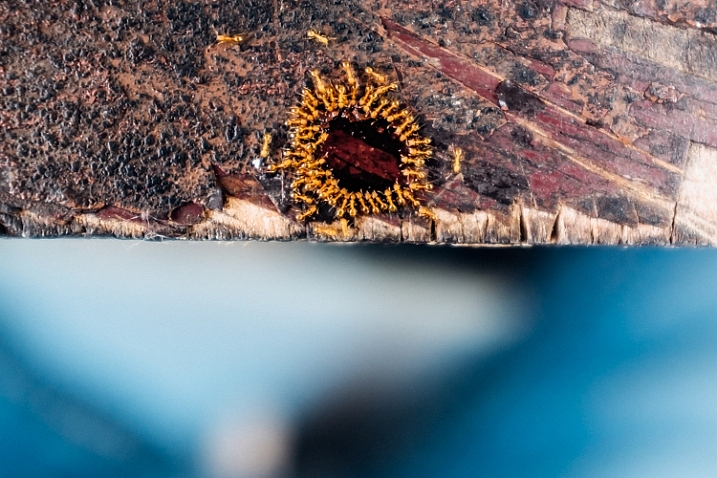
Less obvious are the changes that Fujifilm has made under the hood. The X-Pro2 is weather-sealed and – Fujifilm claims – more able to withstand punishment than its predecessor. This is what happens to an X-Pro2 after it has been aged in a simulated (i.e. sped up) process which appears to have involved rather a lot of sandpaper. Even with paint missing from pretty much all of its edges, the camera remained operational (we’re told). 

CP+ 2016: Fujifilm gets new X-Pro2 and X70 into photographers’ hands

Apologies for the poor quality photograph, but this camera is an early mockup of an ‘X-Pro1 S’, which ultimately became the X-Pro2. Cameras often go through several design changes during the course of their development but it’s unusual to be able to see any of the rejected versions. The X-Pro1 S is a little boxier, and a little more ‘classic’ looking than the eventual X-Pro2.

CP+ 2016: Fujifilm gets new X-Pro2 and X70 into photographers’ hands

And slimmer, too. Although of course it’s impossible to say whether the camera would have stayed quite so skinny by the time it entered production. We’re pretty sure that this prototype doesn’t actually contain any working electronics. 

CP+ 2016: Fujifilm gets new X-Pro2 and X70 into photographers’ hands

Again, sorry about the poor quality of this image, but if you look carefully at this exploded view of the X-Pro2 you’ll see various yellow lines around the body shell on the left of the picture. These are gaskets for weather-sealing. 

CP+ 2016: Fujifilm gets new X-Pro2 and X70 into photographers’ hands

Fujfiilm is really pushing the X-Pro2 at CP+, and has even created a gallery space showcasing images from its newest X-series camera. We must say, these prints (which are mostly around 20 inches in size) look great. 

CP+ 2016: Fujifilm gets new X-Pro2 and X70 into photographers’ hands

Let’s not forget about the X-70 though, Fujifilm’s new APS-C format compact camera. Essentially the X70 takes the imaging components from the X100T, and puts them into a smaller, more compact body. Gone is the X100T’s hybrid viewfinder (an optical one – shown here – can be added if you like) but new is a 28mm equivalent F2.8 lens. 

CP+ 2016: Fujifilm gets new X-Pro2 and X70 into photographers’ hands

The X70’s rear screen can tilt outwards, and up for shooting from low and high angles (and self portraits if you’re so inclined). It’s touch-sensitive, which allows for direct placement of AF point by touch, and quick swiping through images in review mode.

CP+ 2016: Fujifilm gets new X-Pro2 and X70 into photographers’ hands

A major booth at CP+ just wouldn’t be complete without some scantily-clad ladies to take pictures of, and Fujifilm has even created a nice little garden for them to stand in. How kind. 

CP+ 2016: Fujifilm gets new X-Pro2 and X70 into photographers’ hands

Meanwhile, photographers use Fujifilm’s new 100-400mm telezoom to snap overhead portraits of the ladies in their garden. . 

CP+ 2016: Fujifilm gets new X-Pro2 and X70 into photographers’ hands

Fujifilm isn’t focused completely on digital technology of course. The company still makes (and sells a lot of) instant film cameras. Instax had a prominent and very colorful corner of the Fujifilm booth at this year’s show.

CP+ 2016: Fujifilm gets new X-Pro2 and X70 into photographers’ hands

It looks like Rishi has found his favorite color – what’s yours?

Articles: Digital Photography Review (dpreview.com)

 
Comments Off on CP+ 2016: Fujifilm gets new X-Pro2 and X70 into photographers’ hands

Posted in Uncategorized


Newly enthused: hands on with the Canon EOS 80D

18 Feb

Announcing the Canon EOS 80D

Canon has announced the EOS 80D, the successor to very capable EOS 70D that, notably, introduced Dual Pixel autofocus. The 80D brings some marked improvements to Canon’s mid-market, enthusiast line, including a new 45-point AF module and updated Dual Pixel AF.

Body-wise, the 80D remains very similar to the 70D, which means a polycarbonate exterior with water and dust resistance. A few things have changed: the Q and Playback buttons on the back have shrunk, a headphone socket has been added, the remote port has been moved downward, and the stereo microphones have been relocated from the top of the camera (near the hot shoe) to the front, with wider separation (note the four small holes just left of the EOS 80D logo). Furthermore, the 80D now has a mirror vibration control system similar to the 5DS and 7D Mark II.

Dual Pixel AF

Possibly the most noteworthy improvement is that it’s the first time Canon has delivered continuous autofocus (AI Servo) in still live view shooting from a Dual Pixel AF camera, and only the second time Canon offers continuous AF in live view for stills at all. Last time we saw it was in the the Rebel T6s (EOS 760D), which offers continuous AF in both stills and movie mode from its ‘Hybrid CMOS III’ sensor. However, its implementation is far from ideal, with significant hunting from Hybrid AF’s reliance on contrast-detect AF in addition to phase-detect AF. (Only some of the imaging pixels on the T6s are masked for phase detection, rather than having split PDAF-capable pixels across the entire sensor.)

Our brief time with the 80D, on the other hand, left us very impressed. You can select your subject by tapping on it, and then as long as you keep the shutter half-depressed, the camera will quickly track your subject in all three dimensions to keep it in focus – no matter where it moves to within the frame. This means your subject tends to already be in focus when you’re ready to take your shot and depress the shutter button. The camera even continues to focus in continuous drive at 5 fps.

Oddly, the much higher-end Canon EOS-1D X Mark II, skimps on this feature, only offering single AF in Live View. Previous iterations of Dual Pixel AF in the 70D and 7D Mark II also did not offer continuous AF.

Metering sensor

The 80D gains the same 7560 pixel RGB+IR metering sensor that we first saw in the Rebel T6s and T6i (EOS 760D and 750D). It’s essentially a low resolution image sensor: a marked improvement over the 63-zone dual layer sensor in the 70D, promising more accurate metering through scene analysis.

In addition to metering, this sensor is also used to give the camera a degree of human subject awareness. Skin tones can be detected – and then tracked (in continuous AF mode) – to aid the AF system in finding and focusing on a human subject. Our initial, informal testing leads us to believe this isn’t nearly as reliable as ‘proper’ face detection – which the 1DX II, and the 80D itself in Live View, offer.

The camera doesn’t offer Canon’s ‘Intelligent Tracking and Recognition’ (iTR) system, that uses the metering sensor as well as distance information to track subjects around the frame. For reliable continuous AF, you’ll want to stick to a single point and try to manually follow your subject.

The metering sensor brings another important benefit: it monitors the characteristics of the scene illumination, not only trying to interpret an appropriate white balance for the scene but also checking for flickering in the light source. If flicker is detected, the camera can delay its shooting during continuous drive such that it always shoots at the brightest point during the light’s flicker cycle; helping to give more consistent results.

New 45-point AF module

The 80D has received a new autofocus module. It’s a big step up from the EOS 70D, now offering 45 AF points – a considerable upgrade from the 19 AF points on the older model. All of these are cross-type, sensitive to both horizontal and vertical detail, giving all points the ability to focus in challenging, low light and low contrast (including backlit) situations. 27 points remain cross-type even when using a lens/teleconverter combination that has a F8 maximum aperture (ideal for birding and wildlife). Impressive.

The central AF point is rated as working down as far as -3EV in Single AF (One-Shot), which should mean the camera remains usable in extremely dark situations. It’s also a dual cross-type, high precision sensor with F2.8 and faster lenses, which brings enhanced accuracy to focus – particularly important when dealing with the shallow depth-of-field associated with fast primes.

Wi-Fi/NFC/GPS

The EOS 70D already included Wi-Fi but the 80D extends the capability by adding NFC (near-field communication). This simplifies the pairing process for Android devices and also provides compatibility with Canon’s Connect Station storage/viewing unit.

The 80D also gains built-in GPS, which adds the ability to capture location data at the point of capture. This can be hugely useful when it comes to managing your files afterwards, as you have an additional, meaningful data point associated with your images, without the need to manually tag or keyword the files.

Video improvements

The EOS 80D gains some significant upgrades when it comes to movie shooting. The most obvious change is the addition of 1080/60p video (and 50p for PAL shooters). In addition, the camera gains a headphone socket for audio monitoring while recording. Importantly, the mic and headphone sockets are angled for good reason: you can swing the articulating LCD and angle it upward or downward without it running into connected audio components. This allows videographers to make full use of the articulating screen while filming.

Add to this little changes like the movement of the built-in mics to the front of the body, rather than the haunches of the hot shoe, and the 80D shows signs that a lot of thought has been put into video.

Sadly there’s no C-Log gamma option (a very flat tone curve useful for color grading), no focus peaking or zebra warnings and no ‘clean’ HDMI output for external recording, making clear this isn’t intended for video professionals. However, the maximum ISO setting has received a boost and, much like the 1D X II, the combination of touchscreen and Dual Pixel AF should make it easier for non-pros to get good results.

New kit zoom with Nano USM

Alongside the EOS 80D, Canon has announced a new version of its 18-135mm F3.5-5.6 lens. The EF-S 18-135mm F3.5-5.6 IS USM makes use of a new type of focus motor that Canon is branding ‘Nano USM.’ The company declined to give any further detail about the technology behind the actuator but said that it’s able to offer the speed of a ring-type USM motor but is as quiet and smooth as the existing STM (stepper motor) designs.

Canon says the latest version will be 2.5x faster to focus than the existing STM version at the wide-angle end of the range and 4.3x faster at the long end of the zoom. We were very impressed in our own informal tests: the lens is able to ‘snap’ into focus almost instantaneously, even from extreme defocus. The Nano USM design is likely to be used on other lenses in future but can only be applied on lenses with single, light focus elements.

The lens’ stabilization is rated a 4 stops by CIPA standards.

PZ-E1 Power Zoom Adapter

Furthering the video capabilities of the 80D+18-135mm USM combination is the PZ-E1 zoom motor. It’s a clip-on unit that allows the 18-135mm to be zoomed in a controlled manner for video shooting. The PZ-E1 offers two zoom speed modes (high and low), both of which then offer variable zoom speed.

In fast mode the drive can take between 2.4 and 14 seconds to zoom from one extreme of the lens to the other, or 9.5-14 seconds in slow mode. This zoom can be controlled via Wi-Fi app or the desktop-based Smart Utility, as well as the on-body controls.

We really like Canon’s approach in offering the PZ-E1 as a separate unit. It means that stills-only shooters don’t end up having to buy a heavier, more expensive lens for a feature they don’t want but, at a list price of $ 150, videographers don’t have to spend too much to gain smooth zooming.

Canon says other lenses will be made compatible with the drive unit in future.

DM-E1 shotgun mic

Canon has also announced a hot-shoe-mounted shotgun microphone. It’s compatible with pretty much any camera that has a 3.5mm (1/8″) socket. There’s nothing camera or brand-specific about it, but it’s interesting that Canon has decided to start offering video-specific accessories. The DM-E1 will set you back around $ 250.

Summary

Canon’s ‘##D’ series cameras have generally been fairly subtle and progressive evolutions, compared to the previous models (with the exception of the lower-priced 60D, but that appears to have been a temporary blip), and the 80D follows this pattern. Almost every aspect of the latest camera has been upgraded, most of which try to make image-taking faster and more consistent. The AF module has significantly advanced from the 70D, particularly for wildlife photographers that will appreciate expansive F8 focusing. Dual Pixel AF has been upgraded to allow continuous live view AF in still shooting that is competitive with some of the best mirrorless cameras. In fact, face detection and subject tracking are so good in live view that those looking for an easy way to shoot human subjects might even opt to shoot in live view rather than through the viewfinder.

We suspect, though, that the biggest impact might be felt by those users who want to shoot video. The bump-up to offering 1080/60p is useful, either for capturing fast motion or giving a bit of a slow-mo option, but it’s the addition of a headphone socket and the optional power zoom adapter that should make it easier-than-ever to shoot in-camera footage (at the expense of some tools more experienced videographers might expect). And Dual Pixel AF remains one of the most compelling video AF solutions to date.

Combine all this with the advantages of an optical viewfinder and thoughtful ergonomics, and you have a solid addition to the ‘##D’ line.

Articles: Digital Photography Review (dpreview.com)

 
Comments Off on Newly enthused: hands on with the Canon EOS 80D

Posted in Uncategorized


Hands on with Sony’s a6300 and G Master lenses

04 Feb

Hands on with Sony’s a6300 and GM lenses

At a press event in New York City, Sony unveiled a new mirrorless camera and three new lenses – but not just any mirrorless camera, and not just any lenses. The Sony a6300 is the much-anticipated followup to the very successful a6000. And for its full-frame range, Sony introduced a new lens class: G Master. The company has placed the FE 70-200mm F2.8 GM OSS, FE 85mm F1.4 GM and FE 24-70mm F2.8 GM in a category unto themselves, with an emphasis on resolving power and bokeh. We spent some brief moments with all of the new hardware – take a look.

Sony a6300

Front and center of this morning’s announcements is the a6300. Boasting a newly designed 24MP APS-C CMOS sensor, the camera’s most impressive feature is arguably its 425 phase-detect AF points with ‘Advanced 4D Focus.’

The a6300’s 4K video tech is impressive too. The camera reads the equivalent of 6K’s worth of data from its sensor and downsizes it to 4K/UHD – without pixel binning – which promises a big boost in video quality.

Sony a6300

Sony stuck with a familiar design when shaping the a6300, including these top plate mode and command dials, which will look very familiar to a6000 users. 

Sony a6300

It may look like its predecessor on the outside, but the a6300 uses a sturdier magnesium-alloy construction, with weather-sealing.

Sony a6300

The rear panel looks much the same as the a6000 as well, except for the addition of a switch toggling between AEL and AF/MF. The tilting 3″ 921k-dot LCD is still present, and still not a touchscreen, but the viewfinder has been significantly upgraded to a 2.36 million-dot OLED panel.

Sony a6300

A pop-up flash is another welcome carryover from the a6000. With a little pressure, the flash can be tilted backward at a slight angle for a bounce effect.

Sony a6300

The Sony a6300 is expected to ship in March, and will sell for $ 1000 body-only or $ 1150 paired with a 16-50mm F3.5-5.6 power zoom kit lens (not the more expensive 16-70mm F4 seen here).

Sony a6300

Autofocus speed was a strength of the a6000, and the a6300 brings the next evolution of that system with some lofty claims including focus acquisition in as little as 0.05 sec. The a6300 also boasts a minimal blackout period between shots, and can manage to supply a live view feed at up to 8fps – a major breakthrough for mirrorless cameras. 

Sony FE 24-70mm F2.8 GM

The first of Sony’s three ultra premium ‘G Master’ lenses is the FE 24-70mm F2.8 GM. The focus (no pun intended) of the GM lenses is resolution and bokeh, courtesy of high quality glass and a new XA (extreme aspherical) lens element. All three lenses are weather-sealed.

The 24-70 has 18 elements in 13 groups which include the aforementioned XA element, as well as ED and Super ED elements. A Nano AR coating reduces flare and ghosting. The lens also features nine circular aperture blades.

Sony FE 24-70mm F2.8 GM

The minimum focus distance on the 24-70 is 0.38m/15in. with a max magnification of 0.24x. The lens uses 82mm filters. Control-wise the lens has switches for focus mode and zoom lock as well as a stop focus button.

The 24-70mm F2.8 GM will be available in March for $ 2200.

Sony FE 85mm F1.4 GM

Next is the long-awaited fast 85mm prime. This constant F1.4 lens has a whopping 11 circular aperture blades – the most of any Sony lens yet – as well as XD and three ED elements.

The lens’ Super Sonic wave Motor uses a pair of position sensors to ensure accurate focus.

Sony FE 85mm F1.4 GM

As you can see, the 85mm F1.4 GM has a manual aperture dial (with switchable click-stops), AF/MF switch, and focus hold button. 

You’ll be able to pick up this monster of a lens in March for $ 1800.

Sony FE 70-200mm F2.8 GM OSS

The 70-200mm F2.8 steps into Sony’s FE line as the first fast constant aperture tele-zoom, looking the part of a sports shooter’s lens. Sadly, working samples were not available for press to use at the launch event, and its price is still TBD.

Sony FE 70-200mm F2.8 GM OSS

What we do know is that it will have 23 elements in 18 groups, which includes one XD, four ED and two Super ED elements. Like the 85mm lens, the 70-200 has 11 circular aperture blades. It uses two focus motors to optimize speed and accuracy. The front elements have a ring-type SSM while the rear parts use a double linear motor. The minimum focus distance is just 0.96m/38in.

Controls are as you’d expect from a high-end tele-zoom. There are switches for AF/MF, focus distance limit, image stabilization, and IS mode. There are two IS modes: standard (mode 1) and panning (mode 2). The lens also has a zoom lock and buttons for holding focus.

Articles: Digital Photography Review (dpreview.com)

 
Comments Off on Hands on with Sony’s a6300 and G Master lenses

Posted in Uncategorized


Hands on With the Fujifilm X100T

29 Nov

I’m surprised it didn’t happen sooner, but after being bombarded by gushing hype about mirrorless cameras for years, I finally broke down and bought one.

It’s hard for photographers to buy a camera these days. There are so many good options, and it can be difficult to pull the trigger, knowing that some manufacturer’s new model just might be the Holy Grail.

I debated at length as to which direction to go with my next camera. Sony has the nice full frame bodies, Olympus has the petite and swanky OM-D and Panasonic has a couple nice models, but they are geared a little more towards video than I care for.

Eventually, I decided that Fujifilm was going to get my money. At first, the X-T1 started to win me over. The technical specs seemed to tick many boxes: the weather-sealed body is a big plus, along with several high-quality weather-sealed lenses to accompany it, not to mention the classic retro look.

x100t sample image

The X100T’s simplicity is easy to fall in love with.

The problem was that I didn’t really want to add a whole other camera system to my current Nikon kit. I could use my Nikon lenses with an adapter, but that kind of defeats the purpose of going with a smaller system. So after figuring out exactly what I intended to use the camera for – travel, portraits, a little landscape and to accompany my D800 during shoots– I settled on the Fujifilm X100T.

If you’re not familiar with it, the X100T is a rangefinder-style mirrorless camera, with a fixed 35mm lens, APS-C sensor, and a bunch of nice features.

First Impressions

There’s no doubt about it, it’s a sexy looking camera. To tell you the truth, that means very little to me in the end – we all know that a sexy camera does not necessarily equal sexy photos.

x100t sample image

Images straight out of the camera often look great and need little post-processing.

I immediately liked the size of it, and weighing in at only 440 grams (about a pound), there is no excuse to ever leave it at home. However, the feel in the hand is somewhat unrefined. There is the tiniest of nubs to get your right-hand middle finger wrapped around for grip. I bought the camera with a low-profile, more pronounced grip that also protects the bottom of the camera – probably a necessity for many.

It feels solid and of high-quality build. The shutter speed and exposure compensation dials are stiff, which is good, so it isn’t always spinning around when you don’t want it to. I wish I could say the same of the rear thumb dial which feels very plastic-y and has almost no resistance. The on-off switch also has almost no resistance as well, which results in the camera constantly ending up in the On position draining the tiny battery.

Shooting with the X100T

Focus

I popped in a memory card and battery while sitting in a coffee shop, fired up the camera, and took a few shots.

Surprisingly (to me at least) the camera had a hard time finding focus in the not-so-dimly-lit shop. It slowly searched several times before the autofocus locked on. I thought maybe the settings just needed to be tweaked, but after a few months of shooting with it, I’ve found the autofocus to be a bit slow and it needs a ton of contrast to find focus.

Switching on macro mode allows you to get 10 centimeters (about four inches) from your subject, which is pretty good. On the downside, images have a severe lack of sharpness while shooting wide open in macro mode. Facial recognition is hidden in there, and does a great job.

x100t close focus

The X100T’s close-focusing allows you more latitude for creative compositions.

Set to manual focus, the camera offers you the option of a zoomed focus peaking feature, to help you nail sharp images. I find the focus ring to be too unresponsive and it seems to take way more twisting than necessary to adjust the focus – definitely impractical for moving subjects.

Composition

The X100T gives you the option of composing the image through a rear LCD display, straight through the viewfinder, or with the electronic viewfinder (EVF). The rear LCD is stunning and functions really well in low light, showing minimal noise. The EVF features a small inset image, that can be toggled off or on, which shows a magnified portion of the shot for focus confirmation – pretty slick.

Exposure Control

One thing I really love about this camera is the fact that it has both a built-in neutral density (ND) filter, and an electronic shutter that can shoot at 1/32,000th of a second. This gives you the ability to shoot at wide apertures under bright conditions without overexposing the image. The tricky thing is that you can’t use the on-camera flash, or the hotshoe as a trigger, with the camera set to either electronic or electronic+mechanical shutter modes.

x100t neutral density filter

The combination of a built-in neutral density filter and an electronic shutter allow to shoot at wide apertures in bright conditions.

I’m a big fan of the exposure compensation dial front and center, and use it often.

If you are using the X100T in Manual or Aperture Priority mode, you’re going to have to fumble around to get ahold of the aperture ring, which is right up against the body. It has two little nubs which aim to assist, but unless you have dainty little fingers, you are likely to have difficulty here. There is a spot on my wish list for the ability to adjust aperture with the rear dial instead of on the lens.

Noise, contrast, and color saturation/rendition are all fantastic well into the ISO 3,200 range. I mainly shoot with a Nikon D800, which has stellar low light capabilities, and in comparison, the X100T really holds its own; in truth, it’s better than I expected.

x100t low light example

The X100T handles low light situations with ease.

Image Quality

The X100T simply takes beautiful images.

x100t sample image

Images taken with the X100T seem to always have a pleasing look to them.

The way that the camera records the information, and processes it, (and it appears that even the raw files are processed to some extent) yields very pleasing results. There’s a type of dreamy, silky look, to the images that is very subtle but works.

I always shoot in RAW, and will sometimes play around with the camera profiles in Lightroom (although I never use them in-camera). The Provia setting – a nod to Fuji’s infamous color film – works really well for some photos, and even their version of Kodachrome (Classic Chrome) can be attractive.

provia profile sample image

Although I’m usually not a fan of in-camera filters, I have a soft spot for the Provia profile.

Conclusion

I had reservations about buying a fixed lens camera. However, I have found that the simplicity of the Fuji X100T leaves you no choice, but to focus more on composition.

My strongest motive to acquire a camera like this, was to have something that I wouldn’t think twice about bringing with me when I walk out of my house. By no stretch of the imagination is the X100T a replacement for my D800, but it compliments it brilliantly.

PROS

  • Compact and lightweight
  • Above average image quality
  • Impressive list of practical features
  • Great low-light performance
  • Built-in neutral density filter
  • Flash sync speed up to 1/4000th of a second
  • Fantastic results using the built-in flash
  • Built-in WiFi
  • Built-in RAW converter
  • Can charge the battery in the camera

CONS

  • Short battery life
  • Sensitive on/off switch
  • Aperture ring difficult to adjust
  • Some controls are unresponsive when first turning on the camera
  • Video quality is laughably bad
  • No weather sealing

In the end, I have no regrets buying this camera. On one hand I feel that a camera as this price point should have faster and more accurate autofocus, and I hope to see the slow startup issue fixed in a firmware update. On the other hand, I have found the positives far outweigh the negatives, and I am really looking forward to shooting more this great little camera.

Do you have an X100T? How has your experience been with this camera?

Would you consider getting a camera like this? Why or why not?

googletag.cmd.push(function() {
tablet_slots.push( googletag.defineSlot( “/1005424/_dPSv4_tab-all-article-bottom_(300×250)”, [300, 250], “pb-ad-78623” ).addService( googletag.pubads() ) ); } );

googletag.cmd.push(function() {
mobile_slots.push( googletag.defineSlot( “/1005424/_dPSv4_mob-all-article-bottom_(300×250)”, [300, 250], “pb-ad-78158” ).addService( googletag.pubads() ) ); } );

The post Hands on With the Fujifilm X100T by Jeremie Schatz appeared first on Digital Photography School.


Digital Photography School

 
Comments Off on Hands on With the Fujifilm X100T

Posted in Photography


26 Expressive Images of Hands

19 Sep

It is said that the eyes are the windows to the soul, but hands can be very expressive as well.

Let’s take a look at this set of images of different hands and see what they say, what story do they each tell?

Victoria Bjorkman

By Victoria Bjorkman

Khadija Dawn Carryl

By Khadija Dawn Carryl

Peter Lee

By Peter Lee

Alex Berger

By Alex Berger

Bill Gracey

By Bill Gracey

Riccardo Romano

By Riccardo Romano

Jun Aviles

By Jun Aviles

Craig Sunter

By Craig Sunter

Le Vent Le Cri

By le vent le cri

Jonathan Kos-Read

By Jonathan Kos-Read

Marjan Lazarevski

By Marjan Lazarevski

Toni Blay

By Toni Blay

Son Of Groucho

By Son of Groucho

Rob.

By Rob.

Kasia

By Kasia

Victor Bezrukov

By Victor Bezrukov

Chiara Cremaschi

By Chiara Cremaschi

ArTeTeTrA

By ArTeTeTrA

Mark Spearman

By Mark Spearman

Hamed Parham

By Hamed Parham

Serge Klk

By Serge klk

Jason Devaun

By Jason Devaun

Thomas Szynkiewicz

By Thomas Szynkiewicz

Strep72

By Strep72

Toru Watanabe

By Toru Watanabe

Ricardo Machado

By Ricardo Machado

googletag.cmd.push(function() {
tablet_slots.push( googletag.defineSlot( “/1005424/_dPSv4_tab-all-article-bottom_(300×250)”, [300, 250], “pb-ad-78623” ).addService( googletag.pubads() ) ); } );

googletag.cmd.push(function() {
mobile_slots.push( googletag.defineSlot( “/1005424/_dPSv4_mob-all-article-bottom_(300×250)”, [300, 250], “pb-ad-78158” ).addService( googletag.pubads() ) ); } );

The post 26 Expressive Images of Hands by Darlene Hildebrandt appeared first on Digital Photography School.


Digital Photography School

 
Comments Off on 26 Expressive Images of Hands

Posted in Photography


Weekly Photography Challenge – Hands

19 Sep

Hands can be just as expressive as the face sometimes, as these images show.

Weekly Photography Challenge – Hands


Elisabetta Orlacchio

By Elisabetta Orlacchio

This week it’s your turn to photograph hands. Human or otherwise – it’s your choice. Find some expressive ones and use good lighting, and compositional techniques to create some great images.

Bill Gracey

By Bill Gracey

Lucio Zandonati

By lucio zandonati

Johnson D

By Johnson d

Jessie Jacobson

By Jessie Jacobson

Giovanni

By Giovanni

Romanlily

By romanlily

Sharada Prasad CS

By Sharada Prasad CS

Share your images below:

Simply upload your shot into the comment field (look for the little camera icon in the Disqus comments section) and they’ll get embedded for us all to see or if you’d prefer upload them to your favourite photo sharing site and leave the link to them. Show me your best images in this week’s challenge. Sometimes it takes a while for an image to appear so be patient and try not to post the same image twice.

googletag.cmd.push(function() {
tablet_slots.push( googletag.defineSlot( “/1005424/_dPSv4_tab-all-article-bottom_(300×250)”, [300, 250], “pb-ad-78623” ).addService( googletag.pubads() ) ); } );

googletag.cmd.push(function() {
mobile_slots.push( googletag.defineSlot( “/1005424/_dPSv4_mob-all-article-bottom_(300×250)”, [300, 250], “pb-ad-78158” ).addService( googletag.pubads() ) ); } );

The post Weekly Photography Challenge – Hands by Darlene Hildebrandt appeared first on Digital Photography School.


Digital Photography School

 
Comments Off on Weekly Photography Challenge – Hands

Posted in Photography


The big beast: hands on with the Panasonic Lumix DMC-GX8

16 Jul

We got a chance to get our hands on Panasonic’s Lumix DMC-GX8 recently, and have prepared a slideshow running through its features. It’s the first Micro Four Thirds camera to gain a 20MP sensor and it wraps a whole host of cleverness, including a Dual IS system, into its substantial magnesium alloy body. Read more

Articles: Digital Photography Review (dpreview.com)

 
Comments Off on The big beast: hands on with the Panasonic Lumix DMC-GX8

Posted in Uncategorized


Hands Down the Best Gifts For Your Mom

04 May

After a full year of note-taking and IG stalking, we have conclusively determined the best gifts for your photo-loving mom.

Also, we may have called her. Maybe.

Check out our roundup of goodies guaranteed to make her smile … for the camera! Snag yours today and we’ll even gift wrap ‘em for free.

Grab the perfect gift for Mom
(…)
Read the rest of Hands Down the Best Gifts For Your Mom (0 words)


© Erin for Photojojo, 2015. |
Permalink |
No comment |
Add to
del.icio.us

Post tags:


Photojojo

 
Comments Off on Hands Down the Best Gifts For Your Mom

Posted in Equipment


CP+ 2015: Hands on with Sigma’s new 24mm F1.4 DG HSM Art lens

13 Feb

One of the most interesting lenses at CP+ for enthusiast photographers is Sigma’s new 24mm F1.4 DG HSM Art. We made a beeline for the Sigma stand as soon as we arrived on the show floor and got our hands on this intriguing new prime. Click through for some photos and our initial impressions of its build and image quality, based on some initial sample images. 

Articles: Digital Photography Review (dpreview.com)

 
Comments Off on CP+ 2015: Hands on with Sigma’s new 24mm F1.4 DG HSM Art lens

Posted in Uncategorized


Handiwork: How to Pose Hands

29 Jan

“Never neglect the little things. Never skimp on that extra effort, that additional few minutes, that soft word of praise or thanks, that delivery of the very best that you can do. It does not matter what others think, it is of prime importance, however, what you think about you. You can never do your best, which should always be your trademark, if you are cutting corners and shirking responsibilities. You are special. Act it. Never neglect the little things.” – Og Mandino

All images copyright Gina Milicia

Hands main

What to do with your model’s hands is the one thing most photographers and their models get flustered with. Hands can feel like the leftovers of a pose but giving your models relaxed and natural looking hand poses is going to make your portraits look really polished. In fact, skillful hand placement is one of the abilities that separate an experienced photographer from a beginner.

How to pose hands

I can remember, back in my assisting days, we used to hire professional hand models to hold objects for advertising shots. Their hands were truly beautiful with long elegant fingers and perfect soft flawless skin that made everything they held look really expensive.

Sadly, not everyone you photograph will be born with these kinds of hands so here are a few things to keep in mind when photographing hands.

  1. Clean nails are a must. I always ask my models to at the very least have clean nails and clear nail polish for women.
  2. If your model is wearing makeup on their face, remember to add a bit of bronzer to hands, as nothing looks worse than hands that are three shades lighter or darker than rest of body or face.
  3. Watch out for clenched hands, which is a common instinct to help with nerves but it doesn’t photograph well!

Hands 002

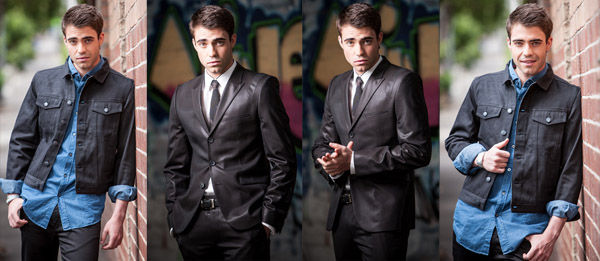
Model Credit: Jonathan Newton. A great hand pose for men is to hold their hands as if they are holding a pen or to ask them to pretend they are twirling a ring on their little finger.

Hands 003

Business Chicks Ceo, Emma Isaacs, Arms crossed in front of a female model looks more elegant but make sure you balance the shot with both hands showing to give the body language a more open feel. Get your model to only lightly touch their arms when they are crossed.

Hands 005

Model Credit: The Cast of Fat Tony/image courtesy Nine Network Australia

Giving your model something to do with their hands helps create a natural looking pose. Putting hands in pockets, doing up buttons or rubbing hands together can all create a natural pose for hands.

Hands hair

Model Credit_ Mimi Elashiry on location, Sacre Coeur , Paris. Playing with strands of hair or running hands through hair. This works for male and female models.

Hands HIPS

Model Credit Shareena Clanton/Foxtel ( left) Piperlane (right). For female models, placing their hands on their hips can create an optical illusion of a smaller waist.

Hands chin

Model Credit Rachael Lever

Hands chin2

Model Credit Shareena Clanton/Foxtel

When asking models to rest their hands on their face or their bodies, ensure they are only lightly touching with their hands so they don’t distort the face or body. Hands look best when they are photographed side-on as it reduces their size.

Hands 004

Hands 007

Model credit: Lester Ellis/Nine Network Australia

This “soccer goalie” pose is a classic “go to” pose for most men when they are not given any direction. This is a sign that they are feeling vulnerable and insecure and, thus protecting their masculinity. There are many alternatives to the soccer goalie pose. Try asking your model to place hands in pockets, hanging them from belt hoops, or pretending to adjust an item of clothing.

Group White

When posing groups, I like to ask each of my models to do something different with their hands because I think it makes the portrait look more dynamic.

What are your techniques for posing natural looking hands? If there is anything I may have missed? I’d love to hear from you.

googletag.cmd.push(function() {
tablet_slots.push( googletag.defineSlot( “/1005424/_dPSv4_tab-all-article-bottom_(300×250)”, [300, 250], “pb-ad-78623” ).addService( googletag.pubads() ) ); } );

googletag.cmd.push(function() {
mobile_slots.push( googletag.defineSlot( “/1005424/_dPSv4_mob-all-article-bottom_(300×250)”, [300, 250], “pb-ad-78158” ).addService( googletag.pubads() ) ); } );

The post Handiwork: How to Pose Hands by Gina Milicia appeared first on Digital Photography School.


Digital Photography School

 
Comments Off on Handiwork: How to Pose Hands

Posted in Photography