RSS
 

Posts Tagged ‘Guide’

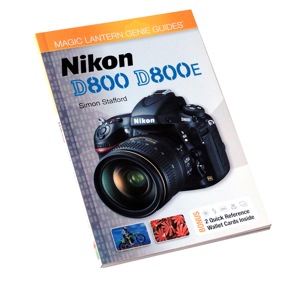
Magic Lantern Guide to Nikon D800/D800E Review

20 Jan

Guide Nikon D800  800ELike many books and movies, if you’ve read the book you’ll want to see the movie.

Similarly, if you own a Nikon D800/D800E you’ll want to read this guide book. Or even more significantly, if you’re thinking about buying one of these cameras, you will definitely want to read this book.

No doubt you’ve already read my review of the remarkable Nikon D800E camera.

Now, about the book ….

Unlike some guide books that I’ve read, this one is all meat and no potatoes, no embellishments, no guff about what a wonderful camera it is, classic lineage etc.

There is however a useful intro to explain the differences between the D800 and D800E models: the only difference being the structure of the filter array covering the image sensor.

Having spent many hours poring over the Nikon manual PDF when reviewing the D800E I wish that I had seen this Magic Lantern guide first!

You get an idea of the book’s helpful approach from the first diagrammatic, explaining the camera controls: clearly laid out, using an image of the camera’s top, sides and rear. Along with explanatory text, the camera pictures and text are close by, so you are not forced (as in the Nikon manual) to thumb through hundreds of pages.

I have rarely found the manufacturer’s original manual to be 100 per cent useful so it’s gratifying to dip into a sample of this book and see how it treats an otherwise mundane function:

‘Mirror up: Locking the reflex mirror into its raised position helps to reduce the vibrations that can often occur, particularly at slow shutter speeds … once the mirror is raised, it is not possible to compose via the viewfinder, and TTL exposure metering and autofocus will not be possible.’

Although the book totals only 128 pages, there is a heap of info within them, although some may find the small six point sans serif type a bit hard to read; it gets even worse when you get to the index at the back of the book where the text shrinks to 5 point type. To be hyper critical, the pictures are also a little on the small side.

But … the info is simply written and leaves no detail unclear. Another extract: ‘Spot metering: This metering pattern is highly specific, as it covers a circle approximately 0.16 inch (4 mm) in diameter.’

For good measure there are helpful paras on peripherals such as memory cards and batteries as well as outlines on the camera’s file formats, JPEG, RAW and TIFF.

An area often skimped in makers’ manuals is the camera’s movie modes; this book answers this criticism by opening the whole subject, clarifying many topics such as shooting stills mid-movie as well as what operational info is displayed in Live View when video recording is under way.

Useful ‘freebies’ are the six quick reference cards tucked into the book’s front and rear covers, carrying concise info on auto focus, setting ISO, flash ranges, sync speeds etc. Slipped into your pocket these would be enormously helpful on a shooting safari where carrying the whole book would be a problem.

Overall, I wish that one brave manufacturer should step out of line and supply a manual such as this with the original camera … and not the pitiful publications normally tucked into the box.

On the other hand, I do feel that the type size in Simon Stafford’s book is far too minuscule. I realise larger type would call for a bigger book or more pages, leading to an increased purchase cost but it would make the book far more accessible and useful.

Details of Magic Lantern Guide to Nikon D800/D800E

Author: S Stafford.
Publisher: Pixiq.
Distributor: Capricorn Link.
Length: 128 pages.
ISBN 978 1 4547 0401 0.
Price: Get a price on Magic Lantern Guide to Nikon D800/D800E

Post originally from: Digital Photography Tips.

Check out our more Photography Tips at Photography Tips for Beginners, Portrait Photography Tips and Wedding Photography Tips.

Magic Lantern Guide to Nikon D800/D800E Review


Digital Photography School

 
Comments Off on Magic Lantern Guide to Nikon D800/D800E Review

Posted in Photography


New Years Flash Guide: 7 Simple Tips for Great Flash Photos

26 Dec

Extra photos for bloggers: 1, 2, 3

New Years means three things: dancing, champagne, and lots of photos to record the blurry memories.

If it weren’t for your trusty flash, those photos would turn out just as blurry!

Have no fear fellow party monsters because we’ve put together a guide to flash photography guaranteed to keep your photos sharp as a tack and shiny as a disco ball.

Check out these 7 simple tips, and by midnight we’ll have you ready to kiss blurry goodbye.

7 Simple Tips for Great Flash Photos

p.s. We’re having our first ever sale today in the shop! Hurry on over before we change our minds 😉

Why it’s Cool:

ingred-smFlash tends to get a bad rap.

Many people associate it with dark shadows and washed out colors.

In a perfect world we could use ambient light all the time, but nobody wants to miss capturing the party just because the light’s gone low.

In this guide we’ll show you how flash can help avoid motion blur, balance for unusual lighting, fill in dark shadows, accentuate movement, and offer tons of creative control.

And what’s awesome is that when done just right flash looks really good!

In fact, most people won’t even be able to tell you’re using it.

Diffuse the Situation – Flash Diffusers

paint-smDirect flash can be over-bright, harsh, and create some nasty shadows.

But, flash diffusers help soften the light from your flash by either shooting it through some transparent material or bouncing it off a reflective surface.

We like the Lightsphere from Gary Fong for even soft light, and The Flash Bender and Diffuser when you want a little more creative control with your lighting.

For this shot, we angled our flash slightly backwards so that light popped forward through the diffuser to shine on our subject and also kicked off the wall behind us to spread our light evenly.

Glitter Bomb – Using flash to Freeze Action

paint-smWhen the ball drops, don’t drop the ball with blurry pics, use your flash to freeze the action!

To take advantage of flash’s action grabbing potential, make sure you set a minimum shutter speed of at least 1/60th of a second.

Because of a fancy rule called the inverse square law (which basically says the power of your flash doesn’t travel very far), you will want to get as close to your subject as possible.

A wide angle lens will help capture your entire scene.

We took this shot at 1/250th of a second, f/4, and ISO 1000, fast enough to keep background light from messing up our freeze.

Also, a super wide 21mm focal length helped keep the camera close and still squeeze it all in.

Ghosts in the Night – Using Slow Sync

paint-smThe slow sync setting leaves your shutter open longer, and lets your camera pick up the ambient light in your surroundings.

This helps keep color natural instead of just picking up the light from your flash which is tinted a little blue.

Slow sync can open a pandora’s box of possibilities, from light painting with sparklers to incorporating background movement into the mix.

Our example was shot using rear curtain sync option.

This means the shutter will open, gathering ambient light and allowing anything moving to blur, and then right before the shutter is about to close the flash will fire, freezing the action.

If we had used first curtain sync instead, the flash would’ve fired as soon as the shutter opened and then stayed open to gather light.

Notice the ghostly light passing through our subjects, and the glowing trails of their movement.

Flash Filterz – Using Colored Gels

paint-smColoring doesn’t have to stop when you outgrow your 24 pack of Crayolas.

Flash filters are super easy to use and can be a fun way to add creativity to your shots.

Using flash filter can also help balance for ambient lighting conditions.

For instance, a yellow flash filter balances for the amber tint of candlelight.

We used a couple filters from The Universal Flash Filter Kit for this shot.

To use these filters, simply snap the included rubber band around your flash head and attach the colored gels.

Cranking up the saturation in your settings will make these guys shine, and for extra creative points try combining flash filters with double exposures.

Bounce House – Bouncing Flash

paint-smBouncing is a technique for diffusing the light from your flash.

Instead of pointing your flash directly at your subject, you tilt your camera’s flash so it bounces off another surface such as the ceiling, which illuminates your subject with the reflected light.

Bouncing flash keeps your subjects from looking like a deer in headlights, and gives you super creative powers.

For this technique, imagine you are playing a giant game of light pinball.

Aim your flash forward, backwards, or to the side, to bounce your ball of light off different surfaces and at different angles, creating unique looks and eliminating harsh shadows.

For this shot, the flash was angled up and just a little forward so that the light bounced off the ceiling just in front our subject and filtered down onto her face.

Off Roading – Using Flash off Camera

paint-smWith this technique, you’ll be taking your flash on safari with an off camera excursion.

You will need an external flash unit for this one. If you don’t already have one, this flash from Sigma can be picked up for a pretty good price and is made for all major camera manufacturers.

Many external flashes can be triggered wirelessly by the pop up flash built into your camera.

To do this, simply set your flash into slave mode, set your camera’s flash as the master commander (Muhahaha), and make sure they are on the same channel.

You can set your camera’s built in flash just to trigger the external flash unit or to fire along with it.

This shot was created with the flash pointed straight at the camera and placed behind the disco ball. When fired, it created shiny sparkles and consequently reminded us of our middle school dances.

Off camera flash can also be used to fill in dark shadows and balance for other light sources that are striking your subject.

I Can See Your Halo – Using Ring Flash

paint-smRound pupils, round face, portraits were just made for circular flash!
Ring flashes attach around your lens and light up like a big glowing halo for glitzy circular catch lights in the eyes.

We used The Ring Flash Adapter for our example, which attaches to the flash you already have saving you some solid buckeroos.

To use the Ring Flash Adapter, you will probably need to turn up the exposure compensation on your flash as it works by bouncing light down a mirrored tube.

We found between +1.3 and +2 stops worked best for a nice bright exposure.

Taking it Further

  • Head outside and try a flash portrait at sunset.
  • Get wet with some water drop photos.
  • Can’t afford a fancy diffuser? Print this bounce card for free!
  • Create a DIY square ring flash.
  • Head over to Joann Fabrics and pick up some cloth backgrounds for a New Years photo shoot. Right now Crushed Panne Velvet is on sale! (FYI, they totes didn’t pay us to say that. It’s just rad.)
  • Related posts:

    1. Alternative Prom Photography — Ideas & Tips for Truly Great Prom Photos Extra photos for bloggers: 1, 2, 3 Prom photo-ops have traditionally come in…
    2. Halloween Photo Tips — Our Ghoulish Guide to Scary Snaps How can you not love a holiday that encourages you…
    3. The Pop-Up Flash Bounce – Perfect Lighting with Your Camera’s Own Flash! Your pop-up flash’s measly spurt of light and shadowy results…


    Photojojo

     
Comments Off on New Years Flash Guide: 7 Simple Tips for Great Flash Photos

Posted in Equipment


Tack Sharp – A Step By Step Guide to Nailing Focus: 40% off Today Only

23 Dec

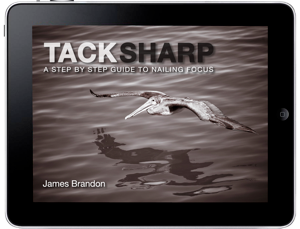
NewImageToday’s deal in our 12 Deals of Christmas features a great eBook from one of our regular dPS writers – James Brandon.

‘Tack Sharp – A Step By Step Guide to Nailing Focus‘ is all about – as the title suggests’ getting consistently sharp images.

There’s nothing worse than getting back to your computer to look at your shots after a day of shooting only to have that sinking feeling when you realise your shots were not quite in focus.

This eBook will identify small things that you can build into your shooting style that’ll eliminate that sinking feeling and help you achieve consistently tack sharp images for years to come.

For today only it is just $ 5.97 (40% off the normal price) if you use the coupon code of CHRISTMAS during the checkout process.

In this eBook you will:

  • Learn the art of consistently nailing focus on your images
  • Discover custom functions that have been hiding right within your cameras menu settings
  • Say goodbye to the frustrations of blurry, unusable images

Tack Sharp was written for anyone who has ever struggled with getting sharp images in different situations. Maybe you recently purchased a fast lens, but can’t figure out why the camera keeps focusing on the wrong part of the subject. Or perhaps you feel as if you’re doing everything right but still come out with slightly soft images. This process can be extremely frustrating and hard to deal with.

Within the pages of this ebook, you’ll discover the tips and tricks used by the pros to take full control over the advanced systems of focus within today’s digital camera systems. Along the way you’ll see actual examples of images where these practices were put in place, often times in situations where focus would have been next to impossible to achieve otherwise. If you struggle with getting consistently sharp images then look no further, this ebook is for you!

Grab your copy today for just $ 5.97 (40% off) when you use the coupon code of CHRISTMAS during the checkout process.

Post originally from: Digital Photography Tips.

Check out our more Photography Tips at Photography Tips for Beginners, Portrait Photography Tips and Wedding Photography Tips.

Tack Sharp – A Step By Step Guide to Nailing Focus: 40% off Today Only


Digital Photography School

 
Comments Off on Tack Sharp – A Step By Step Guide to Nailing Focus: 40% off Today Only

Posted in Photography


Photography Pricing Guide

22 Dec

photographypricingguide.com Photography pricing guideline. How to set profitable prices for photography. Portrait photography pricing. Wedding photography pricing.
Video Rating: 4 / 5


Baking with Cameras, A Guide to Photography in the Kitchen!

14 Dec

Your camera’s just as badass as you are in the kitchen.

With your sleeves rolled up, you can both take on a little batter, and you can both definitely take on some cocoa dusted Belgian chocolate anything.

With this mid-holiday season insanity, there’s nothing that sounds better than taking a little break from it all with your camera in one hand and a spatula in the other (okay, maybe not at the same time).

Here’s a little roundup on tips for shooting in the kitchen, camera gadgets for better photos, and an extra-special section down ‘low on edible photographs and cameras. Yep, you heard us.

Photos and cameras you can eat. Go. read. now. ?

1. Tips for Taking Better Food Photos:

ingred-sm

Your two main perpetrators are 1) not having enough light and 2) having the wrong white balance.

To combat the the low light issue:

  • Shoot with a wide aperture
  • Raise ISO to capture more light
  • If your shutter speed < 1/60, use a tripod or flash.
  • Direct flash is too harsh for food (makes too many shadows & makes food glisten in potentially unappetizing ways), so you might try a flash bounce or a diffuser.

To combat the white balance issue, try these white balance settings:

  • In natural light, go with a daylight setting.
  • If it’s especially cloudy or shady with a blue cast, use a cloudy or shady setting.
  • If you have lamps on inside, set your white balance to Tungsten to offset the orange shade.
  • Or set a custom white balance using a grey card or something like a white balance lens cap.

Onward! Here are a few guides full of really handy tips for shooting in the kitchen and hey, even at the table.

  • Photojojo’s Ten Tastiest Food Photography Tips
  • The Serious Eats Guide to Food Photography
  • How to Start a Food Blog

2. Gadgets for Better Food Photos:

ingred-sm

There might be a couple reasons why you have a camera in the kitchen. Y’know, besides proving to everyone that you look really good in an apron.

It might be to document the process (maybe you have a blog!) or you’re simply a foodie that appreciates what goes into making something that looks as good as it tastes.

These gadgets are not only the extra hand you’ll need if you’re playing with flour, kneading dough, or whisking eggs, but they’ll help you get better shots, too!

  • A camera holder. Something like this Camera Capture Clip lets you wear your DSLR on your belt, keeping your camera safely out of the way.
  • Shutter triggers. The iOShutter lets you set off your DSLR’s shutter via sound, motion triggers & more. Helpful for when your hands are full.
  • A tripod. To prevent motion blur, so your photos are nice and sharp.
  • A phone stand. When you’re not using as a tripod, you can use it as a stand for reading recipes on your phone. Also check out the Tiltpod.
  • A level. Saves you time from having to go back and edit.
  • A mini camera crew. The Swivl is a phone stand that follows your every move via a remote sensor. Shoot vids of yourself or set up a video-chat.
  • A flash bounce or diffuser. Direct flash is too harsh. With the right amount of diffusion, you can take flash photos that don’t even look like they were shot with flash.
  • A grey card or white balance lens cap. Set a custom white balance to measure the temperature of the light that you’re shooting in. It’ll make your shots look more like they were shot in natural lighting.

3. Blogs & Photographers That’ll Inspire You:

ingred-sm

You’ll love these guys if you don’t already.

  • Smitten Kitchen — Simply great photos showing the process
  • Evelina and Carl Kleiner — The photographer & stylist behind Ikea’s cookbook
  • Delicious Days — Thoughtful photos of food
  • The Last Appetite — A global food blog
  • TasteSpotting — An aggregated best of from around the net
  • I Love Fika — Beautiful photos of coffee adventures in Portland and beyond

4. Camera Geek Wares for Your Kitchen:

ingred-sm

Your kitchen’s the one room in your house that’s missing that photo geekery you’re so well-known for! There’s a chance you didn’t know some of this stuff even existed.

A kitchen timer that looks like a lens and camera bag that you can use as a lunch cooler? Totes.

The f/60 Lens Kitchen Timer — A timer that looks like a lens.

Camera Cookie Cutters — For true photo geeks. Rangefinder, TLR & SLR shapes!

Ceramic Lens Mugs — For the classy coffee drinker. Ceramic with fine lens detailing.

Lens Shot Glasses — That bread pudding could do with a little shot of a brandy, and so could you.

The Egg Carton Film Case — This thing is made to keep your 35mm rolls of film fresh in the fridge. Just make sure your roomie doesn’t try to make a scramble with ‘em.

Canon & Nikon Lens Mugs — These come in telephoto and zoom, and that’s all you need to know.

The Camera Cooler Bag — This is a camera bag that can double as a cooler bag!

5. Photos & Cameras You Can Actually Eat!:

ingred-sm

Yes, finally! Here are all the delicious photos and cameras that will happily digest in your tummy.

Gingerbread cameras — Our DIY tutorial for making TLRs and even a Mamiya from cookie dough!

Instagram chocolate — Cocoagraph will turn your phone photos into chocolate.

Photo cupcakes — Printable icing sheets means you can print a photo onto icing and eat your own face.

Camera cookies — Cookies that look like cameras. Glass free!

Photo lollipops — Same idea as the cupcakes. Lick.

Photo credits: 1. Joanna Karenina, 2. The iPhone SLR Mount, 3. Smitten Kitchen

Related posts:

  1. The f/60 Lens Kitchen Timer Extra photos for bloggers: 1, 2, 3 Things disguised as…
  2. The Ten Tastiest Food Photography Tips   Win a ProfessionalPortfolio Website Makeover! Got breathtaking photos, but…
  3. Fun with Food Photography… or, How to Capture Your Culinary Creations on Camera Smoke pellets from special effects supply houses, glycerin-filled spray bottles,…


Photojojo

 
Comments Off on Baking with Cameras, A Guide to Photography in the Kitchen!

Posted in Equipment


Just Posted: Mobile Photography Gift Guide

11 Dec

holidaygiftguide.jpg

Your best camera is the one you have on you, and for many of us that’s a smartphone. We’ve just posted our 2012 Mobile Photography Gift Guide, which covers a range of accessories for the mobile photographer, from inexpensive and fun gifts to more serious, useful products like add-on lenses and supports for phones and tablets. Click through to read the full article at connect.dpreview.com

News: Digital Photography Review (dpreview.com)

 
Comments Off on Just Posted: Mobile Photography Gift Guide

Posted in Uncategorized


Photojojo’s Holiday Gift Guide 2012, Part 3!

10 Dec

It’s twelve drummers drumming time! That’s right, we have come to the end. Welcome to our third and final Holiday Gift Guide of 20Dozen.

We may not have swans a swimming, but we’re pretty sure you’re gonna want to gift your friends our lenses a leaping and our camera bag in a pear tree (minus the tree and the leaps).

OH, and don’t forget, we’ll getcha free priority shipping on orders over $ 50.

USA shipping deadlines: Tues, Dec 18 ~ (FREE) Priority; Tues, Dec 18 ~ UPS Ground
Thurs, Dec 20* ~ UPS 2-Day; Fri, Dec 21* ~ UPS Next Day


Egg Carton Film Case

Bellamy Hunt (aka Japan Camera Hunter) has designed the perfect film roll case for the 35mm enthusiast in your life.

It holds ten rolls of film snug and safe and keeps your film organized for storage and/or travel.

Egg Carton Film Case
$ 20 at the Photojojo Store

 Tweet it!      Share


Clip-On Cell Lenses

These li’l lenses slide on and off of your camera phone (or your phoneography loving friend’s phone or just about any phone on the planet) as quick as can be!

You can choose a polarizing filter, fisheye lens, or six-way kaleidoscope or go ahead and snap up all three.

Clip-On Cell Lenses
$ 20 at the Photojojo Store

 Tweet it!      Share


You Vision Video Glasses

FREE SHIPPING! You vision glasses are back! We’ve got a brand new version of one of our most popular gifts evar.

These snazzy specs have a super secret little HD camera built into the bridge that records full motion video at the push of a button.

HD You Vision Video Glasses
$ 149 at the Photojojo Store

 Tweet it!      Share


The Plaid Camera Satchel


FREE SHIPPING! This dashing bag is great for anyone who loves a day trip (and that’s pretty much everyone, right)?

It lets you lug just enough gear to document your adventures, without wearing out your shoulders. Plus, it’ll match your kilt quite nicely.

The Plaid Camera Satchel
$ 75 at the Photojojo Store

 Tweet it!      Share


Instabook + PostalPix

It’s time to get those photos off of your phone … and put ‘em into this delightfully giftable album.

The Instabook comes with a certificate for 10 PostalPix! Order prints right from your phone and they’ll show up at your doorstep, ready to jump into this book.

Instabook + PostalPix
$ 25 at the Photojojo Store

 Tweet it!      Share


DSLR Wheel of Filters

It’s a fantastic plastic Holga Lens for your DSLR, with 18 filters built right in.

With just a twist of your wrist switch between fun color and prismatic effects. This lens loves your DSLR as much as you do!

DSLR Wheel of Filters
$ 40 at the Photojojo Store

 Tweet it!      Share


Awesome New Goodies in the Shop!

We’ve been filling our shop with giftable goodies all month. In case you missed ‘em…


Add silly accessories to your photos with these neat-o magnets.

Disguise Magnet Set
$ 12 in the shop


Charge your camera phone or tablet with the power of the sun.

Bamboo Solar Charger
$ 35 in the shop


The Lensbaby Spark makes taking tilt-shift photos easy-peasy.

Lensbaby Spark
$ 80 in the shop
FREE Shipping in USA


It’s a lens! It’s a mug! It really makes a super-duper gift!

Get Into Focus Lens Mug
$ 15 in the shop


Keep your iPhone at the ready for every photo opportunity.

iPhone Wrist Strap
$ 35 in the shop


Toy meets camera. Take this lo-fi wonder anywhere for guaranteed fun.

Nanoblock Camera
$ 70 in the shop
FREE Shipping in USA

Related posts:

  1. Photojojo’s Holiday Gift Guide 2012, Part 2! It’s the most wonderful time of the year! Some would…
  2. Photojojo’s Holiday Gift Guide 2012, Part 1! When the turkey is roasted and thanks is given, take…
  3. Photojojo’s 2011 Holiday Gift Guide, Part 2! Remember that sleep deprived, sugar high, OMG-it’s-almost-the-Holidays excitement that you…


Photojojo

 
Comments Off on Photojojo’s Holiday Gift Guide 2012, Part 3!

Posted in Equipment


Photojojo’s Holiday Gift Guide 2012, Part 2!

03 Dec

It’s the most wonderful time of the year! Some would even say, it’s the hap-happiest season of all.

So, we’re packing our shop to the brim with photo goodies that are perfect for gifting, and we’re absolutely hap-happy to present them to you in Photojojo’s Gift Guide number two.

Don’t forget, free priority shipping on orders over $ 50!


Get Into Focus Lens Mug

Cozy up with a lens of coffee (or tea or nog).

The Get Into Focus Lens Mug is made of dishwasher safe ceramic and features fun lens details like an AF-switch and focus rings.

Get Into Focus Lens Mug
$ 15 at the Photojojo Store

 Tweet it!      Share


Photojojo Tree Bling

Deck the halls with blown glass camera ornaments! Each one has been carefully crafted and hand-painted in Poland.

Isn’t it about time your tree showed its photo-love, with an instant camera or SLR of its very own?

Photojojo Tree Bling
$ 25 each at the Photojojo Store

 Tweet it!      Share


The iPhone Cable Trigger

Perfect for the phoneography enthusiast, who still has a soft spot for film.

It’s a cable shutter release for iPhones that has an addictively clickable button. No more jabbing at that on-screen “button!”

The iPhone Cable Trigger
$ 23 at the Photojojo Store

 Tweet it!      Share


The iPhone Wrist Strap

Keep your favorite camera-phone safe and stylish at the same time.

This vegetable-dyed leather wrist strap teams up with a sleek, easy to attach metal bracket to protect your iPhone from the cruel combo of gravity + ground.

The iPhone Wrist Strap
$ 35 at the Photojojo Store

 Tweet it!      Share


Nanoblock Camera

FREE SHIPPING! The building blocks of photography are light, focus, composition and Nanoblocks!

This digital toy camera is pocket-sized, customizable, and takes vibrant lo-fi photos. Super for anyone who enjoys fun.

Nanoblock Camera
$ 70 at the Photojojo Store

 Tweet it!      Share


Got an iPhonographer on your gift list?
These iPhone 5 compatible gifts are perfect for pals who love photoing with their phone.


This telephoto lens will get you 12x closer zoom on your phone!

iPhone Telephoto Lens
$ 35 in the shop


A lazer engraved case that looks just like a vintage camera.

Wood Camera iPhone Case
$ 42 in the shop


Turn your iPhone into a hand-held video rig for making movie magic.

The iPhone Video Rig
$ 130 in the shop
FREE Shipping in USA


This little lens bag hangs out with your phone to hold your littlest accessories.

The Cell Lens Pouch
$ 15 in the shop


Pro-quality glass lenses that work on any phone (even non-iPhones, too).

Photojojo Cell Lens Series
from $ 20 in the shop


A nine-in-one lens set with colorful, playful effects for your iPhone pics.

The Holga iPhone Lens
$ 30 in the shop

Related posts:

  1. Photojojo’s Holiday Gift Guide 2012, Part 1! When the turkey is roasted and thanks is given, take…
  2. Photojojo’s Holiday Gift Guide 2011, Part 1! You calmly plug your ears at the first hint of…
  3. Photojojo’s 2011 Holiday Gift Guide — Part 3! Soon you’ll be launched into a food-nomming, photo-snapping, gift-searching frenzy….


Photojojo

 
Comments Off on Photojojo’s Holiday Gift Guide 2012, Part 2!

Posted in Equipment


2012 Holiday Gift Guide

01 Dec

hgg2012.jpeg

It’s holiday season, which means it’s time to start buying presents for friends and loved ones. Photography is an expensive hobby, and finding the right gift for the photographer in your life can be tough, but not everything costs thousands of dollars. In this quick guide we’ve tried to provide some inspiration by rounding up 14 potential gifts that we’d be pleased to find under our trees (virtual or actual) on Christmas morning. We hope you enjoy it!

News: Digital Photography Review (dpreview.com)

 
Comments Off on 2012 Holiday Gift Guide

Posted in Uncategorized


The Killer Clamshell – A Two Light Setup Guide

29 Nov

Awesome Two Light Clamshell Setup – A Real Beauty

Introduction

If your just getting started in off camera flash and studio photography then single light setups are a fantastic, uncomplicated way of getting to grips with lighting techniques.  Despite the wide range of effects that can be achieved with a one light setup, working with multiple lights provides even greater range of creative options and my favourite multi light setup has to be the clamshell.  This lighting setup can be used to produce a soft wrapping quality of light; a perfectly white background and stunning catch lights resulting in a classic beauty look ideal for photographing female models.  Best of all its incredibly easy, so hopefully with the following guide you can also have a go at this great lighting setup.

Setup & Equipment

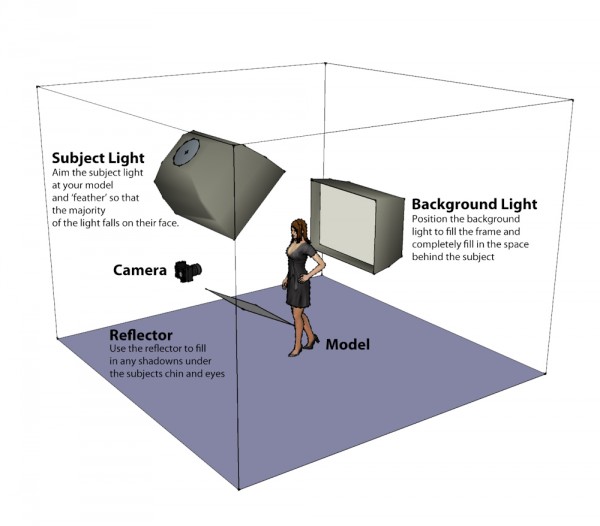
The basic idea behind this setup is to use a single large light source both as a backdrop and to provide wrap around light.  The subject is then illuminated from above using a second light with any remaining shadows filled in using a flat reflector.

For this setup you will need two light sources; ideally strobe heads although speedlights are also fine but might take slightly longer to recycle given the higher power required.  To achieve the soft quality of light both lights should be shot through large soft boxes, although if you don’t have these then you could us a large sheet as a background and something like an umbrella for the main light.

The basic setup is as follows; the key point to remember is to ensure the backlight completely fills the background.

Lighting Diagram – A Simple Two Light Setup

Metering

Metering for this shot is actually fairly simple and whilst a light meter can be helpful in speeding things up its easy enough to set the exposure for this shot by eye.  The main steps are as follows:

  • Start by leaving your flashes off and start with your camera settings.  Set a small aperture, (something like f8 or f11), a fast shutter speed (around 1/200 to 1/250) and set your ISO to its lowest setting.
  • Turn your back light on and starting with a low power take a test shot and check the image preview on your camera to see how ‘white’ the background is, a properly exposed background should be solid bright white.  A good way to check is to take a look at the image histogram, most of the reading should be to the very right hand edge of the graph indicating that the tones in the image are tending towards solid white.  If the background isn’t exposed properly increase the flash power and repeat.
  • Now its time to get your model in position and check the amount of wrap around light from the background.  Place your model in front of the back light and take another test shot.  Vary the distance between the subject and backlight to change the amount of light wrapping around your subjects head and shoulders.  The purpose of the wrap is to provide some separation and help add definition, so all you need to do is highlight the edges of your model.
  • Now turn your subject light on and take a test shot.  Check the overall exposure and vary the power/position of the light until your models face is correctly exposed.
  • Finally position a reflector below your subjects jawline and use this to bounce fill light into any dark areas of the shot in particular under your models chin, nose and eyes.

Summary

Hopefully the steps above are simple enough to convince you to give this lighting setup a try.   Not only is this a great way to try working with multiple lights but it also results in a really satisfying and flattering image and of course double the lights means double the creativity!

Post originally from: Digital Photography Tips.

Check out our more Photography Tips at Photography Tips for Beginners, Portrait Photography Tips and Wedding Photography Tips.

The Killer Clamshell – A Two Light Setup Guide


Digital Photography School

 
Comments Off on The Killer Clamshell – A Two Light Setup Guide

Posted in Photography