Google is working on an image identification technology at its Research Labs in Mountain View, California. The latest complex algorithm from the search engine giant is able to systematically ‘produce captions to accurately describe images the first time it sees them’, creating coherent sentences rather than individual tags. Read more
Tag: Google
-
Google launches Nexus 6 with 13MP and OIS
Google has launched the Nexus 6, its latest showcase phone that comes with a brand new version of Android, 5.0 ‘Lollipop’, and an interesting-looking camera specification. The device comes with the same dual-LED ring flash as the Moto X and a 13MP imaging sensor. However, it adds a slightly faster F2.0 aperture and an optical image stabilization system into the mix. Read more
-
Project Wing: Google Testing Drone Delivery Service
[ By Steph in Gadgets & Geekery & Technology. ]

Google sees Amazon’s Prime Air drone delivery service and raises it with the enhanced aesthetics of its own Project Wing, a series of autonomous aerial vehicles currently being tested. In development for the past two years and a secret until this week, Project Wing was initially conceived as a way to deliver emergency aid like defibrillator kits to people in remote places or disaster areas.

Now that the prototype vehicles have been tested (in Australia, which is far more lax about the use of drones than the United States,) it seems that they could be used to deliver goods to customers in a similar way to Amazon Prime Air, as well.
“As part of our research, we built a vehicle and traveled to Queensland, Australia for some test flights,” says Google of the project. “There, we successfully delivered a first aid kit, candy bars, dog treats, and water to a couple of Australian farmers.”
Developed by the company’s research arm, Google X, the Project Wing drones have a wingspan of about 4.9 feet and a total weight capacity of 22 pounds, the bulk of which is taken up by the drone itself at 18.7 pounds. It doesn’t need a runway to take off or land, and can hold its position hovering in one spot.
Looking like tiny blunt airplanes, the drones are at least a visual improvement over Amazon’s design, which was mocked for resembling a flying barbecue grill.
Want More? Click for Great Related Content on WebUrbanist:

World’s Largest LEGO Model: Star Wars X-Wing Starfighter
The largest LEGO model ever built is a life-size Star Wars X-Wing Starfighter made of over 5 million bricks and weighing 45,000 pounds.
Click Here to Read More »»

Drones for Life: 13 Fun & Positive Flying Robot Functions
Instead of raining death and destruction, these 13 drones deliver defibrillators and piping hot pizza, save drowning victims, mix the perfect cocktails, clean …
Click Here to Read More »»
If You Believe, They Put Google Maps on the Moon. Mars?
Google has conquered Earth and apparently looking for new frontiers – too bad they haven’t develop Google Moon very much since releasing it.
Click Here to Read More »»


[ By Steph in Gadgets & Geekery & Technology. ]
[ WebUrbanist | Archives | Galleries | Privacy | TOS ]
-
Pics.io, a browser-based Raw editor built on Google Drive, goes live with public beta
Ukrainian start-up Pics.io is hoping to change your photography post-processing workflow with its new browser-based Raw editing and organization service. Using WebGL technology to harness the power of your computer’s graphics card, Pics.io is able to offer Raw image editing and management for Canon, Nikon, Sony and Olympus Raw files right in your web browser. Read more
-
Google Photo Sphere now available for iOS
Google’s Photo Sphere feature for capturing 360° spheric panoramas was launched in 2012 with the camera app in Android 4.2. Since then it has only been available for devices running Google’s mobile OS – until now. The Photo Sphere team at Google has just launched a version for Apple’s iOS devices, dramatically increasing the potential user base of its app. Read more
-
10 Things Google Should Consider in Launching a Standalone Photo Sharing Service
Google used to have a standalone photo sharing service. It was called Picasa. I never really liked it. It wasn’t a very social site. I thought Flickr was a lot better.
Today’s news out of Bloomberg is that Google is looking to spin off Google Photos from Google+. Maybe it’s true, maybe it’s not. You never know. The timing of Friday afternoon stories and leaks always makes you wonder. Usually when companies want to push something they release it more like Tuesday mornings or make a big deal about it at I/O or something.
Whatever the case, photos has been one of the highlight use cases for G+. Many photographers have flocked to the site and I think it’s done a pretty good job with photos overall.
*If* Google is going to launch a standalone photo service though, they should really go all out. I worry that they’ll launch something less than fully baked — it will generate a bit of initial excitement and then lack stickiness.
With that in mind, here are 10 suggestions that I’d give Google in launching a standalone photo sharing service.
1. Flickr has raised the bar by giving everyone a full terabyte of high res photos. Flickr made one big mistake with this offering though. *Private* high res photos are of very little value to a photo social network. Public photos are *very* valuable to a photo social network. Public photos are worth more to a social network than the cost to store the photos. Flickr just gave everyone a terabyte without distinguishing the visibility of the photos. Google should offer at the launch either unlimited or 2TB of high res public photo storage with every account. This will get great press and attention.
Go big or go home I say. Nobody can maintain cheaper enterprise storage than Google, and it’s only going to get cheaper in the future. Don’t be blinded by the open-ended liability of high storage limits. Public photos on the web are only going to get more valuable in the future and storage is only going to get cheaper.
2. Partner with photographers to sell their photos. Flickr just leaked something like this earlier this week. Partnering with photographers to sell photos is not just about stock photos as revenue (although the stock photography market is in fact a multi-billion dollar market ripe for disruption). This is about attracting the sorts of high quality photographers to your network because they will be *paid* for participating through photo sales. By providing photographers an avenue to sell their stuff and make real money, you endear them to your network. Tie the visibility of their work, in part, to their level of activity on the network — not directly, but just float that out there so that photographers feel like the more active they are on the network, the more $ $ $ they may make.
3. Create a super light weight mobile client like Instagram. Make it so simple. Tap/tap to +1, like, fave, whatever. Really dumb it down. Just something to follow your friends’ stuff and favorite it without all the other clutter of G+/Facebook getting in the way.
4. Build an intelligent way to organize albums by keywords. Manual album management sucks big time. Let me build albums by keywords (this will also encourage more keywording which is valuable organizational metadata for Google to have). Study what Jeremy Brooks has done with SuprSetr and build something like that but even more intuitive and easy to understand and use.
5. Build intelligent groups for photographers to hang out in on the photo network. Unfortunately Google got one thing very wrong with communities in G+, which is why communities never took off. They refused to bump threads based on new comments. This ensures that all threads die quickly. It’s the longevity of conversations that fuel community interaction. Refusing to bump threads based on comments makes large groups completely chaotic and unusable. Why invest in a conversation that will be completely buried and dead in 24 hours and that I’ll never be able to find again? Let me mark conversations as favorites and feed all my favorite conversations to me in a feed ordered by recent comments/activity.
6. Go mosaic big time. On the web, give users a huge wall of photos with infinite scroll to just scroll through and +1. Code the site so that if you are hovering over any photo and press the “f” key it +1s it. Lubricate social activity on the web. Social activity begets social activity. The more you make it easy for people to like/fave/+1 stuff and the faster you make it, the more you get. The more people get, the better they feel about the network.
7. Spend some serious money the first year on community management / evangelism. Hire a whole bunch of photo community managers and partner with influencers all over the world. Require community managers to host at least 2 photowalks a month in their geographic region. Require them to spend 10 hours a week inside of social groups interacting with photographers on the new site. Bombard your users with interaction from Google Community Managers. Make sure Googlers are using the site to share their photos, especially visible senior management. Keep track of how many +1s, comments and other interactions Googlers have with photos on the network and make sure Googlers know that this matters.
8. Open some fine art physical galleries. These can be used to host meetups and gallery shows for G+ photographers. You can also sell physical prints and DVDs of photo series from these galleries. Social photographers love doing shows with their work. Digital displays make doing temporal shows easier than ever. The ego boost a photographer gets when they are showing their work in a group show is substantial. Capitalize on this to draw the finest photographers in the world to your network.
9. The Nik Software stuff from Google is really good. Snapseed is the best mobile photo editing software out there. Analog Efex Pro 2 really is some of the best photo processing software I’ve used in years. Google could create something as good as Lightroom, maybe even better. Build this into the site for processing but also give people the ability to download the software to their computers for when they don’t want to work in the cloud and want to work locally. Sell this software for $ 99 with a six week free trial. Users who upload at least 5 photos on different days to the new photo network for six weeks should be given a promotion code to get the software for free.
10. Prioritize Google Photos photographs in Google Image Search. Create a button that photo buyers can click in Google Image Search to show photos available for licensing. Leverage the power of Google Image Search to both drive traffic back to photos in the social network and sales through the social network.
That’s all for now.
-
Google Street Art: View Over 5,000 Past & Present Pictures
[ By WebUrbanist in Gaming & Computing & Technology. ]

Using panoramic Street View technologies, Google is assembling an awesome collection of high-resolution images capturing over 100 works in 5,000 interactive photographs to date, including many famous pieces from all over the globe (include now-destroyed paintings and tags).
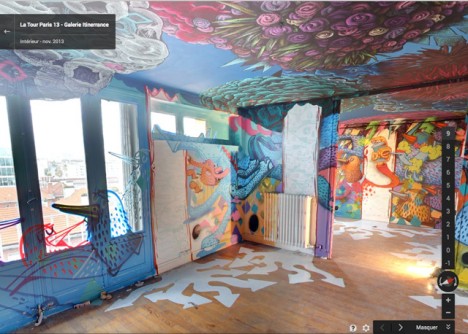
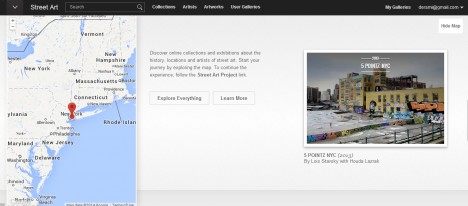
Street artwork is often ephemeral, sometimes disappearing within a day of its creation, making this endeavor an ambitious attempt to document an art form frequently subject to being painted over by unhappy building owners or paid city workers. Art captured and presented here ranges from whole-wall exterior murals to floor-to-ceiling interior works, complete with online critiques, commentary and supplemental imagery.


The 5Pointz murals, for instance, were lost despite community protests, first painted over (presumably to lesson the blow of what was to come next) before the building they were on was destroyed entirely.
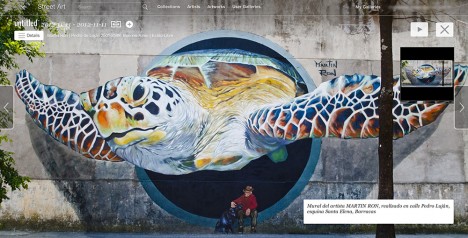
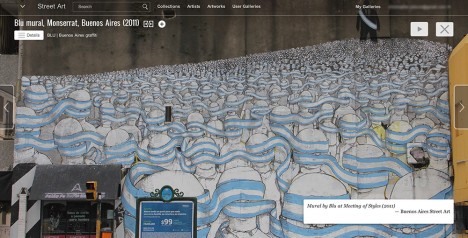
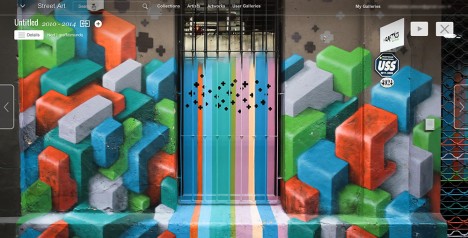
All of this is part of a larger endeavor, the Google Cultural Institute, which provides access to famous art and architectural interiors from around the world. The street artwork subsection lets you sort by artist or artwork, collection or location.
Want More? Click for Great Related Content on WebUrbanist:

10 Urban Snaphots: Google Street View Pictures Freeze Time
The now-infamous Google Street View van has captured embarrassing moments, created accidental celebrities and documented interesting urban changes over time.
Click Here to Read More »»
5 Google Street View Images: Errors, Glitches & Mistakes
With so much focus on Google Street View privacy issues, many people have missed a whole subset of non-controversial but much more strange Street View images.
Click Here to Read More »»

Google Street View: Accidental Art or Invasion of Privacy?
Already someone is asking Google to take down an image of her house cat – if Google complies, what could it mean but the end of this tool?
Click Here to Read More »»
[ By WebUrbanist in Gaming & Computing & Technology. ]
[ WebUrbanist | Archives | Galleries | Privacy | TOS ]
-
Decaying Detroit: Google Street View Shows Transformations
[ By Steph in Abandoned Places & Architecture. ]

The architectural equivalent of ‘Faces of Meth,’ these compiled Google Street View images of Detroit from 2009 through 2013 paint a poignant portrait of decay in the city. Entitled ‘GooBing Detroit,‘ a tumblr blog uses Google Street View Time Machine to follow the fast transformation of houses from cute and cheerful suburban residences to overgrown vacant lots.
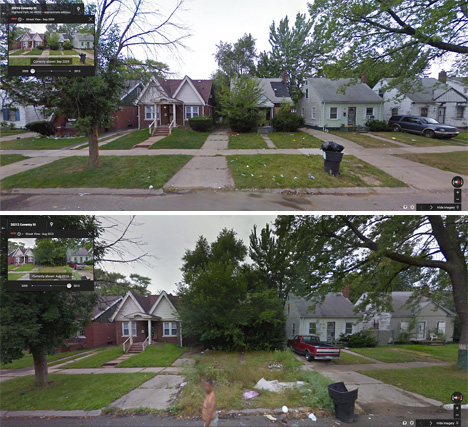

Much has been said about the decline of a once-great city, and the seemingly diminishing chances of a comeback. The city’s 78,000+ ‘feral houses‘ are the stuff of legend, seeming to revert back to a wild state the way domesticated animals tend to do when left to their own devices.

The Street View images are often astonishing in the rapid transition in a span of just a few short years. A stretch of houses may have cars parked in the driveways, toys on the lawn and other signs of life all around in the first image, while by the third or fourth they’re barely discernible among the overgrowth.


While these images really drive home how much Detroit has lost over the last three decades, many residents aren’t ready to give up hope, despite the fact that the city’s population has declined from a peak of 1.8 million to just 700,000. There are indeed areas of the city that still thrive, but the question of an overall plan (either to break the city into manageable pieces or reinvigorate it as a whole) remains an open one.
Want More? Click for Great Related Content on WebUrbanist:
Google Street View: Accidental Art or Invasion of Privacy?
Already someone is asking Google to take down an image of her house cat – if Google complies, what could it mean but the end of this tool?
Click Here to Read More »»
5 Google Street View Images: Errors, Glitches & Mistakes
With so much focus on Google Street View privacy issues, many people have missed a whole subset of non-controversial but much more strange Street View images.
Click Here to Read More »»
10 Urban Snaphots: Google Street View Pictures Freeze Time
The now-infamous Google Street View van has captured embarrassing moments, created accidental celebrities and documented interesting urban changes over time.
Click Here to Read More »»
[ By Steph in Abandoned Places & Architecture. ]
[ WebUrbanist | Archives | Galleries | Privacy | TOS ]
-
Google Camera update brings back self-timer and 16:9 crop

Google again updates its Camera App, this time with self-timer, 16:9 aspect ratio and two more panorama modes. This addresses a point of criticism raised by users when an update in April removed the self-timer function. Other features that come with the new version of the app include wide angle and fisheye panorama options that are based on the Photo Sphere technology.
-
Find the Perfect Photography Location Using Google Maps
No matter if you’re planning your next photo road trip or you’re scouring the city streets looking for the perfect viewpoint, Google Maps and Google Earth are the most valuable tools to add to your arsenal for finding the perfect photography location.
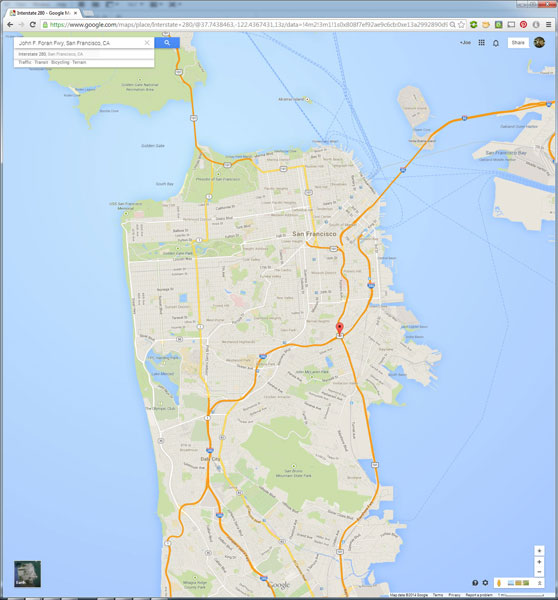
I usually travel for work, or with family, so I don’t have the luxury of as much time as I might want to search for the perfect vantage point in person. Nor to scout an area to compare locations that I want to dedicate to the one sunset that I’ll have time to shoot. Google Maps to the rescue!
While planning a trip from home, you have much more time to explore the area in a virtual capacity instead of being out there with boots on the ground. Nothing can compare with actually being there, but the tools available to you are getting better every day and the ability to nearly frame your shot is a realistic time saver. Time to turn the volume on your pre-visualization up to 11.
If I’m planning a trip or have an idea for a shot, I’ll start with Google Maps and zero in on the area that I want to shoot. You probably already do this, too, but let’s just take it a step further. Click the icon in the lower left corner labeled “Earth” to start the Google Earth browser plugin. This has replaced the satellite or aerial view for much of the world’s map, but instead of only offering a flat, two dimensional view of the map directly overhead, you can now tilt the map and see an approximation of topography, texture, and elevation.
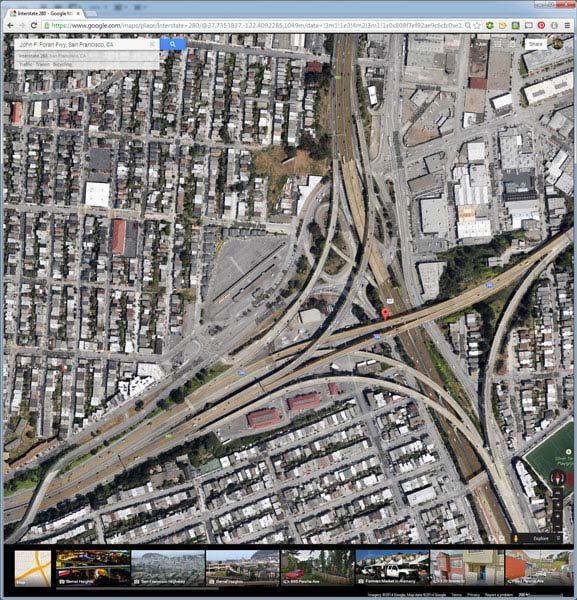
Normal mouse controls on the map let you pan in all directions, and zoom in or out with the mouse wheel. In order to adjust to a view that will help you get a better idea of the terrain, hold down the shift key, click and drag upward. That will rotate your point of view (POV) so that you now have an aerial view looking toward the horizon instead of straight down. Dragging left or right while holding shift will rotate your point of view instead of panning.
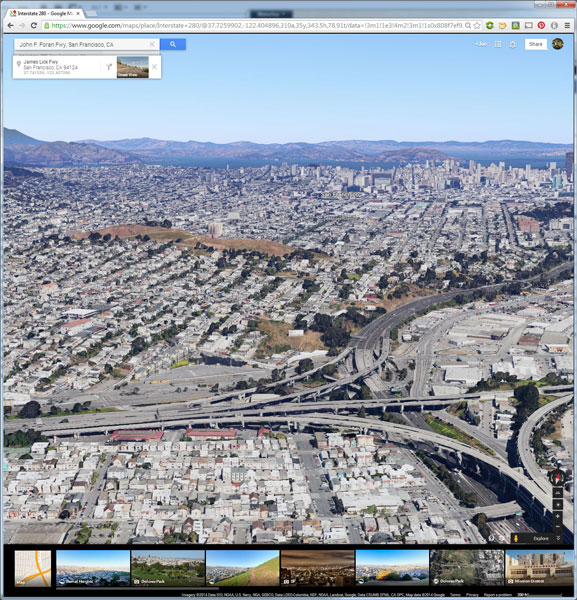
But, you don’t have to be tied down to your desk to do this. Just two weeks ago, I was out with a friend exploring San Francisco and searching for a specific vantage point of the 101/280 freeway interchange. We knew the general area that we wanted to shoot from, but with so many streets winding around, using Google Earth on my mobile phone helped to eliminate some of the trial and error of driving around without a clue how to find what we wanted.
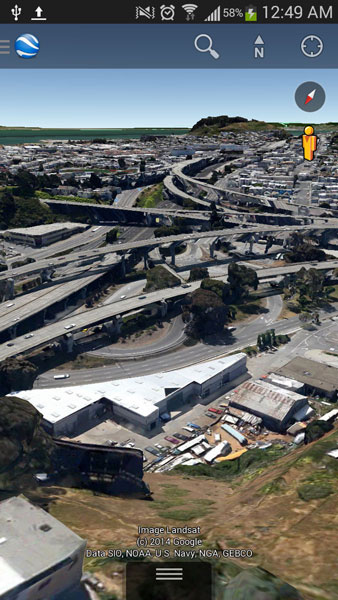
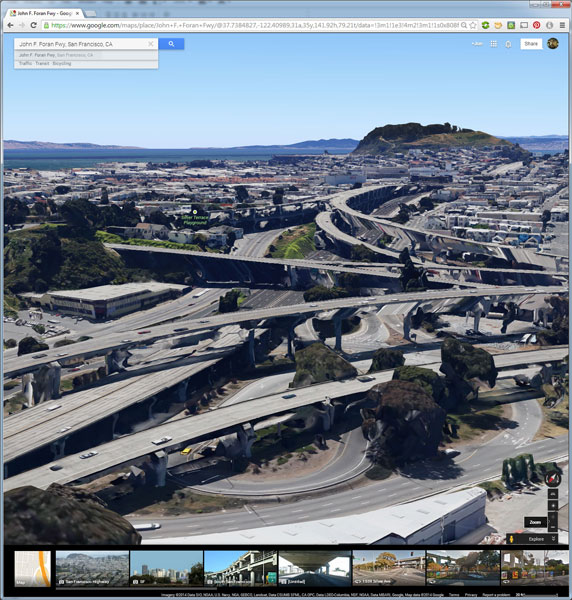
Desktop interface Google Earth view looking south
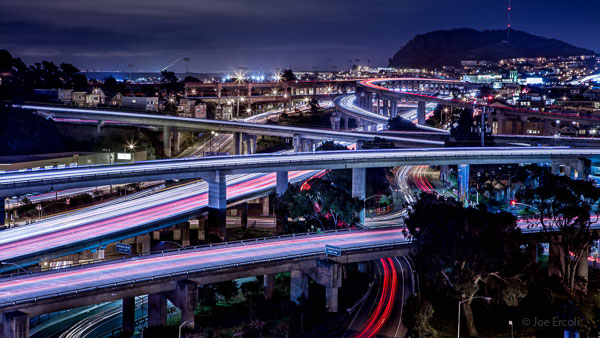
Finished image from location scouted using Google Maps/Earth
The example images from this article show the area that we shot in, including a screenshot taken from the mobile interface, and the completed image. Of course the view that you can get from the map interface is never as good as what you’ll see in person, but it’s an excellent way to help you hit the ground running when you get on-site with your camera in hand.
NOTE: The camera is facing South in the final composition, not North as in the initial Google Earth Point of View.
Have you used Google Maps to find any cool locations? What other tips or tricks have you tried? Please share in the comments below.
The post Find the Perfect Photography Location Using Google Maps by Joe Ercoli appeared first on Digital Photography School.