A Guest Post by Alex Morrison
So, you’re thinking about unleashing your inner artist? Good for you! Old school photography can seem a bit limiting sometimes, with all those pesky rules – the rule of thirds, the rules of thumb, sunny 16 rule. Who needs rules! Your creative after all and we creatives are born to break the rules!
Fine art photography is one of those photographic genres that defies rules, bends and breaks them and in the process of doing so the photographer creates art. A bad out of focus image of a flower could become your masterpiece; a mediocre landscape can hang in a gallery! With a little know how, and a creative eye, fine art images are pretty easy to create.
In this article we’ll discover what fine art photographs are, how to develop your own artistic style, and a simple way to process your photos into art images.
But Is It Art?
So what’s the difference exactly, between a fine art image and any other kind of photography? Well, this is where a clear definition gets a little murky.
Here are some general parameters, so we can talk about fine art photography from a common perspective (excuse the pun). Art photography is printed, and hung. (Hopefully in a prominent place!). It can be used in decor, in homes and offices; or “art for art sake” in galleries and exhibitions. Fine art photos are usually presented and sold as limited editions.
Here’s a pretty clear definition I really like, from the Professional Photographers of Canada that covers most of the generally accepted requirements of a fine art image:
Fine art images may consist of unusual images, individual images or a series of images. The range of styles and treatments varies greatly, from the classic black and white scenes to more non-conventional images. In fact, conventional beauty, formal design and familiar subjects are often not components of fine art images and can include painterly effects, soft-focus, journalistic, snapshot type images, bizarre and erotic images and other unconventional approaches.
Fine art images are usually sold to individual collectors, museums and business clients. Photo Decor is usually the term used to designate a print hung to decorate a room, whether in a private home, an institution, a corporate boardroom, a gallery, etc.
All right, now that we know what we are talking about let’s find out about how to create these wondrous and unconventional images. For this discussion we’ll be devoting our exploration to painterly styles and effects – the coolest and easiest techniques to learn! Other fine art photography techniques will be discussed in future articles. So hang tough if your favourite style isn’t included here yet  And if you don’t like photographs that look like paintings don’t despair – this is only one way of so many ways you can create fine art photographs.
Finding Your Artistic Style
First, let’s look at classic fine art. I know this seems counter intuitive – how can we break the rules if we’re studying classics – didn’t they define the rules?! Well, yes, but…these historical styles and techniques give us powerful insight into the range of artistic expression that you can build on when considering painterly looks.
 Since I’m a big fan of Sir Isaac Newton’s “..on the shoulders of giants…1″ school of greatness, I believe you achieve success in anything by building on and learning from the achievements of others.
A great place to begin absorbing a fine art point of view is with the old classic paintings, from Goya to the Post-Impressionists, and all schools in between!
I adore works by Claude Monet, and much of my art photography style is of his influence (his picture to the right).
Not to be confused with Claude is Édouard Manet, whose use of colour in his still lifes also moves me deeply.
The great thing is you don’t even have to “study” these works, just look at them and notice the colours, the brush strokes, the compositions, the subject matter.
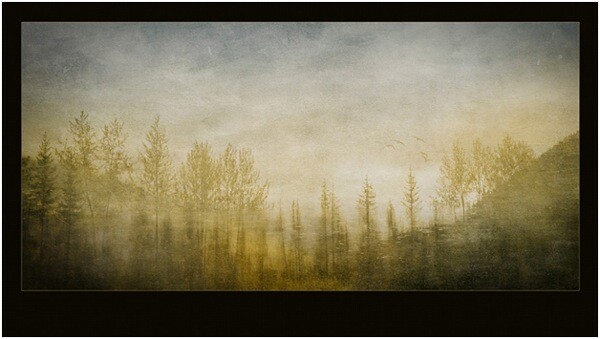
Are you inspired yet? Ok, here’s another artist for you to investigate, in case you want more examples than just flowers in vases! Look for works JMW Turner an 18th century water colour artist who changed landscape art forever.
He inspired this image of a reflection in a lake.
The Subject of Your Desires
If your aim is to sell your fine art images as decor, be sure that your subject matter is something most people would want in their homes or offices. Think about the context. Ugly doesn’t sell – no matter how artistically it is portrayed. But beauty generally does. Artistic treatments of flowers, landscapes, still lifes, abstracts and impressionistic figure studies are safe bets as subject matter. They seem to be almost universally accepted.
One of my most acclaimed art images – won several major awards – and one that everyone absolutely loves is “the Devils’ in the Details.” Someone loved it so much they bought it, but returned it to the gallery a week later because once they got it on the wall – it was just too freaky and disturbing!

?
If you plan on selling to collectors then usually any subject is fair game – some lesser known van Gogh paintings were of old shoes. Who knew!
But it’s YOUR creative interpretation and treatment of these subjects, whatever they may be, that creates the WOW factor. And it is here in your treatment and interpretation that you can break all the rules!
Viewing the works of artists who have gone before will expand your imagination and get your creative consciousness flowing for styles, subjects and different and unique ways to portray them. Once you have your image captured, you can then create a wild assortment of artistic and painterly effects in your post production processing…which is coming right up!
Creating Painterly Techniques in Post Production
One of the most flexible and fun ways to give your images a painterly fine art quality is to use overlays, underlays and textures, which you add in post production. As long as your favourite image editor supports layers and blending modes you’re good to go. If you get really expert you may even want to make your own textures and under/overlays to take full control of your final image. You’ll be rocking epic fine art photography.
Back in 2006 I was playing with a program called Corel Painter – it is a painting program where you can create all sorts of paint effects in a digital way. I had created an image in Painter using an oil paint “brush” and the texture and some subtle colours. Just our of curiosity I layered this image on top of a landscape and wow! the brush strokes came through in a most enchanting way – and so my own form of painterly fine art overlays were born! I use these a lot and make new ones as needed. But you don’t have to go to all that work – often using random images you have in your folders can be just as useful, as we will soon see.
Achieving a painterly affect in a photograph requires two main components in post production, usually a texture to emulate canvas, cloth, or some other base media; and at least one other texture or overlay to give it the image the look of something other than a straight-up photo – something like a painting! Depending on your initial image you may not have to use both these types of textures. In fact because there are no rules here you can stack multiple layers in a variety of combinations to achieve stunning images.
“Winter Garden” started out as this. A fine mess of dead and withered grasses in my garden in January!
?

And it was transformed to this, and went on to win several national and provincial awards for Fine Art photography:

?
And now finally – How do I do this?
First, take a stroll around the Internet and look for free textures. Not textures of wooden boards and bricks though – look for cloth and fabric textures. Also look for textures of brush strokes or that have a very fine pattern like rust, old concrete. Other photos that are out of focus, or that have primarily one colour or pattern such as frost or rain drops on a window also work particularly well.
If you’re not inclined to go on a treasure hunt right now, I’ve created source files for you! Here are the files I used for Winter Garden, to get you started!
(downloads) (warning: this is an 18MB download and will give you a zip file with a PSD file and some JPGs).
The idea is to underlay and overlay these textures and images with your base image using blending modes and opacity to alter the way the textures interact with the base image. Ready to get started?
The Process of Post Processing
In Photoshop or your image editor, open your main photograph – your base image – in this case if you’re using my source files, Image 0852. Double click on the Background layer in the layers panel to make your Background layer editable. It will be called Layer 0. Set its blending mode to Soft light.
Then go to File>Place and select the image 0853.jpg. Stretch it to fit if needed. This will become Layer 1 Change the blending mode to Hard Light.
Duplicate this layer, and set the blending mode to Luminosity, and change the opacity to 20%. Flip the layer horizontally by going to Edit>Transform> Flip horizontal.
Almost there! Now place Image 0775, this is a photo of frost that I am using as a texture and colour overlay – stretch to fit if needed, and then set the blending mode to color, and opacity to 49%.
Now we’re going to create the UNDERLAYS! These are layers that we will add UNDER Layer 0. How exciting!
So… place image 0870, and drag the layer to be immediately under Layer 0. Set Layer 0 to Soft Light.
Set your underlay layer to 53% opacity.
And finally we will add our last underlay layer by placing the texture, Image 0809. Well add this in 2 places, but first place it as we have done with the others, and move it to be the bottom-most layer in your stack. It will be Normal and 100%.
Now duplicate this layer (CTRL J) and drag the copy to be the top-most layer in your stack. Set it to soft light and 42%.
At this point you should save your file as a layered image. What do you think? Quite painterly, no?
Want to adjust some more? Awesome! You can now play with these layers, the order, the opacities, the blending modes and even adjusting hue and saturation of individual layers to suit your own style and your interpretation of withered grasses in the winter. You can add other textures you may have on hand or that you’ve found online.
With a few simple images, some inspiration from the Masters, and your own imagination, free from rules and constraints, you’ll be making fine art images in no time!

Alex is a professional fine art and nature photographer, accredited by The Professional Photographers of Canada, and was Canadian Photographic Artist of the Year in 2009. In 2012 and 2011 she was selected Manitoba Photographic Artist of the Year. She teaches photography, runs workshops and online classes on fine art and nature photography, infrared photography and iphone photography. Her educational website with photography tips and tricks is at www.nature-photography-central.com. Her art photography portfolio is www.alexandra-morrison.com. Connect with Alex on Facebook, Pinterest and Google+.
Post originally from: Digital Photography Tips.
Check out our more Photography Tips at Photography Tips for Beginners, Portrait Photography Tips and Wedding Photography Tips.
Fine Art Painterly Images From Your Photos

Digital Photography School




You must be logged in to post a comment.