RSS
 

Posts Tagged ‘from’

Sprawling Vision of the Past: American Suburbs From Above

06 Jul

[ By Delana in Art & Photography & Video. ]

cristoph gielen aerial suburban photographs

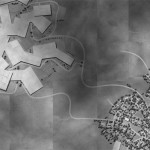
Suburbs are far older than most of us tend to realize, but when we talk about urban sprawl we most often think of the planned communities that popped up during the industrial revolution. Photographer Christoph Gielen spent seven years documenting some of these communities in America from a helicopter, creating a fascinating series that he calls Ciphers, which he published in a book of the same name.

urban sprawl seen from above

Seen from within, urban sprawl seems like little more than closely-built homes that all look the same. But there is a deeper meaning to these communities that is sometimes glossed over. They were built at the height of the country’s growth phase, when driving miles to work didn’t seem like a bother because gas prices were low and expected to stay that way.

american suburbs from above

But the best laid schemes of mice and men often go awry, and eventually suburbs became more of a headache and an eyesore than the pleasant communities they were meant to be. A 45-minute commute between work and home became an extremely expensive proposition, but suburban homeowners were stuck with their “American dream” hoames. Today, these relics of a time gone by are still mostly inhabited, their residents still driving long distances each day.

cristoph gielen ciphers

The goal of Gielen’s project was to draw attention to the effect these communities have on the environment. The practice of building further and further away from city centers, and in turn creating the need to use cars to drive long distances, creates an environmental burden that he calls “fascinating and profoundly unsettling.” Regardless of your opinion of these far-flung planned communities, there is a certain sort of lovely aesthetic to the patterns and shapes formed by the streets, green spaces, and tiny box houses that make up the American suburb.

Share on Facebook


[ By Delana in Art & Photography & Video. ]

[ WebUrbanist | Archives | Galleries | Privacy | TOS ]


WebUrbanist

 
Comments Off on Sprawling Vision of the Past: American Suburbs From Above

Posted in Creativity


Blast from the past: Photographing steam locomotives

04 Jul

Matthew Malkiewicz is what you might call a vintage train enthusiast. Fascinated with trains since his childhood, he’s been photographing steam locomotives since a trip to Colorado in 2005 reignited his interests in trains and photography. His photos capture the old-world charm and romanticism that these steam-powered machines evoke. He answered a few questions about his work – see more of his photos and learn about his process. See gallery

related news: Digital Photography Review (dpreview.com)

 
Comments Off on Blast from the past: Photographing steam locomotives

Posted in Uncategorized


5 Photoshop Tools to Take Your Images from Good to Great

03 Jul
Seascape image - Before and After image editing

Seascape image – Before and After image editing

We hear it all the time, “That photo has been Photoshopped”. Sometimes it sounds like the photo has caught a disease or that Photoshop is some undesirable effect that has been added to the image. Photoshop is the KEY to making your good images look spectacular. Yes, I said “good” images. Photoshop is not about fixing mistakes or trying to rescue a bad shot. It is more about refining your images and making them look amazing without overdoing it. Photoshop is a fantastic tool when it is used effectively but can be your enemy when you overdo it. Depending on what you want to achieve with your photos, this quick guide to five Photoshop tools will help you adjust your exposure effectively and make the colour really pop out of your image.

NOTE: the examples in this article simply show you how to make the adjustments on a separate layer. You could also use an adjustment layer which gives you much more control over the adjustment. The only tool that can’t be used with an adjustment layer is Shadow and Highlights. I will go into more details about adjustment layers in upcoming articles, for now, if you follow these guidelines, your images will look compelling and rich without looking overdone.

1. Shadow and Highlights Tool

This tool will be used to get more detail in the shadow areas of your image. Modern cameras can capture lots of detail, but depending on the light in the scene you are shooting, the shadows may be a little dark. The Shadow and Highlights tool will bring back some of the details in those areas.

Open your image in Photoshop and go to:  IMAGE > ADJUSTMENTS > SHADOW AND HIGHLIGHTS.

Finding the Shadow and Highlights tool

Finding the Shadow and Highlights tool

The tool will pop up and you will see this (as shown below), if you don’t see all these sliders, click “more options” to expand the box. You will use this tool to bring detail back into the shadows and you won’t be making any adjustments to the highlights. I find that the highlights part of this tool does not do a really good job, so I don’t use it at all.

Making adjustments to the Shadows in the image

Making adjustments to the Shadows in the image

The best way to work with the tool is to slide the Amount slider under the Shadows box to about one third across (33%). Then slide the Tonal Width slider to directly under the Amount slider. Lastly  bring the radius slider to directly under it. In most cases, you will want to have these sliders directly under each other (see screenshot below right).

shadows-highlightsThe important thing to remember here is to make the adjustments and take careful note of your image has been affected. Click on the preview button on the right hand side of the tool (you can do this with all the tools in this article) to see the “before and after”. You will be able to see at a glance how your changes are working. If you need to extract more detail from the shadows then slide the Amount slider to the right even more but make sure you line the other two sliders underneath it.

The amount that you decide to adjust the shadows is up to you. Be careful not to overdo it. Once you start seeing a “glow” around certain parts of your image, you may have gone too far. This glow is often referred to as a halo which can be avoided by watching carefully how your adjustments are affecting your image. If you see them appearing, simply drag the sliders back to the left until they disappear. Once you are happy, click OK.

2. Levels Tool

With your image open and the shadows adjusted, you will now adjust the overall exposure in the scene. If your image is a little over or under exposed, the levels tool can fix that. Go to: IMAGE > ADJUSTMENTS > LEVELS on the menu bar (or using the keyboard shortcut Command/Control+L). You will see the LEVELS dialogue box pop up and it will have a graph in it. This graph is called a histogram.

histogram

A histogram is simply a graphical representation of the pixels in the scene. If the graph is pushed over to the left side it means that your image has more darker tones in it, if the graph is over on the right side it means that your image has more brighter tones. There is no right or wrong histogram, it is simply a representation of the light in your scene. There are some great articles about histograms on the dPS site, so if you want to learn more about them, click on one of the links above.

Using the Levels tool to enhance the exposure and boost contrast

Using the Levels tool to enhance the exposure and boost contrast

The important thing to remember when working with levels is to make sure you don’t adjust your image so much that it causes the image to become under or over exposed. Thankfully, Photoshop gave us a way to see if that is happening, which I will explain shortly. Firstly, you will notice there are three sliders on the bottom of the histogram. The slider on the right is white (adjusts highlights) the slider in the middle is grey (adjusts mid tones) and the slider on the left is black (adjusts shadows). The levels tools will help adjust contrast and colour in your image. You can start the process by clicking and dragging the white slider in (move it to the left) to touch the edge of the histogram. Do the same for the black slider (drag it to the right). Your image will already look better.

Using the ALT key to see where the highlights are being overexposed

Using the ALT key to see where the highlights are being overexposed

Then you can move the middle slider to the right or the left to see which works better. Small changes always work best, so don’t make extreme changes on each slider. If you want to see how your adjustments are affecting your image, hold down the ALT key (PC) or OPTION key (Mac) while you click on the white or black slider. When you click ALT and hold down the white slider, the image will go black. As you slide to the left, you will see some red areas in your image (see above). When you see this, Photoshop is showing you which parts of the image will be overexposed, or clipped. The opposite is true for the the black slider. If you hold down ALT and click on the black slider, the screen will go white and as you slide to the right, the areas that come up on the screen will be underexposed, or clipped. It is a good idea to use this function if you are not sure if you have overdone your adjustments in Levels.

3. Colour Balance

This is a good tool to use to change the overall colour in the image. If your image is too blue and want you want it to be warmer, then you can do that by pulling up the red tones. Also, if your image has an undesirable colour cast, maybe the overall colour of the scene seems too green, then you can correct that by using this tool. The colour balance tool is found in the top menu bar under IMAGE > ADJUSTMENTS > COLOUR BALANCE (or using the keyboard shortcut Command/Control+B).

color-balance

Once the dialogue box is open, you will see three sliders (as above). The sliders represent the visual colours in the image, and are set in the middle by default. By moving them to the left or the right you will be able to change the colour in the image. The top slider affects Cyan/Red, the middle slider works on Magenta/Green and the bottom slider is Yellow/Blue. The colour will change according to which slider you choose and how far left or right you move it.

Note: you can also choose which area of your image to affect as in the Shadows, Midtones or Highlights but selecting the appropriate button in the Tone Balance section below the sliders.

You will want make small adjustments here too. A big adjustment can make your image look over saturated with a particular colour and that will look unnatural. The idea is to enhance your image by boosting certain colours in the scene. So, if you have a sunset image (as below) you may want to boost the reds, yellows and magentas. That will make your image look warm and will give the scene some colour boost.

Using Colour Balance to boost the colours in the image

Using Colour Balance to boost the colours in the image

4. Hue and Saturation

One of the most powerful colour tools in Photoshop is the Hue and Saturation tool. To open it go to: IMAGE > ADJUSTMENTS > HUE/SATURATION (or using the keyboard shortcut Command/Control+U). This tool can be used very effectively to adjust all the colours in your image. When you open the tool, you will notice that there are three sliders again, namely Hue, Saturation and Lightness.

hue-saturation

Hue means colour, this is not used very often as it will reassign the colours in your image, what you want to use this tool for is saturation. Saturation controls the richness or intensity of the colours in your image. Above the three sliders you will see a drop down box called Master. If you click on this, you can choose the colours that you want to saturate. This gives you very fine control over each colour in your image. You can select each colour individually and adjust it according to your preference. You may want to saturate the reds and yellows more than the blues, as an example, this tool allows you to do that. It is good to know that you are not adding colour to your image, you are saturating the colours that are there. Again, incremental adjustments are key. Don’t overdo it, small adjustments throughout this process will make your image look more natural and more dramatic

Getting the most out of the Hue and Saturation tool by saturating colours by channel

Getting the most out of the Hue and Saturation tool by saturating colours by channel

5. Vibrance

vibranceThe vibrance tool is found under IMAGE  > ADJUSTMENTS > VIBRANCE (no shortcut). It effectively saturates colours that are not completely saturated. This is a good finishing touch to your image editing to make sure your image gets a final boost. There is no real guideline as to how much you should adjust on this tool, but be aware of how it is affecting your image. Once this step is complete, your image should look remarkably different and if done correctly, the viewers won’t be saying those dreaded “Photoshopped” words.

The final step, boosting the vibrance to get that extra pop in the image

The final step, boosting the vibrance to get that extra pop in the image

In Conclusion

These five tools will help you make your good images spectacular. The important thing to remember in Photoshop is to make adjustments incrementally. As you can see from this process you slowly and incrementally make changes but the overall effect is dramatic without looking overdone. There are many other tools in Photoshop that can add even more enhancement to your images (I will be doing articles on those over the next few months) but start with these and get comfortable with how they work. To summarize, in Photoshop, slower is better and many small adjustments make a more dramatic impact on your image than a few large adjustments. Enjoy and experiment and as always, let me know what you think in the comments below.

The post 5 Photoshop Tools to Take Your Images from Good to Great by Barry J Brady appeared first on Digital Photography School.


Digital Photography School

 
Comments Off on 5 Photoshop Tools to Take Your Images from Good to Great

Posted in Photography


Reviewing the Loka UL Adventure Backpack from F-Stop Gear

28 Jun
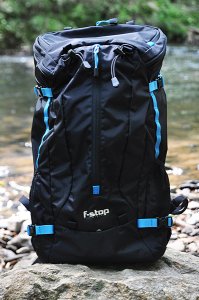
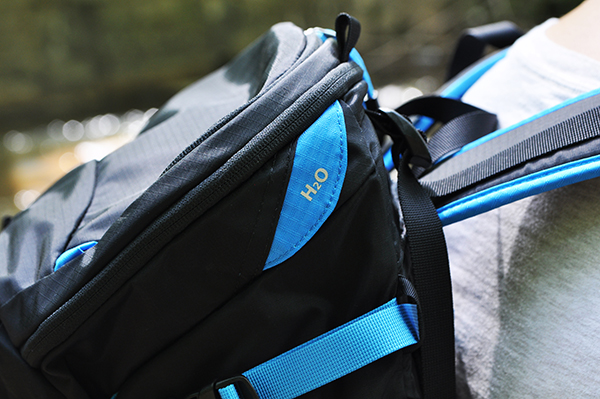
The new Loka UL backpack from F-Stop Gear combines rugged protection for your camera gear with the space you need for other outdoor essentials.

The new Loka UL backpack from F-Stop Gear combines lightweight rugged protection for your camera gear with the space you need for other outdoor essentials.

Among the many life lessons learned from my father was the one about always making sure you have the right tool for the job. I think we all do our best to apply this wisdom to the gear we pack inside our camera bags, but I’ve always felt that it’s just as important to apply it to the bags themselves. For starters, the bag that gets you to the gig isn’t always the best bag for getting you through the gig. I have a lot of bags. A lot. Until recently, though, I never had a bag that adequately combined protective storage for the gear with room for other essentials like a jacket, food, or other hiking gear for when an assignment– or life– takes me off the beaten path. The just-released Loka UL (Ultra Light) from F-Stop Gear not only combines those elements for me, but does so in one of the more innovative ways I’ve seen in a while.

First Impressions

Fresh out of the box, I was impressed with the high-quality construction and attention to detail. Modeled after F-Stop’s original Mountain Series Loka pack, the Loka UL has been stripped down to the essentials.  More than a full 1/3 lighter than the original, this newer version has been simplified in the interests of weight reduction and better freedom of movement. Those goals have been achieved without any compromise whatsoever in the build quality. A ripstop nylon water-repellent shell, internal aluminum frame, and a new ergonomic harness provide the lighter weight, as well as a more even distribution of the load.

Specs and Features

  • Height:  22 inches (55.9 cm)
  • Width:  12.5″ (31.8 cm)
  • Depth: 11″ (27.9 cm)
  • Volume: 37 liters
  • Weight empty:  2.25 lbs. (1.02 kg)
  • Price: $ 249.00 (USD)
  • DWR (durable water repellant) treated, 210D Ripstop Nylon with PU2 (Urethane moisture curing) coating
  • EVA (Ethylene vinyl acetate) padded hip belt, EVA-padded shoulder straps, and internal aluminum frame for easier handling of heavy loads
  • Jersey laminate EVA-padded back panel for ventilation and comfort control
  • YKK brand reversed zippers for extra weather protection
  • ITW brand buckles
  • Easy-to-reach side mesh pocket with ripstop nylon base and elastic cuff for water bottles
  • Drainage weep holes on sides and front pockets
  • Rain cover pocket in base of pack
  • Organizer pockets in top lid for batteries, memory cards, smart phones, etc.
  • Front panel pocket ideal for jackets, extra layers, ground tarp, etc.
  • Internal nylon sleeve fits up to a 13″ laptop, or doubles as a hydration bladder pocket
  • Quick-release side compression straps can secure tripods, ski poles, skis, etc.
  • Sternum strap includes integrated whistle for emergencies
  • Belt and shoulder suspension straps help adjust load for optimum weight distribution
  • Several exterior D-rings and attachment points for accessories
An integrated hydration system (bladder not included) will be a plus for outdoor photographers.

An integrated hydration system (bladder not included) will be a plus for outdoor photographers.

Internal Camera Unit (ICU)

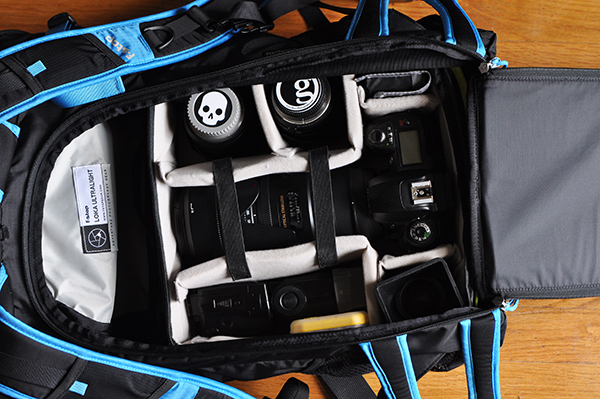
The heart and soul of the F-Stop Mountain Series is the Internal Camera Unit (ICU). Available in ten different sizes, the ICU lets you select the ideal-sized padded insert for your camera gear, while balancing available space between camera gear and other essentials like clothes, food, camping equipment, etc. Like other bags in the Mountain series, the Loka UL can accommodate one or more ICUs, depending on the size selected. Pictured here is the Shallow Medium ICU– one of the three recommended ICU sizes for this bag. Six of the 10 available ICUs will fit the Loka UL, but the other larger ones would seriously cut down on space available for non-camera essentials, defeating the entire purpose of the bag. The ICU rests securely in the bottom of the Loka UL and is kept in place with four Velcro tabs around the internal aluminum frame. Camera gear is accessed through the back panel of the pack.

Gear stored in the ICU is accessed through the back of the pack.

Gear stored in the ICU is accessed through the back of the pack.

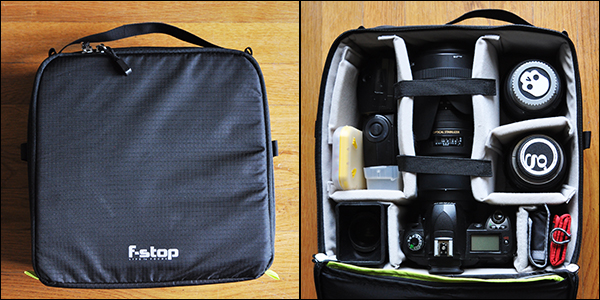
Every ICU is made with double ripstop nylon and a polyurethane coating.  High-density cross link foam dividers and side walls keep gear secure and protected. The ICU also works well as a modular storage system for your gear. The foam lid protects your precious cargo when used for storage or transport, and can be folded back and out of the way for easier access to gear when it’s in the pack. The dimensions of the ICU shown here are:

  • External:  5″ (L) x 11.5″ (W) x 11″ (H) (12.7 cm x 29.2 cm x 27.9 cm)
  • Internal: 4.5″ x 10.5″ x 10″  (11.4 cm x 26.7 cm x 25.4 cm)
  • Weight Empty: 0.95 lbs (0.43 kg)
ICUs also work well as modular storage systems when the bag's not in use.

ICUs also work well as modular storage systems when the bag’s not in use.

It’s worth pointing out that the Loka UL makes for a great all-around backpack with the ICU completely removed, for those unheard of situations (GASP!) when you might actually leave the photo gear at home. Note: If this happens to you, seek help immediately.

Hitting the Trails

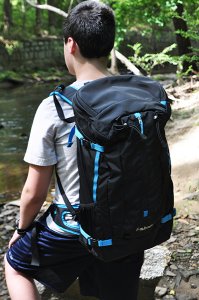
Stabilizing straps on the shoulders and at the waist help maintain a comfortable, even distribution of weight.

Stabilizing straps on the shoulders and at the waist help maintain a comfortable, even distribution of weight.

Summer has already hit here in Georgia (USA) with all the grace of a runaway freight train, so I’ll have to get back to you on how the Loka UL performs in cold, snowy conditions. But I can say that it did great in the heat, humidity and rain while hiking through paths, hills and riverbeds. Obviously, comfort is the #2 priority when choosing a camera backpack. I say #2 because let’s face it– protecting the gear is #1. But comfort is key and the Loka not only met my expectations, but vastly exceeded them. By biggest complaints in the past about camera backpacks has been the comfort issue. I’ve never doubted their ability to protect the gear. Sometimes, though, it’s their unfailing gear protection that makes them too heavy or unwieldy for actual hiking or camping. The fact that the Loka has been designed specifically for hiking, camping, skiing and other outdoor activities helps ensure that it strikes a great balance of form and function.

I was very impressed with the wide variety of pockets on this bag. Someone was obviously paying attention to the real-life needs and concerns of outdoor photographers. Features such as a pocket perfectly sized for a protein bar on the harness straps, as well as drainage “weep holes” at the bottom of some exterior pockets all add up to maintaining what you need and discarding what you don’t. There’s an old saying when it comes to hiking– “Take only pictures and leave only footprints.” This bag even has multiple pockets available for responsibly taking your trash with you.

With stabilizing straps at both shoulders and each side of the hip belt, adjusting and readjusting distribution of the load was extremely easy. Obviously, the bag alternates between getting lighter and heavier over the course of the day. The camera goes in and out of the bag. You stop to eat. Put on or take off a jacket. Being able to make those adjustments quickly and easily takes one more item off the list of things you need to worry about. The stabilizers and harness straps work well together to keep any potential back strain to a minimum.

We did encounter some light to moderate rain while testing the Loka. I opted to skip the rain cover, and was pleased to see that the water-repellent fabrics did exactly what they were supposed to do.

What I Packed in Mine

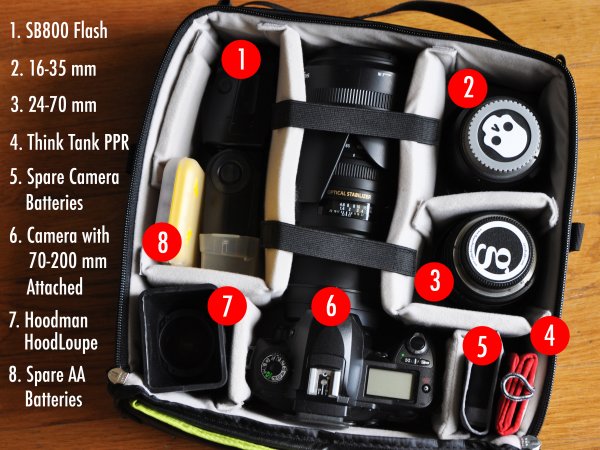
The image below breaks down the camera gear I packed in the ICU. Other items packed in the remaining areas of the bag included: Jacket, hat, towel, dry shirt, bug spray, two water bottles, lunch, and a few snacks.

fstop-loka-review-dps-008

Wrap-up and Recommendations

Variety is the spice of life and that same philosophy can (and should) apply to camera bags. I have bags that I only use for storage. I have one that’s been configured for nothing but lighting equipment. I have “everything but the kitchen sink” bags for commercial shoots, and small shoulder bags that won’t hold much more than a camera and two lenses. They all serve their specific purpose and the Loka UL is no different. It’s the first bag I’ve had that can carry not only the right amount of gear, but the other essentials needed for a day on the trails. Outdoor photography is both a challenge and an adventure. The Loka UL from F-Stop Gear helps you meet those challenges head-on and I highly recommend it for whenever adventure comes knocking on your door.

fstop-loka-review-dps-005

I try to steer you guys towards Amazon as much as I can, but the Loka UL backpack is currently available exclusively through F-Stop gear. That’s actually a good thing, insofar as configuring your bag and ICU combination is a lot easier when you have every possible combination in one place. Prices for the bag and ICU as shown in this review: Loka UL Backpack ($ 249.00 USD), Medium Shallow ICU ($ 79.00 USD). Click here for more information. As always, feel free to post any questions you have in the comments.

The post Reviewing the Loka UL Adventure Backpack from F-Stop Gear by Jeff Guyer appeared first on Digital Photography School.


Digital Photography School

 
Comments Off on Reviewing the Loka UL Adventure Backpack from F-Stop Gear

Posted in Photography


Almost There: Signs from the Near Future May Blow Your Mind

13 Jun

[ By WebUrbanist in Conceptual & Futuristic & Technology. ]

no synthetic biology allowed

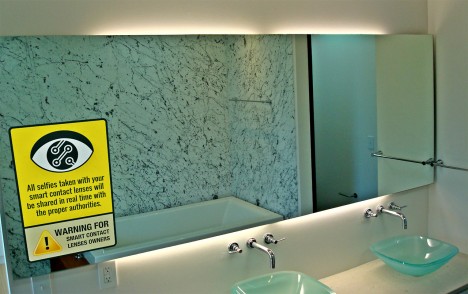
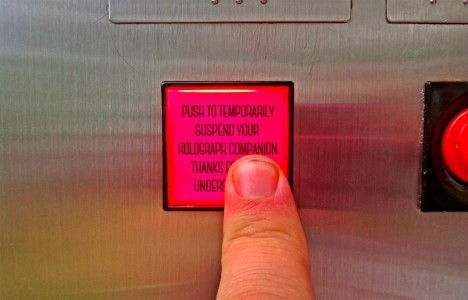
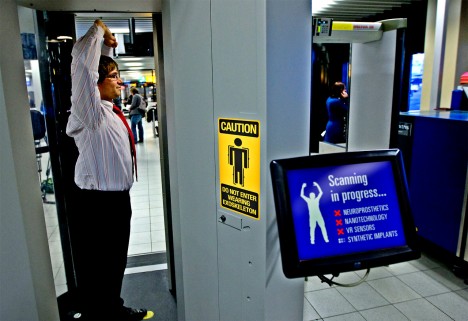
A few are far-fetched, but most of these notices are shocking in part because they are nearly believable – some may be an accepted reality within the next few years (click to enlarge).

contact lens selfie alert

disable your holographic companion

exoskeleton scanning in progress

driver free taxi cab

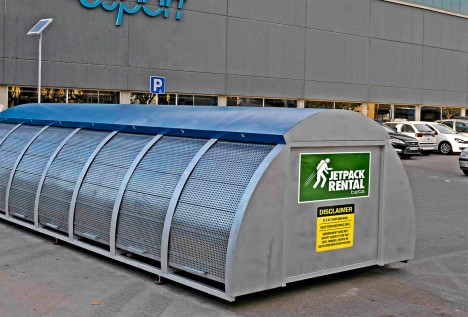
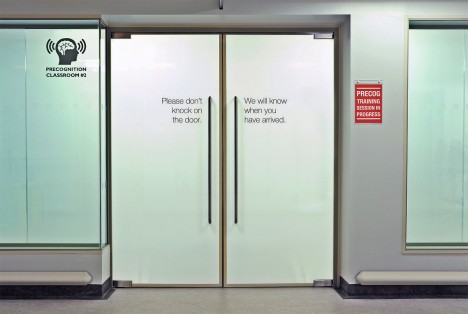
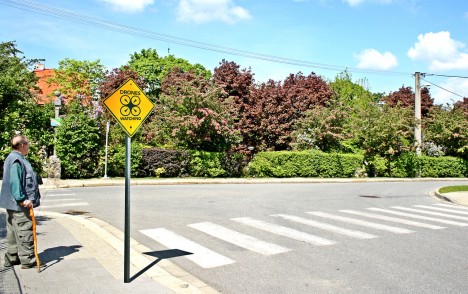
Collected on signsfromthenearfuture, a Tumblr blog, their subjects range from driverless cars and solar roadways to cryogenic stations and hyperloop trains.

jetpack station future sign

oversharing cell phone alert

preconition training classroom sign

drones watching alert

Some are clearly tongue-in-cheek commentary on current social behavior and perceived threats to privacy, or based on science-fiction principles unlikely to materialize, but who knows. Others you may be seeing very soon on streets and in other public places (alas, probably not the one about jetpack rentals).

Share on Facebook


[ By WebUrbanist in Conceptual & Futuristic & Technology. ]

[ WebUrbanist | Archives | Galleries | Privacy | TOS ]


WebUrbanist

 
Comments Off on Almost There: Signs from the Near Future May Blow Your Mind

Posted in Creativity


Lessons you can learn from master photographers – Minor White, Ansel Adams, and Syl Arena

09 Jun

The reason I have put pen to paper (fingers to keys) is to share with you some simple tips and knowledge that can be gained from taking a look at some notable photographers. Some would even argue that these people are among some of the most creative and artistically idolized craftsmen who have ever captured light with a box. If you’re just starting out on your photographic journey these tips from some of the masters will hopefully help you along.

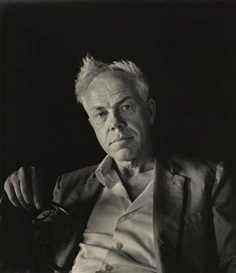
Minor White

Minor White by Imogen Cunningham

Portrait of Minor White by Imogen Cunningham

Born during the summer of 1908 in Minneapolis, Minor White held jobs as a waiter, bartender, and even worked in military intelligence during World War II. He was a very spiritual man and his beliefs spilled over into his photography. Co-founder of Aperture magazine along with Ansel Adams and other notable photographers, Minor was also an early advocate of the Zone System pioneered by Adams and Fred Archer. An early practitioner of infrared photography, White ventured into an array of subject matter but his work with the small, and often overlooked scenes and objects, such as frost on glass and dilapidated structures remain some of his most acclaimed.

Lessons you can learn from Minor White:

Make photographs all the time, even if you don’t have a camera.

Minor said that he was “always mentally photographing everything as practice”. This is solid wisdom for any photographer of any skill level. Unfortunately, the realities of most of our lives limit the time we get to spend with a camera in hand. The good news is that our artistic mind is never absent. Think about which exposure would blur that passing train just right. What aperture would give me enough depth of field to put that entire table into focus? You’ll be more prepared next time when you have your camera handy.

Don’t overlook small objects and details.

Some of Minors’ most celebrated works were of seemingly mundane or otherwise less than notable subjects. Be on the lookout for details and textures of things that you see every day. This is especially useful if you have an interest in abstract photos.

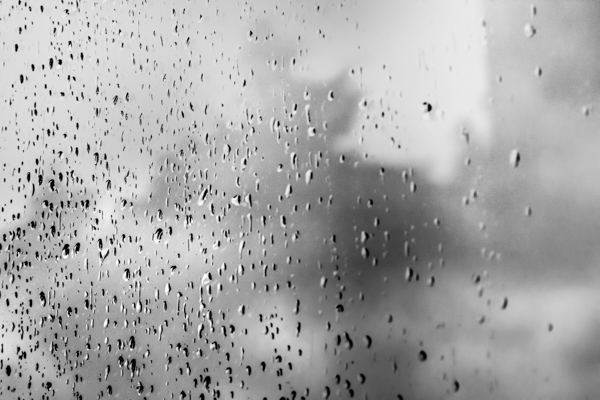
Drops of rain on my back door glass. Easily overlooked.

Rain on glass small

Simple occurrences made more interesting with a little creative thinking.

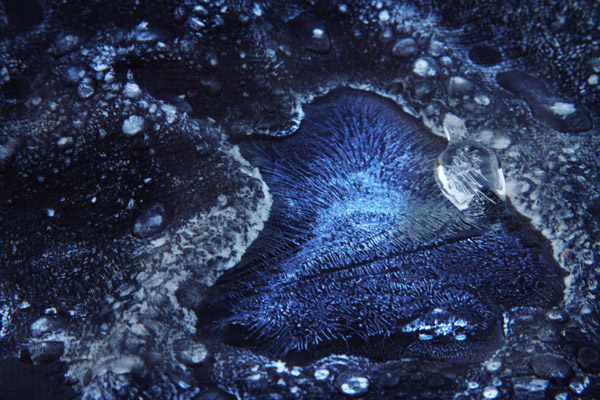
Ice on Firepit small 1

The early morning blue hour made this frost and ice on the cover of my fire pit look otherworldly.

Ansel Adams

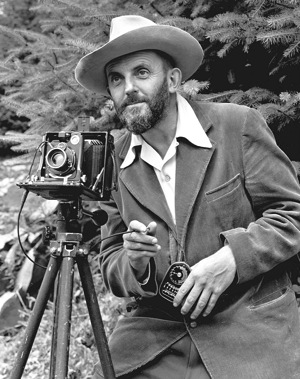
Ansel Adams self portrait

The portrait of Ansel Adams taken by J. Malcolm Greany around 1947

Chances are, you have heard at least something about Ansel Adams, even if that something is that he was a famous early photographer. It’s true, he is considered by more than a few to be one of the best photographers of the twentieth century. There have been volumes filled with the ins and outs of this photographic master. Born on February 20th, 1908 into a well established family in San Francisco, Ansel Adams discovery of photography was unplanned. Ansel was a gifted piano player. An exceptional piano player in fact, so exceptional that he was set to become a professional concert pianist until he decided to commit himself fully to photography. Honestly, the next sections could be titled “What can Ansel Adams NOT teach you?”. The man was such a force in the early days of modern photography that it almost seems unfair to point out only a few practices that will help you improve your own work. However, I have managed to list some basic tips from Ansel Adams that you can put into action in order to make you a better photographer right now.

Lessons you can learn from Ansel Adams:

Slow down

I’m sure you’ve heard this before and possibly have read about the importance of slowing down and making your photographs with more deliberate intentions. Our crushingly convenient modern era of virtually unlimited and relatively low cost film (i.e. digital photography) has lent itself to making us potentially sloppy in our shooting. We sometimes press the shutter button entirely too often in order to get a suitable image for processing. I will shamefully raise my hand and admit that I too am guilty of this spray and pray method of shooting, more so in my earlier photography days right after I made the leap from analog to digital.

I did myself a favor, that I also encourage you to do for yourself, and decided to take things more seriously. Ansel would consider all aspects of his composition: from the elevation and tilt of his camera, the perspective of his lenses, the cast of shadows, even the future effects of the wind on the clouds. There will be times when you are racing against a sunset or you will be trying to catch some specific or fleeting moment and at those times you must shoot quickly and intuitively. Usually, however, we rush for no perceivable reason and often overlook or forget small changes that can make or break an image. So the next time the muse slaps you across the face to make an image, calm yourself down and work the problem. Think about what it is you are trying to do. Put yourself into the correct mindset to make better images and you might find, strangely enough, that your images become better also.

Teach yourself to see the finished product before you make the exposure.

The act of seeing or visualizing is another subject that has been touted by the photographic community many times. Visualization is one of those things that really can’t be brought about by technical instruction in the traditional sense; meaning there are no classes on visualization. Ansel Adams himself remarked that visualization cannot be taught, it is be learned. Think about that concept.

It’s undeniably true that some people learn faster than others when it comes to visualizing finished prints. However, it is equally true that no one started out being able to see in their mind’s eye the final result of a photo. Like most things, it takes practice, as well as patience, and more than a healthy helping of sheer determination. When you begin to see the print before it is made, then really all that stands between you and your vision is the selection of techniques which, similarly, require just as much determination and commitment to master.

Use a tripod

To reiterate, please, use a tripod whenever and wherever possible. A tripod is one of the single most important tools you can use to increase the focal clarity and sharpness of a photograph. Minimizing camera shake and vibration is key to making crisp images, period.

Colorflowersmall

By using a tripod I eliminated the need to worry about vertical camera movement in the macro shot above. Ansel tells us that the ideal tripod is “a cubic yard of solid concrete with a 1/4″ X #20 bolt head sticking out of the top”. If you don’t have a huge block of cement lying around to attach your beloved camera to, then the next best thing is to obtain a quality tripod and use it.

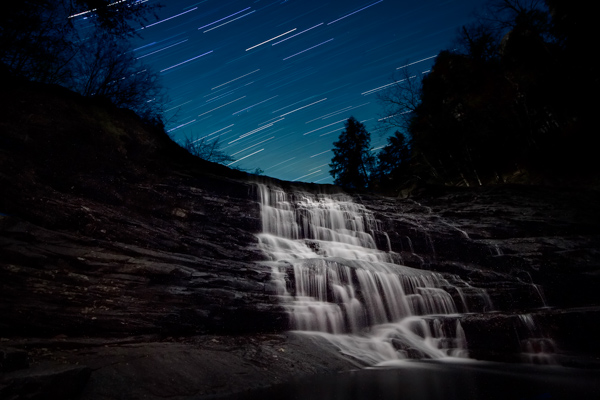
Having some way to keep your camera absolutely still is essential when working with long exposures like the image below.

Cane Creek Cascades Star Trail Color3

Exposure time: approximately forty seven minutes. This long exposure time would not have been possible without the use of a tripod.

Using a tripod (correctly) also forces you to, again, slow down and think about the photograph you are intending to make. dPS has a superb article on tripod employment that can be found here.

Syl Arena

Syl Arena

Photo by Vera Franceschi

Syl Arena, is a uniquely humble and genuine person, author, teacher, lecturer, and a speedlite Jedi. He is a magician of sorts when it comes to creating and moulding light. Syl currently resides on the west coast around San Luis Obispo, California. His biography is brief and barely mentions any notable achievements of which there are many. The lessons I learned from him actually lean more towards the philosophical than the technical. That being said, you will find this section contains no real insight from Mr. Arena concerning artificial light manipulation or photographic technique in general. For that I would highly suggest you check out his blog or his new Q&A site for loads of information.

My first introduction to Syl was through the gift of one of his books (thanks Mr. Veneman), “LIDLIPS: Lessons I didn’t learn in photo school“. In that book, this highly educated, highly skilled, highly successful, highly haired photographer simply and truthfully listed page by page the things he was never taught. They ranged from personal revelations on the photographic process to small background stories of some of his location shoots. He mentioned nothing about technique or gear really, just lessons from his life as a picture maker, unpretentious and sincere.

Lessons you can learn from Syl Arena:

Don’t be afraid.

Your limited gear, your perceived skill level, your lack of obvious subject matter, your lack of confidence, fear of trying something new; don’t be afraid of any of these things, or anything else for that matter. You will never have the all of the best gear so don’t let it worry you. Instead, learn to make the best use of what gear you have. You will never learn all there is to know about making photographs so learn what you can, where you can. Feeling like you’ll never get an image just right? You are your own worst critic, so don’t hide your work from the world.

Be inspired, not intimidated.

This is one of the hardest things to overcome, especially if you are just beginning to learn about photography. It’s easy to feel envious or even jealous of other photographers work. This can sometimes lead to convincing yourself that your work has no merit. Chances are, that image you’re envying and ogling over is a product of hard work, patience, diligence, determination, perseverance, and many other great words that the thesaurus can produce.

Viewing other artists work is one of the best ways to grow your own creativity.

Take the work as seriously as you want, but not yourself.

As you grow and learn as a photographer, remember that we all started out understanding absolutely nothing about photography; so keep that in mind the next time someone asks you a question about one of your photographs in a less than learned way. Most likely, you have learned something from someone who was nice enough to teach you. Please pay it forward.

Have you learned any lessons from other master photographers? Who is your mentor? Please share in the comments below.

The post Lessons you can learn from master photographers – Minor White, Ansel Adams, and Syl Arena by Adam Welch appeared first on Digital Photography School.


Digital Photography School

 
Comments Off on Lessons you can learn from master photographers – Minor White, Ansel Adams, and Syl Arena

Posted in Photography


Take your Photos from Blah to WOW with Lightroom and Photoshop

07 Jun

Would you like to get started with black and white (or color) fine art photography, but don’t really know how to get the results you want? I will give you some insight in the process to take your photos to the next level and let you see how you can make the most of the not so ideal situation. I will explain how you can take your ordinary photo and transform it from this . . .

Img1

to this!

Img final

Take your Photos from Blah to WOW with Lightroom and Photoshop

For the creation of this photo I used both Adobe Lightroom and Adobe Photoshop (Note: any program that handles layers will also work including GIMP or Photoshop Elements). The beginning photo is just a black and white conversion of the color photo, as shot. It is important that when you go out and shoot, you have an idea of the final image in your head. If you are at a location, take a moment and think of what you would like to see as a final result. This way, it will take you less shots to get your winning photo.

First step the photography, how was this photo created?

This photo was shot with a Nikon D3000, Tokina 12-28mm f/4 (IF) DX AT-X PRO and Haida ND3.0 (10 stop neutral density filter). That’s right, it’s not a full frame camera! With good light conditions you don’t need one, spend money on lenses instead. I was aiming at an exposure time of minimum 25 seconds, to make the clouds and water smooth. I metered 1/60th at f/14, 100 ISO, so that would give me the 25-27 second exposure (with the ND3.0) I wanted.

You can find exposure tables online, and sometimes you get them with the filter you buy. If all the conditions were perfect (which wasn’t the case) I wanted to shoot until sunset, expanding my exposure time to over 1 minute. But clouds rolled in (wasn’t forecast) and ruined the light. After a few shots, I got what I wanted and was heading home.

Next step, post-processing your image

First load the photo in to Lightroom and give it some minor adjustments to contrast and clarity. Increase the contrast a bit and reduce the clarity of the bottom part of the photo (the water). This can be done with a graduated filter (keyboard shortcut “M”) and moving the clarity slider to the left.

Now move over to Photoshop to take care of the sky (you can export it directly from Lightroom, right click on the photo and select edit in Photoshop). I was aiming for a nice movement in the sky, but the clouds weren’t going fast enough for my maximum exposure time. So we are going to replicate that with the help of photoshop.

Duplicate the image and select the sky, using the magic wand selection tool (W). Use the current layer and a brush seize of 30 pixels. When you’ve got your selection (it won’t be perfect but that is fine), click on the add layer mask symbol. (below the layers on the bottom right side of the screen).

You can make the layer mask more accurate with the pen tool (p). Click on the edge of a building (and later on the bridge) and work your way around the skyline, by clicking on every corner. The pen too will automatically draw a straight path from one point to another. When complete (you have to get all the way back to the first point you made), right click on the image and select “make selection” (feather 0, and make new selection) hit OK in the new window. Now fill your selection with black and you have a nice and clean layer mask of the sky.

Add motion blur to the sky

Now you can add a zoom blur to the sky layer, so you get a nice washed out cloud formation. Here is how to do that:

  • Select the duplicated sky layer then select Filter -> Radial Blur
  • In the menu select Blur Method -> Zoom, Quality -> good and amount 70 (you can add more, but that depends on the photo) – don’t hit OK yet!
  • Nest select where the Blur Center is positioned in the right window by clicking and dragging it around (somewhere in the middle for this photo)
  • Hit OK
  • After this you need to clean up the layer, because it now runs over the buildings
  • Hold CMD (alt on win) and click on the layer mask for the sky. Click -> selection -> inverse (you now have everything but the sky selected and hit delete.

Now you should have something like this:

Img2

As you can see the sky is now very pleasing, full of movement. When you look closer you can see that all the wires from the bridge are gone. We will have to fix that next. The wires aren’t straight lines, so the selection process of these is a pain – but worth the effort.

Using the pen tool (P) you can select all the wires on the background layer (which took me quite some time). You can do this one by one. Select one complete wire and duplicate the selection into a new layer. When you have all of them, merge all of these layers to one and place it above the duplicated sky layer.

You could also use the Magnetic Lasso Tool (L) to select all the wires but because of the low contrast in some places it won’t work, and you have to correct it later on.

Using the pen tool is a complete chapter, and I’m feeling that explaining how to use the tool takes too much focus away from this tutorial. It can take some time to master but I highly recommend reading tutorials on how to use the pen tool. You will need it for this image, but for the most of the images you can just make straight selections.

Here is my selection of the wires:

Img3

Now you can add some adjustments to the contrast in the wires and bridge, using a Brightness/Contrast adjustment layer. I used: Brightness +3 and Contrast +24

Img4

Final adjustments in Lightroom

From this point we leave Photoshop and continue in Adobe Lightroom. You could, however, do the same in Photoshop with dodging and burning, but I like the workflow of Lightroom more and used it to get to the final stage of the image.

From here it is basically just adding and removing light (exposure, contrast, white point) to selective places in the photo and checking for some dust particles. I can go into the details here, but it’s your vision of what you would like to achieve with the photo. Use the gradient filter (M) and the adjustment brush (K) in Lightroom to add and remove light to selected areas of the image. You have to “color” the photo to your wishes and crop it when needed. You are in fact painting with light.

Here is what I came up with for the final image:

Img final

“Catch  the light” – Rotterdam (The Netherlands)

Do you have any additional tips for processing for that wow factor? Please share in the comments below.

The post Take your Photos from Blah to WOW with Lightroom and Photoshop by Martijn Kort appeared first on Digital Photography School.


Digital Photography School

 
Comments Off on Take your Photos from Blah to WOW with Lightroom and Photoshop

Posted in Photography


10 Great Photography Lessons You Can Learn From a 2 Year Old

06 Jun

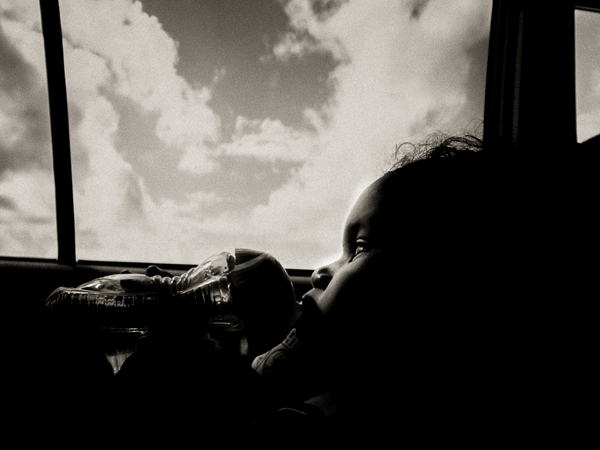
Child

Nowadays, fancy shmancy cameras can blast you with gazillion frames per second, but non of these can beat the time honored tradition of observation.

If there is one skill that has safeguarded my butt many times it’s the simple act of observing. If you don’t believe me, ask my wife. Observation is not only good when making images, it’s also good for insights. Well I’ve observed my son since day one, literally, and now that he is 2 years old, he is the one who is offering me great insights into photography.

I’ll make sure he never sees this article. Imagine when he’s 10 and says “You’ve learned so much from me at two, imagine how much more you can learn now that I am 10″. I’ll never hear the end of it. Anyway, here are:

10 great photography tips I’ve learned (and you can too) from my 2 year old, nicknamed Yoki

1) Be amazed at everything
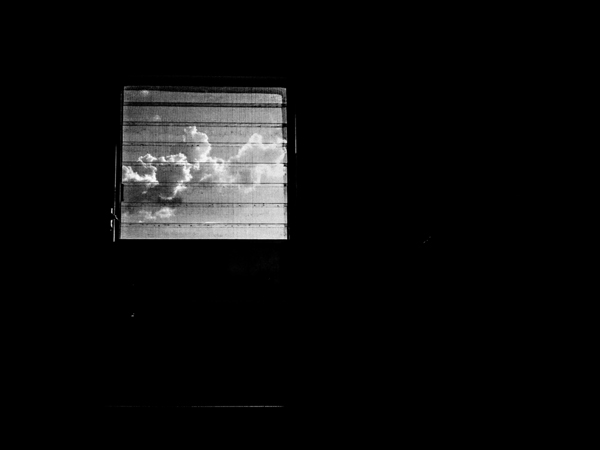
Bathroom window

I was outside a restaurant waiting for the rest of the family, it was raining. Laplwie! (“Rain” in french) Laplwie! Yelled my son. A woman walked in with an umbrella, my son bent his feet and pointed all exited “Bwella!!! Bwella!!!”

An oh-so-cute scene. But it got me wondering. I’ve probably seen a million and a half umbrellas yet look at this kid jumping up and down because of an umbrella. Both of our eyes saw the same thing but our mindset was different.

Humans are by nature creatures that get used to things. When it comes to photography, the location is only interesting after a few days, beyond that it’s boring. If you go out and shoot the same area over and over again, you know what I mean. To freshen things up, the solution is to either seek new locations or things to do – or see things in a new way.

In the first case the transformation is external, in the second case it’s internal. I keep the scene of my son and the umbrella in my mind to remind me to always see things in a new way. Every location eventually gets boring, shooting the same kind of pictures over and over again can get boring, so the solution is to see things in a different way.

There’s the true story of an old woman, she was going completely blind but had an operation that restored her sight. She talks about how much she loves doing dishes and looking at the beautiful colors of the bubbles that get formed when she puts in the soap. How many times do we loathe doing our dishes? What is to be learned from this lady?

If you feel your photography is boring, see things in a new way, always tell your mind to see things as if you see them for the first and last time. Yoki does so, and so does that woman who regained her sight. Light and life is beautiful everyday, but to appreciate it takes a conscious effort. There’s a nice saying I like “Everyday is a new day to a wise man”.

Every time I find myself saying Photography is boring (not often but it happens), I remind myself of my son and the rain. Speaking of which, do you notice how rain can transform a scene? The lower contrast between the sky and the rest of the earth? How reflections of the puddles create interesting shots? Or how the rain hitting the ground makes interesting shapes? Or how a window in a bathroom can be a symbol of being locked in? Or how…

2) Kids enjoy themselves because they are in the present
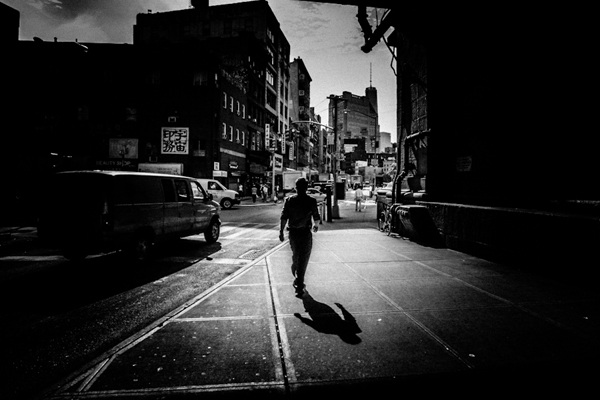
Dark man

I like watching Yoki play, especially with his blocks. He looks so happy. This got me wondering, why don’t photographers have this sort of joy? Isn’t it as simple as enjoying what you do? I observed him even more and looked for what he was doing that photographers were not doing.

The main thing is that kids enjoy what they are doing, all that they care about for the time being is playing with the toy. I’ve been out on the street thinking about what to do the next week, I’ve been on assignment while doing mental financial calculation – exactly what Yoki isn’t doing.

Can you walk a mile? How much less enjoyable would it be if I gave you two nice pieces of luggage to drag while you walk that mile? Unfortunately we do the same thing mentally when it comes to photography. We bring our “stuff” along when shooting and just like dragging real life luggage around, it diminishes the enjoyment of photography.

When shooting, be like a kid with a toy; focus on what you are doing and nothing else. Minor White was adamant about clearing the mind before the act of photography. I listen to music and zone out to zoom into photography. Find what works for you, the important thing is to be lost in what you are doing.

3) Kids enjoy themselves because they don’t care about being the best
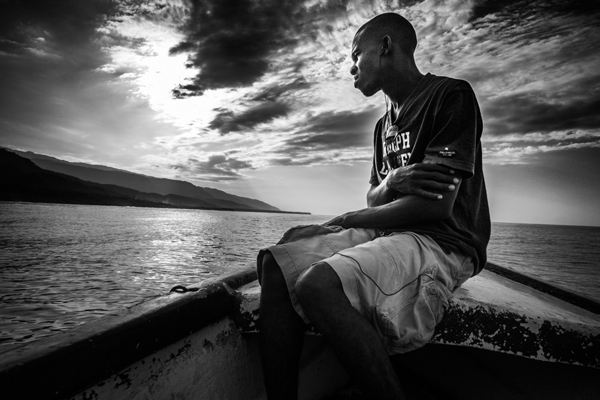
Haiti boat

From time to time Yoki comes in with something he’s done. Bravos, hugs and all around congrats are thrown his way. But you know what? I’ll continue doing so until he is older.

I remember doing my best for grades as a kid and all I could feel from my mom was how short I fell from top of the class. When kids are kids it’s all about doing their best, but as they grow older it’s all about how short they fall of being THE best. How can Yoki enjoy himself doing crafts if all that he thinks about is being better than somebody else?

What matters for kids is to do the best they can and enjoy what they do. That is also valid about photography, all that matters is that you do their best and enjoy making pictures. To enjoy your photography it’s all about enjoying what you are doing, as simple as it sounds. The moment you start ranking yourself is the moment you stop being content, because being in first place will be only thing that will matter at that point. Plus there’s always someone better than you, and someone better than them ad infinitum.

4) Kids enjoy themselves because they don’t care about comparisons
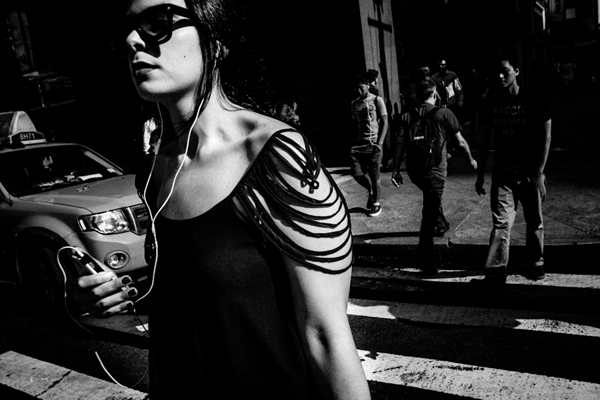
New york woman

I was watching my son finger painting. What came to mind was the fact that compared to how I can draw, his drawings are absolutely bad. But does he care that his dad can outdo him in drawing? No.

He’s too happy with his own stuff to even bother to compare with others. Take any photographer you respect, that person has another photographer they feel jealous of. But very few of them are genuine enough to admit that. When you tend to compare yourself with others, the answer to all this is do like children do – stop it, and focus on your own stuff.

When your work is your focus, everything others do might be better, but it sure won’t affect you. Photography is all about enjoying what you do and not about comparing to others all the while doing your best. Actually, I’ve found that the more you focus on your stuff the better you get. But, the more you compare the worst you get, because it sucks the life and joy out of photography. It’s all about loving what you do, and doing what you love.

5) Don’t get sidetracked
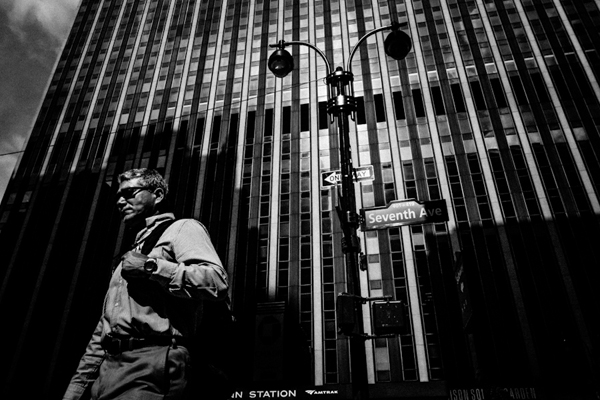
Penn station

One of the parenting tricks I have is to distract my son when I don’t want him to have something. If I don’t want him to use the computer, I pick up his alphabet phone toy and start playing with it. He never fails to forget about the computer. That taught me how easy it is to get sidetracked in photography.

One of the easiest traps of photography is the camera. So many get sidetracked by the camera that photography gets completely lost. I’ve been there, and lost 1000s of $ $ $ . I was addicted to the gear. But that’s a story for another time. If you find yourself googling for accessories instead of going out and making images, you might have a problem.

The second way to get sidetracked is by focusing on other’s photography, and that includes the Masters. I know a few folks that have such powerful photographs, yet instead of developing their own voice they continue copying another photographer’s work. Such a waste – they are distracted from their own photography by copying someone else.

You can also get sidetracked by being too much into the masters. Do you want to be known for knowing the masters, or known for actually making images? One thing that is rarely stated is that no matter how great the masters were, doing your work is more important because it’s your own work.

To recap: photography is not about having the most cameras, that only shows you’ve got plenty to spend. Photography is not about collecting photobooks, that only shows you appreciate art. Photography is about making photographs, that’s when you are a photographer.

If anything has a bigger place in your life than your own photography, you’ve been sidetracked.

6) Pattern recognition
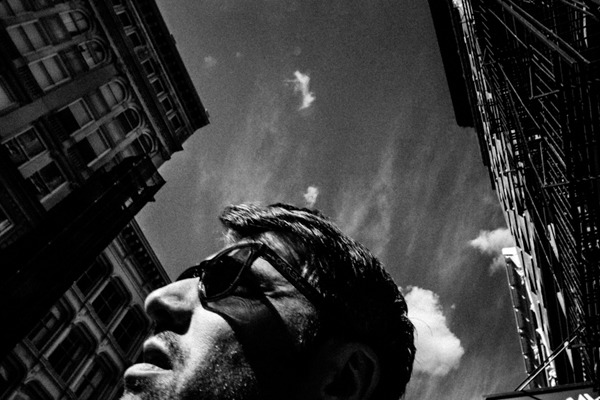
Man surreal

When Yoki was born, I resolved to always observe him, and more importantly to observe how he learns. I was fascinated by my son playing with a particular toy, this one called a shape sorter (see image right)
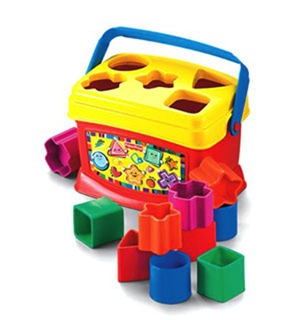
Shape sorter

How did his little brain work to put the shapes in the appropriate holes? The answer is patterns. The brain is wired to recognize patterns, so when Yoki took the star shape, his brain said “seek star shape” and ordered the eye to look around for that shape. When Yoki is out and starts saying letters and numbers, his brain is not really actively searching for the letters and numbers, the brain compares what he sees with the brain’s database of shapes and alerts itself that it’s a recognized pattern.

The first example is called the top-down mode (Where the brain actively seeks a pattern) and the second the bottom-up (where the brain is in a more receptive mode).

I was struck when I realized that photography on the compositional level was a huge, glorified “shape sorter” toy in real life. Here’s an illustration:
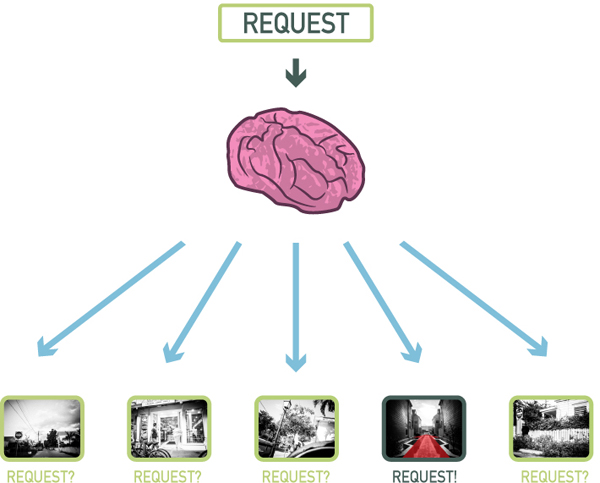
Top down

In my son’s mind the request was “seek star shape”. In my photographer’s mind, the request might be “seek vanishing point“. In the illustration above, I was on the street, but my brain only alerted me when it recognized the pattern I asked for (vanishing point). That is the top-down mode. It’s the process that happens when you are seeking a particular type of image. Here’s another illustration:
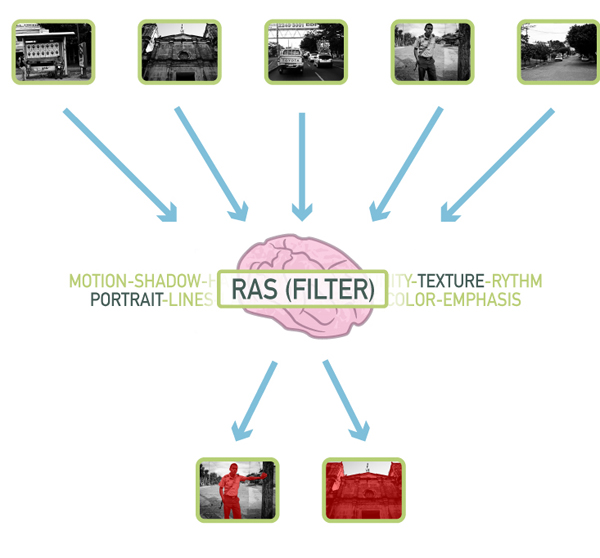
Bottom up

At the base of the brain there’s something called the Reticular Activation System (RAS), or as I like to call it the Really Awesome Secretary. A secretary’s role is to cut the fluff and only alert you when something is important, and that is what the RAS does. What’s important is relative and defined by each person.

What is important to my son Yoki? Letters and numbers, he’s going to see them everywhere, at least it’s going to appear to him that way. For me as a photographer what is important is what I want to see in my photographs. So I was in the streets not looking for anything in particular, but more than once my brain processed what my eye saw and it alerted me when it recognized a pattern (in the case above texture and portrait). That’s called the bottom-up mode.

It’s a frighteningly beautiful system that allows my son to play with his shape toys and me to recognize stuff when I am shooting.

7) You can’t recognize what you don’t know
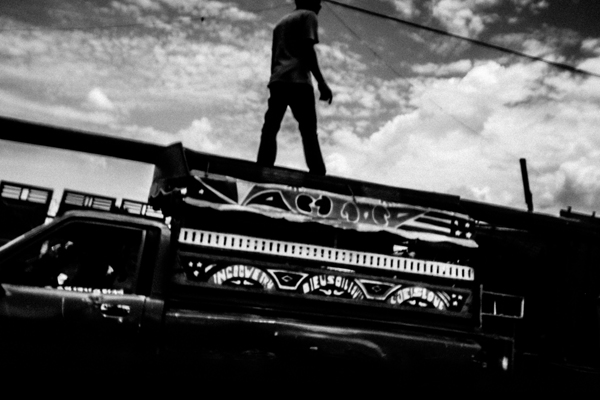
Man haiti standing

Pattern recognition has it’s limits though, you can’t recognize patterns that you don’t know. Take my son for example, he will cry out “Circle! Oval! Sqwawe.”, but it will be quite a while before I hear him say “Hexagon! Trapezoid! Pentagon.”.

His palette of patterns are limited: square, circle, oval, square, star, heart. My palette is much more expanded to include a bunch more. So in a scene where there is a square and a pentagon shape, he will see the square only, but I will see the square and the pentagon. It’s the same principle at work when two photographers see different things in the same location.

When people who don’t know photography see the kind of pictures that can be produced out of a regular scene, they immediately credit the camera. But fact is that the photographer recognized a good picture (trained to look for certain patterns) whereas the non-photographer (not trained to look for certain patterns) could not see anything. So what’s a pattern? It can be anything from certain compositional types (Golden ratio, etc.), shapes, color, types of pictures (landscape, portrait, etc.), themes that interest you (people, animals, etc.) and more.

8) Everything is basic shapes
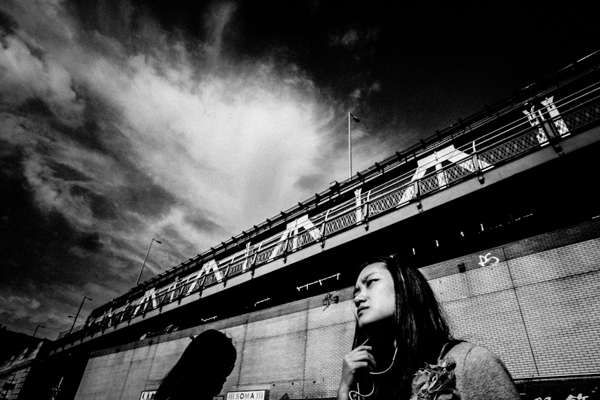
Under bridge

I was on my bed when the kiddo starts saying “S!” “S!” “The wetter S!” Hoho… I was sure he was seeing things because I never saw a prominent S in my room. But the kiddo was right, there was an S in the room, here it was:
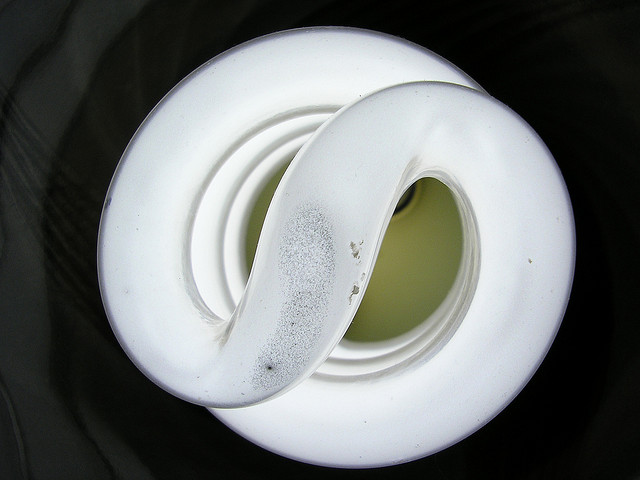
By Mathew Bajoras

It was the light bulb. That reminded me how the world is like a glorified “shape sorter” toy. Absolutely everything visual can be broken down into line, shapes, space, color and texture.

It’s something that painters and artists understand at a fundamental level; everything can be broken down into basic elements. As a graphic designer I also understand this at a basic level because you can break down designs into simple elements. Here’s an example with a shot I made:
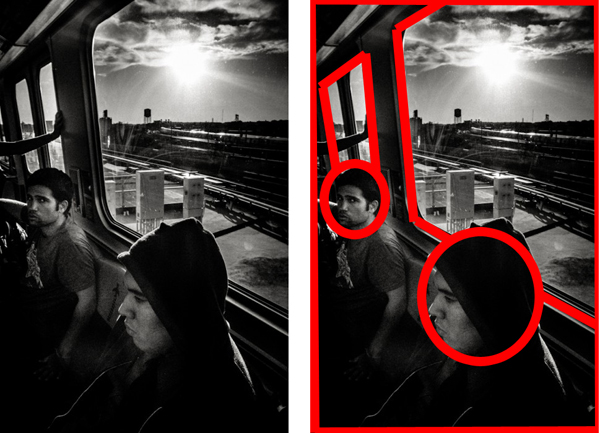
Simple elements

All of a sudden a window is a trapezoid, and people’s heads are ovals. This is due to the Gestalt law of perception called “Pragnanz”. Simply stated it says that we perceive complex shapes as simple ones (a face as an oval for example). Yoki recognizing the “S” out of the light bulb always reminds me of that, so I look for basic, broad shapes in my photographs, and more importantly how to arrange them.

9) People are aware of the camera
Lady power

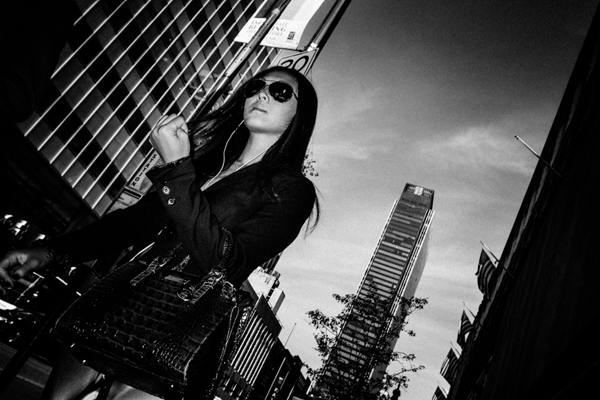
My kid is not even five and he already knows to pose. It’s nuts. How does he know when the camera is up to strike a pose? Are we spoiling our genuineness by asking kids to say “Cheese”? I think so because it teaches kids to stop what they are doing to say cheese and look at the camera. But whatever the case, very early in life kids are aware of the camera. The result? Absolutely everybody in today’s world is aware of the camera.

That pretty much means no one is genuine when a camera is present. For pros this means you have to learn to relax your clients. For everybody else it means you have to be quick to get a genuine pose. The best moment is the split second before the person realize you are photographing them.

One interesting tidbit about the genuineness of the subject when faced with a camera, is that it is proportional to the type of camera. Pull out a point-and-shoot camera in the streets and people won’t care much, you’re probably a tourist in their minds. Pull out a double battery DSLR with 55-200 zoom and people will start acting differently. Pull out a Polaroid camera and people will react as if you are an “Artiste”.

People are conscious of the camera because they are conscious of their image, it’s ingrained since the start. If you can make people believe all you want is a snapshot, they won’t give you a second look. That, my friend is why I can only recommend a point-and-shoot lookalike for the streets.

10) Complacency hinders growth
Older lady

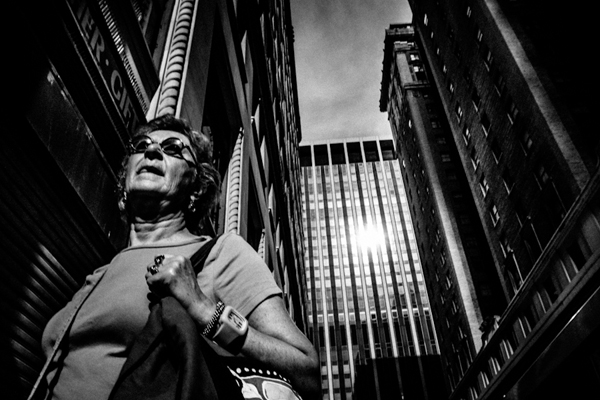
What’s that? I asked pointing to a square in a book. “Square!!!” “Carré” (Square in French) my son said. Good I said, now what’s that? I was pointing a rectangle, he looked at it and then pointed to the square “Square!! Carré!!”. Yes but what’s that? I asked pointing at the rectangle once more. He pointed at the square once more and named it again. Instead of taking a risk at trying to name the rectangle he pointed at what he already knew.

I was quite surprised at what happened, not because of how my son reacted but because I saw myself in it. It’s easy to get complacent in photography, I sure did. It happens when you do something over and over again and don’t challenge yourself. I largely abandoned longer than 35mm focal lengths because of that. The best thing I ever did photographically is to get a 28mm because it’s much harder to deal with.

I could go out with a longer lens and not challenge myself, but I would not grow and I would become complacent. When Yoki did this with his shapes, it taught me to never become complacent and always challenge myself. I’ve grown so much when I decided to go wide angle. Try it, it will not let you make an image without a fight.

To each his comfort zone, for me it was always sticking to fast apertures at 50mm, for you it might be something else. Find where you are too comfortable photographically, then challenge yourself. It’s the trick that pole jumpers use, they put the bar higher every time.

Finals comments

I love my kid, and I love watching him. I love to see how he works and how he thinks. He’s learning from me hHopefully a good thing) but I am also learning a lot from him, as you can see from the 10 tips above. But that stays between me and you, ok?

Be yourself, stay focused and keep on shooting.

Have you learned any photography lessons from your kids? Please share any additional tips in the comments below.

The post 10 Great Photography Lessons You Can Learn From a 2 Year Old by Olivier Duong appeared first on Digital Photography School.


Digital Photography School

 
Comments Off on 10 Great Photography Lessons You Can Learn From a 2 Year Old

Posted in Photography


Contest – Win One of THREE Photography Courses from New York Institute of Photography

05 Jun

Over the last few years here at dPS, wNYIP Logoe’ve run some incredibly popular competitions with one of our partners – the New York Institute of Photography – to give away to lucky dPS readers some of their great photographic teaching.

Due to popular demand – we’re doing it again this week.

For this competition, NYIP is giving away THREE prizes.

Each will be won by a different dPS reader. Here’s what you could win:

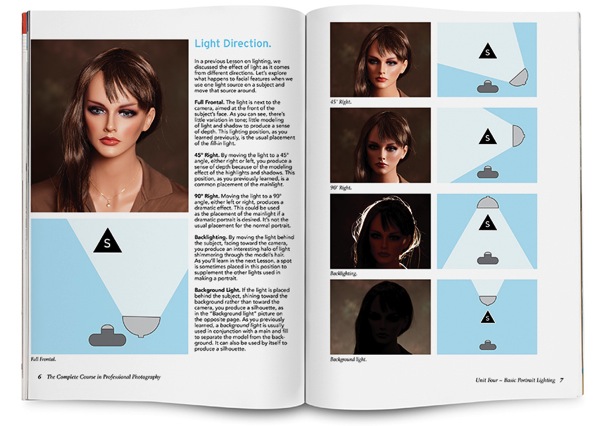
Complete Course in Professional Photography – worth $ 1,499

This is NYIP’s most popular course. It teaches everything an aspiring photographer needs to know about the art, technique, and business of photography. Want to become a better photographer? Then this course is for you.

NYIP spread Light Direction

All courses include comprehensive and illustrated lesson books, CD audio guides, DVD video training, photo projects, professional evaluation and personal student advisers.

How to Win

To win this competition you’ll need to:

  • Watch the video below
  • Leave a comment below and tell us why you’d like to enrol in New York Institute of Photography. Please note: there is a limit of 1 entry per person.
  • Do this in the next 8 days and on June 12th, 2014, the team at NYIP will choose the best three answers and we will announce the winners in the following days.

Deadline is June 11th, Midnight PDT. Comments left after the deadline will not be considered.

By “best” – we’re looking for people who have an understanding of what NYIP is, what the course offers, and how it suits their needs. There’s no need to write essay length comments to win – but we’re looking to hear what you like about NYIP, the course and how it would help your development as a photographer.

This competition is open to everyone around the world no matter where you live, but there is only one entry per person please. To enter – simply leave your comment below.

Don’t forget to share this post with your friends! Like NYIP on Facebook for special offers and announcements on all of the NYIP Courses!

Disclaimer: NYIP is a paid partner of dPS.

The post Contest – Win One of THREE Photography Courses from New York Institute of Photography by Darlene Hildebrandt appeared first on Digital Photography School.


Digital Photography School

 
Comments Off on Contest – Win One of THREE Photography Courses from New York Institute of Photography

Posted in Photography


Holy Beer: 12 Pubs Converted from Churches, Urinals & More

05 Jun

[ By Steph in Architecture & Offices & Commercial. ]

Converted Pubs Main

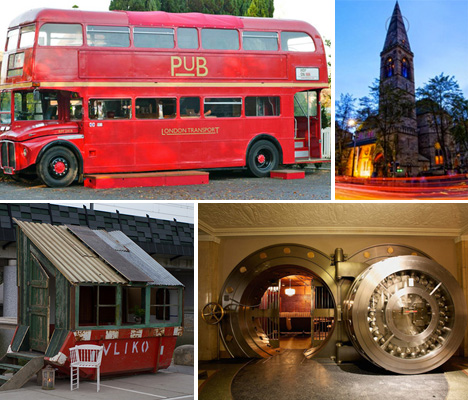
If knocking pack a pint in a subterranean Victorian urinal doesn’t sound like a good time to you, read on. Extensive renovations have transformed the most unlikely of settings into quirky and often beautiful places to have a drink, from dumpsters and sheds to historic bank vaults and gothic churches.

The Temple: Victorian Urinal Pub
Converted Pub Victorian Urinal

Once dark, dingy and far from sanitary, a subterranean Victorian urinal is now a popular pub in Manchester, UK. One of the city’s smallest bars, the Temple nevertheless offers a vast array of foreign bottled beers. Meanwhile, in London, a urinal from the same era has now become an eatery after a $ 150,000 renovation.

Oran Mor Church Pub
Converted Pubs Oran Mor Church

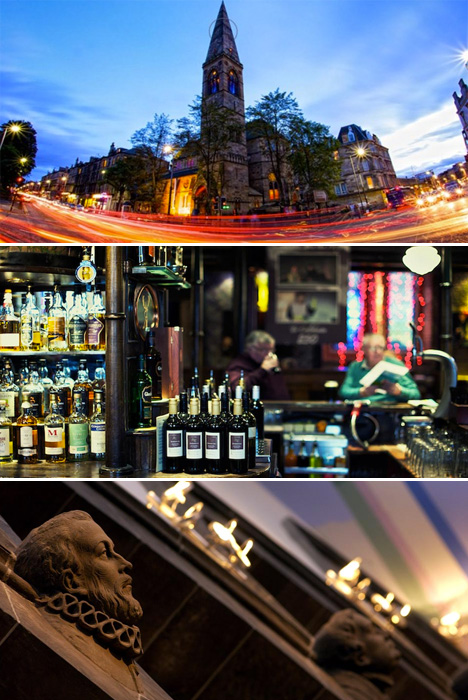
Europe is brimming with former places of worship that have since been converted into private residences, hotels and more due to an overabundance of churches that just don’t draw the same crowds that they used to. The Oran Mor in Glasgow, Scotland is just one (particularly stunning) example, which has become one of the nation’s hottest nightspots after a major renovation that includes trippy murals painted all over the ceilings.

Woodhenge Shed Pub
Converted Pubs Shed

It’s not hard to see why John Plumridge’s handmade backyard structure won Shed of the Year in 2012. After all, not many sheds are lined with hundreds of bottles of ale. Plumridge spent 4 years converting his Woodhenge Pub Shed into “a great venue for family and friends to party in.”

Dumpster Bar
Converted Pubs Dumpster

Urban waste and a dumpster became a tiny, charming bar as part of the Foundation Projects by designers Rikkert Paauw and Jet van Zweiten. This adaptive reuse project shapes found materials into little dumpster houses that have practical purposes throughout the cities in which they’re built.

1926 Bank Vault, Chicago
Converted Pubs Bank Vault

A beautiful 1926 bank vault in Chicago with many of its historic features still intact – including that incredible door – is now known as The Bedford, a local kitchen and bar serving food and cocktails in a signature mix of German and Southern cuisine.

Hop On Inn: Double Decker Bus Pub
Converted Pubs Double Decker

Named for its hop-on, hop-off rear platform, the Hop On Inn is a renovated 1966 London double-decker bus that now hosts a full bar downstairs and a lounge area upstairs complete with a stage and removable roof cover for live music. The bus, which once served Piccadilly Circus, is among the last classic Routemasters that were taken out of service in 2005.

Next Page – Click Below to Read More:
Holy Beer 12 Pubs Converted From Churches Urinals More

Share on Facebook


[ By Steph in Architecture & Offices & Commercial. ]

[ WebUrbanist | Archives | Galleries | Privacy | TOS ]


WebUrbanist

 
Comments Off on Holy Beer: 12 Pubs Converted from Churches, Urinals & More

Posted in Creativity