RSS
 

Posts Tagged ‘from’

How to Recover Lost Files from a Memory Card

17 Feb

Whether you’re a novice or veteran photographer, chances are you’ve experienced a moment of dread when you thought all of your precious photos were lost forever. Maybe you damaged a SD or CF card, or accidentally formatted a card before offloading your images. As long as your memory card can still be plugged in to, and recognized by your computer, there’s a good chance you’ll be able to salvage your photos, even if you did an accidental deletion. Sometimes you can achieve this all by yourself, and recover your lost files.

There are many programs and apps that can help you recover data from a memory card, but the one I’m going to introduce you to is SanDisk RescuePRO. Created by the same folks who produce trusty SanDisk memory cards, RescuePRO has in my experienced maintained the same reliability and quality that one can expect from SanDisk products. Their recovery program is straightforward, easy to use, and does a great job at recovering lost photos. So before you make an appointment with an IT professional, give this memory card recovery method a try.

SanDisk Recovery PRO memory card recovery

About SanDisk RescuePRO

RescuePRO is a downloadable, data recovery program available for Mac or Windows. Using proprietary media recovery algorithms, RescuePro will scan your memory card and display previews of any recoverable data such as photos (JPG and most RAW formats), video, and audio. The software will work with most brands of digital cameras and memory card types including; SD, SDHC, CompactFlash, Memory Stick, CDs, and DVDs.

There are two versions of RescuePRO, regular and deluxe, with the main difference other than price being in the extra formats of photos and video/audio that deluxe promises to recover. RescuePRO has a fee of $ 39.99 for the regular version and $ 59.99 for deluxe, but they do offer a free evaluation so you can verify if the program will work with your memory card before you purchase. Payment buys you a one year subscription, which must be renewed annually to continue using the service. But on the bright side, this is a small price to pay if you stand to recover important photos or videos.

How RescuePRO Works

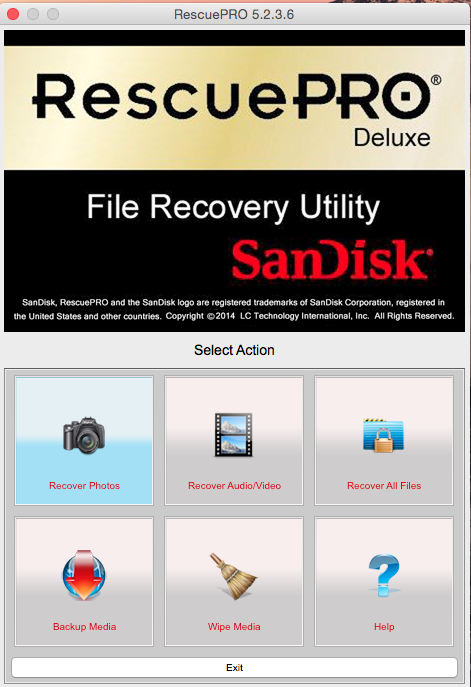
1. After you buy a subscription, download the RescuePRO program to your desktop computer. Insert your memory card into your computer and launch RescuePRO. The below menu will pop up on your screen, and you’ll want to select the option that’s relevant to your needs: either Recover Photos, Recover Video/Audio, or Recover All Files.

SanDisk Recovery PRO memory card recovery

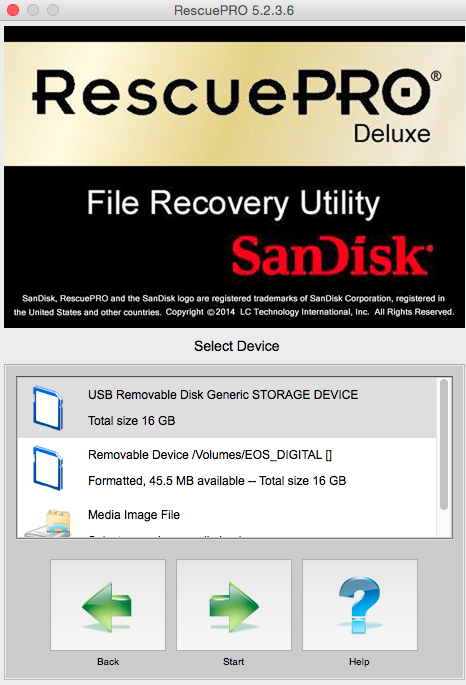
2. After you select your desired outcome, the below screen will prompt you to select the memory card in question. Be sure you have your memory card connected to the computer. Select your card and hit the green Start button.

SanDisk Recovery PRO memory card recovery

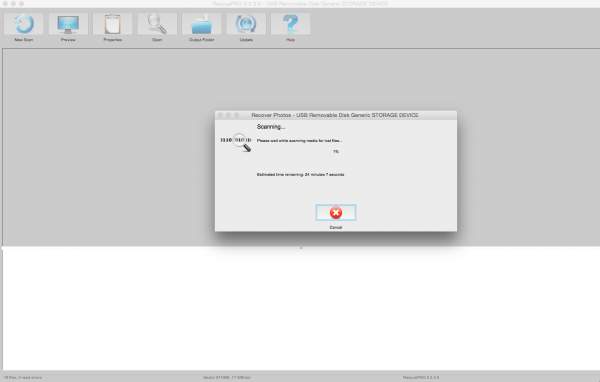
3. Now it’s time to sit tight and let the program do its thing. Feel free to pull up an Internet browser or Photoshop and multitask as you wait. Data recovery from your memory card can take a bit of time depending on how many files there are to be retrieved. In this particular instance, I had 927 files to recover from my CF card and it took about 30 minutes.

SanDisk Recovery PRO memory card recovery

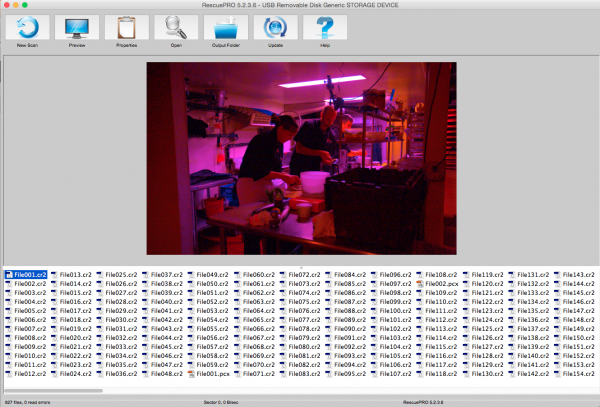
4. When the program is done recovering data, it unfortunately doesn’t do a great job at alerting you. There’s no fanfare, but you’ll know the recovery process is done when you see the bottom portion of the screen filled with recovered files. To verify what content the program has recovered, click on each individual file name and a preview will appear. In this particular instance, the previewed images were showing up tinted in pink, but the actual recovered images were just fine without any distortions.

SanDisk Recovery PRO memory card recovery

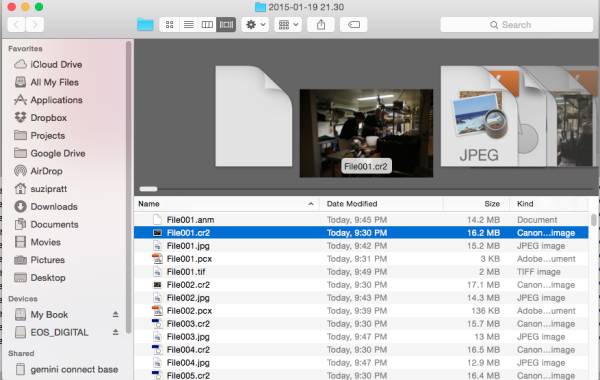
5. Once you verify that your files have indeed been saved, it’s time to locate them on your computer. The great part about RescuePRO’s long recovery process is that it includes saving the files on your device automatically. As a result, all you have to do to find the desktop folder full of your recovered images is click on the giant Output Folder button. The program should then pull up a desktop window like the one below, showing you a folder full of recovered data. Also, notice in the preview below that the recovered image does indeed, not carry over the extra coloring that RescuePRO’s software assigned to it in the preview.

SanDisk Recovery PRO memory card recovery

There you have it; a relatively simple, low cost way, to potentially get back precious photos that you thought were lost. Either way, do yourself a favor and remember to always format your memory card in your camera (not your computer) after every use; doing this will keep your memory card up to speed, and lessen the chance of it becoming corrupt over time.

Since this is one of many options, let me know in the comments below if you have a preferred method or program for recovering lost images.

googletag.cmd.push(function() {
tablet_slots.push( googletag.defineSlot( “/1005424/_dPSv4_tab-all-article-bottom_(300×250)”, [300, 250], “pb-ad-78623” ).addService( googletag.pubads() ) ); } );

googletag.cmd.push(function() {
mobile_slots.push( googletag.defineSlot( “/1005424/_dPSv4_mob-all-article-bottom_(300×250)”, [300, 250], “pb-ad-78158” ).addService( googletag.pubads() ) ); } );

The post How to Recover Lost Files from a Memory Card by Suzi Pratt appeared first on Digital Photography School.


Digital Photography School

 
Comments Off on How to Recover Lost Files from a Memory Card

Posted in Photography


Soon, 40MP without the tripod: A conversation with Setsuya Kataoka from Olympus

14 Feb

According to Setsuya Kataoka, future OM-D cameras will create their multi-shot high resolution images in such a short time that photographers will be able to use the feature handheld. Mr Kataoka, General Manager of Olympus’s product and marketing planning division and the man behind the R&D of the OM film cameras and the E system, spoke to DPReview in the Czech Republic during a European event to demonstrate the features of the new OM-D E-M5 ll. Learn more

Articles: Digital Photography Review (dpreview.com)

 
Comments Off on Soon, 40MP without the tripod: A conversation with Setsuya Kataoka from Olympus

Posted in Uncategorized


7 Things I’ve Learned from Photographing Storms

12 Feb
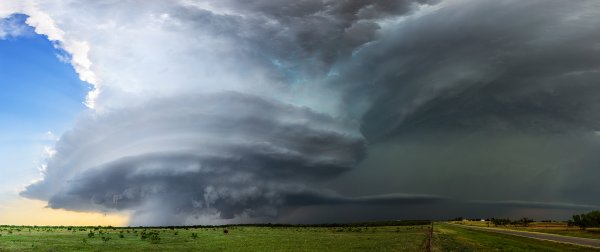
henrietta-supercell-1-Panorama

A massive supercell near Henrietta Texas in May, 2014. © James Brandon

I’ve been a professional photographer for around five years now. I’ve photographed a lot of different subjects throughout the years, but nothing in the world could have prepared me for photographing storms. When I stood in front of my first supercell on May 8th of 2013, I was hooked. A low hanging wall of cloud hovered over the field in front of me as its rotation increased by the second. The 40mph winds at my back were feeding moisture and warm air into the storm. The grass in the field was all bent down towards the monster looming in front of me. Yeah, that’s all I needed to become totally obsessed.

That was back in the spring of 2013. Since then I’ve become good friends with a few very seasoned storm chasers and have gotten a chance to ride along with them on several storms, both last season, and now this season. Mike Mezeul, for example, has become a great friend over the past couple of years and we even lead workshops together now. He’s an absolute wealth of knowledge when it comes to weather and I highly suggest you check out his work.
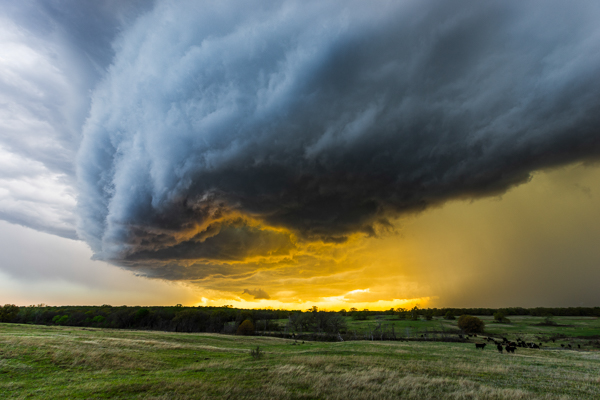
Shelf Cloud Over Ardmore, Oklahoma


In these brief two seasons of chasing, I have already racked up countless hours chasing, God knows how many miles, and my bank account certainly knows how many tanks of gas. In spite of all that, I’m still very new to this world of storm chasing and storm photography, and to be honest, at this point, I’m more of a storm photographer than a storm chaser. I’ve already started getting a lot of questions about storm chasing so I thought I’d put together an article here on dPS going over some of the things I’ve learned thus far, with the preface that I am not an expert at this point. Whether you’re interested in dipping your toes into this genre of photography or just want to know more about it; read on.

1) Storm chasing and storm photography are two very different things

This is something that has become more apparent the more I go out. It’s tough to separate the two because when I go out in search of storms, even I say that I’m going storm chasing (but I’m really not at this point). The people up front in the car are the chasers. The driver is actually doing the chasing and the person riding shotgun is navigating and forecasting. Me? Well most of the time, at this point, I’m in the back; along for the ride. So you might say that I’m chasing with them and you might not. Who cares. I have been in the passenger seat a few times now (in charge of forecasting and navigating) and it is not easy. You can’t be focused on getting pictures in that seat. You’re responsible for navigating the road networks out on the chase — staying one step ahead at all times — while also keeping an eye on the storms using radar.
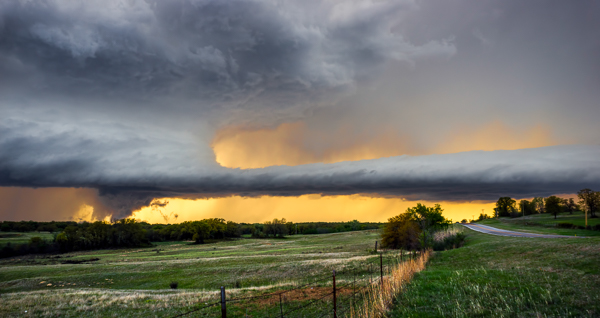
I haven't photographed a tornado yet, but this is about as close as I've come. This wall cloud (the section of a storm where tornadoes DO come from) began lowering behind the tree line while rotating quite rapidly. © James Brandon

I haven’t photographed a tornado yet, but this is about as close as I’ve come. This wall cloud (the section of a storm where tornadoes DO come from) began lowering behind the tree line while rotating quite rapidly. © James Brandon

2) Becoming a good chaser takes time, dedication, mentoring and experience

Learning about weather has become a huge passion of mine ever since starting the process of getting my private pilot’s certificate (which I finally got back in late 2012). Weather has to be a passion to get into chasing. It just has to. You’ve got to have an intimate knowledge of weather patterns, frontal systems, pressure systems, lifting mechanisms, dry lines, triple points, dew points, troughs and so much more. You have to know when a scary looking cloud is just that; a scary looking cloud. Many rookie chasers (yes, I’ve done this) will see a scary, ominous looking cloud that is low to the ground and think it’s a tornado forming. They are looking in one direction — at the wrong part of the storm — while the actual danger is somewhere else. Lucky for me, I’ve always had experts with me to point out what I should be concerned with, and what I shouldn’t be.
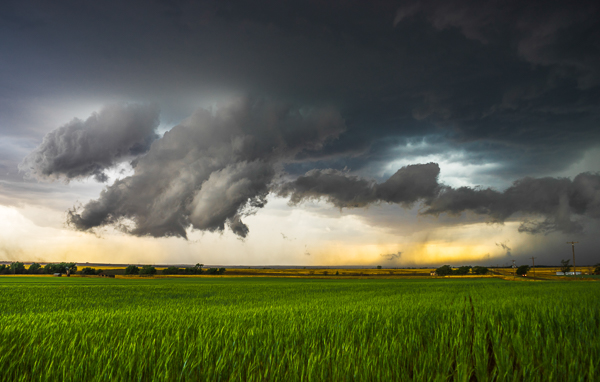
This image shows an area of outflow from the storm that was moving off to the right. At one point the cloud began to resemble a funnel that was almost touching the ground. However, it wasn't rotating and it was on the wrong part of the storm. A few minutes later, tornado sirens began going off in the small town nearby, even though the storm wasn't tornado warned yet. Someone had called in and said a tornado was on the ground.

This image shows an area of outflow from the storm that was moving off to the right. At one point the cloud began to resemble a funnel that was almost touching the ground. However, it wasn’t rotating and it was on the wrong part of the storm. A few minutes later, tornado sirens began going off in the small town nearby, even though the storm wasn’t tornado warned yet. Someone had called in and said a tornado was on the ground.

3) Until you become a seasoned chaser, NEVER go alone

The best chasers out there have dedicated their lives to this stuff. It’s not a weekend hobby. Seriously: Don’t go out alone if you’re a rookie. Just don’t do it. You’ll be putting both your life and the lives of others at risk. Going out on your own means becoming driver, navigator, forecaster, and photographer all at the same time. Just earning a permanent spot up front in a chase vehicle is a coveted thing that takes years (and should) of experience to accomplish. It’s referred to as the “hot seat” for good reason. When you’re on your own, it’s impossible to be totally safe. You have to concentrate on driving, but you also have to pay attention to the storm. That means that you’ll likely be using some sort of radar app on your phone or laptop and will be checking that instead of paying attention to driving. This is a recipe for disaster that will catch up to you eventually.

4) Like any hobby/interest, there are a lot of egos and hot heads

I’m sure this one is going to piss some people off but it’s just the truth. It’s true with anything though. Go buy a Remote Control car and get into RC car racing. Go join your local camera club. Buy an RV and start spending time with fellow RV owners. Every group has them. In storm chasing you will see them driving on the wrong side of the road, passing people with their amber lights flashing while driving 90 in a 55 to get to a storm that’s still 20 miles away (risking lives just to get on a storm), parking their cars just off the side of the road and then leaving their doors open so that traffic has to swerve around them…the list goes on.
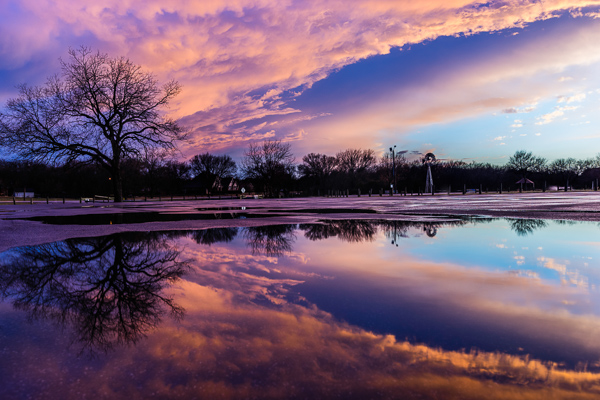
Stormy Skies After A Storm | Keller, TX


Most of them also cover their entire car in storm chasing decals, weather instruments, antennas, and amber lights. The point is: Pay attention to the stuff that these people do and don’t do it. Having amber lights on your car doesn’t make you any more important than the guy in front of, or behind you. Storm chasers are not law enforcement or emergency services. Being a chaser doesn’t give you any special powers or authority.

5) There are also a lot of amazing people

While there are a lot of egos out there, there are just as many incredible people who have more knowledge about weather than I could ever even dream of. These are the people who make storm chasing a noble pursuit. Some of them are self taught, some have masters and doctorates in meteorology or climatology. I’ve had the fortune of meeting some amazing people already just in two seasons. If you can befriend these people, and honor their knowledge and authority, you will have a good chance at advancing your own knowledge at an accelerated pace.
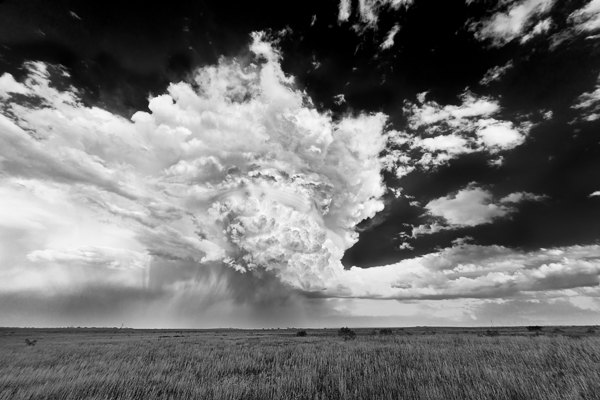
A beast of a supercell in Throckmorton, TX back in May of 2013. Around 10 minutes after I took this photo the storm fell apart and disappeared.

A beast of a supercell in Throckmorton, TX back in May of 2013. Around 10 minutes after I took this photo the storm fell apart and disappeared.

6) It’s not about tornadoes

Sure, easy to say for the guy who hasn’t photographed a tornado yet. In all seriousness though, tornadoes occur in somewhere around 1-2% of supercells. I don’t do this for a living and it’s still a very new passion, so I’m not going to drive 10,000-15,000 miles across the country ever year in search of tornadoes. Even if I did, I’d still see tornadoes so seldom that if that were my goal, I’d feel like a failure. On top of that, tornadoes are incredibly dangerous and destructive, and take lives every year. If I can one day photograph a beautiful tornado in the middle of nowhere, miles away from a town or residence, I’ll be happy. But if there’s a town nearby, or a neighbourhood, or even just a house, I’ll be praying against a tornado each and every time. I’m not after tornadoes. I’m after structure.

Standing in front of a supercell with 30-50mph winds at your back, watching as it rotates and grows, is one of the most awe-inspiring things you’ll ever witness. Seeing the raw power and fury of mother nature is just incredible. I’ve stood in a field with warm, moist 40mph winds at my back feeding the storm in front of me. Then, in an instant, the air turned dry and super cold. The storm had began ingesting the cold air from the evaporating rain it was dropping, and in essence it killed itself by doing so. Within 10 minutes, the entire storm was gone.
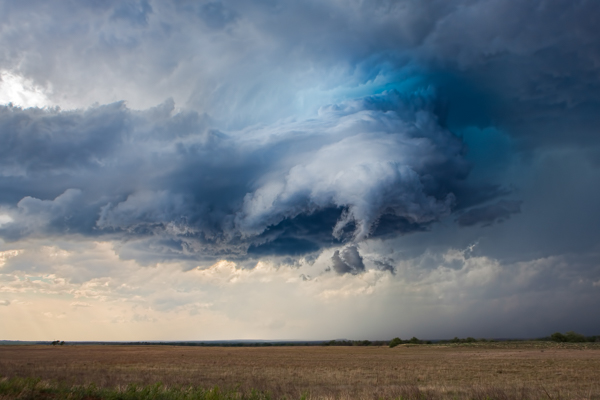
An image of a rotating wall cloud from the storm I described in the paragraph above. This was actually my first storm to ever photograph.

An image of a rotating wall cloud from the storm I described in the paragraph above. This was actually my first storm to ever photograph.

7) Chasing has become a circus in recent years – tread lightly

It’s something you can’t fully understand unless you see it. With shows like Storm Chasers, the constant media attention that chasers get during storm season, social media, etc., an innumerable number of people have come out of the woodworks to chase storms in the U.S. When the Storm Prediction Center posts a moderate or severe risk day, you can rest assured that the roads will be packed with chasers (especially if it’s during a weekend).  This can, and does, present an added element of danger to chasing storms. I’ve heard stores of road networks being completely clogged up from just chasers while a tornado is on the ground nearby. Because of this, the people I chase with usually don’t go out chasing on days like this. Some of the best storms I’ve seen to this day were on slight risk days when most chasers stayed home.
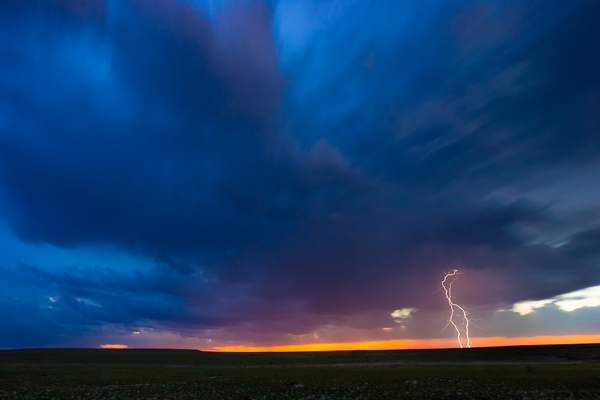
A CG (cloud to ground) lightning bolt strikes in a field somewhere in east Texas as a storm moves off in the distance.

A CG (cloud to ground) lightning bolt strikes in a field somewhere in east Texas as a storm moves off into the distance.

In closing

Storm photography, storm chasing, whatever you want to call it, has become something I look forward to all year long now. The main months for chasing in Texas, and the surrounding area, is March through May – which means I have to dream about it from June through February. Sure, supercells can pop up in the surrounding months but not nearly as often. If you want to see what chasing is all about, please follow the advice that I set out above. These storms kill people every single year and should not be taken lightly. Don’t go unless you can secure a seat in the car of an experienced and knowledgeable chaser. For the record, someone who chases storms doesn’t necessarily qualify as an “experienced and knowledgeable chaser.” There are many people who chase solo year after year who shouldn’t be out there. Use caution and choose wisely.

If you have any questions, let me know in the comments below! To follow along with me during the upcoming storm season, be sure to follow me on Instagram. Thanks!

googletag.cmd.push(function() {
tablet_slots.push( googletag.defineSlot( “/1005424/_dPSv4_tab-all-article-bottom_(300×250)”, [300, 250], “pb-ad-78623” ).addService( googletag.pubads() ) ); } );

googletag.cmd.push(function() {
mobile_slots.push( googletag.defineSlot( “/1005424/_dPSv4_mob-all-article-bottom_(300×250)”, [300, 250], “pb-ad-78158” ).addService( googletag.pubads() ) ); } );

The post 7 Things I’ve Learned from Photographing Storms by James Brandon appeared first on Digital Photography School.


Digital Photography School

 
Comments Off on 7 Things I’ve Learned from Photographing Storms

Posted in Photography


CP+ 2015: First samples from the Sigma 24mm F1.4 DG HSM Art lens

12 Feb

We’re at the CP+ show in Yokohama Japan, where Sigma is showing its brand new 24mm f1.4 full-frame prime lens. The latest in the company’s ‘Art’ series of fast primes, we have high hopes for the new lens based on our extremely positive impressions of the 35mm and 50mm lenses which have come before it. Sigma very kindly let us shoot some sample images on a late pre-production lens and it does indeed look very, very nice. Click through to take a look.

Articles: Digital Photography Review (dpreview.com)

 
Comments Off on CP+ 2015: First samples from the Sigma 24mm F1.4 DG HSM Art lens

Posted in Uncategorized


5 Tech Trends Photographers Should Know (Report from CES 2015)

08 Feb
SamsungTomorrow

By SamsungTomorrow

The dust has settled on the Consumer Electronics Show of 2015, but with the thousands of new tech products hitting headlines this January, what trends, exactly, should photographers be taking note of? Amid the 4K TVs, wearable technology and unusual inventions, the photography industry welcomed a few new announcements in cameras, lenses, drones, data storage and printing. Here’s what technology is headed to the imagining world in 2015.

Cameras

Cameras were admittedly, a disappointment at this year’s CES. There were a handful of compacts and extended zooms from Canon and Panasonic, but only two cameras advanced enough to interest enthusiasts and serious photographers.

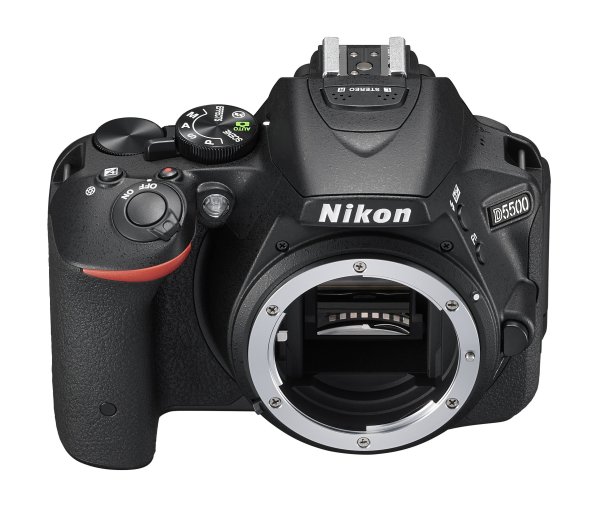
Nikon5500b


The most exciting CES camera announcement comes from Nikon, as an update to their mid-range APS-C camera. The Nikon D5500 replaces the D5300 as the camera giant’s middle option out of three entry level models. While the tech guiding the image quality remains largely unchanged, the D5500 is the first DSLR to feature a touchscreen. The D5500 also continues the trend of smaller camera bodies, shrinking the size gap between DSLRs and mirrorless cameras.

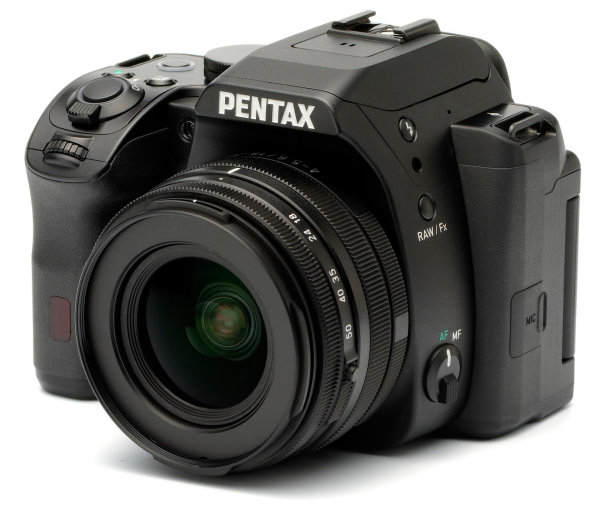
Pentax also announced a DSLR, but hasn’t yet released the name or full technical specs. It does look to be the replacement for the K-50 and appears to have an APS-C sensor, but with only a handful of details, it’s hard to say where the new camera fits in.

Lenses

While cameras are getting smaller, lenses are following that same trend. Out of Pentax’s three new lens announcements, the most notable is actually the 18-50mm kit lens, because it is collapsable. When collapsed, it appears to be as small as a prime lens. While collapsable lenses have been around for some mirrorless cameras, it’s a refreshing update to bulkier DSLR lenses.

new_pentax_camera


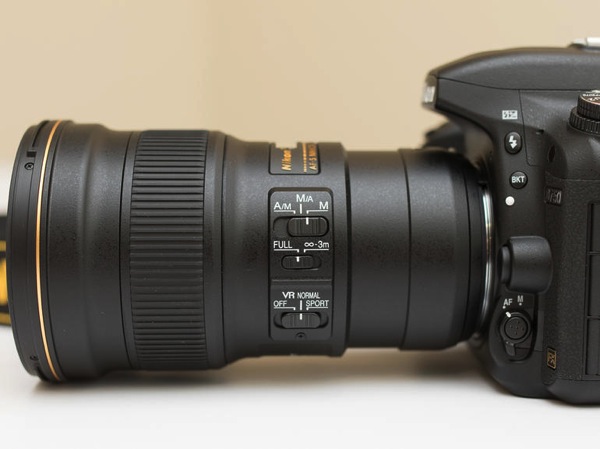
Nikon is following the smaller-is-best trend as well, with a 300mm that they say is the lightest full frame fixed focal length AF lens. They don’t appear to be sacrificing features to get down to the smaller size either, offering 4.5 stops of image stabilization, ED glass, and electromagnetic aperture control. Technology called Phase Fresnel helps keep the size down while fighting distortion.

Nikon 300mm f4

Drones

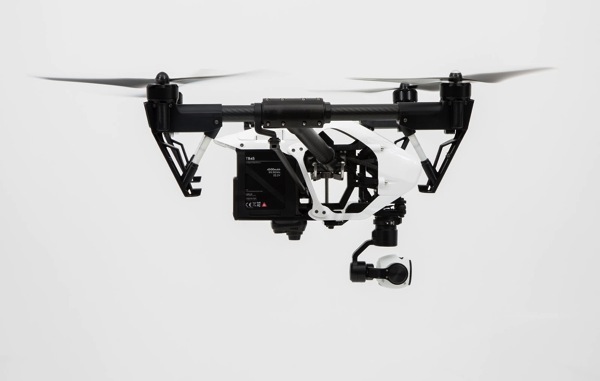
2015 could be described as the year of the drone, at least for CES anyways. Several dozen new models were on display with a variety of different features. Some models include a built-in camera, including one capable of shooting 4K video or 12 megapixel RAW, the DJI Inspire 1, while others allow you to rig any camera and lens mount. The new Airdog follows you (or whoever is wearing the wristband) around automatically taking video. While most use a remote, the Hexo+ is controlled completely via smartphone app. More are also becoming capable of ariel stunts, though these models have yet to see a battery life long enough to make them practical.

DJI Inspire 1

One thing is for sure, soon there will be a drone on the market to fit nearly any ariel photography need, and the more widely available the technology becomes, the more affordable it will be as well.

Memory

While storing images isn’t exactly exciting, CES 2015 brought more than a few image storage solutions worth noting. Samsung and Seagate both introduced remarkably small external hard drives, though a few stand out as advancing beyond just big capacity in a tiny size.

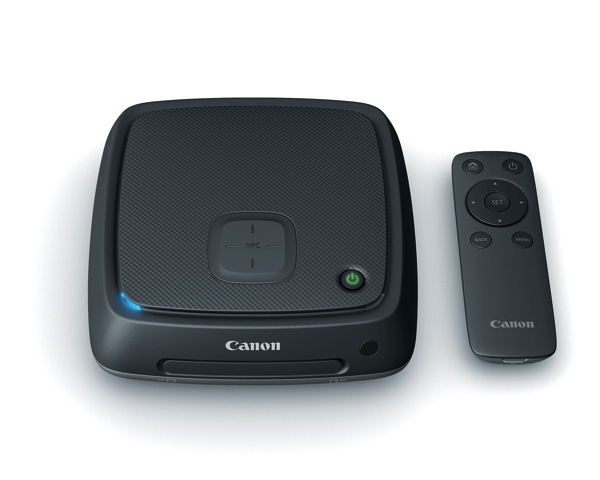
Canon has finally given a name and full details to the system they’ve been hinting at since 2010, now known as the Canon Connect Station CS100. Using wi-fi to connect to phones and wi-fi enabled cameras wirelessly, images and video can be easily uploaded to the system. The CS100 is designed to be used with a TV to display family photos and videos, like a Roku box but for photos. The 1TB of storage won’t be enough for serious professionals, but it’s worth watching to see how the technology expands in the future.

Canon connect station

Toshiba also introduced a new form of memory cards. While they appear to be more gimmicky than actually useful, it’s an interesting change and indicates some potentially interesting advancements in the future. The cards can be read with a NFC-enabled Android smartphone, but it only allows you to see 16 thumbnails and how much space is available. Actually transferring photos would require adding a power source to the card, and NFC doesn’t have the bandwidth for that kind of transfer yet. Still, seeing the advancements offers an interesting glimpse into what might be possible a few years down the road.

Printing

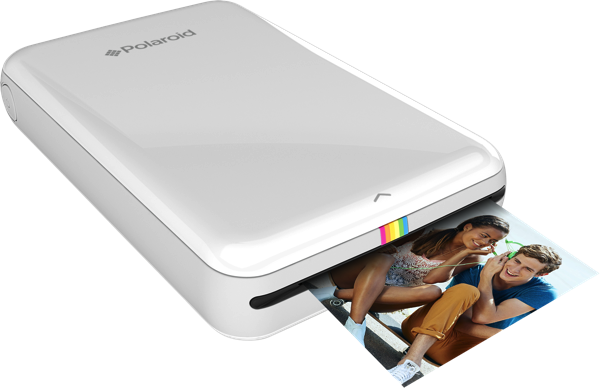
While Polaroid certainly may not seem like a company making big CES digital photography announcements, their Zip Mobile Printer is worth taking a look.

Zip mobile printer

Printing 2×3 images wirelessly from any smartphone or tablet, the Polaroid Zip is keeping in tune with the manufacturer’s foundation on instant, easily-shared physical images. But perhaps even more interesting is that the printer doesn’t use ink. Developed by Zink, the photo paper is made with embedded dye crystals. Heat from the printer determines which colors are activated to make the print, which is smudge-proof. The entire printer is about the size of a smartphone.

While designed for smartphone use, it’s worth noting and perhaps wondering if something similar might be in store in upcoming years for use with wi-fi enabled DSLRs and mirrorless cameras. The images print in under a minute, without the need for ink – an advanced version could come in handy for event photographers or photo booth style applications.

If this year’s CES is any indication, cameras and lenses will continue to get smaller without sacrificing on image quality, while accessories continue to expand in unusual ways. From drones to wirelessly printing images without ink, it’s bound to be an interesting year for photography-related tech.

googletag.cmd.push(function() {
tablet_slots.push( googletag.defineSlot( “/1005424/_dPSv4_tab-all-article-bottom_(300×250)”, [300, 250], “pb-ad-78623” ).addService( googletag.pubads() ) ); } );

googletag.cmd.push(function() {
mobile_slots.push( googletag.defineSlot( “/1005424/_dPSv4_mob-all-article-bottom_(300×250)”, [300, 250], “pb-ad-78158” ).addService( googletag.pubads() ) ); } );

The post 5 Tech Trends Photographers Should Know (Report from CES 2015) by Hillary Grigonis appeared first on Digital Photography School.


Digital Photography School
 
Comments Off on 5 Tech Trends Photographers Should Know (Report from CES 2015)

Posted in Photography


Why I Switched From LEE Filters to Formatt-Hitech for Landscape Photography

03 Feb
A hard graduated neutral density filter worked great here to darken the sky.

A hard graduated neutral density filter worked great here to darken the sky.

There are three types of photographers in the world; those that try to get it right in camera, those that simply rely on post-processing, and those who believe that both mindsets together lead to the best possible outcome. I try to always keep the mindset of that third type. If I can get everything right in camera (and save minutes or even hours in post) I will. I also have always loved post-processing and the art of making an image come to life. When shooting landscapes, you are more often than not at the mercy of mother nature. You can certainly schedule your time wisely and shoot at the best times of day but that doesn’t always mean that you’ll be able to capture everything in camera, as it is.

I’ve been using filters in one way or another for the better part of four years now. I started off with those bloody screw in filters (my gosh were those a pain in the rear). I remember very vividly just how frustrating it was to need a separate filter for each and every lens. I also remember how long it took to get to a scene, set up my tripod, look at the scene, decide I needed a filter, realize the filter I needed doesn’t fit the lens I had on, switch lenses, get the filter out of its case, screw it on, refocus and then finally take a shot.

I used a my Formatt-Hitech 105mm circular polarizer here to remove glare from the rocks and water. The images without the filter were virtually unusable.

I used a my Formatt-Hitech 105mm circular polarizer here to remove glare from the rocks and water. The images without the filter were virtually unusable.

My brief stint with LEE Filters

After giving up on the screw-in filters, I eventually discovered the LEE Filter system. Those LEE filters are dang near impossible to get your hands on. I had to put my name on a waiting list at a camera store just to get the foundation system to attach the filters to my lenses. I then had to buy my filters on eBay and pay over retail to get them. My absolute favorite filter from LEE was (and still is) the Big Stopper. The Big Stopper is a 10 stop neutral density filter that will slow your shutter speeds down by…well…10 stops. This is a long exposure filter that is meant to slow time down drastically. You can easily get one to two minute exposures in broad daylight. The problem with the Big Stopper is that it’s a glass filter. This means that you have to be very careful with it and any time it’s on your person, you have to be extra cautious.

This 2 minute exposure caused the hundreds of tourists in the scene to disappear completely! © James Brandon

This two minute exposure caused the hundreds of tourists in the scene to disappear completely! © James Brandon

So what went wrong with LEE? Well, I’ll tell you…

Back in 2013, I was in California and was traveling up the coast from San Luis Obispo to San Francisco with my buddy Brian Matiash. We made it up to Big Sur and were trying to get down to Pfeiffer Beach for sunset. As we made our way up Highway 1, we pulled over to photograph Big Creek Bridge. I decided to put my Big Stopper to good use and started grabbing some long exposures of the bridge with the waves crashing against the shore below. I got a few shots where I was standing but soon decided to switch lenses and try something else. When I’m out in the field and need to switch lenses, I always point my camera down to the ground so that minimal dust will get into the censor during the swap. I pointed the camera down toward the ground (while still on the tripod) and then reached for my filter pouch to take off my Big Stopper before changing lenses. That’s when it happened. I felt a big thud against my shoe and then heard the terrible sound of glass hitting the gravel beneath my feet. Ugh…

It turns out the LEE filter holder can’t support the weight of a heavy Big Stopper. I’m not sure if this is a design flaw or what, but it certainly seems like oversight to me. With LEE filters (just like Formatt-Hitech) you have to screw an adaptor onto the lens you’re using (I just leave these adaptors screwed on most of the time). The filter holder then clips onto the adaptor via a pull pin on one side. This pull pin is angled away from the lens to match the shape of the ring adaptor. Because of the angle of this pull pin, you can actually just pull the filter holder off of the adaptor with surprisingly little force. Of course this will never happen if your camera is pointed out toward the horizon, but who among us never points their camera down? I got lucky that day because the filter hit my shoe first before hitting the ground. It didn’t bust the entire filter but one of the corners did however get a big chunk taken out of it.

My introduction to Formatt-Hitech

Colby Brown has been a friend of mine for a couple years now. I met him during the very, very early days of Google+ when a group of five or six of us would do hangouts almost daily. I have had the pleasure of watching his career virtually explode over this time and was really excited to see him land a signature edition filter kit with Formatt-Hitech. I’ll be the first to admit, I was pretty skeptical about trying any other type of filter besides LEE. Still to this day, I love my Big Stopper. However, that “event” in Big Sur really left me uneasy and nervous about using the LEE holder. So when Colby offered to send me his kit to review, I said what the heck, let’s see how it stacks up (see what I did there?) against LEE.

Unboxing

Don’t worry, I’m not posting one of those monotonous unboxing videos where I show you how the filters were packaged or how much paperwork is included. I’m including this section because of one thing; when I pulled the Formatt-Hitech filter holder out of the box, I knew instantly that it was better than LEE. It just feels better. It’s aluminum instead of plastic for one, but on top of that – the filter holder has a fastening screw to attach to the adapter ring instead of the little notched pull tab that’s on the LEE system. At first I wasn’t really sure this would be any better because, after all, you’re essentially just tightening the filter holder onto the adapter ring with a single screw. As it turns out though, the filter holder fits very snuggly onto the adapter ring, so when you tighten the screw the filters aren’t going anywhere. It takes a very strong push to cause it to budge at all, and no amount of filters will ever weigh that much. The LEE, on the other hand, requires surprisingly little force (see the video above).

Quality between LEE and Formatt-Hitech

The Colby Brown Signature Edition Landscape Filter Kit comes with basically everything you need to get started and stay satisfied using filters in the field for a very long time. I went all out and got the 100mm Premier Kit which comes with two graduated ND filters, a 6 Stop ND filter, the aluminum filter holder and to top it all off, a 105mm circular polarizer. Everything in the kit is extremely high quality and I use the filters on virtually every photo trip I take.

In all honesty, there isn’t a massive difference in the quality of images that come from either filter. Some will disagree with me on this of course. The LEE Big Stopper puts out a very obvious blue color cast in your images while Formatt-Hitechs new Firecrest filters put out virtually zero color cast. I’m actually quite fond of that blue/cool color cast though and have left it in several of my images to some extent. It’s also very easy to correct with a simple white balance adjustment so I’ve never considered it a huge deal.

I used my Formatt-Hitech 105mm Circular Polarizer for this shot as well to remove the glare from the rocks in the foreground.

I used my Formatt-Hitech 105mm Circular Polarizer for this shot to remove the glare from the rocks in the foreground.

Where Formatt-Hitech wins

There are three main areas where Formatt-Hitech Filters excel and where LEE falls short.

  1. The first of those areas is the one I already covered; a superior filter holding system constructed of durable aluminum and a tightening mechanism that won’t fail in the field when pointed at a downward angle.
  2. The second area where Formatt-Hitech wins is availability. The simply produce and ship enough filters so photographers like you and me don’t have to be put on waiting lists, or pay over retail to acquire their products.
  3. The third reason Formatt-Hitech takes the cake is that they continue to push to boundaries of what filters can do. They continue to innovate and advance. Their new line of Firecrest filters can stop down a scene by up to 16 stops! That means you could shoot in broad daylight at f/8, ISO 100 and a shutter speed of 1/1000th of a second and as soon as you slide that filter on, you’re shutter speed will drop all the way down to 1 minute. That’s insane!
Here I used my 10 stop neutral density filter to slow the shutter speed way down. This was a 25 second exposure taken before sunset. The clouds coming over the Sierras in the background is actually smoke from the rim fire that occurred back in 2013.

Here I used my 10 stop neutral density filter to slow the shutter speed way down. This was a 25 second exposure taken before sunset. The clouds coming over the Sierras in the background is actually smoke from the rim fire that occurred back in 2013.

Conclusion

Both LEE and Formatt-Hitech make great filters (although Formatt-Hitech has a slight edge in my opinion). However, the fact that I simply can’t trust the filter holder from LEE was enough to make me look at other options. Sure, I could have just stuck with LEE filters and got a new filter holder system, but I like to be all in with the brands I associate with in the industry. The failure of the LEE system caused me to look into Formatt-Hitechs options and when I did, I was pleasantly surprised to find a superior company making superior products. I’m not sponsored by Formatt-Hitech, I just honestly believe their products are top notch. Let me know if you have any questions below.

googletag.cmd.push(function() {
tablet_slots.push( googletag.defineSlot( “/1005424/_dPSv4_tab-all-article-bottom_(300×250)”, [300, 250], “pb-ad-78623” ).addService( googletag.pubads() ) ); } );

googletag.cmd.push(function() {
mobile_slots.push( googletag.defineSlot( “/1005424/_dPSv4_mob-all-article-bottom_(300×250)”, [300, 250], “pb-ad-78158” ).addService( googletag.pubads() ) ); } );

The post Why I Switched From LEE Filters to Formatt-Hitech for Landscape Photography by James Brandon appeared first on Digital Photography School.


Digital Photography School
 
Comments Off on Why I Switched From LEE Filters to Formatt-Hitech for Landscape Photography

Posted in Photography


Learn From The Masters: Muybridge To Witkin

28 Jan

The Masters


Hey FashionPhotographyBlog.com readers! 

Alana Tyler Slutsky is back on FashionPhotographyBlog.com, after sharing some of the inspiring works of the great photography masters, to reveal the works of some more masters who have pioneered the photographic craft. We are all ready Alana!


Need some more inspiration? Look no further! Here are some more Masters of Photography. Tried and tested, these photographers have withstood the test of time. Am still a firm believer that you can’t really call yourself a photographer unless you study the history of the photographic medium and have an understanding of the masters – who they are and what they did that sets them apart from the rest. In my opinion, this applies to all areas of life, so here’s more names to add on the cheat sheet of names of those commonly referred to as “The Masters”;  who they are, what they did and why they’re still so awesome (names have been sorted alphabetically for your convenience).


Eadweard Muybridge


Muybridge used multiple cameras to stop and study motion. A popular debated question, whether or not all four of a horses feet leave the ground as it gallops, was answered with Muybridge’s studies – proving that all four feet did indeed leave the ground.  Muybridge managed to take over 100,000 images capturing the motion of animals and humans.

The work of Eadweard Muybridge featured on Fashion Photography Blog (FashionPhotographyBlog.com)

Helmut Newton


Newton is one of the most famous fashion photographers to date.  His works are often vert provocative and erotic in nature. Newton’s images are a reflection of the sexual revolution occurring during his time. There is much to be said about Newton, but even more to be learned by viewing his images. Take a peek, they’re sure to not disappoint! “If a photographer says he is not a voyeur, he is an idiot,” Newton once said.

The work of Helmut Newton featured on Fashion Photography Blog (FashionPhotographyBlog.com) The work of Helmut Newton featured on Fashion Photography Blog (FashionPhotographyBlog.com)

 Irving Penn


Irving Penn is another one of those prolific fashion photographers. He is one of the first photographers to photograph a subject against a stark grey or white background. His prints are known for deep contrast and a crisp feeling.  He’s also known for shooting interesting still life images composed of trash found on the street and cigarette butts. Penn is known for his immaculate control and attention to detail.

The work of Irving Penn featured on Fashion Photography Blog (FashionPhotographyBlog.com) The work of Irving Penn featured on Fashion Photography Blog (FashionPhotographyBlog.com)

Stephen Shore


Shore is the other big pioneer of color photography. Shore went on a series of road trips and documented his way across America and Canada. Initially what started as photography on a little 35mm Mickey Mouse camera transformed into a new way of seeing when he eventually changed over to a large format camera (first 4″x5″ then 8″x10″). Shooting with an 8″x10″ camera completely changes the way one sees and composes an image, this is greatly reflected in Shore’s work.  Shore is known for his dead-pan shooting style which often depicts interiors and landscapes with no people in them, almost as if they’re a Hollywood set that has emptied out for the day.


The work of Stephen Shore featured on Fashion Photography Blog (FashionPhotographyBlog.com) The work of Stephen Shore featured on Fashion Photography Blog (FashionPhotographyBlog.com)

Edward Weston


Another member of Group f/64 (along with Ansel Adams), Weston is known for his close ups of natural forms, landscapes and nudes.

The work of Edward Weston featured on Fashion Photography Blog (FashionPhotographyBlog.com) The work of Edward Weston featured on Fashion Photography Blog (FashionPhotographyBlog.com)

Now, these next two may not formally be considered “Masters,” but they are in my book! Two of my favorite fine art photographers, these guys are quite the intellects.


Joel-Peter Witkin


Witkin creates tableaux often relating to the idea of death.  Often Witkin uses corpses and often incorporates dwarfs, transvestites, hermaphrodites and the physically deformed into his work.  It’s dark, it’s twisted, pretty creepy stuff.  In fact, it’s the things that nightmares are made of.  But at the same time, it’s downright awesome!

The work of Joel-Peter Witkin featured on Fashion Photography Blog (FashionPhotographyBlog.com) The work of Joel-Peter Witkin featured on Fashion Photography Blog (FashionPhotographyBlog.com)

Hiroshi Sugimoto


Sugimoto views his work as “time capsules” of an event or series of events. This is most evident in his “Theatres” series, my personal favorite, where Sugimoto will leave the shutter of his camera open during the screening of a movie and allow the light that emanates from the screen to fill the room and in turn illuminate his image. There is a beautiful simplicity to his work. Both Sugimoto’s theatres and seascapes are absolutely stunning.  If anyone is looking to buy me a holiday gift, I wouldn’t refuse a Sugimoto print, or original, *hint hint*)


The work of Hiroshi Sugimoto featured on Fashion Photography Blog (FashionPhotographyBlog.com) The work of Hiroshi Sugimoto featured on Fashion Photography Blog (FashionPhotographyBlog.com)

Take notice that majority of the Masters shoot with large format 8″x10″ cameras. This causes them to slow down and really look at their image, see what they’re composing. Unlike photographers now-a-days, shooting large format and film causes a photographer to shoot much slower, causing them to be more precise. This also means less shots taken. Next time you want to take 300 images of one look, slow it down, think of the Masters and try to really think through your shot. A quick description really doesn’t do these guys justice.  Take some time, Google them, get inspired. Hey, maybe you’ll learn a thing or two!


– Alana


Did you find Alana’s post about the Masters of Photography interesting? Do you agree with the selection? Is there any that you would add that we have missed out that we should include? Please leave your comments below in the comment section. We would like to know what you thought about this article. If you enjoyed this post and interested in learning about the Photography Masters, check our post on Fashion Photography Blog titled “Learn From The Masters: Adams To Meatyard“.


IMAGE SOURCE: 

Feature image & images 1-13: courtesy of Alana Tyler Slutsky.


Fashion Photography Blog

 
Comments Off on Learn From The Masters: Muybridge To Witkin

Posted in Uncategorized


Learn From The Masters: Adams To Meatyard

26 Jan

The Masters


Hey FashionPhotographyBlog.com readers!


Need some inspiration? Look no further! Here are a few of the Masters of Photography. Tried and true, these men have stood the test of time. I’m a firm believer that you can’t call yourself a photographer unless you study the history of the medium and have an understanding of the masters – who they are and what they did that sets them apart from the rest. In my opinion, this applies to all areas of life, so here’s a cheat sheet to those commonly referred to as “The Masters.”  Who they are, what they did (and why they’re so awesome). I’ll even make it easy for you – they’re sorted alphabetically.


Ansel Adams


Adams, an environmentalist and symbol of the American West, is best known for his black and white landscapes. Adams initially developed the “Zone System,” a technique of determining exposure, development and contrast, to help his students create optimal prints. This technique became indicative of Adam’s style and results in the images we all known and love. Ansel Adams shot using a large format camera and is a founding member of “Group f/64″ – a group of “Modernist” photographers that shared a sense of style characterized by sharp-focus (largely uncommon at the time).

The work of Ansel Adams featured on Fashion Photography Blog (FashionPhotographyBlog.com)


Richard Avedon


Most well known for his images of fashion and portraiture, Avedon became an icon in the later half of the 20th century. Avedon is the master of minimalism, known for well lit portraits in front of a white background. Using the large format camera to his advantage, Avedon would use the time it took to compose a shot to get into his subjects head and pull out emotions that typically aren’t photographed by anyone but Avedon.


Along with Avedon’s work for all the big fashion magazines and designers, he is known for his series, “In The American West,” where he traveled the rural American West with a portable studio and typically used a large format camera, the sun and a white background to create some of his most iconic images. If you ever have the opportunity to see an Avedon print in person, seize it! His prints are beautiful. You can get lost in them. Be sure to take notice of the depth of field and tonal ranges.


 The work of Richard Avdeon (Davima with Elephants) featured on Fashion Photography Blog (FashionPhotographyBlog.com)

 The work of Richard Avdeon (West) featured on Fashion Photography Blog (FashionPhotographyBlog.com)

From “In the American West”


Bernd & Hilla Becher


A married German photography team, Bernd and Hilla Becher are known for their series of structures arranged in grids, referred to as “typologies”. They come from a school of “straight” photography, which depicts a scene as objectively as possible.


The Becher’s have also left their mark on photography through their teaching. Mentors to some other big names in photography such as Andreas GurskyThomas Ruff and Thomas Struth (check them out!) they’re considered one of the biggest influences in the history of photography.


 The work of Bernd & Hilla Becher featured on Fashion Photography Blog (FashionPhotographyBlog.com)


Henri Cartier Bresson


Considered to be the father of modern photojournalism, Bresson is known for coining the term “the decisive moment”. Bresson is known for developing a unique style of street photography that has influenced photographers to this very day. Bresson was a believer of composing his images, in camera, not in the darkroom and was an avid user of Leica 35 mm cameras, shooting only black and white film.


The work of Henri Cartier Bresson (Hyeres) featured on Fashion Photography Blog (FashionPhotographyBlog.com)
The work of Henri Cartier Bresson (Gare) featured on Fashion Photography Blog (FashionPhotographyBlog.com)

William Eggleston


Eggleston is one of two fathers of color photography. He is known for his aesthetic which transforms ordinary, mundane subjects into something extraordinary – by elevating the color to be the true subject due to the simplicity of his tangible subject.

The work of William Eggleston featured on Fashion Photography Blog (FashionPhotographyBlog.com) 
The work of William Eggleston featured on Fashion Photography Blog (FashionPhotographyBlog.com)


Walker Evans


Evans is most well known for his work documenting the Great Depression for the Farm Security Administration. Evans’ finds success in the fact that his images are relatively “objective” – well, as objective as a photographer can be.

The work of Walker Evans featured on Fashion Photography Blog (FashionPhotographyBlog.com)


Robert Mapplethorpe


Mapplethorpe is known for his huge black and white images of flowers and nudes. The homoeroticism and sexual energy apparent in Mapplethrope’s work has evoked quite some criticism and controversy.


The work of Robert Mapplethorpe featured on Fashion Photography Blog (FashionPhotographyBlog.com)
 The work of Robert Mapplethorpe featured on Fashion Photography Blog (FashionPhotographyBlog.com)

Ralph Eugene Meatyard


Meatyard is famous for his somewhat haunting images of masked people, most commonly children.  According to Meatyard, he felt that all people are connected and when you don a mask, it removes any differences.  Consider his work somewhat of a commentary on connectivity and individuality.  Despite declaring himself a “dedicated amateur,” Meatyard had been noticed in serious photography circles.  Unfortunately he died of cancer before the age of 50, with only around 14 years of photography under his belt.

 The work of Ralph Eugene Meatyard featured on Fashion Photography Blog (FashionPhotographyBlog.com)


Stay tuned for part two of the Masters coming up soon!


– Alana


Did you find Alana’s post about the Masters of Photography interesting useful? Do you agree with the selection? Is there any that you would add as your inspiration? Please leave your comments below in the comment section. We would like to know what you thought about this post. If you enjoyed this article, don’t go away as Alana has another post with even more photographic masters just around the corner on FashionPhotograhyBlog.comIf you want more photographic inspiration, check our post “My Top 10 Favorite Photographers“.


IMAGE SOURCE: 

Feature image & images 1: courtesy of Alana Tyler Slutsky.


Fashion Photography Blog

 
Comments Off on Learn From The Masters: Adams To Meatyard

Posted in Uncategorized


Project from war-torn Ukraine wins Terry O’Neil Award for Italian photographer

24 Jan

The winners of the 2014 Terry O’Neil Award have been announced, with Italian photographer Giorgio Bianchi collecting the first prize with a documentary series covering the crisis in Ukraine. Behind Kiev’s Barricades won Giorgio £3000 and a commission for the UK’s Guardian newspaper. Take a look at some of the winning images. See gallery

Articles: Digital Photography Review (dpreview.com)

 
Comments Off on Project from war-torn Ukraine wins Terry O’Neil Award for Italian photographer

Posted in Uncategorized


8 Quotes From Master Photographer Ansel Adams and How You to Apply Them to Your Photography

22 Jan

The technology of photography has been evolving at a very rapid rate. Most of our cameras are almost obsolete by the time we purchase them! But one thing about photography hasn’t changed over the years and that is the art of photography. We can learn so much about the that from the masters of yester-years. Ansel Adams was one of these great masters, best known for his iconic black and white images of the American West. Let’s review some quotes from Mr. Adams and consider how we might apply them to modern day photography.

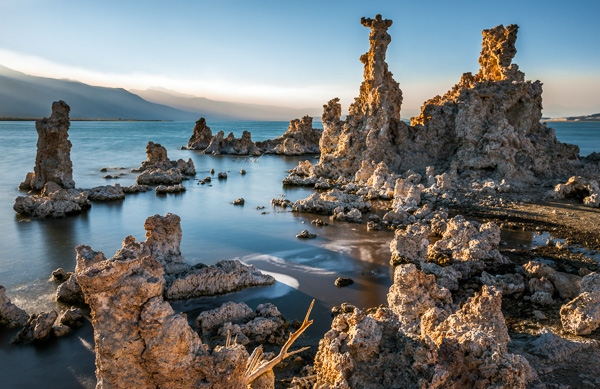
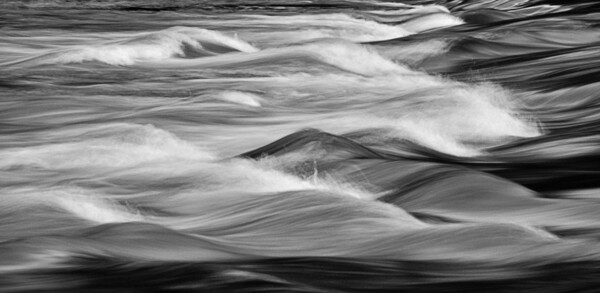
This image was part of a digital display that ran alongside the temporary exhibition, Ansel Adams: Photography from the Mountains to the Sea on at the National Maritime Museum, Greenwich from 9 November 2012 - 28 April 2013.

This image by Bruce Wunderlich was part of a digital display that ran alongside the temporary exhibition, Ansel Adams: Photography from the Mountains to the Sea on at the National Maritime Museum, Greenwich from 9 November 2012 – 28 April 2013.

“Expressions without doctrines, my photographs are presented as ends in themselves, images of the endless moments in the world.”

You surely have heard the expression, “A picture paints a thousand words.” Ansel thought of his images as expressions of how he felt in the moment he released the shutter. These expressions require no words of explanation. He was also quoted as saying “A true photograph need not be explained, nor can it be contained in words.” Likewise, we should look for moments in the world around us worthy of a captured image, which affects us emotionally before we click the shutter.

“Twelve significant photographs in any one year is a good crop.”

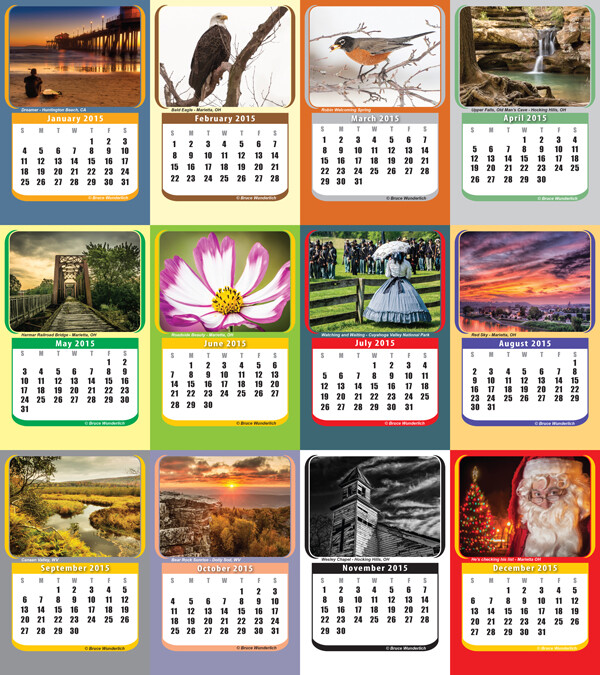
It is always a good idea to keep your portfolio up-to-date. A yearly inventory of your work, examining what you captured well and what you need to improve upon will help keep you focused on your artistic expressions. Photographers with digital technology have the tools to take many more images than Adams could with film and plates, so here’s a suggestion: Perhaps the number 12 suggests aiming for one memorable image each month. Take these most significant images and create a calendar featuring your art that you can give to friends. Regardless, keep your favorite images, your “crop”, organized and ready to share.

My 2014  "crop" in my 2015 desk calendar

2014 “crop” presented in a 2015 desk calendar.

“Sometimes I do get to places just when God’s ready to have somebody click the shutter.”

One favorite story about Ansel Adams centers around the circumstances of one of his most iconic images, “Moon rise over Hernandez”. As he was driving from what was described as a very unsuccessful day of shooting in New Mexico, suddenly Ansel pulled the car off the road when he saw the now famous subject. The light was changing so quickly that he was only able to get one exposure before the light was gone. Never think a day of shooting is a waste, that iconic image might just be around the next bend.

“There are no rules for good photographs, there are only good photographs.”

In a statement for a 1932 exhibit in San Francisco, Ansel listed his two “rules” of photography:

  1. The completed image must directly reflect how the subject appeared in the camera.
  2. He had to see the finished photograph in his mind before the shutter was released.

One of the most important things Ansel Adams left with us was this principle of pre-visualization. This mental vision of what he was expecting to communicate with the images he created is what makes them so prominent even today, some three decades after his death. We see too many photographers out in today’s world just aiming and shooting, not taking the time to think about the subjects before them and how the resulting image will speak to (or not) the viewers of the image.

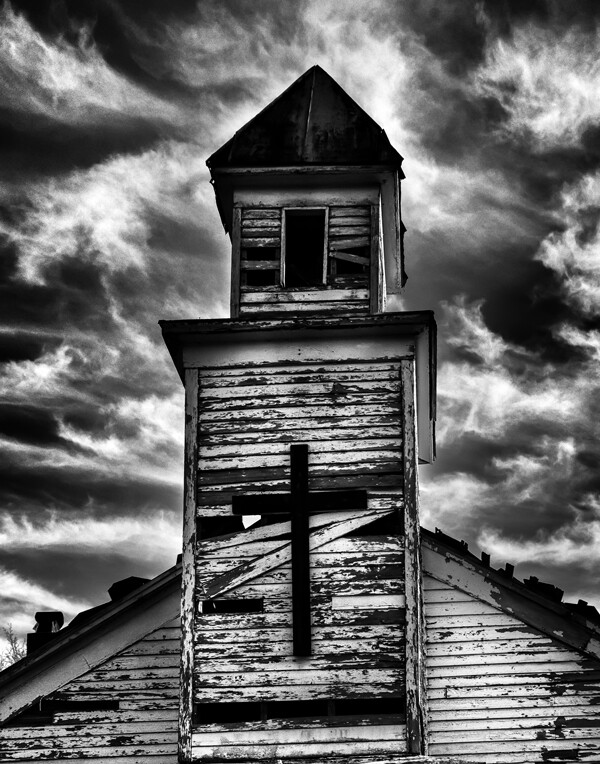
Using Ansel's previsionalization method, When approaching this image I immediately visualizied this image as a black and white by adding a polarzing filter I was able to make the blue sky more saturated which can in handing later during processing to create dark and contrasting sky. I also intentionally under-exposed the image to ensure that the white boards of the abandon church are not to bright, to help convey the abandon feeling of theimage.

Using Ansel’s pre-visualization method when approaching this shot, I immediately visualized this image as a black and white. By adding a polarizing filter, I was able to make the blue sky more saturated which helped later during processing to create a dark and contrasting sky. I also intentionally underexposed the image to ensure that the white boards of the run-down church would not appear too bright, to help convey the abandoned feeling.

 “Ask yourself, “Why am I seeing and feeling this? How am I growing? What am I learning?” Remember: Every coincidence is potentially meaningful. How high your awareness level is determines how much meaning you get from your world. Photography can teach you to improve your awareness level.”

What a powerful quote! “Every coincidence is potentially meaningful”. To develop the creative eye that it takes to create great photos we need to be on the constant lookout for unexpected opportunities. So, must we carry our camera at all times? How many times have you come across a great scene only to find you do not have your camera ready and available? It happens to all of us, but don’t get caught up in the fact that you don’t have your camera with you. Instead, use this opportunity to think about the shot and visualize how you would have shot it, how you would compose it, and what camera settings and filters you might have used to capture the scene. Even though you may have missed the shot, you can use this as a learning experience to be prepared in the future.

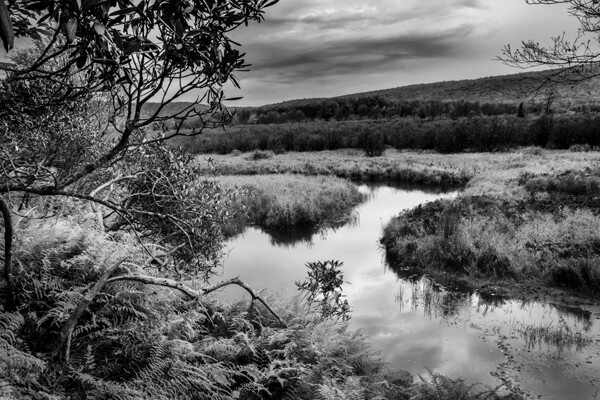
By studying the images of great photographers of the past and present we can learn how to approach our own images. This image, captured in the Canaan Valley Resort State Park in West Virginia, reminded me of Ansel's image The Tetons and Snake River.

By studying the images of great photographers of the past and present we can learn how to approach our own images. This image, captured in the Canaan Valley Resort State Park in West Virginia, reminded me of Ansel’s image The Tetons and Snake River.

 “The machine-gun approach to photography – by which many negatives are made with the hope that one will be good – is fatal to serious results.”

With the new digital age of photography it is so easy to take the “spray and pray” approach to photography, but we must learn to slow our approach and think about every piece of the image that we are capturing. One way to take a more deliberate approach with a landscape shoot is to place your camera on a tripod, which will allow you to concentrate more on the composition of your image. There are plenty of situations where the machine-gun approach to photography can be helpful, for example, action subjects such as sports or wildlife, but in other areas this approach can be fatal.

“A photograph is never finished until I burn the corners.”

Ansel considered it important to keep the viewer’s eye in the frame of his images, so he would burn (darken) any light areas near the edges of the image. These adjustments were quite time-consuming and tedious to produce in the darkroom of Adams’ era. Today, however, we can easily accomplish these steps in Photoshop or Lightroom. Be careful not to overdo it, as these changes should be made in a way that is completely imperceptible to the viewer of the image.

“I am sure the next step will be the electronic image, and I hope I shall live to see it. I trust that the creative eye will continue to function, whatever technological innovations may develop.”

Many fans of Adams’ photography ask, “Would Ansel Adams have shot digital?” This quote indicates he would have! Ansel was never overly concerned about the process of taking photos as much as he was about the creative experience and how a photograph made him feel. Ansel Adams would not only be shooting digital, but also he would be a Photoshop guru, probably working closely with Adobe to develop and improve the photographer’s experience.

Where do we go from here?

So in conclusion, has photography changed over the years? Yes, the process has changed, but the art of photography remains the same. By studying the guiding principles of great photographers of previous generations, like Ansel Adams, we can sharpen our skills to become the best photographers of our day. Please leave a comment below: What is your favorite photographer’s quote and how has it inspired you?

googletag.cmd.push(function() {
tablet_slots.push( googletag.defineSlot( “/1005424/_dPSv4_tab-all-article-bottom_(300×250)”, [300, 250], “pb-ad-78623” ).addService( googletag.pubads() ) ); } );

googletag.cmd.push(function() {
mobile_slots.push( googletag.defineSlot( “/1005424/_dPSv4_mob-all-article-bottom_(300×250)”, [300, 250], “pb-ad-78158” ).addService( googletag.pubads() ) ); } );

The post 8 Quotes From Master Photographer Ansel Adams and How You to Apply Them to Your Photography by Bruce Wunderlich appeared first on Digital Photography School.


Digital Photography School
 
Comments Off on 8 Quotes From Master Photographer Ansel Adams and How You to Apply Them to Your Photography

Posted in Photography