RSS
 

Posts Tagged ‘Free’

Free Versus Paid Photography Portfolio Websites – Which is Best for You?

13 May

One of the joys of photography is sharing it with the world. Once upon a time, a photography portfolio was a collection of prints, but digital photography and the internet have changed everything. Photography portfolios these days come in many forms, and they are almost exclusively online.

So, do you need a portfolio, and how do you decide where to proudly display your photos for the world to see?

Long exposure landscape photo of rocks at sunset, Mt Maunganui, New Zealand - photography portfolio

Why You Need a Photography Portfolio

You may be asking why you need a portfolio at all. Maybe you’re happy keeping your photos to yourself and never sharing or printing them for anyone else to see? It’s your photography, and you can do what you like with it. But, there are a few benefits that only come from sharing your work, though.

A photography portfolio allows other people to see and enjoy your creations. I’m betting you love not only the process of creating images but also the final product. So why not let others appreciate your artwork too?

You will be driven to stretch yourself and work on improving your photography if you put it out there for others to see. This is often a quiet voice nudging you to try a new technique or take a workshop or develop your post-production skills. A portfolio opens your photography up to critique, which is a little daunting, but I’ve found it to be positive and helpful most of the time.

noosa heads sunshine coast queensland australia - photography portfolio

A portfolio is also necessary if you ever plan to sell your photography. This isn’t for everyone, and I wouldn’t recommend that this be your primary motivation, but it’s worth considering. You may not think you want to make money with your photography, or not yet at least, but if and when that time comes, you will be better prepared if you already have an online presence and portfolio.

Free Versus Paid Photography Portfolio Websites

The options for displaying your photography portfolio online can be a little overwhelming. A quick google search for “photography portfolio website” returns 48 million results. The first question you need to ask is whether a paid or free service is best for you? There are many options within each category, but they each have their pros and cons.

It’s also worth noting that “photography portfolio” doesn’t necessarily look how you expect. In fact, you may already have a portfolio online, you just aren’t thinking about it in that way yet. Let’s look at a few of the options and you’ll see what I mean.

Free Services

If you’ve ever shared any of your photos online, whether on social media or on a photo-sharing website, then you already have an online portfolio. Although not generally considered portfolio websites, some social networks actually make great free portfolios.

Photo sharing websites are a great place to display your portfolio for free. They’re aimed more towards photographers than most social networks, so often include features that may assist you in using them as your primary portfolio.

Sunrise at Urangan Pier, Hervey Bay, Fraser Coast, Queensland, Australia - photography portfolio

Pros

Other than being free, the biggest advantage of free services is the volume of traffic. The larger websites are among the biggest on the internet, so the potential for people seeing your photos is far greater. With all these visitors and traffic comes community. The ability to engage with other users is a huge advantage in my opinion. They have become the modern camera club. They are places where you can not only find an audience for your work, but other photographers to inspire you and network with.

Free services are constantly pushing forward with new features and technology, so you get to be on the cutting edge. The regular updates can be frustrating at times, but I think the good far outweighs the bad in this regard.

These are also the places that you are likely to be found by buyers. One of my first magazine features was an image that was found on Flickr by a photo editor searching for a specific image to buy. Again, this isn’t for everyone, but something worth considering if you are wanting to sell your photos.

Landscape photo of Two Mile Bay, Lake Taupo, New Zealand - photography portfolio

Cons

There are downsides to using a free service, though. The biggest one for me is that you are depending on someone else’s platform to build your portfolio. Their primary interest is profit, not making you rich or famous. They can and will change things whenever they like and you have no say in the matter. If they close down or are sold to a new owner, that can mean a lot of hard work goes down the drain.

You have little or no ability to customize your profile page, meaning you have no options for how your portfolio looks. This may not be something you’re concerned about, but it’s worth considering. Free services make money by either selling ads (social networks) or offering premium features to users (photo sharing sites). This is fine, as it keeps the service free for those who don’t want to pay, but it means you’ll miss out on some of the best features the service has to offer.

You’re probably already using one or more free portfolio services, or are at least aware of them. Let’s take a look at a few of the biggest ones and see if they’re right for you.

Flickr

The photo-sharing website Flickr has been around forever and was one of the first places I began sharing my photography when I started out. With around 75 million users, it is a giant in the photo-sharing world. Flickr’s biggest strength lies in its communities. I have been involved with many Flickr groups where I have met lots of other photographers and learned a ton.

flickr free vs paid photography portfolio websites

Flickr’s popularity has declined over the last few years as users have moved on to other things, and the Yahoo-owned website (recently acquired by SmugMug) hasn’t done itself any favors by being incredibly slow to innovate and keep up with the competition.That being said, it still has a thriving photography community and is worth considering.

500px

Like many Flickr users, I abandoned ship when I discovered 500px, a newer photo sharing website that offered many of the same features but with a fresh new user experience. 500px also used an algorithm that meant you were far more likely to see amazing photography on its “popular” page. The standard of photography seemed higher, so it naturally attracted a lot of photographers.

500px has never reached the same volume of users as Flickr, with current numbers sitting around 12 million, but the service has added new features like communities and their “Marketplace”, which is essentially a way to license your images to sell as prints or stock.

500px free vs paid photography portfolio websites

500px has made headlines recently in the photography world after it was sold to VCG, the “Getty Images of China”. This has been a hugely controversial issue for 500px users, and there has been a mass exodus of previously loyal users. Don’t let that be the deciding factor for you, as 500px still has a lot to offer as far as free portfolio websites go.

Instagram

You may think of Instagram as just another social network, but you might be surprised how many photographers are now using it as their primary portfolio.

I’m sure I don’t need to tell you that Instagram is currently the world’s number one photography app, and for good reason. People want to go where the masses are. With over 800 million users, there is no question as to whether it’s a place to consider sharing your portfolio.

instagram free vs paid photography portfolio websites

Instagram can be used in many different ways, but if you choose to use it as a portfolio, you must learn to be selective about what you share. Try to resist the temptation to share every photo. Curate your feed well, and you will have a portfolio that will attract people to it. If you must share photos of your cat, try using Instagram’s awesome Stories feature.

Pinterest

Just like Instagram, Pinterest has grown into a social network with a massive number of users, and it has the added advantage of being heavily visual. It’s a great place to be able to share your portfolio with the potential of being seen by a large audience.

Pinterest allows you to create boards and then “pin” your photos to as many boards as you like. You can create a different board for each photography category or location, such as “Weddings” or “Australia”. You can even have a “Portfolio” board where you only pin your best photos.
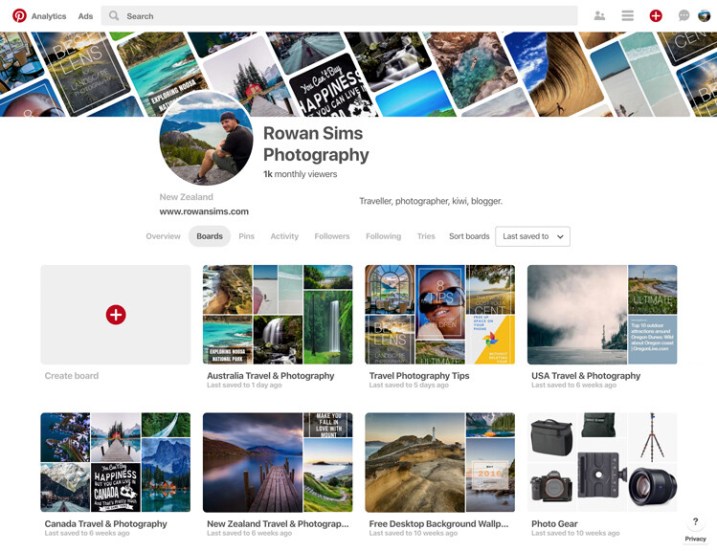
pinterest free vs paid photography portfolio websites

Pinterest also allows you to pin web pages, so if you have a blog you can pin your posts. The ability for others to re-pin your pins to their own boards means your work can be seen by a lot more people. You can also create inspiration boards for re-pinning other photographers’ pins. With all these features, Pinterest is definitely worth considering as a place to share your photography portfolio for free.

Paid Services

When it comes to paid photography portfolio websites, there aren’t as many options, but the ones that are available give you pretty amazing bang for your buck. Most professional photographers use one of these services these days, but that doesn’t mean you have to be a professional to use one.

They all have a range of options that vary in cost and features, but if you are considering a paid service for your portfolio, I’m sure you can find something that will fit your budget and needs.

Pros and Advantages

As with the free options, these services have their pros and cons. The biggest advantage, in my opinion, is the ability to customize how your portfolio looks and feels. You can change colors, layouts, text, logos, etc., all without needing to know how to code websites.

noosa national park sunshine coast queensland australia - photography portfolio

Most of them include unlimited storage for your photos, meaning you can upload as many high-resolution images as you want. This not only means you never have to delete another photo to make space for new ones, but you also have a copy of your photos backed up in the cloud.

The ability to sell your photos as prints or license them as stock directly from the website is a major attraction for many photographers. Each service’s e-commerce system works differently, but if this is a feature you want, you will find something that works for you. Some paid portfolio websites also allow you to deliver image files directly to clients, which works great if you’re a wedding or portrait photographer, or if you want to deliver files directly to a magazine, etc.

If you have a blog, some of these services will allow you to integrate your domain with your portfolio. For example, you can make your portfolio URL something like “portfolio.yourdomainname.com” rather than “yourname.photoshelter.com”. Visitors to your portfolio won’t even know that they’re on another website.

Driftwood bench seat on sand dunes overlooking Mount Maunganui Beach at sunset. - photography portfolio

Cons or Disadvantages

As you’re paying for premium features, there aren’t as many disadvantages of using a paid service. The main one is that they don’t have the social element that you get with photo-sharing sites or social networks. Getting your portfolio in front of eyeballs is a lot harder without the ability for viewers to engage with your work like they can on social media.

Although you have far more options to customize the way your portfolio appears, you’re still at the whim of the website that it is hosted on, and therefore how it functions. If you don’t like the features a website offers, it’s take-it-or-leave-it.

The following paid photography portfolio websites are by no means an exhaustive list, but these are some of the largest and most popular amongst photographers.

PhotoShelter

This is the first paid portfolio service I used for my own photography. PhotoShelter offers some of the best photography portfolios money can buy. Their websites look and work great, and their e-commerce features are second-to-none.

You can sell and license your photos directly through the website, and they even offer self-fulfilled printing if you want to print and ship images yourself. Although it’s one of the most expensive services, PhotoShelter is a solid option.

photoshelter free vs paid photography portfolio websites

SmugMug

I switched from PhotoShelter to SmugMug a few years ago after running an experiment to see how the two big boys compared in terms of Google search traffic. SmugMug won hands-down, so I moved my portfolio over. The two are very comparable in terms of cost and features.

If you want a beautiful portfolio website that works well and offers unlimited storage, I would definitely consider SmugMug. They also offer a solid e-commerce system, although they let themselves down with their refusal to allow self-fulfilled printing, despite users requesting it for years.

smugmug free vs paid photography portfolio websites

Zenfolio

I haven’t used Zenfolio personally, but from what I’ve seen and heard from other photographers, it’s a service worth considering. Their websites look great, although aren’t as customizable as the competition. Zenfolio is one of the more affordable services available, especially if you aren’t planning to sell your photos. It’s definitely, worth a look.

zenfolio free vs paid photography portfolio websites

Editor’s note: I personally use Zenfolio (screenshot below) and have used their print fulfillment services for clients, as well as for file downloads. It all works seamlessly and you can set your own prices with the Pro or Advanced plans. So, I can add my recommendation for this service. 

Zenfolio photography portfolio of Darlene Hildebrandt, dPS Managing Editor.

Self-Hosted Website and Portfolio

The last option sits somewhere between paid and free, and is yet another option to consider. If you want total freedom to customize and run your portfolio website however you want, you need your own self-hosted website.

The easiest way to do this is with an installation of WordPress on your own domain. It’s cheap and easy to set up with a service like BlueHost. Once it’s up and running, the options for your portfolio are endless. There are many free and paid gallery plugins, and if you want to sell your photos you can do it directly from your own website with a plugin like WooCommerce, all without having to pay anyone else a commission, so you get 100% of the profit.

If you have time (and are technology savvy) and you like to have total control over how things look and work, this is a great option. It does require a lot more user input, though, so be careful about rushing into it. If you prefer something that’s easier to set up and does most of the heavy lifting for you, one of the paid services is probably best.

tea tree bay sunset noosa heads queensland australia - photography portfolio

How do you choose?

With so many options, it’s hard to know which is best for you. The good news is that whatever you choose, nothing is permanent. I have used almost all of the services that I’ve mentioned in this article. They all worked for me at the time that I used them, and then I moved on when they no longer served my needs.

Try one or two of the free ones and see if you like them. If you think one of the paid services might be for you, they all offer free trials, so you don’t need to commit until you’re ready.

Whatever you decide, remember to have fun and don’t take it too seriously. Sharing your photos with the world can be one of the most enjoyable parts of photography. I would love to know about your experiences with portfolio websites. Have you used any of the websites mentioned? Are there any others you would recommend? Questions? Let me know in the comments area below.

The post Free Versus Paid Photography Portfolio Websites – Which is Best for You? appeared first on Digital Photography School.


Digital Photography School

 
Comments Off on Free Versus Paid Photography Portfolio Websites – Which is Best for You?

Posted in Photography


Free AtomOS update adds ProRes RAW support to Atomos Shogun Inferno and Sumo19

10 Apr
Photo: Atomos

Apple made a big splash in the video industry last week when it debuted ProRes RAW: a new video codec that seeks to combine the flexibility and editing latitude of RAW video with the performance and space benefits of a compressed ProRes file. And now, thanks to a free firmware update from Atomos, owners of the Shogun Inferno and Sumo19 monitor/recorders can immediately begin shooting in the new and improved format.

Simply download and install the AtomOS 9 firmware at this link, and your Shogun Inferno and Sumo19 will be able to record ProRes RAW and ProRes RAW HQ using any of the nine supported cinema cameras from Panasonic, Sony and Canon. As of this writing, that makes the Shogun Inferno and Sumo19 the first and only monitor/recorders to offer ProRes RAW.

If you’re still a bit confused as to what ProRes RAW is, and how it differs from standard ProRes, Atomos breaks down the benefits of the new format on its website. The company also produced the following ProRes RAW sample footage using the Atomos Shogun Inferno and three different cinema cameras: the Panasonic EVA1, Canon C300mkII and Sony FS5.

Press Release

ProRes RAW available today for Atomos recorders

Melbourne, Australia – 9 April 2018 – ProRes RAW is available today for Atomos recorders, delivering a powerful new RAW workflow when combined with Final Cut Pro 10.4.1. Simply install the free AtomOS 9 upgrade on the Atomos Shogun Inferno or Sumo19 monitor/recorders, connect to one of the nine supported cinema cameras, and begin recording in ProRes RAW and ProRes RAW HQ.

Users can immediately enjoy the benefits of the amazing new RAW end-to-end workflow that combines the incredible performance of ProRes with the flexibility of RAW. Atomos devices are the only monitor recorders to offer ProRes RAW, with pristine recording direct from the sensor output of Panasonic, Sony and Canon cinema cameras.

The response to ProRes RAW from the creative community has been incredible:

“The hills are alive with the sound of ProRes RAW, and Atomos has heard it….Apple has a new format, and it’s everybody’s darling. The malleable nature of RAW and the beauty and (and necessity of) ProRes are together at long last, and Atomos has you covered.” – Cinema5D

“This announcement is a big deal. ProRes has been an industry standard codec since its inception back in 2007, now 11 years later Apple is looking to position ProRes again as the go-to codec.” – Newsshooter

“Apple has unveiled a new video recording codec called ProRes RAW, a move that instantly makes the high-quality format more mainstream…Atomos’ Shogun Inferno and Sumo 19 recorders, meanwhile, will be the first to offer RAW recording for cameras from Panasonic, Sony, Canon and others.” – Engadget

Come and see for yourself how Atomos is unlocking creativity at the NAB show, booth C9425 and at the 17th Annual Las Vegas SuperMeet on Tuesday 10th of April. There will be product demos, as well as the opportunity to get hands on with the gear and workflow with both companies.

Articles: Digital Photography Review (dpreview.com)

 
Comments Off on Free AtomOS update adds ProRes RAW support to Atomos Shogun Inferno and Sumo19

Posted in Uncategorized


Free Atomos Shogun Inferno update will let you capture 5.7K RAW on the Panasonic EVA1

04 Apr
Credit: Atomos

Atomos’ Shogun Inferno and Sumo19 external HDR monitor/recorders are about to get a free upgrade that will really delight owners of the popular Super 35 Panasonic AU-EVA1 cinema camera. The update—full details incoming at NAB 2018—will allow EVA1 owners to capture 5.7K Raw video direct from the sensor at up to 30fps using the recorders’ 6G SDI connections.

If you pull that down to 4K resolution, you can record Raw video at up to 60fps in CDNG Raw, as well as straight to Apple ProRes or Avid DNxHR formats. If you drop the resolution further to 2K, you can record slow-motion Raw video at 240fps. According to Atomos, “the resulting frames are super clean, detailed and capable of withstanding heavy grading.”

Credit: Atomos

For those of us not into video, it’s worth noting why this is a big deal.

The Panasonic EVA1 is a camera that a lot of DSLR/mirrorless users consider when they get serious about video. Support for 5.7K Raw on a ~$ 7-8K cinema camera of this quality is pretty compelling. It’s a logical next step for people who want to go beyond DSLR/mirrorless video.

We won’t dive into the Shogun Inferno or Sumo19’s other features here, but you can learn more on the Atomos website. And if you already own one of these recorders, keep an eye out—this free AtomOS update will be released at NAB 2018 later this month.

Press Release

Atomos Shogun Inferno and Sumo19 unlock the Panasonic AU-EVA1 5.7K RAW output

Melbourne, Australia – 02 April 2018 – Panasonic’s AU-EVA1 is a great Super35 cine camera with excellent low light capabilities – winning wide-spread acclaim since its launch last year.

Now users will be able to unlock the true potential of this amazing camera and its low noise sensor by combining it with the Atomos Shogun Inferno HDR monitor/recorder, thanks to the release of Panasonic’s free RAW output upgrade. The results take the camera to another level of performance, giving you images with maximum dynamic range in pristine quality.

Users will soon be able to capture stunning 5.7K RAW imagery direct from the sensor at up to 30 fps over the 6G SDI connections and record it to reliable, affordable SSD media. Full details will be revealed by Atomos at the NAB 2018 show this month.

In 4K resolution you can record up to 60fps from the RAW output in production ready Apple ProRes, Avid DNxHR,or CDNG RAW up to 2Kp120 or 4Kp30. The resulting frames are super clean, detailed and capable of withstanding heavy grading.

The Shogun Inferno also supercharges the EVA1’s slow motion performance. It can record the RAW output at up to 240fps in 2k/HD, direct to Apple ProRes or Avid DNxHR. Perfect for sports, wildlife and a wide range of other uses.

All these features will come in an AtomOS upgrade for the Shogun Inferno and Sumo19 to be released at NAB April 2018. This will be offered for free as part of our continuing commitment to our users.

“Panasonic and Atomos have combined to deliver an astonishing set of features for end-to-end RAW production – 5.7K, 4kDCIp24-60, 2KDCIp240 in 10-bit V-Log recorded on our Shogun Inferno or Sumo 19. This is the best RAW solution for the price point on the market today,” said Atomos CEO Jeromy Young.

Of course, recording is only half of the equation, accurate monitoring is also essential. Luckily, the Shogun Inferno also offers state-of-the-art monitoring for both HDR and SDR recording with its 7” 1500nit high brightness panel with the Sumo19 at 19” and 1200nits.

Take the guesswork out of exposure in HDR or Log with Atomos’ unique AtomHDR system which shows a massive 10+ stops of dynamic range on either screen. The display is colour accurate and can be calibrated over time using a X-rite i1Display Pro probe. Benefit from AtomoOS’ full range of monitoring tools like waveform, vectorscope, false colour, audio level meters and pixel-to-pixel magnification.

Users can also load and store LUTs directly into Shogun and Sumo for complete creative control, production to post. With HDMI or SDI users can output their footage in 4K PQ (HDR 10) or HLG HDR direct to a compatible television or monitor for instant preview using our AtomHDR engine – great for on-set use or client review.

When used with the EVA1 no other external monitor recorder will give users the extensive range of options available from the Shogun Inferno and Sumo19. It remains the most versatile, flexible and cost-effective solution for high end external monitoring and recording on the market today.

If you are attending the NAB Show then be sure to come and check out the EVA1 and Atomos RAW capabilities live at Booth C9425.

Articles: Digital Photography Review (dpreview.com)

 
Comments Off on Free Atomos Shogun Inferno update will let you capture 5.7K RAW on the Panasonic EVA1

Posted in Uncategorized


RGG EDU is giving away a $300, 8+ hour beer photography course for free

09 Feb

If you’re looking to get into professional beverage photography—and specifically tap into the market for professional beer photography—this course from RGG EDU is definitely worth checking out. Produced by RGG and photographer Rob Grimm, the 8+ hour course covers everything you need to know. And the best part? This course, which usually retails for $ 300, is being given away 100% free.

As with all free offers like this, you’ll have to put in your personal info at checkout, but you can uncheck the “keep me up to date on news and exclusive offers” checkbox and avoid the marketing emails if you’re not keen on those.

The process takes just a few clicks—we went through it ourselves to check that it actually works—and once you’re done, you’ll get an email with a bespoke download link that gives you access to all 25 chapters of photography and retouching tutorial content, 27 RAW files, four full photo shoots, and access to a private Facebook group where you can chat with fellow members of the RGG community about the stuff you’re learning.

Here’s RGG’s description of the course:

In this tutorial, you will see Rob’s entire process for creating beverage images by breaking the composition down into its parts and obsessing over the details. You will learn the foundations of beverage photography from capturing a bottle on white, photographing cocktails including drink styling, proper use of ice, realistic condensation, creating appetite and appeal, and the use of duratrans to make an image that appears to be shot on-location with all the control of a studio.

Rob will share with you his method for generating portfolio ideas that will make you rethink your entire approach to creating images. Finally, world-renowned retoucher Earth Oliver, will walk you through the best methods to bring polish to your images that stand out from the crowd.

To learn more about the course or pick up your free copy, click here.

Articles: Digital Photography Review (dpreview.com)

 
Comments Off on RGG EDU is giving away a $300, 8+ hour beer photography course for free

Posted in Uncategorized


What I’ve learned after sharing my photos for free on Unsplash for 4 years

20 Jan
Stairs in Coimbra, Portugal?—?one of the 460 image I uploaded on Unsplash

This editorial was originally published on Medium, and is being republished in full on DPReview with express permission from Samuel Zeller. The views and opinions in this article are solely those of its author.


What is Unsplash?

Unsplash is a website where photographers can share high resolution images, making them publicly available for everyone for free even for commercial use. It was created in May 2013 by Stephanie Liverani, Mikael Cho and Luke Chesser in Montreal, Canada.

Four months after creation they hit one million total downloads, and a year after they had more than a million downloads per month. Now there are 400,000+ high resolution images hosted on Unsplash, which are shared by 65,000+ photographers from all around the world.

Last month 2,400 photographers joined Unsplash and shared 25,000 new images (not just snapshots, some really good photography).

Here are a few examples:

Visitors in the last month viewed 4 billion photos and pressed the download button 17 million times. The average Unsplash photo is viewed over 600,000 times and downloaded over 4000 times. No other social network can give you those numbers.

Unsplash is massive, and it’s (currently) one of the best place to get visibility for your work as a photographer. Some of my most appreciated images were viewed over twelve million times and downloaded a little bit more than 125’000 times.

Here are the top nine below:

I receive 21 million views per month (677’000 per day) and 93’000 downloads (3000 per day). As a result, every day there’s one or two person that credit me on Twitter for an image they’ve used. I also get emails regularly and new backlinks to my website every week.

And it’s not just for old users who’ve been sharing for a long time, here’s the stats from someone who joined Unsplash just three days ago:

In total I’ve uploaded 460 images, they’ve been viewed over 255 million times and downloaded over 1.7 million times. Of course these are just numbers, but they are much more meaningful (and larger) than the likes you can get on Instagram or Facebook.

Designers all around the world have been making album covers, posters, article headers, blog posts, adverts and billboards with my images on Unsplash. Like many photographers I chose to turn what was idle on my hard-drive into a useful resource for other creatives.

Here’s a few examples:

That’s not all, one of my first client (when I started as a freelancer in 2016) found me on Unsplash. They’re the biggest bank in Switzerland and I did four projects for them.

One included spending a night at 3,571 m (11,716 ft) at the highest observatory in Europe, the Jungfraujoch Sphinx observatory to document it (full project visible here); the second one was much lower at the Zürich airport photographing below aircraft like the Airbus A340.

The reason why they reached out to me? They were already using a few of my Unsplash images in their global database and wanted more in the same style.

Fast forward to a few months ago, I landed a new client (a design firm) and at one of the meeting they introduce me to one of their designer. The guy said after hearing my name “I know you already, I’ve been using some of your images on Unsplash, they’re great.”

The problem with social networks

People, especially the new generation, are becoming incredibly lazy. Our attention span is lower than ever, and we get stuck in nasty dopamine loops—we literally need to check our phones multiple times a day.

Social networks make us think we need to post new work often to get good engagement and get noticed, but the truth is great photographers take a year or more to publish new projects (for example Nick White “Black Dots” or Gregor Sailer “Closed cities”). Good work will always take time, and it will always get noticed.

We all fight for attention, for likes, for numbers that will not bring us anything good. We are in that aspect devaluing our own craft by over-sharing—being tricked into becoming marketing tools for brands.

The rise and fall of Instagram

What will you do once Instagram becomes old school? I don’t know if you noticed, but Facebook are ruining the whole Instagram experience by bloating the UI and releasing features for brands.

Here’s the user interface in March 2016 vs today on an iPhone 5/SE screen:

Seriously, what the heck? I can’t even see the user images anymore when I land on their profile.

Before Facebook bought it, the app was a simple, chronological photo-sharing service. Now they’re rolling out “recommended posts” from users you don’t even follow right into your feed. The suggested content will be based on what people you follow have liked (and probably on how much brands are paying to shove their ads right into your smartphone screens).

By sharing on Instagram daily as a photographer you are basically expending a ton of effort to grow a following on a network that’s taking a wrong turn. It’s like trying to build a sand castle on a moving elevator—sure, it works. but it’s not the most effective use of your time.

Not only is real engagement dropping, soon your reach will crumble unless you pay to promote your posts. I’m running an account with a little bit over 50,000 followers, and for a post that reach 25,000 people, only 170 of them will visit the account—the rest will just merely glance at the image for a second (maybe drop a like) and keep scrolling.

People create accounts on Instagram, then stop using it after some time. Truth is, many of your followers are inactive by now, and most of the ones that are active don’t care enough about your work to even comment on it.

What’s even worse is that Instagram makes photographers literally copy each other’s styles because only a few type of images can get better engagement and please the masses—think outdoorsy explorers taking pictures of forests from a drone or hanging their feet off a cliff. They’re diluting their work and style by focusing on what will grow their account.

Followers are still valuable now, but in two to three years they’ll be worthless. There’s a ton more 50k+ accounts than two years ago. Brands are now looking into accounts with 100–150k to do collaborations. Instagram is a big bubble that will blow one day, and I don’t want to have all my eggs in the same basket when it happens.

Would you take someone seriously if he told you, “I’m working on my Myspace/Flickr account every day! I got soooo many followers, I’m famous!”

I have 16,500 followers on my personal Instagram account and I could close it any day. The reason why? I also have a newsletter with over 25,000 subscribers. Guess which is more valuable and long-lasting?

Too many photographers today are forgetting that a portfolio, experience, publications and exhibitions are far more important than building up their following on a social network.

There’s still a lot of good sides to Instagram, the community aspect to start with and also the fact that there’s not yet a proper contender to replace it. It’s still (to me) the best place to discover emerging photographers and get your dose of inspiration. There’s also a great deal of photography magazines that are actively curating work on it.

The culture of the new

That’s the big problem with photography online as curator and photographer Andy Adams explains, “It’s always about the new, which inevitably means the not new drops off our radars way sooner that it should.”

Social networks like Instagram and Facebook are flawed for photographers for this particular reason. They are great for brands who can afford to hire social media managers and post regularly or sponsor content.

There are other social networks that don’t rely on a feed but rather on search, for example Behance or EyeEm. Those are way better for photographers in the long term. They have a higher rate of discoverability.

The images I share on Unsplash don’t lose value, in fact there’s no difference at all between a year old shot and a week old shot. Their value are not based on time. I could stop uploading new images and still have a lot of visibility every day. Try not posting on Instagram for a month…

Here’s a real example, those two images below were shared on Unsplash in October 2014. Notice how they still gather a ton of views/download per month even after four years?

Leaving a mark

Last year in February I lost my dad to cancer—he was diagnosed just a month before in January. I wrote before on the concept of memory and digital data (See: the data we leave behind) but his sudden death made me realize how short life can be.

We always say “we need to enjoy every moment, life is fragile,” but it’s impossible to understand it fully until you have lost someone close. My father had bookmarked my website, my Instagram account and my Unsplash account on his laptop, he was checking them often, he was probably my biggest fan.

What’s left of him are memories but also his files on his computer—photos of him and his art (he was doing digital art and uploaded a lot of pieces on DeviantArt). I’m grateful to have all of this to remember him.

As a photographer and artist I feel like it’s a necessity for me to also leave something behind, because we never know what will happen tomorrow.

Having some of my images on Unsplash is one way to ensure that even if I’m gone my work will keep on living. Another way is through prints and books. Speaking of which, I’m finishing my first book that will be published in April by Hoxton Mini Press.

Photography isn’t about making money as a freelance photographer, it’s also a part of us, stories of where we traveled, visual tales of our singular experiences with life. I choose to share it as much as possible because I can.

There’s one last reason why I share photographs for free and Josh summed it up very nicely in one of his Medium article, here’s what he wrote:

“Beauty has always been free. It came in the box with sunlight and eyeballs. It was granted to us upon birth as we first laid eyes upon our beautiful mothers and then mother Earth. For those of us with extreme empathy and a wide-eyed approach to seeing the world, finding the beautiful all around us and capturing it is a deep and glorious honor. Yes, you can have that image at the top for free?—?perhaps not because it has no value, but because I simply want you to see what I can see. I want to share in the joy of this world’s beauty. The image, in that scenario, is only a document of our mutual appreciation for it. And maybe taking money off the table in that discussion is actually what helps it remain beautiful.”

Josh S. Rose

What’s next

I feel like Unsplash is just the beginning of a new era of photography. It’s thrilling to be able to grow with it.

I was born in 1990 just before the world wide web, and I’ve seen how technology evolved for the past twenty years. I’m afraid of how addicted we have become to it. How fast paced things have become. We need more generosity, community based efforts, human curation and less algorithms driven by the need of profit. We need to slow down.

Some projects are trying to focus more rewarding artists instead of advertisers, and Ello is one of them. I’ve made the decision to stop using my personal Instagram account and switch to their social network.

But that’s a topic for a different article.


Samuel Zeller is a freelance photographer based in Switzerland, an ambassador for Fujifilm and the editor of Fujifeed magazine. You can contact him here and follow his recent work on his website and Ello.

Articles: Digital Photography Review (dpreview.com)

 
Comments Off on What I’ve learned after sharing my photos for free on Unsplash for 4 years

Posted in Uncategorized


Free Lightroom alternative Darktable is now available on Windows

28 Dec

Free Lightroom alternative Darktable was recently updated to version 2.4.0, an update that is joined by a new milestone for the open source software: for the very first time, it has been ported to Windows. The Windows port is incomplete at the moment, lacking a few features like printing support, but the team said in a blog post that, “we are confident that it’s quite usable already and hope you will enjoy it.”

Darktable is an open source “virtual lighttable and darkroom for photographers,” and one that frequently pops up on “free Adobe alternative” lists online; however, until now, it had only been available for Linux and Mac. Version 2.4 brings numerous changes and some new features, including: tweaks to design elements, support for the basic import of Lightroom 7 settings, removal of the 51200 ISO limit, some usability improvements such as the ability to make new module instances using the middle mouse button, and a new haze removal module (among others).

The update also applies numerous bug fixes, adds new camera, noise profiles, and white balance preset support, changes some dependencies, and adds new software translations.

As for the Windows port, Darktable says this version currently has “a few limitations,” such as needing special drivers to tether. It also has some bugs, one of which is apparently a lack of non-ASCII character file name support when exporting and importing TIFF files. Still, the Windows version gives PC users something to play around with until the next update… and the one after that. Before long, Darktable for Windows might become a very popular Adobe alternative that will cost you 0 dollars and 0 cents.

Darktable 2.4.0 can be downloaded now from GitHub. The full version changelog can be found in the team’s announcement post.

Articles: Digital Photography Review (dpreview.com)

 
Comments Off on Free Lightroom alternative Darktable is now available on Windows

Posted in Uncategorized


CopyTrans brings native HEIC support to Windows with free plugin

19 Dec

CopyTrans has launched a free piece of software that brings High Efficiency Image Format (HEIC / HEIF) image support to Windows, enabling PC owners to view the popular new image format that has replaced JPEGs in iOS 11.

Windows doesn’t natively support HEIC images at this time, instead receiving JPEG versions of HEIC images when they’re transferred from an iOS 11 device. And while we’ve seen other programs build HEIC support into their own Windows versions, CopyTrans’ program is the first to bring native support.

In other words, as CopyTrans software developer Niki Minkov explained to us over email:

That is, when you browse your files with Windows, HEIC files will display thumbnails just as JPEGs, double clicking will display them full size with Windows Picture Viewer, and the right-click-on-file context menu will now include a “Convert to JPEG” feature.

In fact, our plugin is using the same integration technology that Nikon and Canon used to make Windows compatible with their respective RAW formats.

CopyTrans HEIC for Windows also supports Microsoft Office, and it retains the images’ original EXIF data.

The HEIC format allows for much smaller file sizes than their JPEG counterparts, enabling a greater number of photos to be saved to a device’s built-in storage. Other advantages of the format include the ability to store burst photos, focal stacks, and exposure stacks in a single file, the ability to store image editing operations, and more. Thanks to CopyTrans HEIC, you don’t have to give those advantages up just because you own a PC.

To learn more or download the software for yourself, head over to the CopyTrans website.

Articles: Digital Photography Review (dpreview.com)

 
Comments Off on CopyTrans brings native HEIC support to Windows with free plugin

Posted in Uncategorized


Affinity Photo 1.6 released: faster processing, new features, and free stuff

04 Nov

Serif has updated its image editing software Affinity Photo with ‘a huge performance boost’ to make it faster to use and more capable with large files. The step to v1.6 also brings a new ‘light’ user interface option for those new to the program or those who don’t need the full range of features.

Additional feature enhancements include a stroke stabilization mode for brushes and pencils, as well as better support for its Photoshop plug-in. Here’s a full list of the new features you’ll find in Affinity Photo 1.6:

  • New light user interface option
  • New stroke stabiliser for all pencil and brush tools
  • New “Edit In” integration with Apple Photos
  • Metal 2 accelerated view optimised for macOS High Sierra
  • Improved view pan/zoom performance and
  • Improved performance with large documents
  • New font chooser dropdown with recents, used fonts and favourites
  • New Glyph browser
  • Align to key items
  • Text frame vertical alignment options
  • Fit frame to text
  • Custom brush wet edges
  • Outlier stacking mode
  • Improved Photoshop Plugin support
  • Improved Live Filters performance
  • Many PDF export improvements including vector export of multi-stop gradients
  • Numerous bug fixes and other improvements

Additionally, the update gives new and existing users what the company describes as ‘bonus content’ worth around £120, including:

  • Dirk Wüstenhagen Fine Art Texture Collection: 99 beautifully crafted, high-resolution textures
  • Uplift Epic Skies Overlay: A versatile collection of 50 striking cloud overlays
  • Macro Pack: A stunning set of image styles, light leaks and distortions

Affinity Photo costs £49 / $ 50 / €55 and can be downloaded directly from the Affinity website.

Press Release

{PressRelease}

Affinity 1.6 updates and free bonus content available now

We are thrilled to announce that both Affinity Photo and Affinity Designer have just received a fantastic new update. And to celebrate for the next two weeks we are giving away a huge bundle of creative content free with every purchase!

Our apps continue to push the boundaries of professional creative software and this latest update raises the bar once again with a huge performance boost making them faster, smoother and more powerful than ever.

We’ve added valuable new features including a light UI mode, brush stabilisation and tons of useful performance improvements and enhancements. For more details check out our brand-new product pages and the 1.6 feature video below, all created using artwork submitted by our very talented users.

Affinity apps are all about enabling you to work faster – whether it’s a quick design draft or photo edit, or a painstaking, complex document involving hundreds of layers or stacked images.

Our apps are already a trusted part of the workflow for creative professionals around the world. The latest versions build on those proven capabilities to deliver lightning speed, pinpoint accuracy and incredible processing power like never before.
Along-side the v1.6 update you will also receive:

Affinity Photo bonus content worth around £105

  • Dirk Wüstenhagen Fine Art Texture Collection – 99 beautifully crafted, high-resolution textures
  • Uplift Epic Skies Overlay – A versatile collection of 50 striking cloud overlays
  • Macro Pack – A stunning set of image styles, light leaks and distortions

Affinity Designer bonus content worth around £60

  • Frankentoon Texturizer Pro Brush Pack – Over 70 brushes created exclusively for Affinity Designer
  • Tom Chalky Handcrafted Fonts & Textures – A huge bundle of stylish fonts and over 80 textures
  • Grade UI Kit – More than 1000 fully-customisable elements, icons, panels and buttons

If you already own Affinity Photo or Affinity Designer this update is completely free, and to thank you for your support we’ve also made the free content available to existing users until 16 November when the special offer ends.

Mac customers can download the update right now from the Mac App Store and Windows customers will be prompted to update the next time they open their app. Once installed a link to the free content will appear on the app welcome screen (go to Help and select Welcome if it does not appear at start up).

If you don’t own them yet now is the perfect time to buy. The apps are available priced at £48.99 / $ 49.99 / 54,99€ each, which we think is great value for money ? the free content alone would cost more than the app, if bought separately. And remember there’s no subscription and future updates like this one are also included in the price!

It’s also worth noting our free trials have now been reset, so if you downloaded a trial in the early days and would like to see how far our apps have come, you can now download the trial from our website for a second time.

{/PressRelease}

Articles: Digital Photography Review (dpreview.com)

 
Comments Off on Affinity Photo 1.6 released: faster processing, new features, and free stuff

Posted in Uncategorized


The free Focos app brings more professional looking bokeh to your dual-cam iPhone

01 Nov

Apple’s ‘Portrait Mode’ on the company’s dual-camera iPhones is a cool feature that produces some neat photos. But if you’re not a fan of the fake bokeh Apple’s standard camera app generates, you might want to check out a free new app called Focos.

Created by the same indie developer behind the apps Colorburn and MaxCurve, Focos takes your iPhone 7 Plus, 8 Plus or X’s Portrait Mode shots and makes them look more ‘professional’ by adding more realistic and customizable bokeh effects.

Focos allows you to pick custom bokeh ‘shapes’, generate more professional-looking bokeh by selecting options like ‘creamy’ or ‘swirly’, import your current Portrait Mode photos and re-edit the background, and re-focus Portrait Mode photos after the fact. And since it’s already capturing 3D data, the app allows you to access that data and apply filters based on depth.

The results should ostensibly look better than what Apple is generating with its own Camera app, but at the very least they’ll be more customizable so you can find a more appropriate effect for every photo.

To learn more about Focos or pick up the free app for yourself, head over to the Focos website or go straight to the iTunes App Store.

Articles: Digital Photography Review (dpreview.com)

 
Comments Off on The free Focos app brings more professional looking bokeh to your dual-cam iPhone

Posted in Uncategorized


DxO acquires Nik Collection from Google and will continue to offer it for free… for now

25 Oct

Look alive, Nik Collection fans: the software suite is back from the (mostly) dead. It will change hands from Google to DxO, who will continue to offer it as Photoshop and Lightroom plug-ins, as well as incorporate it into their own software. DxO will offer a new flagship application called PhotoLab, a version of OpticsPro that will incorporate Nik Collection’s U Point technology.

We spoke with Aravind Krishnaswamy, a Google Engineering Director, and DxO founder/CEO Jerome Meniere about the acquisition. Krishnaswamy mentioned Google’s need to focus on its Photos application, but that they want the Nik community to have a future, and a place to continue using the suite’s tools.

That’s where DxO picks things up. The Nik Collection in its present state will continue to be offered for free – for now. Meniere hints that this may not always be the case, and DxO plans to develop a new “Nik Collection 2018” for mid-next year. Meniere also mentions that they’d like to work with the Nik community to take the software in a direction that they’d like to see it go.

Not surprisingly, Nik-developed Snapseed is not included in the transaction, and will remain with Google. The company plans to continue actively developing and improving the mobile image editing app.

Head to DxO’s dedicated Nik Collection site if you’d like to snag free versions of the plug-ins while you still can.

Press release

DxO acquires Nik Collection assets from Google and plans to set a new bar on Photo editing softwares

PARIS – October 25, 2017 – DxO, one of the most innovative companies in consumer imaging, today announced the acquisition of the Nik Collection assets from Google.

DxO plans to continue development of the Nik Collection. The current version will remain available for free on DxO’s dedicated website, while a new “Nik Collection 2018 Edition” is planned for mid-next year.

“The Nik Collection gives photographers tools to create photos they absolutely love,” said Aravind Krishnaswamy, an Engineering Director with Google. “We’re thrilled to have DxO, a company dedicated to high-quality photography solutions, acquire and continue to develop it.”

“We are very excited to welcome the Nik Collection to the DxO family,” said Jérôme Ménière, CEO and founder of DxO. “DxO revolutionized the image processing market many times over the years with its innovative solutions, and we are convinced that we will continue to do so with Nik’s tools, which offer new creative opportunities for photographers. The latest version of our flagship software DxO PhotoLab, which is available as of now, is the first embodiment of this thrilling acquisition with built-in U point Technology.”

About the Nik Collection

The Nik Collection is composed of seven desktop plugins for Adobe Lightroom and Photoshop that provide a powerful range of photo editing capabilities — from filter applications that improve color correction, to retouching and creative effects, to image sharpening that brings out hidden details, to the ability to adjust the color and tonality of images. The current lineup of the Nik Collection includes:

  • Analog Efex Pro: Applies film-era camera, lens, and film simulations to digital images
  • Color Efex Pro: A comprehensive set of filters for color correction, retouching, and creative effects
  • Dfine: Noise reduction software for camera-specific digital images
  • HDR Efex Pro: Specialized program for processing HDR pictures
  • Sharpener Pro: Image sharpening for digital images
  • Silver Efex Pro: Black & White conversion of images with darkroom-inspired controls
  • Viveza: Selectively adjusts image color and tonality without complicated masks or selections

Articles: Digital Photography Review (dpreview.com)

 
Comments Off on DxO acquires Nik Collection from Google and will continue to offer it for free… for now

Posted in Uncategorized