RSS
 

Posts Tagged ‘Frame’

Aura is a next generation digital picture frame

04 Oct

Digital picture frames were all the rage around 2006, but since then have pretty much been relegated to the bargain basement. Instead of focusing on innovation, new features and better performance, frame makers decided to compete on price. As a result digital frames have always been regarded a low-quality product and the gadget community quickly lost interest.

The team behind the new Aura frame is planning to change that and make the digital picture frame once again a product that technophiles across the globe are lusting for, with a design that combines a high-quality display with all sorts of digital bells and whistles. The Aura’s screen is pretty much identical to the 2048 x 1536 pixel Retina display in the iPad and the acrylic frame, which is edged in anodized aluminum, will be available in either ivory with rose gold trim or black with charcoal trim. 

Premium finish aside, the Aura frame stands out thanks to its features. There is an accompanying mobile app for syncing manually created albums to the device. Alternatively, the app offers facial recognition and can be set to upload all images that have specific persons in them. There is also a filter that gets rid of blurry images, duplicates and those where subjects have their eyes closed. It even makes sure to only use images that crop well for the frame’s 4:3 format.

Of course you can invite others to contribute to an album as well. In addition the Aura also comes with a set of sensors that can detect if you are in the room in order to make sure you always see a new image when you enter.

The sensors are also used for the gesture control feature which lets you scroll through images from a distance. The Aura frame is not available yet but its makers just secured $ 6M Series A round funding from Spark Capital, so chances are you’ll be able to buy one in the nearer future. The projected retail price is $ 400 and you can register your email to be notified at launch. Watch the video below for a better idea how Aura works.

Articles: Digital Photography Review (dpreview.com)

 
Comments Off on Aura is a next generation digital picture frame

Posted in Uncategorized


App review: Full Frame is a quick, easy JPEG viewer, EXIF editor

28 Jun

Full Frame is a Mac-based image viewer, photo importer and metadata editor that centers around an incredibly clean and intuitive user interface. Released by California-based Inland Sea and available now in the App Store, its potential to speed up one’s workflow caught our attention.

Of course, there are a lot of different photo viewing, ingesting and sorting programs available on market, many of which are geared toward casual users. Full Frame, on the other hand, is targeting more toward high-end users like photo enthusiasts.

In Use

Having spent some time trying out using Full Frame in my own workflow, it seems its closest competitors are Photo Mechanic, a time-honored program with a cult-like following from photojournalists world-wide, as well as Adobe Bridge.

Unlike Adobe Bridge, which I find frustratingly sluggish and cluttered in design, Full Frame comes across as exceptionally lean in terms of speed (except when working with un-supported Raw files) and design. It has much more in common with Photo Mechanic like quick startup and image load times. Of course the spectrum of its functionality is much more limited than that of Adobe Bridge.

I took Full Frame for a spin while sorting images to post to one of my personal sites. Specifically,  I used it to move and rename selects from one drive, to a folder on another.

Once you have Full Frame fired up, users simply select the source folder and destination (assuming you are copying files) in the upper-left of the screen. The above screenshot represents the entire window when the program is open. There is literally nothing to get in your way of viewing images and deciding which to keep and which to trash.

To select an image to copy, simply click on it and a checkmark appears. Alternatively you can select all by hitting ‘Command A’ and uncheck the ones you don’t want. In the upper-left portion of the window you’ll find a slider to zoom in the grid view as well as options to view metadata and delete files from their source.

With your mouse hovering over an image, a small plus sign will appear in the upper left of the photo. Click on it to expand the view. Once in the single image viewer, users can use the slider at the top to zoom the image in and out, to check for critical focus. Unfortunately, when zooming in and out, there is no display of the percentage you are zoomed to, unlike in Photo Mechanic.

One of the best features of Full Frame is the metadata/EXIF viewer. It offers an incredibly detailed list that goes above and beyond what a lot of other programs show, including Photo Mechanic.

Users can also add EXIF info to any imported files from within the preferences panel. One thing I’ve always really liked about Photo Mechanic is how simple it is to add copyright warnings and contact info to my files. In Full Frame, it is just as painless. From within the preference panel users can also assign rules for renaming files on import, which is very handy. 

In many ways, Full frame comes across as a utilitarian program, built to accomplish several specific tasks related to moving and organizing images. However it also doubles as an outstanding way to show off your work to clients, friends or families. The grid view is frankly gorgeous, and once in the single image view, users can simple use the arrow keys to move from image to image. It also starts up very fast, which is a plus.

Things to consider

While I found a lot to like about Full Frame, there are some things to consider before purchasing it: First and foremost, despite the claims of Raw support, I found numerous files, from varying manufacturers, to be unsupported. For instance, Raw files from the Nikon D750 are unsupported, as are those from the Sony a7 II. However, if you have Raw+JPEG files, load times will slow significantly but you can at least view and import your images.

This is really quite unfortunate. Sure, app updates could bring about Raw support but who has time to wait around? On the other hand you could always covert to DNG first, but if the whole point of this program is to speed your workflow, that also makes little sense. Photo Mechanic on the other hand does not have this problem, it can display a JPEG rendering from any Raw file, and loads quickly regardless.

Another beef I have with Full Frame is that there is only one option for sorting/rating images. In Photo Mechanic and Bridge, there are numerous ways to rate and sort images. For instance, when choosing my selects, I first do an initial sweep and check mark all of the ones I like, I then assign color or star ratings until I’ve got the images sorted down to a manageable amount.  At that point I copy the selects to a separate drive to be imported into Lightroom for processing.

The Takeaway

Full Frame is not a program that can do it all, but the things it can do, it does well. If you need a quick, easy way to view JPEGs or edit/view EXIF info, it might be your cup of tea.

Full Frame is an outstanding option for photographers seeking a powerful EXIF viewer/editor or a quick and easy way to import and rename files. Its spotty Raw support is the main thing holding it back. But at $ 30, Full Frame is a major bargain compared to Photo Mechanic, which will set you back $ 150. It is also a much faster way to quickly view and sort JPEG files than Adobe Bridge.

What we like:

  • Intuitive user interface
  • Very clean, simple design
  • Powerful EXIF viewer and editor
  • JPEGs load very quickly
  • Can be used to import, sort, batch rename files
  • Support for video files

What we don’t:

  • Despite claims of Raw support, many Raw files not supported
  • No percentage shown on zoom slider
  • Not as many options for rating photos as competition

Rating:

Articles: Digital Photography Review (dpreview.com)

 
Comments Off on App review: Full Frame is a quick, easy JPEG viewer, EXIF editor

Posted in Uncategorized


Frame by frame: ‘live view’ continuous shooting with the Sony a6300

13 Apr

One of the features we were excited by when the a6300 was announced was the promise of ‘live view’ while shooting continuous bursts of shots. Now we’ve used and tested it, what do we think?

What’s the big deal?

Autofocus systems on mirrorless cameras have been getting better and better with each generation of cameras, to the point that the best of them match (and in some circumstances, exceed) the performance we expect from similarly priced DSLRs.

However, many models still lag behind DSLRs in their ability to show you what’s going on while in continuous shooting mode. The common trick of showing a playback of the last captured image makes it hard to keep up with a moving subject, especially if it moves unpredictably, so that you can’t just compensate for the lag.

The a6300 isn’t the first mirrorless camera to try to offer a live view while continuous shooting (several Nikon 1 models, which use comparatively small sensors to allow fast read-out, even manage to give an uninterrupted feed), but it’s still a rare enough feature to make it worth investigating.

What did we find?

We shot the a6300 side-by-side with the Canon EOS 7D (a DSLR that offers the same 8 fps frame rate as the Sony) and found something interesting. The a6300 has a shorter blackout period than the Canon but turns out to only be showing a single updated frame between each capture. At lower, 5 fps shooting rate, we saw two or three frames on display between captures.

That sounds terrible. It sounds like cheating. but it’s not quite the end of the story. Watch the beginning of the video again – the real-time playback – it looks pretty convincing, doesn’t it?

The fact that it looks so convincing left us wondering: why does the screen ever black out? Why doesn’t the camera just continue to show the ‘live’ image until the next one is available? We think we know the answer.

Note the way that the image doesn’t just cut to black – it fades to black then abruptly cuts to the next update. We believe this is trying to achieve something like the ‘black frame insertion’ technology used in some modern TVs: inserting a black frame prompts your brain to imagine what’s happened between the two frames it’s seen, rather than being distracted by the contradiction between perceiving a sense of movement but seeing static images.

Does it work?

In real-world shooting this is pretty convincing: we only discovered the camera was just showing single images when we recorded it at 240 fps, and even then it took us a while to convince ourselves that we weren’t looking at an error stemming from a clash in display and capture frequencies (temporal aliasing).

So, while the display is only showing you eight frames per second (one between each capture), it’s doing so in a way that gives your brain a convincing sense of motion. The question we wanted to answer was: ‘if the blackout between frames is short enough, and the motion looks fairly convincing, is it as easy to follow action as with a DSLR?’

We spent some time trying to shoot rugby with the a6300 to see how easy it was to follow the game’s fast and unpredictable action. The results were mixed – the camera gave enough information for you to be able to follow the action to a reasonable degree, but not as much as you might want.

The a6300’s live view provided enough information to let us follow the action, but not as much as a high-end DSLR, which meant we reacted more slowly to anything unexpected.

Alongside the a6300 we were also shooting with the Nikon D5, not as direct comparison but because we also need to shoot sports with it. As you might expect, the $ 1000 mass-market a6300 wasn’t as good as Nikon’s $ 6500 professional sports-oriented camera, but it’s the way that it fell short that was interesting.

Although the video further up the page shows that the a6300’s live view looks a lot like real motion and its blackout is shorter than the EOS 7D’s, in use it becomes clear that your brain actually can make use of the extra information the 7D gives you about the subject’s movement.

For example, at the rugby we found that we could keep pace with the action when shooting with the Sony but it would take us longer to react if we made the mistake of believing a player’s dummy-pass and started moving in the wrong direction. With the DSLR we’d spot our mistake sooner and turn back to the real action faster. 

At set pieces, where you have a good idea of what’s going to happen next, the a6300 could shoot with confidence.

Having looked at what the camera’s doing and then put to real-world use, we’d conclude that the a6300’s continuous shooting live view more successful than its single frame update makes it sound. It’s convincing enough to let you keep up with fast action, but there’s still room for improvement as soon as anything unexpected happens.

Articles: Digital Photography Review (dpreview.com)

 
Comments Off on Frame by frame: ‘live view’ continuous shooting with the Sony a6300

Posted in Uncategorized


How to Add Vintage Frame Overlays Using Alien Skin Exposure X

20 Mar

Here is a quick and snazzy tip on adding some cool retro and vintage frame overlays to your photographs, including polaroids and borders, using Alien Skin Exposure X. It’s easy as pie, and takes seconds! Unlike Photoshop, adding frames in Exposure X does not require masking, or the use of layers.

adding-vintage-frames-tutorial-alien-skin-exposure_0007

But first… why add frames?

  1. You may be going for a certain look and want your images to stand out.
  2. You may want to use your images in scrapbooks and blogs that have  a specific theme.
  3. You might just be feeling super creative and want to do something different.

Whatever your reason, it’s a fun experiment, and of course, highly dependent on your taste.

Here’s how to add a frame

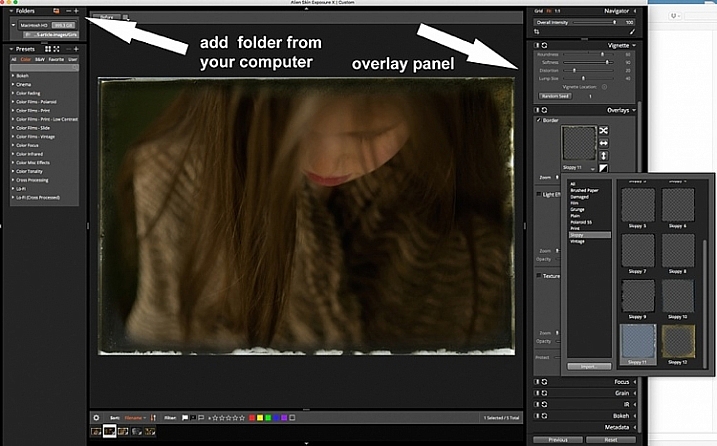
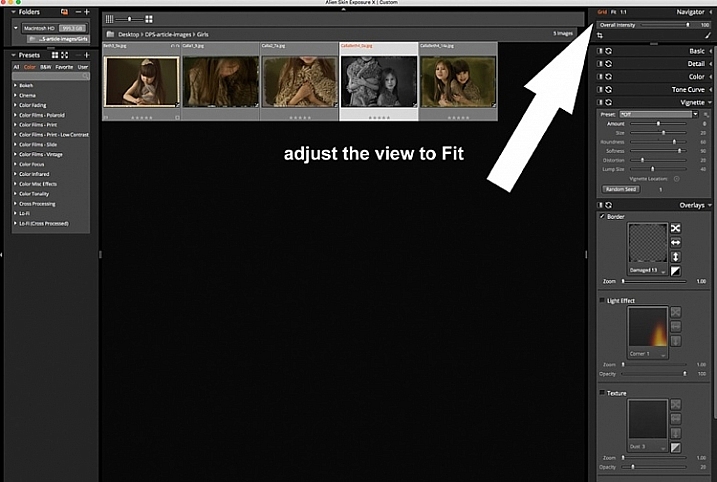
Open Alien Skin Exposure X (the latest version is 10, but previous versions work just the same). Click the + icon on the top left corner of the window to add folders from your computer. Choose the folder you want to add, and double click. You may notice that when you open the folder, your images will be initially displayed as a Grid as shown on the second photo below.

adding-vintage-frames-tutorial-alien-skin-exposure_0000

adding-vintage-frames-tutorial-alien-skin-exposure_0008

Click Fit on the upper right corner of the window and you will see (as shown on the first photo) that your chosen image is enlarged, but you can still see the rest of the set, in the thumbnails just below. Once you have your image, look on the right panel, and bring up the Overlays option by clicking on the arrow. Tick the border, then click on the box showing the overlay and a pop up window, giving you a variety of overlay options, comes up. You can scroll through these options to find the overlay you want to use.

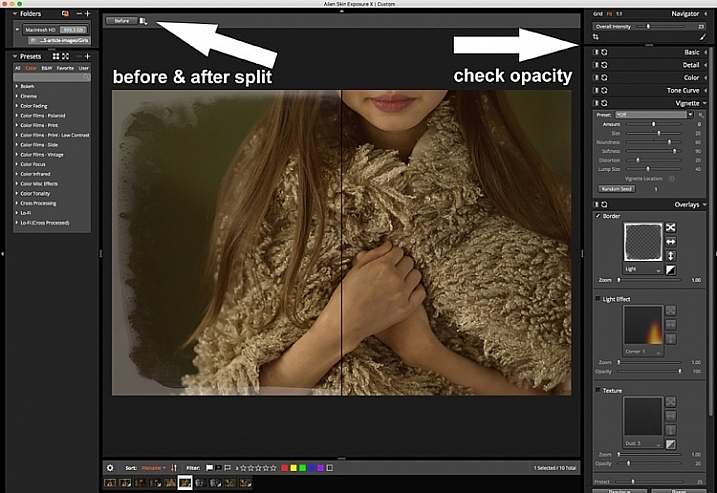
You can work on each photo individually or select all using Cmd/Ctrl + A, and your chosen settings will be applied to all the images. TypeCmd/Ctrl + D to deselect, and click on one photo to work on it individually. Don’t forget to use the Overall Intensity slider on the top right corner of the window, it works like the opacity slider in Photoshop. You also have a selection of view options that allow you to see the various before and after splits, as shown on the image below. In this case, the left half of the photo has the overlay and the right half shows the original. This is helpful in gauging the intensity of the overlay applied, and its effect on the original image.

adding-vintage-frames-tutorial-alien-skin-exposure_0001

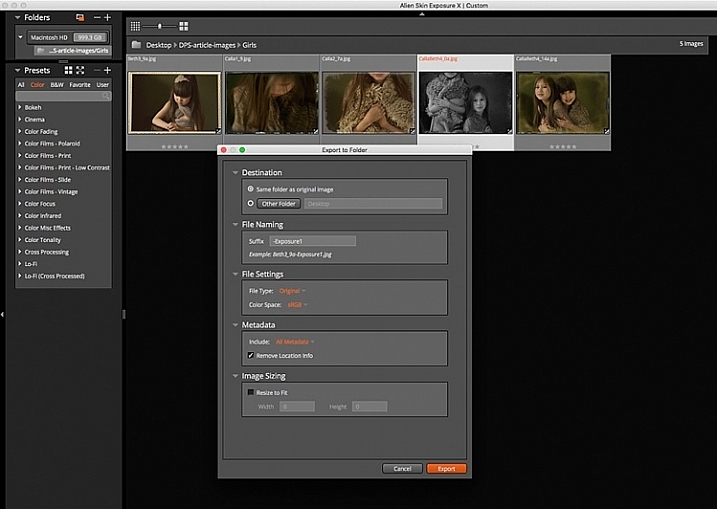
After you have applied your frames on each image, you now need to export them. Select all the images using Cmd/Ctrl + A, then either go to the Exposure bar File menu and select Export, or simply typeCmd/Ctrl + E, and you can export your new images to a folder you designate. I suggest that you keep the suggested file suffix, or change it to something of your choice, so you know these are the new files with the Exposure edits, should you want to keep them in the same folder. You will still have your original images in tact and untouched, in case you want to revisit them later.

adding-vintage-frames-tutorial-alien-skin-exposure_0002

Here are the images that I used in this tutorial, with the added frames using Alien Skin Exposure X.

adding-vintage-frames-tutorial-alien-skin-exposure_0006

adding-vintage-frames-tutorial-alien-skin-exposure_0005

adding-vintage-frames-tutorial-alien-skin-exposure_0002

adding-vintage-frames-tutorial-alien-skin-exposure_0004

I hope you enjoyed this quick tip. Have fun experimenting with frames as well as other special effects. Do share any other quick tips on adding vintage frames in the comments below.

This week on dPS we are featuring articles on special effects. Check out the others that have already been published here:

  • How to Photograph the Full Band of the Milky Way
  • Fire Spinning with Steel Wool – A Special Effects Tutorial
  • Special Effect – How to Create Multiple Flash Exposures in a Single Frame
  • Stacking Light Trails for Night Photography Special Effects
  • 26 Unique Special Effects Photos to Spark Your Creativity
  • Weekly Photography Challenge – Special Effects
  • Tips for Shooting Through Objects to Create a Special Effect

googletag.cmd.push(function() {
tablet_slots.push( googletag.defineSlot( “/1005424/_dPSv4_tab-all-article-bottom_(300×250)”, [300, 250], “pb-ad-78623” ).addService( googletag.pubads() ) ); } );

googletag.cmd.push(function() {
mobile_slots.push( googletag.defineSlot( “/1005424/_dPSv4_mob-all-article-bottom_(300×250)”, [300, 250], “pb-ad-78158” ).addService( googletag.pubads() ) ); } );

The post How to Add Vintage Frame Overlays Using Alien Skin Exposure X by Lily Sawyer appeared first on Digital Photography School.


Digital Photography School

 
Comments Off on How to Add Vintage Frame Overlays Using Alien Skin Exposure X

Posted in Photography


Special Effect – How to Create Multiple Flash Exposures in a Single Frame

18 Mar

Many photographic techniques, rightfully, tend to focus on polished images. They vary anywhere on the spectrum from getting sharper images to capturing accurate skin tones. These techniques are important. However, sometimes they’re not very much fun. Sometimes, that’s precisely what you need to have, and exactly what photography should be – fun.

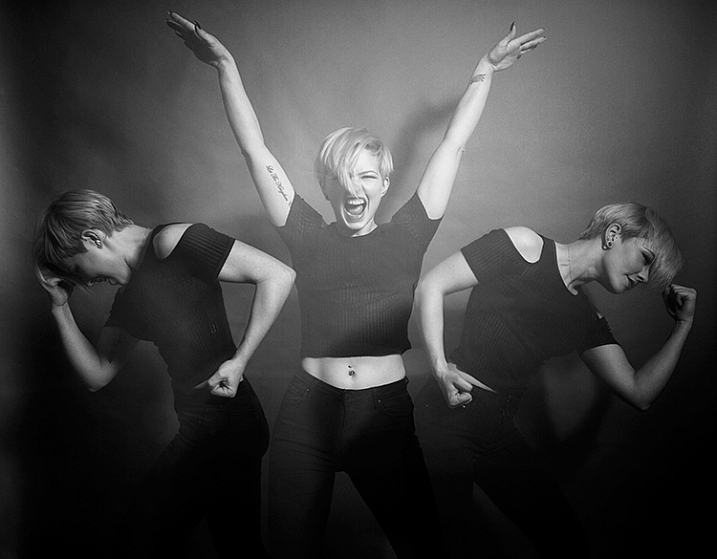
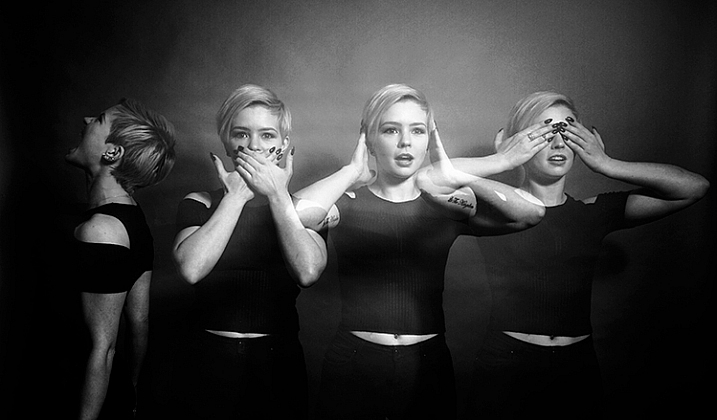
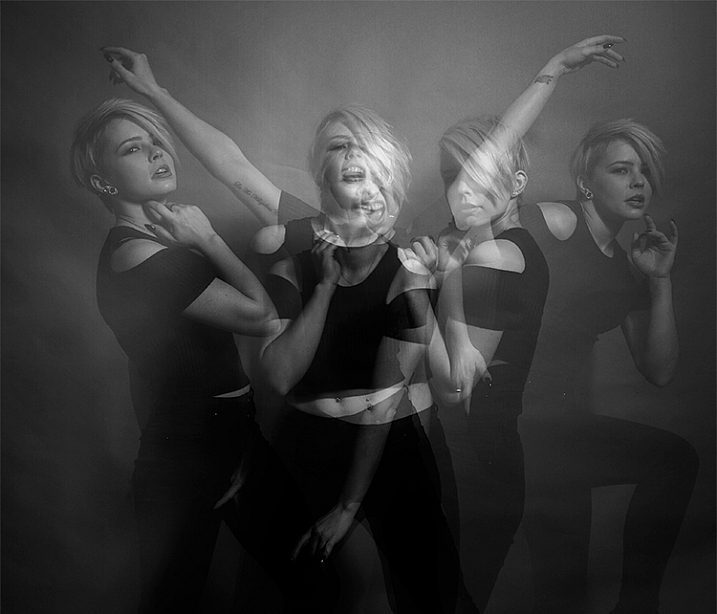
This article will guide you through a fun special effect technique that will allow you to capture multiple exposures in a single frame, using the test button on your strobes or flashguns. Using this method, you will gain a new tool to add movement, and a sense of action in your studio photography.

how-to-multiple-flash-exposures-2793

What you need

  • A dSLR on manual settings (set from 2-10″ or bulb exposure)
  • A very dark room (or nighttime outdoors)
  • A tripod
  • A human subject
  • A strobe or flashgun (speedlight) with a test button (to manually fire the flash)
  • Someone to serve as an extra pair of hands (not required but it helps a lot)

Setting it up

how-to-multiple-flash-exposures-2795

Aperture

Because you’re using flash, the aperture setting is the most important in this technique. As long as your shutter speed is slower than your camera’s flash sync-speed, aperture is what controls how the flash exposure is recorded, and it also dictates what power output to set on your flash. I suggest using an aperture somewhere between f/8 and f/16, to get the best results. A smaller aperture will also help to minimize the effect of any ambient light in your images.

Camera settings

With your camera on a tripod, set the dial to manual mode, the ISO to 100, and your shutter speed to between two and six seconds. To test if your shutter speed is suitable, take a test shot without any flash. As long as the image is completely black at the end of the exposure, it will work for this technique.

This time can be changed and extended later, depending on how many movements you want to capture.

Lighting

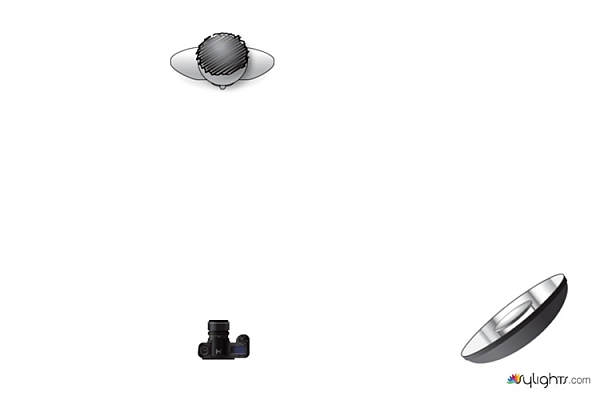
To start with, try to keep your lighting simple. A single light source will give you unlimited potential. This technique will work with multiple lights, but it is best to build up to that over time, as you get used to how the technique works.

As for lighting placement, the choice is yours. The lighting will, and should, depend on the final intent of the image you are trying to create. However, if you’re unsure, try starting with your light high above, and in front of, your subject. That will provide a good starting point to make adjustments from there.

Use a light meter, or manually calculate the exposure, to set your flash output, so it matches your chosen aperture.

how-to-multiple-flash-exposures-diagram

Simple lighting set-ups, like this one used in these images, can be the most effective.

Direction

With everything set up, you need to explain to your subject how to move. The easiest way to explain this is, “Pose, wait for the flash, pose, wait for the flash, and pose again”.

In more detail – you want to wait for your subject to adopt the first pose, set the focal point, and start the exposure. Press the test button on your strobe to fire the flash. After this first flash, your subject should move to their second position as quickly as possible, where you will press the test button again. Repeat as many times as required.

Keep trying

The hardest part of this technique is that it is incredibly hit and miss. Getting your subject to move into positions that create pleasing compositions, without be able to evaluate while it’s happening, is tricky. It takes time and patience. You will need to shoot a lot of frames, and most of them will be unsuitable. Just keeping making as many attempts as you can, until you think you have something, then take some more.

how-to-multiple-flash-exposures-2781

Tips

Here are a few things to keep in mind that will make your attempts easier.

Start small

Sometimes it’s hard judge how movements will appear in the final image. By trying to squeeze too much in, you might end up with a cluttered mess in your images. Start with two or three movements to gauge where things are and build it up from there.

how-to-multiple-flash-exposures-2787

Trying to include too many movements may result in a cluttered mess like this image.

Remote triggers

If you have a remote trigger for your strobes with a manual button on it, you can hold it in your hand and fire the flash. This is much more preferable than having to move between the camera and your light source during each frame.

Recycle rate

If you want to squeeze more than two or three movements into a six second exposure, try to ensure that your flash isn’t set to full power. By reducing the power output, you’re also decreasing the amount of time it takes your flash to refresh. This will allow you to fire the strobe more times in the short timeframe.

Clarity

There is no one way to process images from this technique, and all of that is up to you. However, if you want crisper, more pronounced outlines of your subject, the clarity slider in Lightroom or Adobe Camera RAW will help a lot.

Neutral backdrops

how-to-multiple-flash-exposures-2793-2

Colored backdrops will overpower images using this technique.

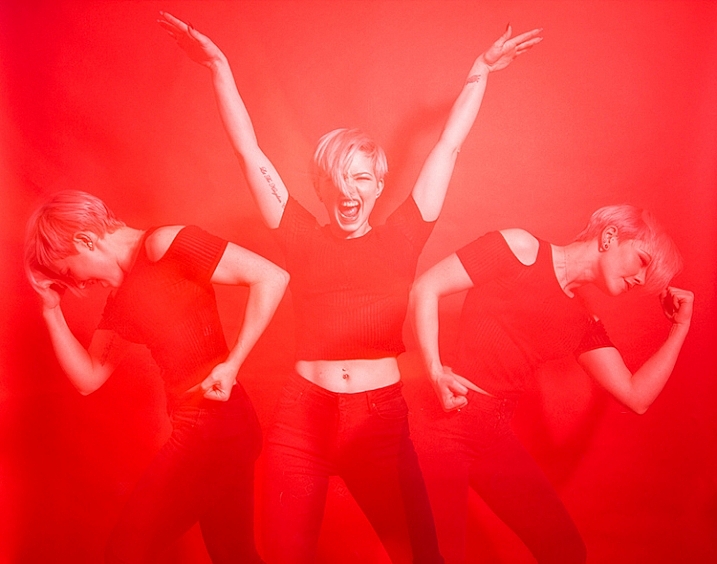
For color images, try and stick to a black or grey background. Because your subject is moving to different positions, the background continues to expose once your subject has moved. If you use a colored background, as I did with these images, that color will dominate your exposures. Of course, this can be used judiciously as a feature of the image should you choose.

Two second timer

If you can’t rope someone into being your assistant for the day, set your camera to use the two second timer, to give you time to move between the camera and the strobe.

Keep going

Once you’ve had a go at this technique with people, feel free to try and think of ways to use it with other subjects. For example you could use it to capture a hammer at different points in its swing, or perhaps a basketball at different parts of its arc. The choices are endless. Be creative with it, have fun, and if you give it a go please share your images below, as well as any questions you may have.

This is the third of a series of articles we will be featuring this week on dPS all about special effects. Check out the others here:

  • How to Photograph the Full Band of the Milky Way
  • Fire Spinning with Steel Wool – A Special Effects Tutorial

googletag.cmd.push(function() {
tablet_slots.push( googletag.defineSlot( “/1005424/_dPSv4_tab-all-article-bottom_(300×250)”, [300, 250], “pb-ad-78623” ).addService( googletag.pubads() ) ); } );

googletag.cmd.push(function() {
mobile_slots.push( googletag.defineSlot( “/1005424/_dPSv4_mob-all-article-bottom_(300×250)”, [300, 250], “pb-ad-78158” ).addService( googletag.pubads() ) ); } );

The post Special Effect – How to Create Multiple Flash Exposures in a Single Frame by John McIntire appeared first on Digital Photography School.


Digital Photography School

 
Comments Off on Special Effect – How to Create Multiple Flash Exposures in a Single Frame

Posted in Photography


Pentax continues full frame DSLR tease with two sample photos

29 Jan

In September 2015, Ricoh published a teaser website for a Pentax full-frame DSLR set to launch in spring 2016. Additional teasers have been released on occasion since the website went live, including a new one today. In this latest post, Ricoh has released a pair of sample photos alongside details about the HD PENTAX-D FA 24-70mm F2.8 ED SDM WR lens and how it functions with the upcoming full-frame camera.

We got a look at an early mockup of the elusive Pentax full-frame DSLR at CP+ in February 2015. The post below is Ricoh’s latest update on the camera; the new sample photos can be viewed on the Pentax teaser website.

D FA 24-70mm F2.8ED SDM WR: for well-depicted, fine-detailed images

The HD PENTAX-D FA 24-70mm F2.8ED SDM WR lens has a 17-element, 12-group optical construction featuring three ED (Extra-low Dispersion) glass elements, one anomalous-dispersion glass element, and three aspherical elements. It delivers high-contrast, high-resolution images with extra-fine details across the image field — from the center to the edges — while effectively compensating for a variety of aberrations.

When mounted on a PENTAX 35mm full-frame digital SLR camera body, this lens can be used as a standard zoom lens, with a zoom ratio of approximately 2.9-times, covering focal-length ranges from ultra-wide angle to standard. It captures unique, eye-catching images with an exaggerated perspective and a wide depth of field, making it ideal not only for sweeping landscapes, but also for confined indoor scenes with limited depth. Its weather-resistant structure prevents the intrusion of water into the interior. When coupled with a weather-resistant PENTAX 35mm full-frame digital SLR camera body, it creates a dependable, durable imaging system that performs superbly even in the rain or mist, or at locations prone to splashing water.

Articles: Digital Photography Review (dpreview.com)

 
Comments Off on Pentax continues full frame DSLR tease with two sample photos

Posted in Uncategorized


Is it Time to go Full Frame? Weight These Pros and Cons Before You Decide

24 Jan

Has anyone ever said to you, “That’s a nice photo, you must have an expensive camera!”?

According to photography legend Ansel Adams, “The single most important component of a camera is the twelve inches behind it!”  

Your camera is simply a tool, that you use to create your vision of the scene in front of you. A camera can only do what you tell it, so it’s not going to capture that “nice photo” all by itself. But, what if the camera doesn’t perform up to your expectations? Then, it may be time for an upgrade.


Captured at ISO 6400 this image shows great tonal range with very acceptable noise levels.

Captured at ISO 6400 on a Nikon D750 full frame, this image shows great tonal range with very acceptable noise levels.

I recently made the jump from a cropped-sensor camera to a full frame body (a Nikon D750, used in all the images below). For the purpose of this article I am not going to get into a technical discussion about the differences between a crop sensor (APS-C), and full frame camera (the main one being is that the full frame has a larger sensor, the size of a frame of 35mm film).

But how do you know if, and when, upgrading to a full frame camera is desirable? What follows are some points to consider if you’re on the fence.

Advantages of full frame

  • Improved low light performance: Because of the larger sensor size, a full frame camera is able to capture more light, which allows it to attain focus in darker environments.
  • Higher ISO performance: The larger sensor of a full frame has larger pixels, which creates less digital noise at higher ISOs. In most cases you will get a one or two stop improvement in high ISO noise, over crop sensor cameras, though many new models of APS-C models have a much improved performance in noise reduction.
  • More control over depth of field: This is a commonly misunderstood benefit of full frame, because the larger sensor does not really affect the depth of field of an image. However, with the larger sensor of a full frame, you can move closer to the subject which causes the depth of field to become smaller. This, in turn, creates a smoother bokeh.
  • Improved dynamic range and color depth:  A full frame sensor can record more tonal range within shadows and highlights. Detail and color are much improved at both ends of the spectrum.

Disadvantages of full frame

Bird in fight was captured here at high ISO to achieve fast shutter speed to capture a very sharp image.

This heron in flight was captured at high ISO to achieve the fast shutter speed needed to get a sharp wildlife image.

  • Expense: Not only is the cost of the full frame DSLR higher than a crop sensor, you will most likely need to make additional investment in compatible lenses.
  • Size and weight: Not only are the sensors larger in a full frame DSLR, the overall size and weight are as well. Also, the lenses have more glass elements, and are also larger and heavier. This may not matter to many photographers, but when carrying gear for long distances it could be a factor to consider.
  • No crop factor: The telephoto reach of a full frame DSLR is lessened by not having a crop sensor. For example: a 200mm lens on full frame doesn’t have the reach of the approximate focal length on a cropped sensor  camera (about 300mm).
  • Slow frame rate in burst mode: Because a full frame DSLR has a larger sensor, there is more information to record to the memory card. Therefore, it will take longer to save images to the card, resulting in fewer frames per second when you are shooting in burst mode.

So, how do you know if you are ready to make the jump to a full frame camera? Ask yourself these questions:

How much will it cost?

As mentioned above, the cost of buying a full frame camera is significantly more expensive than a crop sensor one, plus new lenses will most likely need to be purchased. There isn’t much use in changing to full frame if you are not going use high quantity lenses designed for full frame cameras. If you plan to make the jump to full frame, you may want to begin by upgrading lenses to those compatible with full frame DSLRs.

Choosing a smaller aperture of f/22 gave enough depth of field to keep both the boys and the waterfalls in focus.

Choosing a smaller aperture of f/22 produced enough depth of field to keep both the boys and the waterfalls in focus using a full frame Nikon D750.

What type of photography do you enjoy shooting?

Full frames have advantages and disadvantages for different types of photography.

  • Landscape: Low light performance, more detail and improved ISO performance are all great advantages of full frame for landscape photography. The only possible drawback here is the effectively shallower depth of field, but this can be compensated for by using a smaller f-stop.
  • Portraits: The larger sensor size of a full frame will result in a shallower depth of field. For portraiture this means the backgrounds can feature more blur and make the subjects stand out better.
  • Wildlife: A full frame camera loses the telephoto reach that a crop sensor has. Nevertheless, a lot of wildlife photography is shot in low light situations, where a full frame gives a much improved advantage.
  • Sports: As in wildlife photography, limited reach and low light factors apply to sports photography. Shooting with a full frame, the improved focusing in low light is a helpful benefit for sports. However, the slower frame rates of a full frame can be a drawback in photographing a fast moving sport.

If you are a portrait or landscape shooter, there are many benefits that might convince you to make the switch to full frame.

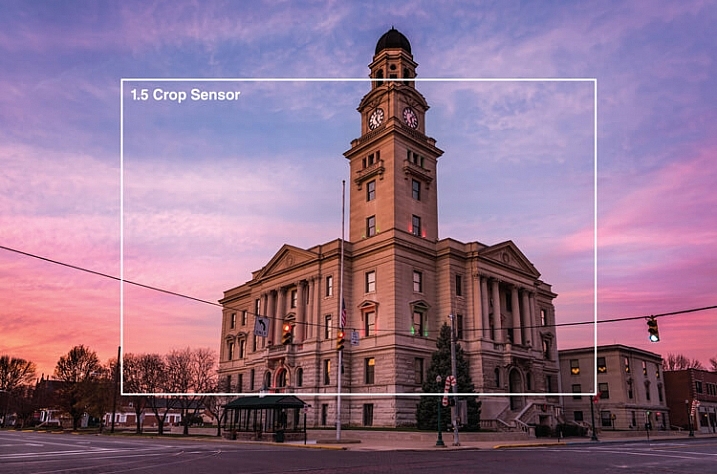
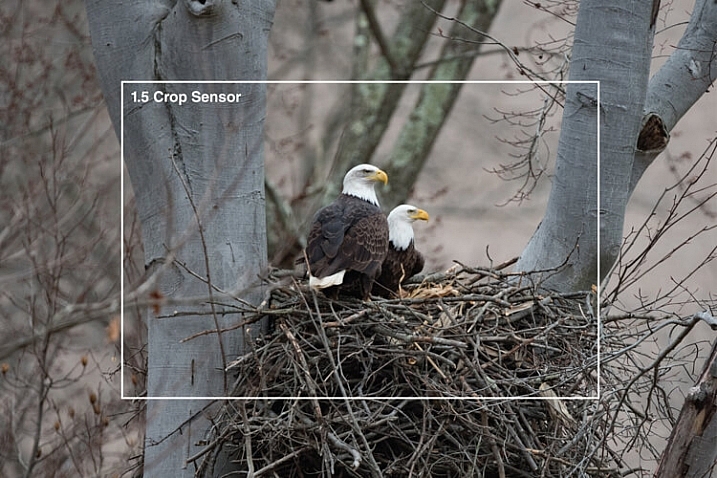
This scene was captured with at 24mm on full frame Nikon D750. The white line shows how much of this image would be captured on a crop sensor from the same location.

This scene was captured at 24mm on a full frame Nikon D750. The white line shows how much of this image would be captured on a crop sensor from the same shooting location.

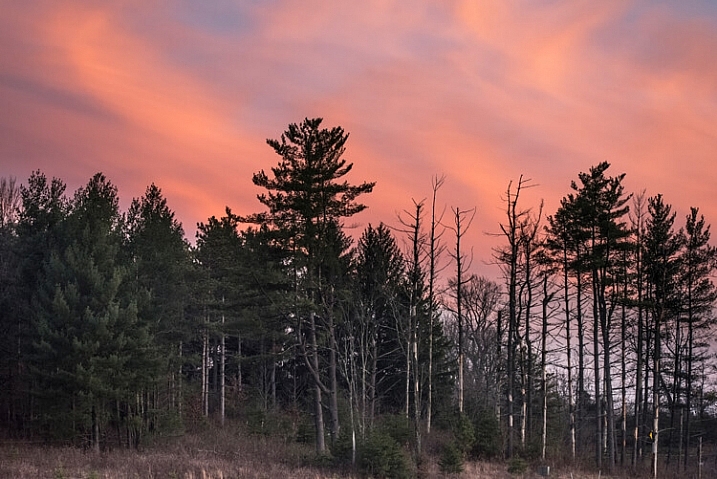
This image was captured at 600mm with a Nikon D750. The white line shows the extra reach that a crop sensor camera would give you. This image was also captured in low light conditions with ISO of 2000 with very acceptable noise level.

This image was captured at 600mm with a full frame. The white line shows the extra reach advantage that a crop sensor camera would provide. Still, capturing this image in low light conditions with an ISO of 2000 results in a desirable noise level.

Is your current camera holding you back?

Every camera has a limited number of shutter releases, so if your camera is nearing the end of its life cycle, it might be time to consider an upgrade. If your older crop sensor DSLR is limiting your results in low light, and you are constantly frustrated by high levels of noise, you might benefit from an upgrade to full frame.

Keep in mind that it’s convenient to blame a camera for taking poor images, but it may not be the camera holding you back. Many times photographers don’t get the results they expect by underutilizing high-end equipment. No matter what type of camera you shoot with, get to know it, and how all of its features work, before moving on to a different one.

shooting here in low light, this shot was able to be captured in low light by increasing the ISO without adding digital noise to the image.

This cityscape was captured with a full frame in low light by increasing the ISO, without adding digital noise.

What is your level of photography experience?

A full frame camera is probably not the best one to use as a beginner. Start shooting with a more entry level DSLR, and work up to a full frame model. If you are looking for a camera to take photos of family and friends, a crop sensor DSLR is a very satisfactory choice. Having a good handle on the exposure triangle (aperture, shutter speed and ISO) and how they work together is a must if you’re going to take advantage of all the benefits of full frame. You must be comfortable with shooting in manual mode. If you earn any part of your income from photography, you may benefit from switching to a full frame camera.

Do you make large prints?

A full frame sensor has a larger pixel size, which will capture more light and detail, which results in sharper images that are conducive to making large prints. If you never make any prints larger than 8×10″, then a full frame DSLR may not be of benefit to you.

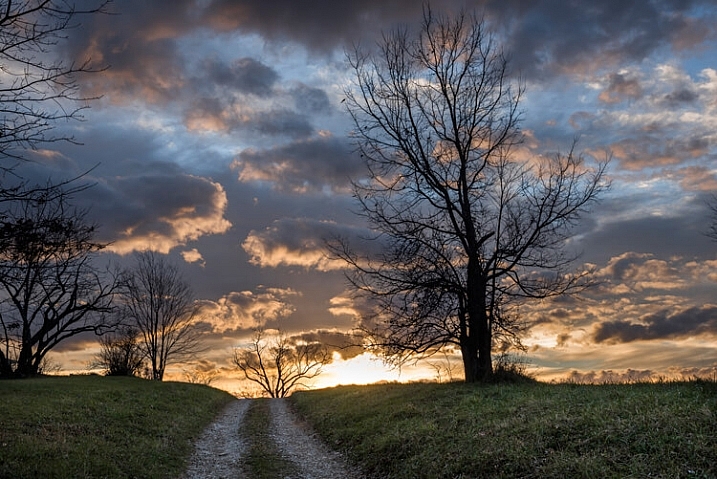
Here this sunrise shot has a nice range of tones without any noise in the shadows that you might get with some crop sensor cameras.

Captured with full frame Nikon D750, this sunrise image reveals a nice range of tones, without any of the digital noise in the shadows likely to be present with some crop sensor cameras.

Will purchasing a full frame make you a better photographer?

You may have heard this quote, “Skill in photography is acquired by practice, not by purchase.”

Do you need a full frame camera to capture great images? No, of course not! Most new crop sensor cameras on the market today are engineered to take beautiful images! But if you are an experienced photographer who makes money with your camera, you may gain an advantage by switching to full frame.

The bottom line

If you are thinking of upgrading from a crop sensor camera, be sure to consider the price, lens compatibility, and type of photography you do, before you make the change to full frame. Jumping to full frame can be quite a leap! But if you are ready for that big step, the results can be rewarding.

Are you ready to go full frame? Please leave your comments below.

googletag.cmd.push(function() {
tablet_slots.push( googletag.defineSlot( “/1005424/_dPSv4_tab-all-article-bottom_(300×250)”, [300, 250], “pb-ad-78623” ).addService( googletag.pubads() ) ); } );

googletag.cmd.push(function() {
mobile_slots.push( googletag.defineSlot( “/1005424/_dPSv4_mob-all-article-bottom_(300×250)”, [300, 250], “pb-ad-78158” ).addService( googletag.pubads() ) ); } );

The post Is it Time to go Full Frame? Weight These Pros and Cons Before You Decide by Bruce Wunderlich appeared first on Digital Photography School.


Digital Photography School

 
Comments Off on Is it Time to go Full Frame? Weight These Pros and Cons Before You Decide

Posted in Photography


Kipon to launch reducer to mount medium format lenses on full frame cameras

18 Dec

Chinese lens manufacturer Kipon has announced that next year it will make available a reducing adapter that’s designed to allow medium format lenses to fit on full frame cameras. The adapter will have a magnification factor of 0.7x which it says will both widen the effective focal length of the lens in use and widen its effective aperture. 

The first adapter will be designed to mount Hasselblad lenses on Sony E-mount cameras, but the company says it is working on other mounts for a wider range of both lenses and host cameras. 

The lenses in the adapter channel the light from the exit element to create a tighter covering circle. This means light that would otherwise fall outside the sensor area is directed to land on it to be recorded.

When a 50mm Hasselblad lens is mounted on a current Hasselblad digital body it produces a similar image area to a 35mm lens on a full-frame camera. That calculation though is a factor of the sensor size of the Hasselblad camera, and the same lens would not deliver that apparent angle of view were it mounted on a full frame camera or in front of the 6x6cm film frames Hasselblad lenses were designed to be used with. 

The 0.7x magnification of the Kipon adapter has the effect of canceling out the crop factor, turning that 50mm Hasselblad lens back into a 35mm-equivalent on a full-frame camera.

The adapter will have to be very good quality to make the most of the resolution of Hasselblad lenses, otherwise the exercise will be a bit pointless. It is expected to retail for $ 415 when it becomes available in February.

For more information visit the Kipon website. 

Articles: Digital Photography Review (dpreview.com)

 
Comments Off on Kipon to launch reducer to mount medium format lenses on full frame cameras

Posted in Uncategorized


HandeVision announces five lenses for its Iberit family – full frame lenses for mirrorless cameras

10 Dec

German/Chinese optics brand HandeVision is set to introduce five new lenses next year that are designed for full-frame mirrorless cameras. Each with a maximum aperture of F2.4, the focal lengths the company is planning to release in its Iberit series will be 24mm, 35mm, 50mm, 75mm and 90mm. 

The company says it has concentrated on making the lenses small and lightweight to suit small and light cameras, but has used brass, aluminum and stainless steel in the construction of the barrels and mounts. 

The lenses, which look more than a little like Leica M lenses, are all manual focus and offer aperture rings with markings for F2.4-16. Although they have a 44mm imaging circle that covers a full frame sensor, the lenses will be released with mounts for APS-C cameras, such as the Sony NEX and Fuji X system. These lenses will offer electronic aperture control. The 35mm, 50mm and 75mm lenses have six-blade apertures, while the iris in the 90mm uses 10. There is no specification as yet for the 24mm lens.

The first set of lenses will be made for Leica M, Sony E and Fuji X cameras, though the company doesn’t specify what other mounts will be available eventually. A Micro Four Thirds mount Ibelux 40mm F0.85 lens already exists, but there is no mention of whether MFT mount versions of these new models will be introduced at any point.

January 2016 is given as the launch date for the 35mm, 50mm and 75mm lenses, and the 24mm and 90mm lenses will be available ‘later in the year.’ Prices are a bit vague at the moment, but HandeVision says the lenses will cost between $ 480 and $ 660 depending on the model. 

HandeVision is a brand created through cooperation between German lens manufacturer IB/E Optics and the Chinese company Shanghai Transvision Photographic Equipment Co – the company behind the Kipon brand. 

For more information visit the HandeVision website. 

Focal Length   35mm  50mm  75mm  90mm
 Angle of View  63.4  46.8  32.2  27
 Aperture  2.4-16 2.4-16  2.4-16  2.4-16
 Close Focus (M/NEX,FX)  0.7/0.35m  0.7/0.6m  0.7/0.6m 0.7m 
 Iris Blades  6  6  6  10

 Length 
(M/NEX, FX)

 35/45mm  55/65mm  35/75mm  69/79mm
 Diameter  58mm  58mm  58mm  58mm
 Filter Thread  M49x0.75  M49x0.75  M49x0.75  M49x0.75
 Weight (M/NEX, FX)  NA  250/310g  270/330g  NA
 Elements/Groups  6/6  6/6  5/5  4/4

Articles: Digital Photography Review (dpreview.com)

 
Comments Off on HandeVision announces five lenses for its Iberit family – full frame lenses for mirrorless cameras

Posted in Uncategorized


Sony A7RII Mirrorless Full Frame Camera Review

17 Nov

Do you ever get the feeling you’re being played by the camera manufacturers? Sony appears to have no shame in regularly drip feeding its technology to consumers, eager for the next best thing in image quality.

If you don’t mind your hot new camera becoming a dinosaur six months after you buy it, Sony is the camera brand for you. You see, Sony has been very crafty by releasing a wide range of new mirrorless cameras, in such a way that you’ll probably need more than one of them, if you want to avail yourself of their best features.

The Sony A7RII Mirrorless Full Frame Body continues this money grabbing trend. The A7R was like the ultimate prototype, with a lot of usability problems, but it did produce gorgeous images. The next big hitter was the A7S with its amazing lowlight performance, and limited 4K video recording functionality (I say limited, because it cannot do internal 4K recording) .

Enter the Sony A7RII – the next resolution monster from Sony.

Sony A7RII Review

As you may know, I switched from Canon to the Sony A7R system as soon as it was launched, and overall I’m delighted with the results, even if the actual functionality of the camera can be painfully annoying at times.
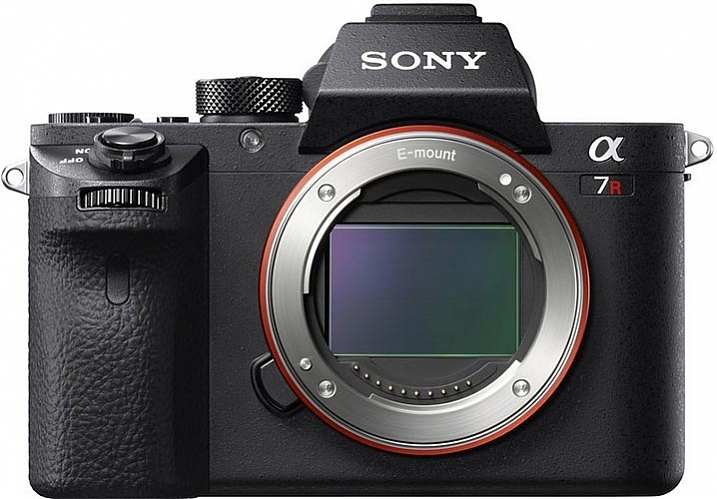
Sony A7RII Review by Gavin Hardcastle

Image courtesy of Sony

For $ 4000 CDN ($ 3198 USD) the 42 Megapixel Sony A7RII packs a lot of firepower into a very small package, when you look at the specs. If your credit card is quivering in anticipation of buying this camera, there are a few things you might want to consider before throwing down your dollars.

I’m going to approach the question of whether or not you should buy this camera based on the assumption that there are likely three types of buyer for this camera:

  1. Existing Sony A7R users considering the upgrade.
  2. DSLR users considering switching to the Dark Side.
  3. New camera buyers with no current investment in any system.

Sony A7RII Review - Astrophotography, Gavin Hardcastle

#1 – Existing Sony A7R users considering the upgrade

If you already own the Sony A7R, here are four major reasons to shell out the big bucks for the upgrade:

  1. If you shoot a lot of handheld work and want the 5-axis image stabilization.
  2. You want to shoot 4K video (see below for my thoughts on that).
  3. You value the silent shutter for less vibration, and therefore sharper images.
  4. You value the new Eye Detect autofocus.

If none of the features listed above have any great importance to your photography, you’re probably better off keeping your A7R, and spending your upgrade dollars on some of the stunning new Zeiss glass for E-Mount that’s available now, or coming out soon. The Batis and Loxia range of lenses are a force to be reckoned with. Also, realize, that based on Sony’s track record, there will probably be a Sony A7RIII on the shelves before you’ve filled your first memory card.

But what about the extra megapixels?

The difference between 36mp and 42mp is not that big a deal. In realistic terms, all it means is that you’ll be able to makes prints ever so slightly larger with the A7RII, and you’ll have a little bit more resolution to play with when cropping. To give you an idea of how big the difference is take a look at this comparison.

Sony A7RII pixel dimensions vs A7R

What about the Silent Shutter?

I was very keen to discover how much of a sharpness improvement I could expect from the new silent shutter (and therefore vibration free) on the A7RII.

Using the Zeiss Loxia f/2.8 35mm lens, I took the above shots on the A7RII and the A7R, with identical settings and focus point. The only difference was that the A7RII was set to silent shooting mode, and therefore didn’t suffer from the notorious shutter shock vibration of the A7R, which is something of a problem for fast exposures and when using telephoto lenses.

The results were impressive. Zooming in to 100%, I can see a significantly sharper image produced by the A7RII, when shooting in bright daylight with fast shutter speeds.
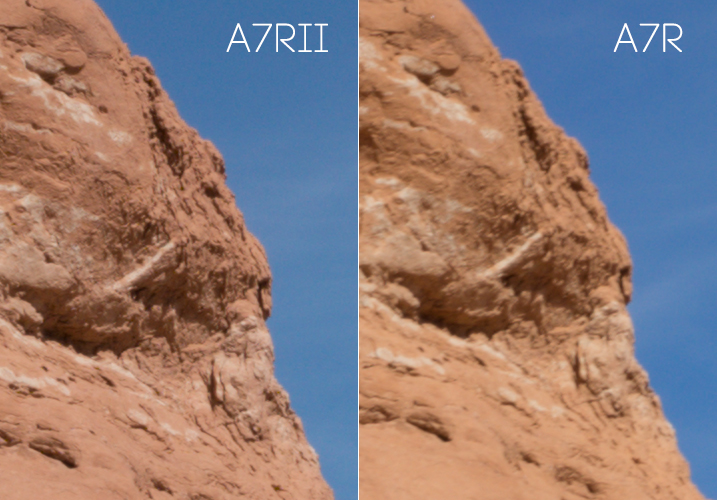
Sony A7RII Sharpness test

Both shots used the Zeiss Loxia 35mm at f/11 with focus manually set at the same point. No sharpening was added in post- production.

After the above comparison, I thought I’d do the same thing in low-light, with a long exposure, to see if the increase in sharpness was consistent.

With this post sunset shot of Bryce Canyon, the sharpness increase on the A7RII is much less significant. Zoomed in to 100% I can barely see a slightly sharper image produced by the A7RII, but the difference is not as significant in low-light situations with long exposures. Once you add a little sharpening in Adobe Camera RAW there is no visible sharpness difference between the A7R and A7RII image when shooting long exposures in low-light.
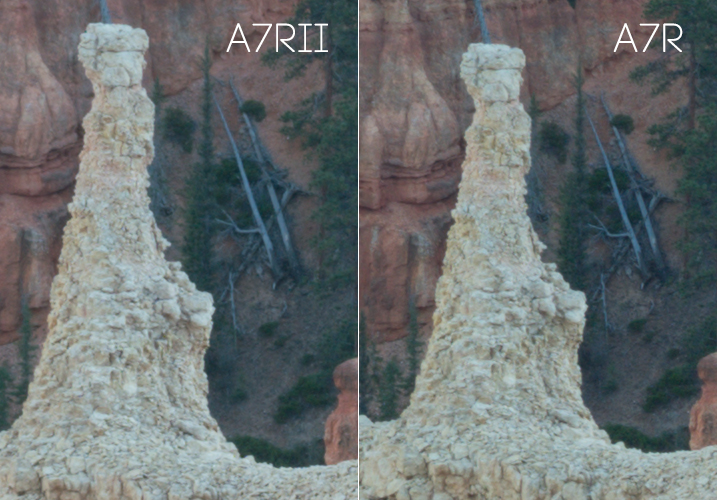
Sony A7RII Review - Resolution Comparison

100% magnification. Both shot with Sony FE 55mm lens at f/11. No sharpening was added in post-production.

It has better noise performance right?

When I heard that the A7RII had much better noise performance than the A7R, I was pretty excited to see how it would fare with astrophotography.

In my tests I could see hardly any improvement over the A7R when pushing the ISO up to 3200 during long exposures for astrophotography. Don’t get me wrong, the A7R was already pretty impressive at astrophotography when paired with good f/2.8 lenses. But, if you’re considering upgrading mainly for the supposed better noise performance, you may be setting yourself up for disappointment.
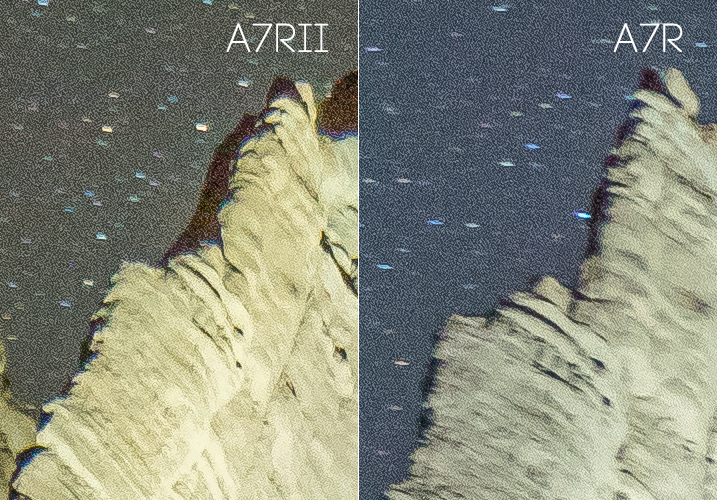
The Sony A7RII for astrophotography

What about the USB power option?

If I wanted to carry around a brick all day I’d still be shooting with a DSLR.

Granted this is a major improvement on the A7R which wouldn’t allow you to use the camera when connected to a USB power source, but I only ever use this feature when shooting a time-lapse sequence longer than the measly one hour provided by the feeble Sony batteries, which I pop like Tic Tacs.

A better solution would be to provide longer lasting batteries. The A7RII has a bigger body than its previous version, so how about a bigger battery?

What about dynamic range?

In my tests I couldn’t see any improvement in dynamic range between the A7RII and the A7R in real use cases. By real use cases, I mean the limits by which you can recover shadow detail and highlight detail in your photos. It’s typical to deliberately underexpose your shots, so that you can recover the shadow detail when processing, and you won’t usually have to worry about blown out  highlights.
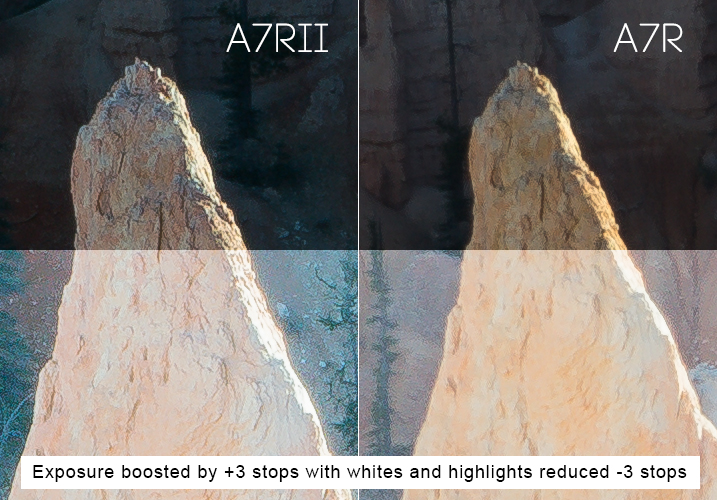
Sony A7RII Review - Dynamic Range Test

I deliberately underexposed these shots to avoid blown out highlights. I knew I could recover the shadow detail in post-production. Shown in the bottom half of the images, I increased the exposure by a ridiculous three stops in ACR, then reduced the Whites and Highlights sliders by three stops. I can see no noticeable difference in dynamic range between either camera, but the A7RII image is considerably sharper in this fast exposure as previously mentioned because of the silent shutter.

I tried this many times with both the A7RII and the A7R, and my conclusion is that they both performed equally well. I’m sure there will be some scientific test that proves the A7RII has better dynamic range, but when it comes to what you’ll observe with your own eyes, I doubt you’ll see any noticeable difference between both cameras in most situations.

If other users are observing better dynamic range in fast exposures, I wonder if what they’re seeing is actually the increase in sharpness on the A7RII, which simply records more detail than the A7R when shooting in silent shutter mode.

Sony A7RII Review by Gavin Hardcastle with Example Images

The 5-Axis Image Stabilization

This is a very good feature. If you’re using adapted prime lenses with no vibration reduction, you’ll really see the benefit of this feature when shooting handheld in low-light, where otherwise trashed shots can end up being very usable.

You’ll also be able to capture smoother handheld video with the image stabilization switched on, and with the additional Custom Function button on the camera body you can easily assign IS to that button, to save digging around in the menus to turn it on and off. This is a major improvement over the A7R.

The menu system of Purgatory

The one consistent gripe among all reviewers of the A7 series over the last couple of years has been the atrocious Sony menu system. They should have dealt with this issue long ago, but decided it wasn’t worth bothering on this upgrade.

Sony doesn’t seem to use any sensible kind of logic as to where they place menu items. For example, you’d expect anything to do with Autofocus to be grouped in one menu – but no, it’s scattered all over the place as if deliberately trying to test your patience. Things like this are a real turn-off for professionals who don’t have the time to waste on menu digging.

Get a grip Sony and sort this out! I’ll happily provide a much better layout for FREE if it means I no longer have to suffer the menu of misery.

Much better autofocus

Let’s be honest, the autofocus on the A7R is pretty lame, when compared to high-end DSLR cameras. If you’re seriously considering using the A7RII for portraiture the new Eye Detect autofocus function is a major attraction, and it works very well. If you primarily shoot landscapes this feature alone might not be worth the upgrade.

Sony A7RII Image Examples for Astrophotography by Gavin Hardcastle

It does 4K video right?

Well – kind of. If you want full frame 4K video you’ll probably want to buy the A7SII instead, because the 4K full frame footage that I shot with the A7RII looks more like scaled up 1440p, and comes out looking pretty soft.

You’ll get proper 4k image quality when shooting in the Super 35 mode, but you’re basically shooting in crop sensor mode, so you loose a major part of the frame to get that crisp 4K video quality. The other downside, is that the better looking Super 35 mode suffers from bad rolling shutter.

Once again, this is another example of how Sony eeks out their technology across different camera models, ensuring that you have to buy more than one camera if you want all the coolest features. That being said, Sony is still offering better value than their competitors when it comes to how much bang you’re getting for your buck.

Better color rendering?

It’s been said that the A7RII produces better colors than the A7R, but I’ve yet to see any improvement from the test shots that I made. I’ve always been quite happy with colors produced by my A7R, but try as I might, I can’t see any difference (good or bad) in the colors produced by either camera. My examples above may show a slightly different color tone, but I’m putting that down to the time difference between shots while I got everything set up.

Sony A7RII Review in Peek-a-Boo Canyon by Gavin Hardcastle

Isn’t the EVF mind blowing?

There’s been a lot of hype over the improved image quality on the EVF (Electronic View Finder) of the Sony A7RII, and while it’s definitely better than the A7R, it all amounts to nothing once you’ve punched in and magnified the image so that you can accurately set your focus manually.

Sadly, the magnified image quality of the new EVF still looks like a bag of smashed crabs, and I didn’t find it to be any more usable than the A7R for that specific purpose. I tried viewing in both Normal, and High Quality modes, and my conclusion is that the new EVF doesn’t live up to all the hype. Sorry Sony Fanboys.

Where you really notice the improved resolution of the EVF is during playback, and that can be very useful when you need to check the focus after shooting. This is something I do very often when working with poorly made Samyang lenses that have terrible build quality, but produce amazingly sharp images when focused correctly (especially for astrophotography). So, in that respect it’s great, but don’t for a second think that it’ll be any easier to set perfect focus using the EVF magnification.
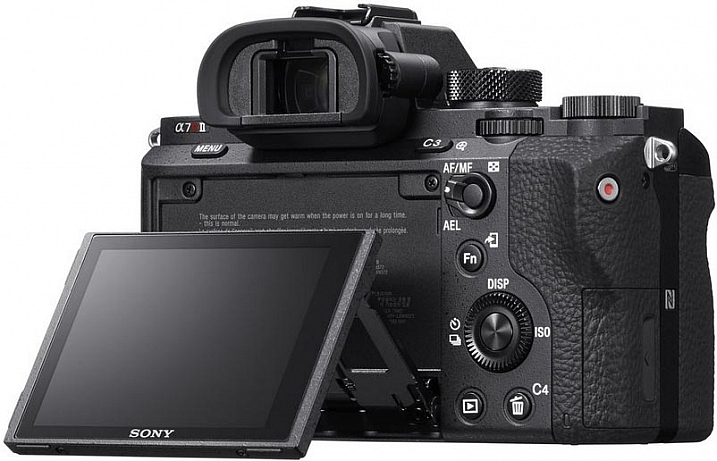
Review of the Sony A7RII Digital Camera

Image courtesy of Sony

It’s bigger and heavier than the A7R

The first thing I noticed as soon as I held the A7RII, was how much bigger and heavier it felt. While I liked the slightly larger size of the A7RII, I was none too happy about the added weight.

One of the major attractions of mirrorless camera systems is their small size, and even with the added weight of carrying lots of spare batteries, it’s still a relief not to be lugging around a breeze-block (cinderblock) of a DSLR.

If Sony could keep the same light weight to these cameras, but make them slightly larger and more ergonomically pleasing to the average hand size, I think they’ll win a lot of new business.

#2 – DSLR users considering switching to the Dark Side

If you’re considering jumping ship from another camera system, there are some things you need to consider before buying into the Sony brand. For most hobbyists these issues aren’t that big of a deal but for professionals these might be deal breakers.

  • No second memory card slots
  • Tedious and slow menu system induces violent tantrums
  • Slow response times when changing settings, writing to card, previewing and using apps
  • Battery life gives you a maximum of one hour of shooting
  • Small size is not comfortable for long periods shooting handheld unless you have tiny hands
  • Weather sealing is pathetic on the A7 series, don’t even test it

Adapt your DSLR Glass
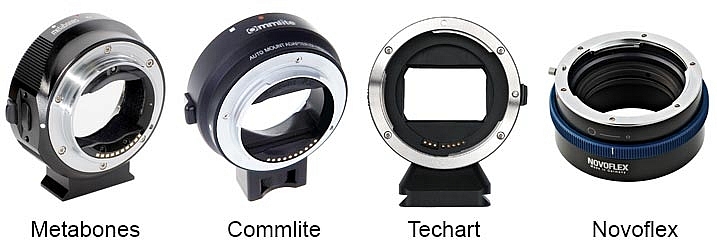
Sony A7RII Lens Adapters

On the plus side, there are now many choices of lens adapter available from different manufacturers, some of which can now handle aut focus. If you own a lot of expensive DSLR glass you’ll most likely be able to adapt it to the Sony E-Mount system. I’ve personally gone down this route but I’ve begun to gradually invest in native Zeiss glass for the Sony because the bulky size of the adapted DSLR lenses makes for a very uncomfortable experience and my camera bag needs to get smaller, not bigger.

Is there really any competition?

It’s pretty slim pickings in the DSLR camp if you need big megapixels. The Canon 5DSR offers more pixels but I’ve yet to see it produce better image quality than the A7RII, especially when it comes to low light shooting and ISO performance. The Nikon D810 is still the king of dynamic range in the DSLR world, but it falls behind the A7RII when it comes to accurate manual focusing using Live View, they don’t even have flip screens!

None of the high end DSLR cameras currently records 4K video.

If you’re outgrowing your current DSLR, or thinking of adding a second camera, that can produce superb images, the Sony A7RII is a logical choice if you can afford the asking price.

3 – New camera buyers with no current investment in any system
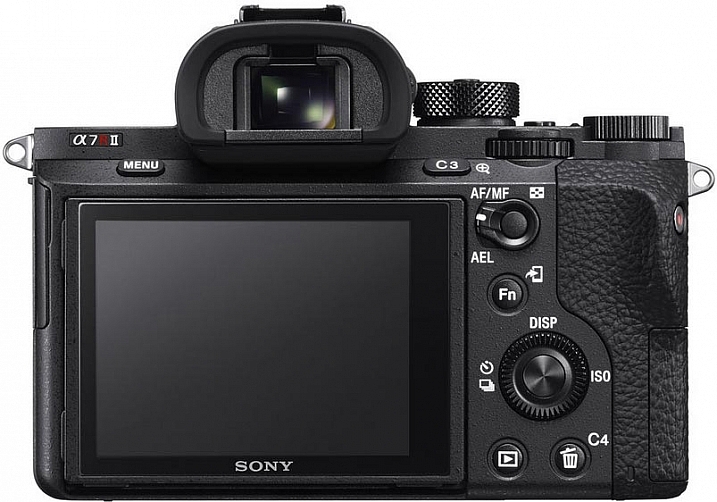
Sony A7RII Camera Review by Gavin Hardcastle

Image courtesy of Sony

If you’re not already invested in any camera system and are thinking of splashing out in this camera, I can summarize the entire ethos of the Sony A7 series for you in one sentence.

Image Quality Over Functionality. That’s what it’s all about. The Sony A7 series of cameras cannot compete with high end DSLR cameras in terms of functionality and reliability in high pressure shooting situations. But when it comes to sheer image quality, sharpness and low light performance, Sony crushes the competition with ruthless dominance.

If you’re a landscape photographer there really is no competition in this price bracket. The Sony A7RII will produce spectacularly sharp and detailed images when paired with good quality lenses.

What do you need from your camera?

Your decision as to whether or not you should buy this camera depends entirely on your shooting style and requirements. Want to shoot weddings and sporting events where reliability is paramount? Buy a high end DSLR. Want to shoot stunning landscapes with the utmost clarity? It doesn’t get much better than the A7RII for the current asking price.

But hold on – What about the A7R?

If the $ 3200 USD price tag of the A7RII (body only) puts too much strain on your bank account, I would recommend that you seriously consider saving some money for Zeiss glass and look for a good used A7R. There should be quite a few Sony fanboys out there, selling off their now obsolete Sony A7Rs for peanuts. Snag one of those for a bargain price and you might still have money left over for a Zeiss Loxia 21mm f/2.8, and maybe even the Sony FE 55mm f/1.8 which are both excellent lenses.

The attraction of top glass
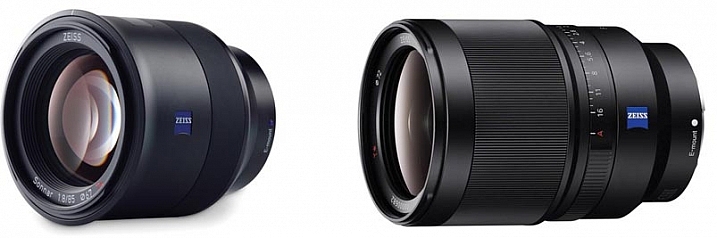
The Zeiss Batis 85mm and Sony SEL35F14Z 35mm lenses

Image courtesy of Zeiss

When the Sony A7 range first came out there were hardly any native lenses to choose from. Now there are more and more high quality lenses from Sony and Zeiss that are so good, I can see some photographers buying into the A7 system simply to take advantage of lenses like the Zeiss Batis 85mm and Sony SEL35F14Z Distagon T FE 35mm f/1.4, which are quickly becoming legendary lenses.

The Sony A7RII gets 4.5 stars

Sony A7RII Test Shots and Review

Why not 5 stars? In some ways Sony has listened to its users and fixed, or worked around, many of the issues voiced by A7R users. However the menu system is still atrocious, and the full frame 4K video is something of a let down.

I would have placed more value on improved dynamic range over the extra few megapixels, and there has been zero improvement in battery life even though the A7RII is a larger camera than its predecessor.

Maybe Sony will fix all of these issues in the A7RIII, and based on recent history, that camera should be in the shops before the next Star Wars sequel comes out.

Special Note: All of the test shots created for the review were done before the latest firmware update which now allows the A7RII to shoot 14-bit uncompressed RAW files.

googletag.cmd.push(function() {
tablet_slots.push( googletag.defineSlot( “/1005424/_dPSv4_tab-all-article-bottom_(300×250)”, [300, 250], “pb-ad-78623” ).addService( googletag.pubads() ) ); } );

googletag.cmd.push(function() {
mobile_slots.push( googletag.defineSlot( “/1005424/_dPSv4_mob-all-article-bottom_(300×250)”, [300, 250], “pb-ad-78158” ).addService( googletag.pubads() ) ); } );

The post Sony A7RII Mirrorless Full Frame Camera Review by Gavin Hardcastle appeared first on Digital Photography School.


Digital Photography School

 
Comments Off on Sony A7RII Mirrorless Full Frame Camera Review

Posted in Photography