RSS
 

Posts Tagged ‘first’

Don’t Fear Photo Post-Processing – Shooting is Only the First Part of the Image Creation Process

14 Sep

You have just bought your new bright shiny camera and you are sure that it is just the thing that will help you create better images. You’re shooting JPG with the camera’s automatic program modes, but you’re not getting the results you wanted. You keep upgrading your cameras thinking that will do the trick, only to find that the quality of your imagery isn’t getting any better. What’s going on?

Lightroom Banner - Don’t Fear Photo Editing - Shooting is Only the First Part of the Image Creation Process

You may be missing an important part of digital photography, post-processing, with a state of the art processing program like Adobe Lightroom or Photoshop.

Before and after

Iceland Light Before - Don’t Fear Photo Editing - Shooting is Only the First Part of the Image Creation Process

This image of a lighthouse in Iceland was taken on a bright yet overcast day. In a matter of moments with the help of Lightroom, it became a favorite.

Iceland Light After - Don’t Fear Photo Editing - Shooting is Only the First Part of the Image Creation Process

The role of post-processing in photography is not new

There are several integral parts to digital photography. The technical and creative aspect of using your camera, and the technical and creative application of post-processing your images. Each part is equally important and when all the pieces are put together, that’s when the magic starts to happen.

Unfortunately, many people are still thinking about the days of film when you took it to a lab and the post-processing was done for you. You never had to think twice about how the image was processed. Did you ever notice that different labs gave you different results? That’s because of their level of post-processing.

Now it’s time for you to understand the importance of post-processing if you are going to create better imagery. It will take some time and some dedication to learn, but it will improve your photography by ten-fold.

The first step – shooting with post-processing in mind

First of all, start shooting in RAW format and stop letting the camera make the decisions for you. When you shoot JPG format, it will automatically process your images in camera, even though you may even not be aware of it.

Have you ever taken a JPG and a RAW image and compared the two photographs? The JPG may appear bright and saturated and the RAW file looks flat. That’s because the JPG has been processed by the camera and the RAW file is an unprocessed digital negative.


That RAW file is ready for you to make your own creative adjustments and apply your photographic vision in Lightroom or Photoshop. Only then can you start to recreate that scene you saw when you first took the image.

What kind of post-processing decisions will the camera make for your JPGs? Depending on your camera, it can automatically increase saturation, sharpness, and contrast, but it will also compress your image. There are settings in your camera where you can make blanket adjustments for every JPG (Picture Styles), however, the camera is still making the decisions for you. That gives you zero creative control.

Raw format gives you control

RAW files contain more information and will allow you to have a wider range of tones (called dynamic range) to work with when you bring your images into Lightroom or Photoshop. When shooting in the JPEG format, image information is compressed and lost forever. In a RAW file, no information is compressed and you’re able to produce higher quality images while correcting problem areas that would be unrecoverable if shot in the JPEG format.

The Histogram

Once you start shooting in RAW, it’s very important to be conscious of the histogram. You can bring up the histogram on your Live View shooting screen or after you have taken the shot in your image review screen. Check your camera’s manual for the location of the histogram.

Note: If you shoot with a mirrorless camera you may be able to see the histogram on the screen before you shoot. Check your settings this is very handy.

Why is the histogram important for your photographic success?

If used correctly while shooting, the histogram will give you the information you need to know to bring up the shadows or bring down the highlights and pop out exposure and detail in an image.

The histogram shows you the brightness of a scene and it can be measured as you are shooting, or after you have captured the image. When look at the histogram and see the bulk of the graph pushing towards the right, this means you have an image that may be overexposed (or a really light toned subject).

Overexposed - Don’t Fear Photo Post-Processing - Shooting is Only the First Part of the Image Creation Process

If the data is mostly on the left of the graph, it’s an image that might be underexposed.

Underexposed - Don’t Fear Photo Post-Processing - Shooting is Only the First Part of the Image Creation Process

If the graph spikes on either the left or right “wall” of the histogram, that means that “clipping” has occurred. Clipping happens when you have areas in your photo with no information as a result of over or underexposure. When an area has no information, it is either pure white or pure black which is often referred to “blown out”.

Generally, it is undesirable to have large areas of your image that have highlights or shadows clipping. See the image below. The red areas show highlight clipping, and the blue areas show shadow clipping.

Clipping - Don’t Fear Photo Post-Processing - Shooting is Only the First Part of the Image Creation Process

Because of the limited dynamic range of a camera’s sensor, the area registering as clipped usually leaves the image with no information in the shadows or highlights. A spike touching the left edge of the histogram means that there is shadow clipping. A spike touching the right edge of the histogram means that there are highlights clipping.

What is possible with post-processing?

Many photographers have frustrating results with their images because they don’t embrace digital editing and post-processing. They are doing everything right when they shoot and are good at composition. They know how to expose correctly for the scene, but don’t know where to go with the image once they get home.

For example, maybe they are in a high contrast area and have taken an image with the histogram in mind. Then they open the image on-screen and throw it out because it looks over or underexposed. They don’t know what the post-processing possibilities are even though they may have a viable image. This is where they are missing a large part of the potential in their digital photography post-processing.

Here’s a great example. This image was taken in the Eastern Sierra in California.

Alabama Hills Before - Don’t Fear Photo Post-Processing - Shooting is Only the First Part of the Image Creation Process

It is obvious that the shadows are way underexposed and it creates an interesting silhouette. But, if you look at the histogram, you can see there is space on the left side of the graph which represents the shadows. This means there is more information there, and a good possibility of bringing up the shadows to create a whole different image.

Here is the result after brightening shadows in Lightroom. This adjustment took just seconds and creates a whole new scene.

Alabama Hills After - Don’t Fear Photo Post-Processing - Shooting is Only the First Part of the Image Creation Process

Start with Lightroom

Almost every image needs post-processing. Some people think that’s “cheating”. It’s not, it’s all part of the digital artistic process.

With post-processing, you can create the image you saw when you photographed the scene. Your eyes have the capability of seeing a wider range of light and color than your camera does, so the images need help in post-processing to duplicate the full range of light and shadows. The problem with a lot of beginners, is they tend to oversaturate or over-sharpen an image. So this talent comes with time and practice, practice, practice.


Once you have mastered the basics, there is a lot more you will be able to do with your digital post-processing that will add drama and interest to your photos. The above image of Bridal Veil Falls in Yosemite looks rather flat in the RAW version (left). Once you add saturation, sharpening, and a vignette to the whole picture it starts to pop. Then you can enhance the brightest areas by “painting with light”, and it now becomes a much more interesting image.

Start your post-processing journey with a full featured program like Adobe Lightroom. It is the standard in the industry for professionals, but it is also user-friendly for beginners and helps with both post-processing and image organization. Just be sure that your computer has enough memory and RAM to run these full featured programs. Check the requirements at adobe.com.

Check out our guide to LR:  The dPS Ultimate Guide to Getting Started in Lightroom for Beginners

Nothing is more satisfying than when you have a catalog of 30,000 images and you’re able to find your favorites in literally seconds by entering a few keywords and star ratings. Take some time to set it up, add a class or two, and you’ll be up and running!

Conclusion

Photo editing or post-processing is an integral part of the digital photography puzzle. Don’t think that you can skip this part and come away with satisfying images. It’s just as important to learn photo editing as it is to learn the basic functions of your camera. Only then, will you be able to bring that intentional photographic vision into post-processing and create great images

How are you going to start your post-processing journey? Is shooting in RAW and learning Lightroom in your future? Please share your thoughts with me on this subject.

The post Don’t Fear Photo Post-Processing – Shooting is Only the First Part of the Image Creation Process by Holly Higbee-Jansen appeared first on Digital Photography School.


Digital Photography School

 
Comments Off on Don’t Fear Photo Post-Processing – Shooting is Only the First Part of the Image Creation Process

Posted in Photography


Throwback Thursday: Alpha A700, Sony’s first high-end DSLR

10 Sep

Turning ten years old this week is the A700, Sony’s first high-end DSLR after fully taking over Konica Minolta’s camera business. With plenty of Minolta DNA underneath its Sony Alpha branding, it debuted in September 2007 to take on the likes of Canon’s 40D and Nikon’s D300. Our 33 page (!) review, published in December of 2007, details the strengths and weaknesses of the camera, and includes musings like “Whether the lack of live view has any real relevance in a camera at this level remains to be seen; we doubt it.”

Did you own the A700? Let us know in the comments.

Read our full Sony Alpha 700 Review

Sony Alpha A700 Sample Gallery

$ (document).ready(function() { SampleGalleryV2({“containerId”:”embeddedSampleGallery_2744829658″,”galleryId”:”2744829658″,”isEmbeddedWidget”:true,”standalone”:false,”selectedImageIndex”:0,”startInCommentsView”:false,”isMobile”:false}) });
Articles: Digital Photography Review (dpreview.com)

 
Comments Off on Throwback Thursday: Alpha A700, Sony’s first high-end DSLR

Posted in Uncategorized


Video: Fujifilm X-E3 First Look

09 Sep

Fujifilm’x X-E3 comes with a whole host of refinements and upgrades both inside and out. A new touchscreen drives the user experience, and with an updated sensor and processor comes 4K video capture. Take a peek at what these upgrades look like in action.

Read our Fujifilm X-E3 First Impressions Review

Articles: Digital Photography Review (dpreview.com)

 
Comments Off on Video: Fujifilm X-E3 First Look

Posted in Uncategorized


Fujifilm X-E3 First Impressions Review

07 Sep

The Fujifilm X-E3 is a 24MP mid-level APS-C mirrorless camera, designed as a smaller, more touchscreen-driven sister model to the SLR-like X-T20.

In terms of their internal hardware and specifications, the two cameras are very similar, but the X-E3 relies more heavily on its touch panel for moment-to-moment operation, as well as retaining a more rangefinder-like form factor.

It’s slightly smaller than the previous X-E models, with the removal of the four-way controller and built-in flash allowing the body to be made a little lighter and more compact. A clip-on flash is included in the box, but it’s a simple affair with no tilt or swivel capability to compensate for the decision to make it a separate component.

Key Features

  • 24MP APS-C sensor with X-Trans color filter
  • Improved AF tracking
  • Wi-Fi with Bluetooth for constant connection to a smartphone
  • Shutter speed and exposure comp dials
  • Twin clickable command dials
  • AF Joystick
  • 4K (UHD) video at 30, 25, 24 and 23.97p
  • USB Charging

The more advanced use of the touchscreen, with directional swipes of the finger replacing the role of the four-way controller, pinch to zoom in playback and the option to use the screen as an AF touchpad when the camera’s to your eye doesn’t come at the expense of physical controls for all the main exposure settings.

The X-E3 also becomes the first Fujifilm model to gain Bluetooth, which establishes a full-time connection between the camera and a smartphone, allowing instant transfer of images as you shoot them. [or faster re-connection of Wi-Fi if you’re just choosing to send selected images]

The company also says it has improved its AF Tracking algorithm so that it can track smaller and faster subjects. Fujifilm say this improved algorithm will also come to the X-T2, X-T20, X100F and X-Pro2 in fimrware updates in November and December 2017.

Fujifilm X-E3 Fujifilm X-T20 Fujifilm X-T2 Fujifilm X-E2S
Pixel Count 24MP 24MP 24MP 16MP
Auto mode switch Yes Yes No Yes
AF Joystick Yes No Yes No
Touchscreen Yes Yes No No
AF Touchpad Yes No No No
AF points 91 or 325 91 or 325 91 or 325 49
Rear screen Fixed Tilt up/down 2-axis hinge Fixed
Exposure comp. range ± 5EV ± 5EV ± 5EV ± 3EV
Viewfinder Magnification 0.62x 0.62x 0.77x 0.62x
Max frame rate
(mech/e-shutter)
8/14 fps 8/14 fps 8/14 fps (11/14 with grip) 7 fps
Built-in flash No Yes No Yes
Video Full width 4K
(by Pixel Binning)
Full width 4K
(by Pixel Binning)
1.17x crop 4K
(by oversampling)
1080p
Log Video No No Yes (over HDMI) No
Weather sealing No No Yes No
Card slots 1 (UHS-I) 1 (UHS-I) 2 (UHS-II) 1 (UHS-I)
Connectivity Wi-Fi with Bluetooth Wi-Fi Wi-Fi Wi-Fi

Kit options:

Fujifilm will offer the X-E3 in two kits, one with the excellent 18-55mm F2.8-4.0 OIS, the other with the 35mm-equivalent 23mm F2 lens. We’re particularly interested to see this second kit, as it’s a combination we particularly like. It’s also a useful option for anyone who already has an earlier generation X series camera and already owns the 18-55mm.

The camera will be available, body only, for around $ 899, with the 18-55mm kit costing $ 1299 and the 23mm kit weighing in around $ 1149, both of which represent a considerable cost saving over the cost of buying the lenses separately.

Articles: Digital Photography Review (dpreview.com)

 
Comments Off on Fujifilm X-E3 First Impressions Review

Posted in Uncategorized


Sony unveils the Venice, its first full-frame cinema camera system

07 Sep

$ (document).ready(function() { SampleGalleryV2({“containerId”:”embeddedSampleGallery_2299524587″,”galleryId”:”2299524587″,”isEmbeddedWidget”:true,”standalone”:false,”selectedImageIndex”:0,”startInCommentsView”:false,”isMobile”:false}) });

Sony has just unveiled a new, groundbreaking (at least for them) cinema camera. It’s called the Sony Venice, and it’s the company’s first 36x24mm full-frame digital motion picture camera system.

Designed in “close collaboration with the creative community,” the Venice is the newest generation of Sony’s CineAlta series, which promises natural skin tones, “elegant” highlight handling and wide dynamic range. In the case of the Venice, the camera’s 36x24mm sensor promises 15 stops of latitude to tackle challenging lighting scenarios, and a brand new color management system with ultra wide color gamut for more flexibility in post.

The headline feature is the sensor itself, though. The full-frame chip can be switched out by the camera’s user by simply removing four screws, and at 36x24mm it’s compatible with Anamorphic, Super 35mm, Spherical and Full Frame PL mount lenses. If you’re really feeling frisky, the lens mount can be modified to support E-mount lenses.

Additional features include a built-in 8-stage glass ND filter system, weather sealing, 10-bit XAVC, 16-bit RAW and S-OCN recording via the Sony AXS-R7 recorder, and a modular design that allows you to use the Venice with current and upcoming CineAlta accessories.

The camera is expected to arrive officially in February of 2018, and while Sony didn’t reveal a price, it seems filmmakers will have the option to ‘license’ different builds for specific production requirements like 4K anamorphic and Full Frame. To learn more, head over to the Sony Venice landing page, or read the full press text below.

Press Release

Sony Unveils VENICE, Its First 36x24mm Full-Frame Digital Motion Picture Camera System

Anamorphic Capabilities, Interchangeable Sensor, 8-stage ND Filter System, New Color Management & Established Workflow Combine into Unique Creative Filmmaking Tool

LOS ANGELES, Sept. 6, 2017 — Sony Electronics is unveiling VENICE – its first Full-Frame digital motion picture camera system. VENICE is the next generation of Sony’s CineAlta camera systems, designed to expand the filmmaker’s creative freedom through immersive, large-format, Full Frame capture of filmic imagery producing natural skin tones, elegant highlight handling and wide dynamic range. VENICE was designed through close collaboration with the creative community, fulfilling the requirements from filmmakers and production professionals.

VENICE will be officially unveiled on Sept. 6, in front of a select audience of American Society of Cinematographers (ASC) members and a range of other industry professionals. Sony will also screen a short film, “The Dig”, the first footage shot with VENICE, produced in Anamorphic, written and directed by Joseph Kosinski and shot by Academy Award winning Cinematographer Claudio Miranda, ASC.

“We really went back to the drawing board for this one,” said Peter Crithary, marketing manager, Sony Electronics. “It is our next-generation camera system, a ground-up development initiative encompassing a completely new image sensor. We carefully considered key aspects such as form factor, ergonomics, build quality, ease of use, a refined picture and painterly look—with a simple, established workflow. We worked in close collaboration with film industry professionals. We also considered the longer-term strategy by designing a user interchangeable sensor that is as quick and simple to swap as removing four screws, and can accommodate different shooting scenarios as the need arises.”

Full frame sensor and wide range of lens compatibility

VENICE combines a newly developed 36x24mm Full Frame sensor to meet the high-quality demands of feature filmmaking. Full Frame offers the advantages of compatibility with a wide range of lenses, including Anamorphic, Super 35mm, Spherical and Full Frame PL mount lenses for a greater range of expressive freedom with shallow depth of field. The lens mount can also be changed to support E-mount lenses for shooting situations that require smaller, lighter, and wider lenses. User-selectable areas of the image sensor allow shooting in Super 35 mm 4 – perf. Future firmware upgrades are planned to allow the camera to handle 36mm wide 6K resolution. Fast image scan technology minimizes “Jello” effects.

New color management system and established workflow for flexible post-production

A new color management system with an ultra wide color gamut gives users more control and greater flexibility to work with images during grading and post-production. VENICE also has more than 15 stops of latitude to handle challenging lighting situations from low-light to harsh sunlight with a gentle roll-off handling of highlights.

VENICE achieves high quality and efficient file-based production through Sony’s established 16-bit RAW/X-OCN via the AXS-R7 recorder, and 10 bit XAVC workflows. VENICE is also compatible with current and upcoming hardware accessories for CineAlta cameras (DVF-EL200 Full HD OLED Viewfinder, AXS-R7 recorder, AXS-CR1 and high-speed Thunderbolt-enabled AXS-AR1 card reader, using established AXS and SxS memory card formats.

Intuitive design & refined functionality support simple and efficient on-location operation

VENICE has a fully modular and intuitive design with refined functionality to support simple and efficient on-location operation. It is the film industry’s first camera with a built-in 8-stage glass ND filter system, making the shooting process efficient and streamlining camera setup. The camera is designed for easy operation with an intuitive control panel placed on the Assistant and Operator sides of the camera. A 24 V power supply input/output and LEMO connector allow use of many standard camera accessories, designed for use in harsh environments.

License options for individual production requirements

With VENICE, Sony is giving users the option to customize their camera by enabling the features needed, matched to their individual production requirements. Optional licenses will be available in permanent, monthly and weekly durations to expand the camera’s capabilities with new features including 4K anamorphic and Full Frame, each sold separately.

The VENICE CineAlta digital motion picture camera system is scheduled to be available in February 2018. For more information, please visit: www.sony.com/venice.

Articles: Digital Photography Review (dpreview.com)

 
Comments Off on Sony unveils the Venice, its first full-frame cinema camera system

Posted in Uncategorized


Photonicz One is the first ever compact weather-sealed LED strobe light

01 Sep

Photonicz, a California-based company founded by photographer Alex Munoz, is seeking funding for the new Photonicz One: the first ever compact LED strobe light that is weather-sealed. Due to this weather-sealed design, the Photonicz One can be used outdoors in snow and rain without risking damage… not bad.

oining that durable construction is a light weight of just 1.5kg / 3.3lbs, and compact size measuring in at just 4.9 x 4.7 x 3.5in (or 124 x 119 x 89mm for you metric types).

The Photonicz One strobe light offers a maximum power output equivalent of 2500 watts, is capable of speeds as fast as 1/50,000 of a second, and can fire at full power at speeds up to 30fps from battery power. The built-in battery is capable of powering ‘thousands’ of full-power flashes per charge, according to the company.

Users have two options for controlling the Photonicz One: a built-in touchscreen display, or the remote control with OLED display. The remote control can be paired with an iPhone or Android mobile device for use with an app that lends even more control options. Finally, the Photonicz One can also be wirelessly synced with other lighting devices, or can be triggered individually from distances of up to 0.6 miles / 1km.

Here’s a quick intro to the new strobe:

The Photonicz One’s design is still a work-in-progress; the Kickstarter campaign, which is offering backers the chance to get the device at $ 750 USD, offers images of the device prototype. The final design may have a different look.

Assuming Photonicz is able to successfully fund the strobe, the Photonicz One will begin shipping to backers in March of 2018.

Articles: Digital Photography Review (dpreview.com)

 
Comments Off on Photonicz One is the first ever compact weather-sealed LED strobe light

Posted in Uncategorized


World’s First Interactive, Multi-View Hologram Table for Designers & Gamers

26 Aug

[ By WebUrbanist in Conceptual & Futuristic & Technology. ]

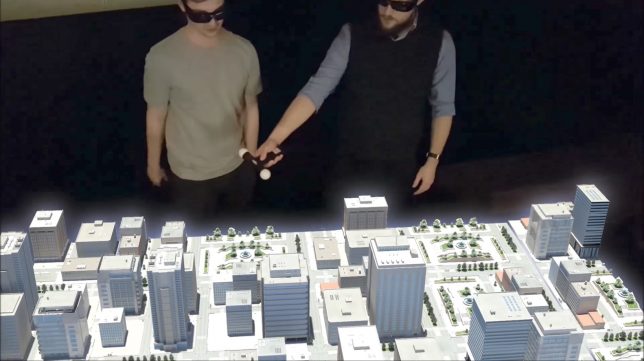
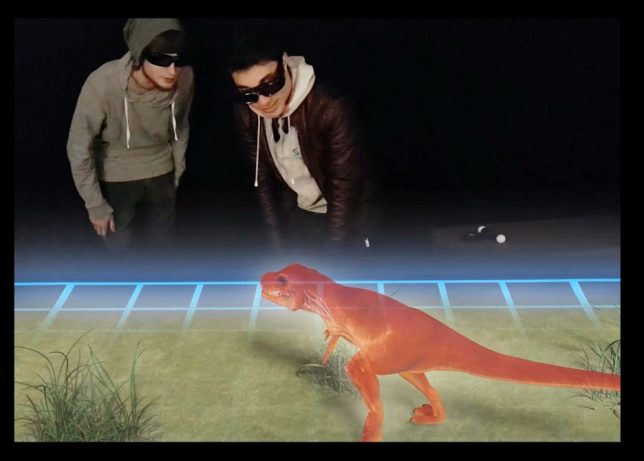
A new hologram table has its sights set on the ultimate prize: an interactive and immersive experience that can shared from multiple angles by different users, all without clunky headgear.

Developed by Euclideon Holographics and retailing for just shy of $ 50,000, the table lets up to four people interface simultaneously with augmented reality images. Motion-tracking glasses are the key to the holographic effect — “frequency separation crystal films in the lens and on the table surface filter jumbled light into a stereo image, similarly to how your standard 3D glasses work.”

Behind the scenes, though, the computerized table has to calculate where each set of glasses is located and, accordingly, where to emit light. Right now, the company has a single working prototype but is raising funds to mass-market the devices by early 2018. Architects and planners, for instance, are sure to be interested in new ways to show clients their designs in new three-dimensional ways. Larger models are also in the planning stages, as well as versions designed for gaming and other applications — the company aims to gain traction in arcades around the world.

Among other things, this breakthrough hints at a future much like the ones we’ve seen for decades in science fiction — the more work that can be packed in on the computing side, the less inconvenient the attire and equipment needed by those interacting with the holograms.

Share on Facebook


[ By WebUrbanist in Conceptual & Futuristic & Technology. ]

[ WebUrbanist | Archives | Galleries | Privacy | TOS ]


WebUrbanist

 
Comments Off on World’s First Interactive, Multi-View Hologram Table for Designers & Gamers

Posted in Creativity


Nikon D850 First Impressions Review

25 Aug

Nikon D850 preview

The Nikon D850 is Nikon’s latest high resolution full-frame DSLR, boasting a 46MP backside-illuminated CMOS sensor. But, in a fairly radical departure for the series, it is also one of the company’s fastest-shooting DSLRs. This combination of properties should significantly widen the camera’s appeal to high-end enthusiasts as well as a broad range of professional photographers.

Key Specifications:

  • 45.7MP BSI CMOS sensor
  • 7 fps continuous shooting with AE/AF (9 with battery grip and EN-EL18b battery)
  • 153-point AF system linked to 180,000-pixel metering system
  • UHD 4K video capture at up to 30p from full sensor width
  • 1080 video at up to 120p, recorded as roughly 1/4 or 1/5th speed slow-mo
  • 4:2:2 8-bit UHD uncompressed output while recording to card
  • 1 XQD slot and 1 UHS II-compliant SD slot
  • Battery life rated at 1840 shots
  • 3.2″ tilting touchscreen with 2.36M-dot (1024×768 pixel) LCD
  • Illuminated controls
  • 19.4MP DX crop (or 8.6MP at 30fps for up to 3 sec)
  • SnapBridge full-time Bluetooth LE connection system with Wi-Fi
  • Advanced time-lapse options (including in-camera 4K video creation)

High resolution

The use of a backside illuminated (BSI) sensor means that the light collecting elements of the sensor are closer to the surface of the chip. This should not only increase the efficiency of the sensor (improving low light performance) but should also be expected to make the pixels near the edges of the sensor better able to accept light approaching with high angles of incidence, improving peripheral image quality.

Like the D810 before it, the D850 continues to offer an ISO 64 mode, that allows it to tolerate more light in bright conditions. We will be testing whether this gives the D850 the same dynamic range advantage as the D810, as soon as a production version arrives but our initial quick looks suggests it does, meaning it should be able to compete with the medium format sensors used in the likes of the Fujifilm GFX 50S and Pentax 645Z.

A BSI sensor with ISO 64 setting should be able to match the D810’s low ISO DR while also offering improved performance in at high ISOs.

And, while the D850 still hasn’t got an electronic first curtain option to ensure stable shooting when using the viewfinder (you need to use live view or Mirror-up mode). However, presumably thanks to a redesigned shutter and mirror mechanism, our quick check with a pre-production model suggests shutter shock may not be an issue, even without it.

The D850 has no anti-aliasing filter, which should allow for slightly finer detail capture but with added risk of moiré, if any of your lenses are sharp enough to out-resolve a 45.7MP full-frame sensor. There’s still no sign of the clever design Nikon patented so, unlike the Pentax K-1 or Sony RX1R II, you can’t engage an anti-aliasing effect if you do find false color appearing in densely patterned areas.

High Speed

In addition to the increased speed, the D850 also gains the full AF capabilities of the company’s flagship sports camera: the D5. This includes all the hardware: AF module, metering sensor and dedicated AF processor, as well as the full range of AF modes and configuration options, which should translate to comparable focus performance combined with high resolution.

Given the D5 possessed one of the best AF systems we’ve ever seen and could continue to offer that performance in a wide range of conditions and shooting scenarios with minimal need for configuration, this is an exciting prospect.

As part of this system, the D850 gains the automated system for setting an AF Fine Tune value. It only calibrates the lens based on the central AF point and for a single distance, but it’s a simple way to ensure you’re getting closer to your lenses’ full capabilities, which is handy given you’ll now be able to scrutinize their performance with 46MP of detail.

Add the optional MB-D18 battery grip and an EN-EL18b battery, and the D850 will shoot at 9 frames per second.

Impressively, the D850 can shoot at nine frames per second if you add the optional MB-D18 battery grip and buy an EN-EL18b battery, as used in the D5. As well as increasing the camera’s burst rate, this combination also ups the battery life to a staggering 5140 shots per charge. You don’t get this same boost in speed or endurance if you use a second EN-EL15a in the grip, though.

An MB-D18 plus an EN-EL18b is likely to set you back over $ 580 over and above the cost of the camera body ($ 399 for the grip, around $ 149 for the battery, $ 30 for the BL-6 battery chamber cover plus the cost of a charger).

The D850 also includes a sufficiently deep buffer to allow fifty-one 14-bit losslessly compressed Raw files, meaning the majority of photographers are unlikely to hit its limits.

Video capabilities

In terms of video the D850 becomes the first Nikon DSLR to capture 4K video from the full width of its sensor. The camera can shoot at 30, 25 or 24p, at a bitrate of around 144 Mbps. It can simultaneously output uncompressed 4:2:2 8-bit UHD to an external recorder while recording to the card. Our initial impression is that the video is pixel-binned, rather than being resolved then downsampled (oversampling), but we’ll be checking on this as part of the review process. This risks lowering the level of detail capture and increases the risk of moiré, though it’s a better solution than line-skipping. There also seemed to be a fair amount of rolling shutter, but again these are only first impressions from a camera running non-final firmware.

At 1080 resolution, the camera can shoot at up to 60p, with a slow-mo mode that can capture at 120 frames per second before outputting at either 25 or 24p. The 1080 mode also offers focus peaking and digital stabilization, neither of which are available for 4K shooting.

The D850’s tilting rear screen will make video shooting easier, though we doubt many will use its contrast-detection tap-to-focus system when they do.

The D850 doesn’t have any Log gamma options for high-end videographers, but it does have the ‘Flat’ Picture Profile to squeeze a little extra dynamic range into its footage, without adding too much to the complexity of grading. It also offers full Auto ISO with exposure compensation when shooting in manual exposure mode, meaning you can set your aperture value and shutter speed, and let the camera try to maintain that brightness by varying the sensitivity.

As you’d expect from a camera at this level, the D850 also includes the Power Aperture feature that allows the camera to open and close the lens iris smoothly when in live view mode. There’s also an ‘Attenuator’ mode for the camera’s audio capture, that rolls-off any loud noises to avoid unpleasant clipping sounds.

Articles: Digital Photography Review (dpreview.com)

 
Comments Off on Nikon D850 First Impressions Review

Posted in Uncategorized


Nikon D850: First full-res sample images

25 Aug

$ (document).ready(function() { SampleGalleryV2({“containerId”:”embeddedSampleGallery_0724895971″,”galleryId”:”0724895971″,”isEmbeddedWidget”:true,”standalone”:false,”selectedImageIndex”:0,”startInCommentsView”:false,”isMobile”:false}) });

Nikon Japan has released the first set of official sample images captured with the new Nikon D850. Unfortunately there aren’t RAWs, but they are full-resolution JPEGs shot in 14-bit RAW and converted to JPEG using Capture NX-D.

Given the D850’s beast of a 45.7MP sensor, even in JPEG the files are anything but small, ranging in size from 18MB all the way to 25.4MB. We can’t wait to get our hands on a production model and shoot our own sample gallery, but in the meantime these photos should give you a good idea of what the new full-frame camera can do in the real world.

And if you want to find out more about how the D850 camera handles, check out our hands on:

Hands On with the Nikon D850

Articles: Digital Photography Review (dpreview.com)

 
Comments Off on Nikon D850: First full-res sample images

Posted in Uncategorized


First look video: Nikon D850

24 Aug

The Nikon D850 looks to be an excellent upgrade over its predecessor, the D810. The resolution has jumped from 36.3MP to 45.7MP, the burst rate has jumped from 5 to 7 fps (9 fps with the right accessories), and the entire AF system has been yanked directly from the flagship D5. Not to mention the D850’s full sensor width 4K video, a first for a Nikon DSLR.

That’s just a little bit of what the D850 has up its sleeve. Watch the video to find out more.

Articles: Digital Photography Review (dpreview.com)

 
Comments Off on First look video: Nikon D850

Posted in Uncategorized