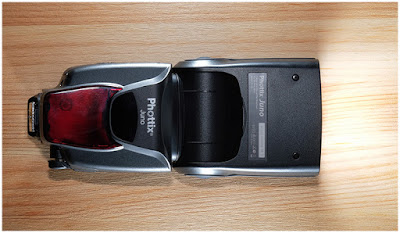
A value-priced, all-manual flash with a built-in radio and a real warranty? Yeah, I'm interested.
Today, a first look at the new Phottix Juno. Read more »
Strobist
A value-priced, all-manual flash with a built-in radio and a real warranty? Yeah, I'm interested.
Today, a first look at the new Phottix Juno. Read more »
Strobist
 |
Ricoh is showing off two upcoming lenses at the Photo Plus Expo show in New York this week. The HD Pentax-D FA* 50mm F1.4 SDM AW is designed for full-frame cameras, while the HD Pentax-DA* 11-18mm F2.8 is intended to be paired with the company’s APS-C DSLRs.
We weren’t able to get our hands on the new lenses, sadly – they’re still under glass – but we’re told that they’re cosmetically near-final. Click through for a closer look.
 |
We’ve known about the HD Pentax-D FA* 50mm F1.4 SDM AW for a while, but the last time we saw it (also under glass) it was little more than a lens-shaped lump of plastic. Things have advanced since then, and the copy on show here appears to be a working prototype.
The upcoming 50mm is one of a new generation of ‘star series’ lenses that Ricoh intends for high-resolution imaging with its flagship K-1 and (presumably) follow-up full-frame models.
 |
The 50mm F1.4 will come with a generously proportioned lens hood. The ‘AW’ in the designation stands for ‘All Weather’ and denotes environmental sealing, which should mean that like the K-1, it will stand up to use in harsh conditions.
A new ring-type SDM autofocus drive promises fast, quiet focusing. Pricing has yet to be announced, but the new 50mm should be available in spring of next year.
 |
Meanwhile, the HD Pentax-DA* 11-18mm F2.8 is intended to be paired with the company’s APS-C DSLRs, and covers an effective focal length range of ~17-28mm. The fast maximum aperture of F2.8 is fixed across the zoom range, and while it hasn’t been spelled out anywhere, the sample on show appears to feature a switch for optical image stabilization, covered in black tape.
This would be a bit odd, given that Pentax’s DSLRs are stabilized in-body but could point towards hybrid stabilization. The alternative explanation (and probably more likely) is that it’s either a zoom lock or simply a vestigial bump which will be removed in shipping lenses.
 |
Beyond the usual hyperbole (photographers should be able to ‘effortlessly capture breathtaking landscapes’ with this lens, apparently) details of the exact specification are sparse. Along with the mystery switch, the focus scale has also been obscured.
 |
No pricing information has been shared, but we’re told that the 11-18mm will be available next summer.
 |
Here’s the new K-1 ‘Silver Edition’, announced in August. This special edition of Ricoh’s flagship full-frame DSLR features a special silver coating, to match the silver versions of Pentax Limited lenses.
 |
This is the kind of thing that often looks great in manufacturer-supplied renderings, but a bit tacky in real life. We’re pleased to see that in person, the silver K-1 looks pretty classy.
 |
A special silver hotshoe cover is an especially nice touch. The K-1 silver edition is limited to 2000 copies worldwide.
 |
Alongside its conventional cameras and lenses, Ricoh is also showing off its new Theta V 360-degree camera, which improves on the original model with much better resolution and advanced video features. Learn more about the Ricoh Theta V
Sony took the wraps off its a7R III this morning, and we’ve been able to spend a little time checking out its standout features. Dan and Richard are on the ground in New York at Sony’s launch event, and have put together a quick video showing what’s new and cool.
Read all about the a7R III and keep an eye out for sample photos and more in the near future!
[ By WebUrbanist in Design & Furniture & Decor. ]

Made to be compatible with other IKEA furnishings and fixtures, this new first-of-its kind pet collection has something for all your favorite furry friends.

The 62-piece collection was designed by Inma Bermudéz and aims to fill a market gap with quality, aesthetically pleasing but affordable pet products.

Some of the objects extend existing uses, helping customers save money and space, like kitty-scratching materials that attach to existing IKEA table legs or puppy beds that slot into bookshelf systems already on offer. A number of the products are designed to pack flat and fold away when not in use.

The designs reflect extensive research into pet needs and behaviors, including a bed designed to be stuffed with old clothes, blankets and towles to help dogs feel comfortable and familiar around their human family.

Aside from pet sleepers and carriers, the LURVIG line features an array of brushes, bowls, leashes, bag dispensers spanning eating, playing, sleeping, traveling, walking.and other cat and dog activities.





Perhaps the biggest surprise in this stellar new collection is that no one at IKEA thought to do this sooner — thankfully, now they have.



[ By WebUrbanist in Design & Furniture & Decor. ]
[ WebUrbanist | Archives | Galleries | Privacy | TOS ]
 |
Forget all of those DxOMark Mobile scores, it’s time to talk about “real” cameras again. DxOMark just completed their review of the Nikon D850 and, not entirely surprising, it is officially the best camera DxOMark has ever tested. In fact, it’s the first camera ever to reach a score of 100, pushing the Sony a7R II into second place with its score of 98.
As it stands now, the camera rankings put the Nikon D850 and its predecessor, the D810, in the number 1 and 3 spots.
 |
While the D850 isn’t the best camera DxO has tested across the board, it nevertheless put in top notch performance in every category. “The D850’s key strengths are its outstanding color and dynamic range at base ISO, where it again ranks as the number one among all commercially available cameras we’ve tested for these attributes,” explains DxOMark. If it falls even slightly short in any regard, it’s in the low-light ISO category where its higher resolution starts to sting.
That said, you can’t help but go wide-eyed reading DxOMark’s conclusion. As they say, this camera is “in a class of its own for image quality.”:
The introduction of the first BSI sensor in a full-frame Nikon DSLR with a super-high 45.7Mp resolution puts the Nikon D850’s image quality on par with, and often better than, medium-format cameras. The first DSLR to hit 100 points — rather apt for Nikon’s hundredth anniversary year — puts the Nikon D850 in a class of its own for image quality. At base ISO, it’s unrivaled for color in the DSLR class, and its headline dynamic range score is outstanding, too.
To read the full conclusion—the full review, for that matter—and see how the D850 compares to the competition from Sony and Canon, head over to DxOMark.
 |
Storage solution company Synology has introduced its first six-bay NAS device: the DS3018xs. The new model holds six drives of its own, but if that’s still not enough storage for your epic photo library, it can combine with the company’s DX1215 expansion units to control up to thirty.
The company has used the Pentium D1208 dual-core 2.2GHz processor that can boost to 2.6GHz, and provides a PCle slot for users to install an optional dual M.2 SATA SSD adapter to shift processing onto solid state drives for speed and efficiency. The DS3018xs comes with 8GB of RAM installed, but has two memory slots for expansion up to 32GB, and an optional 10GbE network card can provide 2230MB/s sequential read speeds.
At the same time, Synology has launched four other DS and DS+ models that replace existing NAS enclosures. The new DS918+ and DS718+ are upgrades of the DS..16+ models, and bring more memory capacity and options for adding extra slots via DX517 expansion unit. These models and the DS218+ and DS418 get new processors as well, while all are said to be capable of transcoding 4K video on the go.
Synology has started a series of workshops around the world that demonstrate some of these models and show off the company’s technology. They are free to attend to anyone registered via the Synology 2018 events page. For more information about the new NAS enclosures visit the Synology website.
Pricing
DS3018xs – £1298.18 (including VAT), €1190 (excluding taxes)
DS918+ – £518.18 (including VAT), €475 (excluding taxes)
DS718+ – £414.55 (including VAT), €380 (excluding taxes)
DS218+ – £310.90 (including VAT), €285 (excluding taxes)
DS418 – £387.91 (including VAT), €351 (excluding taxes)
Press Release
Synology® Inc. announced the official launch of new product lineup featuring:
DS3018xs: Synology’s first 6-bay tower NAS with optional 10GbE and NVMe SATA SSD supports
Plus-series DS918+, DS718+, and DS218+: Designed to meet your intensive daily workloads
Value-series DS418: Featuring optimized 4K online transcoding capability
To allow for ultra-high performance using SSD cache without occupying internal drive bays, DS3018xs features a PCIe slot, which can be installed with a dual M.2 SATA SSD adapter card (M2D17). DS918+ comes with dedicated dual M.2 NVMe slots at the bottom where you can directly install M.2 NVMe SSDs. DS418 features 10-bit H.265 4K video transcoding, and while supporting the next-generation Btrfs file system in DSM 6.2 official, expected to release in early Q1 next year. Btrfs provides reliable data protection through its cutting-edge self-healing and point-in-time snapshot features.
DS3018xs, Synology’s first 6-bay tower NAS, is compact yet powerful as it features the Intel’s advanced Pentium D1508 dual-core 2.2GHz processor (Turbo Boost up to 2.6GHz) with AES-NI encryption engine; offering scalability of RAM up to 32 GB and storage capacity up to 30 drives with two Synology DX1215. In addition to four Gigabit LAN ports, DS3018xs takes advantage of boosting maximum throughput with an optional 10GbE network interface card, delivering stunning performance at over 2,230 MB/s sequential reading and 265,000 sequential read IOPS.
DS918+ and DS718+ are powered by Intel‘s Celeron® J3455 quad-core processor. DS218+ is powered by Intel’s Celeron® J3355 dual core processor. Both models are equipped with AES-NI hardware encryption engine and support up to two channels of H.265/H.264 4K video transcoding.DS918+’s RAM is scalable up to 8GB, while DS718+ and DS218+ are scalable up to 6 GB, allowing you to operate more intensive tasks at once. DS918+ and DS718+ are equipped with two LAN ports, and their storage capacity can be scaled up to 9 and 7 drives, respectively, with Synology’s DX517 expansion unit.
“Responding to the demands from our customers, DS3018xs is built as a comprehensive business-ready desktop NAS. Running mission-critical applications or planning virtualization deployment with DS3018xs has never been easier.” said Katarina Shao, Product Manager at Synology Inc. “The new DS918+, DS718+, and DS218+ are optimized to be your digital video libraries, and will bring you an excellent viewing experience with high definition live video transcoding, regardless of device limitations.”
DS418 is equipped with a 1.4GHz quad-core processor with hardware encryption engine, 2 GB RAM, and two LAN ports. Powered by the hardware transcoding engine, DS418 supports H.265 4K transcoding allowing it to serve as your media library. Combined with Btrfs and Snapshot supports, DS418 is delivers more efficient data storage and more reliable data protection.
For more information on DS3018xs, please visit https://www.synology.com/products/DS3018xs
For more information on DS918+, please visit https://www.synology.com/products/DS918+
For more information on DS718+, please visit https://www.synology.com/products/DS718+
For more information on DS218+, please visit https://www.synology.com/products/DS218+
For more information on DS418, please visit https://www.synology.com/products/DS418
$ (document).ready(function() { SampleGalleryV2({“containerId”:”embeddedSampleGallery_4235413921″,”galleryId”:”4235413921″,”isEmbeddedWidget”:true,”standalone”:false,”selectedImageIndex”:0,”startInCommentsView”:false,”isMobile”:false}) });
As expected after last week’s photo and specs leak, lighting manufacturer Profoto has launched an on/off camera flash unit called the Profoto A1. But if you were expecting a simple speedlight, Profoto is definitely branding this as more powerful than that. In fact, they’re calling it “the world’s smallest studio flash.”
The new A1 is styled much like most on-camera flash units, but is equipped with the powerful features of a Profoto studio head. The 76Ws unit uses a lithium ion battery that is claimed to be good for up to 350 full power bursts and which charges in under 80 minutes. Profoto also says that the A1 recycles “four times faster than other on-camera solutions,” as it can emit a full power pop every 1.2 seconds.
A stand-out feature of the A1 is its circular lens, which is said to produce light that is “natural and beautiful with a pleasing soft-smooth fall-off.” The rim of that circular lens housing is also magnetic, and accepts a range of clip-on modifiers that can be changed quickly and easily. The head offers a manually operated zoom function and the rear display is large and easy to read.
The A1 heads are equipped with Profoto’s Air Remote TTL system so they can work in groups alongside other A1 heads or any other Air Remote studio heads from the Profoto studio head range. Finally, the A1 offers variable power over 9 stops in both standard and HSS modes, and includes an LED modeling light for previewing the effect of the flash or using on its own as a light source.
The A1 is currently compatible with Nikon and Canon systems, and will be with Sony models in the future… but it doesn’t come cheap. As previously reported, the Profoto A1 will cost you $ 995 USD… quite the pretty penny when you compare it to some of the full-featured speedlights other options out there from brands like Godox.
For more information on the Profoto A1, visit the Profoto website or watch the introductory video below.
Press Release
The Profoto A1 might be the smallest flash we’ve ever made, but it’s still built to the same impossibly high standards we’ve set ourselves over the last fifty years.
Our focus with the A1 was to create a flash that delivers a truly high quality of light, which is why it features a round head which delivers light that’s both natural and beautiful with a pleasing soft-smooth fall-off, that blends seamlessly with the ambient light.
Thanks to a smart magnetic mount built into the head, light shaping tools and modifiers can be clicked on and off quickly and easily. Within seconds you’re being creative with light, shaping it. It also has a zoom function that allows you to make fine adjustments to the spread of light by simply twisting the zoom ring on the head, and for accuracy it has a modeling light built-in to the head – so you can see what you’re going to get before you press the shutter.
We made it our mission to make A1 the first on-camera flash that’s easy to use from the box. The user interface is simple and intuitive with a large high-contrast display at its center. The less time you spend learning and fiddling, the more time you’ll spend shooting. And that’s ultimately what counts. Despite its size, or lack of it, the A1 punches above its weight in a good number of key areas.
Battery life is key when a photographer is right in the thick of the action, because the last thing they need to have to stop mid flow to change the batteries. The A1 has its own Li-ion high capacity battery built-in which lasts up to four times longer than AA batteries with no performance fade. So, you can shoot for longer with confidence.
And this is a flash that can keep up with you because it recycles four times faster than other on-camera solutions – that’s every 1.2 seconds at full power. Put simply, you’ll never miss a shot.
And while it’s true to say the Profoto A1 is our very first on-camera solution it’s also just as effective off-camera as a standalone unit, and integrated into a larger system of lights. That level of versatility is possible because Air Remote is built-in, which means the A1 offers seamless connectivity with freestanding lights like another A1 or bigger Profoto lights like the B1X.
And with AirTTL you’ll get a perfect exposure super-fast. Better still, you can lock the exposure with a single ‘click’ while still being free to fine tune that exposure in manual, giving you even greater control.
So, this is so much more than our smallest flash yet. This is shooting on the move, shooting with confidence and shooting with light shaping excellence. This is shooting off-camera and for the first time with Profoto, on-camera. This is the Profoto A1 – the world’s smallest studio light.
$ (document).ready(function() { SampleGalleryV2({“containerId”:”embeddedSampleGallery_1817966601″,”galleryId”:”1817966601″,”isEmbeddedWidget”:true,”standalone”:false,”selectedImageIndex”:0,”startInCommentsView”:false,”isMobile”:false}) });
It seems Profoto is preparing to announce a new line of products: an A-series of speedlights. The lighting company is known for its powerful, high-end flashes, monolights, and modifiers, but a product page leak shows Profoto is preparing to target a slightly less high-end user with something called the Profoto A1 Air TTL.
The unofficial Profoto A1 speedlight popped up briefly on a French distributor’s website complete with a full description and plenty of product shots to prove that this isn’t just some silly rumor. While the page has since been taken down, DIY Photography managed to dig up a cached version (here’s the Google translated version) so you can read about the product in full glory.
 |
The unique-looking speedlight features a rounded head with a focusable Fresnel lens for a “softer” effect than your typical speedlight. It will boast 76 watts of power, features TTL capability, and supports High Speed Sync at up to 1/2000th of a second. Inside you’ll find a lithium ion battery that’s good for 360 full power flashes on a charge, and your recycle time is just 1.2 seconds.
The A1 allegedly comes with three magnetic modifiers that attach to the flash head, and an optional light box can be attached in the same way, as well as a few color filters.
All of this is still unconfirmed, of course, but this is as close to a full announcement leak as we’re going to get. The official release will allegedly happen on September 18th, but if you’re interested in the Profoto A1 Air TTL we suggest you start saving your pennies now… the flash will supposedly cost somewhere in the range of 990 Euro or about $ 1,190 USD.
You have just bought your new bright shiny camera and you are sure that it is just the thing that will help you create better images. You’re shooting JPG with the camera’s automatic program modes, but you’re not getting the results you wanted. You keep upgrading your cameras thinking that will do the trick, only to find that the quality of your imagery isn’t getting any better. What’s going on?

You may be missing an important part of digital photography, post-processing, with a state of the art processing program like Adobe Lightroom or Photoshop.

This image of a lighthouse in Iceland was taken on a bright yet overcast day. In a matter of moments with the help of Lightroom, it became a favorite.

There are several integral parts to digital photography. The technical and creative aspect of using your camera, and the technical and creative application of post-processing your images. Each part is equally important and when all the pieces are put together, that’s when the magic starts to happen.
Unfortunately, many people are still thinking about the days of film when you took it to a lab and the post-processing was done for you. You never had to think twice about how the image was processed. Did you ever notice that different labs gave you different results? That’s because of their level of post-processing.
Now it’s time for you to understand the importance of post-processing if you are going to create better imagery. It will take some time and some dedication to learn, but it will improve your photography by ten-fold.
First of all, start shooting in RAW format and stop letting the camera make the decisions for you. When you shoot JPG format, it will automatically process your images in camera, even though you may even not be aware of it.
Have you ever taken a JPG and a RAW image and compared the two photographs? The JPG may appear bright and saturated and the RAW file looks flat. That’s because the JPG has been processed by the camera and the RAW file is an unprocessed digital negative.


That RAW file is ready for you to make your own creative adjustments and apply your photographic vision in Lightroom or Photoshop. Only then can you start to recreate that scene you saw when you first took the image.
What kind of post-processing decisions will the camera make for your JPGs? Depending on your camera, it can automatically increase saturation, sharpness, and contrast, but it will also compress your image. There are settings in your camera where you can make blanket adjustments for every JPG (Picture Styles), however, the camera is still making the decisions for you. That gives you zero creative control.
RAW files contain more information and will allow you to have a wider range of tones (called dynamic range) to work with when you bring your images into Lightroom or Photoshop. When shooting in the JPEG format, image information is compressed and lost forever. In a RAW file, no information is compressed and you’re able to produce higher quality images while correcting problem areas that would be unrecoverable if shot in the JPEG format.
Once you start shooting in RAW, it’s very important to be conscious of the histogram. You can bring up the histogram on your Live View shooting screen or after you have taken the shot in your image review screen. Check your camera’s manual for the location of the histogram.
Note: If you shoot with a mirrorless camera you may be able to see the histogram on the screen before you shoot. Check your settings this is very handy.
If used correctly while shooting, the histogram will give you the information you need to know to bring up the shadows or bring down the highlights and pop out exposure and detail in an image.
The histogram shows you the brightness of a scene and it can be measured as you are shooting, or after you have captured the image. When look at the histogram and see the bulk of the graph pushing towards the right, this means you have an image that may be overexposed (or a really light toned subject).

If the data is mostly on the left of the graph, it’s an image that might be underexposed.

If the graph spikes on either the left or right “wall” of the histogram, that means that “clipping” has occurred. Clipping happens when you have areas in your photo with no information as a result of over or underexposure. When an area has no information, it is either pure white or pure black which is often referred to “blown out”.
Generally, it is undesirable to have large areas of your image that have highlights or shadows clipping. See the image below. The red areas show highlight clipping, and the blue areas show shadow clipping.

Because of the limited dynamic range of a camera’s sensor, the area registering as clipped usually leaves the image with no information in the shadows or highlights. A spike touching the left edge of the histogram means that there is shadow clipping. A spike touching the right edge of the histogram means that there are highlights clipping.
Many photographers have frustrating results with their images because they don’t embrace digital editing and post-processing. They are doing everything right when they shoot and are good at composition. They know how to expose correctly for the scene, but don’t know where to go with the image once they get home.
For example, maybe they are in a high contrast area and have taken an image with the histogram in mind. Then they open the image on-screen and throw it out because it looks over or underexposed. They don’t know what the post-processing possibilities are even though they may have a viable image. This is where they are missing a large part of the potential in their digital photography post-processing.
Here’s a great example. This image was taken in the Eastern Sierra in California.

It is obvious that the shadows are way underexposed and it creates an interesting silhouette. But, if you look at the histogram, you can see there is space on the left side of the graph which represents the shadows. This means there is more information there, and a good possibility of bringing up the shadows to create a whole different image.
Here is the result after brightening shadows in Lightroom. This adjustment took just seconds and creates a whole new scene.

Almost every image needs post-processing. Some people think that’s “cheating”. It’s not, it’s all part of the digital artistic process.
With post-processing, you can create the image you saw when you photographed the scene. Your eyes have the capability of seeing a wider range of light and color than your camera does, so the images need help in post-processing to duplicate the full range of light and shadows. The problem with a lot of beginners, is they tend to oversaturate or over-sharpen an image. So this talent comes with time and practice, practice, practice.


Once you have mastered the basics, there is a lot more you will be able to do with your digital post-processing that will add drama and interest to your photos. The above image of Bridal Veil Falls in Yosemite looks rather flat in the RAW version (left). Once you add saturation, sharpening, and a vignette to the whole picture it starts to pop. Then you can enhance the brightest areas by “painting with light”, and it now becomes a much more interesting image.
Start your post-processing journey with a full featured program like Adobe Lightroom. It is the standard in the industry for professionals, but it is also user-friendly for beginners and helps with both post-processing and image organization. Just be sure that your computer has enough memory and RAM to run these full featured programs. Check the requirements at adobe.com.
Check out our guide to LR: The dPS Ultimate Guide to Getting Started in Lightroom for Beginners
Nothing is more satisfying than when you have a catalog of 30,000 images and you’re able to find your favorites in literally seconds by entering a few keywords and star ratings. Take some time to set it up, add a class or two, and you’ll be up and running!
Photo editing or post-processing is an integral part of the digital photography puzzle. Don’t think that you can skip this part and come away with satisfying images. It’s just as important to learn photo editing as it is to learn the basic functions of your camera. Only then, will you be able to bring that intentional photographic vision into post-processing and create great images
How are you going to start your post-processing journey? Is shooting in RAW and learning Lightroom in your future? Please share your thoughts with me on this subject.
The post Don’t Fear Photo Post-Processing – Shooting is Only the First Part of the Image Creation Process by Holly Higbee-Jansen appeared first on Digital Photography School.
 |
Turning ten years old this week is the A700, Sony’s first high-end DSLR after fully taking over Konica Minolta’s camera business. With plenty of Minolta DNA underneath its Sony Alpha branding, it debuted in September 2007 to take on the likes of Canon’s 40D and Nikon’s D300. Our 33 page (!) review, published in December of 2007, details the strengths and weaknesses of the camera, and includes musings like “Whether the lack of live view has any real relevance in a camera at this level remains to be seen; we doubt it.”
Did you own the A700? Let us know in the comments.
Read our full Sony Alpha 700 Review
$ (document).ready(function() { SampleGalleryV2({“containerId”:”embeddedSampleGallery_2744829658″,”galleryId”:”2744829658″,”isEmbeddedWidget”:true,”standalone”:false,”selectedImageIndex”:0,”startInCommentsView”:false,”isMobile”:false}) });
Articles: Digital Photography Review (dpreview.com)
