RSS
 

Posts Tagged ‘Fine’

Surrealism and intimacy: fine art portraiture with Fritz Liedtke

16 Feb

Professional photographer Fritz Liedtke’s work spans the worlds of film and digital, from editorial and commercial work to fine art. A native of Edmonds, WA, Liedtke became fascinated with the creative possibilities and surrealism presented by modifying the focal plane of 4×5 cameras in high school and college. In this presentation, Liedtke guides us through a recent project titled ‘Astra Velum’ (Veil of Stars), wherein he focused on photographing individuals whose faces were peppered with freckles.

‘I wanted to try to create something beautiful out of something that many people see as blemishes,’ Liedke says. Of course, not everyone feels that way about their freckles, but throughout his project, Liedtke noticed that many people he put in front of his camera didn’t necessarily feel like they fit in with the overall concept of American ‘beauty culture,’ with its focus (pun intended) on near-flawlessness.

Liedtke takes us through his post-processing and printing techniques, as well as guiding messages for those looking to start out on a personal project of their own. Keep your eyes open for interesting people to photograph, set goals for yourself, and perhaps most importantly, ‘don’t be afraid,’ Liedtke says. ‘Most people will be flattered that you want to photograph them.’

Articles: Digital Photography Review (dpreview.com)

 
Comments Off on Surrealism and intimacy: fine art portraiture with Fritz Liedtke

Posted in Uncategorized


To the point: LensRentals shows how to use Autofocus Fine Tune

23 Jan

DSLR autofocus has been the Gold standard for decades but the higher accuracy and precision offered by some mirrorless cameras risks tarnishing this image. However, many modern DSLRs include an option to fine-tune the autofocus behavior to help optimize their performance. Guest writer Joey Miller has written a short guide to how to make use of this feature, over on the LensRentals blog.

You don’t necessarily need any specialist equipment to fine tune your lenses. But if you’re going to go to all this effort, it might be worth it. Photo: Joey Miller

The article builds on the work Roger Cicala has already done, looking at the reasons that fine tuning is needed, with one of the main reasons being to cancel-out the effect of the combined tolerances of your camera body interacting with the combined tolerances of the specific copy of the lens you’re using.

As we reach higher pixel counts, this imprecision is being highlighted in ever more detail (it was always there, but your camera wasn’t letting you examine the problem in such fine detail).

Miller uses a Canon setup as an example, with up to two corrections per lens being possible (a ‘Wide’ and ‘Tele’ value being available for zoom lenses). But even this is a rather blunt instrument when it comes to achieving perfect accuracy. Given the variation we encounter using off-center focus points, a more complete solution would require something more like the Olympus system for Four Thirds lenses, which allowed two values per lens, per focus point. The best correction value can also change with subject distance, which is why Sigma’s USB dock offers the ability to set four different values for four different subject distances.

Even if such control over calibration were possible for the end-user, it would be so arduous as to be nearly impossible. Products such as Reikan FoCal can help, but it’s still fairly involved, and the situation-to-situation, day-to-day variability we’ve noted with some systems means even these don’t completely solve the problem. Thankfully, the process looks as if it’s about to be made simpler, with Nikon’s D5 and D500 gaining something we’ve been proposing for several years now: an automated fine tune system that checks the results of its contrast-detect AF in live view mode to calculate the corrections needed to fine tune its secondary sensor phase-detection system. It’s rather rudimentary in that only one value can be entered for any lens and body combination, but it’s certainly a step in the right direction. 

Articles: Digital Photography Review (dpreview.com)

 
Comments Off on To the point: LensRentals shows how to use Autofocus Fine Tune

Posted in Uncategorized


In Fine Detail: Canon EOS 5DS / 5DS R In-Depth Review

18 Dec

Preview based on pre-production Canon EOS 5D S & SR

Canon has added to its EOS 5D range with the launch of two 50MP cameras, the 5DS and the 5DS R. Both cameras are high resolution full frame models, primarily aimed at stills photographers. The only difference between the models is that the ‘S’ has an optical low-pass filter, while the ‘S R’ has a self-cancelling filter (the same relationship as Nikon’s D800 and D800E models shared).

The two cameras will exist alongside the EOD 5D Mark III, acting as dedicated high resolution cameras primarily intended for studio, landscape and wedding shoots, rather than the all-round capability offered by the existing model. The Mark III still trumps the S and S R in terms of maximum ISO and continuous shooting speed.

Canon EOS 5DS / 5DS R key features

  • 50MP CMOS sensor
  • 5 fps continuous shooting
  • ISO 100-6400 (Extends to 12,800)
  • 61-point AF module with input from 150k pixel metering sensor
  • Dual Digic 6 processors
  • 3.0″ 1.04M-dot LCD
  • CF & SD slots (UHS-I compatible)
  • 1080/30p video
  • M-Raw and S-Raw downsampled formats
  • 30MP APS-H crop and 19.6MP APS-C crop modes
  • USB 3.0 interface

Most of the big new features on the high-res 5Ds are about ensuring you’re able to get the best of the cameras’ extra resolution. Our experiences with the Nikon D8X0 series cameras has shown us that simply having a high resolution sensor isn’t enough: to take full advantage of it you need to really obsess about stability.

To this end, Canon has reinforced the tripod socket and surrounding area to allow stable engagement with a tripod. It has also used a more controllable, motorized mirror mechanism, like the one in the EOS 7D II, that allows a deceleration step before the mirror hits its upper position – reducing mirror slap.

The third change is a revised mirror lock-up mode that allows you to specify an automatic delay between the mirror being raised and the shutter opening to start the exposure. It allows the user to choose the shortest possible delay that has allowed mirror vibration to subside: maximizing sharpness while minimizing the loss of responsiveness.

Although the S and the SR can both shoot movies with the same choice of frame rates and compression as the 5D III, they don’t offer clean HDMI output or headphone sockets. The message is pretty clear – if video is a major concern, these aren’t the cameras for you.

 
Canon EOS 5DS
Canon EOS 5DS R
Canon EOS 5D
Mark III
Pixel count 50.2MP 50.2MP 22.1MP
Processor Digic 6 Digic 6 Digic 5+
Maximum ISO ISO 6400
(12,800 ext)
ISO 6400
(12,800 ext)
ISO 25,600
(102,400 ext)
Maximum ISO ISO 6400
(12,800 ext)
ISO 6400
(12,800 ext)
ISO 25,600
(102,400 ext)
Maximum frame rate 5 fps 5 fps 6 fps
Autofocus 61 point, of which 41 are cross type and 5 are double-cross type 61 point, of which 41 are cross type and 5 are double-cross type 61 point, of which 41 are cross type and 5 are double-cross type
Metering sensor 150k pixels (RGB+IR) 150k pixels (RGB+IR) 63-segment (RG/GB)
Optical low-pass (anti-aliasing) filter? Yes Self-cancelling Yes
Uncompressed HDMI output No No Yes
Headphone jack? No No Yes
USB connection USB 3.0 USB 3.0 USB 2.0

A series of features in the EOS 5DS and S R are ones we first saw in the EOS 7D Mark II. This includes the flicker detection function that warns you of lighting flicker and can synchronize the camera’s continuous shooting so that it only fires at the brightest moments to ensure consistent exposure (rather than the constant variation you can otherwise get in such situations).

Two other 7D II features to make an appearance in a 5D camera for the first time are the built-in intervalometer function that can be used to shoot time lapse sequences. And, as a first for Canon, these can then be combined in-camera to create a 1080/24p time-lapse movie.

Canon EOS 5DS / SR overview video

If you're new to digital photography you may wish to read the Digital Photography Glossary before diving into this article (it may help you understand some of the terms used).

Conclusion / Recommendation / Ratings are based on the opinion of the reviewer, you should read the ENTIRE review before coming to your own conclusions.

We recommend to make the most of this review you should be able to see the difference (at least) between X, Y, and Z and ideally A, B, and C.

This article is Copyright 1998 – 2015 and may NOT in part or in whole be reproduced in any electronic or printed medium without prior permission from the author.

Articles: Digital Photography Review (dpreview.com)

 
Comments Off on In Fine Detail: Canon EOS 5DS / 5DS R In-Depth Review

Posted in Uncategorized


How to do Autofocus Fine Tuning on Your Nikon DSLR

22 Oct

Most of the time your equipment does a great job, but every once in a while you may find that under certain circumstances, your photos may seem a little soft. Although there are no less than a million reasons why this might be, it may simply be that your lens isn’t focusing where it’s supposed to.

You may be thinking that if this is the case, isn’t something seriously wrong? Not necessarily.

Some cameras are equipped with a feature to tweak the accuracy of its autofocus – Nikon calls this autofocus fine tuning.

Depth of field

Autofocus fine tuning allows you to dial in the autofocus accuracy of a camera/lens combination.

What is autofocus fine tuning?

Camera lenses are built, and tuned, to fairly exacting standards and do what they are supposed to pretty well, even lower-end lenses. However, there is a window, albeit fairly minute, that focus tuning parameters fit into. If the lens’ tuning falls right in the middle of that window, the focus will be spot on, but it’s not uncommon for the focus to be at either end of that window while still meeting quality control standards.

What this means is that in the majority of shooting situations you are going to end up with sharp results. In some situations when you are pushing the accuracy limits of the lens, such as macro photography or shooting at wide apertures, you may discover that the lens focuses a little in front or behind the focus point you’ve chosen. Maybe you’ve seen this shooting a close-up portrait at a wide aperture – although you are trying to get the subject’s eyes in the focus plane, you keep getting their eyebrows or ears sharp instead.

Why use it?

This is where lens fine tuning comes into play. What this feature does is allow you to dial in the accuracy of the lens/camera focus point even more precisely than it already is. If you haven’t noticed any problems with your setup, or mostly shoot at smaller apertures, going through this process may be unnecessary.

This feature can be found on Nikon bodies from the D7000 up and Canon bodies from the 50D and up, as well as several Sony, Olympus, and Pentax cameras.

Fine tuning settings are specific to the lens/camera combination and once you tune a lens, the camera saves the setting, which it reverts to anytime you mount that lens. Although you need to use a CPU lens to reap the full benefits of autofocus fine tuning, older analog or third party lenses can be fine tuned, and the settings saved manually on Nikon DSLRs.

What you need

  • A tripod
  • A newspaper or magazine printed with a small font
  • A table
  • A well lit room

How to do it

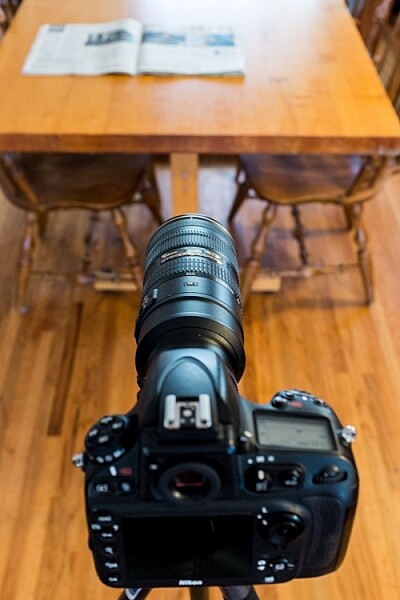
Step 1 – Mount your camera on the tripod and adjust it so the lens is about two feet above table level. The idea is to have the lens pointed at the newspaper at about a 30-degree angle.

Set up for autofocus fine tuning.

The setup to adjust autofocus fine tuning is fairly simple.

Step 2 – It is recommended to set the zoom (if using a zoom lens) to the focal length and distance which you use most often.

Step 3 – Set the camera to single-point, single-servo autofocus (AF-S for Nikon, One-Shot for Canon)

Step 4 – Open the lens to one stop down from its widest aperture (e.g. set an f/2.8 lens to f/4) and the middle of its zoom range (if it’s a zoom lens).

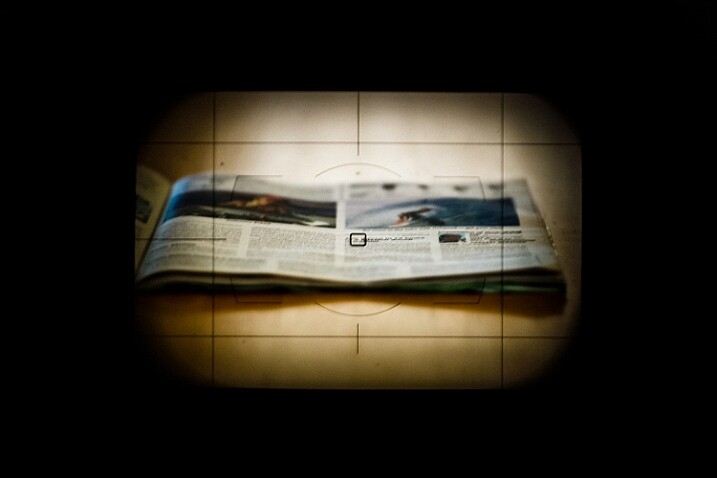
Step 5 – Place the focus point in the middle of the frame (center dot). I prefer to align the focus point with something recognizable like a letter of bold text among normal text.

Focus point in the center of the frame

With autofocus set to AF-S (one-shot), single-point, place the focus point in the center of the frame.

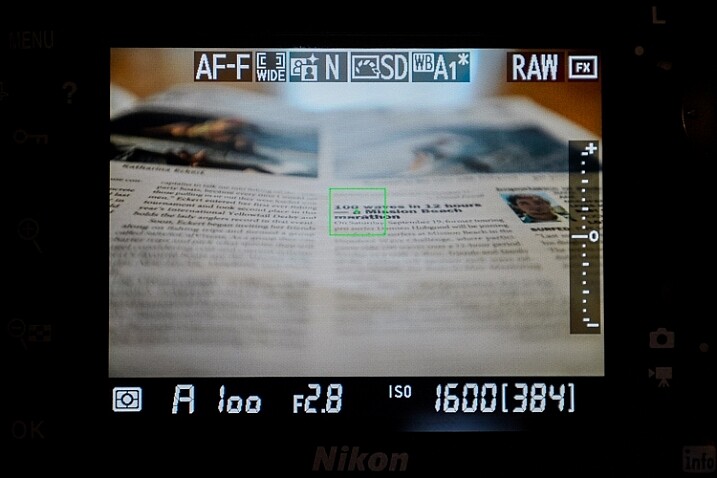
TIP: A helpful method is to turn on Live View and place the small dot in the middle of the focus box on a letter of text. Zoom in the view (NOT the lens) which gives you a more precise center point than the small box seen through the view finder. Turn off Live View to continue.

Using live view to align focus point

Using Live View helps to line up your focus point more precisely.

Step 6 – Set the self-timer on the camera to at least five seconds to allow the camera to stabilize after pressing the shutter button.

Step 7 – Turn off any stabilization either in-lens or in-camera.

Step 8 – Make sure focus points are enabled on playback: Menu>Playback Menu>Playback display options>Focus point>Done>OK

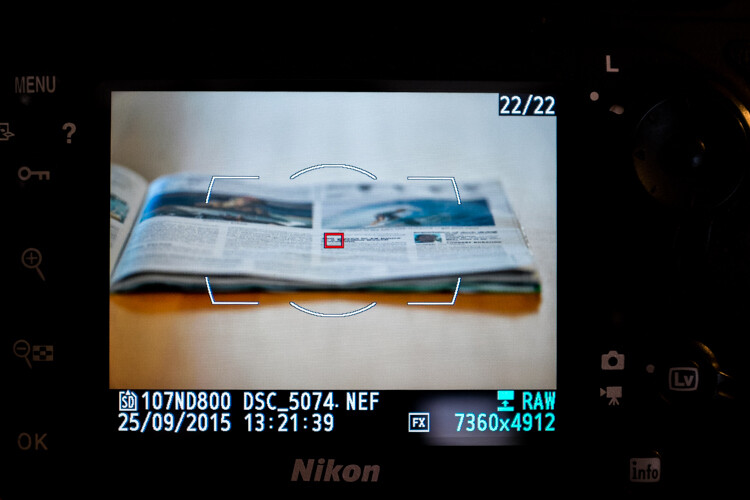
Focus point on preview

Enabling focus point on image preview allows you to see where the focus was set when the picture was taken.

Step 9 – Defocus the lens manually and then engage autofocus until it locks onto the focus point and press the shutter button.

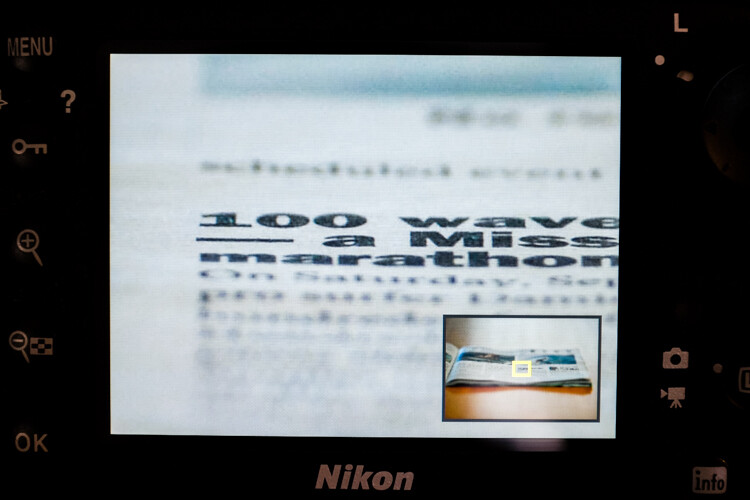
Step 10 – Review the image and zoom in to check the accuracy of the focus point. Do this a few times for verification.

Checking focus point accuracy

Preview the image and zoom in to check the accuracy of the focus point.

If it appears that sharpness is centered on the focus point, great, your lens’ focus is accurate and you’re good to go. If not, continue reading.

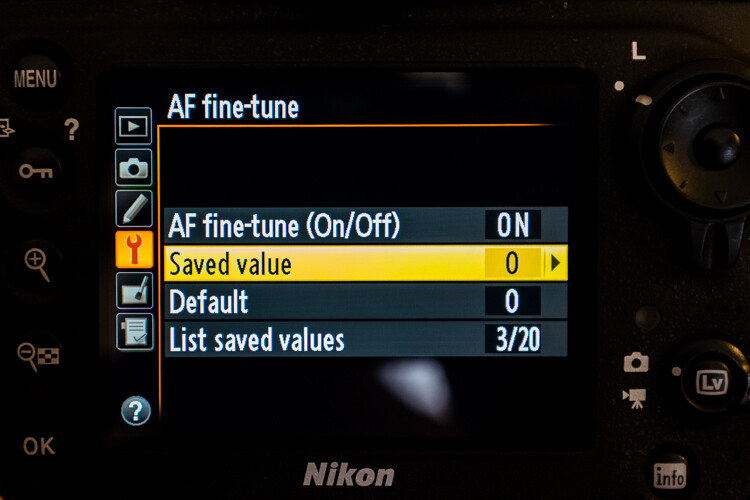
Step 11 – To adjust the autofocus fine tune go to: Menu>Setup menu>AF fine-tune>AF fine-tune (On/Off) and turn it on. Go back and select Saved value.

Fine tuning autofocus

The menu location of autofocus fine tuning.

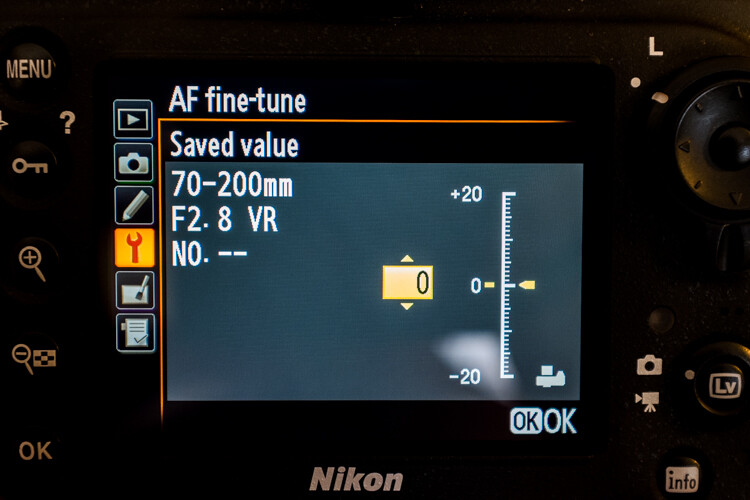
Your lens’ information should be displayed in the upper left corner and the fine-tune adjust on the right.

Step 12 – Positive numbers correct for back-focusing (focusing behind the focus point) and negative numbers correct for front-focusing.

Adjusting autofocus fine tuning

Positive values adjust the focus point away from the camera while negative values move it closer.

Remember, this is called “fine-tuning” so the increments are pretty small – a +1 is hardly noticeable.

Step 13 – After each adjustment, defocus the lens manually and repeat the steps above until you hit the sweet spot.

The settings you have applied to a specific CPU lens are saved, and are loaded automatically anytime that lens is mounted to your camera. With non-CPU lenses, you can create a profile for that lens which you can then save and revert to manually when that lens is used.

If your lens’ focus still fails to hit the mark after attempting autofocus fine-tuning, either go old-school and use manual focus if it’s practical, or you will need to send your lens in to have it calibrated with a special machine.

If you use a brand other than Nikon check your camera manual to see if your model has this feature and how to use it.

Good luck and may your images be as sharp as my witticisms – hopefully much sharper.

googletag.cmd.push(function() {
tablet_slots.push( googletag.defineSlot( “/1005424/_dPSv4_tab-all-article-bottom_(300×250)”, [300, 250], “pb-ad-78623” ).addService( googletag.pubads() ) ); } );

googletag.cmd.push(function() {
mobile_slots.push( googletag.defineSlot( “/1005424/_dPSv4_mob-all-article-bottom_(300×250)”, [300, 250], “pb-ad-78158” ).addService( googletag.pubads() ) ); } );

The post How to do Autofocus Fine Tuning on Your Nikon DSLR by Jeremie Schatz appeared first on Digital Photography School.


Digital Photography School

 
Comments Off on How to do Autofocus Fine Tuning on Your Nikon DSLR

Posted in Photography


The Fine Line Between Travel Photography and Having a family Vacation

15 Oct

A simple Google search for travel inspiration yields thousands of beautiful images and motivational quotes. Words like, “The Best University is to travel”, “We must take adventures in order to know where we truly belong” and “To travel is to live a full life” flash across your computer screen amidst jaw-dropping travel photography imagery. It brings forth such great feelings of wanderlust and longing to hit the road.

However, for those of us who travel with families and/or young kids there is a nagging voice somewhere in the back of our heads that speaks up and says, “Be practical, can you really make this journey with the kids?”. Then if you add to this mix, a parent who is very emotionally attached to his or her camera, you have just stirred up a pot full of trouble for yourself.

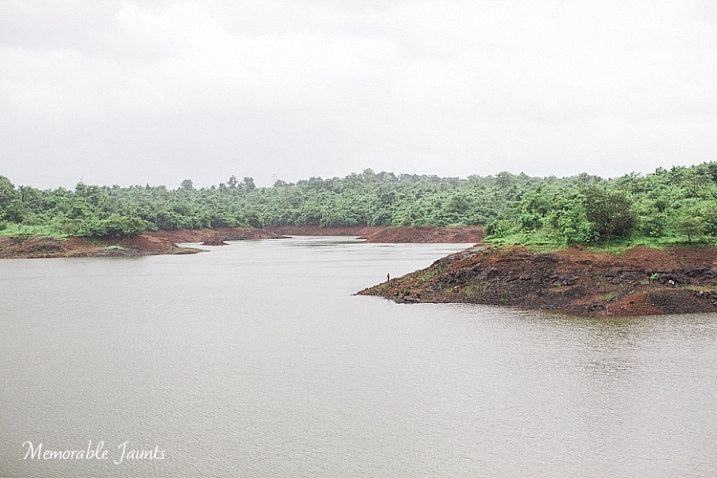
Landscape Image Near Bombay Memorable Jaunts for DPS

Being my family’s designated photographer, and having spent the past two months traveling across my home country of India, I experienced much of these same emotions on a day to day basis. India is a country like no other, where every part of the country has such a strong impact to the senses. It is big, busy, loud, and colorful – and is a photographer’s delight. The parent in me wanted to experience this magical journey with my family, and see my beautiful country through their eyes. Whereas the photographer in me was on a creative high and I wanted to document each and every thing I was seeing through my mind’s eye, and my camera’s viewfinder. I constantly struggled to find the right balance between being a mom, and being a professional photographer. 4000+ pictures later, I feel like I finally figured out what worked for me!

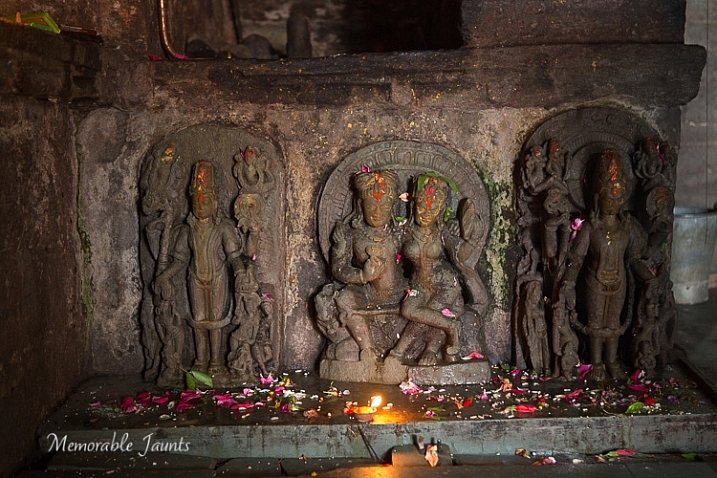
Memorable Jaunts Finding Balance as a photographer Article for DPS-1-2

A quick detour on our road trip led to an ancient temple where I was able to take some amazing and interesting pictures inside the inner sanctum.

Research locations for photo opportunities ahead of time

Just like kids, we adults too crave structure and routine, especially when it comes to photography assignments. Just like you would carry a shot list for a wedding photography gig or a commercial assignment, knowing what to expect with every place you visit gives you a certain peace of mind. This is particularly true if you are visiting famous locations and monuments. I found that often in such places photography was not allowed, or you needed special permission, or had to pay a fee.

Research your travel destination as much as you can. Look for information online, or even ask in photography forums specific to your needs. I learned early on in my trip, that most religious monuments and places of worship don’t allow any type of photography. Even cell phones are not permitted. So I would often leave my gear at home, or in the car, and just enjoy the location with my family.

Minimum gear for maximum effect

Packing for months on the road is never easy, especially when you have a ton of equipment, and suffer from an acute case of separation anxiety with your gear. Once you have researched your travel destination and know what types of imagery to expect, only pack the appropriate gear. Maybe even challenge yourself to only use certain types of lenses and cameras. The more practical you are about your gear, the less frustrated you will be for taking stuff you don’t end up using. My goto setup was my Canon EOS 5D MK III and Canon 24-70mmL lens. I used that combination 75% of the time when I was traveling. I found that I could switch easily from photographing wide angle landscape shots, to narrowing in on my kids playing effortlessly with my zoom lens. I also carried my Canon 70-200mmL lens, but found it was very impractical in terms of its weight. Additionally, professional DSLRs and multitude of lenses tend to get heavy and uncomfortable to lug around for a 20 day road trip, and several flight journeys. If you are going off the grid, or visiting remote places, err on the side of caution, and perhaps travel with minimal gear like a small point and shoot camera.

Set aside some “me” time with just with your camera

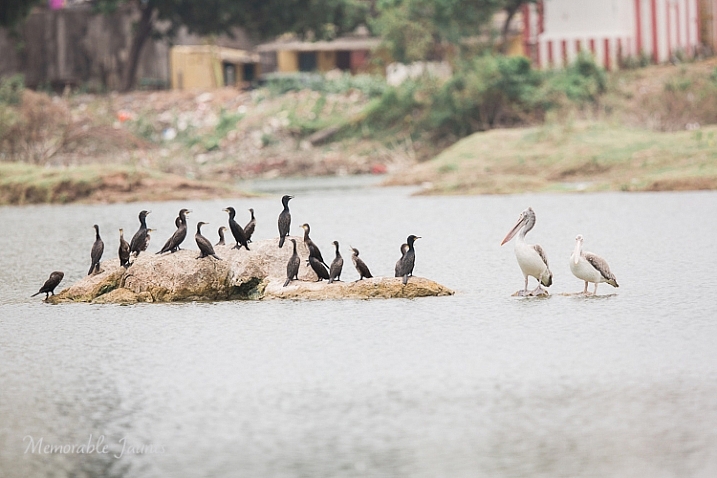
Memorable Jaunts Finding Balance as a photographer Article for DPS-1

During a ‘me’ time photowalk close to my home in Chennai, I spent 30 minutes photographing these birds without any interruptions or disruptions!

The deal I stuck with my family is that at every new place we visited, I would get one hour just to be with my camera. Any photography assignment specific pictures would be taken at that time. The rest of the day was time spent with my family, and capturing those moments on camera sparingly. There were times when the camera was completely banned because I really wanted to treasure the moments, and not just focus on documenting the experience. And guess what, I found I was a much happier, and nicer person, at the end of the day!

Engage your family in your photo trips

Do you have old outdated gear sitting in your gear cabinet? You know those old first generation DSLRs that you will probably have to pay someone to take off your hands? Use them to get your family engaged in photography. My kids share my old DSLR with a kit lens, and they love it. They love playing photographer, and some of the images they capture are so adorable. I always make it a big deal to praise their budding photography skills, and in turn, they are generally more tolerant when mom wants to spend an extra 10 minutes photographing the waves crashing against the rocks at sunset (because it is the most magical sunset ever!)

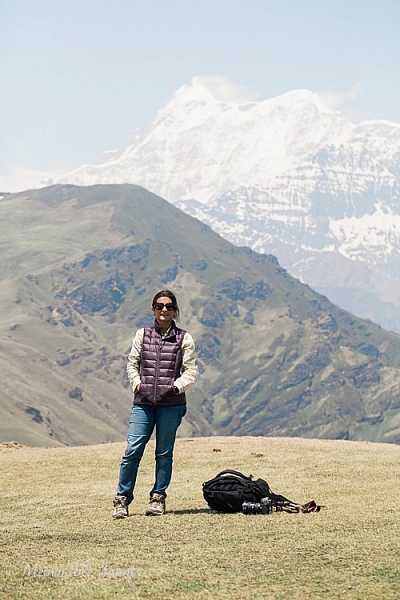
Memorable Jaunts Finding Balance as a photographer Article for DPS-1-3

A rare image of me as taken by my daughter! – this was during a four day hike in the mountains, and it’s the only picture I have to prove that I was there too!

Memorable Jaunts Finding Balance as a photographer Article for DPS-2

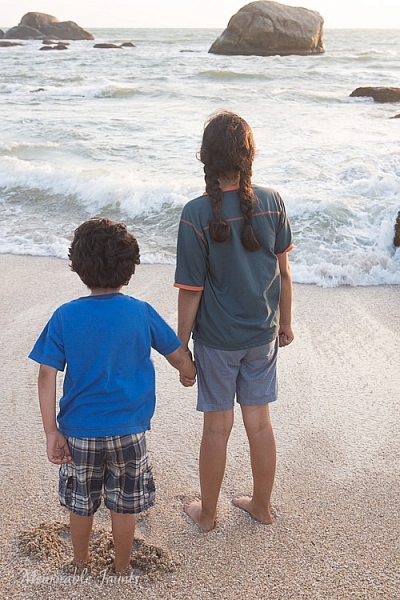
But 10 days later, this was the best I could get of them! – No amount of negotiation could get them to turn around and face me.

Make memories and not pictures

Give yourself permission to not take any pictures occasionally. Put the camera away and just enjoy the experience of being on vacation. After all, you have probably spent a lot of money, and precious time, to get to your destination. Soak in the essence of the space and place, and make memories that will last a lifetime.

After my long summer break, I still felt that I never really had any time off. To me, every minute was a working one, whether was I being a full-time mom, or a travel photographer. While I did walk away with some amazing imagery, a part of me regretted not spending more time with my family. What are some of your strategies for finding a good balance?

googletag.cmd.push(function() {
tablet_slots.push( googletag.defineSlot( “/1005424/_dPSv4_tab-all-article-bottom_(300×250)”, [300, 250], “pb-ad-78623” ).addService( googletag.pubads() ) ); } );

googletag.cmd.push(function() {
mobile_slots.push( googletag.defineSlot( “/1005424/_dPSv4_mob-all-article-bottom_(300×250)”, [300, 250], “pb-ad-78158” ).addService( googletag.pubads() ) ); } );

The post The Fine Line Between Travel Photography and Having a family Vacation by Karthika Gupta appeared first on Digital Photography School.


Digital Photography School

 
Comments Off on The Fine Line Between Travel Photography and Having a family Vacation

Posted in Photography


What is Fine Art Photography and How to Do it?

13 Jul

Digital photography has changed the way people take photos, and how many are taking them. Anyone with a camera can be a photographer these days, and many of those want to be professional photographers or artists, though they can be the both. All over the internet there is a rise of those who are calling themselves Fine Art Photographers; so maybe it is time to look into what they are and how they are different to the usual photographers.

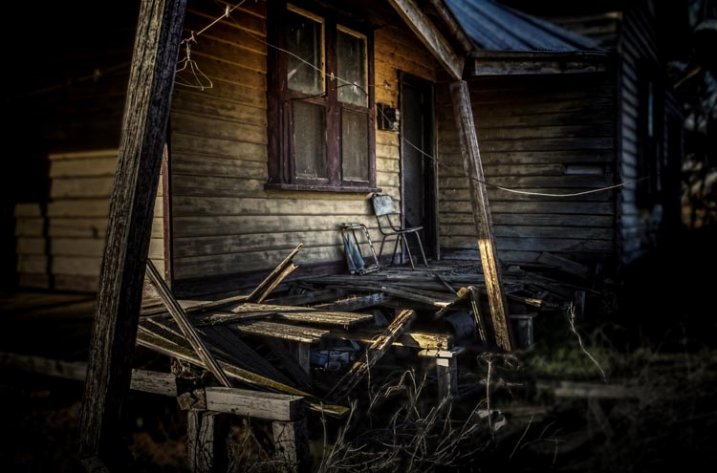
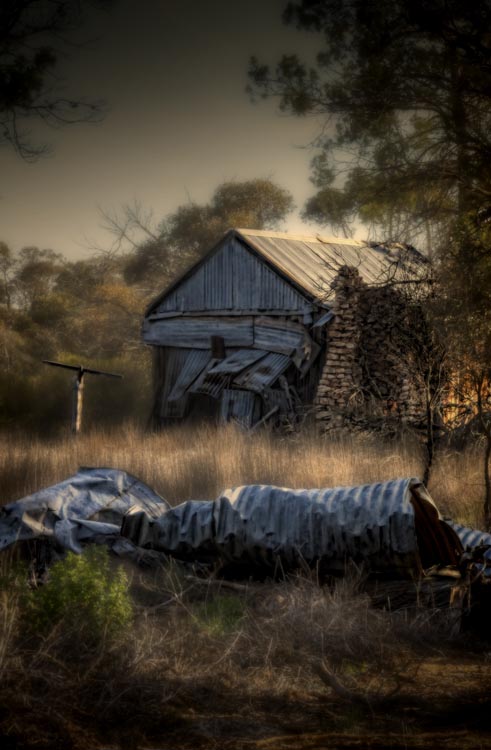
Below is what I consider to be one of my fine art images.

Fine Art Photography 5

Home built in the 30s and then abandoned only a few years ago.

I have lots of images that may be art, but they are not what I would call fine art photographs.

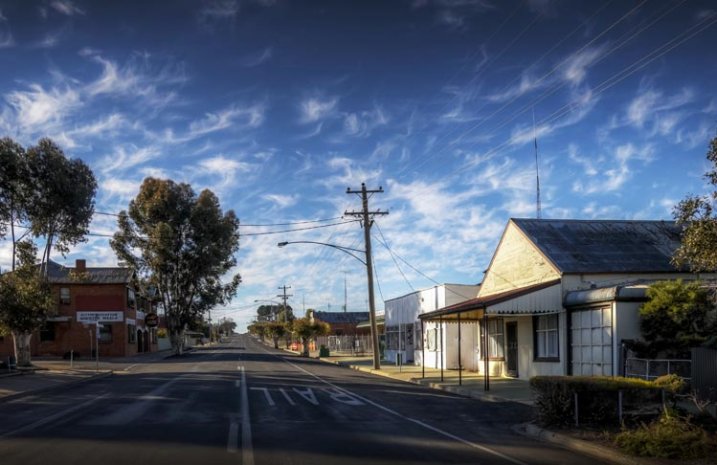
Fine Art Photography

The main street of a small town in Australia.

Both images would look nice framed and hanging on a wall, but if what you are trying to achieve is fine art, then only the first one would really fit that category.

Recently I heard a photographer online saying that you could go wacky on an image, add a weird curving blur, then call it fine art. That doesn’t make an image artistic, that just makes it silly.

There doesn’t seem to be a definitive explanation or definition for what Fine Art Photography is, but there do appear to be things that help define what it is.

When I was doing my fine art degree, part of what was required was to take turns putting our work up on the wall for critique. During these sessions we talked about techniques, what was working, and what wasn’t. We would also discuss the ideas behind the work and where we wanted to go with it.

On top of those we had individual tutorials with lecturers to help us discuss our ideas and how to achieve them. The idea was to get a plan together of how to go about doing the work, what we could use to support it, and looking at other artists that did similar work to see how they conveyed their ideas. These were invaluable, in that they helped us work out what we were doing and the direction we needed to go.

Fine Art Photography 3

Consumerism, everything becoming obsolete.

Artists Vision

Before work can become fine art the artist has to have a vision of what they think their work will look like.

An Idea

Fine art is about an idea, a message, or an emotion. The artist has something that they want to have conveyed in their work.

That idea or message may be something small, a single word such as abandon, or it may be a whole statement, like exploring the way the moon affects the tides. It is a start. It is like a hypothesis.

Technique

The work you create to demonstrate your vision and ideas has to have a consistency to it. When all the work is together it has to have similarities. Often artists will use the same medium and techniques for each idea.

Body of Work

In the end there has to be a body of work that shows your ideas, subjects and techniques. If you were to get your images into a gallery there would need to be a uniformity to them all.

Artist Statement

Finally you would most likely need an artist statement. A short explanation of what the work is about, why you created it and how.

When you go to a gallery you might look at the work and wonder what it is about, so you look for the artist statement. It will help you figure out what the artists intentions were, the reasons why, and how they created that work.

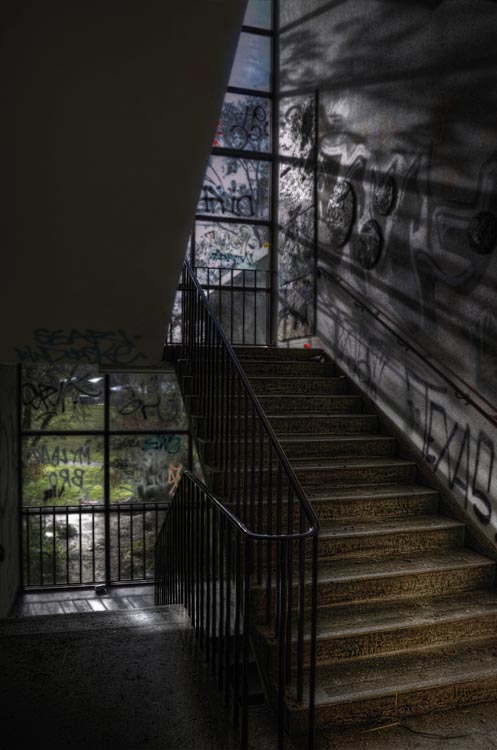
Fine Art Photography 8

An high school that has been closed a while the vandals have taken over, but the light still comes through the windows.

So you want to be a Fine Art Photographer?

You don’t need to have a degree in fine arts to be a fine art photographer, but you do need to think carefully about your work and what you want to achieve with it.

Getting your edeas together

Brainstorming is a great idea, sitting down and just writing ideas down.

  • What topics do you feel passionate about?
  • What messages do you want to convey?
  • What subjects do you like to photograph?
  • What techniques are you interested in?

Just write and don’t take too much notice of what you are writing, it is about getting your thoughts down on paper. It might not make any sense at first, but as you work through your ideas it will start to do so.

Fine Art Photography 4

Brain storming the idea of consumerism. It doesn’t always make sense, but it is about getting your ideas down.

Once it is done you should have the bare essentials for what you want your work to be about. You might decide to disregard a lot of it, but there should be enough there to help you work out what you want to do, and which direction you want to go.

Deciding on your topic

Topics can be anything. They don’t have to be heavy topics like ones that are really political, or socially conscientious. I used consumerism, as I’ve had a couple of exhibitions that were based on that concept, and the idea that we were turning our homes into massive rubbish (garbage) bins.

Working out your message, or the motivation behind it, can be a little bit more difficult. Perhaps for something like consumerism you might want to explore the impact it has on the environment, or what is going to happen to all the goods that we keep buying.

Finding the subject for your photos

What is your subject matter going to be? Would you photograph rubbish piles? Maybe look directly at the different brands, and all the different products they come out with. What your images are going to be of, is just as important, and should link to your topic or message.

Fine Art Photography 6

Once a home, built over a hundred years ago, now left, the outside crumbling and grass trying to cover it over.

Working out your technique

The technique isn’t so important, it just has to be the same for all the images. You can experiment to start with, to help you work it out, but once you have what you want then your body of work has to all be similar. You are looking to create a cohesive portfolio that will look great, and connect together when on display.

Creating your body of work

You should make as much work as you can. If you are planning an exhibition, then you need to know now much work you will need for it. When it is all done there are going to be pieces that simply won’t work and you will be better off leaving them out. It is difficult to work out what is best for an exhibition, and just because you made it doesn’t mean it belongs.

Your Artist Statement

Finally you need to write that artist statement. It needs to be written in what they call artspeak, or language that fits in with the art world. It has to sound good. If you are applying to galleries then your artist statement is what they are going to take notice of, just as much as your work.

Here is an example of one written about work around the theme of abandon:

It is human nature to sculpture and contour the environment into shapes and forms that we find pleasing. We live in these buildings, work in them, and find entertainment and nourishment in them. We spend time in rooms designed to help us learn through many stages of our lives. When the buildings can no longer be maintained they fall into decay quickly. My work is looking at the rate of decay and how similar it is to the human condition. How easily we can fall into the same sort of decay when we are no longer being cared for. Through photographs of old, and recently abandoned buildings, I want to explore the metaphor of the human condition with the deserted buildings.

I just made this short statement up, but I hope it gives you an idea of what an artist statement is like. If you do a google search you will find many places that can help you write one. You will also be able to find examples of them to see what other artists are doing, and how they are creating their work.

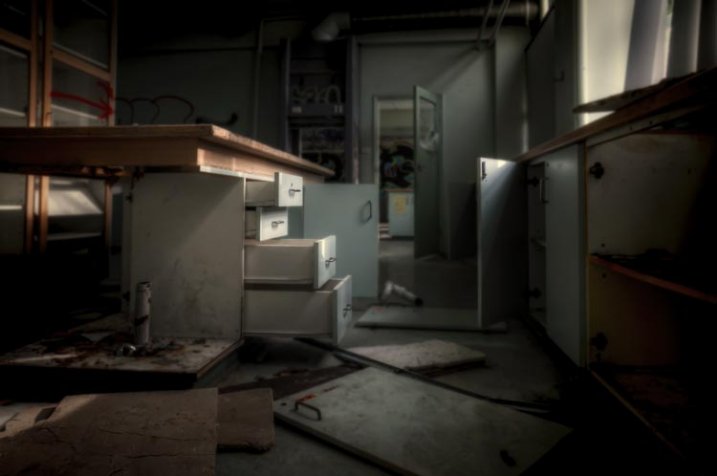
Fine Art Photography 9

The old science room in the closed school. Things are scattered and nothing makes sense.

Finally

The work should be about you, and what you are passionate about. Don’t worry about what other people think. If you know what your vision is, what your subject is, and how you want to create your work, then your statement should come easily and you will find yourself on a new path, an exciting one.

If you are just making lovely images without any of the above, then chances are you aren’t creating fine art photographs. However, if you have a vision or message, and have ideas that you want to convey through your work then you are more likely to be creating fine art. Perhaps you should think about what you want your work to be about. It is also fine to just take photos because you enjoy it.

googletag.cmd.push(function() {
tablet_slots.push( googletag.defineSlot( “/1005424/_dPSv4_tab-all-article-bottom_(300×250)”, [300, 250], “pb-ad-78623” ).addService( googletag.pubads() ) ); } );

googletag.cmd.push(function() {
mobile_slots.push( googletag.defineSlot( “/1005424/_dPSv4_mob-all-article-bottom_(300×250)”, [300, 250], “pb-ad-78158” ).addService( googletag.pubads() ) ); } );

The post What is Fine Art Photography and How to Do it? by Leanne Cole appeared first on Digital Photography School.


Digital Photography School

 
Comments Off on What is Fine Art Photography and How to Do it?

Posted in Photography


How to Give Your Macro Photography a Fine Art Touch in Post-Processing

21 May

Editor’s Note: This is part a series on macro photography this week. Look for a new one each day. The next newsletter will have them all if you miss any!

Macro photography is very popular and you will find lots of images, of all sorts of subjects on the internet. People spend a lot of time taking the photos, planning them, setting them up, and getting all the gear they need to get all the shots they want. Then the photos are loaded onto the computer and minimal processing is done to them.

With this tutorial we are going to look at how you can get your macro images from this:
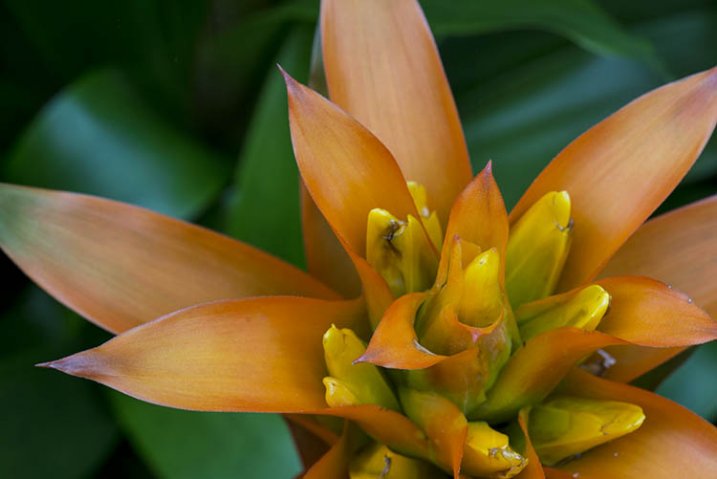
1-fitzroy-gardens-succulent-marco-original

To this:

2-fitzroy-gardens-succulent-marco-fineart

There are many things you can do to your images; what I’m going to show you is only one way. You can try anything really as it’s up to you, it’s your image.

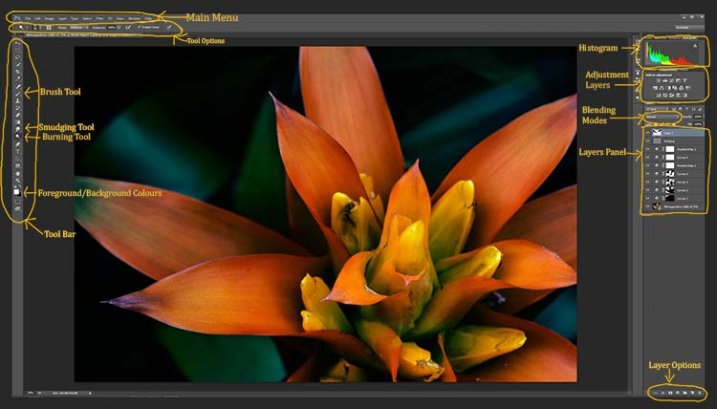
This image was first opened in Adobe Camera Raw and some processing was done to it, just to get the exposure right. From there the macro was opened in Photoshop CC (2014). To explain what some of the instructions are for Photoshop I am including an image below that has the various areas of the interface pointed out, especially the sections that we will be using for this tutorial.

Here is the screenshot of Photoshop with all the various places to find the tools, options, layers and adjustments that were used.
photoshop-setup-2

Step #1 – Curves

At this stage we are going to do several adjustment layers using Curves to change the lighting and bring the centre of the flower out more.

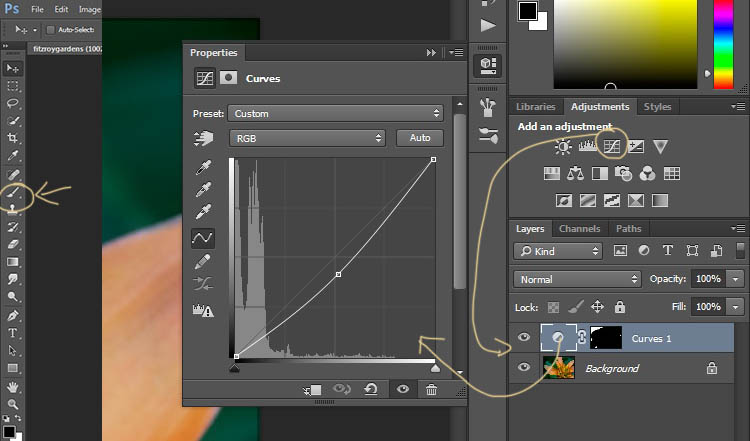
Work in adjustment layers so if you decide further down the track that you should have changed something you did earlier, then you still can go back and fix it, change it or delete the layer. The best way to do this is to use adjustment layers. The adjustment layers are often found above the layers panel on the right of your screen or in the layers menu at the top of the Photoshop window (if you don’t see them go to Window > Adjustments and place it above your layers panel). You will also need the brush tool for this, which is in the tool panel, usually found on the left of the window.
3-adjustment-layer-brush-tool

Once you know where each one of those are, you can start doing your layers for the image.

Click on the adjustment curves layer, as in the photo above. Then in the window that pops up, move the curve down to the dark area just a little, like the image above (just click on the straight line and hold the mouse button down while you drag to move it).

Grab your brush tool from the tool panel. Make it the size that you will need for your image. You can change the size by using the square bracket keys on your keyboard – [ or ] , or right click and in the pop-up window moving the slider for the size. The same changes can be made in the options bar for the tool at the top. Click on the second option from the left, the one that has the size of the brush, and you will get the same panel to change the size and hardness of the brush. For this tutorial a brush towards the soft end was chosen so the edges wouldn’t be too hard (Hardness set to 30% or lower).

You will need to click on the layer mask within the layer, it is the white rectangle in the curve layer. When the mask is white it means the adjustment is being applied to the image below, and when it is black it the change has been hidden. If you paint black onto the mask with the brush you are hiding the adjustment. Black on a mask conceals – white reveals. If you make a mistake and hide a bit you want, you can just paint it back in with the opposite color, white.

Start brushing the image, if nothing changes, then the foreground color (which the brush uses) is likely set to white. You will need to change that colour to black. You can also press X on your keyboard too, it will swap the foreground and background colours around.

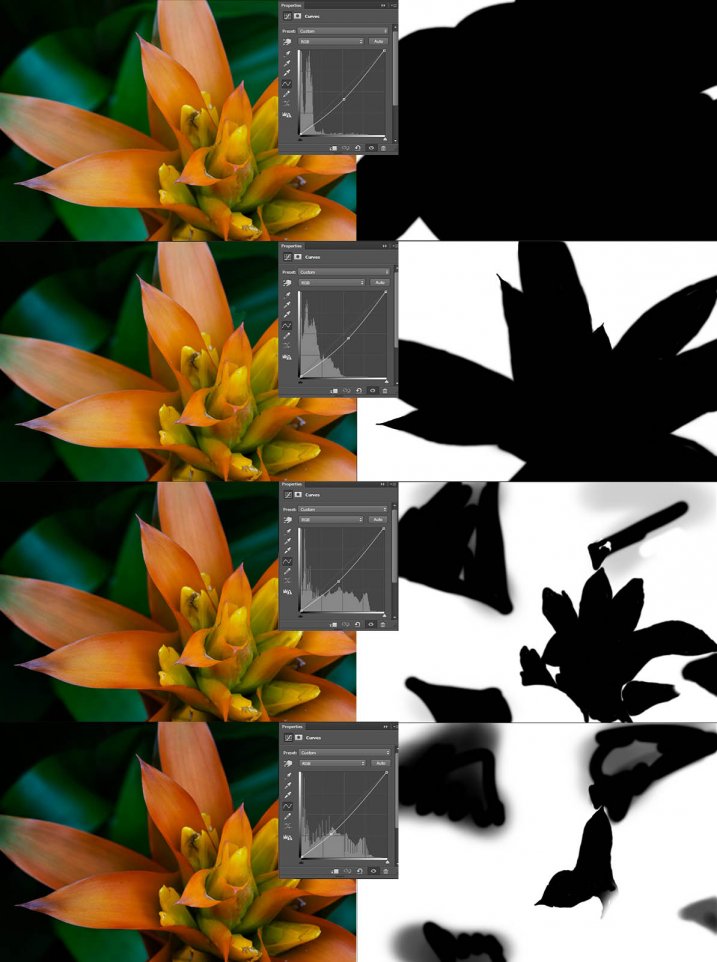
For each different curves layer I took less and less of the adjustment from the image. The following image will show you what I did to each layer. The white areas are where the curves layer still applies, and the black shows where it was hidden.
4-macro-curves-layer

This image was done with curves layers. You don’t have to use the same number of layers, it is up to the image. Some of the background leaves were brought back in the last couple of layers as they were getting too dark. It is something you should be aware of, take notice of what is happening in the background as well.

The centre of the flower is now the same as the original but everything else is darker. The changes should be subtle.

Step #2 – Gradient Map Adjustment Layer

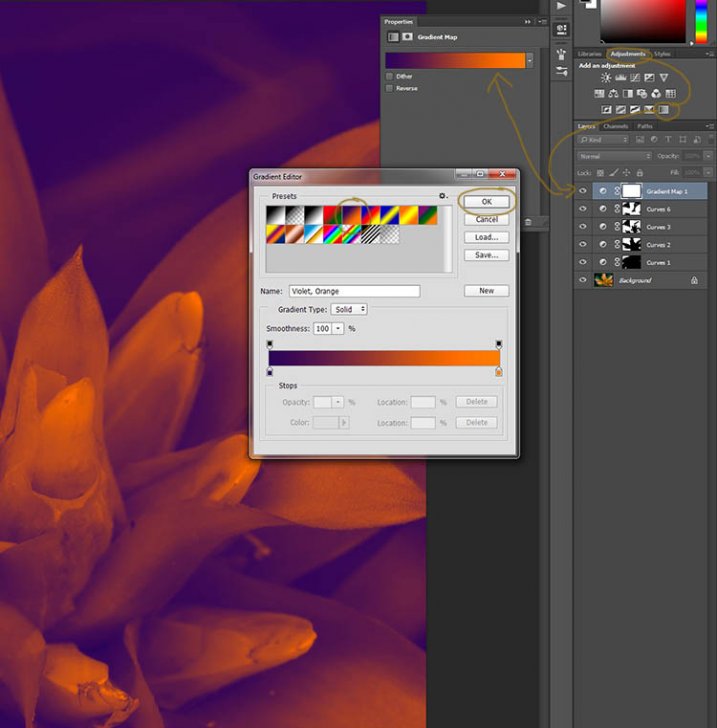
Once the curves were done a gradient adjustment layer was added. The gradient adjustment will change the highlights and shadows; you can decide what colours you want to use.

When you click on the gradient adjustment layer often the black and white gradient comes up and you will notice your image turns to monochrome. If you click on that bar in the window that comes up, you will get a lot more options for the gradient. For this tutorial I used the orange and purple gradient.
5-gradient-adjustment-layer-01

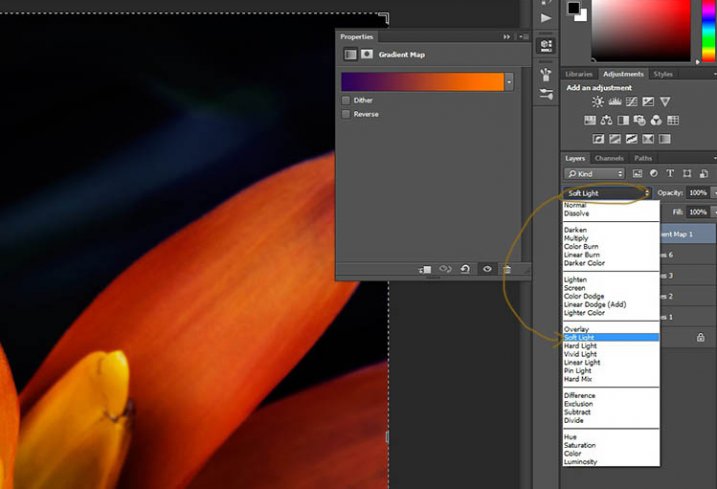
You will see all your highlights turn orange and the dark areas will go purple. You don’t want your image to remain like this, so now you need to blend it. In the image above you can see the blending modes that are above the layers, normal is the default. Click on that and go down to select Soft Light. You will notice the gradient layer is now blended and doesn’t look so horrible.
5-gradient-adjustment-layer-02

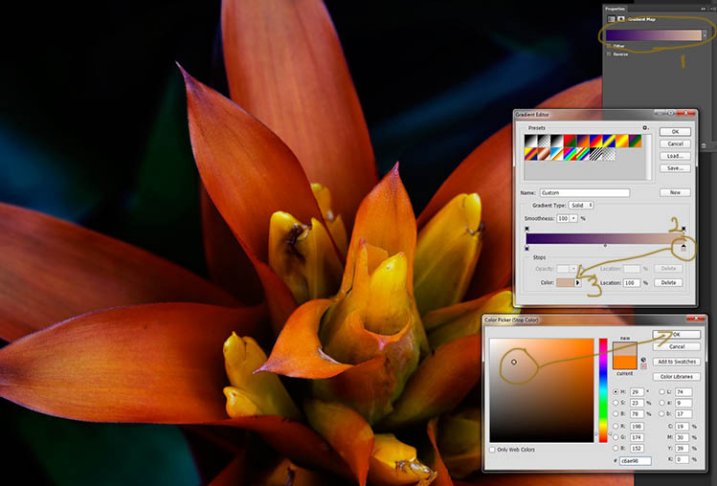
Just because that gradient has those colours, doesn’t mean you have to stick with them. They are easy to change them to give your highlights and shadows the tones you want.

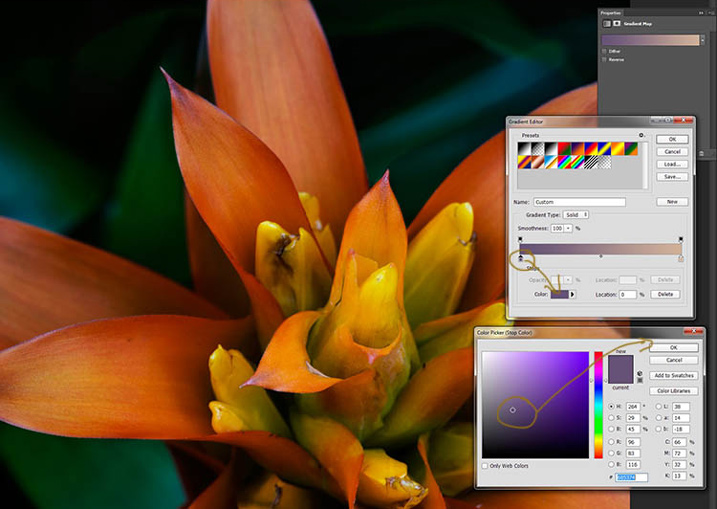
In the bottom part of the gradient editor you can see the colour slider which is how the change goes from one colour to another, and directly underneath you can see little colours. If you click on one of those, the colour comes up at the bottom.
6-gradient-adjustment-layer-2b

Click on that, you will see the Colour Picker window open up. You can change the colour to whatever you want, and as you do so you should be able to see the effect on your image straight away. If you can’t, then it is likely because you forgot to blend the layer. See the following image.
6-gradient-adjustment-layer-2c

You can see from the images what I changed the colours to; you don’t have to use the same ones. I would recommend trying a few colours to see which ones you like. Purple is my favourite colour, so I use it a lot.

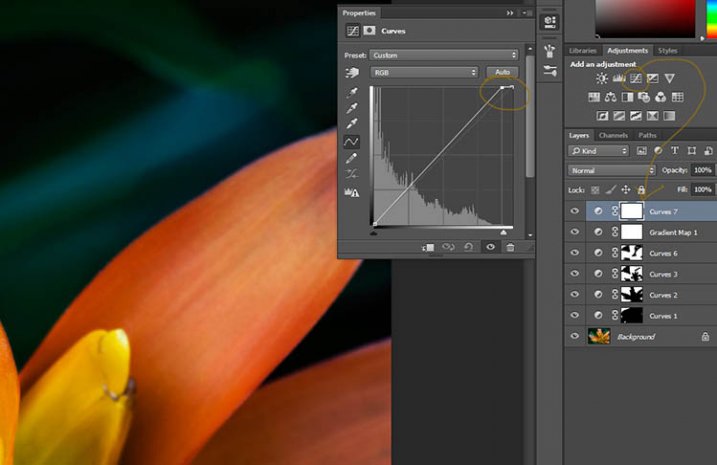
The next step is not always necessary, but often nice to do. All the work that has been done can mean losing the highlights, so to help bring them back you can use a Curves Adjustment Layer.

Step #3 – Adjusting the Highlights

Open a new Curves Adjustment Layer. In the Curves window go to the top right corner and move the line across the top. Watch as you do it and notice if you can see the highlights changing. Sometimes it is good to go too far and then bring it back, just to see what it does. Just be careful not to blow the the highlights out, making them solid white with no detail. Check out the image before to see what to change.
7-curves-highlights

Step #4 – Adding Another Gradient Map Adjustment

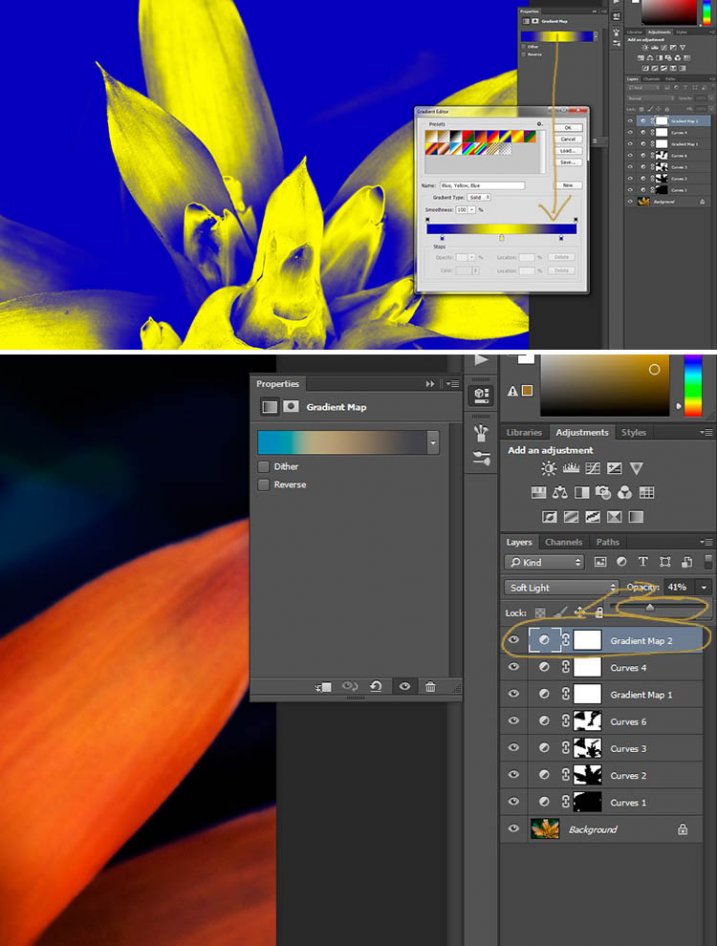
Next another gradient map adjustment layer was added, time time using a different one.

From the above image you should be able to see what colours I choose and follow along the same steps as previously. This time I chose a gradient that changed three areas.
8-gradient-adjustment-layer-3

Step #5 – Dodging the Highlights

One thing that I like to do on many of my images is to bring out the highlights, in small ways, with the dodging tool. The dodging tool is a touchy one, to be used carefully.

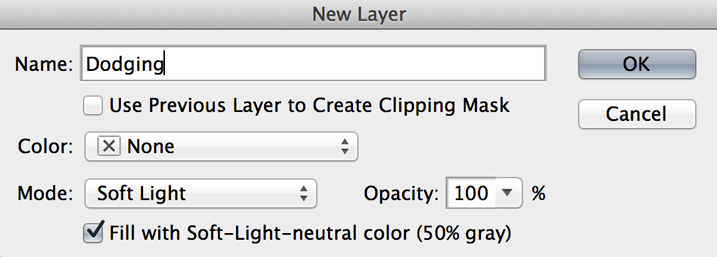
It is always best never to do anything straight onto your original image layer, so like with everything we have done so far it’s going to be on a separate layer. Go to the top menu and click layer, then new layer. When the window appears you can name the layer, if you want to, I called it “Dodging”.
Dodging

There are a couple of things you need to do so you can use this layer with the Dodge tool. First change the layer blend mode to Soft Light, then under the mode drop down menu you will see a box you can check to “Fill with Soft-Light Neutral Colour 50% Grey”, so check that, then press okay (see above)

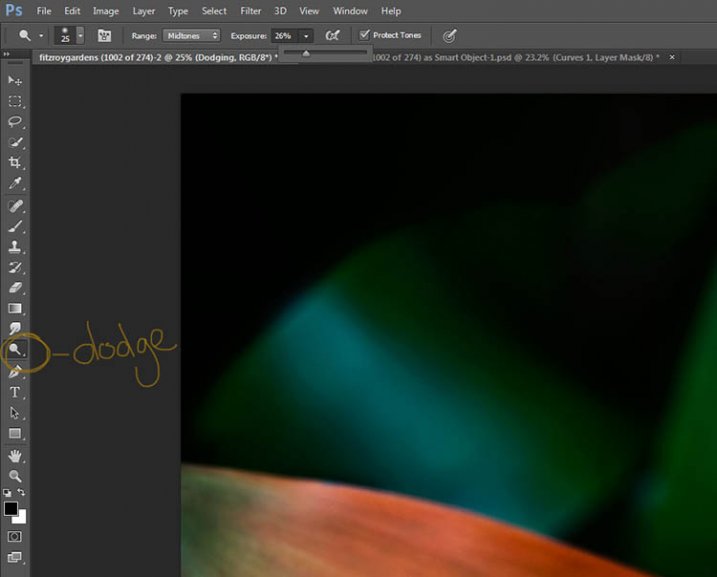
Over in the layers panel you will see what looks like a grey box, this is what you will do the dodging on. Go over to the tool bar on the left and select the dodge tool.

At the top under the main window you will see Exposure, I have set mine at 26% for this image, but you can set it to anything, it depends on how patient you are. In the options bar there is also a setting for the highlights, midtones and shadows, I tend to use midtones. The more you move over an area the more it will go white. In the days of the darkroom they would using dodging to stop the light from getting to certain parts of the area. In Photoshop you can use it to put a little of the highlights back into the image, or to make the highlight pop. It should not be obvious, again subtle is the way to go.

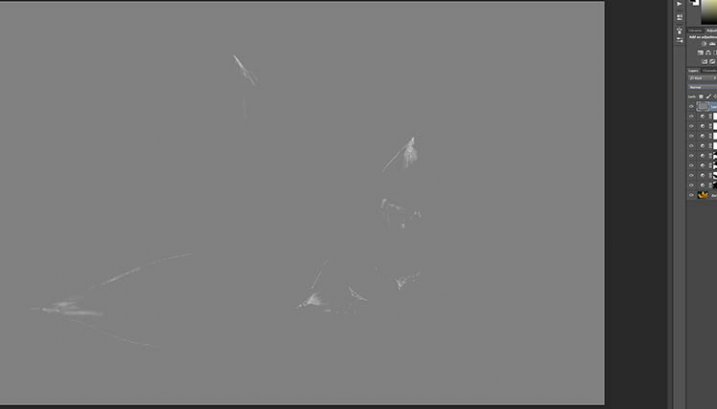
I have changed the layer back to normal mode so you can see what I worked on. Dodging shows up as white on the layer.
10-dodge-layer-2

You can see that I haven’t done a lot, except bring up some of the highlights a little more.11-dodge-layer-3
Step #6 – Smudging

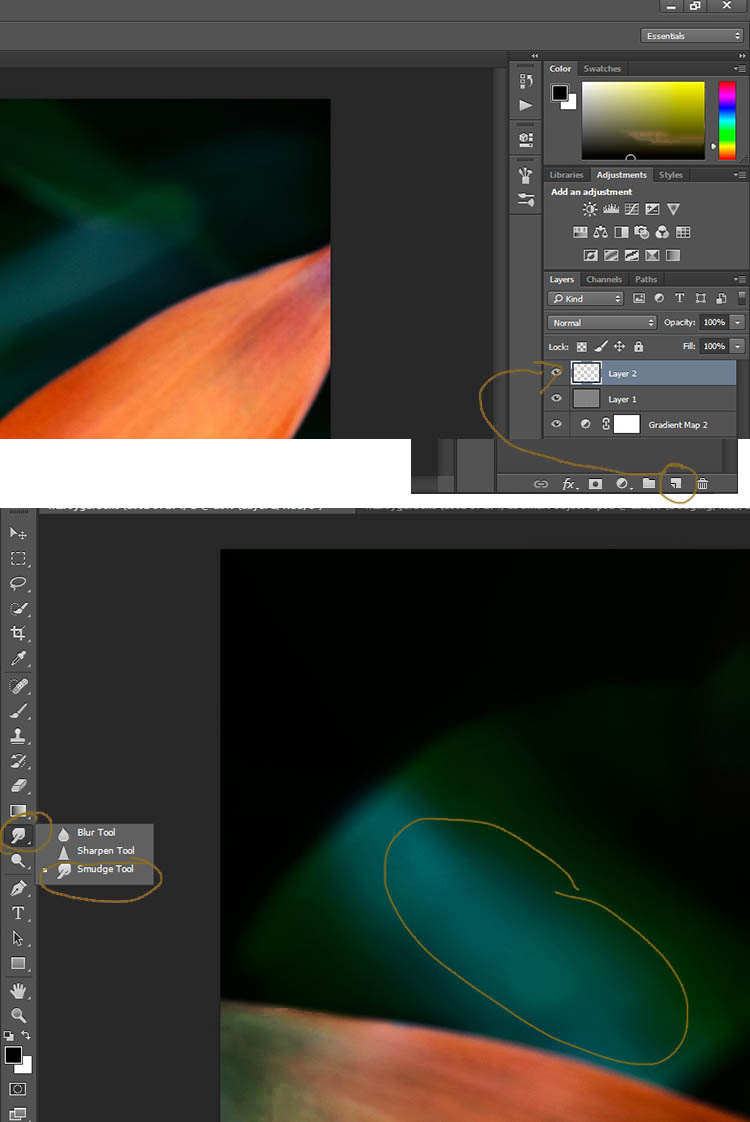
Finally I did a little smudging. Sometimes when you do a lot of work to images it can start to look pixelated, or you get some colour separation. I’ve found that the smudge tool can help get rid of that. You will find it in the tools panel.

I did this on a new transparent layer, again not working on the original image.
12-smudge-layer

Make sure you check the Sample all Layers in the options bar for the tool at the top, and for this tutorial I left the Strength at 50%. I went over the areas where I thought I had some colour separation to smudge them together. If it were a painting I would get my finger into it and smudge the colours together.

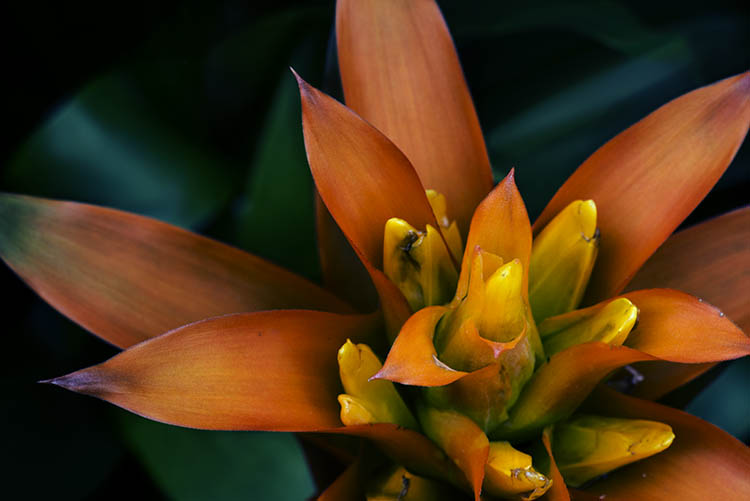
Here is the final image.
2-fitzroy-gardens-succulent-marco-fineart

It is all about personal taste, so you should do it to your own style. I like it like this, but other people might find it too much, and others may think it isn’t enough. I like the way the flower seems to be coming out of the darkness.

If you have any questions, please ask. I will do my best to answer them.

macro-coverWant to learn more about macro photography? Check out Ed Versosky’s Introduction to Close-Up & Macro Photography ebook – just $ 10 (over 30% off) this week with coupon code: DPS. You will need to enter the code to apply the discount.

googletag.cmd.push(function() {
tablet_slots.push( googletag.defineSlot( “/1005424/_dPSv4_tab-all-article-bottom_(300×250)”, [300, 250], “pb-ad-78623” ).addService( googletag.pubads() ) ); } );

googletag.cmd.push(function() {
mobile_slots.push( googletag.defineSlot( “/1005424/_dPSv4_mob-all-article-bottom_(300×250)”, [300, 250], “pb-ad-78158” ).addService( googletag.pubads() ) ); } );

The post How to Give Your Macro Photography a Fine Art Touch in Post-Processing by Leanne Cole appeared first on Digital Photography School.


Digital Photography School

 
Comments Off on How to Give Your Macro Photography a Fine Art Touch in Post-Processing

Posted in Photography


Deal 8: 70% off Photoshop Artistry: Fine Art Grunge Composition Course

21 Dec

Today’s deal is perfect for those of you wanting to awaken your creative genius and create some art with your images.

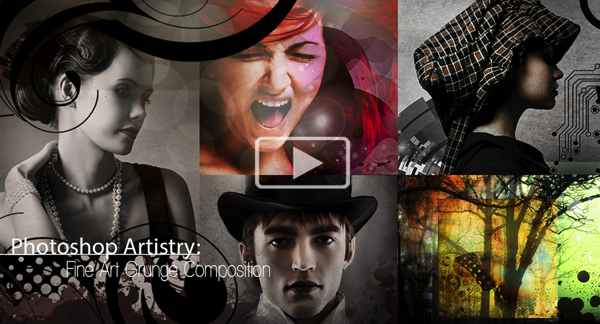
It is 70% off the Photoshop Artistry: Fine Art Grunge Composition course.

Photoshop artistry

We offered this course on our sister site – SnapnDeals – earlier this year and it ended up being our most popular deal of the year, so we convinced it’s creator – Sebastian Michaels – to bring it back for dPS readers today.

The best thing you can do to learn what this course is about is to head over to the sales page where Sebastian has created a great video run down of what the course covers and why you might consider signing up.

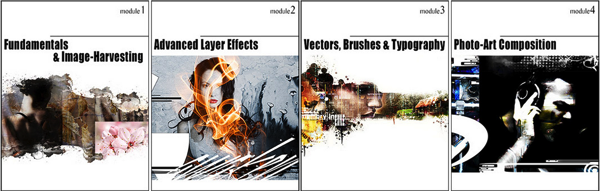
You get a whole lot with this course including:

  • 68 videos, each averaging over 20 minutes in length
  • Each lesson is accompanied by PDF downloadable cheat sheets
  • Sebastian’s huge texture library (over 5 gigabytes in total is available to you)
  • Sebastian’s custom brush (and edge effect) library
  • Sebastian’s high res vector graphic library

Photoshop artistry grunge

Normally this course retails for $ 297 and in January it is set to increase in price but for the next 24 hours it is yours for $ 89.

Best of all – there’s a 60 day satisfaction guarantee on this course. If you buy it and if you don’t find it meets your needs you’re able to simply ask for a refund and Sebastian will get you your money back.

Head over to check out full details of what is included here (there are also a heap of previous students testimonials).

googletag.cmd.push(function() {
tablet_slots.push( googletag.defineSlot( “/1005424/_dPSv4_tab-all-article-bottom_(300×250)”, [300, 250], “pb-ad-78623” ).addService( googletag.pubads() ) ); } );

googletag.cmd.push(function() {
mobile_slots.push( googletag.defineSlot( “/1005424/_dPSv4_mob-all-article-bottom_(300×250)”, [300, 250], “pb-ad-78158” ).addService( googletag.pubads() ) ); } );

The post Deal 8: 70% off Photoshop Artistry: Fine Art Grunge Composition Course by Darren Rowse appeared first on Digital Photography School.


Digital Photography School

 
Comments Off on Deal 8: 70% off Photoshop Artistry: Fine Art Grunge Composition Course

Posted in Photography


Fine Tuning Autofocus on your DSLR

08 Sep

Have you ever used a nice big aperture and got home only to find out the focus isn’t on the part you wanted? Or done a portrait and their ears are nice and sharp not their eyes?

If so, you might have a lens focusing issue. There are ways to test for that and depending on your camera model you may be able to adjust it.

I found a video where the host walks you through the process of fine tuning autofocus for your DSLR. I think her accent is great and I love knowing that people around the world have the same issues and there are great photographers and educators everywhere.

Hopefully that solved your issues and everything is tack sharp now, exactly where you want it.

The post Fine Tuning Autofocus on your DSLR by Darlene Hildebrandt appeared first on Digital Photography School.


Digital Photography School

 
Comments Off on Fine Tuning Autofocus on your DSLR

Posted in Photography


Ebook Review – From Basics to Fine Art Black and White Photography

07 Jul

Ebook Review: From Basics to Fine Art

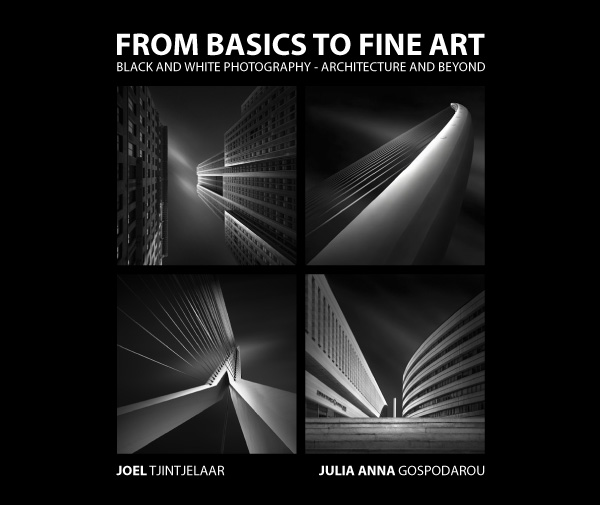
If you’re interested in black and white photography, the names Joel Tjintjelaar and Julia Anna Gospodarou will probably need no introduction. The work of both photographers has helped define, and push the boundaries of long exposure photography, a relatively new genre in the fine art world.

Julia and Joel have joined forces to write a new ebook called From Basics to Fine Art: Black and White Photography – Architecture and Beyond. It is principally aimed at photographers interested in using long exposure techniques to photograph buildings, with some chapters being more general and having a wider appeal.

Ebook Review: From Basics to Fine Art

The contents

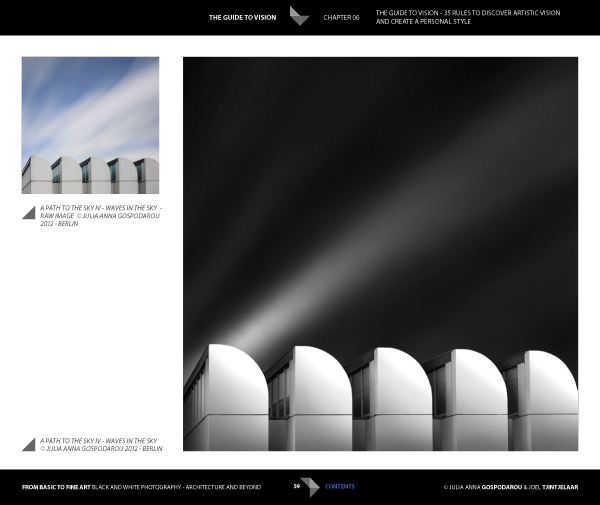
The ebook starts with personal statements from the authors exploring their interpretations of the word vision as it relates to architectural black and white photography. For me, the most interesting concept here is expressed by Joel. He talks about long exposure black and white photography as being several steps removed from reality. It is an interpretation, not a reproduction. The intent is not to capture the scene as it looked to the eye, but to present it in a way that represents the artist’s vision.

This theme is continued in the later chapters where Joel explains his post-processing techniques. Take a good look at his photos (follow the link to see some) and think about whether you could achieve similar results. The likely answer is no, because Joel has developed his processing techniques beyond the level that most photographers achieve. Be warned – Joel takes a long time to process his photos and this section of the ebook reflects that. If you’re looking for quick fixes or shortcuts you will need to look elsewhere.

Ebook Review: From Basics to Fine Art

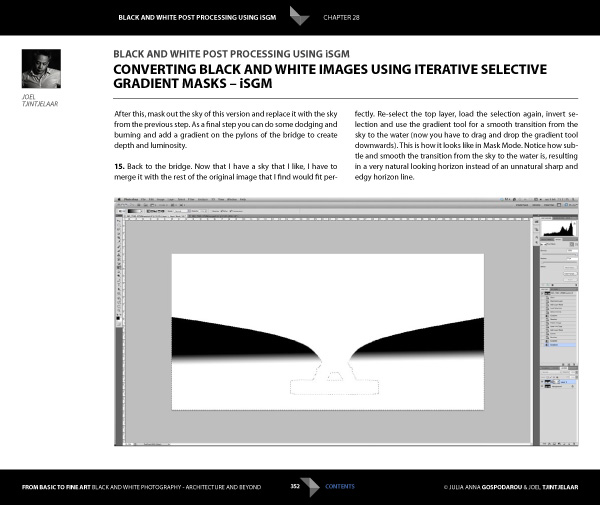
But if you’re looking for a detailed explanation of black and white post-processing techniques that you won’t find anywhere else, then you’re in the right place. Joel explains his workflow, demonstrating how he uses Lightroom and Photoshop, along with plug-ins such as Silver Efex Pro. Most importantly, he shows you how to use what he calls Iterative Selective Gradient Masks, a technique he developed himself, to create the unique look of his black and white images.

He also explores fairly complex techniques modelled on what the calls: the 10 monochromatic commandments for good black and white photography. The idea is that you can create presence and depth in photographs by altering contrast, tonal relationships and defining edges in a way that adds volume, depth and luminosity to the subject.

Don’t be surprised if you don’t understand what this means as it’s an intricate topic that represents a fairly new way of looking at black and white photography. Joel is ahead of everybody else in this respect so you won’t find this information anywhere else. However, the examples in the ebook, and the clear presentation, makes it simple. By the way, the 10 monochromatic commandments I just mentioned are essential reading for anybody interested in black and white photography, regardless of genre.

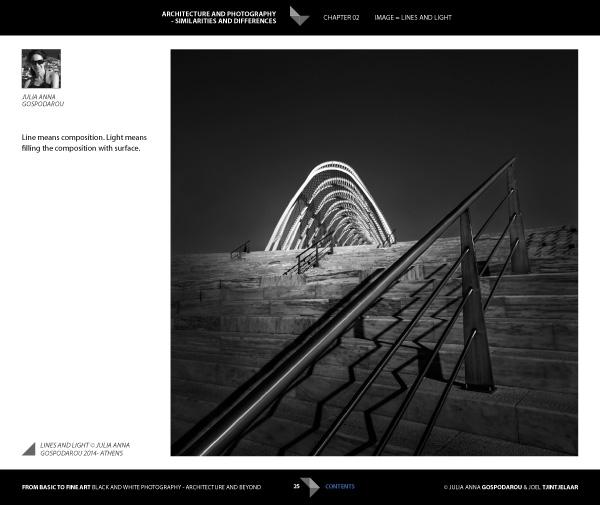
For me, the aspects covered in the previous paragraphs are the most interesting part of the ebook. There’s more, including some interesting thoughts from Julia (a trained architect) on using light to render the form and volume of buildings. She draws on techniques used in drawing and applies them to photography to get you thinking in a new way about rendering three-dimensional objects in photography.

Ebook Review: From Basics to Fine Art

There’s also an extensive chapter from Joel about long exposure photography, and the equipment (including a detailed look at neutral density filters) and techniques required to get results.

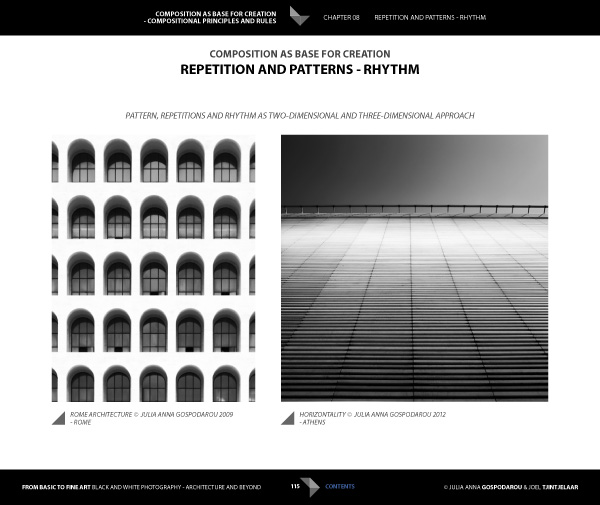
Included is more of the usual stuff that you would expect from a book about architectural photography, including composition, the practical aspects of photographing architecture and a chapter on using tilt-shift lenses. There’s also a useful chapter on pricing your work that will be of interest to professionals (or aspiring professionals).

A niggle: the discussions about composition contain a heavy emphasis on rules that continues throughout the ebook. I’m always suspicious of anybody that claims a certain way of things is a rule, and I’m certainly not convinced of the veracity of using (just to give an example) Fibonacci spirals and then stating that there’s a rule attached to it. I’m a strong believer in principles, rather than rules, and I don’t think Fibonacci spirals are going to help readers improve their composition. This minor complaint aside, there is plenty of good and practical information in this ebook.

Ebook Review: From Basics to Fine Art

Conclusion

I came away from reading this ebook with mixed feelings. On one hand, you have two photographers whose work I admire immensely explaining how they create their images, from their general philosophy to the specifics of long exposures and post-processing.

If you’re ever looked at their photos and wondered how they achieved the results they do then this ebook has the answers. It’s a tremendous act of generosity and sharing. No one else seems to be doing this stuff yet, or at least doing it and teaching it, so that makes some of the content unique. If you’re a fan of either of these authors, and want to learn the secrets behind their work, then it’s a must buy.

Ebook Review: From Basics to Fine Art

My main misgiving comes from the price. It’s an expensive ebook and it would be a shame if this information reaches a limited audience because of that. I realize that expense is a relative concept; the ebook is much cheaper than taking a workshop and you will learn things here that you wouldn’t from any other source. It’s a unique resource, and ultimately the buying audience will decide whether it has a fair value.

I have to admit that what I’d really like to see is a print version of this ebook, properly designed to give precedence to the photos of both authors. Their images would be better enjoyed on the printed page, and a book has the potential to become a lasting testament to their body of work and teachings.

From Basics to Fine Art: Black and White Photography – Architecture and Beyond

You can learn more about or buy From Basics to Fine Art: Black and White Photography – Architecture and Beyond by clicking the link. The price is €49 for those of you in the Eurozone, £39 for anybody in the UK and $ US59 for the rest of the world.

The post Ebook Review – From Basics to Fine Art Black and White Photography by Andrew S. Gibson appeared first on Digital Photography School.


Digital Photography School
 
Comments Off on Ebook Review – From Basics to Fine Art Black and White Photography

Posted in Photography