RSS
 

Posts Tagged ‘Finding’

Photography Rules and Finding Balance to Discover Your Own Style

13 Oct

By Lori Peterson

Digital photography has put the camera in more hands than ever before and everyone seems to either want to follow the standard mold of photography or they want to completely break away from it.

For instance, Ian Ruhter took a delivery van and transformed it into a giant wet plate camera. There are so many photographers out there that are wanting to copy someone else’s style instead of finding their own. Learn the rules and then use them or twist them as you need to do to make your own art and to tell your story. One part of your image may follow the standard photography rules and another part will completely be out of the norm. Not everyone sees the image or the story the same and that is fine. Don’t get so caught up in trying to make everything absolutely perfect that you lose the shot.

One of the rules that you hear a lot is to simplify your image. Sometimes, especially in street photography, you can’t simplify the scene. Sometimes the scene has to speak for itself. Whether it’s chaos or clutter, sometimes you need to just go with what you have and work with it. There are stories that can be told just by being the silent observer and recording the image at that place and time.

Photography Rules and Finding Balance

Some photographers will talk to you endlessly about the Rule of Thirds and not centering your subject. Composition of the image is really subjective, but people get too comfortable just centering the image and when they start thinking outside of that box they begin to see everything in a new way. Moving your subject slightly off to the side can actually bring the focus onto them. Just make sure that no matter where your subject is in the image that they are the focus.

Photography Rules and Finding Balance

Using patterns and lines can draw your viewer in more. It helps for them to picture the scene and even put themselves into that moment in time. S-curves work really well to draw your eyes to a particular spot in an image. You can also try a new perspective and get down really low to the ground and use whatever lines are there to your advantage. Experimenting with your shooting techniques can help you learn what works for your style and what doesn’t.

Photography Rules and Finding Balance

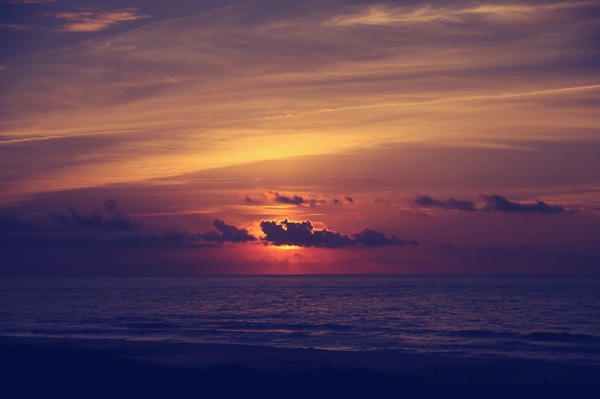
Use of color and tone in an image can set the scene for the viewer. Colors can bring a harmony and unity to an image or it can be used to emphasize a certain part of the image. Color can add contrast, it can help parts of the image blend in, or it can really make a bold statement. Using color in your image can convey emotion and without a written word it can tell you what time of day it is, such as sunrise or sunset.

Photography Rules and Finding Balance

You could do a Google search on photography rules and it would make your head spin from trying to follow all of them, but the important thing about photography rules is knowing when to follow them, when to break them, and when to vary them up just enough to fit your image. Learning to find that balance takes time and practice. Sometimes you just have to learn from the mistakes you make and take those lessons with you to your next shoot. Don’t forget that art is very subjective and what works for one image may not work for another. Experimenting with techniques and composition helps you to learn about photography and find your own creative balance.

Lori Peterson is an award winning photographer based out of the St. Louis Metro Area. Her dynamic work ranges from creative portraits to very unique fine art photography. Lori’s work can be seen at www.loripetersonphotography.com and also on her blog at www.loripetersonphotographyblog.com. You can follow her on Facebook at https://www.facebook.com/LoriPetersonPhotography.

Post originally from: Digital Photography Tips.

Check out our more Photography Tips at Photography Tips for Beginners, Portrait Photography Tips and Wedding Photography Tips.

Photography Rules and Finding Balance to Discover Your Own Style

The post Photography Rules and Finding Balance to Discover Your Own Style by Guest Contributor appeared first on Digital Photography School.


Digital Photography School

 
Comments Off on Photography Rules and Finding Balance to Discover Your Own Style

Posted in Photography


Light that Fire: A Guide to Finding Photo Inspiration at the Library

01 Aug

Dear Mr. Dewey,

Please point me in the direction of the photography books.

Thank you.

Love, A photographer in need of a little inspiration.

If dust is settling on your camera and your creative juices need some stirring, the library is a great place to explore photographers and books on photography that’ll light that photo bug inside you. It’s always in there… sometimes it just needs a a little push in the right direction.

Learn some super simple tips on finding the photo books in your library and what to do once you’ve found them.

If you’ve got yourself a free afternoon, strap on your sneakers and head to the library to peruse the photo books and get inspired!

Find Photo Inspiration at the Library

p.s. We’re looking to re-invent what/how/where we publish online, and we’re seeking one amazing Editorial & Community Lead to lead the charge.

GETTING STARTED

Find your local library.
before
This is a handy website to discover where to locate the library in your hood.

Walk into the library and breath in the musty and awesome smell that is special only to a public library.

Lots of people have been in this institution and many of them have come out of it knowing something they didn’t when they walked in. Or they went in, used the restroom, and left.

But not you! You are going in to be inspired by photography and all of the wonder that comes along with looking at a photograph in print.

What’s great about the library is that you have access to all kinds of photo catalogs that aren’t available online.

You are part of this storied piece of public learning now.

Go forth brave photographer. Inspiration is now shooting out of your fingertips.

DO A LITTLE DIGGING

before

Thanks to Melvil Dewey and his Dewey Decimal System there is a super simple way to find the photo books in most libraries.

When at the library head straight to the stacks labeled 770.

All nonfiction books have a 3 digit number in front of them that corresponds with their subject matter. The 700 section of the library is The Arts section. All photo books start in the 770 section of the library. Anything with the numbers 770-779 on the binding is a photography book.

If you happen to be in a library that uses the Library of Congress system, then you’ll find the arts in section N.

Once at the photo stacks it’s pretty darn fun to run your hand over the books and see a name or binding that strikes your fancy.

Pull some books off of the shelf and find a cozy place to peruse what you just picked out.

A GOOD PLACE TO START

before

If you like to have a little more direction when you are searching for books here are some awesome books to look for.

Names of Photographers to Look for at the Library

  • Wegee (aka Arthur Fellig)
    Scandal! Intrigue! Awesome black and white photographs from a man who beat the police to the scene of many a crime!
  • Lee Friedlander
    Magic street photographs, idiosyncratic landscape photos, and bizarrely awesome self-portraits.
  • Francesca Woodman
    Beautiful and sad stories told through images of the artist herself. If you love taking self-portraits, take a look at Ms. Woodman’s poignant images.
  • Since there are so many amazing photographers out there, here’s a starting list of 100 of the most influential photographers of all time.

 Books on Photography

  • The Photographer’s Eye by John Szarkowski
    A formative guide to the visual language of photography.
  • The Flame of Recognition by Edward Weston
    A fascinating glimpse into the life of a photographer who was constantly on the lookout.
  • The Education of a Photographer edited by Charles T. Traub, Steven Heller, and Adam B. Bell
    A great collection of essays about what it means to be a photographer now.

How-to Photo Books

  • Photography by Barbara London, John Upton, and Jim Stone
    This book guides you to be your own photo teacher!
  • The Art of Photography: An Approach to Personal Expression by Bruce Barnbaum
    Barnbaum explains photography in a way that won’t leave you saying “what?!!”
  • Image Transfer Workshop: Mixed Media Techniques for Successful Transfers  by Darlene Olivia McElroy and Sandra Duran Wilson
    Learn how to turn your photos into fun mixed media pieces.
  • Photojojo!: Insanely Great Photo Projects and DIY Ideas  by Amit Gupta and Kelly Jensen
    Lots of DIY ideas to help you inspire yourself and others with photo projects. From your favorite photo people: us!

Magazines Have Photos, Too!

Books aren’t the only sources for your photo research.

Magazines are full photos, and the amazing thing about the library is that they’re subscribed to basically every magazine ever.

Exploring magazines will introduce you to photography besides the kind you’ll find in the Arts section of the book stacks. You’ll see nature photography, fashion photography, interior design, and portraiture.

Magazines are also a great place to discover emerging photographers. PDN Magazine in particular does a fantastic job of featuring up and coming photogs.

Some more awesome magazines to check out: National Geographic, PDN, Vogue, American Photo, Kinfolk Magazine, Popular Photography, B&W, Wallpaper, Time, Vanity Fair.

TAKE NOTE

beforeBring a notebook, sketchbook or your phone to the library with you.

While you are joyfully perusing the books you’ve picked off the shelves take notes on photographers, photo tips, or quotes.

Write down words that come to you while looking at photographs. You don’t have to get crazy or put pressure on yourself… free associate as you flip pages. This is all for the joy of photography.

If a photo really grabs your attention write down what you are feeling as you look at the photo. Why did this one photo jump off of the page and into your heart?

Remember how you felt when you looked at the specific image while you are out taking your own beautiful photographs.

When you find you are in need of a little inspirational kick in the pants you can look through your notes and see what inspired you.

YOU CAN TAKE IT WITH YOU

Start  an inspiration archive by designating a folder or binder for all things photography.

We feel it important to note that this is a compilation of things you love and is only for personal reference. We don’t believe in stealing artwork or infringing on copyrights.

Once you’ve found something that strikes your fancy make some photocopies of images that you really love and put them in your binder. You can categorize them into sections, like street photography, portraiture, or landscape. Think of it as a Pinterest board, but for your eyes only.

You can also put the notes you have taken in the binder as well.

Organize the images by photographer’s name, subject matter, however you like to look at later and get inspired whenever you are feeling a creative lull.

Related posts:

  1. World Photography Day — Ideas & Inspiration to Celebrate All Things Photo Do you remember the first time you held a camera?…
  2. DIY: Make Crazy Detailed Light Paintings with Photo Light Stencils Extra photos for bloggers: 1, 2, 3 Ever tried painting…
  3. A Healthy Dose of Photo Inspiration — George Lange’s 2006 Photo Flipbook Every so often, we run across photos that make us…


Photojojo

 
Comments Off on Light that Fire: A Guide to Finding Photo Inspiration at the Library

Posted in Equipment


Finding Your Way Around the Mode Dial

11 Feb

This is the first in a series of articles by Andrew S Gibson, the author of Understanding EOS: A Beginner’s Guide to Canon EOS cameras.
01

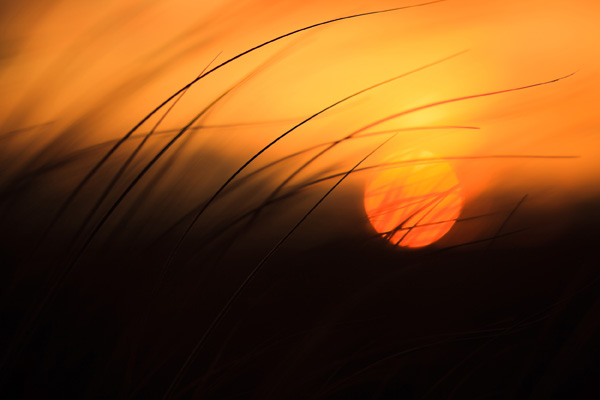
Your camera’s Mode Dial is the gateway to its exposure modes. Knowing which exposure mode to use, and why, is the key to creative photography, and to taking photos like the one above.

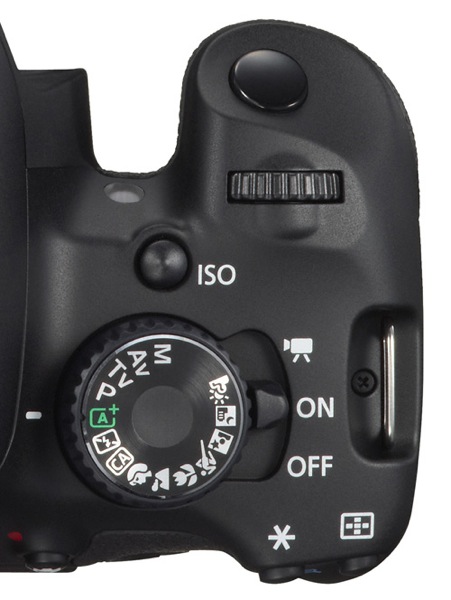
If you want to create beautiful images then you need to know how to control your camera’s settings. It all starts with your camera’s Mode Dial (not all cameras have a Mode Dial, but most do). Here’s what the Mode Dial from the EOS 650D (or Rebel X4i if you’re in North America) looks like. It’s fairly typical of many SLR cameras:
02

As you can see, there are a lot of icons. This can be confusing, especially for newcomers to photography. If you’re new to using an SLR, then how do you know which mode to select?

Let’s start by looking at Full Auto. It’s depicted by the green A+ icon on the Mode Dial of the EOS 650D (the precise term for the fully automatic mode on this camera is Scene Intelligent Auto). With other camera brands the Full Auto mode is also clearly marked by using an icon of a different colour to the rest (Nikon uses green, Pentax and Sony blue).

Full Auto mode is aimed at photographers who don’t know how to use the camera’s more advanced controls. If you’ve just picked up a digital SLR for the first time you can set it to fully automatic and start taking photos even if you know nothing about photography.

03

There are several other fully automatic modes on the EOS 650D’s Mode Dial (see above). Not all cameras have these modes (they are noticeably absent on many models aimed at semi-pro and professional photographers). They have names like portrait, landscape, close-up mode etc.

They are also aimed at photographers who don’t know how to use the more advanced controls on their camera. Their use is straightforward. If you’re taking a portrait, for example, then just set the camera to portrait mode. You don’t need to know anything about the camera or how it works to do this.

Fully automatic modes are very helpful for photographers that don’t know much about how their camera works. But they are too restrictive to be useful to creative photographers. On Canon EOS cameras, for example, you can’t change the white balance, Picture Style, autofocus mode or shoot in Raw in the fully automatic modes. Neither can you override the camera’s selected aperture, shutter speed and ISO settings. You can’t even use exposure compensation. You are locked into the settings the camera selects, and there’s nothing you can do about it. The fully automatic modes on other manufacturer’s cameras have similar restrictions.

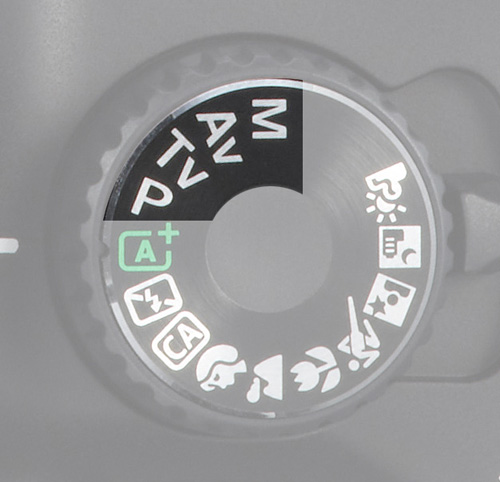
The creative half of the Mode Dial
04

Now, these are the modes that creative photographers are interested in! They are Program Auto Exposure (P), Aperture Priority (Av on Canon EOS cameras), Shutter Priority (Tv on Canon EOS cameras) and Manual (M).

I’m a great believer in keeping things simple. You’ll find the only exposure modes you need in this section of the Mode Dial.

If you’re new to photography, your task as a creative photographer is to move away from the fully automatic modes and start using Program, Aperture Priority or Shutter Priority as soon as you can.

Once you’re comfortable with using these modes, you can also consider using Manual mode. There are some compelling reasons for doing so (I discussed them in another article here).

Let’s take a brief look at the benefits of Program, Aperture Priority and Shutter Priority modes:

Program Auto Exposure (P)

Often overlooked, Program is a surprisingly useful exposure mode. It works like this: you set the ISO and the camera sets the shutter speed and aperture according to the reading from its built-in exposure meter.

Many cameras now also let you use Auto ISO. With Auto ISO activated, the camera also selects the ISO. You can usually restrict the upper (and sometimes the lower) end of the ISO range available to the camera so that it doesn’t set an ISO that is too high.

At first glance, Program seems nearly the same as Full Auto. But the differences are crucial. You retain full control over settings like image quality (ie Raw or JPEG), white balance and Picture Style. You can use exposure compensation to override the camera’s exposure settings. And if you don’t like the aperture/shutter speed combination selected by the camera, you can use Program Shift (that’s Canon’s term, check your manual if you have a different brand of camera) to nudge the selected settings one way or the other.

In other words, while the camera is in an automatic mode, you stay in control of the settings. This is crucial for creative photography.

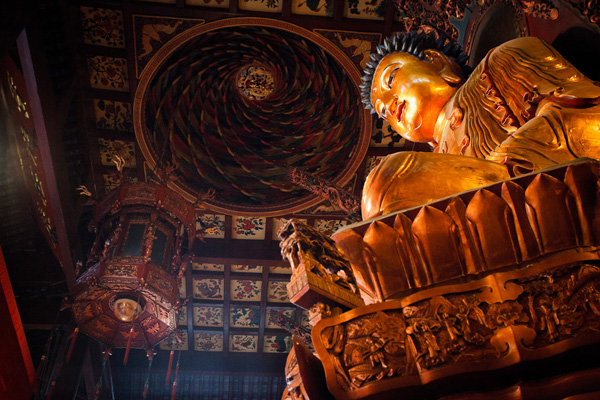
This is the sort of photo you might take in Program mode. Neither the aperture nor the shutter speed are particularly important:
05

The next two exposure modes really let you get creative:

Aperture Priority (Av)

I’m sure plenty of readers are already aware of the effect of aperture on the photo. For those of you who aren’t, here’s how it works. There are three approaches to using aperture:

06

1. You use a wide aperture to take a photo with shallow depth-of-field. You know those beautiful portraits you’ve seen with the background completely out of focus? That’s the sort of thing you can achieve with a wide aperture. Some photographers buy prime lenses (which have wider maximum aperture settings than zoom lenses) just to take advantage of this characteristic. I created the above portrait with an 85mm lens set to f1.8.
07

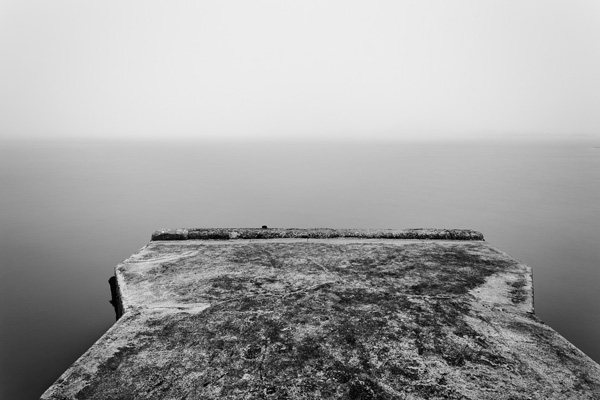
2. You use a small aperture to ensure that the entire scene is in focus from front to back. This is the opposite approach and one often used by landscape photographers who want everything within the scene to be rendered sharply. It’s the opposite to the first approach. I selected an aperture of f16 to create the above landscape image.

08

2. You use a middle-of-the-road aperture, that is one somewhere in the middle of your lens’s aperture range, to create a photo where part or most of the scene is in focus. Parts of the background may be out of focus, even if you have to look closely to see it. This is the sort of approach you would take when you want the background to be recognisable, but it’s not important for it to be completely sharp. The above photo is a good example, taken with an aperture of f5.6.

Aperture Priority works very simply. You set the ISO and the aperture, and the camera sets the shutter speed required to give the correct exposure.

Shutter Priority (Tv)

You use Shutter Priority when you want to set a certain shutter speed to record any movement within the frame a certain way. Again there are three approaches:

09

1. Set a fast shutter speed to freeze motion. This is what sports photographers do when they freeze the motion of athletes in mid-leap. I used a shutter speed of 1/2000 second for the above photo.
10

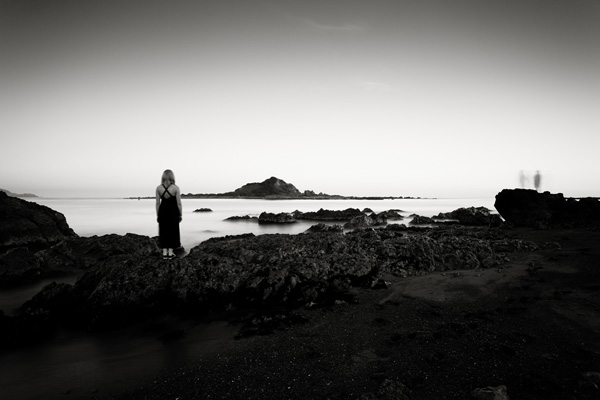
2. Set a slow shutter speed to blur any movement within the scene. You would normally set the camera on a tripod to support it when you do this, although you can also use creative techniques like panning if you are hand-holding the camera. I used a shutter speed of 30 seconds and asked my model to stand still to create the photo above.

3. Set a middle-of-the-road shutter speed that freezes most motion and lets you take a photo free from camera shake. This is the typical approach that many photographers take most of the time. But exploring fast and slow shutter speeds is fun and creative.

Shutter Priority also works very simply. You set the ISO and the shutter speed, and the camera sets the aperture required to give the correct exposure.

Conclusion

There are only three modes you really need to use on your camera: Program Auto Exposure, Aperture Priority and Shutter Priority (some of the others, such as Manual or Bulb mode, will come in useful as your skills develop). But as for the fully automatic modes on your camera, it’s best to forget about them completely. They will hold you back, and prevent you from getting the full potential out of your camera.

This article is the second in a series. The next one will take a close-up look at your camera’s colour and contrast controls.
11

Understanding EOS

Andrew S Gibson is the author of Understanding EOS: A Beginner’s Guide to Canon EOS cameras. The use of the Mode Dial is one of the topics discussed in-depth within the ebook.

Post originally from: Digital Photography Tips.

Check out our more Photography Tips at Photography Tips for Beginners, Portrait Photography Tips and Wedding Photography Tips.

Finding Your Way Around the Mode Dial


Digital Photography School
 
Comments Off on Finding Your Way Around the Mode Dial

Posted in Photography


Finding Nemo 3D Movie Review + Partysaurus Rex : Beyond The Trailer

07 Nov

Finding Nemo 3D Movie Review. Beyond The Trailer host Grace Randolph gives you the low-down on Finding Nemo 3D, then gives her own movie review of Finding Nemo 3D and Partysaurus Rex! Is the next Disney / Pixar 3D conversion a winner like The Lion King 3D, or blah like Beauty and the Beast 3D? And is Partysaurus Rex a worthy addition to the Toy Story brand? And what’s this about Finding Nemo 2? Enjoy Finding Nemo and Partysaurus Rex in 2012, and make Beyond The Trailer your first stop for movie news on YouTube today!
Video Rating: 4 / 5

 
Comments Off on Finding Nemo 3D Movie Review + Partysaurus Rex : Beyond The Trailer

Posted in Animation Videos


Jesse Kalisher’s Photography Tips #1, Finding the Story

09 Oct

Terrific tips on how to become a brilliant photographer with internationally acclaimed photographer, Jesse Kalisher, Episode #1, Finding the Story