RSS
 

Posts Tagged ‘fast’

Nikon adds to fast prime series with AF-S Nikkor 28mm F1.4E ED

31 May

$ (document).ready(function() { SampleGalleryV2({“containerId”:”embeddedSampleGallery_1116369042″,”galleryId”:”1116369042″,”isEmbeddedWidget”:true,”standalone”:false,”selectedImageIndex”:0,”startInCommentsView”:false,”isMobile”:false}) });

Nikon has added a sixth lens to its collection of fast F1.4 primes (the others being 24mm, 35mm, 58mm, 85mm and 105mm). The AF-S Nikkor 28mm F1.4E ED lens features nine rounded aperture blades, two ED and three aspherical elements, and Nikon’s Nano Crystal Coating. The lens is made of magnesium alloy and is sealed against dust and moisture.

As you might imagine, this is a pricey lens – it’ll go on sale in late June for $ 1999.95.

Press Release:

NIKON ANNOUNCES THREE NEW WIDE-ANGLE NIKKOR LENSES

  • AF-P DX NIKKOR 10-20mm f/4.5-5.6G VR – Compact Ultra-Wide-Angle Perspective DX-format Zoom Lens
  • AF-S Fisheye NIKKOR 8-15mm f/3.5-4.5E ED -Circular Fisheye Zoom for the Ultimate in Versatility and a Unique Perspective
  • AF-S NIKKOR 28mm f/1.4E ED – Outstanding Definition and High Resolution Wide-Angle Prime Lens

MELVILLE, NY (May 31, 2017 at 12:01 A.M. EDT) — Today, Nikon announced three exciting new wide-angle NIKKOR lenses to give a diverse array of users brilliant image quality and maximum versatility whether shooting vast landscapes, architecture, interiors, events and many other wide-angle applications. The new ultra-wide zoom and lightweight DX-format AF-P DX NIKKOR 10-20mm f/4.5-5.6G VR is an excellent value for budding shutterbugs and novice shooters looking to explore a wide-angle point of view, while the new AF-S Fisheye NIKKOR 8-15mm f/3.5-4.5E ED is an FX-format circular fisheye zoom lens for photographers and content creators who desire a truly unique perspective. Lastly, the new AF-S NIKKOR 28mm f/1.4E ED is a superior prime lens that provides professional and advanced photographers the ultimate in wide-angle image quality. Both the AF-S Fisheye NIKKOR 8-15mm f/3.5-4.5E ED and AF-S NIKKOR 28mm f/1.4E ED are the latest additions to the Gold Ring Series of NIKKOR lenses, a mark identifying Nikon’s premium lens offerings.

“Nikon continues to push the limits of optical excellence, while making new perspectives more attainable than ever before with our latest wide-angle NIKKOR offerings,” said Kosuke Kawaura, Director of Marketing and Planning, Nikon Inc. “Whether a photographer is a novice learning the art of landscapes, an enthusiastic video creator or a working professional shooter, Nikon now makes the wide-angle perspective achievable for everyone.”

The AF-P DX NIKKOR 10-20mm f/4.5-5.6G VR – Ultra-Wide Zoom Lens That’s Compact and Portable

The new NIKKOR 10-20mm is an ultra-wide-angle DX-format zoom lens that opens new perspectives and possibilities for those new to photography, and is ideal for shooting travel and scenery, real estate, large group portraits or vlogging. This new lens combines superior image quality and an attainable price to give consumers wide-angle versatility with a lens that’s remarkably compact and lightweight.

Like all NIKKOR lenses, the new AF-P DX NIKKOR 10-20mm f/4.5-5.6G VR provides advanced optical technologies for stellar image quality in any light, whether shooting a sun-drenched coastal vista, tight spaces or the night sky. The lens features the equivalent of 3.5 stops1 of Vibration Reduction (VR) performance, to help capture sharp images while handheld or in challenging light. Additionally, it utilizes Nikon’s Pulse Motor technology for super-fast and whisper quiet AF operation- which is especially useful when recording video. The optical formula contains three aspherical elements for excellent image quality with minimal distortion even at the widest focal length.

This is a versatile lens that not only excels at shooting expansive horizons, but also offers a remarkably close working distance that’s useful for images or showing up-close details when making product-related videos or how-to content. To get closer to capture small objects with big details, the lens has a close minimum focusing distance of only 8.6 inches (0.22 meters), bringing small objects to life in glorious size.

AF-S Fisheye NIKKOR 8-15mm f/3.5-4.5E ED – Circular Fisheye for Photographers and Content Creators

Nikon’s first fisheye zoom gives photographers and filmmakers an FX-format lens with the look and feel of a circular fisheye and the versatility of a full-frame fisheye, all in one lens. The new lens design provides a creative circular 180-degree vertical / horizontal angle of view on full frame cameras, and zooms to a non-circular fisheye view (180-degree diagonal angle of view) on the long end of the focal range. The lens can also be used on DX-format cameras for a distinctive point-of-view and extreme wide-angle applications. When looking to push creative boundaries, the intriguing perspective from a fisheye lens should be considered to provide a distinct look to your photos and videos, such as a dramatic emphasis on a subject or an extremely wide interior point of view. 

The AF-S Fisheye NIKKOR 8-15mm f/3.5-4.5E ED is also the latest in Nikon’s Gold Ring Series of premier lenses and features a next-generation design for high-resolution Nikon DSLR cameras. Made for advanced photographers and creators, this durable lens is constructed of lightweight magnesium alloy, and employs internal focusing (IF) to retain its compact size, even while focusing. It is also Nikon’s latest lens to use an electromagnetic diaphragm for consistent exposure during high speed shooting, or smooth exposure control while capturing video. 

The optical formula of the Fisheye NIKKOR 8-15mm consists of three ED elements to reduce chromatic aberration, while two aspherical lens elements minimize coma even at the widest aperture, and enable a more compact lens size. Additionally, the front lens element is coated with Nikon’s non-stick Fluorine coat to help resist dirt, fingerprints and smudges, while Nikon’s exclusive Nano Crystal Coat helps reduce ghost and flare. 

AF-S NIKKOR 28mm f/1.4E ED – The Latest in The Gold Ring Series of f/1.4 Primes in the NIKKOR Line

The new AF-S NIKKOR 28mm f/1.4E ED is Gold Ring glass that provides maximum versatility for outstanding definition and sharpness regardless of shooting scenario. With a fast f/1.4 maximum aperture and nine blade rounded diaphragm, it affords a shallow depth of field with gorgeous bokeh and stellar low light performance, making it a great choice for shooting low light landscapes, interiors and events. 

The superbly balanced and solid body is composed of lightweight magnesium alloy, and features dust and water drop resistant sealing to withstand the elements, combined with a fluorine coating to resist dirt and smudges. The optical construction of the lens is engineered for the best possible wide-angle image quality. It consists of 14 elements in 11 groups, with three aspherical elements that virtually eliminate coma, aberration and distortion, with two ED glass elements that minimize chromatic aberration. The lens also uses Nikon’s Nano Crystal coat to reduce instances of ghosting and flare. 

The new AF-S NIKKOR 28mm f/1.4E ED is a welcome addition to Nikon’s stable of impressive f/1.4 primes that give professional photographers and creators the highest levels of image quality and performance, which also include; The AF-S 24mm f/1.4G ED, AF-S NIKKOR 35mm f/1.4G, AF-S NIKKOR 58mm f/1.4G, AF-S NIKKOR 85mm f/1.4G and AF-S NIKKOR 105mm f/1.4E ED.

Price and Availability

The Nikon AF-S Fisheye NIKKOR 8-15mm f/3.5-4.5E ED will be available immediately for a suggested retail price (SRP)* of $ 1249.95. The AF-P DX NIKKOR 10-20mm f/4.5-5.6G VR and AF-S NIKKOR 28mm f/1.4E ED will be available in late June for a suggested retail price (SRP)*, $ 309.95 and $ 1999.95, respectively. For more information on these NIKKOR lenses as well as the latest Nikon products, please visit www.nikonusa.com. 

1: Based on CIPA Standard. This value is achieved when DX-format compatible lenses are attached to a DX-format digital SLR camera and zoom lenses are set at the maximum telephoto position. 

*SRP (Suggested Retail Price) listed only as a suggestion. Actual prices are set by dealers and are subject to change at any time.

Nikon AF-S Nikkor 28mm F1.4E ED specifications

Principal specifications
Lens type Prime lens
Max Format size 35mm FF
Focal length 28 mm
Image stabilization No
Lens mount Nikon F (FX)
Aperture
Maximum aperture F1.4–16
Minimum aperture F1.4–16
Aperture ring No
Number of diaphragm blades 9
Optics
Elements 14
Groups 11
Special elements / coatings 3 aspherical + 2 ED element, Nano Crystal and fluorine coatings
Focus
Minimum focus 0.28 m (11.02)
Maximum magnification 0.17×
Autofocus Yes
Motor type Ring-type ultrasonic
Full time manual Yes
Focus method Internal
Distance scale No
DoF scale No
Physical
Weight 645 g (1.42 lb)
Diameter 83 mm (3.27)
Length 101 mm (3.98)
Materials Magnesium alloy
Sealing Yes
Colour Black
Filter thread 77.0 mm
Tripod collar No

Articles: Digital Photography Review (dpreview.com)

 
Comments Off on Nikon adds to fast prime series with AF-S Nikkor 28mm F1.4E ED

Posted in Uncategorized


7 tips to set up your Nikon DSLR for fast use

09 May

We’re fans of Steve Perry’s wildlife and landscape photography, but even bigger fans of his practical tips. In a recent video and article Steve outlines seven great tips about how to set up your Nikon DSLR for quick operation, particularly when it comes to wildlife shooting. Incidentally, we agree with every single one of his points for general shooting: the first thing we do when a new Nikon shows up in the office is set up these very ‘tricks’. They may not be news for seasoned Nikon shooters, but give the video a watch: you may be surprised by what you don’t know.

Articles: Digital Photography Review (dpreview.com)

 
Comments Off on 7 tips to set up your Nikon DSLR for fast use

Posted in Uncategorized


Speedmaster 65mm and 85mm fast primes for Fujifilm GFX on the way

26 Apr

$ (document).ready(function() { SampleGalleryV2({“containerId”:”embeddedSampleGallery_1143527949″,”galleryId”:”1143527949″,”isEmbeddedWidget”:true,”standalone”:false,”selectedImageIndex”:0,”startInCommentsView”:false,”isMobile”:false}) });

Chinese manufacturer Zhong Yi Optics has shown of a pair of manual focus prime lenses for Fujifilm’s medium format GFX 50S at a tradeshow at Beijing. The lenses are currently the fastest yet announced for GF mount.

The new lens is a Speedmaster 65mm F1.4, which is exclusively designed for the GFX system. Details are scarce, other than what can be seen from photos of the lens. It has manual aperture and focus rings and supports 77mm filters. Mounted on the Fujifilm it will be equivalent to a 51mm F1.1 lens on a full frame body.

The second lens already exists and is being made available for the G-mount. The Speedmaster 85mm F1.2 is equivalent to 67mm F0.95 and features ED, HRI and low-dispersion elements. The lens has a minimum focus distance is 1 meter and 11 aperture blades. It too accepts 77mm filters.

This pair of lenses will ship sometime in 2017 at prices to be announced later.

Articles: Digital Photography Review (dpreview.com)

 
Comments Off on Speedmaster 65mm and 85mm fast primes for Fujifilm GFX on the way

Posted in Uncategorized


Richard Cooke shares stories from a career photographing fast cars and RAF jets

17 Mar

Richard Cooke, an action photographer whose portfolio includes innovative air-to-air shots of RAF jets, has launched a weekly video series telling the stories behind some of his most daring shoots. In the first episode, he explains how his first job photographing a Jaguar squadron in the air came to be, what the preparation was like, and what happened when he accidentally tripped the Jaguar’s air brake on his first flight.

Up to five episodes currently, the series is a fascinating first-hand account of all the trouble that goes on behind the scenes of some truly incredible images. Take a look at the first episode here, and head to YouTube to subscribe and see the full series.

Articles: Digital Photography Review (dpreview.com)

 
Comments Off on Richard Cooke shares stories from a career photographing fast cars and RAF jets

Posted in Uncategorized


Act Fast: Free Lighting in Layers DVD Promo at Midwest

09 Dec

Quick heads-up on a great deal: Midwest Photo is giving away a free 7-DVD set of Lighting in Layers (more info on the DVDs, here) with every single Jumpstarter kit purchased, while supplies last.

The Jumpstarter kits are already a great value. The no-flash kit actually costs less than the DVDs themselves, at $ 142.99. But no matter which kit you might be considering—the no light, single-light, add-a-light, or two-light version—the DVD set addition makes it an even better value.

Two things to know:

1. You have to enter the code HOBBYSHIP at checkout.
2. The deal also includes free UPS ground shipping within continential US. You have to calculate shipping before you enter the code. But it should take it off after the code is entered, if you choose Ground UPS and live in the lower 48.

You can learn more about the core components of the kits here, in Lighting 101.

Links to the various versions of the Jumpstarter kits follow below:

Lighting Kit WITHOUT Flash ($ 142.99)

Lighting Kit WITH LumoPro LP180 Flash ($ 271.99)

Add-A-Light Kit ($ 198.00) (Includes LP180 flash, but no Ares remote)

2-Light Kit ($ 469.99) (Includes 2 LP180 flashes, remote, stands, umbrellas, case, etc.)
Strobist

 
Comments Off on Act Fast: Free Lighting in Layers DVD Promo at Midwest

Posted in Photography


How fast were you going? GoPro HERO5 Black videos can now include GPS and telemetry data overlays

19 Nov

GoPro has updated its Quik desktop software with a new feature that enables HERO5 Black camera owners to overlay GPS and telemetry data onto their videos. This data is gathered by the camera’s various sensors during recording, and provides an extra layer of information for viewers, including things like the date and time the video was recorded, the altitude, elevation gain, and distance in miles or kilometers. 

The data overlays are customizable, and include resizable graphs and the ability to choose which data is included in the video. In addition to the aforementioned data, the overlays can also include a compass to show the camera’s orientation, speed, a speed graph with activity spikes, the GPS path and position pinpoints, and G-Force levels.

The Quik desktop editing software is available for 64-bit PCs running Windows 7 or newer and Macs running macOS 10.10.X or later. PCs are advised to have at least an Intel Core i3 processor and Macs should have at least an Intel Dual Core, though Core i7 processors are recommended for both.

Via: GoPro

Articles: Digital Photography Review (dpreview.com)

 
Comments Off on How fast were you going? GoPro HERO5 Black videos can now include GPS and telemetry data overlays

Posted in Uncategorized


Fast Five: Sony Cyber-shot RX100 V Review

03 Nov

Introduction

The Sony RX100 V is the company’s newest addition to its lineup of premium compact cameras. As with the previous two versions, it has a 1″-type sensor, 24-70mm equivalent F1.8-2.8 lens but gains 24fps burst shooting in both JPEG and Raw with full autofocus and autoexposure(!), oversampled 4K video recording, and plenty more. In short, the RX100 V has an incredible amount of technology stuffed into an easily pocketable package – but despite major increases in performance, we find that some of its more peripheral qualities could still use some attention.

Key Specs

  • 20MP 1″-type stacked BSI-CMOS sensor
  • 24-70mm equiv. F1.8-2.8 zoom lens
  • 24fps burst shooting in JPEG + Raw, with full AF and AE
  • 315-point phase-detection autofocus system
  • Detailed 4K video capture with well-controlled rolling shutter
  • Good quality high frame rate video capture

Where to begin, besides the original? The first RX100 made quite the splash when it was released back in 2012, and rightly so – it was the first camera to take a reasonably large, 1″-type sensor and place it within a camera body you could easily put into a pocket. There were, of course, pocketable compact digital cameras before it, but the RX100’s much larger sensor was the key here for really allowing it to stand above the crowd.

The RX100 V’s large sensor allows it to capture far more dynamic range than your typical smartphone and smaller-sensor compact, especially useful in challenging lighting conditions. Processed to taste from Raw using a preliminary build of Adobe Camera Raw. 24mm equiv. ISO 125, 1/500 sec, ISO 125. Photo by Carey Rose

The original RX100 brought us one significant step closer to the diminutive, high-quality 35mm film compacts of the 1990s. The RX100 V is a fitting member of the RX100 line in this regard, offering very good image quality and impressive capability in a camera that you can easily forget is in your purse or daypack.

The 24-70mm equivalent lens reach of the RX100 V is something of a standard for professionals with large F2.8 zooms, and is plenty flexible for all kinds of shooting – but some users might be left wanting for even more reach. Straight-out-of-camera JPEG at 70mm equiv. ISO 125, 1/640 sec, F4. Photo by Carey Rose

The RX100 V becomes the world’s first fixed-lens compact (at least, the first you can actually buy) to offer a 1″ sensor with phase detection autofocus, and it does so across 65% of the frame with a total of 315 points. As far as video, the RX100 V shoots oversampled 4K clips, resulting in impressively detailed footage.

Sony’s launch presentation for the RX100 V showed that this series of cameras is increasingly being chosen by existing mid-to-high-end DSLR shooters looking for a carry-everywhere compact. The RX100 V works exceedingly well as a capable point-and-shoot camera, but as with previous models, we’ve found ourselves frustrated when trying to take greater control over it for decisive-moment shooting.

“The RX100 V has the potential to be just about all the camera any enthusiast might ever need.”

That is, frankly, a shame. For all that Sony has done to make this a worthy upgrade from the Mark IV, it’s also the things they haven’t done that bear mentioning as well. There are still just too few controls on this camera, there still isn’t a touchscreen (to more easily take advantage of that snazzy new PDAF system), the user interface is still unfriendly and the sluggish speed at which the camera reacts (or doesn’t react) to some inputs stands in stark contrast to how unbelievably fast it can pull images off the sensor.

Specifications compared

  Sony
DSC-RX100 V
Sony
DSC-RX100 IV
Canon G7X
Mark II
Panasonic
LX10
MSRP $ 999 $ 899 $ 699 $ 699
Lens range (equiv) 24-70mm 24-70mm 24-100mm 24-72mm
Aperture range F1.8-2.8 F1.8-2.8 F1.8-2.8 F1.4-2.8
Autofocus 315-point phase detection Contrast detection

Contrast detection

Contrast detection

Control dials Lens ring (stepless)
Four-way/dial
Lens ring (stepless)
Four-way/dial

Lens ring
(stepped/
stepless)
Exposure Comp
Four-way/dial

Aperture ring Command dial Lens ring (stepless)

Viewfinder 2.36M-dot 2.36M-dot No No
Rear screen Tilt up/down Tilt up/down Tilt up/down
Touchscreen
Tilt up touchscreen
Video capability 4K/30p
1080/120p
4K/30p
1080/120p
1080/60p 4K/30p
1080/120p
Built-in ND Filter Yes
(Auto for stills)
Yes
(Auto for stills)
Yes
(Auto for stills)
No
Burst Shooting 24 fps 16 fps 8 fps 10 fps
Battery life (CIPA) 220 280 265 260

Here, you can clearly see Sony’s focus for this new model – speed and autofocus (regarding pricing, Sony has recently dropped the cost of the Mark IV to $ 899 from its original MSRP of $ 999, which the Mark V has launched at). However, you can see the extra processing has had a fairly detrimental effect on its rated battery life. More on that later.

Always at hand – the Mark V is the latest RX100 to feature impressive technology in a carry-everywhere package, but the price you ultimately pay (besides the steep MSRP) is in terms of ergonomics and controls. Processed from Raw using a preliminary build of Adobe Camera Raw at 30mm equiv. ISO 500, 1/500 sec, F2.5. Photo by Carey Rose

One of our earlier posts stated that the RX100 V has the potential to be just about all the camera any enthusiast might ever need. We still think that rings true, but as usual, there’s some caveats to take into account. Let’s take a closer look.

Articles: Digital Photography Review (dpreview.com)

 
Comments Off on Fast Five: Sony Cyber-shot RX100 V Review

Posted in Uncategorized


Fast and light: Nikkor 24mm F1.8G ED lens review

05 Oct

The AF-S Nikkor 24mm F1.8G ED was first announced back in August 2015. It joins Nikon’s growing family of modern full frame primes alongside the 20mm F1.8G, 28mm F1.8G, 35mm F1.8G, 85mm F1.8G and the 50mm F1.8G. It’s priced at just under $ 750 making it a well matched option to be paired with cameras like the Nikon D610 and the Nikon D750. The Nikkor can also be used on DX format cameras with an equivalent focal length of 36mm.

This fast wide-angle prime will most likely appeal to architecture, landscape and portrait or wedding photographers. Additionally, the F1.8 max aperture may come in handy for those looking to utilize the lens for astrophotography work as well.

At 24mm the lens is Nikon’s second widest prime option to date, coming in just behind the Nikkor 20mm lens. It’s worth noting that there are a few other options at 24mm that potential buyers should definitely be aware of. One of those options is the slightly faster Sigma 24mm F1.4 DG HSM Art that comes in at just under $ 850.

The Sigma 24mm can be seen mounted on a Nikon D810 on the left and the Nikkor 24mm can be seen mounted on a D810 on the right.

Although the Sigma is a bit pricier, it is a sensible alternate option for folks looking for a lens at this focal length. By comparison the Nikkor 24mm F1.4G ED is is priced at just under $ 2000 which makes the Sigma version that much more attractive to potential buyers. We will be taking a closer look at the Nikkor 24mm F1.8G and the Sigma 24mm F1.4 as an alternative lens option in this review.

APS-C

If you’re an APS-C shooter the 36mm equivalent focal length with an equivalent aperture of F2.7 will be a nice addition to your lens kit, being flexible enough to allow environmental and photojournalistic portraits while still being wide enough to accommodate for some landscape and architectural photography as well. It is worth noting however that if you’re looking to purchase this lens for an APS-C camera, then other options, such as Sigma’s 18-35mm F1.8 lens, might be a better alternative for the money. For this reason, we’re not going to consider this lens for use on APS-C in this review.

Nikkor 24mm F1.8G ED Headline Features

  • 24mm Focal Length
  • F1.8 Maximum Aperture
  • ‘Silent wave’ focus motor with full-time manual override
  • F-mount FX format lens, works on both DX and FX format Nikon SLRs
  • Accepts standard screw-type 72mm Filters

Lens Specifications

  AF-S Nikkor 24mm F1.8G ED Sigma 24mm F1.4 DG HSM A (Nikon Mount)
Price (MSRP) $ 745 $ 849
Announced 2015 2015
Lens Type Wide Angle Prime Wide Angle Prime
Lens Mount Nikon F Nikon F
Max Format Size 35mm FF 35mm FF
Focal Length 24mm 24mm
Image Stabilization No No
Max Aperture F1.8 F1.4
Minimum Aperture  F16 F16
Aperture Ring  No No 
Diaphragm Blades 7 (rounded)  9 (rounded)
Elements 12  15
Groups  9 11
Special Elements/Coatings  2 extra-LD glass elements and 2 aspherical elements, Nano Crystal Coat and Super Integrated Coating 2 aspherical elements, 3 FLD and 4 SLD glass elements coupled with Multi Layer Coatings
Minimum Focus 23cm (9.1″) 25cm (9.9″)
Maximum Magnification 0.2x  0.19x
Autofocus Yes  Yes
Motor Type Silent Wave Motor autofocus mechanism HSM (Hyper Sonic Motor)
Full Time Manual  Yes Yes
Focus Method  Internal Internal
Distance Scale Yes Yes
DoF Scale Yes Yes 
Weight  355g (12.5 oz) 665g (23.1 oz)
Dimensions (DxL) Approx. 78 x 83mm (3.1 x 3.3″) 85 x 90mm (3.4 x 3.6″)
Materials Metal Mount/Plastic and composite material Metal Mount/Thermally Stable Composite (TSC) material
Sealing  None  None
Color Black Black
Filter Thread 72mm 77mm
Hood Supplied  Yes Yes
Hood Product Code HB-76 Bayonet Hood  
Tripod Collar No No

The Nikkor 24mm has a metal lens mount and a mostly plastic/composite material body. It feels surprisingly light for being such a fast prime lens; especially when compared to the Sigma 24mm lens which weighs nearly twice the amount and is slightly larger in size (this is broadly to be expected with the Sigma’s 2/3 stop extra light gathering ability). The build quality of the Sigma lens definitely feels more robust with the majority of its components constructed of metal and a composite material that can be found on most of Sigma’s Art series lenses.

It’s worth mentioning that both the Nikkor and the Sigma 24mm lenses lack comprehensive weather sealing, but the Nikkor does offer some protection with rubber gasket around the lens mount, so that’s definitely something to keep in mind if you plan to use these lenses in adverse weather conditions.

With these specifications in mind, how do these lenses stack up against one another in terms of performance? In this review we will be looking at the performance of the Nikkor 24mm and how it compares to the heavier and faster Sigma 24mm. 

Articles: Digital Photography Review (dpreview.com)

 
Comments Off on Fast and light: Nikkor 24mm F1.8G ED lens review

Posted in Uncategorized


Tips for Fast and Effective Studio Product Photography

23 Sep

This is the second part of a series that will explore a studio setup aimed at product photography. You can see the first here: Equipment Tips for Quick and Efficient Studio Product Photography.

Although this is built primarily for product photography you can use it for a few other genres. In this second part I will be going hands on with an actual shoot. I will show you how to set up a shoot based on the equipment from part one and go over some tips that I have gathered over the years of using it. If you haven’t read part one yet, head over there and give it a quick look so that you are up to speed with how we are about to implement that system.

PICTURE 1

Getting set up

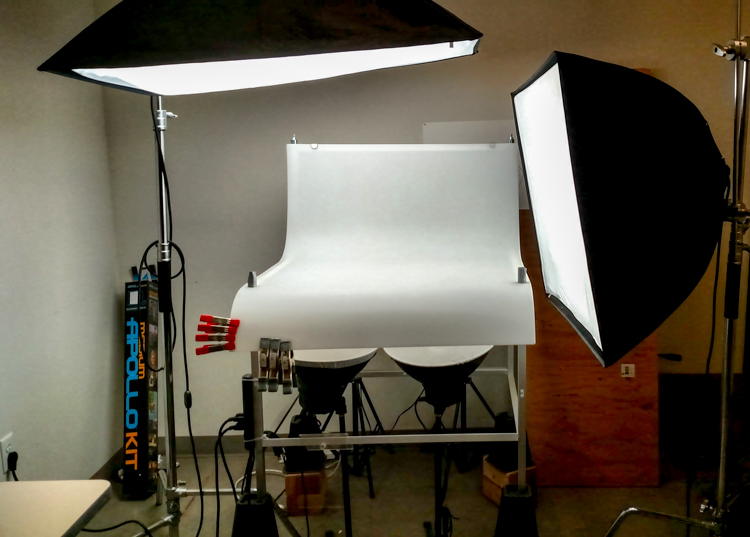
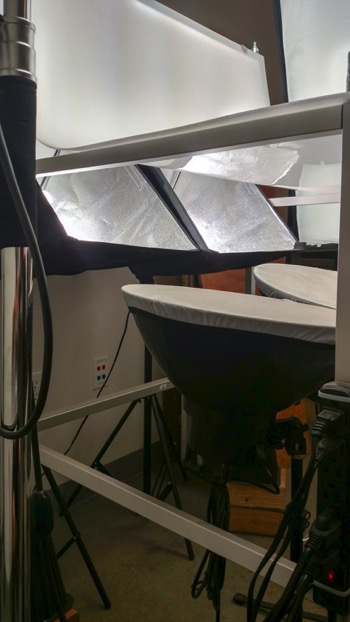
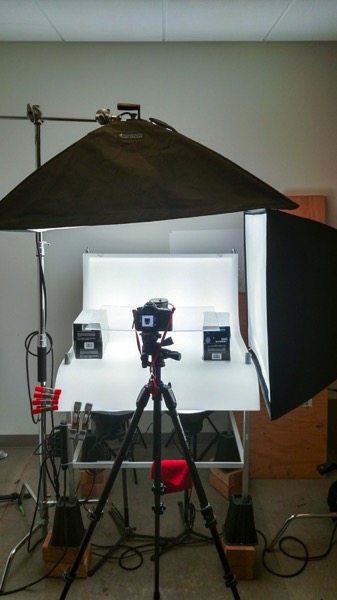
Now that you are caught up let’s dive in. For almost every shoot I start by turning on my table lights. Those include the lights behind and beneath my table to allow the surface to glow from within (see photo above).

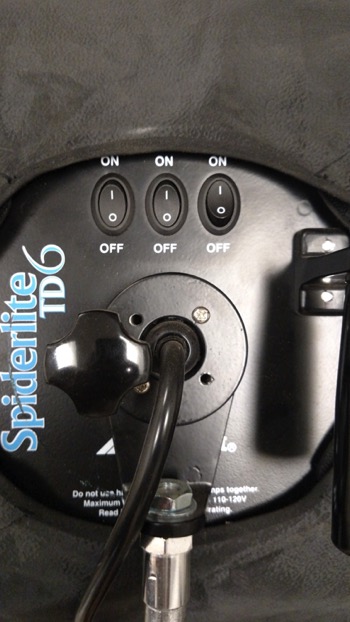
I have one of my Spiderlite TD6 heads above the table aimed straight down. This really helps fill in the top of the product and knock down the shadows caused by the table that underlights the product. My second TD6 light is the one that moves around my set. This is my main light as it is set brighter than the others and it is responsible for the main direction of light.

Settings for my lights will differ slightly from what you will need but this is a good starting point. The overhead TD6 is set for 30% power. The two Flashpoint lights under the table are set to 50% power. I have two small fluorescent softboxes behind the table at full power. My main TD6 is usually at 66% power (two switches turned on).

PICTURE 2 PICTURE 3

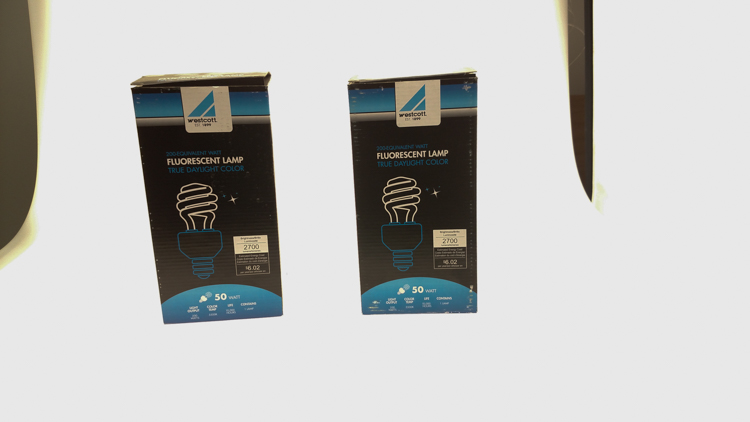
These are the settings I run on my lights, and they work for almost all of my clients that need photos shot for their Amazon, Ebay, Etsy stores or their online company catalog. You need to realize that all bulbs are not created equal and that if you are mixing different daylight balanced fluorescents that colors can come out altered in your shots.

Set the color balance

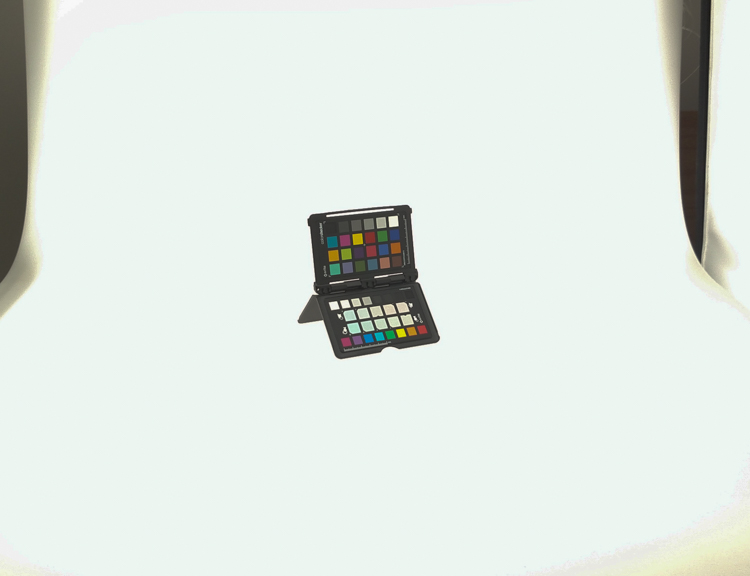
To counter this problem, invest in the Xrite color checker. Make a custom profile for your camera using your lights and this will ensure that colors are accurate. To find more information on incorporating the Xrite into your workflow check out this article by Andrew Gibson: How to Use the X-Rite ColorChecker Passport to Obtain Perfect Color.

PICTURE 4

Set the exposure

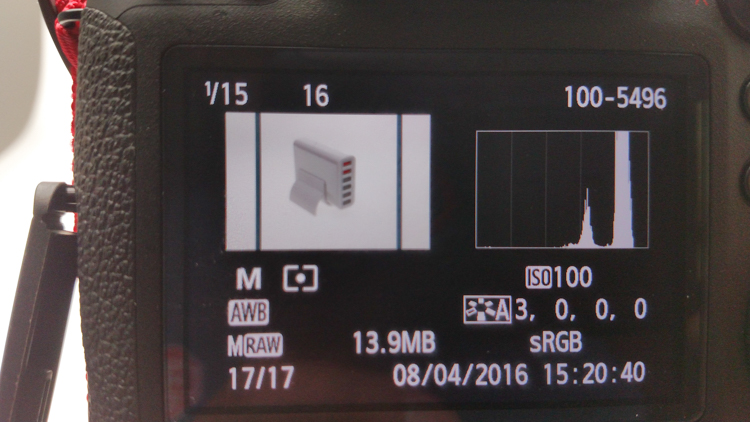
As for my camera, I have one of my custom buttons pre-programmed and ready to go, I simply switch to C2 and I am shooting in seconds. My C2 settings are fixed for Manual Mode at f/16 and 1/6th of a second, highlight detection on, and a square crop. This will get me very close with my studio setup. If I need a little more blowout on my white table I slow my shutter speed, or alternatively if any clipped whites creep into my product I can increase the shutter speed.

PICTURE 5

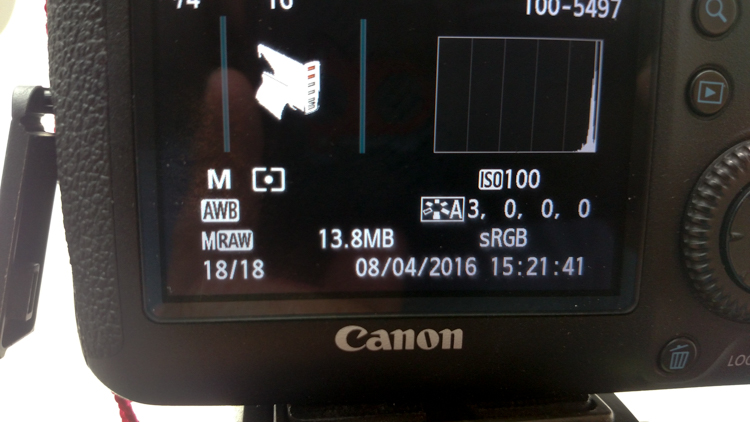
I also find that manual focus is much faster in this situation. Focus hunt happens a lot during shoots and it eats time quickly when you are shooting 20+ products with 4+ angles per part. With a quick flick of a button on the back of my camera, I can enter Live View mode, zoom in, and get the exact focus that I would like. I shoot with highlight detection on so that when the image comes up for review anything that is clipped will flash black.

PICTURE 7

From there I am able to determine if I obtained a proper exposure. The histogram doesn’t help very much here as it is always going to be spiked to the right because I am purposely blowing out the background. I have also set my camera to crop the image to a square as this tends to be the only format my customers want for this style of photography.

Make a raised platform

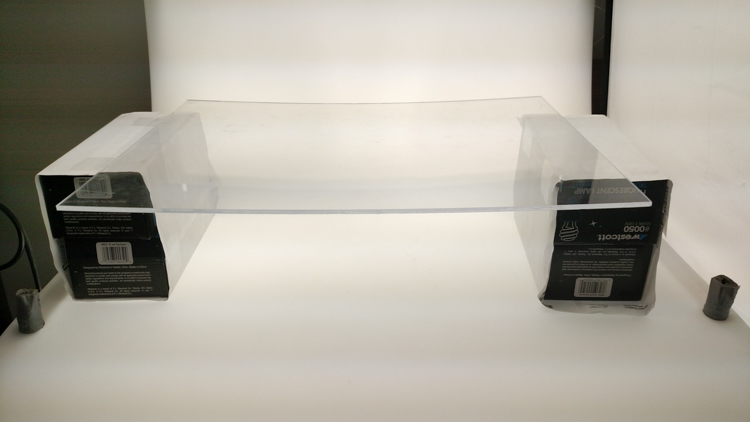
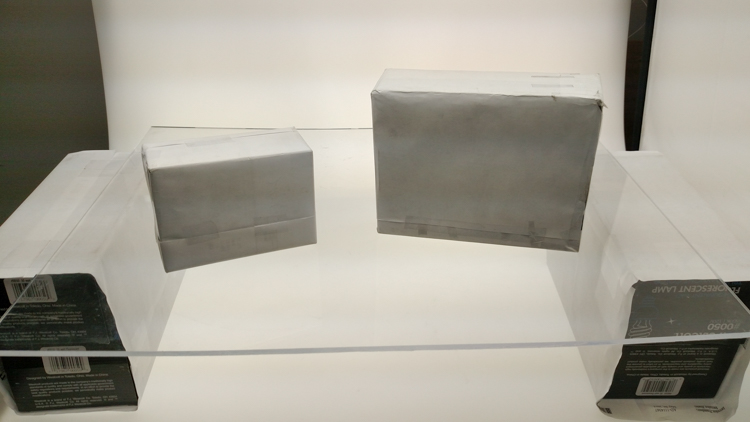
A big tip that I can share with you is to use a raised platform. The reason you need a raised platform is because when an object gets placed directly on the table surface it tends to add a glaring highlight to the bottom of the product. The tabletop and the highlight are so close in terms of power it becomes difficult to blow out your table and keep the highlight on the bottom of your product from clipping. I have a super easy solution to get around this dilemma. What I did was take two boxes, stack them on top of each other, and then wrapped both in regular old white printer paper.

PICTURE 8

PICTURE 9

If you leave them unwrapped then you will have black strips reflecting in your product. The next thing I did was get a sheet of clear acrylic from Lowes. It is a quarter inch thick, and is 18×24″. It cost me around $ 20. I place this acrylic on top of the wrapped boxes which raises the shooting surface by seven inches.

PICTURE 10

What this does is allow the table to blow out, but because of light falloff it prohibits the product from being overly lit on the bottom and clipping the highlight. While I was at it I wrapped two smaller boxes of different sizes in white paper as well. I use these quite often to bounce light back into the shadows.

PICTURE 11

Ready to place the subject

Now that we have gone over power settings for the lights, the configuration of my camera, and some tips on knocking down blown highlights by raising the surface, let’s set up an actual shoot. We will ease into it and start with something that doesn’t give you a whole lot to think about. Let’s do a regular coffee mug.

I placed the mug directly in the middle of the acrylic. The overhead light is directly over the mug aimed down. The other TD6 is at 90 degrees, hitting the mug from camera right.

PICTURE 12

Picture-13b

The resulting image is 95% ready to go online almost straight out of the camera. There are a few things you might want to obsess over, like adding more white reflection and narrowing the dark gap. But honestly, it’s ready to go as is. I did say this was an easy subject so let’s move onto something a bit harder, shall we?

Let’s try a harder subject

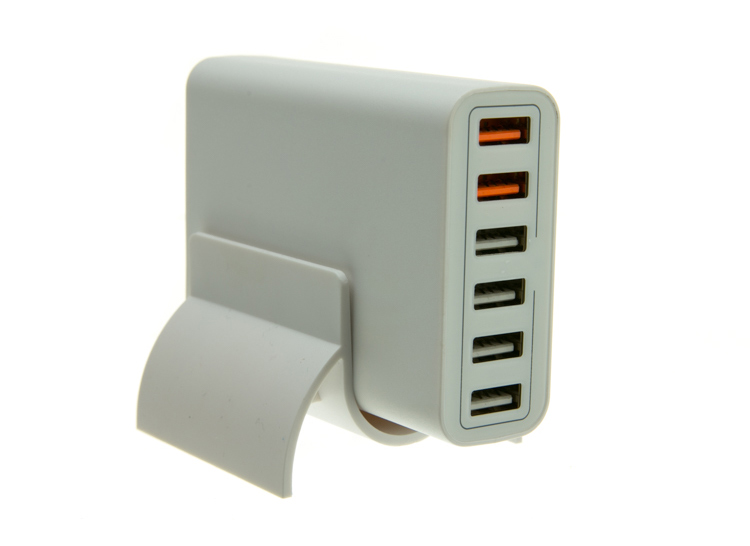
The next thing we will attempt is something that gives plenty of photographers fits; a white subject on a white background. Well, because we have a blown out table top and we are controlling the amount of light that the tabletop is introducing to our subject, it actually isn’t difficult to get great results.

Let’s start with the same lighting. Light from directly above, and one more light at 90 degrees to camera right. Straight out of camera we can see we did a pretty good job.

Picture-14b

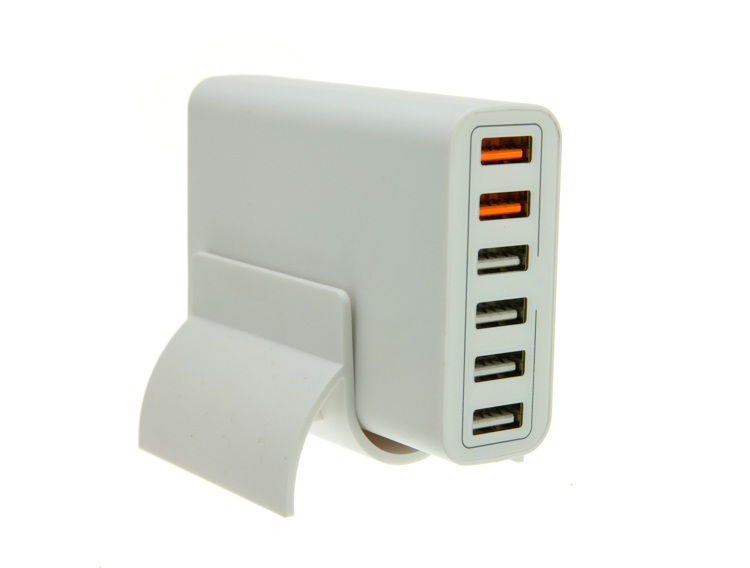
There is no major clipping going on the subject yet the background is completely white. There is not a lot of shape and dimension to the item, however. So let’s move the right light so that instead of 90 degrees it is 45 degrees. Now the light will hit the product on the front of this USB hub. Bingo.

Picture-15

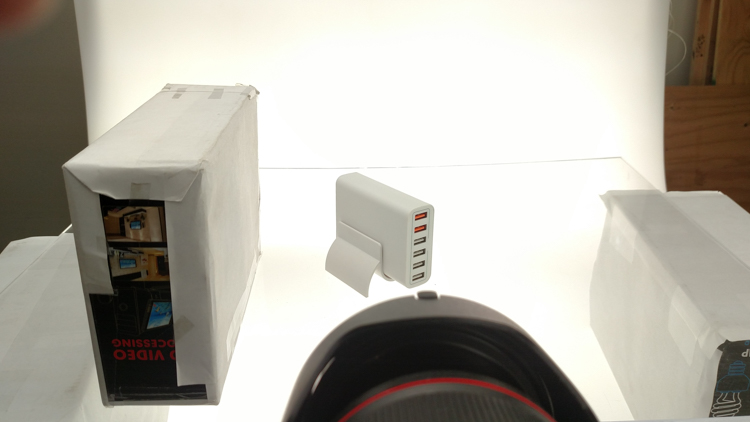
We now have highlights on the leading edges which helps give it shape and dimension. It’s very close, but we can still do a little better. Let’s add one of those white wrapped boxes we made earlier to the shadow side and bounce some of our key light back into the product.

PICTURE 16

Picture-17b

Now what we get is just a subtle fill in the shadow and that just about does it for this product. Yes, we could obsess further over some other details and finesse it some more, but remember this is a speed table. We are trying to get products on and off the table quickly. This image would pass for all of my clients.

Shooting reflective surfaces

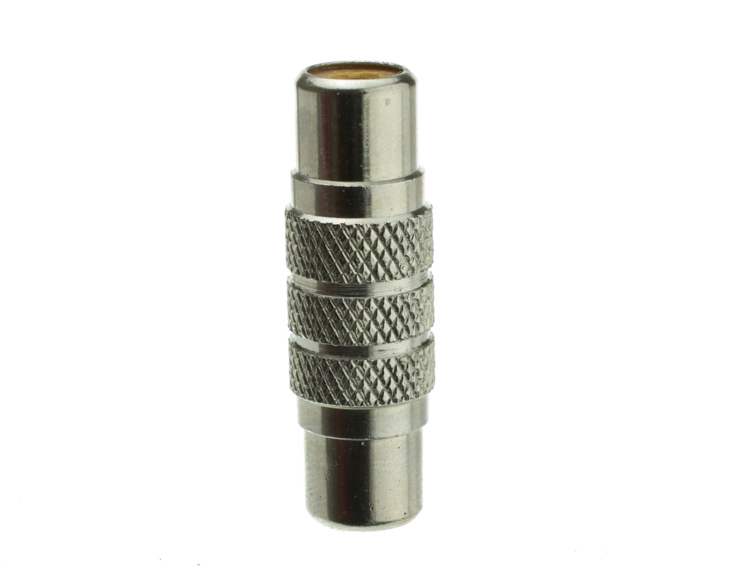
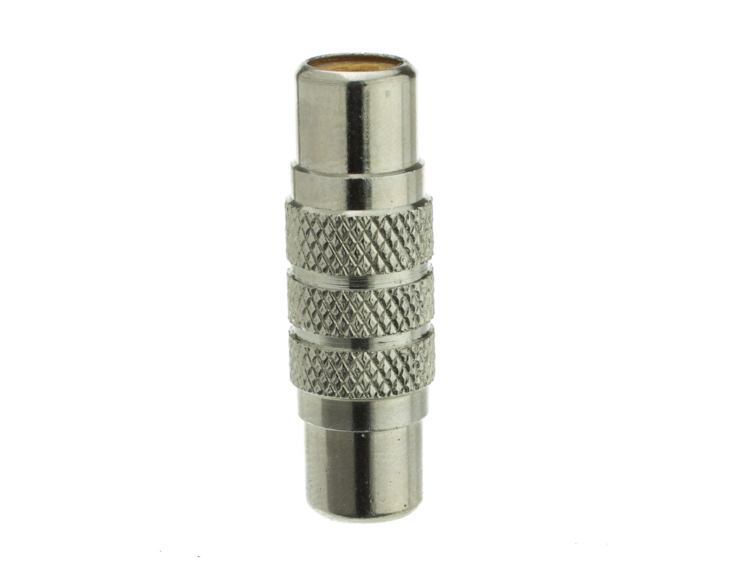
For our final demonstration let’s do a reflective surface. Leaving the lights exactly the same as the previous shot (again because this is about speed) I will remove the white box that is acting as a fill and shoot this RCA adapter.

PICTURE-18b

Again right out of camera it is pretty good. You can see some red reflecting on the shadow side in the lower left which is coming from a red bag out of frame, and there is a really dark strip running down the left/center side. Let’s clean those two things up and try again. I will remove the red bag from out of the frame and put the smaller white box fairly close to the adapter.

PICTURE 19

picture-20b

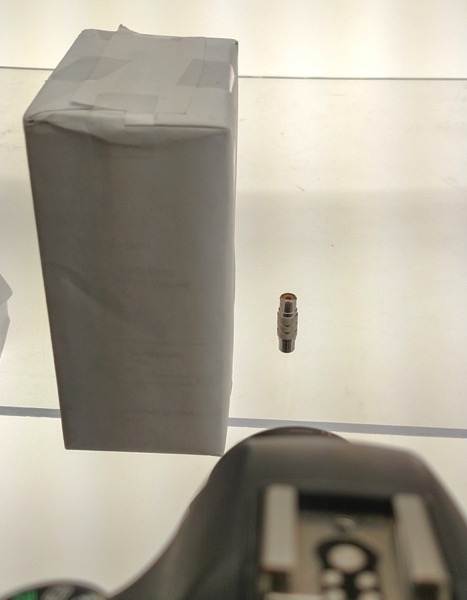
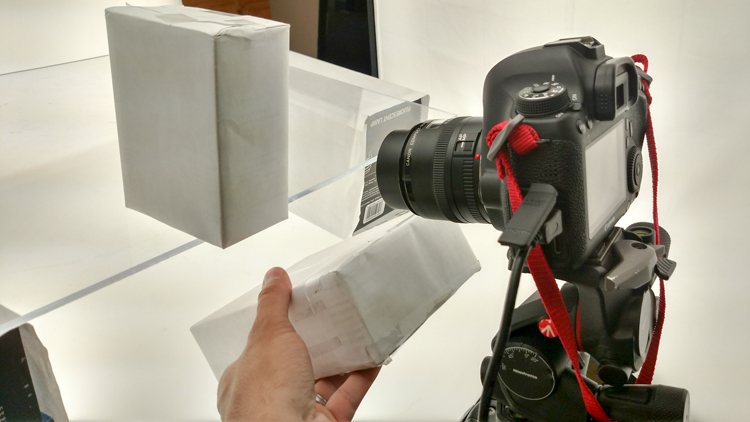
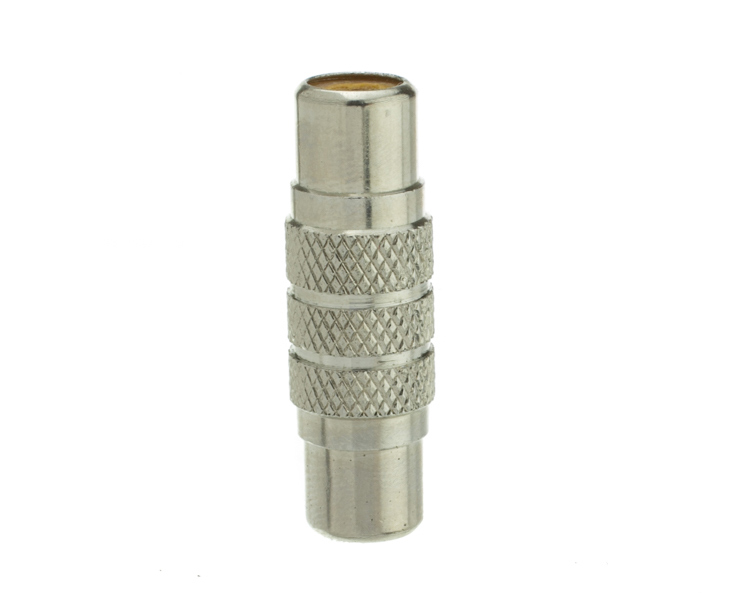
With just those two changes it has made a large difference in the shot. Let’s try and clean this up a tad more. The reason there is a black line is because it is reflecting the much darker room behind the camera. Using the angle of incidence I will use my large white box just below my lens and throw light back into the subject.

PICTURE 21

picture-22b

There we go! A perfectly acceptable image for an online catalog. The RCA adapter is cleanly lit, no harsh black lines, a fully white background and it is already squared because of our camera settings. This image is ready to go.

Read more info about shooting reflective surfaces here.

Summary

The reason I built this system is for speed. If you are trying to knock out 100 products a day, with this system you could absolutely do it. I know because I have done it.

Of course, there is the third and final part of the process and that is editing using your favorite software.

I use Lightroom, and it will really going up your product photography game. You need it to catalog all of your client’s images, keep track of the part numbers, export to their specification and clean up shoot errors using very little time.

Please share your questions and comments in the space below.

googletag.cmd.push(function() {
tablet_slots.push( googletag.defineSlot( “/1005424/_dPSv4_tab-all-article-bottom_(300×250)”, [300, 250], “pb-ad-78623” ).addService( googletag.pubads() ) ); } );

googletag.cmd.push(function() {
mobile_slots.push( googletag.defineSlot( “/1005424/_dPSv4_mob-all-article-bottom_(300×250)”, [300, 250], “pb-ad-78158” ).addService( googletag.pubads() ) ); } );

The post Tips for Fast and Effective Studio Product Photography by Jacob Macias appeared first on Digital Photography School.


Digital Photography School

 
Comments Off on Tips for Fast and Effective Studio Product Photography

Posted in Photography


Interview: “The best image as fast as possible” – Motorola’s approach to smartphone imaging

11 Jul

Modern smartphones are essentially pocket-sized mini-computers, capable of dealing with many tasks that not very long ago would have been processed on desktop or laptop computers. The camera module is just one component of many, but more and more consumers are carefully considering camera performance in their buying decision.

Manufacturers have been well aware for quite some time and are investing heavily to make sure the cameras on their devices can compete with the best. The device division of mobile communication pioneer Motorola for example, which was taken over by Chinese PC makers Lenovo in 2014, first assembled a dedicated camera and imaging team in 2013 when it was still part of Google.

Since then the brand has launched a number of new devices in its Moto range with a clear focus on imaging performance and features. Most recently the Moto G Plus and the Moto Z and Moto Z Force were the first new models to be officially launched under the Lenovo name. In our first impressions review we were pleasantly surprised by the image output of the mid-range Moto G Plus. Both high-end models, the Moto Z and its sister model Moto Z Force, come with advanced smartphone camera features such as optical image stabilization, on-sensor phase detection autofocus and manual control.

Val Marchevsky and Kathy Mahoney in the Motorola image testing lab Peter Matsimanis

We had a chance to speak to some key members of the Motorola imaging team – Kathy Mahoney, Senior Director of Imaging Experiences at Motorola, Val Marchevsky, Senior Director of Engineering – Head of Camera Team, and Peter Matsimanis, Senior Development Manager Imaging – to find out more about the company’s approach to imaging and camera development. Read on to find out what they had to tell us.


How would you describe Motorola’s strengths and weaknesses in the area of smartphone imaging?

One of our core strengths is our dedicated camera and imaging team. Motorola has rapidly enhanced our imaging expertise over the past few years thanks to our internal team which has grown to include software and hardware engineers with diverse backgrounds (color science, optics, computer vision and beyond), in addition to external camera/imaging veterans. This team has reimagined the company’s approach and attitude toward camera technologies, ultimately delivering some of Motorola’s best imaging solutions to date, including our very own intellectual property, like Temporal Frame Stacking and PDAF (phase detect autofocus), which continues to drive major improvements and stands out within the industry.

As for a weakness, I’d say not forming this non-traditional team sooner! Since building our team in 2013, we’ve re-emerged as an industry leader and key player. A lot has changed – for the better – and we look forward to continuing to create industry leading technology that delivers on consumers’ demands for more affordable, thinner smartphones and faster, higher quality cameras. 

Is there any knowledge exchange happening between the imaging team at Lenovo/Motorola and the manufacturers of “traditional” cameras?

In recent years, we’ve added top imaging talent to our team from traditional camera manufacturers like Kodak and HP. We also work closely with suppliers that have great knowledge of traditional cameras, as well as being ODMs for those traditional camera manufacturers. We have also been able to transfer a significant number of top engineering talent from within Motorola to our imaging team, in order to capitalize on their system integration expertise and to also provide cutting edge solutions to enhance the user experience.

Leveraging 80+ years of embedded systems development, we’ve designed cameras that are truly best-in-class. Our plan for the future is to create common imaging experiences across all our products that will universally delight consumers around the world.

What are consumers most looking for in terms of image quality and how is Motorola currently meeting these needs and/or innovating behind them for the future?

Consumers are looking for great image quality in all conditions – low light, bright light, landscapes, selfies, sporting events and more. At Motorola, we’re constantly evaluating imaging solutions to identify those that will deliver under all of these conditions and ultimately provide consumers with a higher quality experience that enhances the memories captured with their smartphone cameras. This includes improving image detail, color accuracy and white balance for all of our devices.

What camera and imaging features are most important to consumers? And how is Motorola working to improve these features in future devices?

We feel what consumers are looking for and what’s important to them go hand-in-hand. Ultimately, what most people really want – and deserve – is a camera that automatically delivers amazing photos and videos that capture the full essence of their experience. We’re focused on continuing to develop enhanced hardware and intelligent algorithms that deliver unbelievable quality and simplicity, but also enable creative freedom.

In which areas can we expect smartphone cameras to make the biggest improvements in the short and long term?

In the short term, we’ll see strides towards improved performance to deliver bright, detail-rich, noise-free photos and videos in low light environments. Many smartphones on the market take low light pictures that are bright, but lack detail due to over-cleaning. We know that to achieve high-quality low light performance, you need to capture more light with bigger pixels and faster apertures. We see this trend continuing. We also expect to see this capability across all price tiers, and we feel Moto G Plus is paving the way.

In the longer term, at Motorola, we continue to address areas of concern for hardware with lasers, better lenses and lower megapixels with large pixels to enhance low light image quality. We also continue to hone in on smart camera experiences, utilizing computer vision and artificial intelligence to provide users the best image, as fast as possible.

Intelligent software not only maximizes the capabilities of hardware, but also leverages the depth of information available from the device. By using device sensors to detect the environment (light, motion, location, etc.), the software is able to deliver better quality images and richer experiences. It turns your camera into an access point for instant information that can help quickly analyze and identify your surroundings.

The Moto 4G offers impressive camera specs for a mid-range device, including a 1/2.4″ sensor and an AF system that uses both on-chip phase detection and a laser to measure subject distance.

The Moto G Plus is, in most respects, a mid-range device, but comes with a high-end camera specification. What was the decision process behind this design and specification?

Consumers depend on great imaging performance each and every day for all of their communication needs, and it was a priority for us when designing Moto G Plus to offer excellent camera systems. Moto G Plus has a 16MP camera, fast apertures, laser and PDAF focus technologies and a wide-angle front camera lens, rivaling some of the best premium smartphone cameras on the market. Putting this technology in the hands of a diverse global consumer audience is a unique opportunity, and we find it particularly rewarding to help them capture life’s most important moments.

The Moto G Plus comes with three focus methods: contrast detect, phase detection and laser. How difficult is it to combine those and what are the benefits of this combination? 

Moto G Plus has an extremely responsive focus system that delivers crystal-clear photography under all conditions; low light to bright light, subjects close-by and distant landscapes. To do this effectively requires multiple focus technologies and the real-time intelligence to know which is best for current conditions. Picking just one or two is simply not good enough. Our philosophy is to maximize output from each focus system and use modern computational methods to calculate the ideal lens position.

Phase Detect Autofocus does a great job quickly finding focus in bright light settings and when the object of interest is farther away, like in landscapes and at sporting events. Laser focus, sometimes referred to as “time-of-flight,” picks up in low light environments and when subjects are close-by, like restaurants and nightclubs. Contrast focus augments each of these technologies to ensure precise focus across a range of light and subjects.

Getting all three to work synergistically is not an easy task, which is why most competitors pick either PDAF or laser (not both), and then augment with contrast. We believe every picture can and should be the best it can, which is why we’ve included all three technologies in Moto G Plus. We’ve also invested in a tremendous amount of simulation tools, deep learning and advanced statistic engines to ensure Moto G Plus covers the endless range of photos and videos consumers want to capture. We will continue to drive advancements in these multi-focus technologies to advance the speed and accuracy of Moto smartphone cameras going forward.

Are manual camera controls, like the Professional mode on Moto G Plus, a niche feature or something that more users will be expecting in a device in the future?

Consumer needs are extremely diverse, especially on a global scale. Most people simply want a great camera – just point and shoot in any condition, but there are others who are more avid photographers and want more out of their mobile imaging experience. We’ve heard from this particular group of photographic aficionados through blogs, the Google Play store, and even directly, that they want features like the professional mode on Moto G Plus that provides greater control and options to create a specific look without a point-and-shoot or DSLR. We’re making great progress towards addressing even more of these needs, and are providing a wider variety of options for more amateur photographers as well to capture every moment exactly how they want to capture it.

The latest generation of Moto devices, including the Moto Z pictured above and the Moto G Plus, all feature manual control over essential shooting parameters, such as shutter speed, ISO and white balance.

Kathy, you have many years of experience at digital imaging pioneers Kodak. How have you leveraged your past experience in your current role at Motorola?

Kathy: I was fortunate enough to be a part of the start of digital imaging with Kodak, working alongside many talented and intelligent imaging engineers. That experience gave me a solid foundation of understanding around what it takes to deliver truly high-quality imaging systems.

Fundamentally, delivering great imaging is so much more than ‘counting megapixels.’ Cameras are complex and require many technologies to deliver great photography. For example, strong low-light performance demands systems that can capture more light, including big pixels and fast apertures, while attaining fast accurate focus requires multiple focus technologies and the smarts to know which one to use under the current conditions.

My past experiences also helped me realize how important photography really is to consumers’ daily lives, as well as the impact (and consequences) of poor quality. Imaging is how we communicate, relive and memorize our life experiences. I am passionate about ensuring Motorola’s camera technology continues to deliver amazing experiences that consumers can count on to be there when they need it.

What lessons have you learned throughout your career in imaging and photography? What words of wisdom would you give to someone just starting in the field?

Kathy: Throughout my career I have learned how important it is to follow your dreams and choose opportunities that you are passionate about. With passion, you’ll always achieve incredible results. Having worked on some of the first commercial digital cameras, the first photo kiosk, digital minilabs, thermal printers, retail printing systems and online photo services, I have spent my career helping people capture, share and relive their lives.

Articles: Digital Photography Review (dpreview.com)

 
Comments Off on Interview: “The best image as fast as possible” – Motorola’s approach to smartphone imaging

Posted in Uncategorized