RSS
 

Posts Tagged ‘fall’

Tips for Doing Fall Portraits

16 Oct

Autumn provides photographers with an abundance of colours and amazing light. When captured right, autumn can create images which are the envy of everyone.

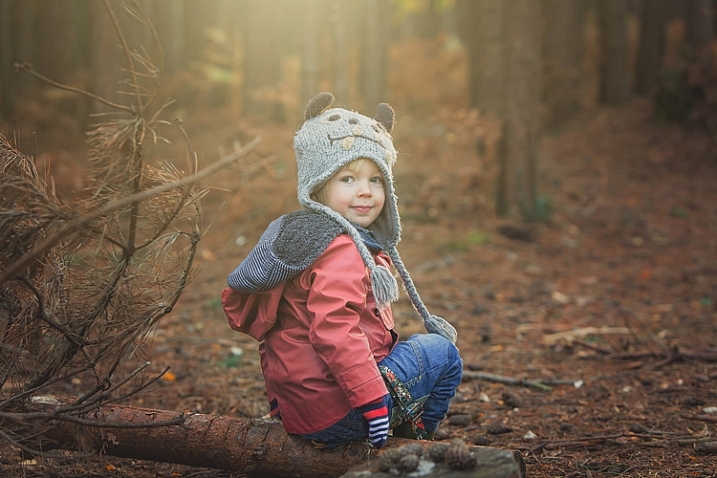
For family photos, autumn can provide you with amazing backdrops, and a variety that can be matched by no other season. For this article, I took my own two children for a walk in the woods to do some fall portraits. Photographing other people’s children is always easier than your own, so I thought it would be a great exercise, and we may also even get some nice pictures of our own children for once. So here are some fall portrait tips to get you started.
Gannon-Studios-2

Autumn Portraits 4

Preparation

Preparation is the key to any successful shoot. Of course ensuring your camera equipment is charged, you have clear cards, and your gear is clean seems like a no brainer, but it’s often the fundamentals that we overlook. Clearing cards can be daunting for those starting out, but just double check that you have downloaded everything, then use the Format function (in the camera) that will give you a completely clear card. There are rumors that deleting single images in-camera can lead to corrupting the card, so it’s best to use the Format function.

Make sure you check the weather. Here in the UK, as well as many other parts of the world, it can change quickly at this time of year. Check with a few sources about local weather. It’s such a pain to get everyone together, get in the car and travel for some time, only to be rained out. Although, even rain in autumn can provide some great image opportunities, if you are dressed correctly.
Gannon-Studios-1

Sunrise and sunset can give us the best light. However, dragging your family out of bed for a photo shoot is always going to be tough. Aim to start your shoot about an hour before sunset. This Golden Hour is favored by many professional portrait photographers, as the light is more flattering and you may even get a great sunset. You can look up sunset times for your local area. It can be surprising how early it gets dark, and you want at least a good hour of shooting before the sun goes down.

Make sure everyone dresses appropriately. It’s getting colder, and it’s one less thing to worry about if everyone is warm during the walk back to the car. While we still think it’s lovely and warm outside, believe me, it gets cold pretty quick when the sun starts to go down. Also have a change of clothing available for everyone. It can be wet and muddy and some of us are prone to falling over!

Make sure you bring snacks and drinks. Especially if you are photographing children. They will get bored and hungry way before you do, so anything to help keep them going while you master that perfect shot the better.

Editor’s note: if you are photographing other people’s kids have the parents bring snacks that the kids like. Never give food to other people’s kids without asking the parents, there may be allergies or special diets.

Clothing advice for portrait photographers:

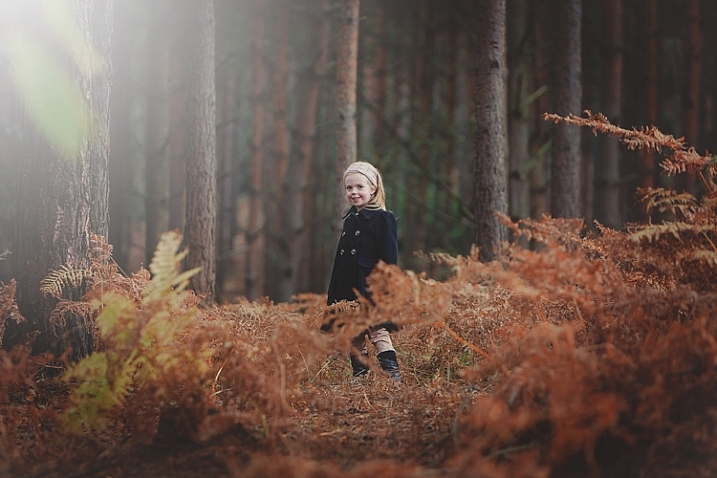
Clothing choices are always important for portraits, but in fall it can really make a difference to your image. Try and have everyone wear natural tones that will either compliment the colours of the leaves and trees, or blend in. My son wore a dark red sweater, as we knew the area had very vivid reds in the trees. My daughter wore black and white which is a timeless combination that blends in well. My son also wore a grey hood that coordinated with his sister.
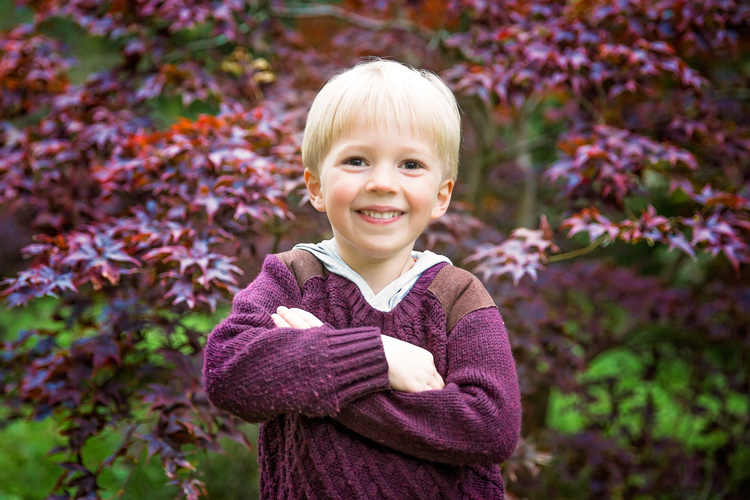
Autumn Portraits

Try and avoid clashing patterns or colours amongst your subjects by discussing it in advance, and maybe come up with a colour theme that everyone can include. Also avoid t-shirts or sweatshirts that have dominant logos. If he could, our son would have Star Wars logos on everything. This can of course date an image, and is also very distracting.

Try and have a few changes of clothes available. This will not only provide variety in your images, but in the wet and possibly muddy conditions, you may well need them, especially for any children.

Location

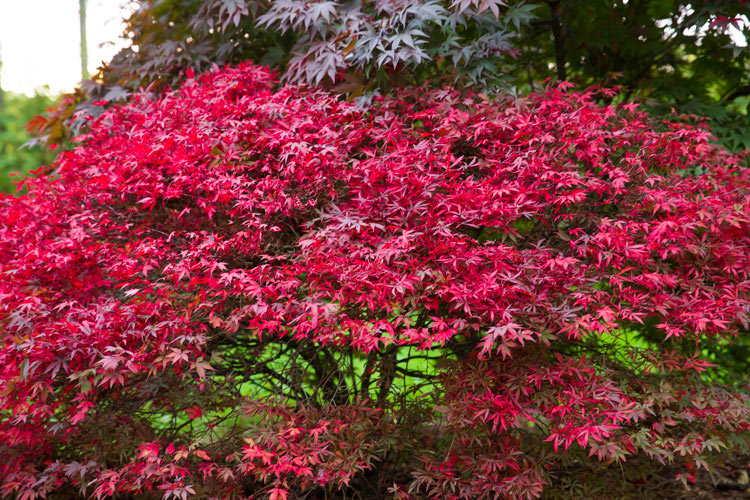
Location is essential for any shoot, but for autumn you want to find the best colours and textures you can. Things can change really quickly. The leaves can change over a couple of days, but it often doesn’t happen until later than you think. For this article, we actually struggled to find autumn colours despite it being early October. You also need to check that the leaves are still there. A heavy wind can take them down overnight, so don’t wait too long after you have scouted your spot to shoot.

We searched online for arboretums, these are great places that have collections of interesting trees. Of course, your local forest would be great too.
Autumn Portraits 2

Use social media for location tags to see what other people have photographed over the last few days, at or near the same location. Instagram, Twitter and even Trip Advisor are fantastic for this. You may also get to see a great place that you may not have found otherwise.

The technical bits

For my shoot, I was using a Canon 5D Mark 3 and took the 24-70mm f/2.8 Mark 2, and the 70-200mm f/2.8 Mark 2. These of course are professional cameras and lenses, but any modern camera whether a DSLR, point and shoot, or even a smart phone should provide great images. In fact, I find the iPhone 6 has great range of colours and light.

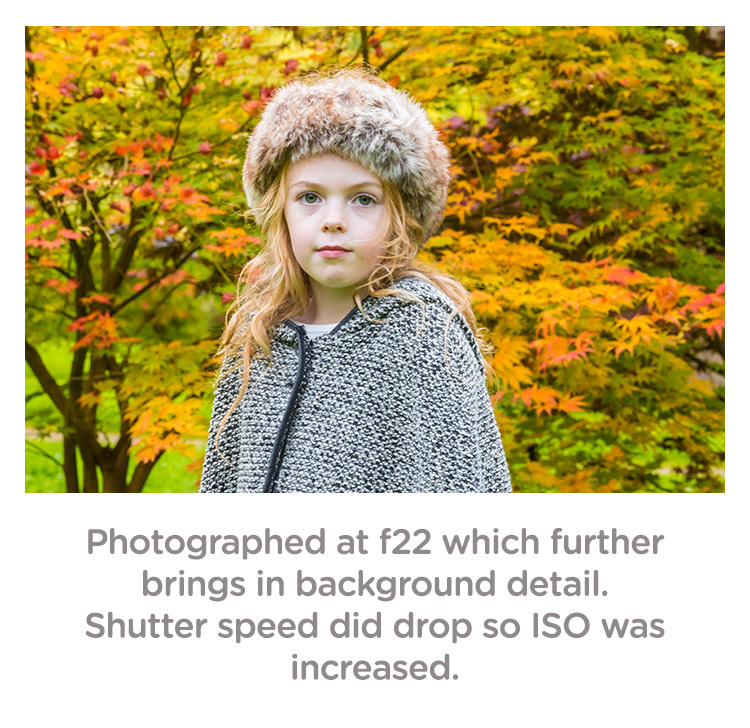
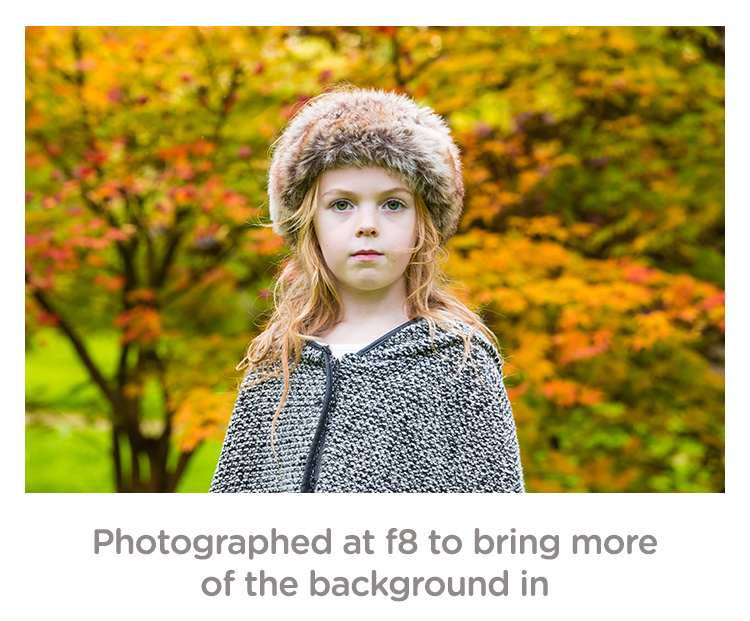
If you are using a DSLR, you can really play with the aperture (f-stops) to get a range of looks without moving location. To get a super blurry background, set your aperture to the lowest number. On my lens, this is f/2.8. Some lenses can go lower and some are limited to higher setting. Even with a kit lens that comes with your camera, you should be able to get to around f/5. If you want the leaves and your family in focus, try increasing the aperture to f/8 or even f/22. Do be careful though because at f/22 your shutter speed will be significantly slower, and you may well need to increase your ISO to compensate.
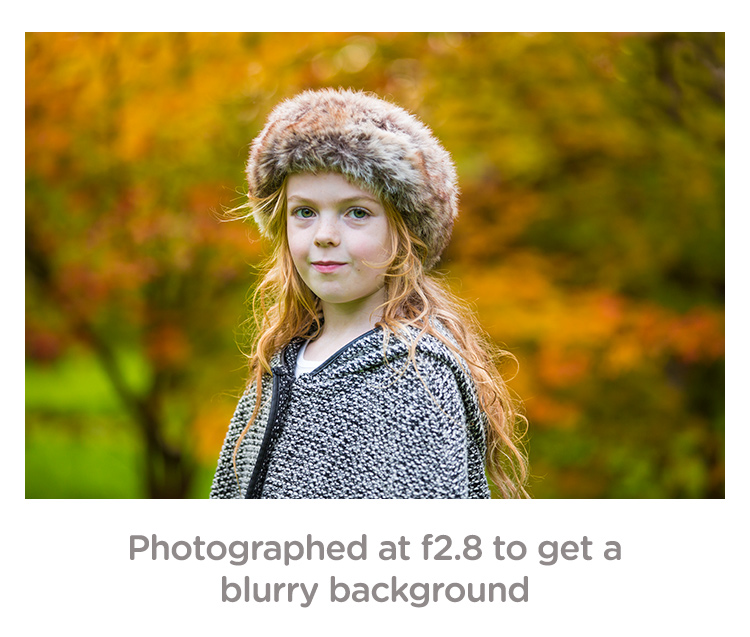
Depth of field guide f2 8

Depth of field guide f8

Depth of field guide f22

I photographed the images above in Aperture Priority (AV on a Canon, and A on a Nikon). This is when you decide the aperture and the camera sets the shutter speed. Keep an eye that the shutter speed doesn’t geet too slow (1/60 as a minimum). If it does, increase your ISO.

Personally, I always shoot in RAW. For me it just allows me that flexibility afterwards. However, with modern cameras, JPEGs are very versatile, and don’t break up as much as they used to. Some cameras allow you to capture a RAW and JPEG at the same time. This is great so you have the RAW to go to if need be.

White Balance: for these images, I shot in cloudy White Balance. It warmed up the colours, although I did alter these in Camera RAW processing later, it did give me a great starting point. If you are using your manufacturer’s own software, you should be able to change the white balance quite easily.

Getting natural smiles and reactions from children

You know your own children very well. You know the songs they like and what gets them interested. However, they are also very comfortable around you, and may decide to walk off just as you get your camera settings right. Here are a few tips to get a natural reaction.

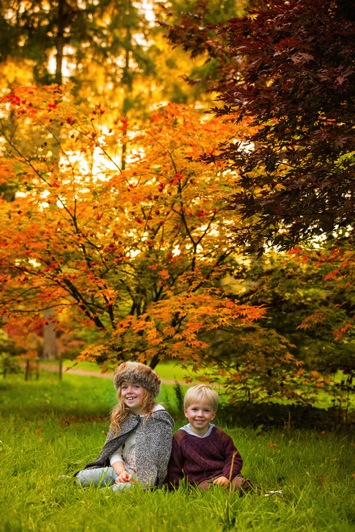
As in the images in this article. I asked my children to laugh hysterically for no reason at all. This got a huge overreaction which although is a great animated image, is not what we were after. What did happen is that as they calmed down from that, they had natural smiles. They thought it was funny and continued smiling naturally.
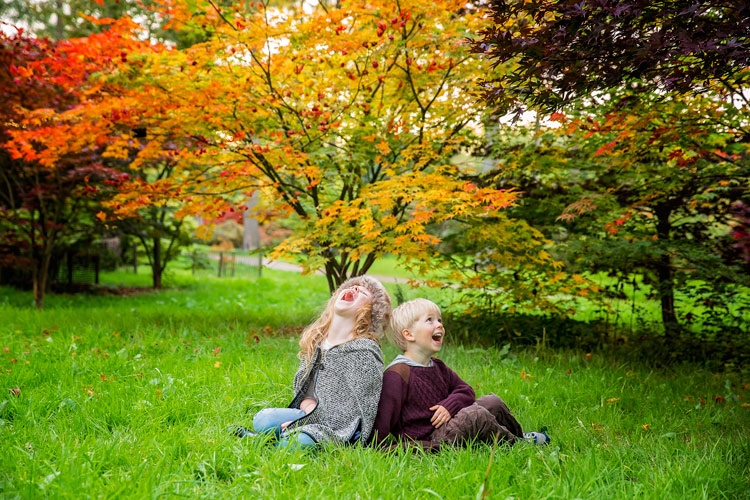
Posing Idea 1

If you have more than one child, ask one to tell the other a secret. This will always get them giggling.
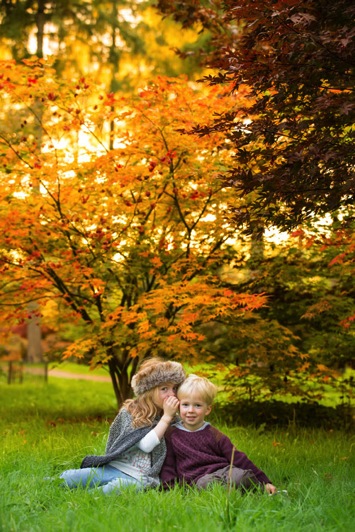
Posing Idea 2 Posing Idea 3

With just one child, ask them to tell you or the camera anything that they are interested in. Our son will talk for hours about anything Star Wars or Marvel. With our daughter we can ask her math questions, which gets a range of reactions.

Sing them a song but get it wrong. For some reason, this is the funniest thing ever to kids. Basically, do anything to distract them or get a reaction, but not by saying CHEESE!

Editing your images

For editing, I used Camera RAW processor which is part of Photoshop. However, most cameras come with editing software, or you can use something like Lightroom which is quite affordable. I actually kept the editing quite simple. The main thing I did was to go to the saturation panel and increased my Reds, Greens and Yellows. This really brought some punch to the image.
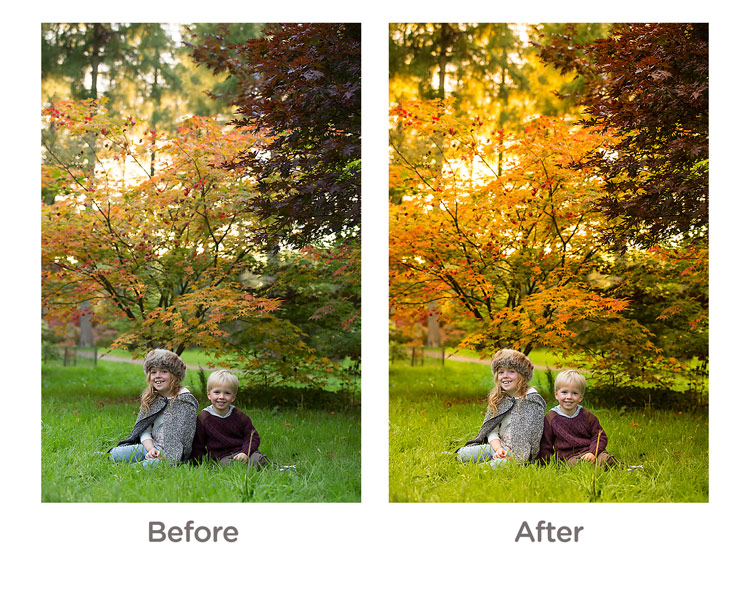
Before and After Editing

And finally…

Please print your images in some way. As parents, we are great at taking images, but not doing anything with them. Don’t worry about capturing the most amazing image, just get something that captures your family and print it some way.

googletag.cmd.push(function() {
tablet_slots.push( googletag.defineSlot( “/1005424/_dPSv4_tab-all-article-bottom_(300×250)”, [300, 250], “pb-ad-78623” ).addService( googletag.pubads() ) ); } );

googletag.cmd.push(function() {
mobile_slots.push( googletag.defineSlot( “/1005424/_dPSv4_mob-all-article-bottom_(300×250)”, [300, 250], “pb-ad-78158” ).addService( googletag.pubads() ) ); } );

The post Tips for Doing Fall Portraits by Sean Gannon appeared first on Digital Photography School.


Digital Photography School

 
Comments Off on Tips for Doing Fall Portraits

Posted in Photography


Fall In Love With Fall!How To Shoot Autumn Colors

15 Oct

Red and yellow and orange, oh my!

It’s officially fall and you know what the means: gorgeous colors everywhere begging to be photographed.

But fall colors can be a tad tricky to capture accurately, so we’re giving you some tips to get it juuust right.

Put on your cutest autumn accessories and let’s go!

(…)
Read the rest of Fall In Love With Fall!
How To Shoot Autumn Colors (549 words)


© Taylor for Photojojo, 2015. |
Permalink |
No comment |
Add to
How To Shoot Autumn Colors”>del.icio.us

Post tags:


Photojojo

 
Comments Off on Fall In Love With Fall!How To Shoot Autumn Colors

Posted in Equipment


8 Tips for Fall Landscape Photography

08 Oct

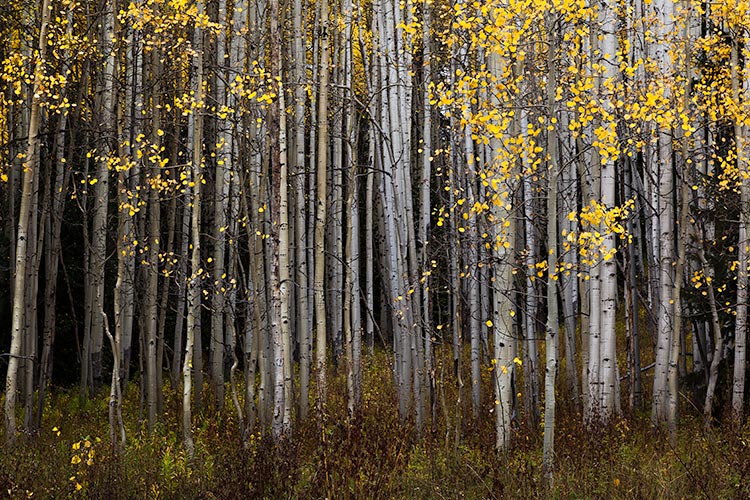
Fall is a fantastic time of year for you to photograph the landscape and really push your creativity. The colors, textures, and soft light provide an amazing palette to create compelling photographs. It’s really easy though to just point your camera at the color and hope the image comes together without thinking about the composition. Here are just a few tips to take with you into the field to make the most of the colorful season in your fall landscape photography:

1. Use a longer focal length lens

Dd tip1

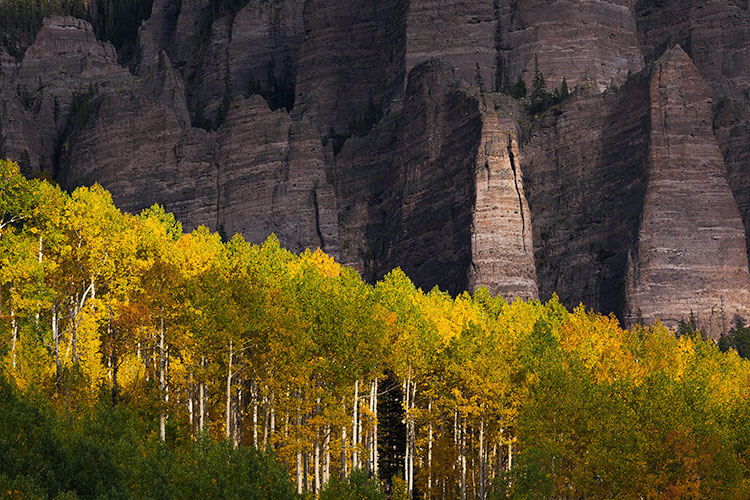
It’s tempting to photograph grand scenes with a wide angle lens, but using a longer focal length lens, 200mm or longer, can really help simplify the scene and make the subject about more than just color. You can also use the longer focal length lens to photograph the intimate details of a forest interior. Look for elements in the scene where there is a break in the pattern or use negative space to help isolate the subject.

2. Use a wide aperture to isolate the subject

Dd tip2

Pick a wider aperture, around f/2.8 or f/5.6, to isolate your subject from its surroundings. This will help create visual contrast between the sharp subject and the background, which will be softer and more abstract. This also adds tension between the real and the unreal, providing you with an image that’s more dynamic and expressive. Experiment with different subjects and backgrounds and get creative with your choices. Pay close attention to your subject and make sure that you have the desired amount of the subject in focus when using a wide aperture.

3. Make fall color the secondary subject

Dd tip3

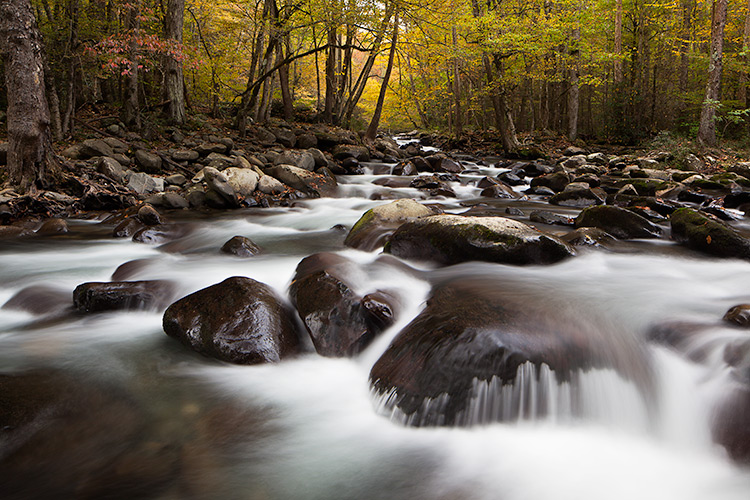
The temptation is for you to make the primary subject all about the fall colors. Find other primary subjects such as streams and waterfalls that are accented by the fall colors, to make images that have more depth and complexity. Although the color may attract your eye to the scene, ask yourself what the subject might be other than color.

4. Look for patterns and textures

Dd tip4jpg

Color is an obvious design element that you’ll be working with in your images but look, for others like pattern and texture, to create satisfying compositions. Learning to see the world around you as elements of 2-D design (line, pattern, texture, etc.) will help you move forward in your composition skills.

5. Be patient and wait for interesting or dramatic light

Dd tip5

Patience may be the best tool in your camera bag. Fall colors are wonderful, but can be even more stunning when combined with the right light for your subject. Patience usually is a big factor between a good image and a great image. Many times the best light can be short lived, so think through your composition in advance, and be ready for the light to work some magic.

6. Experiment with intentional camera movement

Dd tip6

Definitely experiment with moving your camera vertically as you release the shutter to blur the scene and create an abstract image of lines, textures, and colors. Experiment with different shutter speeds, and the pace of moving your camera, until you find the right amount of blur. This is a great opportunity for you to take your camera off the tripod and just play with camera movement. Darker elements that work well include a rock face, canyon walls, or deep shaded areas in the forest.

7. Look for elements that contrast the fall color

Dd tip7

Fall colors are usually bright and have texture and pattern. Look for opportunities to place the fall colors against darker elements so you can create an image with some dramatic tension.

8. Don’t forget to look up

Dd tip8

The interior of a forest can be an amazing and colorful place to photograph, but it’s often difficult to isolate a subject. If you’re having trouble, look up and explore the canopy. Images that contrast the fall colors with the deep blue sky can be really pleasing and make interesting wide angle photographs. Don’t forget to use smaller apertures like f/22, to create a starburst effect as you shoot through the forest toward the sun.

Summary

Hopefully these tips will help you make the most of your time photographing the amazing colors of the fall season. Take the list with you into the field so you can slow down, think through your compositions, and return home with some compelling photographs.

googletag.cmd.push(function() {
tablet_slots.push( googletag.defineSlot( “/1005424/_dPSv4_tab-all-article-bottom_(300×250)”, [300, 250], “pb-ad-78623” ).addService( googletag.pubads() ) ); } );

googletag.cmd.push(function() {
mobile_slots.push( googletag.defineSlot( “/1005424/_dPSv4_mob-all-article-bottom_(300×250)”, [300, 250], “pb-ad-78158” ).addService( googletag.pubads() ) ); } );

The post 8 Tips for Fall Landscape Photography by Dusty Doddridge appeared first on Digital Photography School.

Digital Photography School

 
Comments Off on 8 Tips for Fall Landscape Photography

Posted in Photography


It’s Finally Fall! Check Out Our Festive Faves.

05 Oct

Fall has arrived. How stoked are you to start photographing those fall colors, chunky knits and steaming cuppas?

We are so ready. So we’ve raked together all the best fall goodies from our shop, and blog, to share with you. Check ’em out!

(…)
Read the rest of It’s Finally Fall! Check Out Our Festive Faves. (0 words)


© Erin for Photojojo, 2015. |
Permalink |
No comment |
Add to
del.icio.us

Post tags:


Photojojo

 
Comments Off on It’s Finally Fall! Check Out Our Festive Faves.

Posted in Equipment


Fall Foliage Map For Your Fall Photos

30 Sep
Fall Leaves

Fall has officially arrived! It is time to start snapping pics of everything pumpkin and pumpkin-colored.

Check out this map before you head out for photos. It shows where, and at what stage, the leaves are changing within the lower contiguous US states.

Scroll down below the map to read about how and why the leaves change, and snag some coloring pages too. Who doesn’t love coloring? Especially next to a fire, sipping on a warm drink. Yay, fall!

Photo by The U.S. Department of Agriculture


© Erin for Photojojo, 2015. |
Permalink |
No comment |
Add to
del.icio.us

Post tags:


Photojojo

 
Comments Off on Fall Foliage Map For Your Fall Photos

Posted in Equipment


Fake Perfect Fall Colors Using the HSL Tab in Lightroom

08 Nov

It can be extremely hard to predict when and where the peak colors of falls will hit. If you’ve ever been a week or two early you’ll know the frustration of seeing little splattering of color when you were hoping for full on peak color. Well, using a little bit of post-production magic, you can add some life to those early fall shots and get it closer to the vision you’d hoped mother nature would’ve given you in the first place. Let’s see how we can fake fall color using the HSL tab in Lightroom!

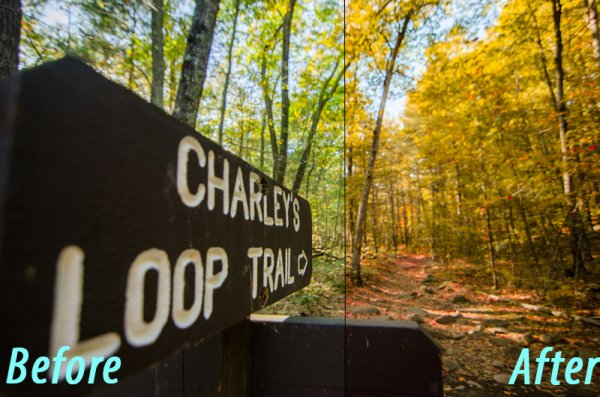
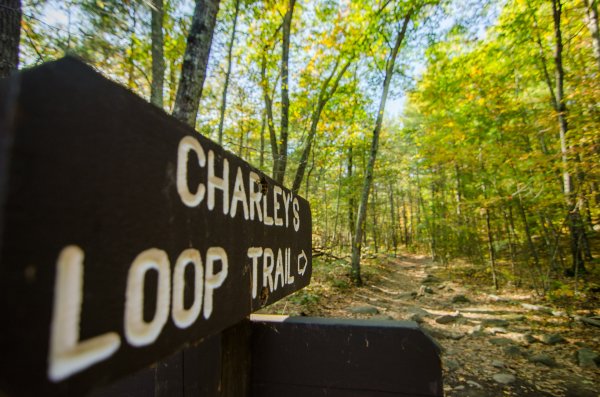
before&after

As a side note: I do want to mention that while this article is about faking the colors to create a vision that didn’t exist in the first place, a lot of these techniques can be applied to enhancing fall colors that do exist. Even if you’re completely against the idea of changing the world in post-production it might be worth reading through it to see how you might be able to use these techniques in a way that retains a more true to life look in your image.

What is the HSL tab

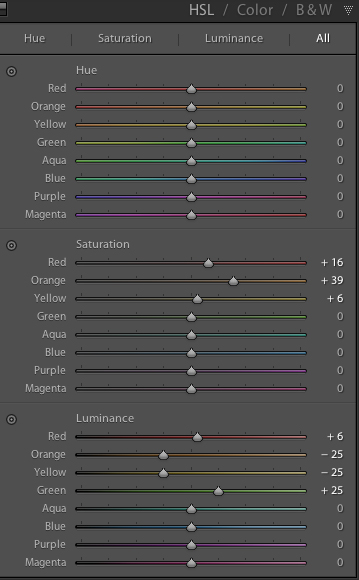
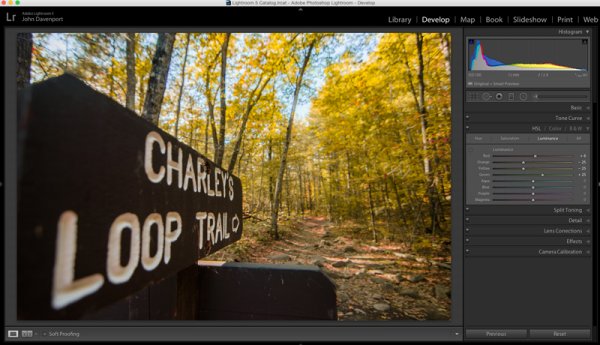
HSLThe workhorse of the manipulations you will see today is the HSL tab in Lightroom. It allows you to control the Hue, Saturation, and Luminance of your photograph on a color by color level. This gives you the ability to modify reds separately from oranges, blues from greens and so forth.

Each of the HSL controls have a unique slider for the eight different color tones that make up an image and as you’d expect, each of the HSL controls allow you to modify different aspects of that color.

  • Hue – Controls the tonal range of the color that you’re modifying. For example greens can be anywhere from yellow to aqua.
  • Saturation – Controls the intensity of the color that you’re modify. More saturated means deeper and more intense color, less saturated and you’ll have muted or even no color for the selected color.
  • Luminance – Controls the brightness of the color you select. Moving a slider to the right will brighten the selected color, while moving to the left will darken it.

As you can see there is a wealth of specialized controls built into the HSL tab. I hope the walkthrough below gives you some ideas on what you can do with it. Remember it’s not just limited to faking the colors of the fall season.

Fake perfect fall colors with Lightroom

To get started you’ll need a photograph to work with. It is going to be important that you choose your images carefully here as not every photograph will work for this kind of post-production.

For example – you’ll want to make sure that the trees you’re featuring do in fact change color in fall (evergreens do not), and, that the other surrounding features of your photograph are outside of the green/yellow spectrum that you’ll most-likely be changing, or you’ll be altering them as well as your trees.

fall

Once you have a great shot and you’ve completed some of the basic post production steps then you’ll want to hop over to the HSL tab in your Lightroom develop module.

As you’ll be working with trees that have yet to change color you’ll mostly be working with greens and maybe some yellows or reds. Again, this is why it’s important that the photograph you’re modify doesn’t contain any non-leaf items in these color ranges – or you’ll change them too – and that might looking more unnatural than the fake fall colors you’re creating.

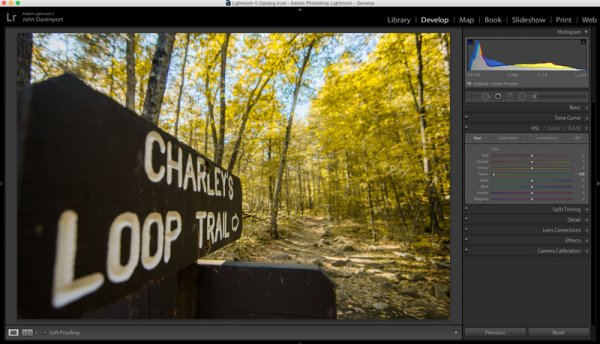
fakingfallcolor-green

As you saw above, the shot I’ve chosen for this article contains mostly green leaves with just a few hints of fall color. The first step is to remove the greens from the image by moving the green’s hue slider all the way to the left. This effectively changes the green colors in the image to yellow giving a more fall like look the the photograph, but we’re not done just yet!

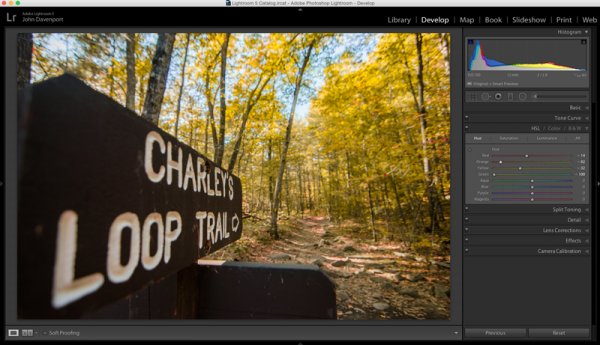
Next you can experiment with moving the reds and yellows sliders around to try and see how they effect the image. Different color tones will come to life that you may not even realize were there in this step so it’s important to take it slow and look at the entire photograph as you make the changes. In this image the leaves on the ground took on a rusted red look while the trees themselves got a deeper orange look.

fakingfallcolor-hue

Once you’ve got the Hue the way you like it you may want to move into the Luminance and Saturation tabs of the HSL tool. This will allow for further modifications of the colors tones by effecting the richness and brightness of the colors you’re presenting.

fakingfallcolor-luminance

Remember the color tones are still the same as they were in the Hue slider, so even though the greens appear as yellow, moving the green Luminance slider to the right brightens the trees a bit, while the orange and yellows sliders effect their respective color tones.

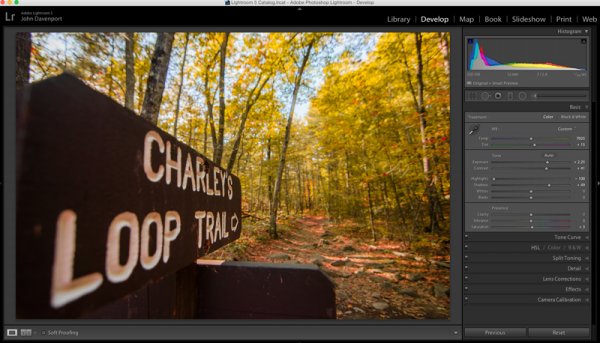
Another idea that you might want to toy around with is modifications of the white balance. Adding more yellows with the Temp slider or more magenta with the Tint slider can add even more dimension to the shot giving the colors a more dynamic feel.

fakingfallcolor-wb

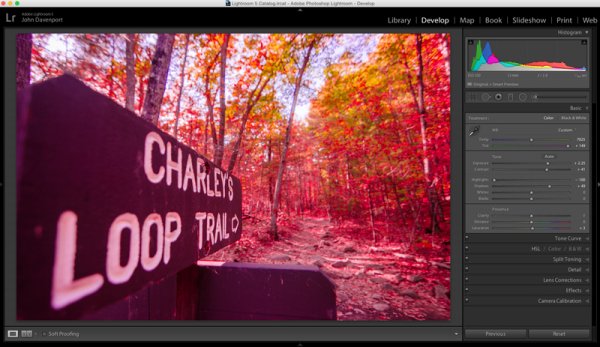
However, it is extremely important to be careful with the white balance sliders when you’re doing these manipulations as bad things can happen very quickly if you’re too aggressive with the changes!

fakingfallcolor-toomuch

After you’ve set your color tones and adjusted the white balance of the image it’s time to give the entire photograph a good, close, once over.

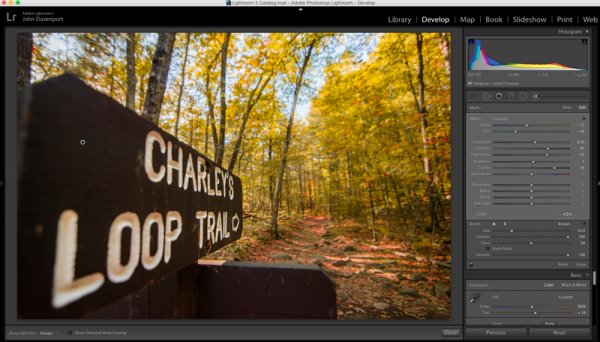
For this demonstration image the lettering on the sign started to take on a reddish/yellow tint after the white balance tweaks were performed. To fix this an adjustment brush was added to the sign which reduced both the Temp slider (to remove yellows) and the Tint slider (to remove the magenta colors). Also at this point the sign was given a little more definition with the adjustment brush by increasing the clarity and fine tuning the exposure.

fakingfallcolor-adjustment

All in all using the HSL tab in Lightroom can be a fun way to create that fall color when it might have been just out of reach. Of course, this doesn’t compare to the real thing so, the best way to get fall color is to go find it in person. Therefore don’t let this stop you from getting out and planning your next hiking trip – the unpredictable nature of the fall season is one of my favorite parts about it!

fall-2

Watch this technique in action

Do you have any other fall photography or post-processing tips to bring out those great colors? Please share in the comments below.

The post Fake Perfect Fall Colors Using the HSL Tab in Lightroom by John Davenport appeared first on Digital Photography School.

Digital Photography School

 
Comments Off on Fake Perfect Fall Colors Using the HSL Tab in Lightroom

Posted in Photography


Close-knit, Connected and Cohesive: Coming Together in Fall Colors

03 Nov

Fall is still going strong here in North Eastern Ohio, so I grabbed a couple of my favorite models, the fun and fabulous Brooke, Chloe, Emily, Erica, Kelly, Lexi, Tenley and Zoe, and we Headed to the Hills… oh, right, it’s totally flat here…so we Headed to the Forest of Peninsula, Ohio one early, crisp fall morning. We had everyone Continue Reading

The post Close-knit, Connected and Cohesive: Coming Together in Fall Colors appeared first on Photodoto.


Photodoto

 
Comments Off on Close-knit, Connected and Cohesive: Coming Together in Fall Colors

Posted in Photography


Fall Foliage Photography Guide for Taking Better Autumn Photos

29 Oct

The world is filled with Red and Gold…Get out there and Shoot!!! So, as many of you know, I have never actually lived in a place with true fall. I’m from Los Angeles, lived in Hawaii, both of which basically are perfect always, did an eight year stint in North Dakota, where it’s frigid for ten months, then there’s a Continue Reading

The post Fall Foliage Photography Guide for Taking Better Autumn Photos appeared first on Photodoto.


Photodoto

 
Comments Off on Fall Foliage Photography Guide for Taking Better Autumn Photos

Posted in Photography


DPR reader loses camera in fall, sustains injury and lives to tell the tale

16 Aug

Let’s get the important thing out of the way first – Greg Theulings is fine. His Fujifilm X-T1, on the other hand, is not. Keen landscape photographer and DPR forum member, Theulings was on a trip to to Luxembourg and the German Eifel photographing the some rapids when he slipped on a rock, fell into the water and dislocated his shoulder. His camera and lens were destroyed, but his memory card survived. See his photos and read his story – and maybe take a little extra care on those rocks when you’re out on your last photo trip of the summer.

Articles: Digital Photography Review (dpreview.com)

 
Comments Off on DPR reader loses camera in fall, sustains injury and lives to tell the tale

Posted in Uncategorized


Architectural Apocalypse: Famous Museums Seen After the Fall

13 Aug

[ By WebUrbanist in Art & Photography & Video. ]

guggenheim half buried sand

Like that iconic scene in the original Planet of the Apes film, these artists have displaced great works of architecture in time and space to see what each museum might look like after the end of days, relocated in ominous environments and recast in black and white.

guggenheim museum after fall

Ukrainian photographers Vitaliy and Elena Vasilieva use surrealistic landscapes as the backdrop for these imaginative transformations, picturing structures like the Guggenheim in a sand-strewn context that looks like anything but modern-day Manhattan as we know it.

new museum in water

new museum at night

The New Museum is seen rising up from post-armageddon floodwaters, presumably after rising sees wash away the rest of New York City.

Niteroi Museum snow dunes

snow filled museum fall

The Niteroi Museum is perched precariously on a mound of snow, everything else perhaps buried in the frozen wastes around it.

pompidou center picture fall

pompidou center storm front

The Pompidou Center is set in a swirling dust storm, Paris long vanished and its inside-out appearance making it look all the more like a remnant than a finished structure.

guggenheim post apocalypse photo

guggenheim half buried sands

When the dust settles, the smoke clears and the world freezes over, what if only our artistic institutions were left? From the creators of the series: “It is difficult to escape the feeling that ‘Apocalypse in Art’ really shows the world, standing on the edge, barren, falling in decay like a story line of a picture that is breaking into fragments.”

Share on Facebook


[ By WebUrbanist in Art & Photography & Video. ]

[ WebUrbanist | Archives | Galleries | Privacy | TOS ]


WebUrbanist

 
Comments Off on Architectural Apocalypse: Famous Museums Seen After the Fall

Posted in Creativity