RSS
 

Posts Tagged ‘Facebook’

8 May, 2014 – Bye Bye Facebook?

08 May

Well, I tried. I joined Facebook a few days ago, and today found myself locked out of my account. The Facebook security system asked me to indentify a series of people by their picture. In most cases the pictures were babies, school kids or of animals.  WTF?

So, for the time being, my flirtation of Facebook has come to an abrupt halt. Maybe when I can log back in, I’ll once again be part of the global breakfast club… or maybe not. I’ll keep you informed.

In the meantime I’ll use this space to send out a smoke signal that Chris and I are currently in Chicago shooting a Lightroom 5 video tutorial update with Jeff Schewe.

See… I don’t need no stink’n Facebook.


 "Every time I go back to a module I had already seen, I learn additional things.  I have never seen tutorials that have the excellent mix of what the features are, 
how to use them, enough of the under-the-hood information 
and concepts so that I can utilize the features creatively and efficiently, 
and just enough humor to keep the motivation level high.  Wow!"


The Luminous Landscape – What’s New

 
Comments Off on 8 May, 2014 – Bye Bye Facebook?

Posted in News


Facebook Survey, May 2013

02 May

Facebook Survey, May 2013

Yesterday I was prompted by Facebook and asked if I wanted to take a survey on my Facebook page. I said yes and took the survey. Here are the questions that Facebook asked me. Maybe this survey gives some insight into what they are thinking about in terms of public perception and product development. I don’t know anything more about the survey. I don’t know who it was targeted towards, how many people were given it, or any other demographic or statistical data.

1. Do you manage the Facebook page or public profile you were just visiting?

Yes, I manage this page by myself
Yes, I manage this page along with 1-4 other people
Yes, I manage this page along with more than 4 people
No, I do not manage this page

2. What is your role in managing this Facebook page or public profile?

I am the public figure this Facebook page or public profile is about
I am an Account Manager — I work for a third-party management firm
I don’t manage the page directly — I make partnership and business decisions
Other

3. Do you manage your Facebook page or public profile using the Facebook website or app, or do you use a tool such as HootSuite, CoTweet, or Seesmic?

I primarily use the Facebook website or app to manage my Facebook page or public profile
I primarly only use another tool such as HootSuite, CoTweet, or Seesmic to manage my page or public profile
I use both the Facebook website or app and another tool equally

4. Approximately how many fans or subscribers does your page have?

5. Approximately how often do you post from your Facebook page or public profile?

Multiple times per day
About once a day
2-6 days a week
About once a week
2-3 times a month
About once a month
Less often than once a month

6. About what percent of the time are the posts composed by the public figure this page is about (rather than another person or agency posting on the figure’s behalf)?

Less than 20%
Between 20% and 40%
More than 40%, but less than 60%
Between 60% and 80%
100%
I don’t know

7. If you were to post something to your page, approximately what percent of your Facebook fans would you expect to have the post show up in their news feed?

Less than 20%
Between 20% and 40%
More than 40%, but less than 60%
Between 60% and 80%
More than 80%, but less than 100%
100%
I don’t know

8. What percentage of Facebook’s engineering resources do you think are dedicated to increasing revenue (versus developing new products and improving on existing products for our users)?

Less than 20%
Between 20% and 40%
More than 40%, but less than 60%
Between 60% and 80%
More than 80%, but less than 100%
100%
I don’t know

9. Relative to other initiatives, how important is your Facebook page or public profile in meeting your business objectives?

Not at all important
Slightly important
Somewhat important
Very important
Extremely important

10. Please indicate how important each of these metrics is to you when you are trying to evaluate the overall success of your Facebook page or public profile.

(Choices offered were: not at all important, somewhat important, very important)

Referral traffic (e.g. website visits)
Content engagement (e.g. video views, likes, comments on posts)
Increased reach (e.g. fanbase growth)

11. Do you agree or disagree with the following statement? My Facebook page or public profile helps me to accomplish my business objectives

Strongly disagree
Somewhat disagree
Neither agree or disagree
Somewhat agree
Strongly agree

12. Do you agree or disagree with the following statement? I am happy with the level of engagement my fans have with my Facebook page or public profile

Strongly disagree
Somewhat disagree
Neither agree or disagree
Somewhat agree
Strongly agree

13. Overall, how satisfied are you with the rate at which you acquire new Facebook fans?

Completely dissatisfied
Very dissatisfied
Fairly dissatisfied
Neither satisfied nor dissatisfied
Fairly satisfied
Very satisfied
Completely satisfied

14. Overall, how satisfied are you with managing a Facebook page or public profile?

Completely dissatisfied
Very dissatisfied
Fairly dissatisfied
Neither satisfied nor dissatisfied
Fairly satisfied
Very satisfied
Completely satisfied

15. In your opinion, what amount of improvement, if any, is required to make the page or profile management tools Facebook provides you excellent?

Huge improvement
Much improvement
Some improvement
Slight improvement
No improvement

16. Do you manage a public page or profile on any other social media platforms?

No, I do not manage a public page or profile on any other sites
Yes, I manage a page or public profile on at least one other site

17.On what other social media platforms do you manage a public page or profile?

Instagram
Google+
Twitter
Pinterest
Tumlbr
Other (fill in)

18. On which service do you most often post

Instagram
Google+
Twitter
Pinterest
Tumlbr
Facebook
Other (fill in)

19. Compared to your consumer facing experiences on other platforms, how satisfied are you with your experience managing a Facebook page or public profile?

More satisfied
About the same level of satisfaction
Less satisfied

20. How important is it to you to be able to manage your Facebook page or public profile from a mobile device?

Not at all important
Slightly important
Somewhat important
Very important
Extremely important

21. When you publish content from a mobile phone, what device do you typically use?

Tablet (such as iPad)
Windows phone
iPhone
Android phone
Blackberry
I never publish from a mobile device
Other (fill in)

22. In your opinion, what amount of improvement, if any, is required to make the Facebook page and public profile administration experience excellent?

Huge improvement
Much improvement
Some improvement
Slight improvement
No improvement

23. In what ways would you like to see the Facebook page and public profile administration experience improve? (select the TOP 3 improvements you’d like to see)

I would like to be able to post additional types of content
I would like to be able to post more easily
I would like to know more about my fans
I would like my fans to share more of my posts with their friends
I would like to be able to test which posts perform best
I would like to drive more traffic to my primary website
I would like my posts to reach more fans
I would like to see everything my fans are saying about me/the public figure
I would like to see how the activity of my fan base compares to that of other public figures
I would like to be able to use hashtags
Other (fill in)

24. Please share any additional feedback you may have about your experience as a Facebook page or public profile administrator.

25. We would like to hear more about your experience with Facebook in the future. Would you be interested in receiving additional surveys on this topic?

25. Would you be interested in participating in a brief phone interview on this topic?

Thank you.


Thomas Hawk Digital Connection

 
Comments Off on Facebook Survey, May 2013

Posted in Photography


What Do You Think of Photos on the New Facebook Timeline?

19 Apr

The New Facebook Timeline

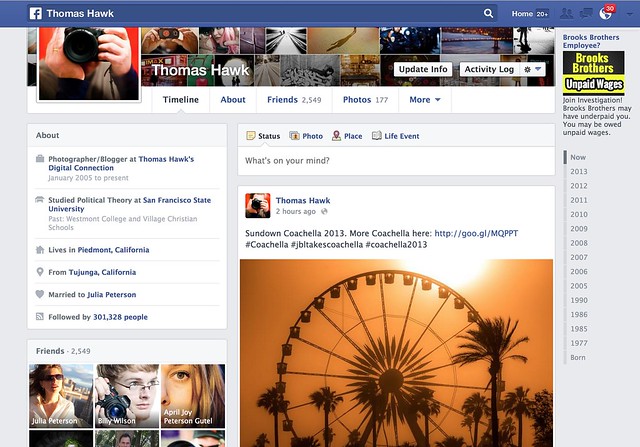
I had the new Facebook Timeline turned on for me yesterday. My wife got it about a week ago. Does anyone else have it? Do you like it? Anyone ever seen that movie Memento?

Photos feel larger — I like that — but I don’t really like the way that photos are cropped.

The old timeline forced everything into a square box by default so landscape/portrait crops were still problematic. You could reposition the photo after the fact (sometimes, when the reposition tool worked, which was probably less than 10% of the time for me) but your photo got stuck in a square crop. You could also “feature” the photo which would give it an extreme horizontal crop manually.

By the way, I seem to be able to use the reposition tool again now with the switch over to the new timeline.

Part of me liked the old Facebook timeline format. I love the square photo. It’s my favorite crop of all. When I uploaded a square to Facebook it would then show perfectly on my timeline page. If the other crops suffered, oh well.

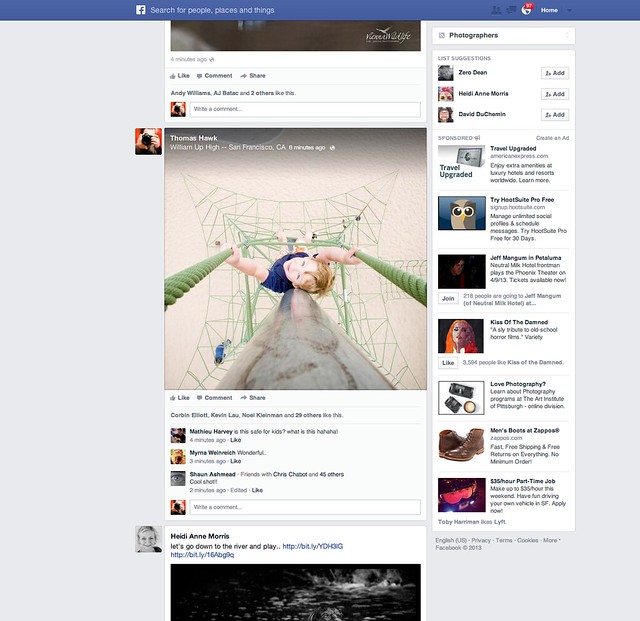
The new timeline page goes back to a traditional landscape crop. So now when you upload your landscape oriented photos to Facebook they fit and look great. Unfortunately though, now both the portrait and the square crop are squashed into a landscape box.

Why on earth doesn’t Facebook just display BOTH landscape and square crops in their original crop? This is what they do on mobile btw, so it would seem more consistent. This would mean that square photos would be even bigger on the web version of Facebook, but everybody wants bigger photos anyways, so why make our square crop photos suffer in that landscape oriented box? This is what Flickr does by the way. On Flickr the square crop is king. I love that.

Of course portrait oriented photos get butchered even worse now with the new Facebook timeline — now they are squeezing a portrait photo into a landscape orientation instead of a square. Some of these just look awful.

It does feel like Facebook is trying to somehow more intelligently decide which portion of square and portrait photos get shown in the landscape box. Maybe their algorithm is looking for the eyes and focusing on that. I’m not sure, but it feels like the auto cropping is a little smarter and more intelligent.

Google+ takes a different approach. They retain the photographer’s original crop… but then you are stuck with those damn grey bars on the sides of your square and portrait photos on G+. For the life of Kevin, I’m not sure why G+ doesn’t just let the square photo have the entire envelope. It would look much better than those tiny little gray bars on the side and it’s just giving square photos an ensy weensy more real estate.

Which is what Facebook should do too, by the way. Square crops sort of fit into the landscape envelope, but why make the square suffer that way? Just liberate it. Make the square the king. I thought Facebook was doing this on the newsfeed a couple of weeks ago, but I think they switched back to cramming a square photo in a landscape box with both the new newsfeed and timeline now too.

Is there an answer to this perplexing problem about how best to display our images on the web? Why can’t we have just one big gigantic mosaic wall on both Facebook and Google+, that’s actually my favorite format of all I think.

Other changes on the new Facebook timeline, include moving your follower count over to a smaller less prominent place on the left. They also give the actual number now, instead of something that just said 300K before. You can add or remove certain modules out of the smaller left side column if you want.

Despite the photo crop issues, overall I like the new timeline a lot. I like it better than the old version. It feels more fluid and slick. I do like that overall photos do appear bigger. Landscape oriented photos especially look great there now.

The new comment system drives me a little batty though. I can never figure out who is talking to who and I feel like I’m trapped in some sort of web version of the movie Memento — but that’s a whole other topic entirely. I can never understand who said what in what order to who. I feel like I’m trapped in some sort of online version of that old movie Memento.

Unfortunately, as usual, with the new Facebook timeline we’re still stuck with the damn ads. I wish Facebook’s ads weren’t so especially vulgar. Why is Facebook trying to get me to join some lawsuit about unpaid wages at Brooks Brothers? I hate lawsuits — plus I’ve never worked at Brooks Brothers. Shouldn’t Facebook be smarter than that in terms of what ads it shows me? Why does Facebook think I worked at Brooks Brothers? Next thing you know some other ambulance chaser is going to start advertising at me just in case I’ve ever had Mesothelioma. Facebook should let us pay for a Pro account and exempt us from bad advertising.

By the way, anyone ever seen that movie Memento?


Thomas Hawk Digital Connection

 
Comments Off on What Do You Think of Photos on the New Facebook Timeline?

Posted in Photography


Facebook Home seeks to change how we share images

06 Apr

title.jpg

With the announcement of Facebook Home, a launcher or ‘skin’ that can be installed on top of the Android operating system of your mobile phone, the social networking giant has instantly transformed the role and importance of images in social media, bringing them to the forefront in a way that not even its desktop Timeline feature could. We are having a closer look at what Facebook Home is and what it means for image sharing.

News: Digital Photography Review (dpreview.com)

 
Comments Off on Facebook Home seeks to change how we share images

Posted in Uncategorized


Service lets you order prints of any Facebook photo

30 Mar

mug_mjf_grandma_grandpa.png

While the privacy and permissions surrounding Facebook-shared photographs have always seemed like a bit of a gray area, a new service is pushing the envelope further. Photos At My Door lets users log in with their Facebook account and access photos of friends. You can then order prints of those photos or even print them on coffee mugs, mouse pads and iPhone cases. Read more about the service and our take on it at connect.dpreview.com.

News: Digital Photography Review (dpreview.com)

 
Comments Off on Service lets you order prints of any Facebook photo

Posted in Uncategorized


On Facebook, The Square Format Photo is Now the King

17 Mar

On Facebook the Square Photo is Now the King

I’ve been using the new Facebook News Feed for a little while now. One of the things I noticed about it today (and maybe new even since the News Feed launch) is that square photos are now king on Facebook.

What do I mean by this? Square photos are the largest sized photos in the new Facebook News Feed. This is similar to how Flickr shows photos in our Flickrstreams.

Google+ on the other hand tries to squeeze a square photo into a horizontal photo envelope, which makes the square photo on Google+ have little side bars on it and looks awkward, smaller and ugly.

I, for one, welcome the new square format as the king of Facebook. The square crop is my favorite. What’s your favorite crop?


Thomas Hawk Digital Connection

 
Comments Off on On Facebook, The Square Format Photo is Now the King

Posted in Photography


Unboxing the New Facebook News Feed

10 Mar

The New Facebook Newsfeed

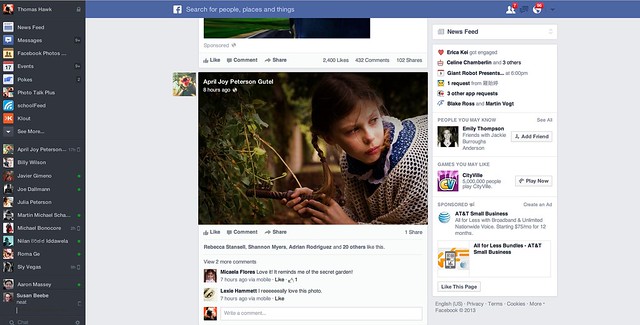
I got the new Facebook news feed last night. The screenshot above is what it looks like. It’s super awesome. A very small minority of people will hate it — because a very small minority of people will hate EVERYTHING. I’m not kidding. The way some people love to bitch blows my mind sometimes. Haters gonna hate.

Most of you will love it though. I think it’s the most significant improvement made to Facebook since Facebook started. If you’re a photographer, you especially will love it. Photos are bigger. Bigger photos have more impact. Bigger photos look better.

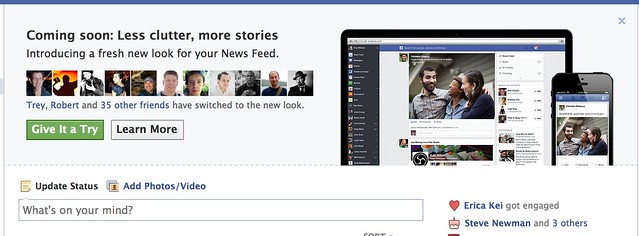
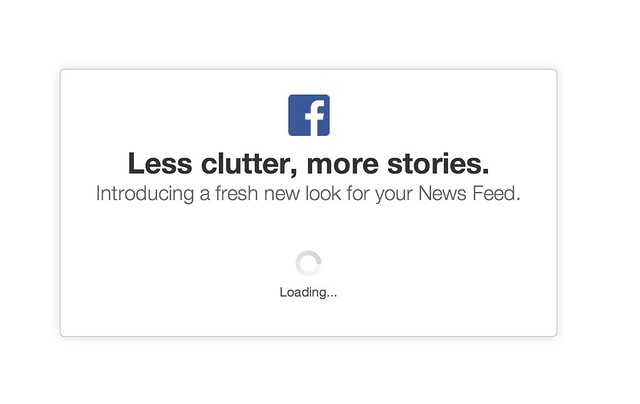
When you’re eligible for it you’ll notice a little “coming soon, less clutter, more stories” box on your news feed. There is a green button to press to give it a try. If you press that green button you get the loading message. I think there was one other notice window that popped up telling me that I couldn’t go back if I went forward with it, but I can’t remember 100% on this. After this loading box the new news feed pops up.

The Invite to Try the New Facebook Newsfeed
Woah! What’s this?

Loading the New Facebook Newsfeed
Almost there!

I’ve only played with the new news feed for a few hours, but here are just a few early observations.

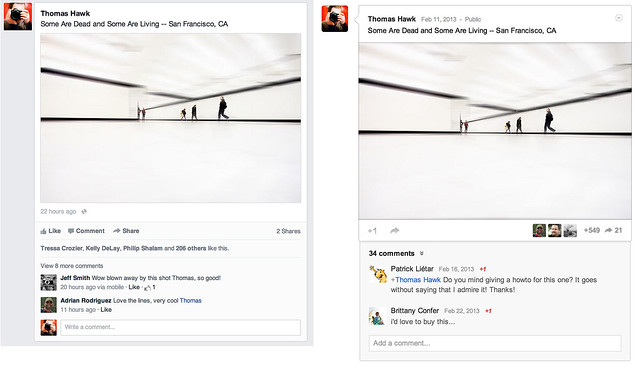
1. Content in the new news feed feels ALOT like Google+. I’m not saying Facebook copied Google+ here, and imitation is, of course, the sincerest form of flattery and all that, but check out the two content envelopes side by side in the photo below. They are pretty darn close.

The New Facebook Newsfeed Feels ALOT Like Google+
Separated at Birth. Facebook new news feed on the left, Google+ on the right. Or wait, is it the other way around?

Personally speaking I have no problem with this by the way. I love competition on the web. With competition users win. Everybody should rip everybody off and make everything look as awesome as it possibly can.

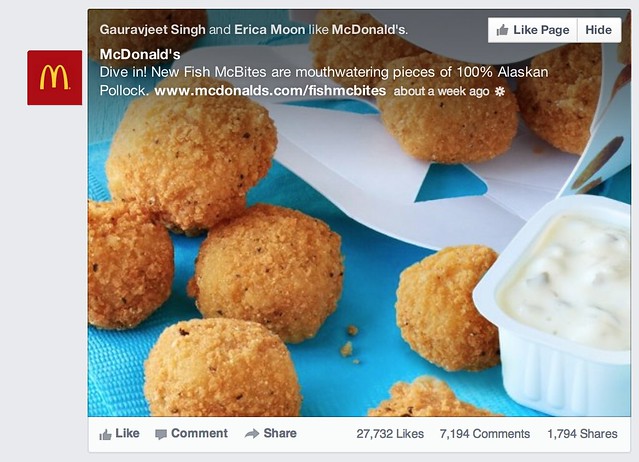
2. Pictures are bigger and stand out more, but unfortunately so do all of those crappy memes and worse, sponsored posts (ugh! advertising — the new advertisement for McDonald’s new fish McNuggets feels even more intrusive). Please Facebook, let us pay you for a Pro account and let us opt out of all the horrible ads.

Photos Look Bigger and Better, but Unfortunately so do the Ads
That’s an awfully big advertisement for those new Fish McNuggets that McDonalds is selling.

The meme’s are really my own fault though. When I started Facebook years ago, I simply accepted every single friend request, whether I knew somebody or not. Hey, I’m a friendly guy. I now realize that was a mistake. I think as I unfriend the most egregious of the meme sharers this should improve a bit for me.

Sometimes though there is just that one person that for whatever reason you CAN’T unfriend. You know who I’m talking about. They’d take it really hard. Yet it’s that one person who keeps sharing the crappiest meme things on Facebook 50 times a day. If you’re that guy, knock it off. Sometimes I wish there was an easy way to permanently hide someone’s content without actually unfriending them.

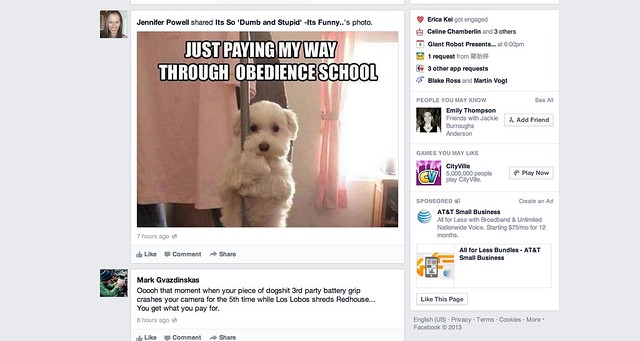
Attack of the Facebook Killer Meme's, Now Bigger Than Ever in Your Timeline
Attack of the killer Facebook meme’s, now even bigger than ever!

Hey it’s a dog, hey it’s stripping. AWESOME!!!! I think I’ll reshare this on Facebook!

3. The hide button is broken. One of the things that I like about Facebook is their move fast and break things moto. Sometimes though this means that everything doesn’t work so well. I haven’t been able to reposition photos on my timeline for weeks now. My wife can’t upload photos directly to Facebook at all. She has to upload to an album and share from the album.

What I’ve found on the new news feed is that when I hide content, it doesn’t stay hidden. It stays hidden for that session, but if I refresh the page it comes back. I don’t know if this is just a bug for me or for everyone, but if I actually HATE something enough to hide it, I really, really don’t like it — and after I went through the pain of a two click effort, I’d really like it to stay permanently hidden from my news feed.

4. I still haven’t figured out exactly how Facebook is repositioning photos that are less ideal for their new envelope. It seems like some portrait aspect and square aspect photos are being stuffed into a landscape frame. It also seems like some are not though — it’s weird why some are and some aren’t. I wonder if there is some sort of algorithm at play here as well, because when photos are repositioned, a lot of the time it’s a pretty smart natural reposition. Like Facebook is focusing on the eyes in photos of people.

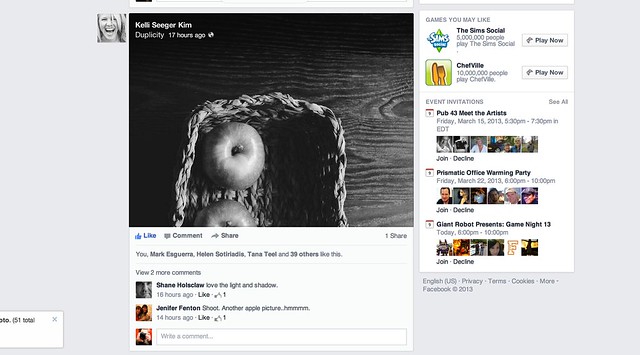
The apple screensheet below is from my friend Kelli Seeger Kim. It’s actually a portrait oriented photograph of two apples in a basket. If you click through the image you’ll see it correctly, but in the news feed the crop is less than ideal. So sometimes this feels a little awkward.

Sometimes Facebook Does Not Get the Repositioning for Portrait or Square Oriented Photos Just Right

Overall the new design is clean and light and lovely. It feels very smooth and really nice. Photos really pop now that they are bigger. I’d give this redesign two thumbs up!

Congrats to the Facebook team on the great work! You can find me on Facebook here. Come find me and let’s be friendly.


Thomas Hawk Digital Connection
 
Comments Off on Unboxing the New Facebook News Feed

Posted in Photography


Facebook further pushes photo prominence in the News Feed

08 Mar

Screen-Shot-2013-03-07-at-1.31.29-PM.jpg

Facebook has announced an upcoming update to the way photos are presented in user News Feeds. More space will be devoted to images, displaying them more prominently on the page. This is the second redesign that focuses on bigger pictures since July last year. The result of the redesign is not too dissimilar to the gallery view in Google+. In addition, the News Feed can be filtered to view only photo-based updates. The company says it is rolling the changes out in the coming weeks to both desktop and mobile version.

News: Digital Photography Review (dpreview.com)

 
Comments Off on Facebook further pushes photo prominence in the News Feed

Posted in Uncategorized


101 Extraordinary Self-Portrait Ideas to Spice Up Your Facebook Profile

09 Feb

Do you feel uninspired? Have no models or interesting subjects available? You are the best model and photographer at the same time! You can always take a picture of yourself. A self-portrait has been a popular form of expression since man first saw his own reflection. When you are your own model, everything is up to you – posing, lighting, Continue Reading

The post 101 Extraordinary Self-Portrait Ideas to Spice Up Your Facebook Profile appeared first on Photodoto.


Photodoto

 
Comments Off on 101 Extraordinary Self-Portrait Ideas to Spice Up Your Facebook Profile

Posted in Photography


Facebook Fan Page Custom URL,Tips,Tricks,Tutorial – Mark Kumar Photographer

05 Dec

Mark Kumar: www.MarkKumar.com http www.facebook.com Facebook Fan Page Custom URL,Tips,Tricks,Tutorial –
Video Rating: 5 / 5

 
Comments Off on Facebook Fan Page Custom URL,Tips,Tricks,Tutorial – Mark Kumar Photographer

Posted in Photography Videos