RSS
 

Posts Tagged ‘Essential’

Android creator Andy Rubin reveals modular Essential phone with dual-camera

30 May

After a prolonged period of teasers and speculation, Android creator Andy Rubin’s new company Essential has released its first smartphone. The new brand’s debut model is an uncompromising high-end device, with premium components and materials all around. The Essential’s body is made of titanium and ceramic and the front is almost entirely covered by a 5.71″  QHD edge-to-edge display with a 19:10 aspect ratio. 

The built-in camera uses a concept similar as Huawei’s latest flagships Mate 9 and P10, combining a 13MP RGB sensor with a 13MP monochrome chip. Image data from both sensors is merged for optimal image quality. Both lenses come with fast F1.85 apertures but there is no talk of optical stabilization. A hybrid autofocus system combines contrast, phase detect and IR laser assist methods. The front camera is capable of capturing 8MP still images or 4K video clips.

Other components include a Qualcomm Snapdragon 835 chipset, 4GB of RAM, a 3040mAh battery and 128GB of internal storage. Unfortunately there are no microSD-slot or 3.5mm headphone jack. One of the Essential’s most interesting features are two connectors at the back, though. They allow for the attachment of accessory modules, similar to what we’ve seen on the Motorola Moto Z line of devices. The first available module is a tiny 360-degree camera, which can shoot spherical UHD (3840×1920) video at 30 fps. 

The Essential Phone will be available in four colors, Black Moon, Stellar Grey, Pure White and Ocean Depths and cost you $ 699 on its own or $ 749 when bundled with the 360-degree camera. You can pre-order from today but there’s no information on shipping dates yet. 

Key specifications:

  • Dual 13MP camera (RGB/Monochrome sensors)
  • F1.85 aperture
  • Hybrid AF with contrast, phase detect and IR laser assist methods
  • 4K video
  • 8MP/4K front camera
  • Android 7.1.1
  • Qualcomm Snapdragon 835
  • 4GB RAM / 128GB storage
  • 5.71″ QHD edge-to-edge display with a 19:10 aspect ratio

Articles: Digital Photography Review (dpreview.com)

 
Comments Off on Android creator Andy Rubin reveals modular Essential phone with dual-camera

Posted in Uncategorized


Top 5 Essential Photography Tips I Can’t Live Without

29 May

These are my big five photography tips which I would take with me to a desert island, the ones I can’t live without. For those who have not had the pleasure, that is a reference to the BBC Radio Four program, Desert Island Discs, which has been running for more than 70 years. The simple premise of the program is that guests choose just eight pieces of music they’d want if they were going to be marooned on a desert island.

Desert island

I think that these lists are much easier to complete if given criteria. This is my Desert Island Big Five. They are chosen on the basis that if you could only apply five ideas to your photography for the rest of your shutter button pushing days, perhaps on a desert island, these would be the ones which I would recommend.

#1 – Follow guidelines not rules

Did you ever see the first Pirates of the Caribbean movie? Captain Barbossa (played with menace by Geoffrey Rush) chastised the main character Jack Sparrow (Johnny Depp), that he could not do something, because “It is not in the Pirate Rule Book”. With great, exaggerated, cheeky charm, and great comic timing, Jack Sparrow replied “I do not think of it as a RULE book … more as GUIDELINES …”

It is my strong belief that all articles and photography tips, such as this one, should be considered in the same way. The first rule is that there are NO rules, there are only guidelines. You should do just as you like. If you enjoy taking the photographs, processing them, and then you enjoy looking at the results, that is enough. Pleasing yourself and no one else is absolutely enough.

If you want to take photographs of people’s feet, go ahead! If you want to take a photograph of … well, what exactly do you think this might be (below)?

What is it? It is actually the bottom of a curtain, with the morning light streaming in. Not a common photographic topic, but it is an image of reasonable interest.

There are no rules, only guidelines, Do what you like! Do whatever turns you on! I could live with that suggestion alone on my desert island.

This next photograph follows the suggestion of having no rules. I think it is unlikely that any rule is going to tell you to photograph the bottom half of someone’s face, right? This photograph also leads on to the next guideline.

#2 – Fill the frame

A good photography tip and guideline to live by is that the subject of the photograph should not be in doubt, it should fill the frame.

This is an unusual school building in Al Ain, in the UAE.

The photograph above shows the scene well enough. However what is interesting in the scene? The subject of the photograph is really the arches. If they are allowed to fill the frame, don’t you think that it becomes a much better photograph (as below)?

Then, I think the framing of the following photograph is quite interesting. There is no need to include the entire opening of the front of the shop, nor much beyond the stretched out arm of the potential customer. The subject of the photograph is the colored lamps and they fill the frame here nicely.

I think I will take this one. The brightly colored lamps are the subject here and there is no need to include any more of the scene to tell the story.

Put another way, look at whatever you are photographing, get close, then get closer yet again.

New Delhi train station.

This very handsome man sitting on the platform of the train station in Delhi caught my eye. It is an okay scene and tells a bit of the story of India. But he is really the subject, so get closer.

Closer

Then get closer again.

Is a star born? Fill the frame with the subject. This potential Bollywood star is the subject, so he should fill the frame.

As I have already mentioned, advice such as this is best taken as a guideline, not a rule. To prove that point, I agree with most people who seem to prefer the middle shot, the second one, in the above series.

You might say there are two photography tips in one here. First, fill the frame; secondly, get closer. However, both usually result in the same thing. There are other considerations, however, such as the engagement with a portrait subject, or the choice of focal length.

You can fill the frame or get closer according to whatever works for you. For Mr. Bollywood, my memory is of zooming in and moving closer to the subject.

#3 – Ignore the subject

So now you have decided on your subject and gotten closer. It may then seem a little contradictory to tell you to ignore the subject for this next tip. But your photograph will be better if you do so.

You have already decided that the subject is interesting. The decision has already been made that the face, that flower, or the landscape is worth photographing. The face, the flower, or the lake are not going to change much, right? So really, you do not have to keep staring at it, you can now let your eye wander away.

I suggest that it is a really good idea to let your eye take at least a quick look around the edge of the frame. As a general guideline, it is best to have tidy edges in your frame.  That means there is nothing sticking in and distracting from the subject.

Distracting things on the edge of the frame take away from the subject, the blue smiley face.

Examples

Here is an example. A small girl in Cebu, in The Philippines.

I am not saying that it becomes a much better photograph once edited. However, with a slightly tighter crop, and a bit of Photoshop to dull of the distraction in the top left corner, the photograph is more concentrated on the subject, and it is a better image.


Please note that recognizable shapes, the triangle over the girl’s left shoulder, and bright colors, as in the top left, tend to be especially distracting.

The image below was taken for a client in Qatar when Doha’s new airport was being built.

Is it just me, or is that portion of a circle at the bottom, in the front of the frame really distracting? It is very much just a small detail, but it is surely attention to such details that is going to move your photography forward. Next time, when you take a similar shot, you might frame a little bit more precisely. I would like to think that I would. I certainly do not like fixing things in Photoshop, but this is better, isn’t it?

Again, you might say that this is two rules, sorry guidelines, in one. However, I think that it is a natural consequence of looking around the edges of the frame that you will also check the background. This is one I did not get quite right. These people are not flattered by the pole growing out of his head.

The well-known bird photographer Scott Bourne once said that he looked around for a good background then waited for a bird to fly past. You would have to ask him, but I do not think he was joking.

For showing off a cheeky little face, plain white works well. I wanted to photograph a number of the children who lived in a house and just plonked them in front of a plain wall. I found a good background, and waited for the children to fly past!

Cheeky!

But that does not mean that you must have a plain background. It is a question of checking out the edges and being aware of the background. Sometimes the background can even become an important part of the photograph.

Stairway from heaven?

Here is a contrasting background using complementary colors.

#4 – Atomic powered

You may well have heard that you should work the scene. I was only ever half sure what that meant. It might help you, as it helped me when I heard the simple advice, “move your feet”.

Then I later heard that idea expanded upon, and an image from my high school science class was revived. The image is of an atom, with the nucleus and electrons (have I got that right?).

By SVG by Indolences.Recoloring and ironing out some glitches done by Rainer Klute. – based off of Image:Stylised Lithium Atom.png by Halfdan., CC BY-SA 3.0, Link


The nucleus, the red and black middle, is the subject. You, the photographer, are the electrons, the blue dots. You are moving over, under, and around the subject. Standing tall, crouching low, walking left, walking right, and working that subject. Looking for the best way to show what you want to show, to tell the story you want to tell.

Created by working the scene and trying different camera angles.

It is not normal to take a photograph of the top of someone’s head. But I hope you agree that this makes an interesting image (above).

Nor is it normal to angle your camera at 45 degrees, tilted over from the horizontal, then point the camera up at an even steeper angle. But this image below seems to tell some of the stories of Singapore’s Clark Quay and the Central Business District. The situation has been worked by moving the camera out of its traditional position in the horizontal and vertical axes.

You must take the shot above, it is mandatory, but it has been taken quite enough times, hasn’t it?

Then, by walking round this very famous building, you can see it in a different way, one that tells a bit more of its glorious tale. The side of the Taj Mahal, as shown below, has its own beauty.

So, the fourth guideline is that you should move around your subject like electrons move around the nucleus of an atom.

There is a bonus to this guideline as well. There is a clear implication that if you have decided that a subject is worth taking one photograph of, you should take ten! If you ever shot with film, you’ll understand that the incremental cost was quite high. When David Bailey shot six rolls of Kodachrome, it probably cost $ 200. Now, in the digital age, the incremental cost is negligible. So do not be shy about taking more photographs.

#5 – Guideline of Thirds

This is the famous, Guideline of Thirds.

Have you heard of it before? Perhaps not, but you may well have heard of the Rule of Thirds. Like many other clichés, it has attained that status because it works! It is so well known but, even then, I have heard people get it wrong. Still, though, I think it is better thought of as the Guideline of Thirds in my opinion.

In your mind, divide the frame by drawing two equally spaced vertical lines, and similar horizontal lines. The image below tells the story easily. This guideline works well with a square frame too, and we would then be able to describe it and use it as a tic-tac-toe board.

You now have a frame divided into nine equal pieces. Three equal horizontal sections, three equal vertical sections, hence the name thirds.

Place your subject on those lines, and the most significant items on the intersections of those lines. Got a tree? Position it on one of the horizontal and vertical lines (where they intersect as seen below).

A river might be placed along one of the horizontal lines.

Place the most significant items, the sun, the human eye, or a cat walking across a street, on the intersections, where the vertical and horizontal lines cross. These are called the power points.

Combining all three, you will have this as your composition.

Very simply, the accepted wisdom is that this arrangement below.

Looks more interesting, more dynamic, than this.

Of course, you cannot move trees and rivers and other stationary objects. However, you can move around and practice the fourth guideline. Often you can find a position where the major elements of the shot are aligned with the thirds, or somewhere close.

If you consciously practice using the rule of thirds it will be a good step in the right direction to creating more interesting photos. Stick with it, practice, and you will soon find that you do not have to really think about it. It soon becomes instinctive. Later you might move on to other guidelines for composition. There are many others, but if I could choose only one to take and use on my desert island this would be it.

I can tell you that this was taken with no conscious application of the Rule of Thirds. I would suggest it has at least some interest. And, lo and behold.

Here is another example.

I know with absolute certainty that The Rule of Thirds was not in consideration when I took this street shot in Jakarta, Indonesia. I wanted one of the drawings to be fully in the frame and as he is the artist, I wanted his hands in the frame too. Again, I am not claiming that this is a great work of art, but I think I can claim that it has some harmony and cohesion. Throw the grid at it and we see . . .

His hands and face, sit pretty much on the intersections of the lines.

A modest realization along the way, with this aspect of my photographic journey, was in respect to the horizontal lines and the placement of the horizon. Still not a rule, only guideline, but it seemed to me that if the sky was interesting, and it was the major subject of the photograph, then you might want to put the horizon on the lower third line. That simply gives more of the frame over to that stormy, wispy cloud-filled, or deep sunset filled sky. Simply, it is consistent with the guideline of fill the frame with the subject.

Boracay sunset, Philippines.

If it is the land which offers the subject for a photo, it usually works if you place the horizon along the upper third.

Beautiful Philippines golf course.

As I have already suggested, there are other compositional guidelines, which you might move on to using at a later date. But the Rule of Thirds, or as you might be better thinking of it, Guidelines of Thirds, is a very good place to start.

In summary

Looking at and understanding light, using a frame, empty space, leading lines, symmetry, contrast, and so on – there are many good guidelines. But these are the five essential photography tips which I would choose to use if I could select no others.

  1. Follow guidelines not rules
  2. Fill the frame with the subject
  3. Check your frame edges and the background
  4. Move yourself
  5. Guideline of Thirds

I would recommend that you could survive very well with the above big five on a metaphorical or, indeed, literal desert island.

The post Top 5 Essential Photography Tips I Can’t Live Without by Richard Messsenger appeared first on Digital Photography School.


Digital Photography School

 
Comments Off on Top 5 Essential Photography Tips I Can’t Live Without

Posted in Photography


Essential Equipment for Long Exposure Photography

22 Apr

Normally, I say that equipment is not important, at least not for those just getting started with photography. Until you know how to master the camera, equipment shouldn’t be the main focus. You don’t need to worry about having the best equipment or things you don’t actually need. However, to achieve certain techniques or effects, having the right equipment is essential. Long Exposure Photography is one of these techniques where some additional equipment is needed.

equipment for long exposure photography

Let’s jump straight to it and look at what I consider to be essential equipment for long exposure photography:

Camera with Manual and Bulb Mode

Okay, so this one might be a given. It’s obvious that you’ll need a camera to take an image. However, to be able to use a slow shutter speed (which is what long exposure photography is all about), you need a camera that allows you to manually adjust the ISO, aperture and shutter speed.

Since you are working with different shutter speeds it’s essential that you’re able to adjust these settings yourself, so you can then control the quality of your image. Even though most compact cameras do have this opportunity now, I highly recommend using a DSLR (or mirrorless) camera if you don’t already. It doesn’t have to be anything fancy, an entry level camera will do just fine.

bulb mode

Nikon D800 Bulb Mode

Bulb Mode is another option that it’s beneficial for your camera to have. While it’s not essential, it allows you to take exposures that are longer than 30 seconds. Most DSLR cameras have a maximum shutter speed of 30 seconds so if you want to use an exposure longer than that, you need to be in Bulb Mode. 

With this mode selected (it’s located different places on different cameras), you can expose an image for as long as you want. Basically, as long as you hold the shutter button triggered, the camera continues to take the image. I’ll come back to a neat trick to avoid pushing the button for several seconds or minutes in a bit.

A Tripod

I consider a tripod to be essential for any type of landscape photography but when dealing with slow shutter speeds, it’s hard to work without one. Some of you might comment that you can just lean the camera on a fence or lay it on a rock but that really limits your flexibility and, of course, the stability of your camera.

The reason I always travel with a tripod is because I normally work with images that have a shutter speed just too slow to capture handheld. Plus even if I’m not, I have the option.

This image wouldn’t be possible without a tripod.

You don’t need to spend thousands of dollars on the best tripods available but avoid getting the cheapest aluminum ones from the local electronic shop. Make sure that the tripod you choose is sturdy enough to be used in a river with rushing water, or when the weather is windy.

Exposure times of anywhere between 1/4th of a second to multiple minutes is common with long exposure photography. It goes without saying that you’re not able to get a sharp handheld image when using a shutter speed of 30 seconds. By using a tripod you make it possible to work with such long exposures and capture great, sharp images.

Neutral density filters

I’ve previously explained how to do long exposure photography without filters, so why do I now say they are essential? It’s quite simple – the quality of your images will be much higher.

Before explaining why I consider neutral density filters to be essential for long exposure photography, let’s quickly look at what they are:

  • Neutral density filters are darkened filters that are placed in front of the lens, requiring a slower shutter speed for the same amount of light to reach the sensor.
  • There are two systems available: screw-in and drop-in or square filters.
  • The filters come in different strengths (3-stop, 6-stop, 10-stop, etc.) which describes how much you need to lengthen the exposure time to maintain a well-exposed image.

NiSi 6-Stop ND Filter in front of my Nikkor 14-24mm

There are many filters to choose from on the market and it seems like new brands appear all the time. Personally, I’ve been using LEE Filters, NiSi Filters and B+W. NiSi has become my go-to choice these days as their filters don’t have a visible color cast (which is a common issue with these types of filters). LEE is known for its strong blue color cast and B+W had a very dominant red tone. These are relatively easy to fix in Adobe Lightroom or Camera RAW but I prefer to get as much as possible right in the camera.

Why are ND Filters essential for long exposure photography?

As mentioned, these filters require you to lengthen the exposure time for the same amount of light to reach the camera’s sensor in order to get a well-exposed image. The filters are darkened and their strength dictates how much you need to slow down the shutter speed. Compared to doing this without filters, using an ND filter allows you to use a much longer exposure times while still maintaining optimal quality (the sharpest aperture of your lens).

equipment for long exposure photography

Nikon D800 w/ Nikkor 16-35mm f/4 @ ISO100 – f/11 – 241 seconds.

It wouldn’t have been possible to capture an image with a 241-second shutter speed, without using an ND filter in the conditions present when I took the image above. You might be able to reach such an exposure time at night but not during a sunset. Without a filter, I might have gotten a 1-second exposure, which would look completely different with an overall lower quality. By placing a dark ND filter in front of my lens (the NiSi 10-stop) I was able to use a very long exposure and capture some of the beautiful motion going on in the sky as well as soften the surface of the lake.

Remote shutter

I’ll admit it right away, a remote shutter isn’t essential to achieve a long exposure but it is going to make the process much easier (I feel naked when mine is left behind)!

I’ve previously written an article where I compared using a Delayed Shutter and Remote Shutter, so I won’t go into the details of which is better here. What I will mention, however, is that when doing long exposure photography you often have to work with quickly changing elements (such as rushing waves). In these scenarios, you want to be able to capture the image at the exact moment the moving element is where you want it to be and can’t afford to wait an additional two seconds (for the self-timer to go off).

equipment for long exposure

A remote shutter was used to capture the exact moment the waves went over the rock

The image above represents one of these scenarios. As the tide was rising, the formations of the waves were constantly changing. I knew that I wanted to capture the exact moment the water started running down the left side rock and to be able to do that, I needed a remote shutter. Had I used the built-in delayed shutter (with a delay of two seconds) I would most likely have missed that exact moment, even though I could have tried to predict the moment of impact.

For Bulb Mode

Another benefit of using a remote shutter for long exposure photography is that most of them have a shutter lock function, which is going to save you a lot of hassle when working in Bulb Mode. Rather than manually holding the shutter button (and causing a visible camera shake) for minutes, you can lock up the shutter with a remote release.

remote shutter

Remote Cable Release

You don’t need to purchase the most expensive release out there (they can be surprisingly pricey) just make sure that it’s something that won’t break right away and one that has the opportunity to lock up the shutter. Note: make sure to get one that is compatible with your camera model.

Cardboard to cover the viewfinder

My last recommendation is something that many articles forget to mention. You need something to cover the viewfinder! Many cameras have this as built-in function and have a sort of “curtain” that you can close. But there are still many cameras that don’t have this option. If your camera doesn’t, make sure that you bring a piece of cardboard, or similar, that you can use to block the viewfinder during a long exposure. This is to avoid any unwanted light leaks as you see in the image below.

camera light leak

I forgot to block my viewfinder so my two-minute exposure looked like this.

Conclusion

While there are many other accessories available to make long exposure photography easier, these are the ones I consider to be essential. Do you have any others to add to the list?


The-Ultimate-Guide-to-Long-Exposure-Photography-eBookIf you want to learn more about Long Exposure Photography I’ve shared everything I know in my eBook The Ultimate Guide to Long Exposure Photography. This eBook is for those who are ready to take their images to the next level and expand their creative vision.

The post Essential Equipment for Long Exposure Photography by Christian Hoiberg appeared first on Digital Photography School.


Digital Photography School

 
Comments Off on Essential Equipment for Long Exposure Photography

Posted in Photography


The Five Most Essential Camera Settings and How to Use Them

14 Dec

Modern cameras, from phones to high-end DSLRs, are designed to make decisions for us. And for the most part, they do a pretty darn good job of it. Slap your SLR into AUTO mode and more often than not you’ll get images that are sharp with decent exposure. If you are just looking to document your world, then go for it, snap away. The drawback is that images taken in AUTO tend to look similar to one another, with a uniform depth of field and exposure. If you want to move beyond the automatic camera settings, you need to understand your camera, how to use it, and most importantly, what impact changing those settings will have on your final image. Here are five of the most essential camera settings, what they mean, and how they impact the photograph.

Five Most Essential Camera Settings

ISO

Five Most Essential Camera Settings

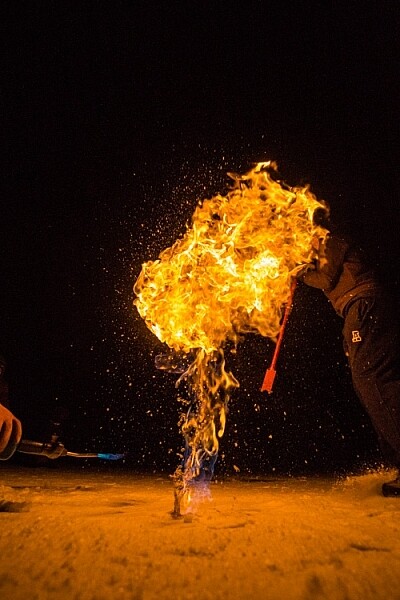
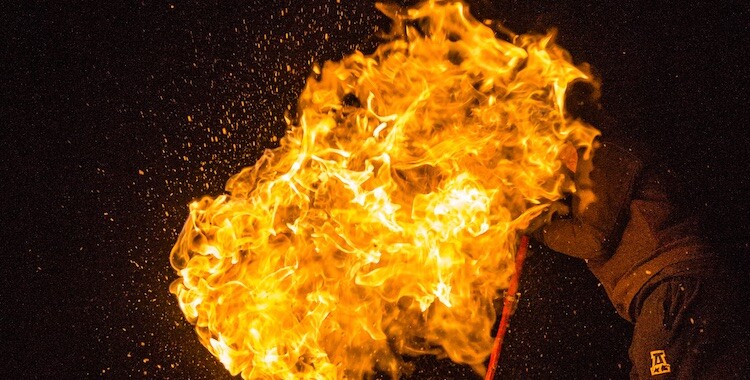
This night image required I use a fast shutter speed to retain detail in the flame, so I had to use a high ISO (3200). In the next detail shot, you can see the noise, in the original RAW file. (By the way, this image shows what happens when you free methane from a bubble in the ice of a frozen pond in the boreal forest, and then set it alight.)

First, the acronym ISO is terrible, because it’s basically meaningless in terms of photography. It stands for “International Standards Organization” a European non-governmental organization that makes sure industries apply the same standards. In the case of photography, they want to make sure that an 800 ISO on a Canon is the same as on a Nikon, Sony or Fuji. If that standard didn’t exist, then settings wouldn’t be applicable across camera brands. So if I set my Canon to make an image at 1/100th sec at f/2.8 and ISO 400, and you set your Nikon to the same setting, we wouldn’t get the same exposure. Thankfully all the major manufacturers do subscribe to the ISO standards.

Yeah, yeah, but what is ISO? It is the measure of the sensitivity of your camera’s digital sensor to light. The lower the number the lower the sensitivity, the higher the number the more sensitive the sensor becomes. If you are shooting in a low light situation, say a poorly lit room or a dusky evening, an ISO setting of 100 will require that more light reaches the sensor than if you were to use a setting of 400, 800, or 1600.

Five Most Essential Camera Settings ISO

Note the noise in the detail of the person’s clothing and in other shadowed areas.

Drawbacks of high ISO

So why not shoot at high ISOs all the time? Two reasons: 1. High ISOs often create digital noise on the image, (though camera sensors are getting better and better) and 2. Sometimes you may want to force a slow shutter speed, in which case you want low sensitivity to light. This may be the case when you are trying to capture blurred motion such as water, wind or to create pleasing blurs in sports photography.

  1. High ISOs often create digital noise in the image, (though camera sensors are getting better and better)
  2. Sometimes you may want to force a slow shutter speed, in which case you want low sensitivity to light. This may be the case when you are trying to capture blurred motion such as water, wind, or to create pleasing blurs in sports photography.

In short, ISO is one of the three tools you have at your disposal to manipulate your exposure.

Shutter Speed

The length of time your camera’s sensor is exposed to light is the shutter speed. Many cameras have a mechanical shutter that snaps open and closed allowing light to reach the sensor, others use a digital shutter that simply turns on the sensor for the set period of time before switching it off again. Shutter speed has a huge impact on the final image. A long shutter speed will create blur in moving subjects. As a landscape photographer, I use long shutter speeds often to blur water, expose starlight, or capture wind motion.

Five Most Essential Camera Settings

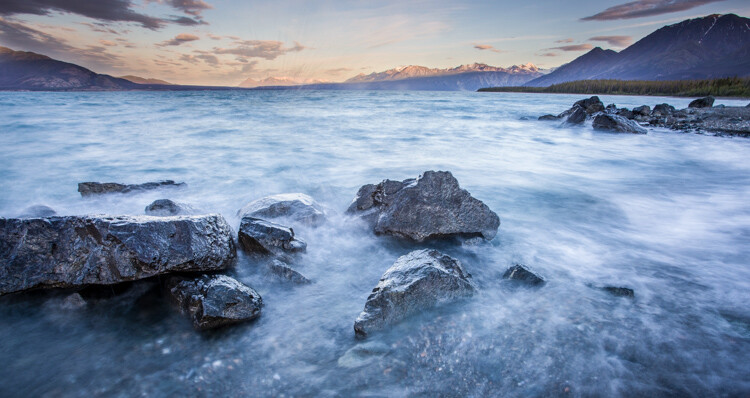
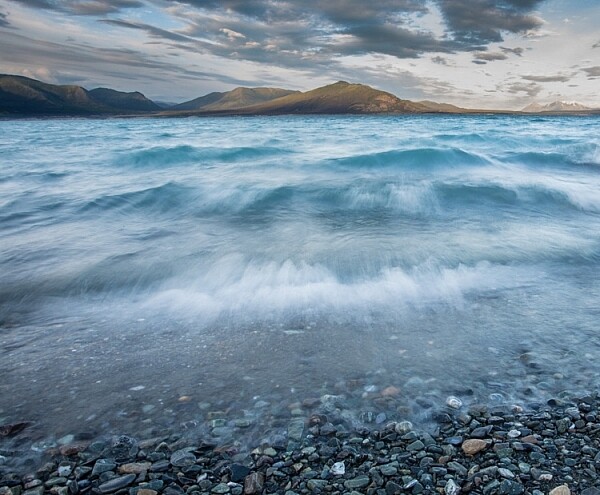
For this image, I used a 0.5 sec shutter speed to blur the waves somewhat, but retain detail.

Five Most Essential Camera Settings shutter speed

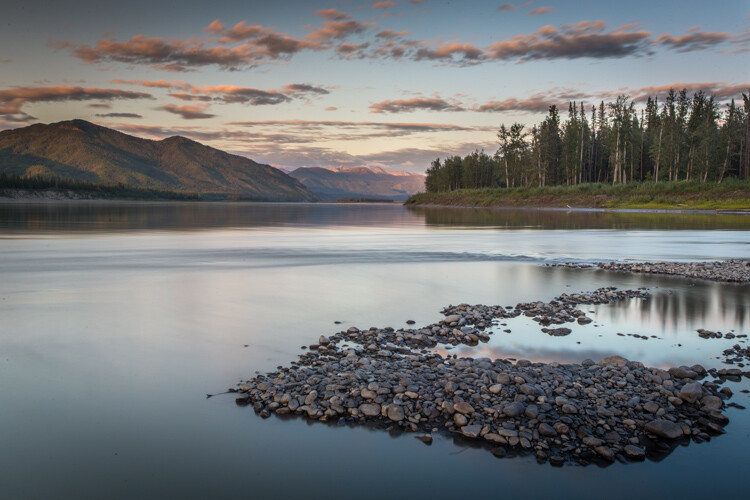
A 30-second shutter speed blurred the Yukon River in this image, into a mirror-like surface.

Short or fast shutter speeds have the effect of stopping motion. Use a shutter speed of 1/2000th of a second and the motion of a runner or a cyclist will be stopped dead.

Five Most Essential Camera Settings shutter speed

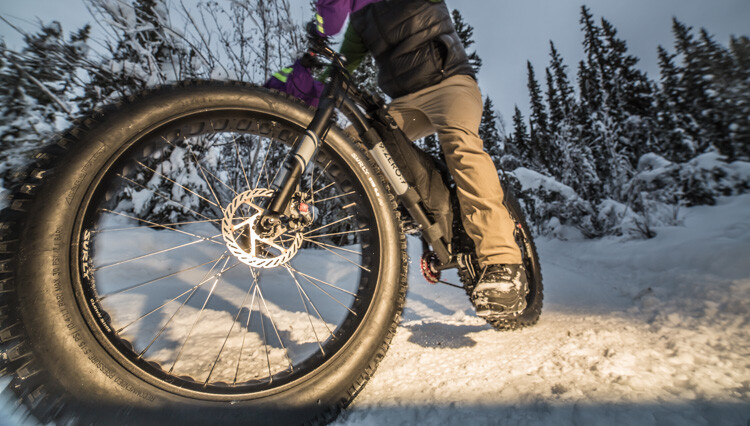
This image of a bike passing used a shutter speed of 1/500th of a second. It was just enough to be sharp overall while retaining some sense of motion in the spinning tire.

Your use of the shutter has to be thoughtful to create a good image. Think about the final image you want to create. Does it have blurred components or is it all sharp? Do you want to stop, or convey the sense of motion? Consider, experiment, then decide on your shutter speed.

Aperture

Five Most Essential Camera Settings aperture

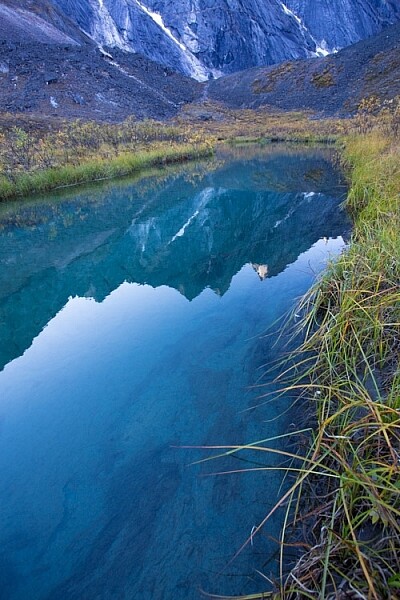
An f-stop of f/11 at 17mm was sufficient to make the entire image, from inches in front of the lens to the cliffs in the distance, sharp.

The aperture, or f-stop, may be the most confusing aspect of photography for many photographers because it affects images in unexpected ways. Essentially, the aperture is how big the hole in the lens is. The smaller the hole, the less light is allowed in, the larger it is, the more light gets through. What often confuses people is the numbering system: the smaller the number, the larger the hole. So f/2.8 is a larger opening than f/4, f/5.6, f/8, f/11 and so on. Lenses with a wide maximum aperture (a small number like f/2) are considered “fast” meaning they are capable of allowing in more light.

But it’s not just about light, and how wide a lens can open. The aperture also affects image sharpness. Most lenses (dare I say all?) are sharper, a few stops down (called the sweet spot). A lens with a maximum aperture of f/2.8 will create a sharper image at f/8, then at f/2.8. The higher quality the lens, the less this matters, but it is noticeable on most lenses.

Five Most Essential Camera Settings aperture

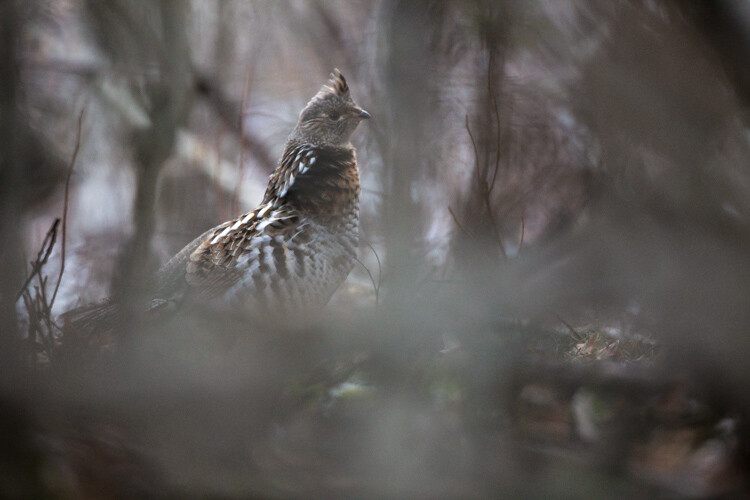
A very shallow depth of field in this image brings the grouse hiding in the brush into focus while the surrounding chaos of branches blurs into a haze.

Depth of Field and application

Next, the aperture also controls the Depth of Field. The DoF is the amount of the image from close to far that is in focus. A lens, when set wide open, say f/2.8, will have less DoF than when the same lens is set to f/11.

Like shutter speed, your use of aperture should be purposeful. Have a landscape image that you want in focus from front to back? You better select a high f-stop (like f/11). How about a portrait where you want a clean, soft background but a tack-sharp eye? Then use a small f-stop (like f/2.8 or f/4) and watch that focus point.

The aperture has a direct impact on shutter speed. A large f-stop will require you to use a longer shutter speed to attain proper exposure. Just as lower f-stop, will allow you to use a fast shutter speed. These two are completely interrelated, there is no escaping it, so you NEED a strong understanding of both.

White Balance

White balance, like ISO, relates to the sensor, but in this case, it has to do with the color of the light, rather than its brightness.

Different light sources have different color tones. Our eyes often don’t detect these differences, but you can bet your camera will. Have you ever seen a photo of a home interior lit by soft-white bulbs, but including a window? Usually, the interior of the room looks natural while the light outdoors looks artificially blue. That’s white balance. The camera (or photographer) decided to use the interior light (the warm-toned bulbs) as the natural color, but then the natural light

The camera (or photographer) decided to use the interior light (the warm-toned bulbs) as the neutral color, but then the natural light outdoors appears blue. When the white balance is set wrong, the colors are off. They look too yellow, blue, or orange. When it’s correct, everything looks natural, or as our eyes detect it.

Five Most Essential Camera Settings white balance

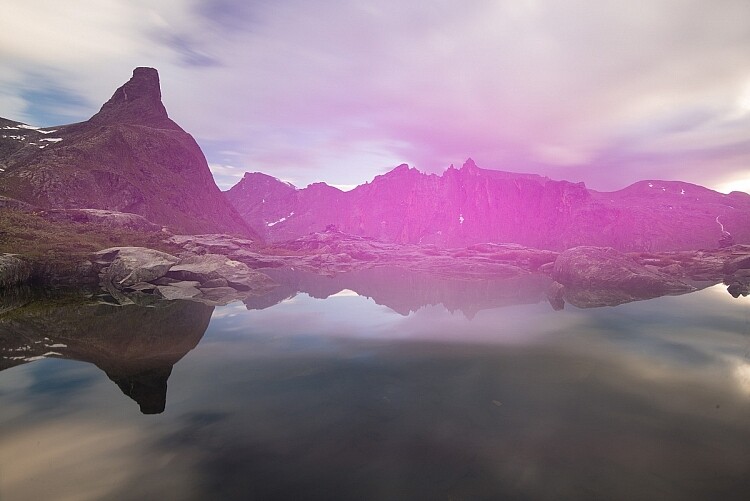
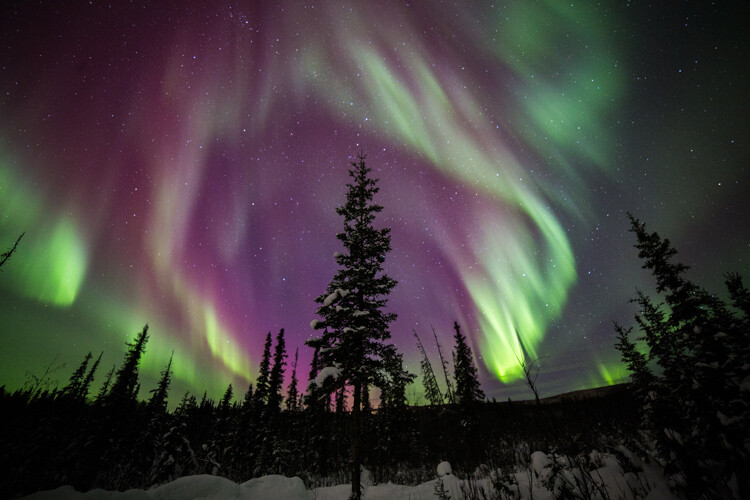
Here is the camera’s AUTO selection for the White Balance. The colors of the aurora borealis appear too purple and yellow.

Five Most Essential Camera Settings white balance

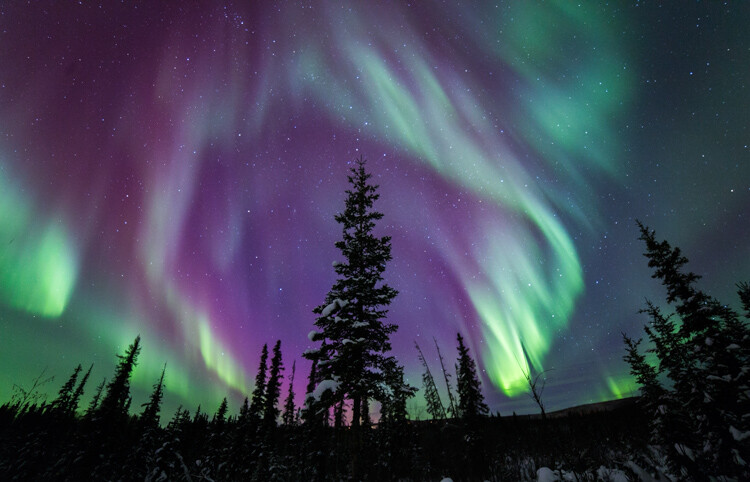
In this version, using the same post-processing for exposure, I adjusted the white balance further into the blue range, making the colors of the lights appear more natural and pleasing.

What about Auto White Balance?

I’ve got a confession to make here. I almost always use the AUTO white balance setting on my cameras. Cameras are pretty darn good at assessing color tones and deciding on the appropriate white balance. When it does get it wrong, I can check the image on the LCD and make the correction for the next shot. Second, I shoot exclusively in RAW format which means that I can make adjustments to the white balance in the computer. I trust the image on my computer screen more than I trust the tiny LCD on the back of my camera.

That said, there are times to adjust the camera’s white balance settings. The first is if you are shooting JPEGs. That image format will not allow you to effectively adjust white balance later, so it’s got to be right in the camera. The second is when stacking images either for high contrast scenes or for panoramas. When stacking images, slight changes in color tones will make combining them into HDR or panoramas much more difficult or impossible. You can also use White Balance if you purposefully want to make an image look cool or warm, or if you are using artificial lights. (Now THAT subject warrants an article of its own…)

Be mindful of your White Balance, know what it does and how it will impact your image, then decide how, or whether to use it.

Exposure Compensation

ak-homer-109266-sunset-139

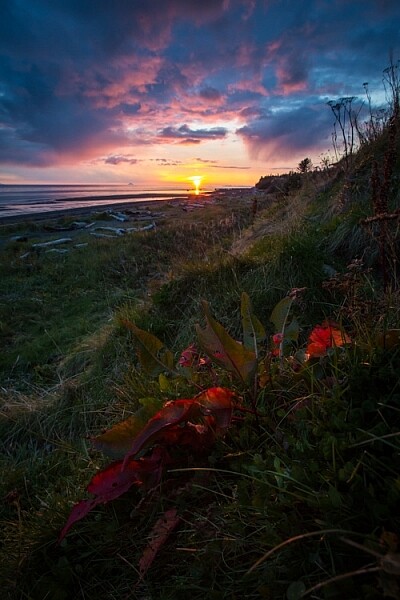
Here I used Exposure Compensation to make sure that the image was bright enough to show details in the foreground while assuring that the bright sunset in the background was not blown out.

These two images show how useful Exposure compensation can be. The image below was made in bright sunlight, but a purposeful underexposure of three stops reduced the mountains to black but retained detail in the sky, making a surreal image.

Know your camera well

Exposure Compensation is a tool you should know how to adjust without even lowering the camera from your eye. Exposure compensation allows you to very quickly, add or subtract light from an image. Too dark? Use Exposure Compensation to add a stop of light. Too bright? Exposure Compensation can quickly reduce the exposure. How it is set depends on your camera settings.

I use Aperture Priority mode most often on my camera. That means I select the aperture, and the camera decides the shutter speed. If I adjust my Exposure Compensation, the camera will retain my chosen aperture and simply adjust shutter speed up or down to get the desired exposure. If I were to use Shutter Priority, as I sometimes do, the camera will adjust the aperture. In AUTO the camera will make that decision for me.

I use Exposure compensation constantly. It is my go-to method for fine-tuning my exposure in the field. On my Canon DSLR, I can adjust it with a simple twitch of my thumb on the rear wheel of the camera. Other cameras have their Exposure Compensation controls on the front, a wheel near the shutter button, or some other system of buttons on the back. Know how your camera works, and learn to adjust this quickly and efficiently. Understanding this important tool will mean you don’t miss your chance to get the shot right when you are working in the field or studio.

Conclusion

These five camera settings are the most important things to understand on your camera. Experiment with them so you know how they affect your final image, and know how to change each quickly and without fuss. Once you do, you’ll have taken charge of your photography, and be on your way to creating purposeful images.

If you have comments or questions please share post them below.

googletag.cmd.push(function() {
tablet_slots.push( googletag.defineSlot( “/1005424/_dPSv4_tab-all-article-bottom_(300×250)”, [300, 250], “pb-ad-78623” ).addService( googletag.pubads() ) ); } );

googletag.cmd.push(function() {
mobile_slots.push( googletag.defineSlot( “/1005424/_dPSv4_mob-all-article-bottom_(300×250)”, [300, 250], “pb-ad-78158” ).addService( googletag.pubads() ) ); } );

The post The Five Most Essential Camera Settings and How to Use Them by David Shaw appeared first on Digital Photography School.


Digital Photography School

 
Comments Off on The Five Most Essential Camera Settings and How to Use Them

Posted in Photography


Six Essential Steps to Taking Great Photographs

05 May

Whether you have been creating photographs for years, or only for few weeks, your goals and dreams are to create great photographs that everyone will admire. You may notice this is not an easy task, and I’m sure that most of the time you experience more disappointments than successes. But don’t worry, I have for you six essential steps that will help you speed up the process, and give you confidence on your journey to these elusive great photographs.

Step 5 - Organise by eva polak

Step 1 – See

Seldom does a photograph succeed because of unusual technique or exotic equipment. Most of the time it succeeds for one simple reason – the photograph was well seen. So, to create great photographs we just need to learn to see better.

Unfortunately this isn’t as easy as it sounds. There’s more to seeing than just looking. It requires time and patience. Begin by concentrating on the objects before you; see how light strikes those objects; see colour, see quality and direction of light, see contrast, see texture, lines,forms and shapes, see details.

The strength of a photograph is directly related to how well, and how carefully you see things around you.

Step 1 - See by eva polak 2 Step 1 - See by eva polak

Step 2 – Feel

Feeling has to do with the emotions generated by a place or subject. Sometimes you need to just sit and absorb your surroundings. Listen to the wind and the birds. Smell the flowers. Feel the rough texture of the trunk you sit on. If you are photographing an animal, watch its movement and behaviour. If you are photographing people, listen to their words, and try to understand their feelings expressed by body language. You can’t photograph the smell of flowers, the sound of birds, or the feelings of a person, but the emotions generated by them can guide you in finding the essence of the scene or subject.

Step 2 - Feel by eva polak 2 Step 2 - Feel by eva polak

Step 3 – Think

This is the most important step in the process. Strong images begin in the mind, not in the camera. Before you begin photographing ask yourself, “Why am I about to take this photo?”

Think about how you will use that sensual input and combine it with your camera, the lighting, and the mood. Is the lighting the best? Would soft, overcast light work better? What about angle of view? High angle? Low angle? Which lens will give the effect you are after? What about shutter speed and aperture?

Answering all these questions is very easy when you have a clear idea of why you want to take an image. Your choices will be completely different when you want to just record your holiday, as opposed to capturing the warm glow cast over the scene by the evening light.

Step 3 - Think by eva polak 2 Step 3 - Think by eva polak

Step 4 – Isolate

Many good shots have been spoiled through poor composition. We tend to concentrate our attention on the subject of a photo, remaining oblivious to what is going on beyond. Make a habit of spending just a second or two before pressing the shutter, checking the viewfinder for any unwanted elements. Get rid of those chaotic objects in the picture. Simplify. Isolate only those elements that convey the message you are trying to express. Emphasize the strong lines, shapes, patterns, textures or colours – but not all of them at once. Be bold and decisive. Ask yourself why. What does it contribute to the overall image? Can you make it stronger by isolating even more? Would you hang that picture on your wall? If not, why not?

Step 4 - Isolate by eva polak Step 4 - Isolate by eva polak_2

Step 5 – Organize

Having isolated carefully, you now need to organize or arrange the elements in the strongest possible way. Where should you place the subject in the frame? In the centre? If so, why? The arrangement may be too boring or static, or on the other hand, it may convey a sense of peacefulness. Or should you put the subject near the edge of the frame? What about the picture orientation itself? You have a choice of creating a vertical or a horizontal image. Which is best for the subject? Vertical orientation tends to emphasize vertical lines or the height of things. Horizontal orientation can give emphasis to sweeping panoramas or the movement of subjects. When you make these choices, always by guided by the message that you are trying to express.

Step 6 - Experiment by eva polak Step 6 - Experiment by eva polak_2

Step 6 – Experiment

Digital photography makes it easy to experiment because you have instant feedback on the LCD screen. Look for new ways to portray familiar subjects. Don’t always photograph the same kinds of scenes in the same ways. Be creative, try different lenses or compositions or angles of view. Play with light. Investigate, explore, observe, evaluate. Don’t be afraid to make mistakes, and above all, have fun!

googletag.cmd.push(function() {
tablet_slots.push( googletag.defineSlot( “/1005424/_dPSv4_tab-all-article-bottom_(300×250)”, [300, 250], “pb-ad-78623” ).addService( googletag.pubads() ) ); } );

googletag.cmd.push(function() {
mobile_slots.push( googletag.defineSlot( “/1005424/_dPSv4_mob-all-article-bottom_(300×250)”, [300, 250], “pb-ad-78158” ).addService( googletag.pubads() ) ); } );

The post Six Essential Steps to Taking Great Photographs by Eva Polak appeared first on Digital Photography School.


Digital Photography School

 
Comments Off on Six Essential Steps to Taking Great Photographs

Posted in Photography


14 Essential Rain Photography Tips for Creating Dramatic Images

16 Apr

Wherever you travel, you are always free to take that perfect shot from the best angle. Not when it’s pouring down heavily, though. Winter is not always the best climate for comfortable outdoor photography. But guess what, if you are a clever photographer, you can take even better photos in the rain than on sunny days. Cold and stormy weather Continue Reading

The post 14 Essential Rain Photography Tips for Creating Dramatic Images appeared first on Photodoto.


Photodoto

 
Comments Off on 14 Essential Rain Photography Tips for Creating Dramatic Images

Posted in Photography


Essential Printing Tips & Best Printers for HDR Photography

16 Mar

Thanks to advances in camera and photo processing technology, even dedicated amateur photographers can shoot scenes that transcend reality. High Dynamic Range photography is one such technique which exploded in popularity over the course of the past several years largely due to the incredible range of tonal detail that result from combining exposures. If you’re putting time and effort into Continue Reading

The post Essential Printing Tips & Best Printers for HDR Photography appeared first on Photodoto.


Photodoto

 
Comments Off on Essential Printing Tips & Best Printers for HDR Photography

Posted in Photography


5 Essential Things You Need to Know About the Lightroom Library Module

16 Dec

Essential things Lightroom

For those of you who have been following my Lightroom articles I thought it would be fun to test your knowledge. We’ll start with the Lightroom Library module because the work you do here, lays the foundation for everything you do inside Lightroom. Master the Library module and you’ll be well on your way to becoming an expert on the entire program.

Ready? Let’s start with what is probably the most important thing of all – backing up your Catalog.

1. How to back up your Catalog

This is really important. Your Lightroom Catalog is absolutely essential because it’s where Lightroom stores every piece of information it has about your photos. Not only does this include the location of your photos (i.e., where they are saved on your hard drive) but any metadata associated with them (from camera settings to keywords), Lightroom specific information (such as which Collections a photo belongs to) and any edits you have made in the Develop module. Yes, these are all stored in the Catalog.

How much of a disaster would it be if you lost all this data? I’m sure it would be a major loss. That’s why it’s so important that you back up your Catalog regularly. You should also back it up to an external hard drive, not to an internal one, in case your computer is lost or stolen.

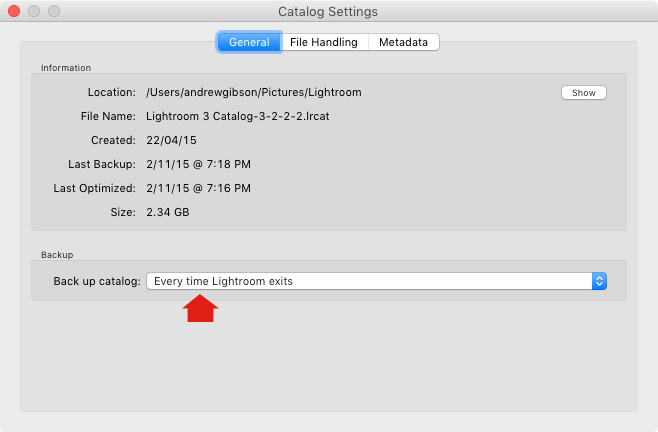
You can check your back up settings by going to Lightroom > Catalog Settings. Click the General tab – Back up catalog should be set to Every Time Lightroom Exits as shown below.

Essential things to know about Lightroom

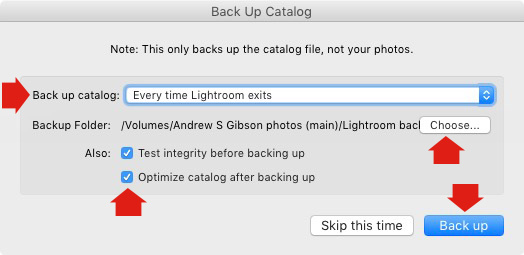
Connect the external hard drive on which you back up your Catalog, then exit Lightroom. Before Lightroom closes down, it displays the Back Up Catalog window. The Backup Folder setting should point to a folder on your external hard drive. If it doesn’t, click Choose and change it now.

Essential things to know about Lightroom

When you exit Lightroom is the only time you will see this popup box, and the only place you can change where it saves the backup of your catalog.

Make sure the Test integrity before backing up and Optimize catalog after backing up boxes are ticked. When you’re done click the Back up button. Lightroom will save a backup of your Catalog to your external hard drive before closing. This may take some time, especially for a large Catalog, so be patient.

Some important things to note about Catalog backups:

  • You only need to keep the last two or three backups. You can delete older ones to free up hard drive space.
  • If you have Lightroom 6 or Lightroom CC the backed up Catalogs are compressed, saving hard drive space.
  • You should always back up your Lightroom Catalog to a different hard drive than the one the main Catalog is stored on. That way, if your main hard drive fails, the backed up Catalog is safe.
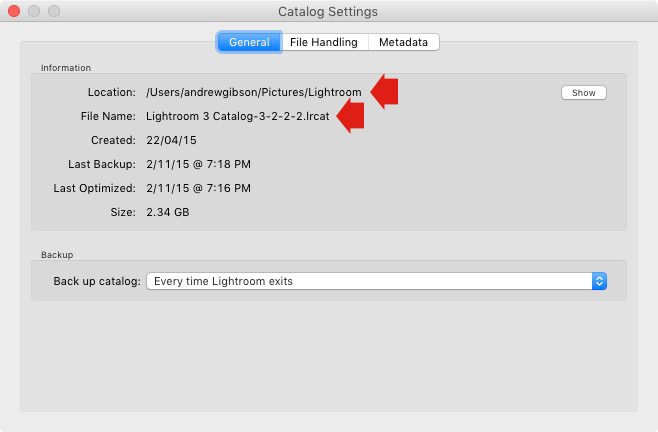
  • Once a month (or more often if you like) copy the latest backup to Dropbox, Google Drive or another cloud storage solution. This is to protect you in case you lose both your computer and your external hard drive to theft or fire. The location and name of your Lightroom Catalog are recorded in Catalog Settings.

Essential things to know about Lightroom

2. How to back up your photos

This is important to mention because I want to make sure you understand that your photos are not stored inside Lightroom, or in the Catalog. Your photos are saved on your hard drive (or drives) and you need to back them up yourself. It is your responsibility – Lightroom doesn’t do it for you.

There are many ways of backing up photos, you need to find the method that works best for you. However I’m sure it will help if I share my method. Feel free to use, adapt or ignore it.

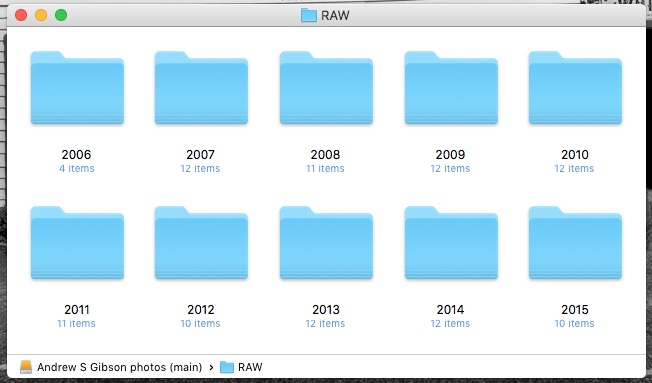
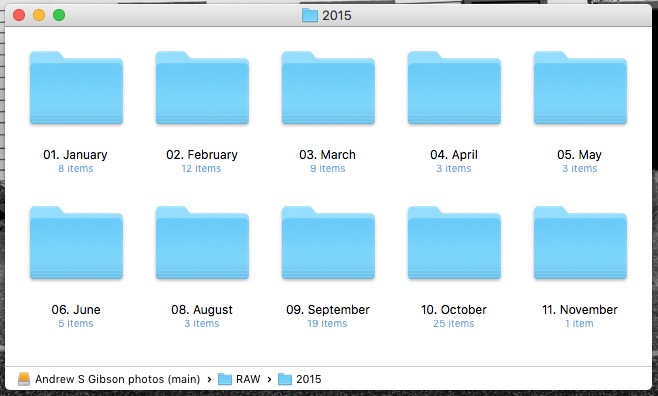
  • Create a folder called Raw. All your Raw files are stored in there (I shoot everything in Raw – you could simply call your folder something like Photos if you shoot a mixture of Raw and JPEG).
  • In that folder create a new folder for every year you take photos.

essential things about Lightroom

  • In each of those folders, create 12 folders, one for every month of the year.

essential things about Lightroom

  • Whenever you import photos into Lightroom, select the correct destination folder depending on the month and year the photos were taken.
  • Place each shoot into a folder of its own. You can either give it a name or organize the folders by date.

essential things about Lightroom

This system works because it’s easy to see whether your Raw files are backed up. Want to back up all your Raw files to another hard drive? Just copy the Raw folder. Want to see whether you’ve backed up all the photos you’ve taken this month? It’s easy to do so with this system.

By the way, I keep my Raw files backed up to four different external hard drives, one of which is stored off-site. That way, if one of the hard drives fails, I have three other copies.

3. How to set up File Handling in Catalog Settings

The File Handling settings are important because they help you strike a balance between optimizing Lightroom’s performance speed, and using hard drive space.

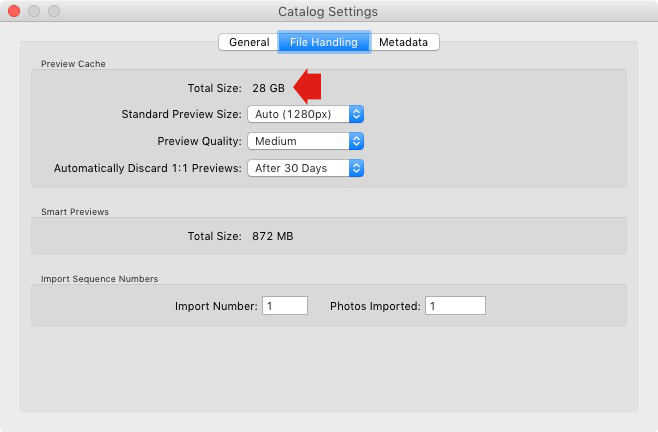
The first thing you need to look at is the total size of the cache. This tells you how much hard drive space your previews take up. For example, looking at mine (see below) I can see my Lightroom previews are currently taking up 28GB.

Essential things to know about Lightroom

It’s important to keep some of your hard drive free (at least 10%, but preferably more) otherwise Lightroom will slow down (as will everything else your computer does). If you are running out of hard drive space, come and have a look here to see if your preview files are too large.

There are two steps to keeping your previews file under control.

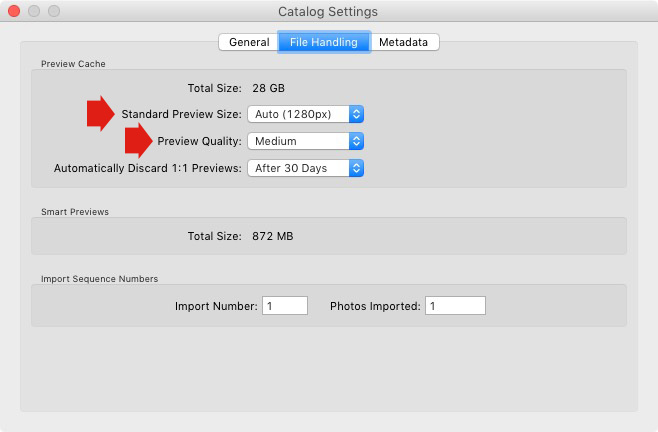
1. Make sure Lightroom is generating the optimum size Standard Previews. These are used to display your photos in Loupe View and don’t need to be any larger than your monitor’s resolution.

If you have Lightroom 6 or Lightroom CC you can set the size to Auto. Lightroom will calculate the optimum size for you. In Lightroom 5 or earlier pick the size that best matches your monitor’s resolution.

Set Preview Quality to Medium – it gives you the best balance between quality and size.

Essential things to know about Lightroom

2. Set Automatically Discard 1:1 Previews to After 30 Days. You need 1:1 previews for zooming in to photos, and working on them in the Develop module. However, they are very large. If you generated 1:1 previews for every photo in your Catalog, and never deleted them, you would eventually run out of hard drive space. To be honest, it doesn’t really matter which setting you choose here as long as it’s not set to Never. You can always regenerate discarded 1:1 previews if you need them again later.

4. How to search for images

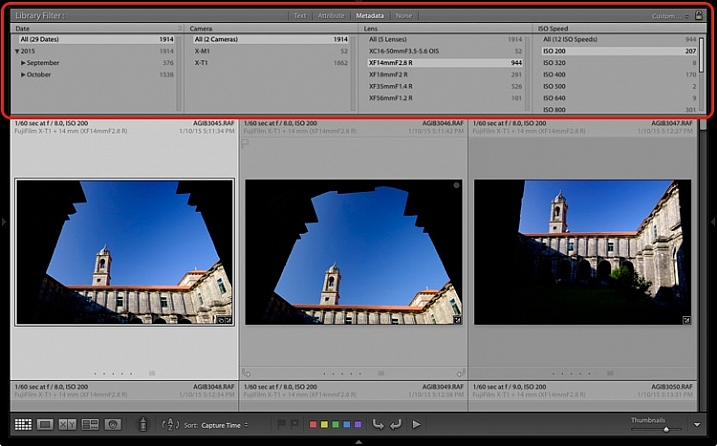
One of the benefits of building the Lightroom architecture on a database is that it is easy to search your photos. You do this in the Filter Bar, which is displayed above the Content Window in Grid View (press ‘\’ on the keyboard if you don’t see it).

There are three types of searches:

  1. Text: Search keywords, filenames, titles, captions, etc., for text sequences.
  2. Attribute: Filter by flag, star rating, colour label or file kind (master photo, virtual copy, or video).
  3. Metadata: Search by date, camera, lens, camera setting (ISO, shutter speed, aperture, etc.), aspect ratio or any of the dozen or so search options listed there.

Have a play with these options to see how it works. Just bear in mind that Lightroom is searching the selected folders or Collections, not your entire Catalog when you do so (select All Photographs to search your entire library).

Essential things to know about Lightroom

5. How to use Collections

Collections are virtual Folders, which you use to organize your images. Folders are limited because a single photo can only be stored in one Folder at a time. The same photo can be stored in as many Collections as you like, making Collections the easiest, and most flexible, way to organize your photos.

An example of this is a photo taken of a person called Jenny in Rome in November 2015. The photo can only be stored in one Folder, but it can be added to a Collection called Jenny, another one called Rome, another called 2015 – in fact as many as you need.

Your folders should be set up to make backing up easy (see earlier point). Your Collections should be used to organize your photos. My article Use Lightroom Collection to Improve your Workflow will help you with this.

Your turn

Of course, this list is not exhaustive, but I’d like to hear your thoughts as well. What do you think is essential to know about the Library module? Do you have any questions about the points raised in this article? Please let me know in the comments below.


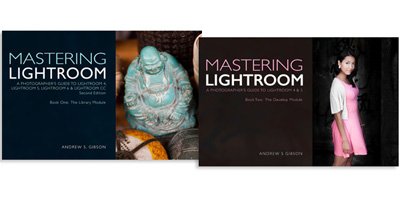
The Mastering Lightroom CollectionMastering Lightroom ebook bundle

My Mastering Lightroom ebooks are a complete guide to using Lightroom’s Library and Develop modules. Written for Lightroom 4, 5, 6 and CC  they  show you how to import and organise your images, use Collections, creatively edit your photos and how to work in black and white.

googletag.cmd.push(function() {
tablet_slots.push( googletag.defineSlot( “/1005424/_dPSv4_tab-all-article-bottom_(300×250)”, [300, 250], “pb-ad-78623” ).addService( googletag.pubads() ) ); } );

googletag.cmd.push(function() {
mobile_slots.push( googletag.defineSlot( “/1005424/_dPSv4_mob-all-article-bottom_(300×250)”, [300, 250], “pb-ad-78158” ).addService( googletag.pubads() ) ); } );

The post 5 Essential Things You Need to Know About the Lightroom Library Module by Andrew S. Gibson appeared first on Digital Photography School.


Digital Photography School

 
Comments Off on 5 Essential Things You Need to Know About the Lightroom Library Module

Posted in Photography


10 Essential Pieces of Gear you Need for Landscape Photography

22 Jun

If you are interested in going out and getting some high quality landscape photographs, here’s a comprehensive list of items you will either want to consider, or must have, in order to increase your chances of getting some keepers:

002

#1 – The Internet

Whenever I start to plan a photo shoot to a particular location, I usually begin by googling the area. If it’s a relatively well-known location, you will probably find some very interesting, and comprehensive, websites made by other photographers or adventurists/bloggers. The problem is, if it’s a famous location, you will also get a ton of not-so-interesting and even incorrect information as well. Weeding through Google to isolate the helpful and high quality blogs or websites from the crummy ones is an art form all its own. Once you get used to perusing Google, reading just a few sentences of a blog will clue you in as to whether or not the information you’ve found is worth taking it to heart or not.

If you aren’t lucky enough to find two or three really good blogs about the location, head over to Alltrails.com. It has a sizeable database of locations around the country that have been hiked, including user’s reviews of the location and the level of difficulty in getting there. If it’s a famous site, TripAdvisor.com has a good database of information, including the places to stay nearby.

From there, you’ll be off and running with more information than you probably need. In most cases, what becomes tricky is weeding through everything you find and parsing it down into just a few brief paragraphs on your overall plan of action.

#2 – A Strong Backpack

If you’re looking for a place to save some money, a backpack is not where you want to be counting pennies. You get what you pay for, and when it comes to choosing a backpack to take on a landscape shoot, it is very important you use a bag that is strong and water resistant, with reinforced padding.

Don’t fall victim to the lame zipper bug (you know you’ve been there before, trying to unzip the bag and before you know it, the zipper pops off the bag like a cricket). Do yourself a favor and invest in a high quality bag, like the Tamrac Expedition Series, or the Lowepro Pro Trekker. It will last you many years, and will help you take care of your camera and lenses in the long run.

001

#3 – A Weather-Sealed DSLR Camera

Generally speaking, for various reasons, I still much prefer a DSLR (such as the Nikon D810) over a full-frame mirrorless camera (such as the Sony A7r) for landscape photography. One reason is that certain DSLR models are significantly more rugged and weatherproof than mirrorless.

Eventually you’re going to drop a camera. It happens to all of us (at least that’s what everyone told me the first time I dropped a camera), especially those of us who are out in less than perfect weather conditions. DSLRs made from composite magnesium handle some rough treatment much better than the plastic-bodied entry level DSLRs. My first full-frame DSLR was the Nikon 700. That camera could survive being run over by a small truck. A perfect companion for the clumsy, just-starting-out landscape photographer that I was then.

Also consider investing in a quality raincoat for your lens/camera. I don’t recommend getting one of the cheap, flimsy, clear plastic covers made from recycled sandwich bags…they will tear easily and won’t stay put in windy conditions. Get a cover that is heavy duty…one good coat will last a long time, and they aren’t pricey.

#4 – A Sturdy Tripod

To handle poor footing out in the muddy, rocky, sandy wilderness, and to protect your camera lens setup, a tripod is one item you don’t want to mess around with. In fact, this is the one item more than any other that I would recommend you consider heading to the northern end of your projected budget in order to select a high quality tripod.

A flimsy tripod could end up costing you a chunk of a paycheck in repair bills. It only takes one good gust of wind to knock over an unstable tripod. Having a nice camera and lens, but an entry-level tripod is like putting four worn down, old tires on a Ferrari. It won’t run properly and it’s dangerous for the rest of the setup.

003

A good tripod will outlive both of us, so it’s rare you’ll need to invest in more than one over the course of many years. A few extra bucks goes a long way towards getting having a more stable, secure setup.

See Really Right Stuff, Manfrotto, Gitzo, or Feisol for excellent tripods. In my opinion, you should strongly consider carbon fiber over aluminum; they are the lightest and strongest on the market.

#5 – Lenses

This is where the fun begins, and your wallet ends. Lenses are the single most important piece of equipment in photography. You can have the finest camera, tripod, backpack, media card, and accessories available, but if you don’t have quality glass, it will severely complicate your ability to take a good photograph.

I typically prefer to shoot with prime (fixed focal length) lenses, as opposed to using zoom lenses. My preference for primes is mostly about making sure that I get as personal and into the scene as possible.

With zoom lenses, I tend to get a bit lazy and shoot without adequately working the scene. There is no substitute for moving your feet and SEEING the composition with your own eyes, and not just through the viewfinder. The element of perspective is lost if you simply zoom, instead of walking around and checking things out with your own eyes first.

That said, it’s strictly a subjective thing. I know plenty of photographers who prefer using zoom lenses, and that’s great. Most of the time, the best gear for you is the gear you’re most comfortable with. The key suggestion here, with any lens, prime or zoom, is that you RENT one and try it out before buying it. You can’t know how the lens will work for you until you use it in various situations.

004

#6 – A Reliable Remote Trigger or Shutter Release

This is often overlooked by many photographers, but I firmly believe having a remote trigger makes a big difference. Without one, you have to physically press on the top of the camera. No matter how careful you are, and no matter how securely fastened the camera is to the tripod, this will introduce some micro-shake into the setup. If you want your image to be as tack-sharp as possible, you don’t want anything touching the camera that doesn’t have to. Once the mirror locks up, you want your setup to be as steady as a concrete slab. Every DSLR has its own proprietary remote shutters, and you can also find quality third-party remote shutters available at a lower cost.

#7 – Filters

For landscape photography, some filters are almost as essential as lenses. I’ll keep it brief here and stick with just a few basic filters I would always want to travel with:

Circular Polarizer

A polarizing filter helps mitigate the nasty, harsh reflection of the sun off of shiny objects such as water or anything wet. To get it to work, you simply turn the filter until you see the glare disappear, then you stop turning the filter. A polarizer will also help darken a blue sky and make it a deeper, richer blue. Some people like that look, some don’t. If you do, a polarizer will help you achieve it. I use a polarizer practically all of the time when shooting in daylight.

Neutral Density Filter

An ND filter basically acts as sunglasses for your lens, it blocks some light from reaching the camera’s sensor, thereby slowing down the exposure. For example, a 3-stop ND filter (usually denoted as an 8X or 0.9 ND filter) allows three stops less light through than you’d get without the filter attached. A 5-stop ND filter will allow five stops less light, and so on. For the serious landscape photographer I’d recommend having a 2-stop, 3-stop and 10-stop ND filter. If you want to do some long exposure waterscape work, the 10-stop will come in handy to help make the water look silky smooth. You can also stretch out clouds or turn people into invisible ghosts with ND filters.

Graduated Neutral Density Filter

These are similar to ND filters, but instead of the entire filter being tinted, only the upper portion is darkened, with the tint getting darker from the middle to the edge. So, for example, if you’re photographing a horizon with a sky that’s two or three stops brighter than your foreground, you could use a graduated ND filter to help bring out the foreground more, without blowing out the horizon. It will effectively balance the amount of light received from both the brighter horizon and the darker foreground. Usually just a two or three stop GND filter is necessary. Here’s a photograph of a Graduated ND Filter:

005

Reverse Graduated Neutral Density Filter

Same principle as the one above, except instead of the tint getting darker from the middle of the filter to the edge, it’s reversed. The middle of the filter starts out the darkest, and gradually gets lighter as you travel towards the edge. These are excellent for shooting sunrises and sunsets, where the horizon line is the brightest area of the frame, and as you go higher in the sky, it becomes less bright. This is what a Reverse Graduated ND Filter looks like:

006

UV or Clear Filter

If it’s my lens, I want to do everything I can to protect it from wear and tear. I always have a clear, or UV, filter on the front of every lens I own. It does nothing to help improve the photograph in any discernible way, but it does a great job protecting the front lens element from dirt and dust, or from me walking into a door lens-first, which has happened more times than I prefer to admit.

007

#8 – Extra Batteries and Media Cards

Always, without exception, carry an extra battery for your camera, an extra media card, and an extra battery for any other battery-consuming device. If you’re bringing along a flash that takes four AA batteries, take an extra set of four with you. Chances are you won’t ever need them, but there will always be the one time when you do, and you’ll wish you had them.

#9 – The Photographer’s Ephemeris

This clever app (TPE) does an amazingly accurate job at detailing when and where the sun, and moon, will rise and set. If you’re out chasing sunsets and sunrises for photographs, this app is a must-have.

#10 – A good pair of shoes

No joke; having a comfortable pair of shoes is like having good vision. If your feet aren’t comfy, then nothing else matters. You will not be as good a photographer as you otherwise would be with comfy feet. This especially holds true on longer hikes; invest in a good pair of hiking boots. A pair that strike a balance between breathing well but also offering some water resistance.

That’s enough for the list of equipment you’d want to consider having to photograph landscapes. If you’ve made it this far in this article, I hope you’ve gotten something useful out of it. Have fun shooting those landscapes!

008

googletag.cmd.push(function() {
tablet_slots.push( googletag.defineSlot( “/1005424/_dPSv4_tab-all-article-bottom_(300×250)”, [300, 250], “pb-ad-78623” ).addService( googletag.pubads() ) ); } );

googletag.cmd.push(function() {
mobile_slots.push( googletag.defineSlot( “/1005424/_dPSv4_mob-all-article-bottom_(300×250)”, [300, 250], “pb-ad-78158” ).addService( googletag.pubads() ) ); } );

The post 10 Essential Pieces of Gear you Need for Landscape Photography by Jeb Buchman appeared first on Digital Photography School.


Digital Photography School

 
Comments Off on 10 Essential Pieces of Gear you Need for Landscape Photography

Posted in Photography


7 Essential Tips for Shooting Portraits on Location

22 Apr

I have so many friends who have the good fortune to travel the world, but they always come home frustrated because they either try to take portraits in obvious places, standing on top of the landmark with thousands of people all around, or they don’t show the things that they found interesting or personal about where they were. So let’s Continue Reading

The post 7 Essential Tips for Shooting Portraits on Location appeared first on Photodoto.


Photodoto

 
Comments Off on 7 Essential Tips for Shooting Portraits on Location

Posted in Photography