RSS
 

Posts Tagged ‘Equipment’

Underwater Photography: Tips And Equipment

25 May

There is a lot of intrigue and mystery about underwater photography, but there is also also a lot of information out there about it.  Mostly what you will find when doing your research is information about wildlife photography, but it is still very useful when dealing with Fashion or Beauty Advertising Underwater photography.   I believe what is important is knowing Continue Reading

The post Underwater Photography: Tips And Equipment appeared first on Photodoto.


Photodoto

 
Comments Off on Underwater Photography: Tips And Equipment

Posted in Photography


Essential Equipment for Long Exposure Photography

22 Apr

Normally, I say that equipment is not important, at least not for those just getting started with photography. Until you know how to master the camera, equipment shouldn’t be the main focus. You don’t need to worry about having the best equipment or things you don’t actually need. However, to achieve certain techniques or effects, having the right equipment is essential. Long Exposure Photography is one of these techniques where some additional equipment is needed.

equipment for long exposure photography

Let’s jump straight to it and look at what I consider to be essential equipment for long exposure photography:

Camera with Manual and Bulb Mode

Okay, so this one might be a given. It’s obvious that you’ll need a camera to take an image. However, to be able to use a slow shutter speed (which is what long exposure photography is all about), you need a camera that allows you to manually adjust the ISO, aperture and shutter speed.

Since you are working with different shutter speeds it’s essential that you’re able to adjust these settings yourself, so you can then control the quality of your image. Even though most compact cameras do have this opportunity now, I highly recommend using a DSLR (or mirrorless) camera if you don’t already. It doesn’t have to be anything fancy, an entry level camera will do just fine.

bulb mode

Nikon D800 Bulb Mode

Bulb Mode is another option that it’s beneficial for your camera to have. While it’s not essential, it allows you to take exposures that are longer than 30 seconds. Most DSLR cameras have a maximum shutter speed of 30 seconds so if you want to use an exposure longer than that, you need to be in Bulb Mode. 

With this mode selected (it’s located different places on different cameras), you can expose an image for as long as you want. Basically, as long as you hold the shutter button triggered, the camera continues to take the image. I’ll come back to a neat trick to avoid pushing the button for several seconds or minutes in a bit.

A Tripod

I consider a tripod to be essential for any type of landscape photography but when dealing with slow shutter speeds, it’s hard to work without one. Some of you might comment that you can just lean the camera on a fence or lay it on a rock but that really limits your flexibility and, of course, the stability of your camera.

The reason I always travel with a tripod is because I normally work with images that have a shutter speed just too slow to capture handheld. Plus even if I’m not, I have the option.

This image wouldn’t be possible without a tripod.

You don’t need to spend thousands of dollars on the best tripods available but avoid getting the cheapest aluminum ones from the local electronic shop. Make sure that the tripod you choose is sturdy enough to be used in a river with rushing water, or when the weather is windy.

Exposure times of anywhere between 1/4th of a second to multiple minutes is common with long exposure photography. It goes without saying that you’re not able to get a sharp handheld image when using a shutter speed of 30 seconds. By using a tripod you make it possible to work with such long exposures and capture great, sharp images.

Neutral density filters

I’ve previously explained how to do long exposure photography without filters, so why do I now say they are essential? It’s quite simple – the quality of your images will be much higher.

Before explaining why I consider neutral density filters to be essential for long exposure photography, let’s quickly look at what they are:

  • Neutral density filters are darkened filters that are placed in front of the lens, requiring a slower shutter speed for the same amount of light to reach the sensor.
  • There are two systems available: screw-in and drop-in or square filters.
  • The filters come in different strengths (3-stop, 6-stop, 10-stop, etc.) which describes how much you need to lengthen the exposure time to maintain a well-exposed image.

NiSi 6-Stop ND Filter in front of my Nikkor 14-24mm

There are many filters to choose from on the market and it seems like new brands appear all the time. Personally, I’ve been using LEE Filters, NiSi Filters and B+W. NiSi has become my go-to choice these days as their filters don’t have a visible color cast (which is a common issue with these types of filters). LEE is known for its strong blue color cast and B+W had a very dominant red tone. These are relatively easy to fix in Adobe Lightroom or Camera RAW but I prefer to get as much as possible right in the camera.

Why are ND Filters essential for long exposure photography?

As mentioned, these filters require you to lengthen the exposure time for the same amount of light to reach the camera’s sensor in order to get a well-exposed image. The filters are darkened and their strength dictates how much you need to slow down the shutter speed. Compared to doing this without filters, using an ND filter allows you to use a much longer exposure times while still maintaining optimal quality (the sharpest aperture of your lens).

equipment for long exposure photography

Nikon D800 w/ Nikkor 16-35mm f/4 @ ISO100 – f/11 – 241 seconds.

It wouldn’t have been possible to capture an image with a 241-second shutter speed, without using an ND filter in the conditions present when I took the image above. You might be able to reach such an exposure time at night but not during a sunset. Without a filter, I might have gotten a 1-second exposure, which would look completely different with an overall lower quality. By placing a dark ND filter in front of my lens (the NiSi 10-stop) I was able to use a very long exposure and capture some of the beautiful motion going on in the sky as well as soften the surface of the lake.

Remote shutter

I’ll admit it right away, a remote shutter isn’t essential to achieve a long exposure but it is going to make the process much easier (I feel naked when mine is left behind)!

I’ve previously written an article where I compared using a Delayed Shutter and Remote Shutter, so I won’t go into the details of which is better here. What I will mention, however, is that when doing long exposure photography you often have to work with quickly changing elements (such as rushing waves). In these scenarios, you want to be able to capture the image at the exact moment the moving element is where you want it to be and can’t afford to wait an additional two seconds (for the self-timer to go off).

equipment for long exposure

A remote shutter was used to capture the exact moment the waves went over the rock

The image above represents one of these scenarios. As the tide was rising, the formations of the waves were constantly changing. I knew that I wanted to capture the exact moment the water started running down the left side rock and to be able to do that, I needed a remote shutter. Had I used the built-in delayed shutter (with a delay of two seconds) I would most likely have missed that exact moment, even though I could have tried to predict the moment of impact.

For Bulb Mode

Another benefit of using a remote shutter for long exposure photography is that most of them have a shutter lock function, which is going to save you a lot of hassle when working in Bulb Mode. Rather than manually holding the shutter button (and causing a visible camera shake) for minutes, you can lock up the shutter with a remote release.

remote shutter

Remote Cable Release

You don’t need to purchase the most expensive release out there (they can be surprisingly pricey) just make sure that it’s something that won’t break right away and one that has the opportunity to lock up the shutter. Note: make sure to get one that is compatible with your camera model.

Cardboard to cover the viewfinder

My last recommendation is something that many articles forget to mention. You need something to cover the viewfinder! Many cameras have this as built-in function and have a sort of “curtain” that you can close. But there are still many cameras that don’t have this option. If your camera doesn’t, make sure that you bring a piece of cardboard, or similar, that you can use to block the viewfinder during a long exposure. This is to avoid any unwanted light leaks as you see in the image below.

camera light leak

I forgot to block my viewfinder so my two-minute exposure looked like this.

Conclusion

While there are many other accessories available to make long exposure photography easier, these are the ones I consider to be essential. Do you have any others to add to the list?


The-Ultimate-Guide-to-Long-Exposure-Photography-eBookIf you want to learn more about Long Exposure Photography I’ve shared everything I know in my eBook The Ultimate Guide to Long Exposure Photography. This eBook is for those who are ready to take their images to the next level and expand their creative vision.

The post Essential Equipment for Long Exposure Photography by Christian Hoiberg appeared first on Digital Photography School.


Digital Photography School

 
Comments Off on Essential Equipment for Long Exposure Photography

Posted in Photography


This art installation re-imagines photographic equipment as weapons

14 Jan

Shoot Portraits, Not People: Jason Siegel’s photographic ‘weapons’

Photo by Jason Siegel

Glance at a piece from Jason Siegel’s ‘Shoot Portraits, Not People’ art installation and you might think you’re looking at a high-powered weapon. But if you look closer, you’ll quickly see that guns and grenades are all made up of photographic equipment.

Siegel is a Denver-based lifestyle photographer, with a professional portfolio that includes work for clients in the clothing and music industries. Stepping outside of the printed image for this project, he gathered over 200 pounds of cameras, lenses, flashes and other pieces of equipment for this project. He worked with metal sculptor Keith D’Angelo to build the weapons and military paraphernalia, a process you can get a glimpse of in the behind-the-scenes video below.

‘Shoot Portraits, Not People’ opens today at BLK MKT gallery in Aspen, and will run through the month of January. See more of Siegel’s work by heading to his website or following him on Instagram and Facebook.

Via PetaPixel

Shoot Portraits, Not People: Jason Siegel’s photographic ‘weapons’

Photo by Jason Siegel

Shoot Portraits, Not People: Jason Siegel’s photographic ‘weapons’

Photo by Jason Siegel

Shoot Portraits, Not People: Jason Siegel’s photographic ‘weapons’

Photo by Jason Siegel

Shoot Portraits, Not People: Jason Siegel’s photographic ‘weapons’

Photo by Jason Siegel

Shoot Portraits, Not People: Jason Siegel’s photographic ‘weapons’

Photo by Jason Siegel

Shoot Portraits, Not People: Jason Siegel’s photographic ‘weapons’

Photo by Jason Siegel

Articles: Digital Photography Review (dpreview.com)

 
Comments Off on This art installation re-imagines photographic equipment as weapons

Posted in Uncategorized


The good, the bad and the ugly of aerial photography – part 3: equipment

26 Nov

In previous articles I’ve discussed the advantages of aerial photography and shooting from a helicopter as opposed to shooting from a light plane. But are there any special considerations with regard to equipment when shooting from the air?

Since we’ve already established that it’s the superior choice (at least in my opinion), let’s concentrate on the helicopter first. An open door gives the photographer a vast range of angle options, and selecting the equipment can be difficult at first. You can find many good compositions with ultra-wide angles all the way to telephoto lenses.

From my personal experience, the majority of my shots were taken with the wider end of a 24-70mm lens, i.e. If you only take one camera body (and don’t plan to switch lenses on the helicopter), take either a 24-70 or an ultra-wide such as a 16-35. Remember that an ultra-wide might come in handy at times, but when a need for longer focal length comes, it might lack the reach.

Naturally, lens selection also depends on the subject: if you know you’ll be shooting grand landscapes, use a wider focal length. If you’re interested in capturing detail or if you’re limited in your ability to get close to the subject, use a longer lens.

From high up, you don’t always need an ultra-wide lens to capture grand landscapes. This image was shot at 46mm.

Sussusvlei, Namibia

I highly recommend taking 2 camera bodies to an aerial shoot. If you do that, you can use another lens without switching it in midair, which can be complicated, not to mention extremely dangerous in case it goes flying out of the open door or window. The extra lens can be an ultra-wide but I personally prefer a telephoto. With a longer lens you can really delve into the fine detail of your subject, which might be hidden when shooting from the ground, and capture unique perspectives and interesting compositions.

My favorite telephoto lens is the Canon 70-300mm F4-5.6L IS, and I found myself shooting on the long end of the zoom quite a bit. The main advantage for me is that even though you’re flying hundreds of meters above the landscape, you can really get close and intimate with it when using a long lens.

When shooting from a plane, my recommendation is a 24-70 and a telephoto. Anything wider will capture parts of the plane, such as a wing or an engine, most of the time, which renders it almost useless.

At 176mm focal length, the Telephoto lens gave me a chance to capture the details on the erupting lava. Flying any closer was impossible since the air above the lava flow was so warm it made the helicopter tremble.

Holuhraun, Iceland

Once on the helicopter, you will most likely fasten the camera straps to a dedicated part in the seat belt. While this keeps the equipment from falling from the heli, you might finds straps getting tangled after going back and forth between camera bodies, which could in turn cause you to miss good shots. Try to be aware of this, and always make sure the straps are disentangled when time comes to shoot. The entanglement problem is also the reason that while it is possible to take 3 bodies, it’s not recommended.

Space in a light plane can be tight, so often you’ll only use one body. I would use a 24-70mm in that case. 

Greenland

Forget about using square filters, or anything else that can fly off and hit one of the rotors. It might feel calm inside, but try to take your hand out of the cabin and you’ll feel the enormous wind strength out there. There’s no reason to risk your life, and with today’s high-DR cameras you can compensate for global contrast when post processing the image. A polarizer is also a bad idea, as it can substantially darken the image and require a slower shutter speed or higher ISO.

Even high global contrast can be balanced with today’s high-DR sensors.
The Lofoten Islands,

Arctic Norway

One last thing to mention regarding gear is clothing. It can get cold up there, and while I was able to wear a t-shirt when shooting aerials in Namibia, in the Arctic I needed full thermal gear – the most important items were the hat and gloves. There were times my hands were totally devoid of all sensation and I had to stop shooting due to the cold. Be ready for this and try to use gloves that protect your hands from cold winds while allowing you to operate the camera.

In the next article in this series, I’ll talk about technique and parameters for aerial photography.


Erez Marom is a professional nature photographer, photography guide and traveler based in Israel. You can follow Erez’s work on Instagram, Facebook and 500px, and subscribe to his mailing list for updates.

If you’d like to experience and shoot some of the most fascinating landscapes on earth with Erez as your guide, you’re welcome to take a look at his unique photography workshops around the world:

Land of Ice – Southern Iceland
Winter Paradise – Northern Iceland
Northern Spirits – The Lofoten Islands
Giants of the Andes and Fitz Roy Hiking Annex – Patagonia
Tales of Arctic Nights – Greenland
Saga of the Seas and The Far Reaches Annex – The Faroe Islands
Desert Storm – Namibia

More in This Series:

  • The good, the bad and the ugly of aerial photography – Part 1: Why shoot aerials?
  • The good, the bad and the ugly of aerial photography – Part 2: Aircraft

Selected Articles by Erez Marom:

  • Parallelism in Landscape Photography
  • Behind the Shot: Dark Matter
  • Mountain Magic: Shooting in the Lofoten Islands
  • Behind the Shot: Nautilus
  • Behind the Shot: Lost in Space
  • Behind the Shot: Spot the Shark
  • Quick Look: The Art of the Unforeground
  • Whatever it Doesn’t Take
  • Winds of Change: Shooting changing landscapes
  • On the Importance of Naming Images

Articles: Digital Photography Review (dpreview.com)

 
Comments Off on The good, the bad and the ugly of aerial photography – part 3: equipment

Posted in Uncategorized


Canon and Sony dominate EISA awards for photographic equipment

16 Aug

The European Imaging and Sound Association (EISA) has awarded Canon and Sony four titles each from the 19-strong list of photography products it has held up as the best of the year. The European DSLR Camera award, which is the main photography title, went to the Canon EOS 80D, while the EOS-1D X Mark ll won the European Professional DSLR category. Canon also picked up awards for its EF 35mm F1.4L II USM lens (Professional Lens of the Year) and for its imagePROGRAF Pro-1000 printer.

Sony’s awards came in the Premium Compact  for the Cyber-shot RX1R II, Professional Compact System Lens for the FE 85mm F1.4 GM, Prosumer Compact System Camera  for the a6300 and Photo & Video Camera for the a7S II categories.

Sigma collected the DSLR Zoom Lens title for its 50-100mm F1.8 DC HSM Art lens, while Tamron won the overall DSLR Lens award for the recent SP 85mm F1.8 Di VC USD. Other notable awards are Prosumer DSLR of the Year for the Nikon D500 and Fujifilm’s X-Pro2 collecting the Professional Compact System Camera title. The Photo Innovation award went to Panasonic’s DUAL IS system as demonstrated in the GX80.

The EISA Awards have been running since 1982 when the only title was Camera of the Year – which went to the Minolta X700. Today’s awards are decided by the 14 editors of the Photography Experts group who represent weekly, monthly and bi-monthly photography magazines from 14 countries across Europe.

For more information visit the EISA website. 

Articles: Digital Photography Review (dpreview.com)

 
Comments Off on Canon and Sony dominate EISA awards for photographic equipment

Posted in Uncategorized


Equipment Tips for Quick and Efficient Studio Product Photography

05 Jul

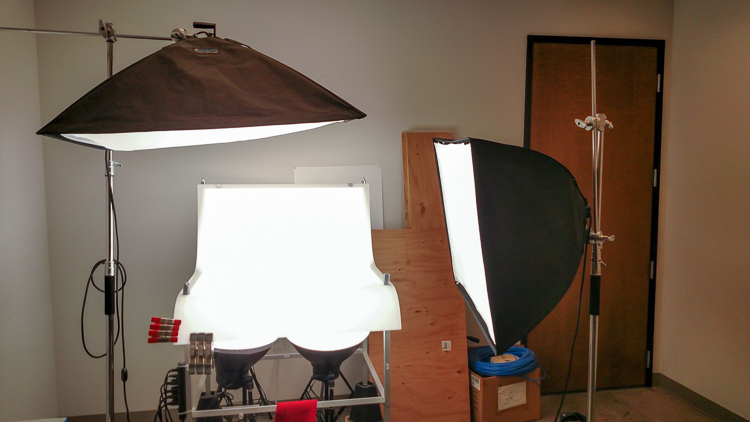
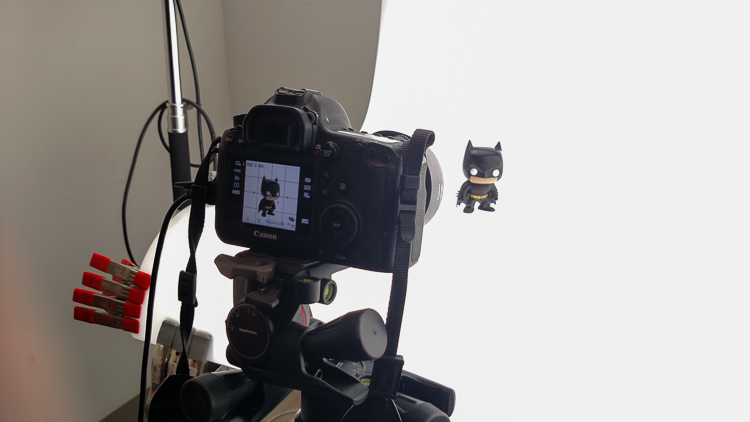
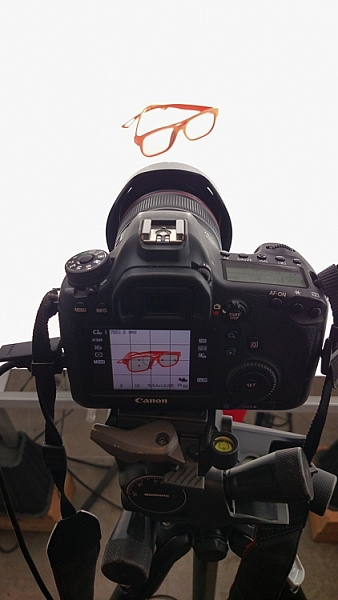
In this article I’m going to discuss the equipment you will need to create great product photography. I built my setup to provide great versatile lighting, speed, and the ability to cut out the product in post production very quickly and accurately. This setup can be used for still life, food, fine art and even some macro work.

Article Example_03

When I first started doing product photography I was hired by a company to reshoot their entire 3200 piece inventory. Needless to say that was a HUGE job, and speed and efficiency was paramount. I had previously not done more than a few dozen parts at one time for a client, so I really was not set up to undertake a job of this scale. I was going to have to rethink a lot of things, and I knew I was going to need additional studio equipment. The words, “Not going to happen” were not going to come out of my mouth, as I wanted the challenge and the learning experience. Many of the things I implemented for that specific job are still in use for my product photography today. This tips in this article are a good base to start if you are an aspiring product photographer.

Requirements of a product setup

Article Example_04

Here is what I felt were the most important things to plan for to make this job happen.

  1. Speed – to be able to quickly move through multiple angles of a single product, and to adapt quickly to the next product.
  2. Versatile light – lighting that can stay constant for similar groups of products, but remain flexible enough to quickly shift to get proper exposure.
  3. Cut-out ease – the ability to knock out a product from the background quickly in post-production, and place a product on pure white without having to open the image in Photoshop.

With this list in mind you find yourself smack dab in the crosshairs of a shooting table. There really is no other way around it. This is why a shooting table works so well for this type of setup.

1. Speed

Article-Example_01b

A platform is needed when you want to quickly move products in front of your camera and then off the set. Why not make it a platform that is specifically made for photography? The seamless background of a shooting table means less fussing around with intersecting lines that is typical with most background setups, and you won’t have to spend much time with product placement within the scene. That alone will speed up your shoots.

2. Versatile light

You can bounce light off the white shooting table, or better yet light the table from below, causing it to glow. Another great thing about a shooting table is that it’s white. White is a great way to control the shadows of a product. If I had it my way I would have the product completely enshrouded in white light or reflectors, then introduce shadows that add shape and dimension via black cards for the ultimate control. That unfortunately isn’t going to happen, but a white table is a great start.

ShootList4

Table with light coming from below.

ShootList5

Table with light from above.

3. Remove background quickly in post-production

Article Example_05

Article-Example_02b

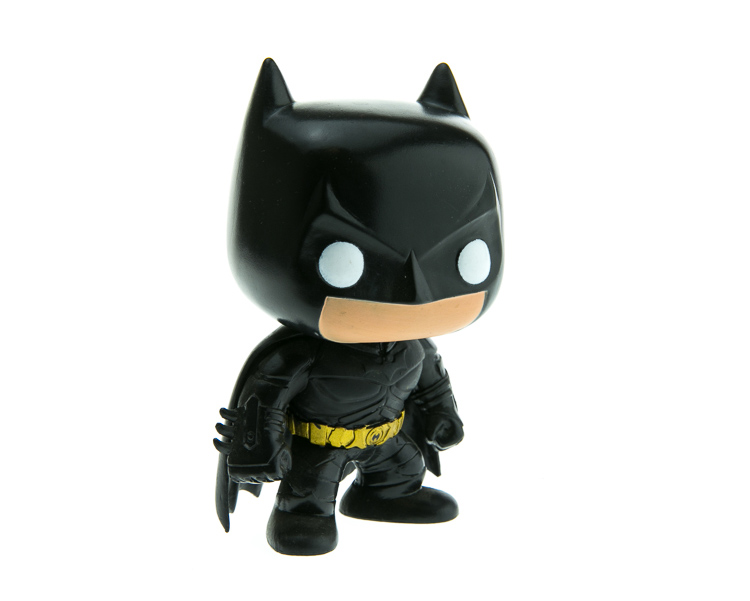
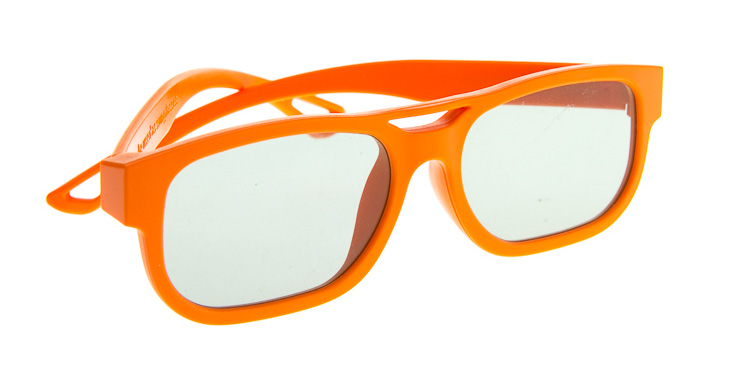
Nice clean light, easy to cut-out product shot.

No one wants to sit around using the Quick Selection tool in Photoshop, refining the edge, seeing the horrible job that tool does, and then finally having to use the much more labor intensive Pen tool to mask out the background. It’s far easier to get this done in camera, or at least give yourself a huge head start. The time you will save with this method will add up very quickly, and will give you a more natural look.

A shooting table

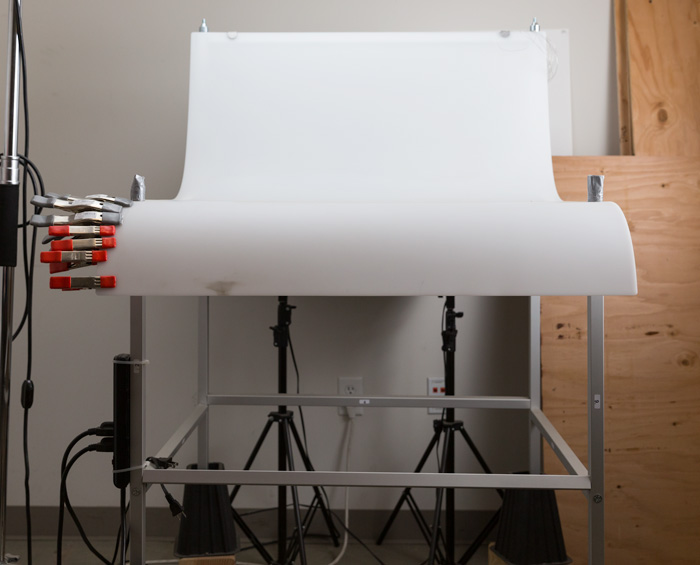
A shooting table is the first place to spend your money. There are many different tables out there but after all my research I found the Foba DIMIU shooting table to be the perfect solution for me.

ShootList3

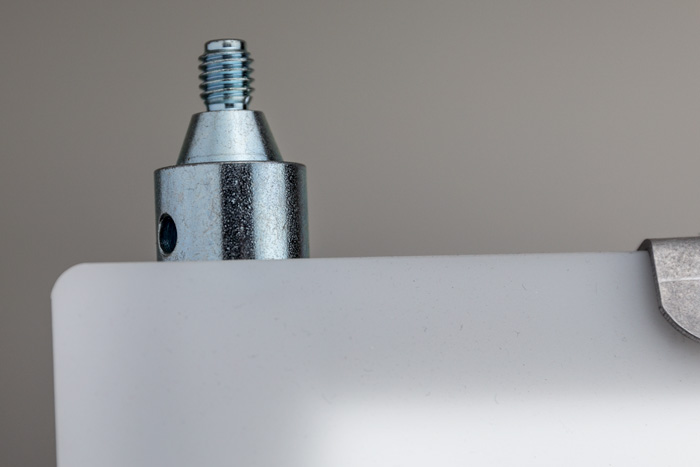
It is a large shooting area, a long sweeping seamless Plexiglas surface that allows you to light from above or below it, the table frame features 4 – æ inch studs at each corner that can be used for various attachments such as arms and brackets to hold cards, product or lights.

ShootList1

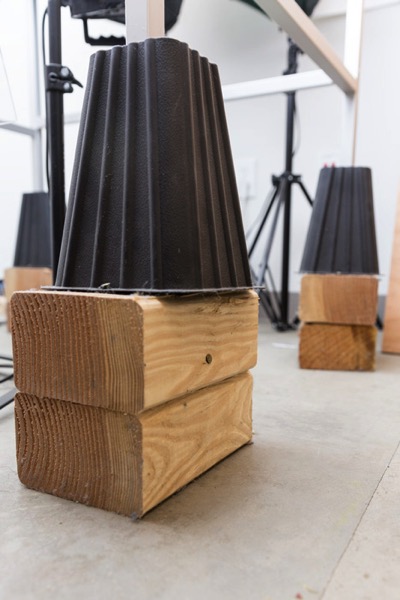
The table is lightweight, can be moved around the studio with ease, and is easy to assemble. I raised the height of my table by using 6×4 lumber cut into blocks, and some bed risers.

ShootList2

At $ 1,544 I realize that the price might keep it out of a lot of hands. But, don’t fret, a more affordable option can be found, like the Manfrotto large still life table for $ 811. If you’re planning on shooting only small products, the Manfrotto mini table at $ 480 is an option as well. Keep in mind, if you think you might have large products in the future, spend the money now and get the largest table you can afford.

Lighting

Lighting is the next thing to consider. The type of system you choose is going to make a pretty big difference when it comes to shooting your actual products. You will ultimately be choosing between two main types of light; a constant (continuous) light system or a studio strobe (flash) system.

A constant light setup is going to be much easier if you’re just starting out with product photography. With a constant light system the learning curve is exponentially smaller. The benefits of What You See Is What You Get (WYSIWYG) light cannot be overstated. I am going to go out on a limb to make a broad statement and say that if you are reading this article for help with your product photography, then you likely do not have the experience needed to employ studio strobes as your light source.

Article Example_03

Even if you have some experience with strobes, unless you have two to three years or more of shooting strobes in a product environment, do yourself a huge favor and get continuous lights. You will be amazed at how much, and how quickly you will learn when you use constant light. Plus there are some added benefits of using a constant light:

  • No tether equipment. You do not have to control the lights with a radio transmitter, by placing the light in optical slave mode, or by a cable like you do with studio strobes. They will always be on, ready to make pictures.
  • You can use them as video lights if you want to get into motion for product shots.
  • They are a far superior light learning tool, even for more advanced photographers. In my opinion this reason alone is why you want go with constant light.

ShootList9

Okay great, you are going to take my advice and get some constant light. My recommendation would be the Westcott Spiderlite TD6 system for the following reasons:

  • They are bright.
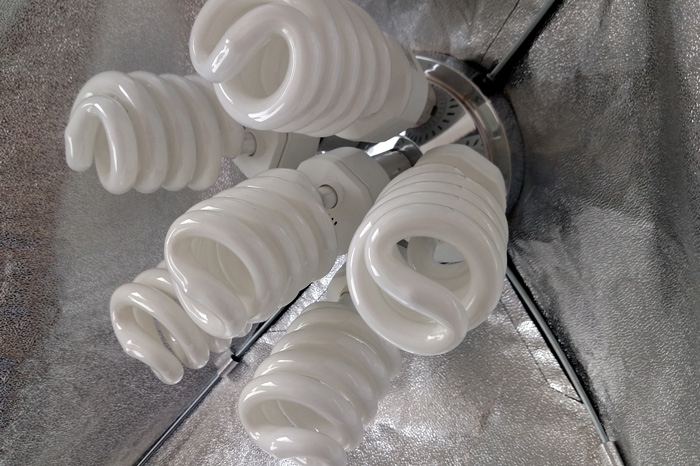
  • The fluorescent bulbs stay cool. A huge deal when you are stuffed in a studio with no windows.
  • The included bulbs are daylight balanced and can be mixed with light from a window.
  • Option to use tungsten halogens (not sure why you would because those bulbs run so hot).
  • Westcott has plenty of light modifiers for shaping your light.
  • Light output is controllable in 33% increments with three switches.
  • Solid build, with all metal heads and quality light modifiers.

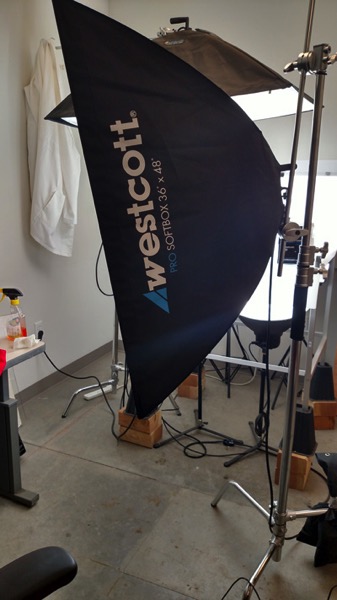
When I bought the kit from Westcott it came with the Spiderlite TD6 head, six 50w fluorescent bulbs, a tilter bracket, and the 36×48 softbox. I paid $ 700 per light, and bought two of those kits for a grand total of $ 1400.

ShootList10

There is some good news though. At the time of writing this article, there is a Westcott promo kit that comes with two of everything, two heads, two brackets, two sets of bulbs, and two softboxes, one is the 36×48 the other is a strip 12×36. The kit is going for $ 799. A fantastic buy for this lighting system.

If that is still a little more than you want to spend, then there are some other options for lighting. Impact has a kit that has light heads, stands, bulbs, and modifiers for about $ 265. But as my grandfather always said, you can’t afford to buy something twice. If product photography is something you are going to do, pay for the quality of Westcott. It will last, day in and day out.

My TD6 lights are used primarily as my key (main) and fill lights. I still need to be able to light my shooting table. For that I turned to some reflectors.

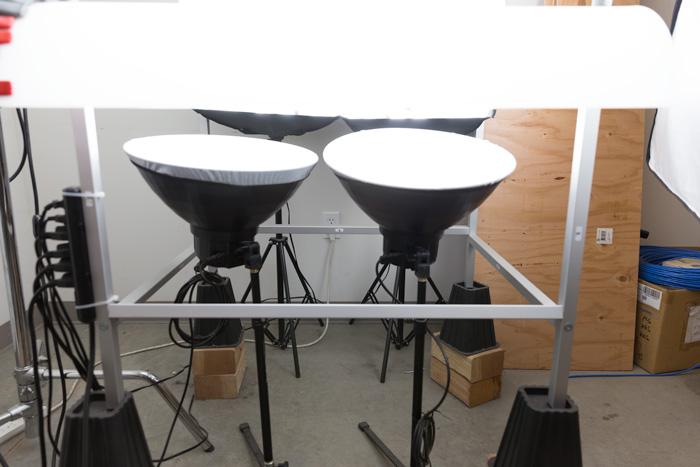
ShootList6

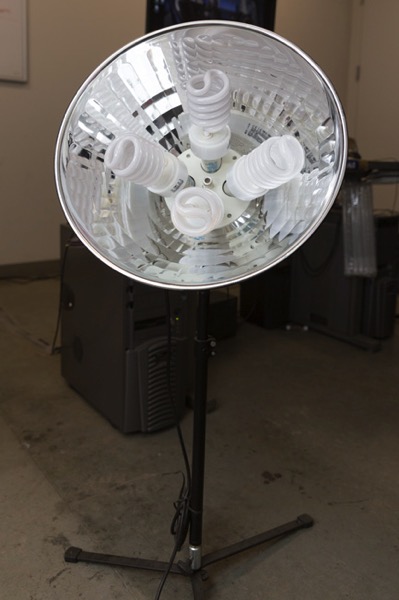
I went with two 16″ reflectors from Flashpoint, for $ 70 a piece. These sit under my raised shooting table and shine straight up through the bottom to blow out my table top.

ShootList7

Light stands

Now is a good time to talk about support. Supporting your lights should be carefully considered, and you need to ensure you don’t skimp here. I have a story to help illustrate this point. While doing a product shot for a client I was moving about the studio, and I brushed past my lights on my way back to my camera. Before I could turn around and look at the scene I heard a crash. My light had toppled over, hit the table, knocked the product off balance, and it hit the floor and broke. It was a bottle of wine. I was left with a huge mess to clean up, a broken bottle that needed to be replaced, and a bill from the client for the unreturned product. It could have been worse, but not by much. Invest in your light stands. Get good ones and weigh them down properly with sandbags.

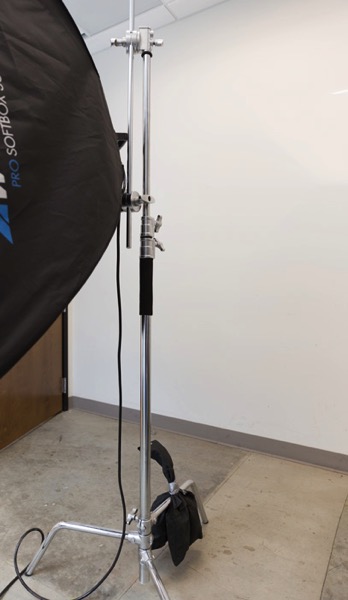
You are going to want to use some sort of a C-Stand. Whether it be a turtle base (removable legs from the center column) a rocky mountain C-stand (a stand with one leg that can go up and down the center column) or a super C-stand (extra heavy duty) invest in a C stand for your large lights. Also, always have sandbags handy to weigh the C-stands down once you bring them onto your set.

ShootList8

For the price of $ 129 per stand from Adorama, for their Flashpoint C-stand with turtle base is pretty great, I couldn’t be more pleased. It has been a fantastic solid stand for my large TD6 lights.

The other stand that I bought was a lot less mission critical, it was for my reflectors. I bought a few Manfrotto Nanopole stands which bottom out at 20″, and can go as high as six feet. They are not meant for anything too heavy, but they do the small stand job perfectly.

So, we touched on all the main equipment needed to make a successful product photography set. Do you have any other tips to add? What do you use for product photography? If you have any questions please ask in the comments below.

googletag.cmd.push(function() {
tablet_slots.push( googletag.defineSlot( “/1005424/_dPSv4_tab-all-article-bottom_(300×250)”, [300, 250], “pb-ad-78623” ).addService( googletag.pubads() ) ); } );

googletag.cmd.push(function() {
mobile_slots.push( googletag.defineSlot( “/1005424/_dPSv4_mob-all-article-bottom_(300×250)”, [300, 250], “pb-ad-78158” ).addService( googletag.pubads() ) ); } );

The post Equipment Tips for Quick and Efficient Studio Product Photography by Jacob Macias appeared first on Digital Photography School.


Digital Photography School

 
Comments Off on Equipment Tips for Quick and Efficient Studio Product Photography

Posted in Photography


KitSplit is a peer-to-peer rental service for camera equipment

15 Jun

KitSplit is a peer-to-peer rental network for camera gear and is best described as the ‘AirBnB’ of the camera world. Photographers who need equipment at a specific location are put in touch with owners who are willing to rent their gear out, while KitSplit takes care of vetting, insurance and the logistics. The company was founded about a year ago in New York by photographers who were unhappy with equipment rental options and by now has approximately 5000 members, both individuals and companies, and $ 40 million worth of equipment available to rent.

The latter includes not only traditional cameras, but also drones and virtual reality gear. KitSplit says its services have been used by companies such as Condé Nast Entertainment, Hearst and NBC. After rapid growth in the New York area, KitSplit has now launched its first geographical expansion, to the Greater DC area, Philadelphia and Boston.

Social sharing has taken off in recent years, especially in the accommodation and car rental sectors, so it only makes sense to apply the same principles to camera and imaging equipment. We’ll be interested how the company develops in the nearer future. More information about how KitSplit works can be found on the website.

Would you use a service like Kitsplit? Let us know in the comments.

Articles: Digital Photography Review (dpreview.com)

 
Comments Off on KitSplit is a peer-to-peer rental service for camera equipment

Posted in Uncategorized


NASA astronaut Jeff Williams showcases ISS photography equipment

15 Apr

NASA astronaut and Expedition 47 flight engineer Jeff Williams posted a video recently detailing some of the equipment he uses to capture his incredible view of the planet from the International Space Station. So what kind of specialized gear does one use in space? Turns out the crew uses ‘regular photography equipment’ to capture still images and videos, with the Nikon D4 being one of several cameras used. A variety of lenses are used as well, including the massive 800mm lens (with 1.4x teleconverter, no less) shown in the video.

In addition to the photography equipment, Williams introduces viewers to the Cupola, the ‘window on the world’ that gives astronauts a full view of Earth from a single vantage point. Other windows are used to capture handheld photos and videos as well, and Williams explains that some videos are animated panoramas made from stitched still images.

You can see Williams’ photos on his Instagram and Facebook pages.

Via: SLR Lounge

Articles: Digital Photography Review (dpreview.com)

 
Comments Off on NASA astronaut Jeff Williams showcases ISS photography equipment

Posted in Uncategorized


CameraLends Peer-to-Peer equipment sharing service launches iPhone app

08 Jan

CameraLends.com, a peer-to-peer camera gear sharing service that was established in 2013, has just launched a mobile app. The service allows for private rental of cameras, lenses and accessories of all types. Read more

Articles: Digital Photography Review (dpreview.com)

 
Comments Off on CameraLends Peer-to-Peer equipment sharing service launches iPhone app

Posted in Uncategorized


Equipment Tips for Landscape Photography

09 Sep

2-for-1 special

As part of Landscape Photography Week here on dPS, we’re offering TWO for the price of ONE on our best-selling Living & Loving Landscape Photography ebooks!

Click here to take advantage of this offer.


“The best camera is the one you have with you” someone said. Is it true? Almost.

The point is that if you are a landscape photographer and you want to pursue the perfect sunset shot, it’s unlikely that you will achieve that goal with your iPhone.

Here’s some advice on the gear you should have in your backpack, both for what I call primary gear (camera, tripod, and lenses) and for all other accessories. Without further ado, let’s start!

Image 0

Camera

Don’t focus on the brand, focus on technical features. Given that all cameras today have all the basic functions, for landscape photography you need a camera with a good (please read “great”) dynamic range and weather resistant body – that’s all.

Dynamic range is essential, because it defines the ability of the camera to capture shadow and highlight details at the same time. Its unit is the Exposure Value (EV), and a value of 14 EV or above identifies an excellent camera.

Weather resistant means that the camera is weatherproof to a certain extent (note: weatherproof does not mean waterproof!). Remember that you will not take shots comfortably seated in a studio, so you should be prepared for humidity, rain and snow.

A Full Frame or an APS-C DSLR camera is up to you and to your budget.

In the last few months I noticed an incredible hype for mirrorless cameras and I must confess that I was tempted too. They probably will be the future, but not today, at least for landscape photography. The point is that the only real advantage of those camera is the weight, and in a 10kg backpack, saving 0.5kg is quite useless. Also, do not be duped by megapixels: you need a 42.2MP camera ONLY if you are going to print larger than 24×16″, and there’re still great cameras with a lot of megapixels in the DSLR market.

Image 1

Nikon D810 – image courtesy of Nikon

Lenses

Landscape photography, fortunately, doesn’t require a lot of lenses, just a few good ones.

Focus on wide angle lenses: for a full frame camera, lenses with a range from 14-35mm are a great choice, from 10-22mm if you have an APS-C sensor camera. Zoom lenses are okay, but obviously prime lenses are best for sharpness and overall quality.

Another point for DSLR cameras is that there are really few wide angle lenses for mirrorless cameras. If you are thinking of using your DLSR lenses on a mirrorless camera using an adaptor, say goodbye to quality.

As with the camera body, I recommend weather resistant lenses: rain, humidity and snow could be a serious problem.
Finally, don’t focus on useless features: as you are going to shoot between f/8 and f/11 in the 95% of the times, you don’t need a fast f/2.8 lens (and for this choice your wallet will be extremely happy!). Also a stabilized lens is useless, because as you are going to use a tripod, you’ll turn if off every time anyway.

Image 2

Zeiss Distagon T* wide angle lenses – image courtesy of Zeiss.

Tripod

No, you can’t use a table or a flat surface, you need a real tripod. They could be really expensive, but as for other gear, focus just on some key features. Truth be told, there is just one feature that you need – sturdiness.

The aim of a tripod is to let you take shots avoiding any vibration, so you need something that can resist the wind. If you can, choose one with independent legs as they could make the difference if you’re on a rock in front of the sea or on any other irregular surface. Aluminium or carbon fibre is up to you (and your budget). Just remember that a carbon fiber tripod is not just lighter, but it will also not be affected by the galvanic corrosion of water, so if you’re a seascape photographer this could make the difference on its life expectancy. Finally, remember that the danger of using a carbon fiber tripod during a thunderstorm with lighting, is just an urban legend.
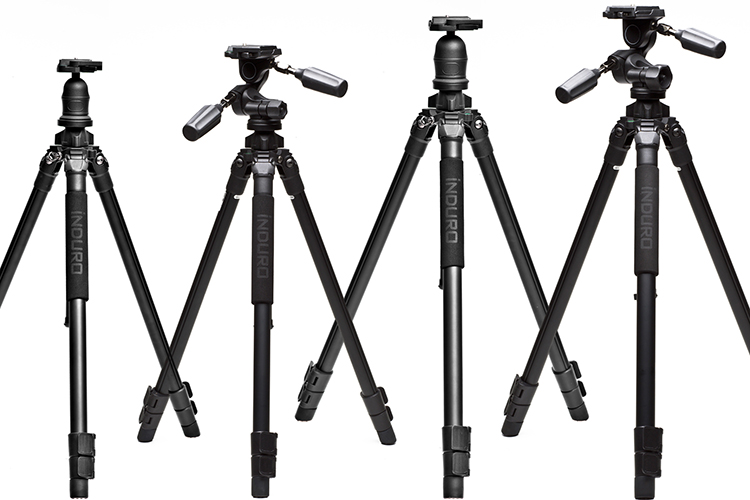
Image 3

Induro tripods – image courtesy of B&H Photo Video.

Remote shutter

To further reduce the possibility of introducing any vibration, I really recommend the use a remote shutter. There are many different type of remote shutters and it can be hard to decide which one is best for you. In my opinion, avoid wireless/infrared remotes and go for the more reliable cabled solution. If you love time-lapse or long exposure photography, choose a programmable one.

Avoid smartphones applications too: they will drain the battery of your phone very quickly and your phone is not weatherproof.

Genuine or compatibles? Of course, genuine remotes are probably more reliable, but they are quite expensive, especially the programmable ones. That said, I’ve been using a compatible programmable remote for three years, and it’s still working perfectly.

Image 4

Nikon MC-36 programmable remote shutter – Image courtesy of Nikon.

Filters and filter bag

You camera could have the sensor with the best dynamic range available, but unfortunately it’s far from the dynamic range of human eye. You can overcome this limit in one of two ways: post-production or using filters on camera. For a cleaner result, as I love to spend my time in the field and not behind the monitor of my computer, I suggest you use filters. Also because there are some filters, like Neutral Density and Polarizing filters that are not possible to simulate in post-production. There are many different kinds of filters and hundreds of different uses of them. We could speak for hours about this topic, so for now let’s just consider them as something that cannot be missing from our backpack.

Finally, if you are a filter user, don’t forget to bring with you a filter bag: handling filters on the top of a cliff or with your feet in the ocean is always a challenge: just one misstep and your precious glass is gone. Look for a dedicated filter bag and hook it to your belt, around your shoulder, or fixed to your tripod. I’ve tried many solutions, but actually I really believe that the Terrascape bags are the best, and most reliable solution on the market.

Image 5

Terrascape filter bag – image courtesy Terrascape.

Tablet/Smartphone

Even you are an old-school photographer, you should consider the incredible advantages provided by the use of a tablet (or a smartphone) in the field. Here are just few:

1) Cartography: Download the awesome, free app Maps.me and you’ll never get lost. You will not be only able to download the needed maps for offline use, but you can also import .kmz files, and this means that you’ll have always with you all the spots you found on Google Earth to reach them easily!

2) Weather: A good landscape photographer should continuously monitor the weather evolution. For that reason, the daily weather forecast is not enough. Download an application that lets you see the actual satellite/radar situation and you’ll be able to select between two or more spots according to the short term forecast. A wise choice is AccuWeather.

3) Planning: If you want to take a great sunset shot, you must know exactly where the sun will be, in the location where you’ll stand with your tripod. Once you know that, you’;; need a tool that allows you to calculate, quickly and accurately, all the needed exposure parameters to properly set your camera. There are many different applications that do theses task, but just one that let you do everything all in one app: PhotoPills

Image 6

Image courtesy PhotoPills

4) Food: Is there something better than having the perfect breakfast after a cold sunrise session, or a warm and delicious soup after a rainy sunset? An application like Tripadvisor will let you quickly find the best restaurant or coffee near your your location.

Cleaning cloths and a rain cover

A landscape photographer is at the mercy of the weather and Mother Nature, so you must consider that a sunny day can become a rainy nightmare in a few hours, so you must be prepared.

First of all, be ready to protect your camera and your lens. Even if they are weatherproof, it’s not a good idea to test the quality control system of the camera manufacturer. You can buy an expensive rain cover from a photography website, or for just few dollars you can go to a local market to buy some refrigerators bag for vegetables…they work perfectly!

Also remember that the overall quality of your shoot is affected by how clean your lens is – bring with you as many microfiber cloths as you can.

Extra tip: if you are using slot-in filters, to protect them from rain while you are not shooting, use a shower cap.

Image 7

ThinkTank Rain cover – image courtesy of ThinkTank

Torches (flashlight)

If you are out with your camera to capture a marvellous sunrise, it’s quite easy to remember to bring with you a torch or flashlight to reach the desired location. Do the same for sunset! After sunset the light fades out very quickly, and you may find yourself losing orientation in the darkness.

If an hand torch is fine, the best solution is a head torch (head lamp – get one at a camping supply store) is the best solution as it will let you both hands free. Remember – safety first.

Image 8

Petzl Tikka RXP Headlamp – image courtesy of Petzl.

Spares

Do you know what could be worse than having a dead battery or a full memory card? Nothing. Believe me, if you’re in front of the perfect sunset just with your iPhone it’s a pity, but if you’re there with your camera and a dead battery, you’ll blame yourself for the rest of your life. Remember that the intense use of Live View mode or extreme cold weather may compromise the charge level more quickly than expected.

Also bring always with you a spare memory card, even if your primary one has a lot of space and you want to take just few shots – it may break or crash. If your camera has two card slots, use them simultaneously, because having a live backup is always a great idea.

Image 9

Loupe

It’s difficult to review images on your LCD display when it’s sunny, so I always use a Loupe. They are also useful for a more accurate manual focus as they can reach a 2x magnification.

Image 10

Kinotehnik Loupe – image courtesty of Kinotehnik.

Bubble level

Every time you straighten the horizon line in post-production, automatically you crop a small amount of the image. So, why not to take your shoot correectly with a straight horizon line?

If you are like me, it’s impossible without help from outside. If you own a modern camera, you may have a built-in virtual horizon function. But if your camera is older, or simply don’t have this function, consider buying a hot shoe bubble level (also useful to protect the hot shoe of your camera against oxidation).

Image 11

Hot shoe bubble level

Clothing

Don’t underestimate the importance of your clothing; it is as essential as your camera. If you are suffering from heat or cold, you’ll definitely focus on yourself, and not on photography. You are dressed properly when weather conditions do not affect your activity. In summer, don’t forget to bring with you a water bottle and a cap; in winter, never forget gloves, a neck warmer and a wool hat. Always bring with you a rain cover and an umbrella (that you can also use to protect your filters and tripod from rain and wind).

Image 12

The North Face gloves – image courtesy The North Face.

First Aid Kit

It’s not that difficult to peel the skin from one knee on a cliff, or get a small wound on a finger, and when it happens a bandage and a disinfectant are worth a thousand sunsets. Again – safety first.

But don’t think just for yourself, think also for your gear. Always bring with you a swiss multitool knife and some duct tape. If they are able to fix the wing of a plane, they will be able to fix the leg of your tripod too.

Image 13

First Aid kit – image courtesy Care Plus.

Bonus tip: music!

To take a great landscape picture, you should be in the right mood, and for me there is nothing like hearing my beloved Ludovico Einaudi, while wandering deep in nature, with my tripod on my shoulder. Remember that you can have thousands of dollars of equipment in your backpack, but they are completely useless if your soul doesn’t want to use it.

Image 14

What gear do you use for landscape photography?


Here on dPS this is landscape week – here is list of what we’ve covered so far. Watch for a new article (or two) on landscape photography daily for the next day or so.

  • 6 Tips for Better Low-Light Landscape Photography
  • Landscape Photography and the Human Element
  • 5 Ways a Telephoto Lens Can Improve Your Landscape Photography
  • Landscape Photography from the Side of the Road
  • 32 Majestic Landscape Photos to Inspire Your Wanderlust
  • Weekly Photography Challenge – Landscape
  • Landscape Photography – Shooting the Same Location Through the Seasons
  • How to Solve 5 Composition Conundrums Faced by Landscape Photographers
  • 6 Tips for Creating More Captivating Landscape Photographs
  • Tips for Getting Started with Urban Landscape Photography
  • 3 Simple Steps to Make Your Skies Pop in Lightroom

googletag.cmd.push(function() {
tablet_slots.push( googletag.defineSlot( “/1005424/_dPSv4_tab-all-article-bottom_(300×250)”, [300, 250], “pb-ad-78623” ).addService( googletag.pubads() ) ); } );

googletag.cmd.push(function() {
mobile_slots.push( googletag.defineSlot( “/1005424/_dPSv4_mob-all-article-bottom_(300×250)”, [300, 250], “pb-ad-78158” ).addService( googletag.pubads() ) ); } );

The post Equipment Tips for Landscape Photography by Francesco Gola appeared first on Digital Photography School.


Digital Photography School

 
Comments Off on Equipment Tips for Landscape Photography

Posted in Photography