RSS
 

Posts Tagged ‘Effects’

4 Lighting Effects You Can Create in Photoshop

10 Mar
Title-image-green-energy

Lighting Effects using Color Dodge Blend Mode in Photoshop.

There are numerous methods to creating lighting effects in Photoshop. I’m only going to cover four but they can be used in many ways. But first let’s take a look at a couple that are in the Filter gallery under Render in Photoshop (CS6 and CC). The first is Lighting Effects, which has been upgraded and is more powerful and easier to use than previous versions of Photoshop.
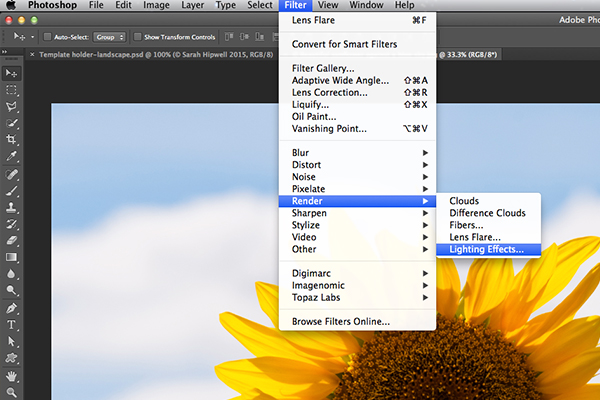
Lighting-effects-filter

How to access Lighting Effects in Photoshop CS6.

The preview box has been replaced with a more sophisticated interface. You are presented with three different types of lighting effects in the Options Bar – Spot, Point and Infinite – and various presets to choose from. There is a Properties panel that customizes the look of the light that you want in terms of direction, placement, etc. This filter works on Smart Objects, so that you can work non-destructively. It is too comprehensive to go through all the aspects of this filter in this article. The best way to use it is simply open an image, experiment with the different options and see what you think.

Instead, I will show alternative techniques that I prefer to use in Photoshop and Adobe Camera Raw (ACR), some of which you may already be familiar with. I really like the Graduated Filter tool in ACR. This works in similar way to a Graduated Neutral Density filter on your camera. Landscape photographers use graduated filters so that they don’t overexpose the sky area. The dark bit on the ND is on top allowing less light in, as exposure is set for the foreground. You can achieve similar results using the Gradient Editor in Photoshop.
Graduated-filter

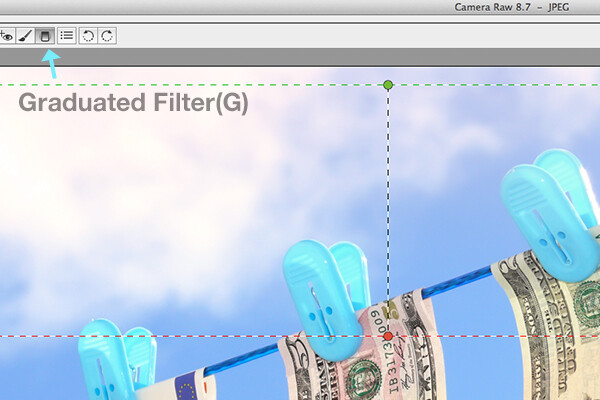
The Graduated Filter icon in Adobe Camera Raw.

With your image opened in ACR, select the Graduated Filter tool. Drag over an area on your image where you want the effect to be applied. Adjust the slider options on the right – Exposure, Highlights etc., to either lighten or darken the area. You can also choose a color to add warmth or a cooler effect.
snail

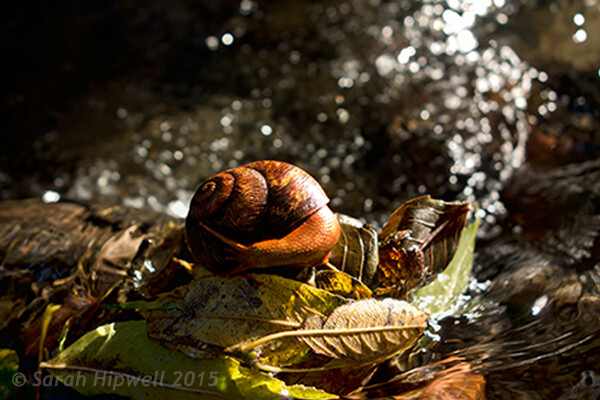
This is the original image of a snail before the Graduated Filter has been applied.

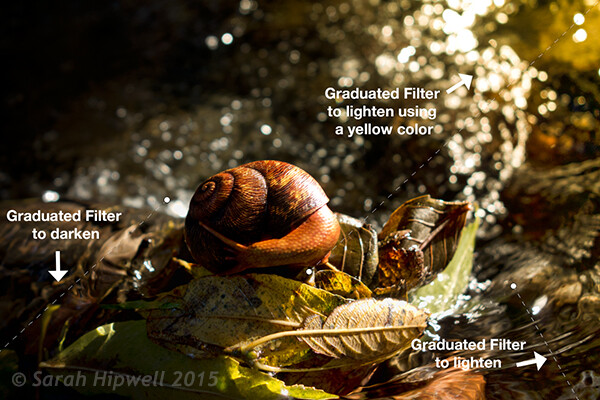
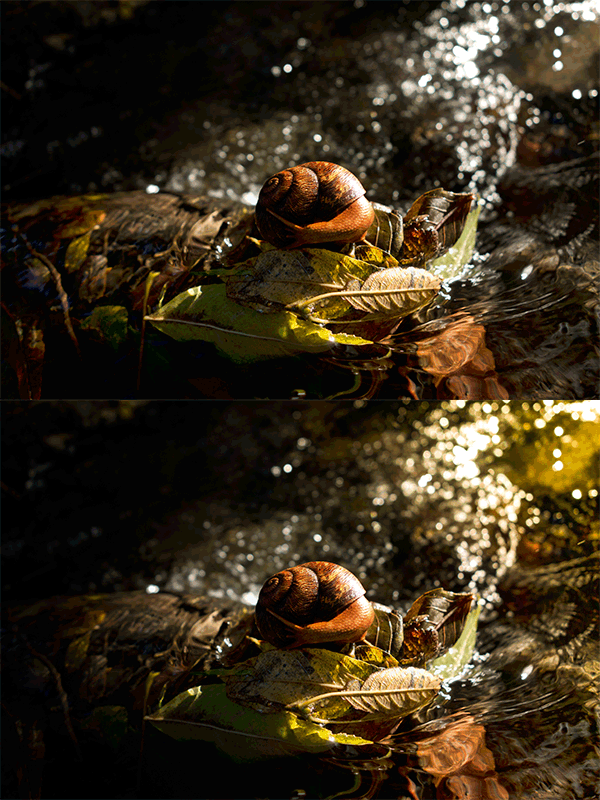
In the image of the snail, I used the Graduated Filter in three different areas on the image. I wanted to add more warmth to the water, so I used a yellow color to create an impression of a sun dappled effect. The second area was to lighten a little more of the water eddy, bottom right of the photo. Finally the third spot, I wanted to simply darken the area directly behind the snail so that the viewer’s eye is drawn to the it. Although, these are subtle light effects, they can add more drama and even change the composition of a photo.
Snail with Graduated Filter effects

The snail image with the Graduated Filter applied in three different areas.
Snail animated gif

Animated GIF  to show before and after effect from the Graduated Filters effects.

The Lens Flare, which is also found in the Filter gallery under Render, is a lighting effect that can be quite useful but you need to use it with care, using the less is more approach. For example in the image with the golf ball on the red tee below.
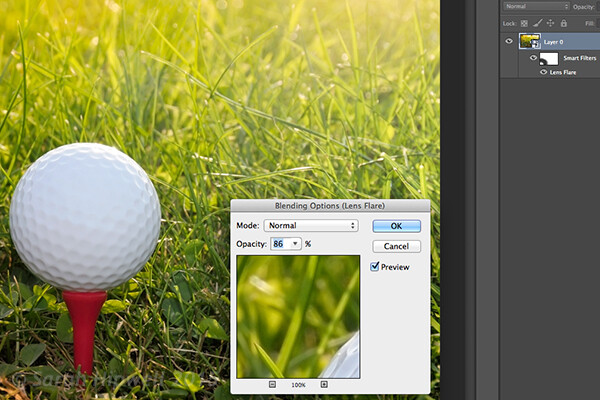
golf-ball-lens-flare

Lens Flare effect added to this image.

I used the Graduated Filter in three areas, similar to the snail image. I added a magenta color tint on the grass, bottom left of the image to break up the green flat look. Adding a different color using the graduated Filter in this way gives the image more depth. I then added a Lens Flare effect to the top right and reduced the opacity so that the effect caught the tips of the blades of grass. Converting your image to a Smart Object first before applying the filter effect, makes it easier to make changes non-destructively. I was also able to mask out some of the effect that I felt was too strong.

Animated gif of golf ball with Lens Flare

Animated GIF of golf ball with Graduated Filter effects and Lens Flare.

This brings me onto the third technique, the Color Dodge blend mode. I wanted to create the effect that the rear lights were switched on in this image of a car (below). This is such an easy way of creating a lighting effect in Photoshop and the result is brilliant.

First, create a new blank layer on top of the original image. Select a darker colour to the part of the image that you will be working on. For the lower section of the light, I used a dark red. Using the Brush tool set to soft, paint a small daub and then make it a bit bigger using the Free Transform tool.
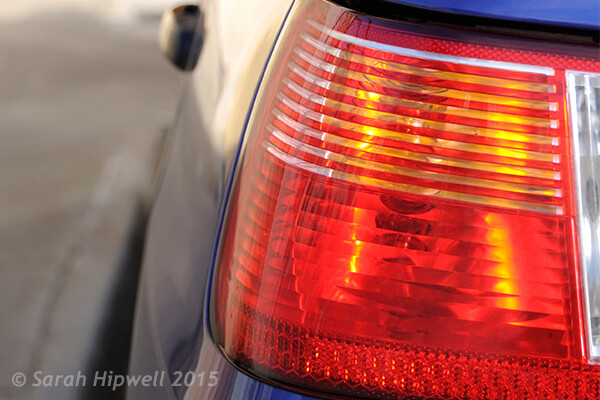
car tail light

Rear taillights of a car.

Add some Gaussian Blur so that there is no ‘hotspot’ in the middle and the color looks uniform. Position this on a section of the light, change the blend mode to Color Dodge and reduce Fill, not Opacity, to achieve the desired effect. In this case, I reduced the Fill to 59%. I then duplicated this layer and moved it over to the right. You can reduce the size of the spot area if you feel the over spill is too much. So now I had the bottom tail light working. I repeated the same steps for the top section of the light. But I used a darker color yellow there.
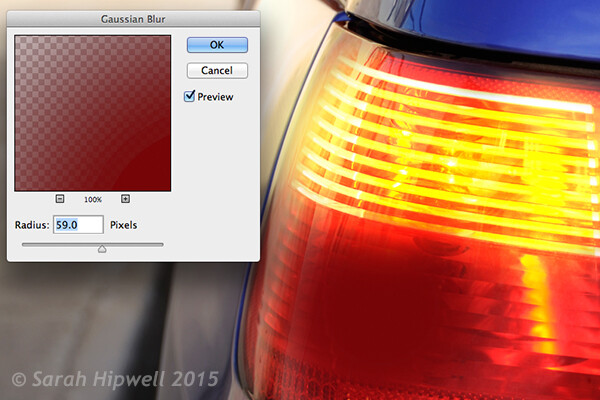
Color-dodge-gaussian-blur

On a separate layer, paint a darker colour to the area intended and add Gaussian Blur.
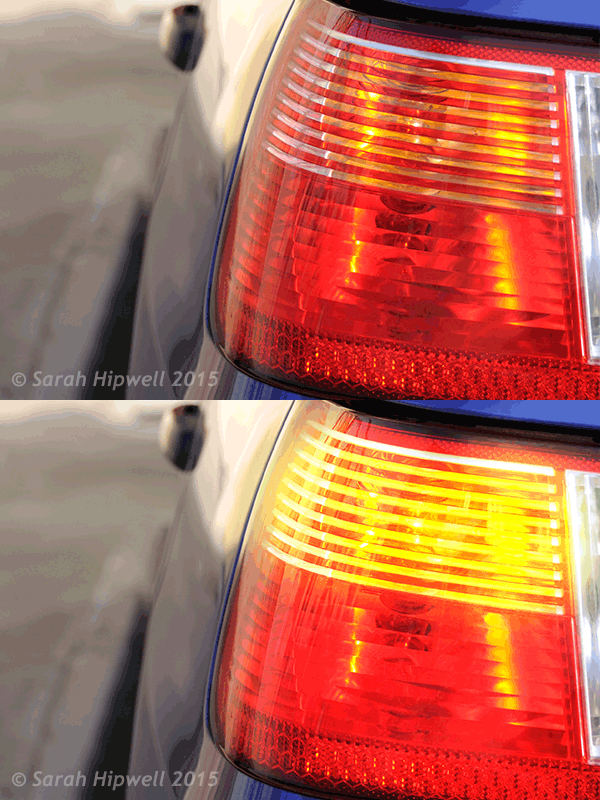
car tail lights flashing

Animated GIF with flashing taillights using Color Dodge Blend Mode in Photoshop.

The forth and final technique is similar to above. When you need to add a highlight(s) to an area of an image to bring out more detail, this technique and the one above can be used on any type of image. It is so easy, quick and very effective. In the photo of the grapes (below), I wanted to create highlights on the dark areas to make them stand out. Same as the above step, create a new blank layer on top of the image and using white as your color, paint a small daub. Make it bigger using the Free Transform tool and add some Gaussian blur. Change the blend mode to Overlay or Softlight, I generally use Softlight. Reduce the Opacity until you get the result that you want.

grapes

Animated GIF to show highlights on areas of some of the grapes, using Overlay/Softlight Blend Modes in Photoshop.

Do you have any other tips for adding or creating lighting effects in Photoshop or another way? If so please share in the comments below.

googletag.cmd.push(function() {
tablet_slots.push( googletag.defineSlot( “/1005424/_dPSv4_tab-all-article-bottom_(300×250)”, [300, 250], “pb-ad-78623” ).addService( googletag.pubads() ) ); } );

googletag.cmd.push(function() {
mobile_slots.push( googletag.defineSlot( “/1005424/_dPSv4_mob-all-article-bottom_(300×250)”, [300, 250], “pb-ad-78158” ).addService( googletag.pubads() ) ); } );

The post 4 Lighting Effects You Can Create in Photoshop by Sarah Hipwell appeared first on Digital Photography School.


Digital Photography School

 
Comments Off on 4 Lighting Effects You Can Create in Photoshop

Posted in Photography


Childhood Obesity – Effects On Body and Mind

06 Oct

Children and the future have always been seen as signs of hope. However, with childhood obesity being in the way, the future has ceased to be promising and hopeful as parents often desired it to be. This is because obesity as a threat has lifelong and long-term effects that kids face in future.

Much disheartening possibilities, poor life quality and health, shorter longevity and compromised psychological health are just some of them. Thus with such desolate scenario, adults must now take action to give kids of this generation, a better future. For this to happen, it is vital for them to understand the causes and effects of obesity.

Causes of Childhood Obesity
Obesity in children is known to be caused by several factors including:

Genetics: Truth is, it is more likely for obese parents to bear obese kids. This shows the fact that genetics have momentous influence on obesity. However, just like any other genetic potential, all this can be controlled depending on the surrounding of the kid.

Lifestyle patterns: A person’s lifestyle is mostly influenced by family activities, culture and food preferences.

Environmental factors: Besides genetics and lifestyle patterns, there are other environmental factors, which are very influential. They are the major issues that the bigger society should curb. Some of these factors include processed food surplus with preservatives sold in groceries, food commercials that support unhealthy foods and new technologies that promote sedentary lifestyle among many others.

The good news is, all these can be restrained mostly through parental care. This is because of the wide scale patronage. But with working class moms of this generation, the whole situation again becomes more complex.

Effects of Childhood Obesity to the Body and Mind
Obesity among both adults and kids can bring grave medical disorders. Kids are prone to develop major health concerns such high blood pressure and high cholesterol that make them liable to heart illnesses as grownups. According to private study, Type 2 diabetes, which used to be a disease for adults, is nowadays noted to grow in obese kids. However, kids with normal BMI are free from such disorders and run a lesser threat of catching the same during maturity.

The most worrisome childhood obesity effect is mental health. This is because the effect can be immediate and could run to lifetime potentially if not addressed at an early stage. Obese kids have a low self-esteem and feel discriminated by other kids because they think they are different and worse than other kids. According to a study performed by Schwimmer in the year 2003, overweight kids compared their quality of life to those of youthful chemotherapy cancer patients.

The study further proceeds to reveal that various obesity-linked problems affect these childrens’ wellbeing. Such problems include bullying at school, sleep apnea, difficulties in playing many sports and fatigue. As if this is not enough, overweight kids are much more likely to drop school leading to miserable lives without employment or low salaries.

Help the Kids Feel Better
With a society that has been filled with biased cultures and many stereotypes, feeling discriminated by these kids is not so imaginary. Bullying comes from friends and adults like teachers and families. As the children internalize this feeling, they tend to feel more inferior, imperfect and also lose aspiration.

The powerful communication presented to them by the society at large about the idyllic body weight only help to exacerbate their psychological sufferings. This brings up a question that everyone should ask themselves. Does everything change for the better as these children become older disputed rather than conquered? There are very few instances when surmounting the odds made them successful. However, statistics show that many of them end up defeated with the rest of their lives becoming poor and depressed.

After all is said, there are various things all responsible adults can do to soften childhood obesity effects. In the United States, solutions by Surgeon General’s “Call to Action to Prevent and Decrease Overweight and Obesity” were proposed. Most of them lied within the capacity of what parents may do for their kids. Regrettably, not all environmental features can be controlled by these kid’s parents. Thus, the only thing left is to hope that the society in this generation will wake up with this major call.

Your Child’s Health

 
Comments Off on Childhood Obesity – Effects On Body and Mind

Posted in Photography


Amazon Fire phone packs 6 cameras for 3D effects and object scanning

19 Jun

fire1.jpg

Amazon has officially announced its much-rumored smartphone, the Fire. Packing in six cameras in total, four of them are dedicated to enabling a new ‘Dynamic Perspective’ 3D-user interface possible, whereby the device can track a user’s face and change how content is displayed. The main 13MP rear-facing camera has an F2 aperture and optical image stabilization. As well as being used for capturing photographs is also enables a new feature called Firefly, which can scan and identify millions of items. Read more

News: Digital Photography Review (dpreview.com)

 
Comments Off on Amazon Fire phone packs 6 cameras for 3D effects and object scanning

Posted in Uncategorized


onOne Software’s Perfect Effects 8 available for free

06 May

Screen_Shot_2014-05-05_at_11.18.07_AM.png

onOne Software is offering its Perfect Effects 8 Premium Edition plugin for free for a limited time. It gives you hundreds of creative presets, fully customizable filters and ability to combine effects. Perfect Effects 8 works as a standalone application (Windows or Mac) or integrates with Adobe Lightroom, Aperture and Photoshop. Go to the onOne Software site to get this fully licensed version – worth $ 99.95 – for free. Learn more

News: Digital Photography Review (dpreview.com)

 
Comments Off on onOne Software’s Perfect Effects 8 available for free

Posted in Uncategorized


Light Blaster [ For Special Effects Lighting ] a Review

20 Apr

Sometimes a new piece of camera equipment will let you do something better, faster, or cheaper. But sometimes it lets you do something wholly new, that nothing else can do, and it opens up a whole new world of creative opportunities. The Light Blaster is that kind of gear.

Light blaster 33 1024 resize

By combining a flash, a lens, and one of many different slides which you can buy or provide yourself, the Light Blaster lets you project an image into your scene or onto the subject. Like any new piece of equipment there’s a bit of a learning curve, but you can create effects that add to your photo in ways only possible with tricky DIY hacks until now.

How it works

The Light Blaster is a strong plastic shell that acts as a mount to hold the three key elements – lens, flash and slide – securely in place and in the correct relative positions. You provide a lens and a flash. The lens attaches to the front via an EOS bayonet mount (a Nikon adapter is available). There’s no lock, but it is held firmly. At the back you slide in your flash, which is held in place with a strong leather friction-secured strap, which is adjustable and held in place with velcro. Flashes of many sizes are accepted, and I tested with a Canon 580EX and a Lumopro 160.

In the centre of the Light Blaster there is a slot which accepts the provided caddy. The caddy holds the slide which is to be projected. You can use standard mounted 35mm slides or small plastic sheets about the size of a coloured gel you might put on the front of your flash. Just on that topic: you can gel the flash you’re using to give a colour tint to the projected image as well. The caddy is super easy to swap, although putting the slide in can be a wee bit fiddly. Topping off the well designed and sturdy construction is a metal tripod thread on the bottom in the thickest part of the plastic body so that you can securely mount the whole arrangement on a light stand.

Looking at the whole thing assembled, one might think it’s a bit precarious and that the lens or flash could be bumped and fall out, but that was not my experience at all. Everything felt sturdy and secure, and I didn’t mind picking up the light stand with everything attached and moving it around the set.

The Light Blaster also comes with a convenient case which safely holds everything, including a whole bunch of slides and an extra caddy in a small package with a fabric handle.

The Results

While I was testing out the Light Blaster I used it primarily in three different ways:

  1. Projecting onto the background
  2. Projecting onto a model
  3. Projecting into the air itself with the aid of a smoke machine

Here are some examples:

Creek 131110 078 X3 resize

Model: Mei Hikari

For this shot I projected a pair of wings onto a large wall behind the subject. It was dusk and low light, so the flash projection was easily visible, even though it’s a dark wall. The contrast was enhanced in post processing. The image projected ended up being about three meters wide. It took a few shots to get myself and the model lined up exactly right, since you can only see the projection on the camera screen. Have a look at the rest of the photos from this shoot here.

Creek 140319 236 X3 resize

Model: Graciously

I used the Light Blaster to project a simple circle of light onto the backdrop behind my model in this burlesque style shoot for a “stage” feel. While a snoot can restrict the light to a spot, only a focussed light can create the sharp clean edge I wanted, like a stage spotlight, or the Light Blaster. See more photos from this shoot.

Creek 140319 383 X3 resize

Model: Graciously

Later in the same shoot I fired up my smoke machine, and using a random geometric pattern on one of the effects slides, I created cool light beams through the smoke. The shafts of light you see wouldn’t be possible with a single light. It needs to be broken up in order to cast shadows into the smoke.

I NXG3q3z X3 resize

Here a photo of autumn leaves was projected directly onto the model and background, creating interesting layers of texture and shadow. I filled in the shadow of the model’s face with a tightly gridded flash to make his whole face visible. Projecting onto the model can be tricky to get right, but the results can be impressive. I want to experiment more with this technique. I think it is particularly well suited to art nude photography.

Any Problems?

There’s a couple of potential ‘gotchas’ when using the Light Blaster, which you’ll need to overcome and learn how to work with, but that’s true of any piece of gear in your kit.

Firstly, you’ll most likely want the projected image to be in focus, which is achieved by turning the focus ring on the attached lens, (make sure it’s in manual focus mode). Since the image is only visible when the flash fires, you’ll need to use a flashlight in place of the flash before you add the flash to the back. You’ll need the set to be quite dark or use a bright flashlight to see well enough to focus, and if you move the Light Blaster relative to the surface it’s being projected onto, you’ll need to take the flash out and re-focus.

As mentioned in the first example shot above, it can be tricky to get the best placement of the image, your model and yourself. You might need to take several shots and make small adjustments each time.

Because there’s a powerful flash shining through the slide, the blacks are never going to be truly black. Some of the light will still pass through the black ink or emulsion, so the contrast might not be as good as you’d like it to be. To address this issue, a brand new set of laser-cut metal “slides” has just been announced for the Light Blaster. This will give you absolutely solid blacks.

Conclusion

I had a great deal of fun testing this product, and I’m looking forward to using it in future shoots. With a good variety of effects slides available from the Light Blaster site, the ability to take any 35mm slide, and even home-printed acetate slides, there is literally unlimited creative potential. You can put any backdrop you like behind your subjects, and transport them to another world. Or you can use it in ways similar to what I have here. Have a look at the Light Blaster site for more example photos. For under $ 100, this is a super versatile creative tool to add to your kit.

Want more on special lighting techniques? Try these articles:

  • How to Create this “Fight Club” Inspired Portrait using One Light
  • Accent Lighting for Portraits
  • Studio Lighting: Building a Light Set-up
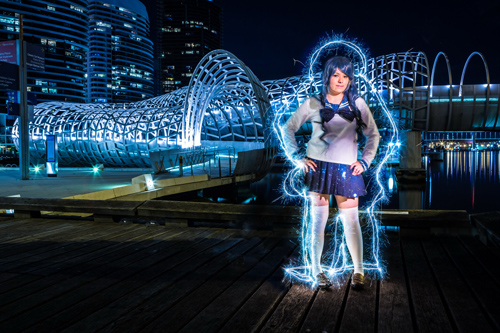
  • How the Shot was Done: SNK Police Cosplay

The post Light Blaster [ For Special Effects Lighting ] a Review by Neil Creek appeared first on Digital Photography School.


Digital Photography School

 
Comments Off on Light Blaster [ For Special Effects Lighting ] a Review

Posted in Photography


DxO releases FilmPack 4, with 65 new creative effects

05 Jun

DxO_FilmPack_4_-_Expert_Edition.png

DxO has announced availability of FilmPack 4, the fourth version of its film-simulation software. FilmPack 4 adds 65 ‘even more aesthetically-pleasing renderings’. Available in two editions, Essential and Expert, a single DxO FilmPack 4 license can be used as a plugin for Adobe Photoshop, Adobe Photoshop Elements, Adobe Photoshop Lightroom, Apple Aperture, and DxO Optics Pro, and as a standalone application for Mac and Windows. Click through for the press release.

News: Digital Photography Review (dpreview.com)

 
Comments Off on DxO releases FilmPack 4, with 65 new creative effects

Posted in Uncategorized


Discover the Secrets to These 11 Special Effects Photography Projects: New dPS eBook

23 May

NewImageToday we’re launching a new dPS eBook that I suspect is going to give a lot of our readers hours of fun while playing with their digital cameras.
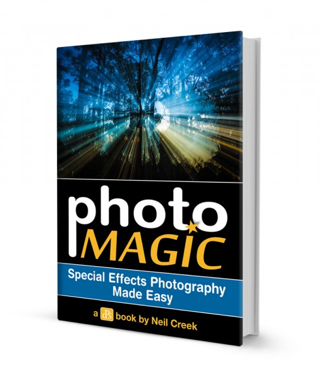
It’s called Photo Magic: Special Effects Photography Made Easy – an eBook by Neil Creek.

As an Early Bird special you can grab it today at 25% off (just $ 15 USD).

Over the years we’ve published thousands of tutorials here on dPS – many of which are on topics like Portraiture, Landscapes, Macro and Street Photography.

However some of our most popular tutorials over the last few years have been when our authors have submitted teaching on how to do ‘trick’ or ‘special effects’ shots.

As a result, I’ve long wanted to publish an eBook on Special Effects Photography and recently asked one of our regular authors – Neil Creek – if he’d like to write it.

Neil was an obvious choice to author this eBook, he’s a Professional Photographer, experienced photography educator and he’s one of those guys who always seems to be working on a new technique for taking photos with that WOW factor.

11 Fun Special Effects Photography Projects to Master

In Photo Magic Neil walks you through 11 photography special effects. In each case he shows you a photo he’s taken and then will walk you through the steps he went through to take the shot.

This is the perfect eBook for those weekends when you’re looking for something fun to do. Tackle each technique in turn and over the coming months you’ll have some spectacular images in your portfolio and will also have learned some new skills that you can then build upon to create your own special effects.

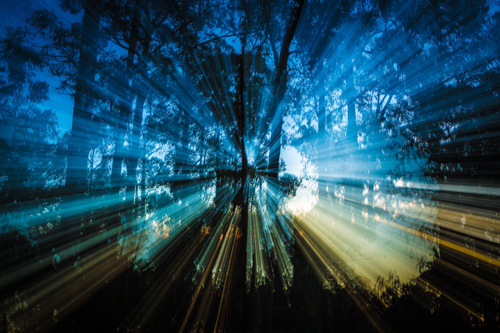
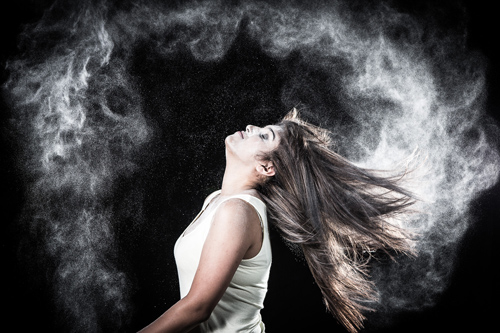
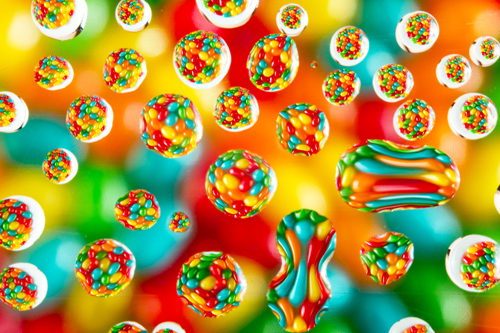
Here’s just some of the shots Neil will walk you through taking.

Zoomeffect

NewImage

NewImage

NewImage

NewImage

NewImage

Get full details on what’s included in this eBook here or order your copy at 25% off by clicking the download button below.

download_it_now_photomagic

// < ![CDATA[ // < ![CDATA[ // < ![CDATA[ // < ![CDATA[ // < ![CDATA[ // < ![CDATA[ // < ![CDATA[ // < ![CDATA[ // < ![CDATA[ // < ![CDATA[ // < ![CDATA[ // < ![CDATA[ // < ![CDATA[ // < ![CDATA[ // < ![CDATA[ // < ![CDATA[ // < ![CDATA[ // < ![CDATA[ // < ![CDATA[ // < ![CDATA[ function EJEJC_lc(th) { return false; } // ]]>

Post originally from: Digital Photography Tips.

Check out our more Photography Tips at Photography Tips for Beginners, Portrait Photography Tips and Wedding Photography Tips.

Discover the Secrets to These 11 Special Effects Photography Projects: New dPS eBook


Digital Photography School

 
Comments Off on Discover the Secrets to These 11 Special Effects Photography Projects: New dPS eBook

Posted in Photography


Vimeo adds ‘Looks’ filter effects for videos

01 Mar

VimeoLogo2.png

Video-sharing service Vimeo has partnered with video-editing company Vivoom, to add a filter effects tool called ‘Looks’. More than 500 effects ranging from vintage to futuristic and can be applied during video upload. Each effect can be adjusted from 0-100% intensity. Looks will be free to Vimeo’s registered users for the next 90 days. Read more at connect.dpreview.com.

News: Digital Photography Review (dpreview.com)

 
Comments Off on Vimeo adds ‘Looks’ filter effects for videos

Posted in Uncategorized


Energy Ball – After Effects Experiment

24 Jan

An experiment in after effects where I tried to create an energy ball that is motiontracked to the hand palm. Software – After Effects + Boujou (black dots in the hand where used for proper motion tracking..)


Nikon 300mm f/4 effects of not having 39mm drop in filter.

12 Jan

This is the information off of Ken Rockwell’s website. ” The internal filter should remain in place because the presence or absence of the filter changes the effective (optical) distance to the film plane by a tiny amount. Don’t worry about this, but please leave the filter holder in place. The change in effective path length is the thickness of the filter x ([the filter glass’ index of refraction] -1 ). A typical index of refraction is about 1.5, so you change the effective distance to the film by about half the thickness of the filter. Of course the same effect happens with filters in front of your lens, but no one notices when you change the distance to a subject by a millimeter. In lens design, moving the film plane a mm can make a difference, but not much with telephotos. You can confirm this effect if you focus on a distant object and note the indication on the focus scale. Now remove the internal filter, refocus, and you will note that the focus scale indicates a different distance when focused on the same object. ” All information is copyrighted by Ken Rockwell at www.kenrockwell.com

??? ?????? ????? ??????? ?????? ???? ??????? ???? ??? ??? ?? By Tau ??????? ????????? = www.mediafire.com ……………………………………………………………………………………………………………………………………. Design By Tau =Ali Mohamed For More Hacks Go www.facebook.com/groups/tauandd3x Murder Hack Team =============ADMIN============= Tau And D3X =============================== .,, Have Fun ///////////////// Product by \\\\\\\\\ ==================================== TauGFX = FB.ME/Tau2GFX MurderTeam = facebook.com/Groups/Tauandd3x www.murderteam.weebly.com ====================================
Video Rating: 3 / 5