RSS
 

Posts Tagged ‘Digital’

Western Digital announces My Passport Wireless Pro

21 Jun

Western Digital has announced its new My Passport Wireless Pro hard drive, a Wi-Fi enabled portable storage device designed for photographers and videographers who want to backup, access, and edit photos or video in the field without using a computer. In addition to Wi-Fi, the drive includes an integrated SD card slot and a USB port that can be used to connect external devices, such as a CFast or XQD card reader. It can also be plugged directly into a computer for standard operation.

This is the second generation of Western Digital’s My Passport Wireless series. The company told us that they received a lot of feedback from photographers following the product’s initial release in 2014, and that much of that feedback has been incorporated into the new Pro edition. The Pro version includes a faster SD card slot with transfer rates up to 75MB/s, up from 10MB/s, as well as upgraded 802.11ac Wi-Fi with speeds up to 20MB/s, improved from 9MB/s. It also features a larger 6400mAh battery, compared to 3400mAh on the original model, which WD says can last up to 11.5 hours in the field, including 6 to 8 hours of operation under ‘hard use.’ Unfortunately, the USB port for connecting external devices appears to be of the USB 2.0 variety.

WD has also made improvements to the product’s companion My Cloud app for iPad. The company told us that while photographers loved the ability to view images stored on the drive from an iPad, they didn’t want to be restricted to using a proprietary app. The updated app makes it possible to export photos to the camera roll for easy sharing or editing with other iOS apps. It also integrates with Adobe’s Creative Cloud, facilitating transfer of photos directly to a user’s Creative Cloud account.

Finally, WD told us that about 50% of customers using the original product used it primarily as a device to stream content. To better support these users the company has added a PLEX media server to the device.

We recently received a demo unit from Western Digital and look forward to taking it for a spin (pun intended). We look forward to letting you know how it works.

The My Passport Wireless Pro comes in two capacities: a 2TB model which lists for $ 229.99, and a 3TB model which lists for $ 249.99. The company also announced a new My Cloud Pro Series NAS device, which you can read about in the press release below.


Press Release:

My Passport Wireless Pro and My Cloud Pro Together

Provide Fast, Reliable Back-up and Transfer While on a Remote Shoot or in the Studio

IRVINE, Calif. – June 21, 2016 – Western Digital Corporation (“Western Digital”) (NASDAQ: WDC), a global storage technology and solutions leader, today introduced the WD Pro Series: My Passport® Wireless Pro Wi-Fi® mobile storage and My Cloud® Pro Series network attached storage (NAS). Designed specifically for the creative community, the WD Pro Series enables seamless transfer of content between devices, with classic WD reliability and speed, regardless of whether users are on a remote shoot, in the studio or editing at home. The products use the My Cloud mobile app – the new version of the app will be launched with the My Passport Wireless Pro and My Cloud Pro Series and be compatible with the Adobe® Creative Cloud®. In addition, both the My Passport Wireless Pro and My Cloud Pro Series devices are also compatible with the Plex™ Media Server and My Cloud OS 3 software for easy editing, streaming and sharing of content.

“Portability, reliability, capacity, speed and interoperability are crucial for creative professionals, whose very livelihoods rely on the strength of the technology they use to store their life’s work,” said Sven Rathjen, vice president of marketing for content solutions at WD. “We created the WD Pro Series as a comprehensive, feature-rich storage solution designed to fit seamlessly into their workflow, regardless of where the work actually happens, so storage, transfer, back-up, editing and even streaming options are readily available.”

My Passport Wireless Pro

My Passport Wireless Pro Wi-Fi mobile storage lets creative professionals and enthusiasts leave the laptop behind when on a shoot. Using the direct Wi-Fi connection, creators can automatically backup files from compatible cameras, as well as save, edit and transfer work seamlessly from up to eight other devices connected to the drive. Tethered connections are also available for faster transfers and include a built-in SD card reader as well as a USB 3.0 port.

Available in capacities up to 3TB, the My Passport Wireless Pro device also features up to 10 hours of battery life* and a built-in battery pack that can even be used to charge phones and other devices like digital or video cameras.

To ensure creative professionals can continue to work while in the field, My Passport Wireless Pro devices include compatibility with Adobe’s Creative Cloud for mobile photo and video editing, as well as compatibility with Plex Media Server, which is capable of playing up to four streams of content while on-the-go.

My Cloud Pro Series network attached storage

When the shoot is over and it’s time for editing or studio work, the My Cloud Pro Series NAS device takes the reins seamlessly. Offering up to 32TB of storage, the My Cloud Pro Series NAS are optimized to import from cameras/memory card readers and other USB storage with a simple one touch backup button. Simply connect your cameras and compatible USB storage devices, press a button, and your new files are easily backed up/imported.

In addition to giving creative professionals and enthusiasts a reliable place to store their files, this fast, high capacity drive features a hardware accelerated video processor. Its powerful transcoding capabilities mean the My Cloud Pro Series NAS can ingest, edit, store and stream content to and from popular formats, including 4K video. These capabilities compliment a robust, integrated application suite, which includes compatibility with Plex Media Server for storing and optimizing media libraries and compatibility with Adobe’s Creative Cloud for editing and finalizing them.
The My Cloud Pro Series NAS gives the creative community significantly more control while they are away from their workstation, using WD’s My Cloud app and MyCloud.com remote access, and despite its professional caliber, is still easy to set up and use.

Pricing and Availability

My Passport Wireless Pro Wi-Fi mobile storage is available today in the WD store at wdstore.com and at select retailers, including Amazon.com and distributors. My Passport Wireless Pro storage has a Manufacturer’s Suggest Retail Price (MSRP) ranging from $ 229.99 up to $ 249.99 depending on capacity. The My Passport Wireless Pro storage will offer a 2-year limited warranty. Terms and conditions of WD’s limited warranty may be found on the WD website.

My Cloud Pro Series NAS devices are also available at Amazon.com, B&H and the WD Store. Manufacturer’s Suggested Retail Price (MSRP) begins at $ 399.99 up to $ 1,649.99 depending on configuration and capacity. The My Cloud Pro Series will also offer a 2-year limited warranty for diskless models and 3-year limited warranty for populated models. Terms and conditions of WD’s limited warranty may be found on the WD website.

About Western Digital

Western Digital Corporation (NASDAQ: WDC) is an industry-leading provider of storage technologies and solutions that enable people to create, leverage, experience and preserve data. The company addresses ever-changing market needs by providing a full portfolio of compelling, high-quality storage solutions with customer-focused innovation, high efficiency, flexibility and speed. Our products are marketed under the HGST, SanDisk and WD brands to OEMs, distributors, resellers, cloud infrastructure providers and consumers.

*Based on streaming HD 720p, 3 Mbps video to one device over Wi-Fi 2.4 GHz single band only. Actual battery life depends on file size, type, format, bitrate, devices connected, Wi-Fi connectivity, settings and other factors.

Articles: Digital Photography Review (dpreview.com)

 
Comments Off on Western Digital announces My Passport Wireless Pro

Posted in Uncategorized


Western Digital acquires SanDisk as more data moves to solid state memory

27 May

Hard disk drive giant Western Digital has completed its acquisition of flash manufacturer SanDisk in a deal that will create a partnership that WD hopes will help it leap into the future of computer memory. The company announced plans to buy SanDisk last fall.

Western Digital’s reliance on spinning disk technology in a world that is swiftly moving towards solid state drives has been a cause for concern for the company that currently claims 44% market share for HDDs. Acquiring the world’s largest producer of NAND flash memory should settle some nerves.

Western Digital is said to be interested in cloud storage and computing solutions as PC sales continue to decline, so SanDisk’s know-how in flash data center technologies that provide more capacity in a smaller space, with less heat and faster communication have proven attractive. 

All told, the deal cost Western Digital $ 17 billion in cash and shares, $ 2 billion short of initial estimates. The company expects to be able to make significant savings through economies of scale, expecting combined revenue of almost $ 20 billion with a better position to compete against Samsung and Micron.

For more information visit the SanDisk and Western Digital websites.


Press release:

WESTERN DIGITAL COMPLETES ACQUISITION OF SANDISK, CREATING A GLOBAL LEADER IN STORAGE TECHNOLOGY

Western Digital® Corporation (NASDAQ: WDC) today announced that its wholly-owned subsidiary Western Digital Technologies, Inc. has completed the acquisition of SanDisk Corporation (NASDAQ: SNDK). The addition of SanDisk makes Western Digital Corporation a comprehensive storage solutions provider with global reach, and an extensive product and technology platform that includes deep expertise in both rotating magnetic storage and non-volatile memory (NVM).
The Company also indicated that the debt financing associated with this transaction has been consummated and that the previously obtained funds from this financing have been released from escrow to Western Digital Technologies, Inc.

“Today is a significant day in the history of Western Digital,” said Steve Milligan, chief executive officer of Western Digital. “We are delighted to welcome SanDisk into the Western Digital family. This transformational combination creates a media-agnostic leader in storage technology with a robust portfolio of products and solutions that will address a wide range of applications in almost all of the world’s computing and mobile devices. We are excited to now begin focusing on the many opportunities before us, from leading innovation to bringing the best of what we can offer as a combined company to our customers. In addition, we will begin the work to fully realize the value of this combination through executing on our synergies, generating significant cash flow, as well as rapidly deleveraging our balance sheet, and creating significant long-term value for our shareholders.”

The integration process will begin immediately through the joint efforts of teams from both companies. As previously announced, Steve Milligan will continue to serve as chief executive officer of Western Digital, which will remain headquartered in Irvine, California. Sanjay Mehrotra, co-founder, president and chief executive officer of SanDisk, will serve as a member of the Western Digital Board of Directors, effective immediately.

“As a combined company, we will be best positioned to address the demands for data storage, which is growing exponentially every year,” said Sanjay Mehrotra. “Growth and change go hand in hand, and we couldn’t be happier to grow and change together with Western Digital. I look forward to contributing to realizing the potential of this combination as a member of the board.”
Under the terms of the transaction, each outstanding share of SanDisk common stock was converted into the right to receive $ 67.50 per share in cash and 0.2387 shares of Western Digital common stock.

SanDisk shareholders looking for information with regard to the payment of the merger consideration should review the Public FAQ available in the Investor Relations section of our website at investor.wdc.com or click here.

Articles: Digital Photography Review (dpreview.com)

 
Comments Off on Western Digital acquires SanDisk as more data moves to solid state memory

Posted in Uncategorized


Leica launches M-D (Typ 262) digital rangefinder with no rear screen

29 Apr

$ (document).ready(function() { SampleGalleryV2({“containerId”:”embeddedSampleGallery_4857686221″,”galleryId”:”4857686221″,”isEmbeddedWidget”:true,”standalone”:false,”selectedImageIndex”:0,”startInCommentsView”:false,”isMobile”:false}) });

German camera manufacturer Leica has announced a new M digital rangefinder that has no LCD panel. The Leica M-D (Typ 262) will be almost exactly the same as the existing M (Typ 262) but without a rear screen for reviewing images and working the menu. The company says it has produced a camera with only the ‘essentials of photography’, or ‘Das Wescentliche’, and that it will help photographers concentrate on the important elements of image making rather than getting distracted with the camera functions.

This isn’t the first time Leica has produced a digital M with no rear screen, as the company launched the limited edition M Edition 60 to mark the sixtieth anniversary of its rangefinder camera system. Leica made only 600 of these models, and they sell for about $ 18,000/£12,000, but the M-D (Typ 262) will be the first full production model without a rear LCD.

This new model will feature the standard 24MP CMOS sensor, will have an ISO range of 200-6400, and will have brass base and top plates. The viewfinder has a magnification of 0.68x and offers bright-frame markings for 35/135mm, 28/90mm and 50/75mm lenses. The body has no traditional red dot as Leica says it wants the camera to be discrete, and the single frame mode uses a particularly quiet shutter cocking system.

Users will have control only of aperture, shutter speed and ISO settings, and the camera records in DNG Raw format only.

The Leica M-D (Typ 262) will go on sale in May with a price of $ 5995/£4650. The M (Typ 262), which does feature a rear screen, actually costs less, at $ 5195/£4050, but it doesn’t have the quiet shutter or brass top and bottom plates.

For more information visit the Leica website.


Press release:

Leica M-D: The return of anticipation

New digital Leica rangefinder focuses on the absolute essentials of photography, and excludes an LCD screen
 
Leica Camera has extended its iconic rangefinder camera series with a new model: the Leica M-D (Typ 262). The fifth product in the Leica M range, the Leica M-D joins the Leica M and M-P (Typ 240), the Leica M (Typ 262) and the Leica M Monochrom (Typ 246), offering a greater choice for photographers looking for specific functionality from their rangefinder camera.
 
The Leica M-D is the first serial production model of the digital M family to be made without an LCD monitor screen. The standard location of the screen on the back of the camera is taken by the ISO sensitivity setting dial – one of the few, but essential, features of the camera. Although the Leica M-D embodies the entire range of technical developments perfected over decades for the Leica rangefinder system, it intentionally omits all but the most vital features. Concentrating entirely on the key parameters required for photography: shutter speed, aperture, distance and ISO sensitivity, the Leica M-D focuses the user on the most essential aspect – the picture they are taking – and brings back the anticipation of discovering the results later in the process, as when shooting with film.
 
Jason Heward, managing director, Leica UK, said, “With the exclusion of the ubiquitous LCD screen, photographers must return to the principles of photography when shooting with the Leica M-D: accurate framing and composition, selecting the appropriate parameters and settings, and ensuring that they capture the decisive moment with the thought and consideration that has always been necessary in analogue photography. This unique rangefinder camera also brings back the fascination and expectation associated with film – returning photography to its origins during the capturing process, whilst maintaining the obvious convenience and benefits of digital technology.”
 
Principally, the technical features of the Leica M-D are based on those of the Leica M (Typ 262). As with all other digital Leica M cameras, the Leica M-D (Typ 262) features a high resolution CMOS full-frame sensor, which has been designed exclusively for rangefinder photography, and supports neither video recording nor Live View. Its 24 megapixel resolution delivers exceptional image quality and extreme sensitivity, making it perfect for available light situations. At the same time, the camera’s Maestro processor guarantees fast processing of image data. Exposures are captured exclusively as RAW data in DNG format, enabling photographers to apply the required adjustments in post-processing software.
 
Leica’s focus on ‘Das Wesentliche’ (the essentials of photography) is immediately recognisable in the design of this camera. The Leica M-D expresses purely functional, formal clarity, and features characteristics such as a brass top plate with a ‘step’ at the end, referencing the design of the Leica M9. The Leica ‘red dot’ logo has been omitted from the front of the camera for ultimate discretion.
 
Furthermore, the barely audible shutter of the Leica M-D ensures the camera is inconspicuous when shooting: an invaluable advantage in scenarios where the photographer wishes to remain unobtrusive. As an aid to this, the camera features a shutter cocking system that is particularly quiet in single exposure mode, and enables a shutter release frequency of up to two frames per second. In continuous mode, the Leica M-D has the same sequential shooting speed as its sister model and shoots up to three frames per second.
 
The Leica M-D is available in a black paint finish, and includes a real leather carrying strap in full-grain cowhide.

Articles: Digital Photography Review (dpreview.com)

 
Comments Off on Leica launches M-D (Typ 262) digital rangefinder with no rear screen

Posted in Uncategorized


How to Choose the Right Digital Camera for a Specific Type of Photography

19 Apr

Are you overwhelmed with the many digital camera options available in the market? This article will help you determine the right camera for your specific photography need. Whether it’s portrait, landscape, travel, sports and adventure, or aerial photography that you want to get into, you can’t just settle for the most popular. So before you go checking out what the Continue Reading

The post How to Choose the Right Digital Camera for a Specific Type of Photography appeared first on Photodoto.


Photodoto

 
Comments Off on How to Choose the Right Digital Camera for a Specific Type of Photography

Posted in Photography


4 Things You Can Learn From Film and How to Apply Them to Your Digital Photography

15 Apr

Since the introduction of digital cameras, photography is becoming more and more popular amongst everyone. This is largely due to the fact digital has dramatically reduced the cost of taking photos, as they no longer required to be developed, and the recording media (SD or CF cards) can be reused. Another fantastic advantage of digital, is the instant replay it gives you of the photo just taken, giving you the option to correct any flaws in the image. This is something that could not be done with film, and each photo taken would cost money; regardless of how great it was, or was not.

Digital Film

Digital technology has come so far in the last several years that it is out-performing film on almost every level; for example, camera’s can now go up to ISO 3.2 million – an ASA (film equivalent to ISO) level that was never even considered during the films days.

But does this mean that film is useless, and has nothing to offer? Absolutely not. Regardless of whether film is making some sort of a resurgence or not, there are still many things that film can teach you about photography, that digital simply cannot. Here are some thing that shooting with film can teach you better than what digital capture can do:

1. SELF CONFIDENCE

With the immediacy of the feedback that digital cameras provide you, it is all too easy and tempting to continually check your camera’s LCD to see how your photo has turned out. This tendency to keep looking at the LCD is often referred to as chimping. You may chimp for various reasons, ranging from ensuring your photo is correctly exposed (the most common reason), in focus, or seeking self-gratification that you’ve done a good job.

Now, imagine you were photographing with film. You would not be able to see your photos straight away; you’d have to wait a week or even two! You would not be able to see if the photo was correctly exposed, or pat yourself on the back about getting a great frame – at least not right away!

Film taught photographers to read the light and tones within their environment, and to learn how to use their tools correctly. This built confidence within photographers to trust in their own abilities and decisions. It meant that photographers would worry less about receiving positive reassurance on the photo they’d just taken; they knew that they had exposed and focussed correctly and kept going. There was no ,”Hold on, I’ll just check to make sure your wedding dress is correctly exposed”, or “I missed that shot because I was checking my exposure.”

Fredrik Holmberg

By Fredrik Holmberg

So why is chimping a bad habit? Because it says that you are not that confident in your own abilities and judgement, and you need the constant reassurance that you are doing a good job. It results in you potentially missing a great opportunity for a photograph, as your attention has now shifted from your subject to your camera. Wedding, sport, and action photographers may miss a critical moment, a defining moment, if they are always looking at their screen. If you’re looking at your screen, you’re not ready for the moment and you most certainly are not taking photos.

For portrait photographers, taking your camera way from your eye breaks that connection between yourself and your subject. It also says that you’re more interested in the result than you are them.

Apply this to your digital photography

To increase your confidence in your own abilities, I challenge you to only look at your LCD once or twice the next time you’re out photographing. These times should really only be to help you achieve the exposure you wish. If the lighting conditions are consistent, there is no reason you should need to look at your LCD again.

2. PUSH YOURSELF MORE

All too often you may see an outstanding result on the back of your camera. You stop taking photos because you are convinced that it cannot be bettered; only to see your friend take a better image right next to you. The instant replay of your work on the back of your camera can often prevent you from pushing yourself just that little bit further, and getting that great shot. That instant replay didn’t exist on film cameras, so photographers didn’t know if they had “the shot” or not; they had to keep pushing themselves to ensure that they did get it.

Calvinnivlac

By calvinnivlac

If you’re tempted to keep looking at your screen, I’d encourage you to turn preview or replay to off in your camera menu. If you are still tempted to press play and have a sneaky peek, tape a little piece of paper or card over the screen so you cannot see the image.

Apply this to your digital photography

Do not be tempted to keep looking at your screen, and being satisfied with what you see after the first one or two frames. Keep going. Perhaps you could try different angles, settings, lighting etc., but you should always keep pushing a little further to get a better shot. Even if it is just three or four additional frames.

3. YOU THINK MORE

Taking a photo with digital cameras costs nothing; just the minuscule amount of electricity the camera needs to operate and a little bit of storage. Memory cards can hold thousands of photos – far more than the 36-exposure roll of film. But that limitation of 36 exposures can teach you something that digital cannot – discipline.

John Goode

By John Goode

Think about the last time you went out taking photos. How many did you come back with? I would bet that you might have hundreds of photos to go through, maybe even thousands. Now, divide that number by 36. That’s how many rolls of film you went through. When you have such a limited number of exposures until you have to change your roll (which takes a lot more time than switching memory cards, by the way), you don’t just take photos every time you see something you like. You look at the subject or scene and consider it more carefully. In doing this, you evaluate if it is indeed worth taking a photo of or not.

Apply this to your digital photography

Try shooting with a smaller memory card like 1gb, or even smaller if you can find some old cards. Limit yourself to 36 shots per day or per outing. Do not delete images as you go, only fill the card or your limit of shots and no more. It will help you be more intentional with your shooting. If you are always deleting images, that defeats the purpose of having a smaller card!

4. GREATER VARIETY IN YOUR WORK

Have you ever gone through photos that you’ve taken and realized that you took so many images of the same thing, with little or no difference between many of them? Do you find it boring going through your photos sometimes because there is such little variation in so many images? With film, each frame cost more money than digital, so photographers made each frame count.

Phil

By Phil

Apply this to your digital photography

Do you really need 10 photos of the same object, from the same angle? No, you don’t – those 10 frames are all the same, so therefore are really just one photo taken ten times. You can still have 10 photos of the same subject, but vary them; try different angles, focal length, exposures. Even try photographing it with a different lens (wide angle versus telephoto). Make each frame different to the next, and make each frame count. Not all the images will work out, but you will have much more variety in your work from the same number of subjects. It will also help you greatly in the future when deciding on what approach to take for your next subject.

Summary

So there you have it, some simple and practical things that shooting with film can teach you better than digital. If you have a film camera laying about collecting dust, why not pick it up, put a fresh roll of film in (extra points if you shoot on slide film) and start using it? It will be quite a strange sensation using a film camera and the the images you take may not be that fantastic to start. Should you stick with it, it will help you on your journey to improving you photography and in my experience, nothing is more satisfying that nailing a photo on film over digital.

googletag.cmd.push(function() {
tablet_slots.push( googletag.defineSlot( “/1005424/_dPSv4_tab-all-article-bottom_(300×250)”, [300, 250], “pb-ad-78623” ).addService( googletag.pubads() ) ); } );

googletag.cmd.push(function() {
mobile_slots.push( googletag.defineSlot( “/1005424/_dPSv4_mob-all-article-bottom_(300×250)”, [300, 250], “pb-ad-78158” ).addService( googletag.pubads() ) ); } );

The post 4 Things You Can Learn From Film and How to Apply Them to Your Digital Photography by Daniel Smith appeared first on Digital Photography School.


Digital Photography School

 
Comments Off on 4 Things You Can Learn From Film and How to Apply Them to Your Digital Photography

Posted in Photography


3 Reasons Why Mirrorless Cameras are Better than Digital SLRs for Focusing

30 Mar

Mirrorless cameras and focusing

A lot has been written about the drawbacks of autofocus performance from mirrorless cameras. Most of this focuses on the tracking of moving subjects – an area where the phase detection autofocus found in digital SLRs is still superior (although the gap is closing).

But when it comes to focusing on still subjects, the mirrorless camera is a better tool. Surprised? If you’ve never used a mirrorless camera, you may be. Let’s take a look at the reasons why.

1. Phase detection versus contrast detect autofocus

Mirrorless cameras have a different autofocus system than digital SLRs.

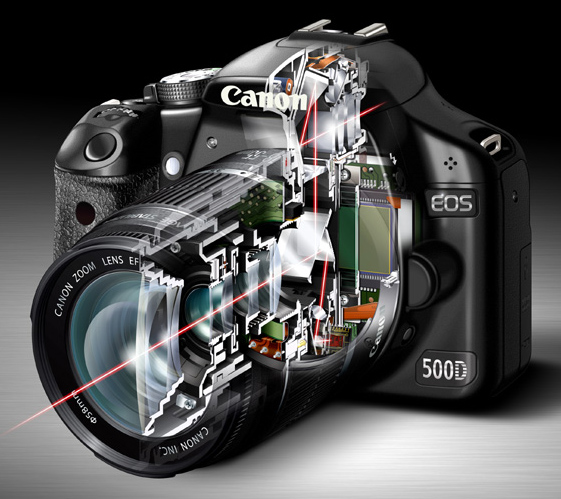
In a digital SLR most of the light coming through the lens is reflected up by the mirror, into the pentaprism and through the viewfinder. A small part is deflected downwards to a dedicated autofocus sensor. It uses a system called phase detection autofocus to calculate the camera to subject distance, and tell the lens where to focus.

Mirrorless cameras and focusing

The red lines in this diagram show the path that light takes through an SLR camera with the mirror in the down position. Most of the light is reflected into the pentaprism and the viewfinder. Part of it is reflected downwards towards the autofocus sensor.

The advantage of phase detection autofocus is that it’s fast (generally speaking – but it also depends on which camera you have) and very good at tracking moving subjects. It’s the best system anyone has managed to come up with for an SLR camera.

However, phase detection autofocus has a significant weakness – lack of accuracy.

There are two main reasons for this. The first is that most digital SLRs have a combination of cross-type and single line autofocus points. Cross-type autofocus points are the most accurate, and should always be used when focus is critical (for example, when using a prime lens at its widest aperture), otherwise the camera may not focus where it is supposed to. Your camera’s manual will tell you which of its AF points are cross-type.

Whenever you use a non cross-type autofocus point, you cannot rely on the camera to focus accurately. This is fine when using small apertures, which give you plenty of margin for error, but not when focus and accuracy is critical.

The second reason is to do with camera and lens calibration. Even when you use a cross-type autofocus point your camera may not focus exactly where it is supposed to. For accurate focus, every part of your camera setup – from the autofocus sensor, to lens and autofocus motors that tell the lens where to focus – must be working in perfect harmony. It only takes a small degree of misalignment to throw the accuracy of the system out.

Most of the time you won’t notice, because there is sufficient depth-of-field to make the focusing inaccuracies irrelevant. But if you use a wide aperture, especially with a telephoto lens, then depth-of-field is measured in millimetres, and accurate focus is essential.

For example, if you are taking a portrait then it is conventional to focus on the model’s eyes. If you miss focus, and her eyes are soft, then people will notice and the portrait will lose its impact.

Mirrorless cameras and focusing

I made this portrait with an EOS 5D Mark II and 85mm lens set to f1.8. With this camera it is necessary to measure and calibrate the autofocus system to ensure accurate focus at wide apertures.

Most mid-range and high-end digital SLRs have a feature that allows you to measure and compensate for inaccurate focusing. Manufacturers have different names for this – Canon and Sony use the term Autofocus micro-adjustment, Nikon calls it Autofocus fine tune, Pentax uses the term Autofocus adjustment and Olympus Autofocus focus adjust. It’s bit of a long winded process – you have to test your lenses by focusing on a ruler, or a purpose made scale, to see if the focus is accurate, and make adjustments if it isn’t.

You can also get your camera and lenses calibrated at a service centre. This is the only way to calibrate an SLR camera that doesn’t have the above feature built-in.

That was bit of a long explanation, but crucial if you are to understand why phase detection autofocus is not as accurate as it should be.

How are mirrorless cameras different?

So, how do mirrorless cameras differ? As they don’t have a mirror, there is no way of deflecting light to a dedicated autofocus sensor. The solution is to take a reading from the sensor. The camera looks at the point on the sensor which is meant to be in focus, and adjusts the lens until maximum contrast is achieved. This is called contrast detect autofocus.

This system is slower, because the camera has to move the lens first one way, then the other, to find the sharpest point. But, it is much more accurate (for still subjects).

With a mirrorless camera autofocus micro-adjustment is redundant. You don’t need it, and you will never have to measure or calibrate the camera’s autofocus system. It also doesn’t matter which autofocus point you use, as they all work equally well. That is why, for still subjects, autofocus in mirrorless cameras is superior to that of digital SLRs.

Mirrorless cameras and focusing

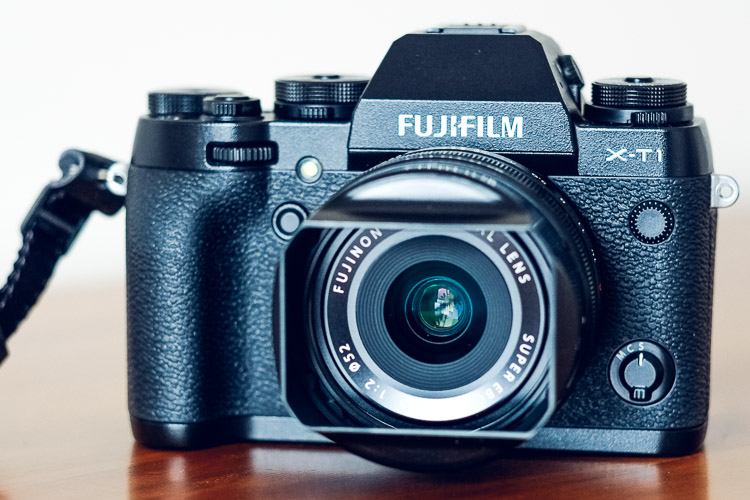
I made this portrait with a 56mm lens at f/1.2 with my Fujifilm X-T1 mirrorless camera. With this camera it is easy to focus on the model’s eye. There is no need to calibrate the camera’s autofocus system.

2. Manual focusing

Mirrorless cameras are also a better tool for utilizing manual focus lenses.

Modern digital SLRs are not designed to be helpful with manual focus lenses. The split prism focusing screens of the past are gone, and assistance is limited to a light that comes in the viewfinder when the subject underneath the selected AF point comes into focus.

Mirrorless cameras are different. They have a tool called focus peaking, which is specifically designed to help you manually focus a lens. The camera highlights the parts of the scene that are in focus, so that you can see which areas are sharp. You can also magnify the image at the touch of the button, making it even easier to see whether the subject is sharply focused.

This feature works best when using lenses at wide apertures. Both tools take advantage of the camera’s electronic viewfinder, a feature that most digital SLRs don’t have.

Mirrorless cameras and focusing

This mock up shows how focus peaking works. I made the portrait with a Helios 58mm manual focus lens at its widest aperture setting of f/2. The red lines indicate how focus peaking shows you what is in focus.

3. Hyperfocal distance

Fujifilm cameras have another tool that will be of interest to landscape photographers as it helps you instantly find the hyperfocal distance without referring to tables or smartphone apps.

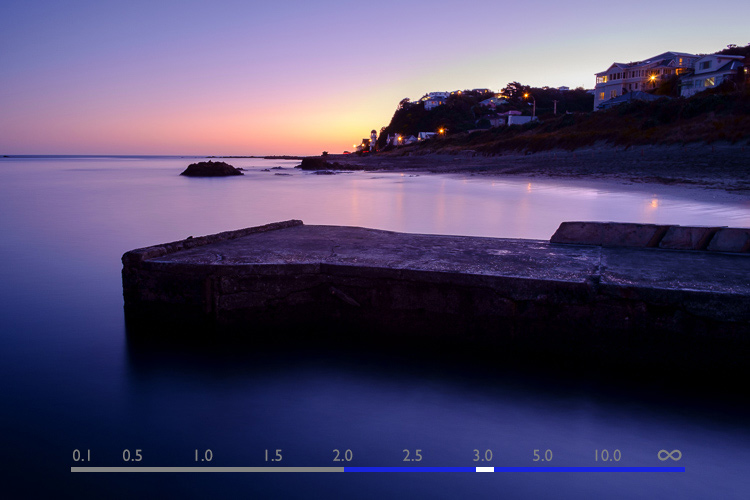
The viewfinder has a depth-of-field scale that shows you the point you are focused on and the area in focus on either side, according to the selected aperture. If you move the focusing ring until the depth-of-field scale touches the infinity mark at one end, you have found the hyperfocal distance point. It’s quick and easy.

To be honest, I don’t know if this feature is available in any brand of mirrorless camera other than Fujifilm. I’d be grateful if Sony/Olympus/Panasonic, etc., owners would let us know.

Mirrorless cameras and focusing

This diagram shows how the depth-of-field scale works. The bar shows the point the lens is focused on (white), and how much of the scene is in focus (blue). The lens is focused on the hyperfocal point in this made-up example.

Since buying my first Fujifilm camera a little over 18 months ago, I’ve been pleasantly surprised by what a great tool mirrorless cameras are for photography. They are much better than my old digital SLR for focusing on still subjects, or for using manual focus lenses.

The difference is so great that I predict that one day most photographers will use mirrorless cameras, and digital SLRs will be a niche item built for photographing sports and wildlife.

But what do you think? Please share your thoughts, or ask any questions about focusing, in the comments below.


Mastering Lenses

If you want to know more about lenses and autofocus check out my ebook Mastering Lenses: A Photographer’s Guide to Creating Beautiful Photos With Any Lens.

googletag.cmd.push(function() {
tablet_slots.push( googletag.defineSlot( “/1005424/_dPSv4_tab-all-article-bottom_(300×250)”, [300, 250], “pb-ad-78623” ).addService( googletag.pubads() ) ); } );

googletag.cmd.push(function() {
mobile_slots.push( googletag.defineSlot( “/1005424/_dPSv4_mob-all-article-bottom_(300×250)”, [300, 250], “pb-ad-78158” ).addService( googletag.pubads() ) ); } );

The post 3 Reasons Why Mirrorless Cameras are Better than Digital SLRs for Focusing by Andrew S. Gibson appeared first on Digital Photography School.


Digital Photography School

 
Comments Off on 3 Reasons Why Mirrorless Cameras are Better than Digital SLRs for Focusing

Posted in Photography


How Thinking Film and Shooting Digital Can Improve Your Photography

27 Mar

Film is not dead. But since the advent of digital photography, about 20 years ago, film has certainly taken a back seat. Since just over a decade ago, when digital cameras were widely available to the masses, film has almost been completely replaced. However, there’s a lot to be learned from the disciplines of analog days, before the ability to take photos so instantly, and at a phenomenal rate and remarkable quality, was made accessible to everyone with a digital camera.

think film shoot digital creative project_0000

Back in film days, we only had a limited amount of frames we could shoot on one roll. Often the camera sat for days and weeks until we had shot all the frames on the roll of film. We then carefully rewound the film and packaged it off to the film developers, then we wait…hours, days, weeks before we even saw the images we shot. Shooting film was no doubt a methodical exercise in process and patience.

think film shoot digital creative project

But, film has made a comeback in recent years. Many professional digital photographers have added film to their arsenal, others have made the complete switch back to film, and there are those who never made the switch to digital in the first place. Exciting days for analog in this predominantly digital age!

One way to learn from the disciplines of shooting film is to think in film mode.

think film shoot digital creative project

Go out with your camera with the following restraints:

  1. Set yourself an imaginary film roll number. Limit the number of frames you can shoot to 12, 24, or 36.
  2. Keep your ISO to a set number like 100, 200, 400, or 800 – which are the common film speeds from those days.
  3. Use only one lens. I’m sure not many of us, unless we were professionals then, walked around with an array of lenses in hand. Often we just used one lens, carried no back up film, or batteries, or external flash!

think film shoot digital creative project

Now shoot like you have a film camera in your hand and adopt these mindsets:

1.Don’t spray and pray!

When you take a photo, bear in mind how many frames you have left, and think carefully before you press the shutter. You cannot spray and pray with film, therefore have to exercise restraint. Look at things carefully, with an intentional eye, and imagine what the scene might look like before you take the shot. This helps you compose the frame more meticulously, and look at the light and dark contrast of the scene with more discernment.

think film shoot digital creative project

2. Think of a story or theme, or limit yourself to one place.

Boundaries are always helpful, they stretch you to think outside the box, more than when you have all the freedom in the world to photograph anything you please. It also helps make a cohesive story at the end, should you wish to collate your photos together on a blog or in an album.

think film shoot digital creative project

3. Don’t fear deep darkness or the raging midday sun.

Film is so good at retaining details in highlight and shadow areas of a photograph, that the dynamic range of the image is miles better compared to the digital camera image. Film also has a very forgiving nature when it comes to underexposure and overexposure over a wide range of stops. So with your film brain on, don’t fear extreme brightness or deep darkness. However bear in mind the settings to use that could help you in such circumstances.

When your subject is in bright daylight, and you don’t have a light meter handy, adopt the sunny f/16 rule. This means you use the following settings: aperture f/16 and your shutter speed set to the reciprocal of your ISO, or film speed. For example, if you have set your ISO to 100, this means your aperture will be f/16 and your shutter speed to the closest of 100 which is 1/125 (or any equivalent exposure value such as f/11 at 1/250, or f/8 at 1/500).

think film shoot digital creative project

4. Go where the light is

Whether it be natural light or any other available light, whether under the brightness of the sun or just candelight in a room, find the light. Film is extremely sensitive to light and if you adjust your shutter speeds in low light accordingly, you will be surprised at how well film can capture ambient light. Remember when shooting in low light, steady yourself or your camera, lower your shutter speed and adjust your aperture (open it wide). Your ISO cannot be changed; with film you only have two sides of the exposure triangle to play with.

think film shoot digital creative project

5. Edit for a film look

Nowadays there is a plethora of Lightroom presets, and Photoshop actions, that replicate the film look. If you are a dab hand at Photoshop, you can probably do it yourself from scratch. The main elements you are after to replicate the general film look are: pastel tones, creamy highlights, soft shadows, low and controlled contrast, reduced saturation, matte look (reduced black output), creamy skin tones, and some grain. Of course the actual overall look depends of the type of film used, but this list would encompass the general look and feel that film gives to an image.

think film shoot digital creative project

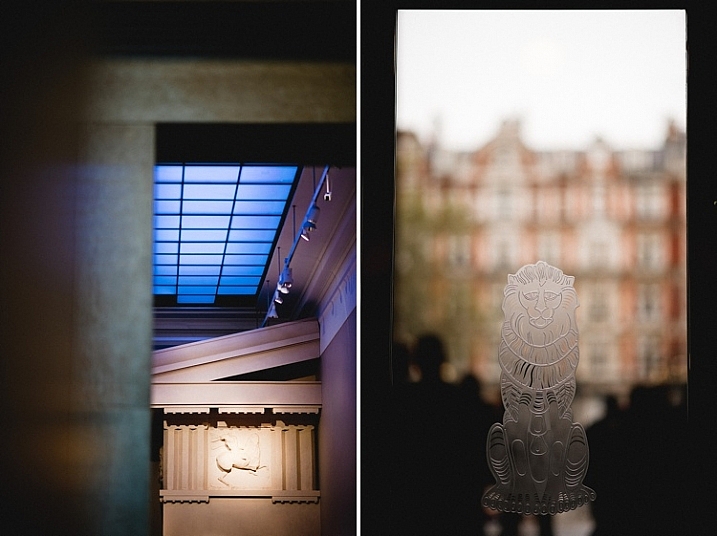
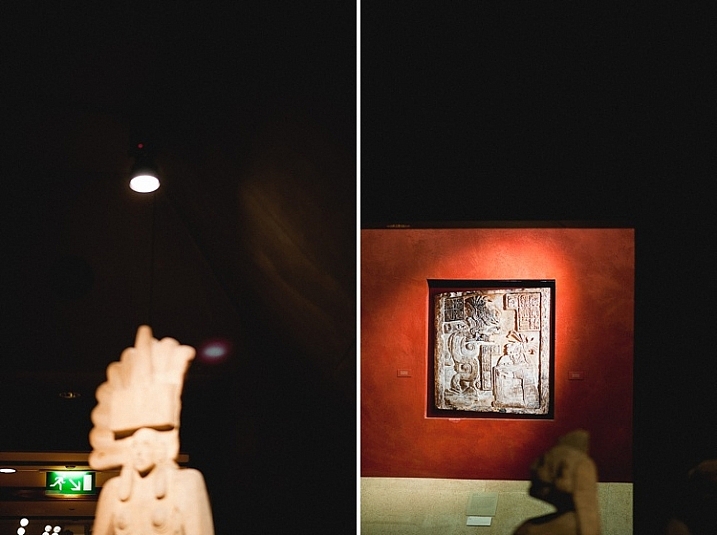
The photos I have used in this article were taken with a D700 and a 35mm f/1.4G, captured one day in London when I went out thinking film and shooting digital. I shot 22 frames out of 24 in three hours, nailed 19, botched two and fixed one in Photoshop.

think film shoot digital creative project

I hope you try this exercise and have fun with it. Share below in the comments how many frames you managed to shoot under great restraint, and then celebrate!

think film shoot digital creative project

amzn_assoc_placement = “adunit0”;
amzn_assoc_enable_interest_ads = “true”;
amzn_assoc_tracking_id = “dpsgeneral-20”;
amzn_assoc_ad_mode = “auto”;
amzn_assoc_ad_type = “smart”;
amzn_assoc_marketplace = “amazon”;
amzn_assoc_region = “US”;
amzn_assoc_linkid = “6710d26f550e9793f41475ee806fee9e”;
amzn_assoc_emphasize_categories = “13900861”;
amzn_assoc_fallback_mode = {“type”:”search”,”value”:”digital cameras”};
amzn_assoc_default_category = “Photo”;

googletag.cmd.push(function() {
tablet_slots.push( googletag.defineSlot( “/1005424/_dPSv4_tab-all-article-bottom_(300×250)”, [300, 250], “pb-ad-78623” ).addService( googletag.pubads() ) ); } );

googletag.cmd.push(function() {
mobile_slots.push( googletag.defineSlot( “/1005424/_dPSv4_mob-all-article-bottom_(300×250)”, [300, 250], “pb-ad-78158” ).addService( googletag.pubads() ) ); } );

The post How Thinking Film and Shooting Digital Can Improve Your Photography by Lily Sawyer appeared first on Digital Photography School.


Digital Photography School

 
Comments Off on How Thinking Film and Shooting Digital Can Improve Your Photography

Posted in Photography


Western Digital upgrades its My Cloud NAS system with multi-tasking processor

20 Feb

Storage manufacturer Western Digital Corporation has added a new 1.3 GHz dual core processor and 1GB of DDR3 memory to its latest network attached storage system and increased its maximum capacity to 12TB. The My Cloud EX2 Ultra is a twin-bay data storage device that the company aims at creative users, and which it is says is especially suited to those working with still and moving images. The new faster processor and built-in memory will allow users to multi-task ‘with ease’ and to stream high resolution content from the device to other connected PCs, smartphones and TVs.

The EX2 Ultra comes empty or fitted with Western Digital’s Red hard drives in total capacities of 4TB, 8TB or 12TB. The drives can be managed in RAID 0, RAID 1; JBOD and spanning modes, and they can be hot swapped while the unit is still running. Temporary expansion can also be achieved by connecting additional USB 3.0 external hard drives via the EX2’s USB ports.

The Western Digital My Cloud EX2 Ultra is compatible with Windows and Mac operating systems, and is priced from £135 with no disks, to £245 for 4TB, £390 for 8TB and £519.99 for 12TB.

For more information visit the Western Digital website.

Press release:

New Western Digital Prosumer NAS Storage Gives Creative Pros The Power To Multi-task And Easily Share Files

New My Cloud® EX2 Ultra Delivers High Performance with Up to 12 TB Capacity

IRVINE, Calif. – Feb. 17, 2016 –Western Digital Corporation (NASDAQ: WDC), a world leader in connected storage solutions, today updated its prosumer solutions with My Cloud EX2 Ultra, a high-performance, two-bay network attached storage (NAS) system. The My Cloud EX2 Ultra NAS is designed from the ground up for creative professionals and prosumers that need to automatically sync content across computers, easily share files and folders and enjoy multiple backup options so they can create their own personalized digital library with ease.

“We know our My Cloud users, especially creative professionals, need comprehensive solutions as digital storage needs continue to soar as well as the need for ongoing streaming capability,” said Jim Welsh, executive vice president, WD Branded Products. “With the My Cloud EX2 Ultra, creative professionals are able to combine high performance with multi-tasking optimization and data protection to create a NAS system that simplifies their workflow and provides peace-of-mind.”

My Cloud EX2 Ultra has been upgraded with a powerful 1.3 GHz dual-core processor enabling users to get ultra-fast transfer rates for high performance and smooth video streaming. Users also have access to 1 GB of DDR3 memory, allowing them to multitask with ease and leverage applications for HD media streaming, surveillance and much more. Several data management and security features allow users to select a preferred method for managing and protecting their movies, photos, music and digital files. Drive management options include RAID 0, RAID 1; JBOD and spanning modes, while data protection options include NAS to NAS, USB, cloud or LAN/WAN backup. The My Cloud EX2 Ultra  NAS comes preconfigured in RAID 1 mode to help protect data right from the start and is easily configurable into other data protection modes.

High Capacity and Ultimate Reliability
From unpopulated to 12 TB capacities1, the My Cloud EX2 Ultra provides several capacity options for customers to choose from. Additionally, customers can attach compatible USB 3.0 hard drives to the USB expansion ports on the My Cloud EX2 Ultra to instantly expand their storage capacity. The populated My Cloud EX2 Ultra features the award-winning WD Red® hard drives, specifically built for NAS systems to provide non-stop performance within 24×7 environments. WD Red drives are powered by NASware™ 3.0 technology, improving drive reliability and minimizing data corruption in the event of a power loss or disruption.

Easy Sharing with Anywhere Access
With simplified file and folder sharing, users can send customized, private links that allow recipients read/write access to particular files on the user’s My Cloud EX2 Ultra. Whether on a photo shoot, or editing at home, saving creations at full fidelity and sharing with your entire network is a breeze. The My Cloud EX2 Ultra features an intuitive dashboard, so user accounts can be created, features customized and storage can be monitored with ease. With MyCloud.com web access, or the My Cloud mobile app, users can access their media and manage users from any internet connected device. With WD Sync™, users can automatically synchronize their media and files across their computers and their My Cloud device with the confidence that their computer content is up to date and accessible from all devices.

Advanced Features
My Cloud EX2 Ultra includes advanced data serving options including an integrated FTP and WebDAV server, backup server, P2P download server and Microsoft Active Directory support. Additionally, users can download and run a host of third party apps, including, Plex®, Milestone Arcus™ surveillance, aMule, Icecast, Joomla!®, Anti-Virus Essentials, WordPress®, SqueezeCenter, and more. Users can also stream videos and photos to connected TVs, media players, gaming consoles and other DLNA®/UPnP® devices with  the included Twonky 7.2 DLNA-certified 1.5 media server, and built-in iTunes® support.

Price and Availability
My Cloud EX2 Ultra is currently available at select U.S. retailers and online at the wdstore.com. MSRP is $ 159.99 USD for the diskless My Cloud EX2 Ultra, $ 349.99 USD for 4 TB, $ 449.99 USD for 8 TB and $ 599.99 USD for 12 TB. The WD My Cloud mobile app currently is available for download for free from the Apple App StoreSM and Google PlayTM. My Cloud EX2 Ultra comes with a two-year limited warranty on the diskless device and a three-year limited warranty on the pre-configured devices.

Compatibility
My Cloud EX2 Ultra is compatible with Windows® 10, Windows 8, Windows Vista®, OS X® El Capitan™, Yosemite™, Mavericks™, Mountain Lion™ as well as DLNA®/UPnP® enabled devices.

Forward Looking Statements
This news release contains forward-looking statements, including statements relating to the approximate price and estimated availability of the My Cloud EX2 Ultra, the growth of digital storage needs, as well as the demand for ongoing streaming capability. These forward-looking statements are subject to risks and uncertainties that could cause actual results to differ materially from those expressed in the forward-looking statements, including but not limited to, the risks detailed from time-to-time in our Securities and Exchange Commission filings and reports, including, but not limited to, our most recent annual report on Form 10-K to which your attention is directed. Readers are cautioned not to place undue reliance on these forward-looking statements, which speak as of the date hereof, and WD undertakes no obligation to update these forward-looking statements to reflect subsequent events or circumstances.

About Western Digital
Founded in 1970, Western Digital Corp. (NASDAQ: WDC), Irvine, Calif., is an industry-leading developer and manufacturer of storage solutions that enable people to create, manage, experience and preserve digital content. It is a long-time innovator in the storage industry. Western Digital Corporation is responding to changing market needs by providing a full portfolio of compelling, high-quality storage products with effective technology deployment, high efficiency, flexibility and speed. Its products are marketed under the HGST and WD brands to OEMs, distributors, resellers, cloud infrastructure providers and consumers. Financial and investor information is available on the company’s Investor Relations website at investor.wdc.com.
1System is shipped in RAID 1 configuration, which leaves half of the system capacity available for data storage. System is configurable to RAID 0; JBOD or spanned, which leaves all system capacity available for data storage. Up to 0.1TB may be reserved for non-user accessible storage.

Articles: Digital Photography Review (dpreview.com)

 
Comments Off on Western Digital upgrades its My Cloud NAS system with multi-tasking processor

Posted in Uncategorized


Tips for Removing Digital Noise in Lightroom

17 Feb

One of the most significant advantages that modern cameras have over their film-based counterparts of days gone, by is their ability to change how sensitive they are to light with the touch of a button.

Back in the days of film you had to decide ahead of time whether you wanted to shoot at ISO (then called ASA) 100, 200, 400, or in extreme cases, 800. If you were going to take pictures outdoors, a roll of 24 or 36 exposure, 100 or 200 film would work fine, but woe betide the unsuspecting photographer who wandered inside a dimly-lit building with that same film still in his or her camera. To change sensitivity, and shoot in the new lighting conditions, you had to shoot the rest of the pictures on a given roll of film, remove it from your camera, and hope you brought some ASA 400 or 800 film with you.

Nowadays you just spin a dial on your camera to instantly switch between ISO values like 100 or 200, that work great in broad daylight, to ultra-high values like 6400 or 12,800, that would be positively unthinkable with film. It’s not all sunshine and roses though as one of the biggest issues with high ISO values is that of digital noise. Even the newest cameras produce pictures with noise and grain when shooting at high ISO values, but thankfully Lightroom can help mitigate some of the effects of this noise.

Shot at ISO 5000, the original image was too noisy for practical use. Lightroom enabled me to clean things up significantly.

Shot at ISO 5000, the original image was too noisy for practical use. Lightroom enabled me to clean things up significantly.

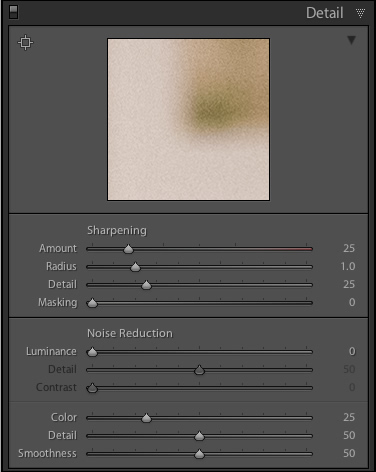
To get started with the noise reduction options click on the Develop module, then find the Detail panel on the right side. Note: this process works best if you shoot in RAW, not JPG.

You will find several options that can seem a bit confusing and overwhelming at first. You can experiment all you want, by just moving the sliders around to see what effects they have on your pictures, but it also helps to examine each one individually, to know precisely what they do. You will also see the Sharpening options, which are related to noise reduction, but I’m not going to focus on them specifically just yet. Before you look at the sliders themselves in the noise reduction area, it’s important to understand the two types of noise that are produced when taking a picture, Luminance and Chroma.

lightroom-noise-reduction-develop-panel

Luminance noise

This kind of noise affects the brightness, but not the color, of individual pixels. If you had a picture of a dark grey piece of paper with a great deal of luminance noise it would appear similar to old-school television static with lots of light and dark fuzz.

Chroma noise

This shows up as oddly-colored pixels, scattered throughout an image, almost like someone has tossed a handful of red, blue, and green grains of sand at it. Lightroom calls this “Color” noise, but it’s just another term for Chroma noise.

Both types of noise are byproducts of how digital image sensors capture data, and while they can be corrected somewhat in Lightroom and other post-processing software, it’s almost impossible to completely remove noise from a picture while still ending up with a usable image. Lightroom does give you some tools to get your digital noise under control, and if you know what you’re doing you can get some fairly decent results. Using separate controls for luminance and chroma noise, in combination with some sharpening adjustments, can help you salvage what you may think is a useless picture. As an example, here’s a picture that I took at ISO 6400, without any noise reduction applied.

35mm, f/5.6, 1/60 second, ISO 6400

35mm, f/5.6, 1/60 second, ISO 6400

Not bad, right? If this is what ISO 6400 looks like, you might as well shoot like this all day long! Well, before you go and spin your ISO dial all the way up to Ludicrous Mode, you might want to take a look at the same 24-megapixel image zoomed in to 100%.

lightroom-noise-reduction-scene-no-noise-reduction-100-percent

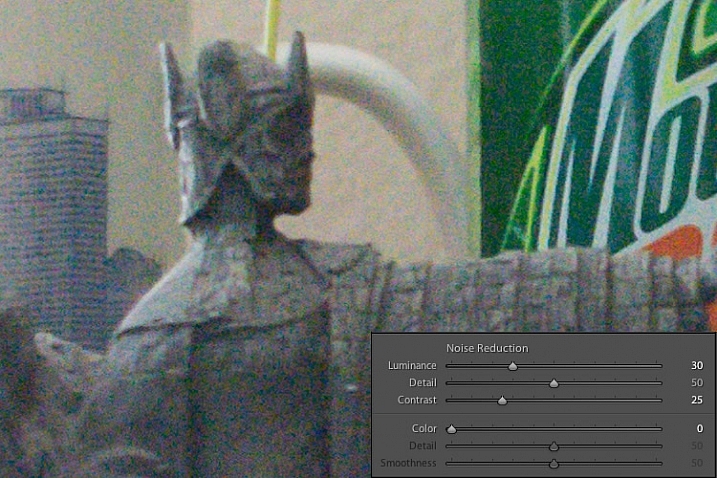
Ow, my eyes! The noise, it hurts! Not only is the picture full of color blotches, but shooting at ISO 6400 has resulted in an image that is far less sharp than it could be at a lower ISO. A great deal of color noise is evident on the torso of the figure, as well as the slanted lines on the left side, and you can see lots of luminance noise in the green letters on the right side too.

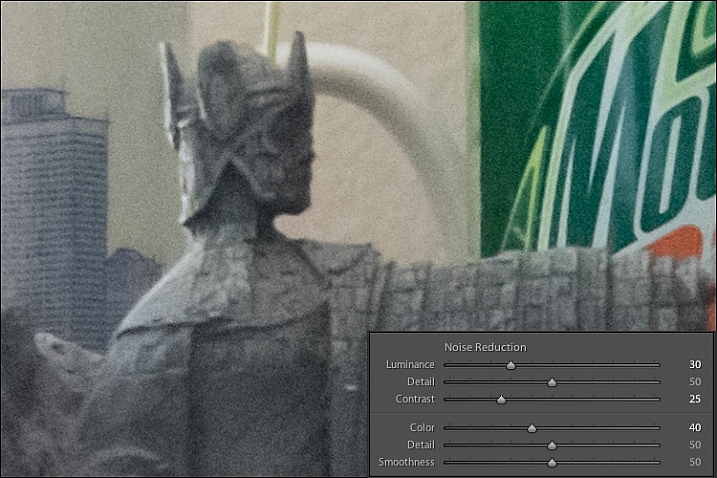
This noise is not always visible when you shrink  your files down to share online, but if I were to print this picture it would look like my cat threw up on the paper. Lightroom can help us fix things, and a good place to start, in this case, is with the luminance slider at a value of 30.

lightroom-noise-reduction-scene-luma-noise-reduction-100-percent

Much of the black and white static has been removed, but there are still splotchy patches of color scattered throughout the image, which can dealt with using the color slider next. Before you start thinking that this is a magical cure-all for your noisy images, take a closer look at the picture. Much of the details have been lost, or blurred, such as the lines on the side, and the patchwork of the figure’s tunic.

You can mitigate these effects somewhat by using the detail and contrast sliders, but again the results are not going to be ideal. Detail acts as sort of a threshold control, allowing you to tell Lightroom what should be treated as noise and what should be left in. I usually leave this slider at 50 but you can experiment with it to get the results you need. The contrast slider helps bring back some of the edges that have gotten blurry, thanks to the noise reduction algorithm, and even though I have set it to 25 in this example, you can clearly see that much of the edge contrast is not as good as the noisy original. Move this slider too far though, and your photo will start looking fake and artificial, so you’ll have to find a good balance depending on your needs.

To continue with the noise reduction, the color slider can be used to get rid of the weird splotches of red, green, and blue, but again you are going to see some tradeoffs.

lightroom-noise-reduction-scene-chroma-noise-reduction-100-percent

The results look fine at first, and you may notice that Lightroom automatically applies some degree of Color noise reduction (value 25) to every photo by default. This is because low-grade Color noise reduction is almost always good to have, and generally won’t result in too many tradeoffs for the image as a whole. In this case I used a value of 40, to show the effects a bit more. Even though the result is decent, you might notice something else that’s missing, if you look at the soda bottle label on the right-hand side. Compare it to the original picture and you will see that along with removing some of the color noise Lightroom has actually removed some color from the whole photo.

The Detail slider slider, similar to its counterpart in Luminance noise reduction, acts as somewhat of a threshold so you can tell Lightroom what is, and is not, noise to remove. The Smoothness slider is a fairly recent addition to Lightroom, and can be used to control what’s known as “low-frequency” color noise. Basically, slide it to the right to remove larger splotches of noise or to the left to keep these more intact.

Every time you use Lightroom’s noise reduction tools you will deal with tradeoffs, and one of the most significant of these is the overall sharpness of the image. Photos with more noise reduction will almost always be softer, particularly where there are sharp contrasting edges, and you can bring a bit of this back by using the sharpening tools.

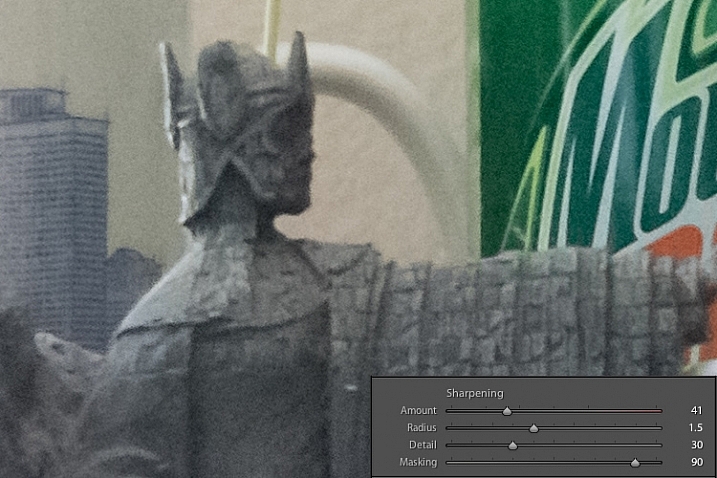
Here’s yet another 100% crop of the image above with the same noise reduction employed in the previous image, but with added sharpening.

lightroom-noise-reduction-scene-sharpened-100-percent

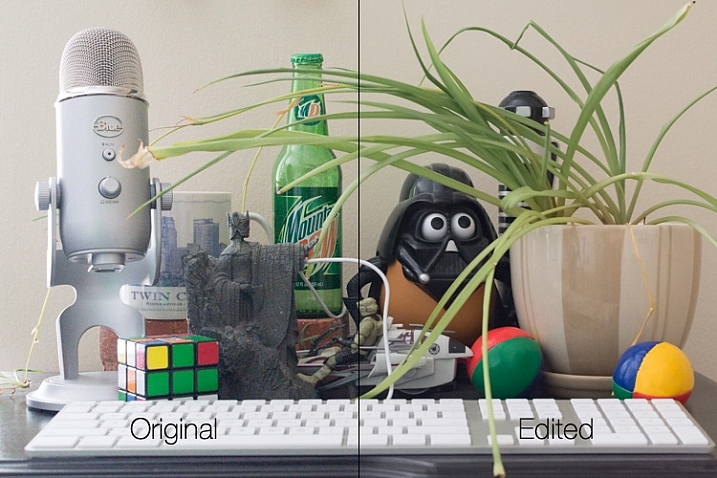
After a bit of sharpening, the detail in the lines on the left side has returned, and so has the texture of the tunic, but the lower-left corner is still a muddy mess of grey, whereas in the original noisy picture it was more defined. Here’s both the original and edited image side-by-side which might help you get a macro view of how these noise reduction and sharpening tools can affect a picture.

lightroom-noise-reduction-scene-both

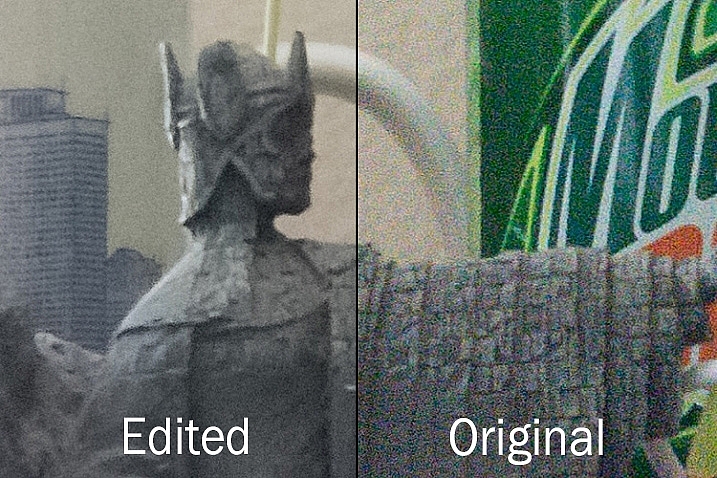
At first glance you might not notice too many differences, but one of the most glaring problems with the edited picture is the complete lack of texture on the wall behind the scene, as well as a smoothness to the plant that is almost unnatural. Here’s a side-by-side zoomed in to 100%.

lightroom-noise-reduction-scene-no-noise-reduction-100-percent-before-after

Is it worth these tradeoffs to get a photo with less noise? That question can only be answered by you, but one rule of thumb I like to follow, is that a noisy image can be corrected and edited in postproduction, albeit somewhat imperfectly. A blurry image cannot be fixed.

So, if there is a situation in which I find myself having to choose between a faster shutter speed and higher ISO (i.e. more noise), or a slower shutter speed and lower ISO (i.e. less noise) I’ll usually err on the side of noise, if the slower shutter speed would result in an image that is too blurry.

I also make liberal use of my camera’s auto-ISO feature, which allows me to set a minimum shutter speed and a maximum ISO value. That way I can concentrate on adjusting the aperture to get the composition I want, and always know that my pictures will be free of blur, even if does mean there will be a bit of noise I have to clean up in Lightroom.

The light here was quite dim which required a high ISO value. I didn't mind a slightly noisy image that was sharp and in focus, because I was able to get rid of most of the noise in Lightroom.

The light here was quite dim, which required a high ISO value. I didn’t mind a slightly noisy image that was sharp and in focus, because I was able to get rid of most of the noise in Lightroom.

One final note worth mentioning is you can also use Lightroom’s local adjustments like the Radial Filter, Graduated Filter, and Adjustment Brush to apply noise reduction in specific areas of an image only. However, this is a bit limited, in that these adjustments only perform luminance noise reduction, so you might still be left with some ugly colored spots, that can only be removed using the global adjustments in the detail panel of the develop module.

What are some of your favorite tips and tricks for removing noise? I’d be interested to hear any thoughts you have in the comments section below.

googletag.cmd.push(function() {
tablet_slots.push( googletag.defineSlot( “/1005424/_dPSv4_tab-all-article-bottom_(300×250)”, [300, 250], “pb-ad-78623” ).addService( googletag.pubads() ) ); } );

googletag.cmd.push(function() {
mobile_slots.push( googletag.defineSlot( “/1005424/_dPSv4_mob-all-article-bottom_(300×250)”, [300, 250], “pb-ad-78158” ).addService( googletag.pubads() ) ); } );

The post Tips for Removing Digital Noise in Lightroom by Simon Ringsmuth appeared first on Digital Photography School.


Digital Photography School

 
Comments Off on Tips for Removing Digital Noise in Lightroom

Posted in Photography


Canon announces flagship EOS-1D X Mark II full-frame digital SLR

02 Feb

$ (document).ready(function() { SampleGalleryV2({“containerId”:”embeddedSampleGallery_9233536181″,”galleryId”:”9233536181″,”isEmbeddedWidget”:true,”selectedImageIndex”:0,”startInCommentsView”:false,”isMobile”:false}) });

Canon has announced its new flagship DSLR, the full-frame EOS-1D X Mark II. It features a new 20.2MP CMOS sensor with Dual Pixel AF, and uses a pair of Dual DIGIC 6+ processors to capture 4K video and shoot continuously at up to 16 fps. The camera has a native ISO of 100-51200, expandable to 409600.

The new 61-point autofocus system has 41 cross-type sensors and 24% larger frame coverage than its predecessor. Its center point is sensitive to -3EV in OneShot AF. In live view the camera uses the latest iteration of Canon’s Dual Pixel AF technology for high-speed focusing in OneShot mode. The metering system has also been updated to use a 360k-pixel RGB+IR sensor, which the company says improves subject – including face – detection and tracking.

As with its predecessors, the 1D X is as rugged a camera as you’ll find. It’s magnesium alloy body is fully weather-sealed and has a shutter that will last for approximately 400,000 cycles. In addition to its large optical viewfinder (now with better, adjustable AF point illumination), the Mark II has a 3.2″ Clear View II LCD with 1.62 million dots, up from 1.04 million dots. The screen is touch-enabled, but only for autofocus point selection in Live View. Another new addition is a built-in GPS (with an e-compass), which sits in a ‘hump’ on the top of the viewfinder. Otherwise, the design of the Mark II is very similar to that of its predecessor.

Performance-wise, the 1D X II can shoot continuously at 14 fps with autofocus, and if you lock the mirror up, you can shoot up to 16 fps with locked focus and exposure. If you’re using the older LP-E4N battery, the top shooting speeds drop to the same frame rates as the 1D X (12/14 fps). If you’re using a CFast card you can take an unlimited number of JPEGs or a whopping 170 Raw images in a single burst, or 12 seconds of shooting at 14 fps. The 1D X II also has a slot for standard CompactFlash cards. When it comes to connecting to a PC you can choose from the camera’s USB 3.0 or Ethernet ports. Wi-Fi requires the use of Canon’s $ 600 WFT-E8 wireless file transmitter.

One of the most significant additions to the 1D X II is support for 4K (DCI) video capture. It can capture 4K video at 60p using the M-JPEG codec (which allows for easy frame grabs) as well as 1080p at frame rates of up to 120 fps. You’ll need to use a CFast card in order to record more than a few seconds of 4K video though. Dual Pixel AF enables continuous autofocus in video, and touch focus makes the experience a breeze. The camera does not offer focus peaking or zebra patterns natively, but they are visible when using an external recorder. As one would expect given its place in Canon’s lineup, the 1D X Mark II has both headphone and mic jacks.

The EOS-1D X Mark II will be available in April for $ 5999 (body only), or bundled with a 64GB CFast card and reader for $ 6299.

Press release:

Fast, Formidable, and 4K, All-in-One Camera: CANON U.S.A. Introduces the EOS-1D X Mark II Professional Digital Camera 

Delivering Precise and Reliable Performance with Versatility for Any Photo or Video Professional

MELVILLE, N.Y., February 1, 2016 – Rising to meet the rigorous and evolving demands of professional photographers and videographers, Canon U.S.A., Inc., a leader in digital imaging, is proud to announce the new EOS-1D X Mark II DSLR camera. With a new 20.2 megapixel 35mm Full Frame Canon CMOS sensor and Dual DIGIC 6+ Image Processors, the EOS-1D X Mark II professional digital camera delivers stunning image quality and speed. Combining the ability to capture high-resolution still images at speeds up to 14 frames per second as well as stunning high-definition video up-to-4K 60P featuring Canon’s proprietary Dual Pixel CMOS Autofocus (AF) technology, the Canon EOS-1D X Mark II camera becomes the ideal camera for any professional image creator. 

The new flagship Canon EOS-1D X Mark II features several firsts for EOS cameras including:

  • Newly developed 20.2 megapixel 35mm Full Frame Canon CMOS sensor;
  • Continuous shooting speeds of up-to-14 frames per second (fps) with Auto Exposure (AE) and predictive AF for viewfinder shooting and up to 16 fps1 in Live View mode; 
  • Dual DIGIC 6+ Image Processors that transfer image data at extremely high speed for extended bursts during continuous shooting – up-to-170 consecutive RAW images at 14 fps. When shooting JPEG images you’re only limited by memory card capacity2
  • Capable of shooting 4K 60P and Full HD 120P video with Dual Pixel CMOS AF;
  • Enhanced wireless functionality (with the optional accessory Wireless File Transmitter WFT-E8) that supports the new high-speed IEEE 802.11ac standard and the  ability to easily transfer photos and videos to compatible smartphones using Canon’s Camera Connect app*
  • Digital Lens Optimizer to help correct aberrations in-camera (a feature that previously required post-processing on an external computer); 
  • Improved 61-point viewfinder AF with expanded coverage and all AF-points selectable and supported to a maximum aperture of f/8; 
  • Improved AI Servo III+ predictive AF algorithm for better accuracy; 
  • Continuous red illumination of all AF points within the camera’s Intelligent Viewfinder II.
  • Compatibility with both CF and CFast memory cards for optimal performance and versatility.

The Ultimate EOS Camera: Continuing a Legacy of High Speed and Performance

Building on the success of the Canon EOS-1D X professional digital camera, the Canon EOS-1D X Mark II camera is designed to deliver high-performance, speed, and image quality, with improved comfort for professional photographers. In addition to the new 20.2 megapixel full-frame CMOS sensor and Dual DIGIC 6+ Image Processors, the new EOS-1D X Mark II DSLR camera includes an improved 61-point High-Density Reticular AF II system with all AF points selectable by the user (and up to 41 cross-type points depending on the lens in use). The improved AF system includes expanded coverage that supports AF at maximum apertures up to f/8 with all 61 points for high precision autofocus even when using EF super-telephoto lenses with an EF extender. The camera also boasts excellent dynamic range and reduced color noise compared to its predecessor throughout its standard ISO speed range of 100 – 51,200. Expansion ISO speeds of 50, 102,400, 204,800 and 409,600 are also available.  A first for the Canon EOS-1D series, this camera also features a 360,000-pixel RGB+IR metering sensor with enhanced precision and performance compared to its predecessor, improving facial recognition and tracking, as well as nature scenes. Additionally, the advanced AE system can detect and compensate for flickering light sources such as sodium vapor lamps that are often used in gymnasiums and swimming pools. When enabled, this anti-flicker system automatically adjusts shutter release timing to help reduce disparities in exposure and color especially during continuous burst shooting.

For filmmakers and photographers looking to do more than still photography alone with a DSLR camera and EF lenses, the EOS-1D X Mark II camera offers high resolution DCI 4K video at frame rates up-to-60p, with smooth movie recording to an in-camera CFast 2.0 memory card. An additional card slot supports standard CF memory cards up to UDMA 7. The built-in headphone jack supports real-time audio monitoring. Two additional EOS ‘firsts’ include 4K Frame Grab and 120p Full HD recording. The camera’s 4K Frame Grab function allows users to isolate a frame from recorded 4K video and create an 8.8 megapixel still JPEG image in-camera. When combined with the EOS-1D X Mark II’s high-sensitivity full-frame CMOS sensor, the new camera’s ability to record Full HD video at frame rates up to 120p will allow videographers to produce high quality slow motion video even in extremely low light. To make video shooting even more intuitive, the Canon EOS-1D X Mark II camera’s touch-screen LCD allows videographers to select the camera’s AF point before and during video recording with Dual Pixel CMOS AF, which provides responsive, accurate and quiet camcorder-like video autofocus to DSLRs.

“The innovations within Canon’s new EOS-1D X Mark II DSLR camera clearly set a new standard for professional cameras,” said Yuichi Ishizuka, president and COO, Canon U.S.A., Inc. “In developing the EOS-1D X Mark II camera, we looked to incorporate user-requested performance enhancements to bring professional photographers the ultimate EOS camera, a camera that has matured and been developed to meet their evolving needs.” 

“Having f/8 capability on all 61 AF points is a tremendous benefit to wildlife photographers,” noted nature photographer and Canon Explorer of Light Charles Glatzer. “In order to capture tight shots of animals without disturbing them, I frequently have to use very long lenses—sometimes with an extender attached, which further diminishes the aperture. The improved AF allows me to frame the shot exactly the way I envision it, without having to compromise.”

“This camera is a huge step forward,” remarked acclaimed photographer and Canon Explorer of Light Damian Strohmeyer. “Shooting sports in a gym at 8,000 ISO, it looked as good as 800 ISO from a generation or two ago. The images are tack-sharp, and the autofocus just doesn’t miss. I’ve been amazed by what I’ve seen so far.”

“The autofocus was awesome,” agreed Peter Read Miller, sports photographer and Canon Explorer of Light.  “The higher frame rate coupled with the speed of the CFast card was a definite advantage. It just never buffered out, even shooting RAW.”

The new EOS-1D X Mark II camera also offers a built-in GPS** receiver with compass for precise geo-tagged information of latitude, longitude, elevation and direction. This is especially valuable to wildlife photographers and photojournalists who need to track their locations, as well as providing sports photographers the ability to sync a multiple-camera setup with extreme accuracy and precision. It is also possible to use the camera’s built-in GPS to automatically sync the camera’s time to the atomic clock, an invaluable feature to professionals.  An improved grip also makes the camera easier for photographers to hold and maneuver while shooting. In response to feedback from professional EOS users, the AF points in the EOS-1D X Mark II camera’s Intelligent Viewfinder II can be illuminated in red for improved visibility, especially when shooting in dark locations. AF sensitivity in low light has been doubled from EV -2 to EV -3 at the center AF point when the camera is set to One-Shot AF, enabling the camera to autofocus in extremely dark shooting conditions such as a moonlit nightscape. Viewfinder AF coverage has also been increased for greater compositional flexibility.

As with all EOS-1D series cameras, the EOS-1D X Mark II’s rugged construction and magnesium alloy body is weather resistant. The camera also features improved controls and more in-camera image quality enhancements than ever before, including a Digital Lens Optimizer function offering high quality aberration correction which can now be achieved without an external computer. This feature makes it easier for professional photographers to deliver finished files to their clients, especially in situations when access to a personal computer is impractical or inconvenient. 

The estimated retail price for the Canon EOS-1D X Mark II is $ 5999 (MSRP) for the body or $ 6299 for the Premium Kit which includes a 64 GB CFast memory card and card reader. The new camera is scheduled to begin shipping to authorized Canon USA dealers in April 2016***. For more information and the full list of product specifications, visit: usa.canon.com/EOS1DXMarkII 

* With the download of the free Canon Camera Connect app. This software enables you to upload images to social network services. Before uploading images, please be aware that image files may contain privacy-related information such as people and places. If necessary, please delete such information. Canon does not obtain, collect or use such images or any information included in such images through this software. 
** In certain countries and regions, the use of GPS may be restricted. Therefore be sure to use GPS in accordance with the laws and regulations of your country or region. Be particularly careful when traveling outside your home country. As a signal is received from GPS satellites, take sufficient measures when using in locations where the use of electronics is regulated.
***Availability, pricing and specifications are subject to change without notice. Actual prices are set by individual dealers and may vary.

1. Continuous shooting speed may vary depending on the shutter speed, the aperture, the lens being used, the battery charge and various camera settings
2. Burst rate using CFast card


EOS-1D X Mark II specifications

Price
MSRP $ 5999 (body only)
Body type
Body type Large SLR
Body material Magnesium alloy
Sensor
Max resolution 5472 x 3648
Other resolutions 4368 x 2912, 3648 x 2432, 2736 x 1824
Image ratio w:h 3:2
Effective pixels 20 megapixels
Sensor photo detectors 22 megapixels
Sensor size Full frame (36 x 24 mm)
Sensor type CMOS
Processor Dual DIGIC 6+
Color space sRGB, Adobe RGB
Color filter array Primary color filter
Image
ISO Auto, 100-51200 (expands to 50-409600)
Boosted ISO (minimum) 50
Boosted ISO (maximum) 409600
White balance presets 6
Custom white balance Yes (5 slots)
Image stabilization No
Uncompressed format RAW
File format
  • JPEG (Exif v2.3)
  • Raw (Canon CR2, 14-bit)
Optics & Focus
Autofocus
  • Contrast Detect (sensor)
  • Phase Detect
  • Multi-area
  • Center
  • Selective single-point
  • Tracking
  • Single
  • Continuous
  • Touch
  • Face Detection
  • Live View
Manual focus Yes
Number of focus points 61
Lens mount Canon EF
Focal length multiplier 1×
Screen / viewfinder
Articulated LCD Fixed
Screen size 3.2
Screen dots 1,620,000
Touch screen Yes (for AF point selection only)
Screen type TFT LCD
Live view Yes
Viewfinder type Optical (pentaprism)
Viewfinder coverage 100%
Viewfinder magnification 0.76×
Photography features
Minimum shutter speed 30 sec
Maximum shutter speed 1/8000 sec
Exposure modes
  • Program
  • Aperture priority
  • Shutter priority
  • Manual
Built-in flash No
External flash Yes (via hot shoe or flash sync)
Flash X sync speed 1/250 sec
Continuous drive 16.0 fps
Self-timer Yes
Metering modes
  • Multi
  • Center-weighted
  • Spot
Exposure compensation ±5 (at 1/3 EV, 1/2 EV steps)
AE Bracketing ±3 (3 frames at 1/3 EV, 1/2 EV steps)
Videography features
Resolutions 4096 x 2160 (60p, 30p, 25p, 24p, 23.98p), 1920 x 1080 (120p, 60p, 50p, 25p, 24p, 23.98p)
Format MPEG-4, H.264, Motion JPEG
Microphone Mono
Speaker Mono
Storage
Storage included CompactFlash + CFast 2.0
Connectivity
USB USB 3.0 (5 GBit/sec)
HDMI Yes
Microphone port Yes
Headphone port Yes
Wireless Optional
Wireless notes requires WFT-E8
Remote control Yes
Physical
Environmentally sealed Yes
Battery Battery Pack
Battery description LP-E19 lithium-ion battery & charger
Battery Life (CIPA) 1210
Weight (inc. batteries) 1530 g (3.37 lb / 53.97 oz)
Dimensions 158 x 168 x 83 mm (6.22 x 6.61 x 3.27)
Other features
Orientation sensor Yes
GPS BuiltIn
GPS notes with e-compass

Articles: Digital Photography Review (dpreview.com)

 
Comments Off on Canon announces flagship EOS-1D X Mark II full-frame digital SLR

Posted in Uncategorized