RSS
 

Posts Tagged ‘Digital’

Sony Digital Filter camera app merges parts of three images into one

19 Mar

Sony has announced the release of a new camera app called Digital Filter, giving photographers a way to merge parts from two or three different images into a single photo. It adds greater flexibility to a similar existing app called Sky HDR. Digital Filter is priced at $ 29.99 or $ 19.99 as an upgrade to Sky HDR.

Though they offer similar functionality, the biggest feature difference between Sky HDR and Digital Filter is that the new app supports merging sections of up to three different images, whereas Sky HDR only allows for two exposures. Sony merely states that, ‘The Digital Filter application offers functionality, ease of use and image quality that go beyond the features of Sky HDR.’

Digital Filter supports the following camera models:

  • Alpha a7
  • Alpha a7 II
  • Alpha a7R
  • Alpha a7R II
  • Alpha a7s
  • Alpha a7s II
  • Alpha a6000
  • Alpha a6300
  • Alpha a6500
  • RX100 III
  • RX100 IV
  • RX100 V
  • RX10 II
  • RX10 III
  • RX1R II

Sky HDR supports certain camera models Digital Filter doesn’t, including the a5100 and three NEX models.

Via: SonyAlphaRumors

Articles: Digital Photography Review (dpreview.com)

 
Comments Off on Sony Digital Filter camera app merges parts of three images into one

Posted in Uncategorized


2016 CIPA data shows compact digital camera sales lower than ever

08 Mar

Last month, the Camera & Imaging Products Association (CIPA) released its 2016 report detailing yearly trends in camera shipments. Using that data, photographer Sven Skafisk has created a graph that makes it easy to visualize the data, namely the major growth in smartphone sales over the past few years and the apparent impact it has had on dedicated camera sales.

The chart shows smartphone sales achieving a big spike around 2010, the same time range in which dedicated camera sales reached its peak. Each following year has represented substantial growth in smartphone sales and significant decreases in dedicated camera sales, particularly in the compact digital cameras category. 

Per the CIPA report, total digital camera shipments last year fell by 31.7% over the previous year. The report cites multiple factors affecting digital camera sales overall, with smartphones proving the biggest factor affecting the sales of digital cameras with built-in lenses. The Association’s 2017 outlook includes a forecast that compact digital cameras will see another 16.7-percent year-on-year sales decrease this year.

Skafisk’s graph below shows the massive divide between smartphone sales and camera sales – be prepared to do some scrolling.

Via: PetaPixel, CIPA

Articles: Digital Photography Review (dpreview.com)

 
Comments Off on 2016 CIPA data shows compact digital camera sales lower than ever

Posted in Uncategorized


CamFi wireless camera controller now supports Sony digital cameras

28 Feb

Wireless camera controller CamFi now supports Sony digital cameras, the company announced recently. With CamFi 3.0, the latest version of the app, Sony camera owners can attach the CamFi wireless controller to their camera via a USB cable, then access and control the camera remotely using a laptop or tablet over Wi-Fi.

CamFi supports live view from Sony digital cameras, as well as Nikon and Canon cameras, and also enables photographers to change camera settings and capture shots using a laptop or tablet. The controller supports multi-camera setups, and also adds support for the latest DNP wireless printer server. The company says CamFi 3.0 also supports both Raw and JPEG image formats.

According to the CamFi Sony support page, the product presently supports the Sony a7R, a7R II, a7S, a7 II, a7, a6300, a6000, and a5100 models. Both MTP and PC Remote modes are supported; users can select their preferred mode in the camera’s ‘USB Connection’ menu. Check out the support page for full details on how to set up and use CamFi with Sony cameras.

Press release:

CamFi 3.0 Adds Wireless Tether Support for Sony Cameras

GUANGDONG, CHINA. – February 23, 2017 – CamFi Limited, maker of wireless controllers for digital cameras, announced today that the new version of its app, CamFi 3.0, adds wireless tether support for Sony cameras. This feature allows the photographer to transmit photos from a Sony camera to a laptop or tablet via Wi-Fi automatically during a photo shoot. 

“CamFi is the only wireless camera controller which can support Canon, Nikon and Sony currently. The support for other camera brands will be added in the future,” Said Mark Ma, CEO of CamFi, “We hope we can bring something new for the photography industry.” 

CamFi 3.0 supports both raw and jpeg image file formats. It also supports live view for Sony cameras. That way, a photographer can see the live view of the camera, change the ISO, shutter speed and aperture and shoot remotely. Furthermore, the new version added support for the newest DNP wireless printer server. This allows the user to print the photo via Wi-Fi immediately after shooting. CamFi supports multiple camera control, which can be used to create a bullet time effect. 

There are many advantages to using wireless remote capture. For one thing, the technology enables the photographer to see the preview image on a large screen, such as that of a tablet, versus the small viewfinder of the camera. The tether also makes it possible for the camera to be in a position that gets the right shot, but which is not necessary comfortable or safe for the photographer. For instance, the camera can be mounted on a high railing while the photographer can see the preview while standing on the floor below. Wireless tethers are helpful for time-lapse photography and self-portraits as well. 

For more information and the full list of product specifications, please visit
http://cam-fi.com

Articles: Digital Photography Review (dpreview.com)

 
Comments Off on CamFi wireless camera controller now supports Sony digital cameras

Posted in Uncategorized


How to do Digital Blending in Photoshop to Create a Composite Photo

14 Feb

Normally when talking about digital blending, people will first think of exposure blending. That is correct, but it can do more than that. There is several situations where digital blending can be very handy. Not only can it help create a better photo, it also eases you in your shooting experience. In this article, I will share how I use a digital blending in Photoshop to create a much more interesting composition.

digital blending

I took the photo above of Batu Cave in Malaysia. I chose to add a few pigeon photos from a series that I captured, and blended them all together into a single photo with the digital blending technique.

Select images

Here are the raw photos that I going to use. You can see that there are pigeons in different locations in each of the photos.
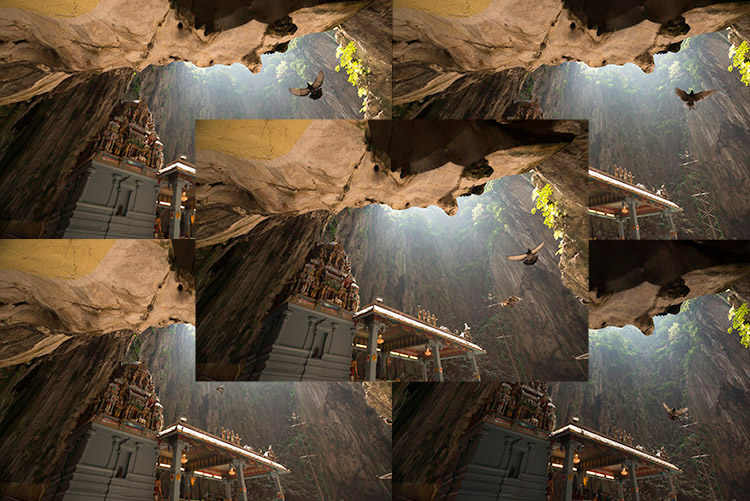
digital blending Photoshop

Open Photoshop

Next with Photoshop open, I load all the photos into one place as different layers. You can rename them if you want, as I did here.
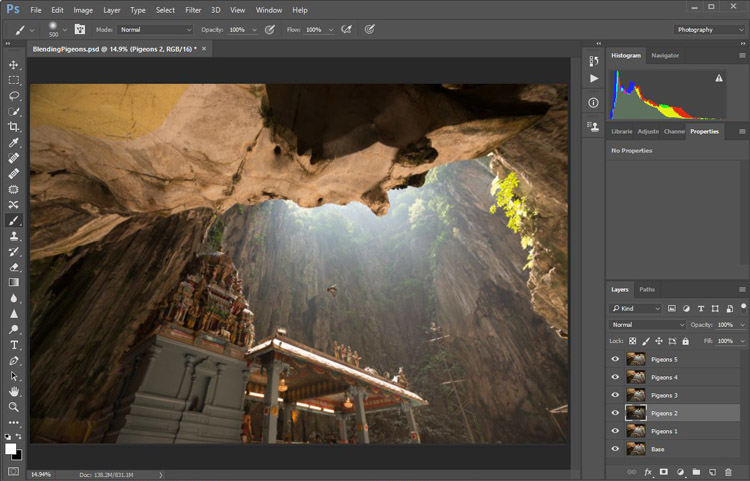
digital blending in Photoshop

Back up for a second: How the shots were done

Notice there’s a “base” layer at the bottom. That image was captured with different camera settings compared to the pigeon shots. I do this because normally before capturing any additional photos such as the pigeon images, I will first take a few photos with the BEST camera settings for that situation. In this case, that was ISO 100, aperture of f/8, 1/30th of a second shutter speed.

However, the 1/30th shutter speed was too slow to capture any photos of pigeons. So I needed a faster shutter speed which ended up with camera settings of; ISO 800, f/5, and 1/640th of a second. This allowed me to freeze the movement of the pigeons, but at the same time, it also generated more noise in the photos (ISO 800 compare with ISO 100) and a slightly more shallow depth of field (f/5 compared with f/8) resulting in a softer background.

So the ideal scenario is to have them both together in one final image. Using the digital blending technique you can have the best image quality photo with lesser noise and better focus, and then blend in only the pigeons from later photos. The pigeons will appear to have more noise than other areas of the photo but only in very small areas and you can do a separate Noise Reduction just for the pigeons if needed.

Shooting sequence

Here is the shooting process in sequence, to give you a better picture:

  1. Decide on a composition.
  2. Take your photo with the best (optimal) camera settings for the scene.
  3. Without moving your composition, change the camera settings to capture anything that looks interesting to you. For example; animals, people that able to bring out the atmosphere of the place such as monk praying in a temple, or even any lifeless objects such as trains or boats, or anything else you can think of or notice in the scene.

Photoshop steps

Step #1 – Turn off some layers

Back in Photoshop, you will see there is an “Eye” icon beside each layer. This means that all these layers are visible. Temporary, let’s hide all the pigeon photos first by clicking on the “Eye” icon to uncheck each layer. Leave only two visible, the Base and Pigeons 1 layers.
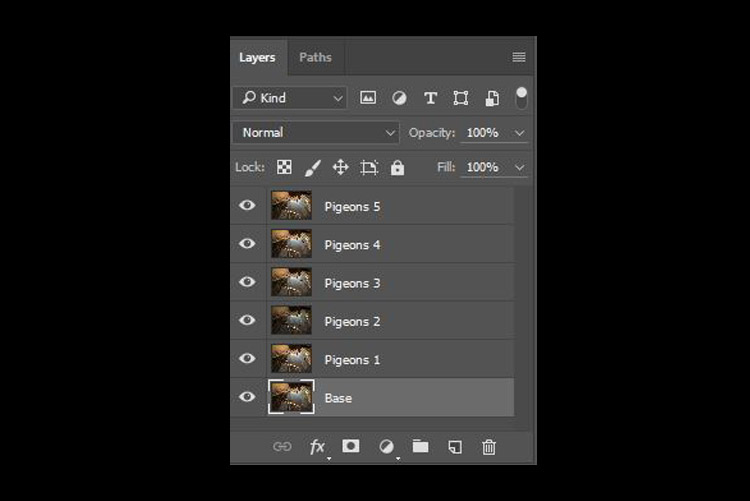
digital blending

Step #2 – Add a layer mask

Next, select the Pigeons 1 layer and while holding down the Alt key, click on the “add layer mask” icon (circled in the red in the photo below left). You shall have a black rectangle appear at the right side of the layer, as seen in the photo below right. This is to add a reverse layer mask on your layer, the black mask means it is hiding what is currently in this layer. If you don’t hold the Alt key when you click on the icon, it will create a white mask which will reveal what is currently in the layer.
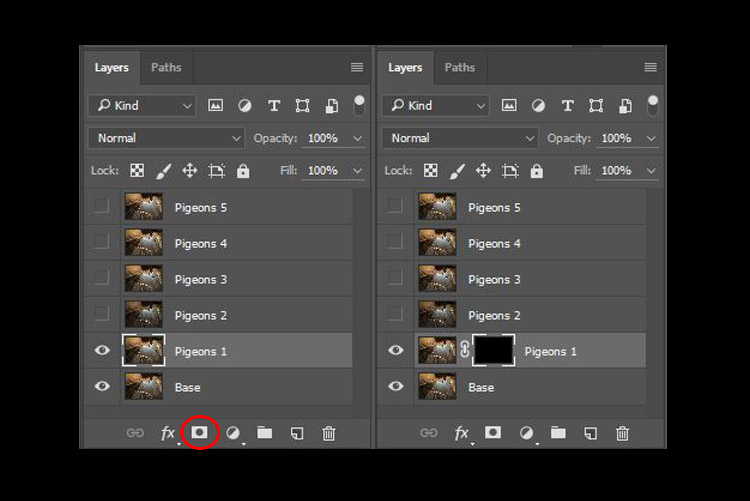
digital blending layer mask

Step #3 – Paint on the mask to reveal the bird

Now we have a black mask. To blend in only the pigeon from that layer, we will need to select the Brush Tool and paint on the mask in white over the pigeon’s area. Note: A black mask means hiding and white means revealing the layer.
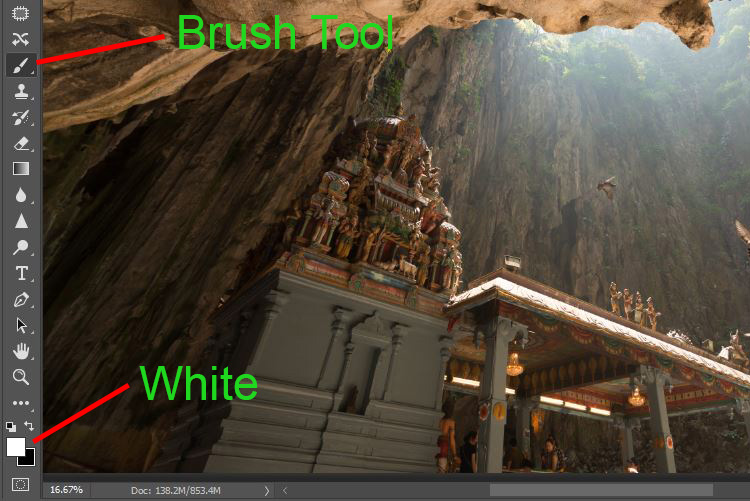
digital blending Photoshop

After selecting the Brush tool, make sure you are using a soft edged brush, and the opacity is set to about 75%. The opacity will affect how much of your painting result will be applied. Using opacity at 100%, you only need to paint once to fully reveal that particular area. However at 75 % or lesser opacity, you will need to repeat the painting few times in order to achieve the 100% effect. It is slower, but at the same time it create a smoother edges and the layer is better blended to the original image.
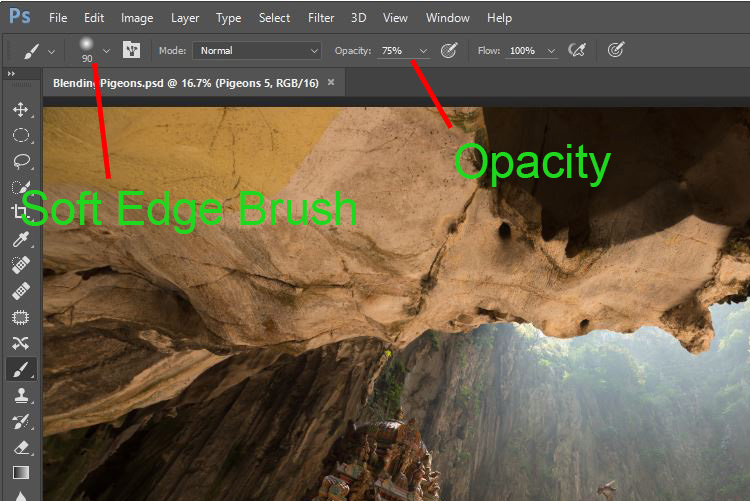
digital blending brush tool

Notice when you do the painting, the mask on the layer also reflects your painting result. Congratulations, now you have the first pigeon blended in! Let’s repeat the same process for the next layer.
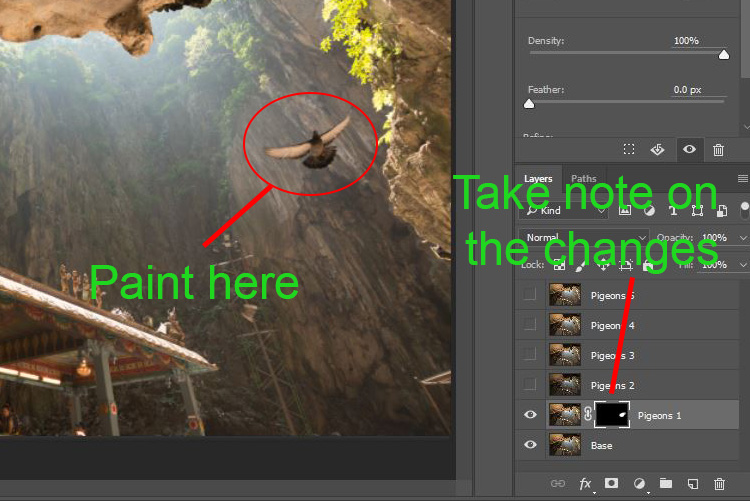
digital blending Photoshop

Step #4 – Repeat on next layer

By performing the same steps on the “Pigeons 2” layer, you will now have the second pigeon added. But wait, something is not right. Do you notice that the second pigeon has dark edges surrounding it? Why?
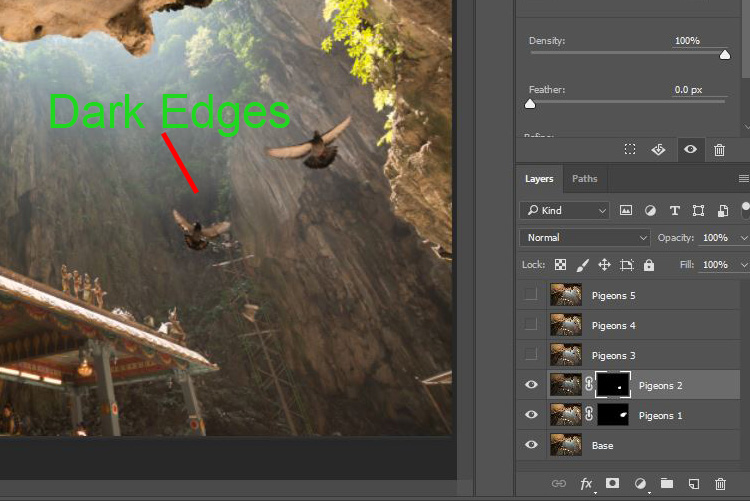
digital blending Photoshop

This is because even at the same camera settings, the lighting conditions may have changed during the shooting process. This image was captured when there were clouds blocking the sun and it dimmed the light in the cave. Instead of solving this by doing some really precise masking (by zooming in and brushing carefully on the edge of the pigeons, which can be a tedious process), let’s try adding a Curves adjustment layer.

Before doing any adjustment with the curve layer, right-click on it and choose “create clipping mask”. This will make sure whatever adjustment is done here will only affect the layer below it. Now add some brightness by slightly pulling the curve up, as shown below right.
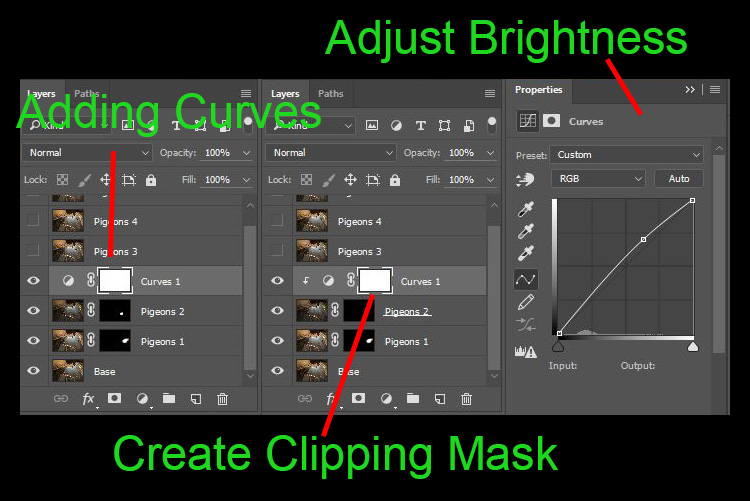
digital blending Photoshop

The surroundings of the second pigeon looks much better now. Other than using a Curve, you can do this on any other adjustment layers such as color balance adjustment layer to correct the tone of the particular layer, if the white balance is not equal with the background.
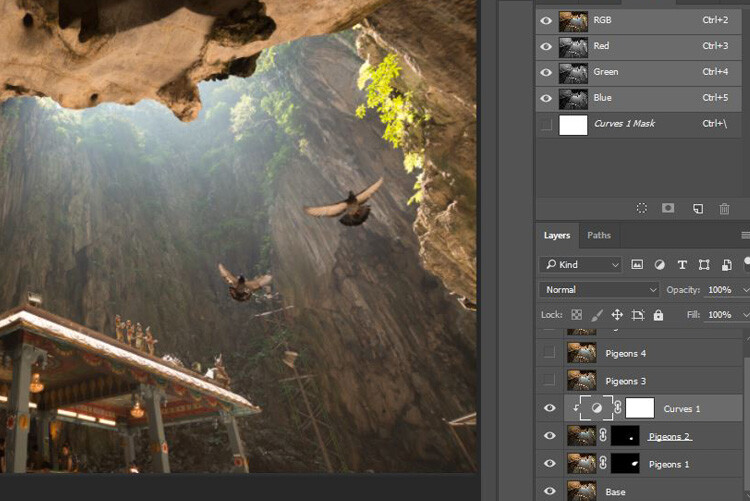
digital blending Photoshop

You can see the bird blends in much better now with the Curve applied.

Step #5 – Complete masking on all layers

Let’s continue with the rest of the layers. The masking results will look like the photo below once you have done the blending process.
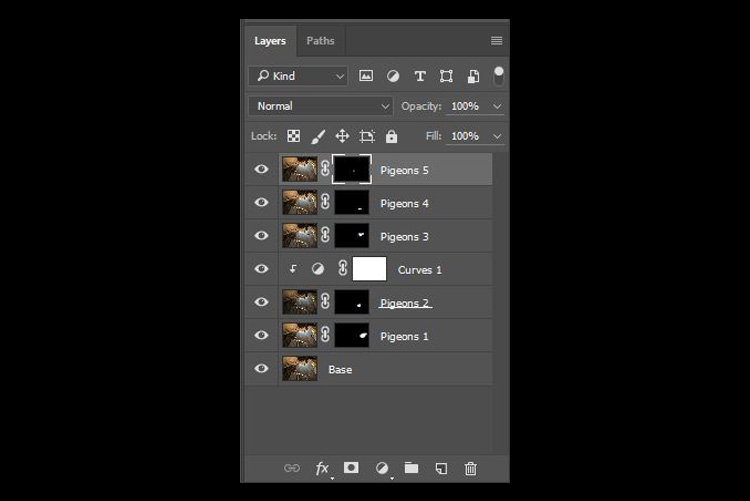
digital blending Photoshop

Finally

Here is the final output of the digital blending. Now you can perform any other post-processing adjustments from here by applying contrast, changing color balance, sharpening, or any other process that you think is necessary to enhance your photo.
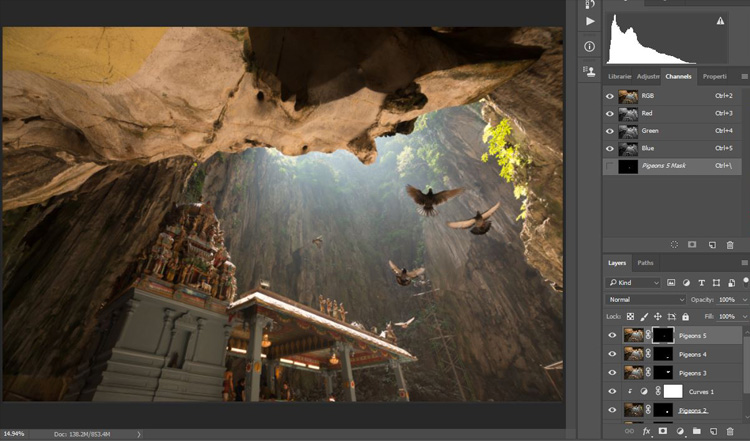
digital blending Photoshop

I hope you have enjoyed this article, and it gives you some ideas or inspiration. If you have any questions or suggestions, feel free to leave a comment below.

googletag.cmd.push(function() {
tablet_slots.push( googletag.defineSlot( “/1005424/_dPSv4_tab-all-article-bottom_(300×250)”, [300, 250], “pb-ad-78623” ).addService( googletag.pubads() ) ); } );

googletag.cmd.push(function() {
mobile_slots.push( googletag.defineSlot( “/1005424/_dPSv4_mob-all-article-bottom_(300×250)”, [300, 250], “pb-ad-78158” ).addService( googletag.pubads() ) ); } );

The post How to do Digital Blending in Photoshop to Create a Composite Photo by Grey Chow appeared first on Digital Photography School.


Digital Photography School

 
Comments Off on How to do Digital Blending in Photoshop to Create a Composite Photo

Posted in Photography


Digital camera inventors awarded with Queen Elizabeth Prize

04 Feb
Dr. Tompsett, Prof. Teranishi and Prof. Fossum at the ceremony, image: Queen Elizabeth Prize

This year’s 1 million Pound Queen Elizabeth Prize has recognized the work of some of the key scientists in the creation of digital imaging sensors. The award is shared by British-born Dr Mike Tompsett, Professor Nobukazu Teranishi from Japan, and Professor Eric Fossum and George Smith from the US.

George Smith and Willard Boyle, who are now both deceased, first had the idea for CCD sensors at Bell Labs in 1969, but it was their colleague Dr. Tompsett, who saw the potential of the technology in imaging. The first digital color photo, of Tompsett’s wife Margaret, appeared on the cover of Electronics Magazine. 

Professor Teranishi is the inventor of the pinned photodiode (PPD), which is a more efficient photodiode than previous variants. He undertook the work at NEC Corporation in Japan in 1980.

Eric Fossum worked in the 1990s at the NASA and Caltech’s Jet Propulsion Lab. His goal was to miniaturize digital cameras to reduce the payload of spacecraft. His work resulted in the development of CMOS sensors which can be found in most modern consumer digital cameras.

Digital imaging, together with other forms of digital technology, has transformed the world, and every day billions of digital images are captured by billions of devices, ranging from professional TV cameras to tiny imaging units in autonomous vehicles. At the time of their inventions the scientists might not have foreseen the scale of the impact of the technology but they are certainly more than deserving of this year’s award. 

Articles: Digital Photography Review (dpreview.com)

 
Comments Off on Digital camera inventors awarded with Queen Elizabeth Prize

Posted in Uncategorized


The Polaroid Pop instant digital camera produces 3 x 4″ prints

05 Jan

$ (document).ready(function() { SampleGalleryV2({“containerId”:”embeddedSampleGallery_7138693871″,”galleryId”:”7138693871″,”isEmbeddedWidget”:true,”standalone”:false,”selectedImageIndex”:0,”startInCommentsView”:false,”isMobile”:false}) });

Meet the Polaroid Pop, a new instant camera that produces classic Polaroid-sized 3 x 4″ prints. Like the Polaroid Snap and Snap Touch, the Pop combines a digital sensor with an integrated ZINK Zero Ink printer. But unlike the Snap, which produces 2 x 3 prints, the Pop prints to a 3.5 x 4.25 format, with the image itself occupying 3 x 4 inches to give each print a faux Polaroid-style border.

The Pop uses a 20MP CMOS sensor and features a dual LED flash, 3.97″ touch LCD and image stabilization. It can also shoot 1080p HD video and stores everything to a Micro SD. When used in conjunction with the Polaroid print app and one’s smart device, users can edit images before printing. Photos print in just under a minute.

If you’re itching to get your hands on one, expect the Polaroid Pop to ship in late 2017. Pricing info is forthcoming.

The Polaroid Pop Instant Digital Camera Offers a Modern Take on the Classic Polaroid Instant Print

Debuting at CES 2017, the Latest Camera in the Polaroid Instant Digital Print Line Pairs Wireless Technology With the Iconic Polaroid 3×4” Print

LAS VEGAS, January 5, 2017– CES 2017 marks debut of the newest camera in the wildly popular line of Polaroid instant digital photography products, the Polaroid Pop. The Polaroid Pop instant digital camera combines a sleek, modern design and digital technology with the classic 3×4” Polaroid instant print format that is reminiscent of the brand’s iconic legacy instant print cameras.

Polaroid is celebrating its 80th anniversary in 2017 and we could not think of a better way to kick-off this milestone year than with the debut of the Polaroid Pop instant digital camera at CES 2017,” said Scott W. Hardy, President and CEO of Polaroid. “Perfectly blending nostalgia with modern design and functionality, the Polaroid Pop embodies the brand’s 80-year history; staying true to the Polaroid core values of sharing, instant, fun and easy-of-use, while pushing the envelope with a fresh form factor and the latest technology.”

The Best of Both Worlds

Just like the Polaroid Snap and Polaroid Snap Touch instant digital cameras and the Polaroid Zip instant photoprinter, at the heart of the new Polaroid Pop instant digital camera is an integrated printer using ZINK® Zero Ink Printing Technology. This gives users the ability to automatically print full color photos in the iconic 3×4” format with the Polaroid Classic Border Logo resulting in a 3.5×4.25” print. The Polaroid Pop also features a traditional digital camera experience. The camera includes a a 3.97-inch touchscreen LCD for framing shots and navigating the camera’s menu, a 20-megapixel CMOS sensor and dual LED flash for high quality images, image stabilization, as well as 1080p full HD video recording capability. All images and video are stored on a micro SD card (up to 128GB).

The Polaroid Pop can quickly and easily connect to a mobile device using a Wi-Fi and Bluetooth dual chip, transforming the camera into an instant photo printer. Via the Polaroid print app, available free for iOS and Android, users can edit and enhance their prints with a number of creative filters, digital stickers, effects and controls. Once again, consumers will have an all-in-one solution for capturing and sharing images on-the-go. No matter what device they use to capture images, users will be able to share the fun with their own creative flair. The Polaroid Pop is ideal for today’s selfie shooters thanks to a self-timer. Additionally, the Polaroid Pop has three color modes—black and white, color, and vintage sepia to give users that iconic Polaroid look and feel.

The Polaroid Pop instant digital camera was designed in partnership with renowned design firm, Ammunition, the studio that was also behind the Polaroid Zip instant photoprinter, Polaroid Snap instant digital camera line and Polaroid Cube lifestyle action camera line. With the Polaroid Pop, Ammunition continued the simple, modern and stylish design aesthetic reflected throughout the current instant and action product offering. The jet-black camera body is accented with a pop of color, or a contemporary monochromatic look. The iconic red shutter button provides users with the easy-to-use one-button shutter control they have come to know and love from legacy cameras like the Polaroid One Step. Led by industrial designer Robert Brunner, Ammunition has partnered with award-winning consumer brands including Adobe, Beats by Dre, Square, Lyft, and Williams-Sonoma.

ZINK Zero Ink® Printing

The Polaroid Pop instant print camera uses the revolutionary ink-free Zero Ink® Printing technology developed by ZINK. The ZINK-enabled printer uses heat to activate and colorize cyan, yellow and magenta dye crystals embedded in the paper. The result is full-color, high quality, long-lasting and smudge-proof images without ink cartridges, ribbons or toner

The 3×4” photo prints in just under a minute so consumers can instantly share the photo with their friends and family. Additionally, because ZINK Paper® is adhesive backed the photo can be used as a sticker as well.

Offered by C+A Global, an authorized Polaroid licensee, the Polaroid Pop instant print camera will be available Q4 2017. Pricing is not yet available. To learn more about the Polaroid brand, please visit polaroid.com

The Polaroid Brand

Polaroid is one of the most trusted, well-respected and recognizable brands with a rich 80-year history beginning with Polaroid instant cameras and film. Our range of products include instant print cameras, action sports cameras, smartphones, flat-screen TVs and emerging technologies that deliver the fun, instant gratification and value for which the brand has long stood. Today, the Polaroid Classic Border Logo, rooted in our beginnings of instant photo sharing, serves to designate genuine Polaroid branded products. For more information, visit Polaroid.com.

Polaroid, Polaroid & Pixel, Polaroid Color Spectrum, Polaroid Pop, Polaroid Cube, Polaroid Zip, Polaroid Snap and Polaroid Classic Border Logo are trademarks of PLR IP Holdings, LLC.

Articles: Digital Photography Review (dpreview.com)

 
Comments Off on The Polaroid Pop instant digital camera produces 3 x 4″ prints

Posted in Uncategorized


Throwback Thursday: Apple QuickTake cameras, pioneers of consumer digital photography

28 Dec
Apple QuickTake 100. Photo by Carl Berkeley

While Apple Inc. is known for being a pioneer in the world of computers and smartphones, it also produced some of the first consumer digital cameras. The QuickTake 100, built by Kodak and priced at $ 750, had a unique binocular-like design and captured images at a whopping 640 x 480. It wasn’t designed for a day of shooting. In fact, the internal memory filled up after just eight shots. An RS-232C port was used to transfer photos (in QuickTake or PICT format) to your Mac.

Apple QuickTake 100. Photo by Carl Berkeley

The QuickTake 100 had a fixed 50mm equivalent F2 lens, an optical viewfinder and an LCD info display on which to adjust settings. As you can see, there was no way to review photos on the camera – you needed a computer for that.

The successor to the 100 – the QuickTake 150 – came about 15 months later. This model, priced at about $ 700, looked identical to its predecessor, but offered twice the storage and support for more image formats (even PCX, for those who remember it). It included a macro conversion lens and also supported Windows PCs. Not wanting to leave original QT 100 owners out in the cold, Apple released a firmware update that essentially converted it into a QT 150.

QuickTake 200. Photo by Jared C. Benedict.

Apple and Kodak parted ways after the QuickTake 150, with 1997’s follow-up, the QuickTake 200, being built by Fujifilm. In fact, Fujifilm sold a nearly identical camera itself – the DS-7. The QuickTake 200 had a more traditional design and had a 48mm equivalent F2.2 lens. 

QuickTake 200. Photo by Jared C. Benedict.

By far the most important addition to the QT200 was a 1.8″ LCD display. Finally, there was a way to preview and review your photos without having to get out a serial cable. For those seeking an optical viewfinder, Apple included one which you could clip onto the camera. Other new features on the QuickTake 200 were a mode dial, limited aperture and focus adjustment, and a SmartMedia card slot.

While they were some of the first consumer digital cameras, the QuickTake cameras didn’t take off as the ‘big names’ got into the business. When Steve Jobs returned to Apple in 1997, the QuickTakes, along with the LaserWriter and ahead-of-its-time Newton PDA were unceremoniously killed off.

Articles: Digital Photography Review (dpreview.com)

 
Comments Off on Throwback Thursday: Apple QuickTake cameras, pioneers of consumer digital photography

Posted in Uncategorized


Global digital photography market value to grow to $110.79 billion by 2021

28 Dec

The digital photography market, including cameras, software and processing equipment, is expected to grow to $ 110.79 billion by the year 2021, according to a new report from Zion Market Research. The research firm valued the digital photography market at $ 77.66B USD in 2015, and anticipates a 6.1-percent growth rate between 2016 and 2021. Asia Pacific is expected to represent the greatest regional market growth during this time frame.

According to the report, Asia Pacific is estimated to hold a ‘significant’ share of the digital photography market due to growing economies, with North America coming in second. The research firm anticipates an increased demand for replacement devices among consumers in Europe and North America, while Asia Pacific countries have seen digital photography market growth due to, among other things, ‘steady income’ in select countries. Also contributing to expected market growth in coming years is ‘strong product penetration’ throughout Latin America.

Social networks including Instagram, Facebook, and Tumblr are helping drive digital photography market growth, as well as software including Photoshop and other photo editors. ‘Digital photography allows consumers to take professional quality photos themselves,’ the study notes as one driving force, as well as digital photography’s suitability for a variety of industries beyond the scope of traditional photography, including surveillance, science, machine vision, and more.

Via: Globalnewswire

Articles: Digital Photography Review (dpreview.com)

 
Comments Off on Global digital photography market value to grow to $110.79 billion by 2021

Posted in Uncategorized


Throwback Thursday: Olympus C-211 Zoom Digital Printing Camera

15 Dec

If you want to see a truly rare camera, look no further than the Olympus ‘Camedia’ C-211 Zoom Digital Printing Camera. The big feature of the C-211 Zoom ($ 800 at launch) is immediately obvious – it’s a camera and photo printer in one. Even if you found a C-211 in a thrift shop you probably couldn’t even print anything, as it uses the now-defunct Polaroid 500 instant film.

From a spec point-of-view the C-211Z wasn’t any different than other Olympus cameras in 2000. It had a 2 Megapixel CCD, 35-105mm equiv. lens, TIFF support and no manual exposure control. One interesting feature was its 113k-dot LCD, which used a ‘Hybrid Collector Backlight.’  Just above the panel was a window, through which light passed through, brightening the display when shooting outdoors without requiring additional power from the traditional LCD backlight. The C-211 used the wondrous storage format known as SmartMedia.

The C-211 used Polaroid 500 film packs, which held ten pieces of film as well as a small battery to advance to the next sheet. The print area of 500 film was 2.25 x 2.875 in. (57 x 73mm) and it took about 15 seconds for the camera to pop out a sheet.

There were a number of options for photo printing. Naturally you could select a photo in playback mode and hit that large blue print button and be done with it. You could also print a contact sheet or a crop of a photo (cropping must have been fun on that tiny LCD.) You could even print a series of frame grabs from a video you’d recorded at a whopping 320 x 240.

While clever, the C-211 Zoom was the only photo printing camera Olympus ever made, and the concept never went anywhere – until quite recently that is, when instant cameras like Fujifilm’s Instax became a big hit.

Read original C-211 Zoom news story

Articles: Digital Photography Review (dpreview.com)

 
Comments Off on Throwback Thursday: Olympus C-211 Zoom Digital Printing Camera

Posted in Uncategorized


RNI’s Colibri app gives your digital images a slide-film look

29 Nov

If you think your smartphone photos and other digital images look a little bland straight out of camera, you now have one more app at your disposal to give them more of a film-like appearance. London-based app maker RNI has launched its new Colibri app. Colibri is essentially an image filter app for the iPhone, albeit a slightly special one. The filter algorithms behind the app use machine learning and its makers say Colibri has been fed some of the ‘finest slide film scans’ to create its range of filter options. 

Colobri’s ‘more color, less editing’ tagline indicates that the app is not meant to be an all-purpose editor but instead puts a focus on enhancing the image’s color and tonal properties to simulate a slide-film look. That said, there are cropping and rotation tools available and you can adjust the intensity of your filters, brightness and contrast using a range of sliders.

Of course it’s all a matter of taste, but some the image samples on the RNI website look quite promising. So, if you like this type of effect, Colibri might be well worth its download price of $ 1. If you like this type of film simulation apps but would prefer a little bit more control over the conversion process, you could also have a look at the Filmborn app we reported on recently.  

Articles: Digital Photography Review (dpreview.com)

 
Comments Off on RNI’s Colibri app gives your digital images a slide-film look

Posted in Uncategorized