RSS
 

Posts Tagged ‘Different’

Posing Guide for Photographing Women: 7 More Poses to Get You 21 Different Photos [Part II]

21 Jun

A post by Kaspars Grinvalds from Posing App.

If you haven’t read the first article in this series, I would kindly recommend you to start with Posing Guide for Photographing Women: 7 Poses to Get You 21 Different Photos – Part I where we started with 7 standing poses.

Let’s continue this time with 7 sitting poses for female subjects and their possible variations in order to get at least three different shots for each pose.

Pose 1
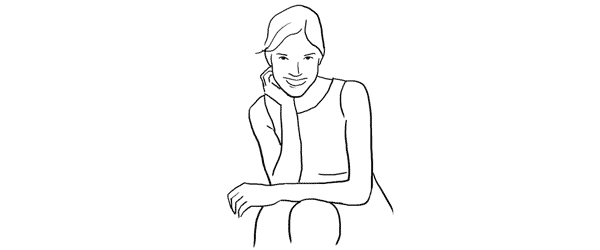
Pose1

Nice and simple pose to start with. Ask your model to sit comfortably with knees placed together. One hand relaxed on the knees while the other hand placed near the neck. And remind her to straighten the spine.

7poses2 1

Photo 1 – This basic starting point provides you with many different choices to continue with. But in the very beginning you may want to just test different shooting angles and heights and check what works best for your model.

Photo 2 – After I got the first shot similar to the sample, I asked the model to lower both arms and rest them on the knees.

Photo 3 – And finally I returned to the initial pose and took a close-up portrait shot.

Pose 2
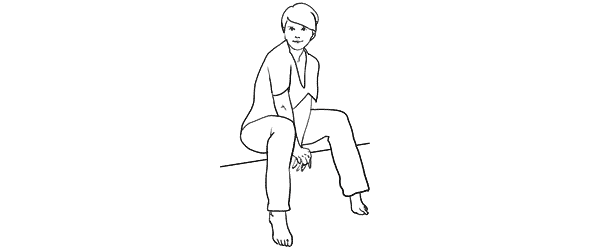
Pose2

Another easy pose with hands placed together between the legs. Notice that arms should not be completely straightened, rather slightly bend at the elbows. Also in the sample pose it is illustrated that toes should be straightened in order to raise the knees slightly up.

7poses2 2

Photo 4 – The model easily recreated the sample pose and we could move on with some variations.

Photo 5 – This shot is exactly the same pose just taken from a side. Minor change but already different result.

Photo 6 – And again one more close-up portrait shot but this time the model is looking down her own body.

Pose 3

Pose3

Another very simple pose with one leg crossed over the other. And I have to say here that including the legs in the frame can be challenging because it doesn’t work with all body types. If your model is curvy, consider framing closer comps (for example as in photos with the previous pose).

7poses2 3

Photo 7 – My model was with slim body type, nice legs and stylish shoes, so I chose to go for a full height frame.

Photo 8 – In exactly the same manner as with the previous sample I simply took this shot from a different angle. The model didn’t change anything, just turned her head to the camera.

Photo 9 – After that we repeated the already tested posture with one hand close to the neck. This hand movement is a very nice variation and works in many posing scenarios.

Pose 4
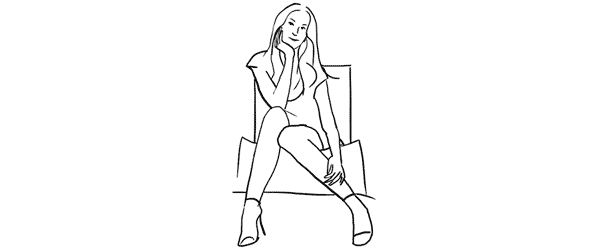
Pose4

This pose however is even more demanding than the previous one because it is all about the legs and thus there is no point of cropping them out. And nice shoes are a must.

7poses2 4

Photo 10 – Recreating it isn’t hard as the pose is fun and creates nice and playful mood to the photo.

Photo 11 – Here the model is looking down and kind of fixes her shoe. Very subtle changes but completely different photo.

Photo 12 – And once again the same pose but taken from a side creates one more variation.

Pose 5
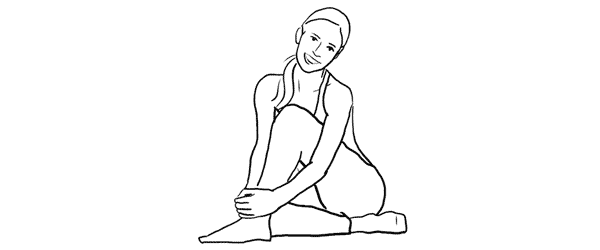
Pose5

Simple and easy pose for the model sitting on the ground. And to my mind, in contrast to the previous on the chair poses, sitting on the ground works better barefoot.

7poses2 5

Photo 13 – The pose is kind of very natural and is easy to recreate. And as a result the model looks really relaxed.

Photo 14 – After recreating the initial pose, different hand placement options are available. Here for example the model raised them and connected on the knee.

Photo 15 – Only two minor adjustments to the initial pose were made here. Putting one hand up in the hair and slightly curving upper body part to the side. This also lowers the raised knee. The result is another friendly and natural looking pose.

Pose 6
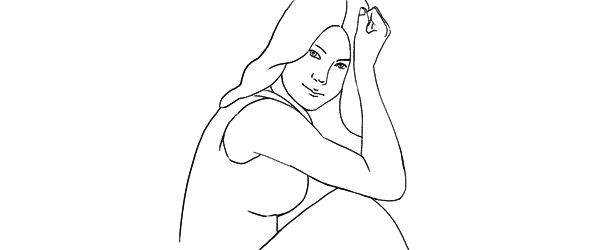
Pose6

Another easy sitting on the ground pose. Very suitable for different close-up portrait shots.

7poses2 6

Photo 16 – While sitting in the initial pose try making two different versions with only the front arm and then with both arms raised on the knees. Both versions works well.

Photo 17 – A slight hand placement variation. This variation works very well for tight crops.

Photo 18 – And don’t be afraid to be spontaneous from time to time. This photo was just an improvisation on the go while sitting in the initial pose.

Pose 7
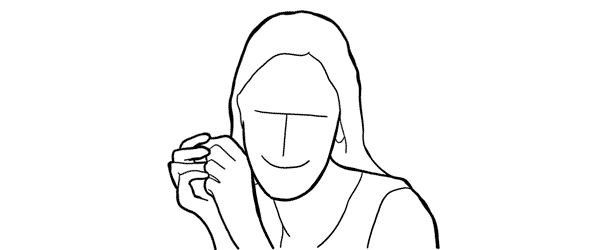
Pose7

And finally I purposely chose also one simple portrait pose for the sitting samples. Despite the fact that only face is visible in the frame, it’s more comfortable for the model to recreate it while being seated.

7poses2 7

Photo 19 – Here I tried to illustrate the previous statement and showed the sitting position. You may visualize how it would work cropped only around the face.

Photo 20 – Keeping the “portrait with hands around the face” concept in mind, try different variations by moving hands around and making different head tilts.

Photo 21 – In order to achieve the most natural postures in the image ask the model to really move hands around. In this particular example she moved her hand through her hair and I made several shots and afterwards chose the best hand position.

So, this was a process of using 7 sample poses as the starting point to create 21 different photos. I encourage you to try this approach to posing your subjects in a similar workflow and most probably you will find your own and even better ways to achieve some great results.

All of these illustrations and many more posing samples are available on Posing App for your mobile devices.

Kaspars Grinvalds is a photographer working and living in Riga, Latvia. He is the author of Posing App where more poses and tips about people photography are available.

Post originally from: Digital Photography Tips.

Check out our more Photography Tips at Photography Tips for Beginners, Portrait Photography Tips and Wedding Photography Tips.

Posing Guide for Photographing Women: 7 More Poses to Get You 21 Different Photos [Part II]


Digital Photography School

 
Comments Off on Posing Guide for Photographing Women: 7 More Poses to Get You 21 Different Photos [Part II]

Posted in Photography


Women Posing Guide in Action: 7 Sample Poses – 21 Different Photos

04 Jun

A post by Kaspars Grinvalds from Posing App.
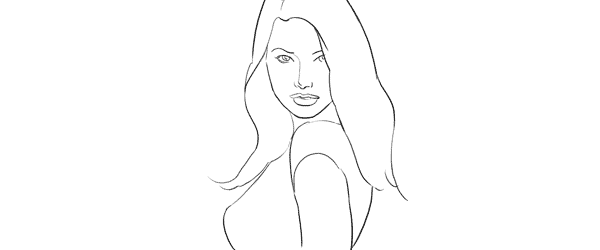
Previously published articles in the Posing Guide series contained hand illustrated posing samples as a guide or reference during your photo shoots. Based upon feedback and questions I received about these guides, I wanted to describe the process in a little more detail and show some real photos created while using these posing techniques.

I’d like to begin by stating once again – the main purpose of using posing samples is only to get your model into some starting point. That’s it. You don’t need to (and quite often you wouldn’t be able to) precisely recreate even the simplified illustrated pose.

This will be a three part series looking at standing, sitting and laying down poses for female models. For the the first article I chose seven sample standing poses and by slightly adjusting each pose I got 21 different photos. Now, let’s take a look at this process.

Pose 1

Pose1

It is a good idea to start your photo shoot with some very basic, easy pose. That’s why I chose this one to begin with. It’s easy to describe and easy to understand – “portrait shot from a side”. So you might start with saying to your model “Ok, turn with your side towards me, turn your head to me and look right over the shoulder at the camera. Straighten your spine and keep hands loose by sides.”

7poses 1

Photo 1 – With these instructions you should get something like the first picture. The next thing without changing the pose, is to “find” the face expression you’re looking for. You may want to try moving from very subtle smirks to stronger smiles or even laughter. And once you have the expression (or different ones) you’re after, tell and show it to the model. Thereby it will be easy for the model to learn and repeat it.

Photo 2 – After I got the simple and kind expression I was looking for, I slightly changed my position and asked the model to keep looking back over her shoulder to the camera. Exactly the same pose, just taken from another angle and you already have a slightly different photo.

Photo 3 – Also many different looking directions and head tilts are possible. In this particular example I asked the model to look back down her body. This look works very well in many posing situations, creating yet another variation just by slightly adjusting the starting pose.

Pose 2

Pose2

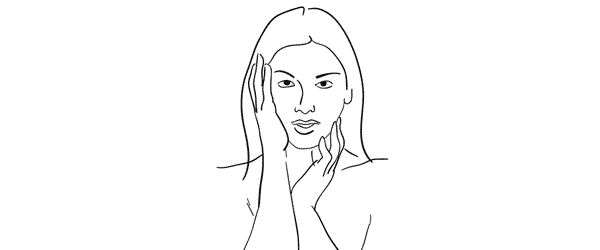
Seeing this sample illustration you should grab only the basic idea – “portrait shot with hands around the face”. That’s all you need for playing around with initial sample pose. Eventually you will come up with some nice variations of your own.

7poses 2

Photo 4 – Before getting to the hands, ask the model to stand facing the camera and support her body weight on just one leg. This instantly curves her body and her shoulder line is shifted. After that ask her to gently move her hands around the face and in the hair. Generally look for asymmetrical hand placements, but as you can imagine – many variations are possible.

Photo 5 – In this shot the only difference is slight tilting of the head and putting one hand behind the hair.

Photo 6 – To differentiate the look and feel, I once again asked the model to look down her own body and cropped tighter around the face. And again with only minor adjustments from one pose we’ve got 3 different photos.

Pose 3

Pose3

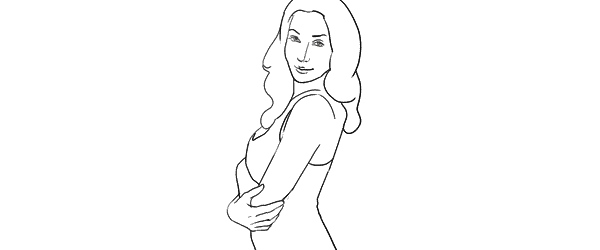
Another easy pose with very simple idea – “hands connected on the chest”. Notice that hands are not really “crossed”, but “connected”. Also you should warn your model not to grip them too tight or press upper arms against the body. Simply put, the posture should feel comfortable and subtle.

7poses 3

Photo 7 – Before taking this shot, I showed the model the sample illustration and she tried to recreate it. This is as close as you usually get if you recreate the sample pose.

Photo 8 – The outlines don’t and won’t match perfectly. In this particular example I took a shot from higher angle aiming slightly down because I saw that this angle works better for the model.

Photo 9 – Another simple way of transforming the pose is simply mirroring it the other way around. And to even more differentiate it from the first shot, I asked the model to lean against a wall.

And then I moved closer and took a head shot for just another variation of the same pose.

Pose 4

Pose4

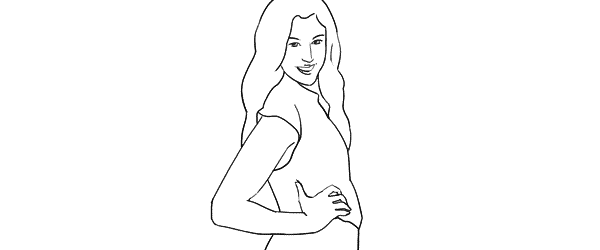
This simple pose is again self-explanatory – “the model turned to the side with one hand on the waist”. That’s all I tried to recreate.

7poses 4

Photo 10 – Here I started straight away with mirroring the sample pose because this was the better looking side for my model. Remember that it is different for each person. If you are not sure, take both variations and ask your model which one she prefers.

Photo 11 – From side view I followed to 45 degree position and asked the model to keep looking to the camera.

Photo 12 – Lastly, I just moved farther away for wider frame. The same pose, but these minor variations provide you with greater choice of images to select from in post.

Pose 5

Pose5

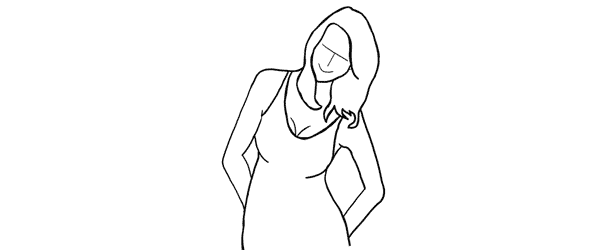
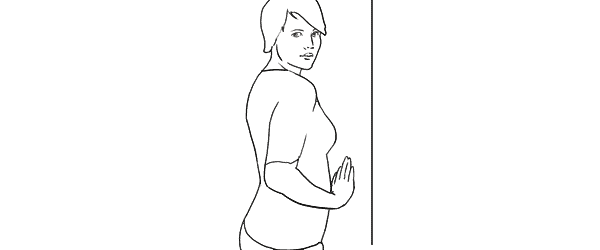
This pose provides simple yet elegant at the wall concept – “standing at the wall with hands behind the back”.

7poses 5

Photo 13 – Start with asking your model to support herself at the wall with her back. After that the first thing to take care of is shifting her body weight on one leg with the other crossed over it. Even if the legs are not visible in the frame, it is critical for forming the model’s body in S shape. Then ask her to place her hands behind her back asymmetrically. Finally ask her to lean forward slightly away from the wall with her upper body part.

Photo 14 – As usual I tried changing my shooting angle and took the next shot more from a side.

Photo 15 – And I continued to experiment with slightly different hand placement and head tilt. These images might be very similar, but most probably your subjects will be grateful for this kind of choice.

Pose 6

Pose6

Another at the wall pose but this time with the model facing the wall. Easy to describe and recreate. Both hands are gently placed on the wall right in front of her just below the breast line.

7poses 6

Photo 16 – With the previous instructions the model easily achieved the described pose. And again I chose mirroring the sample illustration which already is one variation for any pose.

Photo 17 – Here I changed the shooting angle nearly parallel to the wall and cropped for a portrait shot.

Photo 18 – Finally the model changed the hand placement asymmetrically for just another variation.

Pose 7

Pose7

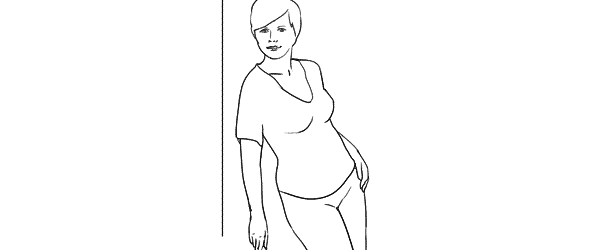
This is a bit more challenging pose than the previous ones, so definitely some guidance for the model is required in order to recreate it.

7poses 7

Photo 19 – The trick for the model here is to stand slightly off the wall and support herself against the wall with the front shoulder only. Front hand is loosened by the wall. After that the model should support the body weight on the outer leg, kicking the hip out with the inner leg crossed over. The back arm rests on the hip and the elbow is pulled behind her back.

Photo 20 – After managing the starting pose I started to variate it. Here I moved closer for tighter crop and asked the model to lean slightly forward along the wall.

Photo 21 – And finally I asked the model to turn sideways, supporting against the wall with both shoulders. And to further differentiate the shots I asked her to look down her body.

So, that’s it. Out of 7 sample poses we managed to get 21 different shots. And as you can easily imagine, even these are only samples, adjustments and variations are indeed endless.

All of these illustrations and many more posing samples are available on Posing App for your mobile devices.

Kaspars Grinvalds is a photographer working and living in Riga, Latvia. He is the author of Posing App where more poses and tips about people photography are available.

(function(d){
var f = d.getElementsByTagName(‘SCRIPT’)[0], p = d.createElement(‘SCRIPT’);
p.type = ‘text/javascript’;
p.setAttribute(‘data-pin-hover’, true);
p.async = true;
p.src = ‘//assets.pinterest.com/js/pinit.js’;
f.parentNode.insertBefore(p, f);
}(document));

Post originally from: Digital Photography Tips.

Check out our more Photography Tips at Photography Tips for Beginners, Portrait Photography Tips and Wedding Photography Tips.

Women Posing Guide in Action: 7 Sample Poses – 21 Different Photos


Digital Photography School

 
Comments Off on Women Posing Guide in Action: 7 Sample Poses – 21 Different Photos

Posted in Photography


Different Strokes: Strange Paintbrushes Promote Creativity

06 May

[ By WebUrbanist in Art & Drawing & Digital. ]

paint brush alternatives

When something evolves to have such a long history as the art of painting, it falls on out-of-the-box thinkers to question the most basic elements of creation: tools.

paint brush design series

The designers at Culdesac compares the process to “genetic mutations” which “give birth to imaginative instruments: the brush compass, pendulum or whip give us a clue to the behavior of paint through sketches and through history.”

paintbrush redesigned wall ceiling

Extending the choice of paint-and-brush pairings (different colors and sizes), these alternative instruments yield unusual (and in some cases unpredictable) results when putting tool to canvas.

paintbrush geometric shape creators

Artists can use them to do anything from painting on a ceiling (using an inflatable balloon brush), to pausing between strokes (thanks to a handy stand built into the handle) to creating circles, squares and triangles (and derivations thereof!).

Share on Facebook


[ By WebUrbanist in Art & Drawing & Digital. ]

[ WebUrbanist | Archives | Galleries | Privacy | TOS ]


WebUrbanist

 
Comments Off on Different Strokes: Strange Paintbrushes Promote Creativity

Posted in Creativity


Treehouse Taster: 3 Wildly Different Types of Tree Houses

22 Mar

[ By WebUrbanist in Architecture & Houses & Residential. ]

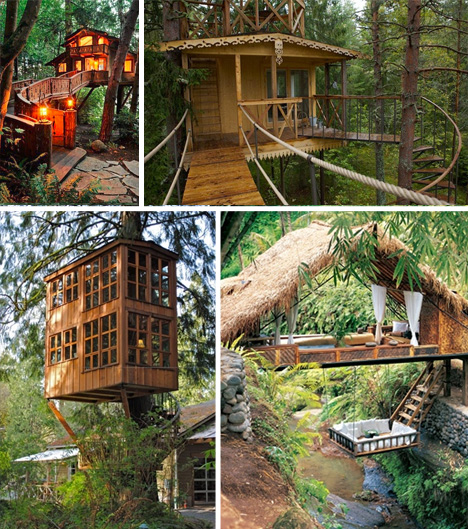
tree houses

Regular readers will know that this site love tree houses of all types, but in researching articles a few have slipped through the cracks, their stories and histories unknown, yet the images of them are too amazing to go un-shown.

tree house steampunk style

organic huge tree house

These more mysterious examples come from a combination of Pinterest and Repinly, and range from pragmatic well-constructed residences to wild and overgrown structures that seem to have grown alongside the trees they surround, with a few derelict and deserted ones somewhere in between. Above are two examples that seem organically evolved, pieced together around the growth of their trees.

tree house real frame

Of the sturdily-constructed sort, this one looks like a regular small family home simply lodged in the branches of a big deciduous monster and bolstered by basic framing.

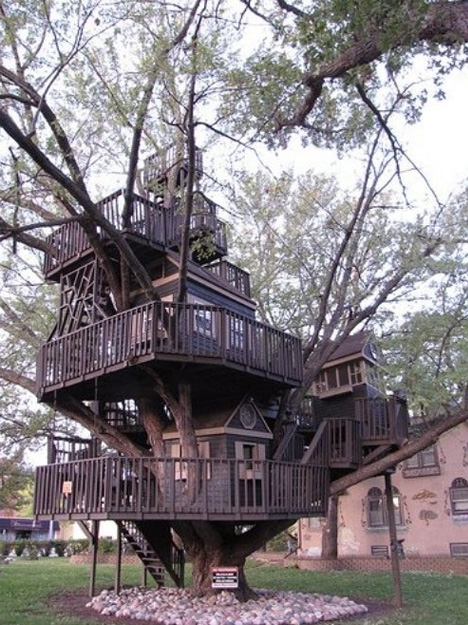
tree house multi story

tree house of fairy tales

Finally, the tree homes of fairy tales – these two magical examples show that plans are one thing, but fantasy is another – sometimes the tree is just a foil for boisterous expressions of amazing and spontaneous architecture.

Share on Facebook


[ By WebUrbanist in Architecture & Houses & Residential. ]

[ WebUrbanist | Archives | Galleries | Privacy | TOS ]


WebUrbanist

 
Comments Off on Treehouse Taster: 3 Wildly Different Types of Tree Houses

Posted in Creativity


Different Shutter Times

12 Feb

Taken with a kodak easyshare DX7630 there is a shutter mode and i went from 1/1000, to 64″
Video Rating: 1 / 5

Guys this is a Dry Ice Bubble Blast in Slow motion (1000 fps) and this blast has occurred alot but barely any people filmed this blast in slow motion!! So yeh.. Enjoy ;D Slow motion is when the playback of a video clip appears to be slower than the natural speed of the events. This illusion can be done in several ways. Slo-mo use can be incredibly dramatic and add emphasis where needed in a story. Let’s take a look at what slow motion is and discuss some common uses for slow motion. Slow motion is when the playback of a video clip appears to be slower than the natural speed of the events. This illusion can be done in several ways. In the early days of filmmaking, the technique for doing slow motion effects was to overcrank the camera speed. This meant that the camera operator would increase the frame rate (frames per second or fps) by cranking faster to acquire more frames in the same amount of time. Then, the footage would be played back at the normal playback speed, producing the illusion that events are happening at a slower speed than what is natural. (We’ll explore this technique a little further in a second.) Later, along came digital video editing, which allowed an editor to slow the playback of a clip down with a click of the button, regardless of the frame rate. How amazing! Rather than acquire additional frames, you could simply tell your editing software what percent of the normal playback speed you’d like and voilà! – instant slow motion. The editing software
Video Rating: 5 / 5


Nikon D7000 Unedited Sample Pictures at different ISO

12 Jan

photographyequipment.yolasite.com (Budget Equipment) razzi.me www.facebook.com twitter.com Unedited sample pictures of Nikon D7000 taken at different ISO. Do SUBSCRIBE as I will be giving lessons on Kids*Wedding*Family*Event photography along with other reviews and photography projects. Don’t forget to ask questions. It’s the best way to learn.
Video Rating: 4 / 5


Canon PowerShot N takes a different angle – as smartphone side-kick

07 Jan

canon_n2.png

Canon has announced the PowerShot N, a compact camera designed specifically as a smartphone companion for the Instagram generation. The N is built around a tilting touch-screen, and its round-lens zoom controller and shutter release are designed to make it behave identically whether held right-way-up or upside-down. It offers a ‘Creative Shot’ mode that generates multiple versions of your image, so you get the shot you composed plus five alternatives with different crops and processing effects. Canon promises one-touch Wi-Fi connectivity to make it easier to upload images and video to your smartphone and the internet. To extend its capability beyond that of a smartphone, the N has a 28-224mm equivalent lens and a 12MP CMOS sensor that works with a Digic 5 processor.

News: Digital Photography Review (dpreview.com)

 
Comments Off on Canon PowerShot N takes a different angle – as smartphone side-kick

Posted in Uncategorized


SUPing and Trying Different Camera Angles

19 Oct


stand up paddling with different camera angle

October 18, 2012. Trying dIfferent camera angles on my paddleboard. Beaver Pond (Arapaho Bend Natural Area, Fort Collins). Camera: GoPro Hero.

I am experimenting with different placement of GoPro Hero camera with a suction cup mount and a long leash. I will try to use similar camera angles with Canon 5D DSLR camera dressed up in Eva-Marine waterproof housing. I still need to figure how to mount it on a paddleboard.

Related posts:
Daily Paddling Picture Gallery
SUP (Stand Up Paddleboard) in Riverbend Ponds Natural Area
Bark Expedition Stand Up Paddleboard in Fall Scenery


paddling with a camera

 
Comments Off on SUPing and Trying Different Camera Angles

Posted in Photography


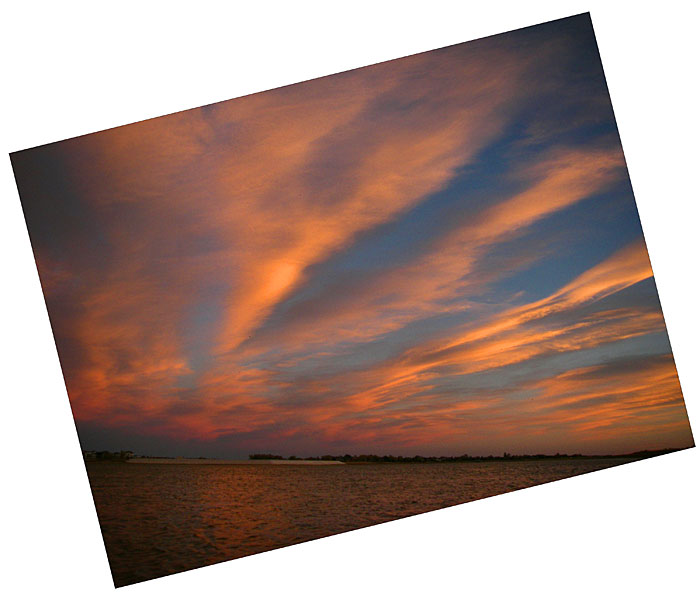
Cloudscape over the Boyd Lake – A Different Shooting Composition

16 Oct


Boyd Lake

October 19 2007. Spectacular clouds at sunset over Boyd Lake near Fort Collins after a very windy paddling. What do you think about this composition?

Related post:
Sunset over the Boyd Lake – Another Composition Idea for a Horizon in Your Picture?
Where to Place a Horizon in Your Paddling Pictures?
Horizontal or/and Vertical Format in Kayak Photography


paddling with a camera

 
Comments Off on Cloudscape over the Boyd Lake – A Different Shooting Composition

Posted in Photography


Holy Cr*p Is Photography Different Now!

17 Oct
Herbert George Ponting and telephoto apparatus, Antarctica, January 1912
Herbert George Ponting – Antarctica 1912

If you were a photographer from 100 years ago and dropped in todays world to discover how you take and publish a photograph you’d be blown away. What is really scary is that photography really hadn’t changed that drastically until 20 years ago when Kodak converted a Nikon F3 to use a 1 megapixel digital sensor and on the consumer side 17 years ago when Apple released the QuickTake 100 that could sync photos to your computer. Oh and lets not forget the first camera phone photo being taken only 14 years ago. Before that there were varying degrees of improvement with film development, but by and large it was the same process and it took time.

What blows my mind is that I’ve lived through and experienced this rapid evolution of photography. I might as well have been the photographer from 100 years ago being dropped in this new world of photography. Photography is no longer as difficult to learn, print, publish or share. I grew up flipping through pages of National Geographic and Life in awe of the images and had to wait a month to see the next batch of images from great photographers. Now anyone with a cell phone can take a photo, post it online and in a matter of seconds have a stream of photos ready to be seen at a moments notice. I can take a photo of my son on the way to the grocery store and before I get there have people commenting and sharing a photo of him.

Digital photography has been an incredible game changer, but combined with the latest social media revolution it has amplified its impact. The likes of Instagram, Tumblr, Facebook, Google+ and now Apple with their Photostream functionality built into their operating systems makes photography a seamless part of modern life. I know there are several other dinosaurs that read my blog and have witnessed this photography evolution revolution. Take a moment to extract yourself from the gradual changes you’ve become accustomed to and think about being dropped into another time. Is this not amazing? Damn it is great to be a photographer!

Copyright Jim M. Goldstein, All Rights Reserved

Holy Cr*p Is Photography Different Now!

flattr this!


JMG-Galleries – Jim M. Goldstein Photography

 
Comments Off on Holy Cr*p Is Photography Different Now!

Posted in Equipment