RSS
 

Posts Tagged ‘Depth’

Motorola Moto Z2 Force Edition comes with dual-cam and depth mode

26 Jul

Motorola has unveiled its 2017 flagship smartphone, the Moto Z2. Unsurprisingly the design is quite similar to the original Moto Z and comes with electronic contacts on the back, allowing for the attachment of Motorola’s Moto Mod accessory modules, such as the Hasselblad TrueZoom camera module.

At 6.1mm the device is very thin and comes with a full-metal shell that features a water-repellent nano-coating. In addition, the 2560×1440 Super AMOLED display is shatterproof, making the Z2 more rugged than most of its competitors in the premium segment of the market.

Android 7.1.1 is powered by Qualcomm’s current top-end chipset Snapdragon 835 but at 2730mAh is smaller than on many other high-end phones, which is probably owed to the thinness of the device.

The Moto Z2 is Motorola’s first smartphone to feature a dual-camera setup. Similar to the concept used in Huawei’s recent top-end phones the Moto combines a Sony IMX 1/2.9″ RGB sensor with a monochrome imager and uses image-fusion technology to optimize detail, noise levels, dynamic range and other aspects of image quality.

A depth-mode for simulating a shallow depth-of-field is on board as well and, compared to previous high-end Moto models, Motorola has significantly improved the panorama mode which can now produce much larger image output and fewer ghosting artifacts on moving subjects.

In video mode the Moto Z2 camera is capable of recording 4K footage and 720p slow-motion video at 240 fps or 1080p clips at 120 fps. The front camera offers a 5MP resolution and comes with a wide-selfie mode. A Pro mode provides manual control over shutter speed and other camera parameters and the DNG Raw format is supported with third-party camera apps.

With the dual-cam, improved panorama and slow-motion modes and new features, the Moto Z2 looks like a very promising update to the original Z2, especially in the camera department. You will be able to pre-order the Moto Z2 Force Edition from tomorrow. The device will be available from August 10 launch at a base price of $ 720.

Key specifications:

  • 12MP dual-cam with Sony IMX 386 1/2.9″ RGB and Monochrome sensors, 1.25µm pixel size
  • F2.0 apertures
  • Dual-LED flash
  • Laser and phase detection AF
  • Depth mode
  • Manual camera controls
  • Raw-support with third-party apps
  • 4K video
  • 240fps/720p and 120fps/1080p slow-motion video
  • 5MP front camera
  • 2560×1440 Super AMOLED ShatterShield display
  • Snapdragon 835 chipset
  • 4/6GB RAM (depending on region)
  • 64/128GB of storage (depending on region)
  • microSD slot up to 2TB
  • 2730mAh battery
  • Water-repellent nano-coating
  • Fingerprint reader

Articles: Digital Photography Review (dpreview.com)

 
Comments Off on Motorola Moto Z2 Force Edition comes with dual-cam and depth mode

Posted in Uncategorized


How to Use a Neutral Density Filter to Control Depth of Field

28 Apr

If your photography isn’t focused around landscapes, there’s a fair chance you don’t have a set of neutral density filters. These accessories are mainly for landscape photographers as their use in long exposure photography is invaluable. Because they are most associated with slow shutter speeds, their application in other genres, like portrait photography, isn’t immediately apparent. A neutral density filter can, however, be vital to gain control over your depth of field in some situations.

This tutorial will show a quick and dirty tip for two scenarios in which to use ND filters to control the depth of field in your photography; one outdoors in natural light and the other in a studio environment.

What is a Neutral Density filter?

At its most basic, a neutral density filter is a piece of material (usually plastic, resin, or glass depending on the quality) you place between your lens and subject to reduce the amount of light entering your camera. This will result in a slower shutter speed being required, a larger aperture, or a higher ISO in order to achieve the correct exposure. The filters come in different strengths, usually ranging from a loss of one stop to three stops of light. For example; if you are metering an exposure of f/8 at 1/250th and you place a 1-stop ND filter on your lens, to compensate you will need to change either your shutter speed to 1/125th or your aperture to f/5.6.

How to Use a Neutral Density Filter to Control Depth of Field

Neutral density filters are a valuable tool in landscape photography, but they are also useful in other genres.

In terms of photographing landscapes in low light, you can probably see how they are useful. A 2-stop ND filter turns a 2-second exposure into an 8-second exposure. Alternatively, it turns an 8-second exposure into a 32-second exposure. If you’re trying to smooth out water or clouds on a windy day, an ND filter makes it a breeze.

For portraits, however, you will almost never want to reduce the shutter speed. If anything, you will often want to increase it. Why, then, would you want to put something on your lens that reduces the amount of light coming in? The answer is simple – when you have too much light in the first place.

Outdoors

If you’re taking photographs outdoors on a bright sunny day, you may find yourself limited to smaller apertures like f/11 and f/16. This is great for capturing a high amount of detail, not so much if you would like a shallow depth of field.

This is where a neutral density filter comes in. A 2-stop ND filter will turn an aperture of f/8 into f/4. A 3-stop ND filter will make it f/2.8, making it far easier to obscure a cluttered background with a shallow depth of field.

How to Use a Neutral Density Filter to Control Depth of Field

Both of these images were taken moments apart. Left: Shot at f/8 without an ND filter. Right: Shot at f/4 with a 2-stop ND filter.

In the studio

The idea behind using the ND filter in a studio environment is the same as it is outdoors. The main difference is that with natural light, you can always wait until later in the day. With high powered studio lights, that’s not always the case. If you’re aiming for soft light , you need to get your light source in close to your subject. If you have high-powered studio strobes, you may not be able to turn the power down low enough to use large apertures.

Again, a quick solution is to pop a neutral density filter on your lens. By doing so, you don’t have to sacrifice the softness of your light and you gain the benefit of complete control over depth of field.

How to Use a Neutral Density Filter to Control Depth of Field

Taken in a studio environment at f/8

How to Use a Neutral Density Filter to Control Depth of Field

Adding a neutral density filter reduced the aperture to f/4 without changing anything else in the scene.

Bonus round

Chances are that throughout this tutorial, the problem-solving side of your brain has figured out that all of these scenarios have a multitude of other methods to solve them. Outdoors, you could use a diffuser that cuts down exposure, or you could move to an area of open shade where the intensity of the light is reduced. In a studio, it’s often easy enough to move a light backward or to move your subject. Using an ND filter just adds another potential tool, and like most techniques, it is neither a be all or end all, nor is it required. It’s just another option.

That said, what do you do in a situation where you can’t control the intensity of your light and if you were to move it even an inch further away from the subject, everything in the frame would completely change? Same with diffusing it? I ran across this exact situation recently, as illustrated below, and it was a 2-stop ND filter that solved the problem.

How to Use a Neutral Density Filter to Control Depth of Field

Moving the light source in this instance, would have ruined the effect of the lighting. A neutral density filter allowed for a larger aperture while still allowing the camera to be handheld.

That’s it

In the end, if you want to have full control over your camera and the depth of field in your images, then neutral density filters deserve a place in your kit bag even if you never set eyes on a landscape.

The post How to Use a Neutral Density Filter to Control Depth of Field by John McIntire appeared first on Digital Photography School.


Digital Photography School

 
Comments Off on How to Use a Neutral Density Filter to Control Depth of Field

Posted in Photography


7 Tips – How to Add Depth and Dimension into Your Photos

29 Dec

Photographers have the same dilemma that painters have faced for centuries – how to show a three-dimensional subject in a two-dimensional frame. When you add depth it helps create a sense of place and draw the viewer into your images. It also shows a deeper understanding of the principles of composition in photography.

The techniques and tips listed in this article will help you convey a stronger sense of depth in your photos.

1. Use leading lines

One of the easiest ways to convey depth in an image is to use a wide-angle lens and include lines that move from the bottom of the frame to the top. This technique is used mainly in landscape and architectural photos.

how to add depth and dimension in composition

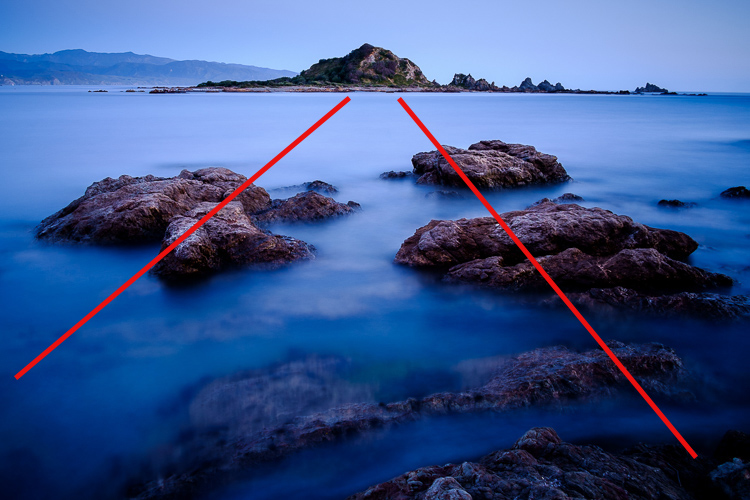
The lines don’t have to be obvious. Take this photo as an example.

The rocks form natural lines that lead the eye from the foreground to the island on the horizon.

how to add depth and dimension in composition leading lines

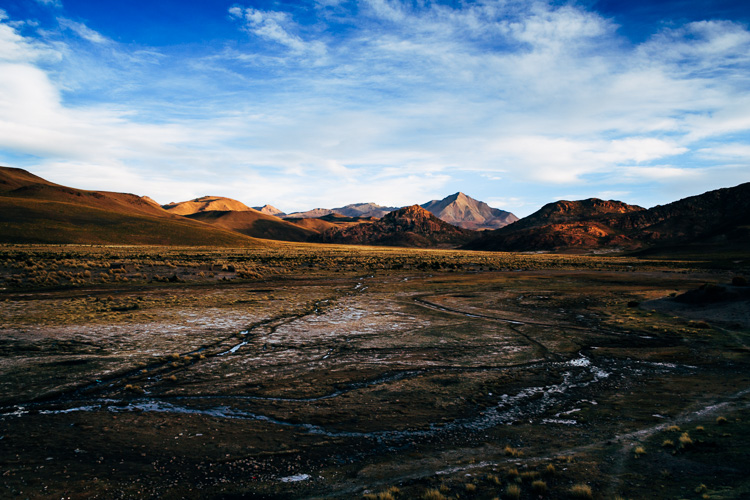
In the image below, the waterways in the middle distance take the eye through the photo to the distant mountains. They are meandering, rather than straight, which helps give the image a more organic feel that fits well with the theme of landscape.

how to add depth and dimension in composition

2. Use perspective

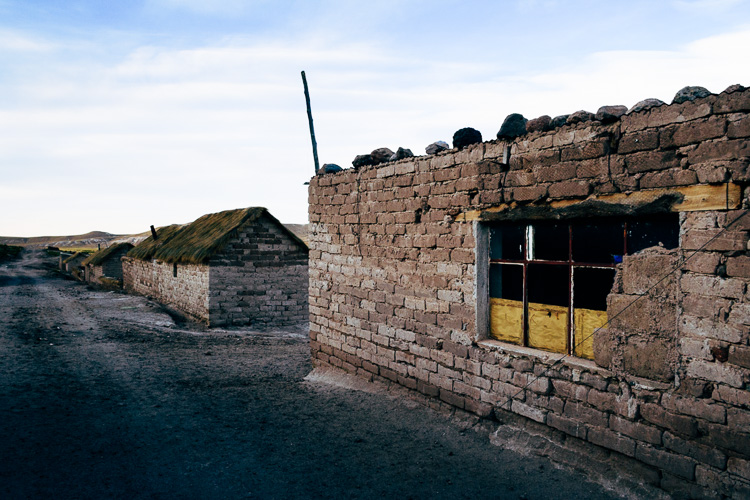
This photo demonstrates how lines can add depth in a different way.

how to add depth and dimension in composition - perspective

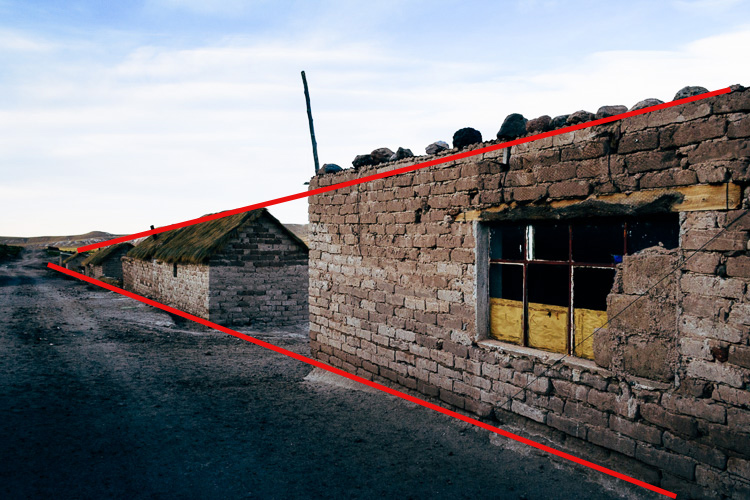
The buildings form converging lines that disappear towards the horizon, creating a sense of depth very effectively. This technique is similar to an artist’s use of perspective. I’ve added lines so you can see how it works.

how to add depth and dimension in composition - perspective

3. Think foreground, middle ground, and background

Most photographers are familiar with the rule of thirds, but when it comes to conveying a sense of depth it is helpful to break the photo up into a different set of thirds – the foreground, middle ground, and background. What you’re looking for is a way of connecting the three that pulls the eye through the photo. Having three distinct zones in the image helps create a sense of depth, three dimensionality.

Leading lines are one way of doing this, but lines are not always present in a scene. When that happens you need to look for something else. Often, that simply means including something interesting in the foreground.

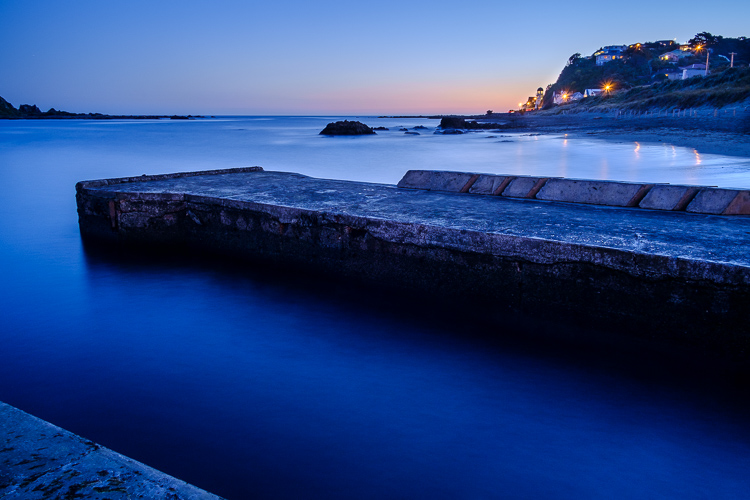
For example, in this photo, there are some buildings in the background, a concrete jetty in the middle, and the edge of another jetty in the foreground. I included the last one deliberately to help create a sense of depth.

how to add depth and dimension in composition

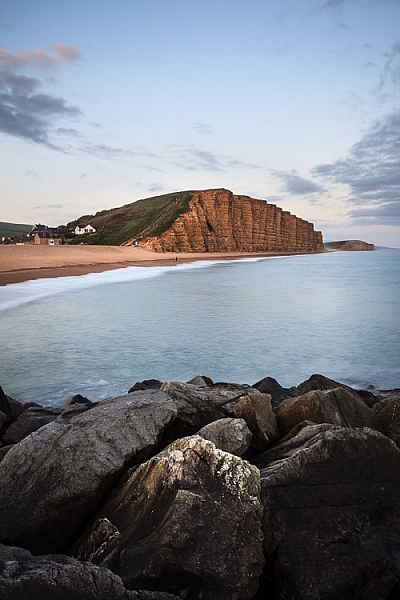
Here’s another example below. Including the rocks in the foreground creates a composition with three distinct zones (foreground, middle ground, and background) that the eye moves through, creating depth in the image. It helps that the wide-angle lens that was used makes the rocks seem quite large in comparison to the distant cliffs.

Depth and composition

4. Use aerial perspective

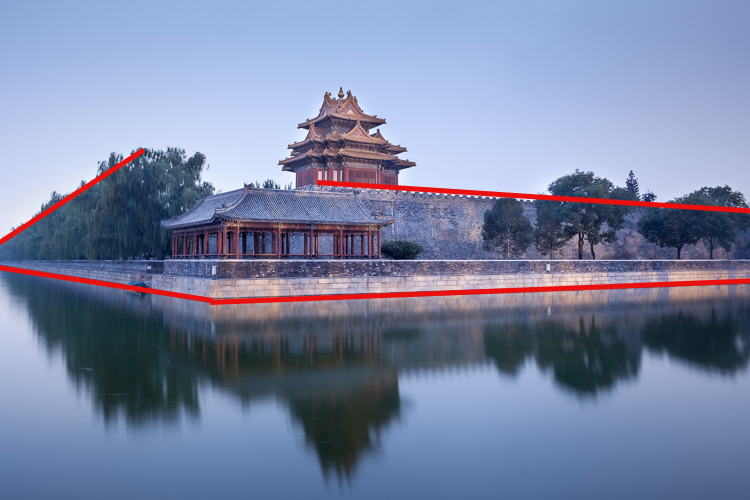
Another technique that helps convey a sense of depth is aerial (or atmospheric) perspective. This is where the atmospheric conditions make things in the distance appear hazy. When you see this occur, it is a good idea to see if you can find a way to include it in your composition. In this photo, taken in Beijing, you can see that the trees in the distance on the left side are obscured by atmospheric haze.

how to add depth and dimension in composition  - aerial perspective

This is reinforced by the converging lines formed by the walls. The two techniques are working together to show depth in the image.

how to add depth and dimension in composition  - aerial perspective and lines

5. Shoot through something

The techniques explored so far work best with wide-angle lenses. The nature of a telephoto lens is that it puts distance between you and the subject, which leads to a flatter perspective that doesn’t show depth as well as a wide-angle lens. But there are different techniques you can use with telephoto lenses to create a sensation of depth.

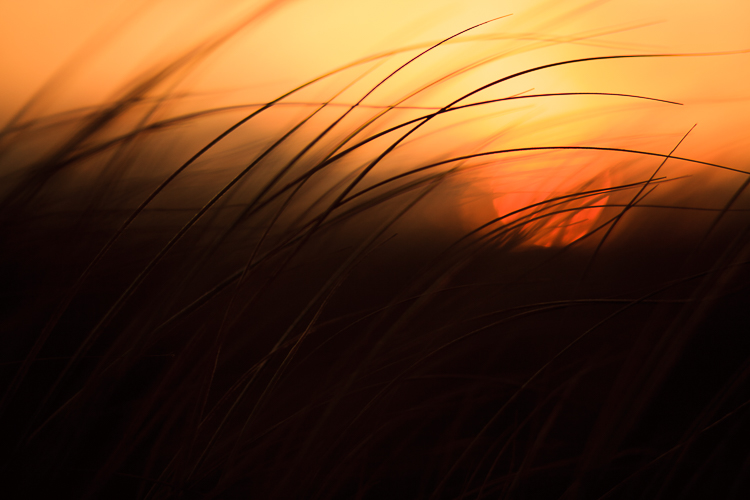
One method is to shoot through something that is between you and the subject. In the photo below, the subject is the setting sun. I shot through grass (and focused on the grass, throwing the sun slightly out of focus) to add a sense of depth to what otherwise could have been a very flat image.

how to add depth and dimension in composition  - telephoto

The photo also makes a good use of another technique, including shadows in the frame, to reinforce the depth.

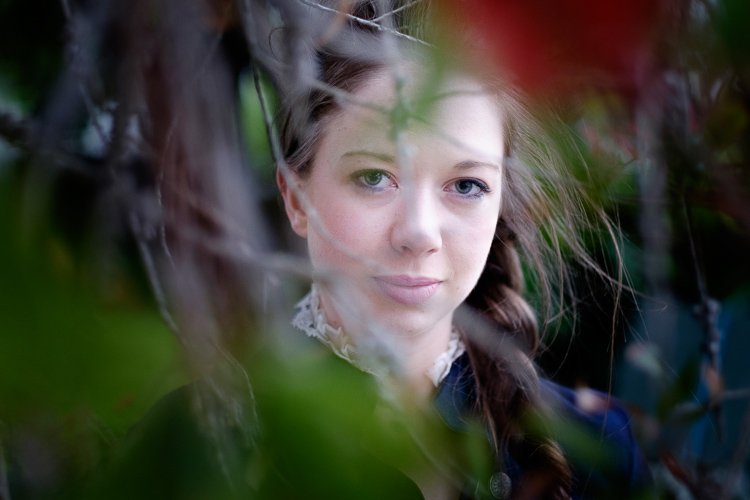
You can also use this technique with portraits. I created the portrait below by shooting through the branches of a tree.

Depth and composition

6. Use selective focus

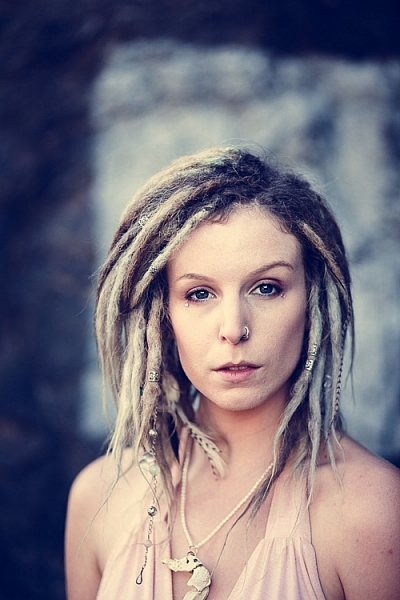
Both of the photos shown for the previous technique also use selective focus. That’s where you deliberately set a narrow aperture and focus on the subject, throwing the background out of focus. It’s especially effective with portraits, as the blurred background helps separate the model from the background, in turn creating a sense of depth. The following portrait was taken at f/2.0 with the lens focused on the model’s eyes.

Depth and composition

7. Convey depth through color

It’s also useful to think about what happens to colors in the background when you use a telephoto lens with a narrow aperture to make a portrait. When the background is out of focus, colors merge into each other. A good contrast between the colors in the background and those the model is wearing also helps convey depth.

For example, in the next portrait the use of color is very subtle. The background is nearly white, without any distracting colors. It is out of focus and doesn’t distract from the model’s face. His sweater is the most colorful part of the photo, and helps separate him from the background.

Depth and composition

You can take this idea to its extreme by using off-camera flash fitted with an orange gel. When you do this, the model is lit by orange light (from the gelled flash), but the background is lit by colder ambient light. This technique works well at dusk when the ambient light has a natural blue color.

In the example below, the model was lit by single Speedlite fitted with a 60cm softbox and a CTO (Color Temperature Orange) gel.

Depth and composition

Your turn

These seven tips should help you create stronger photos with more depth. What other ideas do you have for creating and adding depth into your photos? Please let us know in the comments below.


If you enjoyed this article and would like to learn more about composition then please check out my ebook Mastering Composition.

googletag.cmd.push(function() {
tablet_slots.push( googletag.defineSlot( “/1005424/_dPSv4_tab-all-article-bottom_(300×250)”, [300, 250], “pb-ad-78623” ).addService( googletag.pubads() ) ); } );

googletag.cmd.push(function() {
mobile_slots.push( googletag.defineSlot( “/1005424/_dPSv4_mob-all-article-bottom_(300×250)”, [300, 250], “pb-ad-78158” ).addService( googletag.pubads() ) ); } );

The post 7 Tips – How to Add Depth and Dimension into Your Photos by Andrew S. Gibson appeared first on Digital Photography School.


Digital Photography School

 
Comments Off on 7 Tips – How to Add Depth and Dimension into Your Photos

Posted in Photography


Sketch in 3D: Remarkable Drawing App Gives Doodles Depth & Dimension

23 Nov

[ By WebUrbanist in Design & Graphics & Branding. ]

3dsketched

Programs like Sketchup have allowed amateur artists and architects to sculpt and design in three dimensions for years, but this app facilitates far more informal works that really look like sketches in 3D.

Mental Canvas is part of a suite of software for Microsoft Surface that takes more conventional sketched forms and allows users to navigate and expand them in three-dimensional space, retaining the character of rough drawings.

3d-drawing-tool

The infinite-depth approach of this digital canvas software lets users zoom in and rotate their view, adding layers along the way and inspecting their work from various angles. The effect is remarkable as these illustrations show.

drawing-tool-app

From its creators: CAD modelling “comes at a cost. The cost is that one, you have to have a fully resolved three-dimensional model, even if it’s just a cube; second it’s very hard to edit a CAD model, it’s not fast and fluid like a sketch. At any given moment when you’re sketching, the designer or artist has full control over everything in that representation, but with a CAD model, that’s defined by the computer.”

This clever approach liberates an artist from the ordinary constraints of a physical page or even a drawing tablet, letting them shape worlds that maintain the character of a sketch but can be used to tell and frame stories in new ways.

3ddrawing

As with programs like Sketchup, a bookmarking tool allows users to save and store various views then retrace their steps, creating potential for 3D storytelling. It also lets a user pick the perfect shot, navigating three-dimensional space to select an ideal perspective. A dynamic dial tool, meanwhile, lets the artist rotate between colors and line qualities without backing out of the drawing.

As any good architect knows, an unfinished-looking drawing can be an asset: “A sketch has a quality when it’s unfinished; there’s so much possibility, there’s so much room for interpretation, and [Mental Canvas] expands the idea of a sketch. It makes it less flat. In architecture you always want that “Wow” design that gets everyone excited in the room, and [Mental Canvas] enhances it.”

One can see a lot of similarities here between Mental Canvas and tools being developed for augmented and virtual reality platforms. In a way, this program closes the gap, allowing users with more ordinary tools, devices and interfaces to accomplish something wonderful in 3D space.

Share on Facebook


[ By WebUrbanist in Design & Graphics & Branding. ]

[ WebUrbanist | Archives | Galleries | Privacy | TOS ]


WebUrbanist

 
Comments Off on Sketch in 3D: Remarkable Drawing App Gives Doodles Depth & Dimension

Posted in Creativity


An Exercise For You to Practice Depth of Field Without Going Outside

01 Apr

lead-photo-Vickie-Lewis-Photography-for-dps

Many photographers, especially when starting out, have a difficult time understanding depth of field. I also hear quite often that photographers are waiting for nice weather to get out and shoot. So, here’s a fun exercise you can do at home, in any weather, that will help you understand the finer aspects of depth of field.

Depth of field is determined by which aperture you choose, what focal length you’re using, and the distance between the camera and the subject. In this example, we’ll explore depth of field using a 100mm lens.

To set up

Find between one and three small objects you can photograph. I found three sports water bottles with balls on the top to shoot. Next, you need some studio space. A patio door or very wide window works well.

Your next step is to set up your object, or objects, in front of the window and to place your camera in position. The object and camera should be parallel to the window.

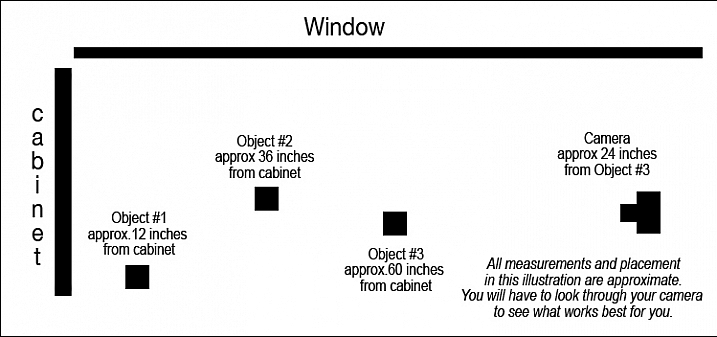
depth_of_field_illustration

This is how I set up my camera and objects.

I put the first ball, the soccer ball, about 12 inches in front of the cabinet. Then I put the second ball, the baseball, about 24 inches in front of that. I put the third object, the basketball, 24 inches in front of the next object, and finally I set my camera about two feet in front of the last object.

You’ll need to play a little bit to see what works best for you. It will vary depending on the size of the object you are shooting, and the focal length you are using. You want to be able to focus on all three objects, and take a photo of them without moving your camera, so play for a minute. Focus on the first object and make sure you can see all three objects in the frame. Then focus on the second and make sure you can still see them all. Lastly, do it with the third one, too.

Set your camera on either aperture priority or manual exposure, and use the widest aperture you have. I chose f/2.8. Your lens might not have that aperture available, if so f/4 or f/4.5 will be just fine.

Shoot wide opened focusing on each object in turn

Now, without changing anything but your focus, take a photo of each of the three objects.

200__depth_of_field_f-2.8

This photo was shot at f/2.8 while focused on the object closest to the camera, the basketball. Notice the narrow depth of field, in other words, how blurry the background is.

201__depth_of_field_f-2.8-f-2.8

This was also shot at f/2.8, but this time, I focused on the middle object, the baseball. Notice that it is blurry in front and in back.

202__depth_of_field_f-2.8

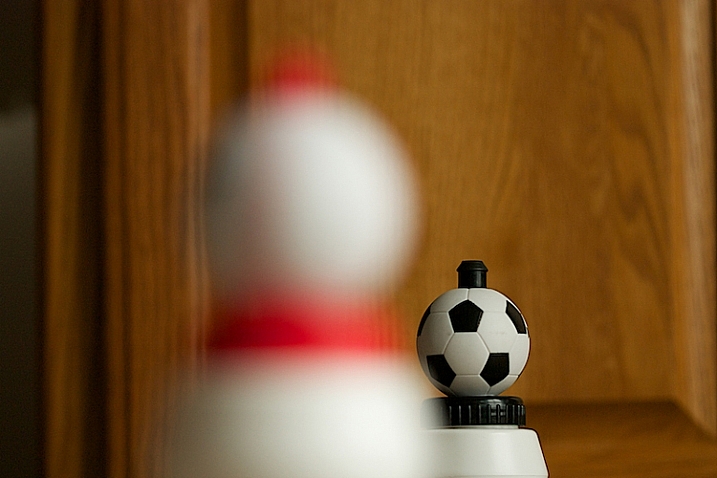
This photo was also shot at f/2.8, but I focused on the soccer ball. I did not change camera position nor did I change lenses. Notice the depth of field, but also notice the change in perspective. Can you see that more of the cabinet is in the photograph?

Next shoot with a small aperture

Now, let’s try something a little different. Instead of shooting at your widest f-stop, shoot at your smallest, which means a higher number, like f/32 or f/16.

205__depth_of_field_-f-32

Here is the same situation. The camera hasn’t moved, but the aperture is now at f/32. The focus is on the basketball, but look how much is sharp.

204__depth_of_field_-f-32

Look closely. The aperture is still at f/32, but the focus has changed to the baseball. Notice the basketball is more out of focus, but the soccer ball in the back looks pretty sharp.

203__depth_of_field_-f-32

Above is the third example. The focus is on the soccer ball.

You can practice each of these things with different f/stops to see the difference between f/4, f/8, f/11, f/16 and f/32. Each choice will change the depth of field.

Change the distance to the subject

209__depth_of_field_-f-2.8

In the above photograph, I moved the camera closer to the baseball and shot at f/2.8. Practice isolating the elements and see what happens. Notice how the baseball really stands out, and look at the background. By isolating the baseball with a very narrow depth of field, the background becomes really out of focus. This tool is very helpful to clean up backgrounds.

210__depth_of_field_-f-2.8

Then I changed my focus to the soccer ball. The aperture is still at f/2.8. What do you notice about the background?

213__depth_of_field_-f-32

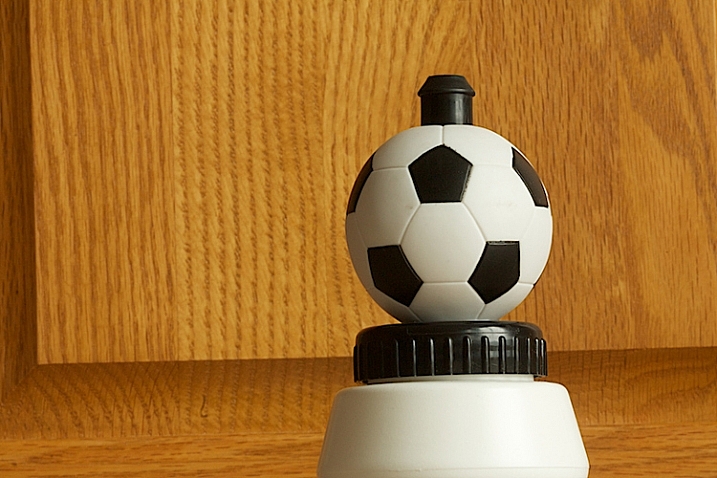
In the shot above the soccer ball is still in the original position, about a foot away from the cabinet. Notice how sharp the background is – this was shot at f/32.

214__depth_of_field_-f-11

Now, notice how we start to lose detail in the cabinet behind. This image above was shot at f/11.

215__depth_of_field_-f-2.8

Finally, by shooting at f/2.8, and without moving the position of the soccer ball or the background, the background has become more out of focus and less distracting.

Take some times and practice this at home. So what you’ve learned here is a great way to practice depth of field at home–even on a rainy day! So take out your camera, find some small objects to shoot and start practicing.

Please share in the comments below how controlling the depth of field could impact how you shoot. What did you learn by doing this exercise?

googletag.cmd.push(function() {
tablet_slots.push( googletag.defineSlot( “/1005424/_dPSv4_tab-all-article-bottom_(300×250)”, [300, 250], “pb-ad-78623” ).addService( googletag.pubads() ) ); } );

googletag.cmd.push(function() {
mobile_slots.push( googletag.defineSlot( “/1005424/_dPSv4_mob-all-article-bottom_(300×250)”, [300, 250], “pb-ad-78158” ).addService( googletag.pubads() ) ); } );

The post An Exercise For You to Practice Depth of Field Without Going Outside by Vickie Lewis appeared first on Digital Photography School.


Digital Photography School

 
Comments Off on An Exercise For You to Practice Depth of Field Without Going Outside

Posted in Photography


How to Use Foreground to Create Depth in Your Images

18 Nov

One of the biggest hurdles in photography is the fact that our majestic three-dimensional scene is rendered into a mere two-dimensional image, and the physical depth that we experience in real life is lost. To resurrect this spacious feeling, we can create the illusion of depth where there is none, by using strong elements in the foreground.

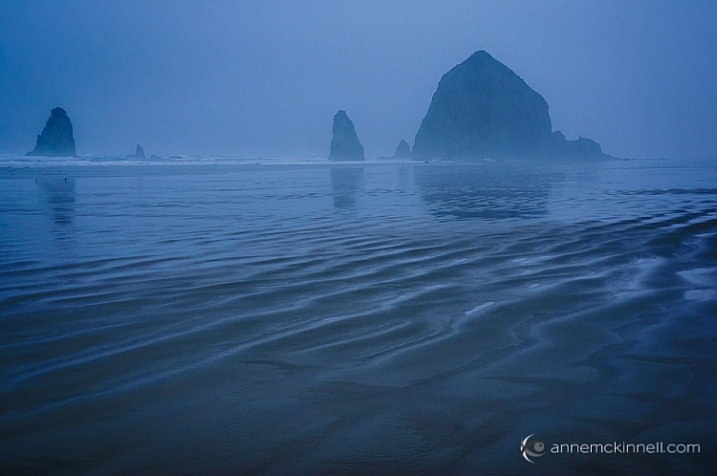
Cannon Beach, Oregon, by Anne McKinnell

When we make a photograph, our natural urge is to get a clear shot of the main subject, without other objects getting between it and the lens. That’s exactly what makes foreground elements so powerful though – they’re unexpected, and sometimes even counter-intuitive. Like any other compositional element, they create shapes, lines, and patterns that lead the viewer’s eye through the image and can be used to enhance its visual impact.

What is the foreground?

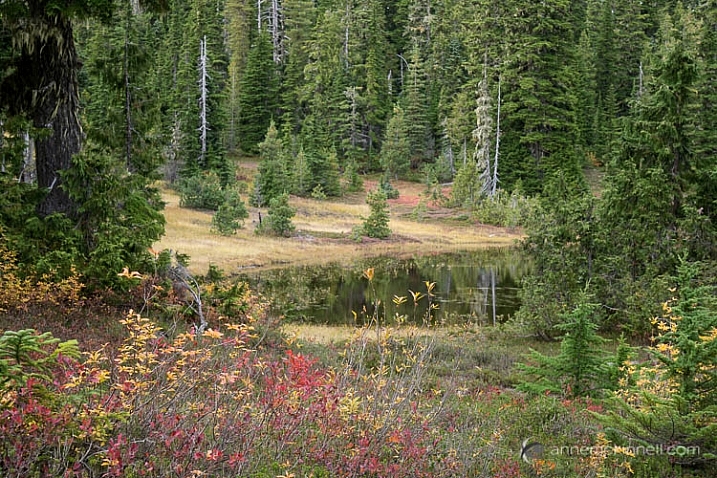
When you are working with a grand vista landscape scene, you can often divide it into three sections: the foreground, mid-ground, and background. For example, the scene below contains some colorful shrubs in the foreground, a pond in the mid-ground, and trees in the background.

Paradise Meadows by Anne McKinnell

The foreground, mid-ground, and background areas are not at fixed distances, but are understood relative to each other. The foreground consists of anything that lies between you and your subject, which is typically considered to be in the mid-ground (but not always). The background is made up of everything behind the subject.

You can think of a photograph like a stage: you have the upstage – that’s the background. It gives setting and context to what happens below it. Center stage is the mid-ground, where the bulk of the action takes place. But downstage – the foreground – is the closest to the audience, and therefore the most intimate part. It is capable of whispering to them and luring them into the action. It is the most easily seen and heard, and therefore understood, and can reveal the finer details of the story.

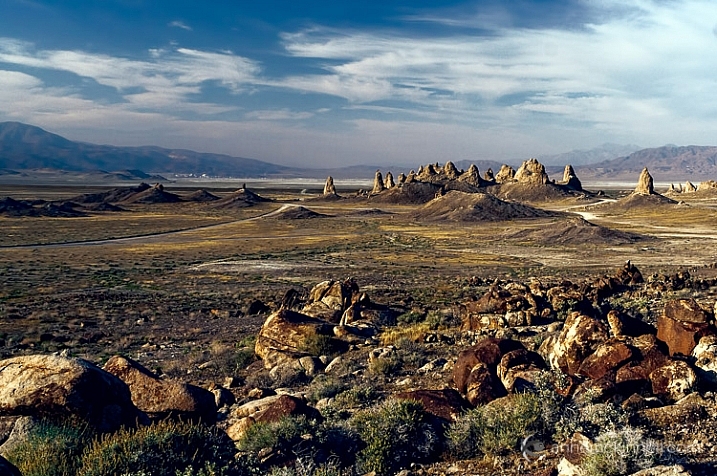
Trona Pinnacles, California, by Anne McKinnell

Not all photographs have three sections though, some just have a foreground and a background, and some have no depth at all.

How is the foreground used?

The foreground should contain some key point of interest, such as a human figure, a tree, a boat, some flowers, rocks, or anything else that is comparatively near to you. Composing in this way evokes depth, and gives your image the illusion of that missing third dimension.

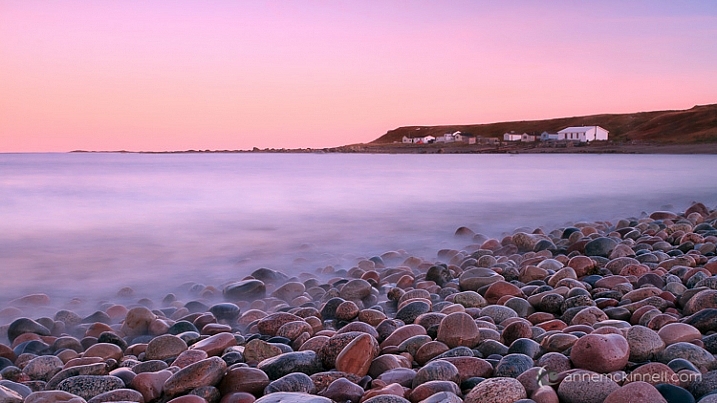
Green Point, Newfoundland, by Anne McKinnell

When you’re composing a photo and you feel that it’s looking a little too flat, placing something in the foreground can instantly add a sense of depth. Exactly how this is done depends entirely on your subject, and on your own creative decisions. This can mean physically adding something to your scene, if you are able to. But most of the time, you’ll be looking for objects in the surrounding area that would make an interesting foreground, and changing your perspective – either by moving your camera higher, lower, or to one side – to incorporate those elements inside of the frame.

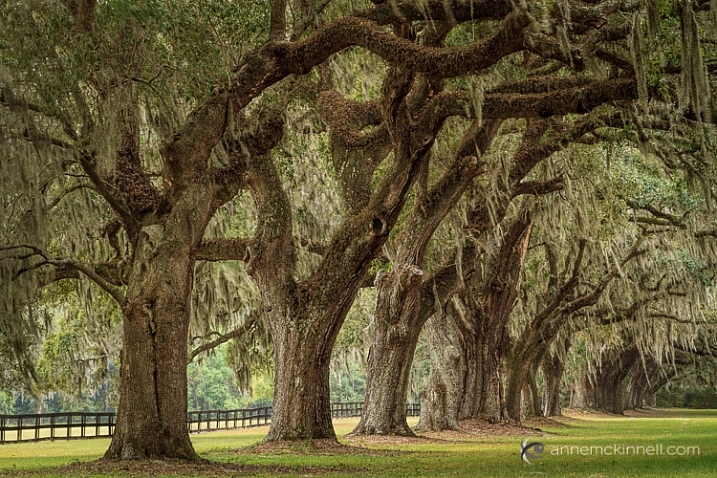
For example, imagine a group of oak trees in a field, all standing in a row. If you photograph them head-on, they’ll all look more or less identical – their size, distance, and focus will be the same, and the composition will likely be a flat, static one. However, if you change your perspective and shoot them from one side, everything changes. One becomes closer, and therefore larger, while the others shrink in comparison. When a viewer sees this image, their eyes will immediately fall on the tree in the foreground first, and the implied line created by the row will pull their gaze inwards towards the other trees. Suddenly, the composition has depth!

Boone Hall Plantation, South Carolina, by Anne McKinnelll

Likewise, you could change your perspective by lowering your camera angle to incorporate rocks, flowers, or anything else that is on the ground, into your image. This use of foreground will provide a point for the viewer’s eye to enter the image, and any lines created in the foreground will direct their eye into the image.

Like any other compositional element, the foreground is only helpful if it adds to the impact of the image. If it doesn’t help tell the story, or worse yet, if it distracts the eye, then it isn’t working as a benefit to your image. Your foreground should be an important part of the scene, and not something distracting. Look for things that point towards the focal point in some way.

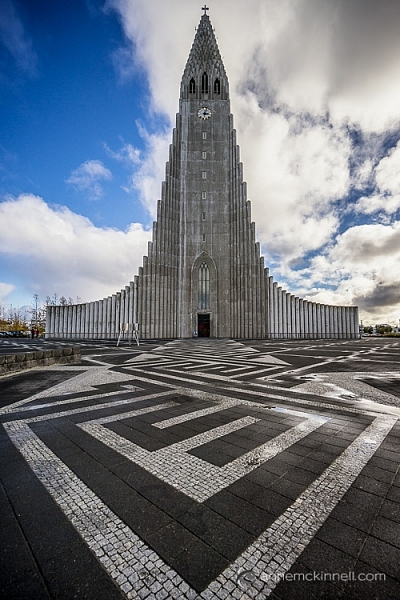
Hallgrimskirkja, Reykjavik, Iceland, by Anne McKinnell

Foreground elements can even be made of simple shapes and lines. In some cases, your foreground elements may be nothing but shapes and lines, like the paint on a stretch of road, the waves on the ocean’s shore, or the shadows cast across a wind-swept desert. Anything that forms a line towards your subject is especially effective. These are known as leading lines.

Similarly, a wall that stretches into the picture from the foreground will carry the eye along with it. The corners of your frame are especially strong points, and anything that leads inwards from them will have a particular impact. Textures are another compositional tool that can make for an interesting foreground.

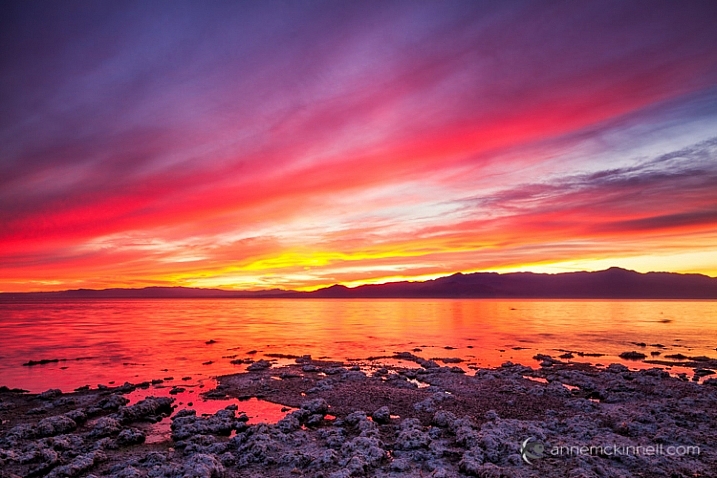
Salton Sea, California, by Anne McKinnell

Arranging your composition so that there are interesting elements in front of your main subject is a very effective compositional tool that can evoke depth, by giving your image the illusion of the missing third dimension.


This week on dPS we’re featuring a series of articles about composition. Many different elements and ways to compose images for more impact. Check out the ones we’ve done so far:

  • Using Framing for More Effective Compositions
  • 7 Tips to Improve Your Skyline Photos
  • 33 Images that Exemplify Compositional Elements
  • Weekly Photography Challenge – Composition Craziness
  • How to Take Control of Aperture and Create Stronger Photos
  • How Cropping in Post-Production Can Improve Composition
  • Good Crop Bad Crop – How to Crop Portraits
  • How to use Focal Length and Background Compression to Enhance Your Photos

googletag.cmd.push(function() {
tablet_slots.push( googletag.defineSlot( “/1005424/_dPSv4_tab-all-article-bottom_(300×250)”, [300, 250], “pb-ad-78623” ).addService( googletag.pubads() ) ); } );

googletag.cmd.push(function() {
mobile_slots.push( googletag.defineSlot( “/1005424/_dPSv4_mob-all-article-bottom_(300×250)”, [300, 250], “pb-ad-78158” ).addService( googletag.pubads() ) ); } );

The post How to Use Foreground to Create Depth in Your Images by Anne McKinnell appeared first on Digital Photography School.


Digital Photography School

 
Comments Off on How to Use Foreground to Create Depth in Your Images

Posted in Photography


How to Understand Depth of Field to Avoid Blurry Photos

21 Sep

Last week we released our brand new course – Photo Nuts and Shots which is all about teaching the tools, techniques and thought processes for creative photography. It’s by on of our most popular ebook authors, Neil Creek and features over two hours of video teaching.

We asked Neil to create this course as he has a natural knack of explaining technical concepts in a way that makes the intricacies of photography easy to understand.

We’re so convinced that this course will help you that we want to share a couple of minutes from one of the modules about avoiding blurry images with you here today.

Neil Creek runs through an additional 35 minutes of golden focus advice in this lesson – available in full when you purchase the course online today.

Keep in mind that this is just one of ten creative photography lessons included in Photo Nuts and Shots.

So you’ll not only discover practical tips and tricks for producing tack sharp photos, but get step-by-step guidance on:

  • Using light effectively
  • Avoiding and embracing lens flare
  • Composition techniques
  • Choosing creative exposure settings
  • Thinking flexibly on location
  • And much more!

With Neil’s comprehensive demonstrations and easy-to-understand teaching style, it’s like having your very own professional photography mentor.

All packaged in over two hours of streamable and downloadable video content for the terrific introductory price of USD $ 39. That’s 33% off!

Don’t miss out – take the full course today.

We’ve extended the 33% saving to our first course, Photo Nuts and Bolts, too (although you can certainly take one without the other). So both are USD $ 39 each, but for a limited time only. And you can rest assured that all of our video courses come with a 60-day money-back guarantee.   

googletag.cmd.push(function() {
tablet_slots.push( googletag.defineSlot( “/1005424/_dPSv4_tab-all-article-bottom_(300×250)”, [300, 250], “pb-ad-78623” ).addService( googletag.pubads() ) ); } );

googletag.cmd.push(function() {
mobile_slots.push( googletag.defineSlot( “/1005424/_dPSv4_mob-all-article-bottom_(300×250)”, [300, 250], “pb-ad-78158” ).addService( googletag.pubads() ) ); } );

The post How to Understand Depth of Field to Avoid Blurry Photos by Darren Rowse appeared first on Digital Photography School.


Digital Photography School

 
Comments Off on How to Understand Depth of Field to Avoid Blurry Photos

Posted in Photography


Maximizing Depth of Field Without Diffraction

14 Sep

So you are out shooting and you want to capture the full scene in front of you – all the way from what is directly in front of you to the background way off in the distance. You know you need a really large depth of field, and you know what you need to do to get it.

You reach for the camera’s aperture control and crank it down all the way to f/22 (or f/32 if your lens allows). That will maximize your depth of field and have your picture looking sharp from front to back.

Or will it?

What is Diffraction?

There is a phenomena in photography called diffraction that has an adverse effect on your pictures, and sets in when you use smaller apertures. What is diffraction? Let me explain.

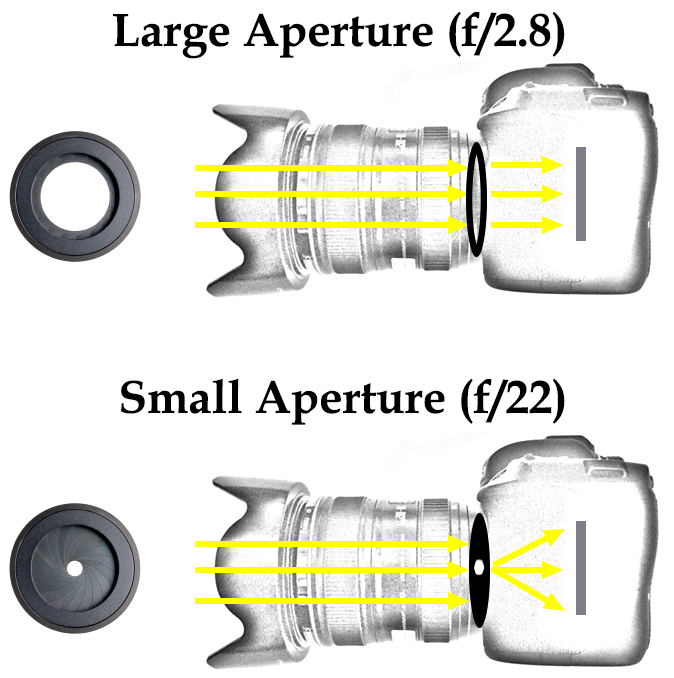
As you are probably aware, the aperture of a lens is the opening in the rear part of the lens that lets light into the camera. The body of the lens consists of optical elements that direct light toward the rear of the lens. When you use a large aperture, light freely moves through the optical elements and then through the aperture. When the aperture is very small, however, essentially the light has to bend to make its way through the aperture. That bending of light causes the waves to interfere with each other. The following graphic illustrates how this works:

Diagram showing how light enters the camera through the lens and results in diffraction at small aperture settings

What’s the result of this to your photography? In a word: softness.

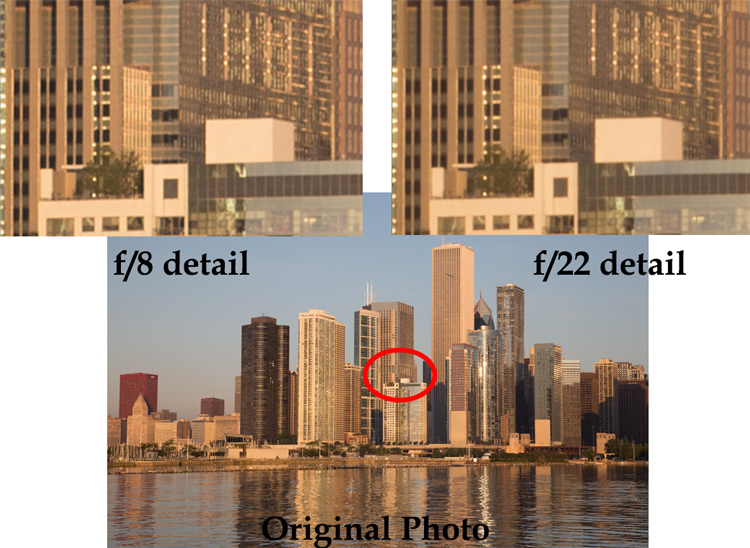
A picture shot at f/22 will not be quite as sharp as one shot with an aperture that is a bit larger. Here is an example of detail from two photos, which are identical except that one was shot at f/8 and the other at f/22:

Example of photos taken with large and small apertures to show the effect of diffraction when using a small aperture on your lens

You can probably see that the f/8 detail is sharper than the f/22 detail.

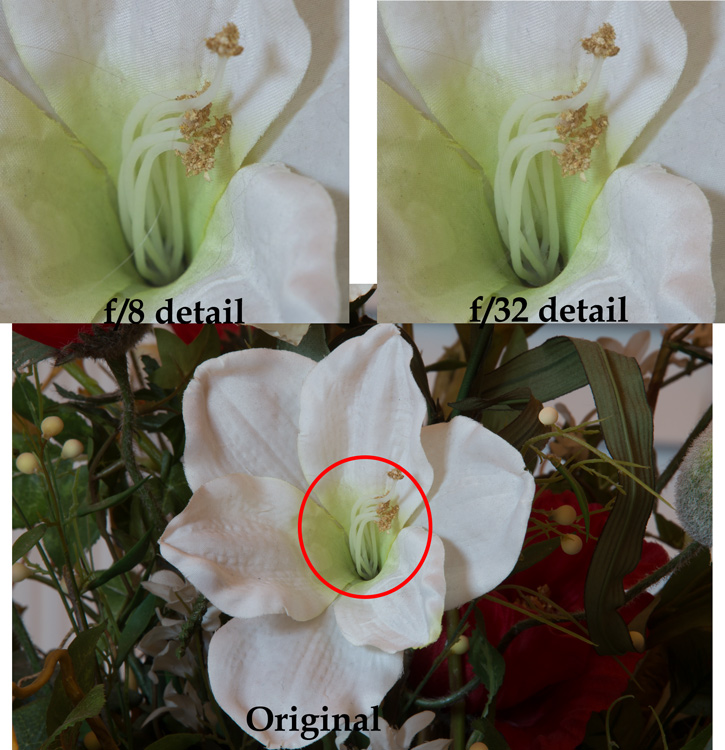
The example above was shot outdoors with a 24-105 mm f/4 lens (my favorite). To see this application in other contexts, I also created another example, this time shooting indoors with a 70-200 mm f/2.8 lens with a minimum aperture of f/32.

Example of photos taken with large and small apertures to show the effect of diffraction when using a small aperture on your lens

Again, the f/8 detail is sharper than that shot with the smallest aperture.

By looking at these examples, you can see that diffraction is not just theory, it has real affect on your photos.

Using the Sharpest Aperture

Okay, so now you see that diffraction is a real phenomenon, and you want to avoid it. What is the smallest aperture you should use? And what is the best aperture setting? Unfortunately, there is no one perfect answer. It depends on the lens. As a result, you should test your lens(es) to determine the aperture (or range of apertures) at which they work best (also known as the lens’ sweet spot).

To do so, just take the exact same picture at each aperture setting (in 1-stop increments). Be sure to use a tripod so your picture is exactly the same. In addition, make sure you are increasing (making longer) your shutter speed by an equal amount every time you change your aperture so that your exposure stays the same. After you have taken the pictures, load them onto your computer, zoom-in on each, and compare.

If you don’t want to test your lens and just want a quick rule of thumb for avoiding the effects of diffraction, generally avoid using an aperture smaller than f/11 or f/16. Most experts consider this range something of a maximum. In addition, the sharpest aperture on most lenses will be about f/5.6 – f/8, or about 1-2 stops smaller than its wide open aperture setting. When possible, default to using an aperture in this range.

Maximizing Depth of Field with Larger Apertures

You may find yourself wondering how to get a large depth of field without using a very small aperture. Keep in mind that you don’t always need to use the smallest aperture that your lens offers, to get a sufficient depth of field. If you are shooting outdoors, which is generally where you will want a small aperture and maximum depth of field, you should become acquainted with the subject of hyperfocal distance.

Despite its complex-sounding name, hyperfocal distance is just a measure of how close you can focus and still keep the background of your image acceptably sharp. You don’t necessarily need to use the smallest aperture possible, particularly when you are shooting wide-angle. For example, if you are using a full-frame camera with a 20mm lens, even using an aperture of f/8 will keep everything sharp from 5.5 feet in front of you, all the way to infinity!

This shows that you don’t always need to use an aperture like f/22. Get acquainted with hyperfocal distance (or keep a hyperfocal distance chart handy) to see how large you can make your aperture, yet still maximize depth of field.

Focus Stacking

Sometimes, however, you need to break out the heavy artillery and make sure everything – from what is right in front of you all the way to infinity – is in focus. To do that, use a technique called focus stacking.

To focus stack what you do is, take multiple pictures of the exact same thing at your lens’s sharpest aperture setting. Again, you should test your lenses to see what the sharpest setting is for each lens, but if you don’t know it will usually be in the range of f/5.6 – f/8.0. Set your lens to manual focus, and set the focus point on the closest part of the image (nearest part you want in sharp focus). Take the first shot, then repeat the process, gradually setting the focus point further and further away with each shot, until you are focused at infinity. Usually 3-5 shots will cover the entire range of the scene.

When you get your photos in your computer, you will combine the photos in Photoshop to create one file using the sharpest parts of each picture. There are a few different ways to do this:

  • Automatic: Use the Photomerge function to load your photos into Photoshop (File > Automate > Photomerge) and combine the images, making sure that the box to “blend images together” is checked. Photoshop will combine the images into one file and (usually) use the sharpest portions of each image.
  • Partial: You can also load the images as separate layers to one file in Photoshop, align your layers (Edit > Auto-Align Layers), and then have Photoshop automatically blend the layers (Edit > Auto-Blend).
  • Manually: Finally, you can do the process manually if you want complete control over it. Load the images as layers to the same file align the layers. To blend the photos, add a layer mask to the top layer (Layer > Layer Mask > Reveal All) and use a black brush to mask away everything except the sharpest point of that picture. Then merge down that layer (Layer > Merge Down) and repeat the process for each layer. This method will obviously take more time than the first two options above.

At the end of this process, you will have combined the layers such that the sharpest portion of each one is showing. The photo will be 100% sharp from front to back – with no effects of diffraction.

Application to Your Photography

You should be aware of diffraction, but don’t let it scare you away from using the aperture that you need. In particular, there is still a place for shooting with very small apertures. The effects of diffraction – while real – are not that great, and keep in mind that the examples set forth above showing the effects of diffraction were zoomed way in. If we look at the original pictures, can you tell which one was shot at the smaller aperture?

Full photos showing limited effect of diffraction

Can you see any diffraction here? In the top row, the picture to the left was shot at f/22 and the one to the right was shot at f/8. In the bottom row, the picture to the left was shot at f/8 and the one to the right was shot at f/32.

Can you see the diffraction in the images above? I can’t.

Worrying about diffraction should be reserved for those times you are dead set on absolute maximum image quality, or you know you are going to display a large version of the picture. Otherwise, you can still shoot with small apertures and you will likely not notice the difference. In other words, there is still a place for f/22 in this world.

However, on those occasions where it does matter, use a slightly larger aperture. Know your lens’ sweet spot and use that setting. Be familiar with the hyperfocal distance involved and see if you can keep the entire picture sharp at the larger aperture. Where you cannot, use focus stacking, this will ensure the sharpest pictures possible.

googletag.cmd.push(function() {
tablet_slots.push( googletag.defineSlot( “/1005424/_dPSv4_tab-all-article-bottom_(300×250)”, [300, 250], “pb-ad-78623” ).addService( googletag.pubads() ) ); } );

googletag.cmd.push(function() {
mobile_slots.push( googletag.defineSlot( “/1005424/_dPSv4_mob-all-article-bottom_(300×250)”, [300, 250], “pb-ad-78158” ).addService( googletag.pubads() ) ); } );

The post Maximizing Depth of Field Without Diffraction by Jim Hamel appeared first on Digital Photography School.


Digital Photography School

 
Comments Off on Maximizing Depth of Field Without Diffraction

Posted in Photography


Tips for Depth of Field Control in Macro Photography

01 Sep

Depth of field is the amount of distance between the nearest and farthest objects that appear in acceptably sharp focus in a photograph, it varies depending on camera type, aperture and focusing distance. If you are into photography you probably already know this and how critical it is when you photograph in macro distances.

01

This image was done with a 100mm macro lens with a life-size converter attached, at a distance of 4 inches to the object to achieve this type of magnification. The Depth of Field you see here is impossible to achieve, as there is no way to have the whole ring in focus with this focal length and this distance to the object.

Here are a couple of test shots to show a comparison between an f/8 and an f/32 exposure of this image:

02

In this particular image f/8 would give you a very shallow Depth of Field, so if you would like to have more then f/32 would seem to be a better choice, right? But if you take a closer look, you will realize it is just not that easy.

03

The magnified image shows you that f/8 has shallow Depth of Field but, because it represents the sweet spot of this lens, it gives you great detail in the focused areas. On the other hand f/32 gives you more Depth of Field, but it lacks detail overall.

This lack of detail is due to diffraction, that is the slight bending of light as it passes around the edge of an object giving the photographed image a soft focus effect. So, sharp focus and deep Depth of Field are impossible to achieve in this image due to optical limitations.

A great work-around for these limitations is Focus Stacking (also known as Focal Plane Merging, Z-Stacking or Focus Blending), which combines images photographed with different focus distances into one final image with a greater Depth of Field.

This technique is only possible if the camera, and all the elements on the image are perfectly still, so the use of a steady tripod is really important.

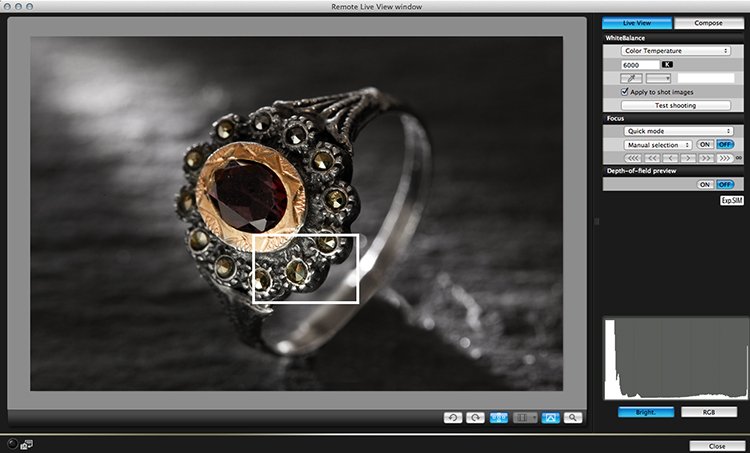
Another important factor is to shoot, and focus without touching the camera. In this particular image the camera was tethered with a computer and a remote shooting app was used to focus the image.

04

The best way to capture these images is to start by focusing on the closest area first, then keep shooting, making sure you cover all the focusing length (move focus farther away from the camera with each successive shot). Just use the controls of your remote trigger and app to fine-tune the focus for each shot.

The final number of shots depends on how detailed you want your image to be, but keep in mind that the more images you have, the harder it will be to process later on. This particular image was made with a merge of 21 images.

05

After the images are captured it’s time to process them. There are a lot of software options on the market for focus stacking; this image was edited with Adobe Photoshop CC. Here are the steps:

  1. Open Photoshop, go on File > Scripts > Load files into a stack
  2. Select all the pictures and turn on “attempt to automatically align layers”
  3. Select all your files in the layer panel on the right side
  4. Go to edit > Auto-Blend Layers and select “stack Images”

You will end up with a stack of layers with associated masks that look something like this:

06

Each layer mask reveals the best of each focused part of the image, and they can also be manually adjusted for more controlled results. The final images are usually very impressive and allow you to achieve effects that would be impossible to reach any other way.

googletag.cmd.push(function() {
tablet_slots.push( googletag.defineSlot( “/1005424/_dPSv4_tab-all-article-bottom_(300×250)”, [300, 250], “pb-ad-78623” ).addService( googletag.pubads() ) ); } );

googletag.cmd.push(function() {
mobile_slots.push( googletag.defineSlot( “/1005424/_dPSv4_mob-all-article-bottom_(300×250)”, [300, 250], “pb-ad-78158” ).addService( googletag.pubads() ) ); } );

The post Tips for Depth of Field Control in Macro Photography by Ivo Guimaraes appeared first on Digital Photography School.


Digital Photography School

 
Comments Off on Tips for Depth of Field Control in Macro Photography

Posted in Photography


Seeing in Depth of Field: A Simple Understanding of Aperture

18 May

Photography can be simply defined as: painting with light.

When you are painting with light, you are creating a story in a split second. That’s what photography is all about. Technically, your camera is measuring the light in the scene, and you are telling it how much of that light you want to use to create a properly exposed image. This becomes your story.

There are three main settings used to control that light; Shutter Speed, ISO and my favorite, Aperture. Each of these settings has its own individual way of measuring light. When all three are balanced correctly, you create a proper exposure.

1 Aperture Range 3265

Though each of these three settings measures light, they also have unique characteristics that create artistic qualities in your photographs. By understanding them, you have control over the full story you want to tell.

Shutter speed captures movement or freezes it. ISO helps control how sensitive your camera is to the available light in a scene. Finally, the aperture creates depth of field. This is where the real story comes from; it is with aperture that you control what is in focus, and what is out of focus.

As a photographer, how do you decide what you want your viewer to focus on? How do you create a story? That’s what aperture is all about, and that’s why I love it.

WHERE IS IT AND WHAT DOES IT DO?

Aperture is located in your lens, not in the camera body. The lens opening expands and contracts to control light. By selecting a specific aperture size, you are telling the lens how much light you want to hit, and register on, the sensor.

It is very similar to how the human eye works. Your pupils expand and contract based on the available light in the scene. Like when you first walk into a dark movie theater. At first you can’t see, then your eyes adjust. Your pupils expand, allowing your eyes to see as much light as possible in the dark room.

Again, when you go outside on a sunny day, at first it’s too bright to see. Your pupils adjust by contracting, letting in less light. Your lens aperture works the same way. Changing aperture settings is like your pupils dilating or contracting.

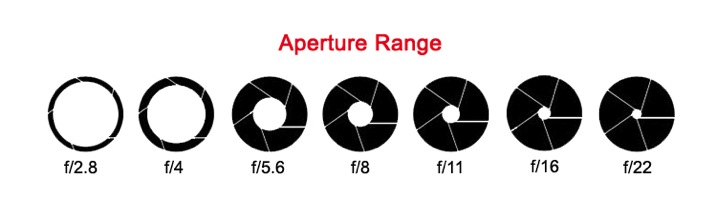
The size of a lens aperture is measured in what we call f-stops (fractional stops). Just like all settings on a camera, there is a general range.
2 aperture range2

The numbers aren’t necessarily important to memorize. What’s important is to see the range in the settings. Here is the trick; the smaller the f-stop number (like f/1.8), the larger the aperture opening. This means more light will enter through your lens at once, and vice versa. The larger the f-stop number (e.g. f/22), the smaller the aperture opening, and less light will enter your lens.

Think of these f-stops as fractions. Just replace the F with the number one. 1/4 of a pie is much more than 1/16 of a pie.

A quick note: Not all lenses are built the same. Different lenses have different apertures. Some lenses have a wider range and some have less. Standard lens will range from F3.5–F22. Specialty lenses go as low as F1.2 or more. See: What the Numbers on your Lens Mean for more on this.

SEEING IN DEPTH OF FIELD

Here is where it gets fun. While measuring light, when the lens expands and contracts, it also measures depth of field. Again, your eyes do the same thing!

As you look at the screen to read this, these words are mostly in focus to your eyes. In your peripherals, you can see other things, but they aren’t in focus.

Notice, your hands on the keyboard, they are in the foreground, and perhaps a bookshelf is in background. You can see them but they are not in focus. You are seeing in depth of field.

A great photograph does just that. It captures a foreground, a mid-ground and background. By setting your aperture you are controlling which of these areas is in focus. It is all based on your intention, your story.

DEFINING DEPTH OF FIELD

With your camera’s focal point (that little square in the middle of your viewfinder), you focus on a particular part of the scene. This point becomes the sharpest part of your image. There is an area in front of that point in focus, and an area behind it in focus as well. The distance from front to back that is acceptable focus is considered your depth of field. You decide what is acceptable by choosing a specific aperture size.

3-Uluwatu-Monkey-8427

This is a story about a monkey on a cliff. The bushes in the foreground and the temple on the cliff in the background are out of focus. They are out of the depth of field. This brings your attention to the focal point; the monkey in the middle (no pun intended).

Remember, the lower the f-stop number, the bigger the opening, the more light comes through the lens. This means less of your scene is in focus and you have a shallow depth of field. The opposite is also true. The larger the f-stop number, the smaller the opening, the less light comes through the lens. In this case, more of your scene is in focus and you have a greater depth of field.

Simply put, the larger the f-stop number, the more will be in focus. The smaller the f-stop number, the less well be in focus.

A DEEPER LOOK AT DEPTH OF FIELD

As you lock your camera’s focal point on a specific spot, that spot creates a focal plane. Everything that is the same distance away from the lens is on the same focal plane, and will be in focus.

4 focal plane explained

At a shallow depth of field (low number), the focal plane is very thin. As your depth of field becomes greater (high number), the focal plane becomes deeper.

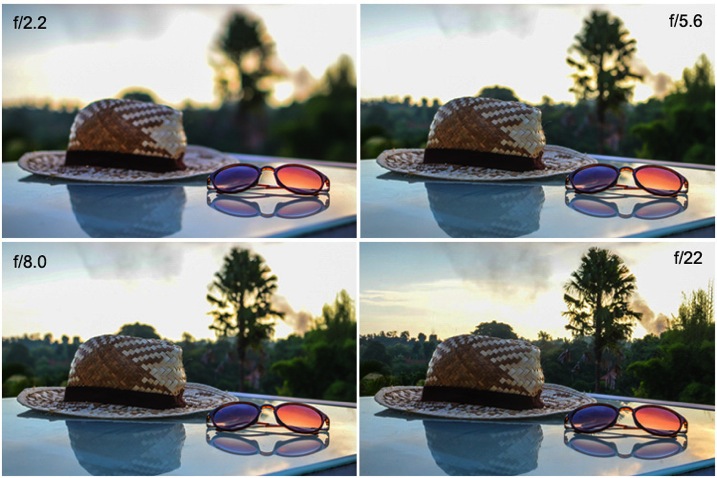
Here is the same scene photographed with different aperture settings. Notice that the depth of field changes how much of the image is in focus.
5 aperture example

At f/2.2 only the sunglasses are in focus. At f/5.6 the hat is also in focus. By using f/8.0 you can start to make out the trees in the background. Finally, at f/22 everything in the image is in focus.

Which one tells the best story? You as the photographer, get to decide.

PRACTICE TIPS AND TRICKS

Now that you’ve got a good grasp on the basics, it’s time to play! Here are some great tips to start your practice.

Set your camera to Aperture Priority mode. You will have full control of the aperture, without having to worry about proper exposure. This way you can just focus on depth of field. It’s a great way to fully understand what your lens is doing as you change your aperture settings.

Pick a subject or scene, and stick with it. Photograph your scene from many different angles. Choose different parts of the scene to focus on using the full range of aperture settings.

Use these guidelines to capturing depth of field in different scenarios:

6 Aperture Range 9748

When shooting single subjects, like a portrait of a child, it is best to use a lower f-stop like f/1.2-f/2.8. Creating a shallower depth of field brings attention to the subject’s face, which is always most important in a portrait.

7 Aperture Range 2145

When shooting a small group of people (2-5), choose an aperture of f/4-f/8. This, being a slightly deeper depth of field, guarantees that everyone in the group will be in focus.

8 Aperture Range 6150

Any time you have a wide-open scene, for instance a landscape, and you want all of that landscape in focus, choose a setting above f/10.

These are just guidelines. Photography is a form of art. Be creative, and remember, it’s all about telling a story.

What story do you want to tell? Share your images here and show how you’ve used depth of field to create a great story.

All Images in this article are © 2015 Danielle Werner and DEW Imagery & Design

Bio

Danielle Werner is a free-spirited photographer, designer and retoucher, on an endless journey around the world. She is also a passionate writer and educator who teaches photography workshops wherever she goes. Read Danielle’s inspirational travel stories at LiveWonderful.com, and check out more of her adventure and lifestyle photography at DEW Imagery & Design. You can also connect with her via:

https://twitter.com/ImageryDEW

https://www.facebook.com/livewonderfulblog

googletag.cmd.push(function() {
tablet_slots.push( googletag.defineSlot( “/1005424/_dPSv4_tab-all-article-bottom_(300×250)”, [300, 250], “pb-ad-78623” ).addService( googletag.pubads() ) ); } );

googletag.cmd.push(function() {
mobile_slots.push( googletag.defineSlot( “/1005424/_dPSv4_mob-all-article-bottom_(300×250)”, [300, 250], “pb-ad-78158” ).addService( googletag.pubads() ) ); } );

The post Seeing in Depth of Field: A Simple Understanding of Aperture by Danielle Werner appeared first on Digital Photography School.


Digital Photography School

 
Comments Off on Seeing in Depth of Field: A Simple Understanding of Aperture

Posted in Photography