RSS
 

Posts Tagged ‘comparison’

Side-by-side comparison between reflectors and diffusers for portraits

07 Oct

Comparison between reflectors and diffusers for portraits

If you’ve been looking into portrait photography, whether it be a casual read, in depth, as a hobby, to improve your portraits, or as a pro, you would have come across the use of reflectors. Reflectors come in various sizes, shapes and colours. My favourites are the 5-in-1 circular foldaway reflectors and the rectangular panels you can lean on or clip to a stand.

Have you ever wondered what a side-by-side comparison using different reflector colors would look like? Wonder no more. Below, you can see the different types I used. These photos all share the same white balance and editing as I wanted the colors to be as true a reflection of the effects of the reflectors used as much as possible. I’ve also kept the edits as clean as possible.

#1 Three reflectors, light shirt

dps-comparison-between-reflectors_0000

Top left is a natural light portrait lit only by window light, half-clear and half-frosted (diffused) but with no other reflectors used. The window is large enough for a big spread illuminating both face and background. The portrait on its right shows a rather obvious warm glow all over. I used two gold reflectors: camera right and in the front underneath the face. This setup warmed everything up – shirt, teeth, face and even the background.

Compare the effect of the gold reflector to the bottom left. This one had two silver reflectors positioned in the same places. Notice how cool the color temperature has become. Next to it on the right I once again had the same setup, but this time using two white reflectors. Notice the color temperature is still cool but softer, less sharp and less edgier than the silver one. Look carefully and this difference is more apparent on the teeth and skin tone being just a touch warmer.

#2 Two reflectors, dark shirt

I thought I’d do the same comparison, this time with the subject wearing black. The difference is more dramatic. With the gold reflector, the black is richer and darker, whereas with the silver it’s a little more washed out.

For me these are both a bit extreme, with the gold reflector being too warm and the silver being too cold. If I were to edit these photos without considering the true effects of the reflector I’d tone down the warmth of the gold reflector by half and I’d be good with that. Similarly, I’d warm up the one with the silver reflector in post, both using the white balance slider. I’d then get the happy warm tone that I’m after.

#3 Diffuser reflector and flash

If you’re familiar with the 5-in-1 reflector, you’ll know there are four colored sides: white, silver, gold and black. These sides are made of fabric all stitched together as one zipped wrap. This fabric wraps around a middle standalone piece that’s translucent. This is the diffuser and a super versatile tool. Strictly speaking, the black side doesn’t actually reflect light but rather absorbs it, and is good for cutting light out or using as flags.

This diffuser is great when shooting in harsh outdoor sunlight and you just want to cut the light down or tone it down by placing the diffuser between the sunlight and the subject. In effect, you are creating a slightly shadowed area for the subject, which makes it ideal for portrait lighting outdoors.

I thought I’d try this same technique for my indoor portraits by using this diffuser to cut down light from a flash, thereby acting like a big softbox but without the bounce.

Here are the results. The left photo was lit with one flash on camera right positioned behind the diffuser, which was pretty big and placed close to the subject for a smooth, soft light. The right photo had two flashes, again diffused, with one light overhead to provide hair light and light the background for more separation.

#4 Diffused natural light vs diffused flash

The final comparison is between diffused window light on the left photo and one diffused flash on the right photo. Window light produced softer shadows here, with less contrast and a bigger spread of light. In contrast, the diffused flash had more defined shadows. It’s smaller than the window with less spread of light, but sculpted the face better.

If I were to mimic the higher contrast and shadows produced by the diffused flash, one trick would be to cut out the light by using the black reflector side as a flag. I wasn’t able to do this, however, as I didn’t want my subject to be waiting too long for my experiment. (He only came in for one headshot.)

I hope you found this little comparison exercise fun and enlightening. It’s amazing what the 5-in-1 reflector, a small and inexpensive tool, can do to your portraits.

The post Side-by-side comparison between reflectors and diffusers for portraits appeared first on Digital Photography School.


Digital Photography School

 
Comments Off on Side-by-side comparison between reflectors and diffusers for portraits

Posted in Photography


Nikon Z7 added to studio comparison scene

29 Sep

Our test scene is designed to simulate a variety of textures, colors and detail types you’ll encounter in the real world. It also has two illumination modes to see the effects of different lighting conditions.

The Nikon Z7 has a sensor said to be very similar to the one in the D850 DSLR. We’ve found a few differences, which we’ll be discussing soon, but we wanted to let you have a look straight away. See what you think:

$ (document).ready(function() { ImageComparisonWidget({“containerId”:”reviewImageComparisonWidget-126309″,”widgetId”:629,”initialStateId”:null}) })

Click here to read our Nikon Z7 First Impressions Review

Articles: Digital Photography Review (dpreview.com)

 
Comments Off on Nikon Z7 added to studio comparison scene

Posted in Uncategorized


Fujifilm X-T3 added to studio test scene comparison

19 Sep

Our test scene is designed to simulate a variety of textures, colors and detail types you’ll encounter in the real world. It also has two illumination modes to see the effects of different lighting conditions.

The X-T3 boasts a brand-new 26MP BSI image sensor, which is likely to appear in the next generation of Fujifilm cameras. We’ve added the X-T3 to our studio test scene comparison to take a first look at how the new sensor compares to the competition.

$ (document).ready(function() { ImageComparisonWidget({“containerId”:”reviewImageComparisonWidget-64598286″,”widgetId”:628,”initialStateId”:null}) })

Read our Fujifilm X-T3
First Impressions Review

Articles: Digital Photography Review (dpreview.com)

 
Comments Off on Fujifilm X-T3 added to studio test scene comparison

Posted in Uncategorized


DPReview TV: Fujifilm X-T3 vs Panasonic GH5 video comparison

06 Sep

Now that the Fujifilm X-T3 has launched, DPReview TV’s Jordan Drake puts it up against the venerable Panasonic DC-GH5 to see how their video features and quality compare. If you don’t mind the large download, a low compression version of the above video can be found here.

And if you haven’t seen them, don’t miss Chris and Jordan’s first look at the X-T3, as well as our own First Impressions Review.

Subscribe to our YouTube channel to get new episodes of DPReview TV every week.

Subscribe to our YouTube channel

Articles: Digital Photography Review (dpreview.com)

 
Comments Off on DPReview TV: Fujifilm X-T3 vs Panasonic GH5 video comparison

Posted in Uncategorized


Panasonic Lumix DC-GX9 added to studio scene comparison

20 Jul

Our test scene is designed to simulate a variety of textures, colors and detail types you’ll encounter in the real world. It also has two illumination modes to see the effects of different lighting conditions.

$ (document).ready(function() { ImageComparisonWidget({“containerId”:”reviewImageComparisonWidget-53603617″,”widgetId”:625,”initialStateId”:null}) })

Our technical evaluation of the Panasonic GX9 has included a trip to the studio, where we put its 20MP Four Thirds sensor in front of our standard test scene. We’ve seen solid image quality from this sensor before, but Panasonic says that it has gone one step further and improved color rendition compared to both the 20MP GX8 and 16MP GX85. Take a closer look at its performance against its predecessors as well as its peers.

Articles: Digital Photography Review (dpreview.com)

 
Comments Off on Panasonic Lumix DC-GX9 added to studio scene comparison

Posted in Uncategorized


Camera Comparison – The Fujifilm X-H1 Versus the Sony a7R III

23 May

Two of the hottest mirrorless cameras you can get your hands on right now are the Sony a7R III and the Fujifilm X-H1. My husband owns one and I have the other. In the past few months, we’ve been experimenting with our new cameras and have noticed quite a few similarities and differences. This is by no means a comprehensive camera comparison, but some of the main differences will be highlighted below.

Camera Comparison - The Fujifilm X-H1 Versus the Sony a7R III

The Fuji X-H1 left, and the Sony a7R III on the right.

Our Background

My husband and I are both photographers who have always been in opposite brand camps. We were Nikon versus Canon during the height of the DSLR. Now in the mirrorless world, we are Fujifilm versus Sony. I’m a full-time photographer specializing mainly in food and architecture photography, while my husband is a part-time assistant photographer.

Our differing photo needs and styles have partially dictated our camera brand loyalty. I prefer Sony for its higher megapixel count for architecture photos and also its more flexible lens selection. Meanwhile, my husband loves Fujifilm for their rangefinder design and film simulations.

One thing we can agree on is that we both have an interest in making more videos. That is why we specifically choose the Sony a7R III and Fujifilm X-H1 as our new cameras. Note that at the time, the Sony a7R III was the newest camera on the market–there wasn’t yet a Sony A7III or a Sony a7S III, both of which are arguably better cameras for video.

Camera Comparison - The Fujifilm X-H1 Versus the Sony a7R III

Fuji versus Sony

Common Features

Before we talk about differences, the Sony a7R III and Fujifilm X-H1 do have many features in common. First, both cameras have enhanced, on-par video recording capabilities. They shoot in 4K and 120 fps slow motion video, and both cameras offer in-camera image stabilization (IBIS). Built-in Wi-Fi and Bluetooth are available on both cameras to facilitate quick transfers to cell phones or tablets.

Physically, both cameras have dual SD card slots for more storage flexibility. There’s also focus peaking to help highlight areas that are in focus, which is especially helpful when using manual-focus lenses. Finally, there are tiltable touchscreens on both cameras. However, touchscreen capabilities are quite limited and you can’t perform full camera operation with them.

Here is the same scene, shot with both cameras for comparison.

Sony a7riii versus fujifilm x-h1 cameras

Fujifilm X-H1

Sony a7riii versus fujifilm x-h1 cameras

Sony A7rIII

Common Weaknesses

In terms of things that neither camera offer, the list isn’t terribly long. But ideally, both cameras would offer a more flexible tilt and swivel screen. Built-in GPS for geotagging photos is also missing.

Finally, both cameras come with hot-shoe mounts for attaching an external flash. However, neither camera comes with a built-in flash.

Camera Comparison - The Fujifilm X-H1 Versus the Sony a7R III

Sony a7R III

Sony a7R III Benefits

Larger Sensor, More Megapixels

The biggest difference exists in the cameras’ sensors. There’s a full-frame, 42.4-megapixel sensor on the Sony, while the Fujifilm has an APS-C 24.3-megapixel sensor. Currently, Fujifilm does not make any full-frame mirrorless cameras, although that will change when the X-T3 comes out in late 2018.

Depending on your photography style, more megapixels is a generally a good thing. Although, it does require using SD cards and hard drives with significantly more storage space for those large file sizes.

Super High-Resolution Composite (Pixel Shift)

Speaking of resolution, there’s a new feature on the Sony a7R III called Pixel Shift. In short, this increases image resolution by 4 times. You still have to shoot individual images and stitch them together in post-production using the included software. The result is a super high-res image that’s great for shooting landscapes or buildings.

forest scene with a river and bridge - Camera Comparison - The Fujifilm X-H1 Versus the Sony a7R III

A photo that was taken with Pixel Shift.

Longer Battery Life

Mirrorless cameras have long been criticized for having poor battery life. Luckily, Sony responded positively by putting a new Z-battery in the a7R III. This battery isn’t cheap, but it offers a much longer battery life than the X-H1 at 650 shots versus 310 shots.

Hyperlapse Filming Mode

One thing many Sony shooters miss from the a7R II is the PlayMemories App that added built-in features such as time-lapse shooting. However, time-lapse can still be taken on the a7R III if you use the S&Q setting.

This allows for shooting slow motion or fast (hyper-lapse). If you do the latter, this is essentially a hyper-lapse that is taken in camera. Just be sure to adjust the settings in the camera, as S&Q can be set to shoot slow motion or hyper-lapse videos.

Headphone Jack

Since recording accurate sound is a big part of video-making, it’s essential to have a headphone jack. This is present on the Sony a7R III but is oddly missing from the Fuji X-H1.

Sony a7riii versus fujifilm x-h1 cameras - Camera Comparison - The Fujifilm X-H1 Versus the Sony a7R III

Fuji left, Sony right.

Bigger Buffer for JPGs

The X-H1 is a faster camera when it comes to shutter speed and frames per second (more on that below). But the Sony has a leg up when it comes to JPG buffering, or how many more JPGs you can shoot before waiting in burst mode. It’s 82 shots on the Sony a7R III compared to 40 shots on the Fuji X-H1.

Higher ISO

Sony – The Sony a7R III has a native ISO sensitivity range of 100 to 51,200. When extended, the Sony can reach ISO 50 to 204,800 for stills, or 102,400 for video.

Fuji – Meanwhile, the X-H1 has a slightly smaller range of ISO 200 to 12,800 or an extended ISO range of 100 to 51,200 for stills or 25,600 for video.

Bigger Lens Selection

When it comes to lenses, Sony has a wider array of choices compared to Fujifilm. If you need traditional focal lengths such as the 16-35mm, 24-70mm, or 70-200mm, you’ll want to go with Sony.

Camera Comparison - The Fujifilm X-H1 Versus the Sony a7R III

Fujifilm X-H1 Benefits

Top LCD Display

The X-H1 takes on the look of a DSLR camera, departing a bit from Fujifilm’s more classic rangefinder design. Part of the DSLR look includes a top LCD display where you can easily see your camera settings. In practice, that may or may not be helpful since the pop-out LCD can also show your camera settings.

Faster JPG and RAW Shooting

Interestingly, the Fujifilm X-H1 is quite a bit faster than the Sony a7R III. The X-H1’s shutter is faster at 1/32,000th versus 1/8000th when shooting wide open in bright light. Also, the X-H1 has faster RAW and JPG shooting in burst mode (14 FPS for the Fuji as compared to 9 FPS on the Sony).

Longer Exposure

Despite being a crop sensor camera, the X-H1 is set up better for taking night photos. It has a long exposure of up to 900 seconds (15 minutes), compared to 30 seconds on the Sony a7R III.

Camera Comparison - The Fujifilm X-H1 Versus the Sony a7R III

Built-In Film Simulations

Fujifilm has been mastering color profiles long before digital cameras even existed. Many color profiles from film days have been added into digital cameras in the form of built-in film simulations. Six have existed until the X-H1 which saw the addition of the brand new Eterna film simulation. If you’re a fan of Fujifilm colors, this could be a big selling point.

Lower Price

Finally, the Fuji X-H1 is significantly less expensive coming in at $ 1,899 compared to $ 3,198 for the Sony a7R III.

In Conclusion

Here is a video comparison going over some of these things as well:

?

Both the Fujifilm X-H1 and Sony a7R III are fantastic digital photography tools that offer lots of features for those looking to up their photo or video game. Which is best for you depends largely on your photography style. What do you like to shoot, and what are the basic tools of the trade that you need to make that happen?

As a commercial architecture, food, and event photographer, I need the extra megapixels, ISO range, and lens choices offered by Sony. However, these features aren’t as critical to my husband, an editorial photographer who values the physical aesthetic and experience of shooting with a Fujifilm camera as much as the image quality.

Here are some more images of the same scene for comparison:

Sony a7riii versus fujifilm x-h1 cameras

Fujifilm X-H1

Sony a7riii versus fujifilm x-h1 cameras

Sony A7rIII

The post Camera Comparison – The Fujifilm X-H1 Versus the Sony a7R III appeared first on Digital Photography School.


Digital Photography School

 
Comments Off on Camera Comparison – The Fujifilm X-H1 Versus the Sony a7R III

Posted in Photography


Comparison: Cheap IKEA LADDA batteries beat Panasonic Eneloop Pro recycle speed

01 Mar

Good batteries aren’t cheap… or maybe they are. Putting that notion to the test is Martin Cheung, who recently published a video in which he tests the recycle speeds of inexpensive rechargeable IKEA LADDA batteries against more expensive Panasonic Eneloop Pro batteries using Godox TT685 flashes. The results are surprising: the LADDA batteries actually demonstrated a noticeably faster recycle speed versus the Eneloop Pros.

The test was performed using both flashes, meaning the batteries were swapped to the opposite unit for retesting to ensure the difference wasn’t due to the hardware rather than the energy cells. The one caveat is that this is a test of recycle speed only—as Cheung explains in the video, he did not test the number of flashes the batteries are capable of powering.

Looking at each battery model’s specs, the Eneloop Pros ($ 21 per AA 4-pack) boast a 2550mAh rating, while the Ikea LADDA ($ 7 per AA 4-pack) have a slightly lower 2450mAh capacity. Assuming the two sets are capable of powering a similar number of flashes, however, the faster recycling speed and one-third cost of IKEA’s batteries make them the clear winner in this comparison.

Articles: Digital Photography Review (dpreview.com)

 
Comments Off on Comparison: Cheap IKEA LADDA batteries beat Panasonic Eneloop Pro recycle speed

Posted in Uncategorized


Panasonic Lumix DC-GH5S added to studio scene comparison

15 Jan

Our test scene is designed to simulate a variety of textures, colors and detail types you’ll encounter in the real world. It also has two illumination modes to see the effect of different lighting conditions.

$ (document).ready(function() { ImageComparisonWidget({“containerId”:”reviewImageComparisonWidget-17234702″,”widgetId”:585,”initialStateId”:null}) })

We’re hard at work on our review of Panasonic’s video-focused Lumix DC-GH5S and have added it to our studio comparison tool. Here’s a quick look$ (document).ready(function() { $ (“#icl-3892–2071317688”).click(function() { ImageComparisonWidgetLink(3892); }); }) at how it stacks up against the GH5 at very high sensitivities, and another versus Sony’s a7S II$ (document).ready(function() { $ (“#icl-3893-1117426504”).click(function() { ImageComparisonWidgetLink(3893); }); }).

Articles: Digital Photography Review (dpreview.com)

 
Comments Off on Panasonic Lumix DC-GH5S added to studio scene comparison

Posted in Uncategorized


Camera Comparison of 3 Popular Nikon Models: D750 – D7100 – D5100

03 Jan

No matter which stage you are into the world of DSLR photography, often the big question comes. Which camera do you buy to start or progress your photography journey and get those creative juices flowing?

In this article, I will compare three widely popular Nikon cameras (the Nikon D750 24 MP FX body – $ 1499, Nikon D7100 24 MP DX body – $ 724, and the Nikon D5100 16 MP DX body – $ 189) of different capability levels and price points. It will give you practical insight into their image quality by using them in real-world shooting scenarios (landscape/social events/sports) that you may want to cover in your photography.

According to statistics from explorecams.com, these three cameras (as of 11 September 2017) rank in Nikon photo-count: D7100 first, D750 second, D5100 sixth. So indeed these are cameras trusted and used by Nikon shooters the world over.

This article is not a photography theory, camera specs, best settings, lenses, or camera technical reviews. There are excellent web resources for that and I do fully encourage you to check these out, both here on dPS and other sites. This comparison will give you real-life examples to see which camera may suit your needs, expectations, and wallet better.

All scenarios will have the following structure:

  • A description of the scene
  • Gear and settings used to ensure comparability
  • The output photographs
  • Summary

Landscape Scenario

The Scene

Most probably you will find yourself at some point outside, camera at hand, wanting to capture the beauty that you see around you. In southern Greece, the picturesque village of Planiteros, with its flowing streams and huge sycamore trees, is the perfect setting for our first scenario.

Gear and Settings

Reasonable companions to this type of photography are a wide angle lens, a tripod, and a remote. The Tokina 12-28 f/4 lens, the Sirui T-025X carbon fiber tripod and the Nikon ML-L3 remote were used. Using the Tokina, which is compatible with both full frame or FX (D750) and crop sensor or DX cameras (D7100 / D5100) allowed photographs of very similar focal lengths to be taken for comparison.

Nikon D5100, capable of handling this situation?

Aiming to give a slightly softer flow rendition of the stream, while maintaining ample depth of field, a longer exposure time and a narrower aperture were desirable. For all three cameras, sensible vibration reducing technique was applied for this type of shooting vision. Mounting the camera on a tripod, using a remote to trigger the shutter, and activating mirror lockup (available on D750 and D7100) or exposure delay (on the D5100, as mirror lockup is not available) are solid steps to getting a good quality landscape photo.

Aperture Priority mode (set at f/8), Matrix Metering, Auto WB, single autofocus mode (AF-S), single point focus, autofocusing on the same point using live view and using the base ISO for each camera (100 for the D750 and D7100, and ISO 200 for the D5100), were the settings applied to extract the best possible quality files from each sensor. Raw files were processed in Lightroom (LR) to produce similar JPGs.

The Landscape Photographs

Look at the photographs below and try to guess which camera produced which picture. The answer comes right after the photographs.
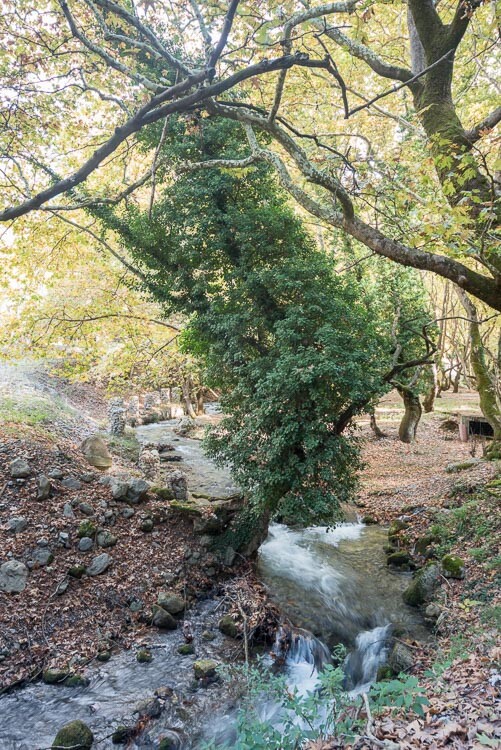
LAND Nikon D750 Nikon Camera Comparison of Three Popular Models: D750 - D7100 - D5100

LAND Nikon D5100 Nikon Camera Comparison of Three Popular Models: D750 - D7100 - D5100

LAND Nikon D7100 Nikon Camera Comparison of Three Popular Models: D750 - D7100 - D5100

Answer: 1) D750 (top), 2) D5100 (middle), 3) D7100 (bottom).

Summary Landscape

If you could not find an edge between one photo over another that makes two of us. I would be glad to hang 12×16″ print from any of them on my wall. Proper technique in this scenario is more important than the camera used and it creates a level playing field for all sensors.

Social Events Scenario

The Scene

Gatherings with friends and family are occasions where you want to grab a candid moment or the ambiance shot that will serve as a memento for many years. Good friends Nikos and Athina were kind enough to invite me and my wife over to their place for a glass of wine. This was the perfect occasion to compare the three cameras in a usual social setting.

Gear and Settings

Contrary to the landscape scenario’s contemplative and slower pace of shooting, social gatherings usually lend themselves more to a handheld, run and gun shooting style. So no particular gear other than the Tokina 12-28 f/4 lens was used here. While this is not a usual focal length for shooting indoors with people, when used from a sensible distance and towards the wider end it can serve the comparison between the three cameras.

Nikon D7100

Aperture Priority mode (at f/4), Matrix Metering, Auto WB, single autofocus mode (AF-S), single point focus, focusing through the viewfinder and using Auto ISO with no High ISO Noise Reduction applied, were the settings used to extract the best possible quality files from each camera.

Using Auto ISO has to do with my individual shooting style. In this scenario, it is actually the same as using ISO 1600 for D5100 and D7100 and ISO 3200 for D750. These are, in my experience, the highest ISO levels that each camera can handle (especially for straight out of camera JPGs) before noise becomes too obtrusive.

Both the out of camera JPGs and those made following similar processing of raw files in Lightroom are provided in the next section.

The Social Event Photographs

Let’s start with the camera JPGs. Which camera produced which photo will come right after both sets of pictures (camera JPGs and LR processed JPGs).

SOCIAL Nikon D7100 CAM Nikon Camera Comparison of Three Popular Models: D750 - D7100 - D5100

SOCIAL Nikon D750 CAM Nikon Camera Comparison of Three Popular Models: D750 - D7100 - D5100

SOCIAL Nikon D5100 CAM Nikon Camera Comparison of Three Popular Models: D750 - D7100 - D5100

And here are the LR processed counterparts in the same order.

SOCIAL Nikon D7100 LR Nikon Camera Comparison of Three Popular Models: D750 - D7100 - D5100

SOCIAL Nikon D750 LR Nikon Camera Comparison of Three Popular Models: D750 - D7100 - D5100

SOCIAL Nikon D5100 LR Nikon Camera Comparison of Three Popular Models: D750 - D7100 - D5100

Answer: 1) D7100 (top), 2) D750 (middle), 3) D5100 (bottom).

Summary Social Events

Again, as in the landscape scenario, you would be hard-pressed to find a winner here. Less than perfect focusing (front or back focus) or camera shake (due to a slow shutter speed) have a lot more impact than the camera model in such shooting environments (e.g. the domestic indoor lighting here).

Sports Scenario

The Scene

Photographing movements, be it your loved ones playing in the backyard or shooting any sport, can generate highly dynamic, catchy, and memorable photographs. Usually, I play football with my friends once a week. For the sake of this article, I put my football gear aside and grabbed my photo kit to shoot the sports scenario.

Gear and Settings

Depending on the sport and the venue, different lenses can be employed in your gear arsenal. The consensus seems to be that a telephoto zoom is an invaluable piece of kit for sports in general. A Tamron 70-300 f/4-5.6 lens was used for this test, as it is compatible with both FX and DX cameras. A Sirui P-224SR Carbon Fiber Monopod and a Manfrotto 410 Junior Geared Tripod Head were used to create the support platform.

Hand holding a DSLR camera with a lens attached is achievable for periods of time. However, when shooting sports, perhaps for hours, and consistently following the action as it unfolds requires more support. This monopod and head combination is working very well for me.

Nikon D750 really excels in this situation.

Usually, sports photography lends its self to shutter priority mode. Select at least a 1/500th of a second. Then take it up from there to freeze action as needed (unless panning is used, where perhaps even 1/60th or slower may be sufficient).

Unfortunately, in the available light conditions of this scenario, not even 1/20th was attainable with any of the three camera-lens combinations, while using reasonable ISOs as discussed before. To somewhat combat this, a minimum of ISO 3200 was used for all cameras. This pushed the limits of acceptable noise, but bought a few more precious tenths of seconds of speed.

With this important point in mind, Aperture Priority mode (varying between f/4 and f/5.6 across the zoom range), Matrix Metering, Auto WB, continuous autofocus mode (AF-C), Dynamic-area AF mode (d9 for comparability), autofocusing through the viewfinder and no High ISO Noise Reduction, were the settings used to extract the best possible quality files from each camera.

Both out of camera JPGs and JPGs following similar processing of raw files in Lightroom are shared in the next section.

Finally, to showcase how high ISO performance has evolved over the years, I will include a bonus JPG with Hi-2 (ISO 51,200) straight out of camera from the D750 (only cropped and lens profiled in Lightroom).

The photographs

First up the camera JPGs, then the LR processed ones. Which is which is shown at the end after both sets:

SPORTS Nikon D7100 CAM Nikon Camera Comparison of Three Popular Models: D750 - D7100 - D5100

SPORTS Nikon D5100 CAM Nikon Camera Comparison of Three Popular Models: D750 - D7100 - D5100

SPORTS Nikon D750 CAM Nikon Camera Comparison of Three Popular Models: D750 - D7100 - D5100

And here are the LR processed counterparts in the same order.

SPORTS Nikon D7100 LR Nikon Camera Comparison of Three Popular Models: D750 - D7100 - D5100

SPORTS Nikon D5100 LR Nikon Camera Comparison of Three Popular Models: D750 - D7100 - D5100

SPORTS Nikon D750 LR Nikon Camera Comparison of Three Popular Models: D750 - D7100 - D5100

Answer: 1) D7100 (top), 2) D5100 (middle), 3) D750 (bottom).

The bonus ISO 51,200 file from the D750.

SPORTS Nikon D750 CAM HI 2 Nikon Camera Comparison of Three Popular Models: D750 - D7100 - D5100

Summary sports

Shooting sports is indeed a completely different animal. Gear that will get perfectly adequate photos in normal situations (e.g. nature and social situations as above) simply will not be enough for sports. It is not an accident that you see big glass and pro bodies used in sporting venues the world over.

Having said that, it is possible with any of the three cameras discussed here to get some usable shots by capturing the peak of the athletes’ movement. My learning is also that increasing ISO even well above 3200 may be sensible for all these cameras. The higher shutter speed benefit offsets the increased noise.

The key differentiator between the three Nikon cameras is not the quality of the keeper photos. It is the vast superiority of the D750’s autofocus system, frame rate and ISO performance that will allow you to create a lot more keepers, long after the other two bodies have given up trying.

Conclusion and proposals

You went through a lot of info here. Now it is time to make some sense of it. I will hopefully help by offering my insights following this Nikon camera comparison and my few years of trying to decipher photography principles and gear choices.

Newest and biggest isn’t always necessary

The latest most expensive camera, with more Megapixels, is neither necessary nor is it a guarantor of getting good photographs. The 4/2011 launched DX D5100 coupled with a suitable (i.e. with built-in focus motor) lens, can create the same quality photographs in many situations as its more capable 2/2013 launched DX D7100 or the 9/2014 launched (and much more expensive) FX D750 siblings.

Solid shooting technique and basic gear (e.g. a tripod) is essential no matter which camera body is used.

In some cases, bigger is better

Higher spec bodies do offer tangible shooting benefits other than image quality. This was apparent in the sports scenario. Be it superior focus performance, internal focus motor, larger viewfinder, commander flash capability, AF fine tune, physical buttons for more functions at hand, prosumer (D7100) or semipro (D750) bodies can help you get your photography to that next level of refinement.

Consider carefully your lens purchases. Ensure the best possible compatibility in case you ever decide to move from DX to FX. A few clever purchases can give you great value-for-money FX and DX compatible lenses (hint: Tokina).

However, do rent or try out gear from friends before you commit. I cannot overstate the real-life ease-of-use factor versus any specs’ sheet excellence.

So here are my proposals to you depending on your stage in the photo journey

Just starting out. Don’t feel pressured to get an expensive high-spec body. A sensible approach may very well be to grab a dirt cheap used D5100 and an 18-200mm inexpensive used lens. See if DSLR photography suits you and your lifestyle and take it from there. Give it time and do not splash out immediately on many different lenses. Plus the D5100 can also act as a great video camera thanks to its rotating screen.

The bug has bitten you. It takes an honest discussion with yourself to see if you really need all the bells and whistles of that new body versus an early D5xxx or a D7000 model. If the answer is yes, then my proposal is to hang in there. Skip the D7100 and save the cash to spring for the D750 (new or used), unless the more recent D7xxx series have similar autofocus and ISO performance for a lower price.

You are ready to make money from your photography and turn semi-pro or even full-time pro. Congratulations! By now you have probably outgrown even the D750 for the sake of other pro FX and DX bodies. There’s not much I can offer in terms of advice here, other than a D750 can always be a light backup body, great for both stills and video.

Conclusion

Thank you for the time reading this article and see where your photography passion takes you next!

Do you have and use any of these Nikon cameras? What types of photograph do you shoot? Please share your experience in the comments below.

The post Camera Comparison of 3 Popular Nikon Models: D750 – D7100 – D5100 by Konstantinos Skourtis appeared first on Digital Photography School.


Digital Photography School

 
Comments Off on Camera Comparison of 3 Popular Nikon Models: D750 – D7100 – D5100

Posted in Photography


Canon PowerShot G1 X Mark III added to studio test scene comparison

09 Dec

Testing of the Canon G1 X Mark III is well underway, inside of the studio and out. We’ve just added it to our test scene comparison tool, where you can take a look at its performance side-by-side against peers like the Sony Cyber-shot RX100 V.

See the Canon PowerShot G1 X Mark III in our studio scene comparison tool

See our Canon PowerShot G1 X Mark III sample gallery

Articles: Digital Photography Review (dpreview.com)

 
Comments Off on Canon PowerShot G1 X Mark III added to studio test scene comparison

Posted in Uncategorized