RSS
 

Posts Tagged ‘Common’

Avoid These 5 Common Camera Setting Mistakes Made By Beginners

31 May

Over the years, I’ve taught many new photographers and observed how they used their cameras. I have noticed a handful of common mistakes that many of them make. While there is a lot more to learn about photography, if you can avoid or fix these issues alone, you will find that your photographs will be much sharper and of much better quality.

Avoid These 5 Camera Setting Mistakes Typically Made By Beginners

1. Not raising the ISO high enough

It used to be commonly taught that you always needed to go as low as possible with the ISO for digital cameras. This was because early digital cameras had horrible noise at higher ISOs. These days, that has completely changed. Newer digital cameras can shoot with incredible quality at ISO 800, 1600, 3200, and even 6400 for higher end cameras. The noise is much less noticeable than it used to be, and it is much more pleasant looking.

Avoid These 5 Camera Setting Mistakes Typically Made By Beginners

This has changed how we can shoot. While your ISO should still be as low as possible when the camera is on a tripod when you’re shooting handheld you will often want to raise your ISO up much higher. Unless I am purposely shooting with a very large aperture such as f/2.8, I typically keep my ISO at 400 in sunlight, 800-1600 in light to dark shade, and 3200 and 6400 when handheld at dusk or at night. This allows me to use a faster shutter speed to offset handheld camera shake or motion in subjects, along with a decent depth of field. My shots are much sharper because of this.

Unless you are shooting in Manual Mode, I suggest taking your camera off of auto-ISO. You never want to let your camera choose two of the three settings (shutter, aperture, and ISO) because it will mess up your photographs a lot of the time. The camera should only be choosing one of those three settings for optimal use.

2. Using a shutter speed that’s too slow

Avoid These 5 Camera Setting Mistakes Typically Made By Beginners

To offset the handheld camera shake, the shutter speed always needs to be ONE over the focal length of your lens. So if you are shooting with a 50mm lens, your camera will need to be at 1/50th of a second (or faster) to make sure the image is sharp. This comes even more into play with a zoom lens because a 300mm lens will need a 1/300th of a second shutter speed in order for the image to not look blurry. This is because slight vibrations are much more noticeable when you magnify a small area in the distance. This is also why I will often raise my ISO when zooming at far distances.

For subjects in motion, you will need a fast enough shutter speed to freeze them. I prefer a minimum of 1/250th of a second to freeze people walking. You will need an even faster shutter speed as you get to subjects such as cars.

3. Not using exposure compensation (+/-) or the right meter mode

Avoid These 5 Camera Setting Mistakes Typically Made By Beginners

If you are using Aperture or Shutter Priority mode, Exposure Compensation is your best friend, particularly in scenes with tricky lighting. Your camera’s light meter is not creative – it wants to make everything look a neutral gray, but that is problematic in images with lots of dark or bright tones. Maybe you want those tones to look gray for creative purposes, but most likely, you will want them to be true to the scene. This is where Exposure Compensation (+/-) comes into play.

For instance, in scenes with lots of bright snow or a bright sky, this could trick the camera into thinking that it needs to overly darken the image to make those white areas look gray. Or if you are shooting at night, or in a dark alleyway, the camera’s light meter will try to make those dark tones look like a lighter gray, thus brightening the image too much. Similar problems can also appear when shooting in areas with both bright highlights and dark shadows, or if your subject is backlit.

On a related note, many photographers keep their camera on the wrong metering mode. There are three main metering modes; Evaluative, Center-weighted, and Spot metering. Evaluative will expose for the entire scene, Center-weighted will expose based on the spot that you focus on and an expanded area around it, and Spot metering will measure the light based on only the spot that you point to. I personally find Evaluative to be too broad and Spot to be too focused, so I mostly use Center-weighted metering mode.

Read more here: Cheat Sheet: Understand Metering Modes On Your Camera

4. Not getting the focus point right

Avoid These 5 Camera Setting Mistakes Typically Made By Beginners

Some photographers leave their focusing completely up to the camera. This is a terrible idea as the camera will often focus on the wrong point, ultimately ruining your image. You need to be in control of your focusing and put the focus on the most important subject in the image.

On a similar note, it is common for photographers to get that new 50mm f/1.8 or f/1.4 lens and immediately think that they need to shoot everything at f/1.4 because they can. Some situations will be good for f/1.4, but it’s important to realize how shallow the depth of field is at that aperture.

If you are shooting with a really shallow depth of field, the focus needs to be perfect and exactly right on the most important subject. If you are photographing a person and you put the focus point on the person’s ear or nose instead of their eyes, it will be noticeable and it will mess up the photograph. Often, I prefer to shoot portraits like this at f/4 instead of f/1.8 or f/2.8. There is still a beautiful background with bokeh, yet more of the person is in focus. This minimizes any focusing mistakes as well.

5. Using image stabilization when using a tripod

Avoid These 5 Camera Setting Mistakes Typically Made By Beginners

The image stabilizer in your lens or camera will make your photographs sharper when handheld. However, it can also create minor vibrations while keeping the camera steadier, and these vibrations can actually backfire when you are on a tripod. Sometimes they will introduce blur. So always make sure to turn the image stabilizer off when you are using a tripod. If you ever notice your photographs on a tripod are slightly blurry, this issue and wind are the most likely culprits.

Conclusion

There you have it. The bottom line is that if you can learn to conquer and avoid these five common beginner mistakes, you’ll be on your way to better photography.

The post Avoid These 5 Common Camera Setting Mistakes Made By Beginners by James Maher appeared first on Digital Photography School.


Digital Photography School

 
Comments Off on Avoid These 5 Common Camera Setting Mistakes Made By Beginners

Posted in Photography


What learning photography and roller derby have in common

02 Apr

Sure, there are obvious differences between picking up a camera and playing a full contact sport on roller skates. Though you’re probably less likely to break your wrist taking pictures, the guiding principles of learning any new skill apply to photography just as much as roller derby. Trust me, I’ve started at the very bottom in both disciplines – I have literally been there and gotten the t-shirt. So many t-shirts.

As I head for the golden pastures where retired derby skaters go, I’ve done a lot of reflecting on the journey. Whether you’re fresh meat (that’s a real derby thing) or just a newbie photographer figuring out what PASM means, I think these basic principles apply.

You will be really, really bad for a while

When you’re new at skating, just staying upright is hard. You can see me demonstrating this point above at one of my earlier scrimmages.

Photo by Robert T. Bakie

With very few exceptions, everybody starts off bad. Like, really bad. In roller derby you’re a hot mess for a while until you learn how to move with eight wheels strapped to your feet. While it might be less obvious to a casual observer, starting out in photography is kind of similar. Until you get the basic principles in hand, there’s really no way around messing up a lot of shots. Don’t let it get you down.

Practice makes perfect, or at least better

By all means, read up on the fundamentals. Study the work of your heroes. But there’s no substitute for getting out there and getting dirty. As a beginning photographer, the more challenging situations you try to photograph, the more you’ll learn what does and doesn’t work. It’s the same in roller derby – you just need to log a lot of hours on the rink.

You’ll probably think you’re better than you are for a while

This is a photo of a telephone pole I took in 2009. It is Not Good. I thought it was something really special at the time.

The Dunning-Kruger effect – a surge of self-confidence that causes beginners to think they’re better than they are – is just as real in derby as it is in photography. Once you start seeing your skills improve, you’ll lack the frame of reference to know how truly bad you still are. And usually, someone or something will bring you back down to earth pretty quickly (refer to the photo at the top of the page for a diagram of what that can look like). That’s okay, it’s just another reason why the next tidbit is so important.

Seeking out feedback will help you see what you can’t

As humans we’re not great at spotting our own weaknesses, so seeking out someone more experienced in your field for some critique is invaluable. Listen and push yourself out of your comfort zone. Roll with people who are better than you are (you know, physically roll, or just go on a photo walk). Pay attention to what they do, but don’t stress out if you can’t quite keep up yet. You will eventually.

Once you master the basics, you’ll find your style

I’m still working on it but at least I’ve graduated from telephone poles.

We aren’t all an Ansel Adams, and we certainly can’t all be a Missile America. Some skaters, like yours truly, are wiry, bony types who look more at home at a Scrabble tournament than on the track. When you have good command of basic skills, you’ll start to see where your strengths are.

Similarly, with the nuts and bolts of exposure under your belt, a beginning photographer can start playing with different styles and subject matter. Pay attention to what you find you’re drawn to and build on your strengths.

Setting realistic goals will help you keep growing

Without goals, you’re just going in circles – aside from the literal circles that you roll in when you play derby. For best results, make your goals specific, realistic and achievable (you know, SMART) and find someone who can help keep you accountable for working toward them. Assign yourself a photo project and set deadlines for yourself, rather than sit at home worrying that you’re not shooting enough.

Don’t give in to Gear Addiction Syndrome

Gear Addiction Syndrome is real and it’s not just a problem for photographers. Many derby skaters can hold in-depth conversations about their preferences in knee pads and the secret sauce that is their wheel setup. Skating requires a certain level of gear smarts, but just as it is in photography, you can get too carried away making adjustments, particularly when you’re starting out.

In either case, experiment, find what feels like a good fit, and then embrace getting the most you can out of your kit before you start trying to upgrade everything in your (skate or photo) bag.

It will all start clicking and that’s when the fun really starts

This is what it feels like when things finally go right. There’s just a lot of actual blood, sweat and tears leading up to that moment.

Photo by Danny Ngan

The absolute best moments I’ve experienced playing roller derby and taking photos have been when instinct kicked in and I stopped thinking. I’ll turn a corner and see the best shot of my day materialize right in front of me, and I’ll have the right lens and the right settings to capture it. Or I’ll suddenly put a skill I’ve practiced for hours to use in a game.

Nothing beats that moment. Savor it.

Articles: Digital Photography Review (dpreview.com)

 
Comments Off on What learning photography and roller derby have in common

Posted in Uncategorized


5 Common Post-Processing Mistakes to Avoid

01 Feb

For today’s photographer, post-processing is a critical element of image making. Sure, when you first get started with digital photography, you might shoot in JPG mode and allow the camera to make decisions about things like color and contrast. But when you’re ready to take control of your images, it’s time to shoot in RAW format and make the important decisions about how you want your final image to look yourself.

Estuary in Campbell River BC by Anne McKinnell - 5 Common Post-Processing Mistakes to Avoid

When you first start shooting in RAW, you might think your images look a bit gray and bland. That’s because the decisions that the camera was making before are now left up to you. That can be a bit daunting! But here are some tips to help you avoid the most common post-processing mistakes and make sure you are helping your images and not hurting them.

Remember, the purpose of post-processing is not to fix bad photos, but to bring out the best in good photos.

Mistake #1 – Lightening shadows too much

Always try to get the best exposure possible in camera. You’ll get a better result when you start out with a good exposure rather than relying on the highlights and shadows sliders in post-processing to balance it.

That said, sometimes you will still want to use the shadows slider to lighten your shadows to bring more detail in the darker areas of your image. Just be careful not to overdo it, or you’ll end up with an image that no longer looks natural.

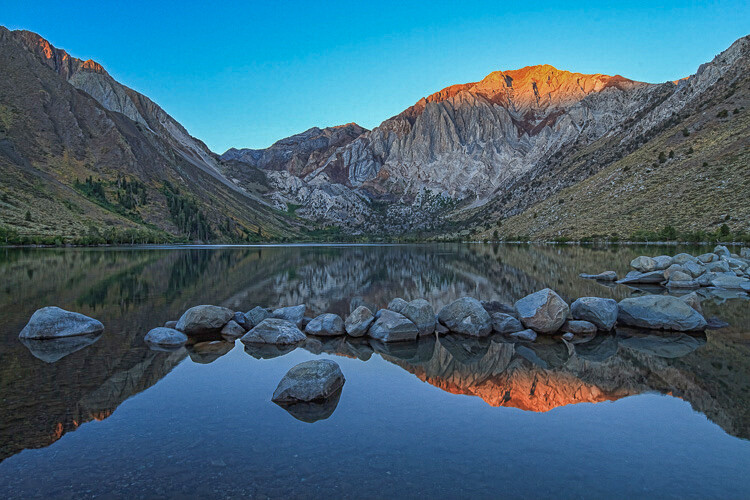
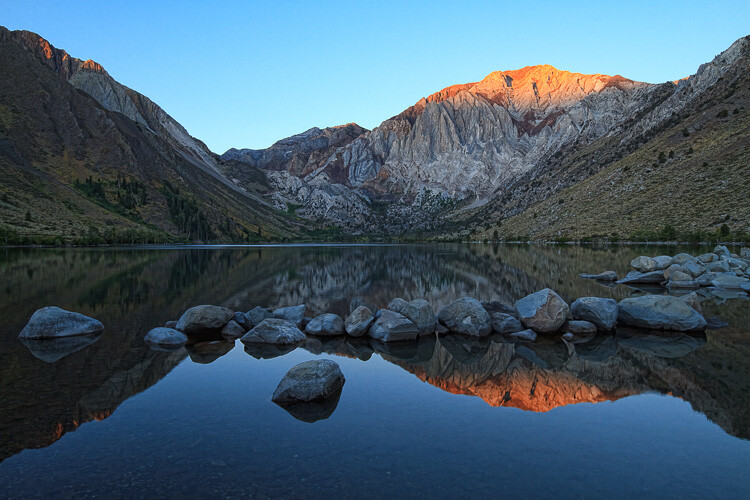
This is overdone, the shadows have been pulled too far here and it no longer looks natural. Notice it also introduced noise into the sky.

Convict Lake, California by Anne McKinnell - 5 Common Post-Processing Mistakes to Avoid

Shadow adjustment in moderation is better.

If you try to equalize the brightness of the highlights and shadows, you’ll end up with a photo that not only looks unnatural, but the lack of contrast will make the image look boring. Contrast is a good thing! This is especially true when you have a scene with a reflection. The reflection should always be darker than the scene it is reflecting, as it is in nature.

Mistake #2 – Over saturation

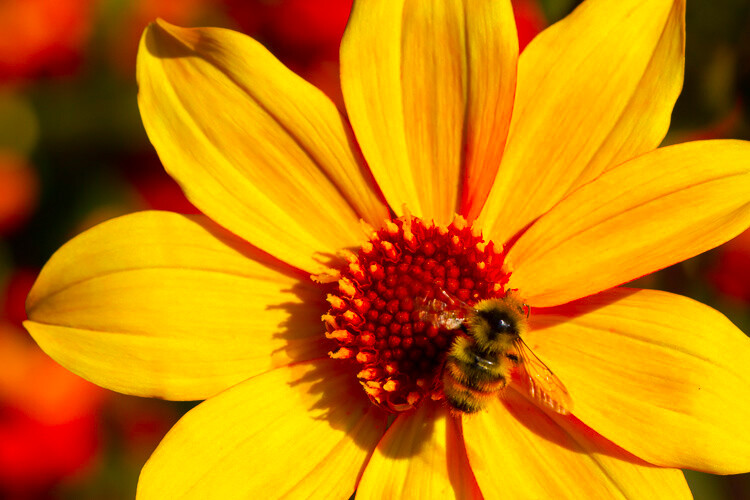
Another way to create an unnatural looking image is to over saturate everything. It’s a tempting thing to do because a little bump in saturation and vibrance makes such a big difference. Again, just don’t overdo it. A little goes a long way.

Before you touch those sliders, spend a bit of time thinking about your image and the colors in it. Sometimes adding saturation globally is not the best idea, especially if you have a scene that contains many different colors. Instead, consider using the HSL (Hue/Saturation/Luminosity) panel, choose Saturation, and use the target tool to add saturation to one color in your scene. For example, you might want to add saturation to the main subject to draw attention to it.

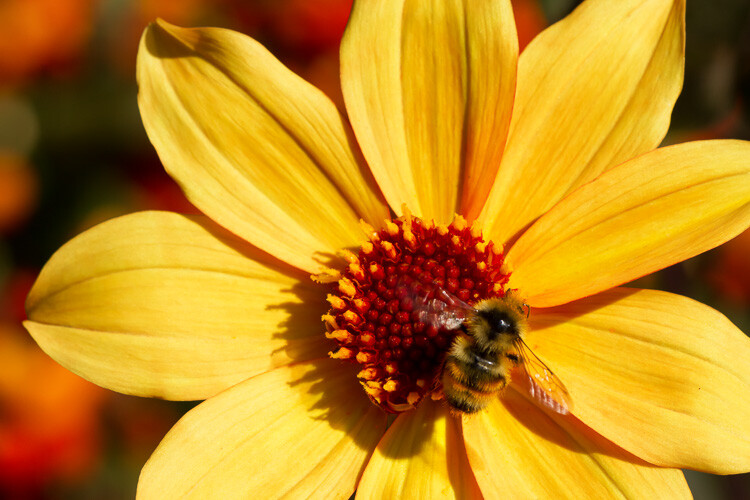
Over saturation leaves the colors looking odd.

Yellow flower with bee by Anne McKinnell - 5 Common Post-Processing Mistakes to Avoid

Better saturation levels.

Mistake #3 – Over sharpening

First of all, never use sharpening to try to fix a photo that is out of focus. It just doesn’t work. Sharpening cannot fix blur. However, if you have an image that is in focus, adding a bit of sharpening can make it extra crisp and realistic.

Again, consider adding sharpening locally (to one select area) not globally, especially if you have areas of your scene that are purposely out of focus, such as when you have a shallow depth of field. Also, the sky usually looks better when it is smooth, so you don’t want to add sharpening there. Keep in mind that adding sharpening will increase noise, which is another reason not to add it globally. Rather, just add it to the main subject or areas of your scene with a lot of detail.

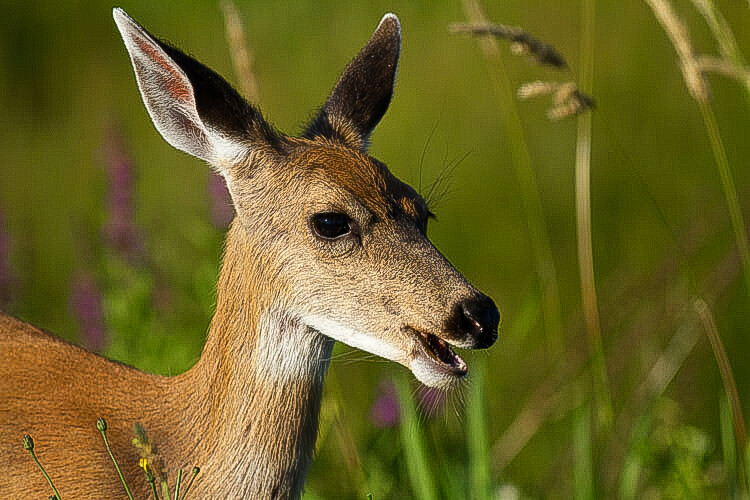
This has been over sharpened, you can see artifacts throughout the image here.

Deer by Anne McKinnell - 5 Common Post-Processing Mistakes to Avoid

Better level of sharpening.

In Adobe Camera Raw, use the Detail panel to add sharpening. Then, hold down the option (or alt) key and use the masking slider. As you move the slider, the areas that appear black do not have sharpening applied and areas that are white do. This is an effective way to add sharpening to the areas of your image that have details. Another option is to use the adjustment brush to brush sharpening on where you want it.

Mistake #4 – Over cropping

The crop tool is a handy way to refine your composition, remove unwanted elements on the edges of the frame, and make sure your horizon line is straight. But don’t use it to remove all the “negative space” in your scene.

You don’t need to fill the frame with your subject. A little breathing room keeps the image interesting. Think about creating a balance between the space taken up by your subject and the space around it. This is not necessarily an equal balance.

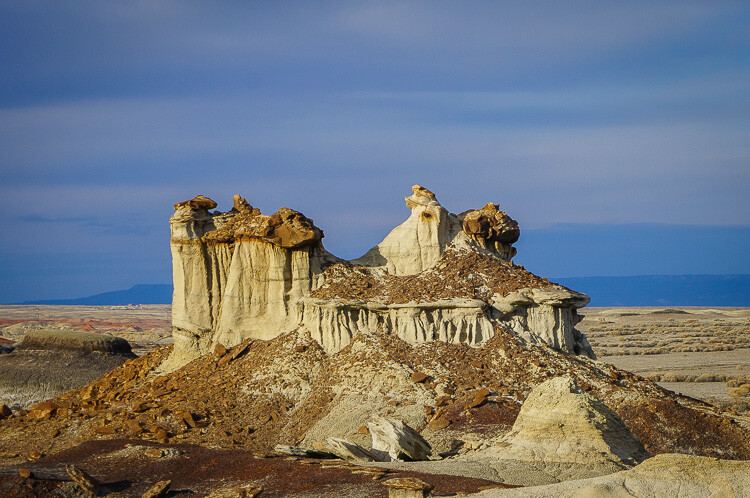
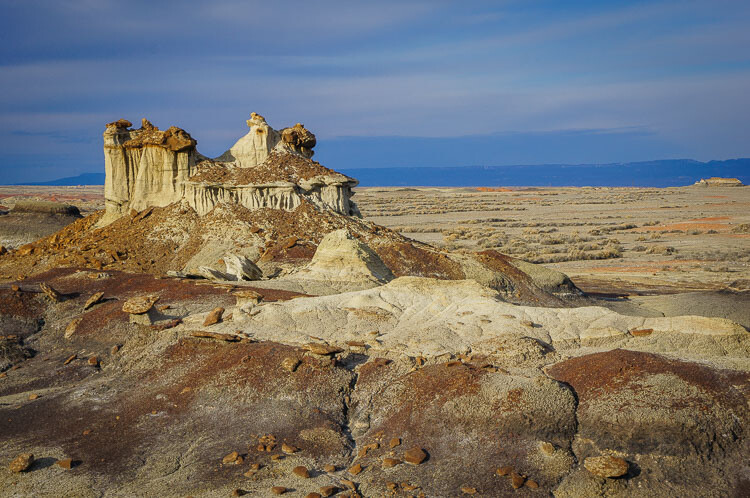
Cropped too tight on the subject.

Bisti Badlands, New Mexico by Anne McKinnell - 5 Common Post-Processing Mistakes to Avoid

Cropped to leave negative space and lead your eye to the subject.

Mistake #5 – Too much Noise Reduction

Sometimes the nature of the light requires the use of a high ISO. Perhaps you need both a small aperture and a high shutter speed for your scene, so increasing the ISO is the only way to get a good exposure. That’s okay. The noise caused by using a high ISO can be reduced in post-processing using the noise reduction slider.

But nobody said that all images must have no noise. Not all images have to be perfectly smooth looking. Especially if there is a lot of detail and texture in your subject. Using too much noise reduction can create blurry splotches in areas that were previously sharp.

Too much noise reduction has been applied here and overall the image now looks blurry.

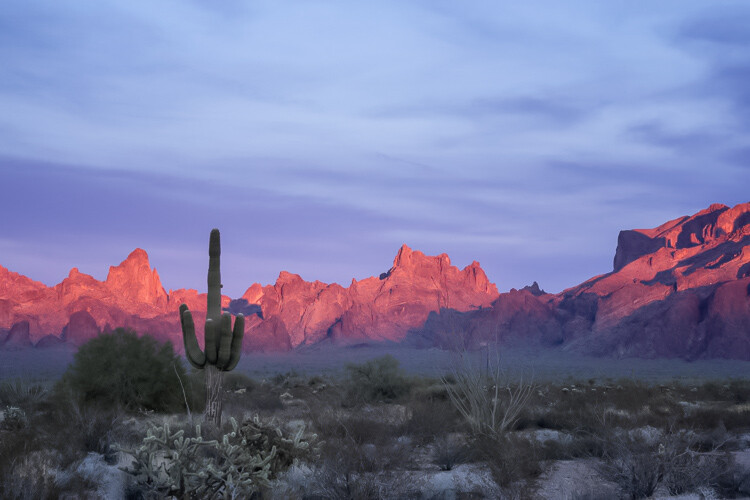
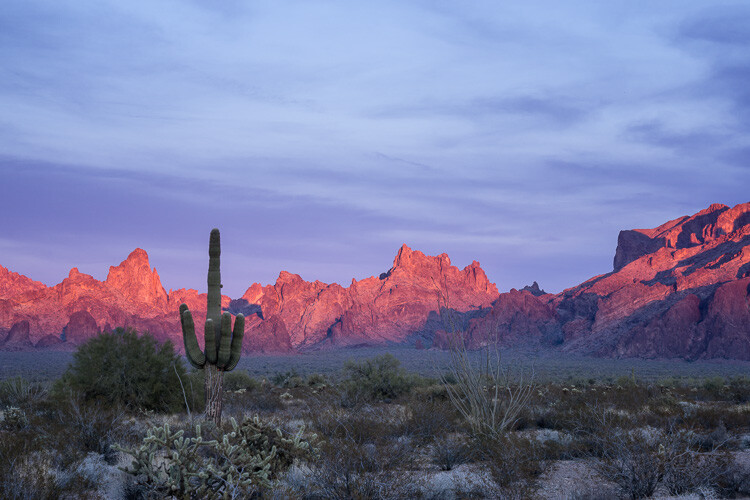
Kofa National Wildlife Refuge, Arizona by Anne McKinnell - 5 Common Post-Processing Mistakes to Avoid

Noise reduction scaled back.

You may have noticed a theme in these common mistakes. Don’t over do it! Small adjustments go a long way to bringing out the best qualities of your images, but taking it too far can just as easily ruin them.

After you process your image, take a break from it and look at something else. Maybe even give it a day to settle. Then, when you look at it again, it will be more obvious if you have taken the processing too far.

googletag.cmd.push(function() {
tablet_slots.push( googletag.defineSlot( “/1005424/_dPSv4_tab-all-article-bottom_(300×250)”, [300, 250], “pb-ad-78623” ).addService( googletag.pubads() ) ); } );

googletag.cmd.push(function() {
mobile_slots.push( googletag.defineSlot( “/1005424/_dPSv4_mob-all-article-bottom_(300×250)”, [300, 250], “pb-ad-78158” ).addService( googletag.pubads() ) ); } );

The post 5 Common Post-Processing Mistakes to Avoid by Anne McKinnell appeared first on Digital Photography School.


Digital Photography School

 
Comments Off on 5 Common Post-Processing Mistakes to Avoid

Posted in Photography


What is a Stop? The Common Currency of Exposure Explained

30 Sep

What are stops? Are they the same as f-stops? How are they measured? Are they the same for different exposure controls? Are they still useful now?

These are common questions for those just starting out in photography. They are good questions, and the exposure concepts surrounding them can be confusing. You have probably been told that a stop is a “doubling of light,” which of course is true. That is helpful, but it doesn’t show how stops really works and how they tie your exposure controls together.

WesternLake

What I want to show you in this article is how the concept of a stop acts as a common currency in exposure, and allows you to take complete control of it. Rather than being confusing, stops are really a simplification tool. Without stops, we’d have a hard time controlling our exposure between the three controls; aperture, shutter speed, and ISO.

Introduction

I’m using the term “common currency” to describe stops. To see what I mean, think about the barter system before we had money. If you sold chickens, I sold apples, and someone else sold bricks, how would we all trade? And what if the person selling the bricks didn’t value your chickens as much as I did? It was a mess, which is why the concept of money was developed. Now we all value our goods using money and we exchange money with each transaction. This has proven to be a remarkably useful tool, which is why it has stuck around for a few thousand years.

Similarly, in photography we faced trade-offs when it came to exposure. For example, how could we value a change in the size of the aperture versus lengthening the time of shutter speed? And then how would we value the sensitivity of the digital sensor (or film in the old days) as compared to these other two adjustments? It isn’t apples to apples. The concept of stops is how we square everything up.
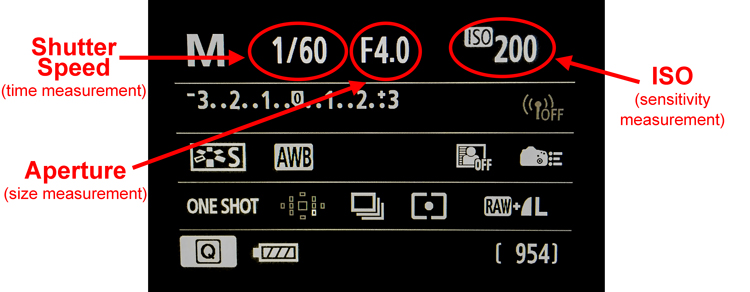
CameraBack

Understanding this is a necessary precondition to mastering your camera and controlling the exposure process. Hopefully this will help you grasp your exposure controls better. First, we’ll take a brief looks at each of them and show you how they are measured in stops. After that, we’ll get into how to use them together.

Shutter Speed

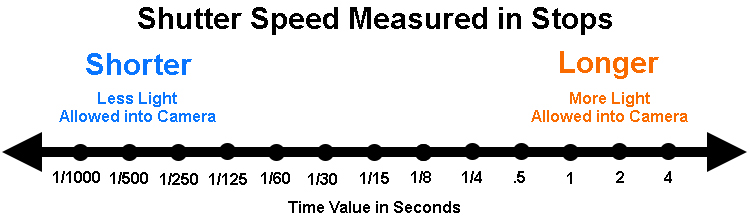
Your shutter speed is a measurement of time. As you probably already know, when you open up the shutter, the camera is gathering light. The longer you allow the camera to gather light, the higher the exposure value. Most shutter speeds you use will be a fraction of a second, but here are the common values for shutter speed you will see when you look through your viewfinder or at your LCD:
Shutter Speeds measured in stops

The segments in this chart are 1-stop increments. Again, a stop is a doubling of light. Remember that shutter speed is a measurement of time, so a doubling of the time your shutter is open is the same thing as a doubling of light. Therefore, for example, a move from 1/250th of a second to 1/125 is a one stop change. You have doubled the time the shutter is open so you have also doubled the exposure value.

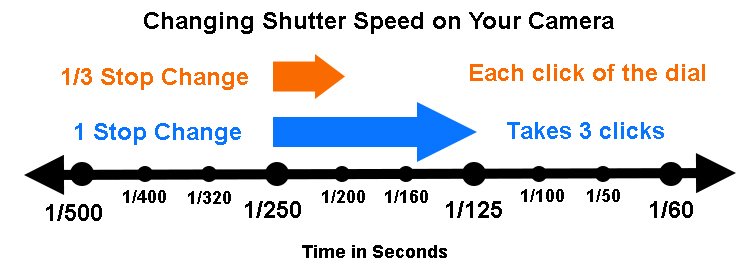
Something that might confuse you is that your camera doesn’t change settings (each click of your dial) in 1-stop increments. Most cameras are set to move in 1/3 stop increments. So rather than moving from 1/250 to 1/125, each click of the dial on your camera will only move part of the way there. It will take three clicks to move a full stop. It looks something like this:
Changes to Shutter speed in thirds of stops

The point is to understand that we are taking a time measurement and converting it into a stop. Each doubling of the amount of time the shutter is open equals a stop. Conversely, you reduce by a stop every time you cut the shutter speed in half. We’ll be able to use that stop in connection with the other controls in a bit.

Aperture

Now let’s look at this in the concept of aperture. As you probably know, the aperture is the hole in the lens that lets light through into the camera, and it is adjustable. Making it larger lets more light into the camera; making it smaller lets less light in. To change your exposure value using the aperture control, you are changing the size of the aperture.

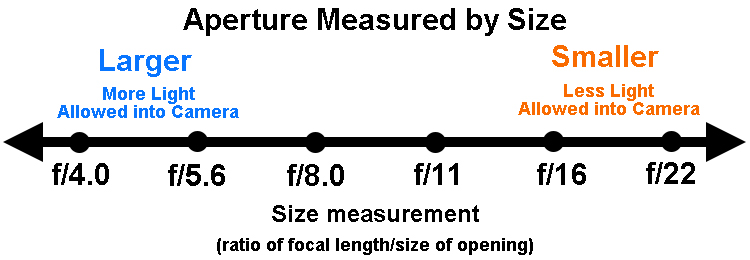
Aperture measurements can be confusing. To begin with, the measurement is actually of the size of the aperture compared to the focal length (The F-number of a lens is the ratio of its focal length divided by the diameter of the aperture.). That makes it a ratio or reciprocal figure, which means that the larger the aperture the smaller the measurement, and vice versa. Secondly, different lenses have different maximum and minimum aperture values. With that in mind, here are common aperture values:
Aperture values in full stop increments

Again, remember that your camera is probably set up to change values in 1/3 stop increments. So, for example, you camera won’t go directly from f/5.6 to f/8.0. Instead, it will probably go from f/5.6 > f/6.3 > f/7.1 > f/8.0 as you click the dial.

I’m ignoring the concept of depth of field here because it isn’t important for purposes of this discussion. All we care about now is converting these measurements into stops. So, on that front, what we have done here is convert a size measurement into a stop. That means we can easily compare it to shutter speed changes as we saw above. We’ll also be able to compare it to changes in ISO, which we’ll talk about next.

ISO

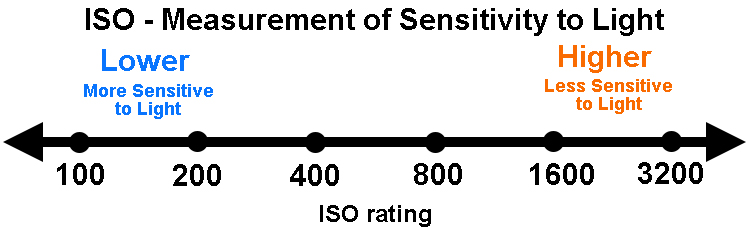
Finally, we get to ISO, the third exposure control. This is a measure of the sensitivity of your camera’s digital sensor to light. Making it more sensitive to light increases exposure but leads to increased digital noise in your pictures. Conversely, decreasing the ISO lowers the exposure value but also decreases digital noise. Here is a chart showing common ISO values in one stop increments:
ISO values in full stop increments

As you can see from the chart above, the ability to change ISO is pretty limited. Whereas there are 18 stops within the range of common shutter speeds, there are only seven in ISO. There are cameras with ISO values that go higher (such as ISO 12,800 and even 25,600), but they lead to pretty dramatic digital noise. This limited range though does show why increases are important.

In any case, as you can see what has been done is create a system where we have taken a measurement of sensitivity to light and converted it into stops. Each doubling in sensitivity doubles the exposure value, which equals a stop. What’s great is that (unlike the aperture measurements) ISO is simple. It is easy to understand that an ISO of 200 is double that of ISO 100.

Putting it all together

Now that we have covered the concept of stops for each of the three exposure controls, we are ready to talk about them together.

The key thing to understand here is that a stop, is a stop, is a stop. By that I mean that a stop of shutter speed exposure, equals a stop of aperture, equals a stop of ISO. In other words, lengthening your shutter speed by one stop is the exact same thing as opening your aperture by one stop. And that is exactly the same thing is changing the ISO by one stop. The measurements all equate.

Why does this matter? Because you will face the need to change your exposure values all the time. This will allow you to take complete control over the exposure process. For example, when you want to increase your depth of field you know you need to make the aperture smaller. But that will cause your picture to be underexposed. By using stops, however, you can increase the exposure by the exact same amount using either the shutter speed or ISO.

An example of using stops

If this seems confusing, an example should help make it clearer. Let’s say you are out shooting a landscape scene and you hold up your camera and set up a correct exposure. It is 1/500th of a second at f/5.6, with an ISO of 100.

That’s just fine, except that remember that this is a landscape photo. You want a much deeper depth of field than f/5.6 is going to allow, so let’s move that to something like f/11. You know that this is a 2-stop decrease (check the charts above for confirmation).
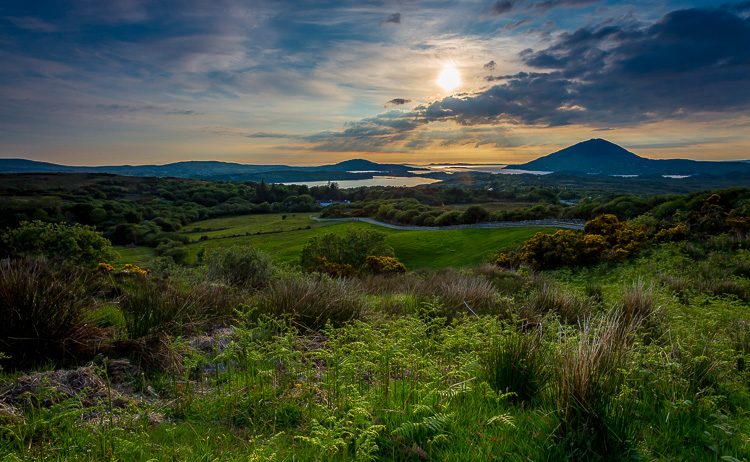
Landscape shot at 1/125 of a second at f/11.

Landscape shot at 1/125 of a second at f/11.

If you made no other change, your photo would be very underexposed. But you now know that you can just increase (lengthen) your shutter speed by the same amount (two stops) to offset this move. In other words, since we have converted all these exposure changes to stops, we have a common currency that we can interchange freely. A 2-stop shutter speed increase takes you to 1/125th. In other words, you started at 1/500, twice that is 1/250, and doubling that again is 1/125 (again, check the chart above to see).

You could also change ISO if you wanted (to ISO 400), but you probably don’t want to do that to keep noise to a minimum. Your new settings of 1/125, f/11, ISO 100 are much better for this situation.

For those who do better with visuals, here is how the two offsetting moves appear:
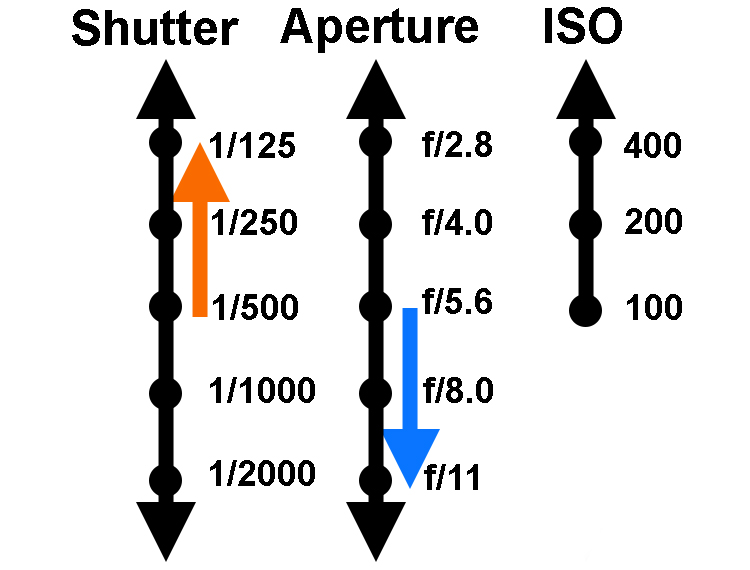
Two-Stop-Move

Another example

Let’s walk through another example to make sure you’ve got it. Let’s say you are photographing a friend or a family member and your camera settings are at 1/40, f/16, ISO 200. The camera’s meter says you have a correct exposure. Take a look at the shutter speed and aperture settings and you’ll see a few problems though.

First, the aperture is too small for this situation. You don’t need a small aperture like f/16. Not only do you not need the small aperture, which costs you light, but you actually don’t want the deep depth of field that f/16 gives you. You’d rather have an extremely shallow depth of field to blur out the background. Secondly, a shutter speed of 1/40 is probably a too slow for this situation. This shutter speed could lead to a lack of sharpness due to the camera shaking slightly or your subject moving while the shutter is open.

The good news is that both your problems can be solved by making changes to the shutter speed and aperture. You can use a stop as the common currency to make sure they offset and your exposure stays the same. You decide to open up the aperture all the way to f/4. That’s a 4-stop increase. Check the chart above, and you’ll see it goes like this; you start at f/16> f/11 > f/8 > f/5.6, and the fourth stop takes you to f/4.0.

Now that you’ve made that change you have the depth of field situation fixed. If you made no other change, your picture would be quite overexposed though. But that’s okay, this just allows you to shorten your shutter speed which you wanted to do that anyway avoid any possible camera shake or subject movement. Now you know you can shorten the shutter speed by four stops to offset the change you just made to the aperture. Starting at 1/40, moving fours stop gets you: 1/40th > 1/80th > 1/160th > 1/320th, and finally to 1/640th. That’s much better.
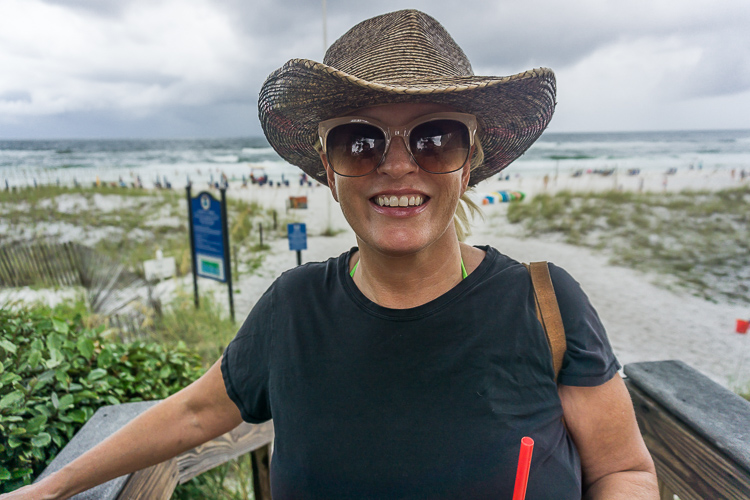
Shot at 1/620 second with aperture of f/4.0.

Shot at 1/640th of a second with an aperture of f/4.0.

Using stops to master exposure controls

Hopefully you see the utility of the concept of stops. It acts as a common currency so that all changes in exposure equate. One click of the dial that controls your shutter speed equates to one click of the aperture control. And that equals one click of the control for your ISO settings (if you can adjust your ISO in 1/3 stops). It all works out, and that is extremely important in the exposure process.

So many times you want to change one exposure control but keep the overall exposure setting the same. You may want to stop down the aperture to increase the depth of field, lower the ISO to reduce digital noise, or shorten the shutter speed to avoid any camera shake. Using stops you can do this with confidence.

Why can’t you just rely on the camera to do all this for you? In other words, why couldn’t you just use Aperture Priority mode, set the aperture you want, and then watch as they camera sets the right shutter speed? You can just change the aperture and ISO settings until the camera sets the shutter speed you want. And, yes, you can do it that way. But even so, you should understand the process so that you know what is going on under the hood. In addition, if you ever use neutral density filters or find yourself in a situation where you camera cannot meter light properly, you’ll know how to do it for yourself.

googletag.cmd.push(function() {
tablet_slots.push( googletag.defineSlot( “/1005424/_dPSv4_tab-all-article-bottom_(300×250)”, [300, 250], “pb-ad-78623” ).addService( googletag.pubads() ) ); } );

googletag.cmd.push(function() {
mobile_slots.push( googletag.defineSlot( “/1005424/_dPSv4_mob-all-article-bottom_(300×250)”, [300, 250], “pb-ad-78158” ).addService( googletag.pubads() ) ); } );

The post What is a Stop? The Common Currency of Exposure Explained by Jim Hamel appeared first on Digital Photography School.


Digital Photography School

 
Comments Off on What is a Stop? The Common Currency of Exposure Explained

Posted in Photography


Avoid These 5 Common Mistakes in Black and White Photography

29 Sep

Black and white photography has been around for nearly 180 years, ever since Louis Daguerre introduced the daguerreotype process to the world. It is still hugely popular despite the rise and ease of color photography. And yet, whenever I look at other people’s black and white photos, I see the same mistakes over and over. Are you making any of these? Let’s find out!

Black & white photography mistakes

Mistake #1: Shooting in JPEG format

Ouch! This is a big one. It’s the single worse thing you could do.

The difference between RAW and JPEG

To understand why, you need to appreciate the difference between Raw files and JPEGs. Raw files contain all the information captured by your camera’s sensor. A Raw file is not a finished picture file. It has to be processed (using software like Lightroom or Adobe Camera Raw) and converted to a JPEG or TIFF file in order to be usable.

You can think of a Raw file as the equivalent of a negative (as in from film photography). You can’t send a Raw file to a photo library or a magazine any more than you could send a negative. You need to process the Raw file (or scan and process the negative) first.

JPEG files are created by the camera. It takes the information captured by the sensor, processes it (much like you would do with a Raw file in Lightroom, but according to the camera’s built-in parameters), compresses it, discards the unused information, and saves it as JPEG. They don’t necessarily need processing in software like Photoshop or Lightroom, although most can be improved by doing so.

Advantages of shooting RAW

Using the Raw format gives you the following advantages.

  • Control: You process the file yourself, rather than letting the camera do it. You can process it to your taste from a stylistic point of view. Using Raw lets you interpret the file as many ways as you want. Using JPEG means the file gets interpreted one way only – the way the camera does it.
  • More data: The Raw file contains much more information than a JPEG, especially in the highlights and shadows, that you can draw out when you process the file. The extra information helps prevent banding in areas of smooth continuous tone like clear skies.

Black & white photography mistakes

Black & white photography mistakes

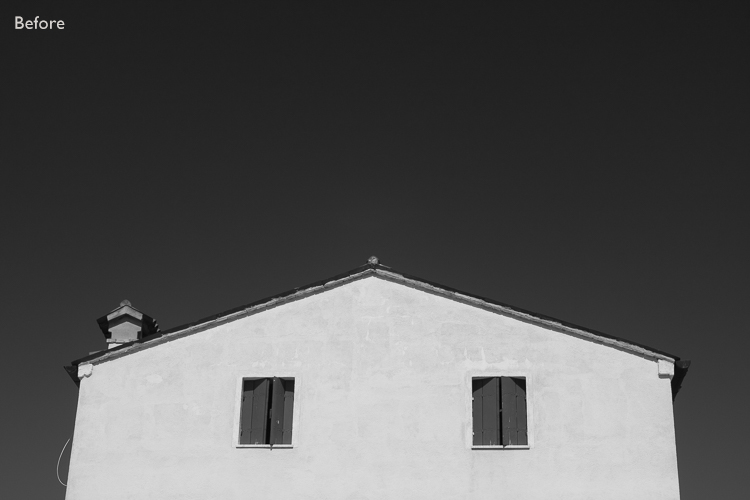
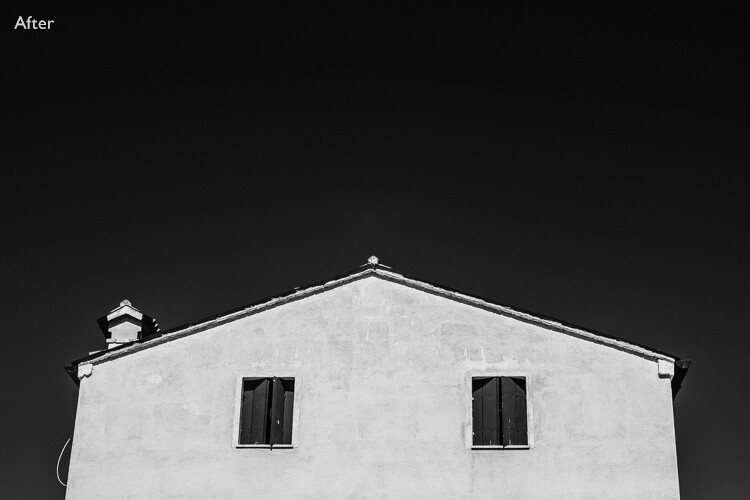
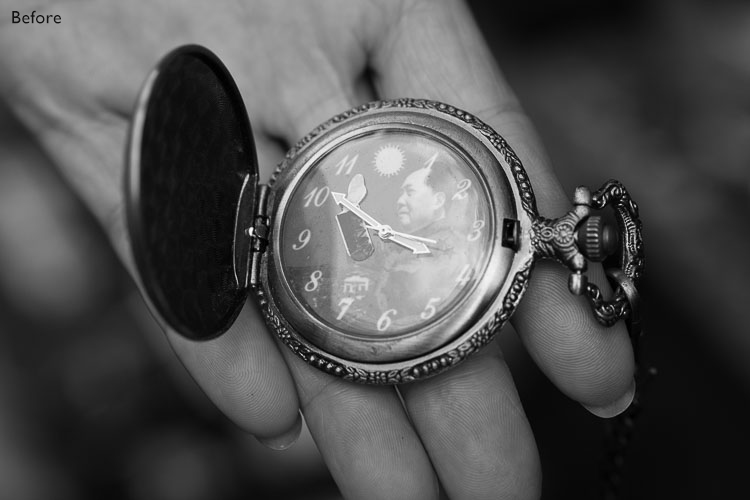
Using Raw helps you get from the before image shown above to the processed version here. With Raw, you can increase contrast and make the sky darker without introducing banding in the sky or halos along the edges of buildings. You can’t do this with JPEG files.

More advantages of shooting RAW

  • Adjust sharpness: JPEG files created by your camera are sharpened. The sharpening limits the amount you can change tonal values before introducing halos and artefacts. Yes, you can turn JPEG sharpening off in-camera – but how many people bother?
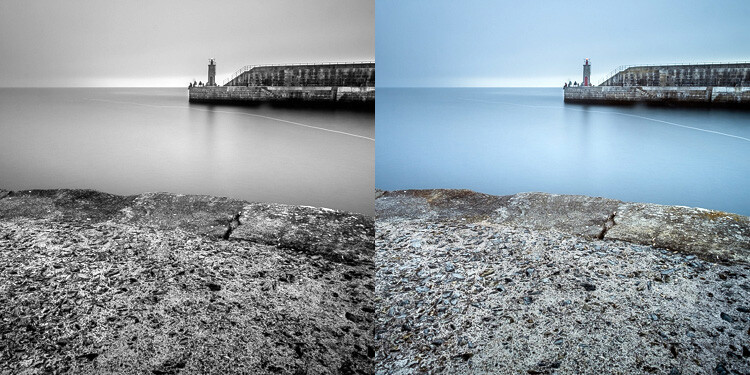
  • RAW format keeps the color info: Raw files contain all the color information captured by the sensor, so you can create a color version of the photo in Lightroom, Photoshop, etc., as well.
Black & white photography mistakes

Using Raw let me create both a color and black and white version of the same image in Lightroom, without any loss of image quality.

  • Improvements: The software gets better every year. The version of Lightroom or Photoshop you use in five or 10 years time will be much better than the current one. With Raw, you can take advantage of these new improved tools and reprocess your images in the future.

So please, don’t use the JPEG format any more for black and white photography. There are, however, advantages to using your camera’s monochrome mode, as discussed in my article Mastering Monochrome Mode.

Mistake #2: Trying to save photos by making them black and white

Black and white is not a method for rescuing poorly crafted color photos. If your photo is bad in color, it will be bad in black and white too (although there are always photos that work better in black and white for compositional reasons).

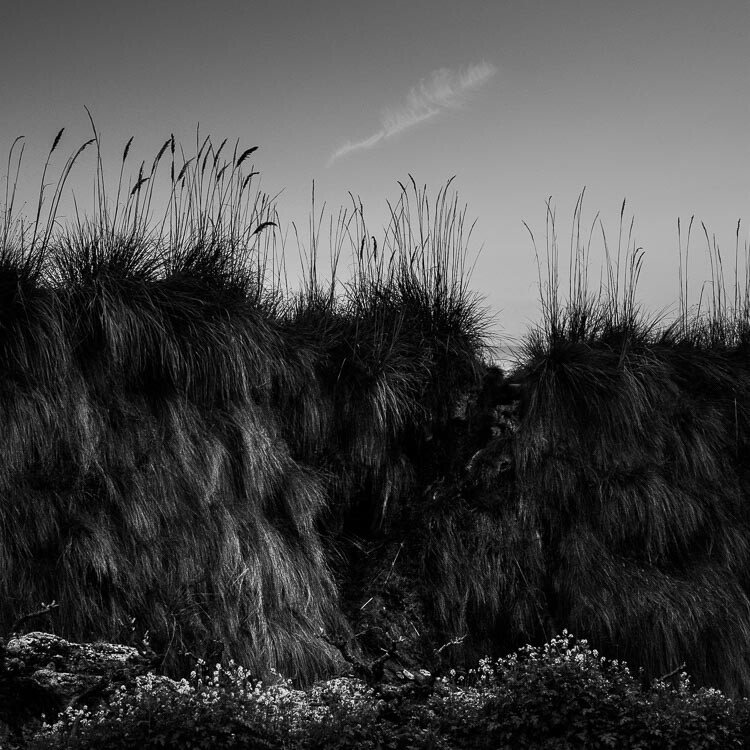
There is nowhere to hide in black and white. In color, if the lighting or composition isn’t as good as it could be, the emotional impact of the colors in the photo may rescue the image (or, depending on how you look at it, cover up its shortcomings). Black and white images rely on factors like tonal contrast, textural detail, line and strong composition to work.

That’s why some photographers consider black and white to be a kind of higher art form than color photography.

Black & white photography mistakes

The texture in this photo is essential to make it work in black and white.

Mistake #3: Not processing the photos properly

Before digital cameras and Lightroom came along, many pro photographers used a professional printer to print their images. Creating top quality black and white prints in the darkroom is hard, and it was often outsourced to professionals.

This was a beneficial arrangement that let photographers concentrate full-time on photography and left printing to the specialists. Perhaps the best known pro printer in the UK is Robin Bell, who has worked with big names such as David Bailey, Terry O’Neil, and Eve Arnold.

Nowadays it is much easier to create beautiful black and white images in programs like Lightroom, Photoshop, or Silver Efex Pro 2, than it is to master the chemical darkroom process. But, sadly, many photographers don’t get to grips with the basics. The result is that their black and white photos are not nearly as good as they could be.

Take the time to learn how to use your software properly and your photos will get better.

Black & white photography mistakes

Black & white photography mistakes

This before and after example shows the photo how it looked straight out of the camera compared to the final version, processed in Lightroom. Learn how to get from one to the other in order to get the most out of your black and white images.

Mistake #4: Not shooting in the best light

One of the advantages of black and white is that you can often shoot in lighting conditions not suitable for color photography. For example, on a cloudy day you can create beautiful black and white seascapes with a tripod and neutral density filters (this is called long exposure photography). Yet, in color, you would really need to shoot close to dawn or sunset to make the most of the scene.

But what some people do is use black and white to shoot in lighting conditions that are simply unsuitable for the subject. Using black and white isn’t the solution. The important skill is in matching the light to the subject. This takes a while to learn but it’s very important. Don’t be lazy just because it’s black and white.

Black & white photography mistakes

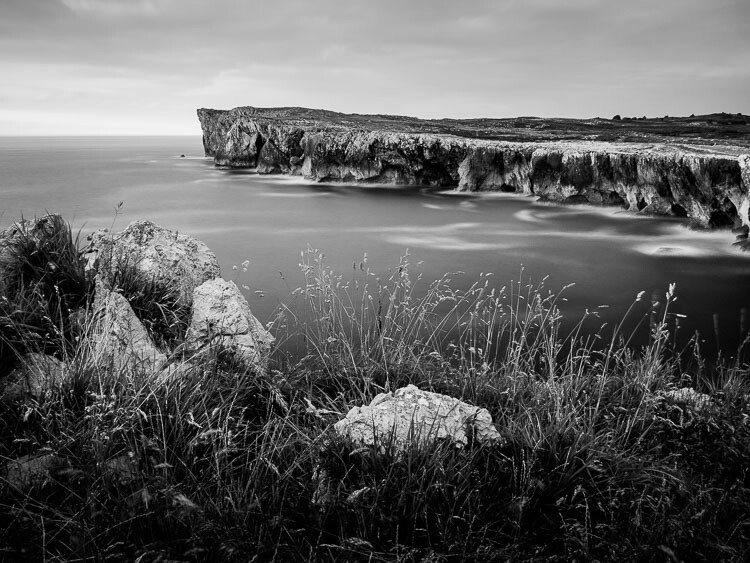
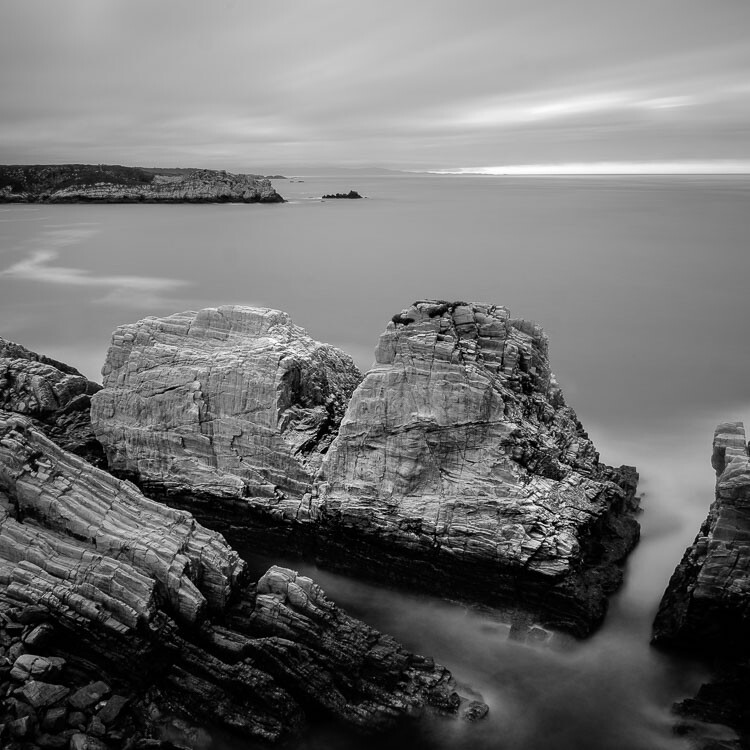
A long exposure photo made on a cloudy day. The light suits the subject – it wouldn’t have worked in sunny weather.

Mistake #5: Not having a strong composition

Black and white is a true test of your compositional skills. The best monochrome images use visual elements like tonal contrast, texture, line, shape, pattern, and negative space. The emotional power of color can mask poor composition. But in black and white there is nowhere to hide. You have to learn how to use these building blocks of composition effectively.

That starts with learning how to see them. For example, you can’t use lines in your compositions if you haven’t trained yourself to see straight, diagonal, or curved lines in the scene.

The good news is that once you understand the fundamentals of composition in black and white, you will instinctively apply them to your color photos as well.

Black & white photography mistakes

I took a lot of care with the composition of this landscape photo. It has foreground interest and plenty of texture – important elements in black and white landscapes.

Have you made any of these mistakes?

Can you think of any other mistakes that photographers make when working in black and white? Please share your thoughts in the comments below.


If you’d like to learn more about black and white photography then please check out my ebook Mastering Lightroom: Book Three – Black & White.

googletag.cmd.push(function() {
tablet_slots.push( googletag.defineSlot( “/1005424/_dPSv4_tab-all-article-bottom_(300×250)”, [300, 250], “pb-ad-78623” ).addService( googletag.pubads() ) ); } );

googletag.cmd.push(function() {
mobile_slots.push( googletag.defineSlot( “/1005424/_dPSv4_mob-all-article-bottom_(300×250)”, [300, 250], “pb-ad-78158” ).addService( googletag.pubads() ) ); } );

The post Avoid These 5 Common Mistakes in Black and White Photography by Andrew S. Gibson appeared first on Digital Photography School.


Digital Photography School

 
Comments Off on Avoid These 5 Common Mistakes in Black and White Photography

Posted in Photography


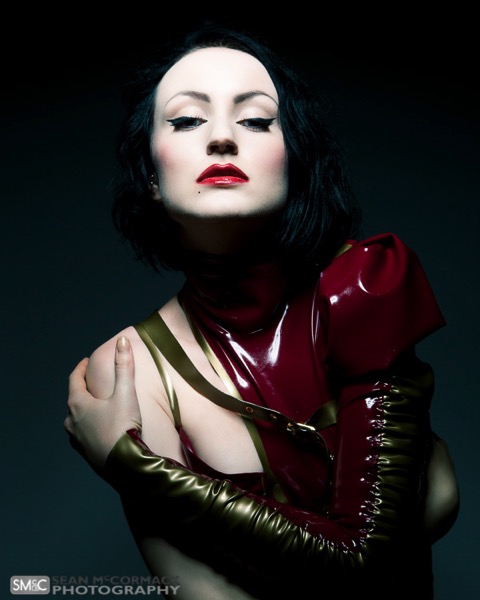
4 Common Lighting Styles to Get the Perfect Portrait

01 Sep

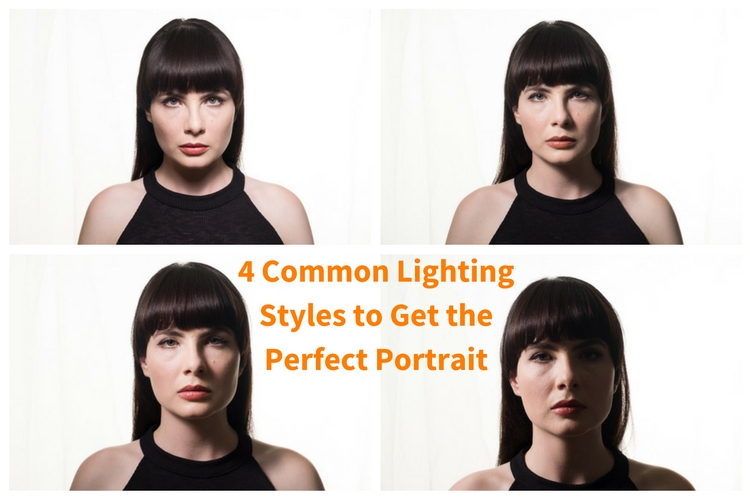
When you begin doing portrait lighting for the first time, the general advice you get is to put your light at 45º to your subject, and aim it down at 45º. It’s a quick way to get something reasonably good, without a lot of understanding. With a little more knowledge, you can make better lighting decisions, and get more dramatic images.

4 Common Lighting Styles to Get the Perfect Portrait

Light has four main properties:

  1. Quantity
  2. Quality
  3. Color
  4. Direction

In this article, we’re looking at direction of light only. If you look at the work of the Masters in painting, you’ll notice that they go to great pains to create light and shadow through their brush strokes. You can of course translate these to your own lighting. So let’s look at the different portrait lighting styles or patterns you can use.

To be able to see these patterns, your subject should be facing the camera. The key to seeing what’s happening is to pay attention to what the shadow is doing, especially the nose shadow.

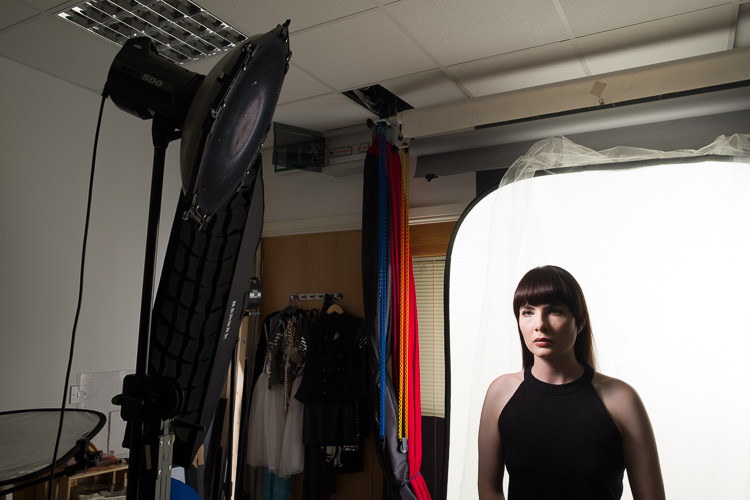
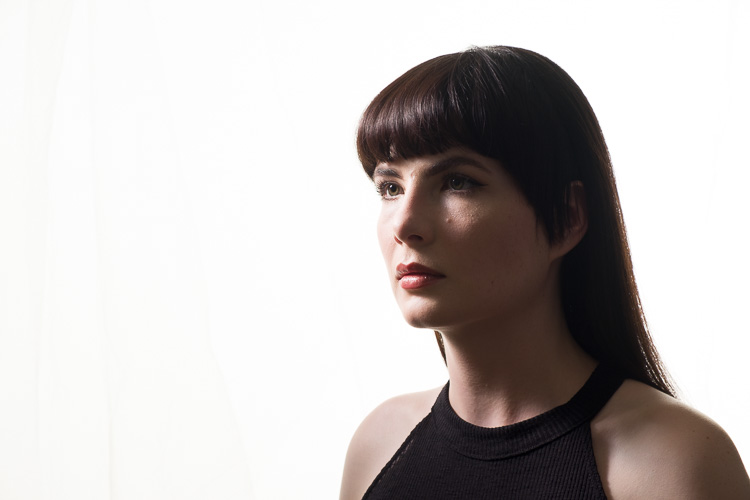
Short Lighting with a Butterfly pattern.

Short lighting style

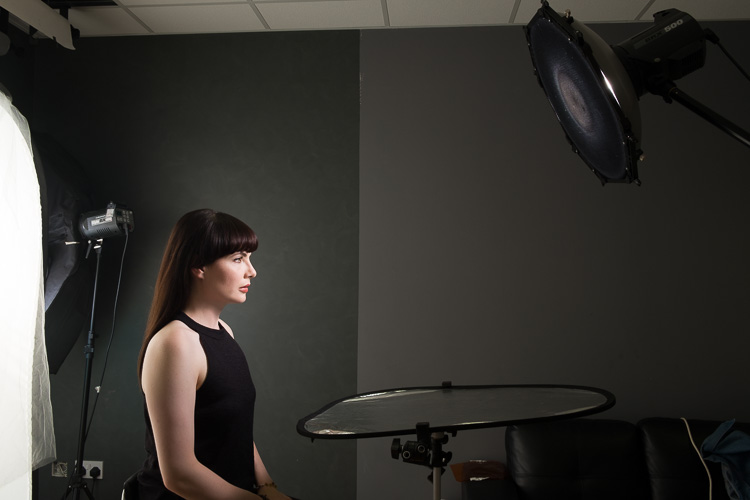
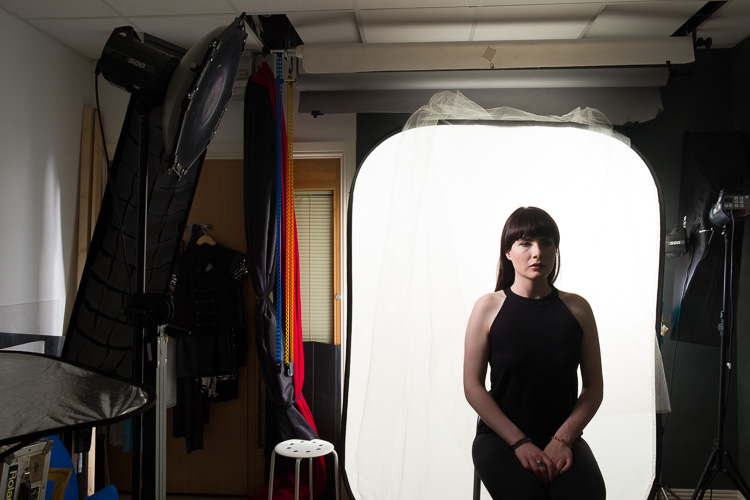
For this setup, I’ve used an Elinchrom BXR500 with a 44cm white beauty dish. The deflector is translucent, and I’ve added a grid to control the spill of the light. The Camera was a Fujifilm X-T10 with a Fujinon 18-55 lens.

The Portrait Lighting Styles

1. Butterfly Lighting

Butterfly lighting refers to the shape of the shadow under the nose that this pattern creates. It’s meant to look like a butterfly in flight, viewed from straight on. It’s also called Paramount lighting when used with guys to sound more masculine. If you look at the work of 30s and 40s Hollywood photographers like George Hurrell, you’ll see this lighting style in operation.

Classical Lighting Patterns 01

The basic butterfly portrait lighting, with no reflector.

First you should place your light on a boom stand, and position it so it creates a line between you, the light, and your subject. Your light should be high enough to create the butterfly shadow. If it’s too low, you won’t get a shadow and the light will be too flat. If it’s too high, you’ll have the nose shadow will cut into the lip.

As you look into the eyes of your subject, make sure you can see a reflection of your light. This reflection is called a catchlight, and helps give life to the eyes. If you cannot see the catchlight, lower your light a bit.

Classical Lighting Patterns 02

The basic butterfly portrait lighting, with silver reflector.

With Butterfly Lighting, it’s common practice to put a reflector (or even another light at lower power) underneath the chin to bounce light back up. This helps soften the look, and reduces the shadows caused by your light position. You’re not trying to overpower the light from above, as doing this will cast shadow upwards on the face, which isn’t particularly flattering.

Classical Lighting Patterns 03

Behind the scenes shot of the basic butterfly lighting, with a reflector.

2. Loop Lighting

For Loop Lighting, you’re looking for a loop shaped nose shadow. Move your light to the left, or light from the centre. You’ll see the shadow change shape. With Loop Lighting, the nose shadow shouldn’t touch the shadow side of the cheek.

Classical Lighting Patterns 04

Loop Lighting

You should aim to have the bottom of the nose shadow about halfway between the lip and the nose in position. With Loop lighting, you’ve got two main options for filling in shadows. You can use a reflector, or a second light from the opposite side of the face as the key light, or you can use an on axis (behind the camera) fill light (like a ring light or an Octabox).

3. Rembrandt Lighting

If you move the key light around a farther, the nose shadow will meet the cheek. Some refer to this as closed loop lighting, with the normal Loop Lighting being referred to as open loop lighting. From a technical standpoint, Rembrandt Lighting usually has a higher light position than closed loop lighting, but for most the term Rembrandt refers to any light that creates a triangle of light below the eye opposite the light source.

Classical Lighting Patterns 05

Rembrandt Lighting

You can probably guess that the name is based on the work of the painter Rembrandt. A lot of his portraits were painted while the subject was lit from a skylight or high window, giving that famous look.

Classical Lighting Patterns 06

Behind the scenes making a Rembrandt Lighting.

4. Split Lighting

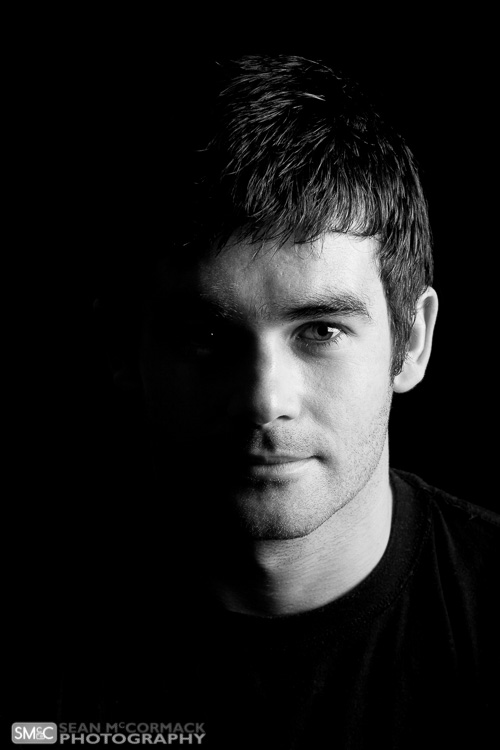
You’ve moved the light slowly from straight on, and your final light style is when the light is perpendicular to the camera. You’re lighting only one half of the face. One of the most famous uses of this is The Beatles album ‘With The Beatles’, where all four members are split lit. You should only be able to see one eye in the shot for this pattern (the other will be in shadow).

Classical Lighting Patterns 07

Split Lighting.

Classical Lighting Patterns 08

Behind the scenes for Split Lighting.

Broad and Short Lighting

To show how the patterns work, you’ve shot straight on to your subject. In real life this is only one view that you’d capture. By turning the face to the side you get even more options. When the face is at an angle, there are two parts of the face visible, the broad side, and the short side. The broad side is the one nearest you, from the ear to the nose. The short side is the small bit of the side facing away from you, that you can actually see.

By aiming the light at the broad side of the face, you see the face in detail, with very little shadow. On the other hand, if you light the short side of the face, you get more shadow. These lighting positions are referred to as Broad and Short Lighting respectively.

You can use Short Light to flatter heavier subjects, as the shadow tends to hide weight in the face. Broad lighting is better for thinner people, and is often used in fashion. For the Short Light example, the light was in the same position as our Split Lighting, the model has just been turned towards the light. For Broad Lighting, you can have it any where in front, though for this example, it was off to camera right.

Classical Lighting Patterns 09

Broad Lighting (main light is to camera right).

Classical Lighting Patterns 10

Short Lighting (main light is to camera left, closer to the background than the subject).

Creating Drama

The trick to creating drama is to use shadow effectively. For this reason Short Lighting is the best option. You can use each pattern in a short light fashion.

Remember at the start, you were told to pay attention to the nose shadow? For Butterfly, you’re still looking for the butterfly shadow. The light will be directly in front of your subject’s nose to get this. As you move the light away, towards Loop position, it’ll start to become more dramatic. You can even do a Rembrandt portrait for really dramatic effect.

Classical Lighting Patterns 11

Rembrandt Lighting, Short lit with no fill.

Classical Lighting Patterns 12

Rembrandt Lighting, Short lit with silver reflector fill.

So that’s how to use common portrait lighting styles or patterns. You should get familiar with them, and as you look at magazines and online, you’ll start to see them in use.

Examples of Portait Lighting in photos

Classical Lighting Patterns 16

Short Lit Loop Light

Classical Lighting Patterns 14

Split Lighting

Classical-Lighting-Patterns-13.jpg

Butterfly Lighting

Short Lighting with a Butterfly pattern.

Short Lighting with a Butterfly pattern.

googletag.cmd.push(function() {
tablet_slots.push( googletag.defineSlot( “/1005424/_dPSv4_tab-all-article-bottom_(300×250)”, [300, 250], “pb-ad-78623” ).addService( googletag.pubads() ) ); } );

googletag.cmd.push(function() {
mobile_slots.push( googletag.defineSlot( “/1005424/_dPSv4_mob-all-article-bottom_(300×250)”, [300, 250], “pb-ad-78158” ).addService( googletag.pubads() ) ); } );

The post 4 Common Lighting Styles to Get the Perfect Portrait by Sean McCormack appeared first on Digital Photography School.


Digital Photography School

 
Comments Off on 4 Common Lighting Styles to Get the Perfect Portrait

Posted in Photography


7 Common Mistakes That Newbie Street Photographers Make

26 Feb

Over the last few years I have worked with enough budding new street photography enthusiasts, to notice a common thread of early mistakes that many of them make. A lot of these are very simple tendencies and changes, that can make a vast difference to the final output. It’s for this reason that I try to teach these 7 tips from the very start. Follow along so you can avoid the seven common mistakes that newbie street photographers make:

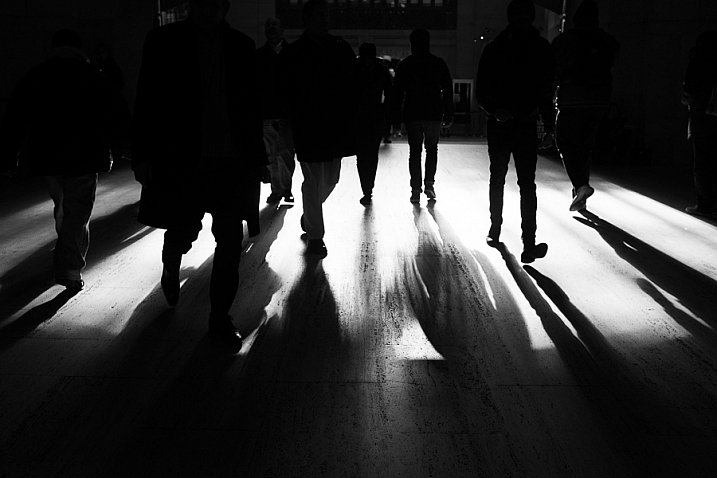
Grand Central, NYC Street Photography

Grand Central, NYC.

1. Thinking too much while shooting

If you are reading this article, you are on the right back. You should read about photography to teach yourself, and study the work of great photographers. However, when you are out there, in the process of shooting, try to not over-think things too much. There are so many tips and tricks, and you may worry a lot about capturing bad images, but that can all get in the way sometimes.

Instead of worrying about the results, get lost in the process. You can assess your results during the editing phase. When you are out there shooting, have fun. Explore, take your time, relax, and just watch everything go by. This is a type of photography that you really have to enjoy to do well, and the best part about it is that you can go out and do it nearly anywhere and at any time. You can do it in 10 minute spurts, or during your lunch hour. You can even do it with your iPhone if you don’t have your camera. The more fun you have with the process of being out there, getting lost, and exploring, the more dedicated you will become, and the better street photographer you will become.

2. Traveling too heavy

There are many great videos of the old masters shooting street photography. You know what is the one common thread between many of them? It’s that they had manageable sized cameras, that they could easily take anywhere, and they more often than not they used small prime lenses. You can certainly shoot street with an SLR, and do it very well. There are top photographers that do just that, but at the same time are you really going to want to carry that tank of a camera around on a daily basis? That’s the big advantage of a smaller camera, and the technology is catching up quickly with the large bodies. A small Fuji camera, or a Ricoh, will do wonders, and you can even get an older used version for much cheaper than the new ones. There are many iPhone street shooters as well.

Astor Place, NYC Street Photography

Astor Place, NYC.

Likewise, you do not need a big bag of lenses and filters. If you haven’t tried it, I can’t stress enough, how freeing going out for a day with a single small camera body, and a single prime lens, can make you feel. Leave the rest behind. Yes, you will miss out on that 200mm zoomed shot of the water tower, but you will come back in the long run, with so many more good photos, and you will have a lot of fun doing it.

3. Trying to get somewhere too quickly

We’re all in a rush these days, running from place to place. Luckily, that is one of the worst ways to do street photography. To do street photography well, you need to slow down, and take your time. You can’t always be in a rush. Look around, and wait for things to happen. Wait with your camera, and let the subjects come to you. The slower you go, the more aware you will be of your surroundings, and the more able you will be to capture those extraordinary fleeting moments. Use photography as a way to break out of the rushed lifestyle, and to get lost and slow down for awhile.

4. Not standing in the middle of the action

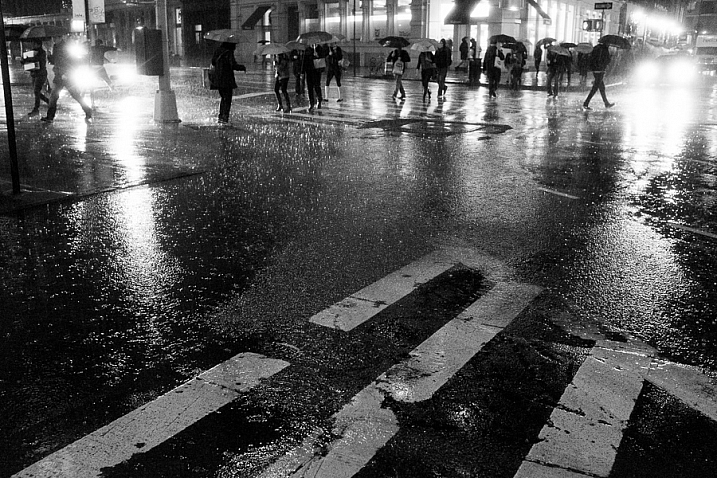
Broadway, SoHo, New York Street Photography

Broadway, SoHo, NYC.

It is so easy to get intimidated when you are first learning. Many people start by photographing from a distance, and they never really push themselves to get right in the middle of what’s happening. Carry your camera proudly, put a smile on your face, and get involved in the action. Get in the middle of the street.

You might notice that if you are standing too far away and shooting, then people will actually think you are up to no good. But, if you are directly in the middle of the action, people will walk right by thinking that you are doing nothing wrong. Sometimes you’ll even blend in more being in the middle. How could you possibly be doing something wrong if you are right there in the middle? Nobody that obvious would be doing anything bad, but that photographer creeping around over there in the corner, just has to be a stalker. Stop and wait right in the middle of an area where things are happening, and just let everything happen around you. Engulf yourself in the experience.

5. Not putting the camera to your eye enough

I hip shoot a decent portion of the time, particularly when things are happening incredibly fast, but I also try to look through the viewfinder as often as possible. A lot of new photographers only hip shoot, and it quickly becomes a crutch. After a while, they become even more afraid to put the camera to their eye, than when they started. Force yourself to get comfortable shooting through the viewfinder. Just stand in a busy place, with the camera to your eye for a while, until you feel comfortable. After that you can add in the hip shooting. There will be situations where a hip shot is beneficial, but you will get better shots, and better framing, when you look through the viewfinder. Take pride in seeing it all coming together, and capturing that split second moment where it does.

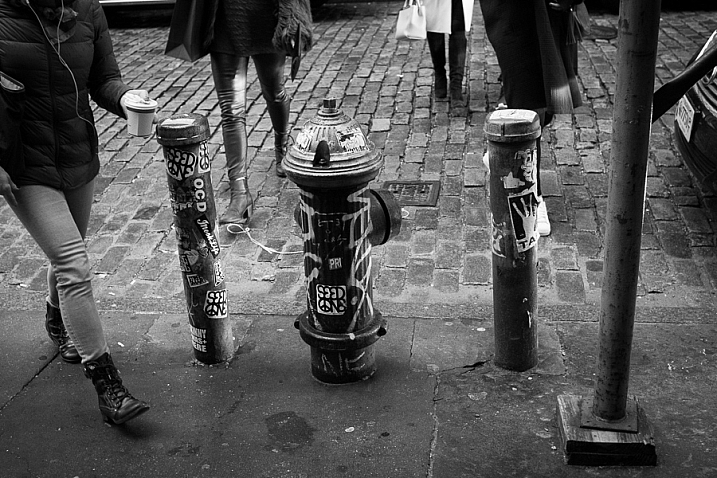
Fire Hydrant, SoHo, NYC

SoHo, NYC.

A tip that helps with this, is to not take the camera away from your eye right after you take a shot of someone. It’s a natural habit to remove the camera from your eye briefly when you take an image. Instead, get in position, and wait for a person to be in the right spot, Then, take the image, but continue to keep the camera to your eye as they walk through the scene and past you, as if they got in your way and you are trying to photograph what is behind them. This trick works incredibly well in areas with quite a few people walking around.

6. Rapid firing with the camera

Turn the machine gun setting on the camera off. A lot of people think that if they take 10 photos of the same scene, they will be guaranteed to get a good one. Where’s the art in that? I actually find that holding down the shutter button, and taking a stream of shots, is a way to guarantee that you will screw up the shot. You need to be able to visualize what you are getting. See the moment as it happens, then capture the elements as they all fall into place. That only takes one shot. Then, as a scene further develops, you can take more, but see the moment and grab it. If you miss it, and you will miss some, there’s always next time. Let go of the fear of missing a shot.

In addition, with rapid fire you will end up taking 10 times the number the photos, over the course of the day. How are you going to find the perfect moment in all of that? Nobody has the time, or the hard drive space. With less, and more purposeful photographs, comes a much more enjoyable editing session.

7. Under and over-editing

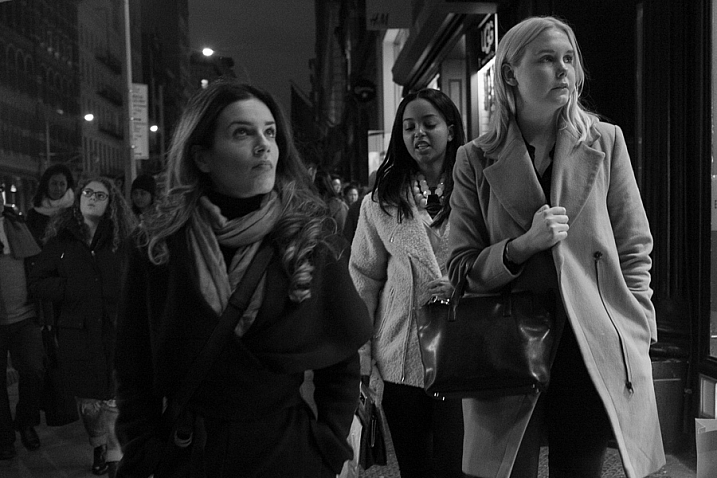
East Village, New York Street Photography

East Village, NYC.

A lot of new street photographers will both under, and over-edit their photos. What I mean is that they will show too many photos, and they will over-process them. Be ruthless with narrowing your photos down to the best ones. You want people to actually give your work attention, and if you show too many photographs at one time, they will tune out. By showing too many photos you are relying on the viewer to do the editing in their heads about what they like. That’s not fair to them, do that work yourself. Spend that extra time organizing. Use a starring system to give your photographs ratings and make sure that there are not too many five star images. Spend the time after each shoot to narrow it down to just the cream of the crop. If you don’t do this consistently, you will allow your archive to pile up into an unorganized mess.

When you do the actual editing to your photos, keep a light touch. You can, and should fix the exposure, blacks and whites, vignettes, color temperature or black and white tones, contrast, and all that other good stuff. However, a lot of new street photographers go way too far. Part of the extraordinary nature of street photography is that it was actually captured in the real world. It was not made up. If your photos are too edited, and lose that real feeling to them, it kills the thing that makes them special.

Are you guilty of any of these mistakes? How have you overcome them? Do you have any others you’d like to share? Please do so in the comments below.

googletag.cmd.push(function() {
tablet_slots.push( googletag.defineSlot( “/1005424/_dPSv4_tab-all-article-bottom_(300×250)”, [300, 250], “pb-ad-78623” ).addService( googletag.pubads() ) ); } );

googletag.cmd.push(function() {
mobile_slots.push( googletag.defineSlot( “/1005424/_dPSv4_mob-all-article-bottom_(300×250)”, [300, 250], “pb-ad-78158” ).addService( googletag.pubads() ) ); } );

The post 7 Common Mistakes That Newbie Street Photographers Make by James Maher appeared first on Digital Photography School.


Digital Photography School

 
Comments Off on 7 Common Mistakes That Newbie Street Photographers Make

Posted in Photography


12 Common Newbie Photography Mistakes to Avoid

14 Jan

None of us are perfect and we all make mistakes. While some photographers might be naturally gifted, and just do amazing work from the moment a camera is put into their hands, that is not the case for most of us. Chances are, if you are new to photography, you are going to muck things up. You shouldn’t feel bad however, as you can be sure that many newbies have done exactly the same things. Here are a number of very common mistakes that new photographers make. Learn to avoid them, and you will improve your images.

1 – Centering everything in your images

The horizon line is right in the middle, cutting the image in two.

The horizon line is right in the middle, cutting the image in two.

When most of us look back at our early images, we usually see the horizon line placed very much in the middle of the image (see photo above). This is one of the most common mistakes new photographers make when they start. Sometimes it’s a good thing to do, but not always. The problem is that it cuts the image in half, and leaves people looking at the image, unsure of which half to look at, which is the intended subject.

When you take photos of landscapes, or anything with a horizon line, it is best to put the horizon on one of the third lines.The Rule of Thirds is one of the compositional guides for photography. As you get more into photography you will hear more and more about it.

With the horizon in the top third most of the ground is showing, telling the viewer what to look at.

With the horizon in the top third, more ground is showing than sky, telling the viewer where to look

It’s the same idea for your subjects. If you are photographing a person, put them to one side of the image, on one of the vertical third lines. Which line you use is up to you. Sometimes it is better to do both and see which one looks better. Experimenting is the key to getting great photographs.

2 – Taking attention away from the main focus in the image

Without meaning to, you may include something in your frame, that takes the focus off the main subject in the image – things like bushes, or a light post that is just a line through the image. It goes back to the previous point about giving your subject so much attention, that you aren’t taking the time to look around it.

3 – Cutting things off at the edge of the frame

It is amazing how many times you can look at someone’s photo and ask, “Why have you cut off their feet?” They then look back at you blankly, saying they had never noticed it before.

LeanneCole-common-newbie-mistakes-0029

Be careful not to cut off parts of limbs, like feet, when you are taking photos.

It is a very typical thing that newbies do. It may not be the feet, but it could be someone’s hand or the top of their head. It can happen in architecture and landscapes as well; the tip of a church dome will be missing, or the top of a tree.

It is all about learning to look at your subject and making sure you concentrate on getting them all in the frame. If you can’t fit them in the image, then you need to make decisions about what you will include, and what to crop off. Often if you take more than two thirds of a leg away it looks deliberate. If you only take one third away it looks like you weren’t paying attention.

Missing toes or feet.

Missing toes or feet.

Make sure to include feet.

Make sure to include feet.

4 – Thinking that having a great camera is enough

“I bought this fantastic camera and I paid a lot of money for it, but my photos don’t look great.” There is an assumption that if you have a good camera, you will automatically take amazing photos. This is not the case.

Just because you have a great camera, doesn’t mean you don’t need to learn photography. It is the person behind the lens that is responsible. If you see amazing photos by other photographers, that it is because they have learned about composition, and how to use their camera properly. Scroll to the bottom for links to more beginner articles to help you with this one.

5 – Not looking behind your subject

“Look at the tree coming out of that person’s head.” This similar to the previous point. You need to consider everything in the frame. You can usuallt remove the tree from their head by taking one or two steps to either side.

LeanneCole-common-newbie-mistakes-0027

Look behind your subjects and make sure there aren’t things like trees coming out of their heads.

leannecole-newbiemistakes-portrait

Slight camera reposition and no tree coming out of her head any more.

6 – Taking only photo of a subject and from a common viewpoint

We all see people who want to take photos of a building, they walk straight up to it, take one photo from the middle position, and that’s it.

Think about other angles you can use as well. Try moving to the left, the right, or both. Take some from low camera angles and then some standing up. As you take more shots, you will learn what works and what doesn’t. Again, it is all about experimenting.

LeanneCole-common-newbie-mistakes-0031

Taking a photo of a place by standing right in front of it. 

7- Having a really good camera and never learning how to use it properly

If you get an amazing camera that is capable of so many things, and never take it off auto, you are missing out on a lot. Learning to use your camera is one of things you can never regret. While you may be able to get some great photos with it on automatic, if you learn about aperture, shutter speed, and ISO, you will have more control over your images. It is usually something that no one is ever sorry about doing.

Once you have the basics worked out, you can then learn more advanced things like long exposures and HDR. The world of photography really opens up to you when you know how to use your camera to its full potential.

8 – Not giving your camera enough time

I was at an event once and I handed my camera over to friend to grab a few shots for me. When I got home and looked at the photos he had taken, they were all out of focus. I realized that he was pressing the shutter release without giving the camera time to focus properly.

You have to learn how to let the camera focus for you and give it time to do that. They are fast, but not always fast enough. The same goes with exposure, you have to give it the time to get the correct exposure. It doesn’t ask for a lot, so just give it the time it needs.

9 – Forgetting to check the settings you used the last time

It’s common for newbies to go out to take photos, making adjustments on their camera for what they are shooting at the time. But, the next time they go out to shoot, they forget to look at how the camera was set up. Afterwards, when they put the images on the computer, they realize they have lots of photos that didn’t turn out, because the camera settings were wrong for that subject or situation.

I was photographing a four day event a few years ago, and I couldn’t work out why some photos were really overexposed, while some were really dark. It took nearly three days to realize it was because my camera was set on auto bracketing (AEB). It was around that time I had just started taking photos at different exposures (bracketing) and had forgotten about it. Now I pick it up straight away.

LeanneCole-common-newbie-mistakes-0028

Checking your camera setting when you take photos in case the last time you were out your were underexposing or bracketing your images.

Always look at the settings you have on the camera. Check what the aperture is set to. Work out if you have it on manual, shutter priority, aperture priority or auto. Be aware of what the ISO is at all times. It is a good habit to get into, to check them all every time you start.

Make sure you have a memory card in the camera too. I have gotten into the habit of leaving the card out of my camera, and when I pack my gear to go somewhere, I put the card in the camera. It is part of my routine now, I also pack an extra as well.

10 – Never turning the camera vertically

One thing you often notice with new photographers is that they only use their camera in landscape mode. They never seem to consider turning their cameras up on the side, to shoot vertically. It isn’t always necessary to do so, but some subjects would benefit more from that orientation. When you are taking photos, try turning the camera into the portrait mode (vertical) and see if you can get a better image.

leannecole-newbiemistakes-horizontal

Don’t always have your camera in landscape mode, like this image, turn the camera up into portrait mode as well.

Try vertical for a different perspective.

Try vertical for a different perspective.

11 – Not asking for help

You should never be afraid of asking for help. Generally, photographers are more than happy to help someone who wants to learn. Don’t badger people with too many questions, but asking a few questions isn’t going to hurt.

12 – Don’t panic

A friend was telling a story about how she was in a Cathedral taking photos and they were all turning out black. She started to panic and couldn’t work out why. Once she calmed down she realized it was because her ISO was too low.

If you get into a situation where your photos are not working, don’t panic. Think logically about it. In most cases it is going to be your aperture, shutter speed or ISO. Just take the time to think about them and check the settings. You will work it out.

Have fun

The best advice anyone can give you is to enjoy your time with your camera. Explore the world around you. Remember that the mistakes you make are being made by nearly everyone in your situation. You aren’t alone.

googletag.cmd.push(function() {
tablet_slots.push( googletag.defineSlot( “/1005424/_dPSv4_tab-all-article-bottom_(300×250)”, [300, 250], “pb-ad-78623” ).addService( googletag.pubads() ) ); } );

googletag.cmd.push(function() {
mobile_slots.push( googletag.defineSlot( “/1005424/_dPSv4_mob-all-article-bottom_(300×250)”, [300, 250], “pb-ad-78158” ).addService( googletag.pubads() ) ); } );

The post 12 Common Newbie Photography Mistakes to Avoid by Leanne Cole appeared first on Digital Photography School.


Digital Photography School

 
Comments Off on 12 Common Newbie Photography Mistakes to Avoid

Posted in Photography


How to Identify Three Common Image Problems and Fix Them in Lightroom

06 Dec

I hear it over and over, “I have a nice camera but my pictures just don’t come out as good as I expect.”

What ensues is an interrogation first about equipment selection, settings, and general technique. More often than not when we finally get down to the nitty gritty, the fact is that many people not only have a difficult time identifying what’s wrong with their photos, let alone determining how to prevent it, or fix it in post-processing.

jumping through hoops

Common problems that plague your images might be able to be fixed, but you might have to jump through some hoops to do it.

Although there are two sides to this topic (one side being nailing the shot in-camera), we are going to take a look at some common image problems that might be plaguing your photos, and ways to fix them in post-processing. This may be helpful if you want to revisit images you have in your library that may be salvageable.

I’ll be referring to Lightroom (LR) as the post-processing software, although the general adjustments can be adapted for use in other software.

#1 Washed Out

The term washed out refers to a photo which seems to have been shot through a translucent fabric. There is a uniform haze which reduces color saturation, sharpness, clarity, and contrast. There are several factors that can contribute to your pictures being washed out. It could be anything from poor quality lenses, to ghosting from shooting directly into a light source (lens flare).

The good news is that with the features and power that we have in LR, this problem can often be overcome.

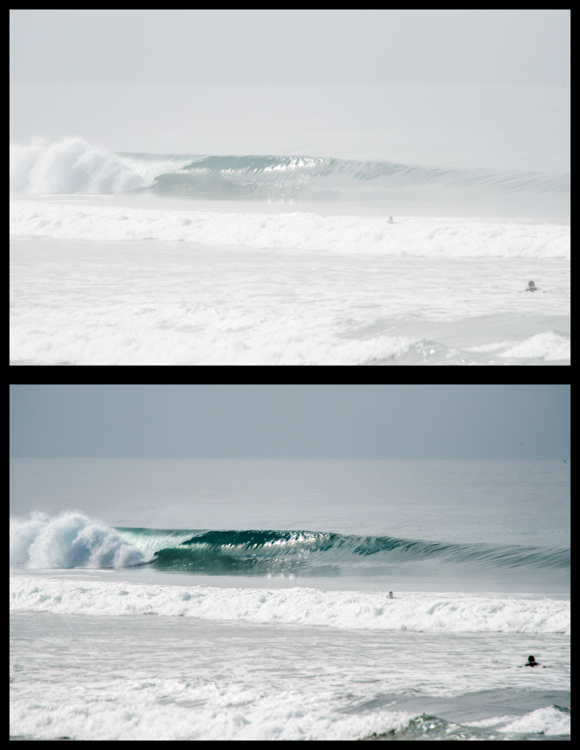
Let’s look at this photo of a beautiful wave, shot early in the morning. It was shot at 200mm with a 2x teleconverter (an effective focal length of 400mm). Teleconverters increase focal length, but are notorious for eating light, and reducing contrast and sharpness.

washed out image

Although teleconverters can wreak havoc on your images, all is not lost.

As you can see, the original shot is not very appealing. In an attempt to bring it back from the brink of unacceptability, I have made the following adjustments:

Basics panel

  • Contrast increased (+)
  • Highlights decreased (-)
  • Shadows decreased (-)
  • Whites increased (+)
  • Blacks decreased (-)
  • Clarity increased (+)
  • Vibrance increased (+)
  • Saturation increased slightly *+)

Tone Curve panel

  • Lights decreased
  • Darks decreased
  • Shadows increased

The trick here is to go back and forth between the different sliders that control darks and lights. For example, I will adjust the Highlights and Whites sliders, go to the Tone Curve panel and adjust the Highlights and Lights, then return to the Highlights and Whites again to fine tune how I want that end of the spectrum to look.

#2 Color or Tint

In my opinion, this is one of the strongest arguments for shooting in RAW format. Shooting in RAW allows you way more control correcting White Balance in post-processing, opposed to other file formats – and incorrect White Balance is the primary cause of off-colored images, or ones with a color tint.

If you haven’t developed an eye for identifying this problem, you might miss it. I see many really nice photos that have a slight tint, which is unintentional. The key is to look at areas of the image which are a neutral color, or white – this is where it is easiest to notice the off-color tint. Note that editing on a monitor which is not color calibrated may limit your ability to achieve correct White Balance.

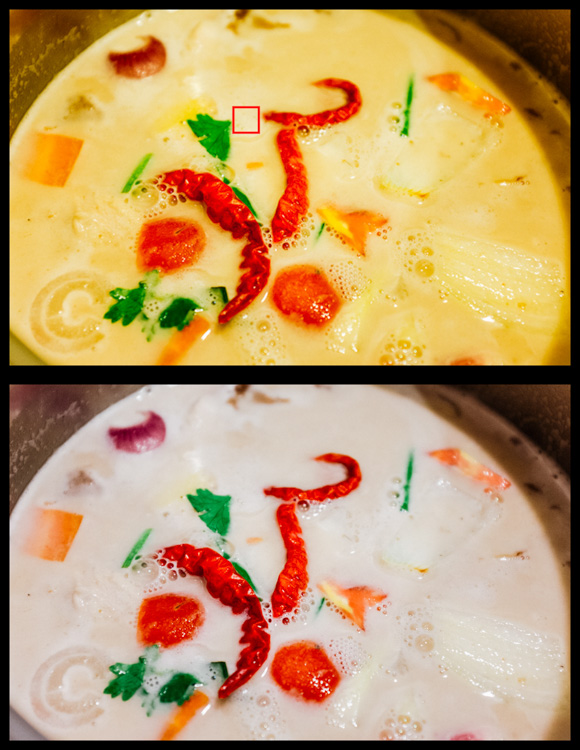
incorrect white balance and tint

Sometimes noticing if an image has incorrect White Balance, or a color tint, can be tricky. I used LR’s White Balance eye dropper tool where the red square is (top image) – it got pretty close, but still a bit too magenta.

The first line of defence is to give LR’s Auto White Balance tool a shot. I find it to be somewhat inaccurate, but a good starting point nonetheless. Once activating the eye dropper tool, a pop-up window will show a magnified view to allow you to select pixels as close to a neutral color as possible.

From this point, you can use the White Balance and Tint sliders to fine tune the image. If there are people in the photo, your goal should be making the skin tones look as natural, and pleasing as possible.

#3 Too Much Variation in Contrast

Being confronted with a drastic contrast range is one of the most common problems you are likely to face in your shooting. After all, this is why many photographers are equipped with a polarizing filter, and why new camera models strive for an expanded dynamic range.

Luckily, you are not stuck with the image that you download onto your computer. If you are shooting in RAW there is a lot of information about details, color, etc., which you can exploit in post-processing.

Let’s take a look at this photo I snapped from inside a bookstore. It was pretty dark inside with the midday sun shining outside the window. Sure, I could have shot bracketed photos to merge into an HDR (high dynamic range) image, used a flash to balance the dark interior with the lighter exterior, or used a polarizer to darken the window portion of the scene. But I only had my camera with one lens, just grabbing some snapshots while out and about for the afternoon, so I didn’t have the means.

high contrast image

The camera struggled with this high contrast scene, but a little work in LR breathed new life into it.

So to what extent can this image be salvaged?

As you can see, the camera actually captured a lot of information, and it was just a matter of telling LR what to do with it. Here is a list of changes made to this image to give you an idea of how to do this yourself:

Basics panel

  • Contrast decreased slightly (-)
  • Highlights decreased (-)
  • Shadows increased (+)
  • Whites decreased (-)
  • Blacks decreased (-)
  • Clarity increased (+)
  • Vibrance increased slightly (+)
  • Saturation increased slightly (+)

Tone Curve panel

  • Highlights decreased
  • Lights decreased
  • Darks increased
  • Shadows decreased

Lastly, I used the Adjustment Brush to mask off the window portion and made these adjustments:

  • Exposure decreased (-)
  • Contrast increased (+)
  • Highlights increased (+)
  • Shadows decreased (-)
  • Clarity increased (+)

Conclusion

Of course, there are a host of other problems you can run into while out shooting, but these are a few of the most common you’re most likely to encounter. Don’t overlook the fact that you should try and get the best image possible while out in the field. Although editing software is very powerful, you will get best results when you don’t have to push the limitations of your editing software.

Hopefully this article has given you some guidance on how to salvage images that you may once have considered lost. Show us some examples of photos that you have saved in the comments below.

googletag.cmd.push(function() {
tablet_slots.push( googletag.defineSlot( “/1005424/_dPSv4_tab-all-article-bottom_(300×250)”, [300, 250], “pb-ad-78623” ).addService( googletag.pubads() ) ); } );

googletag.cmd.push(function() {
mobile_slots.push( googletag.defineSlot( “/1005424/_dPSv4_mob-all-article-bottom_(300×250)”, [300, 250], “pb-ad-78158” ).addService( googletag.pubads() ) ); } );

The post How to Identify Three Common Image Problems and Fix Them in Lightroom by Jeremie Schatz appeared first on Digital Photography School.


Digital Photography School
 
Comments Off on How to Identify Three Common Image Problems and Fix Them in Lightroom

Posted in Photography


8 Common Landscape Photography Mistakes

08 Oct

As photographers, we know that there are literally hundreds of small things that need to be done in each scene, that add up to the final magnificent shot. Sometimes when we get behind the camera, and the light becomes amazing, it’s very easy to forget one or two things, and the result is that the shot is not as good as it could have been. There are lots of details to remember, but there often some obvious things that have been forgotten. These are the common mistakes I see in many landscape images. If they were corrected at the time, the image would have been much more dramatic and powerful.

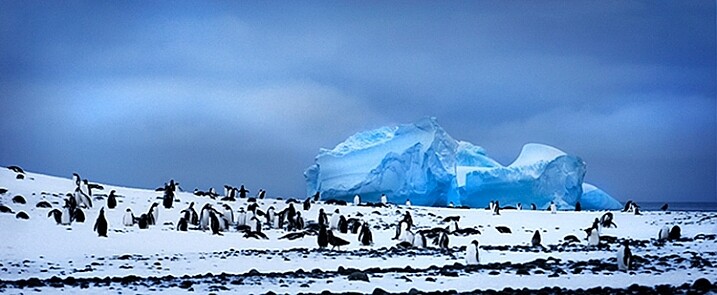
Penguins and iceberg in Antarctica.

Penguins and iceberg in Antarctica.

So here are the eight top landscape photography mistakes make so you can avoid them and improve your images:

1. Stability – use a tripod

In creative images, blurriness can be very interesting. In landscape images however, you usually want your image to be sharp all the way through. The best way to be sure that your image is sharp is to use a tripod. If you are shooting in low light (you mostly will be if you are shooting landscapes) then you absolutely need to be using a tripod.

Now, there are tripods and there are tripods. For landscape photography, you might want to invest in a more heavy-duty one. The small light-weight tripods might do the trick for a while, but if you are shooting on a location and it’s windy, your tripod may get blown over, or might move because of the strength of the wind. A good tripod will also last a long time and take a beating, so buy the best tripod you can afford, and make sure you keep your camera as still as possible when shooting.

Another good piece of equipment to buy is a cable release. You don’t need to buy one of the expensive ones with the intervalometer built-in, no, just a simple cable release. Once you are set up and ready to take your shot, step back from the camera and press the button. There will be no vibration from you pressing the shutter release and your image will be nice and sharp. If you don’t have a cable release, you could use the built-in self timer to release the shutter too.

2. Get the horizon straight

This almost goes hand-in-hand with using a tripod. Many a good landscape image has been damaged by a skewed horizon. Fortunately, this can be easily fixed in Photoshop or Lightroom, so it’s not a very big worry, but you might have to crop out some details to get that right. The idea however, is to get the shot right in camera first, then edit.

You can use a few different tools to make sure your horizon is straight. Firstly, switch on the grid in your camera viewfinder, line up the horizon with the horizontal line, and you should be good. Some tripod heads have a built-in spirit level, make sure this is level and your horizon should be fine. Lastly, use the live view function on your camera, and if you have it, bring up the false horizon dial on the back of your screen, level your camera, and you are done.

I prefer levelling my horizon in camera, as it helps to save time in post production. If you need to straighten the horizon afterwards, you will need to crop the image as I noted earlier, which means your composition may change slightly. I prefer not to crop as far as possible, so getting it level in the camera is a good goal.

A crooked horizon is distracting.

A crooked horizon is distracting.

Looks better now that the horizon is straight.

Looks better now that the horizon is straight.

3. Shooting only in landscape format

Many photographers assume that they should shoot a landscape scene in landscape (horizontal) format. This is normally not a bad idea, but in some cases, a portrait orientation (vertical) can work really well. Think of a forest or mountain scene. If the subject shape is more vertical than horizontal, try it in the portrait format, it can add a dynamic feel to the scene.

Shoot in portrait format too!

Shoot in portrait format too!

4. Not thinking about the aperture

I truly believe that aperture is a composition tool. When you are setting up a scene, you should be thinking about your depth of field. Do you want everything from the foreground to the background to be in focus? Generally, in landscape photography, this will be the case.

If that is what you want, make sure your aperture is f/8, f/11 or higher. That way, you will ensure that everything is in sharp focus. If you are at f/2.8, and you focus on the foreground, the background will be out of focus, and the middle of your scene will be soft. This should be one of your key checkpoints when you set up the shot. If you are using a wide aperture and the mountains in the distance are out of focus, this cannot be fixed afterwards in Photoshop…not yet anyway!

In a landscape image, you will likely want everything in focus.

In a landscape image, you will likely want everything in focus.

5. Shooting using the camera’s landscape mode

Yes, you may have a landscape setting in the scene modes on your camera. As much as possible, try not to use it. Why? Well, it’s not great at making the exposure look good for your scene. What it will do is set your aperture to f/8 or even f/11, but it may not render the scene as effectively as you could do using manual settings. The scene settings are designed to work within certain parameters and in low-light conditions, they are not always the best choice. Try and shoot your landscapes on manual settings as far as possible, that means that you control ISO, shutter speed and aperture.

6. Standing next to other photographers

If you see a group of photographers standing on the top of a hill, it might be a good idea to shoot from somewhere else. This is not to say that other photographers have got it wrong, rather what I mean is, you want to go home with a different image to the others. Sometimes, the best composition or vantage point is at one particular spot, that’s fine, take a shot from there, but look for other places to get a great shot too.

It’s a good idea to scout a scene before you shoot it. Go and take a walk around the day before, look at where the sun will be setting, and decide on your position. Don’t simply follow the crowd, then your images will look like the rest of the images taken there.

A different vista of Machu Picchu.

A different vista of Machu Picchu.

7. Uninteresting negative space

Negative space is the space that surrounds your subject. This space can truly make, or break, your image. In most cases, the sky is the negative space in a landscape scene. A clear blue sky looks great, but some wispy soft clouds can really make the scene dramatic. If the sky has no clouds and is clear, this can make the scene seem uninteresting.

If you find that in your scene, make the sky a smaller portion of your image, if there are some great looking clouds, give it more space in your scene. Sometimes, you don’t have a choice, you may only be able to get some shots on a particular day. In that case you need to get what you can. If you don’t have this constraint, try to go back on another evening, when there are some clouds in the sky. Clouds give the sky detail, they reflect the sunlight, and can look yellow orange against a blue sky. This makes for a much more interesting scene.

The sky had no clouds, so I made it a small part of the image.

The sky had no clouds, so I made it a small part of the image.

8. No clear subject

It sounds crazy, but it is very easy to have an unclear subject in landscape photography. Most often, landscape photography is of a natural scene, mountains, forest, river, seascape, deserts, etc. Whichever one it is, make sure that it is clear to your viewer.

If you are photographing a mountainous scene, make sure you use a lens that works for that scene. Landscape photographers are tempted to think that every image needs to be taken with the wide angle lens. Sometimes, this can cause the mountain range in the background to seem small and insignificant. The same can be true in any of the other types of landscape photography. Be sure that your viewer knows what they are supposed to be looking at, and show them that, and the beauty that surrounds the subject. Get close to your subject, as close as possible, and if it’s not close enough, maybe you need to use a different lens to get closer. A 50mm lens can be used in landscape photography, so can a 200mm lens, it all depends on what you want the viewer to see.

Subject-2

The iceberg in front of the ship is clearly the subject here.

Next time you are planning a landscape photo shoot, run through these points quickly and see how it works out for you. If anything, you will be more mindful and deliberate about what you are shooting, and that will immediately improve your images. Enjoy.

googletag.cmd.push(function() {
tablet_slots.push( googletag.defineSlot( “/1005424/_dPSv4_tab-all-article-bottom_(300×250)”, [300, 250], “pb-ad-78623” ).addService( googletag.pubads() ) ); } );

googletag.cmd.push(function() {
mobile_slots.push( googletag.defineSlot( “/1005424/_dPSv4_mob-all-article-bottom_(300×250)”, [300, 250], “pb-ad-78158” ).addService( googletag.pubads() ) ); } );

The post 8 Common Landscape Photography Mistakes by Barry J Brady appeared first on Digital Photography School.


Digital Photography School

 
Comments Off on 8 Common Landscape Photography Mistakes

Posted in Photography