RSS
 

Posts Tagged ‘Canon’

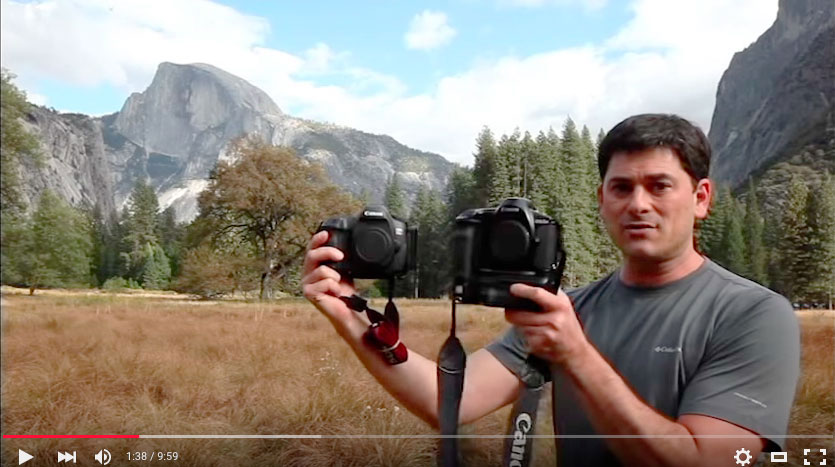
How Far We’ve Come: Canon 5DS R (2015) vs Canon D2000 (1998)

28 Apr
Canon DSLR comparison between the Canon D2000 and the Canon 5DS R

Over on my YouTube channel All Things Photo I’ve released a video looking at how far DSLR technology has come in 17 years by comparing the first Canon branded DSLR circa 1998, the Canon D2000,  to the latest Canon DSLR, the Canon 5DS R.To my surprise the D2000 still has some tricks up its sleeve!

The amusing thing about creating this video is that it took me down memory lane as to why I held out until 2006 to dive in on buying a very expensive DSLR. I held out on shooting film to avoid unacceptable digital noise in long exposures and to continue shooting full frame.  Now its amusing looking back at how bad things were, but I take solace in having more than decent alternatives. It’s good to remember back to the pain points of old school DSLRs to appreciate how good we have it today.

The post How Far We’ve Come: Canon 5DS R (2015) vs Canon D2000 (1998) appeared first on JMG-Galleries – Landscape, Nature & Travel Photography.


JMG-Galleries – Landscape, Nature & Travel Photography

 
Comments Off on How Far We’ve Come: Canon 5DS R (2015) vs Canon D2000 (1998)

Posted in Equipment


Interchangeable lens camera sales steady as Canon profits plunge

27 Apr
Canon calls out the EOS 80D as a driver for strong unit sales in the interchangeable lens camera market.

Canon Japan reported flat ILC unit sales as one of the bright points in first quarter reports that saw a 17.5% fall in net income. A strengthening Yen, poor performance in the laser printer business and continued decline in compact camera sales combined to give the company a tough quarter.

Overall, digital camera sales are down 12%, due in large part to a 22% decline in the dying compact camera market, though Canon cites its G-series as a bright spot. Interchangeable lens camera sales were flat compared to Q1 2015, propped-up by strong sales of the EOS 80D and gains for the M3 and M10 mirrorless cameras in Asia. Interchangeable lens cameras account now account for 49% of total unit sales and 84% of the company’s revenue.

While delivering ‘flat’ numbers might not sound very positive, figures provided by the Camera & Imaging Product Association show a nearly 10% year-on-year industry-wide decline in ILC unit shipments, as well as 17% YoY reduction in SLR shipments. In other words, Canon isn’t doing quite as poorly as it may sound just looking at the numbers.

Looking ahead to 2016 as a whole, Canon expects compact camera sales to drop 24%, though more expensive models like the G-series will help protect margins. The company states that it hopes to increase profitability of this line ‘through the standardization of parts and other measures.’ It also says it expects unit sales of ILCs to fall by 7% across the year. But, while it has slightly lowered its projections for income from its imaging business for 2016, nearly all of the reduction comes from the expectation that the Yen will stay strong, lowering the value of overseas sales.

For more details, have a look at Canon’s Q1 2016 financial statement.

Articles: Digital Photography Review (dpreview.com)

 
Comments Off on Interchangeable lens camera sales steady as Canon profits plunge

Posted in Uncategorized


Canon announces firmware updates for XC10 and Cinema EOS cameras

13 Apr

With the annual NAB (National Association of Broadcasters) Show just around the corner, Canon has announced numerous firmware updates for its video-oriented cameras and display systems.

A new firmware update for the XC10 camcorder adds MP4 recording capability for HD video, improved AF speed and shutter speed options to reduce flicker. You can read our recent review of the XC10 camera here.

Additional products receiving firmware updates include the Cinema EOS C100 Mark II camera, the Cinema EOS C300 Mark II camera (including Canon Log3), the XA30/35 and XF300/305 series of professional camcorders, the VIXIA HF G40 camcorder, the CINE-SERVO 17-120mm lens, and two reference displays.

Press release:

Canon U.S.A. announces a host of product firmware updates at NAB 2016

New Updates Include Canon Log3 for the EOS C300 Mark II Camera and Support of ARRI Log C and Metadata for Canon’s DP-V2410 4K Reference Display 

MELVILLE, N.Y., April 13, 2016 – Canon U.S.A., Inc., a leader in digital imaging solutions, today announced firmware updates to several products being showcased at NAB 2016. These firmware updates support a number of feature updates for users including improvement of workflow, ease of use, focusing and lens corrections, color space, and creative flexibility for products in the Cinema EOS, HD Video, and 4K Reference Display lines. 

Firmware updates are as follows: 

  • The EOS C300 Mark II Digital Cinema Camera updates will allow various functions such as shooting in new Canon Log3, viewfinder magnification during recording, focus guide with EF Cinema Prime lenses, Push Auto Iris and Zoom function on the grip joystick with New COMPACT-SERVO and CINE-SERVO series lenses, Canon Dual Pixel CMOS AF (DAF) with COMPACT-SERVO 18-80mm and CINE-SERVO 17-120mm lenses, ACES 1.0 output, peripheral illumination correction updates and overall image improvements such as noise level reduction in low-light for Canon Log2.
  • The EOS C100 Mark II Digital Cinema Camera update will allow various functions such as Push Auto Iris and Zoom function on the grip joystick with the new COMPACT-SERVO and CINE-SERVO series lenses,  Canon DAF with COMPACT-SERVO 18-80mm and CINE-SERVO 17-120mm lenses, and peripheral illumination correction updates and selectable disabling of the microphone.
  • The DP-V2410 4K Reference Display firmware will be updated to support ARRI Log C and ARRI metadata; improve display contrast and dynamic range; add support for Canon Log3 and Hybrid Log Gamma; and display of SMPTE 2084 input signal on the waveform monitor.
  • The DP-V3010 4K Reference Display firmware will be updated to improve display contrast and dynamic range; add support for Canon Log3 and Hybrid Log Gamma; and display of SMPTE 2084 input signal on the waveform monitor.
  • The CINE-SERVO 17-120mm Lens will be updated to be compatible with Canon’s DAF function in the EOS C300 Mark II and EOS C100 Mark II Cameras.
  • The update for the ME20F-SH Camera will include lens support for an additional 19 EF and CINE lenses allowing for more creative choices in a wider variety of shooting applications including television and film production.
  • The XA35 and XA30 Professional Camcorders and VIXIA HF G40 Camcorder updates include a new file format making it easier to integrate into third party software systems that are used for athletic coaching applications.
  • The firmware updates for the XF305 and XF300 Professional Camcorders include new shooting modes allowing for greater creative flexibility, Wide DR Gamma (600 percent) Mode, Highlight Priority Mode, and Signal/Noise priority mode.   
  • The XC10 4K Camcorder firmware will be updated to include a new file format MP4 in HD mode (35 Mbps only), improved AF speed, and shutter speed options for flicker reduction. 

To see these products mentioned above at NAB 2016, visit Canon U.S.A., Inc. in the Central Hall, Booth C4325. Follow Canon throughout the show on Instagram at @CanonUSA and Twitter at @CanonUSApro. To learn more about the firmware updates and their availability, please visit www.usa.canon.com/NAB2016Firmware. 

Articles: Digital Photography Review (dpreview.com)

 
Comments Off on Canon announces firmware updates for XC10 and Cinema EOS cameras

Posted in Uncategorized


Crossing the Bridge: Canon XC10 Review

09 Apr

Canon XC10 key features

  • 12 Megapixel 1″ CMOS sensor
  • DIGIC DV5 image processor
  • Fixed 10x (24 – 240mm equivalent) zoom lens with image stabilizer
  • Face Detection/Tracking auto-focus mode
  • Records 4K XF-AVC UHD (3840 x 2160) video to CFast 2.0 cards
  • 305Mbps video codec (4K)
  • Canon Log (12 stops of dynamic range)
  • Slow and Fast motion capture
  • 12 Megapixel stills (JPEG only, no Raw)

Hybrid cameras are those capable of capturing both high-quality stills and video. Although they have been around since the release of the Nikon D90 and Canon 5D Mark II, a professional mirrorless hybrid camera is a new category for Canon. When Canon announced the XC10 at NAB 2015, there was some confusion as to what kind of camera it was. Was it a system targeted towards Canon DSLR shooters or Vixia shooters? A drone camera? Or a micro ENG camera? The only thing that was certain was that Canon positioned the camera as one that could credibly be used for both video and still photography work.

The XC10 is an all-in-one compact hybrid camera that features both 4K and Full HD video capture as well as 12 Megapixel stills. It has great ergonomics for handheld shooting, is built around a 1″-type sensor, and includes the ability to record Canon Log, providing up to 12 stops of dynamic range. Optically, it uses a fixed zoom with a 2x Digital Teleconverter and Optical Image Stabilization, as well as a built-in ND filter.

The XC10’s lens gives you a focal range of 27.3-273mm equivalent for video capture and 24.1-241mm equiv. for stills. For monitoring, the camera features a touchscreen with Vari-Angle LCD monitor and an included loupe to mount to the LCD for viewing in bright environments. Unlike the 1080p EOS 5D Mark III, the XC10’s video workflow options should meet the standards for professional video shooters, offering H.264 4:2:2/8-bit MXF 4K UHD (3840 x 2160) files (up to 305Mbps) to internal CFast 2.0 cards, or Full HD (1920 x 1080) to SD cards.

Its form factor sets the XC10 apart from typical DSLR and compact mirrorless cameras like the Sony a7R II or Panasonic GH4. With its adjustable side grip and loupe attached for continuous run-and-gun video shooting, the XC10 slightly resembles Canon’s Cinema EOS cameras, such as the C300 Mark II and the C100 Mark II. With its side grip and adjustable LCD, you can comfortably shoot and monitor your shots at any angle.

Though probably intended for slightly different audiences, on paper the XC10 has a couple of competitors in this space: Sony RX10 II/III and Panasonic FZ1000. All three cameras contain 1″-type sensors and capture 4K video. The RX10 II/III also give you cinematic picture profiles, including S-Log2 which, like Canon Log, extends the cameras’ latitude. Unlike the RX10 II/III and FZ1000, which are aimed at stills photographers, the XC10 does not support Raw image capture. Also, the XC10 is by far the most expensive of the three with a retail price of $ 2,499 (though street prices hover around $ 1,999).

And if video is your primary format, the XC10 could well be a solid replacement for your DSLR, especially if you need to capture 4K. So the question becomes, can the XC10 be a credible stills camera for people who primarily shoot video but need high quality stills in certain situations? Let’s find out.

Articles: Digital Photography Review (dpreview.com)

 
Comments Off on Crossing the Bridge: Canon XC10 Review

Posted in Uncategorized


Break it down: iFixit disassembles the Canon PowerShot G1 X Mark II

02 Apr

iFixit disassembles the Canon PowerShot G1 X Mark II

Taking apart a camera isn’t for the faint of heart, but if you’ve chosen to do so you don’t have to go alone. Our friends at iFixit publish disassembly guides to empower owners of electronic devices to make some fixes themselves. And who hasn’t wanted to see what’s underneath the plastic shell of Canon’s top-of-the-line compact camera? Take a look at what lies beneath the surface of the Canon PowerShot G1 X Mark II.

iFixit disassembles the Canon PowerShot G1 X Mark II

As always, the first and most important step – remove the battery from the camera. 


All images courtesy of iFixit

iFixit disassembles the Canon PowerShot G1 X Mark II

With the battery safely set aside, you’re free to go about the business of taking your camera apart. 


All images courtesy of iFixit

iFixit disassembles the Canon PowerShot G1 X Mark II

After removing the screws on the left, right and bottom of the camera, there are four more to remove under the flip-up LCD.


All images courtesy of iFixit

iFixit disassembles the Canon PowerShot G1 X Mark II

Now that those pesky screws are out of the way, the back panel comes right off, though be sure to disconnect the ribbon cable attaching it to the body before pulling too hard.


All images courtesy of iFixit

iFixit disassembles the Canon PowerShot G1 X Mark II

Unsurprisingly there are additional screws to remove, this time for this copper plate (possibly used to dissipate heat). Underneath that there’s yet another plate, this one silver.


All images courtesy of iFixit

iFixit disassembles the Canon PowerShot G1 X Mark II

With those plates off there are three ribbon cables to remove with your trusty spudger.


All images courtesy of iFixit

iFixit disassembles the Canon PowerShot G1 X Mark II

After removing a screw behind the pop-up flash and another on the front just below the Canon logo, you can ‘pop the top’ on the G1 X Mark II.


All images courtesy of iFixit

iFixit disassembles the Canon PowerShot G1 X Mark II

Once you’re removed even more screws, you can spudge the left side of the camera right off.


All images courtesy of iFixit

iFixit disassembles the Canon PowerShot G1 X Mark II

Finally, after much spudging of ribbon cables, you can remove the front panel of the camera. The round thing toward the right is the G1 X II’s speaker.


All images courtesy of iFixit

iFixit disassembles the Canon PowerShot G1 X Mark II

Two screws must go in order to remove the metal plate surrounding the I/O ports. There are ports for HDMI and USB output as well as a wired remote.


All images courtesy of iFixit

iFixit disassembles the Canon PowerShot G1 X Mark II

With the back and side plates of the camera removed, the time has come to take off the front panel…


All images courtesy of iFixit

iFixit disassembles the Canon PowerShot G1 X Mark II

… and the lens has been liberated from the rest of the camera. That’s the capacitor for the flash on the right – definitely not something you want to handle.


All images courtesy of iFixit

iFixit disassembles the Canon PowerShot G1 X Mark II

After the removal of countless screws and ribbon cables, here’s Canon’s flaghsip compact camera, the PowerShot G1 X Mark II, in pieces.


All images courtesy of iFixit

Articles: Digital Photography Review (dpreview.com)

 
Comments Off on Break it down: iFixit disassembles the Canon PowerShot G1 X Mark II

Posted in Uncategorized


Best of both worlds? Canon patent for DSLR hybrid viewfinder design published

01 Apr

Canon has applied for a patent for a viewfinder design that combines both optical and electronic displays in a DSLR style system. Via a system of mirrored prism the design allows users to benefit from all the advantages of both EVF and TTL optical systems through the same eye piece. Menus can be overlaid on a normal optical view, or a live view function can be used through the viewfinder – which would be of great benefit to video shooters.

In Canon’s new hybrid viewfinder design light passes through the lens as usual and is reflected through a ground glass screen into the pentaprism. As it exits the pentaprism is can be supplemented with light from a LCD panel (labelled ‘9’) that is projected through a series of lenses and bounced from a half-mirror (6b) and on to a reflective surface (6). The two sources of light combine and pass to the photographer’s eye via the eye piece (8). When the mirror is in the up position the image recorded by the sensor (12) can be sent directly to the LCD panel (9) so the photographer can get a live view of what the sensor is recording. Thus the system combines the best elements of electronic and optical viewfinders.

Through a clever use of optics and a mirrored prism, the new design allows a ‘full screen’ display across the whole viewfinder. The significance of the system is that DSLRs will be able to gain some of the advantages of mirrorless systems, such as full menus and playback in the viewfinder, and shooting information could be shown across the larger screen instead of just the bottom or sides of the screen. This would also make possible video shooting through the viewfinder, which could become important if technologies like Dual Pixel AF start to replace secondary-sensor PDAF systems. This would eliminate the need to switch between viewfinder and rear screen shooting to change from stills to video mode, creating a more consistent experience.

The system allows menus to be viewed and accessed as they are overlaid on the image produced by the optical finder

The patent description explains that one of the challenges has been to ensure that the image projected from the electronic screen matches that of the optical system, which is why the screen has been placed close to the viewfinder instead of before the prism, where there might have been more room. Being on the viewing side of the prism means less magnification is needed to create an image big enough to coincide with that of the optical view.

The projection system uses a complex set of lenses to reduce the size of the construction so that the manufacturer shouldn’t have to make physically larger cameras to accommodate it. Canon also indicated that it has taken steps to reduce the impact of the half mirror that has been placed in the optical path. It says that the angle of the mirror is optimized to allow as much light to pass as possible.

The heads-up display type viewing system is nothing new, and although it has been discussed in camera circles before we have yet to see a good example of technology combining optical and electronic views. The closest we have come is the hybrid viewfinders used by Fujifilm in the X-Pro and X100 series of cameras, but Canon’s method is the first to combine an EVF with a TLL viewfinder, rather than a more rangefinder-style arrangement.

Canon’s patent was applied for in 2014 and the information only just published, so the company may be in a position to introduce the system quite soon. However, as with any patent there’s a chance nothing will come of it, no matter how good an idea it is. We will just have to wait and see what, if anything, comes of it.

Articles: Digital Photography Review (dpreview.com)

 
Comments Off on Best of both worlds? Canon patent for DSLR hybrid viewfinder design published

Posted in Uncategorized


Fotodiox introduces extra large WonderPana Free Arc system for Canon EF 11-24mm wide zoom

31 Mar

$ (document).ready(function() { SampleGalleryV2({“containerId”:”embeddedSampleGallery_4391102760″,”galleryId”:”4391102760″,”isEmbeddedWidget”:true,”standalone”:false,”selectedImageIndex”:0,”startInCommentsView”:false,”isMobile”:false}) });

US accessory manufacturer Fotodiox has announced an XL version of its WonderPana Free Arc filter system for wide angle lenses that it says is designed specifically to allow users of the Canon EF 11-24mm F4L USM lens to use filters over the front element. The Canon super-wide zoom has no filter thread of its own and the front element is heavily convex, so fitting filters in the traditional way is impossible. The WonderPana Free Arc system positions a filter holder over the front of the lens that takes 186mm screw-in filters and/or 80mm rectangular filter sheets. The holder is enormous so that large filters can be used to avoid vignetting when the lens is used at its widest setting.

The Free Arc clamps the hood of the lens between its collar and the screw-on filter-holding cone, and provides a 186mm thread for the company’s screw-in filters. A set of brackets can also be attached to the cone that allow two square filters to be fitted as well. The system makes it possible to fit one round filter and one square filter at the same time, and the whole filter stage is rotatable so graduated filters can be positioned to suit the subject.

The Fotodiox WonderPana Free Arc XL costs $ 225.95 and the 183mm filters start at $ 99.95. For more information visit the Free Arc page on the Fotodiox website.


Wide? Ultra-wide? WonderPana has you covered.

Ultra wide-angle lenses are typically impossible to filter due to their bulbous front lens element, lack of filter threads and potential for severe vignetting. The ALL NEWWonderPana FreeArc XL, however, is the latest in our line of aluminum filter collars that let you to attach our massive 186mm filter options, like ND 4-1000 and circular polarizers, to wide and ultra wide-angle lenses.

Perfect for landscape and architectural photographers and filmmakers, we designed the WonderPana FreeArc XL to suit Canon’s new breed of 11-24mm lens. Durable and lightweight enough for hand-held shooting, it can be ready at a moment’s notice to answer any image challenge that requires filters. You can even keep it installed on your lens as a critical layer of lens protection. Just check out our video below to learn more:

Articles: Digital Photography Review (dpreview.com)

 
Comments Off on Fotodiox introduces extra large WonderPana Free Arc system for Canon EF 11-24mm wide zoom

Posted in Uncategorized


Taking it easy: Canon EOS 80D shooting experience

25 Mar
All of the images and videos on this page were shot using the new EF-S 18-135mm F3.5-5.6 IS USM kit lens. ISO 100, 1/1250 sec, F5.6. Shot at 18mm.

The Canon EOS 80D is an enthusiast-level DSLR geared toward photographers looking for a capable stills and video camera. The 80D sports a brand new 24MP APS-C sensor, a 3″ articulating touchscreen, a new 45-point AF system (with dual pixel AF) and 1080/60p video capture capabilities. Like its predecessor, the camera has a weather-sealed construction and a nearly-identical body design.

I had the opportunity to test the 80D having just finished field testing the Sony a6300, a mirrorless camera which also sports a 24MP APS-C sensor and a similar launch price. On paper, the a6300 out-specs the 80D in many categories, like 4K video capture, 11 fps shooting and most notably, its 425-point AF system. But don’t fall into the trap of thinking specs alone make the a6300 a better camera. In hand, it feels as if your holding a small magnesium rectangle jam-packed with cutting-edge technology, but to some degree, the operation and menus feel like a work in progress. In contrast, holding the 80D feels like you’re holding the product of 20+ years of R&D. Which is to say: the 80D feels more refined in operation and more intuitive to use than the a6300.

Of course there are also quite a lot of other APS-C sensor cameras on the market that fall into a similar price range and class to the 80D. Its closest DSLR competitor is most likely the Nikon D7200 (though the Pentax K-3 II also comes to mind). Both the Nikon and the Canon offer very similar still and video specifications, though the D7200 does not have a touchscreen, nor does it offer an equivalent to Canon’s dual pixel AF. There’s also the EOS 7D Mark II, Canon’s top tier APS-C camera. It offers features generally associated with more pro-level cameras like Intelligent Tracking and Recognition (which the 80D does not). And while the 7D Mark II is priced higher than the 80D, it is interesting to note that the 80D uses a newer sensor that we’ve found offers much better dynamic range than previous Canon cameras, including the 7D II.

General camera ergonomics

The 80D is very easy to operate with a single hand. The grip is extremely comfortable, and at 1.8 lbs, the 80D shouldn’t break your back. I do have few small frustrations though: the AF-on button is located next to two other identically-sized buttons and is the most difficult, at least for me, to hit of the three. I also find the switch to lock the back control wheel, which by default is set to Exposure Compensation, can be bumped into the lock position far too easily. In fact, every single time I went to adjust my Exposure Comp., it was locked.

The 80D has an articulating touchscreen, which I used to frame this shot. ISO 100, 1/200 sec, F10. Shot at 24mm.

Finally, I’ve found that the video record start/stop button isn’t quite as sensitive as it should be. I actually missed a few clips because I hit the start button, thinking capture had begun, when in fact it had not.

Of course, it is much easier and quicker to point out frustrations in a camera’s ergonomics, than list everything the company did right. Overall the 80D is a well-designed camera with terrific ergonomics, sensibly-organized menus, and mostly-logical button placement. And unlike most mirrorless cameras, the battery life on the 80D is frankly, a breath of fresh air. A whole day of shooting stills and video (about 700 stills, and 35 videos, most about 30 secs in length) resulted in only a 1/4 drain on the battery.

Dynamic range

Canon’s large-sensor cameras are not exactly known for their dynamic range. Pushing the exposure on a Canon Raw file even a couple stops (or just turning on vignetting correction) can result in the shadow detail starting to fall apart. But the 80D uses a spanking new sensor that supposedly offers better dynamic range than past Canon release. But does it?

Yes it does! We ran the 80D through our exposure latitude and raw dynamic test and found that the new sensor is substantially better than previous Canon sensor in terms of dynamic range. It’s not quite on the same level as the Nikon D7200 or other cameras using recent Sony APS-C Sony sensors, but the improvement is definitely something to cheer about if you’re a Canon shooter.

Original exposure, gently edited in ACR. ISO 100 1/500 sec at F16. Exposure pushed +2.5 stops, Shadows pulled up +50 in Adobe Camera Raw.

The silhouetted image above on the left was processed through Adobe Camera Raw without adjusting the exposure, while the image on the right was pushed a full 2.5 stops. Have a look specifically at the areas in the image on the right that were previously in the shadows. While this isn’t a perfect example, it should give you an idea of what kind of dynamic range the 80D offers.

Video

In the demo above, I used AF-C and selected an AF point in the center of the frame. Hunting is minimal as I move from subject to subject and acquisition is reasonably fast.

It is very easy to shoot nice-looking video with the 80D. The touchscreen is an absolute pleasure for selecting focus points, and Dual Pixel AF allows for continuous focus during video capture. In use, it is excellent, with minimal to no hunting and fast acquisition. When using the widest AF area option, called ‘Auto selection: 45 pt AF,’ the camera will automatically look for faces in the scene and focus on them. If it finds no face, it will instead focus on the nearest object.

Video quality looks decent. It can’t touch the quality of footage coming from the likes of the a6300, but for most enthusiast shooters, the quality will be good enough. And the inclusion of both a mic and headphone jack should add to the camera’s video appeal.

Video shot hand-held in 1080/60p.

Unfortunately, several video making tools that seem to be par for the course when it comes to other manufacturers, are absent in the 80D, specifically: Focus peaking, zebra stripes and a clean-HDMI out option. There is also no C-Log gamma option (a very flat tone curve useful for color grading).

Auto ISO

This was shot after I pushed the 80D’s Auto ISO minimum shutter speed default to its fastest setting. Out of the box, when using Auto ISO, the 80D offers a shutter speed about equivalent to 1 over the focal length. However, in the menus, there is a slider to bias the minimum shutter speed by 1, 2 or 3 stops above default (as well as 1,2 and 3 stops below the default). You can also assign a physical shutter speed number to be the camera’s default. ISO 100, 1/400 sec, F7.1. Shot at 135mm.

The default Auto ISO shutter speed often was not fast enough for the scenarios I was shooting. At one point while field testing the camera, a humming bird flew right up to me and hovered mid air for long enough for me to bring the camera to my eye and fire a shot. Unfortunately, the 80D decided that 1/200 sec was the most appropriate shutter speed. Needless to say, the resulting shot was blurred.

Canon has recently been updating its Auto ISO implementations to make them fully programmable (a la Nikon and now Sony), and it’s great to see this update in the 80D. You have two ways to control your minimum shutter speed when using Auto ISO. You can either pick a physical shutter speed, ranging in full stops, or use a slider to bias the default shutter speed to faster or slower than the default. If you use Auto ISO, I strongly recommend the first thing you do when picking up the 80D is push the shutter default to a faster setting.

AF features

Shot using touch-to-focus. ISO 100, 1/200 sec, F5.6. Shot at 50mm. Cropped in slightly using ACR.

The Canon 80D features a brand new AF system and an increase in AF points over its predecessor, from 19 to 45. Coverage area has also been improved, and all of the points are cross-type. One of the most note-worthy features of the 80D’s AF system comes in Live View, which now offers continuous AF (called AI Servo). It is only the second Canon camera to do this (the Rebel T6s was the first), but the 80D’s Dual Pixel AF is far more capable than the Hybrid AF system found on the T6s. This feature can be used during still or video shooting and should prove especially useful on the video end. That said, we’re also hopeful that it can be used to reliably subject track in stills mode as well (initial impressions are positive, but more on that below).

The 80D’s touchscreen has both touch-to-shoot and touch-to-focus capabilities. In use, the touchscreen is just OK – its operation can be a bit laggy, especially if you are trying to quickly move your AF point. The camera does have a sensitivity slider, but even adjusting it to its most sensitive setting doesn’t seem to help the lagginess much. 

I was disappointed to find out that the touchscreen can not be used as an AF track pad when one’s eye is to the finder. Many camera companies have been including this feature (like Olympus in the PEN F and Panasonic in the GX8, and Nikon in the D5500) and it is extremely useful. A missed opportunity on Canon’s part for sure. To be fair, the 4-way controller on the back of the camera can be assigned to direct AF point selection (but it’s mushy and not well-positioned for quick thumb access with your eye to the finder). You can also use the AF Point Selection button, though I found it frustrating to use when shooting with a single AF point.

I also discovered that there is no way to use touch-to-shoot in continuous drive. Even if you have the camera set to continuous drive, it will simply ignore your selection and default to single frame advance mode (the use cases for this may be limited, but I did find myself in a scenario where touch-to-shoot + burst would have been helpful). In general, I found that using the FlexiZone-Single option, while tapping to specify the area, gave me the best results when using both touch-to-shoot and touch-to-focus.

AF real world impressions

Continuous AF (AI Servo) using a single point gave me the best hit rate, as long as kept my point over the subject. ISO 100 1/500 sec, at F8 (I probably should have used a faster shutter speed).

My initial impressions of the 80D’s AF capabilities are largely positive. I shot quite a bit using the camera in AI Servo mode using either a single point or the Zone AF area mode, with mostly excellent results. Zone AF can sometimes get confused as to which point(s) to use to stay on your subject, so single point is still most reliable. Subject tracking is particularly limited compared to the EOS 7D Mark II, the company’s priciest APS-C offering, because the 80D lacks Canon’s Intelligent Tracking and Recognition. Still, I wanted to get some real impressions of advanced subject tracking ability, so I set AF area to the entire frame (Multi-Area AF) with a manually selected initial point – where the camera automatically moves the initial AF point throughout the entire grid to stick to an initially targeted subject, no matter where it moves to within the frame.

When shooting with one’s eye to the finder, the 80D isn’t great at staying on a subject once it has been identified. This is partly due to the fact that being a DSLR, the 80D cannot not use its image sensor to track (except in Live View mode of course) and likely does not use its metering sensor, which is essentially a low resolution image sensor, either. Although I got lousy results in my initial tests, subject tracking in viewfinder mode is somewhat case specific and has the potential to work well for subjects on non-complex backgrounds, and particularly subjects well isolated in depth (distance) at longer focal lengths.

On the other hand, my experience trying subject tracking in Live View mode was much more positive. When using the touch LCD to subject track, one can simply tap the screen to identify a subject. I had the chance to use this method while shooting candids of friends. The 80D did a great job staying on a subject once identified, which isn’t very surprising: using the image sensor to identify, understand, and track your subject is more reliable than using only distance information to subject track. Furthermore, if you do not tap the screen to identify a subject right off the bat, the camera will settle for the nearest face it finds (as long as you’re in Face + Tracking mode).

Of course, using Live View (the touchscreen) to shoot a burst means you only get the stop-action-style playback of images when firing, which can make it difficult to follow your subject.

Also shot using AI Servo, this one using the Zone AF area, placed in the center of the frame. Overall I found using a single point gave me better results when using continuous focus. For the record, the little guy was cruising real fast! I saw him coming down the sidewalk out of the corner of my eye, and only had time to snap two frames; the first was a little blurry, the second (shown here) was sharp. ISO 100, 1/500 sec, F7.1. Shot at 135mm.

Of course, continuous AF and subject tracking aren’t the only things that matters in an autofocus system, sensitivity is also important. Canon states the 80D’s center AF point is sensitive down to -3EV, which should translate to responsive AF performance using the center point, even in very low light. I ran a quick test in our studio to see if this was the case. Using the EF-S 18-135mm F3.5-5.6 kit lens, and with all lights off except for a dimmed incandescent bulb, I pointed the 80D at out studio test chart. But not before first switching the lens to MF and throwing focus way off (I then switched it back to AF before shooting). With my eye to the finder, I acquired focus and fired a frame. I did this several times at both the wide end and the tele end of the lens’ zoom range. In both cases, the 80D was able to acquire accurate focus nearly instantaneously, which is impressive, especially considering the F5.6 max aperture at the tele end.

And to give you a sense of how dim the above scenario was, when I was testing the low light AF performance at the kit lens’ widest end, I was shooting at ISO 16,000, at 1/30 sec F3.5, which gave me a proper exposure. This is good news for low light shooters, like myself. I’m especially fond of music photography and its encouraging to know that the AF system will perform, even in some of the lowest light scenarios the camera is probably capable of shooting an image in. For instance, with a 24mm F1.4 lens attached, I should be able to shoot at ISO 12,800 1/100 sec F1.4 while still enjoying accurate and responsive AF performance (well, as long as I’ve microadjusted).

The takeaway

It can be hard to get excited about enthusiast level DSLR updates. But in the case of the 80D, enough has been improved upon over its predecessor that while looking nearly identical, the 80D truly is a whole new camera (not just a granular update).

It offers reasonable specs, an easy-to-use interface (the touchscreen adds quite a bit to the camera’s ease of use) and a familiar design. Toss in the fact that it offers maybe the best dynamic range of any Canon DSLR to date, and the 80D has even more appeal. For Canon system users, specifically enthusiasts considering an upgrade from either a Rebel or an older camera, there is an awful lot to like about the 80D.

ISO 12,800 is a pretty high ISO, especially for an APS-C camera. This images was processed through ACR, but I’m fairly impressed with how good the high ISO image quality appears to be. But more testing is needed! ISO 12,800, 1/60 sec, F4. Shot at 27mm.

Canon EOS 80D Sample Gallery

Please do not reproduce any of these images on a website or any newsletter / magazine without prior permission (see our copyright page). We make the originals available for private users to download to their own machines for personal examination or printing (in conjunction with this review), we do so in good faith, please don’t abuse it.

$ (document).ready(function() { SampleGalleryGridV2({“galleryId”:”7982275943″,”isMobile”:false}) })

Canon EOS 80D real world samples

42 images • Posted on Mar 24, 2016 • View album
Sample photoSample photoSample photoSample photoSample photoSample photoSample photoSample photoSample photoSample photoSample photoSample photoSample photoSample photoSample photoSample photoSample photoSample photoSample photoSample photoSample photoSample photoSample photoSample photoSample photoSample photoSample photoSample photoSample photoSample photoSample photoSample photoSample photoSample photoSample photoSample photoSample photoSample photoSample photoSample photoSample photoSample photo

Articles: Digital Photography Review (dpreview.com)
 
Comments Off on Taking it easy: Canon EOS 80D shooting experience

Posted in Uncategorized


Showing dynamism: EOS 80D breaks new ground for Canon low ISO DR

22 Mar

Our testing shows that Canon’s EOS 80D features a sensor with greatly improved Raw dynamic range. The results appear to confirm the company has moved to a new sensor design with lower read noise.

Previous Canon sensors have conducted the analogue to digital conversion step away from the sensor, an approach that contributed noise that limited dynamic range at low ISO settings (while still allowing the excellent high ISO performance that Canon’s CMOS chips built a reputation with). The sensors in the EOS 80D and EOS-1D X Mark II appear to have an on-chip ADC design that conducts the conversion within the sensor, shortening the electronic path and preventing this noise building up. Let’s take a look at the 80D’s Raw DR performance in a couple of our studio tests.

Exposure Latitude

In this test we look to see how tolerant of pushing exposure the 80D’s Raw files are. We’ve done this by exposing our scene with increasingly lower exposures, then pushed them back to the correct brightness using Adobe Camera Raw. Examining what happens in the shadows allows you to assess the exposure latitude (essentially the dynamic range) of the Raw files.

Because the changes in this test noise are primarily caused by shot noise and this is mainly determined by the amount of light the camera has had access to, the results are only directly comparable between cameras of the same sensor size. However, this will also be the case in real-world shooting if you’re limited by what shutter speed you can keep steady, so this test gives you an idea of the amount of processing latitude different formats give.

$ (document).ready(function() { ImageComparisonWidget({“containerId”:”reviewImageComparisonWidget-19311969″,”widgetId”:327,”initialStateId”:2216}) })

As you can see, the 80D is contributing less noise to its images than the 70D did, and this difference will be evident when you try to pull shadows up. It isn’t quite a match for the Nikon D7200$ (document).ready(function() { $ (“#imageComparisonLink2211”).click(function() { ImageComparisonWidgetLink(2211); }); }), but it’s enough that in real-world use, the files should have similar – if not slightly more – processing flexibility than the Canon EOS 5DS$ (document).ready(function() { $ (“#imageComparisonLink2215”).click(function() { ImageComparisonWidgetLink(2215); }); }), despite the latter’s larger sensor! 

Articles: Digital Photography Review (dpreview.com)

 
Comments Off on Showing dynamism: EOS 80D breaks new ground for Canon low ISO DR

Posted in Uncategorized


Writer’s Favorite Lens – the Canon 400mm f/2.8

20 Mar

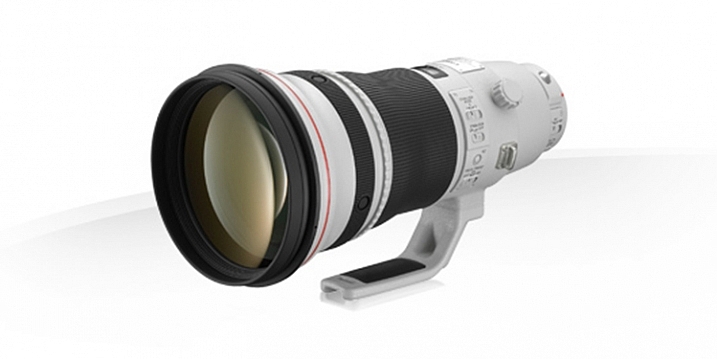
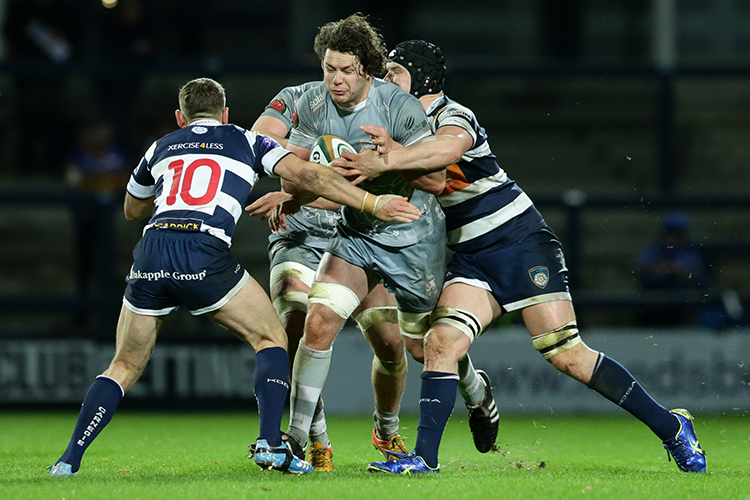
Being a sports photographer, covering things ranging from soccer (football) and rugby, to horse racing, I often have the Canon 400mm f/2.8L IS II USM on one of my camera bodies. It’s this lens’ focal length and fast aperture that is most helpful. I love this lens for its image quality and performance, but also its versatility.

Fig 12

Image courtesy of Canon.

So let’s have a look at the specs of this lens:

  • Focal length: 400mm (560mm APS-C approximate)
  • Maximum aperture: f/2.8
  • Maximum diameter x length: 163mm x 343mm (6.41 x 13.50″)
  • Weight: 3.85 kg (8.48 lbs)
  • Image stabilized? Yes, four stops
  • Minimum focusing distance: 2.7m (8.85′)
  • Weather sealed: Yes

PROS

Ideal Sports Lens

The 400mm focal length of this lens is ideal for many field based sports such as soccer (football) and rugby as it’s not too long, such as a 500mm for example, but at the same time it’s gives more pull than a 300mm. Its fast f/2.8 aperture is very handy when photographing in low-light situations, such as at night matches where the light is often quite low, as it allows me to use a lower ISO and still be able to maintain a shutter speed that is fast enough to freeze the action. This maximum aperture is also ideal to nicely isolate the subject from a busy background and make them pop more. Although I don’t always shoot at f/2.8 (generally hovering around f/3.5-f/4) having the ability to use f/2.8 is quite handy.

As far as focussing speed goes, this lens is blazingly quick and spot-on accurate, especially when coupled to a 1D X, for example. It easily locks on to a subject without any search or lag whatsoever.

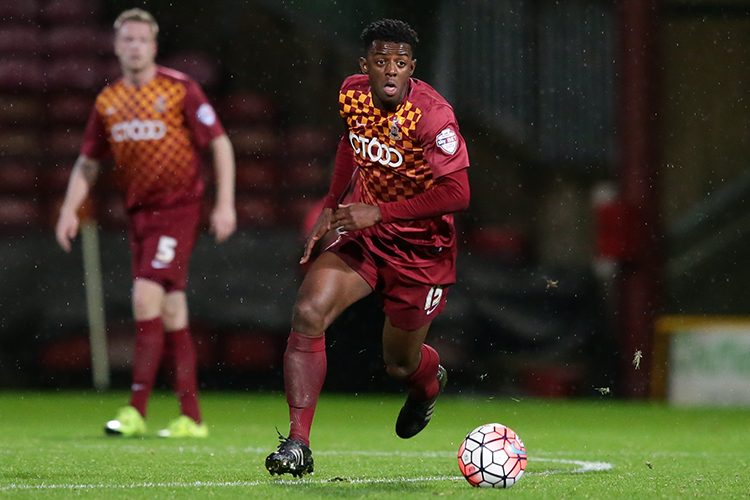
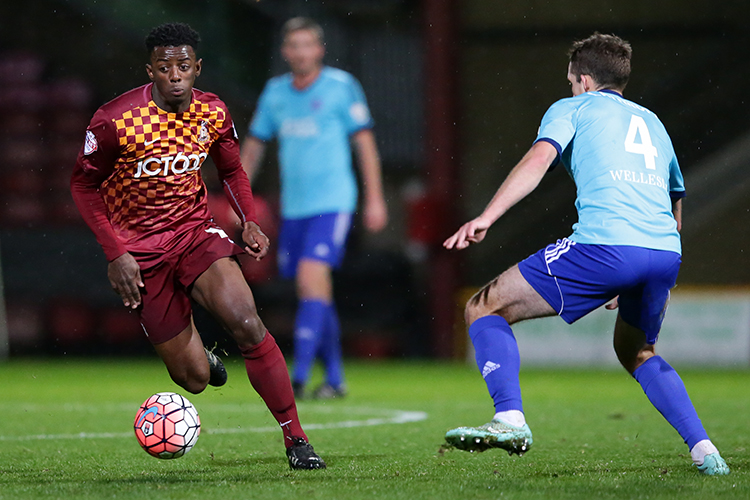
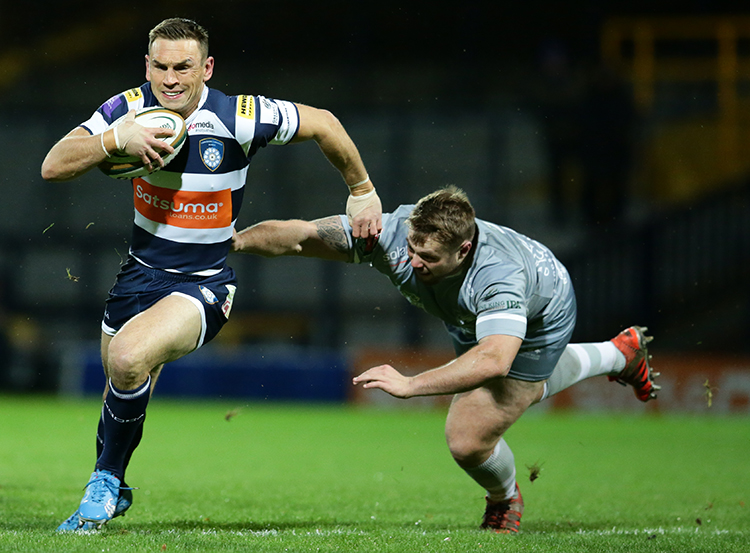
In the following images, the 400mm focal length has been fantastic at pulling the subject in closer than what a 70-200 or 300mm for example, would be able to offer. These images have still been cropped, but not as much as would be needed if I had used a shorter focal length.

© Daniel Smith / Getty Images.

© Daniel Smith / Getty Images.

© Daniel Smith / Getty Images.

© Daniel Smith / Getty Images.

Versatility

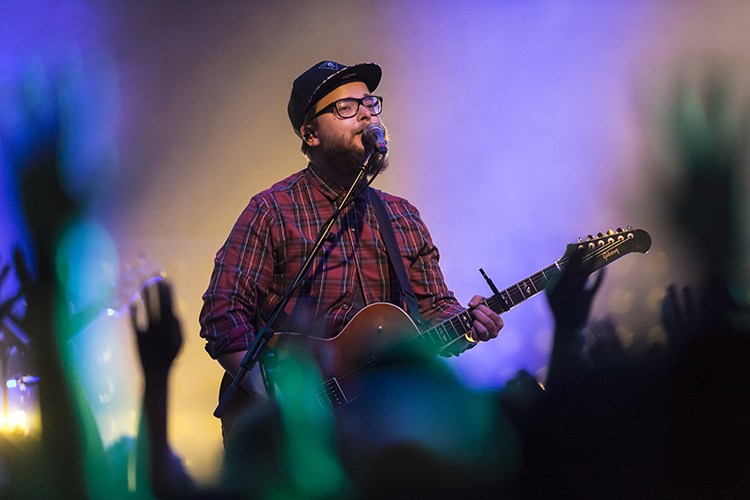
Being quite heavy and long, with no zoom, you may think that this lens would only be suited to use on the sidelines of a sports field, attached to a monopod. However, this lens is much more versatile than that. Being the series two version of this lens, it is significantly lighter than its predecessor. This reduction in weight means that I am now able to use this lens hand-held (if I’m using it for extended period of time, I do use a monopod; it’s not that light!) which opens up more options. For example, I have photographed live concerts with this lens; a lens that is rarely used because of its long focal length. But it’s this focal length, coupled with an f/2.8 aperture, that I love. Photographing through the crowd is fantastic, as I am able to create abstract shapes through the silhouettes created by the audience, and use them to frame my subject.

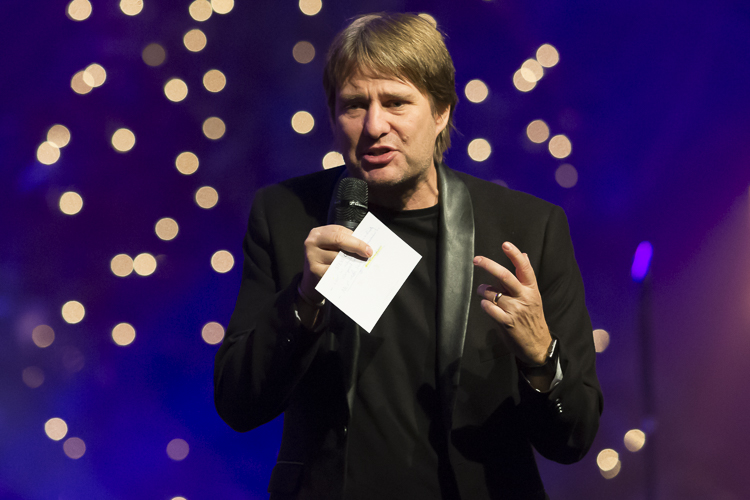
The longer focal length can also be great when covering conferences, as I am able to photograph further back. This is especially helpful if the speakers are on a stage, as standing further back will reduce the angle in which you look up, and enable you to reduce the distortion that looking up can cause.

Fig 3

This was taken from further back. The speaker was on a stage. By standing back I was able to photograph the speaker and be closer to his level. The aperture also provided some great bokeh with the lights in the background.

Fig 1

400mm, 1/500sec, f/3.2 ISO 6400. The singer raising her hand is made stronger by the abstract hand being raised by the fans.

Fig 2

400mm, 1/500sec, f/3.5 ISO 6400. Shooting through the fans with their hands in the air adds some great foreground interest to this image.

In addition, its fast f/2.8 aperture lends itself to use with teleconverters if extra reach is needed. When adding one, you multiply the aperture and focal length by the strength of the teleconverter; so if you are using a 2x, it would make this lens an 800mm f/5.6. And because its image quality is so good, the degradation to image quality when using converters isn’t really noticeable with this lens. Its AF also does not really take much of a hit, either. So for the price of a couple of teleconverters, I potentially have three lenses in one:

  • A 400mm f/2.8 as it is
  • A 560 f/4 with a 1.4x teleconverter
  • a 800 f/5.6 with a 2x teleconverter

CONS

Cost

This lens is not the cheapest lens on the market; Amazon has it listed at $ 9,999 USD, so this lens is definitely not something many photographers would consider purchasing.

An alternative to this would be the Canon 400mm f/5.6L USM which sells for a much more affordable $ 1,199 USD. The biggest drawback with that lens, however, is its maximum aperture of f/5.6, which would not be very useful in low-light situations, where a wider aperture is much more beneficial.

Image courtesy of Canon.

Image courtesy of Canon.

Size

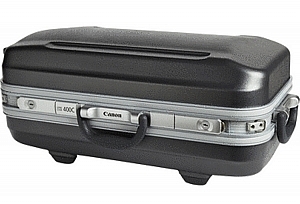
This isn’t the smallest lens either, and you will generally be very noticeable with it. Using this as a street photography lens would not be ideal, and would make you quite a target! You will also need quite a large bag to carry this in, although it does come with its own hard-case as seen here.

Weight

Even though this is the series two, and much lighter that its predecessor, at nearly 4kg (almost 8.5 pounds) this is definitely not a light lens! You will need a monopod with this lens if you intend to use if for long periods of time. Transporting it also requires quite a large bag; a roller bag being ideal as you don’t have to carry it. I transport all of my equipment in the one bag generally – a ThinkTank Photo Airport Security V2.0 roller bag. This makes carrying not only this lens, but all of my equipment much easier, and saves injuring my back.

ALTERNATIVES

This lens is not for everyone, primarily because of its high cost. If you would love to have one of these in your kit but don’t have the finances available, going second hand is an option. A used 400mm f/2.8L IS USM (non-Series II) is still a fantastic lens and can be found relatively (compared to the new version) cheaply at around $ 4,000-$ 5,000 USD.

If that’s still pushing the financial friendship a little consider these:

  • Canon 100-400mm f/4.5-5.6L IS II USM at $ 2,099 USD (or the original for $ 1389)
  • Canon 400mm f/5.6L USM at $ 1,149 USD
  • Or the many offerings from Sigma, Tamron and Tokina which have the 400mm focal length covered

CONCLUSION

While this is the heaviest lens it my kit, the image quality and performance from it is unmatched, and definitely make it worthwhile carting around. With a little practice using a prime super-telephoto, you can create some striking images that you just cannot achieve with shorter focal lengths. The large aperture and the bokeh it produces at 400mm is dreamy, too!

I really enjoy using this lens in areas that it typically would not be used. It doesn’t always work in those situations, but is a lot of fun nonetheless. Do you have a long telephoto lens? What do you shoot with it? Please share your thoughts in the comments below.

amzn_assoc_placement = “adunit0”;
amzn_assoc_enable_interest_ads = “true”;
amzn_assoc_tracking_id = “dpsgeneral-20”;
amzn_assoc_ad_mode = “auto”;
amzn_assoc_ad_type = “smart”;
amzn_assoc_marketplace = “amazon”;
amzn_assoc_region = “US”;
amzn_assoc_linkid = “59b2c6e145b8854217845ac445c9a2b8”;
amzn_assoc_emphasize_categories = “13900861”;
amzn_assoc_fallback_mode = {“type”:”search”,”value”:”Digital Cameras”};
amzn_assoc_default_category = “Photo”;

googletag.cmd.push(function() {
tablet_slots.push( googletag.defineSlot( “/1005424/_dPSv4_tab-all-article-bottom_(300×250)”, [300, 250], “pb-ad-78623” ).addService( googletag.pubads() ) ); } );

googletag.cmd.push(function() {
mobile_slots.push( googletag.defineSlot( “/1005424/_dPSv4_mob-all-article-bottom_(300×250)”, [300, 250], “pb-ad-78158” ).addService( googletag.pubads() ) ); } );

The post Writer’s Favorite Lens – the Canon 400mm f/2.8 by Daniel Smith appeared first on Digital Photography School.


Digital Photography School

 
Comments Off on Writer’s Favorite Lens – the Canon 400mm f/2.8

Posted in Photography