RSS
 

Posts Tagged ‘Canon’

Canon introduces global shutter CMOS sensor with improved dynamic range

01 Sep

Canon has announced a global shutter CMOS sensor with a re-designed pixel structure aimed at boosting dynamic range. Using global shutter presents a clear benefit for the sensor’s videography applications, as it doesn’t suffer from the distortion effects that a standard ‘progressive scan’ sensor does when capturing fast-moving subjects.

However, global shutter designs have tended to offer less dynamic range than their conventional counterparts. Canon says that the sensor’s drive system (the way it’s read out) increases the amount of light the sensor can capture before overexposing. This is combined with a more efficient pixel structure and ‘optimized internal configuration’ to reduce noise and increase sensitivity. The result should be improved dynamic range, though it’s not clear how this improved performance will compare with traditional chips of the kind that exhibit rolling shutter.

Canon says it will explore use of the chip in measurement and industrial applications, and consider applications in video production. No details of the sensor’s size or resolution were given.

Press release:

Canon develops global shutter-equipped CMOS sensor that achieves expanded dynamic range through new drive method

TOKYO, August 31, 2016—Canon Inc. today announced that it has developed a new CMOS sensor equipped with a global shutter function that, because it exposes all of the sensor’s pixels at the same time, enables the capture of distortion-free images even when shooting fast-moving objects. Employing a new signal-readout drive system and new pixel structure that significantly expands the full well capacity and reduces noise, the sensor contributes to high-image-quality video capture by making possible the realization of a wide dynamic range.

Distortion-free image capture when shooting fast-moving objects

Standard CMOS sensors make use of the rolling shutter method, which sequentially exposes the pixels one row at a time. Because rolling shutters can create slight discrepancies in signal-readout timing depending on the location of the pixel, images of fast-moving objects may appear distorted and flash photography may result in the occurrence of the flash band phenomenon, in which the upper and lower portions of images display different levels of brightness. Because Canon’s newly developed CMOS sensor employs a global shutter, when shooting such fast-moving objects as a rotating propeller or a speeding train, subjects are able to retain their proper form to create distortion-free images. Enabling the confirmation of object shapes with a high degree of accuracy, the sensor offers potential benefits in industrial applications, including as a sensor for use in inspection cameras.

Wide dynamic range realized through new proprietary drive method and pixel structure

When the newly developed CMOS sensor converts light into electrical signals and stores the signal charge in memory, the new drive system achieves a significant expansion in full well capacity. Also, because it employs a structure that efficiently captures light and each pixel incorporates an optimized internal configuration, the sensor makes possible increased sensitivity with reduced noise. The expanded full well capacity, realized through the sensor’s new drive system, and substantial reduction in noise, enabled by the new pixel structure, combine to deliver a wide dynamic range, facilitating the capture of high-image-quality, high-definition footage even when shooting scenes containing large variances in brightness.

Canon will explore various industrial and measurement applications for the newly developed CMOS sensor and consider deploying it in the field of video production for cinema production applications, TV dramas, commercials and more.

Articles: Digital Photography Review (dpreview.com)

 
Comments Off on Canon introduces global shutter CMOS sensor with improved dynamic range

Posted in Uncategorized


Putting Image Microadjust to the test on the Canon 5D Mark IV

30 Aug

One of the most discussed features of the Canon EOS 5D Mark IV is Image Microadjust. This uses the slight difference in perspective between the left and right-facing halves of the split ‘dual’ pixels to fine-tune the effective focus point of the images.

Like everyone else, we were interested to see what degree of refocusability this gave.

If you’re wondering: ‘will this let me correct which eye my portrait is focused on?’ The answer is a resounding ‘no’. Indeed, even if the question is: ‘can I shift the focus back from the eye lashes to get the iris sharp,’ the answer isn’t much more positive.

Dual Pixel Image Microadjustment

We set up the 5D Mark IV with EF 35mm F1.4L II USM at F1.4, set up at approximately 25x focal length distance from our LensAlign target. The Dual Pixel Raw file was then processed in Digital Photo Professional (DPP) to see how much the maximum backward and forward adjustments could move focus.

+5 (Max backward adjustment) 0 (No adjustment) -5 (Max forward adjustment)

AF (Lens) Microadjustment

For comparison, here’s the amount of adjustment that can be achieved using AF microadjustment – the traditional method for calibrating your lens to your body to correct back/front-focus issues. The rollover starts at +1 as this is the degree of adjustment needed by this lens on this body.

 +20  +10  +3  +2  +1  0  -1  -2  -3  -10  -20

Real-world difference

To demonstrate the real-world impact image microadjust might have on a traditional head-shot portrait, we shot Carey with an EF 85mm F1.8 at F1.8.

This portrait was very slightly front focused, so we tested the degree to which it can be refocused, backwards. For each of the adjustments, ‘Strength’ was set to 10 to maximize the input from one set of pixels.

+5 (Max backward adjustment) 0 (No adjustment) -5 (Max forward adjustment)

Interestingly, it appears the images become noticeably softer when you apply forward or backward adjustment, which may mask some of the advantages of the focus shift (there’s a chance that slightly better-looking results will be possible if you apply higher levels of sharpening to the microadjusted images). However, the degree of correction we’re seeing is so small that we wonder whether it’s worth the additional effort of having to incorporate the DPP software into your workflow, especially given the relatively long opening times required for each image, even on a fast computer. Or the doubling in file size.

Overall, traditional ‘AF microadjustment’ is a much more powerful tool for achieving pinpoint sharpness and ensuring any particular lens is properly calibrated to your body. Dual Pixel Raw’s primary value, in this particular incarnation, is questionable, as it will only be useful for very minor focus shifts, rather than as a general tool for correcting focus error. That said, the technology itself is promising, and we hope to see more capable future iterations as Canon iterates on the technology.

Articles: Digital Photography Review (dpreview.com)

 
Comments Off on Putting Image Microadjust to the test on the Canon 5D Mark IV

Posted in Uncategorized


Canon EOS 5D Mark IV added to studio scene comparison

30 Aug

As soon as our Canon EOS 5D IV test unit arrived we put it straight to work, both out and about in Seattle and in the studio. The EOS 5D IV has just been added to our studio test scene comparison tool, so you can easily compare it to its peers. Our dynamic range test results will be following shortly.

For now, check out how the EOS 5D IV compares to its peers and competitors in our studio by clicking on the link below.

Canon EOS 5D Mark IV studio test scene

*Raw images have been processed with an early beta build of Adobe Camera Raw. Image quality may not represent the final version of the plugin, but is likely to be close.

Articles: Digital Photography Review (dpreview.com)

 
Comments Off on Canon EOS 5D Mark IV added to studio scene comparison

Posted in Uncategorized


Canon EOS 5D Mark IV real-world sample gallery

29 Aug

We’ve only had the 5D Mark IV for a couple days, but that hasn’t stopped us from taking it out for a bit of shooting. Take a look at some sample images from Canon’s latest full-frame DSLR.

*Raw conversions have been performed with a very early beta build of Adobe Camera Raw. Image quality may not represent the final shipping version.

Articles: Digital Photography Review (dpreview.com)

 
Comments Off on Canon EOS 5D Mark IV real-world sample gallery

Posted in Uncategorized


FotodioX Lens Adapter – How to Put Your Canon EF Lens on Your Sony E-Mount Camera

29 Aug

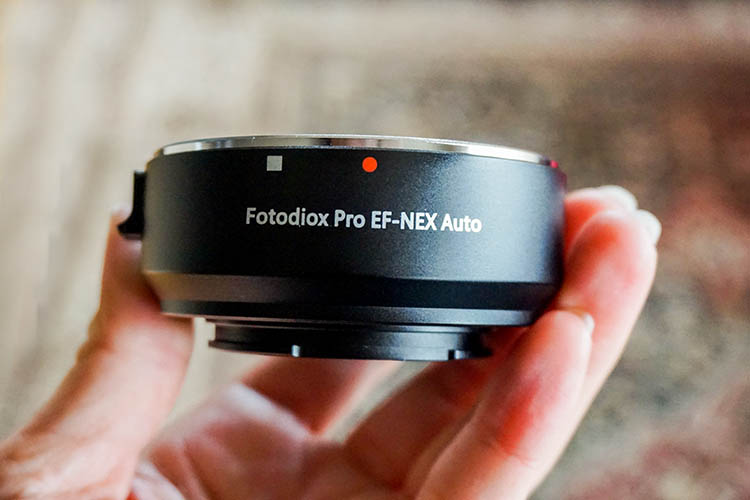
One of the big hurdles for DSLR camera owners considering the switch to mirrorless, is the notion of having to buy brand new lenses to accompany their new purchase. While it’s ideal to have brand name lenses that match your camera body, it’s not at all necessary, thanks to third-party lens makers and lens adapters. This article discusses the latter option, specifically, a lens adapter that allows just about any Canon EF lens, to be used with a Sony E-Mount camera.
ony Canon Lens Converter

My Camera Background

As a corporate event and food photographer, the Canon 5D Mark III, plus an array of Canon zoom lenses and a handful of primes, are my go-to choices for professional photo work. However, the desire to carry a smaller camera while traveling casually, led to my recent purchase of a Sony a6300 camera, my first investment in a mirrorless system. While I did opt for a Sony 16-50mm kit lens and a 20mm f/2.8 prime lens, I wasn’t financially ready to invest in any more Sony brand lenses. Instead, research and recommendations from other fellow photographers led me to purchase a lens adapter, which promised the ability to use my existing Canon EF lenses with my new Sony E-Mount camera body.

If you’re in a similar position, where you’ve accumulated a collection of DSLR lenses and are considering adding the Sony a6300 to your kit, this article is for you!

ony Canon Lens Converter

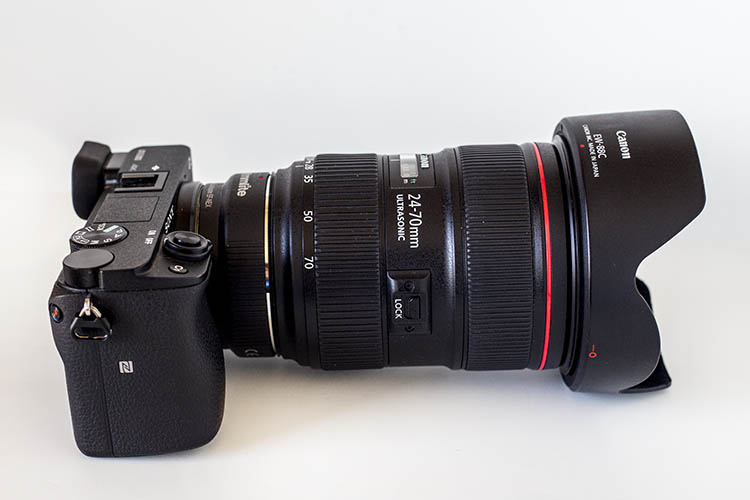
Sony a6300 body with a Canon 24-70mm f/2.8 lens, mounted using the Fotodiox adapter.

Lens Adapter Options

Third-party brands have already hopped on the lens adapter train, and there are quite a few options available, but two main ones that came up in research were the Metabones Smart Adapter IV and the FotodioX AF Adapter. At first glance, both options seemed comparable in their offerings:

  • Compact, lightweight, all-metal design.
  • Allows for automatic focus and aperture control from the Sony E-Mount camera body.
  • Infinity focus allowed if needed.
  • Removable tripod mount included to help distribute the weight.

The main difference between the two products came down to price: the Metabones version is priced at $ 385.99, while the FotodioX option is considerably cheaper at just $ 99.99. In the end, the price was the determining factor, and I went for the FotodioX lens adapter.

ony Canon Lens Converter

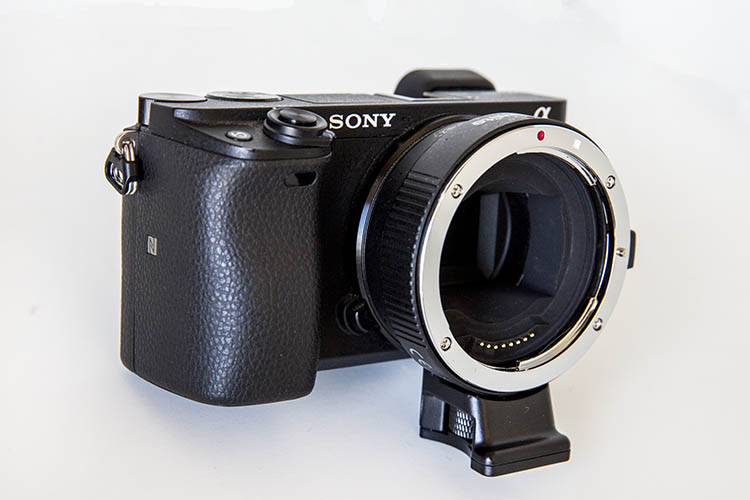
Sony a6300 with the FotodioX AF Adapter attached.

How did it perform?

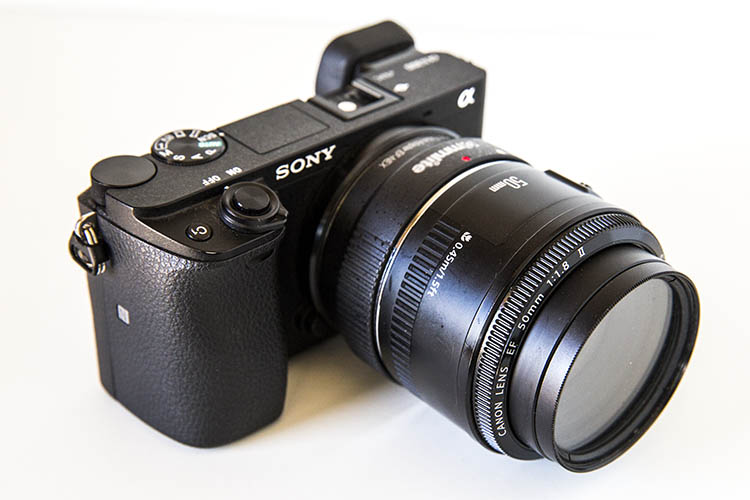
The first thing to note about using an adapter is how it will impact the overall heaviness, bulk, and appearance of your system. The FotodioX adapter itself is truly compact, and isn’t much larger than the Sony a6300 kit lens. As a result, it looks like a natural complement to the a6300 when it’s connected. Adding on Canon EF lenses changes the look and feel of the a6300, depending of course, and which lenses are paired. Small, lightweight, prime lenses such as the Canon 50mm f/1.8 don’t add a lot of bulk to the camera, and also look like a natural fit.

ony Canon Lens Converter

Sony a6300, FotodioX AF Adapter, and Canon 50mm f/1.8 lens.

However, adding larger zoom lenses such as the Canon 24-70mm f/2.8 definitely make the camera more front-heavy, to the point that it makes sense to grip the rig by the lens rather than the camera body. Still, the rig is considerably lighter than pairing the same Canon lenses with a DSLR such as the 5D Mark III.

ony Canon Lens Converter

Apart from aesthetics, the adapter actually performed surprisingly well! There are many reports of adapters causing autofocus to be either painfully slow, or lost altogether. While autofocus was not as snappy and accurate as it was using a Sony brand lens, the a6300 was still decently responsive, even with the FotodioX adapter and a Canon EF lens attached. If autofocus wasn’t working properly, which tended to happen for close-range shots, it was easy to switch the lens to manual focus and still capture a photo. Image quality was also tack-sharp, here are some image examples:

ony Canon Lens Converter

ony Canon Lens Converter

ony Canon Lens Converter

ony Canon Lens Converter

ony Canon Lens Converter

ony Canon Lens Converter

Overall thoughts

Using a lens adapter isn’t a perfect solution. The lagging autofocus was fine for casual use, but eventually became more noticeable and cumbersome when trying to shoot anything that moved. I’d hesitate to rely on an adapter when shooting something where quick autofocus mattered. It also felt like a pretty big tradeoff to not be able to take full advantage of what Sony purports to be the “world’s fastest autofocus” in the a6300. But other than that, the ability to use my existing DSLR lenses with a new camera body made by another manufacturer is a convenient luxury.

Have you tried a lens adapter before? What was your experience like?

googletag.cmd.push(function() {
tablet_slots.push( googletag.defineSlot( “/1005424/_dPSv4_tab-all-article-bottom_(300×250)”, [300, 250], “pb-ad-78623” ).addService( googletag.pubads() ) ); } );

googletag.cmd.push(function() {
mobile_slots.push( googletag.defineSlot( “/1005424/_dPSv4_mob-all-article-bottom_(300×250)”, [300, 250], “pb-ad-78158” ).addService( googletag.pubads() ) ); } );

The post FotodioX Lens Adapter – How to Put Your Canon EF Lens on Your Sony E-Mount Camera by Suzi Pratt appeared first on Digital Photography School.


Digital Photography School

 
Comments Off on FotodioX Lens Adapter – How to Put Your Canon EF Lens on Your Sony E-Mount Camera

Posted in Photography


Canon EOS 5D IV: What you need to know

28 Aug

Canon EOS 5D IV: What you need to know

It’s been more than four years since the launch of the Canon EOS 5D Mark III, and just head of this year’s Photokina trade show in Cologne we finally have a successor: the EOS 5D Mark IV.

While externally similar to the 5D III, and the higher-resolution 5DS/5DS R, the new EOS 5D Mark IV offers some significant internal improvements. We got our hands on a pre-production camera recently, and in this slideshow we’ll be giving you a quick overview of the key features. 

The EOS 5D Mark IV will come in three kits: body only ($ 3499), with the 24-70 IS USM lens ($ 4399) or with the 24-105 IS II USM lens ($ 4599).

Canon EOS 5D IV: What you need to know

The Canon EOS 5D Mark IV offers a roughly 30% increase in pixel count over its predecessor, and sits midway in terms of resolution between the EOS 5D III and the EOS 5DS/R, currently ‘best in class’ at 50MP. Nikon’s current ‘resolution’ flagship, the 36MP D810, offers a few more pixels but practically speaking the difference between 30MP and 36MP is likely to be pretty much academic.

The 5D Mark IV’s native ISO sensitivity span extends a touch higher than that of the EOS 5D III, covering ISO 100-32000. Its extended ISO sensitivity span, however, is identical to that of its predecessor, at 50-102400. Both cameras offer greater nominal low light sensitivity than the Nikon D810, which is capped at ISO 12800 natively, and can be extended to 51200.

Canon EOS 5D IV: What you need to know

New (and currently exclusive) to the EOS 5D IV is what Canon is calling ‘Dual Pixel Raw’. This mode uses the sensor’s Dual Pixel photo sites (more on that below) to effectively create two 30MP files from a single exposure. The resulting file can be adjusted in Canon’s Digital Photo Professional Software to slightly shift the point of critical focus.

The technology behind this feature is complex – it isn’t light field imagery, although the user experience is similar – and we’ll be digging into it more when we receive a fully reviewable camera.

Canon EOS 5D IV: What you need to know

Something old, something new, something borrowed… the EOS 5D Mark IV’s AF system is very closely related to that of the EOS 5D III, which itself inherited the 61-point AF array from the (then) flagship EOS-1D X. New in the EOS 5D IV is the addition of Canon’s iTR (Intelligent Tracking and Recognition) system which incorporates data from a 150,000-pixel metering sensor, to assist subject recognition.

In theory this should make the 5D IV better at identifying and maintaining focus on moving subjects, but from our (admittedly limited) use so far it seems to offer roughly the same performance as the EOS 5DS/R. Which is to say: not bad, but not great. The EOS 5D IV might prove somewhat more useful for fast action photographers than its predecessor, but when it comes to tracking, the Nikon D810 probably still offers the most capable autofocus system in this class. Obviously though, this is something we’ll be testing as soon as possible.

Canon EOS 5D IV: What you need to know

One key area where the EOS 5D IV outshines the D810 is autofocus in live view and video. The Mark IV’s Dual Pixel AF system brings rapid and consistently reliable focus in both modes, and unlike the flagship EOS-1D X II, the 5D IV can offer continuous tracking in live view mode, in addition to the incredible capable movie servo AF during video recording. Based on the time we’ve spent with preproduction Mark IV’s, we are very impressed with just how responsive the Dual Pixel system is.

By comparison, the EOS 5D III’s contrast-detection live view and video AF system is slow, prone to hunting, and cannot offer any kind of continuous focusing. The same applies to the D810, which offers a similarly basic contrast-detection autofocus system in these modes.

Canon EOS 5D IV: What you need to know

As far as handling is concerned, the EOS 5D IV offers a broadly similar experience to its predecessor. This is simple common sense on Canon’s part, but the new camera isn’t just a re-heated version of the same old 5D-series ergonomics. For one thing, the 5D IV features a touch-sensitive, 3.2″ rear screen which, unlike the EOS-1D X II, is tightly incorporated into all key areas of the camera’s feature set. 

From touching to focus in live view and video to quickly tapping to zoom into images after a shoot, the EOS 5D IV’s touchscreen makes a real – and very positive – difference to the camera’s handling compared to both the EOS 5D III and also competitive cameras like the Nikon D810 and Sony a7R II.

Canon EOS 5D IV: What you need to know

In classic Canon style, for all of the brand new features that the EOS 5D IV brings to the table, it inherits a few, too. One of the more welcome additions is an EOS 7D II-style AF area selection button, just below and to the right of to the AF joystick on the rear of the camera. As with the 7D II, this button can be customized to fulfill one of various other functions, depending on the preferences of the photographer.

Canon EOS 5D IV: What you need to know

Hiding inside that comfy grip are dual slots for SD and CompactFlash media. As usual, media can be configured so that when two cards are installed, one acts as overflow storage, backup storage, or can be dedicated to either stills or video. 

That molding line on the EOS 5D Mark II’s pentaprism might look like the camera boasts a built-in flash, but it doesn’t. The very top of the pentaprism is polycarbonate, to accommodate the requirements of built-in WiFi and GPS. The EOS 5D IV is fully weather-sealed, and when paired with one of Canon’s L-series lenses, it should withstand shooting in tough conditions.

Canon EOS 5D IV: What you need to know

There are plenty of holes in the EOS 5D IV, but fortunately they’re physical, not figurative. As well as microphone and headphone monitoring sockets you’ll also find HDMI out, USB 3.0 and a conventional flash sync socket. Just under our hand model’s thumb is the port for a wired remote shutter release.

Speaking of video, the EOS 5D Mark IV becomes only Canon’s third DSLR to offer 4K video capture, in addition to a solid HD video feature set. As we’ve come to expect from 4K-capable DSLRs there is a crop factor at play in 4K video mode, though, and it’s fairly aggressive at around 1.7X – somewhat more aggressive than Super 35mm format.

Canon EOS 5D IV: What you need to know

Neither the EOS 5D III nor Nikon D810 offer 4K, of course, and the EOS 5D IV’s combination of high-resolution video, full-time touchscreen interface and Dual Pixel AF make it – at least on paper – the most capable full-frame DSLR for video at this point in time.

Clean HDMI out is possible, not for 4K. Like the EOS-1D X Mark II, 4K recording is only possible in the highly inefficient Motion JPEG format, but according to Canon, this is deliberate, as it offers easy stills extraction from a 4K timeline – essentially enabling 30 fps 8MP capture (assuming favorable shooting conditions).

The Canon EOS 5D Mark II uses the very familiar LP-E6N battery, rated at 900 shots per charge (CIPA).

Canon EOS 5D IV: What you need to know

A new dedicated grip, known as the BG-E20 ($ 349), doubles your battery life and offers additional controls for shooting in the portrait orientation.

Canon EOS 5D IV: What you need to know

The EOS 5D IV is launched alongside a brand new 24-105mm F4 IS L II USM kit zoom, and a Mark III version of the 16-35mm F2.8 (pictured above). These lenses retail for $ 1099 and $ 2199 respectively, and both are scheduled for October availability.

Canon EOS 5D IV: What you need to know

Compared to its predecessor, the EOS 5D IV is improved in virtually every way. Compared to the EOS 5DS/R, while the Mark IV can’t quite match their resolving power, it outpaces them in terms of speed, and of course a much richer video feature set.

Nikon’s D810 is the EOS 5D Mark IV’s most obvious competitor, but although it’s been on the market for quite some time, it’s still very competitive in several areas. Where the EOS 5D IV scores over the D810 is video specification (obviously) and some aspects of handling. Thanks to Dual Pixel AF, the EOS 5D IV much more fun to use in video and live view modes, but the addition of a touchscreen makes some operations – like image review – quicker and easier than they are with the D810’s more traditional button-based ergonomics. 

Let us know what you think of Canon’s new EOS 5D Mark IV in the comments.

Articles: Digital Photography Review (dpreview.com)

 
Comments Off on Canon EOS 5D IV: What you need to know

Posted in Uncategorized


Canon EOS M10 real-world samples

27 Aug

The Canon EOS M10 is the most beginner-friendly camera of that manufacturer’s mirrorless family, doing away with many physical controls and embracing touchscreen functionality. Its 18MP APS-C sensor, built-in Wi-Fi and compact size help make it a compelling go-everywhere camera, especially when you add Canon’s svelte 22m F2 to the mix.

We’ve had it on hand for strolls through the neighborhood, shows in dim bars and in the stands watching some world-class tennis. Take a look at the samples we’ve gathered so far.

Canon EOS M10 real-world samples

Articles: Digital Photography Review (dpreview.com)

 
Comments Off on Canon EOS M10 real-world samples

Posted in Uncategorized


Don’t get ahead of yourself: Canon EOS 5D Mark IV rolling shutter test

27 Aug

Much of the initial concern about the EOS 5D Mark IV’s video has been about its substantial 1.64x crop (relative to the full width of the sensor, 1.74x compared to the 3:2 region) and its use of the inefficient Motion JPEG compression system (which limits the ability to use SD cards with any dependability).

However, upon shooting with the camera we found it to have significant rolling shutter. We’ve demonstrated the effect alongside the EOS-1D X Mark II, which reads out its sensor fast enough to exhibit pretty low levels of rolling shutter, and the Sony a6300, which shows a relatively high level of rolling shutter.

Obviously we’ve panned faster than you ever sensibly would, to make the difference clearer. If you’re careful with the way you move the camera, this rolling shutter effect may not be too apparent however, for some kinds of shooting, it can be distracting.

Articles: Digital Photography Review (dpreview.com)

 
Comments Off on Don’t get ahead of yourself: Canon EOS 5D Mark IV rolling shutter test

Posted in Uncategorized


Canon offers SD card-shaped Wi-Fi adapter, EOS 7D II bundle

26 Aug

Canon has introduced a Wi-Fi adapter shaped remarkably like an SD card, designed to bring wireless connectivity to dual card slot cameras like the EOS 7D II and 5DS/R. The W-E1 adapter will be sold bundled with the EOS 7D II as well as separately, and will work with previously purchased 7D II and 5DS/R models once a firmware updated is applied.

Though it looks like an SD card, the W-E1 doesn’t include any storage, so the camera’s available CF card slot will need to be used. When used with the EOS 7D II the card can transfer stills and MP4 video files; with the EOS 5DS/R only still images can be transferred. 

The W-E1 will be available in early September for $ 50. A new Canon EOS 7D II kit with the W-E1 and the EF-S 18-135mm F3.5-5.6 IS USM lens will go on sale in October for $ 2,449; a body-only kit with the adapter will cost $ 1,849. Firmware to enable use of the card with previously purchased 7D II units will be available in early September, followed by one for 5DS/R owners will in November.

Press release:

CANON ANNOUNCES NEW CANON EOS 7D MARK II KIT FEATURING NEW WI-FI® ADAPTER FOR THE EASY SHARING OF IMAGES AND VIDEOS

New Bundle Also Includes Canon EF-S 18-135mm f/3.5-5.6 IS USM Lens

MELVILLE, N.Y., August 25, 2016 – Canon U.S.A., Inc., a leader in digital imaging solutions, announced today the new Canon EOS 7D Mark II Kit, featuring the new SD card-sized Wi-Fi® Adapter W-E1. This new Wi-Fi adapter, when placed in the camera’s SD slot, provides the EOS 7D Mark II with Wi-Fi capabilitiesi like easy transferring of images and MP4 videos as well as use of the Canon Camera Connect App for remote capture of still images via a compatible smartphone or tablet.ii

The Wi-Fi Adapter W-E1 will be sold with the EOS 7D Mark II body as well as sold separately, and can also be used with the EOS 5DS and 5DS R as well as previously purchased EOS 7D Mark II camerasiii. When used with EOS 5DS and 5DS R cameras, the Wi-Fi Adapter W-E1 functionality is limited to the transfer of still images only. The W-E1 will support 802.11 b, g and n using the 2.4 GHz band.

Additionally, for the first time the EOS 7D Mark II camera will be conveniently bundled with the Canon EF-S 18-135mm f/3.5-5.6 IS USM lens. This lens has been optimized for high-speed autofocusing when shooting stills and quiet and smooth zoom when shooting video. This is the first Canon lens equipped with Nano USM technology providing high-speed autofocus for shooting stills and silent, smooth autofocus when shooting video. The Canon EF-S 18-135mm f/3.5-5.6 IS USM Lens also provides up to four stops of optical image stabilization.

The new Canon EOS 7D Mark II Lens Kit is currently scheduled to be available in October 2016 for an estimated retail price of $ 2,449.00*, with the body-only version also currently scheduled to be available in October 2016 for an estimated retail price of $ 1,849*. The Wi-Fi Adapter W-E1 is scheduled to be available in early September 2016 for an estimated retail price of $ 50.00*. A firmware update to enable compatibility with the W-E1 for previously purchased cameras is currently scheduled to be available in early September 2016 for the EOS 7D Mark II camera and November 2016 for the EOS 5DS and 5DS R cameras.

For more information: http://www.usa.canon.com/

i The Wi-Fi Adapter W-E1 must be inserted into the available SD card slot. The W-E1 does not have storage and is not designed to record images. To record and store images, a CompactFlash card must be used in the dedicated CF card slot.

ii Compatible with iOS® versions 8.0/8.1/8.2/8.3/8.4/9.0/9.1/9.2/9.3, Android™ smartphone and tablet versions 4.1/4.2/4.3/4.4/5.0/5.1/6.0. Data charges may apply with the download of the free Canon Camera Connect app. This app helps enable you to upload images to social media services. Please note that image files may contain personally identifiable information that may implicate privacy laws. Canon disclaims and has no responsibility for your use of such images. Canon does not obtain, collect or use such images or any information included in such images through this app.

iii EOS 7D Mark II, EOS 5DS and EOS 5DS R cameras that have already been purchased separately require a firmware update to utilize the Wi-Fi Adapter W-E1.

* Availability, prices and specifications are subject to change without notice. Actual prices are set by individual dealers and may vary.

Articles: Digital Photography Review (dpreview.com)

 
Comments Off on Canon offers SD card-shaped Wi-Fi adapter, EOS 7D II bundle

Posted in Uncategorized


Canon introduces EF 16-35mm F2.8L III USM and EF 24-105mm F4L IS II USM L-series glass

26 Aug

$ (document).ready(function() { SampleGalleryV2({“containerId”:”embeddedSampleGallery_0777777920″,”galleryId”:”0777777920″,”isEmbeddedWidget”:true,”standalone”:false,”selectedImageIndex”:0,”startInCommentsView”:false,”isMobile”:false}) });

Coinciding with the announcement of the 5D Mark IV, Canon has introduced updates to two L-series lenses: the EF 16-35mm F2.8L III USM and EF 24-105mm F4L IS II USM. The 24-105mm F4L II offers improved image stabilization, claiming four stops to its predecessor’s three, and adds air sphere coating for better resistance to ghosting and flare. Two aperture blades have been added, totaling 10 now – arguably one more than it should have for pleasing sunstar rendition.

The third iteration of Canon’s 16-35mm F2.8L uses a large diameter GMO (glass-molded) dual surface aspherical lens. Like its predecessors the lens is water- and dust-resistant, and Canon claims the new lens boasts improved durability. We’ve seen some initial comparisons vs. the Mark II, and the Mark III clearly addresses one of its predecessors largest shortcomings – poor off-center performance – while arguably improving upon one of its most revered qualities: beautiful sunstars, now with 18 rays.

The EF 16-35mm F2.8L III USM will cost $ 2,199 and the EF 24-105mm F4L IS II USM will sell for $ 1099. Both lenses are scheduled for October availability.

From the press release:

New Canon EF Lenses and EOS Accessories
In addition to the new EOS 5D Mark IV DSLR, Canon is also introducing two EF-Series L-series lenses as well as a variety of EOS accessories. The new EF 16-35mm f/2.8L III USM Ultra-Wide Zoom Lens features a large diameter GMO dual surface aspherical lens and ground aspherical lens, f/2.8 aperture throughout the entire zoom range, fluorine coating, improved durability and is dust and water resistant. The new EF 24-105mm f/4L IS II USM Standard Zoom lens features an improved four-stop image stabilization as well as ghosting and flare reduction with air sphere coating. The Canon EF 16-35mm f/2.8L III USM Ultra-Wide Zoom Lens is scheduled to be available late in October for an estimated retail price of $ 2,199.00†† and the EF 24-105mm f/4L IS II USM Standard Zoom Lens is scheduled to be available in late October for an estimated retail price of $ 1,099.00††.

Additional EOS accessories include the Canon Battery Grip BG-E20, Canon Rain Cover ERC-E5S/E5M/E5L and Canon Protecting Cloth PC-E1. For more information about all these products and accessories, please visit: https://www.usa.canon.com/5D4Legend

††Availability, prices and specifications are subject to change without notice. Actual prices are set by individual dealers and may vary.

EF 16-35mm F2.8L III USM / EF 24-105mm F4L II USM specifications

  Canon EF 16-35mm F2.8L III USM Canon EF 24-105mm F4L IS II USM
Principal specifications
Lens type Zoom lens
Max Format size 35mm FF
Focal length 16–35 mm 24–105 mm
Image stabilization No Yes (4 stops)
Lens mount Canon EF
Aperture
Maximum aperture F2.8 F4
Minimum aperture F22
Aperture ring No
Number of diaphragm blades 9 10
Optics
Elements 16 17
Groups 11 12
Special elements / coatings 1 dual-surface aspherical, 1 aspherical + fluorine, Air Sphere, Sub-wavelength Structure coatings Fluorine and Air Sphere Coatings
Focus
Minimum focus 0.28 m (11.02) 0.45 m (17.72)
Maximum magnification 0.25× 0.24×
Autofocus Yes
Motor type Ring-type ultrasonic
Full time manual Yes
Focus method Internal
Distance scale Yes
DoF scale No
Physical
Weight 790 g (1.74 lb) 795 g (1.75 lb)
Diameter 89 mm (3.48) 84 mm (3.29)
Length 128 mm (5.02) 118 mm (4.65)
Sealing Yes
Colour Black
Zoom method Rotary (internal) Rotary (extending)
Power zoom No
Zoom lock No
Filter thread 82.0 mm 77.0 mm
Hood supplied Yes
Hood product code EW-88D EW-83M
Tripod collar No

Articles: Digital Photography Review (dpreview.com)

 
Comments Off on Canon introduces EF 16-35mm F2.8L III USM and EF 24-105mm F4L IS II USM L-series glass

Posted in Uncategorized