RSS
 

Posts Tagged ‘Camera’

Review: Rylo is a 360º camera done right

06 Jan
The Rylo camera captures a 360º spherical image. Its companion mobile app makes it possible to export standard HD video from anywhere in the image.

Over the past couple of years I’ve tried quite a few consumer-oriented 360º cameras, and while I’m generally excited about the future prospects of 360º photo and video, I’ve also been of the opinion that applications and technology need to improve before it really gets traction with consumers.

Part of my ambivalence towards 360º video stems from the fact that few of the cameras I’ve tried really do anything unique. Almost universally, they capture spherical video that requires a VR headset to view, or which requires the viewer to drag around an image to find the part of the scene they care about.

The Rylo Camera ($ 499) takes a different approach. Although it captures 360º photos and video, it does so with the idea that you can later select a region of the image from which to create a standard 16:9 HD video. It’s basically like an action cam that lets you decide where to point the camera after you’ve shot your footage.

It’s basically like an action cam that lets you decide where to point the camera after you’ve shot your footage.

On the hardware side of things, the Rylo looks much like any other VR or action camera. It has two fisheye lenses and records 4K spherical video or 6K spherical photos. The body is aluminum and feels very solid – much more so than most action cameras I’ve used. A small door provides access to the MicroSD card and battery, and a small display shows remaining battery and recording time.

However, it’s the software that makes the Rylo really interesting. Video is copied to your mobile device via the included cable, and the camera’s companion app provides numerous opportunities for getting creative.

Before you even begin working with your footage, the app applies automatic horizon leveling and image stabilization. You don’t even notice how effectively this works until you turn these features off, but once you do so it becomes apparent that this correction is really good.

This video shows the same clip with the Rylo’s image stabilization and horizon correction turned on (left) and turned off (right). It works very effectively.
Video by Dale Baskin

To begin editing a video, you simply open a clip and select your desired framing within the app. You could export your HD video at that point, but you would be ignoring the software’s best feature: the ability to direct the camera after the fact.

One way to do this is to tap and hold the screen, then select the option to ‘Look Here’. Doing so locks the camera at that position and creates a keyframe. It’s possible to create multiple keyframes at different locations throughout your clip, and the software will virtually tilt and pan as needed to transition between them.

Even better, you can let the software do the work for you. In addition to ‘Look Here’, there’s also a ‘Follow This’ option that locks onto a subject and tracks it, smoothly panning and tilting like a virtual camera on a gimbal. I found this feature surprisingly effective, and it produced very natural looking footage.

My friend Stu West offered to take the Rylo skiing with his family for a day. In this video we used the app’s Follow Me feature to track the skier down the hill. Stu pointed the camera straight ahead through the entire run; most of the camera movement is the result of virtual panning by the Rylo app.
Video by Stu West

If you want to see the world a bit differently, there’s also a ‘Tiny Planet’ view that shrinks the entirety of your world down into a small sphere.

In addition to motion control, the software also includes the ability to trim clips and perform basic corrections including highlights, shadows, vibrance, and tone (WB). It’s fairly basic, but enough that you can generally adjust the footage to your taste.

The biggest challenge I ran into when shooting video was adjusting my own behavior. I had a tendency to point the camera at my subject as it moved around, much like you would do with an action cam. That actually made editing a bit more difficult, so I had to learn to hold the camera still, then virtually change my camera direction later using the app.

This clip shows an example of the Rylo’s Tiny Planet mode. (Note: the camera records sound in this mode, but we chose not to include it.)
Video by Stu West

The Rylo can also be used for still photos, but I found the experience less satisfying. There’s no way to remotely trigger the shutter from your phone; instead, you have to physically press the shutter button, meaning that your hand is guaranteed to cover much of the photo. As with video, you can select your framing after the fact, but the largest image size is 1080p video resolution, though in practice resolution appears to be somewhat lower than that.

Of course, the Rylo is also a 360º camera that can be used to export spherical images or video. In that sense, it doubles as a VR cam if you want to share a VR experience.

Battery life is respectable. Rylo claims 60 minutes of continuous recording using the interchangeable battery, which is just about enough to fill a 64GB memory card, and based on my experience that seems about right.

The Rylo captures 6K spherical VR photos. It’s possible to export framed images at resolutions up to 1920×1080 pixels.
Photo by Dale Baskin

Speaking of memory, one thing you’ll need is a lot of free space on your mobile device. At its high quality setting, the camera records at a rate of approximately 1GB/minute, and your phone will need enough free space to copy all the footage.

As much as I enjoyed using the Rylo, it’s not perfect. The 1080p video files it exports are, in reality, somewhat lower resolution. That’s not surprising considering that total resolution for the entire spherical file is 4K. That said, it looks very good on a smartphone screen, so if you’re sharing to social media where people are likely to watch on a mobile device it will look fine.

…the camera records at a rate of approximately 1GB/minute, and your phone will need enough free space to copy all the footage.

It would also be nice if the camera were waterproof. The included ‘Everyday Case’ with handle is well designed and very effective, but if you want more protection you’ll need to spring for the ‘Adventure Case’ ($ 69).

The Rylo is a great example of a 360º camera done right. Rather than just capturing spherical video and expecting your audience to view it as such, it provides a set of tools that allow you focus in on telling your story, as well to share that story in a way that’s comfortable and familiar to most people. Sure, I wish the video quality were a bit better, but I’d likely choose the Rylo over many action cameras because it provides such an easy way to direct the action after the fact.

It’s also a reminder that there’s a lot of potential opportunity for 360º cameras if manufacturers are willing to think outside the box. Or, maybe I should say outside the sphere.

Articles: Digital Photography Review (dpreview.com)

 
Comments Off on Review: Rylo is a 360º camera done right

Posted in Uncategorized


Modular PITTA camera transforms into drone, action, and security cameras

04 Jan

$ (document).ready(function() { SampleGalleryV2({“containerId”:”embeddedSampleGallery_5360811256″,”galleryId”:”5360811256″,”isEmbeddedWidget”:true,”selectedImageIndex”:0,”isMobile”:false}) });

PITTA, a modular ball-shaped 13MP camera that transforms into a drone, is currently blasting its way through a campaign on Kickstarter. The small, sphere-shaped modular camera launched on the crowdfunding platform with a $ 50K goal, but as of this writing it has already raised well over a quarter million dollars.

Eyedea, the company behind PITTA, describes its product as a multi-purpose device:

It’s not just aerial, not just handheld, not just wearable or mountable, it’s all of these. It’s a complete system packed into a single device.

Here’s a quick intro video from the company’s Kickstarter:

In its most basic form, PITTA looks like a simple black sphere, which is the 200g/7oz camera body. The sphere-shaped body features a 13MP sensor, support for 4K/30fps recording, and “software image stabilization.” Additionally, the body contains various sensors including GPS/GLONASS, gyroscope, accelerometer, barometer, magnetometer, object detection and visual tracking hardware, and optical flow positioning sensors.

Joining that is an Action Cam Module, Charging Cradle, and Drone Module. When docked in the Charging Cradle, PITTA can be used as a stationary security camera or livestreaming camera.

When used with the Action Module, PITTA can be attached to a tripod or other mount and used as an action camera that supports burst shot, 60fps slow-motion recording, livestreaming, and time lapse, as well as direct sharing to the major social media platforms.

The Drone Module, meanwhile, transforms the camera sphere into a drone via a snap and twist-to-lock design. The resulting camera drone is controlled using a smartphone and companion app, which itself offers several operation modes. PITTA as a drone supports taking panoramas, hovering in place, orbiting around the operator, auto-following the operator, as well as a “Come Back Home” function, terrain awareness, auto-landing, and GPS. The slow-motion and time lapse functions aren’t available in drone mode.

$ (document).ready(function() { SampleGalleryV2({“containerId”:”embeddedSampleGallery_0862783015″,”galleryId”:”0862783015″,”isEmbeddedWidget”:true,”selectedImageIndex”:0,”isMobile”:false}) });

PITTA is being offered to Kickstarter backers who pledge $ 290 for a Kickstarter Exclusive Basic Kit or $ 320 for a Kickstarter Exclusive Full Package, though other pledge packages are also available. Shipments to backers are expected to start in May 2018, though as with any crowdfunding campaign, plans could change, so proceed with caution.

To learn more or pledge for your own, head over to Kickstarter by clicking here.

Articles: Digital Photography Review (dpreview.com)

 
Comments Off on Modular PITTA camera transforms into drone, action, and security cameras

Posted in Uncategorized


Google Camera mod brings Pixel 2 portrait mode to older devices

03 Jan
Portrait Mode on the Google Pixel 2

Google’s Pixel 2 comes with one of the best-rated smartphone cameras in the world, and is one of very few single-lens devices to offer a background-blurring, fake bokeh portrait mode. Unlike dual-lens setups, the camera uses machine learning and neural networking to generate a foreground-background segmentation on both front and rear cameras. On the rear, the Pixel 2 also uses depth data from the image sensor’s dual-pixel technology for this task.

Thanks to Charles Chow, developer of the Camera NX Google camera mod, the feature is now also available to users of the original Google Pixel as well as the Nexus 5X and 6P smartphones. Portrait mode was included in version 7.3 of the Camera NX app but, due to a lack of dual-pixel technology on older Google Android smartphones, uses the exclusively software-based approach of the Pixel 2’s front camera.

The developer says the functionality has so far only been tested on the Nexus 5X, although it should work on Nexus 6P and first generation Pixel phones as well. If you want to try Camera NX and the new Portrait Mode you can find all technical details and download links in Charles’ article on Chromloop.

Articles: Digital Photography Review (dpreview.com)

 
Comments Off on Google Camera mod brings Pixel 2 portrait mode to older devices

Posted in Uncategorized


Rock n Roll unveils handcrafted leather ‘Hendrix’ camera straps

03 Jan

Rock n Roll straps has launched The Hendrix Straps, a product line containing three handcrafted leather camera straps composed of between 52 and 64 individual leather pieces. The company bills its camera straps as ideal for DSLRs and mirrorless cameras, explaining that the leather is supple enough to wrap around a wrist in addition to draping around one’s neck.

The Hendrix camera strap features leather components that have been cut, threaded, and then stitched by hand, a process that takes more than two hours, according to Rock n Roll. Each strap is 24mm / 0.9in wide with two length options—100cm / 39in and 125cm / 49in—and three color options—Black, Red Dot Special Edition, and Cigar Brown.

The 100cm Hendrix strap (any color) is €120.00 (~$ 145 USD) excl. VAT, while the 125cm strap is €130.00 (~$ 156 USD) excl. VAT.

Articles: Digital Photography Review (dpreview.com)

 
Comments Off on Rock n Roll unveils handcrafted leather ‘Hendrix’ camera straps

Posted in Uncategorized


Camera Comparison of 3 Popular Nikon Models: D750 – D7100 – D5100

03 Jan

No matter which stage you are into the world of DSLR photography, often the big question comes. Which camera do you buy to start or progress your photography journey and get those creative juices flowing?

In this article, I will compare three widely popular Nikon cameras (the Nikon D750 24 MP FX body – $ 1499, Nikon D7100 24 MP DX body – $ 724, and the Nikon D5100 16 MP DX body – $ 189) of different capability levels and price points. It will give you practical insight into their image quality by using them in real-world shooting scenarios (landscape/social events/sports) that you may want to cover in your photography.

According to statistics from explorecams.com, these three cameras (as of 11 September 2017) rank in Nikon photo-count: D7100 first, D750 second, D5100 sixth. So indeed these are cameras trusted and used by Nikon shooters the world over.

This article is not a photography theory, camera specs, best settings, lenses, or camera technical reviews. There are excellent web resources for that and I do fully encourage you to check these out, both here on dPS and other sites. This comparison will give you real-life examples to see which camera may suit your needs, expectations, and wallet better.

All scenarios will have the following structure:

  • A description of the scene
  • Gear and settings used to ensure comparability
  • The output photographs
  • Summary

Landscape Scenario

The Scene

Most probably you will find yourself at some point outside, camera at hand, wanting to capture the beauty that you see around you. In southern Greece, the picturesque village of Planiteros, with its flowing streams and huge sycamore trees, is the perfect setting for our first scenario.

Gear and Settings

Reasonable companions to this type of photography are a wide angle lens, a tripod, and a remote. The Tokina 12-28 f/4 lens, the Sirui T-025X carbon fiber tripod and the Nikon ML-L3 remote were used. Using the Tokina, which is compatible with both full frame or FX (D750) and crop sensor or DX cameras (D7100 / D5100) allowed photographs of very similar focal lengths to be taken for comparison.

Nikon D5100, capable of handling this situation?

Aiming to give a slightly softer flow rendition of the stream, while maintaining ample depth of field, a longer exposure time and a narrower aperture were desirable. For all three cameras, sensible vibration reducing technique was applied for this type of shooting vision. Mounting the camera on a tripod, using a remote to trigger the shutter, and activating mirror lockup (available on D750 and D7100) or exposure delay (on the D5100, as mirror lockup is not available) are solid steps to getting a good quality landscape photo.

Aperture Priority mode (set at f/8), Matrix Metering, Auto WB, single autofocus mode (AF-S), single point focus, autofocusing on the same point using live view and using the base ISO for each camera (100 for the D750 and D7100, and ISO 200 for the D5100), were the settings applied to extract the best possible quality files from each sensor. Raw files were processed in Lightroom (LR) to produce similar JPGs.

The Landscape Photographs

Look at the photographs below and try to guess which camera produced which picture. The answer comes right after the photographs.
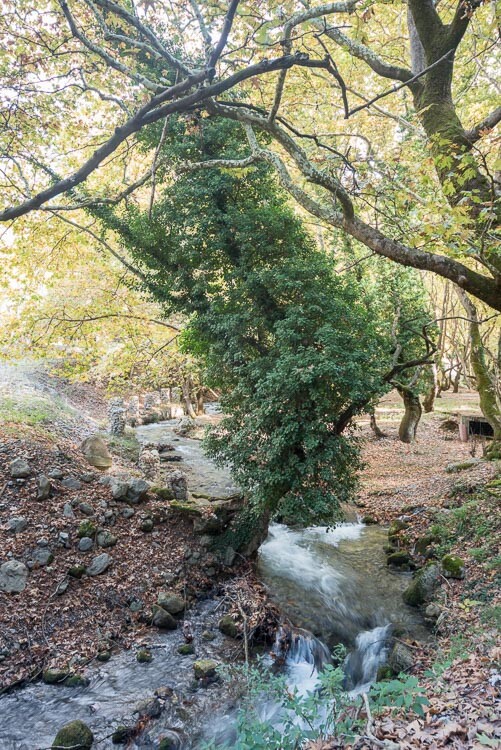
LAND Nikon D750 Nikon Camera Comparison of Three Popular Models: D750 - D7100 - D5100

LAND Nikon D5100 Nikon Camera Comparison of Three Popular Models: D750 - D7100 - D5100

LAND Nikon D7100 Nikon Camera Comparison of Three Popular Models: D750 - D7100 - D5100

Answer: 1) D750 (top), 2) D5100 (middle), 3) D7100 (bottom).

Summary Landscape

If you could not find an edge between one photo over another that makes two of us. I would be glad to hang 12×16″ print from any of them on my wall. Proper technique in this scenario is more important than the camera used and it creates a level playing field for all sensors.

Social Events Scenario

The Scene

Gatherings with friends and family are occasions where you want to grab a candid moment or the ambiance shot that will serve as a memento for many years. Good friends Nikos and Athina were kind enough to invite me and my wife over to their place for a glass of wine. This was the perfect occasion to compare the three cameras in a usual social setting.

Gear and Settings

Contrary to the landscape scenario’s contemplative and slower pace of shooting, social gatherings usually lend themselves more to a handheld, run and gun shooting style. So no particular gear other than the Tokina 12-28 f/4 lens was used here. While this is not a usual focal length for shooting indoors with people, when used from a sensible distance and towards the wider end it can serve the comparison between the three cameras.

Nikon D7100

Aperture Priority mode (at f/4), Matrix Metering, Auto WB, single autofocus mode (AF-S), single point focus, focusing through the viewfinder and using Auto ISO with no High ISO Noise Reduction applied, were the settings used to extract the best possible quality files from each camera.

Using Auto ISO has to do with my individual shooting style. In this scenario, it is actually the same as using ISO 1600 for D5100 and D7100 and ISO 3200 for D750. These are, in my experience, the highest ISO levels that each camera can handle (especially for straight out of camera JPGs) before noise becomes too obtrusive.

Both the out of camera JPGs and those made following similar processing of raw files in Lightroom are provided in the next section.

The Social Event Photographs

Let’s start with the camera JPGs. Which camera produced which photo will come right after both sets of pictures (camera JPGs and LR processed JPGs).

SOCIAL Nikon D7100 CAM Nikon Camera Comparison of Three Popular Models: D750 - D7100 - D5100

SOCIAL Nikon D750 CAM Nikon Camera Comparison of Three Popular Models: D750 - D7100 - D5100

SOCIAL Nikon D5100 CAM Nikon Camera Comparison of Three Popular Models: D750 - D7100 - D5100

And here are the LR processed counterparts in the same order.

SOCIAL Nikon D7100 LR Nikon Camera Comparison of Three Popular Models: D750 - D7100 - D5100

SOCIAL Nikon D750 LR Nikon Camera Comparison of Three Popular Models: D750 - D7100 - D5100

SOCIAL Nikon D5100 LR Nikon Camera Comparison of Three Popular Models: D750 - D7100 - D5100

Answer: 1) D7100 (top), 2) D750 (middle), 3) D5100 (bottom).

Summary Social Events

Again, as in the landscape scenario, you would be hard-pressed to find a winner here. Less than perfect focusing (front or back focus) or camera shake (due to a slow shutter speed) have a lot more impact than the camera model in such shooting environments (e.g. the domestic indoor lighting here).

Sports Scenario

The Scene

Photographing movements, be it your loved ones playing in the backyard or shooting any sport, can generate highly dynamic, catchy, and memorable photographs. Usually, I play football with my friends once a week. For the sake of this article, I put my football gear aside and grabbed my photo kit to shoot the sports scenario.

Gear and Settings

Depending on the sport and the venue, different lenses can be employed in your gear arsenal. The consensus seems to be that a telephoto zoom is an invaluable piece of kit for sports in general. A Tamron 70-300 f/4-5.6 lens was used for this test, as it is compatible with both FX and DX cameras. A Sirui P-224SR Carbon Fiber Monopod and a Manfrotto 410 Junior Geared Tripod Head were used to create the support platform.

Hand holding a DSLR camera with a lens attached is achievable for periods of time. However, when shooting sports, perhaps for hours, and consistently following the action as it unfolds requires more support. This monopod and head combination is working very well for me.

Nikon D750 really excels in this situation.

Usually, sports photography lends its self to shutter priority mode. Select at least a 1/500th of a second. Then take it up from there to freeze action as needed (unless panning is used, where perhaps even 1/60th or slower may be sufficient).

Unfortunately, in the available light conditions of this scenario, not even 1/20th was attainable with any of the three camera-lens combinations, while using reasonable ISOs as discussed before. To somewhat combat this, a minimum of ISO 3200 was used for all cameras. This pushed the limits of acceptable noise, but bought a few more precious tenths of seconds of speed.

With this important point in mind, Aperture Priority mode (varying between f/4 and f/5.6 across the zoom range), Matrix Metering, Auto WB, continuous autofocus mode (AF-C), Dynamic-area AF mode (d9 for comparability), autofocusing through the viewfinder and no High ISO Noise Reduction, were the settings used to extract the best possible quality files from each camera.

Both out of camera JPGs and JPGs following similar processing of raw files in Lightroom are shared in the next section.

Finally, to showcase how high ISO performance has evolved over the years, I will include a bonus JPG with Hi-2 (ISO 51,200) straight out of camera from the D750 (only cropped and lens profiled in Lightroom).

The photographs

First up the camera JPGs, then the LR processed ones. Which is which is shown at the end after both sets:

SPORTS Nikon D7100 CAM Nikon Camera Comparison of Three Popular Models: D750 - D7100 - D5100

SPORTS Nikon D5100 CAM Nikon Camera Comparison of Three Popular Models: D750 - D7100 - D5100

SPORTS Nikon D750 CAM Nikon Camera Comparison of Three Popular Models: D750 - D7100 - D5100

And here are the LR processed counterparts in the same order.

SPORTS Nikon D7100 LR Nikon Camera Comparison of Three Popular Models: D750 - D7100 - D5100

SPORTS Nikon D5100 LR Nikon Camera Comparison of Three Popular Models: D750 - D7100 - D5100

SPORTS Nikon D750 LR Nikon Camera Comparison of Three Popular Models: D750 - D7100 - D5100

Answer: 1) D7100 (top), 2) D5100 (middle), 3) D750 (bottom).

The bonus ISO 51,200 file from the D750.

SPORTS Nikon D750 CAM HI 2 Nikon Camera Comparison of Three Popular Models: D750 - D7100 - D5100

Summary sports

Shooting sports is indeed a completely different animal. Gear that will get perfectly adequate photos in normal situations (e.g. nature and social situations as above) simply will not be enough for sports. It is not an accident that you see big glass and pro bodies used in sporting venues the world over.

Having said that, it is possible with any of the three cameras discussed here to get some usable shots by capturing the peak of the athletes’ movement. My learning is also that increasing ISO even well above 3200 may be sensible for all these cameras. The higher shutter speed benefit offsets the increased noise.

The key differentiator between the three Nikon cameras is not the quality of the keeper photos. It is the vast superiority of the D750’s autofocus system, frame rate and ISO performance that will allow you to create a lot more keepers, long after the other two bodies have given up trying.

Conclusion and proposals

You went through a lot of info here. Now it is time to make some sense of it. I will hopefully help by offering my insights following this Nikon camera comparison and my few years of trying to decipher photography principles and gear choices.

Newest and biggest isn’t always necessary

The latest most expensive camera, with more Megapixels, is neither necessary nor is it a guarantor of getting good photographs. The 4/2011 launched DX D5100 coupled with a suitable (i.e. with built-in focus motor) lens, can create the same quality photographs in many situations as its more capable 2/2013 launched DX D7100 or the 9/2014 launched (and much more expensive) FX D750 siblings.

Solid shooting technique and basic gear (e.g. a tripod) is essential no matter which camera body is used.

In some cases, bigger is better

Higher spec bodies do offer tangible shooting benefits other than image quality. This was apparent in the sports scenario. Be it superior focus performance, internal focus motor, larger viewfinder, commander flash capability, AF fine tune, physical buttons for more functions at hand, prosumer (D7100) or semipro (D750) bodies can help you get your photography to that next level of refinement.

Consider carefully your lens purchases. Ensure the best possible compatibility in case you ever decide to move from DX to FX. A few clever purchases can give you great value-for-money FX and DX compatible lenses (hint: Tokina).

However, do rent or try out gear from friends before you commit. I cannot overstate the real-life ease-of-use factor versus any specs’ sheet excellence.

So here are my proposals to you depending on your stage in the photo journey

Just starting out. Don’t feel pressured to get an expensive high-spec body. A sensible approach may very well be to grab a dirt cheap used D5100 and an 18-200mm inexpensive used lens. See if DSLR photography suits you and your lifestyle and take it from there. Give it time and do not splash out immediately on many different lenses. Plus the D5100 can also act as a great video camera thanks to its rotating screen.

The bug has bitten you. It takes an honest discussion with yourself to see if you really need all the bells and whistles of that new body versus an early D5xxx or a D7000 model. If the answer is yes, then my proposal is to hang in there. Skip the D7100 and save the cash to spring for the D750 (new or used), unless the more recent D7xxx series have similar autofocus and ISO performance for a lower price.

You are ready to make money from your photography and turn semi-pro or even full-time pro. Congratulations! By now you have probably outgrown even the D750 for the sake of other pro FX and DX bodies. There’s not much I can offer in terms of advice here, other than a D750 can always be a light backup body, great for both stills and video.

Conclusion

Thank you for the time reading this article and see where your photography passion takes you next!

Do you have and use any of these Nikon cameras? What types of photograph do you shoot? Please share your experience in the comments below.

The post Camera Comparison of 3 Popular Nikon Models: D750 – D7100 – D5100 by Konstantinos Skourtis appeared first on Digital Photography School.


Digital Photography School

 
Comments Off on Camera Comparison of 3 Popular Nikon Models: D750 – D7100 – D5100

Posted in Photography


Take a look inside Hasselblad’s camera factory in Sweden

02 Jan

Take a look inside Hasselblad’s camera factory in Sweden

Hasselblad’s factory is located in Gothenburg – Sweden’s second largest city. The company has operated in Gothenburg since 1841, but it only became a camera manufacturer in 1941. Today’s HQ, down the river from the city centre, is where the company makes both the H-series cameras and the newer X1D mirrorless model.

During a recent visit I was shown around the factory and was lucky enough to get permission to photograph the production line in detail. They knew I was coming so any secret stuff was tucked away safely out of sight, but it was just as interesting speaking to the staff and finding out about the components of the cameras, what they do and seeing how they are made.

There were three things that really struck me about the factory. The first is that it is a lot smaller than other similar plants I’ve visited in the past. I was escorted almost all the time I was there, but there was no reception desk where I had to sign in, and I didn’t even have to wear a visitor’s badge – I guess because everyone knows everyone else and strangers stand out. The company employs 180 people worldwide, with only 40 people at the factory – and 30 of them working in production.

The second thing that caught my interest is the number of components that have been designed to be used in both H6D and X1D, thus making manufacturing more efficient. The third is the hand-made nature of the products. I’m used to factories powered by robots and automation, but this was a world of hand-tools and humans.

Click through this article for a tour.

The factory floor

This is the main area of the assembly line where the H6D and X1D are produced. I had expected to see the processes in a linear fashion from start to finish, but actually it seems different components are assembled as they are needed and each worker performs a range of tasks. This photo doesn’t show the whole factory, as there is an R&D area that I couldn’t go into, but this is where the current shipping products are put together. Hasselblad designs all the components itself but has most of them made by external suppliers, mostly from Sweden.

In this picture an X1D’s audio system is being tested in the foreground, and to the left a H6D body is being put together. In the distance, shutter units are being made.

Making the shutters

The shutter units start with a moulded ring of plastic onto which the components are attached. The company makes two sizes of shutter unit, both of which can be used in HC and XCD lenses for the H cameras and the X1D. The smaller, a 20mm shutter, uses one piezo-electric motor to open and close the iris, while the 28mm version has two.

A detailed shot of shutter unit, mid-assembly.

Making the shutters

So far the XCD lenses have only used the 20mm unit, but I’m told future lenses will use the larger one as well. The upcoming fast 80mm XCD lens will be a candidate for the larger shutter as its maximum aperture will be wider than f/2.

Measuring tension

The worker assembling the shutter units tests the tension of the shutter release mechanisms with her thumbs, as over time she has come to know what the right tension feels like. Once she thinks she has it right she tests each switch with a meter to verify her instincts.

After hand-testing the shutter release tension, the technician checks with a measuring tool.

Building the iris

Each blade of the lens iris is riveted by hand. It is then cleaned and attached to the main shutter mechanism.

Testing shutter accuracy

Each shutter unit is tested for accuracy and consistency of performance using a collimator and a device that measures the shape and size of the iris opening. Each aperture setting is tested multiple times, as is each shutter speed. If the unit isn’t up to scratch the operator on the testing desk either fixes it or sends it back a stage for investigation.

This shows a short sequence from a shutter accuracy test, measuring the shutter opening time and iris size. Other long term tests are carried out about once a week, and involve a shutter unit being put in a machine that triggers it for days on end. I was told the shutter life of Hasselblad lenses is quoted as over 1 million actuations.

H6D handgrips

The day I was at the plant, handgrips for the H6D were being made. There’s quite a lot of circuitry to fit into a small space.

50MP back for the A6D aerial camera

Here is the back of an A6D aerial camera being assembled. The main parts that go into the back are the 50MP sensor unit, the processing board and the control board. I was amazed that the company uses 32GB micro SD cards in these backs, but was told the calibration and firmware files the back uses are very big.

The ribbon cables and the boards are all connected by hand and fitted into the back during a delicate, pains-taking process.

Tilt and shift adapter

Here’s a HTS 1.5 tilt and shift adapter being put together. The adapter provides ‘large format’ movements for six of the company’s H system lenses. It allows up to 18mm of shift in both directions and 10° of tilt, while multiplying the focal length by approx. 1.5x because of its thickness.

Tilt and shift adapter

Again, the device is assembled by hand, with each screw being secured in place with thread-locking glue.

Assembling the auxiliary shutter

Between the mirror box and the sensor of the H series cameras there’s an auxiliary shutter that has to be sprung with exactly the right tension. Again this shutter unit is assembled by hand from a number of small components and then tested by touch while the tension is adjusted.

The man working at this station told me he needed the tension to be about 0.9 Newtons, and then tested the one he had just made to find he was only 0.02 N out. He said it took a few months of continuous manufacturing for him to be able to get the tension right by touch.

Adding the AF module and shutter mechanism

The aluminum chassis of the H6D is made at a foundry not far from the factory and has remained very much the same since the original H1. The final assembly of the body looks very complicated, as there is a mass of ribbon cable to fit between the boards, as well as the auxiliary shutter, the mirror mechanisms and the AF module. The chassis, the steel mount and the body shell are all made in Sweden.

The shot on the left shows the AF module of the H6D, which sits behind the main mirror. The last shot shows the chassis loaded with electronics and ready to be fitted into the body and to have the handgrip attached.

Mechanical tests for the H6D

In this picture, H6D bodies await mechanical testing and measuring. The length of the body can’t vary by more than 0.02mm in order for the autofocus to work. This machine is used to measure the position of the AF module and the AF mirror, and to match the view of the viewfinder with the sensor via the position of the mirror.

Each body is then attached to a metal block for the orientation sensor to be calibrated – a process that helps facilitate the company’s True Focus feature. This feature measures the angle the camera moves during a focus-lock-and-recompose routine, so that the added distance between the image plabe and the subject can be compensated for in the focusing.

Calibrating the H6D

In a clean room each H6D undergoes its individual calibration procedure. First the sensor and filters are checked for dust and dirt, and cleaned until they are spotless. Then the sensor is checked for dead pixels and the color characteristics, dynamic range and brightness response are measured.

Calibrating the H6D

Each camera has its own calibration program which is loaded onto the body and fired up every time the camera starts. The calibration data is saved at the factory should it ever need to be reloaded to the camera.
It takes about an hour to calibrate each body.

X1D mechanical tests

Once assembled the cameras go through a series of mechanical and systems tests to ensure they are functioning correctly. Operators take a series of pictures with each model and check the audio system, among other things.

X1D mechanical tests

The technician looking down a long dark box is checking there’s no light leaking from the side of the rear LCD panel.

Profiling X1D bodies

Color response is recorded and adjusted so that the camera will produce ‘Hasselblad Color’. As with the H6D, each X1D body has its own tailor-made calibration which is loaded to the internal memory. That’s why the cameras take a couple of seconds to start up.
Each camera takes about 700 pictures during the calibration process.

Profiling X1D bodies

Here an X1D is being calibrated, and the monitor shows the characteristics that are being checked with. As can be seen, in this example the sensor (which is CMOS, not CCD as marked) isn’t aligned within tolerances, so it will be adjusted.

Final checks and cleaning

The last part of the process involves a bright light and a high powered magnifying glass. A lady personally inspects every model that leaves the factory for dirt, dust and marks. She cleans each body very carefully, rubs and polishes, before she is satisfied and it can be boxed.

Final checks and cleaning

X1D bodies towards the end of the production and checking process, before being boxed and shipped to customers all over the world.

Articles: Digital Photography Review (dpreview.com)

 
Comments Off on Take a look inside Hasselblad’s camera factory in Sweden

Posted in Uncategorized


A happy ending: Police recover stolen limited edition Leica from The Camera Store robbery

27 Dec
Shattered glass from the break-in. Photo: The Camera Store

You could look at the story of the recent robbery at beloved Calgary camera shop The Camera Store as a play in three acts. Act 1: the store is robbed of over $ 27,000 USD worth of high-end camera equipment. Act 2: Local and worldwide media attention helps police nab two suspects and recover most of the gear in just 48 hours.

And now, Act 3: The final piece of stolen equipment—a rare, limited edition Leica M-P Edition Safari—is returned to the shop, making this particular theft a complete failure.

Act 3 took place just before Christmas, when the Calgary police executed a search warrant—ostensibly at the home of one of the two suspects arrested previously, 60-year-old Tan Xuan Hung Bui and 36-year-old Justin Ross—where they found the stolen Leica M-P Edition Safari worth $ 13,000 CAD (~$ 10,250 USD).

Posing with the recovered Leica M-P Edition Safari Photo: The Camera Store

The Camera Store announced the recovery on its blog at the same time as the news broke in The Calgary Herald. And, as promised, the tipster who alerted the police to the sketchy online gear sale that led to the two suspects’ arrest will receive a $ 5,000 CAD (~$ 3,800 USD) shopping spree at The Camera Store as a token of thanks.

According to The Calgary Sun, the ‘winner’ is “a gentleman from Edmonton.”

But this happy story is not without its one gray cloud. That rare Leica M-P, a collectors item, was scuffed somewhere between its theft from and return to The Camera Store. Then again, given the amount of attention this particular story has gotten, maybe that’ll make the camera even MORE valuable.

Articles: Digital Photography Review (dpreview.com)

 
Comments Off on A happy ending: Police recover stolen limited edition Leica from The Camera Store robbery

Posted in Uncategorized


So you got a brand new camera? Here’s what you need next

26 Dec

If you’re the proud owner of your first camera, congratulations! Now the fun starts. We’ve got some ideas to help you get started and get the most out of your new gift.

Articles: Digital Photography Review (dpreview.com)

 
Comments Off on So you got a brand new camera? Here’s what you need next

Posted in Uncategorized


Panono’s new owner offers camera to original backers at production cost

23 Dec

Despite raising about $ 1.25 million in a crowdfunding campaign, now-defunct company Panono GmbH went bankrupt after failing to deliver its 360-degree camera to many of the people who had backed the product. The company was bought by the Swiss-based private equity investor Bryanston Group, which acquired most of its assets but none of its obligation to Indiegogo backers.

Bryanston Group AG has brought back the Panono camera under a new holding company called Professional GmbH. Despite stressing that it doesn’t have any “liability or obligation” resulting from its assets acquisition, the company has said that it feels it has “a moral obligation to compensate the project’s early supporters.” For that reason, the company is offering the project’s original backers the opportunity to purchase the resurrected Panono camera at production cost.

The production cost is about half-off
the camera’s retail price

About 2,000 Indiegogo backers who received neither refund or camera have been sent this offer, according to the company, which says the production cost is about half-off the camera’s retail price. In addition, these former backers are also offered unrestricted access to Panono’s cloud features, which is said to have about a $ 600 value.

According to the Verge, this discounted rate means backers who take up the offer will pay around $ 1,120 to $ 1,240 for the production-cost camera bundles available. This is on top of the $ 500 or more these backers already spent on the camera (they never received) as a pledge during the original Indiegogo campaign.

Professional GmbH is limiting discounted Panono camera sales to 50 units per month; customers are limited to one discounted camera each. The Panono website lists the Panono camera set, which includes a case, stick, tripod adapter, and messenger bag, at 1899€ / $ 2,250. Cheaper alternatives exist, though not necessarily with comparable specs, such as the Ricoh Theta V.

Articles: Digital Photography Review (dpreview.com)

 
Comments Off on Panono’s new owner offers camera to original backers at production cost

Posted in Uncategorized


Calgary police catch suspected Camera Store thieves, recover most of the stolen gear

22 Dec
Photo: The Camera Store

Earlier this week, we reported on a high-profile burglary at Calgary’s well-known camera shop “The Camera Store”—best known for its popular YouTube channel. Well, thanks to sharp-eyed tipsters and the fast-acting Calgary police, it only took 48 hours from when the store was robbed to catch two suspects and recover most of the stolen gear.

As we reported on Monday, the thieves made away with over $ 27,000 worth of cameras and lenses, including a Hassleblad X1D, three Hasselblad X lenses, and a limited edition Leica M-P Edition Safari. This is the first time The Camera Store has experienced a break-in in over 20 years of business, and owner Julian Ferreira was both upset and determined: offering a $ 3,800 shopping spree “for any information that leads to a conviction.”

Fortunately for Ferreira, he need not have worried too much about the break-in. The same day that the story was spreading like wildfire across the blogosphere, the police were already tracking down the majority of the stolen gear.

Photo: The Camera Store

According to The Calgary Sun and The Camera Store’s own website, once the story went live on local news last weekend, tipsters alerted Calgary police of a Hasselblad X1D and three Hasselblad X lenses that had just been put up for sale on the website Kijiji. Undercover officers responded to the listing, meeting with two men—60-year-old Tan Bui and 36-year-old Justin Ross—at a Calgary mall on Monday afternoon, and taking them both into custody after it was confirmed the camera and lenses ‘for sale’ were the same ones stolen from The Camera Store.

Both men have been charged with possession and trafficking in stolen property, although it is unknown if police believe Bui and Ross are also responsible for the break-in. The $ 10,000 special-edition Leica M-P Edition Safari has not been recovered… at least not yet.

As for that promised shopping spree, The Camera Store writes:

Multiple tips from the public lead Calgary police to the Kijiji listing that helped them recover our equipment and to arrest the two suspects. Once convictions are made, we will contact the person who was first to provide the information to CPS that allowed them to take action quickly, to collect their $ 5000 [CAD] shopping spree reward.

Articles: Digital Photography Review (dpreview.com)

 
Comments Off on Calgary police catch suspected Camera Store thieves, recover most of the stolen gear

Posted in Uncategorized