RSS
 

Posts Tagged ‘Camera’

The Best Camera Gear for Food and Still Life Photography

04 Jul

I get a lot of questions about the gear I use in my food and still life photography, particularly from those just starting out in these genres. Buying the wrong equipment can be an expensive mistake. This is a list of the best camera gear I have found to work for me and a lot of the still life photographers that I know.

That being said, take the time to research what works for you and your budget. Also, think about your end goal. If you’re a blogger, your needs will be different than those of a photographer shooting product advertising.

still life of cake and coffee - The Best Camera Gear for Food and Still Life Photography

Cameras

First, you need to decide if you will use a camera with a cropped sensor or a full-frame camera. This will likely be determined by your budget.

A cropped sensor is cheaper for a camera manufacturer to make, which makes decent digital cameras available to a wide variety of consumers. Keep in mind that the focal length of your lenses will be different on a cropped sensor camera. For example, on a full-frame camera, a 50mm will behave like a 50mm. Put that same lens on a camera with a cropped sensor, it will behave more like an 80mm. Your shots will be nowhere near as wide.

Also, make sure that the camera you choose can shoot RAW images–not just JPEGs. If you intend to shoot professionally, file size matters. If your work is going to be printed, you need at least a 12-megapixel camera.

I shoot with a full frame Canon 5D Mark II.

As a food or still life photographer, you’ll find that you won’t need most of the bells and whistles that the modern digital cameras on the market offer. Look for the detail the camera will provide, especially if you’re shooting professionally. The camera should have several focus points and handle noise relatively well. It should also have a tethering feature. If you can afford a full-frame camera, I would invest in one right off the bat.

Lenses

Every camera manufacturer has a series of lenses for the amateur and another for the pro photographer. However, if you are a pro shooter, this doesn’t mean that you should only stick to a pro series, such as the Canon L-Series, for example. There are some good options without the hefty price tag that a pro series brings. That being said, lenses are where you should spend the majority of your budget and you should look at them as a long-term investment in your craft.

Your most pressing concerns when shopping for a lens is the sharpness, so your focus should be on prime lenses. Prime lenses are sharper than zoom lenses.

The Best Camera Gear for Food and Still Life Photography

An excellent lens to have in your kit is a 100mm macro lens. This lens is not just for macro or close up shots, although obviously, it’s great at this. By pulling further away from your set, you can get very nice portrait-style shots as well. The focal length will give you that lovely blurred background that is so coveted in food photography.

I have the consumer grade 100mm f/2.8 from Canon and it’s razor sharp. If you can only get one lens, this is the one I’d recommend.

I also recommend a zoom lens, such as a 24-70mm f/2.8 or 24-105mm f/4. I have both in Canon’s L-Series and find the 24-70mm much sharper than the 24-105mm. The 24-105mm is the kit lens when you buy a Canon 5D.
Although the 24-70mm is a zoom lens, I find it very sharp.

Lenses I use.

The 50mm can also be a useful lens, especially if you don’t have a zoom. This lens is good for overhead shots and tablescapes. For food and still life photography, 50mm is considered a wide angle lens. If you’re shooting only an item or two straight-on or at 45 degrees, you will likely have too much of the background and surface in your frame.

You will need to have large backgrounds if you use the lens this way. If you get a 24-70mm, then you can shoot your overhead shots by setting it at 50mm.

If you’re not sure which lenses you should get, try renting a couple. Check the sharpness and focal length before spending a large sum of money. Photographers have their own style and thus tend to shoot within a preferred range of focal lengths. For example, I am usually between 60-80mm on my full frame camera.

This food image was shot at 50mm (left) and another shot at 60mm (right). You can see the 50mm leaves too much negative space and the background is not big enough. These were shot with the camera in the exact same position, close to the scene, etc.

Studio Lighting and Modifiers

If you want to shoot food or still life professionally, you’ll need to master studio lighting. You can rent studio lights or buy your own. Even if don’t have your own studio, you will benefit from having your own lights if you can afford them. Many studio rental places don’t open early enough to allow you to transport and set up your camera gear before the arrival time of your client.

If you’re a blogger venturing into the world of artificial lighting, you may want to start with a continuous light, like an LED. I recommend that you do not get a set of those Lowel EGO lights that so many bloggers are crazy about. They are too bright and at the same time, don’t have enough spread.

You need to be able to work with strobes if you want to shoot professionally for clients. These are expensive lights, so try to make a good choice initially with these. Make sure they have at least 400 to 500Ws (stands for Watt-seconds, is a measurement of flash output) power and that you are able to modify the light with grids and softboxes.

An example lighting setup using a large softbox as the light modifier.

Great lights at a medium price are the Hensel Integra Pro plus 500, or my personal favorite, the Elinchrom ELC HD Pro 500w set. The Elinchrom monolights have clean and consistent light from shot to shot, and they fire fast enough to freeze motion or liquid splashes, a feature found in the high-end and pricey lighting systems.

For a cheaper system that is great to start with, check out the Bowens Gemini 500. The big benefit of using Bowens is that its S-mount is a common modifier mount, which allows you to use a variety of inexpensive modifiers with your strobes. In terms of modifiers, get at least one softbox in the largest size you can find and afford. The larger the softbox, the softer the light.

When shooting food and still life, you will also need a large diffuser to soften the light as it hits your subjects. I use a 59×79-inch diffusor placed right up against my set. This creates a large, soft light source and prevents any unwanted light from spilling onto the set.

Get a good reflector as well to bounce more light into shadowy areas when needed.

You can also use plain white boards as reflectors in tight spots. Get some clamps to hold them in place as I have done here.

Shot with a large soft light source.

Tripod

A tripod is necessary when shooting food, product, or still life images because the objective is very sharp photos. This often means shooting at lower shutter speeds, which can introduce camera shake into your images if you are hand-holding and working in natural light.

Shooting in these genres is about creating a scene, which is a process of building and assessing. You’ll find yourself constantly adjusting your set-ups, adding items or taking them away, or otherwise moving them around to get the perfect shot. This type of photography is not about catching a decisive moment, but about deliberately creating a visual story through the placement of objects. You need to compose to the camera.

Working with a tripod is also important if you are doing a series of shots and need consistency in your set-ups, or if you’re focus stacking or using scripts in Photoshop.

A tripod is essential for framing your shots.

Software

You will need a professional grade image editing software program to get the most out of your food or still life pictures. Adobe’s Lightroom can give you most of the tools you need to create awesome images at a relatively low price. It’s a powerful program that is intuitive and user-friendly. Not only does it have great editing capabilities, it also acts as an archive for all the image files you have on your hard disk.

Lightroom functions best as a global editor. It helps you make adjustments globally to the whole image. In contrast, Photoshop is a pixel editor. It helps you work with the actual pixels in a given image. There is a lot you can do in Photoshop that you can’t do in Lightroom, such as compositing (combining multiple images into one).

As a professional photographer, I do most of my editing in Lightroom. Then I take my images over to Photoshop to do what Lightroom cannot, or doesn’t do as well. Photoshop has the powerful tools that I need to give me the refined look I’m seeking.

Read my other article: How to Edit Food Photography Images Using Lightroom

The difference between the before and after images is subtle but processing your food images is important.

If you’re just starting out, Lightroom will deliver everything you need to make great pictures.

If you’re working on professional packaging design, Capture One Pro is mandatory. With this program, you can upload an overlay of the packaging artwork to determine where the elements in the image should sit on the packaging. It will make the shooting process go a lot faster and a creative director will likely expect you to work this way.

Shot and processed to be dark and moody.

Tethering

If you’re serious about food photography, you’ll need to shoot tethered.

Tethering is when you connect your camera to a computer via a USB cable so you’re able to view a larger rendition of your image in software such as Lightroom or Capture One Pro. Being able to see your images on the computer as you shoot them is hugely advantageous.

Photographing food and still lifes is a detail-oriented process. A misplaced sprig of basil can ruin your image or create hours of work for you in Photoshop. Such errors can easily be avoided when you can see your work brought to life on a much larger screen than your camera LCD can provide.

If you’re working with clients, they’ll expect you to be shooting tethered. Shooting food, in particular, is a collaborative process that often involves a creative director and a food stylist, who both play a role in the final composition of an image.

To tether to your computer, I recommend a gold-tipped USB cable called a High-Speed USB cable Type A to Mini B. The gold tips prevent them from corroding. Make sure that the cable is no more than 10-15 feet long. The longer ones tend to have problems transferring data. Always have at least a couple of them in your kit so you don’t get stuck, as things don’t always last as long as you’d hope.

Shooting tethered setup. You get to see the image on the computer screen shortly after you shoot it and it appears automatically when tethering is on.

Other Miscellaneous Items

Besides extra memory cards and batteries, there are a few other items you will need to invest in if you’re serious about food and still life photography. Here are the basics:

  • Shutter Release –  This is a device that you connect to your camera to depress the shutter. Even if you’re working on a tripod, pressing the shutter can cause a small vibration that can introduce camera shake that will make your images less than sharp.
  • Backup Drives – Always back up your work to an external drive. Preferably more than one. Hard drives fail all the time, so you need at least two if not three copies of your files, kept in separate places. You should also be backing up while you work.
  • Backgrounds – Food and still life photography require backgrounds and surfaces to enhance the subject. These can be purchased expensively online, or you can make your own. One of my favorite style of backgrounds that I use repeatedly in my work is painted canvas. You can buy a large canvas painters drop cloth at a hardware store and cut it into pieces, which you can then paint to suit your needs. You can buy paint samples at the hardware store too. These painted pieces of canvas make inexpensive backgrounds that can be rolled up and put away without taking up a lot of space.
  • A Level – Another purchase from the hardware store is a small level, the kind you use in construction or when hanging pictures. A level placed on your camera once it’s set up will show you if your camera is straight. This is very important when taking overhead shots (like the one below).

pizza margherita_darina kopcok_DPS

In Conclusion

It’s easy to go crazy with equipment. Don’t fall into the trap that you need tons of the best camera gear to shoot properly. At the same time, don’t buy the cheapest version of what you need.

Quality is important and will take you a long way in getting the best shots you can. Start out with the bare necessities and invest as your budget allows.

The post The Best Camera Gear for Food and Still Life Photography appeared first on Digital Photography School.


Digital Photography School

 
Comments Off on The Best Camera Gear for Food and Still Life Photography

Posted in Photography


Alpa’s HXD adapter lets you mount Alpa lenses on Hasselblad’s 50MP X1D camera

02 Jul

Swiss camera and lens manufacturer Alpa has launched ALPA HXD, a new adapter for mounting Alpa lenses on Hasselblad X-mount cameras.

An interesting feature of the adapter is that in addition to mounting individual Alpa lenses onto Hasselblad X1D camera bodies, you can also mount an X1D directly onto the back of an entire Alpa camera module, effectively turning the X1D into a digital back for Alpa camera systems.

The adapter works with Alpa and Rodenstock SB17 and SB34 lenses with focal lengths between 32mm and 180mm. Longer focal length SB34 lenses can also be used if you stitch multiple photos together in post-production, but Alpa says to check the online compatibility guide.

Alpa notes ‘lenses for Hasselblad V, Pentax 67 and those with PL mount can be attached via the respective ALPA lens modules’ as well. Below is a gallery of images captured with various Alpa/Rodenstock lenses and camera modules attached to a Hasselblad X1D via the adapter:

$ (document).ready(function() { SampleGalleryV2({“containerId”:”embeddedSampleGallery_3052438849″,”galleryId”:”3052438849″,”isEmbeddedWidget”:true,”selectedImageIndex”:0,”isMobile”:false}) });

Shooting can be done in full manual mode, as expected, but Alpa specifically mentions the ability to use the Hasselblad X1D’s aperture priority mode for ‘comfortable and easy’ shooting. Alpa also emphasizes how the electronic viewfinder on the Hasselblad X1D makes it easy to focus with its focus peaking function.

The Alpa HXD is priced at CHF 759.00, which comes out to roughly USD $ 762 at the current exchange rate. You can find more information and order an adapter on Alpa’s website.

Articles: Digital Photography Review (dpreview.com)

 
Comments Off on Alpa’s HXD adapter lets you mount Alpa lenses on Hasselblad’s 50MP X1D camera

Posted in Uncategorized


Review: Peak Design Anchor Links System for Camera Straps

02 Jul

I’ve had all sorts of camera straps and carrying implements over the years. From traditional neck straps that come with most cameras to sling-style attachments to simple wrist straps and even, on occasion, daring to go out into the world with no camera strap at all.

My main issue with most camera straps is that while a lot of them are designed for specific situations such as portraits, sports, travel, or hanging out with friends I haven’t yet found one that works for every occasion. That’s where the Peak Design Anchor Links system comes into the picture and solves this problem once and for all.

Mostly.

Review: Peak Design Anchor Links

The issue with camera straps

Choosing a camera strap feels more like a marriage than a dating relationship. Most aren’t easy to attach and remove without twisting some screws, threading some nylon through impossibly small holes, or making your fingernails bleed while wrestling with a key ring-style securement device.

As a result, when I buy a camera strap it usually stays on my camera permanently but often gets in the way when I want to take pictures in a scenario that the strap just wasn’t meant for.

Peak Design Anchor Links System – the solution?

The Peak Design Anchor Links system helps remedy this issue but in a bit of an odd way. Anchor Links don’t really do much on their own, and they’re not even camera straps at all.

What they are is a way for you to add a huge degree of flexibility to whatever you are currently using to help carry your cameras. They give you a great deal of choice and freedom when it comes to picking a strap that’s right for any given occasion.

Review: Peak Design Anchor Links - Fuji camera and a wrist strap

Sometimes I like to use wrist straps, and sometimes I prefer larger over-the-shoulder straps.

How it works

Using Peak’s Anchor Links is pretty simple and involves two basic parts: the strap loop and the connector. The strap loops are small red and black circular tabs with about an inch of cord sticking out. These are what you attach to things you want to carry. The most obvious items are cameras but you can use them on virtually anything that needs to be carted around from pouches to lens cases to accessory bags and more.

The anchors are small connectors that attach to your camera strap, wrist strap, shoulder handle, or anything that you use to actually carry around your gear. There is no special magic to these anchors. You just thread your existing camera strap through the slot on one end of an Anchor just like you would thread a strap through the attachment point on your camera.

It takes just about a minute to get up and running with the Anchor Link system and if you’re like me, you’ll soon wonder what you did without them.

Review: Peak Design Anchor Links - camera with a neck strap

It took less than 9 seconds for me to switch from a wrist strap to a neck strap thanks to the Peak Design Anchor Link system.

So what’s the big deal?

When I first got the Anchor Link system I didn’t really see what the big deal was. How could a set of anchors and connectors really help me with my photography?

What I realized over months of using this system, is that simply having the ability to attach and detach camera straps at a moment’s notice has freed me to focus on other things that really matter. These won’t help you get better photos, and won’t teach you about composition and lighting. But you might find yourself bringing your camera more places than usual simply because you have so much more flexibility with how you carry it.

When I’m out with my family I can clip a traditional neck strap on in about three seconds flat. If I need to go handheld I can attach a wrist strap in no time. Then when I want to move a strap from one camera to another, it’s done in mere moments.

On a recent maternity session, I was able to pack my cameras and lenses securely and put all my various straps in a separate bag. Way better than trying to wrestle everything into a single container while dealing with unwieldy lengths of padded nylon.

Review: Peak Design Anchor Links

Anchor Links can be attached to other items such as bags and pouches, or even key rings.

In the field

In terms of durability, I have had no issues whatsoever with the Anchor Link system and have trusted some very heavy camera/lens combinations to these tiny little cords without any problems. Peak Design claims each anchor link can support over 200lbs and while I don’t know if I would go that far personally, it is nice to know they’re rated for far more than my camera gear actually weighs.

It seems weird to trust a $ 20 attachment to hold a $ 4000 camera/lens combination, but it’s fair to say that the weakest link in the system would probably be whatever strap you are using and not these anchors.

Drawbacks

There are a few drawbacks to the system, namely that the more you use them the more you end up with button-sized anchor disks hanging from your camera gear. Also for some wrist straps, the attachment that secures to the anchor disk can seem a bit large. But I use the system daily with a wrist strap on my Fuji X100F and it has never been a major issue.

These are minor quibbles though, are almost not worth mentioning for something that is so immensely practical.

Review: Peak Design Anchor Links on a Fuji camera

The strap loops are small and don’t really get in the way, and Peak Design claims they are made out of a durable plastic that won’t scratch your cameras when hanging loose.

Conclusion

Finally, it’s worth mentioning that Peak Design has recently re-designed the system to be thinner and easier to use. I currently use the older system and they have never felt clunky or unwieldy, so I would imagine the revised version is just as good and probably even better.

Overall it’s hard not to recommend the Anchor Links to just about any photographer whether casual, professional or anywhere in between. A basic set with four anchor links and two attachments costs about $ 25 and can give you a huge amount of flexibility and freedom no matter what type of photography you do.

The post Review: Peak Design Anchor Links System for Camera Straps appeared first on Digital Photography School.


Digital Photography School

 
Comments Off on Review: Peak Design Anchor Links System for Camera Straps

Posted in Photography


DPReview TV: Instant Camera Roundup

01 Jul

In anticipation of our in-depth buying guide, our friends in the North have been looking at a handful of the latest instant cameras.

Chris and Jordan stocked up on Instax Mini film to feed the twin-lens reflex Mint TL70 and the simpler (and strangely similar) Fujifilm Neo 90 and Leica Sofort. Then, just for some variety, they grabbed the square-format Fujifilm SQ6.

Which seemed like a good excuse for a party…

And make sure to subscribe to our YouTube channel to get new episodes of DPReview TV every week.

Subscribe to our YouTube channel

Articles: Digital Photography Review (dpreview.com)

 
Comments Off on DPReview TV: Instant Camera Roundup

Posted in Uncategorized


‘Potato Camera’ project creates camera out of a potato – what did you expect them to do?

28 Jun

It seems that there really is no limit to human ingenuity – at least at the lower end of the scale. Evidence: the Potato Camera.

The folks at Corridor Crew have published a new project video showcasing the creation of a sorta-interchangeable lens camera features a large potato as the camera body, hollowed-out to accommodate a custom 3D-printed film chamber. The lens is essentially smashed into the front of the potato with the addition of some light-blocking material, and the film is cut into 9in / 22cm strips.

We were somewhat surprised to see that it actually works. We were not at all surprised, on the other hand, to see that it does not work well.

Via: Boing Boing

Articles: Digital Photography Review (dpreview.com)

 
Comments Off on ‘Potato Camera’ project creates camera out of a potato – what did you expect them to do?

Posted in Uncategorized


5 Camera Filters That Can Enhance Your Photography

27 Jun

Photography can be an expensive hobby, with equipment improvement really making a hole in your wallet. What if I told you there was an inexpensive piece of equipment, which can greatly improve your work! You’d want to know what that is right? Well, step forward the humble camera filter.

Although in truth, there are some camera filter systems that are quite pricey, you can also get ones that are a great value. So let’s take a closer look at what camera filters are all about.

What is a camera filter?

In the age of smart phone filters, it’s worth explaining what the term “filter” used to mean in photography. A filter is something that attaches to the front of your camera lens and is used to alter or adjust the light coming into the camera in some way.

5 Camera Filters That Can Enhance Your Photography - orange warming filter

Camera filters allow you to add more creativity to your photography.

Filters come in two different shapes

  • Circular Filters – These filters screw directly onto the front of your lens. You’ll need to buy a filter of the same diameter of the front of your lens (look at the back of your lens cap for the correct size). It is also possible to buy step-up or step-down rings that will allow you to attach your filter to camera lenses of different diameters.
  • Square Filters – These sometimes come as a rectangular filter, and always as part of a system that allows you to attach them to the front of your lens. There is typically a bracket, which itself attaches to a round ring, that you will screw onto the front of your lens. Systems like this make stacking filters easier and are better for graduated filters.

There are in fact many different filters which you can use, and not all of them are going to be mentioned here. Many people like to use a UV filter to protect the glass on the front of their lens. This is a functional use, and this article seeks to look at the creative use of lens filters.

A few notable omissions to this list are the starburst filters, and the softeners/diffusers used in portrait photography. With all this covered, let’s take a look at the five best camera filters that you can use to enhance your photos.

5 Camera Filters That Can Enhance Your Photography - set of different filters

Circular filter are one of the main options out there.

#1 – Circular Polarizing Filter

The circular polarizer is a great filter, it’s a must-have in your bag. Its primary use is for landscape photography, though it can be useful for outdoor portrait scenes as well. This filter works by only allowing polarized light into the camera, that means light traveling from one direction. This has several effects on your photo.

  • Reflections – A circular polarizing filter can enhance or remove reflections from a scene, depending on what you desire. As you rotate the filter, you will see the reflection either increase or decrease.
  • Saturation – This filter can also add more saturation to your photo, giving it more impact with the viewer. You can adjust how much by rotating the filter.
  • Clouds – Related to the increase in saturation, is the enhancement of clouds. On days where there is a mixture of sky and cloud, this is especially effective.
5 Camera Filters That Can Enhance Your Photography - blue sky and a green field

Circular polarizing filters are great for enhancing skies like this one.

#2 – Neutral Density Filter

Neutral density filters are ones that block the light in varying amounts depending on the strength of the filter. The strength ranges from the ND2 to ND1000, weakest to strongest respectively. These filters are mainly used for either portrait work, or landscape work with the stronger filters used in landscape photography.

The darkness these filters add is referred to as a stop, and a stop means one exposure value (1EV). That means an ND2, which is a 1 stop filter, darkens the photo by -EV1. The ND1000 filter is referred to as a 10-stop camera filter.

  • Portrait filters – ND2, ND4, and ND8 filters can broadly be described as portrait filters. They are used with prime lenses when there is too much light for that lens to be used with a large aperture. Their other function, when using a strobe (flash), is to block enough light so you can use the flash at the camera’s regular sync speed (without the need for high-speed sync HSS).
  • Landscape filters – While there are times you might want to use some of the weaker ND filters for landscape photography, typically you’ll be using an ND110 or ND1000 for landscape photography. This allows you to make dramatic long exposure photos during the day, ideal for moving water or clouds.
  • Solar eclipse – Should you be lucky enough to witness a solar eclipse, you’ll want to use the 16-stop ND100000 filter (a special solar filter).
5 Camera Filters That Can Enhance Your Photography - long exposure scene

If you want to take a daytime long exposure you’ll need a strong ND filter.

#3 – Graduated Neutral Density Filter

These filters are the domain of landscape photographers. Graduated Neutral Density filters come in two types, hard and soft. They’re used to make the sky darker, so it balances out the exposure of the image in relation to the foreground.

Purist photographers who like to create their photos from a single image, and avoid techniques like HDR or digital blending like to use these filters. Even those who like to blend their images will use them, as it makes post-processing easier later on.

If you’re looking to buy one you should look at the square variety, as this gives you the ability to adjust where the horizon line is. Let’s look at the types you could use.

  • Hard – This means there is a sharp line between the dark and light areas of the filter. They are more difficult to use but create nice results when applied correctly.
  • Soft – Soft graduated filters have a more graduated transition from dark to light. Easier to use, and better when the horizon line isn’t sharp if it contains buildings or trees.
  • Strength – As with the regular ND filters these vary with strength. You can get ND2, ND4 and ND8 graduated filters.

Note – The quality of the ND filters will be better the more you spend. Cheaper varieties may introduce a color cast to your image and are therefore not entirely neutral. If you have the money to spend, the Lee filter system is highly recommended.

Read these dPS reviews for more on these filters:

  • Comparison – HDR Versus Graduated Neutral Density Filters for Landscape Photography
  • Review of the Vü Professional Filter System
  • Review of the Wine Country Camera Filter Holder System
  • How to Use Graduated Neutral Density Filters for Landscape Photography
5 Camera Filters That Can Enhance Your Photography

The square shape is best for graduated filters.

#4 – Graduated Filter

Progressing on we now look at the Graduated Filter. These are used to enhance the color in the sky. They work just like the graduated ND filters but instead add color. This type of filter will often be used to make a sunset sky even more dramatic, by making the sky orange, or perhaps rose red.

Other options for graduated filters are adding sepia to the top half of your photo. Even more experimental is adding one color to the bottom of the image, and another color to the top by using two of these filters together. This is a great camera filter to be creative with, but you need to apply it to the right place.

Those wishing to try their hand at this type of photography with a filter should look at this excellent guide.

5 Camera Filters That Can Enhance Your Photography - colored filters

You can use filters to add color to the sky, even when it’s not there yet.

#5 – Infrared filter

Do you want to create a dreamscape from your photos, with foliage that looks like it’s from a snowstorm? Then you’ll need to learn how to make infrared photos.

One of the most accessible ways to do this is by using a filter. When you buy a filter like this it will appear black, that’s because the human eye can’t see the infrared spectrum of light. A popular filter for infrared photography is Hoya’s R72. Even with a filter, you’ll need a camera that will perform with this filter attached, and some cameras are better at this than others.

Most manufacturers will block infrared light from reaching the sensor to some extent, the stronger that block is the less effective this filter will be. Should you choose to use this kind of filter on a non-converted camera expect your exposure times to range from 30 seconds up to 4 minutes, depending on your ISO and aperture settings.

Read more: My First Time Shooting Infrared Photography

5 Camera Filters That Can Enhance Your Photography  - b/w infrared style image

Infrared photography is a lot of fun to try. This photo was shot with the Hoya R72 filter.

What camera filters do you use?

There are lots of methods you can add creativity to your photography, a good camera filter is one of those ways. In this article, you’ve seen five of the best filters available to add that little extra to your image.

Have you used any of these filters? Is there another filter that you use in your photography, that can add more creativity? Those who take black and white photos will no doubt point to the effects that red, orange and yellow filters can add to this genre. As always we’d love to see examples of your photos in the comments section, together with hearing about your experience using filters.

5 Camera Filters That Can Enhance Your Photography  - landscape scene

Filters can be used to darken the sky in landscape photography. This can make it more dramatic.

The post 5 Camera Filters That Can Enhance Your Photography appeared first on Digital Photography School.


Digital Photography School

 
Comments Off on 5 Camera Filters That Can Enhance Your Photography

Posted in Photography


Lomography Diana Instant Square Camera launches on Kickstarter

23 Jun

Lomography is crowdfunding its latest film camera, the Diana Instant Square. According to the company, this is the first Instax-compatible camera with a hot-shoe mount and support for interchangeable lenses. Lomography designed this model to work with any of the lenses compatible with the Diana F+, as well as Fujifilm Instax Square film packs.

The new Diana Instant Square camera features a selfie mirror, detachable viewfinder, film counter, an unlimited multiple exposure mode, a bulb mode for keeping the shutter open, adjustable aperture (F11, F19, F32), and an “instinctive zone-focusing system” that toggles between 1 – 2m / 3.3 – 6.6ft, 2 – 4m / 6.6 – 13ft, and 4m/13ft to infinity. A wide variety of flashes can be used with the hot-shoe mount.

Buyers have the following lens choices:

  • 20mm fisheye
  • 38mm super-wide-angle
  • 55mm wide-angle (+ close-up attachment)
  • 75mm kit lens
  • 110mm telephoto

Lomography is currently funding the Diana Instant Square camera on Kickstarter, where it is offering a single Classic unit for pledges of at least $ 69 USD, which is 30% off the anticipated retail price. The company is also offering a Special Edition of the instant camera for pledges of at least $ 77 USD. Shipping for backers is expected to start in December for Classic units and January 2019 for Special units.

Via: Kickstarter

Articles: Digital Photography Review (dpreview.com)

 
Comments Off on Lomography Diana Instant Square Camera launches on Kickstarter

Posted in Uncategorized


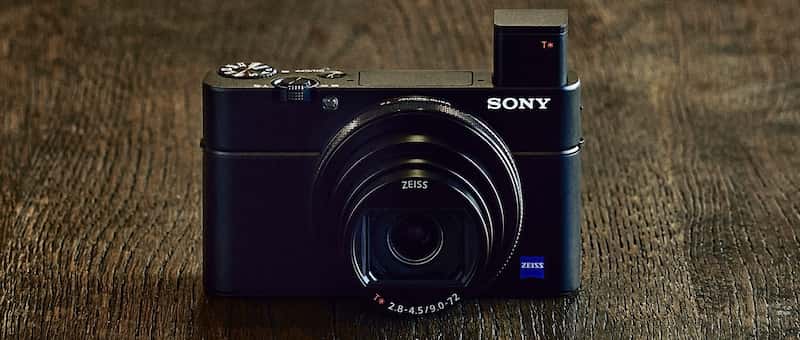
Hands-On with the new Sony RX100 VI Compact Camera

23 Jun

Sony continues to innovate and release new versions of their popular line of mirrorless and compact cameras. Just release is the newest Sony RX100 VI, the sixth version in just six years. But at just under $ 1200 USD is it worth the price? Let’s see.

There are quite a few new things and upgrades from the Mark V. Let’s see what a few different testers had to say about it in Venice recently where Sony handed out some cameras to put through the paces. Here’s a small list of features:

Image courtesy of Sony.

  • New 24-200mm lens (with the 2.73 crop factor) but with an f/2.8 maximum aperture.
  • 24 frames per second burst mode.
  • Buffer 233 JPEGs standard.
  • 315 phase detection autofocus points.
  • 90-degree tilting LCD screen.
  • New touchscreen capabilities.
  • Easier popup electronic viewfinder.
  • Does 4K video.
  • New Vlogging stick available for easier video creation.

Photo Gear News

Richard Sibley from Photo Gear News gives the Sony RX100 VI some good tests as he walks around Venice. See what he has to say about shooting video, slow-motion, and other things. He talks about the aperture range limitations and the menu system.

?

Camera Labs

See what Gordon Laing, prolific camera reviewer, had to say about the Sony RX100 VI. His test of the tracking autofocus shows impressive results on moving subjects with the phase detect autofocus of this camera.

So what does he like, and what does he miss from the Mark V? Watch to find out.

?

Things missing on the RX100M6 he’s noted are:

  • No microphone jack or Bluetooth audio connection
  • The wider aperture of f/1.8 that was available on the Mark V
  • No built-in Neutral Density filter that was on earlier models

For a little humor

Finally, to inject a little humor into things is Kai (former of DigitalRevTV). His point of view and way of approaching things is unique and adds a bit of spice to reviews that can otherwise get a little dull.

?

The official word from Sony

Lastly, here is Michael Bubolo from Sony to give us the low-down on some of the official specs and features of this new camera.

?

Is this camera for you?

I have to admit when I heard about the 24-200 equivalent zoom lens I was a bit jealous as compared to my Fuji X100F with a fixed 23mm (35mm equivalent) lens. But the 1″ sensor (2.73x crop factor) on the Sony is a lot smaller, so I’ll stick with my Fuji!

So who is this camera for? At the price of around $ 1200, it’s not for everyone. Perhaps it’s good as a backup to their DSLR for pros, or for bloggers (and vloggers) who do video and want something portable. The zoom range certainly is attractive and it does a nice job on video for sure. But would you spend this much on a compact camera?

Note: currently the Sony RX100 VI is only available for pre-order from Amazon and other retailers.

Let’s discuss in the comments section below.

The post Hands-On with the new Sony RX100 VI Compact Camera appeared first on Digital Photography School.


Digital Photography School

 
Comments Off on Hands-On with the new Sony RX100 VI Compact Camera

Posted in Photography


Oppo Find X smartphone has a slide-up camera for a true full-screen display

21 Jun

Chinese company Oppo has unveiled its new Find X, an Android smartphone with a full screen 19.5:9 “Panoramic Arc” display, rear dual cameras, and a 3D face-scanning front camera. Unlike certain competing smartphones, such as the iPhone X, Oppo elected to use a slide-up mechanism to house the device’s cameras, rather than a display notch, resulting in a 93.8% screen-to-body ratio.

Oppo’s slide-up mechanism is triggered by swiping up on the handset’s lock screen, at which point the 3D face-scanning camera will slide into view to authenticate the user. The Find X does not feature a fingerprint sensor. According to The Verge, initial tests with a pre-production version of the Find X found the sliding mechanism moves quickly enough for comfortable daily use.

Oppo claims the Find X’s front-facing 3D camera is “AI-enhanced” to “naturally personalize” a selfie, and that its software offers 3D lighting to produce “artistic portraits.” Joining the front 3D camera are dual rear 16MP and 20MP cameras with optical image stabilization. Oppo says its camera software features AI Scene Recognition, a function that works like a “photography technique consultant” with the ability to analyze and identify 800 scene types.

Cameras aside, the Oppo Find X features a Qualcomm Snapdragon 845, 8GB of RAM, and up to 256GB of storage. The handset ships with Android 8.1 Oreo and the maker’s own Color OS veneer. The handset likewise features a 3730mAh battery with fast-charging support.

Oppo will launch Find X globally in August, according to CNET, which reports that the 256GB version will cost €999.

Via: The Verge

Articles: Digital Photography Review (dpreview.com)

 
Comments Off on Oppo Find X smartphone has a slide-up camera for a true full-screen display

Posted in Uncategorized


The Best Way to Improve Your Photography is to Forget About Your Camera

21 Jun

Are you confident using your camera to take photographs in every situation in which you want to shoot? Do you experience anxiety when you think about reaching for your camera? Would you like to feel sure that when you do head out for a photography session you will return more than satisfied with your results? So what is the best way to improve your photography?

portrait of a Kayan girl - improve your photography

If you are anxious or lacking confidence in using your camera you will most likely not be so happy with your photographs. As photographers, most of us like to be improving our pictures each time we use our cameras. I don’t know of a photographer who is not interested in continuing to create better photos than they have previously.

Photography is so much more than having the most up to date equipment and knowing which dials to turn and buttons to push to make it work. The best way to improve your photography is to forget about your camera.

Photography is More Popular Than Ever

Photography is currently more popular than it has ever been. People are taking more photos every day than ever before in history. Why? Because they can and because it is easy. And because everyone always has a camera with them.

Northern Thailand landscape near Suan Sook Homestay, Doi Inthanon - improve your photography

Mobile phone cameras have made photography more popular than ever. This photo was taken with my phone camera.

It is easier and more convenient than ever to be able to take and share your photographs. Most people can take a photo with their phone very easily and without much knowledge of photography technique. Most phone camera users are not concerned with their shutter speed or their ISO setting. But you don’t have to search much to find some outstanding photographs made with phone cameras.

When people take photos with their phone they are most often concentrating on the moment, not the mechanics of how to work the camera. The more you can learn to do this when you are using your DSLR, mirrorless or any other camera the more you will improve your photography.

Make Time to Learn

Make time to study how your camera works. If you are just starting out, begin with the essentials. Become familiar with the settings for obtaining a good exposure and well-focused photos.

Night photo of a buddhist monk at a ceremony at Wat Pan Tao - improve your photography

In any situation you find yourself wanting to photograph, you need to be confident in adjusting your settings well without losing concentration on your subject.

For more advanced photographers, don’t neglect to keep learning more about your camera. Learn to use more of the functions and become proficient at them. If you can do this you will be well prepared whenever you want to head out for a photography session.

If you are constantly trying to figure out how to use your camera at the times when you want to make great photos, you will not be as successful.

Know your camera functions and settings well, so you can use it as quickly and easily as your phone camera. You’ll be able to pay more attention to the moment if you do so.

:aughing Karen woman in a rice field - improve your photography

Be Prepared

When you are in a situation where you want to take photographs, be prepared. Have everything with you that you need. Do you need another lens? Will you need flash? How about your tripod? As well, be mindful of whether or not you will need anything other than your camera and one or two lenses. If not, don’t carry it with you. It will only hinder you.

Always try to anticipate the situation ahead of time. Be well set up with the right lens and any other accessories you need. If you can do this in advance you will be able to concentrate more on making great photos.

Thai woman in traditional costume - improve your photography

Being prepared means you will not miss any opportunities to make great photos.

Review and Critique

Always take a good look at your photos, including the ones you are not satisfied with. Hopefully, you are not deleting any of your photos from your cards before reviewing them on your computer. Aside from this being poor technical practice, you can learn a lot from your dud photos.

lady and giant soap bubbles - improve your photography

Studying your photos for composition, exposure, timing, subject choice, etc., will help you improve. If you are reviewing photos you are not so happy with, this will help you avoid making the same mistakes in future.

Having someone else look at your photos and offer critique can be very valuable. Even if it’s a friend or family member who has little or no photography experience it can help keep you on track, (so long as they are honest and positive.)

Sharing your photos for critique with an experienced photographer can help your growth. They will be able to point out things you may not have noticed. By seeking feedback you will learn directly from your own images.

Reflection of a monk in a puddle of water - improve your photography

Art and Science

Photography is very much a whole brain experience. The left hemisphere of your brain engages to manage the technical aspects. Your right hemisphere is more attentive to the creative aspects. There must be a cohesion and a balance.

If you are too focused on the technical aspects of photography you will not produce such creative pictures. If your right brain takes over you may not get well-exposed or focused images because of not paying attention to your camera.

Pink dahlia photo - improve your photography

Knowing your equipment, whatever camera you are using, will help you improve your photography. A photo that was taken with my camera phone.

Being confident to use your camera, whichever one you choose to use, will help you be more successful. Understand how to use it and to adjust the settings to get the photos you want easily. This takes some study, commitment, and practice, but it’s well worth it to be able to achieve consistently better results.

The post The Best Way to Improve Your Photography is to Forget About Your Camera appeared first on Digital Photography School.


Digital Photography School

 
Comments Off on The Best Way to Improve Your Photography is to Forget About Your Camera

Posted in Photography