RSS
 

Posts Tagged ‘Camera’

OnePlus shares official sample images from OnePlus 7 Pro’s triple camera system

04 May
OnePlus 7 Pro leak from @OnLeaks via PriceBaba

On May 14, Chinese smartphone company OnePlus will officially announce the anticipated OnePlus 7 Pro Android smartphone. Though many details are lacking at this time, the OnePlus 7 Pro previously leaked as featuring a rear three-camera system, something OnePlus confirmed on April 25, 2019. Following that confirmation, OnePlus has shared three official sample images captured with the the triple camera.

OnePlus shared three images captured with the OnePlus 7 Pro via Twitter on April 30. Though the company didn’t provide details on the device, the images seemingly confirm leaks that claim the model will feature both ultra-wide and zoom cameras in addition to the expected 48MP primary camera.

The OnePlus 7 Pro will allegedly feature a Snapdragon 855, 8GB of RAM, USB-C, a single speaker, notch-free display, and complete lack of a headphone jack. Official features will be revealed by OnePlus next month.

Articles: Digital Photography Review (dpreview.com)

 
Comments Off on OnePlus shares official sample images from OnePlus 7 Pro’s triple camera system

Posted in Uncategorized


Your Camera Strap: Are you Using it Wrong?

03 May

The post Your Camera Strap: Are you Using it Wrong? appeared first on Digital Photography School. It was authored by Caz Nowaczyk.

In this video by Phil Steele, he shows you the right way to use your camera strap, and you may just find a few little surprises!

?

How to attach the strap to your camera

If you are removing the strap from your camera, take a picture of the attachments, so you know exactly how to put it back together.

Also, in case you didn’t know, that little rubber rectangle piece on your camera strap (if you have one), is actually an eyepiece cover for when you do long exposure photography. It prevents light leaks coming through the eyepiece!

Fixing loose ends

Do the end pieces of the strap flapping around annoy you? If so, there is a way to fix that.

If your strap has little slide plastic collars on it, make sure it is towards the end of the strap, below the buckle. Then start by feeding the strap from the outside in through the attachment on the camera.

Then feed the end back through the plastic collar and pull it all the way through.

Now, feed the loose end through the buckle. However, instead of feeding it through the bottom first, feed it through the top first followed by the bottom. That way the leftover strap is hidden away rather than flapping around loose.

Using your strap for better photos

  1. Use the strap as a stabilizer to reduce camera shake – Place your elbows into your body then move your camera away from your body, pulling the strap tight. This tension helps stabilize your camera and works well when shooting video too.
  2. Step on the strap when shooting from a low angle to steady the camera.
  3. If you don’t have a tripod, place your camera on a surface and use your strap under the lens to angle it upwards. If you want the camera facing downwards, place the strap under the body of the camera.

Strap mistakes to avoid

  1. When placing your camera on a table, place the camera on top of the strap as though it is sitting in a little nest. That way, no one can accidentally pull your camera off the table by knocking the strap. Also, if someone spills water on the table, your camera is slightly elevated so that it won’t get wet.
  2. When using your camera on a tripod, the strap can cause motion blur on your images if there is any wind. Hold the strap while taking photos, or remove it altogether when on a tripod. Another solution is to get a strap that easily clips on and off.

Comfortable straps

Consider buying a more comfortable strap. Some have extra padding and stretch (Neoprene) and can be a little wider. They sit more comfortably around your neck and can ease the pressure when carrying a heavier rig.

Phil’s favorite strap for event photography

Phil uses a Sling Strap (black rapid) for event photography. It easily hangs over your shoulder and allows you to have free hands when you aren’t shooting. The camera easily slides up and down the strap when you need to use it.

One caution when using the sling strap, however, is the way it mounts to your camera. It screws into the tripod hole on the bottom of your camera. That can be a point of failure because if your screw comes loose, your camera can fall to the ground.

There are two things you can do to guard against that. First, when initially attaching it, wet the little rubber washer that goes between the mounting hardware and your camera. That seems to help. Secondly, periodically check the screw tightness, and tighten if need be.

Have you ever had a mishap with your camera strap? Share with us in the comments below.


You may also find the following helpful:

  • Review: Peak Design Anchor Links System for Camera Straps
  • Overview and Field Test of HoldFast Gear’s Money Maker Leather Camera Strap
  • Review of the Nitz Custom Handmade Camera Strap
  • Custom SLR Dual Camera Strap – Product Review

The post Your Camera Strap: Are you Using it Wrong? appeared first on Digital Photography School. It was authored by Caz Nowaczyk.


Digital Photography School

 
Comments Off on Your Camera Strap: Are you Using it Wrong?

Posted in Photography


Think Tank Photo’s Stash Master 13L is a modular travel cube for your camera gear

03 May

Think Tank Photo has announced the release of the Stash Master 13L, a travel cube designed to safely store camera equipment in a package that can be used on its own or added to any large backpack to instantly turn it into a camera bag.

Think Tank Photo specifically designed the Stash Master 13L so it was large enough to fit the ‘holy trinity’ of lenses — a 70-200mm F2.8, a 24-70mm F2.8 and a 16-35mm F2.8 (or equivalents — alongside a gripped camera body. While the internal baffles can be customized, it should be good to go out of the box to fit all three lenses, a camera body and a decent selection of accessories.

The travel cube is constructed of a 100D rip-stop nylon and features DWR coating to keep moisture away from camera gear. It features YKK RC-Fuse zippers a tuck away front flap with foam panel that can be removed in the event you want to keep the gear more accessible when the cube is stored inside a backpack.

On both the top and bottom of the camera bag are a pair of carrying straps and the side features webbing loops so a shoulder strap can be attached, making for a modular sling-style bag. Think Tank Photo also notes the bag is a perfect match for its recently-released BackLight Elite 45L backpack, where it can be stored inside for back-panel access.

Below are a few gear setup examples Think Tank Photo has provided for what can fit inside:

• One gripped DSLR with lenses attached up to a 70-200mm f/2.8 plus, 2–3 standard zoom lenses and a flash.
• Two ungripped DSLRs with lenses attached up to a 70–200mm f/2.8 and 1–2 standard zoom lenses.
• Two gripped mirrorless bodies with lenses attached up to a 70–200mm f/2.8 plus 3–5 additional lenses.

$ (document).ready(function() { SampleGalleryV2({“containerId”:”embeddedSampleGallery_0692054901″,”galleryId”:”0692054901″,”isEmbeddedWidget”:true,”selectedImageIndex”:0,”isMobile”:false}) });

The external dimensions of the travel cube are 31cm x 31cm x 19cm (12.2in x 12.2in x 7.5in), its internal dimensions are 30cm x 30cm x 18cm (11.8in x 11.8in x 7.1in) and it weighs just 400g (0.9lbs). The Stash Master 13L is currently listed on Think Tank Photo’s website for $ 59.99, but is labeled as ‘Out of Stock’ at the time of posting this article.

Articles: Digital Photography Review (dpreview.com)

 
Comments Off on Think Tank Photo’s Stash Master 13L is a modular travel cube for your camera gear

Posted in Uncategorized


Moment Pro Camera app gets focus peaking, zebra striping and more

02 May

App and mobile lens maker Moment has launched a substantial update to its Pro Camera app for Android and iOS devices.

Both the Android and iOS versions now come with Focus Peaking and the new Zebra Stripes feature. Just like on standalone-cameras with the same features, sharp edges will be highlighted in the preview image when focusing manually. Additionally over or underexposed areas in the preview image are indicated using an overlaid stripe pattern.

The Android app has received a few additional goodies and now comes with Split Focus and Exposure. This offers better control over challenging lighting situations by allowing you to set exposure and focus points to different areas of the scene.

A new live RGB Histogram helps dialing in color, balance, and exposure when shooting video and you can now capture both a RAW and JPG image at the same time. Moment says this also speeds up the image preview in Raw mode.

Other improvements include a redesign of the camera roll and improved support for OnePlus devices as well as the Samsung Galaxy S10.

In terms of pricing the iOS app has been changed from a ‘freemium’ model to a paid download and will set you back $ 5.99 in the App Store. The Android version remains a paid download and is $ 3.99 on Google Play.

Articles: Digital Photography Review (dpreview.com)

 
Comments Off on Moment Pro Camera app gets focus peaking, zebra striping and more

Posted in Uncategorized


Which Landscape Photography Camera Should You Buy? [video]

28 Apr

The post Which Landscape Photography Camera Should You Buy? appeared first on Digital Photography School. It was authored by Caz Nowaczyk.

In this video by Mark Denney, he looks at 8 questions you should ask yourself before choosing your new camera for Landscape Photography.

8 questions to ask yourself:

1. What are you solving? What’s broken that you are trying to fix?

The main problem he was having was that he was trying to use his main photography camera, the Sony A7RII for video too, which was fine but it was an inconvenience for him.

So he wanted two separate cameras – one for stills, and one for video.

2. What’s Your Budget?

Set your budget in the beginning (before you start shopping), so you know what to look for.

3. Do you want to go mirrorless or DSLR?

There are pros and cons to both. While DSLRs have great image quality, and good battery life, they are heavier.

Many mirrorless cameras also have excellent image quality but not always great battery life (editor-though this is always being improved upon). They are lighter in weight, but you may have to carry extra batteries.

4. What sensor size do you want?

Think about the sensor size you want. Do you want to go for full-frame, crop sensor or Micro four thirds? Full frame is the most expensive sensor size to go for. Think about the type of photography you will be doing. If you are going to be doing a lot of Astro photography, for example, you may want to go for full-frame as it will allow you to capture the most light.

5. Image Quality

What camera has the best image quality in the brand that you are interested in?

Pixel size – Think about megapixels. Many cameras now have large megapixels. Are you printing your images in large format or just sharing them on the web and social media?

Dynamic Range – the tonality of an image. The difference between the brightest brights and the darkest darks.
The human eye can detect 20-stops of dynamic range. Dynamic range is measured in stops. Mark says the best cameras on the market at the moment in terms of dynamic range are the Nikon D850 and the Sony A7RIII with around 15-stops of dynamic range. Average DSLRs are around 12-stops of dynamic range. The more dynamic range, the better results you get when bringing out shadows in editing.

ISO – Again, it depends on what you are shooting. If you are shooting night skies, you may want to choose a camera that works better at high ISOs with less noise. If you are shooting landscapes during daylight hours or blue hour, most cameras will work fine in these conditions.

6. Overall Lens Ecosystem

You aren’t just investing in the camera, but also the brands’ lens ecosystem. While there are adapters, you may want to still look at the lenses.

7. Video specs

If you are planning to shoot video too, then look at the video specs. For example, do you want 4K, or are you happy with just HD?

8. User interface/User experience

Do some research about the user interface. Is the camera intuitive and easy to use and navigate? Are the ergonomics good? Does it feel good in your hand?
If you are unsure about any of these things, renting a camera is a good way to try it out before buying.

Mark decided that the Fuji X-T3 was the perfect camera for his needs. What will yours be?


You may also find the following helpful

  • Which Crop Sensor Sony a6000 Series Camera Should You Buy?
  • Fujifilm X-T3 versus Fujifilm X-H1: The Best Mirrorless Camera for You?
  • Camera Comparison – The Fujifilm X-H1 Versus the Sony a7R III
  • The New Panasonic Lumix S1 and S1R – Could these Full-frame Mirrorless Cameras be Cameras of the Year?

The post Which Landscape Photography Camera Should You Buy? appeared first on Digital Photography School. It was authored by Caz Nowaczyk.


Digital Photography School

 
Comments Off on Which Landscape Photography Camera Should You Buy? [video]

Posted in Photography


Healthy.io uses your smartphone’s camera for medical lab testing at home

25 Apr

Thanks to the attached mobile computing power your smartphone camera can be used for more than just taking holiday snaps. A product from Israel-based company Healthy.io is a prime example. Dip.io uses a smartphone and a dipstick to perform urine tests that can detect ten indicators of disease, infection, and pregnancy-related complications.

The system is very simple from a user point of view. You capture a photo of the dipstick against a color and Dip.io does the rest. The app uses machine learning to color correct the image, considering camera make and model, lighting conditions and a variety of additional variables. The app then performs an instant analysis.

In clinical trials undertaken in the process of receiving FDA approval, Dip.io was capable of matching the accuracy of professional laboratories. This is achieved at a considerably lower cost and less inconvenience to the patient as the system removes the need for visits to a physician and lab referrals. In addition, it does away with waiting time for the results.

The makers of the system say that this could encourage more patients to undertake regular screenings which could save them dialysis or even a transplant by detecting signs of kidney problems early.

According to an analysis by York Health Economics Consortium, in the UK alone the new technology could result in early diagnosis of more than 33,000 cases over five years and estimated savings of more than £670 million ($ 867 million). Healthy.io is currently running a pilot program with the pharmacist Boots UK. Women who suspect they have urinary tract infections can use the system to self-test and receive treatment from a pharmacist without seeing a doctor or visiting a lab. The results of the pilot are expected to be announced in May.

Articles: Digital Photography Review (dpreview.com)

 
Comments Off on Healthy.io uses your smartphone’s camera for medical lab testing at home

Posted in Uncategorized


Nikon announces COOLPIX W150 kid-friendly waterproof digital camera

24 Apr

Nikon has announced the COOLPIX W150, a colorful and rugged point-and-shoot digital camera that’s shockproof from drops up to 1.8m (5.9ft), waterproof down to 10m (33ft), dustproof and coldproof down to -10C (14F). The new model features a 13-megapixel sensor and a 3x optical zoom NIKKOR lens, Target Finding AF, multiple scene modes and support for recording Full HD videos with stereo audio.

Nikon has positioned the W150 as a digital camera suitable for both adults and children; the camera maker utilized a modified user interface that is simple enough for first-time users to navigate. The camera supports SnapBridge for automatically transferring images from the camera to an Android or iOS device.

$ (document).ready(function() { SampleGalleryV2({“containerId”:”embeddedSampleGallery_2263652953″,”galleryId”:”2263652953″,”isEmbeddedWidget”:true,”selectedImageIndex”:0,”isMobile”:false}) });

The W150 includes a few unique scene modes, including ‘underwater face framing,’ ‘add clarity underwater,’ ‘picture-in-picture’ and ‘add little planet effect.’ Other features include image lock, Smile Timer, Exchange Messages for adding voice messages to photos and a grading function for rating images and videos.

The Nikon W150 will be available in white, orange, blue, flower and resort color and pattern options. Nikon hasn’t made any mention of pricing or availability yet.

Press release:

Nikon releases the COOLPIX W150 compact digital camera

A waterproof and shockproof camera with a wide variety of scene modes and editing functions to offer users an enjoyable shooting experience

TOKYO – April 23, 2019 – Nikon Corporation (Nikon) is pleased to announce the release of the COOLPIX W150, a compact digital camera that offers superior water- and shock-proofing.

The COOLPIX W150 is a highly water-, shock-, cold- and dust-proof camera that supports shooting in a wide variety of situations, including capturing leisure activities at the pool or beach. A compact, rounded design makes it easy to handle for both children and adults alike. The addition of new and appealing color options and patterns to the camera body will make shooting leisure activities even more enjoyable.

The camera offers an effective pixel count of 13.2 million*1 pixels, and is equipped with a 3x optical zoom NIKKOR lens. It is also equipped with functions that make recording photos and movies with superior image and picture quality fun and easy for anyone. These include the Target Finding AF*2function, where the camera detects and focuses on the primary subject, and a function for recording Full HD movies*3 with stereo sound.

It also offers a variety of scene modes*4 and editing functions that allow users to capture memories and experiences in impressive photos. The variety of scene modes and effects allow users to explore unique possibilities and share these photos and movies with their loved ones.

Its compatibility with SnapBridge allows photos taken with the camera to be automatically downloaded*5 to a smart device*6 for easy sharing of high-quality photos.

Articles: Digital Photography Review (dpreview.com)

 
Comments Off on Nikon announces COOLPIX W150 kid-friendly waterproof digital camera

Posted in Uncategorized


ThinkTank Vision 15 Camera Bag Review

24 Apr

The post ThinkTank Vision 15 Camera Bag Review appeared first on Digital Photography School. It was authored by Peter West Carey.

ThinkTank’s Vision 15 camera bag is one in a line of stylish camera and computer shoulder bags built for photographers who want a functional bag that looks good walking down the street. It’s designed for someone who wants easy access to their gear and isn’t looking for a backpack.

Key features

The Vision 15 has a host of features that I enjoyed while testing. These include:

Fits a DSLR mounted on a long lens

I love my 28-300mm L lens (the same size as a 70-200mm f/2.8 or 100-400mm L lens) and this bag does a grand job of storing it while attached. ThinkTank, in their literature, mentions leaving the camera unattached, but I found the combination just barely fits, with easy, quick access.

Canon 6D mounted with 28-300mm L lens alongside Canon 10-22mm lens

Side view with padding removed

Great organization for extras

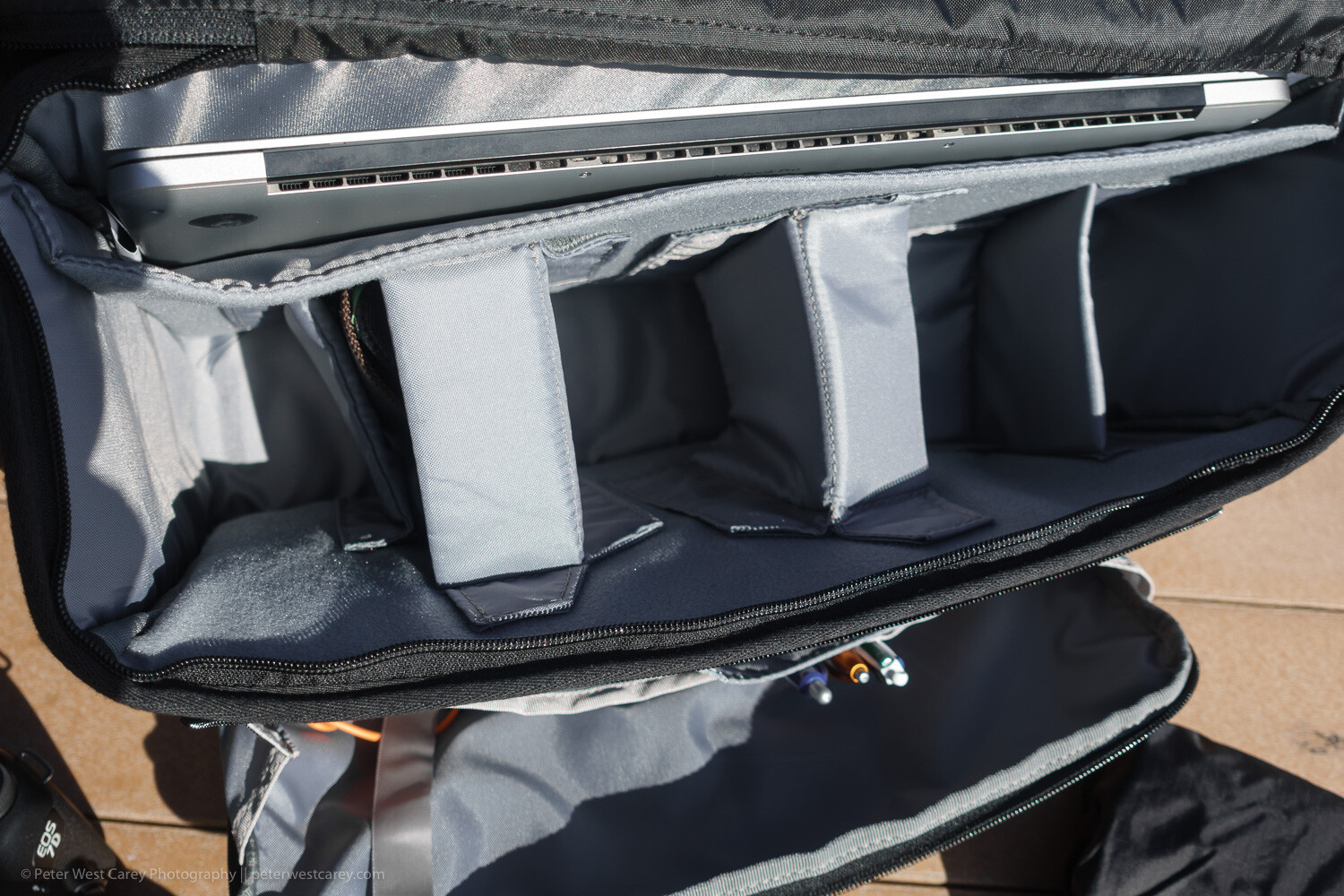
Inside the spacious main compartment is space enough for a few lenses and speedlights. There are both vertical and horizontal padded dividers to protect your shorter lens stacked one on the other.

All the dividers have velcro on each side, so they can be attached to either long side of the bag or to other dividers. I usually travel with a long lens attached and a wide angle lens stored. This means I have room for: smaller Sony RX-100 V, waterproof cover (included with bag), battery pack for phone and tablet, glasses case, power brick for laptop and DJI Osmo Pocket. And there is still more room in there.

It can handle a portable office

If your bag is not just for your camera, but for all the other items you want with you on a shoot or day out of the office, this bag can carry most of it.

The Vision 15 can manage a 15″ laptop and a 10″ tablet. The laptop sleeve is padded on the back and bottom while the tablet slot is found on the zippered front pocket.

That front pocket has a host of other slots to hold pens, business cards, large phones, cables, and keys (with a tether and clip so that don’t get lost). And it still has ample pocket space for books, batteries, chargers and all the other little things that join you on the road.

An added bit of security to the main compartment

While the generous top flap of the bag keeps the elements at bay, a secondary zippered flap will help keep prying hands away. The flap has velcro to help hold it in place, meaning it will open when the main flap opens and close when it closes. Or zip up the inner flap for an added sense of security. It can also be tucked under the main flap to keep it out of the way for quicker access.

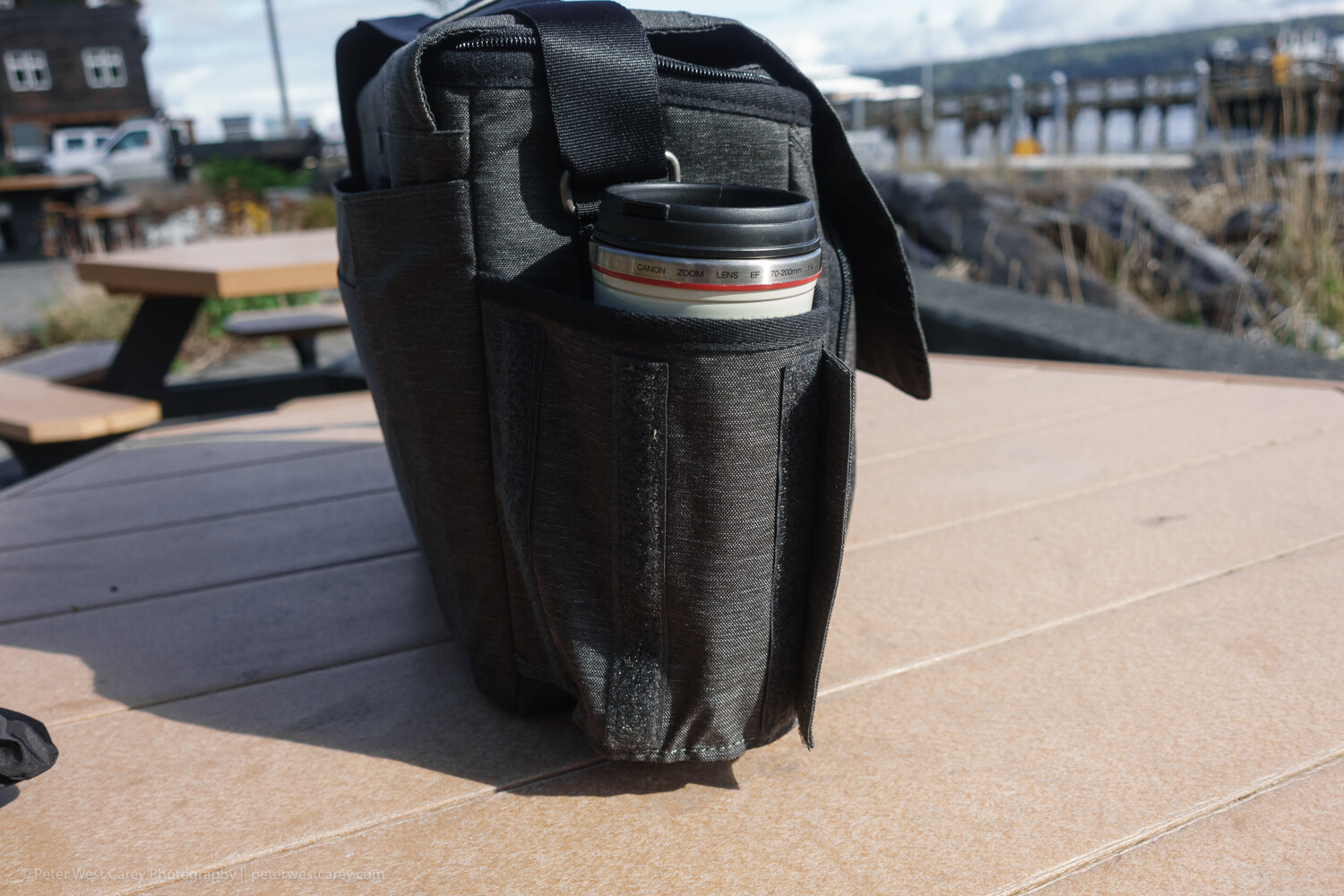
Expandable bottle holder

This little design aesthetic impressed me when I wasn’t expecting it to. Velcro keeps the bottle holder closed when not in use, reducing the chance that it will get caught on something. Plus it looks more stylish this way.

But when you need to hold your coffee or water bottle, just expand the pocket to one of two sizes for a (nearly) custom fit.

Tough, coated bottom

While the bag’s fabric is stylish and does a good job of resisting stains and water, the bottom is made of beefed-up waterproof tarpaulin. This tough option makes for easy clean up when the bag is placed in anything but the most pristine locations. A quick wipe with a damp cloth keeps it clean and your contents dry.

Front and back book/papers pockets

On the back of the bag is a large pocket for books or notebooks. This is a great spot to place quick-at-hand items, and I use it for my calendar and main notebook.

On the front of the bag is a smaller pocket. While you could fit a book in there, it presses against the organizer pocket behind it. While is looks good in photos, it’s not useful for thick items.

Generously padded shoulder strap and carry handle

The bag comes with two main modes of transport: a padded shoulder strap and a carry handle on top. The padding on the shoulder strap is generous and the strap itself has a wide range of adjustment for a variety of torsos. However, the top carry handle only works when you remember to clip the top flap shut. Still, it is a secure way to get the bag in and out of your car for a quick grab.

It fits easily under a seat on a plane

I’ve tested the bag under economy coach seats on 737s and smaller planes with ease. There is ample room and the bag doesn’t scratch along the underside of the seat.

Not so artful tripod holder

On a bag like this, the tripod attachment goes in the only location it can; on the bottom. ThinkTank uses their attachment straps (which can be removed when not in use, as shown above) to allow for a variety of tripod sizes. There’s really no other place for a tripod to go and the clips do an adequate job.

Roller Bag Passthrough

For those who love their roller bags for airports, the back of the Vision 15 has a slot for your roller bag handle to pass through.

Limits

While this bag has a lot going for it, I find the pockets get full fast. Even just throwing a Mindshift card wallet into the front pocket will expand it enough to press on the other pockets. Toss in a charger and Miops cable release as pictured above and you quickly start puffing the bag up, unlike a backpack-style bag.

Vision 15 with rain cover attached

Don’t expect to comfortably carry a full-size tripod on the bottom of this bag. The length would make things unwieldy. Also, with the tripod attached, you suddenly don’t have an easy way to set down the bag.

In use

I tested the bag in use on my job for a month, which included travel on four different flights up an down the West Coast. Its smaller form factor (compared to my normal backpack) is welcome as it packs into my car trunk easily and was effortless to remove, thanks to its clean lines and lack of straps like a backpack.

Opening and accessing contents is straightforward and I left the velcro attachment connected on the inside lid most of the time. Yet, when I had to set the bag down a couple of times in less than ideal situations, that inner zipper was nice to employ. I never did use the rain cover but I am glad they shipped the bag with a black cover to keep it stylish.

Conclusion

The ThinkTank Vision 15 is a very useful shoulder bag. While it can’t quite hold all I like to carry (no space for a drone), it holds all you need on a day-to-day basis when away from the office all day. It easily holds a long lens as well as battery packs, chargers, cards, tablet and laptop. It can easily handle four lenses and a flash, while the padded shoulder strap makes carrying that load bearable.

While the Vision 15 is sized for a 15″ laptop, they have two other, smaller sizes (which cut out the space for a tablet) that might fit your particular setup better.


The post ThinkTank Vision 15 Camera Bag Review appeared first on Digital Photography School. It was authored by Peter West Carey.


Digital Photography School

 
Comments Off on ThinkTank Vision 15 Camera Bag Review

Posted in Photography


Leak: Canon has a 63MP full-frame sensor destined for high-resolution EOS R camera

23 Apr

There’s been rumors of a high-resolution EOS R camera since the EOS R was first released last year, but a leaked data sheet detailing a new 63-megapixel full frame CMOS sensor is the best hint yet that a mirrorless 5DS equivalent might be right around the corner.

According to the leaked data sheet, the sensor — referred to as 35MM63MXSCD — features Canon’s Dual Pixel AF and 63 million effective 3.7nm pixels (9696 x 6464). Using the 16 channel digital signal outputs, the data sheet says the sensor should be capable of up to 5.2 fps at 12-bit.

Below is the data sheet and a collection of leaked illustrations showing the various specs and schematics of the 35MM63MXSCD sensor:

Canon has been teasing in interviews that it’s excited to make cameras capable of showing off the quality and performance of its latest lenses, including its impending ‘holy trinity’ (16-35mm, 24-70mm and 70-200mm). Combined with the ongoing rumors churning around the mill that the next EOS R would be a high-resolution model due out sometime this year, it seems pretty clear this will be at the heart of the camera whenever it is released.

Articles: Digital Photography Review (dpreview.com)

 
Comments Off on Leak: Canon has a 63MP full-frame sensor destined for high-resolution EOS R camera

Posted in Uncategorized


Nikon releases firmware version 1.20 for its D500 camera

23 Apr

Nikon has released firmware version 1.20 for its D500 camera. The firmware update, which comes two years after the camera was initially released, adds the ability to connect via Wi-Fi to devices running SnapBridge (version 2.5.4 or later) and fixes a number of additional issues.

Specifically, Nikon says it’s addressed an issue where focusing on the edge of the frame wasn’t accurate, a problem where the camera would sometimes stop working while shooting in continuous high-speed release mode and a bug where the camera would sometimes remain on even after the power button was turned to ‘Off.’

You can download the firmware version 1.20 for the Nikon D500 from Nikon’s website.

Nikon releases firmware version 1.20 for the D500

Changes from “C” Firmware Version 1.15 to 1.20

• The camera can now connect via Wi-Fi to devices running SnapBridge. Before using this feature, upgrade to the following version of the app:

– SnapBridge version 2.5.4 or later

• Fixed the following issues:

– The camera sometimes had trouble focusing on subjects in the focus points at the edges of the frame.
– The camera would sometimes stop responding during shooting in continuous high-speed (CH) release mode.
– The camera would sometimes not turn off after the power switch was rotated to “OFF”.

Articles: Digital Photography Review (dpreview.com)

 
Comments Off on Nikon releases firmware version 1.20 for its D500 camera

Posted in Uncategorized