RSS
 

Posts Tagged ‘Camera’

Do you need 41 megapixels? Our Nokia Lumia 1020 camera review

30 Aug

TS1600x1200~sample_galleries-7331844753-6420586538.jpg

The 41-megapixel Lumia 1020 melds technology first debuted on the Pureview 808 with a relevant operating system and the optical image stabilization introduced in Nokia’s Lumia 920 that allows significantly better image quality in low light. But do these great ideas translate into a great photographic experience? Our sister site, connect.dpreview.com has put the Lumia 1020 through its picture-making paces to find out how well its impressive imaging technology works in the real world.  

News: Digital Photography Review (dpreview.com)

 
Comments Off on Do you need 41 megapixels? Our Nokia Lumia 1020 camera review

Posted in Uncategorized


Samsung announces pricing for Android-based Galaxy NX camera

29 Aug

funshot.jpg

As the first hybrid smartphone and interchangeable lens camera, the Samsung Galaxy NX certainly cut a unique profile when we first looked at it in June. The Galaxy NX merges the features of Samsung smartphones, including a huge 4.8-inch touch LCD and 3G/4G/Wi-Fi connectivity, with a NX-mount ILC with a 20.3MP APS-C sensor, hybrid AF system, and 8.6 fps burst mode. At long last, the Galaxy NX has been given a price: $ 1,599.99 body only, or $ 1,699.99 bundled with an 18-55mm lens. 

News: Digital Photography Review (dpreview.com)

 
Comments Off on Samsung announces pricing for Android-based Galaxy NX camera

Posted in Uncategorized


Sony introduces NEX-5T Wi-Fi and NFC enabled mirrorless camera

27 Aug

nex5t_angle.png

Sony has announced the Sony Alpha NEX-5T, boasting all the same features that the Alpha NEX-5R offered with the addition of NFC. Smartphones and tablets with the technology will be able to pair easily with the NEX-5T to take advantage of its wireless connectivity. With a 16.1 megapixel APS-C sized sensor, Wi-Fi connectivity and a 3.0-inch flip-up touch LCD, the NEX-5T is introduced at $ 50 less than its predecessor’s initial MSRP. Click through for more information.

News: Digital Photography Review (dpreview.com)

 
Comments Off on Sony introduces NEX-5T Wi-Fi and NFC enabled mirrorless camera

Posted in Uncategorized


Sony A3000 1st-Impressions Review: An SLR-like camera with the heart of a NEX

27 Aug

A30001.jpg

The Sony A3000 is essentially a 20.1MP mirrorless camera that uses the same E-mount as the Sony NEX, yet which has the look and feel of a traditional SLR. Though not the first manufacturer to take this approach, Sony is the first to achieve the low starting price point of $ 399 for body and lens. It’s a bold move; click through to read our first impressions review to see what we think in more detail.

News: Digital Photography Review (dpreview.com)

 
Comments Off on Sony A3000 1st-Impressions Review: An SLR-like camera with the heart of a NEX

Posted in Uncategorized


Sony introduces SLR-esque A3000, a mirrorless camera for $400

27 Aug

a3000_front_thumbnail_1.png

Sony’s latest interchangeable lens camera may look like an SLR, but underneath the hood it’s all NEX. The Sony A3000 offers a 20.1 megapixel APS-C sensor, a built-in electronic viewfinder, full HD video and a Sony E-mount for interchangeable lenses all for an MSRP of $ 399 with an 18-55mm kit lens. The competitively priced A3000 offers all the trimmings of an entry-level DSLR including a fixed 3.0-inch LCD, built-in flash and hotshoe. Click through for the full press release and pricing.

News: Digital Photography Review (dpreview.com)

 
Comments Off on Sony introduces SLR-esque A3000, a mirrorless camera for $400

Posted in Uncategorized


Full 360-degree camera rig takes your 3D portrait with 60 DSLRs

18 Aug

xIMG_0025.jpg.pagespeed.ic_.TP-LDuzYup.jpg

Printing in 3D is in the news a lot lately, but applications are usually limited to industrial prototypes. A company called Captured Dimensions has a different use for this technology. They’ve rigged 60 DSLRs in a 360-degree array to capture 3D portraits. The likeness is then printed using a substance containing gypsum powder, resulting in a 3D sculpture of 1/12 to 1/5 scale. Ready for your 3D closeup? Click through for more details (including how much it’ll set you back).

News: Digital Photography Review (dpreview.com)

 
Comments Off on Full 360-degree camera rig takes your 3D portrait with 60 DSLRs

Posted in Uncategorized


B-Grip Camera Holster Review

18 Aug

10428898-origpic-b69c54
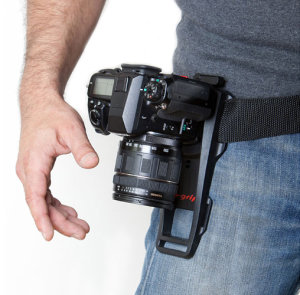
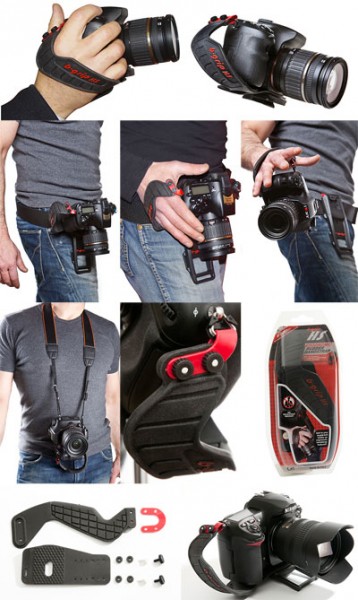
The B-Grip (short for “belt grip”) is a way to carry your camera on a belt, rather than around your neck. The camera is carried around in the holster with a quick release plate that’s easily accessed when you’re ready to shoot. It’s best paired with the hand strap also available, and it is this pair which I was sent for review by a local reseller. I tested this grip out on the busy weekend of an anime convention which I attend every year and usually take about 1000 photos a day for each of the two days. For Saturday I used the B-Grip. For Sunday I switched back to my preferred strap, a Sun Sniper strap. This way I was able to get a good comparison of the two.

Pros

  • It looks damn sexy! I posted the product photo to my facebook page when I got the holster for review and the most common comment was how cool/badass/sexy it looked. For a photographer who needs to look cool, this will not harm your image one bit.
  • This will save your neck and shoulders, as the weight of the camera and lens is moved to your hips, which can carry that weight far more easily. The advertising says “carry your camera comfortably”, and it is comfortable!
  • When holstered, the camera is very secure. I was concerned at first but after putting it all together I could see there was no way the camera would come loose. It’s probably more secure than a standard strap, since it doesn’t swing about.
  • The experience of going hands-free without worrying where a dangling camera might go if you bend over or turn around is a liberating one.

Cons

JU0157HSWebDual

  • The major problem I faced with the holster is the necessity for a strap you slip your hand into before you can remove it from the holster. The alternative is no strap which means your own hand’s grip is the only thing stopping the camera from hitting the ground. I think that’s too risky, especially when trying to holster/unholster your camera.
  • The strap is a thick, flexible, slightly grippy rubber. It’s a little tricky to adjust to the right size, and can be quite difficult to put your hand into when you’re even a little bit sweaty.
  • The event I was shooting had me stopping to take photos every couple of minutes, so I was constantly holstering/unholstering my camera. I started leaving my hand in the grip all the time, and then I just stopped holstering it altogether, so I ended up always holding the camera in my hand and as a result my arm became tired.
  • Not only did this make my arm tired, but it also meant my hand wasn’t free. It took a few seconds to lift my shirt (which naturally fell over the holster), holster the camera and take my hand out of the grip in order to get my hand free. Long enough to be awkward when offered a hand to shake.
  • There’s an optional extra attachment for the grip on the camera that allows you to mate the plate for the holster onto a tripod mount. This is a solution for photographers who want to swap between handheld and tripod, but the adapter is plastic and I prefer metal for tripod plates.
  • Also, the grip is not compatible with my panorama head. This may not be a problem for many photographers (although stills/video shooters may have a similar issue), but the attachment is slow and fiddly enough – with some small plastic nuts used which could easily be dropped and lost – that I’d rather never have to remove the B-Grip from my camera.
  • Every time I wanted to sit down I had to slide the camera and belt around to my side, which then got in the way a bit.

Thoughts

  • I really like the concept of the holster mount, and the benefits are very nice indeed, however for the types of photography I do and the relatively burdensome process of adding and removing the B-Grip from the camera, I don’t think it’s suited to me.
  • I can imagine this being a great tool for a street photographer for example. You could walk around for hours, the camera securely stashed out of the way and not swinging about, then slip your hand in the grip when you come across a photo opportunity. Once you’re done, holster the camera again and go on your way.
  • It’s very true that you need the right tool for the right job, and there are many jobs which demand many different tools. The B-Grip is not a tool for the jobs I do however.

bgrip-friend-g-media-res

Conclusion

  • I find it hard to do a fair review of this holster, as I feel that it simply wasn’t a tool that benefited me, yet for another photographer it could be exactly what they need.
  • There are some annoyances, such as the finicky wrist strap and a slower process to add/remove the camera attachment than I’d rather.
  • The parts that did work for me – the weight of the camera being supported on my hips, being completely hands free and not worrying about a camera swinging around on a strap – were truly a liberating feeling.
  • For the right photographer, this could be a dream come true. But not for me. I’ll be sticking with my Sun Sniper.
  • To keep all of my reviews consistent I’ll still give the B-Grip a score, but please interpret it in the context of what I said above: 6/10

If you regularly find yourself in a situation where you carry your camera with you and stop for occasional shots, or have to have your camera secure without the possibility of it swinging around, the B-grip is a great solution. You can pick one up at Protog.

If you’d like to see early impressions and photos from other camera gear that I’m reviewing, pop over to Facebook and like my page. I post that kind of thing regularly!

Post originally from: Digital Photography Tips.

Check out our more Photography Tips at Photography Tips for Beginners, Portrait Photography Tips and Wedding Photography Tips.

B-Grip Camera Holster Review


Digital Photography School

 
Comments Off on B-Grip Camera Holster Review

Posted in Photography


This just in: Camera enthusiasts are ‘intense’ (who knew?)

12 Aug

nytlearns.png

New York Times writer Nick Bilton recently wrote an article about his experience with Leica cameras and lenses, and was surprised when this was met by an aggressive influx of ‘vehement messages from all kinds of photographers and camera fans’. Not only did Canon and Nikon fans attack him for not writing a similar piece about their favorite brands, but according to Bilton many Leica fans were also critical of his article, as well as his selection of ‘experts’. Click through for more on this surprising development.

News: Digital Photography Review (dpreview.com)

 
Comments Off on This just in: Camera enthusiasts are ‘intense’ (who knew?)

Posted in Uncategorized


Nikon cuts 2013 sales forecast citing poor mirrorless camera sales

09 Aug

shared:NikonLogo.png

Nikon has lowered its sales and revenue estimates for this year, prompting a rethink of its 1 Series mirrorless cameras. Nikon cites poor market conditions, a large drop in compact camera sales and, most interestingly, a ‘deceleration’ in mirrorless camera sales. Nikon’s measures against these changing conditions include accelerating production of entry-level DSLRs and ‘reconsider[ing] product planning’ of their Nikon 1 mirrorless camera system. Follow the link for additional details.

News: Digital Photography Review (dpreview.com)

 
Comments Off on Nikon cuts 2013 sales forecast citing poor mirrorless camera sales

Posted in Uncategorized


Peak Design Capture Camera Clip v2 review

08 Aug

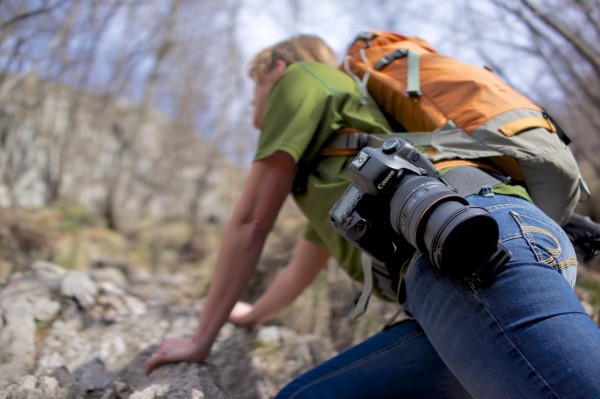
You may have read the article we wrote on Peak Design’s Leash & Cuff a little while back? The crazy bunch at Peak Design are at it again, this time with a version 2 release of their primary product, Capture

GET CAPTURE v2.0 ON KICKSTARTER

As of right now, 4,875 people have backed their current Kickstarter for over half a MILLION dollars!… Amazing crowd supported project! Well, being a Peak Design Pro, I’m very lucky to already be using Capture v2.0 and wanted to pen an article about it and how it has changed from version to version and how it could help you.
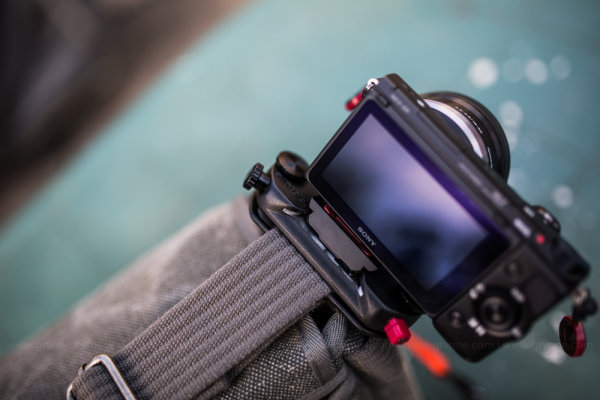
Peak_Design_V2_Simon_Pollock

A brief catch up – what is “Capture” …well, in very basic terms, Capture is a device that you can attach to pretty much any belt / bag strap / backpack shoulder strap etc, that allows you to quickly and securely mount your camera on that device via the included baseplate. So if you want to go hands free while you’re out shooting, you simply slot your camera into Capture and you’re good to go, then when you see a photograph you want to make, on press of a button and you’re firing. You can see the image above, I have my little Sony NEX 5r mounted on the shoulder strap of my thinkTankPhoto Retro 7 camera bag, it makes it so easy when I’m down the park with my 3.5 year old – I can run, kick, jump, swing and hide with my hands free, then, when he’s doing something awesome like climbing a massive tree, I can whip the camera out of its little metal home and SNAP, I’ve capture my moment.

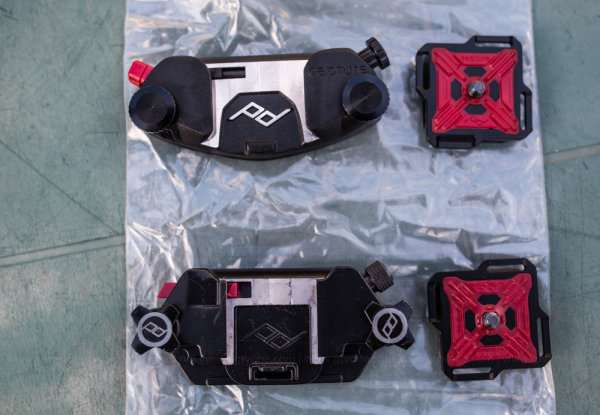
In the photograph below, you can see some of the changes from version one (bottom) to version two (top) including the following (based on my two weeks solid use and not the specs on the website)

  • Easier ‘mouth’ where you slide your camera in – makes slotting your camera away easier (in my opinion) 
  • No more sharp edges / less round edges – while I love and still use v1.0, the v2.0 feels…grown up..
  • The red button you use to release your camera now has a little simple twist lock to stop accidental ejection..
  • The screw (top right of units) now secures the camera plate solid, so you can actually use Capture on top of a monopod / tripod..
  • Capture now has the ability to mount little cameras such as GoPro so you can use capture to shoot yourself falling off your bike – etc!
Capture_Peak_Design_V1_vs_v2_Simon_Pollock

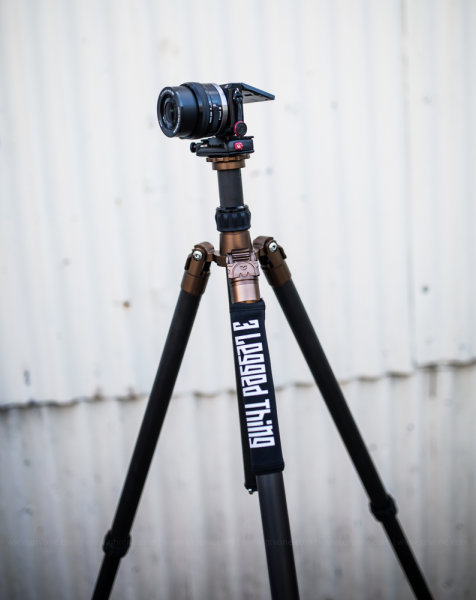
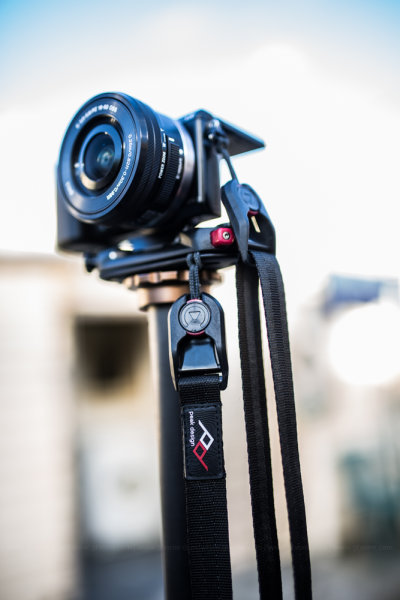
Here’s a couple of photographs that show you how you can use Capture for the top of a tripod or monopod and in the second photo you can see the Sony is tethered with Peak Design’s “Leash”
Peak_Design_Simon_Pollock

Capture being used to mount the Sony directly onto the 3LeggedThing tripod furniture
Peak_Design_Simon_Pollock

Capture being used to mount the Sony directly onto the ‘Bob’ 3LeggedThing Monopod furniture

I’m use Capture v2.0 and v1.0 with Peak Design’s Leash and Cuff system (for those among you that are saying…ohhh, I might drop my camera… you can’t!)

Take a look at the version two Capture camera clip system video on KickStarter and see for yourself… If you have any questions about how the clip works, what I shoot with it / my workflow / how I use Capture, please don’t hesitate to ask in the comments below.

–Sime


Post originally from: Digital Photography Tips.

Check out our more Photography Tips at Photography Tips for Beginners, Portrait Photography Tips and Wedding Photography Tips.

Peak Design Capture Camera Clip v2 review


Digital Photography School

 
Comments Off on Peak Design Capture Camera Clip v2 review

Posted in Photography