RSS
 

Posts Tagged ‘Camera’

Do You Need to Upgrade to the Latest Camera?

21 Feb

Camera-envy is the bane of many photographers. Discussion forums are filled with conversations about the benefits of the latest and greatest camera gear, and our commercial-driven societies fill us with the deep-seated need for more, more, more! But do you really need to upgrade to the latest camera?
By Portrait / Wedding Photographer

What matters more: the camera or the photographer?

This is the question truly at the heart of most photography gear debates: what really matters? Is it the camera or the photographer?

You know what you want the answer to be. When you show someone a favourite picture, you are looking for compliments and congratulations for yourself, not your equipment. You likely don’t post an album on Facebook hoping to get a “Way to buy that new camera!” style of comment. If you compare yourself to a chef and use the analogy that no one would think to praise the frying pan for an excellent meal.

But yet. . .

You see the photographs of others and immediately start making excuses. “Oh, well, he has a 400mm zoom lens” or “Well, she has a full frame sensor,” and at the same time we overlook the years of training or the hours of planning that went into that shot or that set-up. You choose not to wake up early or to stay up late and then wonder why your sunrises or sunsets do not have the same pizzazz or punch as another’s. You choose to shoot quickly and move on, rather than staying around, observing, and find that ‘decisive moment.’

sunflowers, field, flowers, nature, clouds, storm, photography, CanonT1i

You are the variable that matters. If you want to take better pictures, there are unlimited steps you should be taking before you worry about upgrading to the latest and greatest. Think about the time and energy that you put in to your photography. Are you truly pushing your camera to its maximum potential?

Many of the latest and greatest benefits touted by newer model cameras are those that will rarely be used or exploited by the vast majority of camera owners. 61 compared to 9 possible focal points are not necessarily useful if you consistently use the center point to focus-and-recompose or if you rarely use auto-focus or servo-focusing modes for moving subjects.

water crown, splash, drip, drop, water photography

A faster frame rate of 6 compared to 3 frames per second is useful, perhaps, if you are shooting a rapidly changing subject like a bird in flight or kids jumping into a pool, but you do not need six (or even three) identical photographs of a rock formation or a bouquet of flowers. Ask yourself how often you even shoot in such a burst mode.

You should also think about the strengths and limitations of the current lenses that you own. A fast prime lens can open up a wide-range of new shots and opportunities. If you do not already have at least a 50mm f/1.8 lens, then you have not even begun to explore the potential of your current camera body. Many photographers recommend putting your purchasing power into lenses, especially ones that you can hold on to and use down the line.

What I shoot

Full disclosure, I shoot with a Canon T1i (500D for the European naming system), a camera that went on the market in early 2009 and has since been upgraded four additional times. At nearly a year-old, the current Canon T5i is likely due for an upgrade in the near future: the Canon T5 was just announced February 12th. In many photography circles the T1i would be considered a nearly ‘ancient’ digital model. It is also in the entry-level line of Canon DSLRs, with multiple tiers of both cropped and full-frame sensor cameras above it. All photographs in this post (other than the shots of cameras and gear) and my other articles on dPS, were taken with this camera.
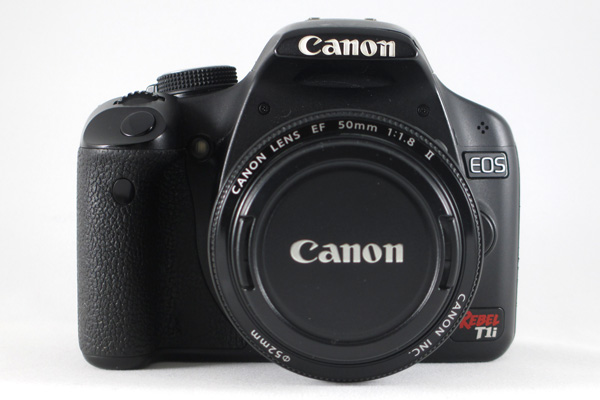
camera, canon, CanonT1i, T1i, photography, rebel, EOS, 500D

I will readily admit that there are trade-offs and limitations to my camera. I know that I cannot push the ISO very high without introducing significant noise into the final images. I know that my buffer will fill quickly and then stall if I take a series of RAW shots in rapid succession. I know that I cannot adjust my LCD screen or see myself while standing in front of the camera for a selfie. Has that ever negatively impacted a shot that I was trying to take? Not often.

I also know that I can carry a tripod and use it if shooting in low light. I know that I can switch into just JPEG if I am trying to take a hurried sequence of shots. I know that I can use cues from a test shot to figure out how to tweak a self-portrait and use a remote to set the focus when I am in position. I know that 15 MP can look great at web sizes as well as printed on canvas or aluminum and hung on my wall.

What frustrates you about your current camera? Think about whether it is something that you could change or whether it really an issue with your camera.

Milky Way, silhouette, night, star photography, astrophotography, stars

Agree or disagree: will you upgrade your camera?

Are you a frequent camera-upgrader or are you shooting with an “old” digital camera too? Share your constructive thoughts or an example photograph in the comments below.

Some other options to buying more stuff:

  • Start Feeling GOOD About YOUR Photography
  • A Year of Photographic Lessons – Journey of a Novice Photographer
  • 5 Photography Rules Moms [and Dads] Can Ignore

The post Do You Need to Upgrade to the Latest Camera? by Katie McEnaney appeared first on Digital Photography School.

Digital Photography School

 
Comments Off on Do You Need to Upgrade to the Latest Camera?

Posted in Photography


Camera Review – the Sony A7R

19 Feb

Sony A7R Example shot from one exposure – ‘Ferocious Stump’ By Gavin Hardcastle

Initial Impression of the Sony A7R

I started writing this Sony A7R Review with the sentence ”I hate the Sony A7R”, such was my vitriol over this infuriating yet impressive piece of tech. And that’s what the A7R is, it’s a technological marvel crammed into a tiny, sharp edged box. If you’re like me, converting from Canon or Nikon, you’ll find the learning curve painful as you discard much of the logic you’ve grown so used to.

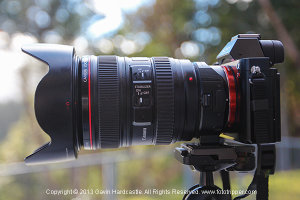
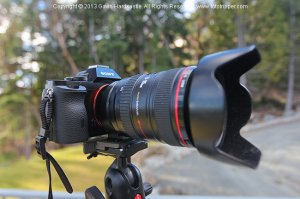
Sony A7R Review with Canon L LensesThat being said, each day my hatred of the Sony A7R diminished as I chipped away at the quirks to uncover the gems this little Pandora’s box has to offer. As expected, the image quality is superb. Having this kind of dynamic range at my fingertips is pure luxury and I’m seeing such a crisp sharpness from my old Canon 24-105mm lens that it’s quickly become my go-to lens of choice.

Sony A7R Example – HDR shot ‘The Frost Fangs’ By Gavin Hardcastle

Could I Learn to Love the Sony A7R?

Sony made a great sensor and some really clever technology, but in terms of ergonomics and overall creative workflow, they could learn a lot from the likes of Canon and Nikon. Compared to the sterile feeling A7R, my trusty old Canon 5D mkII feels like a worn in glove that’s perfectly moulded to my hand with everything in the right place. The A7R is like a soulless Cylon that sports the biggest firepower but is completely devoid of heritage or heart.

The problem is, my 5DmkII perished horribly a couple of months ago so I bought the Sony A7R and even splashed out the $ 412 Canadian dollars for the crappy Metabones adapter that fidgets around in the Sony E-Mount like a 5 year old after a super sized Slurpee binge.

Sony A7R ReviewAlthough this is not Sonys fault, this entire setup really has its problems and I’ll be honest, if I hadn’t already taken the plunge and fully committed to this purchase, I’d probably have taken it back to the store to exchange it for something else. Oh but wait, there is nothing else that comes close to the Sony A7R in terms of specification versus price.



So I’m stuck with it, and what do people usually do when they have no choice, but to get along? They figure out ways around the problems and make do. That’s when my hatred of the Sony A7R started to turn into begrudging admiration, dare I say….. even… love?

Sony A7R Example – HDR shot ‘The Capitol’ By Gavin Hardcastle

Very Customizable

The good news is that the A7R is highly customizable, so if you’re willing to spend days digging through the menus, reading the useless manual and trying a bit of experimentation, you’ll be able to tweak it your tastes – I hope. NEX users will already be familiar with complicated menus and I’ve heard that the A7R is much simpler. I expect NEX users will read my review and groan, possibly even accuse me of being a purist old fart who can’t let go of the old DSLR ways (cue more groans from film shooters).

So, without further waffling, here’s a list of things I love about the A7R and a list of things I hate; so that you know what you’ll be getting yourself into should you decide to buy this powerful little beast of a camera.

What I love about the Sony A7R:

  • The 36 MP sensor is excellent in terms of resolution and dynamic range
  • It’s light weight, my tendonitis loves that – but there are drawback as you’ll see below
  • The digital spirit level in the display – always get perfectly level shots without a green plastic bubble in your hot shoe – nice
  • The manual focus assist – It displays little marching ants to indicate you’ve hit the sweet spot
  • The Live View looks great in the monitor screen
  • I can angle the monitor screen to make shooting near the ground easy. No more lying prone like a sniper and getting a neck crank.
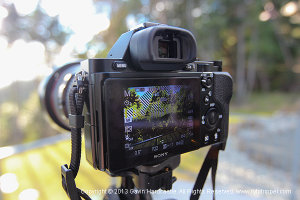
  • The info icons on the display are very helpful once you learn what they all mean.

Sony A7R Example shot from one exposure ‘Tendrils’ By Gavin Hardcastle – click to see a larger version on Flickr

What I hate about the Sony A7R:

  • It’s too small. By all means keep it light, but for a grown man it would fit much nicer in the hand if it was slightly larger. When it comes to electronics – small isn’t always best.
  • I don’t like the EVF (electronic view finder). Call me old fashioned but I like being able to look through a piece of glass and see my composition even with the camera turned off. Not so much an issue with the A7R specifically, as this is just the way of mirrorless cameras in general.
  • The battery life is pretty shabby due to the EVF and monitor screen always being in use. You’ll be buying that extra battery grip for sure. You can switch off the monitor to save juice.
  • Auto Focus is pretty dire compared to Canon/Nikon but I’ll reserve final judgement until I try out a native Sony/Zeiss lens.
  • If you use the default controls for manual shooting it’s very easy to accidentally hit the adjustment wheel. I’m forever changing my ISO and white balance without meaning to – most enraging.
  • Bracketing will not work in unison with the 2 second self timer. You have to choose one or the other. If you want to bracket without touching the shutter you’ll need to buy a remote.
  • The TimeLapse and Timelapse LE app is utterly useless. No bramping (bulb ramping) and it won’t trigger bracketing mode.
  • It’s slow to save files – If you shoot RAW+JPEG in low light you’ll get very familiar with the ‘Processing’ message on the monitor screen. The drawback of having 36 megapixels I guess.
  • Ergonomics – it’s like a matchbox. Ever heard of curves Sony?
  • Ditch your old SD cards. 36 MP Raw files need some super fast cards .
  • The balance is terrible with legacy DSLR lenses. If you shoot handheld and have a medium to large lens, you’ll hate the feel of the A7R. The native Sony/Zeiss lenses however, are all nice and small so it’s only an issue with your clunky old DSLR glass – which might be exactly why you bought the A7R in the first place.
  • Shutter shock with long lenses causes significant vibration and ruins images due to blurring. Apparently this can be improved by adding a weight to the camera. Some user have reported the battery grip fixes the issue. One more example of the camera being too small for its own good.
  • There is no separate battery charger. You have to connect the camera to the mains via the shortest cable I’ve ever seen. You’ll be shelling out an additional $ 50 for the Sony BC-QM1 battery charger.
  • Auto White Balance fails 80% of the time when using Canon lenses via an adapter.

The Manual (pamphlet) of shallowness

The Sony A7R comes with the most useless user manual I’ve ever seen. It has about as much depth as a Miley Cyrus song and leaves you with more questions than answers. On page 82, the manual mentions that there is an in depth ‘Help Guide’ available at a url that is no longer available. After much scouring of the interwebs I found the real link to the Sony A7 / A7R Help Guide which still works at the time of writing. I’m sad to say I’ve read the entire thing and still needed to find answers to my many problems by forum digging.

Sony A7R Example shot from one exposure ‘Tenacity’ By Gavin Hardcastle

Extra dollars you’ll have to spend on accessories

  • Battery charger
  • Remote shutter release if you want to bracket with 2 second timer
  • Battery grip – for added weight, better balance and longer battery life
  • Extra battery
  • New super fast memory cards

Do you really need 36 megapixels?

Sony A7R Review and Example Shots

Of course you do. It doesn’t matter if you only ever print small images, with 36 megapixels your compositional horizons are greatly expanded because you now have the power to crop like a boss. If you don’t own a $ 6k super telephoto lens, it’s no problem, just take the shot and crop it in post with plenty of resolution left over.

Will you need a new hard drive?

Of course you will. These RAW files are humongulous. If you’re squeamish about losing precious disk space, the Sony A7 is probably the better option with its faster auto focus, smaller files and lower price tag.

Do I recommend this camera?

If you’re a landscape shooter, I would recommend that you buy this camera. If you’re any other kind of shooter and never have the need to print massive images and don’t do much cropping, buy the A7.

Why this is an awesome camera

I admit it, I love the A7R. Even though my list of grumbles is way longer than my list of plus points, it all boils down to the fact that the image quality of the A7R is simply awesome. I’ve learned to work around the annoying quirks and when you consider that Sony’s native lenses are very, very small, it all starts to make sense. Sure, it’s great that we can all attach our old lenses via adapters, but if I could afford to replace my giant, heavy Canon glass with miniature sized Zeiss glass that might possibly do a better job – I totally would.

Have you tried out the Sony A7R? What is your experience? Share with us in the comments please.

The post Camera Review – the Sony A7R by Gavin Hardcastle appeared first on Digital Photography School.


Digital Photography School

 
Comments Off on Camera Review – the Sony A7R

Posted in Photography


Blackmagic Production Camera 4K available now for $3000

11 Feb

blackmagicproductioncamera4kfront.png

Blackmagic Design has announced it is shipping its 4K, global-shutter camera for $ 1000 less than originally suggested. The Blackmagic Production Camera 4K is built around a Super 35mm (roughly APS-C-sized) sensor and can shoot 4K and 1080p footage in Apple ProRes 422 (HQ) or Adobe CinemaDNG Raw formats, direct to SSD. The camera offers 4K at 30p, 25p, 24p and NTSC equivalents. It has a Canon EF-compatible lens mount, offering electronic aperture control with Canon and Zeiss lenses. It is available for $ 2,995.

News: Digital Photography Review (dpreview.com)

 
Comments Off on Blackmagic Production Camera 4K available now for $3000

Posted in Uncategorized


Nokia Lumia 1520 camera review

08 Feb

3212278645.jpg

The Nokia Lumia 1520 runs the Windows Phone operating system and offers high-end specs all-around. The device is powered by a Qualcomm Snapdragon 800 quad-core processor and ships with 2GB of RAM but it’s the camera specs that should make the 1520 an appealing option for mobile photographers. The PureView branded camera combines a 1/2.5-inch 20MP BSI CMOS sensor with a F2.4 lens and optical image stabilization. How does it perform as a camera? Read our in-depth review to find out.

News: Digital Photography Review (dpreview.com)

 
Comments Off on Nokia Lumia 1520 camera review

Posted in Uncategorized


Olympus launches Stylus Tough TG-850 iHS underwater camera

29 Jan

TG-850_SLV_LEFT.png

Olympus has announced the Stylus Tough TG-850 iHS, the next generation of the company’s mid-range waterproof camera. The TG-850 has a super wide-angle 21-105mm 5x optical zoom lens and now includes a LCD screen that flips upward 180°. It’s waterproof down to 33 feet (10m) and the 16-megapixel back-lit CMOS sensor can shoot 1080/60p HD video. Learn more 

News: Digital Photography Review (dpreview.com)

 
Comments Off on Olympus launches Stylus Tough TG-850 iHS underwater camera

Posted in Uncategorized


Apple’s magnetic solution for expanding capabilities of iPhone camera

29 Jan

Screen_Shot_2014-01-28_at_6.28.19_PM.png

Two patents, discovered by AppleInsider, show how Apple might allow users to expand the photographic capabilities of their iPhones. One describes a removable ‘back panel’ which contains different camera options, and another (slightly more plausible in the near-term) details how users might be able to attach ‘modules’ to their phones’ camera lenses to provide different lens options. Click through to learn more at Connect.

News: Digital Photography Review (dpreview.com)

 
Comments Off on Apple’s magnetic solution for expanding capabilities of iPhone camera

Posted in Uncategorized


Pencil vs. Camera: Illusion Drawings Pop Off the Page

28 Jan

[ By Steph in Art & Drawing & Digital. ]

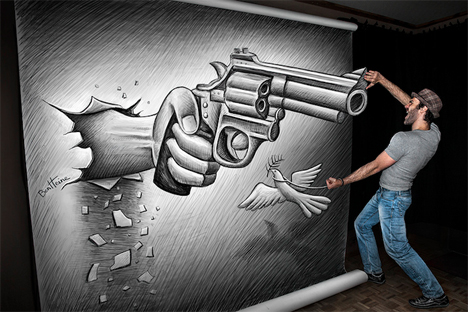
Pencil vs Camera Optical Illusion Drawings 1

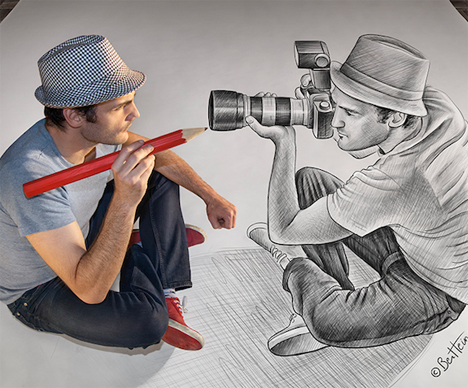
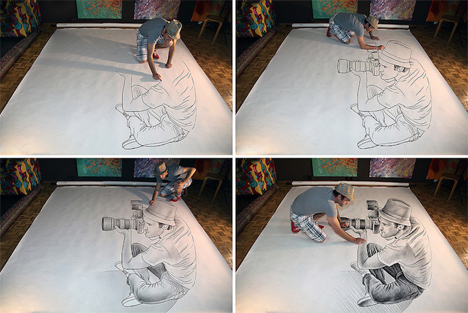
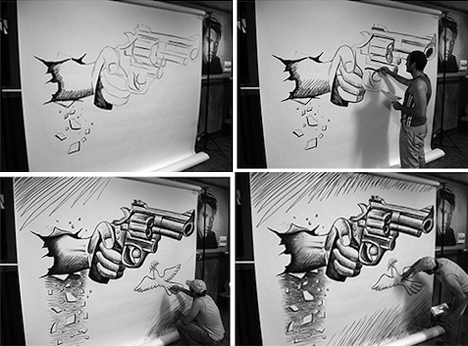
You might think artist Ben Heine has Photoshopped himself into his own pencil drawings, but he’s actually standing on top of them. Much like the mind-bending optical illusions produced in chalk by sidewalk artists, these are flat drawings that just seem like they’re three-dimensional.

Pencil vs Camera Optical Illusion Drawings 2

Pencil vs Camera Optical Illusion Drawings 3

Pencil vs Camera Optical Illusion Drawings 4

The Belgium-based multidisciplinary artist mixes photography and drawings for the series ‘Pencil vs. Camera,’ one of his best-known projects. The drawings seem to pop out from the page when viewed from a certain perspective, making it look like the artist is interacting with his own creations.

Pencil vs Camera Optical Illusion Drawings 5

Pencil vs Camera Optical Illusion Drawings 6

“I just make art for people,” says Heine. “I want them to dream and forget their daily troubles. I used to write poems many years ago, I want to convey a poetic and philosophical meaning into my pictures, each new creation should tell a story and generate an intense emotion, like a poem, like a melody.”

Ben Heine Scenery Drawings

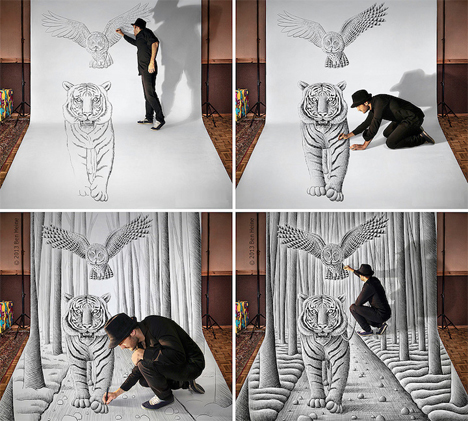
Another part of the series blends Heine’s drawings with landscape photos so they match up. The artist selects a location, draws a fanciful illustration, and then takes a photo of the combined results.

Share on Facebook


[ By Steph in Art & Drawing & Digital. ]

[ WebUrbanist | Archives | Galleries | Privacy | TOS ]


WebUrbanist

 
Comments Off on Pencil vs. Camera: Illusion Drawings Pop Off the Page

Posted in Creativity


The Definitive Guide on How and When to Use ISO on Your Camera

24 Jan

When people talk about digital camera settings, there are three main ones that pop up: shutter speed, aperture and ISO. They all relate to light and the way your camera captures it: Shutter speed controls the length of time your camera lets in the light, aperture determines the size of the opening in your lens that light travels through and Continue Reading

The post The Definitive Guide on How and When to Use ISO on Your Camera appeared first on Photodoto.


Photodoto

 
Comments Off on The Definitive Guide on How and When to Use ISO on Your Camera

Posted in Photography


Spider Camera Holster Review

24 Jan
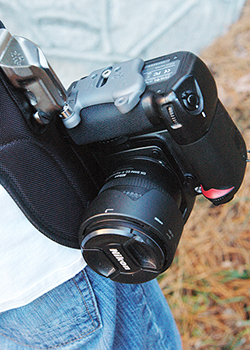
The SpiderPro Holster provides a secure, durable camera-carrying system that takes away the strain caused by traditional camera straps.

The SpiderPro Holster provides a secure, durable camera-carrying system that takes away the strain caused by traditional camera straps.

Many moons ago, someone had the idea to attach a strap to two points on a camera and hang it around their neck. While it may have seemed like a good idea at the time, it’s tough denying that traditional camera straps pose certain problems. Personally, I just don’t like that weight hanging around my neck for several hours at a time, especially if I’m using a longer lens like the 70-200mm. Getting the camera off my neck and over my shoulder isn’t a great alternative, because whether it’s around my neck or over my shoulder, the weight is a strain and at least one hand is always on the camera, making sure it’s not bumping into anything or anyone.

Sling straps were a good step in the right direction,  but they don’t always work well when I’m carrying a camera bag. They also only partially solve the upper-body strain that comes with carrying a pro DSLR (or two) for an extended period of time. All that changed for me, though, when the Spider Camera Holster came along.  Suddenly, I could completely ditch the strap. By providing a secure, balanced carrying solution at my hip, Spider gives me a truly hands-free carrying experience, and takes the strain off my neck and shoulders. Available in two models with various accessories, Spider has a reliable set-up for almost every situation.

SpiderPro Camera Holster Kit

What’s in the Box?

  • Holster
  • Pin
  • Belt/pad combination
  • Accessory plate
The Pro Kit includes the holster, pin, belt, and pad.

The Pro Kit includes the holster, pin, belt, pad, and accessory plate.

How Does it Work?

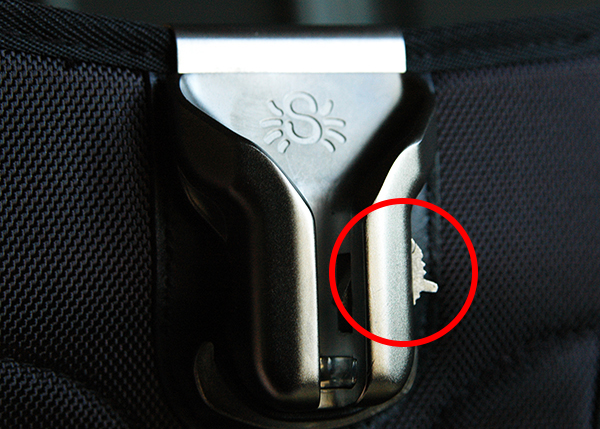
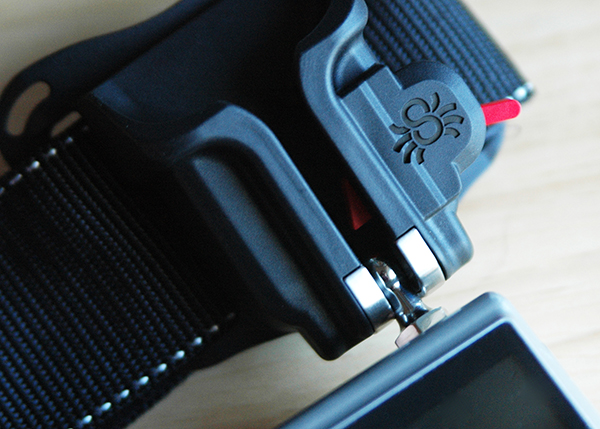
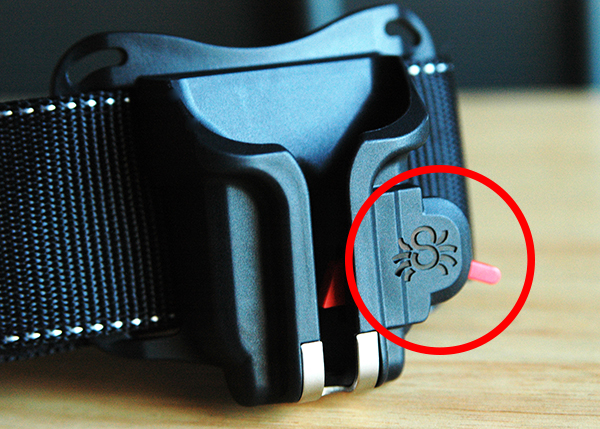
The holster and pin are at the heart of the Spider system. Made of stainless steel and hardened cast aluminum, the holster provides a durable, safe, and secure place to mount your camera at your hip. A two-position lock gives added peace-of-mind. In its locking position, the camera is locked in place each time the pin slides into the holster. A 15° turn of the lock releases the pin, allowing you to smoothly and easily remove your camera from the holster. In its second position, the locking mechanism is disengaged, allowing for quicker, one-handed removal of the camera from the holster. While I personally don’t recommend disengaging the locking mechanism, some sports or event photographers might prefer this quicker release. Proceed with caution if you do.

The red circle shows the locking mechanism in its locked position. Lifting it until it clicks into the "up" position disengages the lock.

The red circle shows the locking mechanism in its locked position.
Lifting it until it clicks into the “up” position disengages the lock.

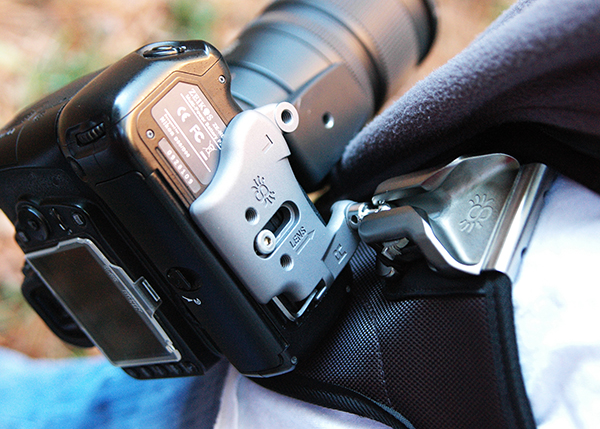
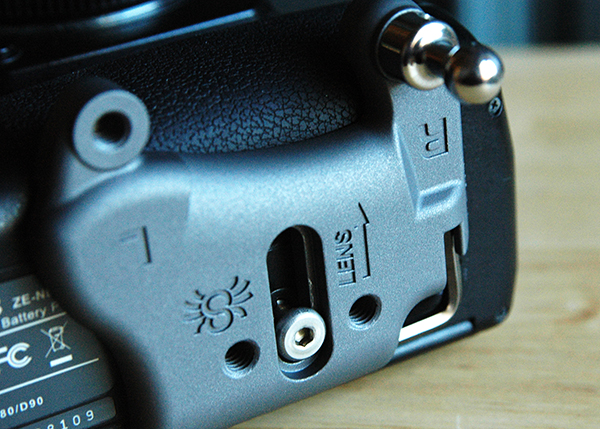
The pin attaches either directly to the bottom of the camera, or to the included accessory plate. Once attached to the camera, the pin slides into the holster at a 90° angle and locks in place. The camera then swivels into its proper position–upside down, with the lens pointing behind you. It is the very nature of this swivel joint that keeps the camera securely in place, preventing any accidental bumps from dislodging it from the holster.

The two-inch, reinforced belt is size-adjustable and has a three-way locking buckle to ensure yet another added level of security. The integrated pad helps support the heavier loads of professional size cameras and longer lenses. In the single camera configuration, the holster is actually bolted to the belt. Trust me when I tell you that it’s not going anywhere.

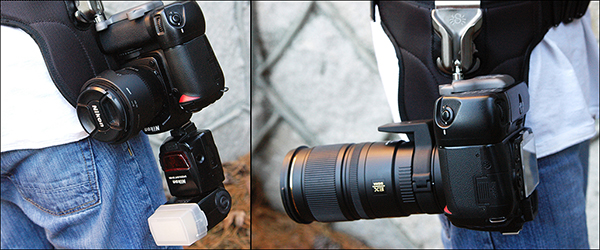
When loaded properly, the camera will hang upside down, with the lens pointing behind you. The holster offers a comfortable balance, regardless of whether you are using a flash or a 70-200mm lens.

When loaded properly, the camera will hang upside down, with the lens pointing behind you. The holster offers a comfortable balance, even if you are using a flash or a 70-200mm lens.

Since cameras are designed with only one accessory hole on the bottom, those of us who have more than one thing to attach are usually forced to sacrifice something. The Spider Holster gets around that by using an accessory plate that allows plenty of room for attaching the pin, as well as additional threaded holes for a tripod quick-release plate. If tripod use is not a concern, you can–as mentioned–attach the pin directly to the camera. During my test-drive, however, I found that using the accessory plate configuration placed the camera in a more comfortable position in the holster.

The accessory and include allen wrench make the system easily adaptable for trip use.

The accessory plate and included allen wrench make the system easily adaptable for tripod use.

Black Widow Camera Holster Kit

What’s in the Box?

  • Holster
  • Pin
  • Belt
  • Pad
The Black Widow Holster is designed for lighter DSLRs and smaller cameas.

The Black Widow Holster is designed for lighter DSLRs and smaller cameras.

How Does it Work?

The Black Widow Holster is designed around lighter weight, entry-level DSLRs, mirrorless systems, and smaller point-and-shoot cameras. It works almost identically to the SpiderPro, with a few key exceptions. For starters, the holster itself is made of tough, durable plastic, with stainless steel where the pin locks into place. The locking mechanism on the Black Widow only has one position, meaning that disengaging the lock is not an option. Additionally, since the Black Widow is designed with an eye towards lighter cameras, it can be used with either the kit belt or your own.

Personalizing the Experience

Fresh out of their respective boxes, both kits are ready to go. Both can also be accessorized, tailoring the experience to your own specific needs. In addition to being able to buy each component separately, the following accessories are available for the SpiderPro and Black Widow.

SpiderPro

  • Large Lens Pouches  – one or more pouches can be attached to the belt, allowing you to carry your camera on one hip and a spare lens on the other
  • Arca-Swiss Adapter – an additional adapter can be attached to the accessory plate, making it compatible with any Arca-Swiss tripod head
  • Pro Pad Adapters Kits – For those photographers who prefer the belts they already own, the SpiderPro Pad can be attached to belts from Think Tank and LowePro.

Black Widow

  • Thin Plate – works in conjunction with the tripod plate you already own, allowing you to attach both the holster pin and your tripod plate at the same time
The locking mechanism on the Black Widow has only one position-- locked-- and cannot be disengaged.

The locking mechanism on the Black Widow has only one position– locked– and cannot be disengaged.

Impressions and Recommendations

The Spider holster systems do what they say they do and they do it really well, providing a balanced, secure, comfortable, and durable camera-carrying experience that takes any possible strain to the upper body completely out of the picture. With what appears to be high-quality materials and workmanship, I’m confident that both of these products are built to last. I’d be remiss, though, if I didn’t offer a few words of caution.

First and foremost, make sure your camera is properly locked in the holster before letting go. This is absolutely vital. A drop of even just a couple of feet can cause very expensive damage. Secondly, be careful when kneeling while you have a camera in the holster–particularly if you have a flash attached. This applies primarily to photographers who may be using two holsters at once, as well as those who may opt to disengage the locking mechanism. You could accidentally damage your camera or slide it from the holster while kneeling if you aren’t careful.

No system is perfect, but the SpiderPro gets me closer than I’ve ever been. I still enjoy my sling strap, but when I’m working long hours in a fast-paced event or teaching situation, I find the relief to my upper body that Spider Holster provides to be just what my neck, back, and shoulders ordered.

The post Spider Camera Holster Review by Jeff Guyer appeared first on Digital Photography School.


Digital Photography School

 
Comments Off on Spider Camera Holster Review

Posted in Photography


Hasselblad replaces CEO, announces 50MP CMOS medium-format camera

22 Jan

Hasselblad-medium-format-camera-with-CMOS-sensor.png

Hasselblad has announced a new camera, the H5D-50c which incorporates a 50MP CMOS sensor. This is a step away from the CCD sensors that have been standard in digital medium-format imaging up to now. The H5D-50c comes weeks after Hasselblad was reported to have quietly replaced its CEO, Dr Larry Hansen. He was the man responsible for the tie-up with Sony that created the Hasselblad Lunar and has been replaced by former chief operating office Ian Rawcliffe. Learn more

News: Digital Photography Review (dpreview.com)

 
Comments Off on Hasselblad replaces CEO, announces 50MP CMOS medium-format camera

Posted in Uncategorized