RSS
 

Posts Tagged ‘Camera’

Apple iOS 9.2 adds iPhone support for USB camera adapter for direct photo transfer

11 Dec

Apple released a number of software updates yesterday including iOS 9.2. In addition to a large number of bug fixes, the update adds iPhone support for the company’s Lightning to USB Camera Adapter, making it possible now to transfer images directly from a camera to your iPhone. Previously, only iPads were supported. Read more

Articles: Digital Photography Review (dpreview.com)

 
Comments Off on Apple iOS 9.2 adds iPhone support for USB camera adapter for direct photo transfer

Posted in Uncategorized


Luna is ‘world’s smallest’ 360-degree camera

09 Dec

As virtual reality grows in popularity, an increasing number of consumer-grade 360° cameras are hitting the market. Latest among them is Luna, a spherical camera that records 360° footage for viewing on desktop or through a cardboard VR headset. The team behind Luna is seeking funding on Indiegogo to cover design and production costs.

Luna features a pair of 190° fisheye lenses, and uses ‘artificially intelligent auto-stitching software’ to merge the captured 2K footage into a single 360° HD video. Finalized videos can be shared on social networks or YouTube, and can be viewed using the Luna app and a VR headset. A sample video reel shows relatively low image quality from the camera’s video mode, but it’s unclear whether this is representative of a final production version of the camera.

Integrated Wi-Fi enables live streaming, as well, and the camera itself is waterproof with an IP68 rating. Luna sticks to any metal surface via a magnetic adapter, and has an optional accessory pack including a monopod, universal accessory adaptor, keychain and docking station. At 170g/6oz and 6cm/2.36in diameter it’s very close in size and weight to a pool ball.

Memora, the company behind Luna, is accepting pre-orders through Indiegogo, where a ‘mega early bird’ unit is available by pledging $ 199. Shipping is available worldwide and estimated to start for backers in October 2016.

Articles: Digital Photography Review (dpreview.com)

 
Comments Off on Luna is ‘world’s smallest’ 360-degree camera

Posted in Uncategorized


Primer: Why would I buy a mirrorless camera?

08 Dec

It seems like just yesterday that we were trying to come up with a sensible name for mirrorless cameras but 2016 will mark the eighth anniversary of the first Mirrorless Interchangeable Lens Camera. In that time they’ve gone from being an interesting new development to an credible alternative to APS-C and full-frame DSLRs.

Mirrorless cameras are interchangeable lens cameras that don’t have the mirror and optical viewfinder that define a DSLR. In most other respects, they’re extremely similar: with only a few exceptions, most mirrorless cameras these days are built around the same sized sensors as DSLRs, increasingly have similar lenses available, and can offer the same image quality.

Other than the presence of a through-the-lens optical viewfinder, the only other significant difference is that DSLRs have a separate, dedicated autofocus module, whereas mirrorless cameras use their main imaging sensor for focus. Beyond that, there’s not a whole lot of difference between the two: mirrorless and DSLR cameras are available for a variety of needs and budgets and there isn’t a major manufacturer that doesn’t have some mirrorless cameras in its lineup.

What are the advantages?

Size

As mirrorless cameras have matured they’ve also diversified, making it harder to generalise about their strengths and weaknesses. It remains true though that mirrorless cameras are generally smaller than their DSLR peers. Taking the mirror out means that the lens can be mounted closer to the sensor, helping to reduce the size of the system. Furthermore, without the need to be backwards-compatible with film-era systems, the lenses tend to be designed to match the size of the sensor, meaning many of these are smaller, too. Just as in the DSLR world though, more expensive, faster lenses – especially those designed for Sony’s full-frame Alpha a7-series – are still pretty big and bulky.

Autofocus

Another advantage is autofocus. Once considered a weakness of mirrorless, hybrid autofocus systems (using a variant of the phase-detection method used in DSLRs to determine how far away a subject is) have essentially closed the gap between DSLR and mirrorless focus performance for all but the most demanding applications. Not all mirrorless models offer hybrid AF though, so it’s worth doing a little research if you need a camera with good continuous autofocus.

The Sony a6000 is much smaller than a DSLR but offers impressive autofocus tracking performance

In fact, because all mirrorless cameras assess focus from their imaging sensor rather than a separate module, they are able to be more accurate and consistent, especially when focusing wide-aperture lenses. Combined with awareness of the scene that allows cameras to track and maintain focus on a subject’s eye, it’s increasingly the case that autofocus is one of mirrorless’s strengths.

Video

Mirrorless cameras already use their sensors’ continuous output to constantly preview the scene, so it’s not a big leap (or change in behavior) for them to capture this output as movie footage.

The most obvious advantage of mirrorless cameras is that there isn’t a mirror blocking the sensor. This means that unlike a DSLR, you don’t have to completely change the way that the camera works in order to shoot video: you can continue to use the same means of previewing and shooting when you switch from stills to video. As a result, it’s mirrorless cameras that have led the charge towards offering better and better video and the clever photographic tricks that can stem from it.

System

Many mirrorless systems are now mature enough to include a broad range of lenses, such as Fujifilm’s X-mount lineup, pictured here.

Because all mirrorless systems are less than eight years old, their systems aren’t as fully developed as legacy DSLR systems. The flip-side of this novelty is that most of the lens designs are relatively new and are well optimised for use on the latest high-resolution models. It’s worth checking that the lenses you might want are available for the system you’re considering, but you may find that there are more modern, more interesting or more affordable lenses available for some mirrorless systems than are available for the big DSLR brands.

What are the disadvantages?

The disadvantages of mirrorless are decreasing with every new generation of camera and only a few of the remaining drawbacks are directly related to the lack of a mirror. The relative novelty of mirrorless mean that manufacturers are still finding their feet, so there’s less consistency of performance and behaviour across brands: ergonomics and user interface are still the subject of experimentation and not every company has worked out how to design lenses that autofocus quickly.

Furthermore, the need to constantly power the sensor and screen while shooting, combined with attempts to capitalize on the size benefits of mirrorless mean that battery life is much more limited on most mirrorless cameras – sometimes to a restrictive degree. We’d strongly recommend you read our reviews or roundups to find out about these details before making a purchase.

Most mirrorless cameras allow SLR lenses to be mounted using adapters. The Sony a7R II is the first that can autofocus other brands’ DSLR lenses successfully.

Finally, of course, there’s the absence of an optical viewfinder. While electronic viewfinders are constantly improving, aren’t limited by the size of the image format and can more accurately preview the image you’re going to get, most contemporary cameras’ live view feeds still lag behind the action when continuous shooting. On top of that, some people simply prefer the ‘part-of-the-scene’ feeling that an optical finder gives. These factor, as much as the vast number of photographers already invested in DSLR systems, pretty much guarantees that mirrorless cameras won’t totally replace the DSLR in the near future.

Just as mirrorless cameras have started to compete in areas the DSLRs have traditionally dominated, we’ve also seen DSLR makers beginning to respond to that challenge, with mirrorless-style on-sensor phase detection being added to offer a faster live view experience and better autofocus during video. As such, it’s getting to the point that personal preference for one particular feature or one specific lens might sway your decision more than the presence or absence of a mirror in the camera. Whichever you choose, advances in technology and a broader range of choices can only be a good thing.

© 2015 www.dpreview.com

Articles: Digital Photography Review (dpreview.com)

 
Comments Off on Primer: Why would I buy a mirrorless camera?

Posted in Uncategorized


Behind the camera: Beauty photographer Lindsay Adler

05 Dec

Lindsay Adler started her career as a portrait photographer very early. As a teenager, she took her classmates’ senior portraits, and later found that shooting portraits through each summer during college would help offset the costs of the school year. She’s now an author, educator and a leading fashion and studio photographer based in New York. We sat down with her recently to find out more about her early career, success and her evolving views on her own so-called ‘failures.’

Articles: Digital Photography Review (dpreview.com)

 
Comments Off on Behind the camera: Beauty photographer Lindsay Adler

Posted in Uncategorized


Google launches Cardboard Camera VR app for Android

05 Dec

As a followup to its Cardboard headset and Cardboard app, Google has launched a new VR content creation tool for Android called Cardboard Camera. With Cardboard Camera, users are able to record 360-degree panoramas for viewing with Cardboard VR headsets. Read more

Articles: Digital Photography Review (dpreview.com)

 
Comments Off on Google launches Cardboard Camera VR app for Android

Posted in Uncategorized


Phase One buys Mamiya, gains ownership of camera and lens production

03 Dec

Digital medium format brand Phase One has bought the whole of the Mamiya Digital Imaging Company and has taken over Mamiya’s Saku factory for its Japanese HQ. The Danish company has had a long-standing relationship with the Japanese camera and lens manufacturer, and since 2009 has owned 45% of the company’s shares. Phase One sold customised Mamiya bodies and redesigned lenses under its own brand name, with the 645DF+ being a very close relation to the Mamiya 645AFD III – cameras the two companies launched simultaneously in 2012. 

For Phase One the move will almost certainly be about acquiring a closer control over the manufacturing side of its business so the company can enjoy a freer reign over what happens in the factory. What Phase One has been able to do in terms of the bodies it offers has so far been dependent on what Mamiya could or was prepared to do, and with no products of its own Mamiya may not have been able to invest sufficiently to develop significantly different new cameras. 

The new president of Phase One Japan, Makoto Honda, hinted that optical design and lens upgrading would also be a major focus in comments in the press release: ‘Phase One Japan is committed to developing new and custom designed masterpiece leaf shutter optics in close partnership with top photographers, imaging companies and long term design partner Schneider Kreuznach.’ 

At the moment lenses branded ‘Phase One’ are made by Mamiya and require in-body focal plane shutters. All the compatible leaf-shutter lenses are made with help from Schneider in Germany. That may not change, of course, but the buyout gives Phase One more control of what can and can’t be done. What the deal will mean for the future products of the company we’ll have to wait and see. 

Mamiya was started by camera designer Seiichi Mamiya in 1940, and produced the wonderful Mamiya Six rangefinder series and then the equally fabulous Mamiyaflex TLRs in its first ten years. Having started in medium format the company went on to produce rangefinder and SLR cameras for 135 film, as well as slim pocket compacts for the miniature ‘spy’ 16mm format film. The modern 6×4.5cm format cameras were introduced in 1975, and it was these that went on to become the basis of the current Phase One digital bodies. Perhaps some of the best loved and revered models the company made were the RB and RZ 6x7cm studio cameras, which were big and heavy but lovely to use. 

The company struggled on its own in the digital market and its 2004 ZD integrated digital camera, and the ZD back for Mamiya film bodies didn’t achieve great success. Phase One bought a large stake in the company in 2009, and in 2012 formed the Mamiya Leaf medium format brand. 

The original company was also a producer of fishing rods and reels until 2000. 

For more information on Phase One see the company’s website. 


Press release: 

Phase One acquires Mamiya Digital Imaging (MDI) assets & establishes Phase One Japan

COPENHAGEN, December 2, 2015 — Phase One, A/S, the leading provider of open-platform, high-end camera systems and solutions, today announced that it has acquired the assets of Mamiya Digital Imaging Company, Ltd (MDI) and has appointed Makoto Honda as the new president of Phase One Japan. Terms of the transaction were not disclosed.

Mamiya has held a long and established reputation in the camera sector.  As a 45 percent shareholder in MDI since 2009, Phase One has developed detailed insight into the camera & lens design and production process and engineered important improvements through its close collaboration with the MDI team in Japan. With this transaction, Phase One now also takes total ownership for all aspects of design and development of medium format camera systems, central shutters & lenses.

“Phase One is now the only medium format camera company that has full internal control of all critical components in a world class imaging system,” says Niels V. Knudsen Phase One’s Image Professor. “This is the best news in many years for quality-focused photographers and imaging companies as Phase One works to consistently raise the bar in medium format photography.” 

“The very successful introduction of the Phase One XF Camera System in June 2015 illustrates the power of our collaboration,” says Henrik Håkonsson Phase One President & CEO.  He added, “The Phase One XF Camera System is the new much improved standard for medium format photography, with the incorporation of significantly enhanced technology.”

Phase One’s mission is to keep pushing the limits for ultimate camera systems and imaging quality, meeting the demand of the world’s leading photographers and industrial imaging companies. 

Makoto Honda President of Phase One Japan said: “Phase One Japan is committed to developing new and custom designed masterpiece leaf shutter optics in close partnership with top photographers, imaging companies and long term design partner Schneider Kreuznach.” 

About Phase One

Phase One is the leading provider of open-platform, high-end camera systems and solutions. Phase One camera systems and lenses are designed to deliver superior quality image capture and investment value. Phase One’s Capture One Pro and Media Pro software help streamline capture and post-production processes for both medium format and 35mm cameras. Phase One products are known for their quality, flexibility and speed enabling pro photographers and industrial imaging companies shooting in a wide range of formats to achieve their creative visions without compromise. 

Phase One is based in Copenhagen with offices in New York, London, Tokyo, Cologne, Hong Kong, Shanghai, and Tel Aviv. Phase One and Capture One are registered trademarks of Phase One A/S. Mamiya is a trademark licensed by Phase One A/S. All other brand or product names are trademarks or registered trademarks of their respective holders.

About Mamiya Digital Imaging

Mamiya Digital Imaging is the digital successor to the reputable Mamiya brand, an innovative company fresh with enthusiasm and dedicated to continuing a legacy of excellence. Mamiya has consistently been a forerunner in medium format camera design, and Mamiya lenses, manufactured following a tradition of precision and quality, are celebrated worldwide. Mamiya Digital Imaging is headquartered in Tokyo with a factory in Saku, Japan and totals a team of 80 dedicated engineers and technicians, and distributors in more than 100 countries. 

Articles: Digital Photography Review (dpreview.com)

 
Comments Off on Phase One buys Mamiya, gains ownership of camera and lens production

Posted in Uncategorized


6 Tips for Using ISO Effectively With Your Camera

02 Dec
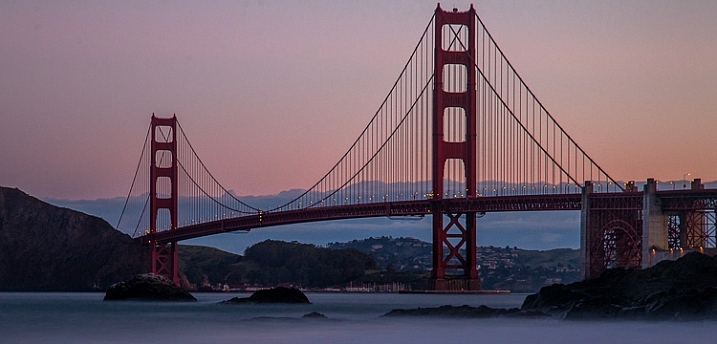
Taken at ISO 800 (shutter speed of 30 seconds and aperture at f/8.0)

Taken at ISO 800 (shutter speed of 30 seconds and aperture at f/8.0)

ISO has long been called the third corner of the exposure triangle, but was it really? In the film days you couldn’t even change your ISO, except by changing your film. In the early days of digital, you could change your ISO after each shot, which was a definite improvement. But, if you dared to increase the ISO, your picture would probably end up with a lot of digital noise in it. The reality is that most of us were confined to a very narrow range of ISO values when making our exposures.

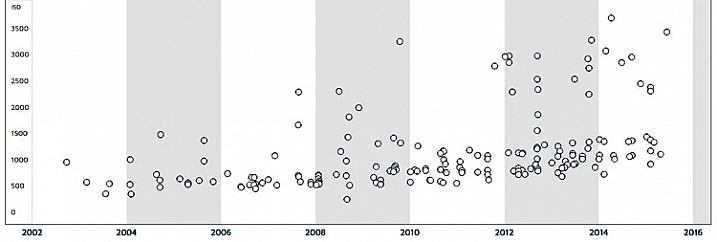
Times have changed though. Newer cameras offer a lot more flexibility when it comes to ISO. First of all, they are capable of taking pictures at higher ISOs. Cameras now will routinely shoot at ISO 25,600 (and higher), which was almost unheard of just five or six years ago. Secondly, when newer cameras do shoot at higher ISOs, they produce less digital noise. Check out this chart from DxO Mark showing the ability of cameras to shoot at higher ISOs without being ruined by noise:
DxO-aging-chart

The chart shows the maximum useable ISO for given cameras introduced over the last 12 years. Notice how the dots are higher on the chart the further you go to the right.  The newer cameras are to the right of the graph and the tests show that they can shoot at higher ISO values with less digital noise.

In addition, seemingly mindful of the desire of photographers to change their ISO more frequently, camera manufacturers have made it easier to change ISO on the fly. Some, like Fujifilm, have even put ISO on par with shutter speed and aperture by giving ISO its own dial. As a result, it is easier to change the ISO and it truly has status as an equal partner in the exposure triangle.

Even beyond cameras, however, we now have a much greater ability to remove digital noise from our pictures. Much of this improvement is thanks to Lightroom. With a quick slider adjustment, we can eliminate much digital noise from our pictures, without making them blurry. Further, if you have a severe noise problem, there are dedicated plug-ins like Noiseware and Photo Ninja, designed to reduce noise in your pictures, which have continued to improve.

As a result of all of this, you have a lot more flexibility when it comes to ISO. But how does this really impact your photography? And where should you set your ISO in different situations?

If you are just getting started, you might be bewildered by the numbers, or perhaps don’t even know where to start. If you have been shooting for a long time, you may be locked into some habits that were engrained before all these changes in technology. Either way, here are some tips to help you put ISO to work, to improve your photography.

Tip 1: Start with ISO 200

If you have been shooting for a long time, you might be in the habit of keeping your ISO at 100 to keep noise out of your pictures. As mentioned above, given the state of camera technology, this was a prudent practice. Now, however, there is almost no discernible difference between a shot taken at ISO 200 and ISO 100 in most cameras. You may as well use ISO 200 as a default to give yourself an extra stop of light. It will result in better pictures. How so? In one of two ways:

  • It will allow you to use a faster shutter speed, which will make your photos sharper if you are hand holding
    AND/OR
  • It will allow you to use a larger aperture to increase your depth of field

By using ISO 200 instead of 100, you will enjoy a little extra flexibility in your exposure settings, without an increase in digital noise. It is pretty much a case of something for nothing.

Tip 2: Use ISO 400 for clouds or dusk

Do not hesitate to move the ISO up to 400 (or even higher depending on your camera) when the need arises. If you are outdoors and there are any clouds, or if the sun is starting to move toward the horizon, go ahead and move to ISO 400. You will find there is very little increase in digital noise in most cameras at this level.
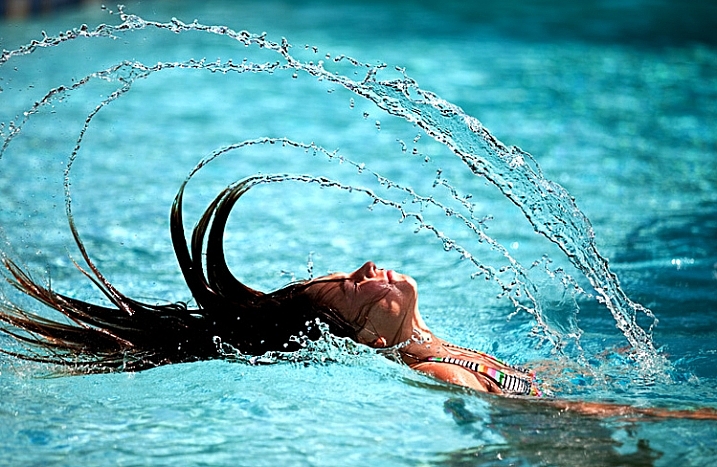
Even though this was a bright, sunny day, the need for a super-fast shutter speed meant that I needed to increase my ISO to 400 to get this shot.

Even though this was a bright, sunny day, the need for a super-fast shutter speed meant that I needed to increase my ISO to 400 to get this shot. Exposure info: 1/8000th, f/2.8, at ISO 400

Tip 3: Crank it up to stop the action

Previously, you faced a dilemma when trying to stop the action. Should you:

  1. Increase the ISO and risk having the picture ruined by noise, or
  2. Keep the ISO low and risk having the picture ruined by blur because of the slower shutter speed you would be forced to use?

Obviously, neither choice was ideal. But now, with better cameras and noise reduction tools, there is no reason not to increase your ISO when you are photographing action (assuming you are not trying to blur it). In that case, start by moving the ISO up to 800.

Tip 4: Start with ISO 1600 indoors

As soon as you move indoors, increase your ISO to 1600 if there is reasonably good light. Move it even higher if the lighting is poor. There is a lot less light indoors, even though it often doesn’t look that way to you (your eyes adjust very quickly).
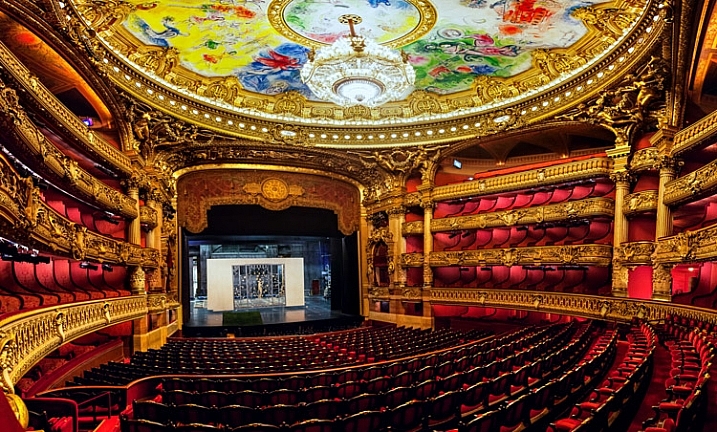
It was not possible to use a tripod in the Opera Garnier in Paris. Hence, ISO 3200 for this picture (actually pictures, since it is many pictures stitched together)

It was not possible to use a tripod in the Opera Garnier in Paris. Hence, ISO 3200 for this picture (actually pictures, since it is many pictures stitched together)

Note: If you have, and can use a tripod then keep your ISO lower if possible (there is no moving subject).

Tip 5: Don’t be afraid to use 6400

I was recently trying to take pictures of a high school play, featuring my daughter. I faced a toxic combination of extremely low light, and a moving subject (flash was not allowed). I had a pretty fast lens, opened all the way up to f/2.8. To keep the subject from being blurred, I needed to use a shutter speed of at least 1/400th of a second. To get a proper exposure, I required ISO 6400. I used it, and then gave it a dose of Lightroom noise reduction later, to get the following picture.

Hannah-Play

Exposure info: 1/500th, f/2.8, at ISO 6400

Perfect? No. But if I had hedged at all, it would have been blurred and completely ruined. The point is that ISO 6400 might not get you perfection, but it will get you a shot, when the alternative is no shot at all.

Tip 6: The same applies for higher ISOs

Nobody wants to use very high ISO values. But when you’re faced with the choice of a shot at ISO 6400 or 12,800 (which will probably have a noise problem), versus a blurry shot from using too slow of a shutter speed, take the noisy picture every time. You have some hope of curing a noisy picture in Lightroom. You have no hope of fixing a blurry subject.
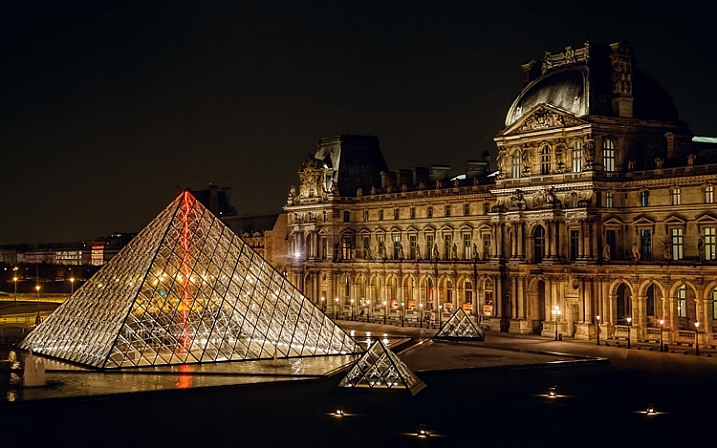
This was shot through a window from inside the Louvre, and using a tripod was not possible. Since I was hand holding, I needed to use ISO 3200. I didn't like using an ISO that high, but it beats not getting the shot at all (or having it blurry from too slow of a shutter speed)

This was shot through a window from inside the Louvre, and using a tripod was not possible. Since I was hand holding, I needed to use ISO 3200. I didn’t like using an ISO that high, but it beats not getting the shot at all (or having it blurry from too slow of a shutter speed). Exposure info: 1/8th, f/4, at ISO 3200

Conclusion

I recognize that, in a sense, this entire article could be summarized as: It is okay to increase your ISO. There is more to it than that though, and that is particularly true if you are just starting out, or getting used to a new camera. I have used hard values in this article to give you default numbers, for some different scenarios. That said, of course, every situation you will face as a photographer is different. Just use these as starting points and adjust from there. In time you will get your own starting points.

Further, your use of ISO will depend on your camera as well. Obviously, newer and more expensive cameras have better low-light performance. How does yours stack up? You can check the DxO Mark rating to start. The best thing to do is to test your camera, which is easily done by taking the exact same picture at different ISO values (while adjusting shutter speed to keep the exposure the same) and then comparing them on your monitor (at 100%). Having done so, you will be well poised to use ISO to improve your pictures.

googletag.cmd.push(function() {
tablet_slots.push( googletag.defineSlot( “/1005424/_dPSv4_tab-all-article-bottom_(300×250)”, [300, 250], “pb-ad-78623” ).addService( googletag.pubads() ) ); } );

googletag.cmd.push(function() {
mobile_slots.push( googletag.defineSlot( “/1005424/_dPSv4_mob-all-article-bottom_(300×250)”, [300, 250], “pb-ad-78158” ).addService( googletag.pubads() ) ); } );

The post 6 Tips for Using ISO Effectively With Your Camera by Jim Hamel appeared first on Digital Photography School.


Digital Photography School

 
Comments Off on 6 Tips for Using ISO Effectively With Your Camera

Posted in Photography


Pentax launches limited-circulation 645Z IR, an infrared version of its medium format camera

02 Dec

Ricoh has announced it is to offer an infrared-sensitive version of its 645Z medium format camera, the 645Z IR. Sadly, the new model is not intended for public consumption, but will be aimed at museums and scientific establishments who will have to sign a usage agreement before they can make a purchase. 

The camera will be made sensitive to infrared by removing the IR-cut filter that sits in front of the sensor. The photographer will then need to fit a filter over the lens to cut visible light according to the requirements of the occasion. With a hot mirror in place the camera will operate as a normal 645Z, but without one the sensor will be able to record wavelengths of up to 1100 nanometers. 

Ricoh says that there is no provision for auto focusing when the camera is working with infrared light as the light focuses at a different distance to visible light, and advises owners to use the magnify function of the live view display on the rear tilting-LCD screen. 

Other than the removal of the IR cut filter the 51.4MP camera will operate in exactly the same way as the normal version – including the scene modes, compatibility with Flucards, wireless control from a smartphone and the ability to shoot HD video. 

Ricoh is offering the Pentax 645Z IR to museums, libraries, government agencies and research institutions for specialist operations, often involving forensic work or recording detail in artworks concealed by layers of paint or faded with time. Shooting with infrared sometimes makes visible what can’t be seen with the human eye. 

The company hasn’t made public the price, but says the camera will be available from 15th January next year.  

For more information see the Ricoh website (Japanese)

Articles: Digital Photography Review (dpreview.com)

 
Comments Off on Pentax launches limited-circulation 645Z IR, an infrared version of its medium format camera

Posted in Uncategorized


Apple iPhone 6s Plus camera review

01 Dec

The iPhone 6s Plus is the iPhone 6s’ bigger brother and, apart from the larger 5.5-inch screen, mainly distinguishes itself from the smaller model by offering optical image stabilization system in its camera module. Compared to its predecessor, the 6s Plus ups camera resolution to 12MP, adds 50% more phase detection sensors and is capable of 4K footage. Our review tests its camera performance. Read more

Articles: Digital Photography Review (dpreview.com)

 
Comments Off on Apple iPhone 6s Plus camera review

Posted in Uncategorized


Behind the camera: Cristina Mittermeier, conservation photographer

01 Dec

In this video we take a look at the work of Cristina Mittermeier, a conservation photographer who has dedicated her working life to documenting our changing environment and the roles of human communities around the world in protecting it. Founder of the International League of Conservation Photographers, Cristina delivered the keynote talk at our recent PIX 2015 show in Seattle. Check out our video to learn more about her work.  

A look at the work of Cristina Mittermeier, conservation photographer 


This is sponsored content, produced with the support of Sony. What does this mean?

Articles: Digital Photography Review (dpreview.com)

 
Comments Off on Behind the camera: Cristina Mittermeier, conservation photographer

Posted in Uncategorized