RSS
 

Posts Tagged ‘Camera’

Accessory Review: Peak Design Slide Camera Sling strap

01 May

Peak Design Slide Camera Sling
$ 59/£45 | www.peakdesign.com | Buy Now

I admit, I’m generally not much of a camera strap user. Oh sure, I have a few straps, but they tend to be utilitarian affairs more there for emergencies or #dadlife convenience (‘What do you mean your feet hurt and I have to carry you the rest of the way through the zoo?’). Even when I was in the thick of my years as a working pro, I tended to work out of a bag far more often than I worked off my shoulder.

That said, shoulder straps have a lot going for them. They protect your camera from accidental drops, allow you to use both hands without putting your camera away, provide a way to keep multiple bodies at hand and the ease of access they offer cuts down on shots missed because you were digging your camera out of a bag or pack. So when I was asked to take a look at the Slide sling strap from Peak Design, I figured it was time to give straps another try.

Specifications

  • Maximum Length: 145cm/57in
  • Minimum Length: 99cm/39in<
  • Weight: 171g/6oz
  • Width: 45mm/1.8in
  • Strength Rating: 200lb (This is the rating for the Dyneema-corded Anchor Link anchors. The 45mm seat belt webbing could probably lift up your car.)

It is worth noting that Peak Design also offers a narrower version of the Slide, the SlideLITE, for mirrorless systems and other smaller cameras. Specs are virtually the same save for the width being 32mm/1.25in and the weight being cut to 141g/5oz. The reduction in weight is likely due to the narrower width and the fact that the SlideLITE is unpadded.

In Use

$ (document).ready(function() { SampleGalleryV2({“containerId”:”embeddedSampleGallery_8737464020″,”galleryId”:”8737464020″,”isEmbeddedWidget”:true,”standalone”:false,”selectedImageIndex”:0,”startInCommentsView”:false,”isMobile”:false}) });

Attaching the Slide took less time than any strap I have ever installed. The Anchor Link connector design is clever and quick. So much so, even when I wasn’t using the strap, I left the Anchor Link anchors installed on my camera. Sure, they look a little silly and flap around like little ears, but they don’t get in the way and allow me to install the strap again in seconds. With four anchors included, it would be easy to move the Slide between bodies. The anchors loop around your camera body’s strap eyelets and then click the anchor into the connector at the end of the Slide strap. To remove, you press down on the anchor and slide it back out again. You could easily do it in the dark and yet there is virtually no chance of it happening accidentally. 

There are two different options to connect the Slide to your camera. The first is the traditional connection to your body’s strap eyelets, suitable for the classic ‘neck strap’ style with the camera hanging down in front of you. The second makes use of the included Arca-Swiss compatible tripod plate.

The plate has small cutouts in each corner that allow attachment of an anchor. When connected to a strap eyelet and the plate, the camera hangs more naturally at your side when worn across your shoulder/chest as a sling. There are other products on the market that allow you to attach a strap to your camera’s tripod mount, but virtually all of them must be removed if you wish to use a tripod. Integrating an Arca-Swiss compatible plate into its design means that users of the Slide can easily tripod mount their camera without making any changes to the strap setup. 

The Slide is surprisingly comfortable. The wide soft seatbelt material combined with the internal padding makes carrying even heavy DLSRs manageable. It has been a long while since I’ve had a ‘padded’ camera strap. I have either found them exceedingly bulky or made out neoprene that allowed the camera to ‘bounce’ on my shoulder more than I liked. The Slide’s padding is only 1/4 of an inch thick or so, but it has enough firmness to it that it can support and distribute the weight of the camera. One side of the padded section is smooth and the other has rubberized ‘gripper’ lines added, allowing you to choose between the two options.

$ (document).ready(function() { SampleGalleryV2({“containerId”:”embeddedSampleGallery_1824827107″,”galleryId”:”1824827107″,”isEmbeddedWidget”:true,”standalone”:false,”selectedImageIndex”:0,”startInCommentsView”:false,”isMobile”:false}) });

The one drawback to the Slide’s padding is that it is somewhat stiff and doesn’t fold up particularly well. This isn’t noticeable on your shoulder, but can be a little awkward when putting your camera into a bag. I suspect that the padding will soften up with age and be more flexible, but I wonder if that will take away any of the cushioning abilities. Only time will tell I suppose.

Length adjustment is quick and easy, even one-handed. You just pull up on the quick adjust handle to release the strap and slide up or down to the desired length. It’s really handy to be able to lengthen the strap for when you are actively shooting and to tighten it back up again when you’ve got some hiking to do. This does, however, bring me to the most glaring problem with the Slide.

While the metal adjustment handles are nice looking and give a sense of quality to the strap, they are also a significant hazard to equipment for those of us who put our cameras in bags. I was constantly afraid that the handle was going to scratch a body or LCD or worse, chip a lens that had somehow been put away without a cap on. As far as I’m concerned, there is no way that the Slide should have used metal in this design. The added weight was unneeded and the danger to camera gear too great. I would love to see this exact design, but with plastic adjustment handles. 

What’s the Bottom Line?

The Peak Design Slide Sling Strap is a well-made, innovative camera strap with a premium price tag. Its construction and materials show quality. The namesake ‘slide’ feature works exceedingly well, the minimal padding and wide strap width tames even heavy DSLR/lens combos and the Anchor Link connectors are a clever and quick way to install and remove a strap.

However, for all the good points about the Slide, the fear that the aluminum quick adjustment handles will scratch or chip expensive equipment is a significant drawback. This is particularly true for those of us who tend to work out of a bag more often than we carry a camera around our shoulder or neck. If you are in that boat and want a strap that still offers many (though not all) of the Slide’s features, it might be worth checking out the Peak Leash strap. 

What we like:

  • Ease of length adjustment, even one handed
  • Innovative hidden non-bulky padding
  • Wide enough to be comfortable
  • Easily installed/removable, can use on multiple cameras
  • Versatile attachment system
  • Material is soft and flexible
  • Arca-Swiss style tripod plate attachment 

What we don’t like:

  • Stiffness of padding makes it difficult to put in bag
  • Metal adjustment buckles can bang against camera/gear in bag
  • Most would consider it expensive for a camera strap

Final Rating:

Articles: Digital Photography Review (dpreview.com)

 
Comments Off on Accessory Review: Peak Design Slide Camera Sling strap

Posted in Uncategorized


Sony patents contact lens camera with blink-triggered shutter

30 Apr

Sony has patented a contact lens that comes with an integrated miniature camera module and all its components, such as image sensor, lens, processor, storage and even a wireless module to transfer images to a smartphone or other connected device. Read more

Articles: Digital Photography Review (dpreview.com)

 
Comments Off on Sony patents contact lens camera with blink-triggered shutter

Posted in Uncategorized


Camera Raw 9.5.1, Lightroom updates add Pentax K-1 support

29 Apr

Adobe has released updates for ACR as well as standalone and CC versions of Lightroom, providing Raw support for the Pentax K-1 and Sony Cyber-shot DSC-RX10 III. Adobe Camera Raw 9.5.1, Lightroom CC 2015.5.1 and Lightroom 6.5.1 are all available for download and offer some minor bug fixes along with the new camera support. Updates are also available for Adobe DNG Converter for Windows and Mac.

Lightroom Mobile for iOS also gets an update. Version 2.3 brings improvements to editing workflow by making it easier to start editing a single photo from the device’s camera roll. The latest version is available for iPhones and iPads at the App Store.

Bugs Fixed in Camera Raw 9.5.1

  • EXIF lens name not visible for some camera models.
  • Camera Raw would not launch under Mac OSX 10.7 and 10.8.
  • Errors when using Camera Raw to tone HDR images from Photoshop. This occurred when converting 32-bit files to 16 or 8-bit files.

Bugs Fixed in Lightroom CC 2015.5.1 / 6.5.1

  • Droplets not working as export actions 
  • Issues with incorrect folder permissions.  Please see instructions to help correct user permissions issues.
  • EXIF lens name not visible for some camera models.  Please see instructions to reparse the Lens metadata after installing the update.
  • Focus lost in the keyword panel when navigating to the next image
  • Error when merging to HDR or Panorama from a collapsed stack 
  • Removed dependencies on QuickTime for some video codecs on Windows. Please see https://helpx.adobe.com/x-productkb/multi/quicktime-uninstallation-impact.html for more information

Articles: Digital Photography Review (dpreview.com)

 
Comments Off on Camera Raw 9.5.1, Lightroom updates add Pentax K-1 support

Posted in Uncategorized


Interchangeable lens camera sales steady as Canon profits plunge

27 Apr
Canon calls out the EOS 80D as a driver for strong unit sales in the interchangeable lens camera market.

Canon Japan reported flat ILC unit sales as one of the bright points in first quarter reports that saw a 17.5% fall in net income. A strengthening Yen, poor performance in the laser printer business and continued decline in compact camera sales combined to give the company a tough quarter.

Overall, digital camera sales are down 12%, due in large part to a 22% decline in the dying compact camera market, though Canon cites its G-series as a bright spot. Interchangeable lens camera sales were flat compared to Q1 2015, propped-up by strong sales of the EOS 80D and gains for the M3 and M10 mirrorless cameras in Asia. Interchangeable lens cameras account now account for 49% of total unit sales and 84% of the company’s revenue.

While delivering ‘flat’ numbers might not sound very positive, figures provided by the Camera & Imaging Product Association show a nearly 10% year-on-year industry-wide decline in ILC unit shipments, as well as 17% YoY reduction in SLR shipments. In other words, Canon isn’t doing quite as poorly as it may sound just looking at the numbers.

Looking ahead to 2016 as a whole, Canon expects compact camera sales to drop 24%, though more expensive models like the G-series will help protect margins. The company states that it hopes to increase profitability of this line ‘through the standardization of parts and other measures.’ It also says it expects unit sales of ILCs to fall by 7% across the year. But, while it has slightly lowered its projections for income from its imaging business for 2016, nearly all of the reduction comes from the expectation that the Yen will stay strong, lowering the value of overseas sales.

For more details, have a look at Canon’s Q1 2016 financial statement.

Articles: Digital Photography Review (dpreview.com)

 
Comments Off on Interchangeable lens camera sales steady as Canon profits plunge

Posted in Uncategorized


Raspberry Pi updates camera board with 8MP Sony IMX219 sensor

26 Apr

Raspberry Pi, maker of low-cost miniature computers frequently used in DIY projects, has upgraded its camera board accessory, replacing the previous 5MP OmniVision OV5647 sensor with an 8MP Sony IMX219 sensor. The new sensor is used for both the regular camera board and an infrared-sensitive version, and according to Raspberry Pi, it offers better low-light performance, image quality and color fidelity.

The camera accessory is a simple, small board with a ribbon cable that can be connected to one of the Raspberry Pi mini-computers. Creators have used the camera modules to record images through a telescope and equip drones with lightweight camera functionality, among many other applications. The previously used OmniVision sensor was discontinued in 2014, but a large stockpile allowed Raspberry Pi to continue offering the model until just recently. 

Speaking about tuning the image sensor pipeline, Naush Patuck said:

Regarding the tuning process, I guess you could say the bulk of the effort went into the lens shading and AWB tuning. Apart from the fixed shading correction, our auto lens shading algorithm takes care of module to module manufacturing variations. AWB is tricky because we must ensure correct results over a large section of the colour temperature curve; in the case of the IMX219, we used images illuminated by light sources from 1800K [very reddish light] all the way up to 16000K [very bluish light].

The Sony-based camera board costs $ 25 like the previous version, and is available through RS Components and element14.

Via: Raspberry Pi

Articles: Digital Photography Review (dpreview.com)
 
Comments Off on Raspberry Pi updates camera board with 8MP Sony IMX219 sensor

Posted in Uncategorized


Huawei clarifies Leica involvement in P9 camera design

21 Apr

Huawei has released a statement clarifying Leica’s involvement in creating its P9 and P9 Plus camera module. Read more

Articles: Digital Photography Review (dpreview.com)
 
Comments Off on Huawei clarifies Leica involvement in P9 camera design

Posted in Uncategorized


How to Choose the Right Digital Camera for a Specific Type of Photography

19 Apr

Are you overwhelmed with the many digital camera options available in the market? This article will help you determine the right camera for your specific photography need. Whether it’s portrait, landscape, travel, sports and adventure, or aerial photography that you want to get into, you can’t just settle for the most popular. So before you go checking out what the Continue Reading

The post How to Choose the Right Digital Camera for a Specific Type of Photography appeared first on Photodoto.


Photodoto

 
Comments Off on How to Choose the Right Digital Camera for a Specific Type of Photography

Posted in Photography


The Top 10 Camera Features Wish List of dPS Readers and Writers

17 Apr
Brooklyn Bridge picture taken using a remote shutter release and a neutral density filter, which could be eliminated with camera improvements.

Brooklyn Bridge picture taken using a remote shutter release and a neutral density filter, which could be eliminated with camera improvements.

It is becoming almost cliche, but there has never been a better time to be a photographer. What we can do now with modern digital cameras, without spending that much money, is incredible. Without breaking the bank, you can now get an extremely high resolution digital camera, with low light performance and a dynamic range unheard of just a few years ago, that shoots at speeds measured in multiple frames per second. If that isn’t enough, it will also double as a video camera with HD quality as a bare minimum. It will even send the pictures wirelessly to your phone. It seems ungrateful to ask for more. Still, everything can be improved, can’t it?

And just to be clear – when I say improved, I don’t mean adding more megapixels. Or demanding even better low light performance and dynamic range. Or achieving even faster focus and shooting speeds. The manufacturers know everybody wants that stuff, and they seem to be putting all their energy into those areas.

But doesn’t it seem like there are features that could be added to cameras that wouldn’t require a technological breakthrough? Or that wouldn’t make your camera cost a fortune? It always seemed that way to me. So I started asking around to other photographers, then I started asking readers, and finally I asked my fellow dPS writers.

How would you improve digital cameras?

I got some good answers, and have combined them with my own to create a list of 10 new features (a wish list) that could be added to digital cameras to make them better. Here they are, in no particular order:

1. A Small LCD for the Histogram

The first improvement is a separate, smaller LCD on the back of the camera. Why? Let me explain.

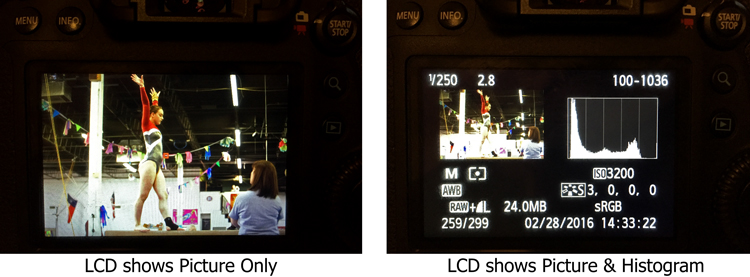
We all know that the best way to evaluate exposure when you are shooting is to look at the histogram. Looking at just the picture on the LCD doesn’t work as well when you are trying to evaluate exposure. But look what happens to the picture on the screen when you add the histogram:

LCD-graphic

On the left, where you have the full picture, you can clearly see it. But once you add the histogram, the picture on the right becomes tiny. It is unusable and tells you nothing. We are essentially forced into a position of having to choose between a picture we can see, or just viewing the histogram (but not both). I’d like to do both.

To fix that, you could just put another very small LCD on the back of the screen. It would show only the histogram, so that you could still have a full sized version of your picture.

2. Three Dials

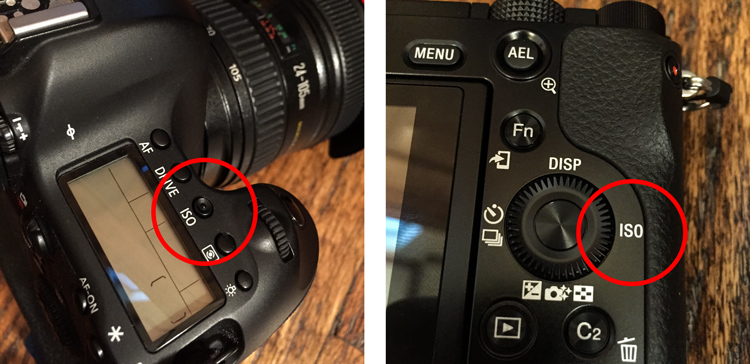
When you set the exposure level of your pictures, there are three controls: shutter speed, aperture, and ISO.

At the same time, how many dials do we have to set those three controls? Two – and that’s if we’re lucky. Entry level cameras often only have one. To change all three exposure controls with only two dials, means you have to press buttons while turning dials. It’s a rather cumbersome process, for the most important and commonly used functions of the camera. If we have three exposure settings, shouldn’t we have three dials to set them?

The odd man out is always ISO, and I personally think this is a hold-over from the days of film. Back then, you couldn’t change the ISO except by changing your film. When digital came along, everyone was pretty happy to be able to change the ISO at all, so having to press a button didn’t seem like a big deal. In addition, at that time, available ISO ranges were extremely limited and if you raised the ISO much then digital noise quickly became a problem.

But now? ISO ranges are huge! Even entry level cameras have ISO ranges up to 25,000. ISO is now truly a equal partner in the exposure triangle. It should be treated as such. That means it should have its own dial. You shouldn’t have to press buttons to adjust it.

ISO-controls-graphic

Stop ISO discrimination! Let’s make it an equal member of the exposure triangle by giving ISO its own dial!

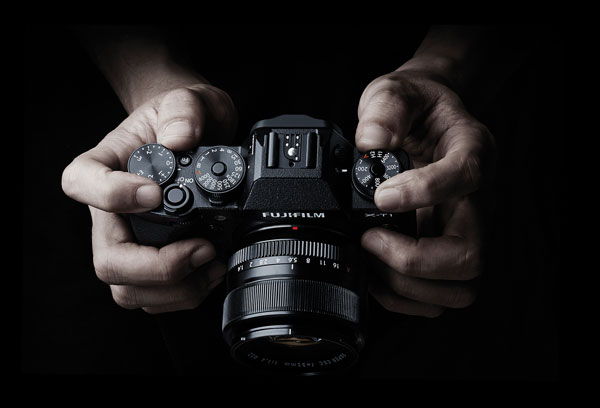
Where would you put the extra dial? There are many places you could choose from, but one thought is to get rid of the mode dial. Having a dedicated dial to quickly change the mode is another hold-over from a time when there were fewer camera controls (and no menus). Who changes their modes so frequently that the most valuable real estate on the camera needs to be taken up with a dial for it? Don’t most people just pick a mode and use it most, or all of the time? Even those that change modes don’t do so often enough that it needs its own dial.

Note: It actually appears that this change might be on the way. There are three dials on most Fujifilm mirrorless cameras and one of them is dedicated to ISO. Perhaps others will follow suit.

Supplied by Fujifilm

Supplied by Fujifilm

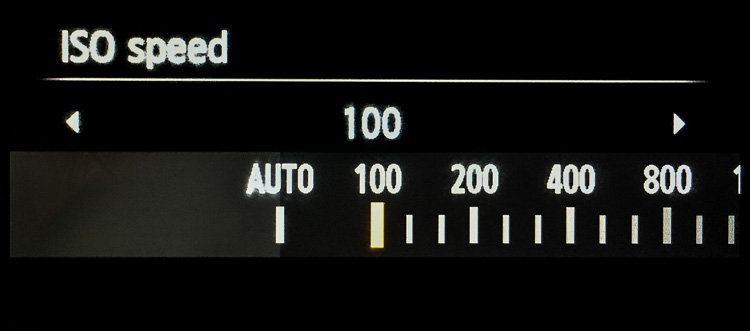
3. Lower ISOs

Speaking of ISO, in the rush to expand ISO values on the high side, the lower side of the ISO scale has been completely neglected. The camera manufacturers have worked very hard to make digital sensors more sensitive to light. It would seem like a simple thing to make the sensor less sensitive to light. Why couldn’t cameras have ISO levels of 50, 25, 12, and so on?

Why would that matter? It would put us in more control over shutter speed, and avoid the necessity of carrying around neutral density filters. Why do landscape photographers need to carry around a bunch of neutral density filters to slow down their shutter speeds? If we could lower the ISO, that would require a longer shutter speed for a proper exposure. It seems like that could just be built in, and would make it much simpler. Instead of adding a 3-stop neutral density filter to your lens, you could then just reduce the ISO from 100 down to 12 (3 stops).

Why stop at ISO 100? We should see ISO 50, 25, 12, 6, 3, and so on.

Why stop at ISO 100? We should see ISO 50, 25, 12, 6, 3, and so on.

Of course, we might need to talk about the numbering system for these low ISOs. Moving down 10 stops from ISO 100 would result in ISO .09 which may not work.

4. Retractable Remote Shutter Release

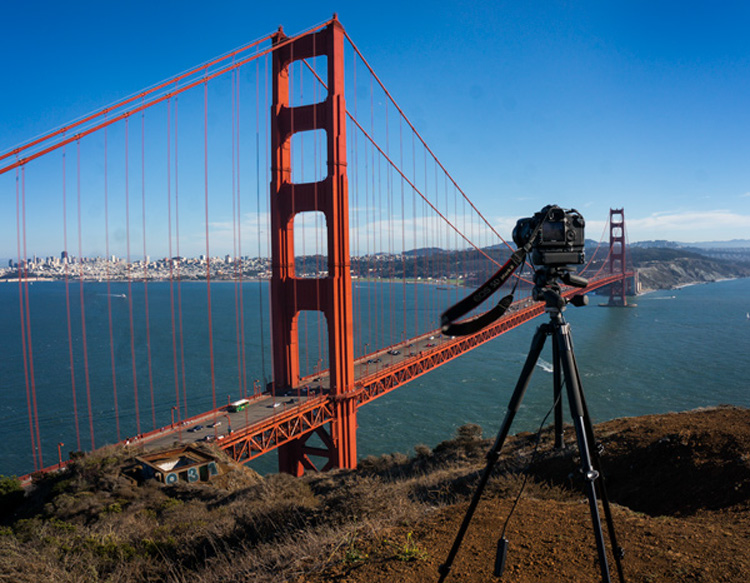
Speaking of landscape photographers, something every one of them needs is a remote shutter release, or an intervalometer. It seems like the shutter release could detach from the camera with a retractable cable. That way you could pop it out and trip the shutter, without moving the camera or risking vibration.

TripodAtGoldenGate

Note the remote shutter release hanging down. Wouldn’t it be nice to have a retractable unit?

It would mean that we wouldn’t have to carry around remote shutter releases.

5. Allowing Longer Shutter Speeds

Another improvement would be to allow longer shutter speeds without the need to switch over to Bulb mode. At present, most cameras limit the length of shutter speeds to 30 seconds. If you want to use a longer shutter speed than that you can, but you have to switch over to Bulb mode. It would be nice to be able to take exposures of a minute or longer without having to switch modes.

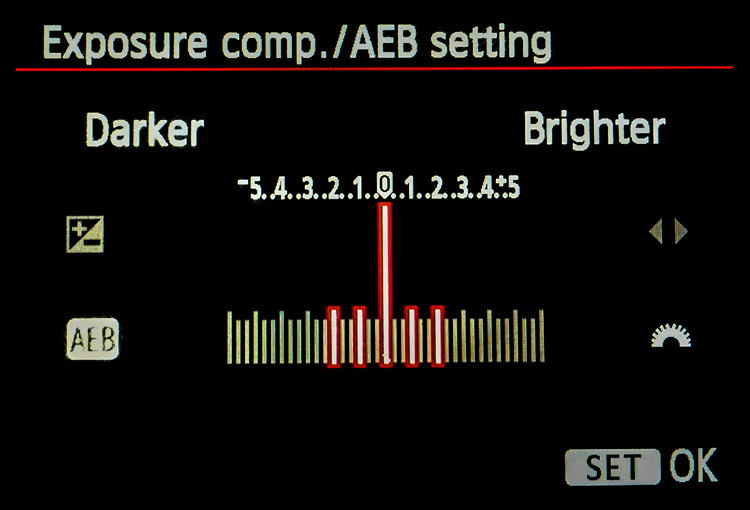
Why is this important? Largely because of bracketing (or Auto Exposure Bracketing, or just AEB for short). When you bracket, you are taking three (or more) exposures: one at normal exposure, one underexposed, and one overexposed. If you are starting with a long shutter speed, then the longer shutter speed required for the overexposed picture will often need to be longer than 30 seconds.

For example, if you are taking a bracket of three photos, with your starting shutter speed at 15 seconds, and you set the exposures 2 stops apart, the bracket won’t work as you hope. In this example, the overexposed picture of the bracket would need a shutter speed of one minute (starting at 15 seconds, adding one stop doubles your shutter speed to 30 seconds, and the second stop doubles it again to one minute). But your camera will only allow a shutter speed of 30 seconds, so that won’t work. Your camera will take the normal and underexposed photos, but the overexposed one will be limited to 30 seconds.

Here is a pretty common bracket for those who use them (5-shots, with each shot separated by 1 stop). If the original shutter speed is longer than 6 seconds, the camera will not capture the entire bracket because the most overexposed picture would need longer than 30 seconds.

Here is a pretty common bracket: 5-shots, with each shot separated by 1 stop. If the original shutter speed is longer than 6 seconds, the camera will not capture the entire bracket because the most overexposed picture would need longer than 30 seconds to expose.

How often does this happen? A lot more than you might think. Landscape photographers are known for being out before the sun is up, and they all want to use a combination of a small aperture to maximize depth of field and a low ISO to minimize noise. The only way to get a proper exposure in these conditions is to use very long shutter speeds. These are the same people who have very little control over their lighting and often face dynamic range problems, so they are the most likely to bracket their photos.

6. Self-Timers

Why are self-timers on cameras limited to two and 10 seconds? A reader named Jeff Johnson wondered about this (as well as raising some of the other improvements mentioned in this article). Every $ 10 digital watch in the discount store will allow you to set timers of different ranges, why not our digital cameras?

This is another one that seems to be a hold-over from a prior era. Timers were mechanical devices at one time, and it may have made a lot of sense to limit the options. Now, it doesn’t make sense. It seems like we ought to be able to set whatever length of timer we want, or at least have a few more options.

7. Improved Wifi

One exciting recent development in cameras has been the introduction of Wifi. It allows you to transfer your pictures to your phone or other device wirelessly. But it is usually clunky. You have to turn off your phone’s data connection to connect with your camera. Some have raised the idea of using bluetooth for connection to phones, tablets, and laptops (in addition to wifi). dPS writer John McIntire echoed that, and pointed out the smartphone and tablet control for things like timelapse and long exposures.

 8. Hyperfocal Distance Calculator

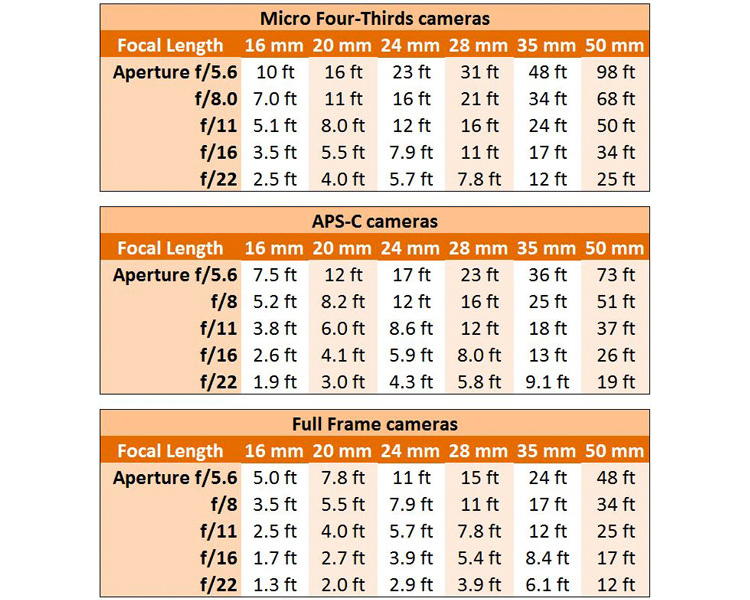
Despite its name, the concept of hyperfocal distance is not that complicated. It is just the closest point at which you can focus, and still keep your entire background acceptably sharp. It depends on only three factors:

  1. The sensor size of your camera
  2. The focal length you are using
  3. Your aperture setting.

There are charts and apps that will help you calculate the hyperfocal distance for your shot.

Hyperfocal Distance Charts

Hyperfocal Distance Charts

But why should you be forced to calculate it at all? The aforementioned Jeff Johnson had another great idea of having the camera calculate it for you. After all, the camera is a computer. It already knows all three of the variables involved. Why couldn’t the camera just tell you the hyperfocal distance? It could be part of the camera’s display.

Note: Once again the Fuji cameras lead the way, as the X-T1 and possibly others, do indeed have a hyperfocal distance display inside the viewfinder.

9. Internal storage

Storage has changed remarkably fast in a short period of time. Just a few years ago, you might have been carrying around a bunch of 4 GB memory cards with you. After a couple hundred pictures, you’d swap it out for another. But now, the sizes of memory cards are huge. 128 GB is commonplace, and not all that outrageously expensive. There are even 256 GB cards or even 512 GB cards available as well. As a result, most of us just buy a large card and leave it in the camera. We download the pictures periodically, and resume shooting with the same card.

That’s already a better situation than what we had a few years ago, but doesn’t it seem weird that there is no storage at all in digital cameras (at least not in the mirrorless cameras and DSLRs we tend to use)? It did to Leanne Cole, who wondered why we are fooling around with memory cards at all at this point. Given how much storage can fit in a small place, haven’t we reached the point where storage should be built-in to the camera? Why not have a 500 GB drive already added?

10. Your Changes

These are some items we’d like to see. I think some of these are good ideas, but I suspect there are better ideas out there. So what would you change? Are there things you would add? Are there features you’d like to see put on the digital camera wish list?

Please let us know in the comments below.

googletag.cmd.push(function() {
tablet_slots.push( googletag.defineSlot( “/1005424/_dPSv4_tab-all-article-bottom_(300×250)”, [300, 250], “pb-ad-78623” ).addService( googletag.pubads() ) ); } );

googletag.cmd.push(function() {
mobile_slots.push( googletag.defineSlot( “/1005424/_dPSv4_mob-all-article-bottom_(300×250)”, [300, 250], “pb-ad-78158” ).addService( googletag.pubads() ) ); } );

The post The Top 10 Camera Features Wish List of dPS Readers and Writers by Jim Hamel appeared first on Digital Photography School.


Digital Photography School

 
Comments Off on The Top 10 Camera Features Wish List of dPS Readers and Writers

Posted in Photography


Microsoft Lumia 950 camera review

15 Apr

In addition to strong camera specifications like a 1/2.4″-type 20MP Sony sensor and Zeiss branded F1.9 lens, the Lumia 950 boasts some tantalizing mobile photography features like Raw capture and extensive manual controls. Unfortunately, its imaging feature set is behind the competition in some notable ways. Read more

Articles: Digital Photography Review (dpreview.com)
 
Comments Off on Microsoft Lumia 950 camera review

Posted in Uncategorized


Flexible sheet camera concept could lead to bendable capture devices

14 Apr

Researchers at Columbia University are working to produce a flexible sheet camera with stretchable lenses. The program aims to create very thin, high resolution cameras that can be wrapped around surfaces like car panels. Currently in concept form, the sheet lens array that such a camera might use has been developed to produce a seamless image on a flexible sensor when it is bent or wrapped around a physical object.

The focus of the research is in creating flexible lenses that are capable of changing shape (and hence the effective focal length) as they are stretched and compressed so that the imaging sensor can record a detailed image whatever the field of view.

With fixed lenses, gaps appear between the coverage of the lenses as the substrate is bent (left), but in the researcher’s flexible lens example (right) the lenses bend with the substrate and offer continuous coverage of the subject.

In previous attempts at flexible lens arrays only the substrate has been flexible, and as the sheet of lenses has been bent gaps have appeared in the subject coverage as the angle between the lenses increased beyond their individual field of view. These gaps lead to aliasing artifacts in the final image that can’t be corrected in post-processing software. In this new concept the lenses are also flexible and they stretch as the sheet bends, altering their focal length and providing better sampling of the subject.

So far the research has successfully produced a sheet of silicone with lenses molded on one side and a diffuser behind a sheet of apertures on the other. The apertures act as a low pass filter ensuring light from each molded lens reaches only one point on the viewing diffuser.

Images created with the substrate bend by different degrees, showing how the field of view changes

The system hasn’t actually been used with a sensor yet, but the study did use it to project images on to the diffuser screen to determine how effective it would be. Bending the sheet increased and decreased its field of view, or effective focal length, and the images were displayed without missing areas. All that is required now is a flexible sensor to go with it.

An array of lenses was formed by pouring silicone into a metal mold

The intention of the project is to work towards finding a way of making sheets of lenses to work with photosensitive materials that will record images when wrapped around real-world objects. The researchers want ultimately be able to produce these sheet cameras in roll format at a low cost so that the sheets can be cut to size to suit specific uses.

The released information suggests a sheet camera could be wrapped around the panels of a car to give the driver a view from all angles. Alternatively sheet cameras could be used by consumers to take normal pictures but with the user bending the sheet to alter the field of view, or zoom effect, of the system.

For more information see the project’s page on the University of Columbia website.


Press release:

Flexible Sheet Cameras With Elastic Optics

In this project, we pursue a radically different approach to imaging. Rather than seeking to capture the world from a single point in space, our goal is to explore the idea of imaging using a thin, large, flexible sheet. If such cameras can be made at a low cost (ideally, like a roll of plastic sheet), they can be used to image the world in ways that would be difficult to achieve using one or more conventional cameras. In the most general sense, such an imaging system would enable any surface in the real world to capture visual information. While there is significant ongoing work on the development of flexible image sensors, our interest here is in the design of the optics needed to form images on such sensors.

At first glance one might imagine that a simple lens array aligned with a flexible detector array would suffice – its field of view (FOV) can be varied by simply bending it. What is perhaps less apparent is the fact that, in a curved state, the FOV can end up being severely under-sampled. This under-sampling leads to a captured image that is not bandlimited. Thus, the Nyquist sampling criterion is violated and the image will suffer from aliasing artifacts when reconstructed. It is important to note that these artifacts cannot be removed via post-processing since scene information is lost during image formation.

To address the above aliasing problem over an entire range of sheet curvatures, we propose the design of a deformable (elastic) lens array. We show that, if designed carefully, the deformable lenses of the array will change shape (and hence focal length) under bending forces in a way that mitigates aliasing. A remarkable feature of our design is that the lens array can achieve aliasing compensation passively, without the use of any per-pixel actuation or control. Our optics can be combined with a flexible sensor array to obtain a complete sheet camera. This project was supported by the Office of Naval Research (ONR).

Articles: Digital Photography Review (dpreview.com)
 
Comments Off on Flexible sheet camera concept could lead to bendable capture devices

Posted in Uncategorized