Award-winning artist and director Lynette Wallworth released her documentary Awavena in 2018 to critical acclaim. The project’s director of photography, Greg Downing, utilized numerous cameras during production, including the specialized Canon ME20F-SH multi-purpose camera.
Awavena follows the first female shaman of the Yawanawa tribe in the Amazonian rainforest. As part of the film, the crew documents an Ayahuasca vision quest and represents this experience using real footage captured in incredibly low light and CGI. Downing, with the aid of the ME20F-SH, captured footage of fluorescent insects and plants in nearly no light, something that Canon believes could have proven impossible for other cameras.
This week, Canon shared a video going behind the scenes with Downing and the ME20F-Sh camera. You can view this below.
If you’d like to view the trailer for Awavena, it can be seen below. Awavena is Wallworth’s second mixed-reality VR film, following up on the Emmy-winning film, Collisions. Wallworth says, ‘We engaged DP Greg Downing from XRez to film in the Amazon and brought the eminent Australian fluorescent biologist Dr. Anya Salih, my longtime collaborator, along on the shoot so we could film the previously unseen world of forest fluorescence as part of the vision sequence.’ Wallworth’s full artist statement about Awavena can be read here.
While the Canon ME20F-SH camera is getting a bit long in the tooth, its technical specifications and features continue to impress over five years since it was announced. The camera utilizes a 2.26MP CMOS image sensor, which was originally announced all the way back in 2013. The sensor has pixels measuring 19?m, allowing for 1080/60p video capture in light levels as low as 0.0005 lux at a gain setting of 75 Db, which is equivalent to over ISO 4,000,000. The ME20F-SH supports Canon’s EF and EF-S lenses. While Awavena represented Downing’s first experience with the ME20F-SH camera, he has long relied upon Canon cameras for his work and has been a longtime Canon Professional Services member.
Canon ME20F-SH camera
This is not the first time footage from the ME20F-SH has been featured on our site. In 2016, Ben Canales recorded video of the Perseid meteor shower using the camera. You can see that footage below.
In 2017, Canon outfitted an industrial done with the ME20F-SH all-purpose camera for nighttime surveillance. That video can be seen here.
As PetaPixel notes in its coverage of Awavena, the ME20F-SH has been used to record the aurora borealis in real-time and record bioluminescent coral over 1,000 feet beneath the ocean’s surface. You can check out these videos below:
Pinhole photography is often associated with ‘intro to photography’ -type classes, because it simplifies the process of recording an image down to bare bones. But there is both an art and a science to creating a well-functioning pinhole camera. Specifications like hole diameter and the light-sensitive material’s distance and angle-of-view to the pinhole make a huge difference.
So, how does one elevate the pinhole camera from DIY beginner project to serious creative tool? With a little bit of technical know-how and a whole lot of trial-and-error. Join 35mmc’s Sroyon on their adventures in the world of cardboard cameras.
Read: Making and using a cardboard camera – adventures in pinhole photography
About Film Fridays: We recently launched an analog forum and in a continuing effort to promote the fun of the medium, we’ll be sharing film-related content on Fridays, including articles from our friends at KosmoFoto and 35mmc.
Manfrotto has introduced its own-brand camera batteries and a dual-bay charger that will be available exclusively in the USA. The lithium-ion batteries fit Canon and Nikon cameras, and are said to offer enhanced performance over standard batteries.
The HLX-E6N battery for Canon is a replacement for Canon’s LP-E6N, but the Manfrotto version offers 2000mAh over Canon’s 1865mAh. The Nikon alternative has slightly greater capacity than the 1900mAh of Nikon’s EN-EL15A and EN-EL15B batteries, but slightly less than the 2280mAh capacity of the EN-EL-15C.
The ProCube charger can accommodate two batteries of the same type and charge them simultaneously. The charger is compatible with batteries from Sony cameras as well as those from Canon and Nikon. An LCD panel shows charging progress as a percentage as well as in mAh, and also informs users of the health of the cells. The charging bay plate is interchangeable, so those with more than one brand of camera will be able to use the camera charging unit with different plates, and AA batteries can also be charged via a further included plate.
Sharp-eyed readers will note the striking similarity between the Manfrotto ProCube with its new batteries and the ProCube and batteries currently available from Hähnel. Perhaps existing Hähnel charging plates for other brands and battery types will also be compatible with this Manfrotto version. While Manfrotto has no track record in battery technology Hähnel does, and it is a pretty good one at that, so we can assume these will be very good alternatives to those supplied by the camera manufacturers.
Manfrotto Professional Batteries will cost $ 49.99, while the ProCube will cost $ 79.99 including adapters for European and UK plugs. For more information see the Manfrotto website.
Press release
NEW PROFESSIONAL BATTERIES AND CHARGERS FROM MANFROTTO
High quality batteries
Charge 2 batteries simultaneously, or 4 AA batteries
Intelligent fast IC charge control
Vitec Imaging Distribution, world leader in the photography and videography, imaging equipment and accessories industry announces their new range of batteries and chargers – the first they have produced.
High quality batteries Exclusive to the US, Manfrotto batteries and chargers go above and beyond the standard offerings currently on the market. With faster, more efficient charging and higher quality batteries, the Manfrotto Professional li-ion batteries deliver additional capacity, extra performance and ultimate reliability. The best UL approved cells have been carefully selected to ensure an extended life cycle, performance and safety.
Think all batteries are the same? Think again. The Professional li-ion batteries have been built to withstand tough environments and extreme field conditions – each battery has been injected with silicone giving them a shock absorbing construction, superior circuit protection and additional electrical insulation. They are drop proof up to 9ft, so you know you can rely on them whatever environment you are in.
Simultaneous charging It isn’t easy to replenish two batteries at the end of the shoot as cameras are only supplied with the means to charge one. The Manfrotto ProCUBE will give you the capability to charge 2 batteries at the same time. It features a sturdy metal shell and interchangeable plates that each accept a pair of batteries as well as a plate for charging four AA batteries. The battery holders simply clip into place, whilst the AA plate fixes magnetically onto the top of the unit. The Manfrotto ProCUBE is an essential piece of kit for professionals who use multiple cameras from the same brand.
The easy to read LCD display shows the charging status of each battery as well as a battery health check, and the USB Power Source and Car Charging Cable means you can charge wherever your shoot takes you. US, Euro and UK plug adapters are also included.
The Professional Batteries are available for Canon and Nikon. MAP $ 49.99
The ProCube Chargers are available for Canon, Nikon and Sony. MAP $ 79.99.
For more information see https://manfrotto.com/us-en/products/batteries-chargers/
Off-the-wall photographic company Lomography has introduced a 35mm film camera that shoots 104mm long panoramic images through a lens that we are encouraged to fill with water. The company claims the HydroChrome Sutton’s Panoramic Belair camera is the world’s first 35mm format panoramic camera with a liquid-filled lens. Not surprising you might think, but they had to specify ‘35mm’ as in 1859 pioneering British photographer Thomas Sutton invented a panoramic camera with a water-filled lens that recorded on curved plates.
The camera has a plastic body and a lens that offers the angle of view of a 32mm. There is a chamber in the lens construction that allows users to add a liquid of their choice to create unusual effects. The liquid as such doesn’t form part of the focusing characteristics of the lens so much as operates as a form of filter. Clear water delivers a low saturation washed-out look, while adding weak coffee creates a sepia feel. Lomography recommends colored food dyes, tea and even diluted soy milk!
Images record across the entire width of the 35mm film used in the camera, so the emulsion around sprocket holes is exposed too allowing users to include the holes in their picture or to crop them off. Focus is fixed and the lens has an aperture of F11. Other smaller apertures can be achieved with the use of aperture plates, and shutter speeds are limited to 1/100sec, B(ulb) and T(ime). Cable release and tripod sockets help to keep the camera still during long exposures as well as for multiple exposures, and a hot shoe and a PC socket provide the means for a burst of flash.
Below are a handful of sample images, provided by Lomography:
The Lomography HydroChrome Sutton’s Panoramic Belair Camera is available now and costs $ 79 / £75. For more information see the Lomography website.
Press release:
The Lomography hydroChrome SuTTon’S panoramiC BeLair Camera
GO LOOPy WITH LIQUIDS, WILD FOR THE WETLOOK AND CRAzy WITH COLORS!
The world’s first 35 mm format panoramic camera with a liquid- filled lens
Unique experimental lens to step up your creativity and craft unexpected liquid effects
A fixed-focus lens with extra aperture plates for versatile renderings
Undeniably analogue aesthetic with lomo vignetting and perforated edges across panoramic shots
A fun introduction to experimental photography suitable for all creative spirits
A CREATIVE NEW CAMERA IS BORN An inspiring new invention, the HydroChrome Sutton’s Panoramic Belair Camera combines some of Lomography’s best-loved features into one exciting analogue innovation. The sweeping panoramic perspective of the Belair body meets the thrilling and unpredictable effects of the Sutton Liquid Lens with exposed sprocket holes to boot. Affordable, ingenious and incredibly simple to use with almost no need for settings, this new edition to the Lomography camera family invites creative spirits and first-time photographers alike to dive into an ocean of colorful experimentation.
EXPERIMENTAL, ENCHANTING, LIQUID EFFECTS The HydroChrome soaks up the scenery and drenches spectacular sprawling shots with special liquid looks. The unique Sutton lens lets you inject liquid into a circular dial, creating distinctive filters and luscious liquified scenes. With just the simple addition of clear water, you can achieve vintage aesthetics, washed-out tones and radiant blur too – every concoction creates unprecedented, unpredictable effects. Check out the HydroChrome Liquid Guide for inspiration and tips.
UNDENIABLY ANALOGUE AESTHETICS The HydroChrome makes experimenting easy. As well as a totally unique lens, this camera comes with a further two built-in features to explore – sprocket holes and panoramic exposures. Artistic minds can let their imagination run wild as they craft panoptic shots complete with lo-fi dreamy aesthetics, authentically analogue perforated edges, and extraordinary liquid effects, all on easy-to-use 35 mm film. Creative photographers can also experiment with multiple, long and pinhole exposures as well as four interchangeable aperture plates for versatility in a variety of lighting conditions.
TECHNICAL SPECIFICATIONS
Film Type: Standard 35 mm film Exposure Area: 104 mm × 35 mm Lens Angle of View: 32 mm Aperture: f/11 with f/16, f/22, f/32 & f/168 pinhole aperture plates Focus: Fixed-Focus Lens Focus Range: Focus-Free, 1.5 m – Infinity Shutter Speed: N (1/100), B (Bulb) T-Shutter: Individual T-Shutter Lever Viewfinder: Sports Viewfinder Multiple Exposure: Yes Tripod Socket Thread: Standard Tripod Socket Flash Sync: PC-Sync Socket & Hot-Shoe Cable Release Socket: Yes Price: 79 USD
Lux Optics, the company behind the popular iOS camera app Halide, has announced the release of Halide Mark II, a second-generation camera app for iOS that’s the culmination of more than 18 months of work.
Halide Mark II is an entirely new app with a revamped interface designed from the ground up to make a more a user experience that is simple to use, but rich in professional-level features for those who want to get the most out of their iPhone photography.
Halide Mark II has the same exposure control and focus gestures as before, but has further refined the experience with additional interface elements. Now, when manually adjusting focus, a new Focus Loupe will appear in the center of the screen that zooms in to help ensure you get focus just where you want it. When you let go, the Focus Loupe will disappear and show the usual overlay so you can compose your shot.
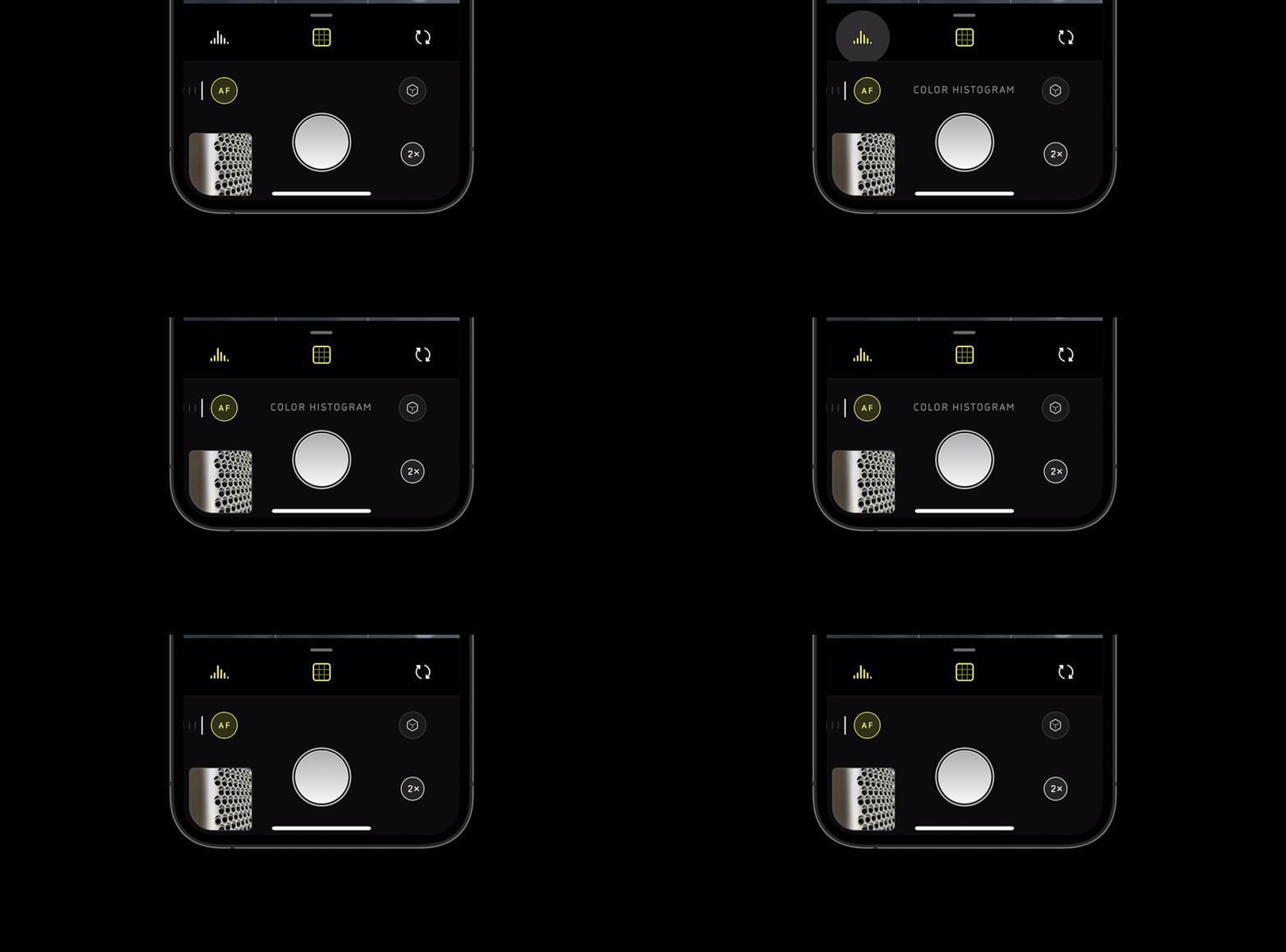
The manual exposure controls, including ISO and shutter speed, have also been moved and are now accessible with a quick swipe from the right-hand side of the screen. The app keeps its interface minimal, but when tapping on an icon, a text description of the tool or setting you’re adjusting, as you can see in the below GIF:
With Halide 1.0, you were given the option to see both Color and Luminance histograms to ensure you achieved just the right exposure. Well, as with most things in Halide Mark II, both of these have been updated with option to make the overlays smaller on the screen. Also new is the ‘Color Zebras’ feature, which breaks down three separate color channels — red, blue and green — into individual waveforms with zebra stripes that will appear if certain colors are clipped in either the highlights or the shadows. This ensures that no matter what color the scene you’re composing is, you can ensure you’re not clipping the highlights or shadows for any three of these channels.
If you’re using the histogram, waveform or zebra tools while in fully-manual mode, where you adjust the ISO and shutter speed, things get even more powerful thanks to a new feature Lux Optics calls XDR Analysis. Rather than using the post-processed 8-bit data other camera apps do to display the waveform and histogram data, Halide Mark II uses the full 14-bit Raw data, in real time, to calculate the exposure. Although Lux Optics says it has a more in-depth post in the works on the technology behind XDR Analysis, it sums it up like this in its blog post:
’Consider that video of the Golden Gate Bridge from earlier. Your histogram, analyzing 8-bit data, might think the sky is clipped. If you saw that in your zebra stripes, you’d say, “It’s over exposed, I should go down turn things down a bit.” In fact, the cloud are not over exposed in the RAW, and there’s no need to turn down your exposure. By under exposing, you’re now going to lose details in the shadows!’
The redesigned image reviewer now shows more accurate metadata information and allows you to view both the Raw and JPEG/HEIC image with a toggle between the two buttons.
Halide Mark II also features ‘Coverage,’ a new capture mode that takes two photos — one with Smart HDR 2/3 and Deep Fusion, and one in RAW. This gives you the benefit of having a more robust Raw file to work with in an editor as well as an instantly sharable JPEG or HEIC file to share with family and friends. Also new is ‘Instant Raw,’ a feature within Halide Mark II’s image reviewer that uses a 17-step process powered by onboard machine learning to instantly create a sharable image from an iPhone Raw file.
If all of these new features, settings and modes seem confusing, don’t worry. To complement the new app is a built-in 10-day course that will not only show off the features of Halide Mark II, but also teach a number of photography concepts along the way through examples.
As Lux Optics explains at the conclusion of its introduction blog post, it’s decided to make Halide Mark II an entirely separate app from Halide 1.0; one that’s free-to-download with a one-week trial and two options for continuing to use the app after the one-week trial is up.
After spending time talking with current users of Halide, as well as beta testers of Halide Mark II, the Lux Optics team decided to offer both a one-time purchase option in addition to an annual subscription option, both prices of which were based on the suggestions of users. A one-time purchase, which will include all future updates and features, costs $ 30 at launch and will go up to $ 36 after the introductory offer. Subscriptions will start at $ 12/month with a limited $ 10/month introductory offer that will lock you in at $ 10 for the life of the app.
Users who have already purchased Halide 1.0 will get Halide Mark II for free and have a year’s membership comped to their account.
You can download Halide Mark II in the iOS App Store and find out more information on the Halide website. For a full run-down of all the new features and updates, check out Lux Optics’ thorough introduction blog post.
DJI has announced the release of its new DJI Pocket 2, a second-generation three-axis mini camera.
The updated camera drops the Osmo nomenclature its predecessor bore and improves its performance across the board. Despite keeping its compact size, weighing just 117g (4.2oz), the Pocket 2 has a larger sensor and wider lens than the Osmo Pocket, which DJI claims has dramatically improve image quality for both photos and video.
The new 1/1.7” sensor (Osmo Pocket had a 1/2.3” sensor) works in tandem with a new 20mm (equivalent) F1.8 lens to capture 16MP photos in standard mode and up to 64MP images in high-resolution mode. The Pocket 2 can record 4K video at up to 60fps at a 100Mbps bitrate. DJI has added HDR recording and the device now offers up to 8x zoom using the 64MP high-resolution mode or 4x lossless zoom when shooting at 16MP or in 1080p.
DJI has also improved the focus system, which should make it easily to track moving subjects faster and more accurately than with the Osmo Mobile. The Hybrid 2.0 AF feature uses a combination of contrast and phase detection to deliver these performance improvements.
DJI Matrix Stereo also improves upon one of the weakest points of the Osmo Mobile—audio. The new audio system uses an array of four microphones to capture what DJI calls an ‘immersive audio experience.’ DJI has added a number of audio features, including Directional Audio, SoundTrack and Audio Zoom. Below is a description of the new features straight from DJI:
’Directional Audio enhances sound recording from those microphones to pick up as much detail as possible, with SoundTrack adjusting the audio based on where the camera is facing, while Audio Zoom narrows the sound field when zooming the camera in. To further filter out unwanted background sounds, an optional wind noise reduction helps keep the audio clean in outdoor settings.’
As with nearly all of DJI’s products, there’s a handful of pre-programmed shooting modes included with the Pocket 2:
Pro Mode: Control advanced camera settings such as ISO, shutter speed, EV, and focus mode.
ActiveTrack 3.0: Select a subject and let DJI Pocket 2 keep it in the frame automatically.
Slow Motion: Capture the fast-moving world in slow motion with a max speed and resolution of 8x at 1080p.
Timelapse, Hyperlapse, Motionlapse: Speed up the world around you with the varying effects of three different time-lapse operations. Hyperlapse automatically integrates Electronic Image Stabilization (EIS) for added smoothness. Users have the ability to save individual images separately, record in RAW format, and use ActiveTrack 3.0.
Panoramas:
180° Pano: Captures four photos for sweeping landscape images.
3×3 Pano: Merges nine images for a wide and detailed view.
Livestreaming: Livestream directly to Facebook, YouTube, or RTMP.
Story Mode: Preset camera movements, color profiles, and music make it easier to choose a template, record the moment, and share to social media instantly.
Other features include a new Fast Wake option that will instantly turn on the device so you don’t miss any action, a Drop Aware function that will ‘take preventative measures when it senses the gimbal falling’ and a Pause Recording feature that will quickly pause video recordings.
With new hardware comes new accessories, including a charging case, wireless microphone set, waterproof housing, a more compact control wheel, an extension rod, a (more) wide-angle lens attachment, a wireless module and a smartphone support system. All of the above features and more can be controlled with the free DJI Mimo smartphone app, available on both Android and iOS.
The DJI Pocket 2 can be purchased in two configurations: the DJI Pocket 2 with the Mini Control Stick and Tripod mount for $ 349, or the DJI Pocket 2 Creator Combo, which includes the Mini Control Sitck, tripod mount, wide-angle lens attachment, wireless microphone with windscreen, the do-it-all handle and the micro tripod for $ 499. Units can be purchased through DJI’s online store and authorized DJI retailers.
Today is the day a number of reviewers are allowed to share their first thoughts on Apple’s new iPhone 12 Pro, the smaller of the company’s two latest flagship mobile devices announced last week. While we haven’t had the chance to take one for a spin yet, we’ve rounded up a few reviews from across the web to see what others’ opinions on the photographic capabilities of the new iPhone devices are.
From more general tech-centric reviews, such as The Verge’s Nilay Patel’s, to photo-specific reviews such as Austin Mann’s in-depth dive, we’ve tried to gather a nice spread of opinions. Overall, the consensus seems to be that while the iPhone 12 Pro is at the top of its game in the photography department, the iPhone 12 Pro Max will likely pack even more punch with its better camera specifications—so long as you don’t mind the extra bulk.
Over the coming days, as more reviewers get units in their hands, we’ll add those to this round-up. If there’s a review (or two) you think we missed, leave it a link the comments below.
Austin Mann
You can’t talk about annual iPhone camera reviews without mentioning Mann’s thorough deep dives. He’s spent some time with Apple’s latest iOS devices while camping out of an Airstream in Glacier National Park, Montana and has wrapped up his thoughts on the photographic capabilities of the iPhone 12 Pro in a very comprehensive guide on his website.
He puts the new ultra-wide-angle lens to the test, pushes Night Mode to its limits and overall provides a comprehensive overview with plenty of sample images to look through. He concludesd by saying, under the headline ‘Buying advice for photographers:’
’The iPhone 12 Pro is a solid camera, and thanks to a bunch of new digital tech I found it to be slightly stronger than the already great iPhone 11 Pro — but if you are serious about photography with your iPhone, wait for the iPhone 12 Pro Max. It looks to be the most significant jump in iPhone camera hardware we’ve experienced in years, and it’s only three weeks away.’
Nilay Patel, ft Becca Farsace (The Verge)
iPhone 12 and iPhone 12 Pro reviews are here. @backlon reviewed the 12 with a focus on 5G: https://t.co/3T9zVkHQWA
And I reviewed the 12 Pro and they let me completely nerd out on Dolby Vision – with a big assist from @BeccaFarsace! https://t.co/xc4NwiavYQ
— nilay patel (@reckless) October 20, 2020
Being a more general technology website, The Verge’s review doesn’t only focus on photography, but author Nilay Patel does have a thorough section dedicated to the imaging capabilities of the iPhone 12 Pro. He also gets the thoughts of The Verge video director Becca Farsace, whose work we’ve featured here on DPReview in the past.
There’s also a video review from The Verge:
Aundre Larrow (via PetaPixel)
new work with the new #iphone12pro #shotoniphone https://t.co/f7KPNpJYKJ pic.twitter.com/ZsHfEx5Wjh
— aundre (@aundrelarrow) October 20, 2020
Photographer and former Adobe Creative Resident Andre Larrow has teamed up with PetaPixel to share his thoughts on the new iPhone 12 Pro camera system. Taking a departure from the usual type of imagery you expect to see in reviews, Larrow opted to put it to the test by taking a series of intimate portraits with friends and acquaintances who have been quarantining together, as to minimize any health risks with the outdoor portrait sessions.
The series is somehow both serious and lighthearted with an editorial feel you don’t often associate with smartphone photography. It’s a welcomed change of pace and well worth the read.
Raymond Wong (Input)
?Here it is: my iPhone 12 and 12 Pro review on @inputmag!?
? Most powerful performance ? Better cameras ? Slick new design ? MagSafe Charging ? 5G
It’s really hard to find anything to complain about.
These are virtually perfect iPhones: https://t.co/QujmF3qdM6
— Raymond Wong??? (@raywongy) October 20, 2020
Despite ‘taking [his] phone photography quite seriously,’ Raymond Wong of Input takes a more casual approach to reviewing the camera technology inside the iPhone 12 Pro. Despite the more casual approach, he does a great job comparing the new iPhone 12 Pro to the iPhone 12, iPhone 11 Pro and Pixel 5 in a number of areas, with sample images for comparison. Head on over to the review to see for yourself.
The post The Five Most Essential Camera Settings and How to Use Them appeared first on Digital Photography School. It was authored by David Shaw.
Modern cameras, from smartphones to high-end DSLRs, are designed to make decisions for us.
And, for the most part, they do a pretty good job. Slap your DSLR into Auto mode, and more often than not you’ll get images that are sharp with a decent exposure.
Now, if you’re just looking to document your world, then go for it. Snap away. But the drawback is that images taken with Auto mode tend to look similar to one another, with a uniform depth of field and exposure.
If you want to move beyond the automatic camera settings, you need to understand your camera, how to use it and, most importantly, what impact changing those settings will have on your final image.
Here are five of the most essential camera settings, what they mean, and how they’ll impact your photos.
ISO
Here’s the first essential camera setting you should know:
ISO.
Now, the acronym “ISO” is terrible, because it’s basically meaningless in terms of photography. It stands for International Organization for Standardization, a European non-governmental organization that makes sure industries apply the same standards.
In the case of photography, the International Organization for Standardization wanted to make sure that an 800 ISO on a Canon camera is the same as on a Nikon, Sony, or a Fuji. If that standard didn’t exist, then settings wouldn’t be applicable across camera brands. So if I set my Canon to make an image at 1/100s at f/2.8 and ISO 400, and you set your Nikon to the same settings, we wouldn’t get the same exposure.
Thankfully, all the major manufacturers do subscribe to the ISO standard.
So what is ISO?
ISO is the measure of the sensitivity of your camera’s digital sensor to light. The lower the number, the lower the sensitivity; the higher the number, the more sensitive the sensor becomes.
Say that you’re shooting in a low light situation, such as in a poorly-lit room or on a dusky evening. An ISO setting of 100 will require that more light reaches the sensor than if you were to use a setting of ISO 400, 800, or 1600.
This night image required a fast shutter speed to retain detail in the flame, so I had to use a high ISO (3200). In the next shot (below), you can see the noise in the original RAW file. (By the way, this image shows what happens when you free methane from a bubble in the ice of a frozen pond in the boreal forest and then set it alight.)
Drawbacks of a high ISO
So why not shoot with a high ISO all the time?
Two reasons:
High ISOs often create digital noise in the image (though camera sensors are getting better and better at avoiding this).
Sometimes you may want to force a slow shutter speed, in which case you need less sensitivity to light. This may be the case if you are trying to capture blurred motion such as water or wind, or if you’re creating pleasing blurs in sports photography.
Note the noise in the detail of the person’s clothing and in other shadowed areas.
In short, ISO is one of the three tools you have at your disposal to manipulate your exposure.
Shutter speed
The length of time your camera’s sensor is exposed to light is the shutter speed.
Many cameras have a mechanical shutter that snaps open and closed, allowing light to reach the sensor. Others use a digital shutter that simply turns on the sensor for a set period of time before switching it off again.
Your shutter speed has a huge impact on the final image.
Why?
Because a long shutter speed will create blur in moving subjects. As a landscape photographer, I use long shutter speeds to blur water, capture starlight, or show wind motion.
For this image, I used a 1/2s shutter speed to blur the waves while retaining some detail.
A 30s shutter speed blurred the Yukon River into a mirror-like surface.
Short (i.e., fast) shutter speeds have the effect of stopping motion. Use a shutter speed of 1/2000s and the motion of a runner or a cyclist will be stopped dead.
This image of a passing bike required a shutter speed of 1/500s. The shutter speed was just fast enough to make the image sharp overall while retaining some sense of motion in the spinning tire.
Your use of shutter speed must be thoughtful to create a good image. Think about the final image you want to create. Does it have blurred components or is it all sharp? Do you want to stop your subject or convey a sense of motion?
Consider, experiment, then decide on your shutter speed.
Aperture
The aperture, or f-stop, might be the most confusing aspect of photography for many photographers. This is because it affects images in unexpected ways.
Essentially, the aperture is how big the hole in the lens is. The smaller the hole, the less light that is allowed in; the larger the hole, the more light that gets through.
What often confuses people is the numbering system:
The smaller the number, the larger the hole.
So a setting of f/2.8 corresponds to a larger opening than f/4, f/5.6, f/8, f/11, and so on. Lenses with a wide maximum aperture (i.e., a small number like f/2) are considered fast, meaning that they are capable of allowing in more light.
But it’s not just about light and how wide a lens can open. The aperture also affects image sharpness.
You see, most, if not all, lenses are sharper a few f-stops down (called the sweet spot). A lens with a maximum aperture of f/2.8 will create a sharper image at f/8 than at f/2.8. The better the lens, the less this matters, but it is noticeable on most lenses.
Depth of field and its applications
The aperture also controls the depth of field.
The depth of field is the amount of the image from close to far that is in focus. A lens set to its widest aperture (say f/2.8) will give less depth of field than the same lens set to f/11.
A very shallow depth of field in this image brings the grouse hiding in the brush into focus while the surrounding chaos of branches blurs into a haze.
As with shutter speed, your use of aperture should be purposeful. Have a landscape image that you want in focus from front to back? You better select a high f-stop (such as f/11). How about a portrait where you want a clean, soft background but a tack-sharp eye? Then use a small f-stop (such as f/2.8 or f/4) and carefully choose your focus point.
An f-stop of f/11 at 17mm was sufficient to make the entire scene, from inches in front of the lens to the cliffs in the distance, sharp.
The aperture directly impacts the shutter speed. A narrow aperture will require you to use a longer shutter speed to attain a proper exposure, just as a wider aperture will allow you to use a faster shutter speed. Aperture and shutter speed are completely interrelated; there is no escaping it.
So you need a strong understanding of both.
White balance
White balance, like ISO, relates to the sensor.
But, in this case, it has to do with the color of the light, rather than its brightness.
Different light sources have different color tones. Our eyes often don’t detect these differences, but you can bet your camera will. Have you ever seen a photo of a home interior lit by soft white bulbs, but including a window? Usually, the interior of the room looks natural while the outdoor light looks artificially blue.
That’s white balance. The camera (or photographer) decided to use the interior light (the warm-toned bulbs) as the neutral color, but then the natural light outdoors shifted toward blue.
Now, when the white balance is set wrong, the colors are off. They look too yellow, blue, or orange.
But when the white balance is correct, everything looks natural, as our eyes detect it.
Here is an image with the camera’s white balance set to Auto. The colors of the aurora borealis appear too purple and yellow.
In this version, I adjusted the white balance further into the blue range, making the colors of the lights appear more natural and pleasing.
What about Auto White Balance?
I’ve got a confession to make here:
I almost always use the Auto White Balance setting on my camera. Cameras are pretty darn good at assessing color tones and deciding on the appropriate white balance. When my camera does get it wrong, I can check the image on the LCD and make the correction for the next shot.
Also, I shoot exclusively in RAW format, which means that I can make adjustments to the white balance during post-processing. I trust the image on my computer screen more than I trust the tiny LCD on the back of my camera.
That said, there are times you should adjust the camera’s white balance setting. The first is if you are shooting JPEGs. The JPEG file format will not allow you to effectively adjust the white balance later, so you must get it right in-camera.
The second time you’ll want to adjust your white balance setting is when stacking images, either for high-contrast scenes or for panoramas. When stacking, slight changes in color tones will make combining several images into a single HDR photo or a panorama much more difficult or even impossible.
You can also adjust your white balance if you purposely want to make an image look cool or warm, or if you are using artificial lights.
So be mindful of your white balance; know what it does and how it will impact your images. Then decide how to use it.
Exposure compensation
What is exposure compensation?
Exposure compensation allows you to very quickly add or subtract light from an image.
Too dark? Use the exposure compensation feature to add a stop of light. Too bright? Exposure compensation can quickly darken the image.
For the image above, I used exposure compensation to make sure the scene showed details in the foreground, while keeping the bright sunset in the background from being blown out.
And the image below was made in bright sunlight, but a deliberate underexposure of three stops (via exposure compensation) reduced the mountains to black but retained detail in the sky, resulting in a surreal image.
Know your camera well
Exposure compensation is a tool you should know how to adjust without lowering the camera from your eye. How it is set depends on your camera settings.
I use Aperture Priority mode most often on my camera. So I select the aperture, and the camera decides the shutter speed. If I adjust the exposure compensation, my camera will retain my chosen aperture and simply adjust the shutter speed up or down to get the desired exposure.
And if I were to use Shutter Priority mode, as I sometimes do, the camera would adjust the aperture, instead.
(In Auto mode, the camera makes this decision for you.)
I use exposure compensation constantly. It is my go-to method for fine-tuning my exposures in the field. On my Canon DSLR, I can adjust it with a simple twitch of my thumb on the rear wheel of the camera. Other cameras have their exposure compensation control as a wheel near the shutter button, or as part of a system of buttons on the back.
Know how your camera works and learn to adjust the exposure compensation quickly and efficiently. Understanding this important tool will mean you don’t miss your chance to get the shot right when you are working in the field or the studio.
Essential camera settings: Conclusion
These five camera settings are the most important things to understand about your camera.
Experiment with them so you know how they affect your final image. Learn to change each setting quickly and without fuss.
Once you’ve done this, you’ll have taken charge of your photography.
And you’ll be on your way to creating purposeful images.
If you have any comments or questions, please add them below!
The post The Five Most Essential Camera Settings and How to Use Them appeared first on Digital Photography School. It was authored by David Shaw.
7artisans has announced yet another affordable ultra-fast manual prime lens, the 35mm F0.95 APS-C lens for Canon M, Fuji X, Micro Four Thirds, Nikon Z and Sony E mount camera systems.
The lens, which retails for just $ 255, is constructed of 11 elements in 8 groups, has an aperture range of F0.95–16, offers a minimum focusing distance of 37cm (14.5”) and has a 12-blade aperture diaphragm. It offers a 43º angle of view, has a declicked aperture dial and weighs just 369g (13oz).
Photo Rumors, who is an authorized 7artisans retailer, has shared a gallery of sample images taken with the lens attached to a Sony a7 III:
The 7artisans 35mm F0.95 APS-C lens is available to purchase for $ 255 through 7artisan retailers, including Photo Rumors.
Meet the Fujifilm X-S10 – a camera the company is calling a cross between an X-T30 and its older X-H1. That basically means that here we have a compact camera with the best APS-C size sensor Fujifilm has to offer (from the X-T30 / X-T4) but with a really nice, sizable grip and in-body stabilization inspired by the X-H1.
In the time we’ve had the X-S10, we have to admit we’re impressed. We think it offers a lot of bang for the buck, and its simplified control scheme will appeal to a lot of users, including those upgrading from older DSLR cameras in particular.
Sensor, performance, and look at that grip
The X-S10 comes with the same 26MP X-Trans sensor we’ve seen in a handful of Fujifilm’s other cameras, and that’s a good thing. It offers excellent noise performance and very fast readout speeds, which help boost autofocus performance and video capability. Based on our preliminary testing, we’d expect autofocus performance to be essentially on par with the X-T30 / X-T3 / X-T4 cameras, which is to say, darn good.
Video specs are solid too: You can record up to 4K/30p, 8-bit files internally. If you use an external recorder, you can boost that to 10-bit 4:2:2 files, which is handy for people who want to do some post-production work on their clips.
Burst speeds are great for a camera of this class. You can shoot at up to 8 fps with the mechanical shutter, and up to 20 fps with the electronic shutter (and a further 30 fps with a 1.25x crop). Unfortunately, we don’t yet know the buffer depth of the X-S10 (how long you can shoot bursts before the camera slows down), but we’ll be testing this when we get a final review sample.
And lastly, check out that grip! It’s generous and comfortable, and makes handling the X-S10 a breeze with lenses big and small. But although the X-S10 feels incredibly solid in your hand, it doesn’t come with any claims of weather-sealing.
New stabilizer
The X-S10 is equipped with an all-new, compact stabilizer unit built specifically to fit inside the camera’s smaller body. It tops out at 6 stops of shake reduction with stabilized lenses, and varies from 5 to 5.5 stops with unstabilized lenses.
Those figures mean that with a 50mm-equivalent lens, you should be able to handhold images with a reasonable degree of success at shutter speeds of 0.6 seconds or even slower.
Control scheme
But where the X-S10 really stands out – among Fujifilm cameras, at least – is right here. Most Fujifilm cameras are covered in ISO, shutter speed and exposure compensation dials, but not this one. This one uses a mode dial, customizable control dials under your forefinger and thumb, and a third customizable dial on the left shoulder of the camera.
While manipulating those manual dials on other cameras could get you into a ‘program auto’ mode, on the X-S10, that’s made much easier by just rotating the mode dial to ‘P’. Fujifilm is banking on appealing to a different subset of users with the X-S10; a group that either sees no need for dedicated dials for exposure parameters, or those coming from other cameras with this style of control scheme, which is basically ubiquitous among entry-level and mid-level DSLRs.
Fujifilm has also said that the full Auto mode has been tweaked to give users a bit more control over autofocus and image quality parameters while also automatically choosing a film simulation mode depending on the scene. Lastly, it’s worth noting that the X-S10 has a built-in pop-up flash which you trigger with the small switch on the far left, and the top plate is also where you’ll find customizable ISO and movie record buttons. The ‘Q’ button brings up the camera’s customizable Quick Menu on the rear screen or in the viewfinder.
Control scheme
The rear of the camera is fairly spartan. You get a customizable drive-mode button on the top left, a customizable button just to the right of the EVF, the requisite Playback, Display / Back, Menu / OK and AEL and AF-ON buttons as well as an AF joystick. We actually find that, overall, we prefer the control scheme on the X-S10 to, say, the X-T30; we collectively thought the X-T30 was a bit cramped, and we’d knock the joystick by accident all the time. On the X-S10, there’s plenty of room for your grip hand and the joystick is perfectly placed.
The rear screen is touch sensitive, and as you can see, is a side-hinged design, which may appeal to video shooters more than a simple tilting design. At the top of the camera is a fairly middle-of-the-road 2.36M-dot EVF, which does at least offer a great refresh rate and good contrast.
Ports
Along the side of the X-S10, we see a 3.5mm microphone port as well as USB-C and micro-HDMI ports. The USB-C port can be used for data transfer, it can charge the battery or you can also attach an included dongle adapter to plug in a pair of headphones for audio monitoring while shooting video. However, based on your usage, it’s worth being aware of the fact that the positioning of the ports may get in the way of the fully articulating screen.
Battery and storage
Power for the X-S10 comes from the standard Fujifilm NP-W126S battery pack, found in a number of its other cameras. Battery life is rated by CIPA for 325 shots if you’re primarily using the rear LCD, but we’d expect far more than that in normal use, especially if you watch your Wi-Fi use and keep the pop-up flash popped down.
One small disappointment is that the single SD card slot is only UHS-I compatible, so you won’t gain any speed benefit from UHS-II cards. It’s not a huge deal on a camera at this level, but considering how fast the X-S10 can shoot burst images, it would have been nice to see the faster slot included.
Hands-on with the Fujifilm X-S10
And that concludes our short tour of the Fujifilm X-S10. While it may not be a revolutionary camera, it looks like a really well-rounded model at a good price, and one that may tempt new users into the Fujifilm ecosystem.
What do you make of the Fujifilm X-S10? Let us know in the comments.