RSS
 

Posts Tagged ‘Camera’

The Five Most Essential Camera Settings and How to Use Them

14 Dec

Modern cameras, from phones to high-end DSLRs, are designed to make decisions for us. And for the most part, they do a pretty darn good job of it. Slap your SLR into AUTO mode and more often than not you’ll get images that are sharp with decent exposure. If you are just looking to document your world, then go for it, snap away. The drawback is that images taken in AUTO tend to look similar to one another, with a uniform depth of field and exposure. If you want to move beyond the automatic camera settings, you need to understand your camera, how to use it, and most importantly, what impact changing those settings will have on your final image. Here are five of the most essential camera settings, what they mean, and how they impact the photograph.
Five Most Essential Camera Settings

ISO

Five Most Essential Camera Settings

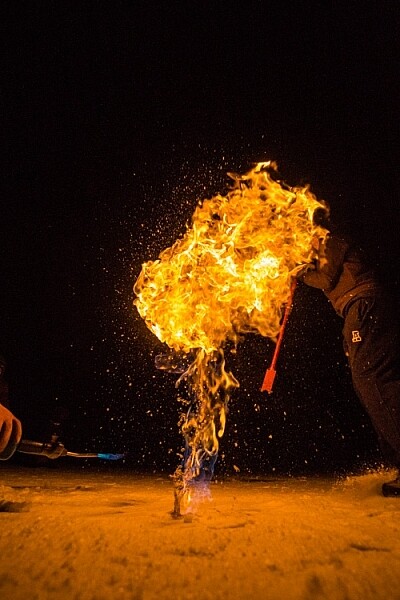
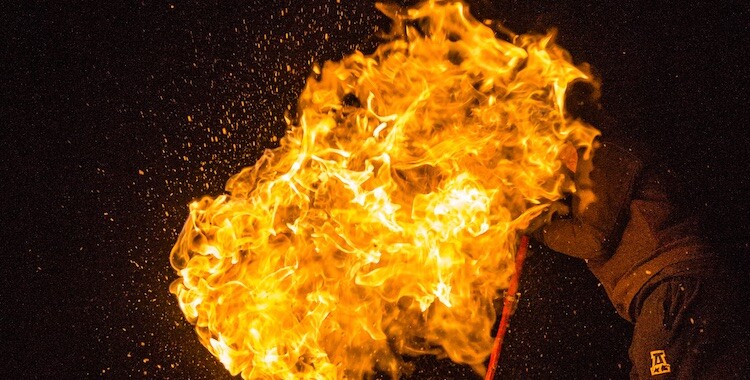
This night image required I use a fast shutter speed to retain detail in the flame, so I had to use a high ISO (3200). In the next detail shot, you can see the noise, in the original RAW file. (By the way, this image shows what happens when you free methane from a bubble in the ice of a frozen pond in the boreal forest, and then set it alight.)

First, the acronym ISO is terrible, because it’s basically meaningless in terms of photography. It stands for “International Standards Organization” a European non-governmental organization that makes sure industries apply the same standards. In the case of photography, they want to make sure that an 800 ISO on a Canon is the same as on a Nikon, Sony or Fuji. If that standard didn’t exist, then settings wouldn’t be applicable across camera brands. So if I set my Canon to make an image at 1/100th sec at f/2.8 and ISO 400, and you set your Nikon to the same setting, we wouldn’t get the same exposure. Thankfully all the major manufacturers do subscribe to the ISO standards.

Yeah, yeah, but what is ISO? It is the measure of the sensitivity of your camera’s digital sensor to light. The lower the number the lower the sensitivity, the higher the number the more sensitive the sensor becomes. If you are shooting in a low light situation, say a poorly lit room or a dusky evening, an ISO setting of 100 will require that more light reaches the sensor than if you were to use a setting of 400, 800, or 1600.
Five Most Essential Camera Settings ISO

Note the noise in the detail of the person’s clothing and in other shadowed areas.

Drawbacks of high ISO

So why not shoot at high ISOs all the time? Two reasons: 1. High ISOs often create digital noise on the image, (though camera sensors are getting better and better) and 2. Sometimes you may want to force a slow shutter speed, in which case you want low sensitivity to light. This may be the case when you are trying to capture blurred motion such as water, wind or to create pleasing blurs in sports photography.

  1. High ISOs often create digital noise in the image, (though camera sensors are getting better and better)
  2. Sometimes you may want to force a slow shutter speed, in which case you want low sensitivity to light. This may be the case when you are trying to capture blurred motion such as water, wind, or to create pleasing blurs in sports photography.

In short, ISO is one of the three tools you have at your disposal to manipulate your exposure.

Shutter Speed

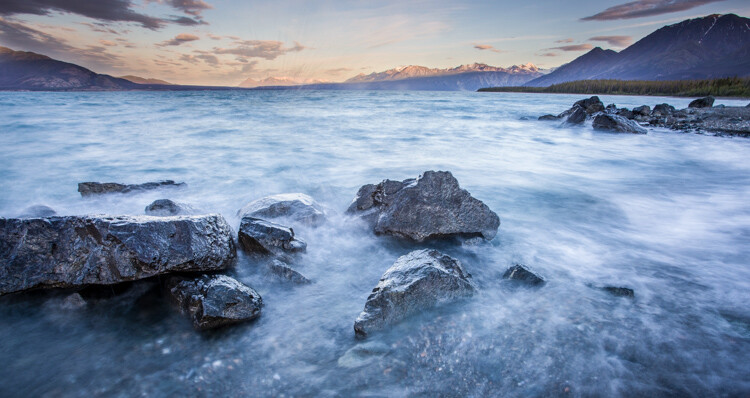
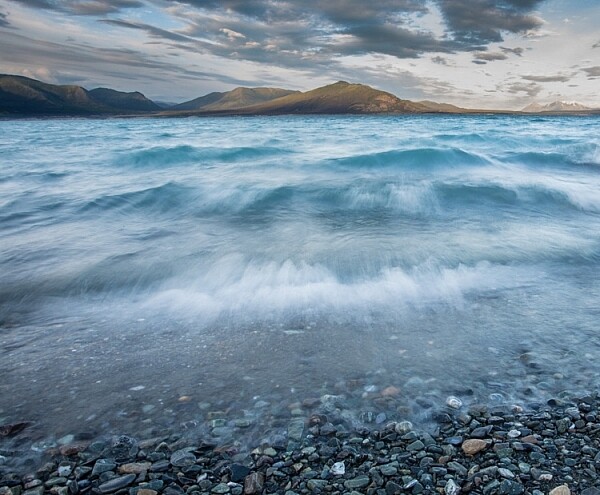
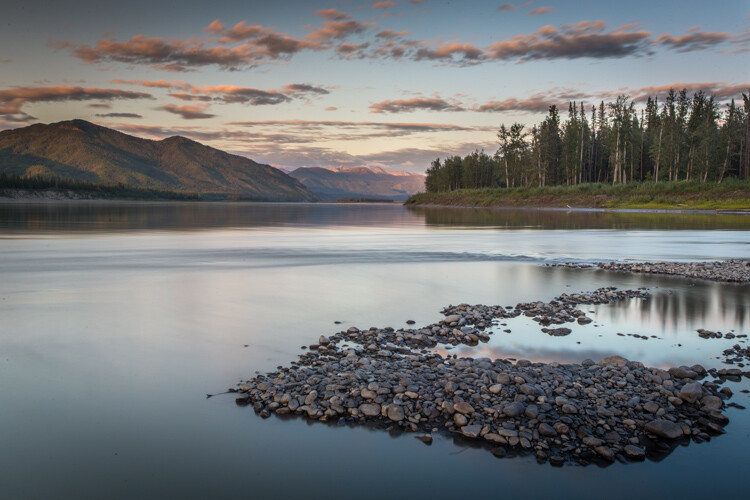
The length of time your camera’s sensor is exposed to light is the shutter speed. Many cameras have a mechanical shutter that snaps open and closed allowing light to reach the sensor, others use a digital shutter that simply turns on the sensor for the set period of time before switching it off again. Shutter speed has a huge impact on the final image. A long shutter speed will create blur in moving subjects. As a landscape photographer, I use long shutter speeds often to blur water, expose starlight, or capture wind motion.
Five Most Essential Camera Settings

For this image, I used a 0.5 sec shutter speed to blur the waves somewhat, but retain detail.
Five Most Essential Camera Settings shutter speed

A 30-second shutter speed blurred the Yukon River in this image, into a mirror-like surface.

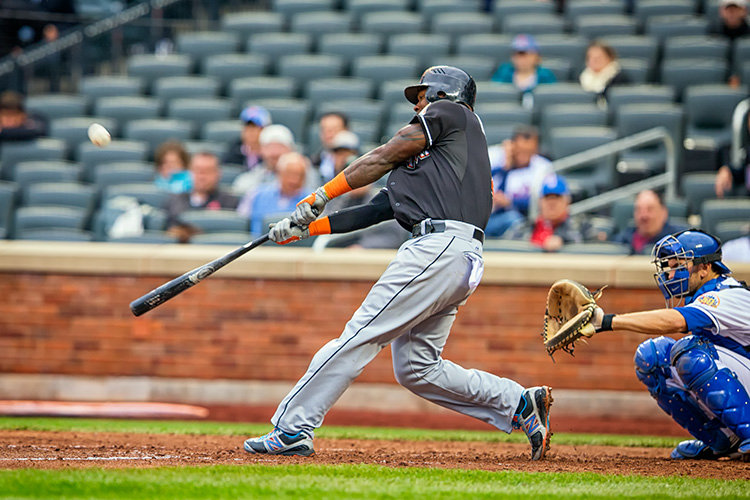
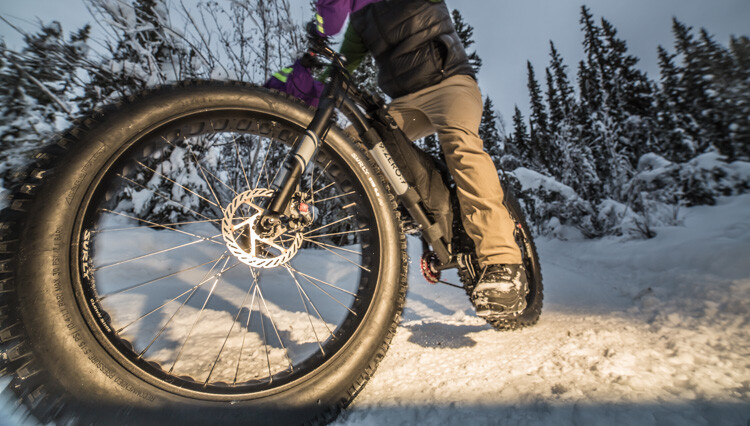
Short or fast shutter speeds have the effect of stopping motion. Use a shutter speed of 1/2000th of a second and the motion of a runner or a cyclist will be stopped dead.
Five Most Essential Camera Settings shutter speed

This image of a bike passing used a shutter speed of 1/500th of a second. It was just enough to be sharp overall while retaining some sense of motion in the spinning tire.

Your use of the shutter has to be thoughtful to create a good image. Think about the final image you want to create. Does it have blurred components or is it all sharp? Do you want to stop, or convey the sense of motion? Consider, experiment, then decide on your shutter speed.

Aperture
Five Most Essential Camera Settings aperture

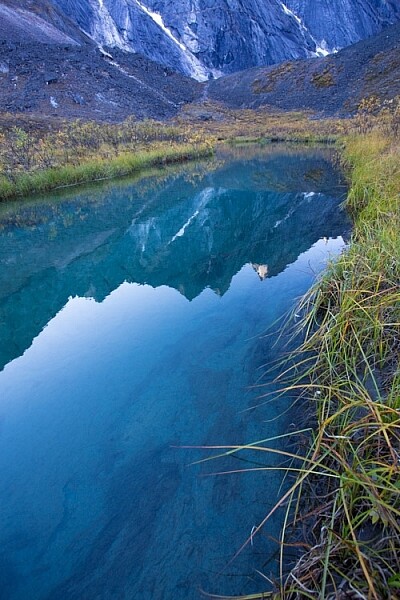
An f-stop of f/11 at 17mm was sufficient to make the entire image, from inches in front of the lens to the cliffs in the distance, sharp.

The aperture, or f-stop, may be the most confusing aspect of photography for many photographers because it affects images in unexpected ways. Essentially, the aperture is how big the hole in the lens is. The smaller the hole, the less light is allowed in, the larger it is, the more light gets through. What often confuses people is the numbering system: the smaller the number, the larger the hole. So f/2.8 is a larger opening than f/4, f/5.6, f/8, f/11 and so on. Lenses with a wide maximum aperture (a small number like f/2) are considered “fast” meaning they are capable of allowing in more light.

But it’s not just about light, and how wide a lens can open. The aperture also affects image sharpness. Most lenses (dare I say all?) are sharper, a few stops down (called the sweet spot). A lens with a maximum aperture of f/2.8 will create a sharper image at f/8, then at f/2.8. The higher quality the lens, the less this matters, but it is noticeable on most lenses.
Five Most Essential Camera Settings aperture

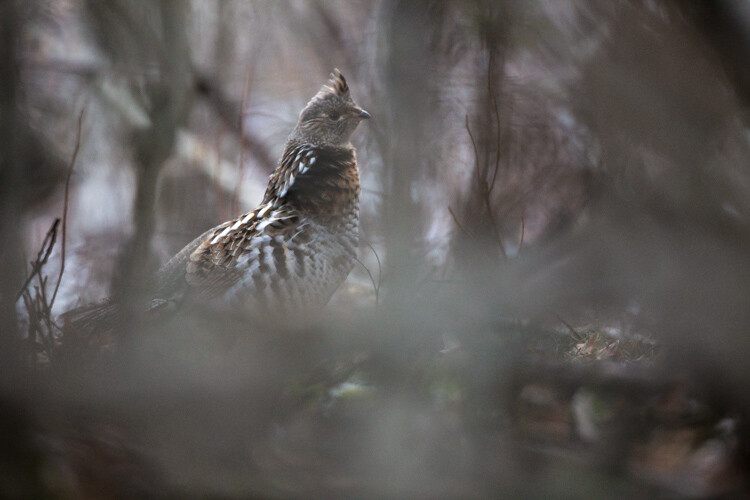
A very shallow depth of field in this image brings the grouse hiding in the brush into focus while the surrounding chaos of branches blurs into a haze.

Depth of Field and application

Next, the aperture also controls the Depth of Field. The DoF is the amount of the image from close to far that is in focus. A lens, when set wide open, say f/2.8, will have less DoF than when the same lens is set to f/11.

Like shutter speed, your use of aperture should be purposeful. Have a landscape image that you want in focus from front to back? You better select a high f-stop (like f/11). How about a portrait where you want a clean, soft background but a tack-sharp eye? Then use a small f-stop (like f/2.8 or f/4) and watch that focus point.

The aperture has a direct impact on shutter speed. A large f-stop will require you to use a longer shutter speed to attain proper exposure. Just as lower f-stop, will allow you to use a fast shutter speed. These two are completely interrelated, there is no escaping it, so you NEED a strong understanding of both.

White Balance

White balance, like ISO, relates to the sensor, but in this case, it has to do with the color of the light, rather than its brightness.

Different light sources have different color tones. Our eyes often don’t detect these differences, but you can bet your camera will. Have you ever seen a photo of a home interior lit by soft-white bulbs, but including a window? Usually, the interior of the room looks natural while the light outdoors looks artificially blue. That’s white balance. The camera (or photographer) decided to use the interior light (the warm-toned bulbs) as the natural color, but then the natural light

The camera (or photographer) decided to use the interior light (the warm-toned bulbs) as the neutral color, but then the natural light outdoors appears blue. When the white balance is set wrong, the colors are off. They look too yellow, blue, or orange. When it’s correct, everything looks natural, or as our eyes detect it.
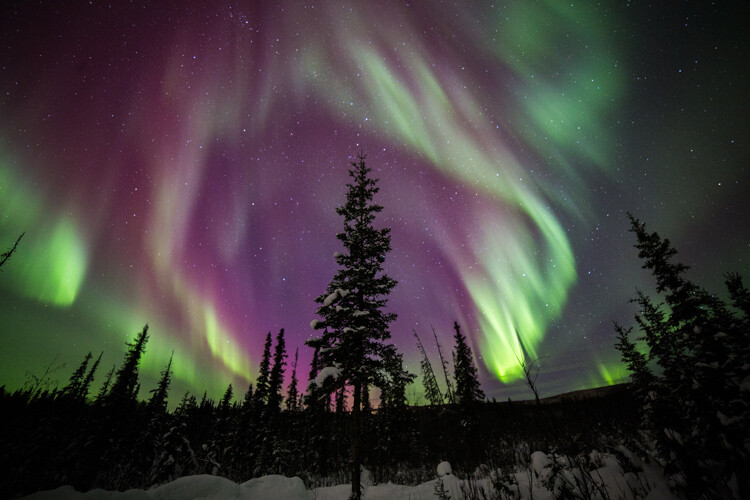
Five Most Essential Camera Settings white balance

Here is the camera’s AUTO selection for the White Balance. The colors of the aurora borealis appear too purple and yellow.
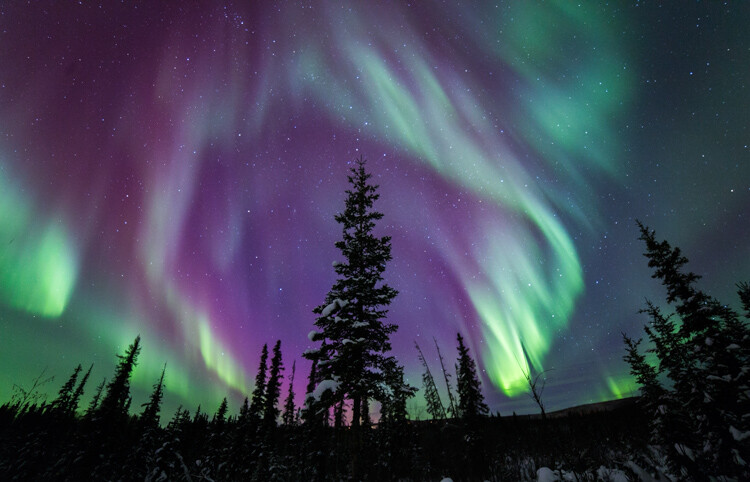
Five Most Essential Camera Settings white balance

In this version, using the same post-processing for exposure, I adjusted the white balance further into the blue range, making the colors of the lights appear more natural and pleasing.

What about Auto White Balance?

I’ve got a confession to make here. I almost always use the AUTO white balance setting on my cameras. Cameras are pretty darn good at assessing color tones and deciding on the appropriate white balance. When it does get it wrong, I can check the image on the LCD and make the correction for the next shot. Second, I shoot exclusively in RAW format which means that I can make adjustments to the white balance in the computer. I trust the image on my computer screen more than I trust the tiny LCD on the back of my camera.

That said, there are times to adjust the camera’s white balance settings. The first is if you are shooting JPEGs. That image format will not allow you to effectively adjust white balance later, so it’s got to be right in the camera. The second is when stacking images either for high contrast scenes or for panoramas. When stacking images, slight changes in color tones will make combining them into HDR or panoramas much more difficult or impossible. You can also use White Balance if you purposefully want to make an image look cool or warm, or if you are using artificial lights. (Now THAT subject warrants an article of its own…)

Be mindful of your White Balance, know what it does and how it will impact your image, then decide how, or whether to use it.

Exposure Compensation
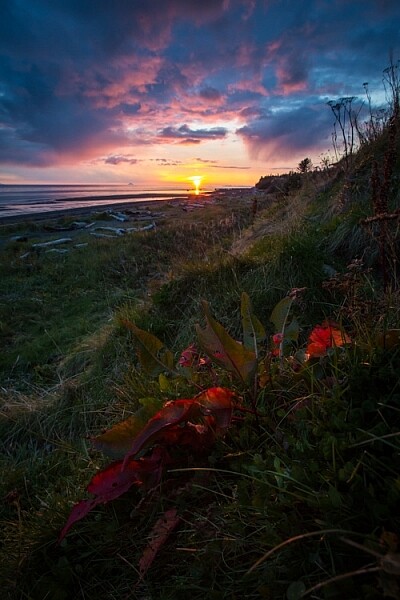
ak-homer-109266-sunset-139

Here I used Exposure Compensation to make sure that the image was bright enough to show details in the foreground while assuring that the bright sunset in the background was not blown out.

These two images show how useful Exposure compensation can be. The image below was made in bright sunlight, but a purposeful underexposure of three stops reduced the mountains to black but retained detail in the sky, making a surreal image.
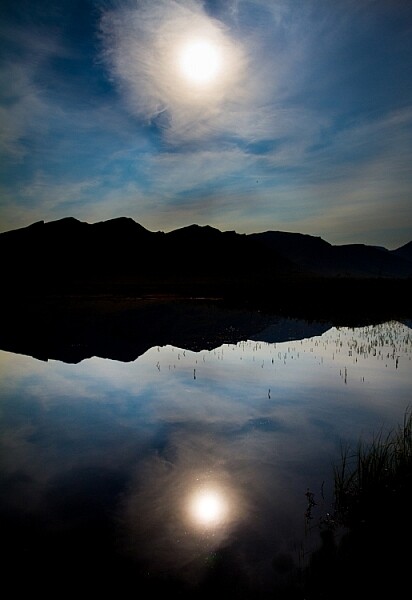
Know your camera well

Exposure Compensation is a tool you should know how to adjust without even lowering the camera from your eye. Exposure compensation allows you to very quickly, add or subtract light from an image. Too dark? Use Exposure Compensation to add a stop of light. Too bright? Exposure Compensation can quickly reduce the exposure. How it is set depends on your camera settings.

I use Aperture Priority mode most often on my camera. That means I select the aperture, and the camera decides the shutter speed. If I adjust my Exposure Compensation, the camera will retain my chosen aperture and simply adjust shutter speed up or down to get the desired exposure. If I were to use Shutter Priority, as I sometimes do, the camera will adjust the aperture. In AUTO the camera will make that decision for me.

I use Exposure compensation constantly. It is my go-to method for fine-tuning my exposure in the field. On my Canon DSLR, I can adjust it with a simple twitch of my thumb on the rear wheel of the camera. Other cameras have their Exposure Compensation controls on the front, a wheel near the shutter button, or some other system of buttons on the back. Know how your camera works, and learn to adjust this quickly and efficiently. Understanding this important tool will mean you don’t miss your chance to get the shot right when you are working in the field or studio.

Conclusion

These five camera settings are the most important things to understand on your camera. Experiment with them so you know how they affect your final image, and know how to change each quickly and without fuss. Once you do, you’ll have taken charge of your photography, and be on your way to creating purposeful images.

If you have comments or questions please share post them below.

googletag.cmd.push(function() {
tablet_slots.push( googletag.defineSlot( “/1005424/_dPSv4_tab-all-article-bottom_(300×250)”, [300, 250], “pb-ad-78623” ).addService( googletag.pubads() ) ); } );

googletag.cmd.push(function() {
mobile_slots.push( googletag.defineSlot( “/1005424/_dPSv4_mob-all-article-bottom_(300×250)”, [300, 250], “pb-ad-78158” ).addService( googletag.pubads() ) ); } );

The post The Five Most Essential Camera Settings and How to Use Them by David Shaw appeared first on Digital Photography School.
Digital Photography School

 
Comments Off on The Five Most Essential Camera Settings and How to Use Them

Posted in Photography


Relonch is a camera and photo editing service that costs $99 per month

14 Dec

$ (document).ready(function() { SampleGalleryV2({“containerId”:”embeddedSampleGallery_0412609845″,”galleryId”:”0412609845″,”isEmbeddedWidget”:true,”standalone”:false,”selectedImageIndex”:0,”startInCommentsView”:false,”isMobile”:false}) });

No screen, no flash, no settings, no SD card: Relonch, a $ 99-per-month APS-C fixed lens camera and photo editing service currently in beta, sounds like a whole lot of nope right off the bat. But its creators think they’ve found a way to bring better photography to the masses.

If Relonch sounds familiar, you might be remembering the prototype iPhone case that held an APS-C image sensor that the company unveiled at Photokina 2014. What became a photo editing app fed into the latest concept, a ‘camera as a service.’ 

That camera is the Relonch 291, a 20MP APS-C camera ‘based on Samsung Galaxy NX technology’ with a fixed prime lens. It offers just one shooting mode, and button: the shutter release. There’s no way to save photos directly from the camera – what Relonch does offer is a 4G connection to automatically transfer captured images to its server and uses AI to select what it deems to be the best images and processes them. Edited images are transferred back to the user via a mobile app the next day.

$ (document).ready(function() { SampleGalleryV2({“containerId”:”embeddedSampleGallery_6517447144″,”galleryId”:”6517447144″,”isEmbeddedWidget”:true,”standalone”:false,”selectedImageIndex”:0,”startInCommentsView”:false,”isMobile”:false}) });

The company hopes to make Relonch available globally in 2018. Until then, the service is in beta testing as its processing algorithms are refined. In the meantime, if you’re in Palo Alto you can visit their showroom to try one out for three days. If you like what you see, you can ‘reserve’ Relonch now for $ 99 (fully refundable), but you’ll be looking at a wait until at least mid 2018.

Fast Company’s Emily Price took one for a spin and found some aspects of the experience appealing, but was ultimately disappointed when photos didn’t meet Relonch’s AI’s quality standards. There’s also an argument to be made about cost – over the course of a year Relonch will cost its user $ 1200. For that kind of money, you can be the proud owner of a really nice APS-C camera. But that may be beside the point for Relonch’s target audience.

Is this something you would consider recommending to your friends and family who find ‘professional’ cameras too intimidating? Let us know what you think.

Articles: Digital Photography Review (dpreview.com)

 
Comments Off on Relonch is a camera and photo editing service that costs $99 per month

Posted in Uncategorized


How to Convert a Camera to Infrared for Black and White Landscape Photography

13 Dec

Get Andrew’s The Black and White Landscape eBook bundle at 30% off now over at Snapndeals, only until December 20th (AUS time).

Do you have an old digital camera that you don’t use much anymore? If you do, one way to make it useful again is to convert it to infrared for black and white landscape photography.

How to Convert a Camera to Infrared for Black and White Landscape Photography

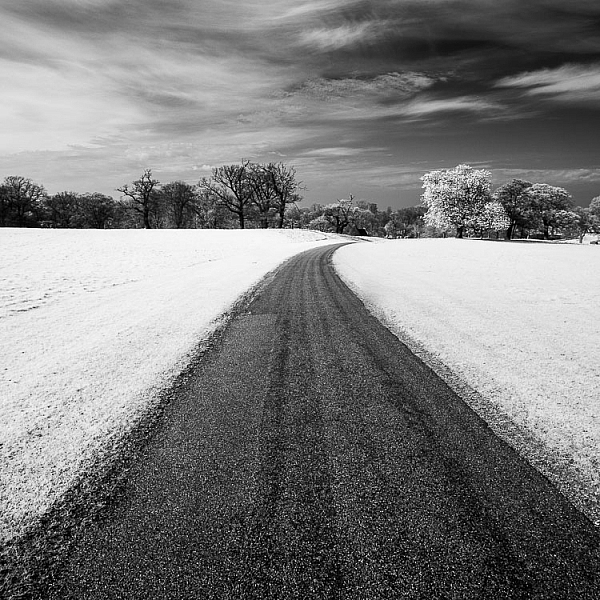
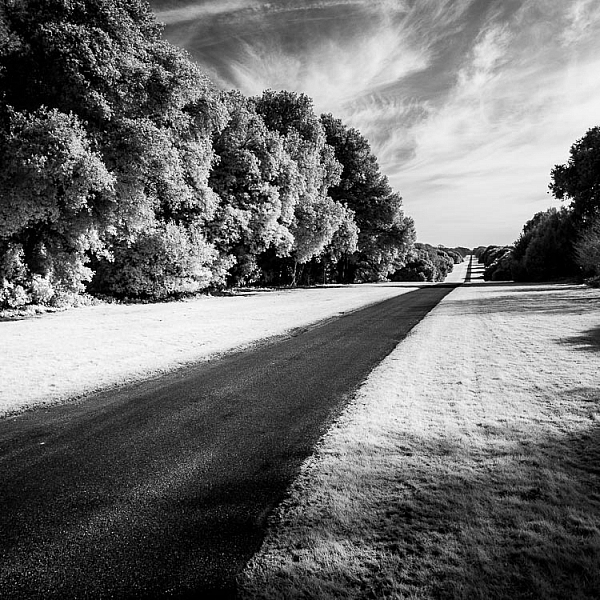
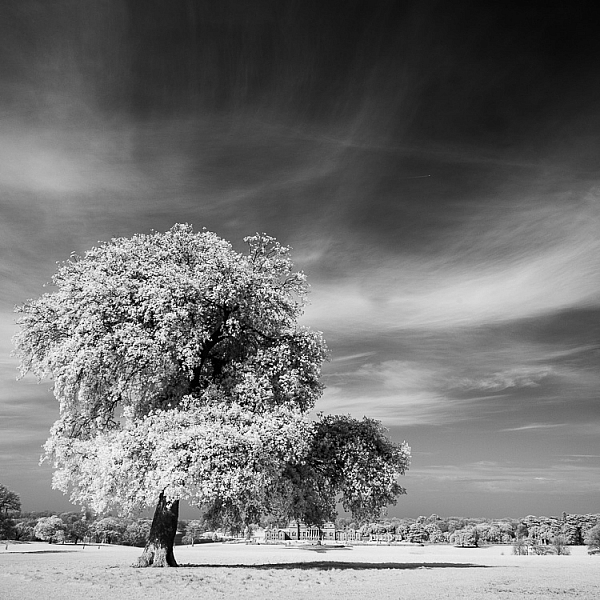
Why would you want to do this? For me, the main reason is that it gives me a new way of working in black and white. Yes, infrared converted cameras can give you color images as well as black and white ones, but for me, the strange colors are more of a gimmick than a useful tool. With black and white, it’s different. In infrared photography, the tonality of the photo changes, giving you new and interesting ways to capture the landscape.

What is infrared photography?

The simple (non-technical) explanation is that infrared light is a kind of invisible light, formed of electro-magnetic waves that are undetectable to the human eye.

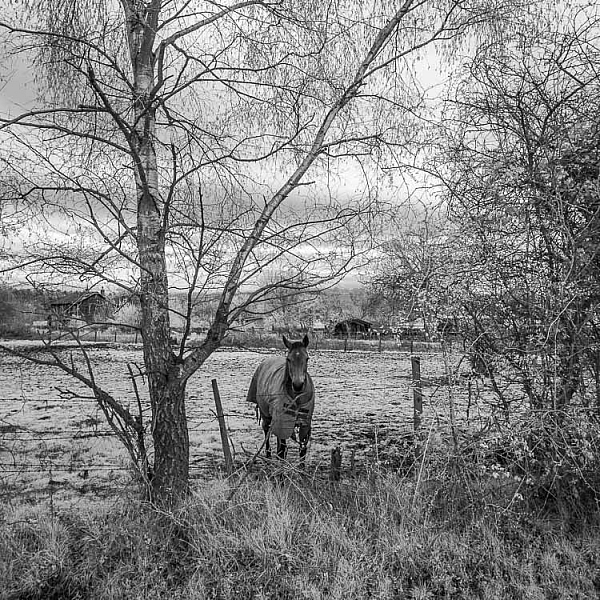
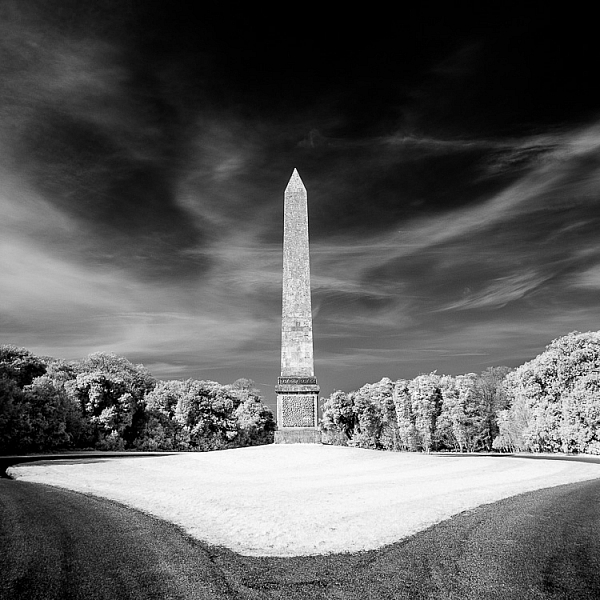
Human skin reflects a lot of infrared light, so does vegetation. These these things appear very bright in black and white infrared photos. Inanimate objects, such as roads, stones, and buildings, don’t reflect as much infrared light and can look remarkably similar to regular black and white photos when photographed in infrared.

How to Convert a Camera to Infrared for Black and White Landscape Photography

What is an infrared conversion?

Digital camera sensors are sensitive to ultraviolet (UV) light and infrared light as well as the visible wavelengths of light. Because of this, digital cameras have filters to block both ultraviolet and infrared light. The infrared filters on most cameras do let some infrared light through, but not enough to affect the image.

During an infrared conversion the technician removes the infrared filter so that the sensor can now see infrared light, and replaces it with a filter that blocks visible light, so the sensor can only see and record infrared. The process isn’t complex, and because of that isn’t particularly expensive. If you are technically minded you could even try it yourself. There are videos on YouTube that explain how. You just need the right tools and parts.

The usual caveats apply. If your camera is still under warranty that will be voided, and bear in mind that you can damage your camera if you don’t know how to do it properly. You should only attempt it if you know what you are doing!How to Convert a Camera to Infrared for Black and White Landscape Photography

The infrared conversion on my camera was done by Protech Photographic in the UK (they also handle orders from mainland Europe). LifePixel and Kolarivision are US based companies that also do infrared conversions. If you know of any other reliable companies, please let us know in the comments section below.

Types of infrared conversion

There are several types of infrared conversion. These are some of the most common.

Full spectrum conversion

The UV and infrared filters are removed. Your camera’s sensor can now see UV and infrared light as well as visible light. You control the effect by using filters (on the lens) to block different amounts of visible and/or infrared light. This may be interesting if you like to experiment, but the disadvantage is that you need to buy filters, adding to the cost. Filters also block light, so you need to use slower shutter speeds or higher ISOs to compensate.

infrared-camera-conversions-6

720nm conversion

The technician places a filterin front of the sensor that blocks all wavelengths under 720nm (nm = nano-meter and is a unit of measurement equivalent to 1/1,000,000,000 meter used for measuring wavelengths of light). In other words, it only lets infrared light through. It’s the type of conversion best suited for landscape photography, giving you a color image that’s easy to convert to black and white. This is probably the most common type of infrared conversion and the one you should go for unless you have a specific need for one of the other types.

830nm conversion

The sensor is fitted with a filter that blocks all wavelengths under 830nm. This gives a more intense type of infrared effect, with very little color. It’s ideal for dramatic black and white landscape photography.

Some companies offer different types of conversion in addition to these, so check their websites for details.

How to Convert a Camera to Infrared for Black and White Landscape Photography

Camera types and infrared conversions

When it comes to converting digital SLRs to infrared there is something you need to bear in mind. Infrared light focuses at a different point to regular light. Your camera is calibrated to focus visible light, which means that if you try to focus on something using a wide aperture (which gives less depth of field) then your focus may not be accurate. It is possible to calibrate a lens to focus accurately with infrared, so check with the company that is going to handle your infrared conversion for details.

But for landscape photography, where most photographers use wide-angle lenses and stop down the aperture for sharp focus, it is not so important. If your camera offers some sort of contrast detect autofocus in Live View (where the camera focuses by taking a reading from the sensor rather than using the camera’s phase detection autofocus system) then you will have accurate focusing in Live View (just not when using the viewfinder).

infrared-camera-conversions-5

Mirrorless advantage

Mirrorless cameras have an advantage over digital SLRs for infrared because they are able to focus from the camera’s sensor. That means that if you plan to hand-hold the camera and look through the viewfinder to take photos (rather than put the camera on tripod and use Live View) then a mirrorless camera is an excellent choice as you won’t get any focusing errors.

Another advantage of cameras with electronic viewfinders is that when you set the camera to its black and white mode the camera displays the scene in black and white in the viewfinder. This makes it easy to visualize how the photo will come out in black and white with the infrared effect applied.

infrared-camera-conversions-7

Lenses and infrared photography

Another consideration is that not all camera lenses are suitable for infrared photography. Older lenses in particular tend to show a hot spot at the center of the frame, especially at wide aperture settings. Before converting your camera you should check and see if there are any reported problems with the lenses you intend to use with it. Kolarivison have a comprehensive list of infrared compatible lenses.

Infrared filters

Another option, if you don’t want to convert a camera to infrared, is to buy an infrared filter that blocks out visible light and just lets infrared light reach the camera’s sensor. The Hoya R72 filter is a great option and not very expensive, especially if you have smaller lenses. It blocks wavelengths below 720nm, just like a 720nm infrared conversion.

Note: shop for the Hoya R72 Filter on Amazon.com or on B&H Photo’s site. 

infrared-camera-conversions-8

You may remember that digital cameras have a filter that blocks most infrared light. An infrared filter is opaque, so the result is that not much light reaches the sensor. In effect, an infrared filter is a strong neutral density filter as well as an infrared filter.

The strength varies according to the camera used, but don’t be surprised if you lose 16 stops of light. A tripod is essential. Luckily, this is not necessarily a bad thing for landscape photographers. If you are prepared to work within this limitation then an infrared filter could be for you.

infrared-camera-conversions-11

Test first

The infrared filter on some cameras is so strong that no light reaches the sensor at all. This makes using an infrared filter impossible. There’s a simple way to check to see if your camera’s sensor can detect infrared light. Do this test first before buying an infrared filter.

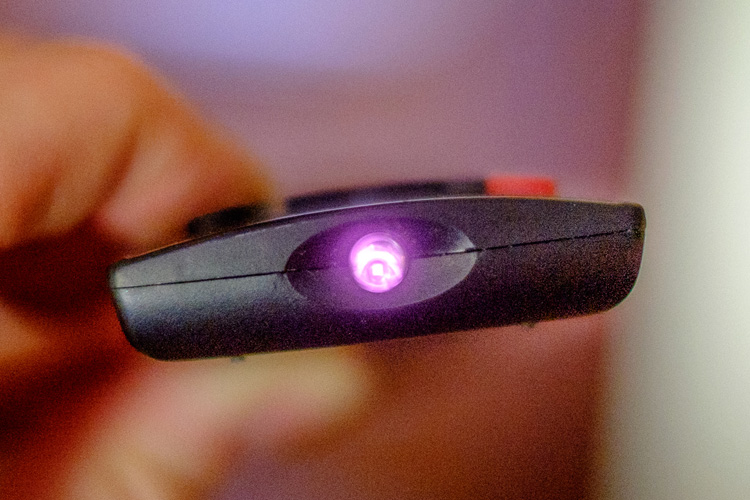
Set your camera to Live View and focus on the end of a television remote control while pushing down one of the buttons. If you can see a light (the infrared communication in action) then it is sensitive enough to infrared light to use with a filter. It’s probably easiest if you ask somebody to hold the remote control for you.

Black & white infrared landscape photograph

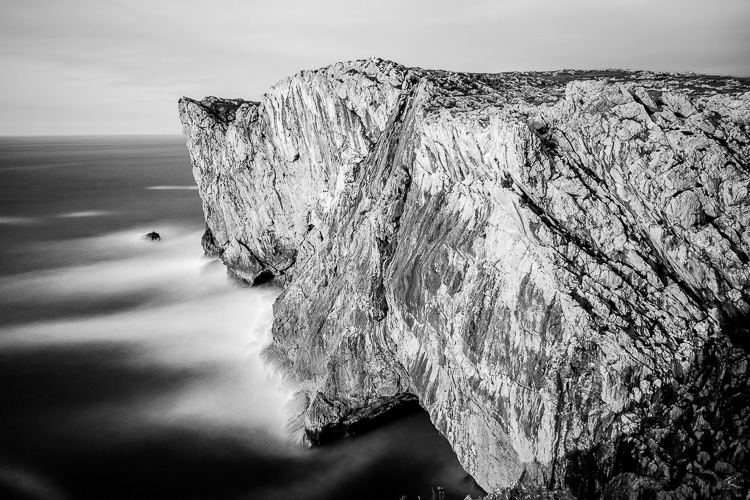
This photo (below) was taken with a Hoya 72 filter. It required a shutter speed of 180 seconds, even though the cliffs were lit by the light from the setting sun.

Black & white infrared landscape photograph

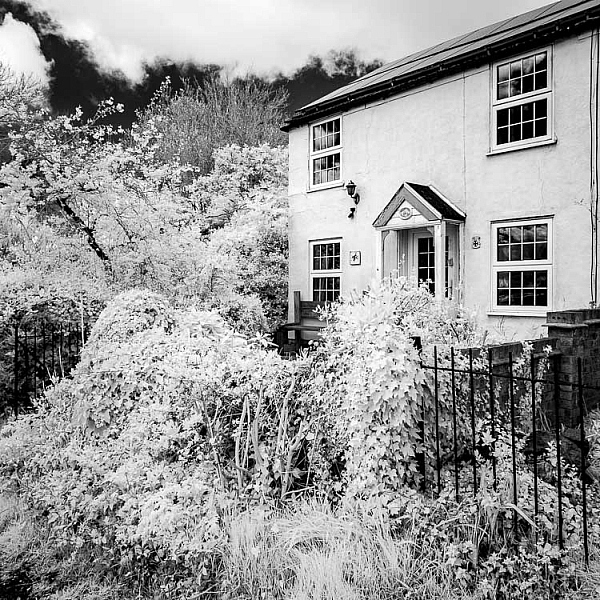
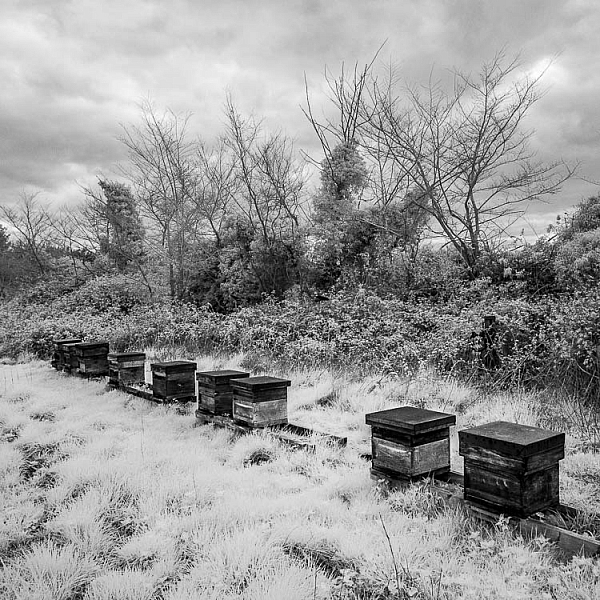
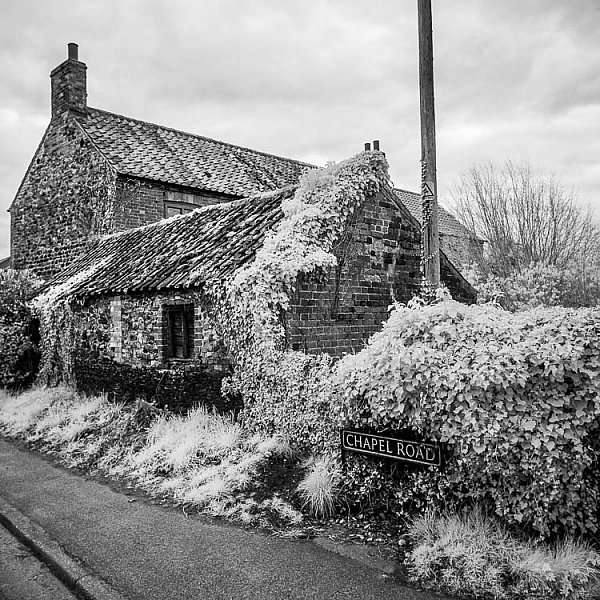
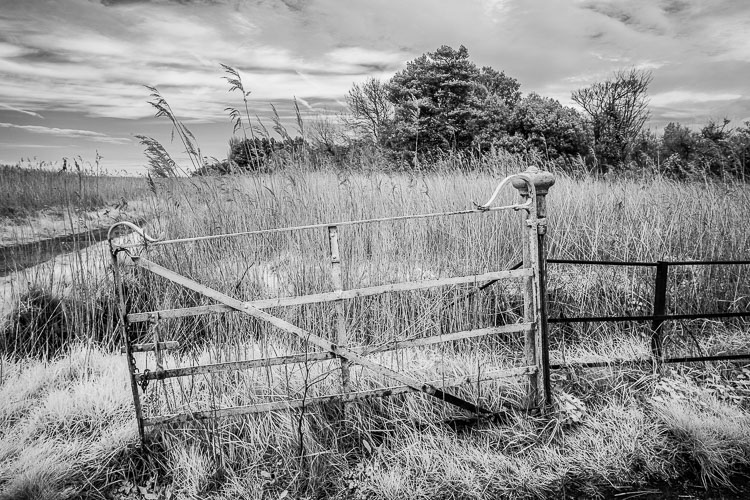
All the other photos in the article were taken with a Fujifilm X-Pro 1 converted to infrared.

Conclusion

That concludes our overview of converting cameras to infrared for black and white landscape photography. Have you tried this yourself? What camera did you have converted and how did it work out? Please let us know in the comments.

Get Andrew’s The Black & White Landscape eBook bundle at 30% off now over at Snapndeals, only until December 20th (AUS time).

googletag.cmd.push(function() {
tablet_slots.push( googletag.defineSlot( “/1005424/_dPSv4_tab-all-article-bottom_(300×250)”, [300, 250], “pb-ad-78623” ).addService( googletag.pubads() ) ); } );

googletag.cmd.push(function() {
mobile_slots.push( googletag.defineSlot( “/1005424/_dPSv4_mob-all-article-bottom_(300×250)”, [300, 250], “pb-ad-78158” ).addService( googletag.pubads() ) ); } );

The post How to Convert a Camera to Infrared for Black and White Landscape Photography by Andrew S. Gibson appeared first on Digital Photography School.

Digital Photography School

 
Comments Off on How to Convert a Camera to Infrared for Black and White Landscape Photography

Posted in Photography


Gear of the Year: Chris’ choice – F-Stop Tilopa camera bag

09 Dec

F-Stop may not have had the best year when it comes to its public image, but I have to say that the gear they produce is absolutely fantastic. I received the F-Stop Tilopa and the Large Pro ICU as a gift from my now wife about a year ago (after waiting several weeks for it to actually ship; my wife was on the phone with them more than she would have liked) and since then I’ve taken it everywhere from the dense forests and goliath waterfalls of the Columbia River Gorge that borders Washington and Oregon to the freshly formed lava fields on the Big Island of Hawai’i. To say that the bag has exceeded my expectations is an understatement.

The black rock that you see in the foreground is recently hardened lava comprised of silica glass and other types of rock. That rock tore up my ripstop North Face hiking pants and the heat from the lava flow actually melted the soles of my boots, but my F-Stop Tilopa bag surprisingly thrived out on the laval fields with really only minimal wear and tear considering the shooting conditions.

Photo by Chris Williams 

The biggest test that I’ve put the Tilopa through came while I was on my honeymoon with my wife this past August. We were lucky enough to have the opportunity to shoot the G61 lava flow ocean entry point on the big island of Hawai’i thanks to Bruce and Tom from Extreme Exposures. The conditions were dangerous to say the least. The soles of my boots literally melted and my tripod got pretty beat up from the silica glass that was formed by the cooling lava. My F-stop bag on the other hand held up to the extreme conditions and sustained no lasting damage. I’ve owned several camera bags from a variety of companies over the years and I have to say that this is by far the most durable and comfortable camera backpack that I have ever owned.

Pictured here is the ICU that I currently use; this is the F-Stop Large Pro ICU. As you can see there’s plenty of room for lenses and extra gear. I currently have one telephoto, one wide-angle, a prime and midrange zoom along with my camera body and accessories stowed away in this ICU with room to spare.

One thing that makes this bag so useful is the ability to customize how you want to store your gear. There are several ICUs (Internal Camera Units) that you can choose from including one specifically designed for telephoto lenses, one designed for cine lenses and a full range of ‘Pro’ ICUs that are fully customizable to fit wide-angle and telephoto lenses along with filters, camera bodies and any accessories that you might need along the way. They also offer Slope Style ICUs that allow for more room in the top of the pack, Shallow ICUs for those with smaller lenses or the Micro ICUs for those with smaller camera kits. 

One of the main selling points for me was durability and weather resistance. The bag is almost impenetrable to moisture and pretty much any other elements that mother nature decides to throw at you thanks to a combination of oxford-weave ripstop nylon and a proprietary thermoplastic polyurethane film that was developed by F-stop Gear. I’ve put the bag through the wringer in terms of terrible weather conditions; torrential rain, sleet, snow, intense tropical humidity and some pretty darn cold temperatures and I’ve never had a problem with any sort of moisture penetration.

This action shot of me wearing my Tilopa was taken by my good friend and fellow landscape photographer Max Foster. The spray was pretty intense at this waterfall, but my gear stayed dry.

Photo by Max Foster

The Tilopa also has a number of exterior straps that can come in handy for strapping a tent or a sleeping bag to the pack during multi-day backpacking trips. One of the biggest issues that I’ve had in the past with camera bags is that none of them really fit me well. I have extremely broad shoulders, so most bags just don’t fit right and I end up using up almost all of the excess strapping material to make them work (and they’re still pretty uncomfortable). The Tilopa’s design makes it extremely versatile for all body types; I’ve never had a bag that fits as well as this one and it’s super comfortable to wear for long periods of time to boot (even when it’s completely filled to the brim with gear).

Another added bonus is that the bag will fit in nearly every airplane overhead compartment that you will encounter, even with the tripod attached (I just remove my tripod ball head and stow it in the bag). I’ve flown with a handful of airlines over the past year in the US and I’ve had no issues. The same can be said for most international carriers across the world, as the majority of the photographers that I’ve interacted with have had no problems stowing their bags in the overhead compartments on flights to Iceland, Patagonia, New Zealand and the like.

In my opinion the F-Stop line of camera bags, including the Tilopa series, are by far the best on the market. Although the customer service can be fairly bad and the wait times can be disappointing; the bag is worth the wait and the frustrations. 

Articles: Digital Photography Review (dpreview.com)

 
Comments Off on Gear of the Year: Chris’ choice – F-Stop Tilopa camera bag

Posted in Uncategorized


A shot in the dark: Casio launches 1.9MP camera for ultra low-light photography

06 Dec

Casio has announced an addition to the Exilim Outdoor Recorder line with a model that is designed to take stills and video in extremely dark conditions. The EX-FR110H uses a back-illuminated CMOS sensor with 1.9 million extra-large pixels that Casio claims are better at recording light when there isn’t much of it around.

Aimed at cavers, campers and those who enjoy a night safari the camera offers ISO 51200 and new noise suppression circuitry as well as a high speed EXilim engine HS ver.3.

Samples from Casio compare images taken with the FR110H with those taken on the company’s regular cameras

The camera features an f/2.8 lens with the angle of view of a 20mm on a full frame camera, while the 3in LCD screen has a special setting for working in very low light. The camera follows the detachable format of the FR series so that the body and the lens unit can be separated for remote capture with feature control maintained via Bluetooth. Casio says the camera is drop-, water-, freeze- and dust-proof, and that it can record Full HD video at 30fps and with 3 stops of stabilization.

Despite the camera’s low-light credentials, in the product information Casio helpfully points out that you can’t take pictures in the absence of light.

The Casio Exilim FR110H will be an Asia-only product, and will be released for sale on 9th December. For more information see this translation of the Casio product page.

Articles: Digital Photography Review (dpreview.com)

 
Comments Off on A shot in the dark: Casio launches 1.9MP camera for ultra low-light photography

Posted in Uncategorized


Hawkesmill launches new line of small luxury camera bags

06 Dec

$ (document).ready(function() { SampleGalleryV2({“containerId”:”embeddedSampleGallery_2812556367″,”galleryId”:”2812556367″,”isEmbeddedWidget”:true,”standalone”:false,”selectedImageIndex”:0,”startInCommentsView”:false,”isMobile”:false}) });

Hawkesmill England, a maker of luxury camera bags and accessories, has launched its new line of smaller bags designed to be used with mirrorless cameras, or smaller DSLRs with an attached lens. Like Hawkesmill’s larger models the new line comes with a removable camera insert and a rear sleeve for memory cards, documents and other smaller items and valuables. 

The bags come in various styles and are made from premium materials, such as Scottish Harris Tweed and triple-layered waterproof canvas. A dual D-ring closing system allows for quick access to your gear while holding it safely. It also lets you slightly expand the bag’s capacity when some extra space is needed. All models of the new line come with the same overall dimensions of 10 x 8 x 5in (25.4 x 20.3 x 12.7cm). However, weight varies slightly between 2.5lb and 3.5lb (1.13kg to 1.58kg).

All canvas models of the small bag are available now for £329 (approximately $ 420), the Regent Street model, which is made from leather, will set you back £469 (approximately $ 595). All Hawkesmill bags are handmade in England and come with a lifetime warranty.

Press Release:

Hawkesmill England Launches New Small Range of Luxury Camera Bags 

West Sussex, England (December 5th 2016) – Today, Hawkesmill England, one of the leading high-end camera accessories brands, announced it is rolling out a line of smaller luxury camera bags. Currently, Hawkesmill makes a stylish large camera messenger bag, suitable for needed gear and a 15” MacBook Pro. These new bags are designed to be used with smaller cameras, i.e., mirrorless, Leica, or a DSLR and single lens attached.

Hawkesmill utilizes superbly luxurious materials, such as Scottish Harris Tweed and triple-layered waterproof canvas, while the firm’s innovative dual-d ring closure and trigger hook system ensures that all of the gear it holds is safe and secure, while also being quick to access. A second d-ring acts as an overflow ring, for those occasions when a little too much has been packed.

Similar to the large bags, the small line also includes a removable insert that is replaceable, ensuring a lifetime of use, as well as a rear sleeve that keeps valuables, such as passports, tickets, memory cards and money, against your body and safe.

There are five models currently available: the classic all-black Bond Street; the olive Jermyn Street, sporting a traditional Harris Tweed design; the distinctive 18oz canvas Marlborough with English vegetable tanned leather; the black body with charcoal Harris Tweed flap Sloane Street; and, in a first for camera bags, the Regent Street, an all-Horween Chromexcel version, known as one of the finest leathers in the world.

The overall dimensions of each of the new Hawkesmill bags are 10? wide x 8? high x 5? deep (25.4cm x 20.3cm x 12.7cm), while the weight varies slightly by model, from 2.5lbs to 3.5lbs (1.13kg to 1.58kg).

All of the small canvas bags sell for £329.00, while the small leather Regent Street is £469.00. Along with the large bags, these are all handmade in England with a lifetime warranty against defects.

The company also makes luxurious leather camera neck straps, card holders and passport holders.

For further information about Hawkesmill England handcrafted bags and accessories, please visit www.hawkesmill.com.

Articles: Digital Photography Review (dpreview.com)

 
Comments Off on Hawkesmill launches new line of small luxury camera bags

Posted in Uncategorized


Cyclops 360 4K camera is designed for motorsport adventures

06 Dec

Cyclops Gear has introduced its new Cyclops 360 (CG360), a camera designed to record your motorsport advenuters with a single super-wide lens for recording 360-degree horizontal panoramas. The CG360 can snap 16MP still images and record videos at resolutions up to 4K/30fps; content is saved to an included 32GB microSD card. A compatible waterproof housing allows the camera to be used underwater as deep as 50m / 164ft.

Cyclops 360 features a total of 16 effects and modes, including time lapse, slow motion and loop recording, along with a driving mode that automatically starts recording when you start your engine. The camera can be remotely accessed and controlled via its built-in WiFi and the related CG360 mobile app for Android and iOS. Ten mounting accessories are included with the camera, among them being a magnetic mount for attaching the camera to vehicles for ‘vibration-free’ recording.

Cyclops Gear is only offering the CG360 through power sports dealers, aiming the camera at off-roaders and others who want to record content by mounting the camera on a vehicle. The Cyclops 360 is currently available through Can-Am for $ 350.

Via: Digital Trends

Articles: Digital Photography Review (dpreview.com)

 
Comments Off on Cyclops 360 4K camera is designed for motorsport adventures

Posted in Uncategorized


Google Pixel users reporting camera app issue

02 Dec

Google’s Pixel smartphones come with a range of innovative imaging technology and currently occupy the number one spot in the DxOMark smartphone ranking. However, shortly after the device launch some users reported a strong tendency of the Pixel camera to produce lens flare, and now it appears some devices are having trouble with the camera app, as well. 

In the Google Product Forum a number of users are reporting that their camera app is frequently crashing, sometimes showing pink and purple vertical lines. It appears the issue is mainly impacting international devices when the phone is in an area with poor signal reception. The error does not occur when flight mode is activated. 

Source: Google Product Forum

Google support staff has been instructing users who are experiencing the issue to clear the cache and data, and factory reset the device. However, none of these measures has solved the problem. It appears performing a soft reset by holding the volume down and power keys is currently the only way to get your device up and running again when the issue occurs.

We are currently testing the Google Pixel XL for our full review and, luckily, have so far not experienced the problem. That said, we hope Google can come up with a quick solution, possibly a software update, to help the affected users.

Articles: Digital Photography Review (dpreview.com)

 
Comments Off on Google Pixel users reporting camera app issue

Posted in Uncategorized


How to Choose the Right Camera Mode to Get the Shot You Want

02 Dec

When starting out in photography, one of the scariest and most confusing things for a beginner is deciding which camera mode to use. While the automatic modes provide a bit of a safety net for those just starting out, there will come a time when you either want to or have to, take greater control of your camera to get the results you desire. But how do you know what camera mode to use?

Aperture Priority Mode

Aperture Priority mode is a perfect choice for a scene like this where you know you’ll want deep depth of field to keep the entire scene in focus.

First off, I won’t discuss any of the automatic modes here. A full discussion of what those do can be found here: Camera Modes Explained for Newbies. What I’d like to do here is discuss specific situations and the appropriate mode for each. Before we dive into that, I’ll explain the basics before we move forward.

Aperture

The aperture is the opening of the lens, which determines exactly how much light enters the camera and strikes the imaging sensor. The aperture also affects the field of focus from foreground to background, otherwise known as depth of field. A shallow depth of field is one that has a sharp focus on the subject, while objects in front of or behind the subject are out of focus. Deep depth of field is when the entire image is in sharp focus from foreground to background. And of course, you can have a depth of field that is somewhere in between those two.

Aperture is shown as a number on your lens, usually as a ratio. For instance, lenses with a maximum (widest) aperture of f/1.8 will have a very shallow depth of field. That same lens set to f/16 will have a deeper depth of field. An easy way to remember this is smaller numbers give you less and higher numbers give you greater depth of field.

Aperture Priority

When you know you want the background blurred, setting a wide aperture to create a shallow depth of field is key. Aperture Priority mode can be used in cases like this (keep reading to learn more on that a bit later).

Shutter Speed

Shutter speed determines the amount of time light strikes the sensor when it enters the camera. The faster the shutter speed, the less light strikes the sensor. In addition, shutter speed is directly responsible for how movement is rendered in an image. Shutter speeds are referred to in fractions of a second, such as 1/125th, 1/60th, or 1/1000th. Faster shutter speeds, such as 1/500th, freeze motion, while slower shutter speeds, such as ½, 1 second, or even 30 seconds,  will show motion as more of a blur. The longer the shutter speed, the more blur motion will create.

ISO

Your camera’s ISO determines how sensitive it is to light. Lower numbers such as ISO 100 or 200 mean your camera is less sensitive to light and are used in bright situations, such as in direct sunlight. When there is less light, such as in shade, or indoors, you might use a higher ISO such as 800, 1600, or 3200 to make your camera more sensitive to light. ISO plays an important part in the various situations I will discuss going forward, so always keep in mind that you can change this setting, and don’t be afraid to raise your ISO if needed.

Camera Modes

Before going any further, I want to clarify that there are multiple ways to get a specific desired result with your camera, using any of these modes. Once you understand the relationship between shutter speed, aperture, and ISO, you’ll be able to do whatever you like in any of these modes.

But which mode is best for which situation? You’ll have to visualize your image to decide.

Program Mode

"<yoastmark

Program Mode resides on the advanced side of the camera mode dial, usually denoted by a P. In this mode, the camera will set the aperture, ISO, and shutter speed for you. So when should you use Program Mode?

Program Mode is good when you’re not looking for any effect in particular. Your camera, when set to Program Mode, will attempt to give you a proper exposure that can be handheld, meaning you won’t be required to use a tripod to steady your camera. This is a good mode for when you’re just casually photographing and just want to be sure your exposures are right.

It is a lot like Automatic Mode in that regard, except that you have the ability to override, or shift, the exposure the camera sets, as well as many other settings such as white balance and picture style. In addition, while in Auto mode, the camera will pop your flash up when it thinks it needs more light. But in Program Mode the flash will not pop up unless you tell it to.

Aperture Priority

On some cameras, this mode is simply denoted by an A on the mode dial, while on Canon cameras it is denoted as Av, meaning Aperture Value. In any case, in this mode, you set the aperture and ISO you want and the camera will set the appropriate shutter speed for you. So when should you use Aperture Priority mode?

Aperture Priority

When you want a shallower depth of field, such as in a portrait, using Aperture Priority and setting a wide aperture is an excellent choice.

To determine the answer, visualize your finished image in your mind’s eye. What do you want it to look like? Generally speaking, if you’ve decided that the most important factor in your image is a specific depth of field, you’ll want to use Aperture Priority Mode so that you can force your camera to give you the depth of field that you want. For instance, if you’re making a portrait, you probably want your subject in sharp focus, but you may also want the background to be a little blurred, to keep your viewer’s focus on the subject. An out of focus background can create a setting without distractions for the viewer. So you might decide you want to use a fairly wide aperture such as f/4, to create enough depth of field to keep your subject sharp, but let the background blur nicely.

But watch your shutter speed too

It’s important to note, however, that you also need to keep an eye on the shutter speed setting. While the camera will set this for you, unlike in Program Mode, the camera is not going to try and give you a fast enough shutter speed to handhold. If there isn’t enough light, this will result in a slower shutter speed that may not be fast enough to freeze any subject movement. This could result in a slight blur due to unsteady hands or slight movement by your subject. If the shutter speed chosen by the camera (based on the aperture you’ve set) isn’t fast enough to freeze motion in this situation, you’ll need to raise your ISO. Raising your ISO will effectively increase the shutter speed given for the aperture you’ve set.

Aperture Priority Landscape

Aperture Priority is a great choice when photographing a landscape where you want a deep depth of field, and the shutter speed doesn’t need to be set at anything specific to capture motion a certain way.

For landscape photography

Another situation for Aperture Priority would be a landscape photo, where you may want greater depth of field to keep the entire scene in focus. In this situation, your primary goal is to get lots of depth of field to keep the entire scene in focus, so you’d set an aperture of f/11 or even f/16 to capture a greater amount of the scene sharply. In this situation, if you’re using a tripod, the shutter speed may not be as big of a factor for you.

But if you’re handholding the camera,  you will want to pay attention to the shutter speed the camera sets to ensure it’s fast enough to avoid camera shake. In addition, if there is moving water or clouds, or the wind is blowing the trees or grass, you’ll want to ensure that the shutter speed the camera sets is appropriately stopping that movement to your liking. If not, you’ll want to adjust your ISO so the camera sets a more appropriate shutter speed.

Shutter Priority

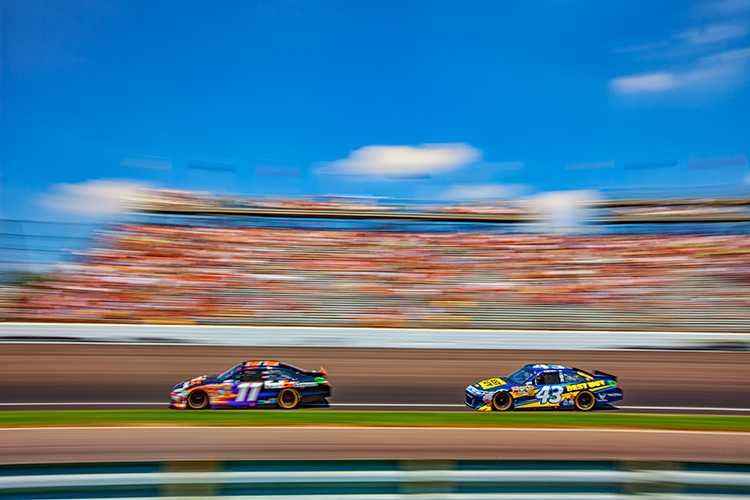
Panning using Shutter Priority

When you know you need a specific shutter speed, such as this image where a panning technique was used, Shutter Priority is often the best choice.

Shutter Priority is usually denoted using an S on most cameras, while Canon uses Tv, representing Time Value to denote Shutter Priority mode. Shutter Priority Mode is just the opposite of Aperture Priority. In this mode, you set the shutter speed you want, as well as the ISO, and let the camera choose the appropriate aperture.  This mode is an excellent choice when you’ve decided that rendering motion in a certain way is the key component of your image.

Shooting sports

For example, suppose you are photographing a sporting event. Most likely, you’ll want to freeze the action of the athletes on the field. To do so, you need a fast shutter speed, such as 1/500th or even 1/1000th. In shutter priority, you’ll need to again keep an eye on your ISO to ensure that the camera is giving you a proper exposure. Usually, the exposure indicator in your viewfinder will flash to show that at the current settings, proper exposure cannot be achieved. In this case, raise the ISO to achieve the correct exposure for the shutter speed you want.

Shutter Priority for Fast Action

You might want to use Shutter Priority Mode when you know you need a fast shutter speed to stop action, such as when photographing sports.

As another example, let’s say you want a slower shutter speed to create a panning effect. Again you would set the correct shutter speed to create the effect, and let the camera adjust the aperture. Any time the primary concern is the appearance of motion in an image, Shutter Priority is a good choice for shooting or camera mode.

Panning in Shutter Priority mode

Another example of using a slow shutter speed to create a panning effect in Shutter Priority Mode.

Manual Mode

Once you’re comfortable with changing settings and you really want to take control of your camera, Manual mode is the way to do that. You will set all of your settings according to how you want your final image to look. There is one caveat, however. Your settings will also be dependent on the available light in the scene. So if you want a fast shutter speed, and deep depth of field, you’ll probably need to raise your ISO a bit. Or compromise on one of the other settings as well.

Watch the meter

Just keep an eye on your camera’s meter and it will help you find the right combination of shutter speed, ISO, and aperture. The other modes do a nice job of taking some of the load off your brain by allowing you to choose one setting to have priority, but sometimes you just need to take full control.

Silhouette in Manual Mode

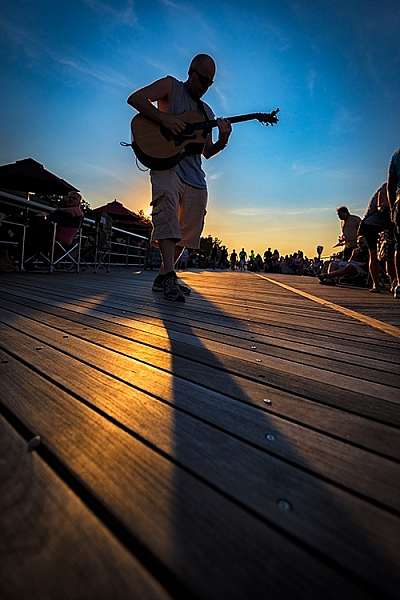
Manual Mode is the best choice when you want to create an effect that the camera’s normal exposure modes just don’t normally do, such as this silhouette.

Exposures long than 30 seconds

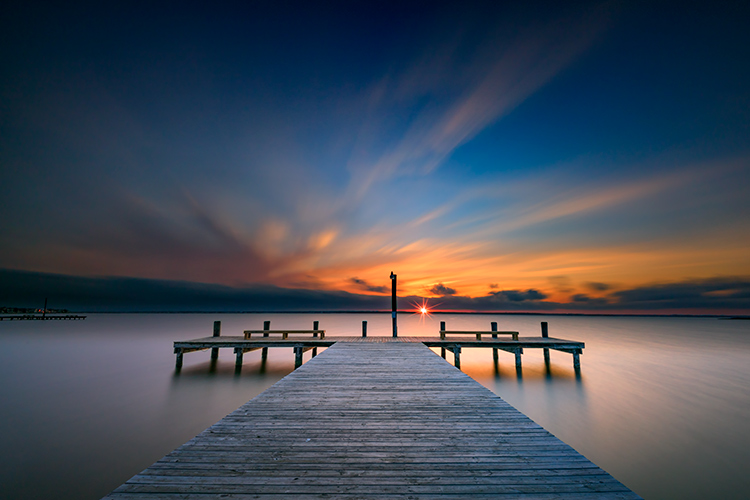
One instance where you’ll need to do this is when creating an exposure longer than 30 seconds. Today’s cameras don’t have shutter speeds for longer than that, so you would need to calculate in your head how long to keep the shutter open, and then use the Bulb setting to do so. Any time the camera can’t properly calculate exposure is a good time to use Manual Mode.

manual-mode-long-exposure

When creating images using a long exposure, such as this one with an exposure time of two minutes, Manual Mode is the best (or possibly only) choice.

Another time to use Manual Mode is when the lighting in a scene is especially challenging, such as when there are a lot of dark shadows. Your camera will try to expose for the deep shadows, causing the highlights to overexpose. Using a manual setting to override the camera’s choices will work well in achieving a satisfactory exposure.

Summary

As I mentioned, there are many ways to capture an image and arrive at similar settings. But each time I’m out photographing, I go through the following checklist in my head:

  1. Do I want deep or shallow depth of field?
  2. Do I want to stop action or is some motion blur okay?
  3. Which of the above two choices is more important for this image?
  4. Is one of the priority modes suitable for the available light of the scene?

The answer to those four questions should lead you to the correct mode for the shot you want.

Shutter Priority for fast action

Shutter Priority can be used when photographing sports to set a fast shutter speed to stop action.

googletag.cmd.push(function() {
tablet_slots.push( googletag.defineSlot( “/1005424/_dPSv4_tab-all-article-bottom_(300×250)”, [300, 250], “pb-ad-78623” ).addService( googletag.pubads() ) ); } );

googletag.cmd.push(function() {
mobile_slots.push( googletag.defineSlot( “/1005424/_dPSv4_mob-all-article-bottom_(300×250)”, [300, 250], “pb-ad-78158” ).addService( googletag.pubads() ) ); } );

The post How to Choose the Right Camera Mode to Get the Shot You Want by Rick Berk appeared first on Digital Photography School.

Digital Photography School

 
Comments Off on How to Choose the Right Camera Mode to Get the Shot You Want

Posted in Photography


Earliest known Nikon camera fetches over $400,000 in Austrian auction

01 Dec

$ (document).ready(function() { SampleGalleryV2({“containerId”:”embeddedSampleGallery_1322935571″,”galleryId”:”1322935571″,”isEmbeddedWidget”:true,”standalone”:false,”selectedImageIndex”:0,”startInCommentsView”:false,”isMobile”:false}) });

A Nikon 1 camera sold at auction in Austria this month has become the most expensive Nikon ever, achieving a sale price of €384,000 (approx $ 406,000) – double the expected maximum estimate. The camera, which is said to be only the third Nikon body ever made, is the earliest known surviving Nikon camera having been made in occupied Japan in April 1948. It was matched with the 11th 5cm F2 Nikkor H lens ever made.

Originally this rangefinder camera was known simply as the Nikon, but in later years it took on the name Nikon 1 as additional cameras, such as the M and S, were produced. Only available in Japan at first, Nikon came to the attention of the rest of the world when Life photographer David Douglas Duncan came across Nikkor lenses while covering the Korean war and spread the word among other press photographers.

The Nikon 1 camera is similar in design to the German Contax but used a 24x32mm film frame. This ultimately meant that it wasn’t taken up beyond Japan, and America wouldn’t allow the company to export to US because the film frames didn’t fit Kodak slide mounts. As a consequence the Nikon M was introduced in late 1949, which created standard 24x36mm frames. Japan finally got its way though, as many of us now use Micro Four Thirds and 6×4.5cm sensors with the same 3:4 ratio as that original 24x32mm film frame.

E. Leitz New York Leica Gun RITEL *

Second version of the famous RIFLE for the 40cm Telyt in 100% original, very fine and perfect working condition. Special viewfinder engraved ‘E.LEITZ INC. NEW-YORK PATENT PENDING’, modified PLOOT mirror housing no. 2486, special extended bottom plate, special leather belt, modified Leica IIIa no.235568, Telyt 5/40cm no.492069 with hood and cap, complete with extremely rare carrying case NUFIR. This is the only set in this combination we know to exist !

Leica M3 black paint ‘Herbert List’

Extremely rare and fully original double-stroke black paint M3 with black film counter and all early features of these un-official pre-series black cameras, the camera was delivered on March 15th, 1958 to Tiranty, Paris (code “Igemo” for black paint M3), with rigid Summicron 5cm no.1510883 (IROOA hood) – only about 90 of these pre-series cameras were produced, much less are known to exist. Camera and lens were owned and used for many years by the famous German photographer Herbert List (1903 – 1975) who worked for magazines, including Vogue, Harper’s Bazaar, and Life, and was associated with Magnum Photos.

The sale took place at the WestLicht Photographica auction along with a collection of 685 other lots of cameras, lenses, accessories and prints, including two Leitz New York Leica Gun rifles which sold for €168,000 each and a Leica M3 in black paint that belonged to Magnum photographer Herbert List – which reached €78,000.

For more information on the Nikon 1 auction and the other items visit the WestLicht

Auction notes

Nikon One

The earliest known surviving production Nikon in the world! Nikon started in March 1948 to assemble cameras (with serial number 60922). The offered camera is one of two cameras made in April 1948 and the 3rd of all Nikon production cameras. It comes with the original early Nikkor-H 2/5cm no.70811 (this is the 11th lens made, with matching Nikon cap) and is still in fantastic original condition. As all very early cameras it has the “8” screw front plate and sharp corner edges on top plate. The camera has still the original shutter. The interior shows the single pair of guide rails, with removable take-up spool. The baseplate with large ‘MADE IN OCCUPIED JAPAN’ engraving. It comes with the original and extremely rare double strap everready case. Published in: ‘The Complete Nikon rangefinder System’ by Robert R. Rotoloni (ps 51-59), ‘Nikon 100 Anniversary’ by Uli Koch (p 68) – provenience: collection of the famous Japanese collector Tad Sato.
World records at WestLicht Anniversary Auctions

Post sale report

384,000 Euro for the earliest Nikon camera

A Nikon One climbed from 90,000 to 384,000 Euro, the highest price ever paid for a camera from the long-standing Japanese manufacturer at an auction. The world record was achieved at the 30th Camera Auction in WestLicht’s 15th year. The record lot is the earliest known surviving example of a Nikon camera in the world, manufactured in April 1948 as the third ever serially produced camera by Nikon. This was also an early birthday present for Nikon company, which will celebrate its 100th anniversary in 2017.

Articles: Digital Photography Review (dpreview.com)

 
Comments Off on Earliest known Nikon camera fetches over $400,000 in Austrian auction

Posted in Uncategorized