RSS
 

Posts Tagged ‘Camera’

Samsung virtual assistant rumored to use camera for object identification

21 Jan

In its upcoming flagship smartphone Galaxy S8 Samsung is expected to implement a Siri or Google Assistant style virtual assistant named Bixby. According to sources of SamMobile, Bixby will include visual search capabilities and be able to analyze a photograph and identify objects within the frame. The system will also perform optical character recognition on visible text. Users will be able to launch the service via the camera app or a dedicated button on the side of the device. 

We have seen apps with similar functionalities before, for example Google Goggles, but Bixby is reportedly aiming to take things to the next level by offering a higher degree of interchange with other applications installed on the phone. For example, users will be able to use detected objects or text to order on shopping apps or perform searches.  

The Bixby technology is likely to have come from Viv Labs, a startup created by former Apple employees and Siri co-founders Dag Kittlaus, Adam Cheyer, and Chris Bringham. Viv Labs was acquired by Samsung last October. It’s not quite clear at this point when the Galaxy S8 will be revealed to the public. It could be at the Mobile World Congress at the end of February or on a dedicated event as late as April. In any case, we’re looking forward to the camera being used in innovative ways on the new Samsung. 

Articles: Digital Photography Review (dpreview.com)

 
Comments Off on Samsung virtual assistant rumored to use camera for object identification

Posted in Uncategorized


Review of the New Flagship DX Camera – The Nikon D500

20 Jan

Everyone thinks they need a full frame camera but are they really that much better? Most people feel the only reason they have cropped sensor cameras is because they can’t afford a full frame one. Then you have to wonder why Nikon have produced one that is not full frame and comes with an expensive price tag. So who would be interested in the new Nikon D500? There are a lot of people who would love this camera and what it has a lot to offer.

Earlier this year Nikon released the new flagship D500 camera as part of their DX range or cropped sensor line-up. It is fast and designed with a specific user in mind. It is also one of the first cameras Nikon has produced that is using Snapbridge, the new phone app that allows you to take photos and upload them to your phone for sharing on social media straight away.
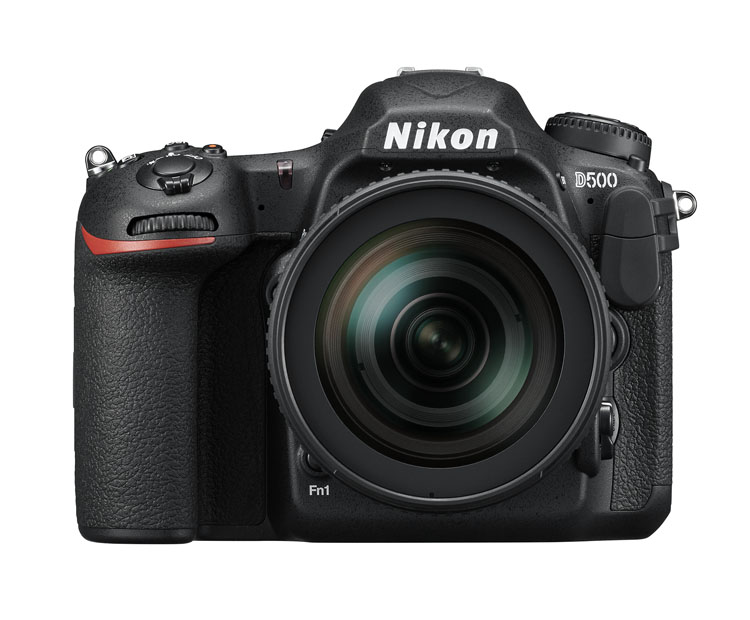
Nikon D500 review

The Nikon D500 – image courtesy of Nikon.

Price out the Nikon D500 on Amazon or B&H Photo’s site.

First impressions

Unlike many of the other DX cameras, it is quite large. People tend to think that cameras with cropped sensors are smaller, but the D500 is in the Pro range and you can see that just by looking at it. It looks like a camera that a professional photographer would use, and many indeed do.

One of the first things I noticed was how similar many of the controls and the layout is to the D800. In many ways, it seems like a cropped sensor version of that camera. This also means that most of the buttons are around the camera body, so you don’t have to keep going back to the menu to change settings. There are everywhere, but it doesn’t make it confusing. You can make changes without really having to stop and look at what you are doing.

Nikon D500 review

Sunset image shot with the Nikon D500.

If want to do long exposure photography there is a small blind in the viewfinder that will close to stop light leaking into your image. It means you never have to worry about whether or not you have the cover for it. You just need to remember to use it when doing long exposures. Very handy.

ISO and noise

The D500 is Nikon’s replacement for the popular D300 range that they stopping making a few years ago. The D300 was fast and great for many types of photography, however, the ISO range was not good. As soon as you increased the ISO the images became very noisy.

It also didn’t go very high, with ISO 3200 being the maximum. The D500 ISO goes up to 512,000, so it will get you images no matter the shooting conditions. The level of noise in the images is also significantly better and not as noticeable.

Review of the New Flagship DX Camera - The Nikon D500

Image shot using a tripod with the Nikon D500 at ISO 200.

Review of the New Flagship DX Camera - The Nikon D500

Image shot with the Nikon D500 hand held at ISO 6400.

Megapixels and image size

The camera is 20 megapixels, which is enough for most people. A RAW image is around 25 MB. Not as large as some cameras, but still large enough that you have to consider how you will store them. Jpegs are a lot smaller, but you don’t get as much information to work with as shooting RAW.

Battery

The battery is very similar to the battery for the D800 but it is a new version, so should only be used in the D500. If you have similar batteries for other cameras it is a good idea to mark them in some ways so they don’t get mixed up. You don’t want to be putting the wrong battery in the camera. While the battery is different the charger is the same.

The battery lasts a long time and you can safely go out for a day of shooting and not use much. Like most Nikon cameras you can go out and shoot for a few days without having to recharge it. Though that is dependent on how many photos you take. Of course, if you do a lot of chimping (image review on the camera) or use LiveView frequently the battery will run out faster. Likewise, if you’re shooting in the cold.

The batteries do typically last a long time as well. You can use a battery for quite a few years before you start noticing that it doesn’t last as long.

Remote shutter release
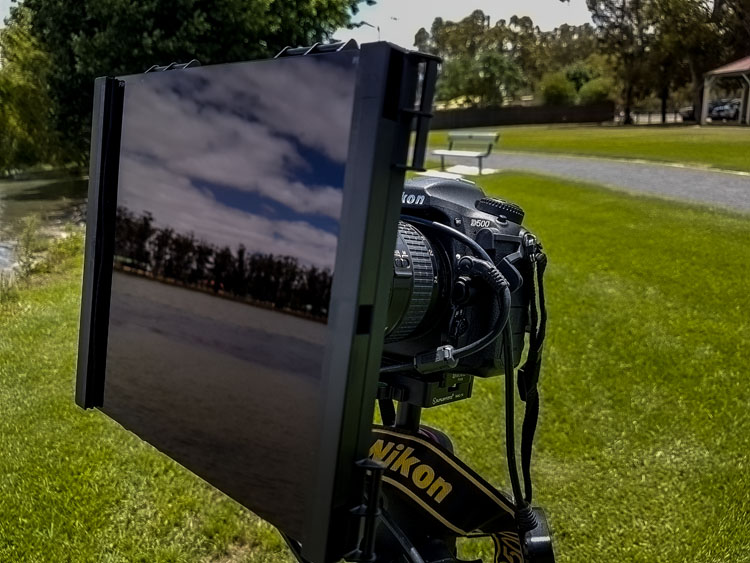
Review Nikon D500 DX camera

Using some ND filters and the MC-36 remote shutter release on the Nikon D500 for some long exposures.

When you are looking at a new camera you need to be aware of all the accessories and whether or not you will have to buy a lot of new ones. The remote shutter release that I purchased for the D300s, the MC-36, was fine for the D800, and it is also good to use on the D500. That makes it a good match for the gear I already have. It is something you need to consider anytime you are buying a camera, it isn’t just the expense of the camera, but what other equipment you may need as well.

Review Nikon D500 DX camera

A long exposure of some recently painted silos using the D500.

Focusing area

The focusing area takes up larger space in the Nikon D500 than it does in other bodies. It has the same focusing center as the Nikon D5, their top pro model, but on the cropped sensor of the D500. In practice, that means you can focus on subjects almost up to the very edges of the viewfinder. You can focus on a much larger area than other DX cameras.

If you want to use spot focusing, but have found it hard in the past because you couldn’t focus on subjects at the side, it is now possible to do that. Any camera that makes focusing easier for you has to be good.

Memory card


The D500 has two slots for memory cards. You can put an SD card in one, and the other is for XQD cards, which are reasonably new but only needed for a few Nikon cameras. It is mainly used in the higher end bodies that are fast and shoot a lot of frames per second, which is why the card is used. Normal cards would find it hard keeping up with the speed and writing the images. If you are taking photos at 10 frames a second it is important.

Apparently, you can buy the cards at all good camera stores. Though, you would also need a memory card reader for it as well.

Touchscreen

The screen at the back is a touchscreen which makes it easy to scroll through your images. It works a lot like your smartphone. You can make the images bigger or smaller and flip through them with your fingers.
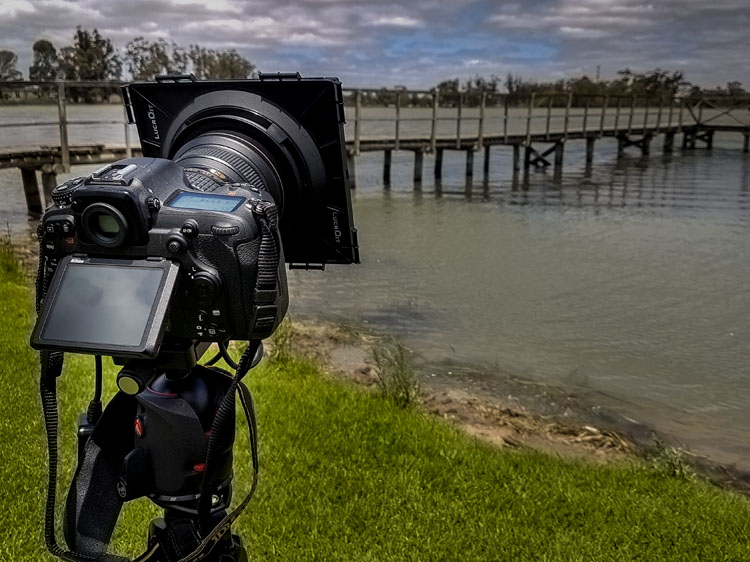
leannecole-nikon-d500-review-15

The back screen of the D500 can be moved for better viewing and is also a touchscreen.

Crop factor

The Nikon D500 has the 1.5x crop factor. Basically, that means that if you have a full frame lens, like the 70-200mm, when you use it on the D500 the lens becomes essentially like a 105-300mm. It is the advantage of using a DX camera body with high-quality lenses.
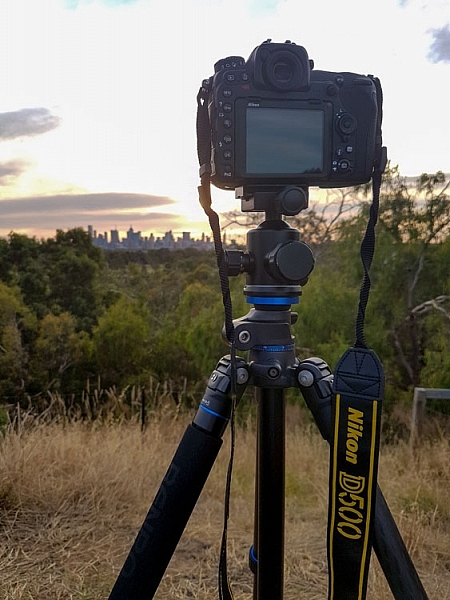
Nikon D500 review

It is all set up to take some sunset photos of the city of Melbourne.

Who is the Nikon D500 for?

The most likely person to buy this camera is someone who is interested in the 1.5x crop factor. Photographers who can’t afford those great big long lenses, but want to be able to get as close as they can to the action. Having the ability to make a 300mm lens go to 450mm is fantastic. The longer the telephoto lens, the more expensive it is, so the cropped sensor is great for that reason.

leannecole-nikon-d500-review-20

The sunset shot with the Nikon D500. The DX camera allowed me to get a lot closer with the 80-200mm, this was at 277mm.

Sports photographers would also be interested where speed and getting closer to the action is very important. Full frame is great, but to get a camera that is fast enough to shoot lots of frames per second you would need to spend around $ 6500 on a Nikon D5 or similar. If you don’t have that kind of money, $ 2000 USD will get you the Nikon D500 which will do many of the things that the others can, but you also get the cropped sensor.

There are many other kinds of photographers who would benefit from the D500 as well. Bird and wildlife photographers would love being able to get more length with their lenses. The 10 frames per second capability of this camera would also be an advantage for capturing birds and animals on the move.

Macro photographers will get a lot closer to their subjects with their lenses, and when you put on extension tubes, a whole new world will be seen.

leannecole-nikon-d500-review-23

Taken using the D500 and the Nikon 105mm macro lens, with the cropped sensor you can get in a lot closer than you can with a full frame.

Snapbridge app

This is a new app that Nikon has developed that makes it possible to connect your smartphone with the camera. It is unlike others that use Wi-Fi to do it, Snapbridge stays connected to your phone all the time. You can upload photos, use it to take your photos, and it also keeps your camera’s firmware up to date.

It is available for Apple iPhones and Android, though it is a little harder to use with an Android.

Using the camera

I found the camera easy to handle and work my way around. Then again, I’ve been using Nikon cameras for many years, and as previously stated I found a lot of similarities with the D800. I found the weight fine, but others who picked it up thought it was heavy. Then again, you would expect a camera of this quality to be that heavy. Good quality cameras of this caliber are always a bit hefty.

The fast frame rate blew me away and as someone who always likes to bracket photos to get more options, I really enjoyed it. With the D800 I would never do more than three shot hand holding, but with the D500 I felt there was enough speed to let me do five. I also really enjoyed just listening to how fast it was.

leannecole-nikon-d500-review-14

Using the D500 for night photography in Melbourne.

If I had one criticism, it would be that there is an overall blue cast and how, in some cases, it made the blues far bluer than they really were. I’m not a fan of blue in images, so I didn’t like it, but I know a lot of other photographers would.

Overall

The Nikon D500 is a great camera and anyone who purchases it will really enjoy using it. Full frame is great, but if you are a photographer who likes to zoom in, then the DX may suit you more. If you shoot sports, birds, wildlife or macro, look at this camera, it could be just what you need.

Price out the Nikon D500 on Amazon or B&H Photo’s site.

leannecole-nikon-d500-review-19

The sun as it sets and the camera taking photos.

googletag.cmd.push(function() {
tablet_slots.push( googletag.defineSlot( “/1005424/_dPSv4_tab-all-article-bottom_(300×250)”, [300, 250], “pb-ad-78623” ).addService( googletag.pubads() ) ); } );

googletag.cmd.push(function() {
mobile_slots.push( googletag.defineSlot( “/1005424/_dPSv4_mob-all-article-bottom_(300×250)”, [300, 250], “pb-ad-78158” ).addService( googletag.pubads() ) ); } );

The post Review of the New Flagship DX Camera – The Nikon D500 by Leanne Cole appeared first on Digital Photography School.


Digital Photography School

 
Comments Off on Review of the New Flagship DX Camera – The Nikon D500

Posted in Photography


Charge your devices with a USB station shaped like a Sony mirrorless camera

18 Jan

$ (document).ready(function() { SampleGalleryV2({“containerId”:”embeddedSampleGallery_6412910342″,”galleryId”:”6412910342″,”isEmbeddedWidget”:true,”standalone”:false,”selectedImageIndex”:0,”startInCommentsView”:false,”isMobile”:false}) });

If you’ve searched high and low for the perfect USB charging station but come up empty handed, Fotodiox might have your number. It’s offering the Mirage Trio USB Charging Station, which is fashioned to look like a Sony a7-series mirrorless camera for no discernible reason. It offers charging for an Apple or Android phone, a USB port for another device and a compartment for an Apple Watch magnetic charging cable. 

Here’s the kicker – the replica lens sold with the station can be removed and swapped out for any E-mount lens of your choice. And as Fotodiox points out, you can simply add an adapter (see what they did there?) to attach a beloved vintage lens so you can gaze upon it as you wait for your GoPro to charge. 

Head to Fotodiox’s site to pick one up for $ 75.

Articles: Digital Photography Review (dpreview.com)

 
Comments Off on Charge your devices with a USB station shaped like a Sony mirrorless camera

Posted in Uncategorized


Udee universal backpack includes camera compartment, external USB charging and more

17 Jan

A versatile photography backpack called Udee is seeking funding on Kickstarter, offering a design that’s meant to cover many different circumstances and needs. The backpack boasts 19 features, including a dedicated ‘photography bag,’ an external USB charging port, an integrated LED safety light, integrated earphone port, and more. With 39 days to go, the campaign is looking to hit a $ 20,000 funding goal to bring the backpack to production.

Udee is designed for everything from travel to regular daily use, covering most of the bases anyone could need via a combination of security, convenience and comfort features. As far as comfort is concerned, Udee has a weight reduction design that includes an X-shaped back support element combined with an S-shaped belt, memory sponge material and air permeability.

This is complemented by an anti-theft security feature in the form of a coded lock which, when used with a steel cable, can lock the bag in place and keep thieves out. Convenience is also given a strong focus, and includes quick- access zones, a 3M reflective strip, an earphone port for listening to music through headphones connected to an item inside the bag, and an external USB port for charging a phone using a battery stored within the bag.

Udee’s design allows specific categories of items to be stored separately from others. A photography bag section has cushioned spaces for a camera and lenses, for example, while there’s also a pocket for a laptop, sleeves for notebooks or similar items, small pockets, a glass chamber for breakable items, and even a compartment that can be used as a portable cooler. Overall, the bag has a 25 liter capacity.

Meltpartners, the entity behind Udee, is seeking funding for the bag on Kickstarter, where there’s a stated $ 20,000 funding goal. Backers are offered an early bird Udee basic backpack in exchange for a minimum $ 99 pledge, though other more substantial pledge rewards are also listed.

Via: Kickstarter

Articles: Digital Photography Review (dpreview.com)

 
Comments Off on Udee universal backpack includes camera compartment, external USB charging and more

Posted in Uncategorized


HTC announces U Ultra 5.7″ phablet with 12MP camera

13 Jan

If you liked the camera performance of last year’s HTC 10 but would prefer a larger screen, the HTC U Ultra, which has been announced today, might just be what you’ve been waiting for. The Ultra U comes with the same rear camera module that can be found in the 5.2″ HTC 10. A 12MP 1/2.3″ sensor with 1.55µm pixels is combined with a fast F1.8 aperture and optical image stabilization. The camera also comes with phase detection AF and is capable of recording 4K video and 12-bit Raw files. 

Compared to the HTC 10 the front camera has received a serious upgrade, though. It now comes with a 16MP resolution and a pixel-binning low-light mode that puts out 4MP files. Images can be viewed on a 5.7″ Quad-HD display that comes with a secondary small screen on top, similar to what we’ve seen on the LG V20. The Android OS is powered by Qualcomm’s  Snapdragon 821 and 4GB of RAM. 64GB and 128GB storage options are available and can be expanded via microSD slot. 

Like the latest iPhones, the U Ultra lacks a 3.5mm headphone jack and only comes with a USB Type-C port. The latter is used to charge the comparatively small 3,000 mAh battery. Thankfully, quick-charging is supported. All the components are packed into HTC’s new ‘Liquid Surface’ design metal unibody that is entirely covered in glass, so a solid case might be a useful investment for future U Ultra owners. The new model will be available globally this quarter. In the US the U Ultra will set you back $ 749 and can be pre-ordered now. Start of shipping is slated for mid-March.

Articles: Digital Photography Review (dpreview.com)

 
Comments Off on HTC announces U Ultra 5.7″ phablet with 12MP camera

Posted in Uncategorized


KitSplit acquires CameraLends, becomes largest peer-to-peer camera rental platform

11 Jan

Peer-to-peer camera equipment rental platform KitSplit has acquired its rival CameraLends to form the world’s largest peer-to-peer gear rental community. The combined entity will be managed under the KitSplit brand from headquarters in New York and CameraLends founder Adam Derewecki will join KitSplit as an advisor. 

“There are more content creators today than ever before and they all need access to top quality, affordable gear. Since launching a little over a year ago, KitSplit has made huge improvements in gear rentals, making creative work and connecting with creators even easier and more affordable. The CameraLends acquisition will further our goals of democratizing access to great gear and empowering creators,” says KitSplit cofounder and CEO Lisbeth Kaufman.

CameraLends user accounts including gear information have already been integrated into the Kitsplit web platform to smooth the transition for existing CameraLends users. In addition to individuals, KitSplit also works with rental houses and production companies to expand its gear pool. More information is available on the KitSplit website.  

Articles: Digital Photography Review (dpreview.com)

 
Comments Off on KitSplit acquires CameraLends, becomes largest peer-to-peer camera rental platform

Posted in Uncategorized


CamFi launches Matrix software for multiple camera control

10 Jan

The maker of remote camera controller and image transmitter device CamFi has announced a new software package that allows CamFi users to control and trigger multiple cameras at the same time.

CamFi Matrix is an application for Windows PCs that communicates via a Wi-Fi or cabled network with certain Canon and Nikon DLR cameras and which can be used to preview a shot via Live View. A control panel allows camera settings to be adjusted and focus points to be selected, and once the shutter is tripped remotely the images can be downloaded and viewed. The system allows an unspecified number of cameras to be controlled at the same time, though the company recommends a high-performance router for simultaneously controlling more than ten, and a cabled connection for more than 20. The company suggests that using multiple-camera set-ups will be useful for creating virtual reality images, 3D product shots and panoramas.

To operate with the Matrix software each camera in the system needs its own CamFi unit, and connection is made via a router or cabled Ethernet rather than directly between the PC and the camera – so an existing network is required.

The CamFi units have existed for some time and have previously been used to link cameras to phones and tablets as well as PCs, but only one camera at a time. The software is free for owners of CamFi units.

For more information and to see a list of compatible cameras visit the CamFi website.

Articles: Digital Photography Review (dpreview.com)

 
Comments Off on CamFi launches Matrix software for multiple camera control

Posted in Uncategorized


Enlaps Tikee time-lapse camera packs two lenses and a solar panel

08 Jan

Tikee by French company Enlaps aims to simplify time-lapse photography by combining a 4.5W solar panel, wireless connectivity and a pair of lenses into a single capture device. The device itself is described as completely self-sufficient, weatherproof and accessible via a Web application.

The idea behind Enlaps is that long duration time-lapse photography can be difficult depending on location due to potential power source and weather issues. Tikee and its more sophisticated counterpart, Tikee Pro, solve this by providing everything necessary for time-lapse photography in a single wireless and weatherproof product.

The small solar panel powers Tikee, assuming it is placed somewhere with sufficient sunlight, while a pair of lenses capture 220-degree panoramic images. A related Web application is available from a computer or mobile device; it automatically stitches the images into a time-lapse, and includes features for ‘advanced users’ like Pan & Zoom and Time Period. Content is stored on a microSD card.

The Enlaps Tikee features Bluetooth LE and Wi-Fi, and saves content in JPEG format, while the Tikee Pro includes those features as well as GPS, GSM support, and both JPEG and Raw file format options. Both products were launched on Indiegogo, where the campaign has successfully resolved with €238,687 in funding. The company is demonstrating the devices at CES 2017.

According to TechCrunch, the Tikee will be priced at $ 750 and the Tikee Pro at $ 900 and will be available in April.

Via: TechCrunch

Articles: Digital Photography Review (dpreview.com)

 
Comments Off on Enlaps Tikee time-lapse camera packs two lenses and a solar panel

Posted in Uncategorized


Take a look at a 380-shot mosaic of Apple’s new campus created with a 100MP Phase One camera

06 Jan

A composite of 380 100MP aerial images has been created of the site of Apple’s new campus by photo mapping and data company SkyIMD. The company usually provides the kit for other aerial photographers to use, but on this occasion wanted to show off the amount of detail that can be captured with a Phase One iXU RS1000 100MP aerial camera. The company used software to create flight paths over the 0.5 square mile construction site and spent just thirty minutes shooting 420 images with the camera attached to a Cessna 172 light aircraft.

When combined to create a single picture of the whole area, the images allow dramatic magnification so that people in the scene can be picked out – even though the plane was flying at 2000ft with a lens just longer than standard for the format.

The Phase One iXU RS1000 industrial camera uses the same CMOS sensor that is used in the IQ3 100 back for the XF 645-style DSLR body, but in this case it is used in a body with no moving parts. The firm used a Rodenstock 90mm lens with the body and once all 420 images were combined and cropped to the equivalent of 380 images, the file measured 4.76GB. SkyIMD used Photoshop’s Photomerge feature to combine the images, but to maintain manageable amounts of data the company divided the images into batches of over 70 covering specific areas of the site. Once the batches were combined those composites were also combined to create the final image, which you can see on the SkyIMD website.

SkyIMD’s Michael Estigoy has provided some detail about how the image was shot and created.

All of the images were captured using our FAA/EASA/ANAC STC certified Aerial Camera Platform. The platform mounts to the strut of a plane (Cessna) and holds the PhaseOne iXU RS1000 90mm camera in a vertical (nadir) position.

During the pre-flight process, we used a software program called Flight Planner from AeroScientific (http://www.aerosci.info/flightplanner/) to create our flight paths, and calculate the frequency of the intervalometer based on the speed, altitude and desired GSD (ground sample distance).

Using the PhaseOne iX Capture Software, we set the exposure and ISO to obtain the best image balance we could. There was some consideration given to capture as much detail as possible – balancing the exposure between not making the shadows too dark and whites/brights too blown out.

We loaded up the flight plan on our iPad – we use an application called Galileo Offline Maps (https://galileo-app.com/) – to depict the flight lines and line up our airplane. Our pilot, who has years of experience flying missions like this, lined up the plane at the speed and altitude we calculated pre-flight, and then flew the lines straight and level. I controlled the camera operation and made sure that the image quality and coverage was being captured successfully.

The parcel required us to fly 7 flight lines to capture the imagery. We flew one grid.
We are planning follow up flights and will fly a double grid pattern on those, or a cross hatch pattern, to capture more images and enable us to create better mosaics and perhaps a 3D model or flyover.

Stitching and imaging process
We typically use photogrammetry software such as those offered by Pix4D and Agisoft. However, this time I elected to try and use Adobe Photoshop to create the Mosaic. I used the Photomerge function.

We had a total of 420 images. We have a high-powered computer (8 core i7, 64GB RAM, m.2 SSD drives, etc., GeForce GTX video card), but 420 is almost impossible to process all at once. I grouped the images into six separate folders, each representing an area of parcel. Each group shared some images with the other groups in order to facilitate matching. After each group, or chunk, of images was merged, I corrected them for distortion and then merged the groups together. After merging, any major flaws were cut out and images were sourced to fill in the holes.

Photoshop used 90% of our installed RAM and approx. 700 GB of scratch disk space on two m.2 SSD drives to complete each group, including the final mosaic.

As mentioned on our site, we did not take any time to massage the resulting mosaic Photoshop produced. I may have adjusted curves, performed some slight sharpening, and that’s about it. There are obvious mis-alignments and distortions in the image. We wanted to share the image rather than spend another week making it perfect.

The final image was cropped to the final size. I had seen the plans Apple submitted to the City of Cupertino and wanted to try and represent that area of view (pages 3 & 4 of this PDF – https://s3.amazonaws.com/apple-campus2-project/Site_Plan1_Submittal7.pdf). The crop was made visually. We eliminated the use of about 40 photos, hence the approx 380 images mentioned on our site.

The image was too large for TIFF or JPG format so it was saved as a Photoshop Large Document (.PSB). In order to support the zooming feature on our web, we used a photoshop plugin from Microsoft:
http://research.microsoft.com/en-us/um/redmond/groups/ivm/HDView/HDPhotoshopPlugin.htm. This created the thousands of tiles for zooming.

I used Openseadragon for the javascript/web enablement for the zoom/interactive viewer:http://openseadragon.github.io/

Articles: Digital Photography Review (dpreview.com)

 
Comments Off on Take a look at a 380-shot mosaic of Apple’s new campus created with a 100MP Phase One camera

Posted in Uncategorized


The Polaroid Pop instant digital camera produces 3 x 4″ prints

05 Jan

$ (document).ready(function() { SampleGalleryV2({“containerId”:”embeddedSampleGallery_7138693871″,”galleryId”:”7138693871″,”isEmbeddedWidget”:true,”standalone”:false,”selectedImageIndex”:0,”startInCommentsView”:false,”isMobile”:false}) });

Meet the Polaroid Pop, a new instant camera that produces classic Polaroid-sized 3 x 4″ prints. Like the Polaroid Snap and Snap Touch, the Pop combines a digital sensor with an integrated ZINK Zero Ink printer. But unlike the Snap, which produces 2 x 3 prints, the Pop prints to a 3.5 x 4.25 format, with the image itself occupying 3 x 4 inches to give each print a faux Polaroid-style border.

The Pop uses a 20MP CMOS sensor and features a dual LED flash, 3.97″ touch LCD and image stabilization. It can also shoot 1080p HD video and stores everything to a Micro SD. When used in conjunction with the Polaroid print app and one’s smart device, users can edit images before printing. Photos print in just under a minute.

If you’re itching to get your hands on one, expect the Polaroid Pop to ship in late 2017. Pricing info is forthcoming.

The Polaroid Pop Instant Digital Camera Offers a Modern Take on the Classic Polaroid Instant Print

Debuting at CES 2017, the Latest Camera in the Polaroid Instant Digital Print Line Pairs Wireless Technology With the Iconic Polaroid 3×4” Print

LAS VEGAS, January 5, 2017– CES 2017 marks debut of the newest camera in the wildly popular line of Polaroid instant digital photography products, the Polaroid Pop. The Polaroid Pop instant digital camera combines a sleek, modern design and digital technology with the classic 3×4” Polaroid instant print format that is reminiscent of the brand’s iconic legacy instant print cameras.

Polaroid is celebrating its 80th anniversary in 2017 and we could not think of a better way to kick-off this milestone year than with the debut of the Polaroid Pop instant digital camera at CES 2017,” said Scott W. Hardy, President and CEO of Polaroid. “Perfectly blending nostalgia with modern design and functionality, the Polaroid Pop embodies the brand’s 80-year history; staying true to the Polaroid core values of sharing, instant, fun and easy-of-use, while pushing the envelope with a fresh form factor and the latest technology.”

The Best of Both Worlds

Just like the Polaroid Snap and Polaroid Snap Touch instant digital cameras and the Polaroid Zip instant photoprinter, at the heart of the new Polaroid Pop instant digital camera is an integrated printer using ZINK® Zero Ink Printing Technology. This gives users the ability to automatically print full color photos in the iconic 3×4” format with the Polaroid Classic Border Logo resulting in a 3.5×4.25” print. The Polaroid Pop also features a traditional digital camera experience. The camera includes a a 3.97-inch touchscreen LCD for framing shots and navigating the camera’s menu, a 20-megapixel CMOS sensor and dual LED flash for high quality images, image stabilization, as well as 1080p full HD video recording capability. All images and video are stored on a micro SD card (up to 128GB).

The Polaroid Pop can quickly and easily connect to a mobile device using a Wi-Fi and Bluetooth dual chip, transforming the camera into an instant photo printer. Via the Polaroid print app, available free for iOS and Android, users can edit and enhance their prints with a number of creative filters, digital stickers, effects and controls. Once again, consumers will have an all-in-one solution for capturing and sharing images on-the-go. No matter what device they use to capture images, users will be able to share the fun with their own creative flair. The Polaroid Pop is ideal for today’s selfie shooters thanks to a self-timer. Additionally, the Polaroid Pop has three color modes—black and white, color, and vintage sepia to give users that iconic Polaroid look and feel.

The Polaroid Pop instant digital camera was designed in partnership with renowned design firm, Ammunition, the studio that was also behind the Polaroid Zip instant photoprinter, Polaroid Snap instant digital camera line and Polaroid Cube lifestyle action camera line. With the Polaroid Pop, Ammunition continued the simple, modern and stylish design aesthetic reflected throughout the current instant and action product offering. The jet-black camera body is accented with a pop of color, or a contemporary monochromatic look. The iconic red shutter button provides users with the easy-to-use one-button shutter control they have come to know and love from legacy cameras like the Polaroid One Step. Led by industrial designer Robert Brunner, Ammunition has partnered with award-winning consumer brands including Adobe, Beats by Dre, Square, Lyft, and Williams-Sonoma.

ZINK Zero Ink® Printing

The Polaroid Pop instant print camera uses the revolutionary ink-free Zero Ink® Printing technology developed by ZINK. The ZINK-enabled printer uses heat to activate and colorize cyan, yellow and magenta dye crystals embedded in the paper. The result is full-color, high quality, long-lasting and smudge-proof images without ink cartridges, ribbons or toner

The 3×4” photo prints in just under a minute so consumers can instantly share the photo with their friends and family. Additionally, because ZINK Paper® is adhesive backed the photo can be used as a sticker as well.

Offered by C+A Global, an authorized Polaroid licensee, the Polaroid Pop instant print camera will be available Q4 2017. Pricing is not yet available. To learn more about the Polaroid brand, please visit polaroid.com

The Polaroid Brand

Polaroid is one of the most trusted, well-respected and recognizable brands with a rich 80-year history beginning with Polaroid instant cameras and film. Our range of products include instant print cameras, action sports cameras, smartphones, flat-screen TVs and emerging technologies that deliver the fun, instant gratification and value for which the brand has long stood. Today, the Polaroid Classic Border Logo, rooted in our beginnings of instant photo sharing, serves to designate genuine Polaroid branded products. For more information, visit Polaroid.com.

Polaroid, Polaroid & Pixel, Polaroid Color Spectrum, Polaroid Pop, Polaroid Cube, Polaroid Zip, Polaroid Snap and Polaroid Classic Border Logo are trademarks of PLR IP Holdings, LLC.

Articles: Digital Photography Review (dpreview.com)

 
Comments Off on The Polaroid Pop instant digital camera produces 3 x 4″ prints

Posted in Uncategorized