RSS
 

Posts Tagged ‘Better’

Photographing on Overcast Days: The Light Simply Doesn’t Get Any Better

17 Nov

The post Photographing on Overcast Days: The Light Simply Doesn’t Get Any Better appeared first on Digital Photography School. It was authored by Herb Paynter.

photographing-on-overcast-days

Lighting is everything in photography, but some “poor” conditions may surprise you. Am I alone here? Does anybody else get excited about photographing on overcast days?

I use to think I was a contrast junkie, but I discovered that my passion is for detail, more of an internal contrast issue than one of overall contrast. Internal contrast (the clear distinction between tones inside the extremes of white and black) is what delivers the distinctions we call detail.

Hot highlights and deep shadows

Photographing on Overcast Days: The Light Simply Doesn't Get Any Better

When you consider the dynamic range of most digital camera image sensors, typical bright sunny days can present two challenges right off the bat: hot highlights and deep shadows. When the highlights in the original image are very hot, and the shadows are very deep, extracting detail in the “near shadows” and “near highlights” turns into an editing issue.

This is why photographing on overcast days is the easiest lighting condition to deal with.

photographing-on-overcast-days

The holy grail of photographic exposure range is located well within those bookend extremes. On a typical Florida day, with the Sun blaring on a scene, the trick is to keep the quarter, middle, and three-quarter tones ideally balanced in order to capture critical detail.

With highlights too “hot,” the inevitable shadows cast by the tropical Sun tends to push critical three-quarter tones (shadow detail) into the mud. Shooting in RAW mode allows most images to recover all but the most severe edges of dark and light, though it can take a careful adjustment to do so.

Filtering effect of clouds

Photographing on Overcast Days: The Light Simply Doesn't Get Any Better

When photographing on overcast days, the filtering effect of clouds mellows the Sun’s harsh light, revealing significant quarter tones (highlight detail).

The wonderful byproduct of this softer “diffused” light is softer shadows, which in turn deliver more shadow detail.

It is much easier to boost the highlights and deepen the shadows with a little help from overcast weather. On very sunny days, you might have to use a reflector or fill flash to open up the shadows, but on cloudy days, they’re already open! This natural diffuser renders rich colors and a full range of tones from the deepest shadows to the lightest highlights.

This lighting is the ideal time to press your 18% gray card into action.

Gray card

photographing-on-overcast-days

There is a reason why photographers like to balance their lighting around an 18% gray card. That 18% value just happens to be the same reflective value as average Caucasian skin color. And that value is the sweet spot of all photographic exposure.

Your camera’s image sensor is tuned to record skin tones in the very center of the contrast range. Image sensors do their best work when you point them at this reflective value. Once the camera knows this value, the lighter and darker tones fall quite naturally in line. And when the outdoor lighting falls neatly within the camera sensor’s “cruising range” (with headroom on either side of the scene’s histogram), that my friends, delivers top drawer results.

Photographing on overcast days may well become your favorite lighting.

Middle tone emphasis

Photographing on Overcast Days: The Light Simply Doesn't Get Any Better

Don’t be afraid to put the scene’s tones well within the middle of the histogram.

There is no hard, fast rule that says that every image has to contain extreme highlights or near-black shadows. Real-life simply doesn’t appear that way to your eyes. Not even high-key photography mandates that the lightest tones must be extremely bright. Some of the most moving photos are nearly void of overall contrast.

Don’t fall into the trap of “optimizing” every photo’s range so that it produces bright highlights and deep shadows. Allow nature to dictate the visual mood. Realistically speaking, the only thing in nature that is truly “black” is the inside of a cave at midnight. The only thing pure “white” is a direct view of the Sun at noon.

Auto levels

photographing-on-overcast-days

It’s okay to have highlights that aren’t pegged up against the right side of the histogram. Please think twice before you hit the dreaded Auto button in the Levels dialog of Photoshop. That kind of cookie-cutter photography should be left to those who don’t know any better. Let the scene set the mood and simply convey what you experienced.

Occasionally, dynamic adjustments within software applications tempt us to automatically force nature into conditions that aren’t natural.

White balance

photographing-on-overcast-days

The next time you find yourself in the shadow-free lighting of a clouded sky, go and get your camera. Great color (and fabulous black and white) photography is there for the taking. However, do keep in mind that outdoor shots under cloud cover will appear slightly bluish because those clouds are absorbing the shorter wavelengths.

Set your camera’s white balance to Overcast or Cloudy. This setting will compensate for the bluishness of the scene. If you are using a gray card and have the time to set a situational white balance, you can zero in on the color even more accurately.

Conclusion

Photographing on Overcast Days: The Light Simply Doesn't Get Any Better

Next time you shoot outdoors in overcast weather, search the scene for something interesting and unique, something that will bring a smile to your face. I’ve found that I find whatever I’m looking for in life, and that includes dismal weather. There is a bright spot in just about every situation if you keep your eyes (and your mind) open.

I hope this inspires you to look forward to photographing on overcast days. These special days deliver great natural lighting and provide many opportunities to see a different side of life.

Do you photograph on overcast days? What are your thoughts? Share with us in the comments!

The post Photographing on Overcast Days: The Light Simply Doesn’t Get Any Better appeared first on Digital Photography School. It was authored by Herb Paynter.


Digital Photography School

 
Comments Off on Photographing on Overcast Days: The Light Simply Doesn’t Get Any Better

Posted in Photography


17 Tips for Shooting Better Urban Portraits

11 Nov

The post 17 Tips for Shooting Better Urban Portraits appeared first on Digital Photography School. It was authored by Matt Murray.

tips-for-shooting-better-urban-portraits

Are you interested in doing an urban portrait shoot, but you’re not sure where to start? An outdoor shoot in your local town or city is a great way to be more creative, think on your feet, and come away with some unique images that you can’t get from a shoot in a studio or your local park. However, If you’ve never done one before, you may be a little daunted. In this guide, I run you through my top tips for shooting better urban portraits.

One way to make sure your talent is relaxed at the start of the shoot is by asking them to smile and getting some fun shots to kick things off.

1. Have a vision for the images you want to shoot

Begin with the end in mind. Create a mood board of urban portraits using a free tool such as Pinterest. These could either be your images or inspirational images from other photographers. Keep these in mind as you plan your shoot, as this is the standard you’ll be aiming for.

2. Location scouting

Before you plan your shoot, get an idea of the type of urban landscapes in your area. What kind of images could you take here? How could the buildings and street scenes feature in your photographs as a point of interest or as a background texture?

Every town and city has its unique charms – from heritage buildings to seaside piers to abandoned shopping centers. Find what’s interesting about your area and use it.

You can find out more about what I look for when scouting locations in my previous dPS article, How to Choose Urban Landscapes for Portrait Photography.

tips-for-shooting-better-urban-portraits

There’s always something of interest to shoot. Open up to the creative possibilities in your town.

3. Find talent for your shoot

The easiest way to find someone for a shoot is by asking family or friends. This way, the pressure is off, as you have someone familiar to work with that you can test your ideas on. Make sure you ask someone that is not too shy or self-conscious, though; after all, it will involve posing for photographs in a public location.

If you’re ready to test your urban portrait skills with a model, organize a TFP (time for print) shoot. These have been around since the pre-digital days, when photographers, models, and make-up artists would collaborate and give their time for free in exchange for physical prints of images taken during the shoot. These days, images from TFP shoots are usually digital files shared over the internet.

Finding people to work with should be relatively easy. Most cities have photographer and model groups on Facebook. Type the name of your area with the words model or photographer and see what comes up. If you have no luck, you can also ask in general photography groups if anyone knows of a TFP-style group you could join.

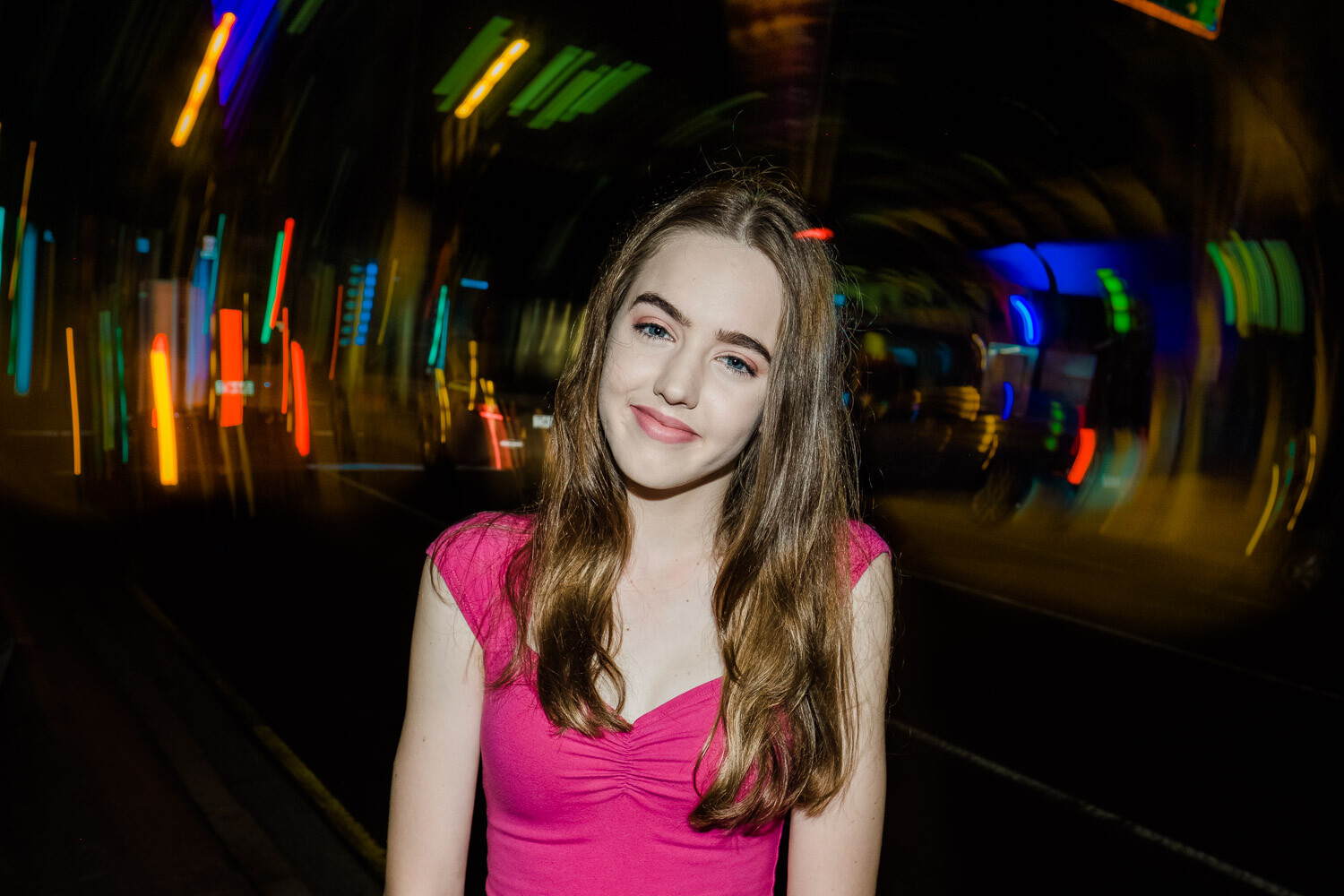
Image: In this image, I have lit Alyssa with a video light. Fujifilm X-T3 with a 35mm f1.4 lens.

In this image, I have lit Alyssa with a video light. Fujifilm X-T3 with a 35mm f1.4 lens.

4. Ask for expressions of interest

Once you’ve joined a local Facebook group, have a scan of the posts and see if it’s the kind of community you wish to work with. If you feel comfortable, it’s time to post your expression of interest.

Create a post introducing yourself and calling for expressions of interest in a TFP urban portrait shoot. Link to examples of your work and your Instagram.

Let people know specific details about the shoot. This includes the approximate location, proposed days and times, and the types of shots you’re looking to get. You can also link to or share images from your mood board on the post to set an expectation of the kind of shots you’ll take. If you use images on the mood board that are not yours, make sure you credit the photographer and explicitly state whose work it is.

Finally, ask people to comment on the post or send you a private message, expressing their interest. Also, ask them to link to their Instagram or portfolio.

tips-for-shooting-better-urban-portraits

Safety is important on any shoot – never put yourself or your talent in danger to get a shot. I took this image with the model on the footpath.

5. Arrange details for the shoot

After you’ve chosen whom you’d like to work with, organize the shoot. Agree on the day, time, and location. Prepare to negotiate regarding which day you can shoot, but not on the time. Always choose the time of day that you know will work best for photography. For me, that’s about an hour before dusk as this provides opportunities for natural light and after-dark images.

If the model is under 18, check that their parent or guardian is coming along and that they will be able to sign a model release form.

Ask your model what they’re planning to wear for the shoot. Quite often, they will ask for your advice or provide you with options. Explain that it would be ideal to have two or three different looks. Some people will prefer to have completely different outfits for the first and second half of the shoot (if there is somewhere to change). For others, it means bringing along some fun accessories like glasses, sunglasses, a hat or jacket.

If you’re arranging a shoot a week or two in advance, don’t forget to stay in touch with your model. Remind them a day or two before the shoot.

tips-for-shooting-better-urban-portraits

Sunglasses can be very handy on a shoot – especially when there are neon signs! Anneke, Brisbane. Fujifilm X-T3 with a 56mm f1.2 lens.

6. Have a plan

Think back to your location scouting. Have a list of 8-10 places where you’d like to shoot that are within walking distance of each other. Draw a map in your notebook and plan your route and the types of shots at each place. Typically, I only shoot in 6-8 locations, but I like having a couple of options up my sleeve in case some don’t work out.

Finally, don’t be afraid to throw your plan out the window if a better opportunity presents itself.

17 Tips for Shooting Better Urban Portraits

7. Plan your kit

It’s tempting to take as much kit as you can carry on an urban portrait shoot. However, strike a happy medium between taking enough kit to give you options without having to hire a Sherpa to carry your gear.

I typically take two camera bodies (Fujifilm X-T3 and X-T2) with prime lenses, with a third lens in my bag. My lenses of choice are usually the Fujinon 16mm f1.4 for wide-angle and environmental portraits, and either the 35mm f1.4 or the 56mm f1.2 lenses for portrait work. With the APS-C crop factor, these work out to 24mm, 52.5mm, and 84mm equivalent lenses in full-frame terms.

Although I love zoom lenses for family portrait shoots, I only take fast prime lenses on urban portrait shoots.

Double-check all your camera settings when you pack your gear. Things I check are:

  1. I’ve selected the same JPG film simulation on both cameras,
  2. I have the same auto ISO settings,
  3. JPG + RAW is selected in the image quality settings.
  4. There are spare formatted SD cards and spare batteries in my bag
  5. I have model release forms and a pen.

8. Get to know whom you’re photographing

Make sure you turn up early – you won’t make a good impression if your talent is waiting for you and wondering if you are going to turn up or not. Get to know your model and their chaperone. Everyone can be a bit nervous at the start of a shoot, so have a good chat with them before you even think about pulling out a camera.

9. On the shoot

Remember, on these kinds of shoots, you don’t need quantity, you need quality. I aim to get a dozen images I’m really happy with. This means potentially shooting in a different way than you usually would. Take your time with directing the model and getting the composition right before taking the shot.

Make sure you get a variety of shots – close-ups, full length, looking to the camera, looking away. Also, remember to get some different looks by using any accessories the model has brought with them.

tips-for-shooting-better-urban-portraits

Make sure you get a variety of shots – not just close-ups.

10. Be prepared to direct the model

Directing talent is a skill you will need to learn – especially with younger up-and-coming models with limited experience. There’s no need to be worried if you have no experience doing this yourself. Get yourself the 67 PORTRAIT POSES (PRINTABLE) Guide from DPS to have on your phone (or print them), or have a stash of urban portrait images, ready to flick through to give your talent some ideas on how to pose.

17 Tips for Shooting Better Urban Portraits

11. Check your ISO and shutter speed

As the day moves into night, keep a check on your ISO and make sure you have usable shutter speeds above 1/80th of a second. The most annoying mistake I’ve made on these shoots is looking at the back of the LCD screen, thinking that I’ve captured a sharp image, only to see that the image wasn’t as sharp as I thought on my computer screen later on.

12. Limit any negative self-talk

Negative self-talk can affect us all. If you had an idea for an image, but it doesn’t work out on the shoot, move on and forget about it. Many images are still there for the taking.

13. Carry your own lighting options

For the first half of an urban portrait shoot, I rely on natural or ambient light. As darkness envelopes the urban landscape, I look to my own lighting options.

The first option I usually take is a speedlight flash that I can use on-camera, or trigger remotely. Typically, the light from these types of flashes can be harsh, so you may like to use a light modifier such as a mini softbox.

The second type of lighting that I use on my urban portrait shoots are small LED video lights. These are fantastic, and I love using them. Again, you can use one through a light modifier for a softer effect.

Image: Using an on-camera flash can lead to some creative effects.

Using an on-camera flash can lead to some creative effects.

14. Safety

Safety should be your number one priority on a shoot like this. Identify any hazards before the shoot and brief your model. The last thing you want is someone getting hurt. Be aware of your surroundings at all times. If you get a bad vibe from an area, it’s best to move on.

Never leave any of your bags on the ground unattended. A few moments of inattention is all an opportunistic thief needs.

15. Legal

Always operate your shoots legally. Research if you need any permits to shoot in your city, look into public liability insurance, and have model releases signed before the shoot.

16. Limit the shoot time

Keep the shoot between 60 and 90 minutes; you’ll be amazed at how fast this will go. It’s better to have it run shorter and end on a high than run it longer with everyone exhausted. For younger models, keep it to under 60 minutes.

tips-for-shooting-better-urban-portraits

Keep the shoot length to under an hour for younger people – modeling is very tiring!

17. Editing your images

I always try and get it right in-camera, with only minor edits made to images afterward. One decision you may have to make is how much you want to clean up the image in post. In the example below, there were a lot of cigarette butts on the ground. I decided to remove these in Photoshop to make a cleaner image.

17 Tips for Shooting Better Urban Portraits

tips-for-shooting-better-urban-portraits

In this image, I removed all the cigarette butts and other debris from the road as I felt it detracted from the image. Sasha, Brisbane, Fujifilm X100F lit by a Godox flash.

Conclusion

Urban portrait shoots are a lot of fun and can stretch your creativity as a photographer. They help you to think on your feet and overcome challenges. If you’ve never done one before, there’s no need to feel daunted. Do your research and planning, and it will all fall into place.

If you have any questions or comments about planning an urban shoot, let us know below.

The post 17 Tips for Shooting Better Urban Portraits appeared first on Digital Photography School. It was authored by Matt Murray.


Digital Photography School

 
Comments Off on 17 Tips for Shooting Better Urban Portraits

Posted in Photography


How To Achieve Better High-Key Photographs

08 Sep

The post How To Achieve Better High-Key Photographs appeared first on Digital Photography School. It was authored by Kevin Landwer-Johan.

Lighting influences the atmosphere of a photograph. High-key photographs are associated with upbeat, positive feelings.

Using one main key light and avoiding contrast can help you produce photographs that convey a happy mood. This technique is popular with wedding and portrait photographers. It’s also often used in classy advertising campaigns.

How To Make Better High Key Photographs Young Clown

© Kevin Landwer-Johan

What is your key light?

Your main light source is your key light. It can be light from any source. The sun on a cloudy day is the best natural key light. Artificial light from a portable flash, studio strobes or a continuous light source can also be used. To infuse the right mood, you are best to diffuse the light.

Diffusing your light source scatters the light rays. This reduces the amount of shadow in your pictures. When you have a strong, softened key light, the shadows it casts will be minimal. You can use additional lights or reflectors to lessen the effect of the shadows even more.

To maximize the good-feeling effect, you need to produce photographs with a narrow tone range. The difference between the darkest and lightest areas in your composition should only be a few stops. You must work with the light sources to balance the light ratio.

How To Make Better High Key Photographs Young Woman in the Park

© Kevin Landwer-Johan

What’s wrong with shadows?

There’s nothing wrong with shadows, but they can imply a heavier mood.

Deep shadows in a photograph are often associated with more somber feelings. Shadows are often used with great effect to convey drama, mystery, and suspense.

Hard edges and high contrast restrict what a viewer can clearly see in a photograph. This lighting technique is often used by photographers and moviemakers to evoke feelings of doubt and mistrust.

Control the light and contrast levels using one diffused key light on your main subject. This produces a nice feeling.

Using one strong, undiffused light produces hard shadows on your subject. This often results in a darker overall feeling.

Man Studio Portrait

© Kevin Landwer-Johan

Use high-key light with the right subject

It’s always best to consider and control the light you use to fit best with your subject.

High Key and Low Key

© Kevin Landwer-Johan

During the portrait session I had with this young woman, we wanted to create two different moods. One light and happy, the other more serious.

For the high key photo, I used a large softbox on my main studio light and a smaller softbox on my secondary light. This produced a soft, bright wrap around light with little shadow. I also lit the background with two strong lights to add to the happy atmosphere. Obviously, her radiant smile completed the tone of this photograph.

During the same session, I changed the lighting. I used only one light and did not diffuse it. I also turned off the background lights and she turned off her smile.

Had I kept the lighting the same as she posed with the two different expressions, the mood would not have been conveyed so well.

How To Make Better High Key Photographs Cleaning Dispute

© Kevin Landwer-Johan

How does the background affect high-key photography?

I think the lighter the background is the more upbeat the feeling of a photo can be. But light-colored backgrounds do not have to be used exclusively.

In a photo session with a ceramic artist who wanted really get in touch with her medium, we produced a series of different photos. Some were high-key with a light background. Others we made with a dark background. Some of them I used high-key lighting. In others, I used one undiffused light.

How To Make Better High Key Photographs Clean Ceramic artist

© Kevin Landwer-Johan

This was one of the first photos in the series before things got dirty. The high-key lighting combined with the light background and another lovely smile produced a light, happy portrait.

Muddy Ceramic artist

© Kevin Landwer-Johan

Dropping in a dark background and keeping the key light the same. After applying some mud, it resulted in a fun, rather unusual portrait. The mood is certainly different from the dark background. The lighting was basically the same.

Muddy Ceramic artist Close Up

© Kevin Landwer-Johan

Wanting to create a different mood, I then used a single, undiffused light with a more gloomy, contemplative pose.

Pay attention to the shadows

Your key light source will determine the amount and strength of the shadows in your photos. You must pay careful attention to the shadows and ensure they are not too dark. Eliminating or lessening the shadow areas will enhance the effectiveness of your high-key photos.

Using a large, soft light source produces the least amount of shadow. This can be a large softbox on a studio strobe, as I have used in the examples above. You can also make use of sunlight for making high-key photographs.

On cloudy days or when your subject is in the shade, the shadows will tone down more. In full, bright sunshine, the shadows can be problematic. They will be darker and have hard edges. This high contrast will not add to the mood you want to create.

Finding an outdoor location where you can backlight your subject with the sunlight can help produce high-key photos. In situations like this, you’ll need a fill light, which will act as your key light. Even though the sun is brighter, the light you add will be the main light you must take your meter reading from.

How To Make Better High Key Photographs Young Asian Woman Outdoors

Young Clown

Setting your exposure by this light, as I have in the photo above, will result in an overexposed background. I was able to achieve this look because of the white-painted structures close by. They were reflecting light back into her face.

Conclusion

As in all styles of photography, working with the light to create the photos you want is an integral part of the process. The better your lighting is, the better your photos will be.

Experiment and try different light sources to achieve a high-key effect. There are no hard-and-fast rules, and you must work with what you have. Whether you’re in a studio or outdoors, you will face challenges.

How To Make Better High Key Photographs Chicken Nerd

© Kevin Landwer-Johan

In a studio, you may not have enough room, lights or diffusers. Be creative, think outside the box a little and innovate when you want to make high-key photos.

Do the same outdoors with natural light. Try introducing diffused flash to help balance the light ratio and reduce the shadows. Make use of reflected light bouncing off a wall or building. Carrying a fold-out reflector is also another practical way to help subdue the shadows.

How To Make Better High Key Photographs Strawberry Cheesecake

© Kevin Landwer-Johan

Give some thought as to how you can create some high-key photos using what you have available to you. You don’t have to photograph people. Food, still life and other subjects can be presented well using high key lighting too.

I’d love to see some in the comments below with a description of how you made them!

better-high-key-photographs

The post How To Achieve Better High-Key Photographs appeared first on Digital Photography School. It was authored by Kevin Landwer-Johan.


Digital Photography School

 
Comments Off on How To Achieve Better High-Key Photographs

Posted in Photography


How To Take Better Headshots: The Complete Guide

24 Aug

Headshot photography is a huge sub genre of portrait photography right now and is becoming bigger and bigger as time passes. So many people need to get headshots done and they should be going to you for this service! I want to talk about how we can all make our headshot photography so much better and thus provide our clients Continue Reading

The post How To Take Better Headshots: The Complete Guide appeared first on Photodoto.


Photodoto

 
Comments Off on How To Take Better Headshots: The Complete Guide

Posted in Photography


Equipment and Camera Settings You’ll Need for Better Moon Photography

23 Aug

The post Equipment and Camera Settings You’ll Need for Better Moon Photography appeared first on Digital Photography School. It was authored by Jeremy Flint.

better-moon-photography

Super Moon, Oxford, England

As the brightest object in the night sky, the Moon has captivated people around the world for centuries. The Moon is simply fascinating, particularly with the recent 50th anniversary of the first humans landing on the Moon. It is also one of the most incredible subjects to learn to photograph. Everyone loves to observe the Moon, but have you ever looked up to the sky at night and thought, “how can I capture this magnificent phenomenon?” Well, as photographing the Moon can be a challenging undertaking, I have highlighted some information about the Moon and recommendations regarding equipment and camera settings you’ll need to consider to achieve better moon photography.

It is initially worth considering what the Moon actually is. Well, in general, the term “moon” denotes an object that orbits something other than the star in a solar system. Earth’s Moon is an astronomical body that orbits the planet and acts as its only permanent natural satellite, orbiting the Earth every 27.3 days. It is the fifth-largest Moon in the Solar System and is an average of 384403 kilometers (238857 miles) from Earth.

When you look up at the night sky to view the peaceful and tranquil Moon, you might notice that the Moon looks a little different each night. This is due to our Moon’s many phases and types.

Phases of the moon

better-moon-photography

Partial lunar eclipse, England

The amount of sunlight that reflects on the Moon’s surface that we can see from our point of view on Earth varies every day, and this is what we refer to as a Moon phase.

Moon phases change during the lunar month from a New Moon (which occurs the moment the Sun and Moon are aligned, with the Sun and Earth on opposite sides of the Moon) to a Waxing Crescent moon (when a thin sliver of the Moon becomes visible after a New Moon), First Quarter Moon (the moment the Moon has reached the first quarter of its orbit around Earth), Waxing Gibbous Moon, Full Moon, Waning Gibbous Moon, Third Quarter Moon and Waning Crescent Moon.

Different types of full moons

Moon photography 02

Super Blue Blood Moon, Oxford

full moon occurs when the side of the Moon facing Earth is fully lit up by the Sun. There are several types of unusual full moons that look different in color and size due to its position to the Sun and Earth. These include blood moons (that appears reddish and occur during a total lunar eclipse, when Earth lines up between the Moon and the Sun); Supermoons (a moon that appears larger because it is closer to Earth), Blue Moons (the “extra” Moon in a season with four Full Moons or the second Full Moon in a calendar month) and Harvest Moons (the full, bright Moon that occurs closest to the start of Autumn), for example.

The equipment

When photographing the full moon or different phases of the moon, you will need some essential pieces of equipment. I recommend you use a tripod for stability. Whilst you may get away with hand-holding your camera, you will get better results by mounting your camera on a tripod and avoiding camera shake. In addition, a remote shutter release cable is a useful bit of kit to help prevent camera shake. It is not essential as you can use your cameras self-timer function.

Which lens to use

Moon photography 03

Moon over the landscape, Dartmoor, England

The type of lens you use largely depends on whether you would like to capture the moon in the landscape, or as a detailed close-up. Wide-angle lenses are great to photograph the moon as it moves over an interesting landscape. Alternatively, a telephoto lens is a great choice for getting closer to the moon to reveal its surface details. Consider using a long focal length lens with a range of 300-400mm.

Which camera settings to use

better-moon-photography

Moonrise, England

Once you have chosen a lens and set your camera on a tripod, you will need to select your settings. Firstly, I would recommend setting your ISO to 100 to prevent noise and grain in your images. Next, select an aperture in the region of f/8 – f/16 to achieve clearer and cleaner shots. In terms of shutter speed, 1/60th to 1/125th should be a great starting point.

Focus on the moon

Moon photography 05

Moon and sky, England

When you have applied the settings, all you now need to do is set the focus of your camera. I like to use my cameras manual focus to focus on the Moon. Once the focusing distance to the Moon looks sharp using manual focus, you are ready to shoot the Moon.

In my experience, manual focus works better than autofocus as the Moon’s surface is sometimes too dark to be recognized by the camera’s autofocus and I find manual focus to be more reliable in obtaining sharper shots in low light. By using manual focus, if you’re camera settings aren’t spot-on for any reason, you will still have reasonably sharp photos that you can recover in your editing software.

If you apply all of these tips, you’ll achieve better Moon photography and be equipped to photograph the Moon at the best time.

Conclusion

In summary, photographing the Moon is one of the most enjoyable subjects any photographer can learn. To achieve better photos of the different phases and types of the Moon, be sure to use a tripod. Also, consider a remote cable release, choose a wide-angle or telephoto lens, get your settings right, and focus your camera on the Moon manually.

Do you have any other tips for better Moon photography? Alternatively, share your pictures of the Earth’s natural satellite or the Moon shining brightly over your chosen scene with us below.


better-moon-photography


The post Equipment and Camera Settings You’ll Need for Better Moon Photography appeared first on Digital Photography School. It was authored by Jeremy Flint.


Digital Photography School

 
Comments Off on Equipment and Camera Settings You’ll Need for Better Moon Photography

Posted in Photography


How to Take Better Beach Portraits at Anytime of the Day

30 Jul

The post How to Take Better Beach Portraits at Anytime of the Day appeared first on Digital Photography School. It was authored by Jackie Lamas.

Golden hour is famous for being the most ideal lighting for portraits, especially at a beach location. Unfortunately, sometimes, the golden hour isn’t an option. Therefore, it’s essential to know how to photograph portraits at any time of the day. That way, you can always create beautiful photos for clients.

Know where the sun is at all times

First, you’ll need to know where the sun is at all times. The easiest way to do this is to use an ephemeris (I personally use this one). This is a tool that can help you see where the sun will be at any time during the day.

Here you can see where the sun will rise from, set, and the times when these will be happening during the day.

Before, or even while you’re scheduling your session, you can quickly check this tool to see the sunrise, midday, and sunset times.

An ephemeris can give you the details on the direction the light is coming from at a particular point in the world. Simply plug in the location of your session, and you can see all of the important details.

Here we can see where the sun will be on this particular day at the same time on the opposite coast in Mexico from the previous photos.

This is really helpful since no beach is alike and the direction of light differs from one side of the world to another. For example, in California, the sun sets behind the beach. Whereas on the east coast, the sun sets in the opposite direction.

Here we can see where the sun will be on this particular day at the same time on the opposite coast in Mexico from the previous photos.

Also, different beaches may face differently and therefore it’s good to know where the sun will be during your session.

Morning light

Morning light on a beach is magical. It has a whole different color temperature than that of the golden hour and can provide a nice soft glow if you have your session early enough.

The light is a little bluer, and depending on the beach where your session is taking place, the sun can rise overlooking the ocean or peaking through the trees. For example, a beach on the east coast like Cancun can mean during your session in the morning you’ll catch the sunrise behind the beach.

Alternatively, on a beach in California, you’ll catch the sun hitting the water from the land side. This will give you that beautiful yellowish-blue glow if your session is before 9 o’clock in the morning.

On the left we see the sun rising behind the bay and at right is after the sun is nearing midday.

Use a simple reflector to bounce light back onto your subject if you feel the sunrise light causes shadows. This is especially useful if sunrise is behind the water at the beach.

Midday light

Midday light at a beach is pretty harsh and therefore it’s good to have some kind of additional lighting equipment to help with shadows. You can use an external flash, popup flash, or a reflector.

Seeing the shadows in front of your clients means the sun is behind them. This family is lit with an external flash mounted on-camera pointed directly at them.

You can also go without an additional light source. However, it’s good to underexpose your photos a bit so you can bring up the shadows in your editing software. Otherwise, you’ll end up with really blown out skies. Of course, this all depends on your style of photography.

Using the sand as a natural reflector helps to bounce light back onto your clients as we can see in both of these photos.

When the sun is at it’s highest point during the day, it might be a good time to take your clients under the shade of some trees nearby or opt to have more playful photos of the family. Have your client’s walk, run, splash in the water, build sandcastles, or just have a bit of fun together.

The sun is at it’s highest at different times around the world, so make sure to check the ephemeris for your exact location to know the time.

Same session, same beach, one photo with flash and one photo without.

Once the sun passes the highest point, it will be at a bit of an angle as it starts to go down for sunset. This is the sweet spot of photographing during midday sun at the beach!

Flash was used to correctly expose the photo and fill in shadows caused by the sun.

When the sun is at a bit of an angle, you can pose your clients with the sun behind them to alleviate having the sun in their eyes. This means you’ll be in the sun, but it’s better than having your clients facing the sun. This avoids causing shadows, uneven lighting, and squinting. The sand can also work as a natural reflector, bouncing light back into their faces.

After midday light

After midday light can be different in the winter than in the summer given that daylight savings can change the amount of light you have left. Either way, the sun sits lower to be at an angle behind your clients. All while still hitting the sand to reflect some light into your client’s faces.

During this time, depending on the angle of light, you can get some really interesting light. It gets more golden by the hour as you approach sunset.

Still, if you find yourself at a beach where the light is still harsh during this time, try and angle your clients away from the sun. You can also try and use your external lighting to help fill in some light.

Golden Hour (Sunset)

Actual sunset only lasts about 5-10 minutes. However, golden hour is just that – about an hour before the sun dips behind the horizon, which means the angle of the light is pretty low and directional. It can mean flooding your photos with lots of that pretty golden light. However, it also makes it difficult to capture your clients evenly lit against the background.

This is especially troublesome if the sun sets behind the water. It can be difficult capturing the beautiful colors of the sunset while also lighting your clients.

Using a flash or external light source pointed directly at your clients can help light them while capturing the sunset behind. You can also underexpose your photo a bit to bring up the shadows later without compromising the sunset.

Try silhouetting your clients behind with the sunset light to offer a different look to the final images.

Golden hour is also a perfect time to turn your clients toward the setting sun to get that beautiful golden color cast on their skin tones and in the overall look of the photo.

Blue hour (After sunset)

Blue hour is the 20-30 minutes (sometimes less time) after the sun has completely gone from view. Blue hour is nice to photograph in because of the beautiful sunset colors like blue, orange, pink, and purples that come out after sunset. The lighting is a bit darker, so you might need a tripod.

During the blue hour, you can get some additional light on your clients by facing them where the sun has set.

During this time you can attempt some slow shutter speed photos while your clients hold still. Getting the movement in water can create a more fine art approach to beach photos!

During any time of day try these ideas:

Cloudy days are perfect for photographing at any time during the day. However, you might not get the sunset as bright as on a clear day.

It doesn’t matter the time of day, it’s good to get variety in your portraits during beach sessions. For that try some of these ideas:

  • Rock formations/caves as backgrounds and also shelter from harsh light.
  • Trees can provide shade as well if the light is harsh and the day is particularly hot.
  • Around town can also serve as a nice background for photos while you’re waiting for the midday sun to angle a bit.
  • Up high can also serve as a nice way to keep clients out of harsh sunlight. For example, a balcony in their hotel room, a higher terrace with some shade that overlooks the ocean, etc.
  • Photographing more lifestyle-type photos with the family playing, getting in the water, and just having a “beach day”.

If you are waiting for the sun to go down a bit, you can take some portraits near trees that aren’t directly on the beach. This also adds variety to the final images.

Conclusion

Photographing at the beach during golden hour isn’t the only time that you can create one-of-a-kind and amazingly beautiful images for your clients.

Taking cover in caves or using rock formations as backgrounds can also help keep your client out of direct sunlight.

It is incredibly beneficial to learn to photograph at the beach at any time of the day. Moreover, it can mean the difference between a client choosing you and another photographer.


better-beach-portraits

The post How to Take Better Beach Portraits at Anytime of the Day appeared first on Digital Photography School. It was authored by Jackie Lamas.


Digital Photography School

 
Comments Off on How to Take Better Beach Portraits at Anytime of the Day

Posted in Photography


Steps For Better Product Photography in Natural Light

18 Jul

The post Steps For Better Product Photography in Natural Light appeared first on Digital Photography School. It was authored by John McIntire.

Taking photos of products can seem like a daunting task. If you look at a lot of advertising, you will find yourself inundated with a lot of high-end product photography that can seem (and probably is) out of reach for a novice. The thing is, not all product photography is equal. In many cases, a much simpler approach will do the job just fine.

This article will guide you through a process that can get you started taking product photos with minimal equipment. In these examples, you don’t even need a studio, just a backyard, and decent weather. You will also see that you can replace some dedicated kit (reflectors and diffusers in this case) with some basic and cheap substitutes.

What you need

With one optional exception, you will only need some basic kit to go through the process outlined here.

Camera – There’s not much to say about this one. You will need a camera.

Lenses – To get the best results you will want to choose a lens with a close focusing distance (if your products are relatively small) and a focal length that will give you the option to fill the frame.

If the products that you are photographing are quite small, you may want to opt for a macro lens. Fast lenses aren’t much of a concern here as you will want to choose an aperture that ensures complete focus on all parts of your subject.

Tripod – Because this is still-life photography, you absolutely should use a tripod. The reason should become clear as this tutorial progresses, but it will make your life so much easier.

An outdoor space – As for the where, all you need to get started with this tutorial is an open outdoor space. Even a small backyard will do. Anywhere that will lend you a decent, clean background will do.

Tissue paper – In lieu of a dedicated diffuser, you can use tissue paper. For ease of use, you can mount this in a frame of some description with clips or a bit of tape. This allows you to control and manipulate the natural light in your photos. I did use a dedicated diffuser in this tutorial, but tissue paper will work just as well.

White and black card (foamcore works well) – Use these as reflectors and flags respectively to give you further control over the manipulation of the light.

Backgrounds (optional) – Using the environment as a background will be fine a lot of the time, but sometimes you may need something different.

Don’t want to rely on what’s there? Bring your own backgrounds, such as these purpose-made boards or use plain colored paper. The choices are endless.

Color Management – Depending on what you are photographing and whom you are creating product photography for, color management may be optional, or it may be a legal requirement.

Tools like the ColorChecker Passport are indispensable for getting accurate colors in your images.

Even if it’s not necessary for your situation, it’s still a good idea.  The word ‘product’ implies that you are selling something. Even if you’re only creating an eBay or Facebook Marketplace listing, ensure an accurate representation of what you are selling. It is a means of treating the people you are selling to with respect. If you’re providing commercial services to a paying client, then that accurate representation of the product may be a legal requirement. Do your research and find that out before you get started.

Note: While you can use tissue paper and foamcore to great effect, I still believe you should buy a 5-in-1 reflector or two. These give you access to white and silver reflectors, diffusers and flags. Godox sells one for $ 15, so there’s no excuse. You can also use 5-in-1 reflectors as a background in a pinch.

Getting started

With your gear collected, this process is relatively straightforward.

Step 1: Find a space

better-product-photography-5

Finding a space that gives you plenty of room to work and gives you a decent background may be the most important step in all of this.

As long as you are photographing small(ish) objects, where you choose to set up isn’t very important. Since the focus of your image is solely the product, other elements like the background won’t be taking up very much space in your frame in most cases. As long as you can find a space that gives you a clean background (or somewhere to place your own) and gives you plenty of room to work, you will be fine.

If you are working with small objects at a close distance to the camera, work with small apertures like f/16. If you want an out of focus background, you will want to ensure there is a good distance between your subject and the background.

Without going into the math, the closer your camera is to the subject, the shallower the depth of field becomes. When you are really close (especially with macro lenses), the focal plane reduces to a tiny sliver. To combat this, use small apertures.

In terms of lighting, as long as there is light, you will be fine. If you have all of the equipment listed at the top of this article, you will be able to manipulate the light in most situations.

Broad daylight? No problem. Shade? No problem. Any time of day will work except for the night where you would probably need to add an external light source of some description.

Step 2: Set up

better-product-photography-4

As this spot was lit by direct sunlight, I put the diffuser up before doing anything else.

Now that you are in your space, pick where you want to set up and decide where you are going to photograph your product. Place your camera on a tripod and ensure that you have a good idea of how you are going to frame your product.

You can now evaluate your lighting. If you’re in open daylight, setup the tissue paper as a diffuser over where your product is going to be. You can fine-tune this later, but any diffusion you may be using should be in place before you start anything else. Diffusion material is going to affect the color of your images. Having it in place allows you to see the light as it’s going to appear in your photos while you are working on your composition.

Step 3 – Color Management

better-product-photography-3

With the light diffused, take your steps towards color management. You want to do this before placing your subject to avoid moving it.

If you are opting to replicate accurate colors, do it now. Place your grey card (or whatever tool you’ve chosen) where your product will be under the exact lighting conditions that your final images will be created with. Take a photo of the card. If you’re setting the white balance in-camera, do it now. If you’re using a tool like the ColorChecker Passport shown in the example images, you can save it for the software later.

Step 4: Place your subject

Place your subject where you want it for your desired composition. Once that’s done, you can begin modifying the lighting. (This image is with the diffusion panel removed)

The next step is to place your product in situ for the composition that you want. Adjust the subject and the positioning of the camera until you have your desired effect. I find it is important to get this right at this stage. With this done, you are free to adjust everything else (such as the lighting) while being able to compare any test shots. It also allows you to blend multiple exposures later (providing it would be permissible to do so).

Step 5: Choose your aperture

better-product-photography-2

Details are essential when you are selling something. The image on the left is shot at f/4 and you will see many of the details are concealed by depth of field. In the right-hand image, all details are present, but the background is less obscured.

With products, most of the time, you will want to choose an aperture that provides maximum focus on the whole of the subject. Since the depth of field is most affected by the distance of the camera from the subject, small objects close to the camera (particularly with a macro lens) will lead you to use much smaller apertures than you might typically use in other situations. If you need to, take a few test shots at various aperture settings. Review the results until you have the desired effect. Depending on your camera, you may find the depth of field preview button useful here as well.

Shooting tethered is also a great way to be able to see if there is enough depth of field in your images.

Step 6: Evaluate the lighting

Here, the subject is lit with unmodified light. You can see that the contrast is high and there is missing detail in both the shadows and highlights.

With everything in place, you’re just about ready to go. Here is where you can fine-tune your lighting to your heart’s content.

Adding the diffuser above the subject helped to even out the exposure between the background and the subject. All details are now present.

Reflective

Use your white card(s) to fill in any shadows that may be providing too much contrast in your images. The beauty of using a card is you can cut it into any size and shape to match any need you have so that you are only reflecting where the extra light needs to be. For the most part, you are going to want to avoid heavy contrast in product photos, so feel free to use reflectors generously.

A bit of white mount board at camera left has filled in that side of the subject just a tiny amount. It makes the exposure evener.

Subtractive

In the event that there’s light falling on your subject where you don’t want it, use your black card as flags. For example, if the main source of light is coming from behind your subject, you can use a flag to shape that light so that it is only falling on your product where you want it. You can also use flags to darken areas around your subjects, such as the surface it is resting on, to put more emphasis on the product itself.

Introducing a flag to camera right has darkened that side of the subject. It has increased contrast just a bit and reduced the impact of the specular highlight on the droid’s head.

This step may seem optional, and to be fair, it pretty much is, but if you want your images to stand out, this is by far the most important step. The more attention to detail and effort you place into getting the lighting right, the better your photos are going to be.

It pains me to suggest that you could to move your camera at this point. However, as a last resort, if you’re having problems controlling the contrast in your images, you can set your camera to spot metering mode and evaluate where your reflectors need to be from there.

That said, if your light is suitably diffused, you shouldn’t have to resort to that. Alternatively, you could use a second body or a light meter if your subject is big enough.

Step 7: Final shot

better-product-photography-1

The final image with minimal post-processing.

With all of the prep work done, you can now take your final shot. If all has gone well, you should have a well-lit, well-exposed image in the composition of your choice. Going through all of these steps should also mean there is very little to do in terms of post-processing.

That’s it

Is this the only way to take photos of products? Absolutely not. It’s not even close to the only way to do things outdoors. This is just one easy method to help you get results with minimal gear.

Hopefully, you’ve come to the conclusion that you don’t need a fully decked out studio and a myriad of specialist and obscure equipment to achieve better product photography results. Basic equipment, basic camera craft and attention to detail can take you a long way and get you results that will help you to sell whatever it is you are trying to sell.


better-product-photography-natural-light

The post Steps For Better Product Photography in Natural Light appeared first on Digital Photography School. It was authored by John McIntire.


Digital Photography School

 
Comments Off on Steps For Better Product Photography in Natural Light

Posted in Photography


8 Tips for Better Fireworks Photos

03 Jul

The post 8 Tips for Better Fireworks Photos appeared first on Digital Photography School. It was authored by Rick Ohnsman.

If you’ve been to a great aerial fireworks display, I’m sure you’ve heard the “oohs” and “ahhs” of the crowd, captivated by the colorful spectacle. Here in the United States, the Independence Day holiday is when many of us try our hand at fireworks photography.  I’m sure if you live in other places in the world, you also have holidays celebrated with fireworks.  So how can you capture those moments in a photo and elicit those same “oohs” and “ahhs” from your viewers and achieve better fireworks photos?

Include a landmark, city skyline, or something in your fireworks photo to add interest, place, and story. This is a show over the Boise, Idaho Depot.

Great fireworks photos aren’t difficult, but you will not get them in Auto mode.  You will need to put a little thought into this and learn to take charge of your camera controls.  Try these simple tips, however, and I’ll bet you’ll come back with images that elicit “oohs,” “ahhs,” some likes, and maybe even “wows” from your viewers.

Here are the things we’ll cover for better fireworks photos:

  1. Location
  2. Equipment
  3. Camera settings
  4. Shutter speed choices
  5. Using Bulb mode
  6. Shooting technique
  7. Boom Zoom Bloom FX
  8. The “Black Hat trick”

After you’ve read this article, and made your fireworks photos, be sure to read Part Two – Creatively Editing your Fireworks Photos.

1. Location

You can make good fireworks photos with just an image of the colorful bursts in the sky. But great fireworks photos need something more – an interesting setting or foreground.

Think of displays you have seen taken with fireworks over the Statue of Liberty, the Sydney Harbour, the Chicago city skyline, the Golden Gate Bridge, or Victoria Harbor in Hong Kong.  What makes those shots over the top?  A couple of things;  iconic city skylines and landmarks, and most often, water.

Not only are there interesting things in the shot besides the fireworks themselves, but often with water in the shot, there’s the benefit of colorful reflections.

If you are lucky, the spot where you plan to photograph your fireworks display will also have interesting foreground features and perhaps a body of water.  If so, scout the area ahead of time so you can find a location to best capture those things.

You can pretty much count on a crowd at a fireworks show. Get there early to stake out your spot. Then consider including the location in some of your shots.

You can count on a crowd when you go to a fireworks show.  Plan on getting to your spot early so you can “stake your turf.” Perhaps put out a blanket to ensure an unobstructed view of the show.  Then, if you have no other foreground elements, consider the possibility of making the crowd your foreground, their heads silhouetted against the sky and fireworks.

Another possibility might be to find a less obvious location, not right where the fireworks will be launched.  Perhaps there is a landmark, a tree-line, a high vantage point, or some other spot that will create an interesting foreground that while still including the fireworks, will give context, place, and “story” to your photos.  Doing some scouting long before the night of the show is a good idea.

The first few fireworks of the show will be in clearer sky conditions. As the show continues, smoke may be more of an issue and the sky won’t be as dark with the fireworks lighting the smoke.

2. Equipment

What will you need to make good fireworks photos? Let’s break down the basic equipment needs:

Camera

You can make fireworks photos with a cellphone camera if that’s all you have. However, the techniques will be different and the results likely not as impressive.

We won’t get into that here, so let’s assume you have a better DSLR or mirrorless camera with the option for manual control. Be sure to have a good-sized storage card, as well as a spare battery or two, as you’ll usually take lots of shots at a fireworks show.

Tripod

Fireworks photography will require a steady camera as you’ll be shooting in low light and taking longer exposures. Consider a tripod pretty much mandatory for this kind of work.  An L-bracket on your camera or at least a tripod that will easily allow going from landscape to portrait mode easily is a good thing too. Often you will shoot in both aspects.

Lens Selection

Lens choice largely depends on how close you will be to the fireworks launch location.  If you are really close, you may need a wide-angle to keep the larger bursts in the frame. If, however, you are a long distance from the show or want to compress the apparent distance between your foreground object and the sky bursts, a telephoto might be in order.

I typically use my go-to lens; a Canon EF 24-105mm f/4L IS as it covers a good range. You don’t need a particularly fast lens as you will be working with mid to small apertures and longer shutter speeds. Still, a sharp lens is always a good thing.

Cable Release/Remote trigger

The technique for photographing fireworks will be discussed in a minute, but trust that having a way to remotely trigger your camera will be a real help. One reason is you are presumably going to a fireworks show to enjoy the show.  Having your eye to the viewfinder and your finger on the shutter button the entire time will lessen  the enjoyment of “being there.” It will also introduce camera shake, something you don’t want.

A very basic remote release can be had for under $ 10.00 US. This is a great item to always have in your bag for many purposes.

The tree line at the bottom of the frame adds some additional interest.

3. Camera settings

If you’ve always worked in Program or one of the Auto modes with your camera, or even if you use Aperture (Av/A) or Shutter (Tv/S) mode, this will be the time to be brave and go to full Manual mode.

Here’s how you want to set up your camera for fireworks photography:

Raw Mode

Real photographers shoot in Raw mode. There are many articles why. If you never have done so before, here’s your chance to try it. You can work in Raw + Jpg if that makes you feel more secure. However, I’m betting you won’t use the .jpg versions.

Full Manual

As described. Be brave. You can do this.

White Balance

As you’re using Raw mode, (you are, yes?), white balance can be tweaked later so it doesn’t matter much what you set for shooting. I tend to leave my white balance in Faithful mode almost all the time.

Sometimes it’s fun to zoom in tighter and get the flurry of action.

Low ISO

Working in low light with dark or black backgrounds and long exposures will tend to introduce noise in your shots. Fortunately, the fireworks are bright, so higher ISO settings won’t be needed.  Instead, use the minimum (ISO 100 on many cameras), and you’ll be fine.

Noise Reduction Off

Many modern cameras have a noise reduction feature, which after the first exposure, takes a second “black frame” exposure, detecting the noise and then subtracting that from the initial exposure. It can work well, but…

The second exposure takes as long as the first, and if you’re making multi-second exposures (for example, that 6-second exposure now takes 12 seconds to finish), your camera will be busy working, and you’ll be missing subsequent fireworks.

Turn it off.  You’ll be using a low ISO with minimal noise anyway, and the delay in being able to make more shots isn’t worth it.

Aperture

There are two things to consider here:

  1. How much depth-of-field do you need?
  2. What is the “sweet-spot” of your lens?

First, because the fireworks will be a good distance from your camera, you will be focusing on something further away and likely have a pretty good depth of field. Working at wider focal lengths helps too. Plan on being at your location well before the show starts and have an idea where you’ll need to focus and how much depth of field you need.

Secondly, most lenses are at their sharpest between f/8 and f/16.  Learn where your lens performs best, the so-called “sweet spot,” and use that aperture if you can.

Most of the photos in this article were taken at the same show. Also, most were very close in their exposure settings such as this one at ISO 100, 10-seconds at f/8.

4. Making shutter speed choices

Your choice of shutter speed will be important in capturing good fireworks photos. You know when you hear the boom of the launched fireworks from its mortar that it trails up into the sky, explodes, and a beautiful shower of colorful sparks radiates out and trails down.

Often multiple fireworks are launched close together, each doing the same thing. What you’re after is to capture the entire event which can sometimes take several seconds.

You could pick a fixed shutter speed of, say, four seconds, but would that be too short? Too long? Of course, it depends on the individual firework duration or sequence you want to capture, and that will vary during the show.

So how do you choose?

The answer is, you don’t have to because there’s a better way.

better fireworks photos

Using bulb mode you will be able to hold the shutter open and capture multiple fireworks bursts, closing it when you like.  Note this shot is in portrait orientation.

5. Use Bulb mode

If you’ve seen pictures of early photographers with their view cameras, you might have noticed them holding a rubber “bulb” which when they squeezed, forced air through a rubber tube and tripped the shutter. As long as the photographer kept the bulb squeezed, the shutter stayed open, ending when they released it.

These were the first shutter remotes, and it was that rubber bulb that gave the mode its name.

Today we have wired, and sometimes wireless triggers that can do the same thing. Putting the camera in Bulb mode allows a variable shutter speed. As long as we press and hold the button, the shutter stays open.  Let it go, and the shutter closes, ending the exposure.

This is just the ticket for fireworks photography, a variable shutter speed.

So, let’s review our basic camera settings:

  • Camera on tripod
  • Raw Capture
  • Manual Mode
  • Noise Reduction Off
  • Auto Focus Off – Focus on the anticipated fireworks spot and lock focus there
  • Lens Vibration Reduction (VR/IS) Off
  • ISO 100
  • Approx. f/8 – f/16  (Use aperture and ISO to adjust if images are too bright or dark).
  • Bulb mode
  • No flash – I forgot to mention this one.  Rarely, (unless perhaps to light a foreground object), will you ever need to use flash when making fireworks photos.  Also, consider whether others are nearby watching the show.  Using flash is guaranteed to make you less-than-popular with other fireworks spectators.  Unless you are alone and have a good reason to use flash, (in which case I will assume you know what you’re doing), just don’t use it.

Set up like this, you’re good to go. Remember, once the show starts, you will be busy. If you are fooling with camera settings, you’ll be missing shots. You will want to try some variations, but you don’t want to have to struggle and miss the show.

Be ready, think it through beforehand, and when the show starts, start clicking.

6. Shooting Technique

You’ve set your camera up on a tripod, figured out where to point it, made sure to pre-focus on a distant spot and locked the focus by putting it in Manual Focus (MF) mode.

If you leave your camera’s Autofocus on it’s almost guaranteed to give you images that are a bust rather than a boom. Against the dark sky and the moving fireworks the focus will hunt, fail, and… it’ll just be bad. Don’t do it.

Often the best images can be made right when the show starts as later, smoke from the previous fireworks becomes thicker, and the fireworks more obscured. So, when you hear that boom of the first firework going up, click and hold the button on the remote. You’ll be in bulb mode so hold it open while the firework goes up, explodes, and radiates out.  Then release the trigger.

Now, quickly check your shot. Is it in focus and framed properly? Is it exposed correctly? If it’s too dark, increase the ISO a click or perhaps open the aperture a stop. Too light? Do the opposite.

Try not to spend too much time doing this as, of course, the show will continue without you.

If you’re in the ballpark, the ability to edit in raw gives you the tweaking room you need. The two unrecoverable mistakes you might make would be to have things out of focus or have the highlights so blown out as to be unrecoverable. Editing won’t save you if you do those things, so be sure the focus is good and if you’re not sure with exposure, underexpose a bit. Some fireworks will be much brighter than others – especially a multi-burst or the finale. So quickly check your histogram and be sure you’ve not clipped the right (highlights) side.

Make any tweaks you need and then keep clicking. Vary the zoom if you need to, but if anything, frame a little “loose.” You can always crop in tighter later. However, if that really big and spectacular burst is so big it goes out of the frame, you’ll have missed it. Try both some portrait and landscape orientation shots. Perhaps reframe to get different things in the shot, especially if you are including foreground elements.

If things are going well, it’s going to be a fairly long show.

And if you’re feeling frisky, you might be ready for some more advanced techniques.

Note how the bright pink burst appears here, thicker streaks at the base of each trail growing thinner at the tip. This uses what I describe as the “Boom Zoom Bloom” technique described.

7. “Boom Zoom Bloom” FX

You may have seen those photos where the bursting fireworks look more like a flower, fat blurry trails with sharp points.  How is that done?

Here’s the technique, which you can vary for different results.

Know this takes practice, and luck plays a big part. So decide if you have already got enough necessary shots before you try it and whether the show will last long enough for some experimentation.

If you’re game, here’s how you do it:

  • You will need your hands free for this, and you’ll want to look through the viewfinder or perhaps use Live View, so using the remote release probably isn’t going to work. Instead, set your shutter speed for about 8-10 seconds, leaving all the other camera settings where they were.
  • With your hand on the focus ring, remember your hand position there. Then turn the ring so things are out of focus.
  • Just as the firework explodes, click the shutter and smoothly turn the focus right back to the focus point you memorized.  You have the time of the preset shutter speed to accomplish this.  If you finish early, that’s okay.
better fireworks photos

Two other images using the defocus-to-focus technique. Also note how some of the bursts, captured after the focus was performed but before the shutter closed, don’t show the same look combining two looks in one photo.

Now, try different things with subsequent shots. Go from focused to unfocused, zoom in or out during the exposure, or maybe take the camera off the tripod and move it during the exposure to make light trails. Play and see what you like.

Just remember, the duration of the show is limited, so try some experiments but also be sure you have some solid “keepers.”

8. The Black Hat Trick

I have to confess, I’ve not personally tried this but the concept is sound and could be fun. (I’ve always wanted to do a “hat trick.”)

Here’s how it’s supposed to work:

  • Have a hat, a black one or preferably of something dark enough to be opaque. You will also need to be working in an area that is quite dark.
  • Put the hat over the front of the lens.
  • Have the camera in Bulb Mode and just before the firework launches, click open the shutter locking it open with the remote.
  • Quickly, but gently so as not to bump the camera, remove the hat while the firework explodes.
  • Leave the shutter open and carefully replace the hat. Repeat, removing and replacing the hat for multiple fireworks bursts. (You may need to have a smaller aperture or lower ISO to do this as you will be building up exposure brightness with each additional firework added).
  • Unlock the remote and close the shutter when you’ve done all you want.

What you’re doing is making a multiple-exposure image in-camera. This should work. Of course, there’s also a way to do it in post-processing.  For that, and some other tips on how best to process you fireworks photo, come back for Part Two – Creatively Editing your Fireworks Photos.

There may be a frenzy of fireworks at the show finale. Keep the shutter open and capture it all if you can without overexposing.

Light the fuse

I hope you’ve decided that good fireworks photography is easy and go and have fun with it.  It’s one more way to enhance your camera skills and make some exciting images.

If there’s anything that’s a problem it’s that good aerial fireworks displays are seasonal in most places and if you really catch the bug, you may find there are not enough opportunities to practice.

So, find out when and where the shows will be near you, mark your calendar, do some scouting for the best locations, “light the fuse” and have fun!

Post your best shots as images in the comments – we’d love to see them.


8 tips for better fireworks photos

The post 8 Tips for Better Fireworks Photos appeared first on Digital Photography School. It was authored by Rick Ohnsman.


Digital Photography School

 
Comments Off on 8 Tips for Better Fireworks Photos

Posted in Photography


Why Hiring an Assistant at Weddings Makes you a Better Photographer

28 Jun

The post Why Hiring an Assistant at Weddings Makes you a Better Photographer appeared first on Digital Photography School. It was authored by Jackie Lamas.

It’s no mistake that many wedding photographers have assistants and even second shooters at weddings. The reason being is that photographing a wedding longer than 5 hours on your own can be very challenging, especially since there are many important wedding details and moments that need extra coverage.

Hiring an assistant means you have help carrying your gear and keeping distractions at bay so you can photograph the important moments smoothly.

What is an assistant?

A photography assistant is not to be confused with a second shooter. While sometimes used interchangeably, the two terms are actually different, and it’s really important to know the difference.

An assistant is an extra pair of hands available for you during the wedding day.

They may be in charge of carrying the equipment, helping with setting up additional cameras and being available for any need that the photography may have during the wedding day.

Assistants can help gather details during a wedding day and help with styling as well.

Many assistants are aspiring wedding photographers or seasoned wedding photographers. It can vary in the level of experience. This is something that you should look into while interviewing or hiring an assistant.

Assistants can also help with styling certain shots like the wedding rings, or help to gather flowers. They can also help with posing families during that portion of the wedding day.

Assistants also offer a second point of view. They offer ideas to get better shots or additional photos that perhaps you had not thought of previously. They are also helpful when you need an opinion and also someone to talk to as weddings can run up to 12 hours or more depending on how much you are covering.

What is a second shooter?

A second shooter is a second photographer. Usually, the second photographer is solely responsible for taking photos of the event alongside you, the main photographer.

A second photographer can get those in-between candid moments that happen when the main photographer is busy photographing something else.

The second shooter helps to get a different angle of the same setup. Or perhaps they can be trusted to photograph a portion of the day alone while you cover another. For example, if you’re photographing the bride and her bridesmaids, the second photographer may cover the groom and his groomsmen.

Also, if you’re photographing the bride and groom together, the second photographer can shoot from a completely different angle. This gives the final images more variety of the same moments throughout the wedding day.

Having a second photographer can get images from a different angle.

Sometimes the assistant can also be a second photographer during certain parts of the day but perhaps not the whole day. For example, you can hire a second photographer and an assistant so that the two jobs don’t overlap during the day. That way, you have both a second pair of photos taken while having someone help carry your equipment and to help you set up.

Be clear about expectations

This brings me to this very important point; be clear about expectations when you’re looking to hire an assistant. Make sure that you outline what their responsibilities are.

An assistant can help carry gear when the terrain is less than ideal for your gear to be in. Like a sandy beach near the ocean.

Perhaps you’re only looking for an assistant? In that case, be sure to outline that their responsibilities will not include photographing the event at all. They will only be there to help with setting up, carrying equipment, and helping the main photographer during the event.

If you’re looking for a combination of the two, outline that from the beginning. Make sure to advise them to bring useful equipment if you will have them use their own. Also, specify which parts of the event they will be covering. Perhaps you need them to be an assistant during most of the day but will need them to be a second photographer during the ceremony only.

Why Hiring an Assistant at Weddings Makes you a Better Photographer 5

Be clear about what your assistant should help you with. For example, posing the family or helping to fluff out the wedding dress.

Also, be aware that it is very difficult to be a second photographer and an assistant simultaneously. You will need to be very clear about what you need from the person helping you at the event.

Be a team player

All photographers work and handle their businesses differently. However, when you are photographing a wedding, it’s best to make it clear that you and your assistant are a team. You are both there to work at the wedding together.

This creates an openness for the assistant to help with styling, and to offer their opinion or aesthetic input. This can be really helpful during the wedding day. Working together rather than bossing or ordering the assistant around can be really helpful since the assistant will feel included and part of a team.

Keep in mind the level of experience the assistant may have, which can also help you immensely during the event. Most seasoned wedding photographers have, at some point, been second photographers or assistants themselves. They are eager and accommodating on wedding days. If they are seasoned pros and are helping you out, consider their input.

Why Hiring an Assistant at Weddings Makes you a Better Photographer 4

When you are hiring someone who is just getting started, it’s important to talk with them before starting the photography. State your expectations, where gear is in your bag, how you approach the wedding day, and what you’ll need from them.

Some assistants are barely getting their feet wet and may need extra coaching. If this is the case, approach them with the mindset of being a team. They will work harder for you and be more willing to anticipate your needs.

Assistant contract

It is very important to have a contract drafted for the assistant position. Too often does it happen when images get published, used, sold, or otherwise from assistants who weren’t the main photographer.

Why Hiring an Assistant at Weddings Makes you a Better Photographer 3

A contract can outline image delivery expectations if they helped photograph a portion of the event, and what their pay is to be.

The contract can help you set boundaries, and outline their responsibilities, as well as set the pay for the event. Don’t skip on this tip! All too often we hear horror stories of assistants that never returned the equipment, didn’t deliver images and got paid what was due!

Why Hiring an Assistant at Weddings Makes you a Better Photographer 2

Having a contract is good to have for all parties involved.

Payment

Even though you can hire someone who is just getting started in the wedding photography business, this doesn’t mean that you can pay them less than you would expect to be paid if you were assisting.

They give you a pair of extra hands and help you for hours carrying most of your equipment, so pay them accordingly. Some more seasoned wedding photographers may have a going rate. However, it’s good to research your area for the going rate, either hourly or a set rate for the entire event.

Take into consideration the following:

  • The amount of time they will be hired to assist
  • Will they also be using their photography skills to photograph certain parts of the event?
  • Will they be using their own equipment or your own? If they are using their own equipment, then factor that into the payment.
  • How much will they be carrying in equipment?
  • Milage, gas, or extra costs

If the assistant will be there with you during the dinner portion of the event, make sure you let the bride and groom know. That way, they will know you have an assistant also eating at the wedding, even if it’s a vendor meal. If they aren’t going to stay for dinner, make sure you state what meals you’ll be covering or if you will be paying for their meal at all.

An assistant can help make a first look go smoothly by helping with positioning the bride and making sure to be available to switch lenses, cards, batteries, etc.

It’s also really important to state how the assistant will be getting paid. Will they be paid by bank transfer, deposit, invoicing, or any other method? That way they know when and how they will be getting paid for assisting at the event.

Having an assistant makes you a better photographer

The reason to have an assistant at a wedding is that it ultimately makes you a better photographer. It frees you up from carrying your equipment so that you can focus on taking important photos rather than checking to see if your camera bag is within reach.

Assistants can help with lighting, adjusting extra cameras, or even helping style the bride’s veil during the portraits. Having an extra pair of hands makes it easier for you to focus on getting the shot without having to do it all on your own.

Also, having someone there to help with making sure that the wedding photography goes smoothly and quickly will help you to focus on what really matters – getting the shot.

Moreover, having someone to talk to during the long wedding day can help you stay focused and in the present moment.

In Conclusion

Hiring an assistant during a wedding event can help you be free to really focus on photographing each and every special moment of a wedding day.

They can help by carrying your equipment, be a teammate and help with lighting or offer ideas. An assistant can be an extra pair of hands and eyes during the day too.

Have you hired an assistant before? If so, what additional tips would you include?


Why Hiring an Assistant at Weddings Makes you a Better Photographer

The post Why Hiring an Assistant at Weddings Makes you a Better Photographer appeared first on Digital Photography School. It was authored by Jackie Lamas.


Digital Photography School

 
Comments Off on Why Hiring an Assistant at Weddings Makes you a Better Photographer

Posted in Photography


DPReview TV: What is shutter angle, and why is it better than shutter speed when shooting video?

27 Jun

Have you heard video pros talk about using shutter ‘angle’ instead of shutter speed? Chris explains what shutter angle is and why it’s often more useful than shutter speed for video work.

Get new episodes of DPReview TV every week by subscribing to our YouTube channel!

  • Introduction
  • A bit of history
  • 360-degree shutter
  • 180-degree shutter
  • 90-degree shutter
  • Downsides of using shutter speed
  • Why shutter angle is more useful than shutter speed
  • Wrap-up

Articles: Digital Photography Review (dpreview.com)

 
Comments Off on DPReview TV: What is shutter angle, and why is it better than shutter speed when shooting video?

Posted in Uncategorized