RSS
 

Posts Tagged ‘Behind’

Behind the scenes: Garry Winogrand at work

16 Mar

13575701.jpg

Filmed as part of a larger documentary, Michael Engler’s ‘Contemporary Photography in the USA’ features photographer Garry Winogrand just two years before his death in 1984 at the age of 56. Although the Bronx-born photographer is often referred to as a street photographer – perhaps one of the best of his generation – he hated the expression, explaining in the video ‘I think it’s a stupid term. Street photographer. It doesn’t tell you anything about the photographer or [the] work.’ Watch video

News: Digital Photography Review (dpreview.com)

 
Comments Off on Behind the scenes: Garry Winogrand at work

Posted in Uncategorized


Humans of New York: Behind the scenes with Brandon Stanton

09 Feb

HONY.jpg

Photographer Brandon Stanton’s Humans of New York Project has been around for a few years now and has been featured in media quite a bit. The latest video of Stanton, made for Facebook’s 10th anniversary, is a revealing look at how he interacts with his subjects. He’s jovial. He’s conversational. But most of all, he’s human – and it shows through in his images. See video

News: Digital Photography Review (dpreview.com)

 
Comments Off on Humans of New York: Behind the scenes with Brandon Stanton

Posted in Uncategorized


Behind the Shot: Erez Marom walks us through his ‘Winter Paradise’

22 Oct

Winter_Paradise.jpg

In the latest “Behind the Shot” article, landscape photographer Erez Marom walks through how he got this Aurora Borealis image in the Mývatn district of northern Iceland. Marom talks about his equipment choice and exposure settings. He also gives a step-by-step look at his post-processing technique. Click through for the full article. 

News: Digital Photography Review (dpreview.com)

 
Comments Off on Behind the Shot: Erez Marom walks us through his ‘Winter Paradise’

Posted in Uncategorized


Nikon D5300 adds pixels, Wi-Fi, and GPS while leaving AA filter behind

17 Oct

D5300_GR_18_55_front.png

Nikon has announced its new D5300 midrange DSLR which, as you might have gathered, is the follow-up to the D5200. New features include the omission of an AA filter from its 24MP CMOS sensor, a larger 3.2in articulated LCD and also a slightly larger optical viewfinder, 1080/60p video, and built-in Wi-Fi and GPS. Nikon claims that the D5300’s Expeed 4 processor improves performance (allowing for 5 fps burst shooting) and photo quality, while reducing power consumption. You’ll be able to pick up the D5300 this month, in your choice of black, red, or gray. Click through for more details. 

News: Digital Photography Review (dpreview.com)

 
Comments Off on Nikon D5300 adds pixels, Wi-Fi, and GPS while leaving AA filter behind

Posted in Uncategorized


Behind The Scenes of Three of My Most Popular Landscape Photos

26 Sep

In the following post I’m not going to remind you again that you need to bring your tripod with you. I’m not here to warn you that weather is unpredictable and you should check the latest forecast before heading out the door.

Nope this post won’t cover the fact that you should bring a flashlight and a few other miscellaneous tools just in case something goes wrong. And of course I won’t be telling you that you should tell someone where you’re going and when you’ll be back incase you do get lost, hurt or otherwise incapacitated and need help getting home.

Instead of rehashing the basics or providing some motivational tips to get you off the couch I’m going to show you three ‘behind the camera’ photographs that I took with my iPhone, share the final shot, and talk a bit about how I made each image.

Sound good? Okay let’s start!

First Up – A Small Cascade Near Trap Falls in Ashby MA
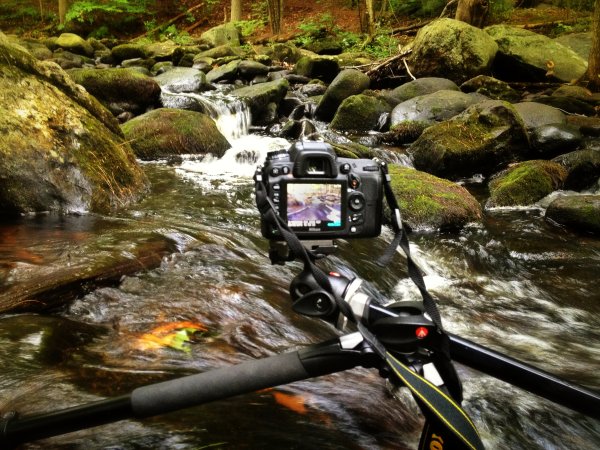
IMG_1902

As you can see the camera was positioned as close to the water as I could comfortably get it – one wrong move and it’s all over for me and my love of photography.

So does the fear of putting my camera in the drink stop me from attempting to grab a photograph? Not in the least!

p1637190443-4-650x365

This shot was something I saw from 100 yards up the bank of the river. I noticed the cascade and knew that it’d be the perfect place to set up my D7000 and Tokina 11-16mm, but how was I going to get into the middle of the river?

As I got closer to the scene I noticed that there were a few wet stones no larger than an iPad leading out into the middle of the river – right where I wanted to be. All I needed was a little balance and some luck and both my camera and I would make it back to the shore dry and one ‘keeper’ richer.

Standing on a rock in the middle of the river the size of an iPad is no easy task and trying to fiddle with camera settings and frame a shot doesn’t make it any easier. I used the Manfrotto’s center-column design, which allows you to swing the center column out so that it is parallel to the ground, to get as close to the water as I could, and I used the live view feature on my DSLR to frame the shot and achieve perfect focus.

After taking a few test shots and fine tuning my exposure I settled on the following settings for the shot: ISO 100, 11mm, f/14, 13.0 seconds. (Note: There is also an ND filter in play here which allows for the longer exposure time).

Next Up – A Stunning Sunset at Stony Brook in Norfolk MA
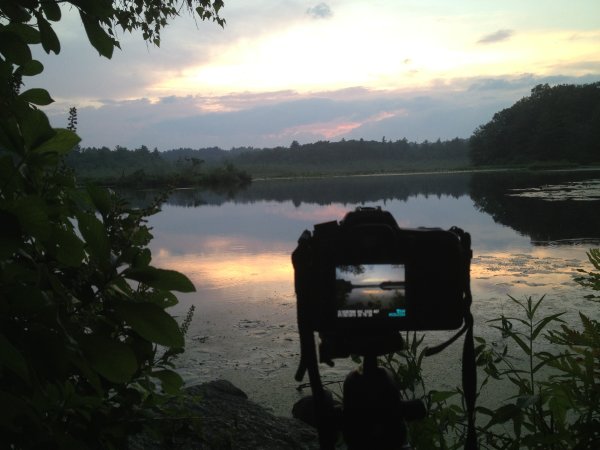
IMG_1713

Okay so this photograph probably isn’t even close to as dramatic as the one above, but it is still able to show you a bit about my thought process when capturing photographs. I could have photographed this scene further back from a nice easily accessible lookout, but I clambered over rocks and got as close to the shore as I could.

By positioning the camera on the tripod I was freely able to adjust the settings and fine tune the exposure and composition of the shot. The settings I used here were: ISO 100, 36mm, f/10, 1/160.

sunset at stony brook

Finally – Capturing Lightning Out Of My Window

Here in south eastern New England we don’t get all that many storms and due to the tall trees and densely populated urban areas it’s not easy to get a clear view of the sky when they do occur.

After hearing my phone alert me to a sever thunderstorm watch that was in effect until well after dark and a quick look at the radar confirmed that it looked like it would pan out. I quickly decided to get a plan together to capture my first lightning bolts as a photographer.

IMG_1571

With a couple hours of notice I was able to get really creative with my set up. I found a piece of cardboard and some duct tape to make a makeshift shelter for my room and the rest of my camera. I knew I wanted to open the window and the screen to get as clear a sight line as possible, but I didn’t want the rain or mosquitos to get into the house. (If you’re curious I finished sealing the cardboard after I took this photo).

I made sure to set my focus while I still had daylight to work with as it would get difficult to do so when darkness hit. I used my ND filter to lengthen the shutter speed which would hopefully allow me better chances to capture bolts of lightning and locked down my settings as follows: ISO 100, 13mm, f/9.0, 20.0 seconds.

Once everything was set up all that was left to do was wait for the storm to get close. As soon as I heard the first crack of thunder I set the Nikon’s intervolometer to capture an image every 25 seconds for about an hour or so, turned out all the lights in my house, and went to bed.

A few hours later, after the storm had long passed, I woke up curious to see if my trap had worked. The end result was a handful of lightning bolts frozen in time – this is one of my favorites.

lightning photo

Do you have any behind the scenes stories to share?

Tell us about how you captured one of your favorite shots in the comments below!


Post originally from: Digital Photography Tips.

Check out our more Photography Tips at Photography Tips for Beginners, Portrait Photography Tips and Wedding Photography Tips.

Behind The Scenes of Three of My Most Popular Landscape Photos


Digital Photography School

 
Comments Off on Behind The Scenes of Three of My Most Popular Landscape Photos

Posted in Photography


The Soul Behind the Subject by Kelly Kirkpatrick

25 Sep

To quote Jean-Luc Godard, “when you photograph a face you photograph the soul behind it”. While I have been a shutterbug all my life, it wasn’t until 2006 when I really started studying photography and working as a professional. Through education and building on my own experience, there are many things I could say on […]
dslrBlog

 
Comments Off on The Soul Behind the Subject by Kelly Kirkpatrick

Posted in Photography


Behind the Shot: Lost in Space

20 Sep

lost_01_final_image.jpg

In this article, nature photographer Erez Marom takes us through the complicated process he used to achieve his image ‘Lost in Space’. As well as equipment choice and location, Erez also explains in detail exactly how he went about adjusting and manipulating multiple images in software to create the final result. Click through for the full article. 

News: Digital Photography Review (dpreview.com)

 
Comments Off on Behind the Shot: Lost in Space

Posted in Uncategorized


How I Shot It: Deanne Fitzmaurice Shares the Story Behind the Shot

20 Sep

A post by Pulitzer Prize winning documentary photographer Deanne Fitzmaurice. Presenter in this week’s CreativeLIVE Photo Week

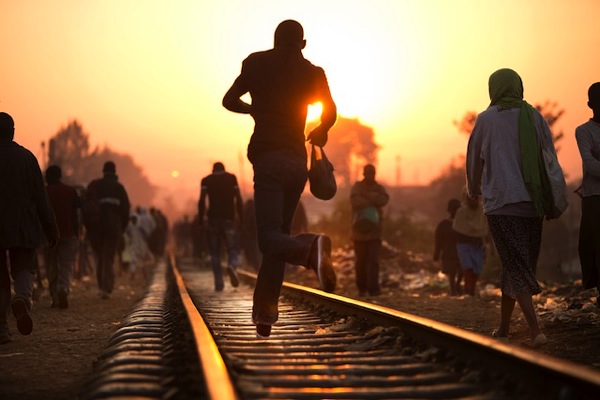
Kibera Tracks

So there I was, waiting in the quiet darkness that precedes Kibera’s beautiful sunrises, for the 12 disciples — our security team from a local tribal gang. They were the type of guys you want by your side and the definition of the guys you didn’t want to cross. Despite the high crime and desperation in Kibera, when any of those 12 guys were by my side, I felt safe and free to photograph as much as I wanted without having to look over my shoulder.

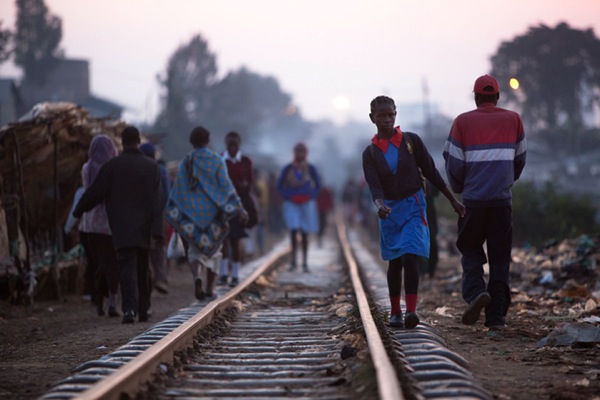
At the time of my visit, Kibera wasn’t just the largest slum in Kenya, it was, and as far as I know, still is, the largest slum in Africa. With two and a half weeks in the slum for our shoot, the crew and I had some time — which is really valuable in documentary photography work – time to research, time to talk to locals, time to scout locations, and time to return to promising locations. During our time observing the community, we discovered there was an exodus early in the morning, as many residents of Kibera left to go to work in local factories to earn meager wages.

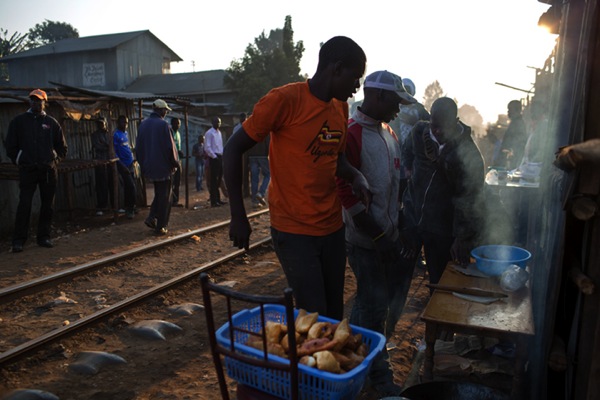
Always thinking about strong storytelling visuals, we thought it was a good opportunity to get some footage and images of this mass daily evacuation. The early-rising Kiberans used the railroad tracks as a main thoroughfare, and there were little shops alongside the tracks and vendors serving food. We wanted to shoot at sunrise with the hope of catching that beautiful, golden light.

On this early morning, I was shooting both stills and motion, trying to capture the mood and the feel of this unique place. I knew that shortly after the sun came up at 6:45am, the local train was scheduled to come through. I always try to position myself and my camera where there are the best odds of making a good image.

D3 8634

I started building the photograph in my head, working on the things I could control, and let everything else go to chance. I saw some vendors cooking some ugali, a cornmeal bread, causing smoke to rise from the cooking. I thought if I shot backlit, the smoke would help capture the mood of what I was seeing. I was also keenly aware that shooting into the sun can work either for you or against you.

D3 8877

I moved in closer to where the smoke was rising so I had two contrasting elements, the sunrise and the smoke. I heard the train approaching and the masses of people started to rush to get off the tracks and onto the train.

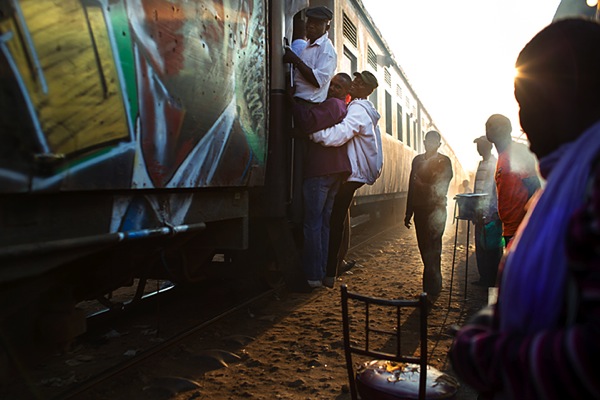
My third element was the train. The only subject left to chance at this point was the people. I didn’t know where they would be or what they would be doing, but I knew I had all three other elements of the composition locked in. This is the fun part for me, in all of my work; when I build the composition and wait to see if I am going to get lucky.

My favourite was this image where three guys jumped up onto the train at the last minute as a starburst began to peek through. The smoke lends nice depth and layers to the photograph and the train was splattered with graffiti, adding a burst of color.

D3 8947

What Gear Did I Use?

I shot these photos with manual settings on a Canon 5D MKIII with a 35mm f1.4 shot at 1/500th at f2.8, ISO 200. I was carrying my equipment in a Think Tank Change Up convertible belt pack/shoulder/ bag and a Think Tank Shape shifter backpack. For the video I was using a Zacuto z-finder, a Zacuto Target rig and a 3 Legged Thing tripod.

To find out more about Deanne and her photography tips, catch her free course during creativeLIVE’s Photo Week

Deanne Fitzmaurice is a Pulitzer Prize winning documentary photographer and multimedia storyteller based in San Francisco, California. She is a regular contributor to Sports Illustrated and ESPN the Magazine, and has also been published in TIME, Newsweek, The Economist, Stern, and GEO. Deanne has also partnered with foundations and non-profits including NPR, The Bill and Melinda Gates Foundation, and the James Irvine Foundation.

Post originally from: Digital Photography Tips.

Check out our more Photography Tips at Photography Tips for Beginners, Portrait Photography Tips and Wedding Photography Tips.

How I Shot It: Deanne Fitzmaurice Shares the Story Behind the Shot


Digital Photography School
 
Comments Off on How I Shot It: Deanne Fitzmaurice Shares the Story Behind the Shot

Posted in Photography


Samurai Girl Composite: Behind the Scenes Post Production Walk Through

29 Aug

by Tom Di Maggio

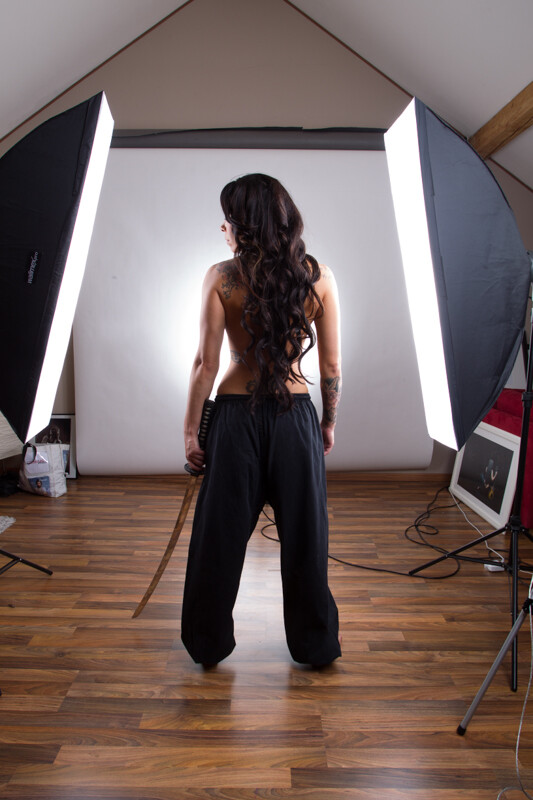
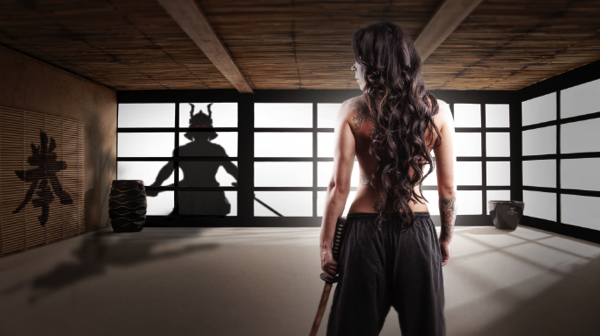
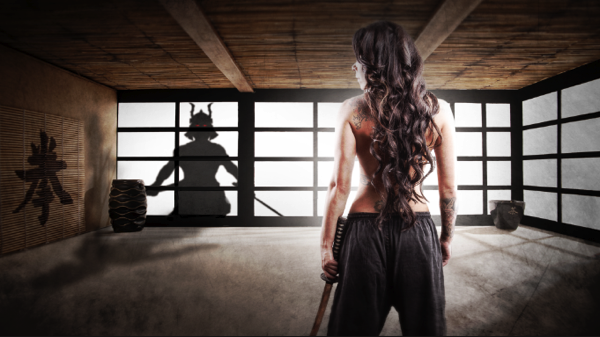
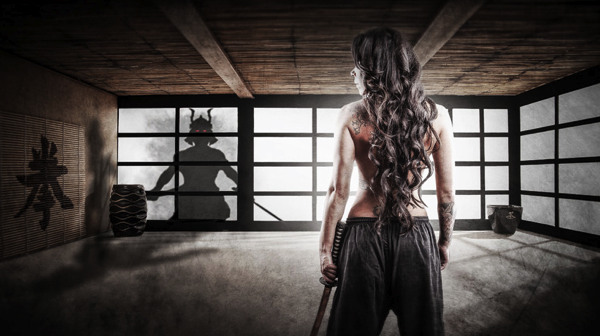
In this article I’ll show you how the “Samurai Girl” picture was done step by step. In addition there is a speed art video at the end of the article that shows the whole process from start to end in a 05:47 minutes Youtube video. It should make the whole process clearer.

Feel free to send me your questions via email at tom@purple-monkey.com

1 Base Image Jessica

Here is the image as it was shot. Before I start to extract the subject I use a technique to create that look on my models that consists of 6 Layers. I will write a separate tutorial on that topic, as it will deviate too much from the point of this tutorial.

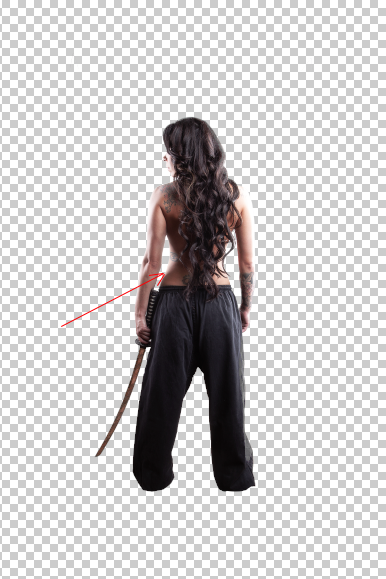
2 Model Liquify copy

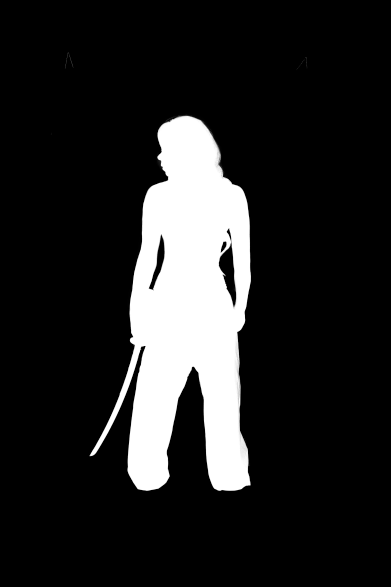
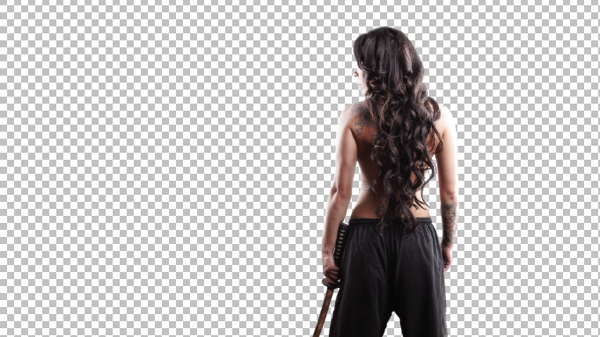
I started with cutting out Jessica from the background. When you know that you are going to extract the subject for a photo manipulation or composite, make sure you shoot them on a background that will create an nice contrast around the edges. It will make your life a lot easier for the extraction process. The method I use to extract my subjects varies a lot depending on the need and the situation. The tools I usually use are the Pen Tool, Brush, Refine Edge, Lasso, Quick Selection and the Blending Option effects. In this case I used a mixture of Pen Tool, Brush and Refine Edges.

3 Mask

Here is a picture of the finished mask. I like to check the mask for imperfections by “Alt” clicking on the layer mask.. What I also do a lot is to check the mask against a white and a black background. I will usually show you all the imperfections on the mask especially fringing. If the extraction looks good against both backgrounds, then you can be sure that you won’t need many adjustments anymore against your final background.

4 Integrate into Image

I usually work on picture in the 16:9 format. Sometimes I quickly sketch my ideas on a piece of paper or on the iPad. I basically gives me an idea about the composition of the image. As soon as Jessica was extracted from the background I moved her over to the canvas using the move too. I scaled her down and positioned here approximately. I slightly corrected her position once the background was inserted.

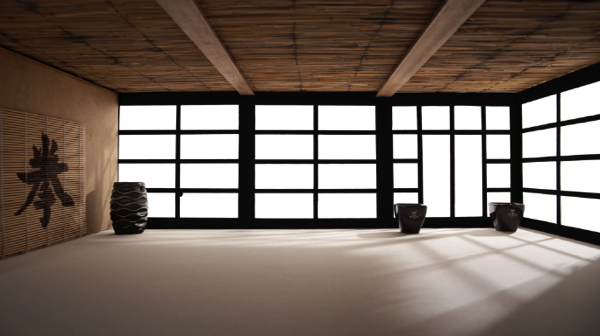
5 Original BG

At this point I also imported my background in order to see what color corrections would be needed to integrate Jessica into it. When I opened the stock image for my background I saw some things that would need modification.

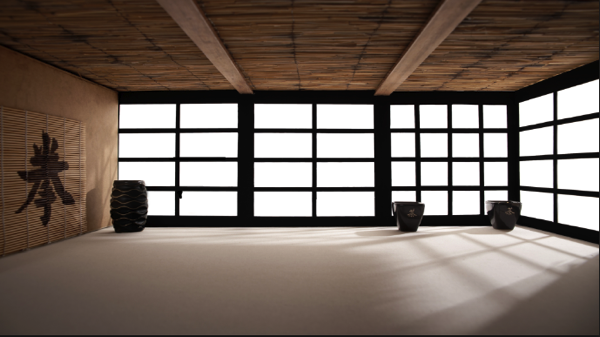
7 Corrected Bg

I didn’t like the doors on the right side as it would look weird when Jessica would be in position. So I just added some horizontal bars to solve that issue.

6 Gradient for Model

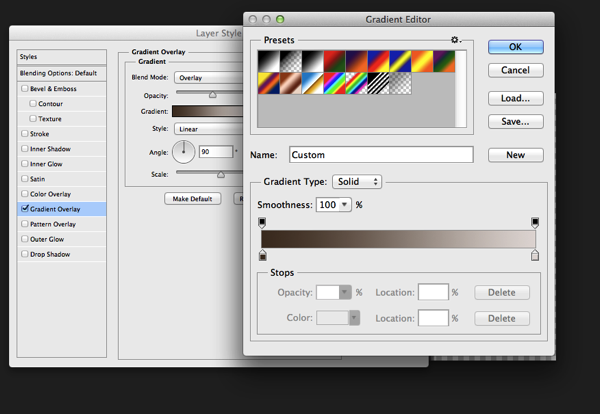
The first step I used to integrate Jessica was a Gradient map. The colors I used for the shadows was a sample of the wooden door frame (very dark brown) and for the highlights I used a sample of the Tatami. I lowered the opacity to about 45% to achieve an acceptable value. It’s important when you use this method that you use colors that are already present in the palette of the image.

8 Samurai

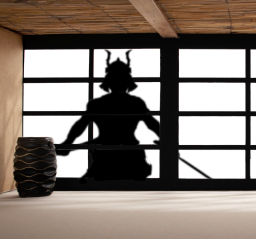
Next step was to integrate the Samurai. I’ve build the Samurai out of several stock photos and used an adjustment layer to darken it to complete black. I used a layer mask to hide the wooden frame of the window.

9 Samurai Eyes

In order to make it more realistic I’ve added a dirty texture on top of the Samurai with a blending mode Overly and I slightly blurred him, since what we actually see is a shadow on the fabric. I then added the eyes with the brush tool and some subtle outer glow effects.

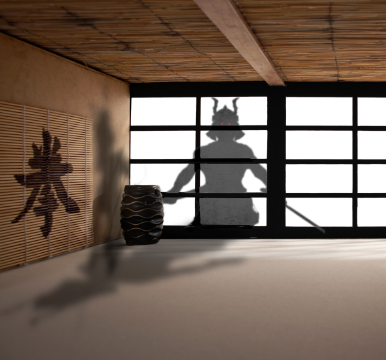
Next step was to create the shadows on the floor and the wall. I duplicate the Samurai Layer and used distort and warp to adjust it’s shape. I also painted the shadows onto the barrel, in the original picture the barrel was brightly lit from the right side. Since the Samurai is standing in front of it, the light source would be blocked.

13 Overlay Color

To blend everything together I use a simple technique that is not well known out there. I merge all the Layers together onto a new Layer ( Shift+Ctrl+Alt+E (PC) or Shift+Command+Option+E (Mac) ) and then use the Blur Average Filter. Switch the blend mode to overlay and reduce the opacity until the color matches. I then used the Tilt-Shift filter to align the average depth of field of Jessica to the background.

14 tilt Shift and Light

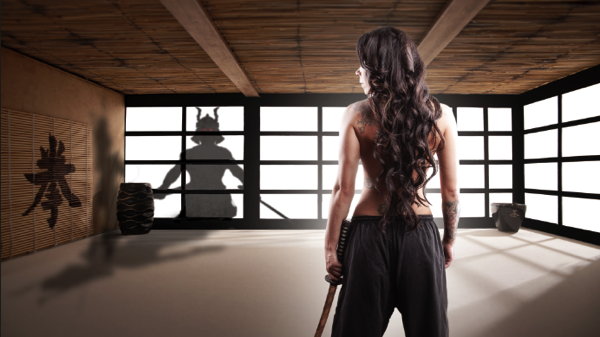
Finally I created a new layer on top of it change it’s blending mode to overlay and painted with a soft black brush around the samurai and around Jessica in order to direct the viewers eye through the picture. A last step was to lay a grungy texture in overlay over the whole image and reduce it’s opacity quite a bit.

15 Final

I try to do a maximum in Photoshop in terms of light and shadows. But when I finish an image I always have some fun in Lightroom with some presets or simply play around with the sliders. Some times I end up not using any of it, but most of the time I find some settings that adds value to the overall image. Now there is no secret to this, I just play around with Clarity, Blacks, Temperature, and Contrast until I see it going somewhere. In this case I added some contrast, quite a bit of Clarity and slightly desaturated the image.

16 Final LR

Here’s the video of the whole process dialed up to about 1000%

Check out more of Tom Di Maggio’s work at his websites at TomDiMaggio.com, Purple-Monkey.com” and on Facebook.

Post originally from: Digital Photography Tips.

Check out our more Photography Tips at Photography Tips for Beginners, Portrait Photography Tips and Wedding Photography Tips.

Samurai Girl Composite: Behind the Scenes Post Production Walk Through


Digital Photography School
 
Comments Off on Samurai Girl Composite: Behind the Scenes Post Production Walk Through

Posted in Photography


Pro Tip: Always Check the Views Behind You

21 Aug
Golden Gate Rocky Edge

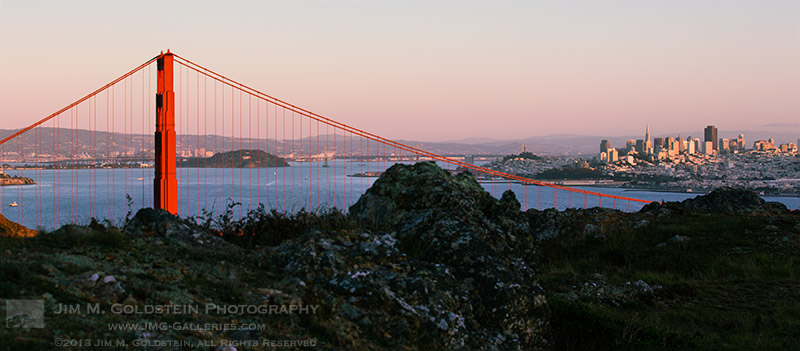
Sunset view of San Francisco and the Golden Gate Bridge behind the rocky edge of the Marin Headlands

One of my many idiosyncrasies that has worked out well for me photographically is my inclination to always look behind me on my hikes. Invariably when you think that you’ve waited long enough to capture all the best light Mother Nature has to offer and  you let your guard down, she throws you a curve revealing something even more amazing.  Unless I have the luxury of waiting until dark as I hike back, I frequently take a peek behind me. Not only does this allow me to keep tabs on changing conditions it allows me to look at my surroundings in a slightly different way. This image “Golden Gate Rocky Ridge” is a perfect example where this technique enabled me to not just capture great light, but an alternate perspective of, a photographic icon, the Golden Gate Bridge.

Copyright Jim M. Goldstein, All Rights Reserved

Pro Tip: Always Check the Views Behind You

The post Pro Tip: Always Check the Views Behind You appeared first on JMG-Galleries – Landscape, Nature & Travel Photography.


Related Stories

  • Pro Tip: Always Check the Views Behind You – Enclosure
  • Dogwoods, Yosemite National Park
  • Dogwoods, Yosemite National Park – Enclosure
Feed Ads by FeedBlitz
powered by ad choices


JMG-Galleries

 
Comments Off on Pro Tip: Always Check the Views Behind You

Posted in Equipment