RSS
 

Posts Tagged ‘Behind’

How to Improve Your Photography by Shooting Behind the Scenes of a Short Film Shoot

15 Nov

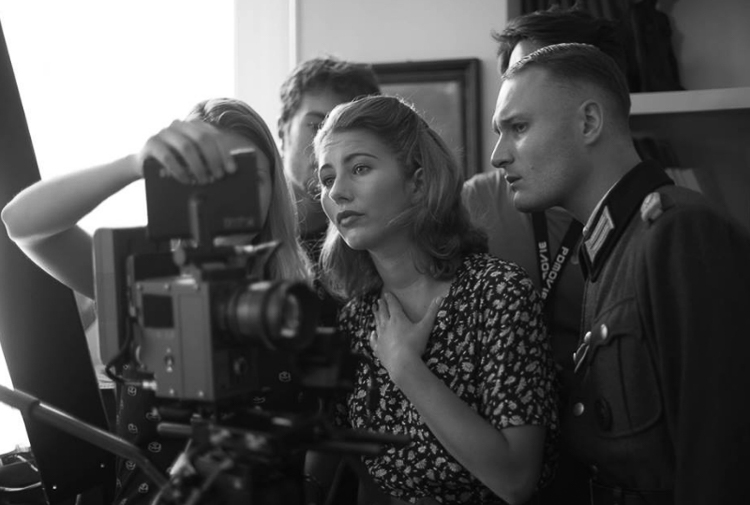
For any creative photographer, shooting behind the scenes of a short film sounds like a boring idea. That’s what I thought until my friend called me to shoot for one of his school projects (he is in a film school and had to shoot three sequences). I wasn’t going to refuse so I showed up that day and little did I know, I ended up learning so many things and got to meet a lot of people. The best part is that I took some of the best images since I first picked up my camera.
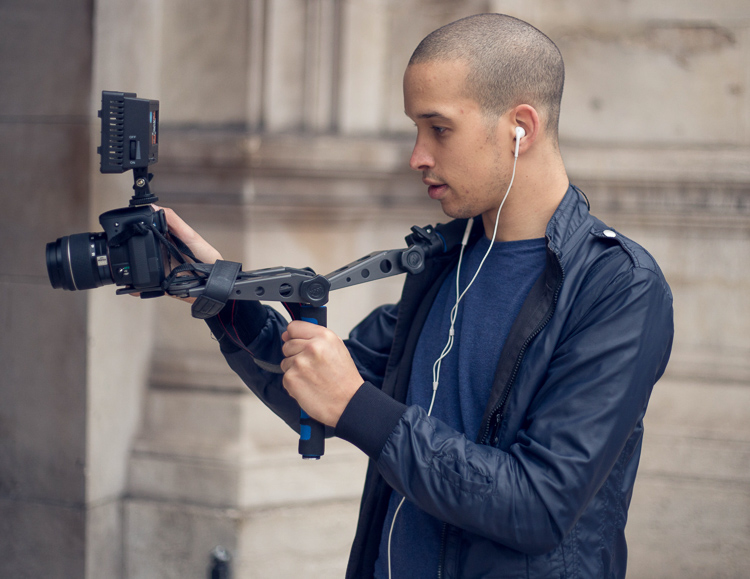
Article bts short film

Here are some reasons why you should consider shooting behind the scenes images and how it can benefit your photography:

#1 – It’s an opportunity for a photoshoot

During a shoot for a short film, most of the actors are used to modeling and aren’t afraid of a camera. There is a director of photography who works on the lighting, and there is a make-up artist (of course there are more people on set who take care of the sound, costumes, assistant, etc.). A short film is basically a photo shoot but instead of taking images, people act and they are being filmed.

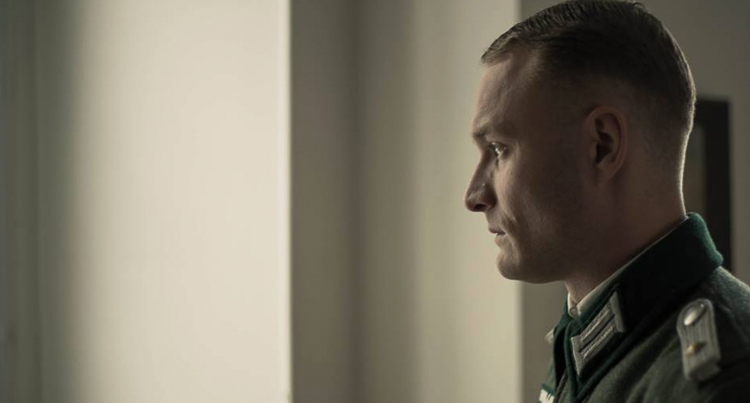
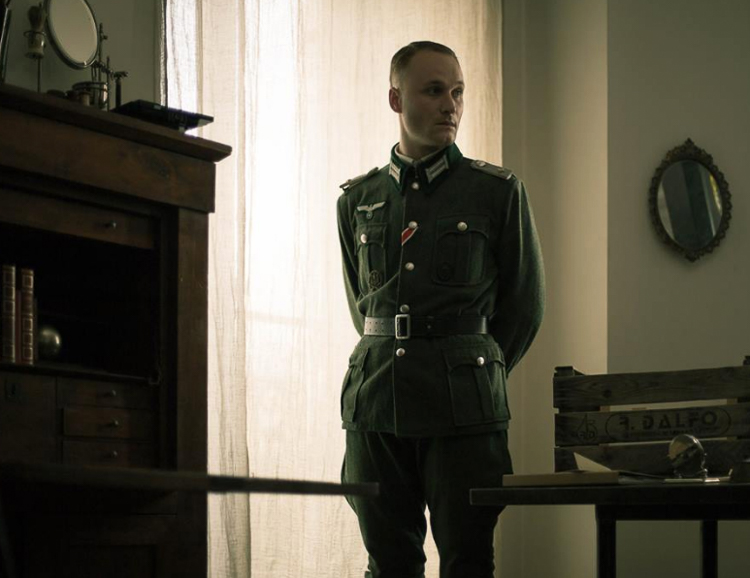
Actors have their costumes, they have had their hair and make-up done, and the director of photography just did the entire lighting for you. You have to see it as an advantage because they spend weeks planning and you’re just here to take beautiful photos with perfect conditions. I took my most beautiful images during short films and I would not have had been able to reproduce the scenes, costumes, and ambience on my own.
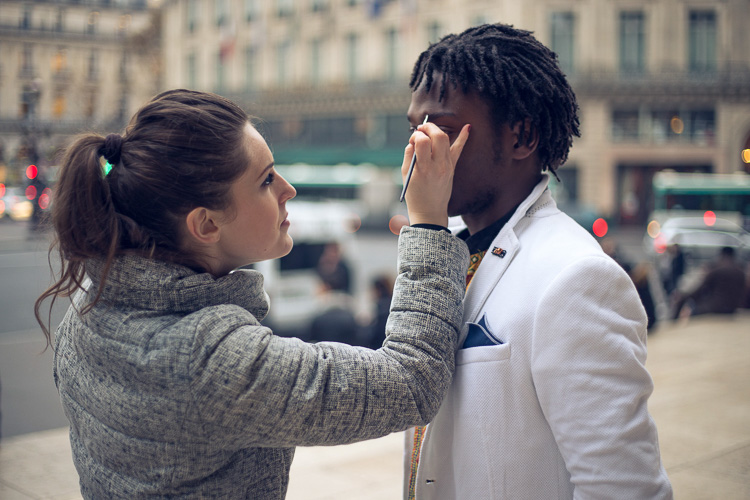
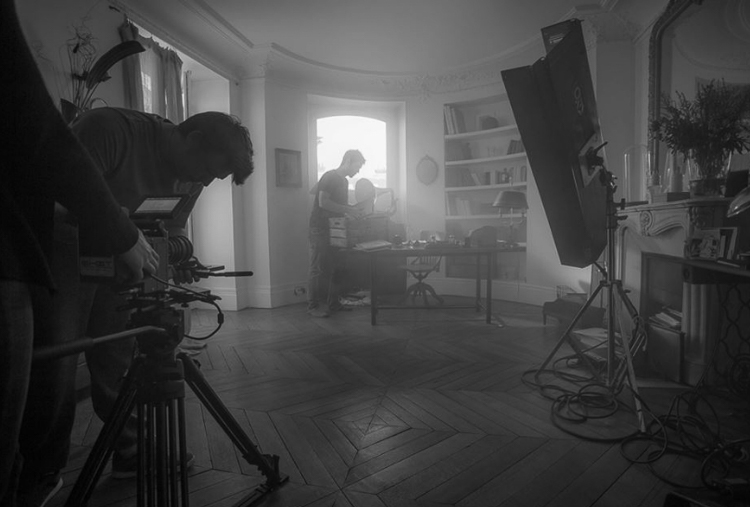
Article bts short film1

Article bts short film9

Even if you don’t really like the theme or would rather plan a photoshoot on your own, trying other people’s ideas can also put you out of your comfort zone and help you progress.

#2 – You’re surrounded with creatives

Working with other creatives has helped me so much. The best thing is the shared interest and not wanting to disappoint. Working with people who want to create gives you an extra boost and it pushes you to do your best. Most people on a film crew need these images. Looking at all the work they put into creating their projects, whether it’s for auditions to find the perfect actors, negotiating to borrow super expensive filming equipment, let’s not forget the make-up artists who stay on set all day, and all the detailed planning of the sequences. You can’t really disappoint with average images, so you automatically try to get stunner shots.
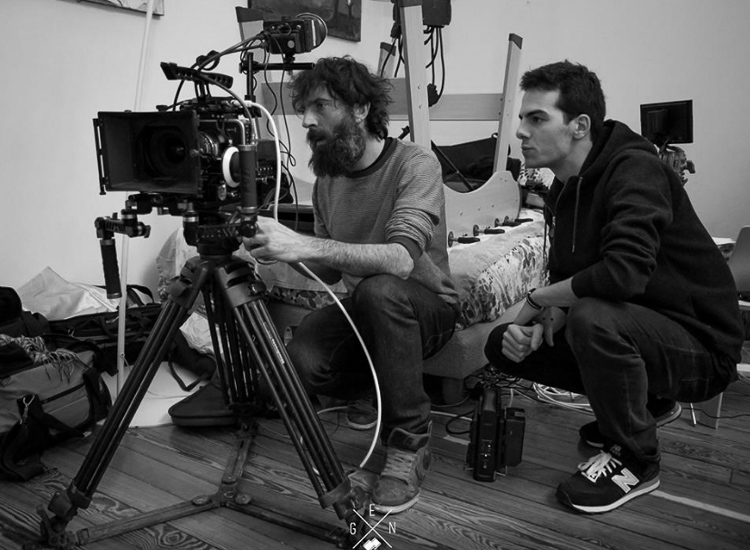
Article bts short film12

article-bts-short-film6

It’s quite difficult because you can only take images after the scenes when the actors are briefed by the film director. So they’re not actually posing for you, you just have to walk around without attracting any attention to get some nice images. Do not take any images when the video camera is rolling. The sound of your shutter can throw a whole scene away, and trust me you do not want to be in that situation. Just patiently wait for the director to say cut and then you can start taking your images.
Article bts short film13

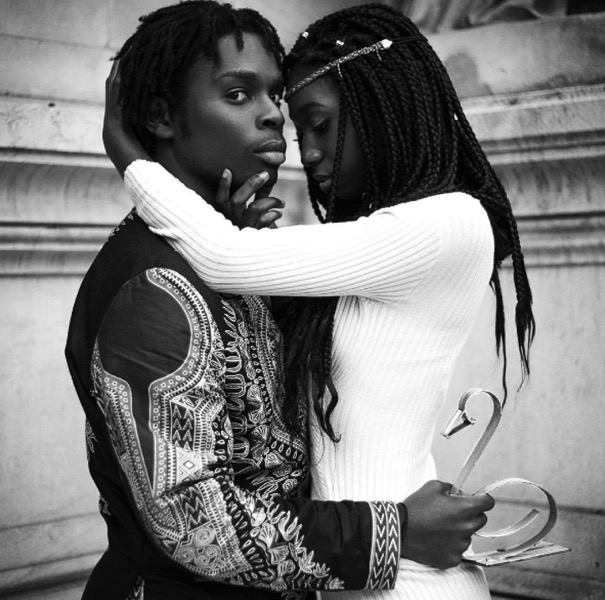
When an actor is not included in a scene, you can kindly ask them to pose for you. Most of them need portraits for their website or their portfolios so they will most likely say yes. If they say no, just tell them that if they change their minds, you’re always fine with taking portraits.
Article bts short film3

Article bts short film5

#3 – You may get to work with these people on future projects

A whole day of filming can take up to eight hours or more. You’re going to meet a lot of people (depending on the size of the crew) and you will have a lot of time to get to know everyone. I would highly recommend socializing during the breaks over a cup of coffee and getting to know everyone. Most of them have the same passion as you, whether it’s the assistant or the sound team, you can speak about previous or future projects, have tech discussions about camera gear, you name it.

The actors are the most talkative, especially when they have a few hours without any scenes. Tell them about your photography. If you like their profile ask them if they would like to have a photoshoot with you in the coming weeks. The make-up artists are also great contacts to have, take their business card and contact them for your next photo shoot if you need someone for make-up and hair.
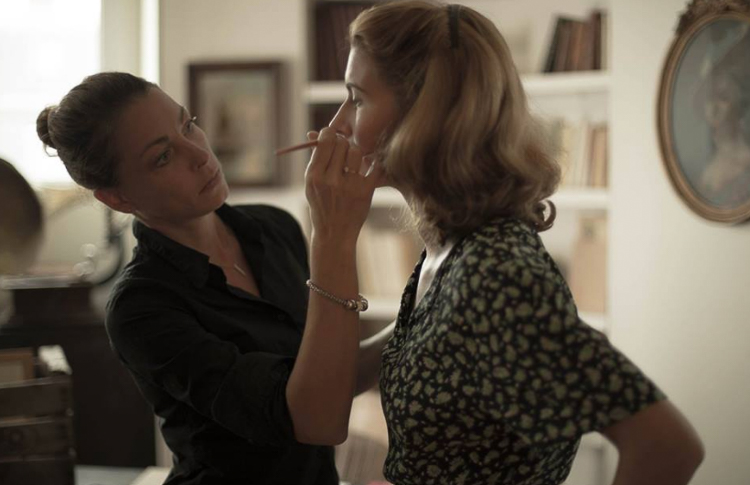
Article bts short film8

One make-up artist I met had a little girl who wanted to start modeling. We met a couple weeks later and I photographed her daughter. I ended up having a solid image that went directly into my portfolio.

Get your images ready to show them quickly

One tip I can give is to work on the images as soon as possible. Once these people see your images they will start spreading the word to other people in their school or entourage, share your images on social media, etc. (that is of course if you had good results). You will probably end up being Facebook friends with most of the crew and you can keep in contact that way.
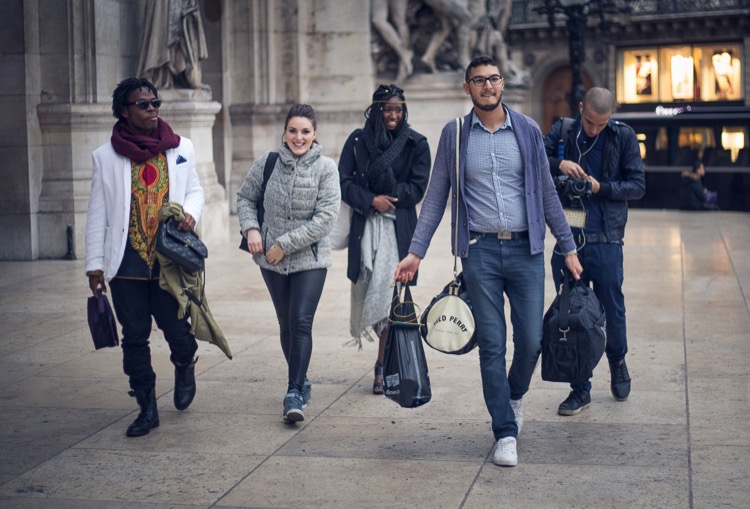
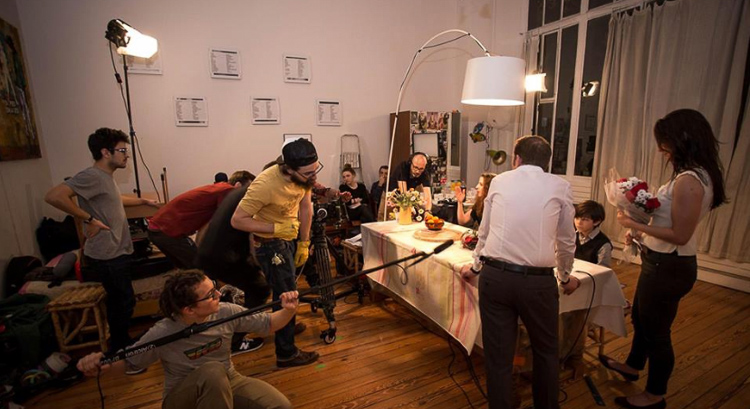
Article bts short film2

Article bts short film11

Most of them will post on Facebook or directly contact you if they need a photographer. Once you do a good job, they will most likely call you back. Their friends will start calling you then you will meet other actors and make-up artists, and increase your contacts even more.

#4 – You will learn a lot of technical things

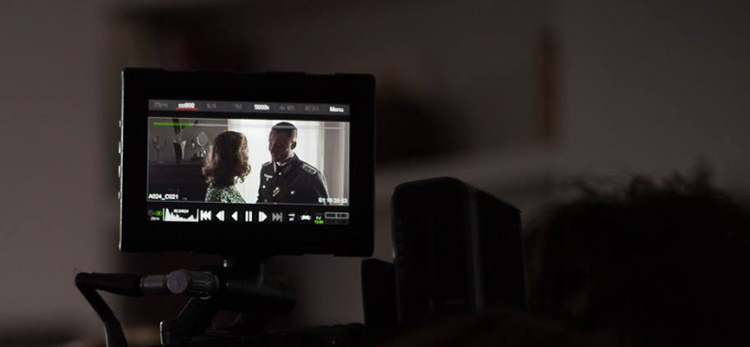
Most film crews use a lot of advanced equipment. By watching them set up everything, you will learn a lot about cameras, the choice of lenses, framing, lighting, sound, communication with actors, team work, tracking shots, and organization. Even if you’re passive in this process, open your eyes and try to absorb as much information as you can.
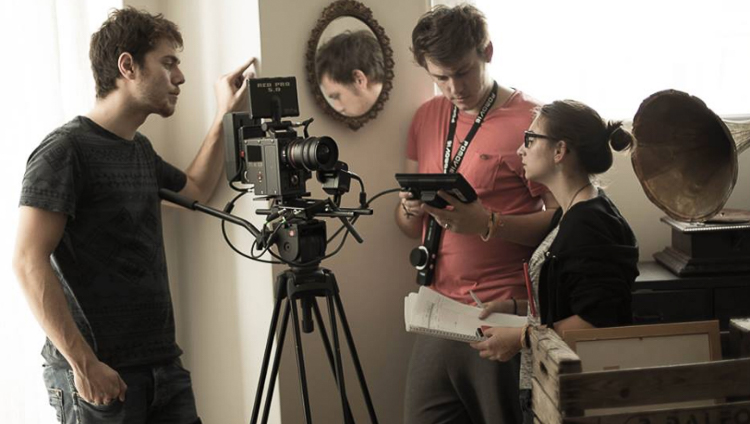
Article bts short film7

Article bts short film4

Most directors of photography will use different lighting techniques with some hair light, key light, harsh light, soft light, back-light with different modifiers. Pay attention to their work and try to replicate what you see later at home, you can also take images of the light set up to know exactly how each light is placed on set.

Conclusion

Those are just a few ways you can benefit from shooting behind the scenes on a film set. If you’ve had the experience of doing this, please share your thoughts and images in the comments below.

googletag.cmd.push(function() {
tablet_slots.push( googletag.defineSlot( “/1005424/_dPSv4_tab-all-article-bottom_(300×250)”, [300, 250], “pb-ad-78623” ).addService( googletag.pubads() ) ); } );

googletag.cmd.push(function() {
mobile_slots.push( googletag.defineSlot( “/1005424/_dPSv4_mob-all-article-bottom_(300×250)”, [300, 250], “pb-ad-78158” ).addService( googletag.pubads() ) ); } );

The post How to Improve Your Photography by Shooting Behind the Scenes of a Short Film Shoot by Yacine Bessekhouad appeared first on Digital Photography School.


Digital Photography School

 
Comments Off on How to Improve Your Photography by Shooting Behind the Scenes of a Short Film Shoot

Posted in Photography


Behind the Shot: The Shadow Towers

01 Oct

In this article I’d like to take you on a nighttime adventure to the remote Torres Del Paine National Park in Chilean Patagonia. This highly photographed park has attracted many photographers, and for good reason: it offers incredible mountainous landscapes and wonderful weather conditions, making for very interesting photography. 

There are many hiking routes in the park, which range from relatively easy to hard. After visiting Patagonia in 2014 to scout for my ‘Giants of the Andes’ workshop and Fitz Roy Hiking Annex, I regretted not being able to explore more of the hiking trails. I swore to go back and do some more hiking and shooting. I did just that earlier this year, just before guiding my groups. It was a bit of an adventure, and things didn’t always go as I had planned, but I got a few results I’m happy with. This article is about one of them, entitled ‘The Shadow Towers’.

‘The Shadow Towers’, Parque Nacional Torres Del Paine, Chile.
Canon 5Ds R, Samyang 14mm F2.8

Getting There and Being There

The Torres Del Paine are the distinctive three granite peaks of the Paine Massif. They are visible from long distances away, but to truly appreciate them, you really need to hike closer. It’s a day hike, taking a few hours to reach the base camp at the bottom of the Torres and another hour or two (depending on your fitness level) from camp to the lagoon from which I took the shot. This last leg is pretty tough with several hundred meters of elevation gain, along a path which is sometimes quite steep.

My planning went more or less like this: I had rented a car from El Calafate, Argentina, a few days before, and planned to drive all the way to Torres Del Paine and do the hike all in one go, if weather agreed. The moon was going to be full, and it was going to rise directly opposite the Torres, which I had hoped would illuminate the tops of the peaks and make for a very interestingly-lit shot. A couple of days beforehand the forecast indicated clear skies, and it seemed like everything was going as planned.

Back to El Calafate. I picked up my car early in the morning and made the 6-hour drive to the park. Upon reaching the start of the trail, I packed the necessities – tent, sleeping bag, some food and all my photography gear in a backpack (which weighed in at a not-too-comfortable 15+ Kg) and began hiking. The sun was shining strongly and I was wearing a light shirt and shorts for most of the hike, even though it was already autumn. 

The hike to base camp wasn’t too hard. It seemed long after all the driving but elevation gain was moderate, at least after the first several km. Beautiful sights were abundant throughout. After about 4 hours I reached camp in the late afternoon and set up my tent. I was a bit tired but I couldn’t get any peace. I decided to climb to the viewpoint that same evening.

I left the tent – and everything else which wasn’t crucial – in camp, and started the steep hike. It wasn’t easy at all with the heavy weight on my back, but I made the effort and after 1 or 1.5 hours, I was standing on the rocky edge of the glacial lagoon at the Torres viewpoint – Mirador de las Torres. Last light was approaching and I used the remaining visibility to find a sheltered place to put my sleeping bag for the night. I had heard that there was a cave nearby but didn’t have the time to find it, and so I settled for a spot surrounded by rocks, which would shelter me from strong winds. I did a bit of scouting around the lagoon before dark, to find a suitable composition.

My sheltered bivvy spot. Pardon the cell phone shot.

Darkness fell and I had to rest a bit from the long day and tough hike. I was waiting for the moon to rise when clouds began rolling in. I was very disappointed, since that meant I wasn’t going to get the kind of light I was hoping for. I kept on waiting and viewing the movement of the clouds and moon. At some point the moon began peeking between the clouds and producing interesting patches of light on the lagoon and the mountains. It was then that I knew I had an opportunity to create a good shot.

The light was changing very rapidly at this point, and due to the strong moonlight, I could see very contrasty shadow moving over the lagoon, which was exceptionally beautiful and exciting. I took several shots in the changing light. At some point, the moon was strongly illuminating the lagoon and foreground rocks, while the Torres themselves remained in shadow. It was an awesome sight, and I tried to convey what I saw with my camera.

Another shot I took on the same shoot, with different composition and light conditions.

After finishing my shoot I went back to the sleeping bag and rested a bit, hoping to shoot some more later with different light. But as it often is with nature photography, things began to deteriorate quickly. More and more clouds came over and I decided to try to get some sleep before trying again. I got perhaps half an hour of bad sleep when it started to rain on me. This was an unexpected turn of events and I was afraid I’d have to sleep in a wet sleeping bag, which was really not how I had planned to pass that night.

Luckily I had a very good sleeping bag (thank you Feathered Friends!) which was highly water resistant, and apart from some dampness in the zipper area, kept me protected and dry. Still, I have to admit lying there, hiding in the sleeping bag under pouring rain, utterly alone at night, more than an hour’s hike away from any other living soul, wasn’t too much fun. 

After a few hours or rain, the sun was about to rise. Sadly, the Torres were shrouded in fog by then, rendering them completely invisible. The hikers who were arriving to see the sunrise were disappointed. I packed my gear and hiked back down, all the way to the car. Even the 2-minute drive to the nearby restaurant was agony, but once I got my big, juicy hamburger I was a happy man.

Settings and Execution

I took this shot with my Canon 5DsR and Samyang 14mm F2.8 lens. The image is focus stacked from 2 exposures, since I used F2.8 and depth of field was quite small. One image was focused on the foreground rocks, the other on the mountains in the background. Since I used an ultra-wide angle lens, 2 images were enough to cover the depth range.
I used ISO 800 and a 13 second exposure. Here are the 2 original RAW files.

Composition

The main element in the composition is a virtual spiral running from the big rock on the right, through the foreground rocks and all the way to the mountains. Here’s an illustration.

I decided to leave a relatively large space above the Torres to show some more of the texture and movement on clouds, and to leave some room above the left peak.
The most important part of the image is the obscure silhouette of the Torres – giving it its mysterious feel, and, of course, its title.

Post Processing

As time goes by, I tend to do less and less post processing. This is both an aesthetic decision and an ideological one. The main things I put an emphasis on here are maintaining fidelity to the actual scene as I saw it and making sure the final image still looked like a night shot, while still keeping details in the dark areas.

The first thing I did was correct the lens aberrations using ACR’s profile correction. I also made a few global adjustments, shown below. No local adjustments were done.

I then saved the 2 files as TIFFs and went on to Photoshop. I put the images as layers and used Edit > Auto Align Layers to align them. After aligning, I cropped the image a bit.

As to the focus stacking itself: to get the sharp parts from both images, I used the eraser tool to expose the right section of each of the shots. This was done by eye.

At this stage I had a focus-stacked, almost complete image, needing but a few last adjustments. Firstly, since the image was still too bright (as visible in the histogram), I used the curves tool to darken the image with more emphasis on the lighter parts. I wanted a darker result, to better convey the night atmosphere and to be more realistic, all that without losing detail in the shadows.

After taking the contrast down in ACR, I wanted to take it back up a bit in a controllable fashion. To do this I used luminosity selections. I selected a mid-range mask and applied a levels adjustment layer on it. 

I also added a bit of local contrast using dodge and burn in LAB color mode, to avoid color shifts. I added some saturation, to bring out the natural colors in the lagoon and rocks, performed size reduction and some sharpening and I was done. 


Erez Marom is a professional nature photographer, photography guide and traveler based in Israel. You can follow Erez’s work on Instagram, Facebook and 500px, and subscribe to his mailing list for updates.

If you’d like to experience and shoot some of the most fascinating landscapes on earth with Erez as your guide, you’re welcome to take a look at his unique photography workshops around the world:

Land of Ice – Southern Iceland
Winter Paradise – Northern Iceland
Northern Spirits – The Lofoten Islands
Giants of the Andes and Fitz Roy Hiking Annex – Patagonia
Tales of Arctic Nights – Greenland 

Selected articles by Erez Marom:

  • Behind the Shot: Dark Matter
  • Mountain Magic: Shooting in the Lofoten Islands
  • Behind the Shot: Nautilus
  • Behind the Shot: Lost in Space
  • Behind the Shot: Spot the Shark
  • Quick Look: The Art of the Unforeground
  • Whatever it Doesn’t Take
  • Winds of Change: Shooting changing landscapes
  • On the Importance of Naming Images
  • Parallelism in Landscape Photography

Articles: Digital Photography Review (dpreview.com)

 
Comments Off on Behind the Shot: The Shadow Towers

Posted in Uncategorized


Behind the Scenes of Marvellous Macro Insect Imagery

19 Sep

This project by British photographer Levon Bliss and the Oxford University Museum of Natural History is a breathtaking. Levon spends weeks taking thousands of images of a single insect and then edits them together into incredibly high resolution images of these tiny creatures.

See more of Levon’s work on the Microsculpture site.

Learn About Macro Photography

While not on the scale of Levon’s project above we’ve compiled some Macro tutorials for those of you inspired to begin to explore this space.

  • Everything You Need to Know about Macro Photography
  • Getting Started Guide to Macro or Close-Up Photography
  • Macro Photography for Beginners (also see Part 2)
  • Tips for Depth of Field Control in Macro Photography
  • Macro Photography on a Budget: An introduction to Close-up Filters
  • It’s a Bug’s Life – 27 Super Macro Photography Images

googletag.cmd.push(function() {
tablet_slots.push( googletag.defineSlot( “/1005424/_dPSv4_tab-all-article-bottom_(300×250)”, [300, 250], “pb-ad-78623” ).addService( googletag.pubads() ) ); } );

googletag.cmd.push(function() {
mobile_slots.push( googletag.defineSlot( “/1005424/_dPSv4_mob-all-article-bottom_(300×250)”, [300, 250], “pb-ad-78158” ).addService( googletag.pubads() ) ); } );

The post Behind the Scenes of Marvellous Macro Insect Imagery by Darren Rowse appeared first on Digital Photography School.


Digital Photography School

 
Comments Off on Behind the Scenes of Marvellous Macro Insect Imagery

Posted in Photography


Exclusive interview: Behind the scenes with Canon at the Rio Olympics

05 Aug

Behind the scenes with Canon at the Rio Olympics

As sports fans around the world get ready for the official opening of the 2016 Rio Olympics, Canon’s Professional Services team are preparing too.

We spoke to Elizabeth Pratt, Director of Professional Products Marketing at Canon Professional Services about how Canon is preparing for the biggest event in the sporting calendar.

Behind the scenes with Canon at the Rio Olympics

The first shift of CPS staff, starting at 7:30AM, pauses to pose for a group photo.

What exactly are you doing in Rio right now?

I’m down here with Canon Professional Services, and there are also some folks here from our broadcast team. CPS provides event support for all kinds of things, any time a lot of media gathers — events like the Super Bowl, the Indy 500, the Kentucky Derby, the political conventions that we recently attended. These are very important assignments for photographers and we want to be on-site to ensure everything goes smoothly.

Elizabeth Pratt, Director of Professional Products Marketing at Canon Professional Services.

Elizabeth is currently in Rio for the 2016 Summer Olympics

We offer cleaning and checks on equipment to make sure that everything is working at factory spec.  Also in situations like this, for someone shooting with an older model camera we like to give them the opportunity to shoot with the latest equipment.

And then of course photographers also have a need for remote cameras, but not everybody takes six cameras to an event so they can use four of them as remotes.  So we loan additional cameras to help them out.

Behind the scenes with Canon at the Rio Olympics

With over 70 Canon staff supporting photographers and broadcasters, coordinating schedules is no easy task.

How long does it take to plan your presence at an event as big as the Olympics?

We started planning at least a year ago, just trying to determine how much equipment we were going to need to be able to support all of our customers, how we were going to get it all into and out of the country, through customs… It’s a collaboration between the home country, the CPS folks who are based in Rio, Canon USA is supporting with a lot of equipment, Canon Europe is contributing to the equipment as well, and we’re all sending staff. So the planning really starts at least a year in advance.

Behind the scenes with Canon at the Rio Olympics

Racks of lenses and professional Canon DSLRs, ready to be distributed to photographers at the 2016 Olympics in Rio.

Can you give us an idea of exactly how much equipment you’re sending?

Almost 1600 lenses and about 900 DSLR bodies. That’s EOS 7D II, EOS-1D X II and EOS 5DS cameras. We also have 78 staff. We have what we call our Professional Market Specialists, whose job is to support professional photographers and filmmakers by answering questions and giving people advice and support. In addition to these people we have logistics folks on site, and then actual technicians who are working on the cameras.

At most events we just do cleaning and checks, but here in Rio we have virtually a complete repair center set up where we’re doing much more extensive repairs than we normally do on-site.

How many languages do you have represented among your staff over there?

Twelve languages including English.

Behind the scenes with Canon at the Rio Olympics

The EOS-1D X II is a capable video camera, as well as being designed to capture fast sequences of still images.

Are you supporting any photographers in Rio who are using the EOS-1D X II for video, or for broadcast?

There are plenty of people shooting video with the EOS-1D X II – not necessarily for broadcast, but certainly several independent agencies and teams. Under the terms of the IOC, photographers are not permitted to shoot video at the Olympics but our big clients like Getty and AP are incorporating video more and more. We talk about video a lot to photographers and they’re being asked to shoot more video and to learn about video.

We’re starting to see newspapers and publications even merge departments and cross-train people [for stills and video].

Behind the scenes with Canon at the Rio Olympics

Canon has worked with Getty, which is creating a submersible remote camera setup using the EOS-1D X II and the 11-24mm wide-angle zoom, specifically to shoot underwater events at the Olympics.

How closely do you work with agency clients ahead of big events like this?

We’ve worked very closely with the big agencies in preparation for the Olympics. We have some robotic cameras down here and we worked with the agencies to develop them for their needs. These robotic solutions are amazing. You can shoot remotely on them from the press center with multiple remote cameras attached to one computer, and switch back and forth. It allows perspectives on the Olympics that we’ve never seen before.

We’ve been helping to support an underwater system, which was developed by Getty. It’s an EOS-1D X Mark II and 11-24mm lens. The camera is in an underwater housing, and it’s networked so that it can be controlled remotely. The flexibility of control is exceptional, and the 11-24mm has really nice distortion correction — you don’t have the kind of distortion at the frame edges that you might get with other wide-angle lenses.

Behind the scenes with Canon at the Rio Olympics

A Canon technician uses an illuminated loupe to check for dust on the sensor of an EOS-1D X II.

How many of this sort of major events have you personally been involved in?

I started off as a professional market specialist with Canon and my first Olympics was Athens in 2004.

We’re much more collaborative now in the way that we work with clients. We reach out to them well in advance and talk to them about their workflow and how their needs are changing. Then we customize solutions to meet those needs.

When I started with Canon years ago, we just made cameras and said ‘here you go’. Our whole mindset has really changed, to try and figure out how to change and adapt as the industry changes.

How will the next Olympics in 2020 be different?

I think we’re at a very interesting place now with technology, with the integration of 4K into DSLRs and the ability to grab incredibly high resolution, beautiful frames from that video. I think there’s potential to change the way that photographers work. I don’t want to try to predict the future but I think that’s probably going to be one of the biggest factors that influences what’s going to change and what new equipment will bring in the next four years.

Articles: Digital Photography Review (dpreview.com)

 
Comments Off on Exclusive interview: Behind the scenes with Canon at the Rio Olympics

Posted in Uncategorized


Behind the shot: Praia da Adraga at blue hour

16 Jul

If you recognize Nicolas Alexander Otto’s name, it may be because we featured some of his work a while ago. The Germany-based landscape shooter has graciously agreed to share the story behind one of his images, titled ‘The Living Infinite’, a shot he captured on a trip to Portugal’s Praia da Adraga beach. He walks us through everything that went into making the image – from planning the trip to his post-processing technique. 

By Nicolas Alexander Otto

To explain my process, I should start with a little bit of background information. When I have a timeframe set and know that I will be on the road during that period I dive into the planning phase first, trying to make the most of the time I have available. I then try to organize my shooting itinerary accordingly, checking for all the different options available for good light: sunrise and sundown times, same goes for the moon, the tidal schedule and the position of the milky way.

In this particular case I knew I was going to be at the ocean and the moon would set in the western skies during blue hour for three successive days. Hence, I knew I had to be at the Portuguese coastline by then, originally starting from Germany and driving all the way through France and Spain to get there.

My main focus on the trip was a beach called Praia da Adraga, located near Sintra. I planned to get my shot in the early morning hours, knowing the blue hour would provide me with the gentle light necessary and the moon would add that little something to the sky, keeping it from falling flat, although much would depend on cloud coverage.

Knowing my goal I looked up the tidal schedule next and noticed that the waves should be splashing around the famous sea stacks on the beach right around the time the moon would enter my frame. It’s important to note that I had been at that location two times prior to planning this, but tools like Google Earth and the Photographer’s Ephemeris make pre-visualizing shots fairly manageable without prior visits – I highly recommend using them. I checked the weather upon arrival and had to sit out a night of drizzle, already fearing I might not get the shot I had imagined. Luckily, it stopped once I woke up and grabbed my gear.

On Location

The evening before I had already scouted the location and taken some test shots looking for the right composition so I knew I didn’t need much time, just a short break in between showers to reel in my desired shots.

During my third trip to the beach I noticed huge differences compared to my previous visit. A fellow photographer whom I met while walking towards the sea stacks told me that severe winter storms had altered the appearance of the beach, washing away quite a bit of sand rendering the sea stacks much higher than I remembered them, and revealing more rocks in the foreground as well. However, when I looked at where the moon would enter the frame on Photographers Ephemeris I saw that almost none of them would be in my composition.

I knew I had to battle against the rising tide and might face issues with camera shake, especially with my 36MP Nikon D800, so I utilized my heaviest tripod: a 3.4kg Slik 780 DX Pro. If burrowed in the sand a little, it’s almost completely resistant against the incoming surge as long as it’s not much more than knee high.

Composition-wise I went for a classic, dynamic two thirds setup with the waves’ receding flow drawing the viewer’s gaze into the image, right past the sea stacks out onto the ocean and the moon looming overhead in the left third of the frame. I tried to leave at least a little bit of separation between the rocks as their dark surfaces can be heavy and distracting if clumped up, drawing too much of the viewer’s attention to a single area.

It took me some time to get an incoming wave to create those leading lines I had imagined. Sadly, the image ended up being a bit too dark, so I would need to brighten the exposure a little in post processing and work on the contrast. To blame was the fact that dawn had already kicked in and I had to readjust my camera settings each minute, and at that moment I tried adding a ND filter. When an especially promising wave came in, rather than adjusting my settings, I pressed the remote shutter and got exactly the wave patterns I was imagining. No other subsequent exposure came even close to it, unfortunately, thus I had to choose this one despite its technical shortcomings.

It can be quite difficult to capture waves because the shutter speed has to match the their force to shape beautiful streaks of spume, without them stopping or clumping up at a rock, breaking the rhythm of the lines. Oftentimes a shorter exposure doesn’t create any dynamic addition to the image and a longer one would render most of the wave motion invisible.

Here are the settings used for my shot:

Camera: Nikon D800
Lens: Nikkor AF-S 18-35mm F3.5-4.5 G ED
Focal length: 18mm Shutter speed: 3,5 sec
Aperture: F5.0
ISO: 100
Filter: Haida ND64

Post-processing

Exposure adjustments made to brighten the image.

I knew I needed to brighten the image overall, however I did not not want to alter the colors in any way to preserve the natural hues that the magical blur hour light supplied. Also, I knew I had to make local adjustments to the micro contrast, which is why I did not use clarity just yet because I wanted to keep the clouds nice and smooth.

At this point some adjustments to sharpening are made, along with correction for vignetting but none for distortion.

I rarely ever sharpen my whole image which is why I used a mid-range mask here to cover only the stronger contrasted edges of the rocks and sky. Even though I do use lens corrections I almost always dial down the distortion; on the one hand because the Nikon 18-35mm G ED has almost no distortion to begin with and on the other because a little distortion, in my opinion, adds to the dynamism of the image, especially in landscape photography. And for the most part I keep the standard noise reductions settings as is.

Next I imported the image into Photoshop and here you already can see all the different adjustments I made to the image on the right (first switched off so you can see the difference). Before I start working on anything else, I usually get rid of dust spots – thus the base layer is renamed to “clean”, indicating I’ve already cleaned up the image.

As a second step I used Nik Color Efex Pro 4 here for some more global adjustments, and afterwards I used luminosity masks to target specific tonalities of the image, adding more contrast selectively to the sand and sky. Due to the very even overall exposure (not taking into account the rocks), most of the masks are not altered after the tonality selection.

In Color Efex Pro 4 I first used the Pro Contrast and Detail Extractor with these settings:

At this point I wanted to add a bit more contrast to the sky and the foreground without darkening the rocks to prevent having to brighten them up again later in the processing, since that is never a good idea to begin with. The rest of the image benefited from a little more punch overall, though. I also balanced out a little bit of the cyan toning with the ‘Correct Color Cast’ setting, because at this stage I felt like it might be deviating a bit too much from what the scene looked like in my recollection.

The detail extractor is an incredibly powerful filter, which is why I seldom use it at more than 5%. I would also recommend painting the effect in rather than using control points for masking in more complex situations. But in this case, the selections that the program generated suited my needs and I went with it. I tried to prevent the detail extractor from brightening the waves and sky, as it tends to brighten darker parts of the image recovering information in the dark tones. Furthermore, longer exposed skies and waves looking too crisp, for me at least, often kind of defeat the purpose of taking long exposures in the first place. However, the dark rocks were already brightened up a little bit which was a desirable result in this case.

After these adjustments the image already had more punch, but still lacked some differentiation in the narrow tonalities of the sand and the incoming surf – something common with blue hour shots. Additionally, I wanted the sky to be just a bit more dramatic. For this I added different curves layers with various luminosity masks generated with Tony Kuypers famous TK Panel.

First, with a ‘Lights 3’ and a ‘Lights 1’ mask, I emphasized the waves in between the rocks, both grouped together and masked with a gradient in order not to affect the sky (you can see the gradient masks in the first screenshot).

The same procedure was then used to get more detail out of the immediate foreground waves by using a ‘Midtones 3’, and again for the rocks, and foreground using a ‘Darks 2’ mask (this was actually applied later in the workflow and is called ‘contr5’ in the image above).

Next I wanted to introduce a bit more drama to the sky, so I used a ‘Midtones 3’ mask in order to select a wide tonal range in the sky, and darkened them only a small amount to make the undersides of the clouds stand out more.

In the end I darkened the rocks a little – just a tiny amount because I love images with prevalent darker tones – using a ‘Darks 3’ mask (this would’ve also simply been achieved by painting out the detail extractor added earlier).

As a last step I added a minor dodge and burn alteration to call attention to the small water splashes on the right sea stack: a very subtle, almost unnoticeable effect.

My final actions, as per usual, included resizing and converting into RGB color space. Usually I choose 900px for the web, but in this case I chose 1200px for this DPR article, so you can see more of the details.

I hope you enjoyed this behind-the-scenes look at my process!

Articles: Digital Photography Review (dpreview.com)

 
Comments Off on Behind the shot: Praia da Adraga at blue hour

Posted in Uncategorized


Welcome to Yosemite: The Man Behind The Sign

12 May

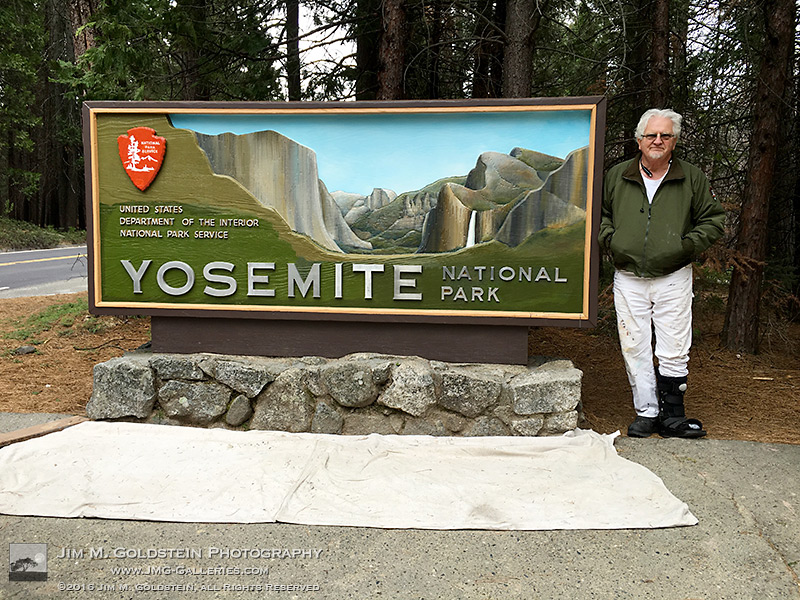
yosemite-sign2-edit-800c

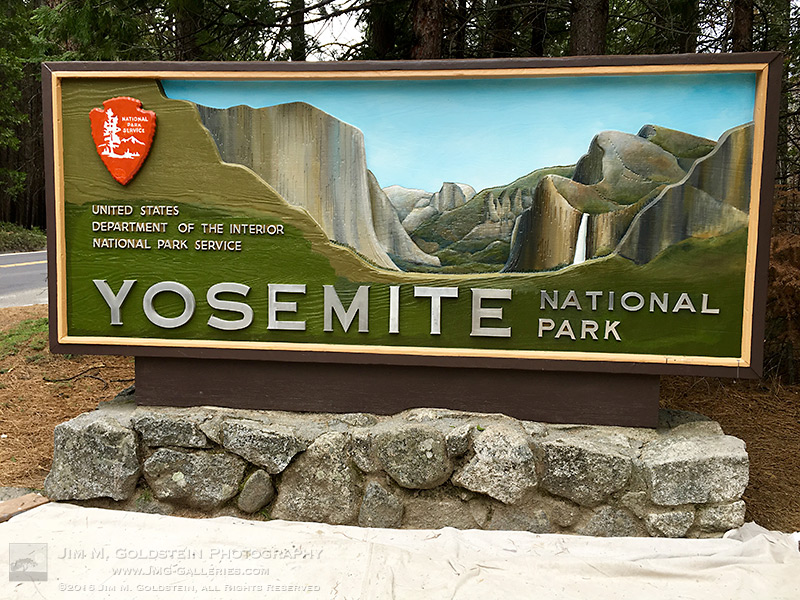
If and when you enter Yosemite National Park you’re likely to see an iconic painted sign welcoming you to the park. I’ve passed by this particular sign at the northwest entrance numerous time. The difference on my last trip was that it was getting a fresh coat of paint and being restored by artist Mark Switlik. I should clarify, while technically it was being restored, it was also being transformed to have a much warmer, more realistic and colorful look. You can see how the sign used to look at the end of this post.

I consider myself quite lucky to have met Mark and had the opportunity to talk with him albeit quickly. He had been working on the sign for sometime before my trip and I had seen early photos from others of its transformation. I wasn’t sure if it’d be done by the time I made it to the park back in April. I don’t know about you but I like Mark’s take on the sign versus the old. It’s a bit more welcoming. What do you think?

yosemite-sign1-edit-800c

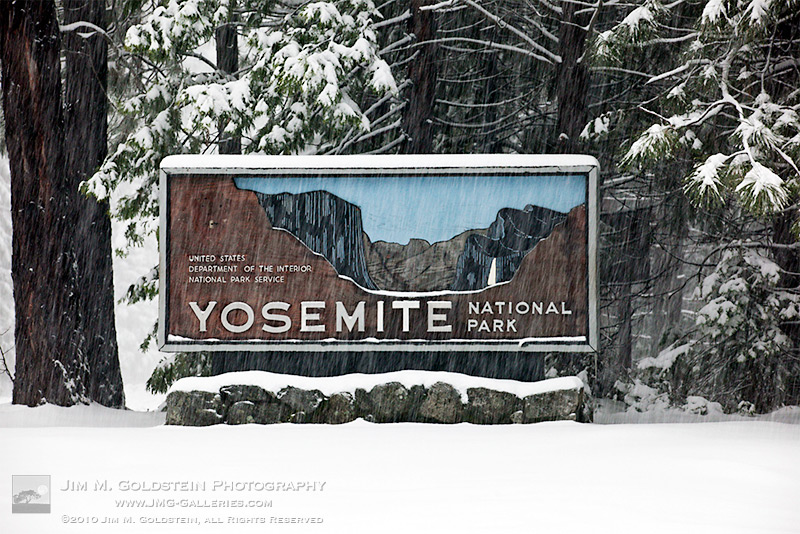
If you don’t remember what the old sign used to look like here is a photo I took of it in a snow storm several years ago. It has a much more stark appearance.

yosemite-sign3-edit-800c

The post Welcome to Yosemite: The Man Behind The Sign appeared first on JMG-Galleries – Landscape, Nature & Travel Photography.


JMG-Galleries – Landscape, Nature & Travel Photography

 
Comments Off on Welcome to Yosemite: The Man Behind The Sign

Posted in Equipment


Behind the Scenes: Hidden Collections Storage at the Smithsonian

22 Apr

[ By WebUrbanist in Art & Photography & Video. ]

smithsonian behind the scenes

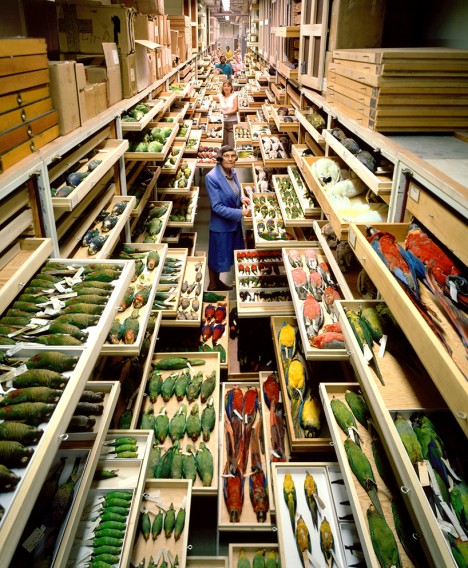
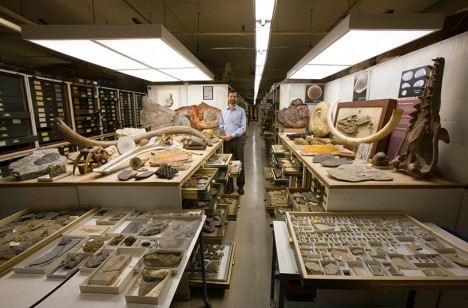
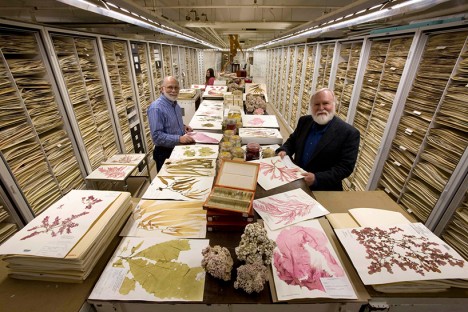
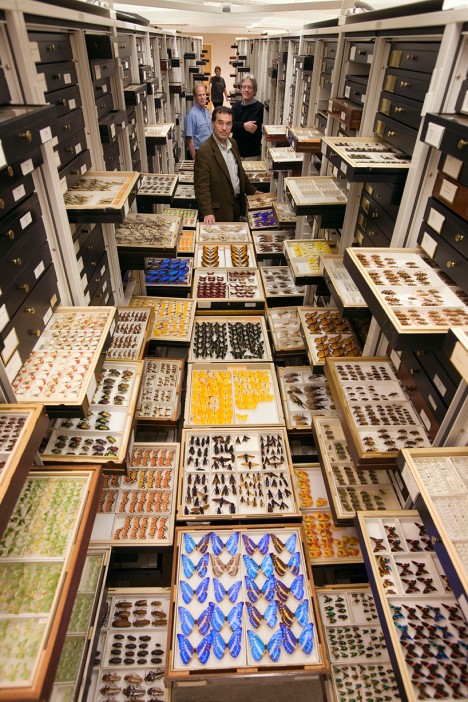
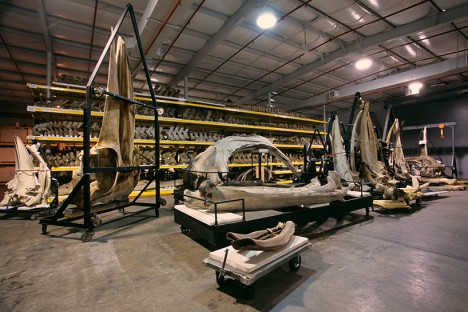
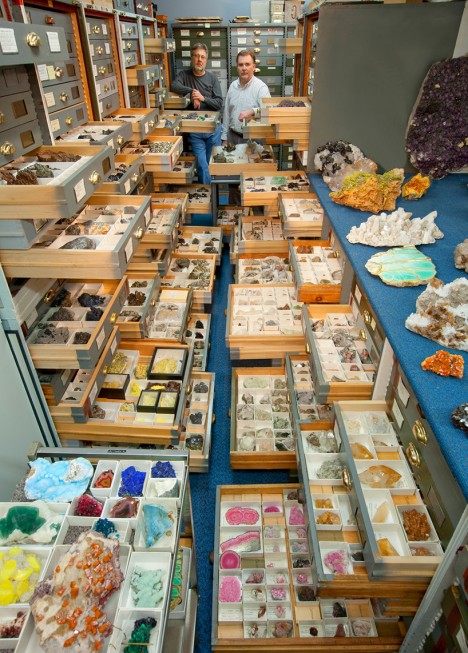
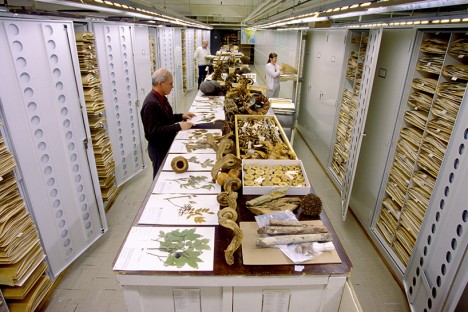
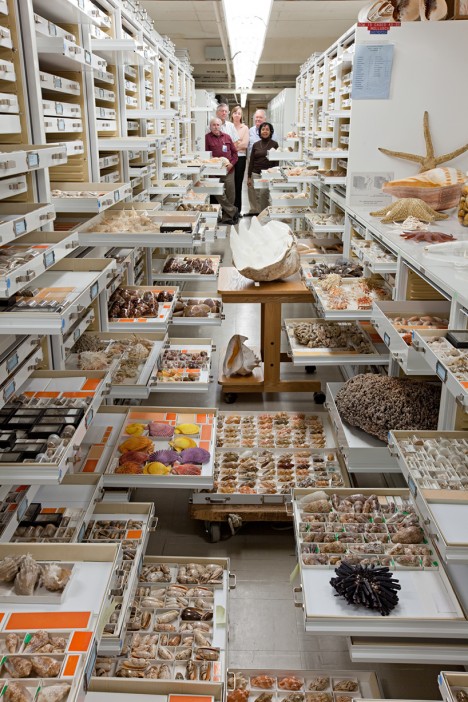
It is hard to imagine just how extensive, colorful and generally amazing the plant, animal, fossil and rock archives at the Smithsonian Museum of Natural History (NMNH) in Washington, D.C. really are … at least until you see the shelves slide out, as shown in this stunning photo series (by Chip Clark).

museum paleobiology

museum rocks minerals

The museum staff has meticulously collected and cataloged plant and animal species as well as rock, fossils and other organic wonders from around the world. Some are on display, but many more live behind the scenes, shelved for reference and study.

museum botany collection

museum zoology collection

Examining these artifacts helps give researchers and scientists insights into biological diversity and evolutionary relationships, but also assist environmentalists studying conservation and climate change.

museum botany algae

smithsonian butterfly collection

There is something particularly humanizing about these images, shot over the decades by a single staff photographer, which feature not on the each collection but in many cases his colleagues as well.

museum mammals

museum anthropology

Departments shown here include botany and algae, invertebrate zoology, mammals, mineral sciences, paleobiology and anthropology.

Share on Facebook


[ By WebUrbanist in Art & Photography & Video. ]

[ WebUrbanist | Archives | Galleries | Privacy | TOS ]


WebUrbanist

 
Comments Off on Behind the Scenes: Hidden Collections Storage at the Smithsonian

Posted in Creativity


Behind the scenes at Fujifilm’s factory in Sendai, Japan

02 Feb

Behind the Scenes of Fujifilm’s Factory in Sendai, Japan

After the official launch of the X-Pro2 recently in Tokyo, Fujifilm invited a select group of press to visit its Taiwa assembly plant near Sendai to see the camera being put together. As well as the X-Pro2, we were also able to see the assembly lines for the X-T1, X100T, and several lenses. Fujifilm has been making optics since the 1940s, and although the construction workers of that time would not recognize much of the technology used in lens construction today, a lot of the assembly is still done fairly traditionally, by hand. 

The first step when visiting any assembly plant, is to sterilize yourself. No, not like that, but by donning head-to-foot protective clothing and scrubbing your hands with alcohol. It’s a time-consuming, uncomfortable but necessary step in order to prevent contamination of the assembly line. I do very much regret keeping a sweater on underneath the overalls though. 
Behind the Scenes of Fujifilm’s Factory in Sendai, Japan

Here, a worker in Fujifilm’s Taiwa plant uses a sonic motorized screwdriver to assemble the company’s 56mm F1.2 prime lens. 

Behind the Scenes of Fujifilm’s Factory in Sendai, Japan

Journalists take photographs of the various lens groups that make up the new 100-400mm zoom, laid out on a table at Fujifilm’s Taiwa plant, which is about 20 miles outside of the city of Sendai. 

The elements themselves are not ground and polished in Sendai, but like other components they are shipped in, ready to be turned into complete lenses. Fujifilm has three additional facilities in Japan that mold and polish glass lens elements and machine various other components.

Behind the Scenes of Fujifilm’s Factory in Sendai, Japan

Here, a worker performs the delicate job of attaching the PCB to Fujifilm’s new 100-400mm telezoom. 

Behind the Scenes of Fujifilm’s Factory in Sendai, Japan

The 100-400mm zoom takes roughly 4 hours to assemble, in its progress from a box of bits to a finished lens. These lenses are almost complete, and await the final assembly and testing phases of their construction. 

Behind the Scenes of Fujifilm’s Factory in Sendai, Japan

Fujifilm’s new 100-400mm telezoom being assembled. As with other factories we’ve visited in Japan, a lot of the assembly is done by hand, and aside from calibration, there’s little automation in the assembly lines of either lenses, or cameras in Fujifilm’s factory. 

Behind the Scenes of Fujifilm’s Factory in Sendai, Japan

Here, a 100-400mm zoom undergoes final testing. This process (which involves racking the zoom and focus ring to various points, repeatedly) is partly automated – presumably to avoid the human operators from getting repetitive strain injury.

Almost all of the other calibration tests and checks are confidential, which means no photos. None taken by humans, anyway.

Behind the Scenes of Fujifilm’s Factory in Sendai, Japan

A 100-400mm gets the finishing touches added, prior to being boxed up for shipping. 

Behind the Scenes of Fujifilm’s Factory in Sendai, Japan

Several completed 100-400mm zooms are placed in plastic trays before being wrapped and boxed-up for shipping.

Behind the Scenes of Fujifilm’s Factory in Sendai, Japan

Here, a worker examines one of the groups destined to become part of Fujifilm’s much smaller 35mm F2 prime lens. 

Behind the Scenes of Fujifilm’s Factory in Sendai, Japan

Again, a majority of the steps in the assembly of this lens are manual, with little automation. 

Behind the Scenes of Fujifilm’s Factory in Sendai, Japan

We were impressed by just how many of the stages in assembly appear to be visual inspection. A single worker might inspect hundreds of these components in a day.

Behind the Scenes of Fujifilm’s Factory in Sendai, Japan

Here, lens groups are arranged in trays ready to be inspected.

Behind the Scenes of Fujifilm’s Factory in Sendai, Japan

Ultraviolet light is used to ‘cure’ the cement that holds elements securely in their groups. Gone are the days of screwing elements together using friction and using shims to adjust their precise alignment.  

Behind the Scenes of Fujifilm’s Factory in Sendai, Japan

Here, several 35mm F2 primes sit in trays awaiting the final stages of their assembly.  

Behind the Scenes of Fujifilm’s Factory in Sendai, Japan

The front bezel of the 35mm F2 is attached with four screws. Once this is done, the screws will be concealed by the nameplate ring. 

Behind the Scenes of Fujifilm’s Factory in Sendai, Japan

And here are the finished lenses with their nameplates attached, ready to be boxed and shipped. Much simpler than the 100-400mm zoom, the 35mm prime takes only about 80 minutes to assemble, in total. 
Behind the Scenes of Fujifilm’s Factory in Sendai, Japan

The day we toured Fujifilm’s factory was the first ‘official’ day of production for the new X-Pro2. Of course workers have been putting final shipping cameras together now for some time, under a veil of secrecy ahead of the product launch in mid-January.
Behind the Scenes of Fujifilm’s Factory in Sendai, Japan

Although outwardly similar to the original X-Pro1, the X-Pro2 is a completely redesigned, considerably more complex camera than the first X-series ILC. It should be – Fujifilm has had four years to gather feedback from users of the original camera. 

Behind the Scenes of Fujifilm’s Factory in Sendai, Japan

Like the lenses, the X-Pro2 arrives in Sendai as a collection of partly-finished components ready for final assembly. Here, a worker performs the delicate job of connecting the various wires and ribbon connectors that will bring the camera to life.

Behind the Scenes of Fujifilm’s Factory in Sendai, Japan

The X-Pro2’s firmware isn’t ‘hardwired’ but has to be manually uploaded to every camera individually, in one of the final stages of assembly before the cameras are boxed up for shipping. Doing it at this late stage decreases the risk that firmware will need to be loaded more than once if an update is required. 

Behind the Scenes of Fujifilm’s Factory in Sendai, Japan

Here, a worker is attaching the small plastic window over the X-Pro2’s focusing lamp before applying the leatherette material that covers much of the outside of the camera’s body.

Behind the Scenes of Fujifilm’s Factory in Sendai, Japan

One of the trickiest (and most manual) stages in the construction of the X-Pro2 is applying the leatherette material to the camera body. This is done slowly, carefully, and entirely by hand.

Behind the Scenes of Fujifilm’s Factory in Sendai, Japan

The material is carefully pressed into place around the lens throat, and various control points. Bubbles are worked out by scraping the material gently with a plastic ‘spudger’. 

Behind the Scenes of Fujifilm’s Factory in Sendai, Japan

The X-Pro2’s grip is attached using a very strong adhesive, and firm adhesion is ensured by placing the camera in a mechanical press that applies firm and even pressure to the join. 

Behind the Scenes of Fujifilm’s Factory in Sendai, Japan

Here, finished X-Pro2 bodies await final checks before being boxed up for shipping. 

Behind the Scenes of Fujifilm’s Factory in Sendai, Japan

The X-Pro2 isn’t the only camera that is put together in Sendai. Fujifilm also assembles the X-T1 in the same facility. Here, a collection of X-T1 top-plates await assembly.

Behind the Scenes of Fujifilm’s Factory in Sendai, Japan

And this is what happens next. The X-T1’s magnesium-alloy top-plates are introduced to the electronic viewfinder assembly, ready to be mated with the main body of the camera, further down the assembly line.  

Behind the Scenes of Fujifilm’s Factory in Sendai, Japan

Dials! Thousands of dials! Here, trays and trays of X-T1 ISO dials sit waiting to be introduced to their host cameras. 

Behind the Scenes of Fujifilm’s Factory in Sendai, Japan

A well as the X-Pro2 and X-T1, the Sendai plant is also home to the X100T assembly line. We wanted to take this lonely-looking X100T home with us, but apparently that’s not allowed.

Behind the Scenes of Fujifilm’s Factory in Sendai, Japan

That’s OK – we like the black ones more anyway. Here, a number of almost-finished X100T bodies sit in trays waiting for their rear control plate and LCD screens to be added. 

Sendai was badly hit by the earthquake of 2011, and some of the buildings at Fujifilm’s Taiwa plant had to be abandoned due to structural damage. One of those buildings housed the original assembly line for the X100, and after the earthquake, assembly was moved across the street and into the building that we visited.  

Behind the Scenes of Fujifilm’s Factory in Sendai, Japan

And here’s where they all end up – X-Pro2s, X-T1s, X100Ts and lenses. These large boxes contain finished products, ready to be shipped to retailers and distributors worldwide. 

Behind the Scenes of Fujifilm’s Factory in Sendai, Japan

Well, almost ready. Even once they’re placed in their retail packaging and stacked in the larger shipping boxes, one in 10 of all the cameras and lenses assembled in the factory are removed, unboxed, and checked by hand to ensure that any given batch is free from manufacturing defects. ‘Made in Japan’ really does mean something, even today. 

Behind the Scenes of Fujifilm’s Factory in Sendai, Japan

Happy 5th anniversary, Fujifilm X-series!

Articles: Digital Photography Review (dpreview.com)

 
Comments Off on Behind the scenes at Fujifilm’s factory in Sendai, Japan

Posted in Uncategorized


Behind the Camera: Sue Bryce’s contemporary portraiture

17 Jan

If there’s been a theme to Sue Bryce’s career, it might be one of evolution. She started making portraits when she was 18 with a Hasselblad film camera, and with grit and sheer determination she built and marketed her own business. Classifying her work as contemporary fashion portrait photography, she’s evolved through decades in a shifting industry, and in addition to running her highly successful studio now offers online workshops for newcomers. We sat down with her recently to learn more about her work, vision and history with photography. 

Articles: Digital Photography Review (dpreview.com)

 
Comments Off on Behind the Camera: Sue Bryce’s contemporary portraiture

Posted in Uncategorized


Behind the Camera: A conversation with Peter Hurley

31 Dec

Peter Hurley wasn’t always a noted portrait photographer with a great head of hair – before he ever picked up a camera he was a bartender, actor and model. With encouragement from Bruce Weber he purchased a camera and lens and the rest is history. Ever the engaging storyteller, Hurley takes us through the beginnings of his career and how he learned to stand out in a crowded field.

Articles: Digital Photography Review (dpreview.com)

 
Comments Off on Behind the Camera: A conversation with Peter Hurley

Posted in Uncategorized