More tutorials @ learnmyshot.com Watch this photography tutorial video to learn how to set custom white balance in your DSLR camera
Video Rating: 4 / 5
More tutorials @ learnmyshot.com Watch this photography tutorial video to learn how to set custom white balance in your DSLR camera
Video Rating: 4 / 5

Why are Oranges … Orange ?
White balance can be a tricky subject to master and as a beginner I found both the concept and application difficult. Getting to grips with white balance was a landmark in my early learning, gone were the days of funky looking indoor shots and chilly looking portraits, from then on the world of warm sunsets and natural skin tones lay at my feet. It’s amazing how different an image can look with and without white balance correction applied and consequently the impact on your images can be profound. The basics of white balance adjustment are relatively simple, what takes more time is training your eye to know when you’ve got it right. In doing this you will not only improve the quality of your images but will also save a whole load of time. Here to help you is a basic run down of practical white balance.
Despite what we see the actual colour of light is hugely variable. The fact that we generally don’t perceive these shifts in daylight colour is testament to the incredible job the human eye and brain does in adjusting how we see. Our cameras on the other hand are at best dumb instruments and need to be told what colour the light we are shooting is. Ever take a shot of a landscape, but was disappointed to find that the final scene looked orange? Ever used some fill flash for a portrait only to discover the subject to has a blue cast? All of these problems can be fixed using good white balance correction.
The colour (sometimes called the ‘temperature’) of light is measured using the ‘Kelvin Scale’. The scale itself was discovered using clever physics experiments, which looked at the wavelengths of light produced by heating black objects to different temperatures. Its definitely useful to know that there is a scale for measuring white balance but all you really need to remember is that the lower numbers equal warmer or redder light with higher the numbers relating to cooler or blue light. Importantly you shouldn’t worry about remembering any of this, its useful knowledge to have but to date I have never needed to know the exact white balance setting of my camera so I doubt you will do either.
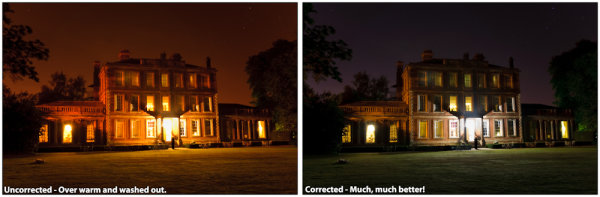
See the difference?
The exact method for setting white balance varies from camera to camera but generally the fastest way to do this is by using one of the standard preset values. Simply dial in the white balance correction and hey presto your camera is instantly seeing in a different colour light.
You can pretty much set any specific white balance value you like however in the vast majority of situations the presets are more than adequate. Given that you can fix pretty much anything in post processing why bother doing anything in camera at all? You might be tempted to place your trust in your cameras ‘Auto White Balance’ feature and whilst its tempting, the applied white balance can shift noticeably from shot to shot and wont necessarily get it 100% right either. Imagine having to adjust the white balance on your whole set of holiday snaps, not great.
So now you’re convinced, here to help you is a run down of the major presets and when to use them:
The ability to accurately apply white balance correction is one the major advantages of shooting in RAW format. If you don’t know about or don’t shoot in RAW format, don’t worry you can still make adjustments to other image types albeit not with quite as much flexibility.
For RAW images you have the option to either select one of the available preset values (which will be the same as those available in your camera) or if you wish make a manual adjustment.
Learning to manually adjust white balance is a great skill to practice as it’s probably the best way to train your eye to recognize the ‘right’ white balance value. The actual adjustment is fairly simple and uses only two controls (although the method for adjusting these will vary according to your post processing software):
Here is a three step recommendation for manually adjusting white balance. Don’t forget you can select a preset value first and then ‘fine tune’ the result manually afterwards.
Don’t forget there is no such thing as a right or wrong white balance, if the shot looks how you want it to then that’s good enough.
Generally white balance corrections can also be applied in batches so if you find a setting which works well and all the shots have been taken in the same light using the same settings you can save a lot of time by applying corrections in bulk.
No matter how you do it, making sure you pay attention and manage the final white balance of your shots is an incredibly powerful way to improve the feel and look of your photos. So much of the mood and drama of a photo is conveyed through the colour and quality of light captured and therefore taking those extra few moments to get it right is well worth the trouble. Despite what you may have been told you, getting this right either in camera or postproduction needn’t be a trauma. Hopefully the few hints and tips in this post should point you in the right direction and could make the difference between your next shot leaving you red faced or feeling blue.
Post originally from: Digital Photography Tips.
Check out our more Photography Tips at Photography Tips for Beginners, Portrait Photography Tips and Wedding Photography Tips.
Practical White Balance and Why You Should Learn It!
In the fourth installment of the DSLR Film School, I talk about White Balance and Picture Styles. White Balance Cards – www.amazon.com Filmed on the Canon 5D Mark III by Marika Neumann Nikkor Ai-s 50mm f 1.2 Rode NTG-3 Juiced Link Box Edited in Premiere Pro CS5.5 Check out our website or like and follow on Facebook and Twitter: www.neumannfilms.net www.facebook.com twitter.com
Video Rating: 4 / 5
Inflammatory comments will be removed. The 10 over hour flight was worth it for the morning view of this landing. Arrived slightly after 6 in morning. Filming equipment: Nikon D3100 camera. Lens: Nikkor 18-55mm G VR with Circular Polarising filter

Connect: Creative white balance tips for smartphone photographers. White balance can make the difference between a bland image and an engaging photograph. Smartphones are increasingly giving control over this important tool for getting color ‘right’ in your photos – we give some tips about how it’s used.
News: Digital Photography Review (dpreview.com)
razzi.me www.facebook.com www.PhotographersOnUTube.com https A tutorial on White Balance and Custom White Balance for Nikon D7000. You can also set custom white balance for Canon cameras are well, though the steps are slightly different. Canon users, please check your user manual to set the custom white balance. There are a couple of extra steps involved in setting up the custom white balance in Canon cameras.
Video Rating: 4 / 5
I’ll try to show you how to play main guitar riffs of can’t stop by red hot chili peppers. see annotation and TABs. [notice] PLEASE ENABLE ANNOTATION on your youtube settings. I explain how to play by annotation. equipment* guitar – VANZANDT TLV-R2 amp&effector – PODxtLIVE camera – nikon D90 about amp settings, see end of the video. if this video will help you, I’m glad. thanks.
Video Rating: 4 / 5
This Photoshop Lightroom tutorial discusses changing and working with the color temperature and white balance of photos. Watch more at www.lynda.com This specific tutorial is just a single movie from chapter three of the Photoshop Lightroom 4 Essentials: Enhancing Photos with the Develop Module course presented by lynda.com author Chris Orwig. The complete Photoshop Lightroom 4 course has a total duration of 5 hours and 32 minutes, and guides photographers through the process of improving images with creative color, sharpening, and other effects in the Lightroom Develop module. Photoshop Lightroom 4 Essentials: Enhancing Photos with the Develop Module table of contents: Introduction 1. Getting Started with the Develop Module 2. Develop Module Workflow Tips 3. Working with Color Temperature and White Balance 4. Masking Basic Tonal Adjustments 5. Improving Vibrance, Saturation, and Clarity 6. Basic Panel Workflow Reflections 7. Cropping and Composing 8. Retouching Tools 9. Using the Graduated Filter 10. Making Localized Adjustments 11. Modifying the Tone Curve 12. Changing HSL and Color 13. Converting to Black and White 14. Creative Color with Split Toning 15. Noise Reduction and Sharpening 16. Making Lens Corrections 17. Adding Vignette and Grain Effects 18. Using the Camera Calibration Controls Conclusion
Video Rating: 5 / 5
#1 – Tell camera what to consider “white” #2 Set the camera to Custom WB. Most cameras will be exactly the same. Some may be slightly different. Most newer ones are combining this into one step like the Canon S95. On my 7D I have to take 2 steps but it’s very easily done and helps a lot.
www.rjbradbury.com A subscriber requested video (Thanks Tammy) this video covers some of the basic photography terms you may of heard in my videos or others. I will do more indepth videos soon. This Video Covers Aperture Shutter Speed ISO WB – White Balance Feel free to ask questions, comment and of course subscribe. Thank you for all of your support and feed back over previous videos. Rick www.rjbradbury.com http
There are eight different white balance settings on the XSi, but only custom white balance give you the most accurate settings, based on exactly the light under which you are currently shooting, from the Magic Lantern DVD Guide to the Canon XSi
This short tutorial video shows how the photo of the B-25 Bomber was made. It is an interesting and informative background to the photo and people involved- Very Interesting! Painting With Light Technique
Video Rating: 5 / 5
Provided by pictureline.com, this tutorial is designed to help people understand how to perform a Custom White Balance on their Nikon SLR. If any questions please call (801)364-1200. www.pictureline.com
You must be logged in to post a comment.