RSS
 

Posts Tagged ‘avoid’

6 Mistakes to Avoid in Long Exposure Photography

13 Jan

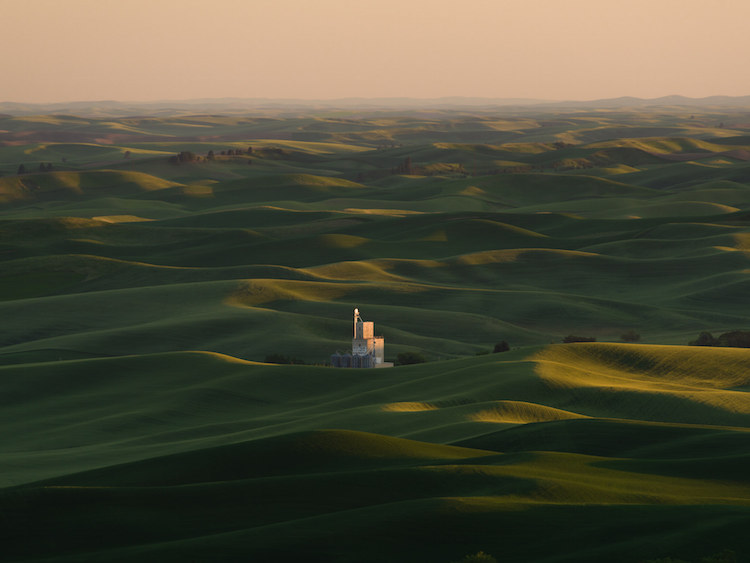
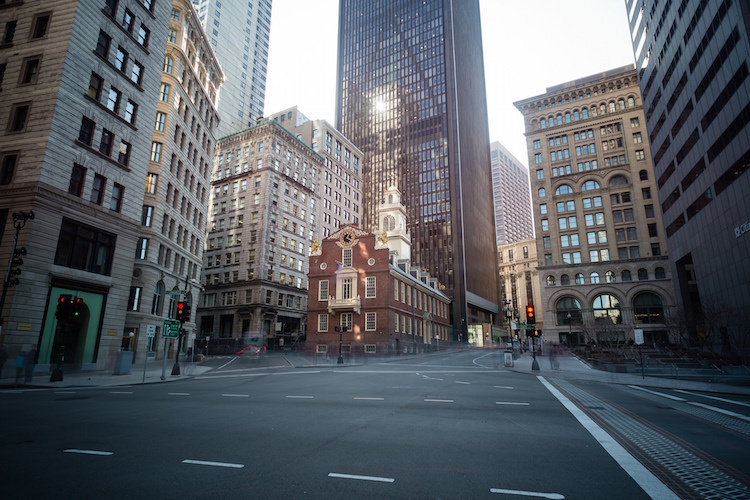
Do you want to get better at creating long exposure photos? Long exposure photography is famous for tranquil and serene landscape shots, but when engaging in this type of photography there are many pitfalls that can ruin your shots. Below you will find a list of 6 common mistakes and how to avoid them. Shaken and Blurred Photos Even though Continue Reading

The post 6 Mistakes to Avoid in Long Exposure Photography appeared first on Photodoto.


Photodoto

 
Comments Off on 6 Mistakes to Avoid in Long Exposure Photography

Posted in Photography


How to Understand Depth of Field to Avoid Blurry Photos

21 Sep

Last week we released our brand new course – Photo Nuts and Shots which is all about teaching the tools, techniques and thought processes for creative photography. It’s by on of our most popular ebook authors, Neil Creek and features over two hours of video teaching.

We asked Neil to create this course as he has a natural knack of explaining technical concepts in a way that makes the intricacies of photography easy to understand.

We’re so convinced that this course will help you that we want to share a couple of minutes from one of the modules about avoiding blurry images with you here today.

Neil Creek runs through an additional 35 minutes of golden focus advice in this lesson – available in full when you purchase the course online today.

Keep in mind that this is just one of ten creative photography lessons included in Photo Nuts and Shots.

So you’ll not only discover practical tips and tricks for producing tack sharp photos, but get step-by-step guidance on:

  • Using light effectively
  • Avoiding and embracing lens flare
  • Composition techniques
  • Choosing creative exposure settings
  • Thinking flexibly on location
  • And much more!

With Neil’s comprehensive demonstrations and easy-to-understand teaching style, it’s like having your very own professional photography mentor.

All packaged in over two hours of streamable and downloadable video content for the terrific introductory price of USD $ 39. That’s 33% off!

Don’t miss out – take the full course today.

We’ve extended the 33% saving to our first course, Photo Nuts and Bolts, too (although you can certainly take one without the other). So both are USD $ 39 each, but for a limited time only. And you can rest assured that all of our video courses come with a 60-day money-back guarantee.   

googletag.cmd.push(function() {
tablet_slots.push( googletag.defineSlot( “/1005424/_dPSv4_tab-all-article-bottom_(300×250)”, [300, 250], “pb-ad-78623” ).addService( googletag.pubads() ) ); } );

googletag.cmd.push(function() {
mobile_slots.push( googletag.defineSlot( “/1005424/_dPSv4_mob-all-article-bottom_(300×250)”, [300, 250], “pb-ad-78158” ).addService( googletag.pubads() ) ); } );

The post How to Understand Depth of Field to Avoid Blurry Photos by Darren Rowse appeared first on Digital Photography School.


Digital Photography School

 
Comments Off on How to Understand Depth of Field to Avoid Blurry Photos

Posted in Photography


2 Clumsy Mistakes To Avoid When Meeting With Potential Customers

31 Aug

You recently received an inquiry from someone who really likes your work, is interested in hiring you for a shoot, and wants to meet in person (or on the phone) to discuss more details. Naturally, you’re pretty excited. The thought of booking an event is something that thrills all of us. Then, as soon as the meeting starts, the two cardinal sins of salesmanship rear their ugly heads. What are they?

Talking too much and not listening enough.

Two Clumsy Mistakes Banner

Sure enough, once the prospect asks you a question, it’s as if you’ve suddenly been put in front of a classroom with the responsibility to lecture on photography for the next 25 minutes, flood gates thrown open. And because you want so badly to make the sale, you don’t leave anything out – linking your statements from one benefit to the next, emphasizing personal strengths, advantages, until you’ve suddenly dominated the conversation with what YOU wanted to say and talk about, not what THEY needed to hear.

This is the first massive mistake, and is actually the primary cause for the second mistake. Whether you are just starting to charge for your photography services, or wanting to increase and grow your existing photography business, you cannot allow yourself to command the conversation. When you do this, you miss uncovering the real concerns of the client, what they really want in the end, and ultimately it makes them feel as though they weren’t really heard. Remember, it’s not about YOU – it’s about THEM.

One way to turn this scenario around is to start asking them questions, turn the table. Get them talking about what their vision for the shoot is, what concerns they may have, how they view the end result. A great trick to get them to start talking is to say something like this, “____ (name), I’m fully prepared to discuss the event/project in detail with you, but first I want to get your perspective on it so that we can focus our time together on the things that interest you most.”

Meeting Cafe

By announcing that you’re prepared, you demonstrate your competence and responsibility – and by demonstrating your preparation, you build immediate credibility. Furthermore, by inviting your customer to articulate what’s most important to them, you recognize and validate their importance. In other words, it shows that you care about their thoughts and concerns, and that you want to work together to provide a solution that works for both of you.

The next step is to keep them talking. Again, this is all about them, not you. An easy way to do this is to keep asking questions that are easy to answer such as:

  • Tell me more about
  • What else should I know about?
  • Could you please expand on..?

It’s imperative that you uncover as many of their fears, concerns, wants, desires as you can. Consider asking questions like:

  • What worries you most about this?
  • I can tell that you are frustrated about that – how come?
  • You mentioned that you tried that in the past. Why didn’t it work so well that time? What could have been done differently?

Meeting Consult

The primary benefit of asking all these questions is to uncover what’s really important to them. This is the treasure chest, what they are really after. Once you know what’s most important to them, you can then frame your offer according to the specific desires of that client, which will skyrocket your chance of booking the shoot.

But all of these questions are worth nothing – if you don’t listen to what they’re saying. There are four primary elements to Active Listening:

  1. Attentive body language (nod, make eye contact, smile, etc.)
  2. Verbal attends (uh-huh, okay, sure)
  3. Ask leading questions (open-ended questions that encourage them to talk more)
  4. Restating back to the person what they just said

Meeting

Active Listening is not simply waiting for your turn to talk, and it’s certainly not interrupting them to demonstrate that you already know what they’re talking about. Active Listening is nothing more than allowing the customer to completely share their story with you, then playing back that story to them asking for confirmation and clarification. “Is that right? Did I miss anything?”

With any new skill, it takes time to get down pat. But this is something that will have an immediate effect on your ability to book more events because you are validating the concerns of your potential clients, and linking your services to their exact wants and goals.

googletag.cmd.push(function() {
tablet_slots.push( googletag.defineSlot( “/1005424/_dPSv4_tab-all-article-bottom_(300×250)”, [300, 250], “pb-ad-78623” ).addService( googletag.pubads() ) ); } );

googletag.cmd.push(function() {
mobile_slots.push( googletag.defineSlot( “/1005424/_dPSv4_mob-all-article-bottom_(300×250)”, [300, 250], “pb-ad-78158” ).addService( googletag.pubads() ) ); } );

The post 2 Clumsy Mistakes To Avoid When Meeting With Potential Customers by Mark Thackeray appeared first on Digital Photography School.


Digital Photography School

 
Comments Off on 2 Clumsy Mistakes To Avoid When Meeting With Potential Customers

Posted in Photography


5 Ways to Avoid Problems and Conquer Summer Photography

20 Aug

I’m a big fan of summer. In fact, I dislike winter greatly, and my favorite season is spring. But summer is probably number two on my favorite season list. Summer is great because it’s not cold. But it can also be so hot that you may walk a couple steps during a hot and humid day and return drenched in sweat.

Not cool, sun – not cool.

15_June_05_NxNW2015__DSC5091.dng

But in all seriousness, summer can be fantastic for photography because you can literally go out anytime with shorts and a t-shirt. In a way that’s liberating. In the winter you’re wearing layers upon layers; in the spring you may be wearing rain gear more often than not.

With this all said, I want to share some things to avoid during summer, and ways to conquer those avoidances. With these tips, you can improve your summer photographs.

1. Carry Less

Quite often photographers carry so much gear when they’re out making photographs. But how much of that is really necessary?

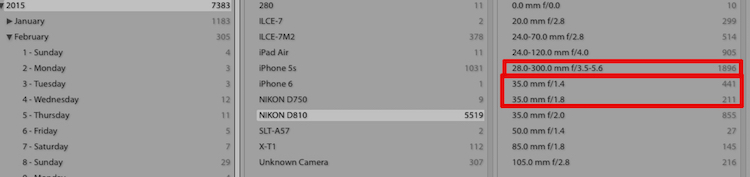
Look at your Lightroom catalog by using the Metadata Library Filter. Filter by the past year or two, and see what lenses you use the most. You can also dig in deeper by using the Lightroom Dashboard website to determine your most common focal lengths.

Lightroom Metadata

The Lightroom Library Filter for Metadata

Once you know which lenses you use the most, stick with those.

For example, as I’m writing this I have my bag packed for a huge photowalk tomorrow in New York City. I’m only bringing my 35mm lens for most of the walk and the 28-300mm lens for distance. I could bring others, but why? I know from experience that I don’t need others for this type of event (photowalk).

Carrying less means a lighter camera bag, which means less struggle in the heat.

2. Wear Less

I mentioned in the intro that in the summer you can wear less. On hot summer days I am outside photographing in shorts and a t-shirt. I might keep a Scottevest jacket with me (rolled in a ball in my bag) just in case it rains.

I won’t be wearing flip-flop,s because those are horrible for standing or walking on for extended periods of time. But I will be wearing low-top sneakers made for walking. But before my sneakers are on, I will also have socks designed for hot temperatures, and walking. Arch support is extremely important, and in the summer if you don’t have proper sizing or support then your feet will feel it.

Don’t forget a hat as well. The hot summer sun can easily cause sunburn. Usually I wear a simple hat, but if I’m traveling I keep my Tilley hat with me, which covers my ears and neck at the same time as my head.

Tilley Hat

Me in my Tilley hat. Photo by Joseph Hoetzl

The hat’s brim is also very soft and flexible, so it doesn’t get in the way when you hold your camera up to your eye.

3. Squint Less

With the sun comes harsh light, strong light, and blinding light. The last thing you want is for photographs of people squinting. My suggestion for this problem is to avoid photographing in the direct sunlight, and instead, find a shaded area as there you still get a lot of light, but it’s diffused.

portrait-direct-sunlight

The other option is to still photograph in direct sunlight, but to add your own diffusion. Lastolite and many other companies make products perfect for that job.

portrait-shade

On your side of things (the photographer), wear sunglasses, and remove them as needed when looking through your camera’s viewfinder or at the LCD.

4. Go Sunless

The summer is an amazing season to photograph during sunrise or sunset. Don’t plan a photo session during the strongest sunlight, like noon. Instead wait until sunset like 7:00 or 8:00 P.M. The sunset can make a great backdrop, and can produce really fun golden light.

If you are photographing portraits, then bring a reflector or flash to add some fill-light on your subjects.

5. Let Less Light Into Your Camera

The last tip is to let less light into your camera using neutral density filters. Sometimes the sun is just so harsh that your can’t get your camera’s settings where you want. By using a neutral density filter you can extend the shutter speed for landscape photos or moving objects, even in harsh sunlight.

For portraits neutral density filters enable apertures like f/2.8 even in direct sunlight, because the filter is blocking light.

Neutral Density - Long Exposure Mid Day

A long exposure made just around noon on a hot day, made possible by using neutral density filters.

I have now shared five ways for improving your summer photographs. Remember that if you are comfortable, then your photographs will improve. If you are overheated, then that worry, stress and discomfort will come through in your work.

So get comfy and enjoy the rest of the summer weather.

googletag.cmd.push(function() {
tablet_slots.push( googletag.defineSlot( “/1005424/_dPSv4_tab-all-article-bottom_(300×250)”, [300, 250], “pb-ad-78623” ).addService( googletag.pubads() ) ); } );

googletag.cmd.push(function() {
mobile_slots.push( googletag.defineSlot( “/1005424/_dPSv4_mob-all-article-bottom_(300×250)”, [300, 250], “pb-ad-78158” ).addService( googletag.pubads() ) ); } );

The post 5 Ways to Avoid Problems and Conquer Summer Photography by Scott Wyden Kivowitz appeared first on Digital Photography School.


Digital Photography School

 
Comments Off on 5 Ways to Avoid Problems and Conquer Summer Photography

Posted in Photography


Options and Choices for Photographers To Help You Avoid Injury

10 Jul

Have you been noticing little aches and pains lately, especially around your arms and back? If you do a decent amount of photography, your camera may be the culprit. While photography is largely seen as a hobby or art form, make no mistake about the fact that lugging gear around can be serious physical activity, especially as you accumulate more gear over time.

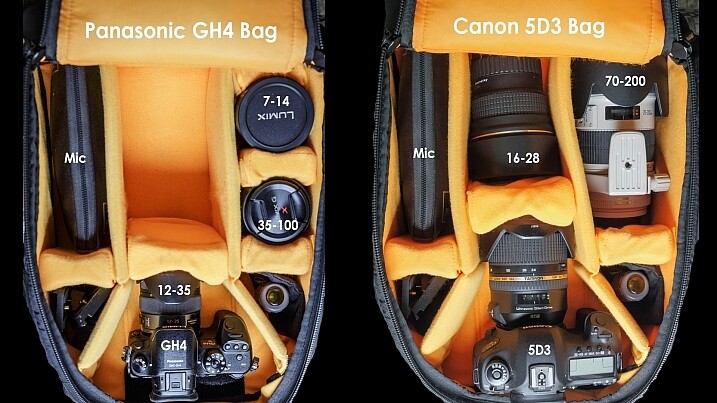
Consider this: a Canon 5D Mark III body only weighs 1.9 lbs (860 grams), and a Canon 70-200 f/2.8 telephoto lens weighs 3.28 lbs (1.49 kg). Combine the two, and you’ve got over 5 lbs of gear to tote, not to mention the added weight of extra lenses, tripods, lighting gear, etc. As a result, it’s not uncommon for longtime photographers to develop chronic pain in their backs, wrists, shoulders, and arms due to the stress of carrying so much gear. The bottom line is that being a photographer can slowly, but surely, lead to chronic injuries over time if you don’t take proper precautions. Here are a few tips to help keep your body in top shape while toting camera gear around, and avoid injury.

Dave Dugdale

By Dave Dugdale

Choose the right gear

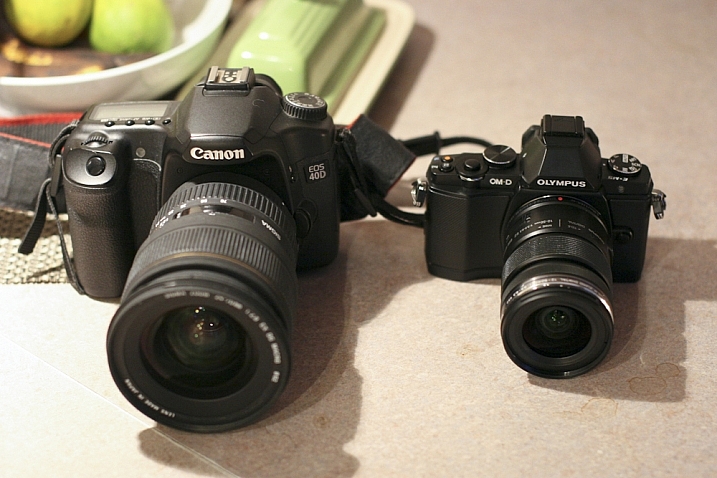
If you’re just starting out in photography or considering replacing your current camera gear, keep in mind that there are many smaller, lighter camera systems that may be easier on your body. Mirrorless cameras from camera manufacturers such as Sony and FujiFilm (as well as Olympus and Panasonic) are becoming renowned by both amateurs and professionals for their superior image quality and significantly smaller camera bodies and lenses. Depending on your photography needs and budget, you may want to invest in smaller, more ergonomic gear, that won’t weigh your body down.

Peter Anderson

By Peter Anderson

Select the best bag and accessories

Camera bags come in all flavors today, ranging from messenger bags, backpacks, and even stylish purses. While fashion can certainly impact your camera bag choice, be sure to also consider how comfortable that bag will be in the long run. Medical professionals often recommend selecting bags with symmetrical designs that equally distribute the weight across your body. This usually means opting for a backpack, or rolling bag with wheels, to move large amounts of equipment from one photo shoot to the next. If you choose a bag that will be carried on your shoulders or some part of your body, be sure not to overload it with too much gear. As a rule of thumb, a truly ergonomic bag you carry on your body should not weigh more than 10 percent of your body weight, and you should not carry a heavy bag for longer than 20 minutes at a time.

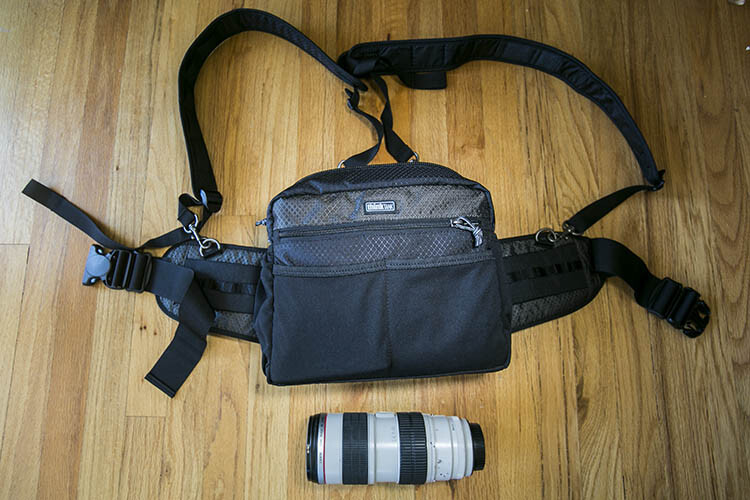
Think Tank Changeup Bag photographer ergonomics

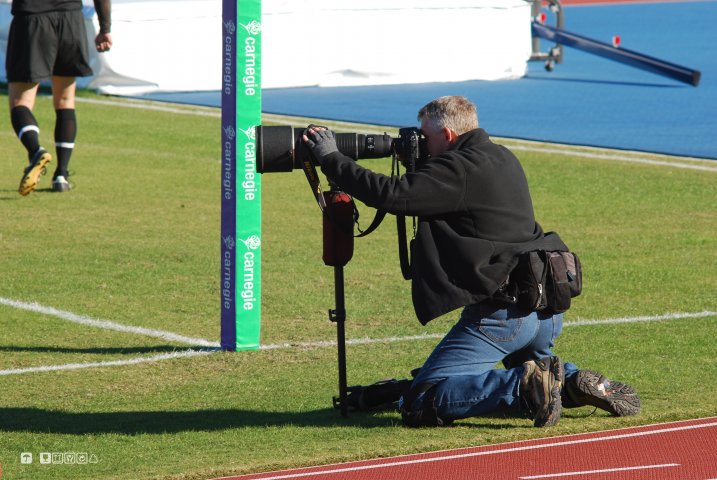
While actively shooting, consider investing in camera accessories that will help alleviate camera weight in the long run. Some options include monopods for sports or wildlife photographers, ergonomic camera or wrist straps, and holster or belt pack systems (like the ThinkTank one shown above). In summary, choose one or several accessories that will help distribute your gear’s weight between your hips and shoulders so that one part of your body doesn’t bear the bulk of the burden.

Practice good ergonomics while shooting

1. Correct your posture

One of the leading causes of injury among photographers is poor posture. If you plan to spend long hours at a photo shoot, keep the following posture tips in mind:

  • First, always make sure to protect your lower back by keeping your pelvis in a neutral position and your core muscles (abs, side, and back) taut.
  • Secondly, make sure your knees are slightly bent (not locked) and your feet are spread at least shoulder-width apart, forming a wide base of support, not unlike the legs of a tripod.
  • Finally, always be mindful of your shoulders, making sure they are dropped down and pulled back, and keep your chin tucked in. These two posture tips will help avoid common neck and back pain as well as headaches that commonly arise among photographers.
DeusXFlorida (7,110,780 Views) - Thanks Guys!

By DeusXFlorida

2. Take frequent stretching breaks

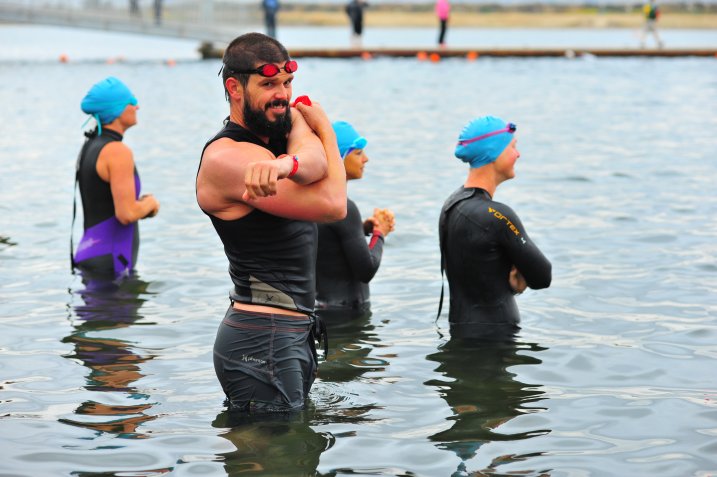
When you have a moment to rest during a shoot, don’t just sit down. Remove your gear, and stretch your muscles and joints.Rotate your head in a clockwise and counterclockwise motion to stretch out your neck. Do the same movement with your hips to loosen your lower back. Reach high into the sky and rotate your arms like a windmill to reach your shoulders and upper back. Finally, do some squats and lunges to keep your quadriceps and legs supple. Above all, remember to not just focus on your arms and wrists. If you’re a photographer who likes to shoot from every possible angle, this means you’re likely squatting, kneeling, bending, and rotating nearly every part of your body to get those shots. As a result, pay equal attention to stretching out all the major muscle groups in your whole body.

Chris Hunkeler

By Chris Hunkeler (stretch often)

Don’t forget about post-processing ergonomics

Good posture and ergonomics shouldn’t be forgotten once you’ve put the camera down. Considering all of the time you spend in front of your computer, offloading memory cards, sorting and editing photos; you’ll want to make sure your work station is also suited for maximizing your posture. Suggested accessories include a standup desk, computer monitor risers, ergonomic mouse and keyboard, and foot stools to elevate and correct your posture while in a seated position.

Take care of your body as well as you take care of your gear. You can replace a broken camera, but not a broken you. If you have any other tips for avoiding injuries please share in the comments below.

googletag.cmd.push(function() {
tablet_slots.push( googletag.defineSlot( “/1005424/_dPSv4_tab-all-article-bottom_(300×250)”, [300, 250], “pb-ad-78623” ).addService( googletag.pubads() ) ); } );

googletag.cmd.push(function() {
mobile_slots.push( googletag.defineSlot( “/1005424/_dPSv4_mob-all-article-bottom_(300×250)”, [300, 250], “pb-ad-78158” ).addService( googletag.pubads() ) ); } );

The post Options and Choices for Photographers To Help You Avoid Injury by Suzi Pratt appeared first on Digital Photography School.


Digital Photography School

 
Comments Off on Options and Choices for Photographers To Help You Avoid Injury

Posted in Photography


Photographing in Crowded Locations – 5 Tips to Avoid the Masses

25 Jun

Travel photography is certainly one of the most rewarding experiences you, as an image-maker, can have. You get to combine visiting amazing places, learning about other cultures, and, of course, your passion for taking photos, all at once.

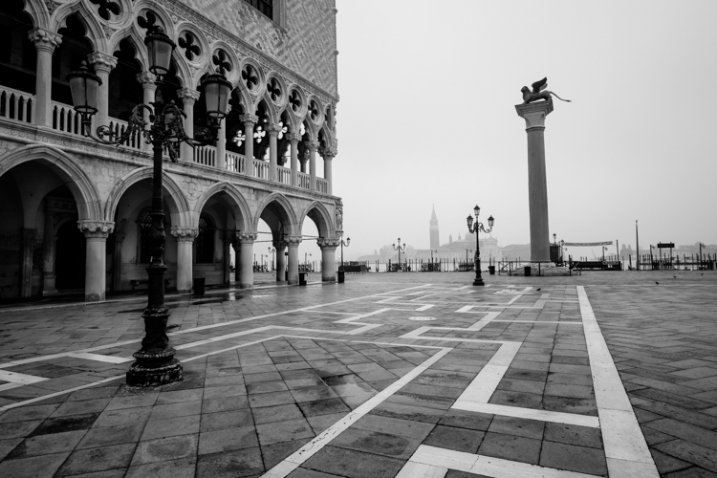
VENICE, ITALY - CIRCA MAY 2015:  Piazza San Marco and Doge's Palace with San Giorgio Maggiore behind.

Piazza San Marco and Doge’s Palace with San Giorgio Maggiore behind – Venice, Italy

However, certain famous locations, or populated cities can be frustrating. You arrive there to find out they are always crowded with visitors and tourists, making it almost impossible to shoot clean photos without intrusions. Granted, locations like these have been photographed millions of times by somebody else before, but I know you can’t consider it your very own until you’ve pressed that shutter button. Here are some suggestions to avoid becoming disgruntled and frustrated in crowded locations, so you can return home from your next trip with memorable images.

1) Shoot up

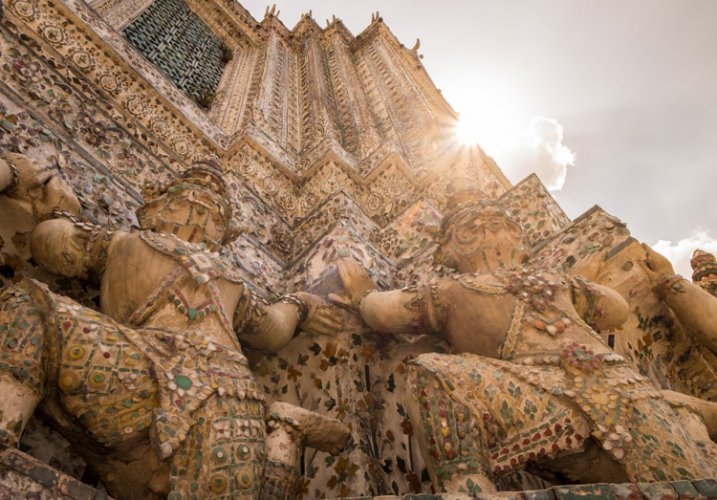
A good way to avoid the masses is to photograph above their heads. Pointing your camera up makes an interesting and different angle. There are plenty of subjects, and architectural elements, that can be easily recognized when shooting this way. Landmarks such as national buildings, memorials, or iconic temples, just to name a few, are ideally suited for this as they can be effortlessly recognized by your viewer without showing them in their entirety.

BANGKOK, THAILAND - CIRCA SEPTEMBER 2014: Detail view of Wat Arun, a popular Buddhist temple in Bangkok Yai district of Bangkok, Thailand, on the Thonburi west bank of the Chao Phraya River

Detail view of Wat Arun, a popular Buddhist temple in Bangkok, Thailand

2) Shoot details and close-ups

Get closer and make details stand out. One the best themes to try this one on is food. Epicurean photos are often used in travel publications to illustrate local customs and traditions. This is easy, as you can just aim your camera straight and click. You can photograph your own food during meals, or walk into a market and search for interesting colors and textures. You can also try close-ups on reflective surfaces, like windows, or water reflections in the streets. The idea is to concentrate on small details that can also help to tell your story.

Vegetables in Hanoi

Vegetables in Hanoi

3) Go early

Beat the crowds by getting there right at dawn. This is not for everybody – but no pain, no gain. The quality of the morning light, and beautiful sunrises, are the main reasons why most landscape and nature photographers love to work at this time of the day. But you’ll also find that in popular destinations, most of the tourists are sleeping, so this is your opportunity to find empty streets. Go out and take photos early, while nobody is there, then get back to your hotel and catch up with breakfast.

4) Go late

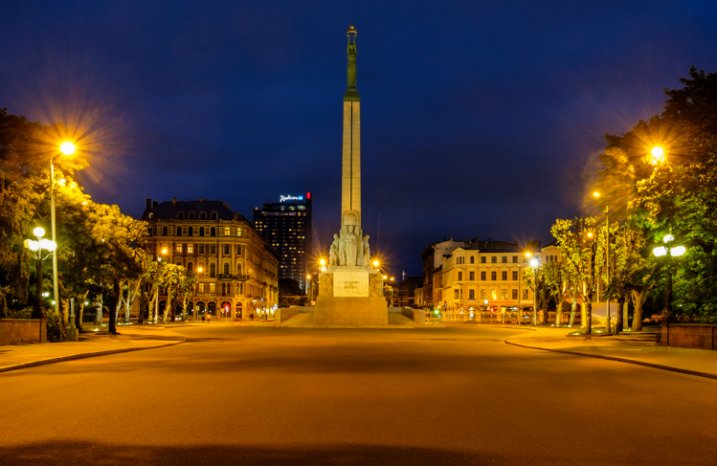
If you are not a morning person, you still have chances to take great photos. Surely this works the opposite of going early, but in most cases, you’ll find empty quarters as well late in the day. You can take advantage of strolling around well past dinnertime and shoot the sought-after spaces with nobody in sight. Better yet, do like the pros and photograph both instances for better results, and more options for better pictures.

Riga Freedom Monument

Riga Freedom Monument, Latvia

5) Photograph the people

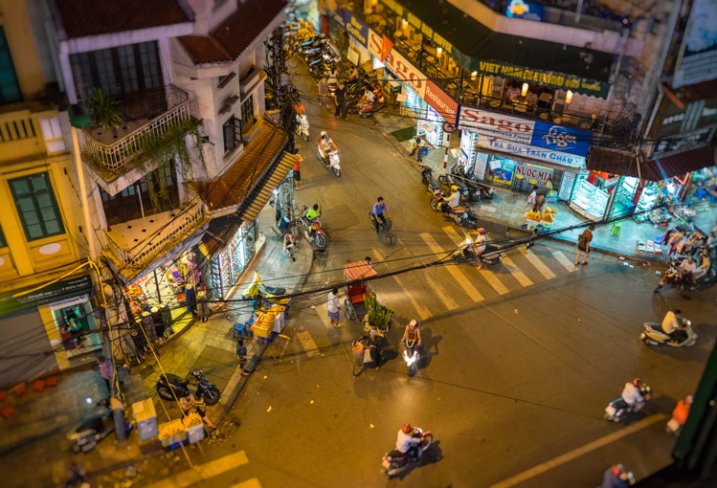
If nothing else works out, you can just photograph the people. After all, what better way to show sense of place than documenting the locals, or even the flocks of tourist enjoying their thing? You see, it’s okay to try to avoid conglomeration, but in some instances it just can’t happen, or simply won’t reflect the true spirit of the destination.

Corner Street in Hanoi

Corner Street in Hanoi

Needless to say, there are several other ways to address the matter. You are more than welcome to share in the comments below your photos and experiences in similar situations, and what you find works best for you.

googletag.cmd.push(function() {
tablet_slots.push( googletag.defineSlot( “/1005424/_dPSv4_tab-all-article-bottom_(300×250)”, [300, 250], “pb-ad-78623” ).addService( googletag.pubads() ) ); } );

googletag.cmd.push(function() {
mobile_slots.push( googletag.defineSlot( “/1005424/_dPSv4_mob-all-article-bottom_(300×250)”, [300, 250], “pb-ad-78158” ).addService( googletag.pubads() ) ); } );

The post Photographing in Crowded Locations – 5 Tips to Avoid the Masses by Daniel Korzeniewski appeared first on Digital Photography School.


Digital Photography School

 
Comments Off on Photographing in Crowded Locations – 5 Tips to Avoid the Masses

Posted in Photography


How to Avoid Loss of Your Digital Photos

24 Jun
Mariam S

By Mariam S

Nowadays almost all photos are taken using various digital devices. In the era of paper photos, the main photo destructors were natural disasters like fires, and also such a phenomenon as discolouration. Modern digital photos face mainly the same dangers – fires, floods, and so on. Surprisingly, digital photos also have some equivalent to discoloration – degradation of a photo storage device over time. However, apart from these dangers inherited from paper predecessors, digital photos are subject to new specific dangers, for example: loss of photos due to a storage device failure. Let’s discuss in more detail what dangers digital photos might face and how you can avoid many of them.

Generally speaking, there are three bottlenecks where you can lose photos – when taking photos, when transferring them, and in storage.

#1 Loss of photos in camera

Immediately after you have taken a photo there is only a single copy of it. If this copy is lost, you can in no way get it back. In all fairness, such cases are relatively rare. Even if data recovery software doesn’t help, as a last resort you can send a memory card to a repair lab in the hope that the hardware specialists can help. However, if it fails, all you have left to do is to say “goodbye” to the photos because there was only a single copy of them.

For example, you shoot a football match and then on the way home lightning hits your camera and all that was left was a pile of ashes. This is what contracts call “force majeure” and therefore nothing can be done. However, history has some funny stories. A man had dropped a camera into the sea; a year later some divers raised it and surprisingly the photos were readable. Divers were even able to identify a camera owner by the photos and then returned him his “property” (read the full story here).
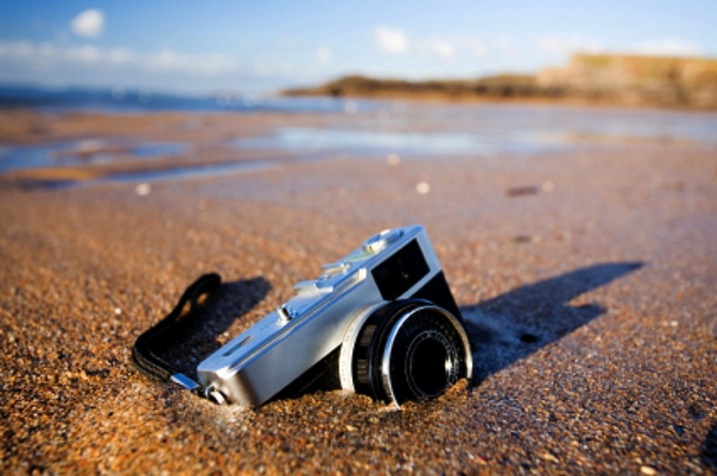
Image 2

Tips

Here, there is little advice for you because surely you know better how not to drop the ball, say due to a camera failure or something like that, when shooting a unique event.

There are some tips on memory card health that will help though:

  • How to Spring Clean Your Memory Cards
  • The Best Way to Delete Photos From Your Memory Card

Also remember to turn off your camera before removing or changing your memory card or battery. Not doing so can result in a card crash and lost images.

#2 Transferring photos

The process of transferring digital photos from your camera to computer is akin to producing paper photos from the negative. In both cases you duplicate photos from a single copy you have, whether it would be a negative from an old camera, or a flash card in a modern digital device.

In the film days, the process of transferring photos to new data storage was laborious, took a lot of time, and required certain skills and equipment; with digital photos the process becomes radically simplified. However, strange as it may be, nowadays the chance of losing photos during transfer is still significant.

Earlier, when developing film you had to stick to certain rules. Ignoring these rules inevitably resulted in destruction of photos. For example, one such rule says that all actions with negatives must be performed in a darkroom. In case of digital photos there are also some rules, however, people tend not to follow them because ignoring them doesn’t always lead to loss of photos. Those “less fortunate” people who neglected the rules and lost their photos, then have to bother with photo recovery.

Let’s look at the rules:

  • Always use the “safely remove hardware” option when ejecting a memory card or any other removable device from a computer. Otherwise, the operating system may not have time to handle data on the removable device properly. That sometimes can lead to the RAW file system issue, the typical symptom of which is when Windows shows you the message like this:

    Image 3 small
  • Don’t eject a memory card from a working camera, for the same reasons as in the previous case.
  • Always monitor the battery charge. If battery runs low at the wrong time, it may result in a file-system failure on the memory card. Generally, it is better to use a card reader device for transfers since it has no such problems.
  • Transfer photos regularly. By doing so, in the worst-case scenario would be that you lose only you’re latest photos, rather than an archive for the entire year.

However, it should be noted that all listed above typically don’t destroy photos themselves. It just leads to a file-system failure which is pretty well cured by data recovery software, given that you have not formatted a card.

#3 Storage

In general, loss of data in storage is bad form. Immediately after taking pictures you have just one chance to copy them, and you still can write data loss off to an “irresistible force of nature”, for example. Once you have enough time to create a copy of the photos, however, data loss is less excusable.

Charles Wiriawan

By Charles Wiriawan

Do not trust only one storage technology

Do not rely upon only one storage technology, even if you think it is very reliable. No data storage technology, be it a fault-tolerant RAID or modern Storage Spaces from Microsoft, can replace a good old backup. More than that, a proper backup procedure requires an off-site copy, maintained in some physically separate location. This is to prevent simultaneous loss of both original,
and backup copies to a fire or theft.

Tips

  • Off-the-shelf NAS devices like Synology and QNAP have several indicators that can be green, yellow, and red. These indicators significantly simplify monitoring of the device “health” – just remember what typical indications are, then glance at the NAS at least once a day. Extinguished or red lights are a reason for concern.
  • If you store photos on a Windows PC, use special software to monitor your disk state. S.M.A.R.T. is a technology used in hard drive self-diagnostics. Fairly often, it can predict hard drive failure ahead of time. A monitoring tool requests S.M.A.R.T. status of the device periodically and if S.M.A.R.T. data deviates from the normal values, the tool will alarm you so that you can back up the data.
  • Check the S.M.A.R.T. state of your hard drives at least once a month.

Photo recovery tips

If you have lost some photos and are looking for a way to recover them, there is no need to panic because photo recovery from a camera memory card is one of the easiest, and well-established data recovery tasks. All you need is to download and install any data recovery software – there exist both paid and free options – select a memory card from the device list, and see what it brings up.

If you are not satisfied with the quality of the recovery, it makes sense to try several tools since recovery algorithms used in various software may differ in some way. Note that data recovery tools, for the most part, are read-only so they will not destroy anything on your card. Windows CHKDSK is the significant exception to this rule – it sometimes does make matters worse.

Below are some tips on how to achieve the best result when recovering photos from a memory card:

  • Stop using a card once you see that something is wrong. If the camera’s behaviour is unusual, stop taking any new photos until you clear up the situation with the existing photos.Image 4
  • If possible, use a card reader device when recovering data. It is stable and provides better performance than a cord and direct connection to the camera.

    Matthew

    By Matthew

  • Do not take new photos once you realize that you need to recover data. Usually, with each new photo you lose a capability to recover one previously deleted photo.
  • Ascertain in advance what your camera actually does when you format a card. If the camera uses a “complete” (also called low-level) format by default, change it to a “quick” format. Thereby, if you format a card accidentally you still can recover photos from it; after a complete format, all the data will be overwritten and not recoverable.

Bonus – discolouration

In early days, when archives were stored on magnetic tape, it was critical that the tapes must be rewound regularly. Otherwise, the data became unreadable because magnetic fields mixed between adjacent layers of tape (what was then known as crosstalk effect).

Some place the photos on CDs and then do not check them for years. In five years one can easily find that at best only half of the CDs are readable. CDs are not suitable for long-term storage and should only be considered as one of the backup options for a short period of time.

Those who keep their photos on old hard disks, in ten years will not be able to find a proper connector anywhere else except in a museum. If you are going to store photos for a long time you should use the most modern devices to increase the chances of find a compatible setup in the future. This is sometimes called “future-proofing”. However, you should not bet on the ultramodern technologies since it may happen that the technology does not stick and therefore, say in five years, you will not be able to find compatible components (think beta versus VHS).
Sophia Maria

By Sophia Maria

Generally speaking, digital discolouration differs from analog (paper) discolouration, only in that you can discern at least something on a discoloured paper photo, while a digital picture is destroyed immediately and completely.

Image 5

So some care and planning on your part can help you avoid losing your images, or in the worst-case scenario, quickly able to recover them. What’s your disaster avoidance plan?

googletag.cmd.push(function() {
tablet_slots.push( googletag.defineSlot( “/1005424/_dPSv4_tab-all-article-bottom_(300×250)”, [300, 250], “pb-ad-78623” ).addService( googletag.pubads() ) ); } );

googletag.cmd.push(function() {
mobile_slots.push( googletag.defineSlot( “/1005424/_dPSv4_mob-all-article-bottom_(300×250)”, [300, 250], “pb-ad-78158” ).addService( googletag.pubads() ) ); } );

The post How to Avoid Loss of Your Digital Photos by Alexey Gubin appeared first on Digital Photography School.


Digital Photography School

 
Comments Off on How to Avoid Loss of Your Digital Photos

Posted in Photography


Chromatic Aberration – What is it and How to Avoid it

19 Apr

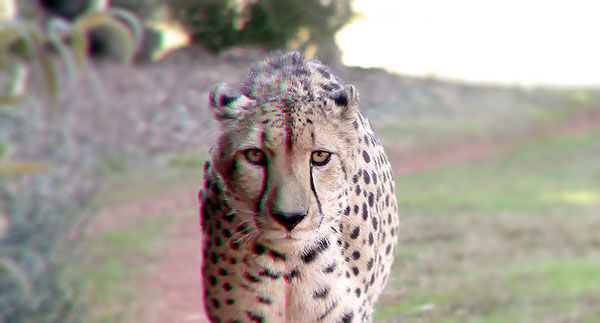
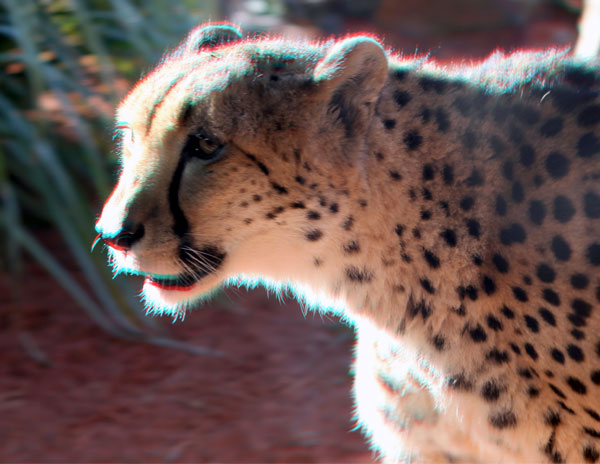
OziRig Cheetah Chromatic Aberration

In the photo above, you may notice that the colors on the left-hand side appear to be showing fringes of green and red along the sharp edges of the subject; this is what is called chromatic aberration.

What is chromatic aberration?

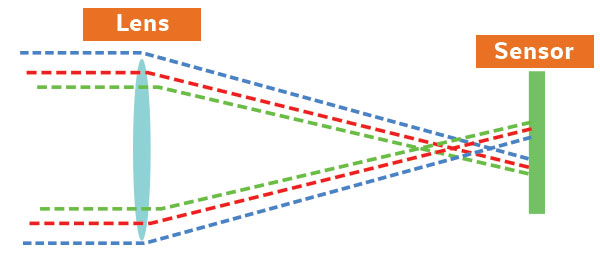
Chromatic aberration (also known as color fringing or dispersion) is a common problem in lenses which occurs when colors are incorrectly refracted (bent) by the lens, resulting in a mismatch at the focal point where the colors do not combine as they should.

To help understand this a bit better, remember that the focal plane is your sensor’s point of focus; where all the light from your lens should rejoin together to be correctly detected by your sensor. The thing is, depending on the construction of your lens, your chosen focal length, and even the aperture that you’ve used, certain wavelengths (colors) may arrive at points before or after where the focal plane sits.

Ozirig ca dlsr illustration

When this occurs, you end up with the telltale color fringing around edges in your photograph; and although you can remove low levels of chromatic aberration in Photoshop and Lightroom, the reality is that each extra moment you spend on touching up a photograph is one moment less you have to get something else done!

OziRig Cheetah Chromatic Aberration Comparison

Why does chromatic aberration occur?

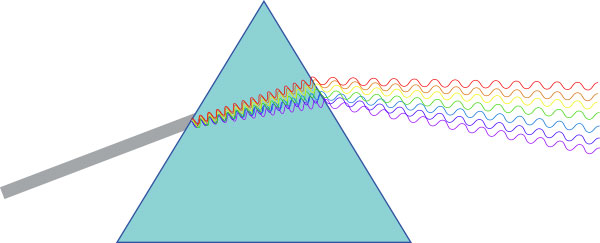
Chromatic aberration happens because your lens acts as a prism; bending light depending on the various properties of the glass, and much like the triangle-shaped one made famous by Pink Floyd, colors passing through it are split at different angles.

Ozirig ca prism diagram

Remember that light is actually made up of several different wavelengths (colors). So, for your camera’s sensor to detect the combined color of light, your lens needs to make all wavelengths of that particular ray hit the exact same point on your sensor.

This sounds simple, but you need to take into account the fact that various wavelengths (and thus various colors) will be striking your lens all at once and that each of these rays will behave slightly differently depending on the glass that it is passing through.

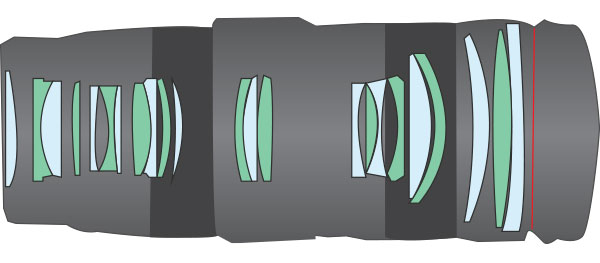
The feat of engineering required to correctly align all of these different light rays is usually achieved by the manufacturer’s use of a lens array. In fact, if you were to pull your lens apart, it wouldn’t be surprising if you found upwards of 16 lens elements all designed to correct for various things along the light’s journey between your lens and your sensor.

OziRig Lens Elements

Unfortunately, this is also where chromatic aberration tends to rear its ugly head. Hidden within the design of these lens elements are defects – either in the glass or the design of the lens itself – which under specific conditions may cause your photos to exhibit this type of aberration.

I’m not trying to say that you need to have a pro-level lens, in fact, the key point to keep in mind here is that all lenses suffer from chromatic aberration in one form or the other. What matters is whether or not your lens exhibits visible chromatic aberration, and whether in your particular case this is a deal-breaker or not.

Avoiding chromatic aberration defects

Chromatic aberration can actually be effectively removed in post-processing if you are shooting in RAW. However, good practice states that you should try and remove issues in-camera first, rather than creating more work down the line.

The good news is that if you are stuck working with a lens that exhibits some form of visible chromatic aberration there are several easy-to-understand strategies which can help you to remove or minimize the visible effect of it in your photos.

Avoid high contrast scenes

OziRig CA Cheetah High Contrast

Chromatic aberrations tend to flare up in high contrast scenes. Particularly guilty are shots against white backdrops, landscape shots against a bright sunrise, or, as in the example of this Cheetah, where the light source is behind the subject.

This means that sometimes there’s nothing to do except try and reframe your shot. Swap your backdrop out to something which better matches your subject’s primary color, or wait for more favorable lighting conditions. If you absolutely must capture this shot as-is, then swap over to RAW and get your fingers ready for the possibility that you may need to do some touch-ups in post-production.

Check your focal lengths

OziRig Chromatic Aberration Focal Length

Although it’s nice to have access to a wide range of focal lengths, the fact is that most zoom lenses will exhibit various aberrations at the shorter and longest extremes of their focal range. So being able to choose a different focal length will usually help to remove the issue of visible chromatic aberration.

Likewise, using a zoom lens at a wide angle will usually introduce not just chromatic aberrations but various other defects in your image. Instead, consider choosing a prime wide angle lens to handle the job, or, perhaps more practical for your case, make a panorama at a focal length that does not exhibit the chromatic aberration issue and then join the photos in post-production for a flawless result.

Stop down your aperture

OziRig CA Aperture

Although this will depend on the exact type of lens you are using, stopping down your aperture will usually help to play down the noticeable effects of most lens defects, including chromatic aberrations. Remember that you may need to consider dropping the shutter speed or boosting the ISO to compensate for the light loss if working in a non-studio setting.

If you have access to lighting or flashes, then be sure to experiment with the effect of boosting and adding in extra light.

Reframe your subject to the center of the image

OziRig Rhino CA Recrop

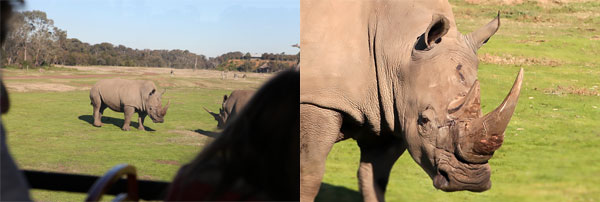
Chromatic aberrations tend to occur more frequently as you move further away from the center of the frame. This is generally as a result of the curvature of the lenses within the barrel. Therefore, being able to reframe your subject closer to the middle may help to reduce, or even completely eliminate, issues with chromatic aberration and other lens-based defects.

This means that you may need to crop your image after shooting to achieve the desired frame, which may be an issue if you absolutely have to maintain every pixel in your photo. If, on the other hand, you are working with small prints, or digital distribution, then the differences between resolutions are not as noticeable until you step down significantly.

So understanding chromatic aberration, how to avoid it, and what you can do about it will help you improve the final quality of your images. If you have any other tips or comments please share them below.

googletag.cmd.push(function() {
tablet_slots.push( googletag.defineSlot( “/1005424/_dPSv4_tab-all-article-bottom_(300×250)”, [300, 250], “pb-ad-78623” ).addService( googletag.pubads() ) ); } );

googletag.cmd.push(function() {
mobile_slots.push( googletag.defineSlot( “/1005424/_dPSv4_mob-all-article-bottom_(300×250)”, [300, 250], “pb-ad-78158” ).addService( googletag.pubads() ) ); } );

The post Chromatic Aberration – What is it and How to Avoid it by Joshua Burke appeared first on Digital Photography School.


Digital Photography School

 
Comments Off on Chromatic Aberration – What is it and How to Avoid it

Posted in Photography


4 Mistakes New Photographers Make and How to Avoid Them

01 Mar

Cameras are complex machines and to get the most out of them you need to know how they work. When you’re a new photographer shooting with a sophisticated camera for the first time, the complexity can be overwhelming. There’s just so much to learn! Now that I’ve been shooting for more than ten years, it’s interesting to go back to my early days and see the mistakes I made.

In this article we’ll have a look at four of my first DSLR photos and I’ll share what I know now that I wish I knew then, so hopefully you can learn from these mistakes.

Mistake #1 – not using exposure compensation

1/250sec f10 ISO100

1/250th of a second,  f/10, ISO100

The camera’s exposure meter will try to make the exposure “middle grey”. Since the camera has no way to tell how bright the subject is, middle grey is a good average bet. But when the subject is much brighter or darker, like the sky in this photo, it ends up getting it wrong. Today if I see a shot like this on the back of my camera, I know why it is under exposed and will adjust it by dialling in some positive exposure compensation. That would have made the clouds much brighter, and brought out details in the dark tree-covered hillside.

Mistake #2 – afraid to increase the ISO

1/30sec f5.6 ISO100

1/30th,  f/5.6, ISO100

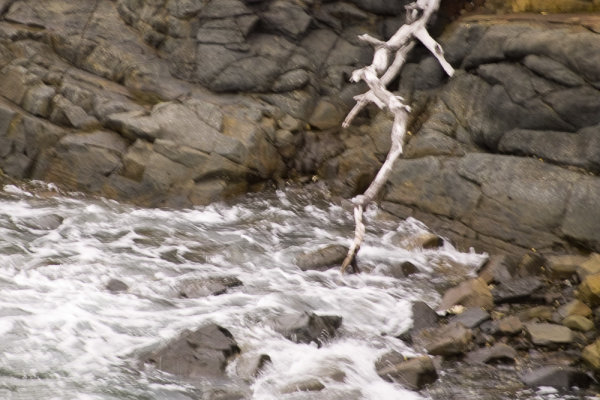
Towards the end of an overcast day, we arrived at a rocky shoreline while on holiday. I liked the texture of the rock, the white dead tree branch, and churning water. However there wasn’t quite enough light. At this stage I didn’t even know how to change my ISO, but even if I had, I’d heard that increasing it made your photo noisy. This was certainly true, especially of DSLRs 10 years ago, but 1/30th of a second at 200mm focal length just wasn’t fast enough. As a result there’s enough camera shake to ruin the photo. Today, even if I was still shooting with the old Sigma SD10 I had then, I’d know that it’s better to increase your ISO to get a shorter shutter speed, even if it results in more visible noise. A noisy photo is better than a blurry one.

Mistake #3 – not exposing for the highlights

1/200sec f10 ISO100

1/200th, f/10, ISO100

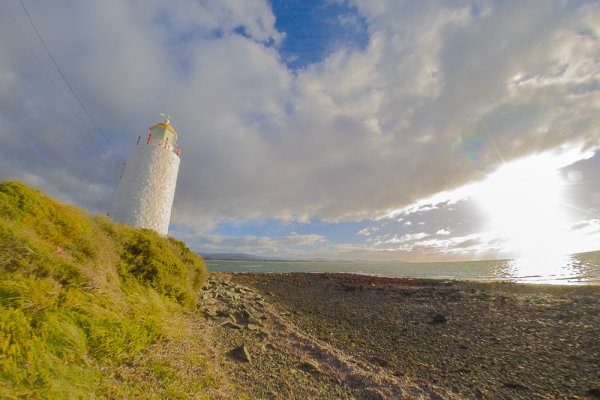
If some parts of the image are very bright, such as the sky and clouds around the sun in this photo, they can be “clipped” by the camera. This means that there is more brightness than the sensor can differentiate, and as such, whole areas of the photo are rendered as white with no detail. Once part of a scene is clipped, nothing can bring that detail back, and it can ruin a shot. Clipped highlights are unattractive and draw the eye in a negative way. In high contrast situations it can be really tricky to capture detail in the highlights and shadows at the same time, but because they draw the eye so much, it’s preferable to preserve detail in the highlights.

While the sun is always going to clip in a photo, preserving details in nearby clouds is possible. For this shot I should have dialled in some substantial negative exposure compensation. Even if this made the rest of the photo too under-exposed, because I was shooting in RAW, I’d still be able to bring out a lot of detail when processing the photo. That way only the sun would be clipped and the clouds and water would look much more natural.

Mistake #4 – not controlling depth of field

1/200sec f8 ISO100

1/200th, f/8, ISO100

I wanted to capture the gorgeous texture on this interesting rock, but still show enough of the background to give it context. The background however, is too in focus and ends up being a distraction, competing for attention with the rock, which should be the star of the photo. I was shooting in program mode (auto), and there was plenty of light. The camera realized this and chose an aperture of f/8. This was narrow enough to increase the depth of field so that the background wasn’t nearly blurry enough. If I was taking this shot today I would put the camera into aperture priority mode with the mode dial, and open the aperture wider. Possibly to its full width, which on this lens was only f/5.6. This would have blurred the background more, letting the rock get all the attention.

If I could go back and tell myself something when I was starting out, I’d emphasize the importance of shooting as often as possible, not to worry about making mistakes, and keep looking to other photographers (both online and in person) as a source of inspiration and learning. Finally, I’d tell inexperienced me that you will never ever stop learning.

How about you? What are the biggest things you learned (or are still learning about) to improve your photography?


pnbvideo_box.pngNeil is so invested in helping others to become confident with their cameras that he has created dPS’s very first online video course Photo Nuts and Bolts. From shutter speed, to aperture and exposure, Neil explains clearly so that you can start shooting with confidence…

googletag.cmd.push(function() {
tablet_slots.push( googletag.defineSlot( “/1005424/_dPSv4_tab-all-article-bottom_(300×250)”, [300, 250], “pb-ad-78623” ).addService( googletag.pubads() ) ); } );

googletag.cmd.push(function() {
mobile_slots.push( googletag.defineSlot( “/1005424/_dPSv4_mob-all-article-bottom_(300×250)”, [300, 250], “pb-ad-78158” ).addService( googletag.pubads() ) ); } );

The post 4 Mistakes New Photographers Make and How to Avoid Them by Neil Creek appeared first on Digital Photography School.


Digital Photography School

 
Comments Off on 4 Mistakes New Photographers Make and How to Avoid Them

Posted in Photography


5 Unforgiving Post-Processing Mistakes Every Bird Photographer Must Avoid

03 Nov

Post-processing is one of the most important steps in the image making process. It is in fact one of the most powerful tools to make your vision come true. The camera does not see the way you see your world and it is your responsibility to translate your vision into reality in post-processing.

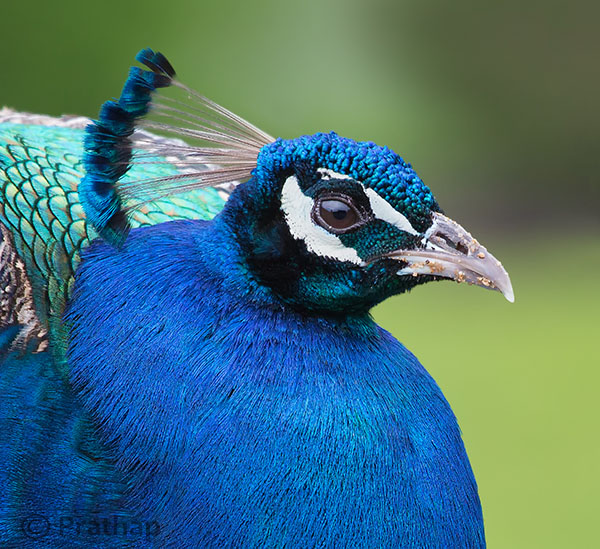
0 Nature Photography Simplified Bird Photography Post Processing Tips Peacock Portrait Featured Image

You can achieve most artistic results in post-processing that are simply not possible in reality. But, being a bird photographer you do not often get a chance to post-process your bird photographs artistically. Why?

Since the viewer would have seen the bird in reality, it is easier to compare to what is presented in a photograph. Bird photography is generally about showing the bird and its natural beauty not enhancing it artistically to achieve something else!
It is very similar to taking photograph of a person. Do you want to show the person as they are, or do you want to make them look someone else?

Does this mean, you have to just keep it real?

Not necessarily. But any enhancement in post-processing to make a bird or its features look beautiful has to be done with lot more care than if it was a landscape photograph for instance.

Remember that the mistakes will be caught easily!

Below I am listing the five post-processing mistakes that you, as a bird photographer, should avoid because they are unforgiving.
Committing any of these mistakes may ruin your bird photograph, and you definitely do not want to ruin your hours and days of effort in getting that one photograph you love. Do you?

Mistake #1: It’s cropped too tight

There is an ongoing debate about whether to crop or to get everything perfect in field. Though it is desirable to compose in the field, cropping in the post becomes necessary many a times in bird photography because of several factors like:

  • Not enough time to compose the fast action that unfolds in split seconds
  • Not enough focal length to fill the frame
  • Not enough time to compose an image especially in case of birds in flight

If you can improve the composition, then go ahead and crop the image. But too often, I see lot of bird photographers crop it too tight which makes the bird suffocate in the frame and the image look cramped.

1-Nature-Photography-Simplified-Bird-Photography-Post-Processing-Tips-Too-Tight-Crop

The little Egret in this photograph looks suffocated because there is no breathing space in front to look into, and no space to move which makes it look cramped.

2-Nature-Photography-Simplified-Bird-Photography-Post-Processing-Tips-Little-Egret

Notice how a little bit more space around the bird gives him room to look into and move. It is more pleasing to our eyes also.

Quick Tip: Use the Rule of Thirds as a guideline.

Mistake #2: It’s unrealistic

The clarity slider in Adobe Lightroom is such a lethal weapon that is hard to replicate even with Adobe Photoshop. It enhances the local contrast in an image, which is one of the most important aspects of processing. Too much local contrast makes an image looks unrealistic as it tends to sharpen.

The soft and smooth feeling of the smallest details in feathers of the bird starts to look very unrealistic.

3 Nature Photography Simplified Bird Photography Post Processing Tips High Local Contrast

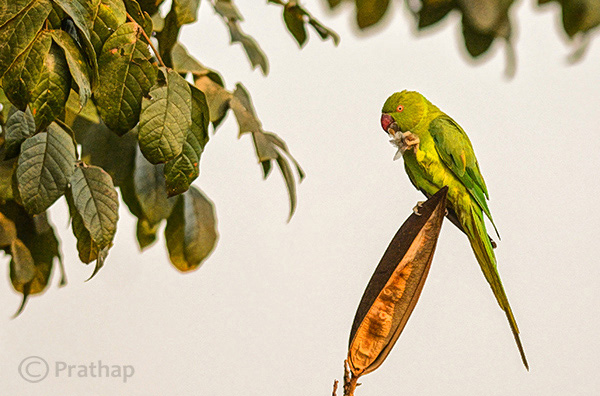
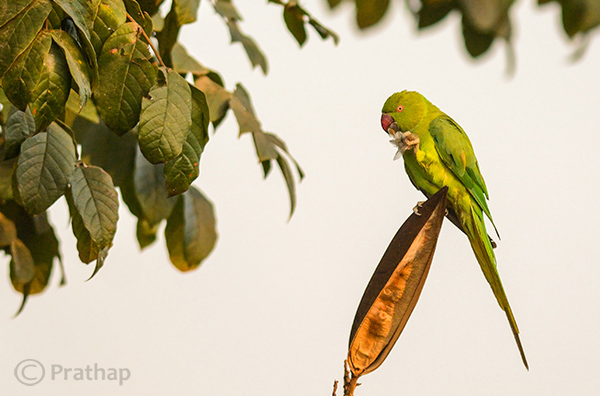
Notice how unrealistic the Parakeet looks in the above image. Even the leaves look like plastic.

4 Nature Photography Simplified Bird Photography Post Processing Tips Rose Ringed Parakeet Female

Just enough local contrast (usually Clarity of +20 to +30) will bring out all the details in the bird.

Quick Tip: Instead of using your mouse to pull the Clarity slider, use keyboard arrows and watch the changes as you bump up the clarity. Restrict to the smaller numbers like +10 to +30.

Mistake #3: Everything is overly colorful

Over-saturated images are everywhere!

Birds are definitely colorful subjects and that is the reason we are all attracted to them. But are they so colorful?
Too much saturation looks overcooked. If you try to increase the contrast as a last step in your post-processing workflow (which is usually recommended), then it will also increase the saturation.

Note that Saturation slider increases the overall saturation of the image making everything in the image colorful. Do you really want everything in the image looking colorful? Do you want to emphasize the bird or the background?

5 Nature Photography Simplified Bird Photography Post Processing Tips Over Saturated

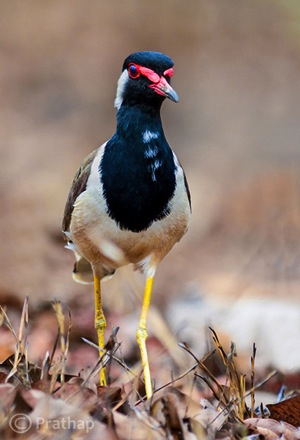
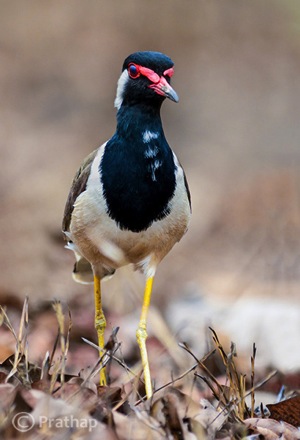
Everything in the above photograph of a Red-Wattled Lapwing is colorful. It is way too colorful.

6 Nature Photography Simplified Bird Photography Post Processing Tips Red Wattled Lapwing

In the above photograph I have selectively increased the Saturation only for the bird in Adobe Photoshop.

Quick Tip: Use selective coloring. Saturate only the colors or object that are very important. Use the HSL panel or the adjustment brush to apply the color.

Mistake #4: The bird looks like a wax statue

Have you seen a wax statue of a bird in a shop? You can also see them on the web. Excessive noise reduction will give a plastic or wax statue look to your bird photographs.

While it is important to reduce the noise because most often we have to bump up the ISO to 400 or 800 to freeze the action, it is also important to understand what the Noise Reduction filter does. It The smoothes out the edges, by smoothening out the minute and important details of the image and the bird.

7 Nature Photography Simplified Bird Photography Post Processing Tips Waxing

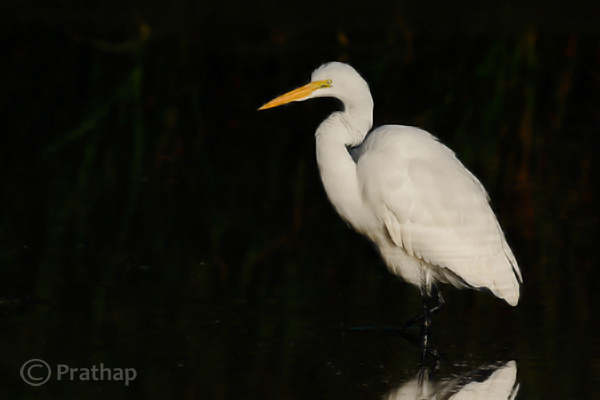
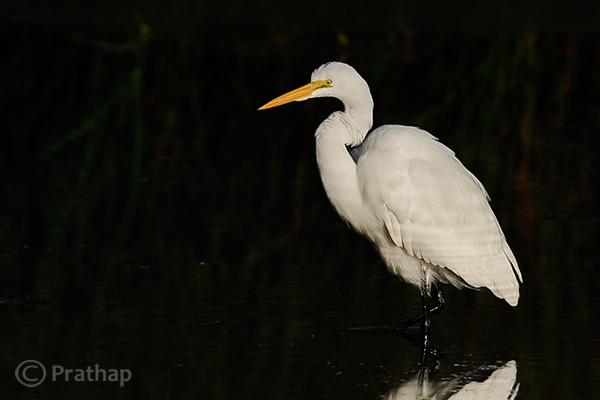
The above image of a Great Egret has a waxy look because of the excessive noise reduction applied to the entire image. Remember that the water looses texture due to excessive noise reduction giving it an artificial look.

8 Nature Photography Simplified Bird Photography Post Processing Tips Great Egret

By reducing the noise only in the out-of-focus or low detailed or shadow regions of the image, it will help to keep the details intact.

Quick Tip: Reduce the noise only in the smooth areas (like the background) since noise is generally not visible in the high detailed areas (like the bird’s body).

Mistake #5: Too much is bad

Too much is bad in anything that we do. Pushing any post-processing slider too far will yield a bad image. But the most important one that is noticeable with many bird photographs, is that it is over-sharpened. No matter how good your post processing skills are, if you make this one mistake, there is no way out.

Over-sharpening kills a photograph. Period.

It is better to keep it little less sharp than to go too far and be overly sharp.

9 Nature Photography Simplified Bird Photography Post Processing Tips Over Sharpened

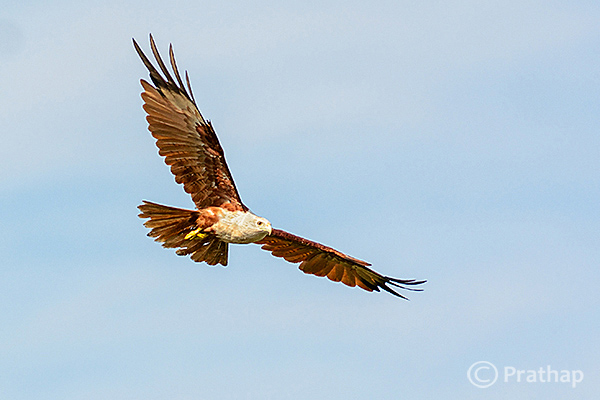
The features of the Brahminy Kite are way sharper than what they should be. Also check out the halo around the bird formed due to sharpening on the overall image.

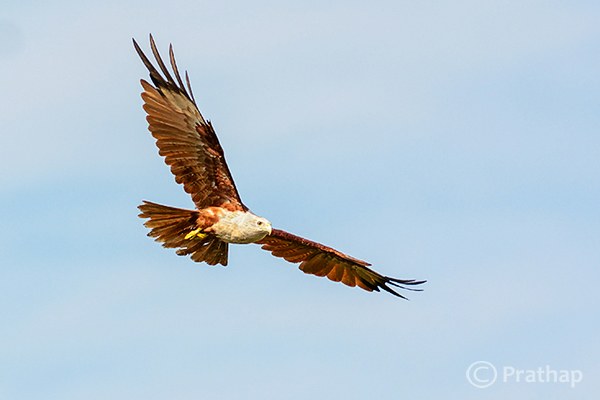
10 Nature Photography Simplified Bird Photography Post Processing Tips Brahminy Kite In Flight

Quick Tip: Apply sharpening only to the bird but not to the background.

Final words

These are some of the major mistakes that should be avoided. Because they are unforgiving and can potentially ruin your best photographs. The best way to avoid these mistakes is to keep a small checklist to see if you have committed any and correct them immediately. With practice, you will easily avoid all of them.

Now, it’s your time to tell me the mistakes that you think should be avoided. What mistakes have you made in post-processing? Feel free to add your opinion on this subject but please make sure it is productive and helpful to all our readers.

The post 5 Unforgiving Post-Processing Mistakes Every Bird Photographer Must Avoid by Prathap DK appeared first on Digital Photography School.


Digital Photography School

 
Comments Off on 5 Unforgiving Post-Processing Mistakes Every Bird Photographer Must Avoid

Posted in Photography