Tag: Architectural

  • Fashionably Architectural: 5 Designers Debut 3D-Printed Shoes

    [ By WebUrbanist in Design & Products & Packaging. ]

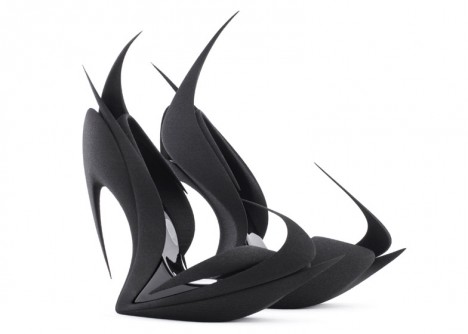
    spikey zaha hadid shoe

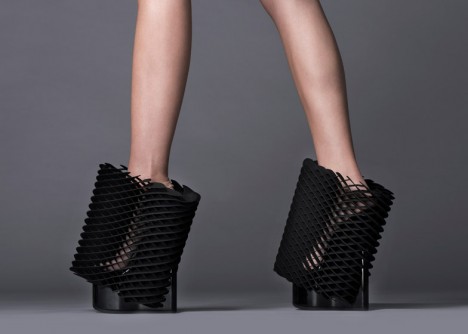
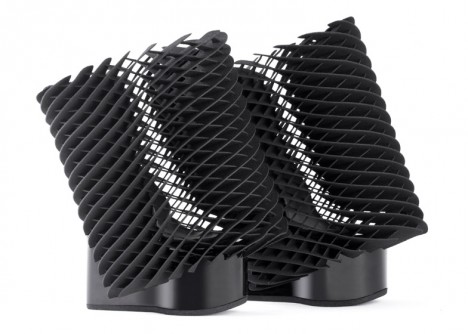
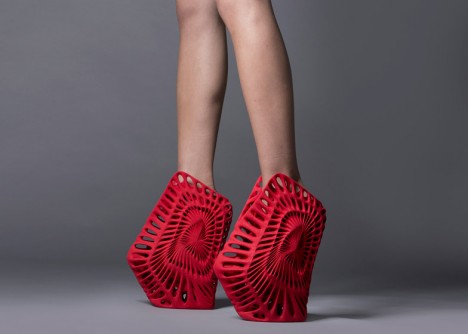
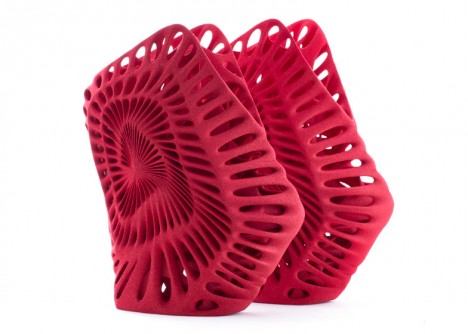
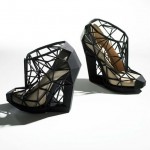
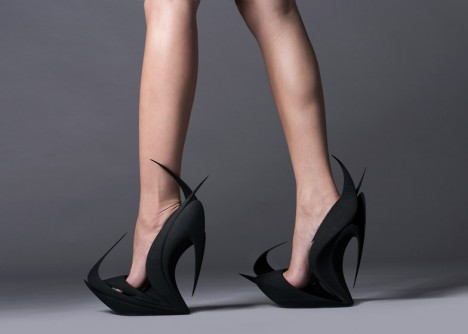
    Somewhere between architecture, art and fashion, this series of 3D-printed shoes by five famous designers for United Nude pushes the limits of new technologies to make fresh forms of fancy footwear. Not meant to be everyday apparel, these unique party-oriented accessories were created for Milan Design Week 2015.

    spiked 3d printed shoe

    Rem Koolhaas invited architects Zaha Hadid, Ben van Berkel and Fernando Romero as well as designers Ross Lovegrove and Michael Young to participate in creating these pairs, each requiring around a day to print on a sPro 60 selective laser sintering (SLS) machine made by 3D Systems.

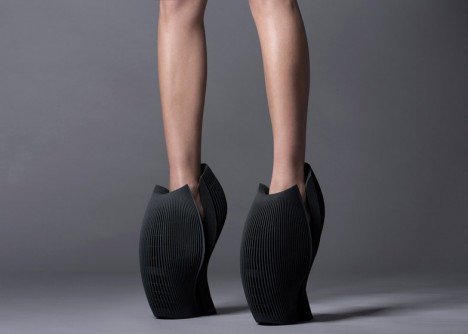
    hoof like 3d shoe

    hoof shoe base

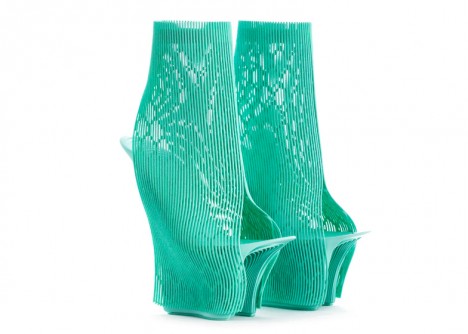
    open heal toe shoe

    open thin material

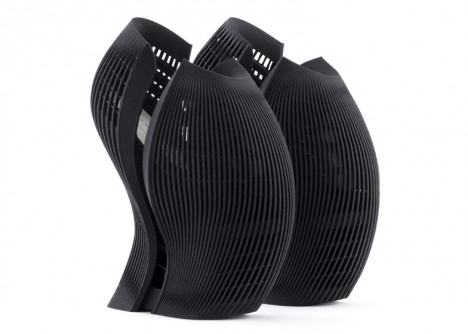
    All shown above, Flames by Zaha Hadid features pointy protrusions casting stellar silhouettes, UNX2 by Ben van Berkel looks almost like a hoof and Ilabo by Ross Lovegrove features open heals and toes. Below, the Young Shoe by Michael Young provides comfortable support on all sides, looking much more awkward, reportedly, than it actually feels when in use and Ammonite by Fernando Romero is abstractly patterned off of the spirals of sea creatures.

    angled shoe mesh

    3d printed mesh shoe

    sea shell shoe

    3d red spiral shoe

    More on the process and materials from Dezeen: “The process starts with a container filled with powder, which is heated in places, as specified by a digital file. This fuses the material together layer by layer until the final form is built up. Once complete, the excess powder is broken away to reveal the design.Each pair was created using two different materials: the soles were printed in hard nylon, while the uppers were formed from thermoplastic polyurethane (TPU), which is softer and more flexible.”

    Share on Facebook


    [ By WebUrbanist in Design & Products & Packaging. ]

    [ WebUrbanist | Archives | Galleries | Privacy | TOS ]


    WebUrbanist

  • Architectural Fiction: 35 Impossibly Surreal Structures

    [ By Steph in Art & Drawing & Digital. ]

    Fantasy Architecture Dujardin 1

    Unbound by gravity, the need for structural soundness or any sense of real-world aesthetics, architecture becomes like a life form of its own, multiplying and mutating in strange and unsettling ways. These fictional architectural assemblages explore unlikely configurations that are only possible with digital art and photo manipulation.

    Surreal Structures by Matthias Jung

    fantasy architecture jung 1

    fantasy architecture jung 2

    fantasy architecture jung 3

    fantasy architecture jung 4

    fantasy architecture jung 6

    fantasy architecture jung 7

    The architectural creations of Matthias Jung seem to inhabit a fairytale realm where gravity doesn’t apply, raising Brutalist concrete structures on tiny stilts, floating stained glass windows like balloons and untethering some from the earth altogether. Some designs, however, seem like they might actually occupy some hidden rural meadow in Europe where aging country homes are actually topped with sheep-dotted hills. Jung is a German-based graphic designer who refers to his strange photo collages as “architectural short poems.”

    Fictional Architecture by Victor Enrich

    fantasy architecture enrich 1

    fantasy architecture enrich 2

    fantasy architecture enrich 3

    fantasy architecture enrich 4

    fantasy architecture enrich 5

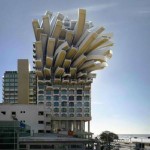
    Victor Enrich’s ‘architecture gone wild‘ twists, bends and turns, splitting down the middle as if the buildings are being unzipped or seeming to disassemble before our eyes. Balconies become giant slides leading down to the street, staircases meander off into the sky and individual apartments stretch out of their building toward the sun like leaves on a plant. The Barcelona-born designer travels the world and takes photographs of cities, digitally manipulating them for results that would generally be impossible in the real world.

    “Once the object is chosen, it is shot from a point easy to recognize by users, not pretending to achieve the greatest picture ever, but instead, a picture that anybody could do. The shot is the basis to produce a replica of the building by using very detailed photogrammetric techniques that end with the creation of a three-dimensional model that fits almost perfectly into the picture.”

    Jim Kazanjian

    fantasy architecture kazanjian 1

    fantasy architecture kazanjian 2

    fantasy architecture kazanjian 4

    fantasy architecture kazanjian 5

    fantasy architecture kazanjian 6

    Shadowy passages and strange interiors from horror films like The Shining and the fiction of H.P. Lovecraft tinge the disorienting and disquieting work of Portland-based photographer Jim Kazanjian, who’s inspired by “our inherent anxieties about isolation and vulnerability.” Kazanjian draws on his experience as a CGI artist working on games to create these ‘hyper-collages,’ cobbling together images of buildings, sinkholes and foggy landscapes from an archive of over 30,000 photos.

    “My interest in gaming stems from my fascination with architecture and its potential to generate narrative structures,” says the artist. “My time in game development has definitely informed my photographic work. I find that the immersive qualities in both mediums have a strong correlation.”

    Next Page – Click Below to Read More:
    Architectural Fiction 35 Surreal Fantasy Structures

    Share on Facebook


    [ By Steph in Art & Drawing & Digital. ]

    [ WebUrbanist | Archives | Galleries | Privacy | TOS ]


    WebUrbanist

  • Architectural Gems: 13 Blinged-Out Buildings Cut Like Stones

    [ By Steph in Architecture & Offices & Commercial. ]

    diamnd chapel bali

    Architects hoping their creations will be described as ‘gems’ could take the literal route and design faceted structures that call to mind diamonds, geodes and other precious stones. Made of glass or mirrored stainless steel, the geometric panels shimmer in the sunlight and give off their own glow after dark.

    Rock Gym by New Wave Architecture, Polur, Iran
    gemstone buildings new wave

    gemstone buildings new wave 2

    A jagged stretch of glass slices up the boulder-like walls of this climbing gym in Iran, mimicking the look of crystals poking out of a geode. The design, by New Wave Architecture, was inspired by the geological process of large-scale movements of the earth’s crust and tectonic forces.

    The Diamond Chapel, Bali

    diamond bali

    gemstone architecture diamond chapel bali 2

    A massive blue diamond tipped on its side sits in a clear pool of water at Sanur’s Grand Bali Beach Hotel, serving as a dramatic and highly photogenic wedding chapel.

    Park & Suites Arena, Montpelier, France

    gemstone architecture park & suites 1

    gemstone buildings park & suites 2

    French architecture firm A+ Architecture gave the Park & Suites Arena in Montpelier a highly unusual look with an amethyst gemstone design on its steel cladding.

    The Octopus, Make Architects, London
    gemstone buildings octopus 1

    gemstone buildings octopus 2

    Make Architects call the Octopus, a proposal for London’s western gateway, “part building, part sculpture.” Sitting beside a derelict site next to a busy intersection, the building features a metallic, semi-transparent shroud that acts as a solar shade as well as a screen for high-resolution LED displays showing advertising.

    Salvador Dali Museum, St. Petersburg, Florida
    gemstone buildings dali 1

    gemstone buildings dali 2

    Designed by Yann Weymouth, who helped create the Louvre Museum’s famous glass pyramid, the $ 36 million Salvador Dali Museum in St. Petersburg, Florida boats an undulating geodesic wave comprised of over 1,000 glass triangles that contrasts with extra-thick concrete walls.

    Next Page – Click Below to Read More:
    Architectural Gems 13 Blinged Out Buildings Cut Like Stones

    Share on Facebook


    [ By Steph in Architecture & Offices & Commercial. ]

    [ WebUrbanist | Archives | Galleries | Privacy | TOS ]


    WebUrbanist

  • Architectural Photography Using Layer Masking to Correct Contrast and White Balance

    Dps 2

    A challenging nighttime scene was overcome with multiple exposures and layer masking.

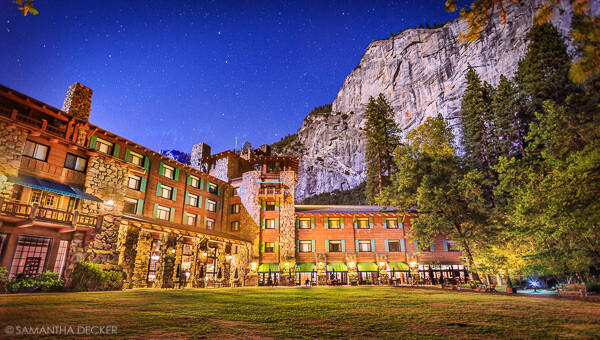
    Blending indoors and outdoors in architectural photography can often create a compelling image. Unfortunately, however, it is often fraught with exposure and white balance issues. These issues are compounded at night, when artificial lights inside buildings coupled with the darkness of the night sky create an especially contrasty image with an unattractive colorcast created by the different light sources. Luckily, with multiple exposures and layer masking in Photoshop, you can create a photo that looks a lot like what you saw with your own eyes.

    This method is a little different than HDR, which involves taking three or more photos at different exposures, then using automated software to combine them into one image that captures the range of light in the scene. Here, you’ll be taking three or more photos and blending them manually, since HDR software often creates unpleasant artifacts and odd color blending when used in the type of situations presented in this tutorial. You can always try HDR software first, and if the colors don’t seem to bleed, you can skip down to the later part of the tutorial for dealing with the colorcasts.
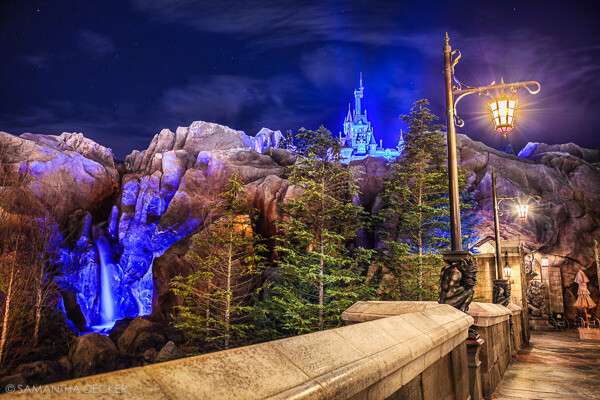
    Dps 1

    An image that required three exposures and had a color cast from the lamps.

    Shoot three or more exposures on a tripod

    You need to shoot as many photos as it takes to capture the dynamic range (the range from light to dark) in the scene. It is really important to shoot in RAW, to get as much mileage out of each photo as possible. A tripod is also necessary, since you’ll probably be taking these at night, and also because you won’t be using HDR software which aligns the images. You can use auto exposure bracketing to capture three images, but at night, exposures on the high end can often exceed 30 seconds, the longest shutter speed most cameras will let you shoot manually. It’s probably easiest to use manual mode, set your ISO to 100 or 200, stop down your aperture to f/7.1 or f/8 (if it’s really dark out, you can open it up wider), and then take a series of shots at increasingly slower shutter speeds until you’ve captured the range of light in the scene. If you need to go past 30 seconds, go into bulb mode (consult your camera’s manual for how to find it), and use a remote trigger release, holding the shutter open as long as you want. Don’t worry about white balance yet.
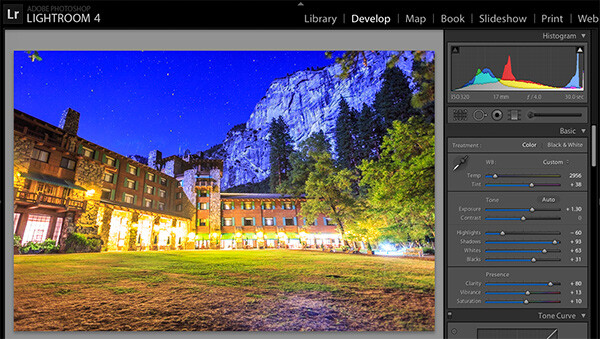
    Dps 3

    Processing one of the RAW files in Lightroom. Here you can see where just processing one RAW file wouldn’t be sufficient.

    Process each exposure in Lightroom or Camera Raw, then open as layers in Photoshop

    First, you are going to process the photos for exposure only, ignoring white balance. If you don’t have Lightroom, you can do this in Adobe Camera Raw. Since you have multiple exposures, you don’t need to go crazy trying to recover lost highlights (overblown bright spots) and shadows (dark parts that look black), but you want to recover them a little bit to give you more leverage later on in the process. There’s no magical formula for processing here. I usually apply lens profile correction, remove chromatic aberration, and do a little noise reduction before bringing down the highlights a little bit and bringing up the shadows and whites a little bit. Once you’re done processing each exposure, select them all, right click, and select “open as layers in Photoshop. Now you’ve got an image with three or more layers all ready to go, but we’re no quite ready to do the layer masking yet.
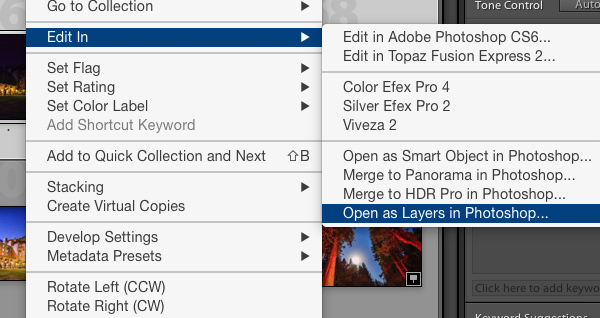
    Dps 4

    Go back and reprocess for white balance

    White balance is a setting that keeps the whites in the image white, removing any colorcasts. Different light sources have different white balance settings though, so if you have a photo with two or more different light sources (such as the night sky and an artificial light), no matter how you adjust your settings, you’ll always have a color cast somewhere on your photo. What you’re going to do here is reprocess each photo so that you’ve corrected any colorcasts. If you’re lucky, you’ll have no more than two light sources in the photo. Unfortunately, though, there can often be more.

    It’s important to note that you only have to correct for colorcasts that are in properly exposed parts of each photo. For instance, in one of your overexposed photos, don’t worry about the white balance for the overblown highlights. You’ll be discarding that part of the photo later. For one of your underexposed photos, don’t worry about correcting for the shadows, since you’ll also be discarding that. Start with your most properly exposed photo, and correct for any colorcast you see (for instance, the lights inside a building have a yellow cast).

    All you have to do to correct the white balance is slide those two sliders (one goes from blue to yellow, and the other goes from green to magenta) until the part of the photo with the colorcast looks normal. When you’re done, open that photo in Photoshop, and make it a layer in the other image you have open. Do this by hitting Ctrl-A on Windows, or Command-A on a Mac to select the photo you just opened, then Ctrl-C or Command-C to copy it. Then click on the image with the three layers, and hit Ctrl-V or Command-V to paste it in as a layer. Repeat the processing until you have corrected all colorcasts in the photo. Then, move on to the other exposures, and correct any color casts there (remember, only the properly exposed parts need to be corrected).
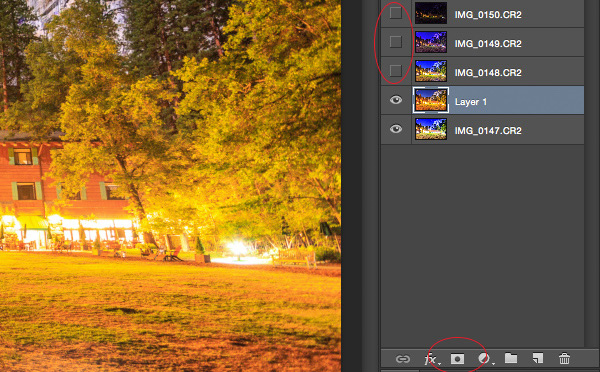
    Dps 5

    Mask in one layer at a time

    Once you’ve finally got every exposure and every colorcast accounted for as separate layers, you’re going to mask them in one by one. I start by making all but the bottom two layers invisible and masking in one layer at a time (by the way, the order of the layers does not matter, but having the most properly exposed image on the bottom will probably make things easier). Do this by clicking the little eye to the left of each layer except the bottom two. Then, with the layer one up from the bottom selected, click the layer mask icon (it’s a rectangle with a dot in the middle, found at the bottom of the layer panel). Make sure the paintbrush icon is selected as well (this can usually be found on the left hand side). You may need to adjust your brush size as you go through.

    When painting with black on the layer mask, you will cover up the parts of the layer you don’t want appearing (the improperly exposed or color cast parts of the image are what you want to cover up). When you want to go back and reveal parts because you’ve made a mistake, paint with white on the layer mask. Click X on your keyboard to toggle back and forth between black and white.

    When you’ve masked out all the parts of the layer you don’t want shown, select the layer on top of that and make it visible (click the space where the eye used to be). Then create another mask and start masking that layer. Keep revealing layers and masking them in until you’re done. In some cases, one part of the photo may be properly exposed in more than one image. In this case, keep the one that looks better to you. Once you’ve finished this process, save the photo as you would normally. If you think you might come back to this photo later and edit it, make sure to save a copy as a PSD.
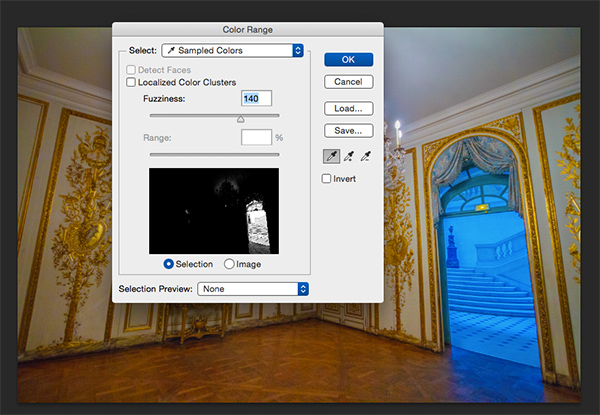
    Dps 6

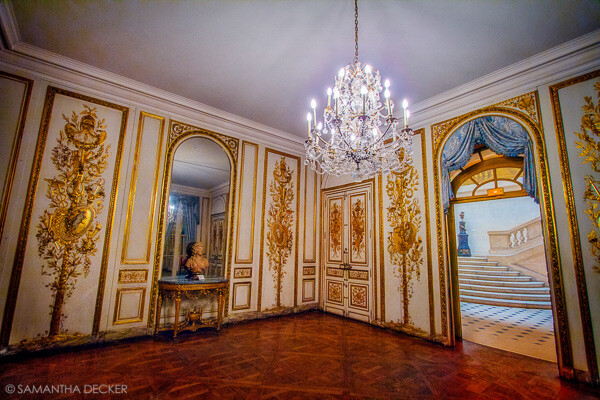
    Sometimes you get lucky, and the part of the image that’s colorcast has a very strong hue to it. If you have a colorcast that’s almost all one color, you can automate the masking process a bit for that layer. In the top pane, go to Select –> color range, then click somewhere in the colorcast. Look at the preview. You want the part of the image that’s your colorcast to be almost completely white, and the rest to look almost completely black. Adjust the fuzziness slider until this is the case, and then click ok. You actually want to select the inverse of that, so go to Select –> inverse. Now click the layer mask icon, and you’ll have a mask that hopefully masks out the colorcast. If it doesn’t look right, undo it and try it again with a different fuzziness setting. This is not a perfect fix. You will still need to do some fine-tuning, but it really helps move things along quicker.
    Dps 7

    A simple “select color range” layer mask got rid of most of the colorcast in this photo.

    Conclusion

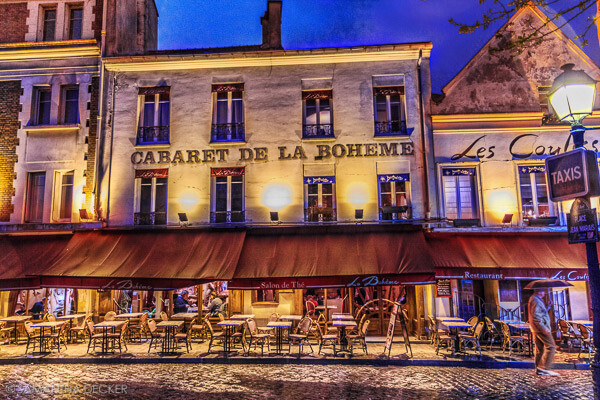
    This is just one method of conquering the challenges brought on by nighttime architectural photography. As you start working with photos of this nature, you may find a different method that you prefer. Luckily, many photos only require some of the steps detailed in this tutorial. Sometimes you only need one exposure, but you need to process for colorcasts. Other times, the white balance is even, but you need to mask for exposure. It takes practice to master these intricate masking techniques, so don’t give up if you’re unhappy with your results at first. Start with simpler photos with fewer colorcasts and exposures needed before diving into a really complex one. In time you’ll be creating photos that look as natural as they appeared when you saw them in person.
    Dps 8

    A single exposure that required layer masking to correct colorcasts.

    Have you got any tips for doing architectural photography or using layer masking? Please share in the comments below.

    googletag.cmd.push(function() {
    tablet_slots.push( googletag.defineSlot( “/1005424/_dPSv4_tab-all-article-bottom_(300×250)”, [300, 250], “pb-ad-78623” ).addService( googletag.pubads() ) ); } );

    googletag.cmd.push(function() {
    mobile_slots.push( googletag.defineSlot( “/1005424/_dPSv4_mob-all-article-bottom_(300×250)”, [300, 250], “pb-ad-78158” ).addService( googletag.pubads() ) ); } );

    The post Architectural Photography Using Layer Masking to Correct Contrast and White Balance by Samantha Decker appeared first on Digital Photography School.


    Digital Photography School
  • Architectural Magic: Big Stone Building Breaks Free & Floats

    [ By WebUrbanist in Art & Installation & Sound. ]

    architecture floating building magic trick

    A work of art, genius and incredible effort, half of this replica structure appears to hang in mid-air, seeming at once a perfect aesthetic fit for its surroundings and completely disconnected from the laws of physics.

    architecture covent garden installation

    British artist Alex Chinneck and his crew spent over 500 hours and had to construct a 4-ton counterweight to balance this faux building in the sky – what appears to be solid stone is in fact a steel-framed copy of an historic structure also found at Covent Garden (the original is nearly 200 years old).

    architecture floating building illusion

    architecture draft plan model

    Chinneck is well known for his architecture-centric optical illusions, with this particular piece created as a play on the area’s “performance culture” – its proximity to theaters and performance spaces.

    architecture faux construction process

    architecture cut slice pieces

    The construction process required a painstaking attention to historical details and materials in addition to grafting the appearance of age, wear and tear onto the fake structure. Another significant challenge: the seemingly haphazard breaking and slicing of everything from stones to windows and their frames.

    architecture hidden steel frame

    architecture floating building magic trick

    From the artist: “The hovering building introduces contemporary art to traditional architecture, performing a magic trick of spectacular scale to present the everyday world in an extraordinary way. My objective was to create an accessible artwork that makes a harmonious but breath-taking contribution to its historic surroundings, leaving a lasting and positive impression upon the cultural landscape of Covent Garden and in the minds of its many visitors.”

    Share on Facebook


    [ By WebUrbanist in Art & Installation & Sound. ]

    [ WebUrbanist | Archives | Galleries | Privacy | TOS ]


    WebUrbanist

  • Hyperphotos: Architectural Hybrids Remix Built Environments

    [ By WebUrbanist in Art & Photography & Video. ]

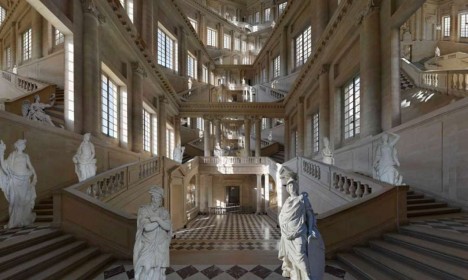
    hyperphoto endless staircase image

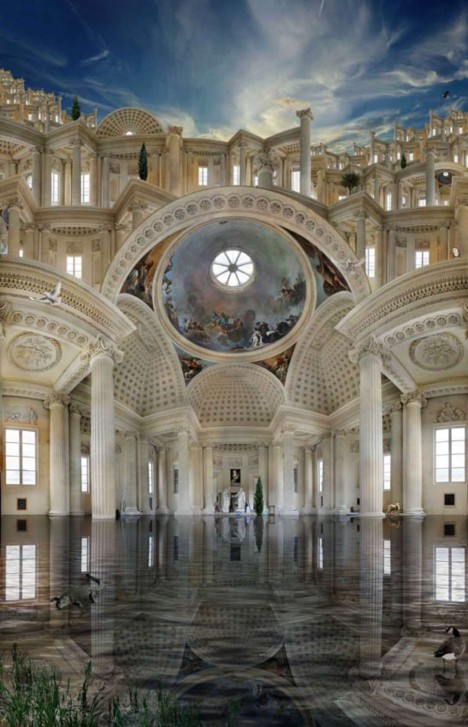
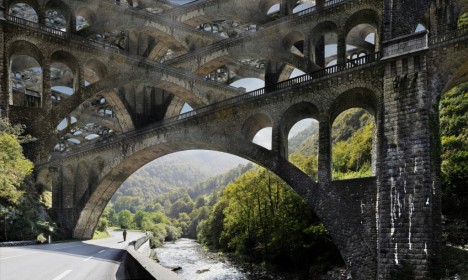
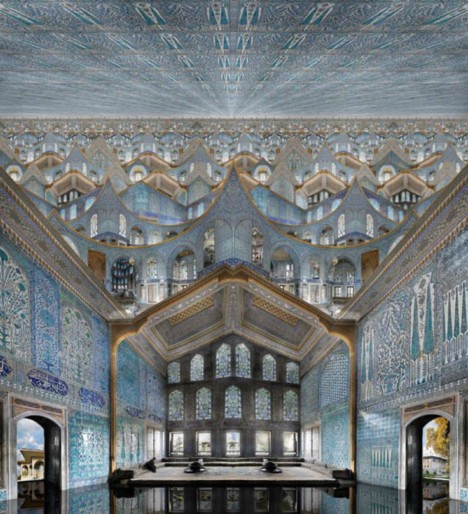
    There is something almost mystical (or mythical) about these photographic collages, at once apparently realistic in content and seemingly impossible in composition.

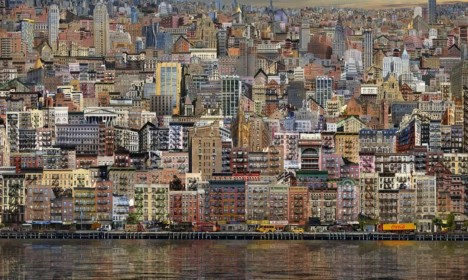
    hyperphoto urban city montage

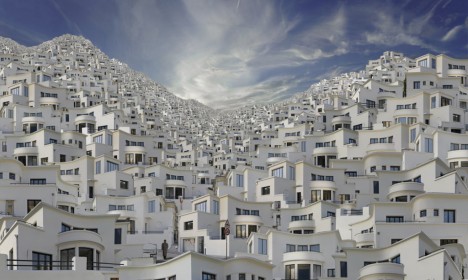
    hyperphoto babylon

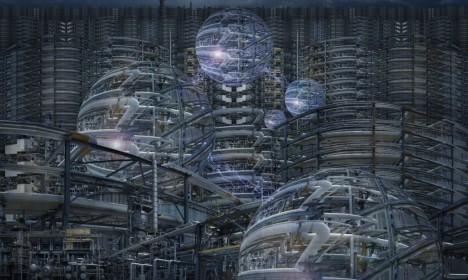
    The Hyperphotos portfolio of Jean-Francois Rauzier, a French artist and photographer, represents years of captured images overlaid to create incredibly detailed composites. “In his monumental works he mixes the infinitely big and the infinitesimal, in a profusion of details so unusual as fascinating. The image thus recomposed numerically gives way to the dreamlike world of the artist.”

    hyperphoto reflected mythical interior

    Some seem to reflect the nature of their places of origin, from New York City and Paris to Istanbul and Barcelona, or the time period from which the architecture originates, from ancient cathedrals to modern brownstones.

    hyperphoto stacked bridges

    hyperphoto infinite future city

    Others are works of almost pure fantasy, casting the viewer into imaginary futures or impossible pasts. While people, plants and animals are sometimes included, the focus of his fascination is almost always a built environment.

    hyperphoto inside religious structure

    About the artist: “Fascinated by photography from an early age, Jean-François Rauzier graduated from the School Louis Lumière in 1976. He has since been working as a professional photographer, while developing a personal creative work. In 2002, his artistic work takes an innovative and radical turn.” Now “he creates virtual images consisting of several hundreds of shots, taken with a telephoto lens and assembled by computer.”

    Share on Facebook


    [ By WebUrbanist in Art & Photography & Video. ]

    [ WebUrbanist | Archives | Galleries | Privacy | TOS ]


    WebUrbanist

  • Architectural Apocalypse: Famous Museums Seen After the Fall

    [ By WebUrbanist in Art & Photography & Video. ]

    guggenheim half buried sand

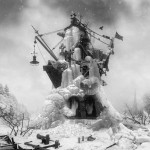
    Like that iconic scene in the original Planet of the Apes film, these artists have displaced great works of architecture in time and space to see what each museum might look like after the end of days, relocated in ominous environments and recast in black and white.

    guggenheim museum after fall

    Ukrainian photographers Vitaliy and Elena Vasilieva use surrealistic landscapes as the backdrop for these imaginative transformations, picturing structures like the Guggenheim in a sand-strewn context that looks like anything but modern-day Manhattan as we know it.

    new museum in water

    new museum at night

    The New Museum is seen rising up from post-armageddon floodwaters, presumably after rising sees wash away the rest of New York City.

    Niteroi Museum snow dunes

    snow filled museum fall

    The Niteroi Museum is perched precariously on a mound of snow, everything else perhaps buried in the frozen wastes around it.

    pompidou center picture fall

    pompidou center storm front

    The Pompidou Center is set in a swirling dust storm, Paris long vanished and its inside-out appearance making it look all the more like a remnant than a finished structure.

    guggenheim post apocalypse photo

    guggenheim half buried sands

    When the dust settles, the smoke clears and the world freezes over, what if only our artistic institutions were left? From the creators of the series: “It is difficult to escape the feeling that ‘Apocalypse in Art’ really shows the world, standing on the edge, barren, falling in decay like a story line of a picture that is breaking into fragments.”

    Share on Facebook


    [ By WebUrbanist in Art & Photography & Video. ]

    [ WebUrbanist | Archives | Galleries | Privacy | TOS ]


    WebUrbanist

  • Architectural Photography Tips to Make Any Building and Structure Look Fantastic

    Architectural photography is for people who have an eye for buildings and structures. It’s the art of taking pictures of buildings as well as structures that are aesthetically welcoming and trustworthy representations of their subjects. Many of the best photographers who specialize in this discipline are normally well-trained in the use of both sophisticated equipment and methods. Architectural photography is Continue Reading

    The post Architectural Photography Tips to Make Any Building and Structure Look Fantastic appeared first on Photodoto.


    Photodoto

  • Architectural Kaleidoscopes: Buildings Spun into Fractal Art

    [ By WebUrbanist in Art & Photography & Video. ]

    fractal building exterior dome

    Reimagined, repositioned and recomposed, this photo manipulation series turns familiar elements of buildings into abstracted compositions that morph beyond architecture, bridging disparate worlds of design and art.

    fractal tower windows

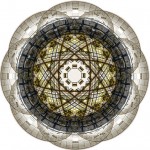
    Canadian photographer Cory Stevens starts with exteriors, ceilings, walls and windows, then adds his artistic twist – a variation on the polar panoramic approach.

    fractal architecture glass

    While pattern recognition may persist in some cases, the rotation and multiplication in many of these pieces makes them increasingly abstract.

    fractal building rotation progression

    The symmetry of these fractal forms begin to make us see other patterns of nature, like snowflakes or star systems, in the shapes and materials of otherwise everyday towers, monuments, habitations, town squares and civic circles.

    fractal circle town square

    fractal glass facade

    From the photographer: “Though my primary focus is on architecture and urban environments, I also like to indulge my love of the natural landscape. Digital abstracts have also become a growing segment of my work – inspired by my passion for design and the modern aesthetic.”

    Share on Facebook


    [ By WebUrbanist in Art & Photography & Video. ]

    [ WebUrbanist | Archives | Galleries | Privacy | TOS ]


    WebUrbanist

  • Pointless Diagrams: Daily Architectural Nonsense Drawings

    [ By WebUrbanist in Art & Drawing & Digital. ]

    pointless set of pyramids

    A quick doodle drawn in the heat of the moment on a napkin at an architectural cocktail party is more likely to be a concept diagram than a phone number. There is nothing architects love more than a sexy drawing with dotted lines, curvy arrows and a few key color accents.

    pointless building paths

    pointless chutes and ladders

    Josh Lewandowski is a Minnesotan architect who is taking things to the extreme, producing a new diagrammatic sketch daily … with a catch: they do not represent anything and are ends unto themselves. The series is dubbed simply Pointless Diagrams.

    pointless landscape model

    pointless series of towers

    Of his work, Josh writes: “I started this blog because for as long as I can remember I’ve always drawn and doodled 3d sketches that have an unapologetic dearth of meaning.” He draws his “inspiration from architecture, furniture, engineering, geometry, cereal boxes, Lego instructions, and Etch A Sketch memories. I always use pen and ink because erasing is for wimps.”

    pointless pool diagram
    pointless impossible tree spiral

    The works are populated with walkways, bridges, staircases, pools, trees and more, yet a whole never really emerges from the parts except when the viewer’s imagination takes part. Thus the mysterious and subjective side of the equation.

    Next Page – Click Below to Read More:
    Pointless Diagrams Daily Architectural Nonsense Drawings

    Share on Facebook


    [ By WebUrbanist in Art & Drawing & Digital. ]

    [ WebUrbanist | Archives | Galleries | Privacy | TOS ]


    WebUrbanist