RSS
 

Posts Tagged ‘Apps’

The Neimeo e-ink keyboard can be customized for Photoshop, Lightroom and other apps

09 Jan

Nemeio is a portable keyboard that uses e-ink technology to allow for complete customization for any app you want to use it with, including Adobe Photoshop, Lightroom and other image or video editing apps.

The keyboard features mini-displays in each of the 81 keys, so users can create specific key-layouts for any app they are working with and switch between them using the Nemeio companion software. Icons can be dragged and dropped in the latter’s virtual keyboard and then immediately show up on the real one.

The Nemeio can also be set to change its layout automatically with the app you are using. For example, you could use a standard keyboard layout while typing emails or writing a letter. Once you open Photoshop the keyboard would then automatically change to a different layout with editing shortcut icons.

The Nemeio comes with a brushed-metal body and measures only 12x7x0.43-inch (30.5×17.8×1.1cm), making it easily portable. It can connect to any device with Bluetooth keyboard support.

The Nemeio is not quite available yet but shipping is expected some time this year. Pricing could be an issue, though. Engadget reports the keyboard could cost somewhere between $ 300 and $ 500.

Articles: Digital Photography Review (dpreview.com)

 
Comments Off on The Neimeo e-ink keyboard can be customized for Photoshop, Lightroom and other apps

Posted in Uncategorized


Major Facebook bug exposed private photos of 6.8 million users to third-party apps

15 Dec

On its developers blog today, Facebook disclosed a major photo API bug that left the private images of millions of users exposed to third-party apps. The bug, which has been fixed, was live from September 13, 2018 to September 25, 2018. During that time, some third-party apps may have had permission to access images uploaded to the service but not posted, as well as photos shared outside of the user’s timeline.

Facebook users can grant third-party apps permission to access images they’ve shared on the platform, but that permission is “usually” limited to photos the user published on their timeline, according to the company. The photo API bug may have given some third-party apps permission beyond timeline images, however, also including ones uploaded to the platform but not published, Facebook Stories content, and images shared on Marketplace.

As of its initial disclosure on December 14, Facebook said, ‘Currently, we believe this may have affected up to 6.8 million users and up to 1,500 apps built by 876 developers.’

Facebook plans to alert users who were potentially affected by the bug. A new Help Center page on Facebook’s support website provides a tool that shows users whether they have used any apps that potentially had access to their private images. As well, the company will provide app developers with a tool “early next week” that shows whether their apps were affected by the photo API bug.

“We are also recommending people log into any apps with which they have shared their Facebook photos to check which photos they have access to,” the company said in its disclosure.

The bug is the latest in a growing number of privacy debacles at Facebook. Earlier this year, the company suspended hundreds of third-party apps during its Cambridge Analytica scandal, which had revealed that data on 87 million Facebook users had been harvested and improperly used.

Articles: Digital Photography Review (dpreview.com)

 
Comments Off on Major Facebook bug exposed private photos of 6.8 million users to third-party apps

Posted in Uncategorized


VSCO adds new ‘Preset Views’ to its Android and iOS apps

17 Oct

Today, VSCO introduced Preset Views, an interface change within its mobile application that makes it easier to see how presets look on your photos.

The new feature provides three new viewing options when adding presets to your photos. In addition to the standard view, VSCO now lets you see previews of each preset in various sizes, from small thumbnail to full-width photos.

“The feature is designed to help creators continue to evolve their creativity by encouraging them to step outside of their comfort zones and experiment with different presets,” says VSCO.

VSCO also added a new grouping function that makes it easier to see what presets work best with certain types of photo. Until now, presets were only grouped in the various collections VSCO introduced. You could rearrange them as your needs desired, but it’s a time-consuming process. And you still have to know what presets work best for various types of photos.

Now, you can get a better feel for what filters work best for portraits compared to those more suited for landscapes or urban environments. It also includes groupings of filters such as “monochrome” or “vibrant” for images that would look better as black and white or those that could use a little saturation.

The new features should be live across VSCO for both Android and iOS smartphones. If you don’t have VSCO, you can download it for free for both Android and iOS.

Articles: Digital Photography Review (dpreview.com)

 
Comments Off on VSCO adds new ‘Preset Views’ to its Android and iOS apps

Posted in Uncategorized


Apple ceases Photo Print Products, recommends third-party apps

14 Jul

If you use Apple’s photo printing service you’ll have to find yourself a replacement soon, as Apple is in the process of discontinuing the service. Photo Print Products was originally launched for Mac users in 2002 and first integrated into iPhoto, letting you order photo prints, albums, photo books, and calendars among other products. Later it made the move to the Photos app but was never available on the iOS mobile operating system.

It appears that not enough people were using the service. According to a message in macOS 10.13.6 Photos app final orders for Photo Print Products will have to be placed by September 30, 2018.

Luckily, Apple doesn’t leave you without any printing options. The company recommends the use of third-party apps that include a Photos Projects extension. The latter is an API that was introduced with macOS High Sierra and lets photo printing services integrate their user interface into the Apple Photos app. Payment and printing are handled by the third-party provider. Currently the API is used by apps such as Mimeo Photos, Wix, GoodTimes, WhiteWall and Shutterfly.

Articles: Digital Photography Review (dpreview.com)

 
Comments Off on Apple ceases Photo Print Products, recommends third-party apps

Posted in Uncategorized


Ricoh releases SDK for Pentax cameras, opening the door to 3rd party remote control apps

17 May

Ricoh has released a software development kit (SDK) for Pentax cameras that allows third-party developers to create mobile and desktop apps that can control the camera remotely via USB cable or Wi-Fi.

The wireless package is available for Android and iOS. The USB-version can be downloaded for Microsoft .NET Framework and for C++ (Linux, Windows or MacOS). Both variants offer functions for controlling Pentax’s DSLRs and medium format cameras remotely, including photo and video capture, live view and adjustment of camera settings.

The SDK should allow for straightforward development of sophisticated remote control apps and other, more specialized, camera software, without any need for reverse engineering.

Free downloads and comprehensive documentation are available on Ricoh’s dedicated API website.

Articles: Digital Photography Review (dpreview.com)

 
Comments Off on Ricoh releases SDK for Pentax cameras, opening the door to 3rd party remote control apps

Posted in Uncategorized


Google Lens will soon be available in several Android camera apps

13 May

Google’s AI-based image recognition system Google Lens will be making its way into stock camera apps, the company revealed during its I/O 2018 conference this week. The tool— which identifies objects, landmarks, and more in the images you capture with your phone—was first revealed last year, later launching for the maker’s own Pixel smartphones and then on Android and iOS in general.

For now, Google Lens is only available through the Google Photos app, but that will be changing in coming months. The company plans to launch Google Lens in stock mobile camera apps starting with its own Pixel handsets; other Android smartphone models will get support later on. According to The Verge, a total of 10 models will offer Google Lens in their stock camera apps.

Joining the expansion announcement are three new Google Lens features: smart text selection, style match, and real-time functionality for instant results.

With smart text selection, Google Lens is able to identify words within images and find relevant information—such as retrieving data on a food dish after the user captures an image of its name in a menu or other document. Style match, meanwhile, is a feature for finding objects similar to ones captured in an image, such as related outfits or home decor.

Finally, all of this information will be made available at a faster pace thanks to real-time functionality. With this addition, Google Lens finds and provides information proactively based on items in the user’s environment that are captured as they point their phone’s camera around.

Google says these features will start rolling out in the next few weeks.

Articles: Digital Photography Review (dpreview.com)

 
Comments Off on Google Lens will soon be available in several Android camera apps

Posted in Uncategorized


Google enables HDR+ for Instagram and other apps on Google Pixel 2

07 Feb

Google’s latest generation Pixel 2 smartphones come with the built-in Visual Core dedicated imaging processor that powers the HDR+ mode’s sophisticated multi-frame-stacking computational imaging functions and other camera features. However, Visual Core wasn’t activated when the Pixel 2 devices were first launched, and only was enabled for developers in November last year.

The latest Android update now brings the power of Visual Core to all Pixel 2 users, an update smartphone photographer should be very excited about.

This update mainly means that Google’s excellent HDR+ mode is now available on all apps that call the camera and target API level 26, not just Google’s own Camera App. According to Google, this includes popular examples such as Instagram, Whatsapp or Snapchat, but we hope it also covers some of the powerful third-party camera apps available on Google Play.

Previously, those apps relied on a much more basic camera API that could not produce the same image quality as HDR+.

The Android update for the Google Pixel 2 will be rolling out over the next few days, along with other software improvements, so make sure you install the newest version as soon as it becomes available to take full advantage of the phone’s camera capabilities.

Articles: Digital Photography Review (dpreview.com)

 
Comments Off on Google enables HDR+ for Instagram and other apps on Google Pixel 2

Posted in Uncategorized


9 More Great Apps You Need for Your Smartphone

17 Jan

What are the next great apps you need for your Android and your iPhone?

There are many apps out there that are fun to use. In part two we bring you 10 more great apps for your smartphone (read part one here). Some of the ones listed below are for shooting, some are for creativity, and others are great tools for the landscape photographer. Most are available for both Android and iOS, some just available for iOS.

Shooting apps

#1 – ProCamera 10 – iOS – $ 4.99 9 More Great Apps You Need for Your Smartphone

ProCamera gives you a lot of control over your settings while shooting with your iPhone. It is easy to use and offers advanced features such as RAW capture, a live histogram, and an anti-shake feature. In the new iPhones with multiple camera lenses, it has the ability to access either lens.

The images come out sharp with accurate exposures. The reason is that
you can separate the focus and exposure points to really create a sharp balanced composition.

You can also shoot in either Manual, Semi-Automatic or Automatic mode with on-screen display modes of standard, medium or light to hide non-critical display elements. It also has a low light mode called Low Light Plus which captures up to 64 photos and combines them into one photo with reduced noise.

9 More Great Apps You Need for Your Smartphone - ProCamera

ProCamera 10 screenshots.

9 More Great Apps You Need for Your Smartphone - VSCO#2 – VSCO Cam – for iOS and Android – Free with in-app purchases

VSCO Cam is one of my favorite apps. This free app has a powerful built-in camera with very clear image resolution and the ability to separate exposure and focus points which is vital in creating optimal imagery with a smartphone. This app also has built-in presets as well as ones you can purchase. It has a very active community that shares photo “recipes” to gain inspiration and create similar photographic styles in post-processing.

When taking photos in VSCO, you can have manual control of focus, exposure, white balance, and even ISO and shutter speed. Depending on the model of your phone, you can even shoot in RAW mode.

A big part of this app is the VSCO community and the navigation can be a bit confusing, but the results are consistently great.

Light Effects Apps

10 More Great Apps You Need for Your Smartphone - Lens Distortions#3 – Lens Distortions – iOS only – Free

Lens Distortions is a unique app that will change the way you see iPhone photo filters. The app’s editing platform allows you to combine subtle blur effects, light leaks, textures, sun flares, and sunbursts to help you enhance your images with light.

Lens Distortions is a great app for any iPhone photographer who is looking for unique filter effects that are easy to control and can be used to highlight a specific subject rather than apply it to the entire image. When used properly, the effect can look like it was taken on a much more advanced camera. Since smartphones don’t have an aperture which allows you to create a sunburst or sun flare effect like you can on a DSLR, this app will let you apply a sunburst, and give a realistic effect of the sun’s rays.

9 More Great Apps You Need for Your Smartphone

 10 More Great Apps You Need for Your Smartphone - Rays#4 – Rays App – iOS only – $ 0.99

The Rays app is great for creating realistic light ray effects quickly and easily. The rays are only added to the bright highlight areas and have the effect of passing through objects while adding a three-dimensional quality to your image. You can add shafts of light streaming through trees, rays filtering through clouds, beams of light coming through the fog, or even rays coming out of some text. You can customize the color of the rays using a color picker and specify where the rays will be visible.

9 More Great Apps You Need for Your Smartphone - Rays

Blend Mode Apps

Creating Your Own Textures

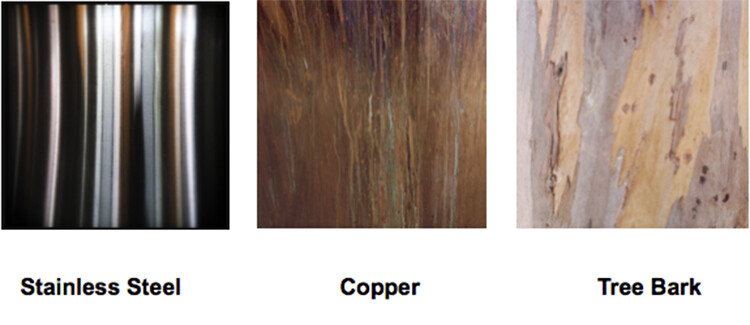
Before introducing some blending mode apps, I want to introduce you to creating your own textures. You can create your own palettes by taking pictures of interesting tree bark, floors, walls, or anything that catches your eye and combine it in a blending program.

Here are a few textures that I’ve used to create an interesting appearance in the background of an image.
9 More Great Apps You Need for Your Smartphone

There are several apps available that give you stock textures to add to your compositions, but why not create your own? It’s just another way to see creatively and use your smartphone to make something unusual.

9 More Great Apps You Need for Your Smartphone - superimpose#6 – Superimpose – iOS / Android

($ 1.99 for IOS, $ 0.99 for Android)

If you want a powerful app to combine images and textures, look at Superimpose. You can create professional level layered images on your Smartphone and easily blend one photo on top of another with this app.

You can also use this tool to blend textures, overlay borders, or create double exposures while adjusting transparency with 18 different blend modes.

To use this app, first load a background image. Then load a foreground image, masking out any unwanted elements in the foreground image. You can then move, scale, resize or flip the foreground and adjust colors and exposure. Then you can save the blended image to the photo library at full resolution.

Use the textures you created in the exercise above to give your images a unique and creative twist.

9 More Great Apps You Need for Your Smartphone - superimpose

The rich brown hues of the copper background layer and the blend modes give a warmth to this image that it didn’t have before. You can move your background layer around to work with the foreground. Notice you don’t see the copper texture in the sky in this sample image. That was because it was rotated to work in that space with minimum texture.

9 More Great Apps You Need for Your Smartphone - mextures app#7 – Mextures – iOS / $ 1.99

Mextures app lets you create grunge patterns, textures, and light leaks quickly and easily. With Mextures, you bring in an image from your camera roll and decide what texture from their menu you would like to use as a background layer. Once you apply that texture to the first layer, you can add another layer of texture, pattern, or light.

Layers are used in more advanced photography programs like Photoshop and are useful for making color and texture adjustments that won’t affect the whole picture. In this app, you can add texture in layer one, and then add gradient color in layer two. If you decide that you don’t like the gradient color, you can just delete that layer and redo it without affecting the texture layer.

Layers in both Photoshop and apps like this work the same way. Imagine having a stack of tissue paper, and each tissue has an element that you can add to your image. One tissue layer could have color, one could have texture, and one could have light leaks. It’s easy to take them in and out or change them without affecting the layers above or below.

This app gives you formulas that are saved presets which may be a combination of textures, colors, and gradients. You can even scroll through “Guest” formulas, and use them for your own images.

9 More Great Apps You Need for Your Smartphone - mextures app

Plumeria Flower created with Mextures App

For Landscape Photographers

9 More Great Apps You Need for Your Smartphone - Aurora app#7 – My Aurora Forecast and Alerts – For Android / iOS – Free

Many photographers have shooting the Northern lights on their bucket list. This app will help you track the sometimes elusive Aurora Borealis and give you a forecast based on the Aurora activity. You can track the Aurora from your present location or at another location in the world. It will also give you alerts as to when the Aurora is active and in what location.

An interesting way to use this app is to follow Aurora cams around the world and then set your alerts as to when these areas are active. Then you can tune in and watch the show!

Get the app for Android here – and iOS here.

9 More Great Apps You Need for Your Smartphone#8 – Geotag Photos Pro – For Android / iOS – Free

Geotagging is the process of adding geographical identification metadata to your photographs or videos. This data usually consists of filename, folder location, city, GPS coordinates, date, and time captured.

The Geotag Photos Pro app is meant to be used while you are shooting with your DSLR. It will record your position while you are taking photos and create a GPX file that you can export to your desktop app or to other apps and services like Lightroom, Flickr, and Apple Photos.

This is a particularly good tool for landscape photographers or anyone who wants to know exactly their route or the specific location they shot a group of images. The images below show how you can set your interval time for the track log as well as watch the track log as it is being created.

9 More Great Apps You Need for Your Smartphone

Don’t worry, we weren’t walking in the ocean! The app did not recognize the pier in the route.

It is a quick, easy, and cheap way to keep track of your locations and log a shoot. There is no need for any expensive bulky additions to the hot shoe of your camera. It’s all tracked by synchronizing the clock on the app with the clock on your camera. It will create a track log with custom interval settings that you set up.

The best part is you can bring it into the Lightroom mapping module or connect with the Geotag Photo Pros online site and it will create a map of your shoot with thumbnail images along the route.

9 More Great Apps You Need for Your Smartphone

Mapped route after it was imported into Lightroom.

9 More Great Apps You Need for Your Smartphone - sun seeker#9 – Sun Seeker – iOS / Android

$ 9.99 for IOS – $ 7.49 for Android

Sun Seeker is a great app for landscape photographers as it shows the angle of the sun and where it will be setting and rising in several different views. It provides a flat compass view as well as a real time image with an overlay of the sun’s projected solar path. You can choose any date and location in the world to plan for optimal light conditions. It helps you to find the right time and location to set up for your landscape photography.

9 More Great Apps You Need for Your Smartphone

Views showing the projected trajectory of the sun in the Sun Seeker App.

Conclusion

Whether or not you are using your smartphone as your primary camera, or you’re using it as a tool to help you get the shot with your DSLR, these apps can add fun and functionality to any shoot. Give them a try and let me know what you think!

If there are others that we’ve missed (check part one also) please give us the info in the comments below. What apps are your favorite?

The post 9 More Great Apps You Need for Your Smartphone by Holly Higbee-Jansen appeared first on Digital Photography School.


Digital Photography School

 
Comments Off on 9 More Great Apps You Need for Your Smartphone

Posted in Photography


9 of the Best Apps to Help You Do Awesome Mobile Phone Photography

05 Nov

They say the best camera is the one that you have with you. Even though I love my digital SLR, quite frequently, I shoot with my smartphone. This is why mobile phone photography is so popular.

There is a collection of stunning oak trees near where I live. Each time I go there, the trees look different based on the weather and time of year. Did I need an expensive $ 5,000 camera to get these pictures? No, because I know some tricks for shooting with my smartphone.

9 of the Best Apps to Help You Do Awesome Phone Photography

For these types of images, it doesn’t matter what type of camera you have. If you’ve got a camera, the inspiration, and the time, you can create some great images with your smartphone. Great images come from a good eye and a basic knowledge of composition and light. If you practice with these elements, you can take awesome pictures with any device even if it’s a phone camera. In this article, I will give you some of my favorite apps that will inspire you to have some fun with the camera that is always with you.

Is the era of the compact camera coming to a close?

9 of the Best Apps to Help You Do Awesome Mobile Phone Photography

Either people shoot with their smartphones or they use an advanced digital SLR.  There’s not much in between. Why is this happening?

For the general public, smartphones have more capacity and are easier to use than the current lower-end point and shoot cameras on the market. People are getting better results with less effort. When someone asks for a recommendation on a camera and they only have a couple hundred dollars to spend, I usually recommend that they use their cellphone.

As a photography educator, I find my iPhone to be easier to use and more consistent across multiple models. Some Android models work differently and don’t have the same capabilities as other phones. Some apps don’t work on all Androids, so please take that into account when trying out the apps mentioned in this article.

Smartphone-workshop 9 of the Best Apps to Help You Do Awesome Mobile Phone Photography

The current compact cameras are more menu-driven than most people can handle. And if their photography skills are not up to snuff, it is hard to get past the automatic modes on those cameras. I have had clients in my classes with these lower-end compact cameras where the manual modes do not work at all. These little gadgets are almost as complicated as the advanced digital SLRs, but without the quality results. The only things that are of benefit are their size and price point, but even then it means a smaller lens, a smaller sensor and diminished results.

Smartphone photography

I discovered smartphone photography after attending a professional photographic trade show. I took a little seminar on an app called Hipstamatic for iPhone and I was hooked. I was no longer a photo snob! All of a sudden, I realized I could create stunning photos in moments that would take hours in Photoshop.

Over the next year or so, I shot thousands of pictures on my smartphone and I got really familiar with the ins and outs of this type of photography.

San Simeon Hipstamatic - 9 of the Best Apps to Help You Do Awesome Mobile Phone Photography

I also realized this was the future of social media and photography for the general public. You could create little masterpieces that were appreciated online. They were not high resolution and the use of these images was limited, but that works just fine for most people. As a photographer, you don’t want to post images that can be stolen and easily used somewhere else, so the smartphone low-resolution image size is perfect.

I knew then there was a huge future in this art form for the general public. I continued to research new apps, reading everything I could and staying updated. Here are some of my favorite apps for mobile phone photography.

Shooting apps

Camera+Camera+ for IOS

This app allows you to control separate focus and exposure points, one of the secrets to good mobile phone photography. You can also use additional features such as selective focus, exposure compensation, and exposure lock. I use Camera+ on every picture I take.

Unfortunately, Camera+ is not available for Android.

Big Sur-iPhone  9 of the Best Apps to Help You Do Awesome Mobile Phone Photography

ProshotProShot – for IOS and Android

This app has all of the auto, program and manual modes that Camera+ has and is available for both IOS and Android (as well as Windows phones). With ProShot you have full manual control over exposure, ISO, and shutter speed. The most important aspect here is the ability to separate focus and exposure like you can with the Camera+ app.

My go-to editing app

Snapseed

Snapseed

This app is a must for both IOS and Android users! Snapseed is a go-to app for processing photos. It has such an easy interface, that you can make it part of your normal workflow and literally do your editing in seconds when taking a shot with your mobile phone. There are so many options in this app, but my favorite is the selective contrast and exposure settings. It allows you to go into the image and change exposure, contrast, and saturation in specific parts of your picture. Other settings such as grunge, HDR and Retroux let you create a variety of special effects.

Snapseed is available for both iPhone and Android.

Graphic Apps

wordswagWordswag – for IOS and Android

Are you looking for a simple text app where you can create text overlay or a watermark? Wordswag will help you create professional looking graphics like this in just seconds!

wordswag 9 of the Best Apps to Help You Do Awesome Mobile Phone Photography

Retro Apps

HipstamaticHipstamatic –  for IOS

This app allows you to select “film” and “lenses” in the “classic mode” before you shoot to create the perfect effect. Hipstamatic also added a modern interface with the ability to change your “lenses” and “filters” after you have taken the shot. Find one combination you like to create your own shooting style.

Hipstamatic - 9 of the Best Apps to Help You Do Awesome Mobile Phone Photography

Retro Camera – for Android

Retro

With Retro Camera you can take Hipstamatic-style images with five cameras, five sets of vintage vignetting, film scratch and cross-processing options.

Creative art apps

 Prisma – for IOS and Android

Prisma

Here’s a fun app that will turn your images into works of art in seconds. Lots of different options to create in this app. Each option in Prisma is preset and instant with very little custom editing needed.

9 of the Best Apps to Help You Do Awesome Mobile Phone Photography

Diana

 Diana – for IOS and Android

This app is an easy way to create double-exposure images in seconds. You can create images by selecting specific photos to combine, or you can randomly let Diana select for you. It works better if you have a vision in mind before working with this app, but sometimes a random selection works as well!

Diana app - 9 of the Best Apps to Help You Do Awesome Mobile Phone Photography

Waterlogue – for IOS and Windows 10 devices

Waterlogue

Create beautiful watercolor style images with Waterlogue. Select from a number of different styles to create your own masterpiece!

waterlogue

Conclusion

The beautiful thing about photography with the smartphone is that it expands your creativity and can even help with your Digital SLR photography. You can use more than one app to create even more customized effects. Take each image through a series of apps before getting the final look you want. You never know where you’re going to end up, and you might just like that.

What are your favorite Smartphone apps? Has it changed the way you shoot with your Digital SLR? Which of these apps is going to become a regular part of your smartphone photography workflow?

The post 9 of the Best Apps to Help You Do Awesome Mobile Phone Photography by Holly Higbee-Jansen appeared first on Digital Photography School.


Digital Photography School

 
Comments Off on 9 of the Best Apps to Help You Do Awesome Mobile Phone Photography

Posted in Photography


iOS apps can secretly record and take pictures once you’ve given them camera permission

31 Oct

If you want to be sure nobody is spying on you through your laptop’s webcam, the best thing you can do is cover the lens—but the same might actually be true for the camera on your Apple smartphone.

Felix Krause, a developer at Google, has found that any iOS app could secretly use the iPhone’s camera to record images and video of the user, once given permission to access the camera at all. Krause developed an app for demonstration purposes that shows how an app could use either front or rear cameras to capture images and video in the background. The resulting footage or images could be directly transferred to cloud servers without the user being aware or receiving any notifications.

The camera could also be used to run real-time face recognition, possibly even identifying the user.

The good news is that Krause’s app is not approved for distribution through the iTunes App Store; hopefully such malicious behavior would be picked up during Apple’s pretty strict review process. However, if you want to be entirely certain you’re not being spied on, the best options seem to be covering the lens or not granting camera access to any app you don’t 100 percent trust.

For a better idea of the issue, watch the video below that shows Krause’s proof-of-concept app in action, or read the full report on his website.

Articles: Digital Photography Review (dpreview.com)

 
Comments Off on iOS apps can secretly record and take pictures once you’ve given them camera permission

Posted in Uncategorized