RSS
 

Posts Tagged ‘action’

Yoga Joes: G.I. Action Figures Posed in Complex Meditative Positions

18 Oct

[ By WebUrbanist in Art & Sculpture & Craft. ]

yoga rock stack

G.I. Joe and other toy soldier figures are rarely found in anything but anxiety-prone positions, ready to do battle with the imaginary enemy. But in this quirky collection, they tackle a fresh foe: difficult and sophisticated yoga positions.

yoga in nature

yoga position solider

yoga action figure

yoa pose joe

These posed characters can be found doing downward-facing dogs, lotus headstands and scorpions but also more complex positions like firefly, scorpion, peacock, side plank and king pigeon.

yoga silhouette

yoga figurine

yoga headstand

yoga and lizards

Started in 2014 by artist Dan Abramson, the collection has grown to include ever more sophisticated poses and postures which, in many cases, require more work for the figurines’ creator in making their molds. The pieces are sold in themed collections, ready to be used as toys or staged in nature for funky photo shoots.

yoga

yoga 2

yoga 3

yoga 4

yoga 5

yoga joes

“My hope is that advanced Yoga Joes inspire beginners to reach for the stars or, at the very least, to reach for their foot backward over their head” says Abramson. “I hope they inspire seasoned yoga masters to expand their own practice by showing off next to them on Instagram. But whatever your skill level, I truly hope they inspire calm and focus, and hopefully more than a few smiles and laughs.”

Share on Facebook


[ By WebUrbanist in Art & Sculpture & Craft. ]

[ WebUrbanist | Archives | Galleries | Privacy | TOS ]


WebUrbanist

 
Comments Off on Yoga Joes: G.I. Action Figures Posed in Complex Meditative Positions

Posted in Creativity


How to Capture the Perfect Action Shot in Sports Photography

08 Oct

Sports photography is a fun challenge for any photographer. There is plenty of intensity and emotion to be found at any competitive event. These elements combine to create the potential for some truly memorable images.

At the same time, the speed and unpredictability of some games can be intimidating. Especially if you are used to dealing with slower-moving subjects, like portraits or landscapes.

Never fear! This article will arm you with helpful knowledge so that your next brush with sports photography will result in some fantastic captures.

Getting your settings right
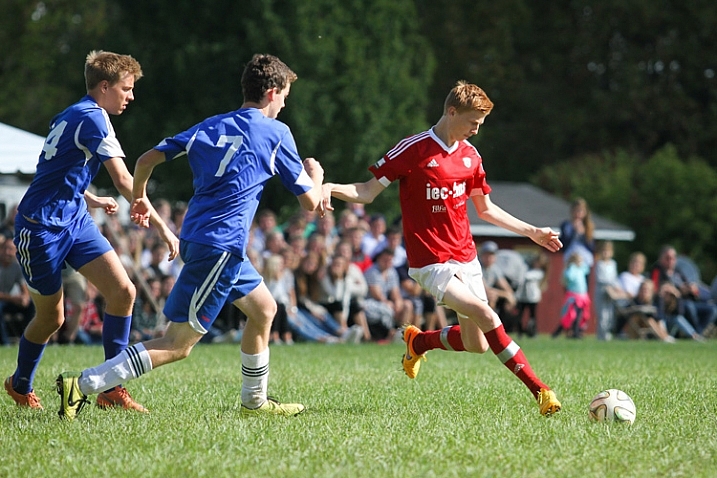
A soccer player about to kick a soccer ball, captured with a high shutter speed

This image was taken at 1/1600th of a second, which freezes the action completely. This super fast shutter speed is possible because there is a lot of sunlight.

Chances are that you’ve probably taken your fair share of blurry sports photo. Typically, players or athletes are moving at high speeds, and your camera doesn’t necessarily know for itself how to compensate.

Freezing the action

If you want to freeze the action in a photo, you’ll need to use to choose a fast shutter speed. But, how fast does it need to be? Well, that depends on the sport. 1/250th of a second should be enough to freeze kids playing soccer, but you’ll need to go a lot faster if you want to capture a baseball in mid-flight. Experiment and find what shutter speed you need to use in order to produce sharp images.

Adding motion

On the other hand, you can also experiment with slowing down the shutter speed and panning your camera throughout the picture to create a sense of speed and movement. It takes a bit of practice to get right, but if you match the speed of your subject, you can hold them in focus while the directional blur emphasizes the sense of movement.

Whenever possible, you will want to use a wide aperture, such as f/3.5 or lower. This will create a narrow depth-of-field, and helps the players to stand out, as the background distractions will be blurred.
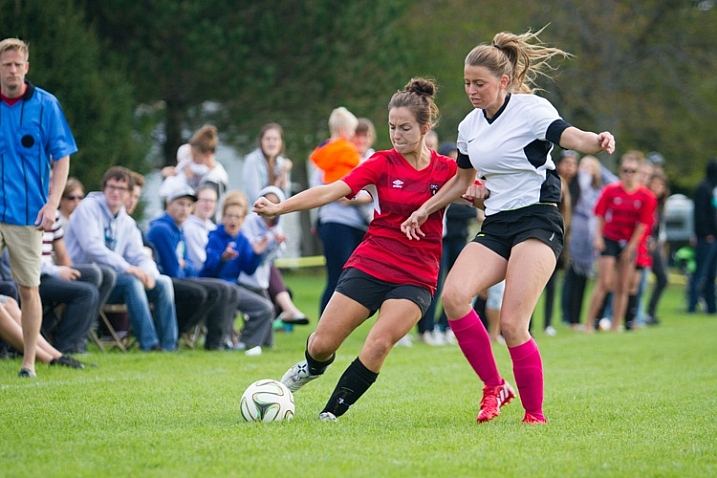
Two soccer players fighting for the ball with spectators watching the game behind them

This image was shot at an aperture of f/2.8 so that the spectators in the background don’t distract from the players chasing the ball.

If the sport is being held outside during overcast conditions or indoors with consistent lighting, consider using manual exposure mode and settings. It may take a bit of time to figure out, but you’ll get much more reliable and consistent images.

Pick your spots

When you first arrive at the field, arena, gym or track, consider all of your potential angles and options. Your options will be different depending on whether you have a short or a long zoom lens.

For many sports, you won’t be able to cover every angle. Getting up close with a wide-angle lens means you won’t be able to capture plays on the other side of the field. While using a long zoom means you may struggle to capture play right in front of you.

Find the “sweet spots” – the places on the field of play which are the perfect distance away for your camera and lens combination. You’re going to get your best images when the play is in these areas. Rather than trying to get an incredible picture when play is far away on the other side of the field, be patient and prepare so that you make the most out of every opportunity when play is in your sweet spots.
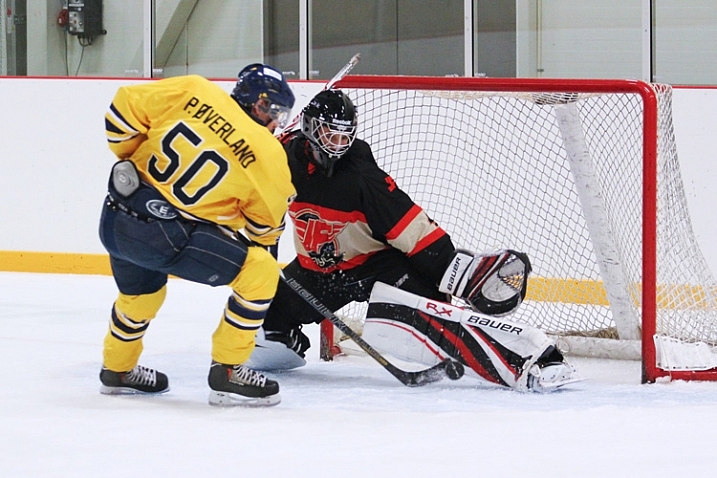
A hockey player tries to deke around the goaltender

When I stand near the benches with a 70-200mm lens, this play in front of the net is right in my sweet spot, which allows for strong composition.

Where possible, it’s a good idea to put yourself in a position where the players will be coming towards you. This allows you to see faces and get a better sense of depth than if you shoot from the sidelines and get a side profile view of everyone.
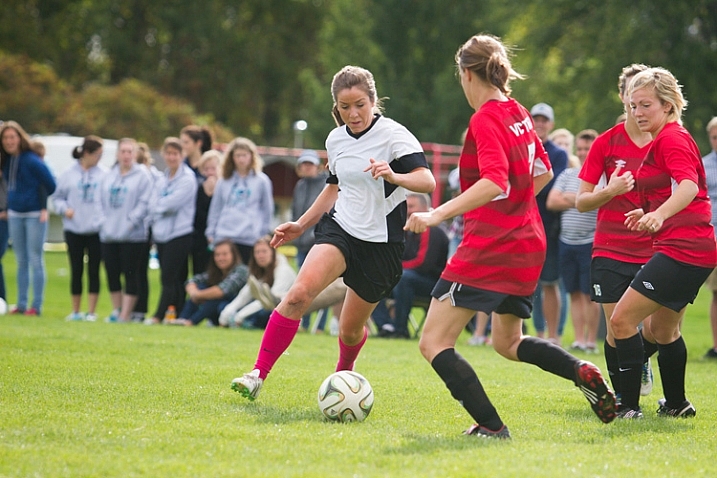
A female soccer player attempts to dribble the ball through two defenders

Get in the middle of the action

If you want to take a sports photo that will be memorable, you need to bring the viewer in as close as possible. Typically, this means using a zoom lens like the 70-200mm. If you don’t have a long zoom lens, simply get as close as possible to the field.

Perspective changes quite a bit as you zoom in. A wide-angle shot looks very different than a shot with full zoom (long telephoto). Consider how you can use this change in perspective to find some unique captures.

Many first-time sports photographers are nervous to zoom right into the middle of the action. Yes, it does come with some risks. You’re likely to snap plenty of frames where an unexpected zig or zag took the player partially out of the image. This is part of sports photography. Even the professionals aren’t able to nail the perfect shot every time.
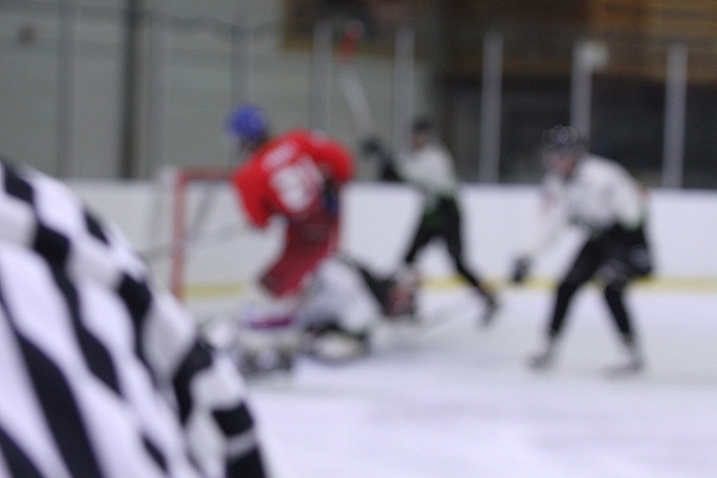
A hockey picture where the focus has missed

In this shot, the referee passed in front of the camera and messed up the focus. Don’t feel upset if some pictures turn out like this! These kinds of images will be very familiar to any sports photographer.

Risks sometimes pay off

If you have trouble following the play, it definitely is an option to play it safe by taking a wider shot and then cropping in closer afterward. But by taking a high risk, high reward approach to composition will result in some magnificent images!

Another reason to use zoom: To capture expressions!

The most memorable sports shots show faces full of emotion – whether that is the joy of the game, the thrill of victory or the agony of defeat.


Image of hockey players celebrating on the ice after a goal

Image of two soccer players laughing while preparing for a corner kick

Timing is everything

There seems to be a furious competition between manufacturers to see who can make a camera that takes the most images per second.

Burst mode is an incredibly useful tool for sports photography, but all too often it can be a crutch. Just because you can take 10 pictures in one second doesn’t mean you should.
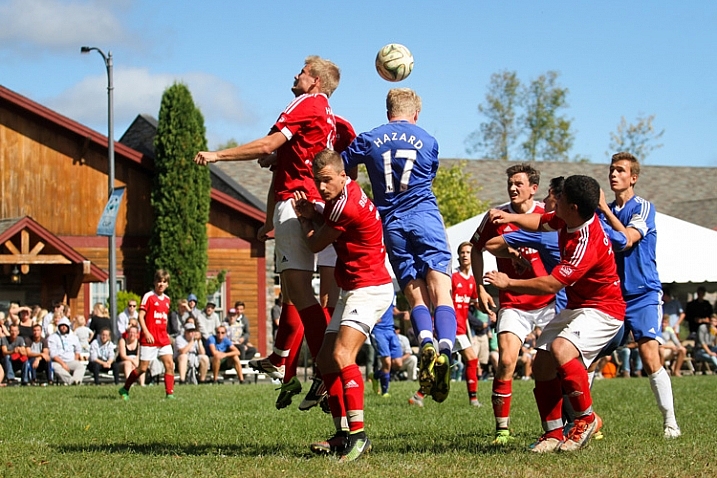
Soccer players attempting to head the ball into the net from a corner kick

Having the ability to take pictures in bursts should be secondary to anticipating the action. Understanding of the game and having a sense for what is going to happen next is more important than burst mode in every case. If you return from every event with thousands of pictures, all taken a fraction of a second apart, it’s going to be a strenuous job of sorting and finding the keepers.

With that said, burst mode can be a great tool if you don’t want to miss any opportunities and have lots of room on your card.

Lastly, don’t spend the whole game chimping! Chimping is when you get so caught up checking out all of your sweet pictures on your camera’s LCD screen that you miss an incredible play that happens right in front of you. Your pictures will still be there when the game is over. Focus on getting your shot!

Hitting your focus

Having the perfect settings, composition and timing won’t count for anything if you miss your focus.

With the possibility for spectators, colourful advertisements, and other players in the background of your images, your camera’s focus might wander and lock onto the wrong target.

For sports photography especially, you might want to consider using back button focus. With this method, your focus is controlled by a button on the back of your camera, which you can reach with your thumb. The shutter button doesn’t influence the focus at all.

By separating the actions of focusing and taking the picture, you will have greater control and independence over both roles. You may need to consult the manual for information on how to switch your camera to back button focus.
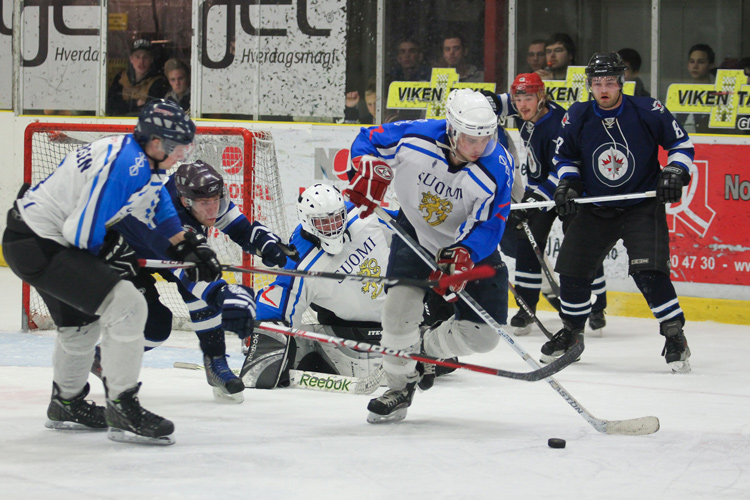
An sports action shot of hockey players fighting for the puck

Focus modes

Your camera comes with different focus modes that you can use to get more reliable results, even when dealing with fast and unpredictable subjects. The process for selecting these modes will be a bit different for every camera, so consult your manual for information on how to switch to these options.

First off, you can allow your camera to use all the focus points to determine the best target to lock onto. This can often go wrong, however, as the camera may choose the wrong point, leaving you with an out-of-focus image.

You can get a bit more specific with zone focus, which allows you to select a group of focus points that the camera uses to determine what it focuses on. This focus mode gives up greater control over what the camera locks onto, but still leaves some room for error.

If you want to be very precise, single point focus allows you focus based on just one point of your choosing. This is great if you want to focus on a specific player in a group. The drawback is that is may not be as accurate, and you may need to be very steady in order to stay locked on target.
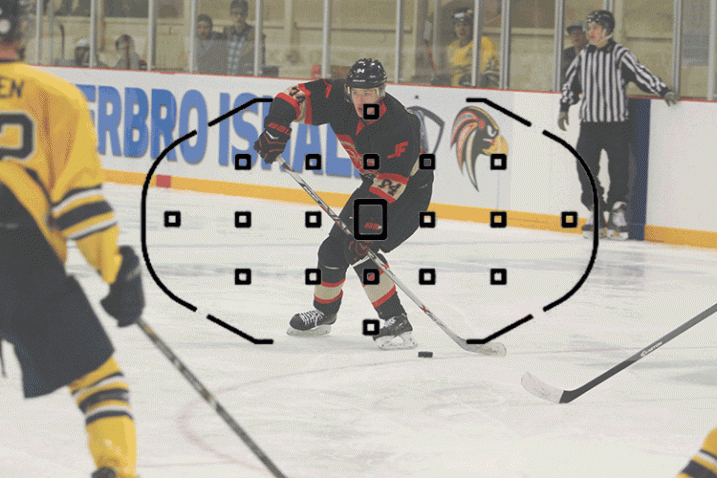
Shows all the different focus modes

This image shows three different focus modes as seen through a Canon 7D: Full Auto Focus, Single Point Focus, and Zone Focus

You can also select how the focus will track. These settings may have different names from manufacturer to manufacturer, but they do the same thing.

Continuous or AF-C (Nikon) / AI Servo (Canon):  In this mode, your focus will constantly seek for as long as you are holding your focus button down. This is ideal for moving subjects, and should be your first choice for sports.

Single or AF-S (Nikon) / One Shot (Canon):  In this mode, your focus will find a target and lock, even if you continue to hold down your focus button. While this is often slightly more accurate than servo focus, your subject may have already moved out of focus by the time you take the shot.

AF-A (Nikon) / AI Focus (Canon):  This mode is an intelligent blending of the two previous modes – it will determine if the target is moving and will lock or track accordingly.

Making the most of the focus technology your camera has to offer will play a big role in snapping some excellent sports shots!

Bonus tips and tricks

If you are photographing a car race or a long jump event, it can be a real challenge to track your subject in action. A fast moving car or runner isn’t an easy target for a lot of cameras.

One surefire way to hit your focus even under these tricky conditions is to prefocus. When using this technique, you pick a spot somewhere ahead on the track to carefully set your focus. Then, when your subject comes through, you simply snap the picture and voila!
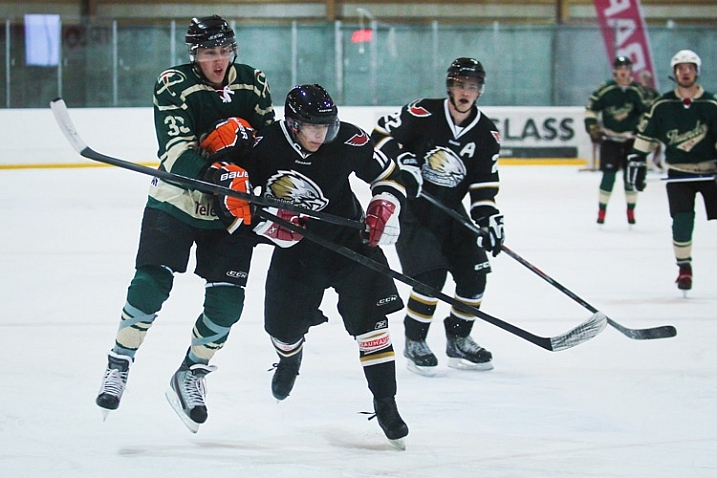
Two hockey players in mid air after a body check collision

If you want to add drama and action to your images, consider shooting from a lower angle. This perspective can often make athletes seem heroic or larger than life. Shooting from a lower angle also means the background will show spectators or the opponents behind the player, giving a better sense of the setting and action.

Take Lots of Pictures!

When you get home and load the images on your computer, you’re going to find that many of your shots have missed focus, have players in awkward or unflattering angles, or other annoying distractions. This is perfectly normal! It isn’t easy to capture the chaos of sports, and you’re going to need to throw out a lot of shots.

Over time, as your feel for the game from behind the camera improves and as you begin to master these techniques, you will find yourself coming home with more and more keepers!

googletag.cmd.push(function() {
tablet_slots.push( googletag.defineSlot( “/1005424/_dPSv4_tab-all-article-bottom_(300×250)”, [300, 250], “pb-ad-78623” ).addService( googletag.pubads() ) ); } );

googletag.cmd.push(function() {
mobile_slots.push( googletag.defineSlot( “/1005424/_dPSv4_mob-all-article-bottom_(300×250)”, [300, 250], “pb-ad-78158” ).addService( googletag.pubads() ) ); } );

The post How to Capture the Perfect Action Shot in Sports Photography by Frank Myrland appeared first on Digital Photography School.


Digital Photography School

 
Comments Off on How to Capture the Perfect Action Shot in Sports Photography

Posted in Photography


Review: Inexpensive Time Lapse with the YI 4K Action Camera

12 Sep

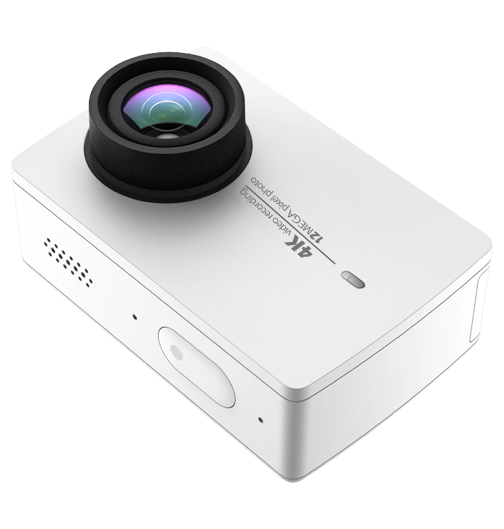
While this is essentially a review of a small action camera, that produces both stills and video, I’m going to focus on using the little YI 4K Action Camera, to kickstart your love of time lapse photography.

YI Technology – YI 4K Action Camera

Time lapse photography can produce stunning results that can inspire you to travel, to capture behind the scenes of your photographic projects, even as a great way to capture your holidays. Your week at the beach might only last a few minutes as a time lapse (as opposed to a couple of hours of video to make your friends sit through!) However you use it, there’s no denying it’s fun to use, and fun to try.

p15

Gear for time lapse photography

So, time lapse with amazing results requires a bit of gear, right? A camera that allows you to adjust your shutter and aperture. A trigger that allows you to set your camera to capture the time lapse, either indefinitely or for a certain period of time. If you want to take it further, you might look at something that allows you to have movement in your time lapse, rather than a static shot, just to add interest. (more on that, next article)

That being said, can you create a good enough looking time lapse, to start your journey into this fun and creative style of photography with an action camera? That’s the question I set out to find an answer to, with this latest hardware review.

I have a GoPro, it’s great! It’s the Hero4 Black, and it does time lapse, but it’s actually pretty expensive! Expensive enough, with some accessories and a spare battery, that you might actually consider just getting an entry level dSLR!

I also have a very brilliant Sony Action Cam 4K. Again, a spare battery and you’re up over half a grand. So, looking at options, I once again find myself wading into the “not really brand name” manufacturers of the lesser known! Enter YI Technology YI 4K Action Cam. There are a handful of reviews popping up online for this little camera, and most I’ve read or watched are positive. I’m not going to talk about the whole video side of the unit much, though it produces decent quality 4K footage for the price tag. This review is all about the camera’s time lapse ability.

p13

The specs in brief are as follows:

  • Main Processor – Ambarella A9SE chipset, includes a 800 MHz dual-core. Cortex-A9 ARM CPU and a high-performance digital signal processing (DSP) subsystem with a 32-Mpixel image sensor pipeline (ISP), and an advanced H.264 encoder capable of 4K resolution.
  • Image Sensor – SONY IMX377, 1/2.3″, 12 megapixels CMOS image sensor with Exmor R ability.
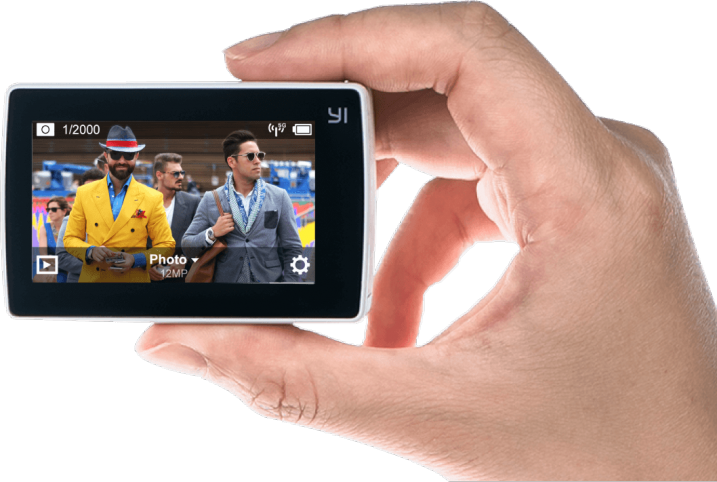
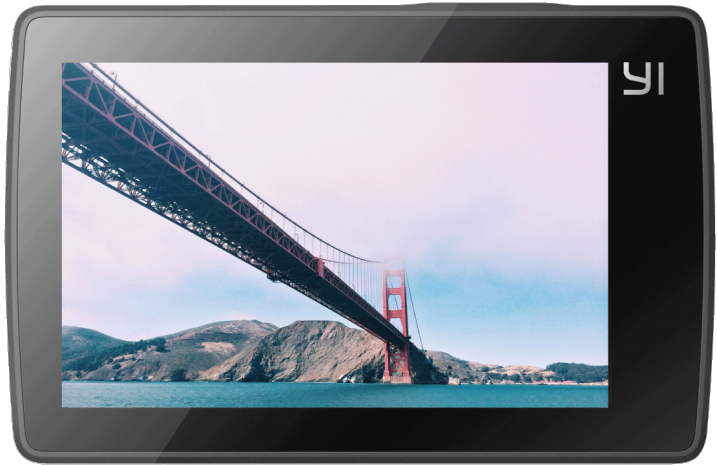
  • LCD Screen – 2.19″, 640×360 resolution touch screen, 330PPI, 250cd/m2 brightness, 30FPS, 160° FOV, 16:9.
  • Lens – Lens f/2.8 aperture / 155° wide-angle lens, 7G, f=2.68mm.
  • Wi-Fi – Broadcom BCM43340 Dual-band 5GHz /2.4GHz, built-in (802.11 abgn), offers 30Mbps download speed.
  • Weight – 3.4 ounces camera + battery (96.4 grams).
  • Size – 65 x 42 x 30 mm.

Said to have a Gorilla Glass rear touch screen, and I’ve got to say, that it’s actually useable! Responsive and clear, and also quite good at playing back your Time Lapse sequence on the camera.

Yi-4K-ActionCam-Review-Time-Lapse-Simon-Pollock-Gtvone

What’s it like to work on your time lapse creation with the YI 4K?

It’s actually very simple, there’s a touch screen rear display (as per above) and you simply tap it, select time lapse (either photo or video version of time lapse), dial in some adjustment, and press the go button! Now, the unit saves the time lapse in one of two formats, you may have noticed I said “Photo or Video time lapse” above, which is basically the output you get when you select either. In video time lapse mode, you get a single file at the end of your sequence, with photo time lapse you get the time lapse movie as the individual images.

There are benefits to both. With the video version of the sequence, you get a simple video at the end, that you can directly upload and share with your friends. The downside of this is that if you get a dodgy image (bird flies across, a drastic light change, etc.) in the middle of your time lapse, with the photo version you can simply delete the offending frame and you’re good to go. In video mode, you would need to edit that frame out with a video editor of sorts. Keeping in mind you may lose a little continuity in your time lapse if you delete more than a couple of frames, and you’ll see jumps.

I’ve made a quick example. At 1:03 in this video mode time lapse, someone over my back fence switched on their outside light and the white balance (auto, in video time lapse mode) jumped a gate and ran off into the hills! Take a look, you’ll see what I mean. It’s only 4 frames and I could edit it out, but left it in to show you what I mean. In photo time lapse mode, you can preselect the white balance and this wouldn’t have happened. My sweet darkening purples changed to blue.

Does the YI 4K work as an entry level time lapse camera? Absolutely it does, and with better specs than the current GoPro Hero 4 Black, it’s a decent little all-round package if you want something less expensive to document your photoshoots with too.

Conclusion?

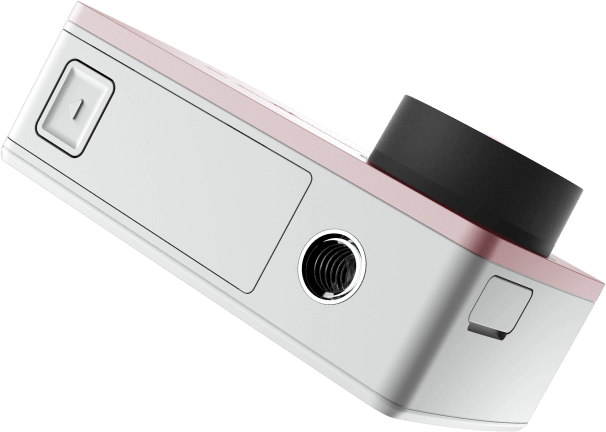
I really enjoyed using the YI 4K as I call it. It’s easy to use, produces a good result, and is very well priced for what you get. One other thing I really like is the inclusion of a 1/4 20″ metal tripod mount in the bottom of the camera. So, you can stick a tripod plate on it, or screw it straight onto a light stand for use on set, or just to get your YI4K up high for a time lapse.

I’m not about to bin my GoPro or Sony Action Cam, but there is rumoured to be a GoPro 5 dropping sometime very soon – we shall see how they stack up.

p6

What I like about the YI 4K Action Camera:

  • Simple iOS app to change all settings on the YI 4K.
  • Good quality images from an Action Cam.
  • Multiple options for time lapse (Video / Stills).
  • Fantastic touchscreen included in device by default.
  • Good battery life.
  • Tripod mount on the camera.

What I’d like to see improved:

  • More standard accessories

I’m not really thinking I should give this a star rating as I’ve really only used it for time lapse, but if I were to give it a rating, it’d have to be a 4.5 out of 5 I think! Good job, YI Technology.

googletag.cmd.push(function() {
tablet_slots.push( googletag.defineSlot( “/1005424/_dPSv4_tab-all-article-bottom_(300×250)”, [300, 250], “pb-ad-78623” ).addService( googletag.pubads() ) ); } );

googletag.cmd.push(function() {
mobile_slots.push( googletag.defineSlot( “/1005424/_dPSv4_mob-all-article-bottom_(300×250)”, [300, 250], “pb-ad-78158” ).addService( googletag.pubads() ) ); } );

The post Review: Inexpensive Time Lapse with the YI 4K Action Camera by Sime appeared first on Digital Photography School.


Digital Photography School

 
Comments Off on Review: Inexpensive Time Lapse with the YI 4K Action Camera

Posted in Photography


Sony’s new flagship FDR-X3000 action cam shoots stabilized 4K video

09 Sep
The new Sony X3000 both offer image stabilization, with the X3000 (left) shooting 4K and the (center) Full HD. Both are sold in optional kits with the new, smaller live-view remote.

Sony has announced that the 4K-capable flagship FDR-X3000 action camera (previously announced in Japan) will go on sale in North America, along with the Full HD FDR-AS300 action camera. Both makes use of Sony’s Balanced Optical SteadyShot image stabilization (BOSS – yes, really), which can be used when shooting 4K video on the X3000 and Full HD on the AS300. 

Stabilized 4K footage from an action camera is a very big deal. Of the cameras included in our recent 2016 Action Camera roundup, only one is capable of stabilized 4K, and it’s an adventure tracker, not an action camera.

Both the X3000 and AS300 also feature new Zeiss lens designs, and utilize 8.2MP BSI Exmor R CMOS sensors with full sensor readout and no pixel binning. The models feature identical designs, and are smaller than previous Sony action cameras. The user interface has also been vastly improved.

The X3000 will be sold body-only for $ 400 and kitted with a new 30% smaller live view remote (X3000R) for $ 450. The AS300 will be sold body-only for $ 300 and kitted with the new live view remote (AS300R) for $ 450. Both will be available in North America in late September.

Press Release:

Sony Announces new Flagship 4K and HD Action Cams with Superior Image Stabilization

New 4K and HD POV Cameras Feature Balanced Optical SteadyShot® Image Stabilization, Live-View Remote, 4K Time-lapse Capture and other professional capabilities

SAN DIEGO, Sept. 9, 2016 – Sony Electronics, a worldwide leader in digital imaging, has today introduced their first POV cameras to feature the innovative Balanced Optical SteadyShot (B.O.SS) image stabilization technology, the FDR-X3000R 4K*  model and HDR-AS300R Full HD model.

The flagship feature of the two new cameras – Balanced Optical SteadyShot* – is an advanced form of image stabilization where internally, the camera’s lens and sensor are joined and moved together to compensate for camera shake caused by excessive motion, whether shooting handheld with optional accessories or during a fast-paced sporting activity. This is a particularly effective technology when paired with a POV action camera design as it ensures captured video footage is smooth and stable – even in 4K or high-frame-rate shooting modes.

Advanced Movie-Making Capabilities

The versatile new FDR-X3000R and HDR-AS300R Action Cam feature a new ZEISS® Tessar lens with significantly less lens distortion than previous models3. They are also equipped with a new back-illuminated Exmor R® CMOS sensor with large pixels designed for 16:9 aspect ratio video plus a powerful BIONZ X™ processor, ensuring that video quality remains consistently strong across all settings.

The new cameras utilize full pixel readout without pixel binning technology to produce exceptionally high resolution and accurate colors in both 4K (FDR-X3000R only) and Full HD videos. This allows them to read and process data from all of the sensor’s pixels, producing highly detailed video content with minimal noise and ‘jaggies’ in a variety of formats including the high data stream XAVC S™ codec (100Mbps in 4K and 50Mbps in Full HD) 4. The FDR-X3000R can also shoot 120p in Full HD and HDR-AS300R can shoot 120p in HD for impressive slow-motion footage 5. Both cameras offer a new angle of view adjustment, with a 3x smooth zoom or preset “wide”, “medium” and “narrow”6 settings. This allows shooters to get even closer to the action during movie recording, and reducing barrel distortion common with wide view POV cameras.

FDR-X3000R and HDR-AS300R each have a built-in stereo mic7 with wind noise reduction to reduce the impact of wind interference on overall audio quality, and are equipped with stereo microphone input for advanced recording.

LiveView Remote and User Interface

Sony’s new Action Cam models will be offered in a kit with a compact Live-View Remote8 that is about 30% smaller than previous9 version. The remote, with a mountable design, acts as an extension of the camera and allows users to see what is being recorded when the camera is not accessible. The remote has the ability to control various functionalities including shooting settings, start/stop recording, power on/off and more. It also features an “auto display off” mode that turns off its LCD screen display automatically during shooting in order to save power of both camera and remote.

The versatile remote accessory can be attached to various optional accessories such as Finger Grip (AKA-FGP1), Shooting Grip (VCT-STG1) or Handlebar Mount (VCT-HM2) using supplied mount adaptor, or worn as a wristband using supplied belt. Users can also utilize Sony’s PlayMemories Mobile™ application – available for both Android and iOS – to control the new Action Cam with a smart device10.

Based on extensive feedback from athletes, filmmakers and more casual users, the new cameras and Live-View Remote feature a more in-depth user interface and menu system, with a rich indication of camera settings that makes it easier to navigate menus and customize settings as needed. The new models also offers “Wi-Fi high power mode”, which extends to communication distance between the camera and Live-View Remote11 for more flexible shooting.

Additional Feature Enhancements

The FDR-X3000R and HDR-AS300R both include a unique Time-lapse Capture feature that shoots still images in pre-set intervals that can later be transformed into a stunning 4K time-lapse movie utilizing the Action Cam Movie Creator software12. The Action Cam App13 can also create time-lapse movies in Full HD.

Built-in GPS inherited from previous models3 is available, allowing location tracking and speedometer to be added to the video file when Action Cam Movie Creator is used. This also allows GPS Data Overlay on video to read your speed data and generate another video file14 that includes your route, speed information, etc.

Additionally, an updated version Sony’s own in-built movie creator – Highlight Movie Maker15 – is available in the new cameras. The innovative feature, which now utilizes face detection technology, automatically assembles footage into a video highlight package and pairs it with custom music for the ultimate viewing experience.

For the more advanced user, there are an expanded scope of manual controls and setting adjustments including white balance, and auto exposure shifting. Loop recording is also available, allowing users to maximize usage of available memory card space to ensure they get the exact shot they are looking for.

The FDR-X3000R and HDR-AS300R have a splash-proof body and are waterproof with supplied Underwater Housing (MPK-UWH1) 7 that is certified down to 197 ft. / 60m in depth. A new range of accessories for Action Cam has also been announced, including the Finger Grip (AKA-FGP1) that is an ideal travel accessory as it enables flexible one-handed shooting and the MC Protector (AKA-MCP1) for extra protection from lens scratches and dirt.

Pricing and Availability

The new Sony FDR-X3000 will be sold as body only for about $ 400 US ($ 550 CA), and will be offered as a kit (model FDR-X3000R) with the new Live-View Remote for about $ 550 US ($ 700 CA).

The new Sony HDR-AS300 will be sold as a body only for about $ 300 US ($ 400 CA) and will be offered as a kit (model HDR-AS300R) with the new Live-View Remote for about $ 450 US ($ 550 CA).

The new AKA-FGP1 finger grip will be sold for about $ 25 US ($ 40 CA), and the AKA-MCP1 lens shield will be sold for about $ 35 US ($ 50 CA).

All products will be available in North America in late September at authorized dealers.

Notes:

1) 3840 × 2160 pixels.
2) Distortion in image quality or out-of-focus may occur when used in close proximity to vibrating motors and engines. Image results can be improved by using Action Cam with optional accessory Motor Vibration Absorber for X3000/AS300 (AKA-MVA).
3) FDR-X1000V, HDR-AS200V.
4) A micro SDXC/SDHC Class 10 or higher is required for XAVC S recording. Micro SDXC/SDHC UHS-I U3 or higher is required for 4K 100Mbps recording.
5) Requires post-processing for slow-motion movie
6) Medium and narrow are not available in 4K, time-lapse capture, and high speed recording.
7) Recorded sound level is lower when using supplied Underwater Housing (MPK-UWH1).
8) Not sold separately. Included only as part of the FDR-X3000R, HDR-AS300R or HDR-AS50R.
9) Previous model is RM-LVR2.
10) Camera on/off control requires Bluetooth 4.0 compatible smartphone or tablet (iPhone/iPad or Android ver.5.0 or later) with PlayMemories Mobile ver. 5.5 or later.
11) The Live-View Remote may not be able to turn the camera on/off depending on the physical environment and the communication distance. The communication distance will be dependant on the physical environment and connected device.
12) Requires version 5.1 or later for Windows and 3.1 or later for Mac.
13) Requires version 2.0 or later of the application. Available for Android and iOS.
14) Requires version 5.2 or later for Windows and version 3.2 or later for Mac.
15) Requires a smartphone or tablet with PlayMemories Mobile ver.5.1 or later for the operation. Not available in XAVC S 4K, XAVC S HD 24p, and high speed recording modes.

Articles: Digital Photography Review (dpreview.com)

 
Comments Off on Sony’s new flagship FDR-X3000 action cam shoots stabilized 4K video

Posted in Uncategorized


Field Test: Shooting action with the Nikon D5

06 Sep

Nikon’s D5 is a full-frame professional DSLR designed for shooting fast action in tough environments. To test the D5’s market-leading autofocus system, we took the camera out to Santa Fe, and put one in the hands of professional photographer Michael Clark.

In this field test, DPReview’s technical editor Rishi Sanyal joined Michael to shoot a range of activities, including dirt bikes and white-water kayaking. Watch the video to see how the D5 performed. 


This is sponsored content, created with the support of Nikon. What does this mean?

Articles: Digital Photography Review (dpreview.com)

 
Comments Off on Field Test: Shooting action with the Nikon D5

Posted in Uncategorized


2016 Roundup: 4K action cameras

05 Sep

Action cameras have come a long way since the very first GoPro hit the market in 2005 (it used 35mm film, if you can believe that.) They’ve increasingly shrunk in size, and video quality has improved dramatically with each new generation. Many offer rear LCDs (a rarity a few years ago), some are even waterproof/shockproof without the need for a case and certain models can even be used for live broadcast. All of them pair with dedicated apps.

Of course, there are a lot of action cameras available on the market, but there are far fewer capable of 4K video capture. This roundup takes a look specifically at several of the most popular 4K action camera models as well as some lesser known ones too. 

While Sony and GoPro are both big names in the action camera world, and Ricoh has been making rugged cameras for years, companies like Yi and Wimius may be less familiar. Both are convincing GoPro lookalikes that retail for far less. The Yi 4K sells for $ 250 and in many ways out-specs the GoPro’s current flagship. The Wimius Q1, on the other hand, retails for around $ 70 and was included in this roundup as the inexpensive dark horse in the 4K action cam race.

In addition to 4K action cameras, this roundup also includes the Olympus TG Tracker, a video-capable data-capturing device (read our shooting experience). It has the ability to not only record 4K video but also capture information like altitude, temperature, location, acceleration and more. 

We’ve included the following 4K-capable action cameras in this roundup:

  • GoPro HERO4 Black
  • Olympus Stylus TG-Tracker
  • Ricoh WG-M2
  • Sony FDR-X1000VR
  • Wimius Action Cam Q1
  • Yi 4K

All of the 4K samples footage was shot using each camera’s default settings. You can also view a super cut from our field testing, with footage from each camera, below:

*Note: Due to technical issues, we were unable to shoot 4K footage with the Sony X1000V at Mount Hood. Sample 4K footage from the X1000V can be viewed here.

Articles: Digital Photography Review (dpreview.com)

 
Comments Off on 2016 Roundup: 4K action cameras

Posted in Uncategorized


Garmin VIRB Ultra 30 4K action cam unveiled with voice control

03 Sep

$ (document).ready(function() { SampleGalleryV2({“containerId”:”embeddedSampleGallery_1954745106″,”galleryId”:”1954745106″,”isEmbeddedWidget”:true,”standalone”:false,”selectedImageIndex”:0,”startInCommentsView”:false,”isMobile”:false}) });

Garmin has introduced the VIRB Ultra 30, a rugged action camera capable of recording 4K/30fps footage. Despite its small size, Garmin packs a bunch of sensors and features into the camera, including GPS, voice control to start recording, a touchscreen display and a high-sensitivity microphone. The VIRB offers what Garmin calls 3-axis image stabilization, but it’s available up to 1440/60p, which leads us to believe it’s digital.

In addition to 4K footage, the new VIRB action camera can record 720p/240fps slow motion video and can capture 12 megapixel still images. Content is stored on a microSD card. The touchscreen display works when the camera is enclosed in its waterproof case, as does the microphone, according to Garmin. That waterproof case includes an anti-glare coated and water-repellant lens.

In addition to changing settings via the touchscreen display, the VIRB Ultra 30 supports Sensory TrulyHandsfree voice control. Commands like ‘OK Garmin, remember that’ for tagging moments and ‘OK Garmin, start recording’ are supported. Additionally, the camera can be controlled remotely using the VIRB app on a tablet or smartphone. The VIRB app is complemented by the Garmin VIRB Edit desktop software for post-processing.

The Garmin VIRB Ultra 30 is available in the U.S. now for $ 499, and will be available in the UK for £449 in Q3 2016.

Via: Garmin Blog

Articles: Digital Photography Review (dpreview.com)

 
Comments Off on Garmin VIRB Ultra 30 4K action cam unveiled with voice control

Posted in Uncategorized


How To Capture Action Shots of Waves

24 Jun

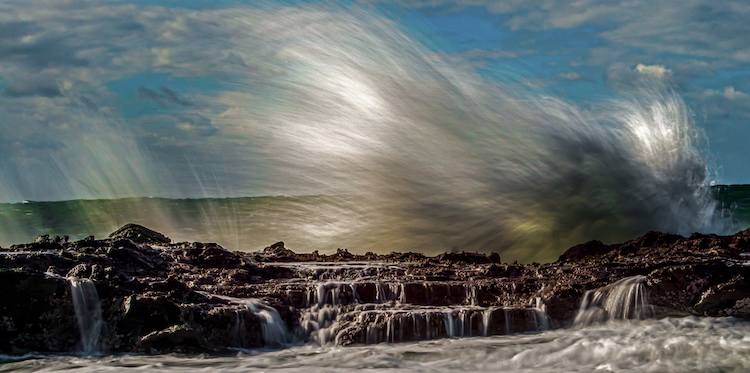
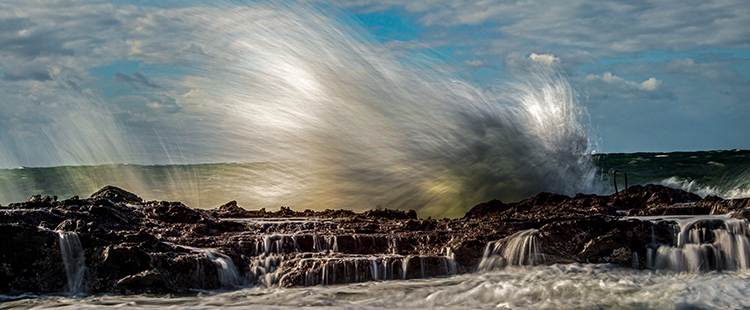
If you enjoy photographing mother nature and waterscapes, one particularly fun exercise is to capture the beautiful characteristics of the ocean shore. If you are in the right place at the right time, you can create images displaying the delicate balance between the awesome force of a powerful wave crashing into the shoreline, juxtaposed with the calming ebb and flow of the water cascading over the rocks.

Follow these tip to help you capture great action shots of waves:

Image001

EQUIPMENT:

Use of a tripod is important due to the relatively slow shutter speeds you’ll be working with. Generally speaking, a one-third to one-half second shutter speed range does the job. Perhaps there are lenses and cameras with image stabilization which can help you shoot photographs in this shutter speed range handheld, but I always prefer to keep my setup as motionless as possible to achieve sharp images so I use a tripod.

I also always use a remote shutter release, because pressing directly on the camera’s shutter button can introduce slight vibration into the setup during exposure.

Ideally you will be shooting a relatively rough surf (more on that later), so choosing a long lens that keeps you and your setup out of harm’s way is important. I typically choose a medium telephoto, such as a 70-200mm zoom, but sometimes a slightly shorter length is necessary to capture a wide enough composition.

You may also want to bring a circular polarizer which helps mitigate any glare in the water, and should slightly slow down the shutter speed. You may also want to bring a variable neutral density filter in case it is too bright out to get the correct shutter speeds.

Image002

PLANNING THE SHOT:

If you want to shoot large, powerful waves, pick a location that has incessantly high wind. The higher the winds, the larger and stronger the waves will be. You will also want to shoot during the golden hour, either just after sunrise, or just before sunset. These times of day offer a warm, diffused natural light cast over the beach, and create a nicely saturated background sky.

Get to the location early. Give yourself plenty of time to scout it out, and pick an area where you can ideally compose a combination of high waves crashing into the surf, with a foreground of water flowing to and from the beach. If possible, pick a beach with rocks and boulders scattered amongst the surf. Rocks give the waves an extra punch when they land, and further add the element of unpredictable force and power to the photograph. Also, water gently flowing over rocks in the foreground adds an interesting element to the image.

When your composition is set (more on that in a minute), put your camera in aperture priority, set your aperture to f/8 or f/11, and fasten the polarizer to the lens. Rotate the filter until you see the sheen or reflection on the water dissipate to its minimum, then stop. Adjust the ISO to reach a desired shutter speed of around 1/3 to 1/2 of a second. Remember, raising ISO one stop speeds up the shutter by one stop, and lowering ISO one stop reduces shutter speed by one stop, (assuming the aperture stays constant). Depending on how bright it is out, you may need a neutral density filter to slow down your camera’s shutter. Many filter manufacturers make one single filter that has both a polarizer and a variable ND filter combined.

Image003

Quick Tip: Whenever I use a neutral density filter, I always manually focus before adding the filter. The ND filter will cause your viewfinder to become relatively dark, which makes focusing difficult – sort of like trying to read with sunglasses on in a dimly lighted room.

Set your camera so that it shoots continuous photos as quickly as possible, in RAW mode, and fire away!

COMPOSITION AND POST-PROCESSING:

When you compose the scene, leave plenty of extra space around the intended target. Since your setup will be locked in place on a tripod, you won’t be able to adjust your composition once you’re set. Thus, you’re basically taking an educated guess as to where the wave will eventually land. Once you’re set, wait for a wave that’s inside your composition, and let it loose.

Image007

Shooting wider than necessary greatly increases your chances at nailing some good action shots of waves. Once you’re back at the computer, it’s a piece of cake to crop out the edges and tighten in on the action if necessary.

With respect to post-processing, aside from cropping, the only adjustment you might want to consider is a mild boost in contrast. Added contrast will enhance the water’s punch and power, as seen by the viewer.

Image004

Do you have any other tips for photography the awesome power of nature and ocean waves? Please share in the comments below, as well as your wave images.

googletag.cmd.push(function() {
tablet_slots.push( googletag.defineSlot( “/1005424/_dPSv4_tab-all-article-bottom_(300×250)”, [300, 250], “pb-ad-78623” ).addService( googletag.pubads() ) ); } );

googletag.cmd.push(function() {
mobile_slots.push( googletag.defineSlot( “/1005424/_dPSv4_mob-all-article-bottom_(300×250)”, [300, 250], “pb-ad-78158” ).addService( googletag.pubads() ) ); } );

The post How To Capture Action Shots of Waves by Jeb Buchman appeared first on Digital Photography School.


Digital Photography School

 
Comments Off on How To Capture Action Shots of Waves

Posted in Photography


Takeway launches R1 Mini Ranger Clampod for action cameras

04 Jun

$ (document).ready(function() { SampleGalleryV2({“containerId”:”embeddedSampleGallery_0938055042″,”galleryId”:”0938055042″,”isEmbeddedWidget”:true,”standalone”:false,”selectedImageIndex”:0,”startInCommentsView”:false,”isMobile”:false}) });

Camera clamp manufacturer Takeway has announced a miniature version of its T1 Clampod that it is aiming at the action cam market. The R1 Mini Ranger Clampod features a screw-close clamping jaw that can be adjusted for gripping on to flat surfaces or around cylindrical poles. The jaw offers a choice of three clamping ‘teeth’ so users can select the most appropriate for the type of surface the clamp is being attached to.

The head features a quick release plate that allows cameras to be attached and detached easily – Takeway claims the R1 can cope with a maximum load of 300g. Its load capacity makes it suitable for small to medium sized flash units too, such as the Canon Speedlite 430EX RT, though not top-of-the-range models. The aluminum clamp itself weighs 73g, and the jaw can attach to tubes of between 10-32mm in diameter and flat surfaces of between 5-32mm thick.

The Takeway R1 Mini Ranger Clampod will cost £29.94/€39.95. For more information visit the Takeway website.


Press release:

Kenro unveils new additions to Takeway range

Kenro Ltd, the specialist photo & video distributor, has expanded its range of Takeway camera clamps with the introduction of the new R1 Mini Ranger Clampod, together with an expanded range of Clampod accessories.

Kenro is the UK and Ireland’s exclusive distributor of the versatile Takeway Clampod mini tripod and clamping system.

Following hot on the heels of its ingenious larger brother – the T1 Clampod introduced last year – the new R1 Mini Ranger version is aimed at action cameras, mobile phones and GPS devices. SRP is just £29.94.

It is ideal for fixing onto cycle or motorcycle handlebars for filming outdoor adventure activities, but it will actually clamp onto anything 5-32mm thick so the applications are numerous. The R1 Mini Ranger has a quick release plate so an action camera or other device can be quickly loaded into place.

It can be used as a camera support aid in inaccessible places where handheld or tripod use is not possible, plus it can also be used with a flex neck for precise positioning in even more difficult places.

Clampod accessories, also recently launched, include:

Tablet Holder (TY102)
The optional tablet holder is compatible with tablets from 7” to 10.2” – such as iPad, Note 10.1 etc. The stored holder is only 15 cm x 6.4 cm, the max opening for tablet width is 20cm. SRP is £17.94.

Smartphone Holder for Sports (TY103)
This is a smartphone holder for dynamic use – such as motorcycles, bicycles, scooters, skateboarding etc. Even with violent shaking, a smartphone will not easily fall out. It is designed for smartphones from 4” to 5.7” in size. SRP is £15.54.

G1 Mini Tripod (TYG1)
The G1 is a table-top device which fits direct to cameras etc, via its 1/4” screw thread. It is designed to be used with the TYB01 Ball Head and T1 Clampod. Size folded: 15 x 11 x 7cm. Size extended: 9.5 x 4 x 2.4cm. SRP is £17.34.

Flex Neck (TYFN01)
The Flex Neck is 11cm long and fits the camera plate of the T1 or R1 Takeway Clamps along with the TYB01 Ball Head. Its bending action enables the user, in conjunction with a Takeway Clamp, to operate at more extreme angles. SRP is £22.14.

Ball Head (TYB01)
This mini Ball Head is designed mainly for use with the Takeway R1 Ranger, G1 Tripod or Flex Neck. It has a load capacity of 3kg and features a Quick Release Plate. SRP is £22.74.

Paul Kench, Kenro’s managing director, says: “When we introduced the original T1 Clampod, it provided users with a great looking, excellent quality and very handy device to clamp digital cameras to virtually anything and it has been very well received.

“This success led Takeway to design a smaller clamp aimed at the action cam and handheld device user, and the R1 Mini Ranger Clampod fits the bill perfectly. With its extended range of accessories, Takeway now has an extremely versatile and cost-effective device clamping system.”
All quoted prices are SRP guide, including VAT.

Articles: Digital Photography Review (dpreview.com)

 
Comments Off on Takeway launches R1 Mini Ranger Clampod for action cameras

Posted in Uncategorized


Vitrima lens aims to bring low-cost 3D video capture to GoPro action cameras

01 Jun

$ (document).ready(function() { SampleGalleryV2({“containerId”:”embeddedSampleGallery_0450741422″,”galleryId”:”0450741422″,”isEmbeddedWidget”:true,”standalone”:false,”selectedImageIndex”:0,”startInCommentsView”:false,”isMobile”:false}) });

Looking to bring more excitement to your POV snowboarding videos? A new case called Vitrima is in the works, which would enable GoPro action cameras to record 3D video. The lens attachment uses mirrors to deliver two images to the GoPro camera’s own lens. The resulting resulting stereoscopic videos appear to be 3D when viewed through a VR viewer like Google Cardboard or the Gear VR.

The Vitrima lens is waterproof and will ship already attached to a standard GoPro camera housing, and can also be used with various mounts. Because the lens is simply composed of carefully arranged mirrors, it works out of the box without any software. Though the resulting videos won’t feature 3D audio, the lens – which will cost $ 50 when the product launches – presents a low-cost way for someone to record 3D videos without purchasing a dedicated 3D camera like the $ 799 Vuze VR camera.

The website lists Vitrima as ‘launching soon.’

Articles: Digital Photography Review (dpreview.com)

 
Comments Off on Vitrima lens aims to bring low-cost 3D video capture to GoPro action cameras

Posted in Uncategorized