RSS
 

Posts Tagged ‘About’

12 December, 2014 – Special Antarctica Offer and An Article About Color and Human Vision Anomalies

12 Dec

A few years ago I was traveling with LuLa’s good friend Bill Atkinson.  Over dinner one night we got into a conversation on color and how the human eye and mind see color.  It was quite fascinating not to mention mind boggling.  Bill is one of the industries experts on color. Over the years, we have published stories about Color and Human Vision.  The way the eye sees color is quite fascinating. Today Charles Johnson Sr. shares his article on Observing and Managing Color: Dealing With Human Vision Anomalies.   An interesting read on understanding how we see color especially when working photographically.

A Special Message from Michael Reichmann

The Luminous Landscape, together with John and Roxie Walker of Switzerland, have created an opportunity for one or two people to join our January 26th, 2015 photographic expedition to Antarctica (there are two berths available).  The Walkers were early registrants for this extraordinary odyssey, unfortunately for personal reasons they will now not be able to fulfill this dream opportunity.  However, in the spirit of the season and with a deep desire to advance the art and craft of photography, we are pleased to offer the following unique opportunity:

Rather than simply resell their two berths,  Kevin, the Walkers and I have found a "silver lining" in this unfortunate turn of events and, as a result, we are pleased to make these two berths available as a thank-you gift for a meaningful donation to The Luminous Endowment for Photographers.

READ THE DETAILS AND MORE INFORMATION. . . 


The Luminous Landscape – What’s New

 
Comments Off on 12 December, 2014 – Special Antarctica Offer and An Article About Color and Human Vision Anomalies

Posted in News


Ten things you need to know about the Sony Alpha 7 II

28 Nov

Sony announced the Alpha 7 II last week relatively quietly, introducing a new member to its full-frame mirrorless family. The a7 II brings 5-axis in-body stabilization to a full-frame camera for the first time, claiming 4.5 stops in shake reduction. Other updates include improved ergonomics – you can see these for yourself in our hands-on overview of the a7 II. Here’s what you need to know about Sony’s newest Alpha camera. Read more

Articles: Digital Photography Review (dpreview.com)

 
Comments Off on Ten things you need to know about the Sony Alpha 7 II

Posted in Uncategorized


3 Factors to Think About When Composing Your Photos

28 Oct

The way you frame a photo is an important part of the composition. There are several key decisions to make when composing your photos:

  1. What to exclude from the frame
  2. What to include in the frame
  3. Where to place the main subject

The best way to learn about this is to look at several photos and explain how these principles apply. Let’s look at how they all apply:

Natural light portrait – what to exclude

Framing and composition

I took this photo of a local singer in Wellington’s Botanical Gardens. I knew what I wanted to include in the composition: the singer herself (she is the main subject of the photo and should take front stage in the composition) plus a hint of the background.

I achieved this by using a short telephoto lens (85mm on a full-frame camera). Telephotos are lenses of exclusion – their narrow field-of-view means they don’t include as much of the background as wide-angle lenses do.

I was also able to blur the background by using an aperture of f/2.8. This is another form of exclusion. While the leafy trees in the background are still recognizable, they don’t pull the eye as much they would if they were in sharp focus. This helps direct attention to the singer.

I placed her centrally in the frame. Central compositions work well when the subject is quite prominent in the frame. There is only focal point, the person in the portrait, so she doesn’t have to be on a third (following the Rule of Thirds).

Of course, this is subjective, and I know some people will disagree, so I’m going to provide a second version of this photo, cropped so the singer is on a third. It’s an important point because in an ideal world we will frame our photos perfectly when we take them, there are always times when a crop in post-production may improve the composition. Here are the two versions side-by-side.

Framing and composition

Which do you prefer? For me, I feel the original version has a better balance between the singer and the background.

The cropped version includes less of the background, however, the singer is larger in the frame, which will make it more attractive to some people.

There is no right or wrong here, like many aspects of composition it is completely subjective. But isn’t it interesting how a relatively small change in composition (a different crop) can make such a big difference to the same photo?

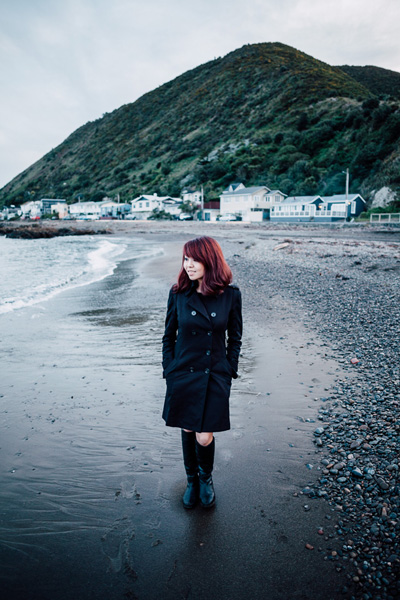
Beach portrait – what to include

Framing and composition

In the first example I minimized the amount of background in the photo, but in this one I included a lot more. The environment is an important part of the portrait. It was a cold, cloudy, wintery afternoon. I included the houses and hill in the background to emphasize the bleakness of the weather and the location.

The idea is for the viewer’s eye is to move between the girl in the foreground (the main subject of the portrait) to the houses and the hill in the background, taking in the detail along the way.

To achieve this I used a wide-angle lens (24mm on a full-frame camera). I was standing quite close to my model, yet this lens still included a large amount of the background. I used an aperture of f/2.8 to make the background slightly out of focus.

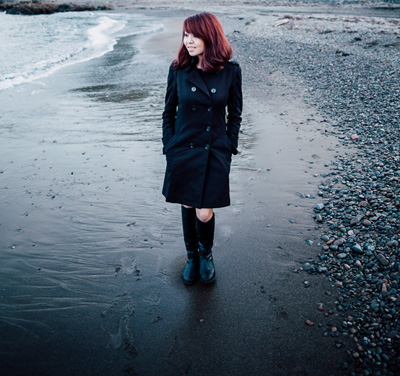
The placement of the model is an important part of the composition. If you have used a wide-angle lens you will know that a slight change in viewpoint makes a dramatic different to the composition. I made sure I held the camera high enough so that the model’s head was lower than the houses. If I crop the photo you can see that the only thing behind the model is the beach.

Framing and composition

I took care to prevent the model and the houses overlapping because they are separate elements of the photo. The composition is stronger if they are separated.

Chinese Lantern Festival – where to place the subject

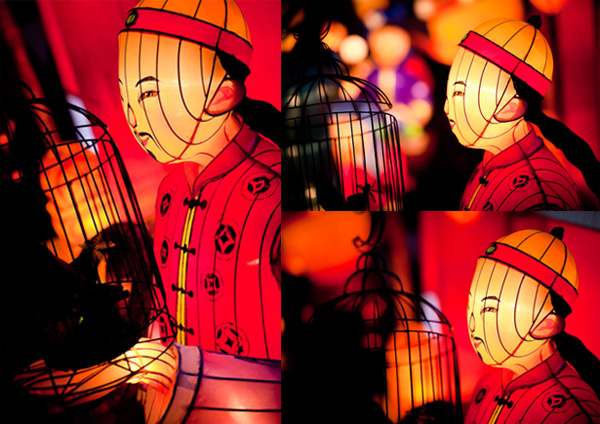
I took this photo at a Chinese Lantern Festival in Auckland. There were hundreds of elaborate Chinese lanterns on display, and they made wonderful subjects.

Framing and composition

I like to take the simple approach to photography and for this shoot I used just one camera and one lens, an 85mm short telephoto. My aim was to focus on the subject and practice using wide apertures to throw the lights in the background out of focus. This is one of my favourite photos from the evening.

I framed the image in such a way that the face of the lantern man was clearly the main focal point of the image and the lanterns in the background were out of focus. The question was just how much of the lantern should I include? The full lantern shows a Chinese man holding a bird cage. Including too much may weaken the composition. Getting too close risks cropping too tightly.

The solution, which is easy to apply with a static subject like this, is to take a variety of photos. Take some time and explore it from different angles, moving closer or farther away to change the subject’s size in the frame. Then you have the luxury of deciding which composition works best when you get back home.

The more photos you take, the more possibilities you see. It’s as if the act of taking photos warms up the part of your mind that works visually. It helps you see different and more effective ways of composing the image. It is normal to find that the last images you took are some of the best in the sequence. You end up with stronger photos than if you had taken just one or two then moved on.

Here are some of the other photos I took of the same lantern as I worked the subject.

Framing and composition

Your turn

Now it’s your turn. How do you use framing in your photos, and decide what to include or exclude from the frame? Let us know in the comments and feel free to add photos to illustrate your point.


Mastering Photography

Composition and line

My latest ebook, Mastering Photography: A Beginner’s Guide to Using Digital Cameras introduces you to digital photography and helps you make the most out of your digital cameras. It covers concepts such as lighting and composition as well as the camera settings you need to master to take photos like the ones in this article.

The post 3 Factors to Think About When Composing Your Photos by Andrew S. Gibson appeared first on Digital Photography School.


Digital Photography School

 
Comments Off on 3 Factors to Think About When Composing Your Photos

Posted in Photography


20 October, 2014 – About Photographic Competitions

25 Oct


Every now and then Alain Briot contributes an article that starts good discussions in the forum.  Today’s article About Print Competitions will be just that kind of article.  In his last article Alain did a very good essay about Critiquing Photographs.  Now he takes us into the area of judging prints entered into competitions.  Alain covers just about all aspects one could think of when it comes to judging prints in competitions.  For many photographers this is a part of learning as well as recognition.  You decide after reading the article. In my own experience over many years I have found it interesting to see how images are judged.  I also wonder many times how judges would react to some of the classics of photography. In many ways that images are judged, they would never had received an honorable mention in todays competitions.  This is a very enlightening essay and thank you Alain for this.

Our good friend Thomas Knoll the inventor of Photoshop recently shared his images as a slide show at The Adobe Max 2014 program.  Thomas is a very fine photographer and we thought you might want to see his excellent photography. Enjoy his 9 minute slide show HERE

We still have a few spots open on our first and second Antarctica Trips.  Take a look at the instructor line up and give some serious consideration in joining us for this amazing adventure.  If you have any questions contact Kevin Raber.  You can learn more about these two trips HERE. 


The Luminous Landscape – What’s New

 
Comments Off on 20 October, 2014 – About Photographic Competitions

Posted in News


A Common Misconception About Street Photography – Just Take Photos of People Walking

15 Oct
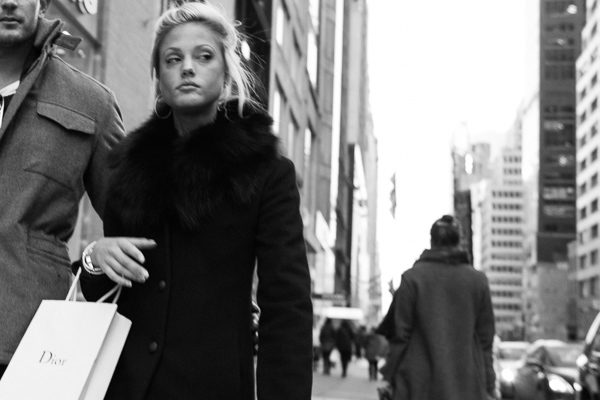
Dior, 5th Avenue.

Dior, 5th Avenue, NYC

A common misconception about street photography is that it is that it is about capturing any person that looks slightly interesting walking down the street in front of an interesting background. It’s actually about trying to capture a story, idea, or emotion through an image. While this largely can take place on the street, it can be captured anywhere.

What comes to mind when you see the term street photography? Is it a person walking down the street?

Whether or not you you have practiced street photography, I am assuming that you have come across this idea or seen images like this – a person with a blank look just walking down the street. Maybe they have some interesting clothes, beautiful hair, or the background looks interesting. But nothing is happening. There is no idea or emotion present.

Go beyond shots of people walking

Good street photography, and good photography in general, goes beyond that. Street photography is not just about capturing images of people. It is about capturing candid and natural photographs about life. There has to be something there.

My favorite street photographs make me feel like there’s something behind the curtain. Of course there needs to be something interesting and beautiful on the surface. There has to be a mix of both content and form, but behind the curtain there is some sort of idea or feeling, something that makes you think.

I can’t tell you how many boring shots I have of a person with a blank look walking down the street. We all take these kinds of images. There is a lot of spontaneity and hand-eye coordination in this type of photography and most of the time you see the potential for the shot, react to take it, but there’s just nothing there. That is normal.

Go for the expression

SoHo

The above image has a lot going for it. The main subject is up close and sharp, the angle is dynamic, the woman looks interesting and fashionable, the lighting is great, and the background is colorful and interesting. However, this image lacks for me what the top image has. There is no expression or emotion. It’s tough for me to feel anything under the surface of the image. Because of this I consider this image to be good but not great.

What we are looking for however, is something to be there. This could be a strong facial expression whivh is one of the first things that I look for when I’m out there doing street photography, particularly the look in someone’s eyes. Fashion, the background, the light, are all important elements of a strong photograph and you should pay attention to them, but in my opinion, a good expression can trump them all. The photograph at the top of this article is a person walking down the street, but there is so much more to the photo than that, because of her facial expression.

Watch for gestures

Gesture, SoHo

An example of gesture, SoHo. NYC

Gesture is also very important. I prefer to think of gesture as an expression with the body. Pay attention to how people carry themselves and what hints that might give us about them. A facial expression could be considered a gesture as well, but look at the hand in the top image. The way the hand is position with the sharp nails makes it look like a claw. When you mix that with the facial expression, this becomes a very frightening image, at least to me. Or take a look at the gesture of the legs above with the weight all on one leg and the other turned gracefully. You can get a sense of this person just from that body position.

Also, a street photograph does not have to have people in it. This goes beyond an urban landscape. Search for images that have the same effect as a good street photograph with a person. Search for an image that give us hints about life or makes us think or feel something, without people in the shot.

Gowanus

Gowanus, Brooklyn NYC

The more you get involved with this type of photography, the more you will notice themes and consistency in your work and hints beneath the surface of your photographs. Focus on this when editing and group similar photographs together. This all takes time to develop and the more you think about your photography in this way, the more it will improve.

What do you focus on when you do street photography? Do you have any other tips to share? Please do in the comments below.

The post A Common Misconception About Street Photography – Just Take Photos of People Walking by James Maher appeared first on Digital Photography School.


Digital Photography School

 
Comments Off on A Common Misconception About Street Photography – Just Take Photos of People Walking

Posted in Photography


Twice as good? What you need to know about the Canon EOS 7D Mark II

23 Sep

Five years is a long time in the camera world, but that’s how long Canon’s EOS 7D was on the market – buoyed by a midlife firmware update that kept it impressively competitive against APS-C offerings from other manufacturers. Canon has not been idle in the past few years, it seems, and the new EOS 7D Mark II is a huge upgrade over the original 7D, offering improvements to every aspect of its feature set. We got hands-on with a pre-production sample recently. Click through to see more.  

Articles: Digital Photography Review (dpreview.com)

 
Comments Off on Twice as good? What you need to know about the Canon EOS 7D Mark II

Posted in Uncategorized


Everything You Need to Know About Lightroom and Colour Space

03 Sep
Lightroom and colour space

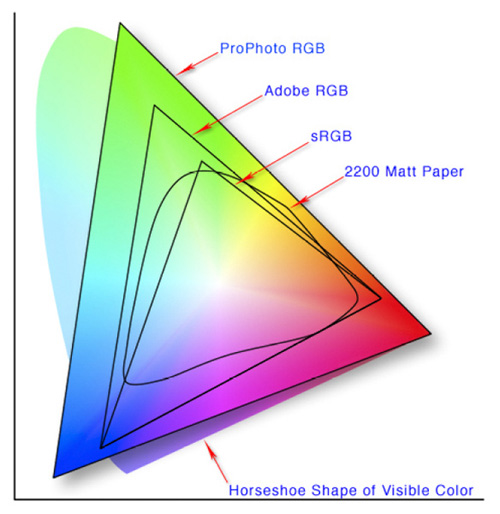
This diagram shows the three colour spaces that Lightroom works with. Photo from Wikipedia

One of the key differences between Lightroom and Photoshop is their approach to colour management. In Photoshop, once out of Adobe Camera Raw, you can go to the Colour Settings menu option and tell Photoshop in which colour space you want it to work.

How Lightroom works

Lightroom works differently. When processing Raw files, Lightroom uses the ProPhotoRGB colour space the whole time, and there’s nothing you can do to change it. The benefits of this method are:

  • Less colour information is lost during the processing stage. ProPhotoRGB is the largest colour space, so it is the optimum one to work in.
  • You can export multiple versions of the same photo, each with a different colour space, if you have need to do so.
  • If future output devices (monitors, printers etc.) support ProPhotoRGB (they don’t at the moment) then your photos will be ready for them.
  • Colour management is greatly simplified. You don’t have to make any decisions about what colour space to work in until you export your photos. This is the biggest advantage of all.

How Lightroom manages colour

When processing Raw files, Lightroom (and Adobe Camera Raw in Photoshop) uses its own colour space based on ProPhoto RGB. It provides a large colour gamut to work with the wide range of colours that digital sensors are capable of recording.

Note: Gamut is the term used to describe the range of colour values that fit in a colour space.

Exporting photos in Lightroom

When you export a photo in Lightroom it gives you the choice of three colour spaces.

ProPhotoRGB: ProPhoto RGB is the largest of the three. It roughly matches the range of colours that a digital camera sensor can capture.

Adobe RGB (1998): Adobe RGB (1998) is smaller than ProPhoto RGB, but larger than the next choice, sRGB. It roughly matches the colour gamut of CMYK printers used to print books and magazines.

sRGB: sRGB is the smallest colour space of the three. It represents the colour space that most monitors are able to display.

Comparing colour spaces

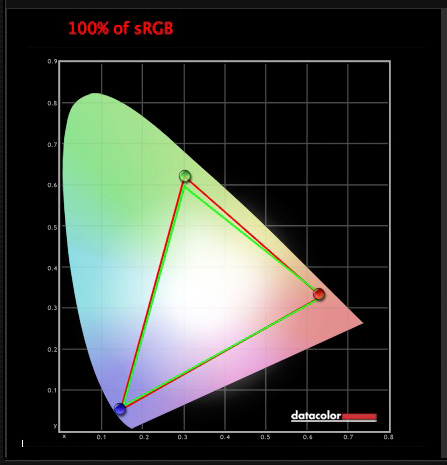
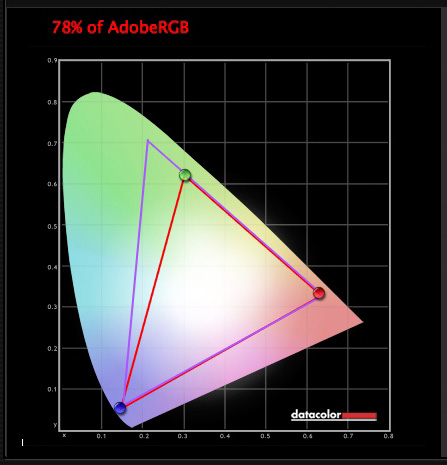
These two graphs show how the colours my monitor is capable of displaying, compared to the sRGB and Adobe RGB colour spaces.
Lightroom and colour space

The green triangle shows the sRGB colour space, the red one shows my monitor’s colour gamut. The two are nearly identical.
Lightroom and colour space

The purple triangle shows the Adobe RGB (1998) colour space, the red one shows my monitor’s colour gamut. My monitor can’t display all the colours within this colour space. Only a select few high end monitors can display all the colours within the Adobe RGB (1998) colour space.

This diagram compares the ProPhoto RGB, Adobe RGB (1998) and sRGB colour spaces. You can see that ProPhoto RGB is the largest.

Lightroom and colour space

Photo from Wikipedia 

Keeping it simple

Armed with this knowledge, here’s a guide to which colour space you should select when exporting your photos:

sRGB: Use when exporting photos to be displayed online, printed at most commercial labs, or printed with most inkjet printers. In short, if in doubt, use sRGB.

Note: Lightroom’s Web module automatically sets the colour space of exported files to sRGB.

Adobe RGB (1998): Use only if requested. If you’re not sure, ask. If you’ve been asked to submit photos to a magazine, for example, then ask them which colour space is required. It will probably be Adobe RGB (1998). Submitting photos to a stock library? Again, it will probably be Adobe RGB (1998). It’s the colour space most likely to be used for commercial purposes.

You would also use this colour space if you have an inkjet printer that utilizes the Adobe RGB (1998) colour space, or you are using a lab that accepts and prints photos with that profile.

ProPhoto RGB: Use when exporting a photo file to be edited in another program such as Photoshop or a plug-in. The file should be exported as a 16-bit TIFF or PSD file. There is little point in using the ProPhoto RGB colour space with 8 bit files, as they don’t contain enough bit depth to utilize the full colour range.

Note: If you import a JPEG or TIFF file into Lightroom, it uses the file’s embedded colour profile. If there is no colour profile attached, it assumes that it’s an sRGB file. If you choose an alternate colour space when you export the file, Lightroom converts it.

Colour spaces and compression

The reason that Lightroom uses a version of the ProPhoto RGB colour space, is that it is doesn’t compress the colours captured by your camera’s sensor.

When you export a photo, if you select either the Adobe RGB (1998) or sRGB colour space, Lightroom compresses the photo’s colours to match the chosen profile. That’s why selecting colour space is best left for as close to the end of the post-processing workflow as possible.

While Lightroom does its work within its version of the ProPhoto RGB colour space, your monitor isn’t capable of displaying all those colours. Instead, your computer’s operating system uses the monitor profile to convert the colours to ones that your monitor is capable of displaying.

Note: All monitors have a colour profile, regardless of whether they have been calibrated. But your monitor will only display colour accurately if it has been properly calibrated. You can learn more about the calibration process in my article How to Calibrate Your Monitor With the Spyder 4 Express.

Exporting photos with Lightroom

To export a photo in Lightroom, select the photo (or photos) you want to export, then go to File > Export. You can do this from any module (use the Film Strip to select multiple photos if you are not in the Library module’s Grid View).

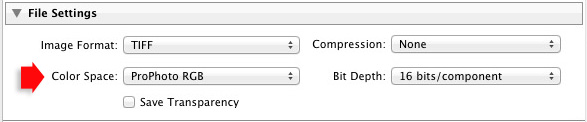
Go to the File Settings section of the Export window and set the required colour space. If you select the ProPhoto RGB colour space set Bit Depth to 16 bits/component.
Lightroom and colour space

Transferring photos to Photoshop

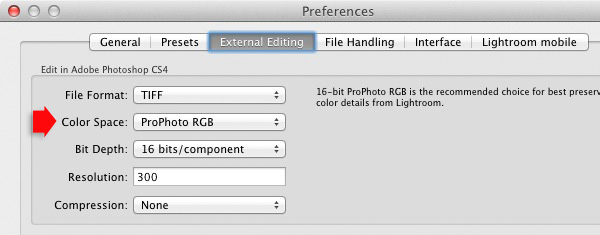
To open a photo in Photoshop, right-click on the photo and select Edit In > Edit In Adobe Photoshop. Photoshop opens the photo using the colour space indicated in Lightroom’s preferences.

To adjust this setting, go to the External Editing tab in preferences, and set Color Space to ProPhoto RGB. You can choose another colour space if you wish, but ProPhoto RGB is definitely the best one to use.
Lightroom and colour space

Opening photos in plug-ins

To export a photo to a plug-in, right-click on the photo, go to Edit In and select the plug-in you want to use to open the photo.

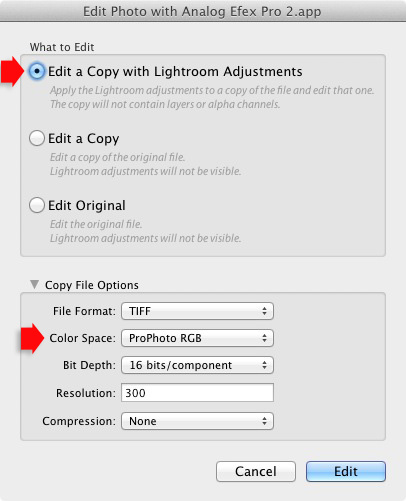
In the Edit Photo window, if you select Edit a Copy with Lightroom Adjustments (the only option available if you are exporting a Raw file) you will be able to select which colour space you want to use. Again, go with ProPhoto RGB for the best results.
Lightroom and colour space

If you are exporting a JPEG or TIFF file, Lightroom gives you the option of selecting Edit a Copy or Edit Original in the Edit Photo window. If you do so, the option to select a colour space is greyed out and Lightroom opens the photo in the plug-in using the embedded colour profile.
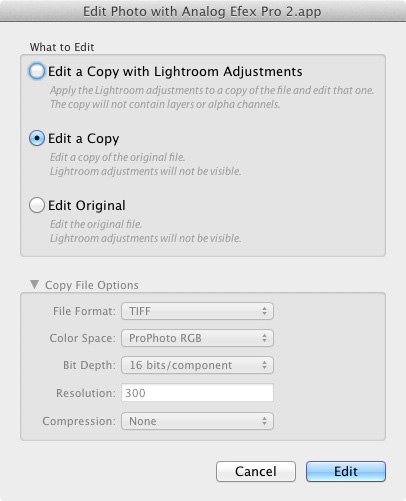
Lightroom and colour space

But if you select Edit a Copy with Lightroom Adjustments, you can select any colour space and Lightroom will convert the photo to that colour space when it opens the photo in the plug-in.

Conclusion

Confused? I hope not, because colour management in Lightroom is really very simple. It’s essential to calibrate your monitor, but after you’ve done that Lightroom takes care of all colour related issues for you until you export your photos. Then, it’s just a matter of selecting the appropriate colour space.

If you have anything to add to the article, or any questions, please post it in the comments.

Mastering Lightroom: Book Four – The Photos ebookMastering Lightroom: Book Four – The Photos

My new ebook Mastering Lightroom: Book Four – The Photos takes you through ten beautiful examples of photography and shows you how I processed them step-by-step in Lightroom. It explores some of my favourite Develop Presets and plug-ins as well as the techniques I use in Lightroom itself. Click the link to learn more.

The post Everything You Need to Know About Lightroom and Colour Space by Andrew S. Gibson appeared first on Digital Photography School.


Digital Photography School
 
Comments Off on Everything You Need to Know About Lightroom and Colour Space

Posted in Photography


Forget About Pixels – Awaken the Artist Within

24 Aug

I have a confession to make: I used to be a pixel peeper. There was a time when I’d spent hours zooming in and inspecting photos at 1:1 or even 300 percent. I was looking for a technically perfect photo. Back then, most of the work I was shooting was aimed at micro stock outlets. At most of them, the inspectors and image editors were not easy to get around. Noise, camera shake, out of focus, chromatic aberration, white balance, basically any issues would end up in an image rejection. That actually helped me. I learned the technical side of photography, but I also became obsessed. I became a pixel peeper.

Luckily I don’t care about it anymore, and you shouldn’t either, unless you are shooting commercially. I mean sometimes, depending on the type of work you are doing, a thoughtful examination could be needed. However, like every obsession, pixel peeping can be a detrimental habit.

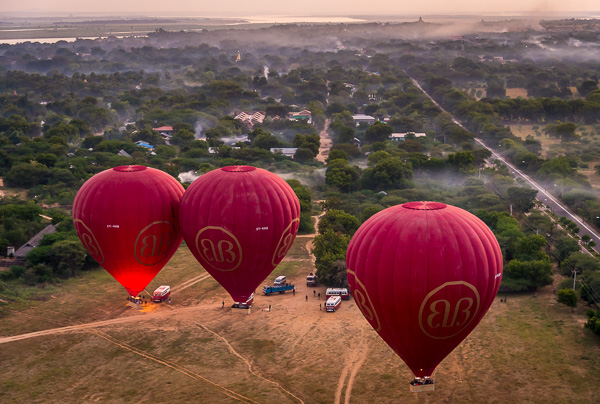
20131207 Bagan 744

If you find yourself analyzing 100 percent crops, debating about pixel counts, hitting the forums too often and compulsively reading gear reviews, please stop. Especially if the majority of your work is about documenting travel, street photography, and whatnot. This is not what photography is about.

Yes, I get it, photography is part technology and science, but overall it’s art. Counting pixels or buying the latest camera is not going to help you to find your vision. Those are mere tools meant to aid you in expressing your voice, your art, in a wonderful medium.

I encourage you to leave the verbal flux behind and go shooting. Photography it about communicating emotions, a moment in time, the essence of a place, the soul of people.

20131208 Mandalay 311

If you’re still unconvinced, think about this. Let me start by asking you how much of your work is being shared online? Have you ever realized that the average monitor can only display 2 megapixels? And many of our photos are being seen only on tablets and phones. None of those are even close to being even viewed at 100 percent. Let’s throw in print as well; let’s say you want to enlarge your photos to 8×10, or you want to decorate a room and print a 16×24. Grab a photo that you think is not sharp or noisy and make a test. I think you’ll be delighted by how awesome it looks.

In the end, as photographers and storytellers, what we pursue is capturing a moving picture, perhaps communicating an emotion. Of course you can go after excellence and be meticulous, but always keep in mind that what you are trying to express with the craft is way beyond just a technically perfect photo. A great subject, an inspiring place or a story will always generate a reaction, an emotion in your viewer. Such an image will never be judged as too noisy, a bit shaky, and so on. In exchange, there are gazillions of perfectly technical photos floating around without any kind of content. Photos that, even though technically perfect, nobody cares about.

20131216 Doha 273

It is true that we have much better technology now than we had in the past. Sensors with low light capabilities, bodies and lenses with image stabilization, and software are all better than ever. But for some, it seems to never be enough; there will be always something new, something better, and we tend to get lost in the technical side instead of pressing the shutter. Many moons ago, I was always looking at these things, to the point where I didn’t even want to shoot beyond ISO 200. It was a big mistake. I lost a lot of moments and opportunities that I would’t get again. That will never happen now; I prefer to capture the instant, the character of a place, the spirit of humankind – without having to worry about pixel counts.

Forget about pixels, awaken the artist within. Go out and shoot something that moves you. You know you can.

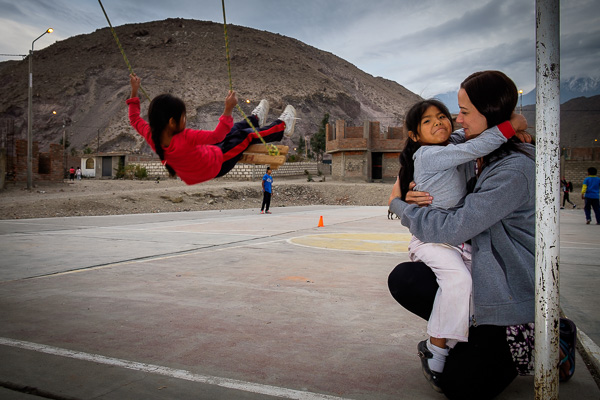
20140407 Hoop Peru 584

The post Forget About Pixels – Awaken the Artist Within by Daniel Korzeniewski appeared first on Digital Photography School.


Digital Photography School
 
Comments Off on Forget About Pixels – Awaken the Artist Within

Posted in Photography


Highly Intelligent ‘About Me’ Page Tips for Photographers to Build Their Brand

09 Jun

Crafting a compelling bio and writing the perfect pitch are quite challenging. Working in a service industry requires its own rules. Nobody wants to hire a person he doesn’t know, doesn’t trust or doesn’t like. That’s why talking about yourself is extremely important while creating your own brand. If you check your Google Analytics, you’d see that the ‘About Me’ Continue Reading

The post Highly Intelligent ‘About Me’ Page Tips for Photographers to Build Their Brand appeared first on Photodoto.


Photodoto

 
Comments Off on Highly Intelligent ‘About Me’ Page Tips for Photographers to Build Their Brand

Posted in Photography


What Life Lessons Can Teach You About Photography

31 May
family-600x400b

Image of my new crazy family by Mia McCloy

A few months ago I got married. (Confetti! Streamers! Cake if you have it!) In doing this, I took on a gorgeous husband and three darling stepdaughters. Add my two adorable sons to the mix and you end up with a total of seven people sharing a couple of bathrooms, a kitchen, and the lion’s share of my patience. All of a sudden things like meal planning and buying in bulk have gone from concepts I’ve heard about to the only thing keeping me out of an inpatient treatment facility. To spare my sanity and enable me to do a hundred loads of laundry each day, everything in my life has been streamlined either by necessity or default including my photography business.

While it’s a continuous progression I realized the other day, when I was folding a mountain of clothes remembering a simpler time, that I am turning-out some of my best work in over a decade of being a professional photographer. I have to assume this is partly from streamlining everything from my shooting style to my editing process, and partly because my personal life changes have forced my professional life to adapt as well. So far, all for the better if you don’t count the laundry thing. I love them madly but having five children isn’t for everyone. In the event you don’t want to take on a small army of kids as a social experiment just to see if it improves your photography, here are some lessons I’ve learned recently and how you can apply it to your own photography.

What life lessons can teach you about photography

IMG_8899b

Work is more meaningful and balanced

This sounds so lovely but really it’s just a byproduct of my continuous lack of time. In the past, any image that caught my eye for any reason at all would be subjected to editing and delivery to the client. This would add hours to each job I took on. Now only the really, really good stuff ever sees the light of day, or my client’s eyeballs. Images that once would have gotten ten minutes of editing just because I saw one tiny bit of pretty in it, are now trashed because I know they will only bring down the finished product as a whole. I shoot with more purpose because I am on time constraints I never had before.

Are my clients suffering? No. They are getting quality over quantity.

Also, hearing “BUT THAT’S NOT FAIR!” roughly a thousand times a day puts fairness in a whole new perspective. It also puts having children in a whole new perspective, but that’s another ball of wax–unidentifiable and likely stuck to my kitchen floor.

It used to be that I had no real office hours. I shot when my schedule allowed and when the clients needed. I edited late at night after kids were asleep. I answered emails when I got around to it. I took every advantage of working from home one could. Don’t get me wrong–spending all day in yoga pants is still a giant perk, but now I have office hours. I return emails as soon as possible, even if that means from my phone, while waiting in the carpool lane at one of the three different schools at which I drop-off and pick-up children. I don’t see the sunrise at the end of my workday anymore because frankly I’m way too tired to stay up past 10 p.m. now. My clients are getting every ounce of me they deserve. But my photography business is no longer claiming my very soul. It’s fair for everyone.

TIP: Don’t let photography take over your life.

This goes for hobbyists and professionals alike. The work/life balance has always been a tough one for me, but as cliché as it sounds, we all need to reevaluate honestly and often. Shoot what you can, edit when you can, deliver where you can. Contrary to every photography quote I’ve ever heard, shots can be missed–there are a million more opportunities for an amazing picture tomorrow.

IMG_8688b

Learn how to say no

It used to be that if you asked me nicely, I would take on about any assignment. Taking pictures of houses even though I don’t have the equipment, or know-how, real estate photography requires? You bet! Do some product photography for your best friend sister’s boyfriend’s cousin? Sign me up! You want a professional photographer to hang-out with on Saturday mornings for your kid’s little league games? Of course I will! Now, not so much.

Not only do I not have that kind of time, I don’t have the desire. I’m spending all of the “doing-something-I-don’t-want-to-do” time I can spare chaperoning middle school field trips and taking kids to dentists, doctors, play dates, and street corners with “Free To Good Home” signs. I don’t want to do real estate, product, sport, or a dozen other types of photography. I want to do the kind of photography I’m good, at and the kind that I enjoy doing. On the flip side of that coin, I just can’t do favors like I used to. The line for a minute of my time now starts here and goes back quite a ways. I allow people to cut the line all the time, so you’ll be there a while waiting.

TIP: Just say no!

When in your gut it doesn’t seem like a job you want or can do, when the idea isn’t exciting or fun on any level, when you have to work with people that make you miserable, say no. When you are overwhelmed, behind and feel like taking on one more thing may break you, say no. When you are asked to do something that offers you no benefit, not even warm, fuzzy feelings, say no.

IMG_1674b

Say “Thank You” more often

I’ll be honest–I have no idea where this comes from; perhaps me attempting to model good manners for five kids who are all allergic to the word “please”. Regardless it’s a great lesson. It used to be that when I was complimented for my photography I would immediately detract; it’s not that I’m a good photographer, it’s that I have really beautiful clients. It’s not that an image is exceptional, it’s that I got lucky. It’s that I have an amazing lens. It’s that I have a great camera. It’s that perfect light just happened. It’s anything but me. It has taken 10 years but I am finally able to just say, “Thank You”.

The truth is that I do have a great camera, live in a beautiful place of the world that allows for ideal background settings, and have really beautiful clients. But I’m also a really good photographer. I can find light, work a complicated camera to my every advantage, put people at ease, and edit a diamond in the rough (image) to perfection. As uncomfortable as it still is for me to say that, it must be true because I’ve been doing this a while and people continue to hire me. Lots of photographers have these same talents, and more, and it’s important that we (you as well) start realizing that they are in fact talents and not just random acts of luck.

TIP: When someone compliments your work say, “Thank you!” with a big smile, and nothing more.

If this is something you’ve struggled with, it will feel unnatural. Keep doing it anyway. Saying an honest thank you is one of the nicest things you can do in the face of a compliment. Explaining why you think you are not deserving of it is one of the rudest.  

IMG_9640b

Play to your strengths

Having so many people need me (and only me) has redefined my objective. Much like saying no to photography jobs that are not well suited for my skill set, I have been pickier taking on jobs that are in my wheelhouse. Family photography falls into my lap often and most of the time it’s a perfect match for me. My love-hate relationship with weddings however has finally come to a close; weddings are no longer something I will do. Neither is endless editing to achieve fancy vintage (and similar) toning. My clients get a fun and spontaneous shooting atmosphere and final images in straightforward color or black and white. It’s my very best, and most honest work.

TIP: Try new things when it makes sense.

Challenge yourself when necessary, but play to your strengths–you’re good at them for a reason.

IMG_1010b

Charge what you’re worth

Just like having a business partner forces accountability, having a personal partner makes me look at the big picture. At the end of the day, photography is my job. It’s how I make my living. There are glamorous and fun sides (though not near as many as people think), and there are dirty and gloomy sides too, just like any job. I can’t work for free. Granted I have pro bono projects I take on (my heart, it bleeds), although I now do them much more selectively, and when I know it will benefit me in the long run either with new business or free marketing.

Gone are the days when I could take on a very low-paying project with no other benefit just because it seemed like fun. I’m finally charging what I’m worth, I’m no longer part of that deadly middle ground of charging too much to be a good deal, and not enough to be considered any good. I read a while back that as soon as you could no longer afford yourself, you were charging enough. At the time I passed it off as greedy and mean-spirited but I have to say: friends, I’ve come to the dark side and the water is fine. The clients that can afford me, do. The ones that can’t? They save up until they can, or they are careful to take advantage of my rare sales. I haven’t lost clients and bigger than that, my work has more value.

TIP: Evaluate your pricing.

Consider everything from wear-and-tear of your equipment to your electric bill that keeps your computer running into the wee hours of the morn. There’s a good chance you aren’t charging what your are worth, if only because it’s hard to make that jump and put a dollar figure on something that used to be a hobby, or something people consider art. I promise you though, if you’re not going to charge, someone else will. So while I consider my business as personal as it comes, it’s still a business. Besides, it takes a lot of laundry detergent to keep my new family of seven in clean clothes.

What other things have you experienced in life that have helped you learn something about your photography? What other tips do you have? Please share in the comments below.

The post What Life Lessons Can Teach You About Photography by Lynsey Mattingly appeared first on Digital Photography School.


Digital Photography School
 
Comments Off on What Life Lessons Can Teach You About Photography

Posted in Photography