RSS
 

Archive for February, 2020

Made in the Shade – Why Taking Portraits in the Shade Can be Ideal

07 Feb

The post Made in the Shade – Why Taking Portraits in the Shade Can be Ideal appeared first on Digital Photography School. It was authored by Rick Ohnsman.

dps-taking-portraits-in-the-shade-pinterest

You’re taking portraits, and it’s time for your subjects’ “moment in the sun.” If you really want them to shine, let’s look at why taking portraits in the shade is the way to go.

I can remember when the recommendation to photographers was to “always photograph your subject with the sun at your back, so the light is on their face.”

I think I read that many years ago on an insert in a box of film. Perhaps the idea was not to wind up with a silhouette with the bright sky tricking the camera into an underexposed subject.

There are no doubt circumstances where you might do it this way, but I’m ready to teach you why the shade is your friend and that of your subject as well.

Taking_Portraits_in_the_Shade_Unshaded_and_Shaded

Make a bad location with your subject squinting into the sun work by shading them. 1/160 sec. f/5 ISO 100. White reflector fill.

Why not to shoot portraits in the sun

Let’s list some reasons you probably don’t want to shoot portraits in the sun:

  • The light will be bright, contrasty, and the shadows will be hard and distinct.
  • Your subject will probably squint.
  • On a hot day, your subject will get hot, and cranky and both you and the subject won’t have much fun.  The photos will suffer.
  • The extremes of the exposure range between highlights and shadows will make getting a good exposure difficult.
Taking_Portraits_in_the_Shade_Mixed_Light

Mixed, speckled, uneven shade…don’t do this!

Why taking portraits in the shade is better

  • The light will be diffuse, less contrasty, and the shadows will be minimal
  • Your subject will relax and open their eyes.
  • On a hot day you and your subject will be more comfortable, have more fun, and the photos will show it.
  • Getting a good exposure will be far easier and you will have less editing later to create a nice image.

Light direction

Obviously, when discussing taking portraits in the shade, we’re talking about working outdoors with the sun as your primary light source. Depending on the position of your subject relative to the position of the sun in the sky, the light can come from these basic directions:

Overhead

Most photographers know that the worst time for photos is mid-day when the light is directly overhead. This is especially true for portraits and even more so if you make the shot in direct sunlight.

Working in the shade has the advantage of allowing you to make portraits during midday since the overhead light is diffused.

Side

If the sun is lower in the sky, you can position your subject, so the light comes from either side. There might be circumstances where you’d want one side of the subject to brightly lit while the other side is in shadow, but generally not. Again, taking portraits in the shade is the answer.

Taking_Portraits_in_the_Shade_Fill_Flash_1

Taken in an alley, the light in this shot was from camera right and above. A fill flash helped fill the shadows and put a nice catchlight in the subject’s eyes.

Front

With the sun lower in the sky, you could position your subject, so, as the film insert I mentioned suggested, the sun was at your back and on the face of your subject. Occasionally this works if the sun is not intense, you have the right background, and you don’t mind a more contrasty look.

Most often you’d still be better, that’s right…in the shade.

Back

If the sun is lower in the sky, sometimes you can make backlighting your subject work. With their back to the sun, their face will be shaded. Now it’s you and your camera that will be looking into the sun.

You will need to be careful with your exposure so as not to make your subject a silhouette or totally blow out the background. Sun flare can also be a problem.

This could be a time for spot metering. You may also wish to use a reflector or fill-flash (we’ll cover that in a minute). Properly done, however, you may get a nice rim-light look.

Open vs closed shade

You will hear the terms “open shade” and “closed shade.”  Let’s define those.

Taking_Portraits_in_the_Shade_Open_Shade

The subjects are in a shaded area looking toward a brighter lit area. This is “Open Shade.” 1/250 sec. f/6.7 ISO 400

Open shade

Even with your subject in the shade, the light will still usually come more from one direction than the other. Your subject will be in “open shade” when in the shade, but the ambient light is strongest on their face.

If you can’t determine which direction this is, walk around your subject. Ask them to turn as you walk so as to keep facing you. The position when the light is at your back (and on their face) is the most “open shade” position.

One advantage of shooting in this position is the light will be brighter on their face, and the catchlights in their eyes will usually be most dominant.

Taking_Portraits_in_the_Shade_Closed_Shade

The predominant light is from behind and the subject is looking into a more shaded area. Fill-flash is used to fill the shadows. This is “Closed Shade.” 1/200 sec. f/8 ISO 200

Closed shade

This is pretty much the opposite of open shade. Your subject is in the shade, but looking into a darker area.

An extreme example of this might be a subject standing just inside a doorway where they are in the shade, but looking inside toward a darker room or area.

Usually, this will not be as good because the background will be brighter than the subject, and the eye catchlights will be minimal if they are there at all.

Taking_Portraits_in_the_Shade_Closed_Shade_2

This is “closed shade” where the predominant ambient light is behind the subject and she is looking into a darker area. Fill-flash brightened her face and filled the shadows. 1/180 sec. f/7.1 ISO 100

Making it all work

It might be a fine idea to suggest you always take portraits in the shade. Usually, though, you also want to consider:

  • your location,
  • what you want in the shot other than just your subject 
  • your background
  • where you and the subject can position yourselves
  • camera angle
  • and many other factors other than just where a shady spot might be. 

If you want to pose your subject in front of that iconic landmark, and you’re there during the middle of the day, you may not have much choice where you position them. 

So let’s discuss ways to use shade where you find it, make shade when you need it, and enhance the light you find while still making the portrait you want. 

Let’s take a look at some examples.

Under the trees

It’s often pleasant in the shade of a tree, and sometimes even the tree itself works well in the shot. Depending on where the light may be coming from, you might be working with open or closed shade, and light coming from various directions.

We’ll cover enhancing the light you might find there in a minute, but here’s a couple of things to keep in mind when working in the shade of a tree or other foliage.

1. Light color

The leaves on most foliage are green (though perhaps other colors at different times of the year). Sometimes the translucent leaves will cast their color on your subject.

Kermit the Frog will tell you, “it ain’t easy being green.”

Green light and skin tones usually won’t be a good mix. Keep this in mind.

Shoot in Raw mode, and if necessary, be ready to tweak your white balance and tint slightly in post-production to back off the green color if it appears.

Taking_Portraits_in_the_Shade_Going_Green

With green foliage above and green grass reflecting from below, your subject may go green – not a good look. Shoot in Raw format, and you can tweak the white balance when editing. 1/60 sec. f/5 ISO 400 with fill flash.

2. Dappled light

When making portraits, deep shade is good. Dappled light, the kind where the leaves put a pattern of light and shadow on your subject is bad – very bad.

You can rarely fix this in editing. So when taking portraits in the shade, always look to be sure the shade is complete, and the light is not dappled and patchy on your subject.

This can be especially tricky with group photos where some subjects may be in the shade and others in the sun. See what you can do to have everyone in total shade or, if that’s not possible, find a spot where you can have the light coming from behind them so at least their faces are shaded.

Taking_Portraits_in_the_Shade_Find_Shady_Spots

Take advantage of shady spots that work with your composition. The object making the shade can sometimes work with your shot. 1/125 sec. f/5.6 ISO 200 with pop-up fill flash.

Other shady spots

Depending on where you’re photographing, there might not be trees but other ways to put your subject in the shade.

Buildings, structures, rocks and cliffs – whatever you might find that works with your shot and vision can be useful.

Something to keep in mind is that other structures or objects might be reflecting light into your shady spot. Your subject might be in the shade, but whatever else that is close by, even the nearby sunlit ground, could reflect light into the scene.

Sometimes you can make this work for you. Other times, particularly if the reflecting object has a strong color, it will reflect colored light onto your subject.

Taking_Portraits_in_the_Shade_Color_Cast_Reflections

With the surroundings painted in warm colors, as well as the opposite red brick, the reflected light is going to be warm as well. Shot in Raw mode, I could adjust as desired later in post-processing. 1/30 sec. f/4 ISO 100

Throwing shade

Most people don’t like it when you “throw shade” on them. However, in photography, this can be a good thing, especially when you want to photograph them in the shade, but the place where you want them to stand isn’t shady.

What to do?

Make your own shade!

Anything you can put between the light source and your subject is going to put shade, aka a “shadow” on your subject.

This could be a piece of cardboard, a 5-in-1 reflector (which we’ll discuss in a minute), an umbrella – you name it. If the object lends itself to the theme of your image, you can even include it in the shot. Just be sure whatever you use is large enough to shade the area you need completely.

If you’re making a full-length image of a person and your 5-in-1 can only shade their upper body while their legs are still in the sun, that won’t look good. You’ll either have to restrict your shot to the shaded area or find something bigger to shade them with.

Taking_Portraits_in_the_Shade_Throwing_Shade

Bad light where you want to make your shot? Throw some shade on your subject! Here, I’ve used the black side of a 5-in-1 to shade the subject. A fill-flash nicely evens out the light, also putting a catchlight in her eyes. 1/60 sec. f/6.3 ISO 100

A Scrim shot

The reason you will usually want to put your subject in the shade is that the direct sun is bright, harsh, and produces hard shadows. In the studio, photographers use diffusion to soften the quality of light. Photo umbrellas and softboxes use a translucent material, which scatters and diffuses the light. It also makes the light source “larger” relative to the subject.

This can work outdoors with the sun as well. Rather than use the pinpoint of intense light that is the sun, instead, put the translucent panel of a 5-in-1 between the sun and subject to make the light source larger relative to the subject. It will also make the light more diffuse.

Need something bigger? A translucent shower curtain or piece of white nylon cloth can work well if you have a frame or helpers to hold it.

Of course, there are commercial versions of this if you will be doing a lot of outdoor portrait photography and have the budget.

Taking_Portraits_in_the_Shade_Reflected_Fill

On a sunny day, you might be surprised on how much fill the silver side of a 5-in-1 will throw.

How about some fill?

So you put your subject in the shade, they’re happy, their eyes are open, you like the composition, but now you see the subject is darker than you’d like. What can you do?

It’s time for a little fill light.

There are several ways you can (and often should) add additional light to your subject.

Let’s cover a few.

Reflectors

I mentioned a 5-in-1 reflector above. This is a portable, and usually collapsible, disk typically covered with translucent fabric. Use it alone as a scrim, as we just discussed.

It then has a zip-on cover that is black on one side, white on the other, and turned inside out, silver on the inside and gold on the reverse of that.

Variations exist. So, 1) Scrim, 2) Black, 3) White, 4) Silver, 5) Gold = a 5-in-1.

You can use the colored side to reflect light onto your subject. Black is the side to use when you want to shade the subject. The white will give a softer, less intense light while neutral in color. Silver is the most intense and can be a slightly cooler light, while the gold will warm your subject.

For photographers doing outdoor portraits, I’d almost consider a 5-in-1 reflector mandatory. It is that useful. There are many brands, styles, and sizes. I have a 42″ (106cm) Interfit brand as well as a little 23″ (59 cm) version that, when collapsed, is just 9-inches (23 cm) and fits nicely in my photo bag.

Taking_Portraits_in_the_Shade-5_in_1

One device, 5 ways to use it – a 5-in-1 reflector. I think all outdoor portrait photographers should own one, or even a few of these in different sizes.

Doing it “on-the-cheap” you can also use a piece of white poster board or foamcore.  It has the disadvantage of being less portable, but the advantage of being available in very large sheets if you need that big of a reflective panel.

Fill-Flash

If the only time you use a flash is indoors, at night, or in dimly lit situations, you’re missing a real use of this lighting tool.

Shooting subjects in the shade and then filling the shadows with a touch of flash works exceptionally well, especially with most cameras doing a great job of balancing the fill light using ETTL (Evaluative Through-the-Lens) exposure control.

If you are a new photographer just getting into outdoor portraiture and have a camera with a pop-up flash, I’d strongly encourage you to shoot in the shade and use the pop-up flash for every shot.

Even on sunny days with plenty of light, that little extra flash will fill shadows and put a nice catch-light in your subject’s eyes.

Your portrait photography will improve tremendously. As you advance, a Speedlight is the next step, and beyond that, a fill-flash you can use off-camera.

Backlit/Golden hour/Rim light

Photographers love the “golden hour,” that time in the morning or evening when the sun gets low, and the light is warm. You can make beautiful portraits in such light.

Often you can pose your subject with the light behind them, and the golden glow will rim-light their hair with a beautiful look. (Visualize a model on the beach with the setting sun behind them).

To get some light on your model’s face and better balance the exposure between them and the background, it’s time for some fill light. A reflector or fill-flash will do the trick.

One advantage of the reflector is that you’ll be bouncing the same warm light back onto their face and so your white balance will be consistent.

If you use a flash, consider putting a warming gel on it to better match the color of the background light.

Taking_Portraits_in_the_Shade_Backlit_and_Filled

Here the subject is standing in full sun. With the light from behind, her face is shaded. I used the bright silver side of the reflector for fill. You may need to “feather” the reflection slightly by adjusting the reflector position as it can easily become too bright and make your subject squint. 1/160 sec. f/5 ISO 100

Nature’s Softbox

The average person would think a “nice day for portraits” would be that beautiful, sunny, cloudless “bluebird day.”

They’d be wrong.

On such days you’ll really need the tricks we’ve explored here and should be taking portraits in the shade.

If, however, the day you’ve scheduled to do that outdoor portrait shoot should be overcast, consider yourself blessed, especially if you need to shoot at midday. Now, instead of that harsh, pinpoint light source of the sun with associated hard shadows, the entire sky becomes your light source – “nature’s softbox.”

Taking_Portraits_in_the_Shade_Full_Shade

Made in the shade…This one was done in full shade and filled with flash. Note the catchlight in her eyes. 1/40 sec. f/4 ISO 100

Now the challenge might become working with light that is too flat. The effect of your reflector will be much less on a day like this, but your portable flash could perhaps now become your key light. It can give you just enough contrast to make your portrait more dimensional and interesting.

I’ve also just started exploring the use of portable LED lights for portraiture and purchased a Lume Cube.

This small and intense little light doesn’t immediately strike me as something I’d use for the standard portrait, but when taking portraits in the shade or on overcast days, perhaps it could work into the mix.

After I’ve had more experience with it, perhaps I’ll cover how you can use such a device in a later article.

Go do it and show us your work

It’s always great to see photographers putting new knowledge to work, so we’d love to see the images you make when taking portraits in the shade.

Post your images in the comments below and tell us a little about what you did.  Best wishes!

The post Made in the Shade – Why Taking Portraits in the Shade Can be Ideal appeared first on Digital Photography School. It was authored by Rick Ohnsman.


Digital Photography School

 
Comments Off on Made in the Shade – Why Taking Portraits in the Shade Can be Ideal

Posted in Photography


Nomad launches iPhone 11, Google Pixel 4 cases with Moment lens mount

07 Feb

Accessory maker Nomad has announced new smartphone cases in its Rugged line. The new models are available for all Apple iPhone 11 models as well as the Google Pixel 4 and feature an integrated mount for Moment lenses.

In a press release, Nomad said:

Our newest cases are Moment compatible. Meaning, they are the same style and quality you’ve come to expect from Nomad but now with an integrated Moment mounting plate. These will be available for all iPhone 11 models as well as Google Pixel 4 phones.

According to Nomad the cases are designed to withstand drops from up to six feet height and available in two colors, black or brown Horween Leather. They also come with a lanyard attachment point.

The lens mount allows you to attach any lens from premium accessory lens makers Moment, which includes an 18mm wide-angle, a 15mm fisheye, an anamorphic lens, a macro lens, and a 58mm tele lens, making the Nomad lenses an interesting alternative to Moment’s own cases.

The cases are available now form the Nomad website for $ 50.

Articles: Digital Photography Review (dpreview.com)

 
Comments Off on Nomad launches iPhone 11, Google Pixel 4 cases with Moment lens mount

Posted in Uncategorized


Lomography Petzval 80.5mm F1.9 MKII Art lens launches on Kickstarter

07 Feb

Lomography has launched its twelfth Kickstarter campaign with its new Petzval 80.5mm F1.9 MKII Art lens. This 180th Anniversary Edition of the 19th-century portrait lens features 4 elements in 3 groups, F1.9 to F16 aperture, 67mm filter, 0.8m minimum focusing distance, 30-degree FOV and weighs 440g (0.9lbs).

Lomography’s new Petzval 80.5mm MKII Art lens sports a stopless aperture diaphragm, Waterhouse Aperture System, helicoid focusing mechanism, and what the company describes as a ‘velvety swirly Bokeh’ when the shot is wide open. The stopless aperture diaphragm and helicoid focusing mechanism mean users will be able to adjust the f-stop and focus while recording.

The new Petzval offering was designed for use with full-frame cameras but is said to still offer ‘great results’ with cropped sensors. The Advanced Bokeh Control Edition of the lens will feature a bokeh control ring with seven different bokeh swirl levels; this version of the lens will only be offered in black anodized aluminum.

The Petzval 80.5mm F1.9 MKII Art lens will be made available in Nikon F and Canon EF mounts in black anodized, brass satin and black painted brass colors. Lomography is offering the lens to Kickstarter backers who pledge at least $ 290. The lens is estimated to start shipping to backers in June.


Disclaimer: Remember to do your research with any crowdfunding project. DPReview does its best to share only the projects that look legitimate and come from reliable creators, but as with any crowdfunded campaign, there’s always the risk of the product or service never coming to fruition.

Articles: Digital Photography Review (dpreview.com)

 
Comments Off on Lomography Petzval 80.5mm F1.9 MKII Art lens launches on Kickstarter

Posted in Uncategorized


Fujifilm pulls controversial X100V promo video due to the featured photographer’s method

07 Feb

Days after it launched its new X100V compact digital camera, Fujifilm has pulled one of the promotional videos it published to showcase the new model. Some viewers have criticized the intrusive shooting style used by Tatsuo Suzuki, the photographer featured in this particular video. Others have praised his work, saying his habit of jumping directly in front of subjects is a legitimate part of his art.

Fuji’s promotional video includes several scenes of Suzuki has he captures images on the street, a process that, at times, involves stepping into someone’s path and putting his camera directly in their face. Some subjects are seen being forced to quickly sidestep to avoid the photographer; some look surprised or distressed about the encounter.

Though Fujifilm pulled the promotional video, FujiRumors managed to acquire and publish a copy of it. The action starts around the 0:45 mark.

Articles: Digital Photography Review (dpreview.com)

 
Comments Off on Fujifilm pulls controversial X100V promo video due to the featured photographer’s method

Posted in Uncategorized


Slideshow: Agora’s #Photojournalism2020 winner and finalists

06 Feb

Slideshow: Agora’s #Photojournalism2020 winner and finalists

Agora, a free-to-use photography app, received 12,321 submissions for its #Photojournalism2020 competition from amateur and professional photographers all over the world. Rene Bernal’s (@renebernal) ‘Young guns,’ a photo depicting a group of Filipino children playing with toy guns they discovered atop a dumpsite, received the most votes and was declared the winner. A $ 1,000 cash prize was awarded to Bernal.

2019 was a pivotal year for political protests, uprisings, and climate change awareness. This inspired the team at Agora to launch its very first photojournalism contest. ‘People who manage to be in the right place at the right time can become potential journalists for all Humanity. Through #Photojournalism2020, we aim to discover the best informative images by people worldwide. Everyone owns a camera, and can create interesting content,’ said Octavi Royo, Agora’s CEO and Co-Founder.

It was difficult to choose 14 other photos to feature in this article as they are all compelling. All Top 50 #Photojournalism photos can be viewed here or in the video, above. Agora currently has 6 contests running on its app where users can win a $ 1,000 cash prize. The title of the photo followed by the Agora username and country of origin is featured here. All captions are the photographer’s own words.

#Photojournalism2020 Winner: ‘Young guns’ by @renebernal (Philippines)

About this photo: Self-taught filipino photographer @renebernal shot this staggering photo in a dumpster in San Dionisio, a district located in the southern part of Metro Manila. His photo collected the most votes on the Agora app and won him a $ 1,000 cash prize.

In Rene’s own words: “Everywhere in the world, children are increasingly exposed to guns, whether real ones or just toys, causing much worry to parents and to the community in general. I was amazed to see these children who were playing in a dumpsite located right in the middle of Paranaque City. They were totally oblivious of the hazards of their recreation. Indeed, a poignant reminder of how these children are able to find ways to enjoy their childhood, even in the most distressing environments.

I feel so lucky and happy to have won this contest as I would like to use this prize money towards my daughters’ education, and will donate part of it to the less fortunate children living in the slums. Discovering Agora gave me a chance to showcase my art and hopefully inspire others. I am very grateful for Agora that enables us to hear other people’s stories through photos.”

#Photojournalism2020 Top 50 Finalist: ‘Revolting Tears’ by @notsotoya (Lebanon)

About this photo: “What’s happening now in Lebanon is necessary to document since our TV stations are biased and do not portray the reality of the people in the streets. This is why I took personal initiative to always be on the streets photo documenting to portray the closest image to reality. Warlords are now controlling the fate of Lebanese citizens.

From 29 years till now the country has been economically deteriorating under the absence of the Lebanese government. The woman in the picture is the embodiment of our economy and her tears shed as she witnessed the revolt that the people took to the streets in hope of a better country,” explains @notsotoya.

#Photojournalism2020 Top 50 Finalist: ‘Hoisting’ by @øystein (Norway)

About this photo: “This is a normal day at work for the Norwegian search and rescue services. Training situation hoisting over the Norwegian mountains. Often the preferred way of access when the helicopter can’t land. This was a nice day, but that’s not the case everyday. I was hoisted down with my kit on a nearby ridge before the rescue swimmer started his training procedure. I had to crawl in deep snow to get the right angle of light for this scene.”

#Photojournalism2020 Top 50 Finalist: ‘Homeless’ by @pranab_basak (India)

About this photo: “A homeless mother was standing on the ruins of her dwelling place and looking for a new destiny. During the remapping of tribal bordering, many buildings were demolished by local administration. Thus, a large number of tribal people became homeless.”

#Photojournalism2020 Top 50 Finalist: ‘Protestas 2017’ by @regulogomez (Venezuela)

About this photo: “During the 2017 protests in Venezuela, I worked as a photojournalist because that was what I could do: documenting the situation so that people would know about it. This photo was taken while a Bolivarian National Police headquarters was burning nearby.”

#Photojournalism2020 Top 50 Finalist: ‘Devotees return home’ by @sakter (Bangladesh)

About this photo: “I took this shot at Dhaka’s airport railway station during Biswa Ijtema, the second largest congregation of (the) Muslim community after Hajj. Every compartment of the train along with engine was overloaded!”

#Photojournalism2020 Top 50 Finalist: ‘Corazón de fuego’ by @donaldobarros (Venezuela)

About this photo: “It was a dangerous scene. Venezuela was in a difficult and aggressive situation. A lot of people died in those protests. Journalists were targeted all the time, not easy. I did that job for my country. I am an artist, but I stopped my art to give my best as a journalist to Venezuela and the world.”

#Photojournalism2020 Top 50 Finalist: ’11S’ by @oscar_penelo (Spain)

About this photo: “This protest march was set against the imprisonment of the pro-independence politicians. It shows a massive march demanding the reconstruction of a country with the Sagrada família in the background, one of the symbols of Barcelona and Catalonia, under construction.”

#Photojournalism2020 Top 50 Finalist: ‘World champions day’ by @pascalpbz (France)

About this photo: “This picture was taken in Dieppe, moments after the football World Cup final of France vs Croatia. It was madness! The crowd invaded the streets all evening and all night. It was a big party that united all the French people. There was no difference to be seen between anyone, it was beautiful to see. Everyone wanted to be photographed, it was amazing.”

#Photojournalism2020 Top 50 Finalist: ‘Fire At Chawkbazar Dhaka’ by @tanveer.rohan (Bangladesh)

About this photo: “More than 70 people have died in this massive fire that occurred in buildings being used to store chemicals, and quickly expanded to nearby buildings in the densely packed historic district of the city. According to the Fire Service control room, 37 units from 31 stations were working all night to control the fire in the buildings. Many people hide in the small shops, but got stuck when fire spread rapidly. This fire incident was one of the most tragic incident in Bangladesh’s history.”

#Photojournalism2020 Top 50 Finalist: ‘Protesta vecinal en contra de los residuos mineros en terrenos cercanos a sus casas’ by @kopernic (Spain)

About this photo: “The people in the photo are environmentalists and families that live nearby the mining heap lands. I wanted to express the pain of these people through a staged photo. The population where they live is surrounded by mining sediments, resulting in high blood lead levels.”

#Photojournalism2020 Top 50 Finalist: ‘The biggest eruption of Mt. Sinabung, December 2013’ by @kriswantoginting (Indonesia)

About this photo: “To this day, the status of Mount Sinabung is still the same: this volcano hasn’t stopped erupting since 2013. By sharing this photo, I would like to convey a message that we humans should have been taking care of nature before it got angry.”

#Photojournalism2020 Top 50 Finalist: ‘Kerbelâ1’ by @bekiryesiltas (Turkey)

About this photo: “During the month of Muharram, elaborate public processions are performed in commemoration of the Battle of Karbala. Thousands of people participate in these commemorations in different provinces and the suffering of the people is as fresh as the first day.”

#Photojournalism2020 Top 50 Finalist: ‘The Graves of 20 Nameless Corpses’ by @barcerumkabu (Indonesia)

About this photo: “This deadly flash flooding that hit Sentani, Papua, killed more than 100 people, with more than 8,000 families who had to evacuate the zone.”

#Photojournalism2020 Top 50 Finalist: ‘Grève générale’ by @mikirabat.photo (France)

About this photo: “Paris, 5th December 2019: the general strike brings the french protesters to the streets. Here’s the activist group ‘Black Block’ advancing through the flames.”

Articles: Digital Photography Review (dpreview.com)

 
Comments Off on Slideshow: Agora’s #Photojournalism2020 winner and finalists

Posted in Uncategorized


Professional Photographer Catherine Hall’s Advice On How to Get The Perfect Shot

06 Feb

In this article, Catherine Hall tells us about what inspired her into photography, and gives us tips and tricks of the industry offering some advice to fellow photographers. What influenced you to photograph people? Over the years, I’ve tried many different types of photography, and at the beginning of my career all I knew was that I loved shooting but Continue Reading

The post Professional Photographer Catherine Hall’s Advice On How to Get The Perfect Shot appeared first on Photodoto.


Photodoto

 
Comments Off on Professional Photographer Catherine Hall’s Advice On How to Get The Perfect Shot

Posted in Photography


How to Use Old Lenses with New Digital Cameras (with Bonus Video)

06 Feb

The post How to Use Old Lenses with New Digital Cameras (with Bonus Video) appeared first on Digital Photography School. It was authored by Adam Welch.

Old-Lenses-with-New-Digital-Cameras

They say time flies when you’re having fun. I’ve been having so much fun that I realize it has been over six years since I first talked to you about how to use old lenses with new digital cameras

A lot has changed when it comes to going about using vintage camera lenses with our modern digital camera bodies. Well, things haven’t exactly changed but have rather “progressed” from where they were just a few years ago.

Let me show you now, how you can easily use classic glass with virtually any interchangeable lens digital camera…with a few exceptions.

Old lenses and new digital cameras

Understanding old lenses

Vintage lenses are a fantastic gateway into the world of photography. Many are usually cheap (relatively) and comparatively well constructed. Additionally, the majority of old lenses are surprisingly sharp with fast apertures, even by today’s standards.

Speaking of current standards, seeing as the majority of these types of lenses were manufactured for use with 35mm film, they are essentially ready-made to match with the growing number of high resolution full-frame digital cameras available to us today.

Vintage Nikkor 50mm lens mounted to Sony A7R

Some of these lenses also add a unique character to your images, which might or might not be desirable depending on your own expectations. Lenses such as the legendary Helios have become prized lenses for portrait photographers and videographers due to its distinctive “swirly” bokeh.

Photo of Nikon F3 taken with Helios 44-2 lens

This photo was made with the Helios 44-2 at its maximum F/2 aperture. Note the distinctive swirl of the background.

Check out this cool tutorial on how to simulate this effect in Photoshop

In short, vintage lenses bring a lot to the table in terms of sharpness, build quality and cost-effectiveness. This is all well and good, but how do you get these old lenses to fit your camera?

To find out, keep reading.

This is the cool part.

Adapting vintage lenses

When it comes to using old lenses with new digital cameras, there are two things to consider: lens mount compatibility and a little thing called “flange-focal distance.”

We’ll talk more about flange-focal distance in the next section, but for now, let’s focus (haha) simply on how to get a lens from manufacturer A to fit on a camera from manufacturer B.

It’s all really quite easy – mostly.

You can use old lenses with new digital cameras by means of an adapter

You’ll need an adapter to use your old lenses with new digital cameras. However, this isn’t limited to vintage glass, as today, there are quite a few ways to use even modern lenses across a wide range of camera platforms. For our purposes, though, we’ll stick to showing you how to use older lenses.

The first problem an adapter solves is the conversion of your lens mount to the mount your camera uses.

Think of the adapter as a “connector” with one side matching the lens and one side matching the camera. This allows us to physically attach the lens to the camera even though they sport different mounts.

Different lens mounts of old lenses

Here we see some examples of various vintage lens mounts.

There are all sorts of adapters available on the market today. They range from the alarmingly cheap to the shockingly expensive and everything in between.

Some are complex with electronic components intended to aid in metering/focusing with autofocus lenses, and some are as simple as small rings of metal.

Adapters for using old lenses with new digital cameras

A few adapters used for fitting various vintage lenses to new digital camera bodies.

Now, you may be thinking that all you need is an adapter that will convert a lens to a certain mount, but there’s a bit more to it than that.

Let’s talk about what might be the most important factor when it comes to using old lenses with new digital cameras – flange-focal distance.

Flange focal distance

No matter the lens, you will have to overcome something called “flange-focal distance” if you choose to adapt older lenses for your digital camera.

This is where you have to be careful because there are some lens adapters out there that do not take this very important aspect into account.

Without the correct flange-focal distance, your adapted lens will not be able to focus correctly. In some cases, it will not focus at all.

Flange-focal distance of the Canon 5D MK3

Although crucial, flange-focal distance is extremely simple to understand. Flange-focal distance is the distance (in millimeters) from the rear mount of the lens to the focal plane of the camera, which can be either film or a digital sensor.

Your focal plane is designated by that little symbol that looks like a ‘0’ with a line.

Image demonstrating the focal plane of a Sony A7R

Different cameras all have different flange-focal distances and vary widely between manufacturers. Compensating for this differing flange-focal distance is a key factor when it comes to determining whether or not your adapted lens will be able to obtain the correct focus.

So, in reality, your lens adapter needs to not only act as a mount converter but also be able to accurately correct for the specified focal-flange distance.

Flange-focal distance and the mirrorless advantage

Up to this point, we’ve only explained what flange-focal distance (FFD) is and why it’s important. Now, we’re going to discuss the practical aspects of FFD when it comes to actually adapt your old lenses to new digital cameras.

More specifically, we’ll touch on why mirrorless cameras are so versatile when it comes to adapting various camera lenses.

An old Nikon G-mount lens mounted using an adapter to a Sony A7R

Hypothetically, you can adapt virtually any lens to fit any digital camera. However, this is not always practical. In some cases, it would require massive modifications to your camera.

The reason for this all goes back to the importance of FFD. With a camera manufactured with a relatively large FFD, like a Canon DSLR (44mm FFD), it becomes quite easy to adapt the lenses for that camera to one with a smaller FFD.

Seeing as the majority of older lenses were made for cameras with mirror mechanisms, most of them will have a FFD larger than today’s modern mirrorless digital cameras.

An example of this is using Canon EF mount lenses with Sony mirrorless cameras like the A7R.

Since there is no mirror reflex mechanism, the A7R has a relatively tiny FFD of 18mm. So in our case, all that is required to achieve the correct FFD of the Canon lens (44mm FFD), and thus facilitate proper focusing, is for the adapter to provide 26mm of spacing in order to reach the correct 44mm FFD of the Canon EF lens.

Lens mount adapter for Sigma lenses

Sound a bit confusing? It’s okay! I’ve put together a super short video that breaks down how FFD works in simple terms.

?

As I mention in the video, you have to be mindful that you aren’t buying a lens adapter that does not compensate for the needed difference in FFD.

There are quite a few adapters on the market that are essentially only “mount adapters,” that just convert one lens mount to another while not enabling the lens to actually achieve focus. Not only that, you run the risk of damaging your precious camera should the lens intrude too far inside the body – more on this and other complications in the next section.

Common complications

Using old lenses with your modern mirrorless or DSLR cameras has a lot of benefits. Many of these older lenses are sharp, fast and brilliantly constructed. Unfortunately, with age comes a few problems. I’ve listed a few things to watch out for below. Some are obvious and some you might not expect.

  • Dust and fungus – Older lenses can have dust and lint inside the lens as well as fungus growing on the lens elements. There can even be a separation of the optical coatings should the lens elements feature this. So when considering purchasing a vintage lens to use with your digital camera, make sure it comes from a reputable place. Also, examine the lens closely for any flaws.
  • The infinity focus problem – We’ve already talked about how important FFD is for focusing, and if you are primarily a landscape or astrophotography shooter, you’ll want to pay special attention to infinity focus. Should your adapter be only slightly too large, meaning it goes past the FFD for the particular lens you’re using, the lens will not focus to infinity. In most cases, the adapter will physically be minutely shorter so that the adapted lens will focus past infinity for this very reason.
  • FFD incompatibility – Perhaps one of the most important things to keep in mind when using old lenses with new digital cameras is that many lenses aren’t backward-compatible. This means, instead of requiring an adapter to compensate for larger FFD, the lens needs to be mounted closer to the focal plane. So, lens intended for mirrorless cameras (with short FFD) can’t be adapted to DSLR bodies (relatively large FFD). Refer to the video for a bit more info on this.
  • Potential camera damage – Always remember that it’s up to you to decide if you want to try adapting any lens to your camera. There is always a chance of damage, and this risk goes when electronic adapters are involved. Furthermore, some lenses can protrude inside of the camera body, which could possibly damage digital sensors and other internal mechanisms.

Some closing thoughts…

I sometimes wonder if the original makers of some of my vintage lenses ever thought about the manner they might get used thirty, forty, or even fifty years down the road.

Making use of old lenses with new digital cameras is not a new concept. However, with the recent rise in popularity of mirrorless digital cameras, their use is becoming more and more common.

With the correct adapter and a bit of basic photographic know-how, you can put many of these beautiful old lenses to work for you with minimal investment in both time and money.

So whether you’re looking for a budget-friendly way to make great photos or you’re simply a fan of the character of old glass, I believe you’ll find it worth your while to try out some vintage lenses for yourself.

Have you used some old lenses with your digital camera? We’re all camera geeks here, so we’d love to see your results! Feel free to post your images made with old camera lenses below.

The post How to Use Old Lenses with New Digital Cameras (with Bonus Video) appeared first on Digital Photography School. It was authored by Adam Welch.


Digital Photography School

 
Comments Off on How to Use Old Lenses with New Digital Cameras (with Bonus Video)

Posted in Photography


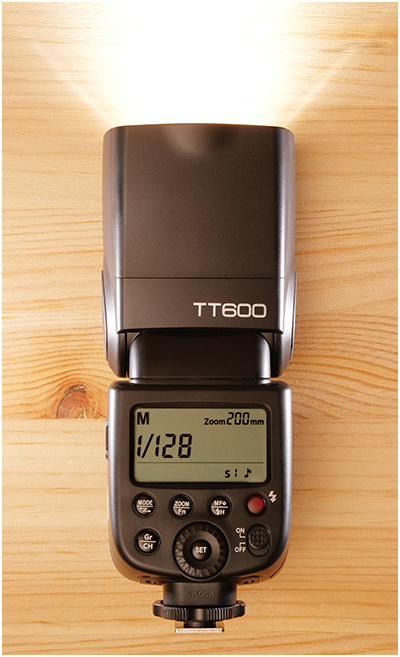
Hot-Shoe Go-To: The Godox TT600

06 Feb

How best to put this?

The Godox TT600 is, objectively, a screaming bargain. It is a full-sized manual-only speedlight with power comparable to OEM speedlights that cost over eight(!) times as much.

It features a reliable, built-in transceiver, a suite of different remote triggers and is part of a ridiculously comprehensive lineup of lighting gear.

I honestly don't know how they can possibly sell them for under $ 70 and still make a profit. Read more »
Strobist

 
Comments Off on Hot-Shoe Go-To: The Godox TT600

Posted in Photography


Fujifilm X100V pre-production sample gallery (DPReview TV)

06 Feb

$ (document).ready(function() { SampleGalleryV2({“containerId”:”embeddedSampleGallery_5663186914″,”galleryId”:”5663186914″,”isEmbeddedWidget”:true,”selectedImageIndex”:0,”isMobile”:false}) });

In their most recent video, Chris and Jordan previewed the new Fujifilm X100V. This sample gallery includes dozens of photos captured with a pre-production X100V in and around the mean streets of Calgary, Alberta.

View sample gallery

Watch DPReview TV’s in-depth preview of the Fujifilm X100V

Articles: Digital Photography Review (dpreview.com)

 
Comments Off on Fujifilm X100V pre-production sample gallery (DPReview TV)

Posted in Uncategorized


Are Lightroom Presets Worth Buying?

06 Feb

If you follow any popular photographer on YouTube or Instagram, chances are, that you’ve been pitched to buy their Lightroom presets. Some photographers actually give theirs away, while some charge a pretty penny. Which leads to the question, are Lightroom presets worth buying? If you search the Internet for this question, you would mostly find strong opinions telling you to Continue Reading

The post Are Lightroom Presets Worth Buying? appeared first on Photodoto.


Photodoto

 
Comments Off on Are Lightroom Presets Worth Buying?

Posted in Photography