RSS
 

Archive for August, 2019

Firecrest 77mm 16-Stop Stackable Neutral Density Filter Review

26 Aug

The post Firecrest 77mm 16-Stop Stackable Neutral Density Filter Review appeared first on Digital Photography School. It was authored by John McIntire.

There is something about long exposure photography that is just, for lack of a better word, appealing. Blurring moving elements (like water, clouds, tourists and moving cars) in your images can create an ethereal or even surreal aesthetic that many photographers, myself included, are drawn to. Formatt-Hitech’s Firecrest 16-stop neutral density filters take long exposure photography to the extreme. By allowing ten-minute exposures in the middle of the day, these filters open up long exposure techniques to normally impossible times. And it does it with fantastic results. In this article, I’ll review the Firecrest 77mm 16-stop Stackable Neutral Density Filter.

What is it?

Firecrest-77mm-16-Stop-Stackable-Neutral-Density-Filter

A neutral density filter is a piece of material (glass or resin in most cases) that you affix to the front of your lens. What they do is cut down the amount of light hitting your sensor, increasing the amount of time you need to expose for. Doing this allows you to get longer exposures than you would normally be able to, making it easy to blur water and clouds in a satisfying way.

Most ND filters come in a range of one to three stops. However, five and ten-stop filters are also very popular amongst landscape photographers. During golden hour and blue hour, when light levels are generally quite low, these strengths of filter make it easy to achieve exposures that last for several seconds.

Image: An exposure time of 408 seconds in the middle of the day is impossible without a specialist f...

An exposure time of 408 seconds in the middle of the day is impossible without a specialist filter such as this one.

What a 16-stop filter allows is extremely long exposures even in the brightest of lighting conditions; including midday sun. For example, with a 16-stop filter, an exposure of 1/2000th of a second becomes 30 seconds. In comparison, with a 10-stop filter, that 1/2000th of second exposure becomes 1/2 of a second. You can probably already see the advantage that the denser 16-stop filter provides.

To drive it home, look at the sunny 16 rule, which says that on a bright sunny day, an exposure of f/16 at 1/125th of a second should give you close to a correct exposure (it usually does). With a 10-stop filter, that becomes 8 seconds.

That might be good enough in many cases, but it also won’t completely blur anything other than the fastest moving elements. With 16 stops, that 1/125th of a second becomes 8 minutes and 44 seconds, ensuring anything moving in your frame is either blurred or disappeared.

What is this good for?

Firecrest-77mm-16-Stop-Stackable-Neutral-Density-Filter

A 16-stop ND filter allows you to blur moving objects in your frame, which can lead to more pleasing images.

Being able to blur details out of clouds and water allows you to remove details that might detract from your subject. This lends itself well to minimalist styles of photography. If that fits your taste, the results can be stunning.

Exposures of this length not only blur moving elements within your frame but can also completely remove other moving things. Boats in rivers, tourists in front of landmarks, and anything else that might move through your frame during the exposure time disappears.

A filter of this strength is also good for things like star trails at night.

Before you consider

Image: You may need some extra specialist equipment before you get started, such as the trigger that...

You may need some extra specialist equipment before you get started, such as the trigger that allows the control of your camera with a phone.

The one thing that you need to know before you consider purchasing a filter like this is that you will need some extra equipment you may not already have. A high-quality tripod is an absolute must as you will need to keep your camera absolutely still during the long exposures.

The other thing you need to take into account is some way of controlling your camera. Because many cameras are limited to exposures of 30 seconds, you will need a way to keep the shutter open in bulb mode for the duration of the exposure without touching the camera. There are many options out there, including remotes and cable releases. I used the Pulse time-lapse trigger from Alpine Labs, which lets you control your camera with your phone. There are others available too, like the MIOPS trigger.

An exposure calculator is also an absolute must as you will need to be able to calculate how long your exposures need to be. There are plenty of free options available for both Android and iOS.

The Filter

Firecrest-77mm-16-Stop-Stackable-Neutral-Density-Filter

After shopping around for a bit, I decided on Formatt-Hitech’s circular screw-in Firecrest 77mm 16-Stop stackable neutral density filter. This filter has a few features that make it stand out.

Since I knew that I would not be using any other filters in conjunction with this one, I wanted a circular screw-in variety. That’s because I thought that the length of the exposures might create the opportunity for light leaks with my normal filter system. I might be wrong on this, but it’s not a chance I wanted to take.

Formatt-Hitech claims their filter is truly neutral (including in the UV and infrared spectrums) and that there are no color casts. This is important to me as my Lee Big Stopper (10-stops) always adds a strong blue cast that is painful to deal with. I won’t go into details about the coatings as you can find them on the product listings.

Does it do the job?

Image: The Formatt-Hitech Firecrest 77mm 16-Stop stackable neutral density filter is certainly a cap...

The Formatt-Hitech Firecrest 77mm 16-Stop stackable neutral density filter is certainly a capable piece of kit.

That’s an emphatic “yes” from me. While there are some downsides to the filter, it provides all of the quality you could expect. The few places it does fall short are all easy to overcome and well worth the little effort to do so.

Pros

Exposure times

Image: The exposure difference between a 10-stop and 16-stop filter can be a bit staggering at first...

The exposure difference between a 10-stop and 16-stop filter can be a bit staggering at first.

Just as the exposure calculator said, the 16-stops of ND filter provides really long exposures even in daylight. 1/125th of a second becomes nearly nine minutes, while 1/15th of a second becomes nearly one hour and thirteen minutes.

Attaches well

Image: It still takes care, but the filter attaches easily enough.

It still takes care, but the filter attaches easily enough.

It’s easy enough to attach the filter to the filter thread of your lens. It does require care as it is easy to slip (I’m sure that’s more me than the filter), but with this technique, there’s no reason to go fast anyway.

Color casts

Image: The color represented without the 16-stop filter.

The color represented without the 16-stop filter.

Firecrest-77mm-16-Stop-Stackable-Neutral-Density-Filter

Color represented with the 16-stop filter.

I won’t say there is no color cast, but they are very minimal if they appear. Comparing shots with and without the filter side by side, it does seem that there is a slight, slight shift towards blue and green. However, I am not sure if that’s an optical illusion. Either way, it’s easy to deal with.

Cons

There are some downsides of both the filter and the technique. However, their effects are minimal and easy to overcome.

Extra equipment

Firecrest-77mm-16-Stop-Stackable-Neutral-Density-Filter

As mentioned, to get started with this technique, it’s not just the cost of the filter you need to take into account. If you don’t have a good enough tripod or some variety of release to trigger your camera, you will have to shell out for those.

Light leaks

Firecrest-77mm-16-Stop-Stackable-Neutral-Density-Filter

Circled is a pair of light leaks that appear at either edge of the frame.

Despite opting for the circular filter to avoid light leaks, they did appear in my images at the left and right of the bottom third of the frame. They were minimal and easy to deal with in post-production, but they are there.

I have done some research, and it seems there’s a chance these leaks are coming from where the lens attaches to the camera body. If that’s the case, you can fix it by covering the join with black material. Formatt-Hitech also sells an accessory that fits around the front of the lens and filter to help prevent light leaks.

Exposure times in low light

When it comes to shooting later in the day when the exposure times get longer, and the light changes rapidly, it’s likely your required exposure time will change partway through your exposure. For example, if your metered exposure when you start is 1/125th (8 minutes and 44 seconds), and the light levels drop to 1/30th (if the sun moves behind a cloud for example) during that exposure, the new time is 36 minutes and 24 seconds. This means that your image will be quite underexposed.

Because of this, I’ve found this technique works better in the middle of the day when light levels are consistent.

Noise and hot pixels

Image: Here, you can see a combination of noise and hot pixels after an 8-minute and 44-second expos...

Here, you can see a combination of noise and hot pixels after an 8-minute and 44-second exposure.

Noise and hot pixels have little to do with the filter itself. Extremely long exposures with digital cameras open you up to problems with noise. The longer your shutter is open, the more noise appears in your frame.

Software is very good at dealing with this, but you do need to be aware of it.

This is especially true if you opt to up your ISO in lower light levels to keep the exposure time in the minutes rather than in the hours.

Direct light

Image: Taken in overcast conditions, the technique has emphasized the flatness of the light.

Taken in overcast conditions, the technique has emphasized the flatness of the light.

Image: In direct sunshine, contrasty conditions get emphasized.

In direct sunshine, contrasty conditions get emphasized.

What I’ve found with this technique is that it works best with direct light on your subject. If the conditions are overcast, or the light is otherwise dull, the long exposure tends to emphasize the flatness of the scene.

Of course, that won’t always be the case and please don’t take that as a rule of any sort, it’s just an observation. If you live somewhere that is sunny and bright most of the time, this won’t pose you much of a problem. However, I live in Yorkshire and overcast days are the rule rather than the exception.

Price

I do not include the price of the Firecrest 77mm 16-Stop Stackable Neutral Density Filter as either a pro or a con. At $ 125, it’s probably not going to be an impulse buy for most photographers. However, for what it is, what it does, and how well-made it is, it is well worth that price. It’s also roughly the same price as filter offerings from companies like Lee Filters.

Overall experience

Firecrest-77mm-16-Stop-Stackable-Neutral-Density-Filter

Overall, the Formatt-Hitech Firecrest 77mm 16-Stop Stackable Neutral Density Filter does exactly the job I bought it for.

In the end, the Firecrest 77mm 16-stop Stackable Neutral Density Filter does exactly what I wanted it to when I bought it, and it does it well. The complications aren’t hard to overcome, and it is well worth the extra effort. At $ 125, it is well within reach of anyone who wants to have a serious attempt with the techniques it offers.

I also found that I really appreciate the side effects of the technique. Because the exposure times are incredibly long, you can spend a couple of hours on location and come away with only a handful of images. This slow-treacle approach to photography is enjoyable and turns the whole experience into a mindful one.

If you like the effect of streaky clouds and flat water, or you are into minimalist photography, this type of filter may be indispensable for you.

Do you do long exposure photography? Do you use a 16-stop filter? What are your experiences? Share with us in the comments!

Firecrest-77mm-16-Stop-Stackable-Neutral-Density-Filter

The post Firecrest 77mm 16-Stop Stackable Neutral Density Filter Review appeared first on Digital Photography School. It was authored by John McIntire.


Digital Photography School

 
Comments Off on Firecrest 77mm 16-Stop Stackable Neutral Density Filter Review

Posted in Photography


How to Plan and Pull-Off a Toddler Photo Session

26 Aug

The post How to Plan and Pull-Off a Toddler Photo Session appeared first on Digital Photography School. It was authored by Mat Coker.

Toddlers are filled with volatile emotions. They can be shy, moody, defiant, chaotic, unpredictable, and in need of bribes. So a toddler photo session can be a challenge.

But when you build a photo session just for toddlers, it’s far less challenging and lots of fun. It is also the perfect opportunity to get creative.

Here’s how to let your inner child create a toddler photo session that’s fun for you and toddlers.

Toddler-photo-session-Documentray toddler photo session

1. The big idea

The first step is to plan out the photo session. I think that a themed lifestyle or documentary session is perfect for toddlers.

The big question is, how do you come up with an idea or theme for the session?

Many photographers choose a theme themselves, such as princesses or pirates. The benefit of choosing your own theme is that you get to exercise your creative vision (designing the set, costumes, etc.) and let people choose to be part of it or not.

Of course, one downside is that it’s a cookie-cutter approach that gives every child similar portraits.

If you want to choose something unique to the child, keep in mind that every toddler has something they love to do. Go with that as the theme for the session.

If they love dinosaurs, then find a way to make dinosaurs part of the session. If they love to play with big-rigs and diggers, then make those part of the session. Whatever it is they love, try to make it larger than life for the session.

Toddler-photo-session-Toddler photos at football field

When I found out that this little guy loved watching football with his Mom and Dad, I knew we had to visit an actual football field for his photo session.

Start with a small everyday experience and take it to the next level (I’d love to hear some of your ideas in the comments).

2. The toddler photo session

When it comes to pulling off the session, start by being prepared. This seems obvious, but many photographers come unprepared, and it can ruin a session.

If you are prepared, then you won’t have to think about it during the shoot. The less you have on your mind, the more room you have to be creative.

Gear

Pack the right gear and check twice that you’ve got it all.

  • Spare camera
  • Charged batteries
  • Lights (if needed)
  • Props (provided by you or the family)
  • A checklist of other things you need

Part of being prepared is being familiar with your camera and knowing what settings to use. I keep things as simple as possible with aperture mode and exposure compensation. I only use manual mode when I need it.

Fire fighter thmemed toddler photo session.

Even though props for the session should be prepared in advance, you should still allow room for spontaneity. Dressing up as a firefighter was not part of the plan, but it was the best part of the session.

Chaos

Generally, you’ll need to embrace chaos as part of the toddler photo session. Toddlers are emotionally volatile, and the session may take many twists and turns. This is one of the reasons that I love lifestyle sessions. It easily allows for pauses, breaks, and spontaneity.

Go with the flow and don’t try to force anything. If you design the session for the toddler, then it should be fun. They should be happy, and it should be the perfect environment for them. Even a studio can be fun.

Keep the parents informed, but don’t feel the need to explain things to the toddler. You don’t even need to tell the toddler it’s a photo session. If it’s a lifestyle or documentary session, just let them be themselves.

How to Plan and Pull-Off a Toddler Photo Session

Creativity

Use many creative elements with your photography. Go for a variety of angles, close-ups, storytelling, wide angles, and beautiful light.

Football mascot photo session.

Part of your creativity is in choosing the environment and backgrounds for your session. I used a combination of background, composition, and moment for these two photos. The moment began with him confronting his opponent’s mascot and ended with him making a run for it.

Beware of yourself

You’ve got to be able to handle any problems that arise and still get great photos.

Before a toddler photo session, I do some reflection. What could go wrong with this session? Has anything gone wrong in the past? What is the worst that could go wrong? But most importantly, how will I respond? I make this decision in advance so that I don’t have to think in the moment. Do the thinking while things are calm, and you’ll make better decisions.

Consider answering these questions in advance:

  • What if the toddle is grumpy?
  • Suppose the parents are overbearing?
  • What if the kid throws mud at my camera or turns the firehose in my direction?
  • What if the toddler gets hurt?
session at beach.

As much as we all love nature, there are many harmful elements out there for toddlers. Keep parents close by and make sure they are comfortable with where their toddler is exploring.

3. The edit

When it comes to the edit, be ruthless in narrowing down your photos. Most photographers are happy if they keep 10% of their photos from a session. Some are satisfied with less. Don’t be afraid to cut, cut, cut!

Your final selection of photos should have lots of variety to it.

  • Close-ups
  • Full scene
  • Details

When it comes to touching up your photos, I recommend a simple edit with Lightroom or a similar program.

How do you know what to do with a photo? Keep these two principals in mind. When it comes to editing you’re either:

  1. Putting the finishing touches on your photo (crop, exposure adjustments, etc.)
  2. Or you’re trying to fix a photo that didn’t turn out
Toddler-photo-session-Before and after edit with Lightroom

The main things I did with this RAW photo is I cropped it and warmed it up with the temperature slider.

Generally, I would say if you need to do a heavy amount of fixing or editing of a photo, you should just leave it out of the final collection. If you constantly have to fix certain elements of your photos in editing, this is a good clue as to what you need to learn to improve your photography. Editing should be about finishing touches, with fixing as a last resort.

A perfect session for you and toddlers

Follow your nature as a creative person and the nature of the toddler you are photographing. Design everything for the toddler, and you’ll have an amazingly creative toddler photo session that will leave everyone wanting more.

Do you have any other tips for a successful toddler photo session? Share with us in the comments below!


toddler-photo-session

The post How to Plan and Pull-Off a Toddler Photo Session appeared first on Digital Photography School. It was authored by Mat Coker.


Digital Photography School

 
Comments Off on How to Plan and Pull-Off a Toddler Photo Session

Posted in Photography


2019 Guide: Apple iPad Pro for Photographers

25 Aug

Introduction

With the release of every new tablet, photographers peer past their laptops and wonder: could this be the one that lightens my gear load without sacrificing performance? The appeal of a fast and light tablet is seductive, even if you’re not looking to completely replace a desktop or laptop, but tradeoffs have so far made it a difficult choice.

2019 iPad Pro key specs:

  • Resolution of 2388×1668 pixels (11″ model), 2732×2048 pixels (12.9″ model)
  • 64GB, 256GB, 512GB, 1TB storage capacity options
  • 64-bit A12x chip
  • USB-C connection
  • 468g (11″ model), 632g (12.9″)

Apple’s latest iPad Pro models boast impressive hardware that’s making them competitive alternatives. Depending on what you need to do, though, the software still isn’t quite there yet. Partly that’s due to limitations imposed by Apple and iOS, but it’s also because third-party developers have only recently had the power to build the types of full-blown apps photographers expect.

That said, based on what’s been announced about the next versions of iOS (called iPadOS 13 for the tablets), the iPad Pro will become even more capable when it’s released in the fall. I haven’t run the iPadOS beta on the current iPad Pro because the software is still in development, so I won’t be evaluating any of those features in this article. However, I’ll reference them as needed to talk about some of the current limitations and what to expect later this year.

Performance

During the early days of the iPad, Apple didn’t share all the hardware specifications, preferring to convey the message that the iPad was perfect for anyone’s needs. Processor speed, memory, and graphics specs were details for nerds and pros, and the computer industry had become fixated with them. Honestly, Apple was likely deflecting from the fact that the original iPad shipped with just 256 MB of RAM—not terrible for most uses on that first model, but it hampered the machine when working with large image files. It wasn’t until the third-generation iPad that it crossed into the 1 GB territory for RAM.

Affinity Photo on this latest 12.9-inch iPad Pro isn’t fazed by significant demands

Apple has since returned from that marketing sojourn with a lot to trumpet. The iPad Pro is powered by an Apple-designed, 64-bit A12X Bionic processor with eight cores that balance power and battery life: four high-performance cores and four high-efficiency cores. When needed, all eight cores can be put to use. It includes 4 GB of LPDDR4 RAM, though the model equipped with 1 TB of storage includes 6 GB of RAM (the model I reviewed). The A12X also includes a 7-core graphics processor that Apple says delivers the same graphics performance as an XBox One S, and a Neural Engine that processes machine-learning tasks (such as identifying faces in the Photos app).

What does all that mean for photographers? It never feels like I’m waiting for the device to catch up. For example, in my review of Affinity Photo for iPad using a 2016 iPad Pro, I noted, “The tradeoff is that adding several Live Filters will slow down the live rendering performance. I added five Live Filters to a layer to test this, and making subsequent edits did lag significantly.” Affinity Photo on this latest 12.9-inch iPad Pro isn’t fazed by the same demands.

We’ll call it abstract art: a photo with multiple Live Effects applied in Affinity Photo for iPad.

Similarly, making adjustments in Lightroom for iPad is responsive, even on large raw files created by the Nikon Z7 and Sony A7 III cameras. I threw images at other photo editing apps, such as RAW Power, Pixelmator Photo, and Snapseed and I swear the iPad Pro yawned and asked, “Is that all you’ve got?” (I may have been overcaffeinated at the time.)

Editing in Lightroom for iPad Editing in RAW Power
Editing in Pixelmator Photo Editing in Snapseed

Storage for two of the configurations is roomy enough for photographers generating gigabytes of image and video files. While the 64 GB base model is pretty sparse and the 256 GB level is what I would consider tight, jumping to 512 GB or 1 TB is a lot more workable. Of course, you’ll be paying for the privilege: the 11-inch iPad Pro with 1 TB costs $ 1549. Depending on the speed of your Internet connection and your comfort level with cloud services, even the 256 GB configuration is workable if you’re using Apple’s Photos or Lightroom for iPad due to their ability to temporarily delete originals to conserve space and re-download them as needed.

Articles: Digital Photography Review (dpreview.com)

 
Comments Off on 2019 Guide: Apple iPad Pro for Photographers

Posted in Uncategorized


How to Make an Awesome Pop-Up Card with your Photos

25 Aug

The post How to Make an Awesome Pop-Up Card with your Photos appeared first on Digital Photography School. It was authored by Ana Mireles.

If you can cut and fold a piece of paper to make a pop-up, why can’t you make it to an image? A photograph translates our three-dimensional world into a two-dimensional representation. With a pop-up card, you can present it with tridimensionality. Here are some ideas to bring your photos to life by turning them into an awesome pop-up card!

How-to-Make-an-Awesome-Pop-Up-Card-with-your-Photos

From paper crafting to paper engineering, this creative practice can be as complex as you want. I will show you two basic techniques that you can apply to your own images. Keep in mind that each image will need specific measures and some testing before you get it right, so be patient!

What you need to make your awesome pop-up card

I recommend you print some copies of the photo in black and white on a cheap paper so you can do your testing without spending much. Then get scissors, a precision cutter, ruler or measuring tape, double-sided tape, and a cutting board.

How-to-Make-an-Awesome-Pop-Up-Card-with-your-Photos

1.Single image pop-up card

Choose the right image

Because you want to give it a third dimension, images that have a clear separation of elements will work best. For some guidelines on this check out the article How to Use Figure to Ground Art Theory in Photography. Print your image at least two times, and one for each layer you want to add.

Foreground and Background are separated for a better pop-up card

Layers and more layers

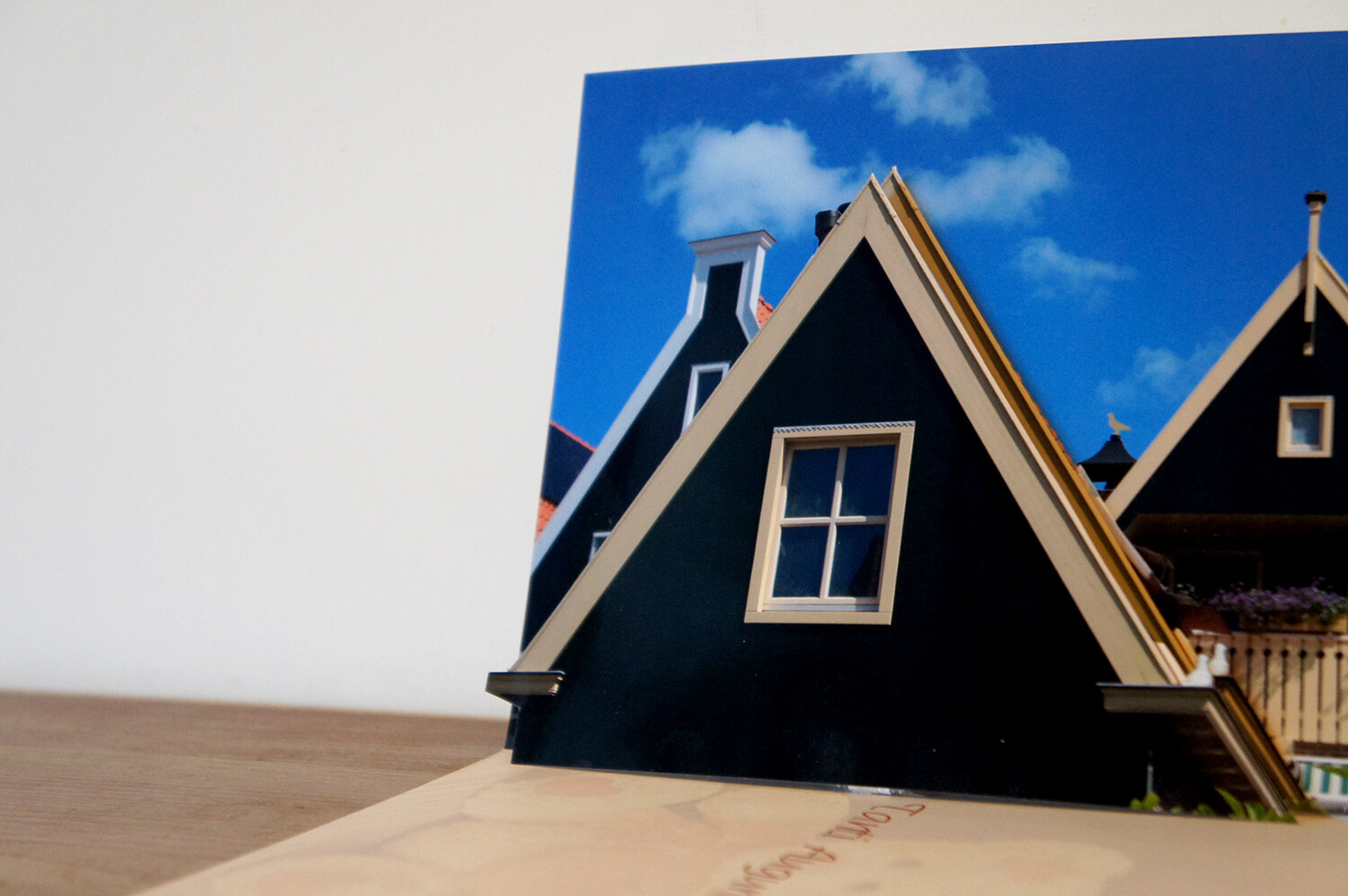
The more elements you separate into layers, the more interesting and elaborate your card will look. I promised to keep it simple so I’ll just add one layer to show you the process, then just repeat it as many times as you want. Cut out the element of the layer that will pop up. In this case, I’ll cut the house in the front.

How-to-Make-an-Awesome-Pop-Up-Card-with-your-Photos

Cut also a stripe of paper, either from the photo or any other thick paper that will hold the layer up. The longer you make it, the bigger the separation to the background.

Fold and paste

Now paste the background to the card which can be store-bought or just a piece of colored paper folded in two that you can later write your message on. Place the base of the photo on the crease where the card folds.

paste background into card

Fold the paper stripe into a square. Then paste one side to the background and one to the bottom side of the card. This will serve as support to the pop-up cutout.

piece of paper to hold the pop-up piece

Paste the other side of the square to the background, and the bottom part to the card. Making sure the cutout matches the original image when you position it. That’s it. Do the same for any elements you want popping out.

How-to-Make-an-Awesome-Pop-Up-Card-with-your-Photos

2. Multiple image pop-up card

This technique is great when you want to showcase many images. For example, an anniversary or a birthday where you want to sum up the highlights of the year. It’s also useful when you want to make a themed card to communicate a concept.

Create the layout

The first thing you want to do is choose your images. Then arrange your images in a grid. To automatize this process you can use Lightroom. If you need some direction just follow the instructions of How to Create Contact Sheets in Lightroom. Set it to the size of the card you’re going to use: for me is an A3 so 4 columns and 3 rows should look nice, but this is entirely up to you.

Print thumbnail images to use

Note that the outer images of the middle row will get folded in half, so use images that fit this crease, or leave it black.

Fold

Fold the paper vertically in half, and then each side again in half towards the opposite direction. As a result, you will have an accordion where the folds separate the columns.

Fold contact sheet as accordion

Cut

Unfold the accordion and just leave it in half. If you do it in a way that the images are towards the outside, you won’t have to measure and just guide yourself by the images. Cut horizontally between rows reaching the middle of the outer image. Then fold inwards the piece you just cut.

How-to-Make-an-Awesome-Pop-Up-Card-with-your-Photos

Paste

Now put some double-sided tape into the side edges and fix it to the card. Make sure the fold in the middle of the accordion coincides with the fold of the card.

pop-up card with accordion photo album

I hope you enjoyed reading How to Make an Awesome Pop-Up Card with your Photos and that you enjoy making pop-up cards yourself! For future occasions, if you want to go deeper into this craft side of photography I’ll leave you some links to check out.

Additional reading

If you’re feeling creative and want to do other types of cards, check out these amazing tutorials:

  • How to Make Your Own Postcards: Cheap!
  • Greeting Card Templates in PS or PSE
  • How to Make Great Photo Invitations in Photoshop


How-to-Make-an-Awesome-Pop-Up-Card-with-your-Photos

The post How to Make an Awesome Pop-Up Card with your Photos appeared first on Digital Photography School. It was authored by Ana Mireles.


Digital Photography School

 
Comments Off on How to Make an Awesome Pop-Up Card with your Photos

Posted in Photography


DPReview TV: Lensbaby Omni review

25 Aug

Photographers used to do crazy things like smear petroleum jelly on their lenses to create interesting photos, but thanks to the Lensbaby Omni you can get those same effects without plopping goo on your glass. Join Chris and Jordan for some creative photography.

Get new episodes of DPReview TV every week by subscribing to our YouTube channel!

  • Introduction
  • How it works
  • Wand options
  • Using the Omni for video
  • Useful tool or novelty?

Articles: Digital Photography Review (dpreview.com)

 
Comments Off on DPReview TV: Lensbaby Omni review

Posted in Uncategorized


Video: Beat creative block with these 5 tips

25 Aug

In his latest video YouTuber and photographer Jamie Windsor offers a collection of inspiring tips to lift us out of those dead-end moments when creativity temporarily abandons our world. When ideas seem to dry up it rarely feels like a temporary situation, even though experience proves that with time masterpieces will be made again. The problem is how long it takes to regain our mojo.

In A Few Quick Thoughts On Staying Creative Jamie discusses creative block and his theory on how it happens – and most importantly how to accelerate the return of fresh inspiration. He tells us to put ourselves in the way of new ideas, to listen to others plans and to try a new environment – and to review the ideas we have been working on.

If you are going through a dry spell at the moment this might just lift you out of it, and if you aren’t it could be your insurance for next time one comes along.

Articles: Digital Photography Review (dpreview.com)

 
Comments Off on Video: Beat creative block with these 5 tips

Posted in Uncategorized


The Canon 90D Unveiled Through Leaked Promo Video

24 Aug

The post The Canon 90D Unveiled Through Leaked Promo Video appeared first on Digital Photography School. It was authored by Jaymes Dempsey.

After months of rumors and speculation surrounding Canon’s new DSLR offerings, we finally have something certain to report:

The specs of the Canon 90D, as indicated by a promotional video leaked from Canon.

The Canon 90D Unveiled Through Leaked Promo Video

If you’re a Canon user, you’re going to want to pay attention. Because the Canon 90D is a seriously impressive piece of kit, one that seems to be a combination of the Canon 80D line and the Canon 7D line, and one that will carry on many of the best features from both camera lineups.

Here’s the promotional video in full:

?


Now, what’s so special about the Canon 90D?

First, the resolution is bound to impress: The 90D is slated to have a 32.5-megapixel sensor, which is a huge step up from both the Canon 80D (at 24.2 MP) and the Canon 7D Mark II (at 20.2 MP). The increased megapixel count means increased crop capabilities and an increased potential for large prints.

High megapixel counts usually result in slower continuous shooting. But not for the 90D, which fires off 10 frames per second. This is enough for any type of action photography: sports, wildlife, bird, and more. Plus, the Canon 90D features 45 autofocus points, all of which are cross-type. Together, these features should be a potent combination in the hands of a dedicated photographer.

Add to this 100% viewfinder coverage, impressive battery life of 1300 photos, and an articulating screen, and you’ve got yourself a winner. You should also remember that the Canon 90D will offer dual pixel autofocus, which practically guarantees fast and efficient focus while using Live View.

Who should get the Canon 90D?

I’d recommend grabbing the Canon 90D if you’re a hobbyist or semi-professional photographer. Better yet, you should be interested in action photography of any kind. The strong autofocus and 10-fps continuous shooting is too impressive not to pass up.

Plus, if you’re looking for a bit of a megapixel boost compared to an older Canon, the 90D is the way to go.

Now I’d like to ask you:

What do you think of the Canon 90D? Will you be looking to purchase it? And what are your favorite Canon 90D features?

Let me know in the comments!

The post The Canon 90D Unveiled Through Leaked Promo Video appeared first on Digital Photography School. It was authored by Jaymes Dempsey.


Digital Photography School

 
Comments Off on The Canon 90D Unveiled Through Leaked Promo Video

Posted in Photography


Interview: Colin Goudie, feature film editor

24 Aug
In the edit suite for The Show, a new film written by and starring Alan Moore

Colin Goudie is a feature film editor with a career spanning over 35 years, editing everything from 16mm film to Digital 65mm, and has cut films in big studios, hotel rooms and even tin shacks. Most recently, he’s known for his work on Rogue One: A Star Wars Story and Monsters, though he doesn’t limit himself to big budget productions and can often be found editing lower budget documentaries and dramas too.

Colin talked with DPRevew about editing movies back in the film days, and the transition to a fully digital workflow.


How did you start out as an editor?

I got a placement at Nene College of Art and did a foundation course for two years where I discovered 35mm stills photography. I graduated from Nene and got a placement at Bournemouth College of Art School of film, photography and TV production.

Instead of just concentrating on stills photography, in year one I would actually go to the second and third year students and ask them if they wanted a unit stills photographer and, of course, everybody always wanted a free unit stills photographer. I did that, and of course the thing about a film set is there’s always too much work to be done and not enough people to do it, so people would start asking you to hold this boom mic, could you alter those barn doors on that light, so you start to learn the process.

Of course, if you don’t mess up people give you more and more responsibility. By the time I went into my second year people were asking me to edit their films, so I jumped ahead by a year. Then I left film school and I managed to get a job at the BBC in their trainee assistant film editor course.

Do you remember the first time you saw non linear editing and what was your reaction?

I left the BBC after 10 years editing on film and tape, and the very first job I was offered was for a tiny documentary series for the BBC about volunteering. There were 15 minute films and the director of one of the episodes had recommended me to the Series Producer. The Series Producer phoned up to talk to me; we got on well over the phone and he said I’d been highly recommended, but the film was cutting on Lightworks and was I OK with that? I said yes.

In year one I would actually go to the second and third year students and ask them if they wanted a unit stills photographer and, of course, everybody always wanted a free unit stills photographer.

I hung the phone up and then I picked it up right away and called directory enquiries and said, “Can you put me through to a company called Lightworks?” and they looked up the number and put me through. I said, “Hi, can you tell me what a Lightworks is and how can I learn to use one?” Lightworks ran a training course that was two days, and I went and spent a lot of money to do the course and then on the following week I started on the series.

I do remember that the other person – there were only two of us on the course – when the instructor talked about using the mouse, said she had never used a computer mouse in her life. I had because of my days at the BBC, because you had to do some stuff with the mouse and a bit of DOS work. Also, because I used an Atari ST as a gamer.

It’s really interesting, everything everybody tells you that playing computer games are bad. But actually it turned out not to be because I understood about loading floppy disks, doing backups, using a mouse, what a DOS monitor was and how to type in code. All those things I learnt in gaming were really useful in an editing environment, and I did see other people struggle who had never done that.

I loved Lightworks straight off because for me it was finally a combination of of the dexterity of film editing, the fact that I can cut in a single frame, the fact that I can drop it in two-thirds of the way through a film or a third of the way through the film. It meant I didn’t have to re-conform my tape like it had on on the U-matic based editing system. It also meant that I could keep all my previous cuts of the film.

A young Colin editing 16mm. It was a very delicate process.

Editors who have worked with film often talk about the physicality of it. Do you miss it?

No, mainly because Lightworks felt physical when you were using that controller. It was lovely to have your pictures at better quality than they had been on U-matic in the early days of offline. Of course, you did come a cropper because you had to digitize at a quite a low quality picture rate, so sometimes you would miss things.

I remember editing a show once, a World War II drama, and there was an extremely wide shot of the outside of St. Pancras station with hundreds of cast members walking through shot, and a shot like that eats up your data rate so things look very blocky.

It was only when they conformed the film and the guys were dubbing it, and the sound crew were laying in the footsteps, looking at the film frame by frame for footsteps, said, “Do you know there’s somebody walking through shot with a Sainsbury’s shopping bag?” Which for a WWII drama was a bit of an error. Nobody has ever seen it, I never saw it on the rushes because I only saw the digitized picture.

It was a learning curve. It really made me learn to look for those kind of things even more on a heavily digitized picture. It also made me fight vociferously for productions moving forward from that day that I would have more memory and be able to digitize my rushes at the highest possible quality.

I learnt to do all my wide shots at a higher quality digitization rate than the close-ups, whereas up until that time it was always quicker and easier to do everything at the lowest possible rate, which is what everybody did because memory was so expensive in those days. A 9 gigabyte drive was £2,400. If you do the maths on that it was £90,000 in memory alone just for an edit, so you cut your cloth accordingly but those are all learning things. It was the early days of nonlinear.

Colin and Gareth Edwards on Rogue One.

You’ve edited in some quite odd places. Normally, people picture director and editor sitting in a air conditioned room with coffee and croissants coming in, but that’s not always been your experience has it?

Certainly among my peers I seem to have edited in more weird locations than many. I have done my fair bit of editing in suites, but I’ve also done a lot of location editing. I have edited at Soho and Pinewood and Shepperton, Skywalker Ranch at the Lucasfilm Presidio in San Francisco and also in the rim of a volcano, but it wasn’t active.

I like location editing for the access it gives me to the director and sometimes to the cast. It’s very useful if you befriend the actors on location and they become your mates, because when you go up to them and say, “Could you just record this line of dialogue for me so I can lay it into the edit and try out an idea with some new dialogue?” it’s much easier if you know them.

Certainly among my peers I seem to have edited in more weird locations than many.

Obviously, having the access to your director when on location is great because if I look at the rushes in the afternoon that they shot in the morning and spot something that I need a pickup on, I can pop down to set straight away while they’ve still got the cast on that set. I can even show them a little rough edit that I might have done and say this is why I need this shot, so everyone understands why you need it, and I’ll get it bashed out for you really quickly – there’s no delay in that process.

Don’t you find yourself out on a limb in those situations?

The drawback of editing on location is lack of technical backup, so if something goes wrong and you’re on the other side of the world with a laptop and suddenly your card reader doesn’t talk to your drive or your camera media, then you’re really stuffed. I have made numerous phone calls to people in the UK pleading for some help down a dodgy phone line to get me out of a scrape or send me a new driver down the internet.

My joke I always used when I talked to the production manager was, I don’t care about the quality of my hotel room so long as I’ve got a table and a chair, stable electricity mains supply and the internet, and you wouldn’t believe how many times you can’t get all four of those things. That can really affect your workflow.

If you don’t have a stable electricity supply it’s impossible to run your drives because they just keep dropping out the whole time, so suddenly the Producers are like, “Why didn’t you cut anything today?” and it’s like “I don’t have a main supply to edit it, to run the external hard drives up on.”

You get used to the fact of taking portable drives that you can maybe clone material from, and work off of on the short-term until you can get to some sort of electricity supply and recharge your laptop.

Colin editing Monsters on location.

You’ve also shared your edit suite with some non human occupants as well haven’t you?

I’ve had an edit suite where a scorpion came in underneath the door.

I also worked on a BBC series which was edited inside London Zoo, in a large Portacabin. It was a real team experience with four other freelance editors, a bit like the old days at the BBC. The great thing about that was that the zoo keepers sometimes brought a few of the animals into the office. We had Coatis and even a Lynx come round; the Coatis ate our lunch (they loved yogurt) and the Lynx pawed the carpet. We all adopted them.

We did have a problem with some other wildlife at the Zoo. One day I came into my suite, turned on my Avid and then booted up all the others. When I got back to mine all the media was offline and I checked the same had happened in every other edit too. On investigation, the Technical Manager found that a rat had chewed through the fiber optic cable than ran between the edit suites and the main building where the drives were kept.

I’ve had an edit suite where a scorpion came in underneath the door.

Cheap plastic cable cost us days in edit time until it could be replaced by the armored variety. Cutting costs there actually didn’t work out too well.

If you could re-cut one film that you haven’t made what would it be?

I’d inter-cut Dunkirk with The Darkest Hour and make one movie because I think there’s a way of doing that. When I was a kid growing up epic films were Lawrence of Arabia, which had incredible battle scenes, and they also had really intelligent political dialogue scenes and these days it seems that you have to have one or the other.

Dunkirk is a spectacular looking action movie but I don’t understand what’s going on plot wise in terms of the history of Dunkirk. I mean, I know because I grew up watching World War II movies, I’ve talked to my dad who fought in the war, but for a modern audience in terms of teaching you about Dunkirk it’s incomprehensible.

It doesn’t have any plot, it just has incredible action scenes, The Darkest Hour is a really brilliantly made Churchillian biopic which gives you all the political background but has no scale, it’s almost all people in rooms talking.

I think that if you took the rushes for those two films it would be fascinating to see if you could have a crack at making one 3 hour long Lawrence of Arabia style epic which told the story of Dunkirk and told the story of Churchill and made effectively the modern Lawrence of Arabia. You’d have to have the rushes, and you’d have to have carte blanche to do what you wanted, but I think that would be amazing to do that.

X Wings and kilts, not often seen together.

Thinking about Star Wars, what’s your favorite film and why?

Empire Strikes Back, definitely.

I saw Star Wars (Episode IV) when it came out. I liked it, but it wasn’t my favorite movie of all time, but I did enjoy it. I think one of the reasons why it wasn’t my favorite movie is because it took six months to get from America to the UK and by the time we actually sat in the cinema to watch it they’d shown so many clips of it on TV you kind of knew the story.

When Empire Strikes Back came out it was all shrouded in secrecy, there were no clips. Up until that movie I had not seen the Godfather Part II, so basically I’d never seen a good sequel. Every sequel that I’d ever seen was not as good as the original film; Jaws 2 was not as good as Jaws, and it was effectively the same film.

With Empire Strikes Back I sat down to watch what I thought was going to be Star Wars part II, and I saw a film that took things in a totally different Direction. It introduced new characters, had Yoda, who has got to be one of the greatest cinematic characters of all time, and was not flagged up in the first movie at all all.

Every sequel that I’d ever seen was not as good as the original film; Jaws 2 was not as good as Jaws, and it was effectively the same film.

Then the Twist with what they did with the Luke Skywalker character and the Darth Vader character, and the fact that it ended on a cliffhanger, which in those days no movie did. Now every movie does it. I just remember walking out of that movie theater on opening day – I saw it at 10:30 in the morning at Odeon Leicester Square in 70mm, and all I wanted to do was go back in and see that movie again, which I couldn’t do because it was sold out.

I just thought it was incredible, and I think that the score had some of the tracks from the original movie, but the Empire theme was new for Empire Strikes Back. Imperial March is not in the first movie, that is one of the most defining pieces of music in cinematic history, so to get all those pieces was incredible and the visual effects (VFX) were on a new level.

I understood how they did the VFX in the original Star Wars film, spaceships against black, because I really studied and knew about 2001 and how they did that. But, when they had sequences of snow speeders going across landscapes against snow in Empire… my little brain was going, “How did they do that?”

Colin editing at the BBC on tape.

Moving from 16mm to tape, and now on to digital, what’s been the biggest challenge?

I think the biggest technical difference during my career as an editor has been the introduction of video tape, and now digital over film, because when we shot on film the average shooting ratio was 10 to 1. I remember when I made my University film I shot on a ratio of 1.25 to 1. I had 40 minutes of film stock to make a 25-minute finished drama.

When you learn that discipline 10 to 1 seems like luxury. The skill set, the training that most directors had in the first part of my career, was that everybody had come up through film and they learnt to shoot on a 10 to 1 shooting ratio, so they don’t get the minimum amount of coverage needed, but have sufficient coverage – not excessive coverage – and that it was correct.

When I made my University film I shot on a ratio of 1.25 to 1. I had 40 minutes of film stock to make a 25-minute finished drama.

What happened with videotape was things started to become a bit more ‘shoot everything that moves and we’ll sort it out the edit’, and that’s a tradition that is even more prevalent with digital today. Traditionally capture was only in real time, now you don’t even to wait that long so shooting ratios have exploded. That is almost always to the detriment of what happens in the edit because that means that the editor now has more footage to look at than there are hours in the day to look at it.

Unless you are on a very long schedule you need either the director to have gone through the material and come in with at least some notation, and some honing down clarification as to what they’ve shot, so that you only need look at the minimum amount for what you need to do the edit.

Quite often what I’ll do is do that, and when I’ve assembled the film I will then talk to them and say, “What else have you got that I’ve not seen?” that we can now go back and look at with a view to improving some of the sequences, because you just don’t have time to watch everything on a standard schedule.

Articles: Digital Photography Review (dpreview.com)

 
Comments Off on Interview: Colin Goudie, feature film editor

Posted in Uncategorized


How to Photograph Architecture as Sculpture

24 Aug

The post How to Photograph Architecture as Sculpture appeared first on Digital Photography School. It was authored by Herb Paynter.

Architects design buildings based on form as much as functionality. Many of these creative structures serve as works of art as well as mere brick and mortar buildings. Viewing subjects for their form as well as their function, and capturing that beauty with creative eyes and a little careful planning, can deliver stunning results. In this article, you’ll learn how you can photograph architecture as sculpture.

Photograph-Architecture-as-Sculpture

A statue of Wilbur Wright stands in front of the Student Union building on the campus of Embry Riddle Aeronautical University in Daytona Beach, Florida.

Rule One: Observe before you shoot

Too often we are struck with the initial appearance of a subject and immediately start shooting. However, this knee-jerk snapshot approach rarely provides the kind of result that it could if we took our time. Take the time to walk around the subject and observe it from several different angles. Those angles will provide different vantage points, reflections, and shadows that will change and influence the framing you use for each shot.

Investigate the uniqueness that each structure presents and appreciate the visual statements the architect is making. Structures are more than a collection of connected boxes with passageways and windows. They are the physical housing of the community. We should study the features that make each structure unique. Throughout time, architects have designed structures that reflect social attitudes and serve the full spectrum of cultures from very conservative and business-like to modern and avant-garde.

Image: London’s amazing architecture along the Thames.

London’s amazing architecture along the Thames.

If you carry optional lenses in your bag, consider how each will render the scene. Don’t hesitate to stop long enough to find out. Lenses not only provide a distance variable, but they also change the dynamics of dimension. Longer lenses tend to compact the range much more than wider lenses.

Remember, backgrounds play a large role in the process. It is easy to get carried away with the subject and not see the effect that items in the foreground and background have on the final result. You can shorten major post-production chores, and even eliminate, by carefully seeing and shaping the background.

Rule Two: Think before you shoot

Digital cameras tend to override the cardinal rules of photography by allowing us to haphazardly capture dozens of shots without thinking them through. Remember, photography is a discipline and technical science as much as it is a process of documentation. Don’t allow yourself to excuse sloppy shooting.

The basic tradeoffs of exposure should run through your mental checklist as you think through each shot. Here’s where “Auto” settings can work against you as a photographer.

Briefly weigh the big three factors behind correct exposures before you click the shutter: Shutter speed, ISO, and Aperture each contribute to the shot, and each affects the result.

Photograph-Architecture-as-Sculpture

Interior of Student Union at Embry Riddle University

The most important of these three variables in architectural photography is the aperture. Aperture controls the depth of field (DOF), particularly in long lenses. Since buildings rarely move around and daytime outdoor lighting is usually ample, shutter speed is of little consequence in the final analysis. As is ISO, but your choice of framing and DOF will make all the difference.

Rule Three: Plan your shot before you shoot

Make it a point to develop specific intent for each shot and develop at least a mental shot list of the project. Without this exercise, you’ll end up with a multitude of lookalike shots that you’ll have to cull through. Ask yourself if you want to capture the entire scene or just highlight a particular aspect of the scene?

Image: The 19th century stone structure of the Chicago Water Tower stands in contrast to the gleamin...

The 19th century stone structure of the Chicago Water Tower stands in contrast to the gleaming metal surface of the Trump Tower, also in Chicago.

Rule Four: Account for Keystoning

Buildings are always taller than the camera lens and thus always distort the parallel nature of the vertical lines. The only way to avoid this is to keep the camera axis parallel to the horizon. The moment you shift the lens skyward, the vertical lines will keystone. This is both normal to the human eye and advantageous to adding drama to tall buildings, but the camera lens can exaggerate it.

If you’re fortunate, and a bit creative, you can shoot the building from the inside (or atop) another structure. This will allow you to keep the vertical surfaces parallel.

Image: Seeing this domed rooftop from an adjoining property delivered a unique view. If I’d ca...

Seeing this domed rooftop from an adjoining property delivered a unique view. If I’d captured this dome from the ground, the actual shapes and features would have been distorted.

The other option, and the one most utilized, is to adjust these angles in post-production. Almost all imaging software provides the ability to straighten the lines by either automatically or manually stretching the image using the software’s Transform function. However, be aware that every time you distort an image’s shape, you reassign pixel values which can affect the sharpness of your image.

Rule Five: Assess White Balance

The general assumption is that you should capture outside photos in Daylight mode. But this isn’t always the case. Outdoor lighting changes constantly. Images captured either in the shade or in mixed lighting (dusk with street lighting, windows illuminated with tungsten lighting, or interior shots that include sunlight coming from outside) can create problems. The best way to address this issue is to capture your images in RAW mode. Doing so, allows you the latitude to experiment with the color temperature during post-production.

Photograph-Architecture-as-Sculpture

Even after extensive damage suffered in World War II, Dresden, Germany still hosts a great number of historical and cultural buildings.

Rule Six: Carry a tripod

There are many good reasons to carry a travel tripod when shooting architecture. Exposures can vary greatly, and a tripod eliminates the possibility of camera shake during longer exposures or shooting to match precise angles of structures.

Since buildings don’t move much, a tripod allows you to lock down the focus and the steady the camera even at strange angles. Tripods also allow you to use your camera’s timer for hands-free exposures.

Image: Genoa Archway

Genoa Archway

Rule Seven: Choose the right lens for the shot

Wider-angle lenses allow you to capture larger buildings in areas of limited access. However, extreme wide-angle lenses (both zoom and non-flat field) can also introduce undesirable issues like barrel distortions that bow straight lines. Moderately wide-angle lenses and reasonable distances from the subject will most times address these issues.

Rule Eight: Pay attention to textures and geometry

The array of interesting textures, colors, fixtures, and surfaces used in building materials is quite diverse and makes for very interesting detail shots. Textures are the fabric of life and vary wildly both inside and outside modern architecture.

Architects are perfection artists who love geometry, and good geometry is the foundation of good structure.

From the earliest days of piling and arranging huge stones into pyramid shapes to today’s massive sports arenas, you can see the mathematical beauty of creative geometry everywhere. Look for geometric design in the biggest and smallest elements of architectural structures.

Photograph-Architecture-as-Sculpture

The Interior of the Frauenkirche cathedral in Dresden, Germany is graceful in structure and beautifully finished in pastel colors.

Rule Nine: Break the rules

Don’t be scared to see your subject from very strange vantage points. This includes looking both straight up from the floor and straight down from balconies. You may look a little silly to passersby, but chances are you’ll never see those people again, and they may well marvel at the photos you produce. The result of your creative vantage point will let your viewers see life from a fresh angle.

Almost everybody takes pictures from eye height (which is quite boring), and most of us are between five and six feet tall, so this means that most photos appear…average and “normal.” Get un-normal and show people life from a fresh viewpoint.

Image: Many of the European cultural and government buildings include beautiful cultural symbols and...

Many of the European cultural and government buildings include beautiful cultural symbols and statues sculpted with old-world craftsmanship.

Rule Ten: Look for contrast and balance

This applies to subjects as well as tone curves. Today’s buildings are focused on issues that reflect environmental and social issues. Pay attention to the juxtaposition of natural and human-made elements that are designed to coexist in total harmony. Colors and textures emphasize cooperation between human achievement and nature. The balance of the practical and artistic aspects of modern engineering reflect a renewed sense of respect between progress and responsibility in today’s world.

Conclusion

Most of all, take the time to appreciate the marvel and beauty of human creativity. The more you look, the more you’ll appreciate the ingenuity and genius of today’s architectural masterpieces.

Don’t rush through this process. Exercise the same level of care and skill that you observe in the design and structure of the buildings and interiors that you capture, and you’ll produce some amazing pictures. Shoot inspired.


photograph-architecture-as-sculpture

The post How to Photograph Architecture as Sculpture appeared first on Digital Photography School. It was authored by Herb Paynter.


Digital Photography School

 
Comments Off on How to Photograph Architecture as Sculpture

Posted in Photography


Weekly Photography Challenge – Hands

24 Aug

The post Weekly Photography Challenge – Hands appeared first on Digital Photography School. It was authored by Caz Nowaczyk.

This week’s photography challenge topic is HANDS!

Weekly Photography Challenge – Hands

Perry Grone

Hands can say so much about a person! So go out and take some fab photos of hands! They can be wrinkly, newborn, working, dirty, or clean. They can be color, black and white, moody or bright. Just so long as they include hands! You get the picture! Have fun, and I look forward to seeing what you come up with!

Image: Quino Al

Quino Al

Weekly Photography Challenge – Hands

Akira Hojo

Image: Liv Bruce

Liv Bruce

Check out some of the articles below that give you tips on this week’s challenge.

Tips for Shooting HANDS

6 Tips for Posing Hands in Wedding and Portrait Photography

26 Expressive Images of Hands

Handiwork: How to Pose Hands

How to Pose Hands in Portraits

Black and White Portraits a Set of Images to Admire

How to Photograph Close-Up Details of Newborns and Infants

Weekly Photography Challenge – HANDS

Simply upload your shot into the comment field (look for the little camera icon in the Disqus comments section) and they’ll get embedded for us all to see or if you’d prefer, upload them to your favorite photo-sharing site and leave the link to them. Show me your best images in this week’s challenge.

Share in the dPS Facebook Group

You can also share your images in the dPS Facebook group as the challenge is posted there each week as well.

If you tag your photos on Flickr, Instagram, Twitter or other sites – tag them as #DPShands to help others find them. Linking back to this page might also help others know what you’re doing so that they can share in the fun.

The post Weekly Photography Challenge – Hands appeared first on Digital Photography School. It was authored by Caz Nowaczyk.


Digital Photography School

 
Comments Off on Weekly Photography Challenge – Hands

Posted in Photography