RSS
 

Archive for June, 2018

Video: Diving into the demise of Kodak

14 Jun

The story isn’t new to anyone in the world of photography. Kodak, once the undeniable leader of the industry, has since been turned into a sad shell of its former self.

What isn’t so clear is how exactly Kodak went from photo giant to a name that can be licensed and slapped on seemingly anything and everything if enough money is thrown its way.

As part of its Company Declines series, YouTube channel Company Man has shared a biography of sorts detailing the demise of Kodak. Throughout the 12-minute video, the narrator provides a brief history lesson of Kodak and its beginnings before diving into what we now know as the decline that ultimately led to bankruptcy in January 2012.

As the video notes, Kodak’s downfall can’t simply be attributed to its efforts to eschew digital photography, as seems to be the consensus in most circles. Instead it was a matter of Kodak not putting enough emphasis on digital camera technology when the time came around, the narrator argues.

Ultimately, there are more factors than we’ll even know behind the demise of Kodak. But this biopic of sorts does a great job summarizing the problem and looking at it from a different perspective.

Articles: Digital Photography Review (dpreview.com)

 
Comments Off on Video: Diving into the demise of Kodak

Posted in Uncategorized


How to Overcome Intimidation and Learn from the Experts – Adorama Inspire Conference

14 Jun

Disclaimer: Adorama is a paid partner of dPS.

As a photographer have you ever suffered from Imposter Syndrome?

Do you look at your social media feed and scroll through fabulous snaps that make your heart sink? Instead of being inspired by ethereal lighting and fantastic depth of emotion, do you find yourself intimidated and second-guessing your work?

We have all been there.

The Adorama INSPIRE Conference seeks to challenge that response. The event (more details below) places emphasis on collaboration and creativity that will allow you to learn from respected experts without feeling intimidated. Instead, you will feel invigorated. Which is why I wanted to share some of my own tips for getting the most out of attending events like Adorama INSPIRE.

Art of Visuals - Adorama Inspire Event

Get rid of the pedestal

So how can you learn if you find looking at other photographers’ great images intimidating? If the instructors at workshops or conferences are top experts, how can you relate to them and get over your own fears?

Speaking from my own experience, the best thing I can recommend is to try and think of the teachers and instructors as equals and take them off the pedestals on which you’ve placed them. Consider the fact that once upon a time they were sitting exactly where you are now, with the same insecurities and fears. They are only human too, and the only difference is they have more experience than you do.

Ask questions and don’t be afraid to make mistakes

Don’t be afraid of asking questions. I tell my students all the time that the only stupid questions are the ones you don’t ask because then you’ll never learn. So ask away.

Gavin Hoey Portrait Kit

Image by Gavin Hoey

Try things and make mistakes as you learn – that too is normal. Take the newfound knowledge you get from any photography educator, whether it be live in-person or an online class, and apply it. Don’t expect it to all work out perfectly the first time. You need to do things a few times to “get” it. Rome wasn’t built in a day, be patient with yourself.

There are many ways to learn photography nowadays.

Read: Should you Study Photography at College or are There Better Options Now?

Image by Jose “@tutes” TUTIVEN – Storm King Art Center

Get inspired and learn

That’s why if you only attend one photography conference and festival this year, you should make it Adorama INSPIRE. Adorama INSPIRE combines guidance from top photographers and influencers from around the world with hands-on learning in a supportive community so you are able to expand and enhance your skills in a no-pressure, friendly space that is accessible to all.

NOTE: There are many workshops which are free to attend, you just have to register. 

Tracie Maglosky Maternity Photography

Image by Tracie Maglosky – Maternity Photography

Adorama INSPIRE runs from June 25th to July 1st, 2018 in New York City where you can attend the in-person workshops and classes, many of which are free or really low cost. Either way, you will benefit tremendously from the advice of some of the photography world’s most esteemed professionals in an environment that allows your own skills to blossom.

What you get

Inspire Met preview - Adorama Inspire Event

Use Adorama INSPIRE as a springboard for your next creative breakthrough and soak in inspiration from cinematography, music, social influence and photography in all its many shapes and forms. Fine-tune your technical skills and enjoy fresh inspiration and motivation to create your next masterwork.

Digital photographers who live in or can travel to New York City will benefit from Adorama INSPIRE’s free events, including visits to local art galleries and photo walks.

Statue of Liberty - Adorama Inspire Event

Since Adorama INSPIRE is unique in the photography conference sphere, it is well worth making a special trip to attend their conference and festival. Consider it an investment in your future career, and a way to get your creative juices newly flowing. Additionally, you will be able to check out New York City, which is vibrant and inspirational all on its own!

Tamara Lackey Children s Portraits

Image by Tamara Lackey – Children’s Portraits

You can register for any number of workshops, hands-on experimental events, and panel discussions at Adorama INSPIRE. Please note that this event is expected to be very popular, so advanced registration is strongly suggested, even for workshops or discussions that are free. We do not want you to miss out! For a full calendar of events click here.

Highlights not to miss

SLR Lounge Wedding Photog Workshop - Adorama Inspire Event

Image by Vanessa Joy – Wedding Workshop

Highlights that you absolutely do not want to miss include a State of the Industry panel moderated by Barry Litwin, CEO of Adorama, and the Adorama INSPIRE Expo. The Expo is particularly intriguing because you will get a glimpse into what is fresh and on the horizon in the photography community. With technology evolving at light-speed it’s important to keep apprised of all the new tools you have at your fingertips.

Adorama is a trusted source for new and exciting products. Since its inception it has evolved from a New York City camera store to one of the biggest authorities in the photography world, exploring new techniques, technologies and expanding its bandwidth to include popular YouTube channels and tutorials. As such, Adorama is in a unique position to have their finger firmly on the pulse of what is next for the industry, so their expo is well worth checking out.

Learn from industry leaders and instructors

Stan Honda Night Shooting - Adorama Inspire Event

Image by Stan Honda – Night Shooting.

Attendees will get a once-in-a-lifetime chance to join Lumix Global Ambassador Kevin Gilbert on a nighttime shoot of the epic New York City skyline. Participants will learn from the best while honing their skills in real-time and creating some memorable images.

Or join fashion photography icon Emily Soto live or through video-stream as she walks you through tips and tricks of creating the most fabulous fashion editorial; from conceptual design to how to polish your final images. Soto has been featured in several high-end magazines and is considered an unparalleled authority on the subject.

Eric Pare Light Painting - Adorama Inspire Event

Image by Eric Pare – Light Painting

Participants can also learn how to find their unique voices as street photographers with guidance from Street Dreams Magazine’s key photographers. They will explain how they found their creative groove and mentor you on how to discover your unique perspective and visual story.

Learn from other attendees

Something else to keep in mind is the opportunity to interact and learn from other conference attendees. Even during online classes, there is often a chance to communicate with others, share images, and get feedback on your photos.

At most workshops, there are many people of various skill levels. So help those with less experience than yourself, and ask advice of those with more.

Read more tips on attending a conference here: 5 Tips to Getting the Most out of a Photography Conference

Dave Black Belmont

Image by Dave Black – Belmont

Sign up now

Adorama INSPIRE strives to accomplish a mission that has yet to be realized by any other photography conference or festival; intertwining valuable technical workshops, artistic inspiration and a supportive community of photographers and mentors. This week-long event will jumpstart your motivation and give you fresh tools to take your photographs to the next level.

Click here to register now.

The post How to Overcome Intimidation and Learn from the Experts – Adorama Inspire Conference appeared first on Digital Photography School.


Digital Photography School

 
Comments Off on How to Overcome Intimidation and Learn from the Experts – Adorama Inspire Conference

Posted in Photography


Aurora Aperture doubles up on its new PowerXND Mark II VND filters

14 Jun

Back in 2016, Aurora Aperture took its first foray into the photography filter world with the launch of its PowerXND 2000 variable neutral density (ND) filter. Now, it’s back at it again on Kickstarter with the launch of a pair of updated PowerXND Mark II filters.

Unlike its first filter, the PowerXND Mark II comes in two varieties: the PowerXND-II 128, which covers one to seven stops of light, and the PowerXND-II 2000, which covers from five to eleven stops of light.

By splitting the coverage into two filters, you now have the entire range from one stop of light reduction, all the way up to eleven stops, with a bit of overlap in-between.

Profiles of the new (left) and original (right) filters.

At the request of users, Aurora Aperture has added more aggressive knurling to the rings, direct reading scales and hard stops to its PowerXND Mark II filters, both of which should help dial in the proper exposure every time. Despite the changes in design, the PowerXND Mark II filters still measure in at just 6mm deep.

4K video screen shot

The filters are constructed of Schott B270 glass and a polarization film from Nitto Denko, which are combined with a proprietary polishing process. Aurora Aperture also adds ‘multilayer nano coatings’ on the elements to protect the elements from debris and reduce color shifting. The frames are CNC-milled from ‘aerospace grade aluminum’ and anodized black for corrosion protection.

Filters can be purchased for the following filter thread sizes: 37mm, 39mm, 40.5mm, 43mm, 46mm, 49mm, 52mm, 55mm, 58mm, 62mm, 67mm, 72mm, 77mm, 82mm, 86mm, 95mm, 105mm and 150mm.

The Kickstarter has already surpassed its $ 15,000 goal. Pledges start at $ 45, which will get you one small (37-46mm) 128 or 2000 filter and go up incrementally from there depending on the size and quantity of filters you need. Aurora Aperture expects the first filters to ship by September 2018.

Articles: Digital Photography Review (dpreview.com)

 
Comments Off on Aurora Aperture doubles up on its new PowerXND Mark II VND filters

Posted in Uncategorized


7 Tips for How to Fix Bad Lighting

14 Jun

Golden hour is a great time to create stunning photos. The light is soft and warm, shadows are longer and more gentle. But it only happens twice a day, sometimes not at all, and it doesn’t always last an hour. But what do you do when the light is not right? How can you create interesting, meaningful photographs when there is bad lighting?

Balloons over Bagan Myanmar - 7 Tips for How to Fix Bad Lighting

Photography means; writing or drawing with light. When you want to produce a gentle portrait outdoors at noon in the sun it is like having to sign your name on a get well soon card with a piece of charcoal.

Full sun, strong backlighting, or just plain, flat, dull light can be challenging to work with. Managing to light your photos well, whatever the available light is like, is an invaluable skill to learn.

Here are seven tips to help you overcome bad lighting situations.

1. Fill Flash

Adding an external light source can bring a photo to life when the light is flat and dull. It can also help eradicate harsh shadows when the light is strong and contrast is high.

Off-camera fill flash of a boy at the Poi Sang Long festival in Mae Hong Son, Thailand. - 7 Tips for How to Fix Bad Lighting

The pre-sunrise light was very flat and dull, but the action was already happening. I held my flash off camera and balanced the output with the available light.

Aiming to balance the output of your flash with the available light will produce a more natural looking result. If your flash emits too much light you run the risk of it creating hard shadows.

The TTL function on most flashes is very useful. Sometimes the TTL output calculation is wrong and too much or too little light falls on your subject. In these situations switch to manual control. Take a few photos and review them on your camera’s LCD screen. Adjust the level of your flash output and experiment until you have the setting how you like it.

Bounce your flash off a light colored surface. A wall, ceiling, or reflector, etc. This will soften and spread the light. A modifying cone or softbox will also help the flash output look more natural.

fill flash used to create more depth in a portrait - 7 Tips for How to Fix Bad Lighting

Using fill flash with a small softbox, I have balanced the available light to create more even lighting and add dynamic to this portrait.

2. Use Reflected Light

Having a portable reflector with you, (and someone to hold it) can be of great assistance when the light is bad. For portraits, if your subject is backlit, reflecting some light into their face will provide a softness and add catchlights in their eyes.

Using a reflector well can also return good results in direct sun. Bouncing light back into your subject can help soften and reduce dark shadows.

Reflected light softens the dark shadows on a young Thai woman. 7 Tips for How to Fix Bad Lighting

We wanted to have the model stand in front of these old wood doors, but the light was so bright and the shadows dark. Using a reflector I have softened the shadows.

If you don’t have a reflector and assistant, look for locations where light is reflecting naturally. Light may be bouncing off a wall or fence, a light colored car, water, a window or the ground. Once you start looking for the direction from which the light is reflecting on sunny days you may be surprised at how you can use it.

On sunny days I often place a person just inside the shade of a building or tree. This way they are right at the edge of the sunshine, but it is not falling on them. The light bouncing up at them from the ground produces a soft, gentle glow.

3. Move Your Subject

Buddhist nun portrait - 7 Tips for How to Fix Bad Lighting

This lovely nun in the temple was happy to move closer to the window where the light was reflecting off the light colored tiles outside.

If you are photographing a subject that can move to a spot where the light is more favorable, do it. Lighting is so vital to good photographs and bad lighting can ruin a picture. If you have a wonderful subject to photograph but the lighting is bad, your results will be lacking.

Take time to choose a better location where the light is going to provide the mood and feel for the photo you want to create. Take your time, don’t rush the process. Look around you and consider other locations for improved light.

4. Compose Creatively

Creative composition to remedy bad lighting can at times produce very pleasing results.

Zooming or moving closer to your subject can help omit parts of your composition where the lighting is problematic. Try a vertical framing rather than horizontal. Or hold your camera at an unconventional angle if it helps hide troublesome lighting.

Iced tea in a glass - 7 Tips for How to Fix Bad Lighting

The bright backlighting did not work as well as I had hoped for the glasses of iced tea.

Creative composition of Thai iced tea. 7 Tips for How to Fix Bad Lighting

To avoid the bad lighting in the background I moved closer and changed the camera angle to a higher viewpoint.

This technique is most helpful in avoiding bright lights which are behind your main subject. Changing your point of view, even slightly, can hide a distracting bright light or window.

Think about ways you could crop the photo later also. Thinking of a composition as a very wide image (a panoramic) cropped top and bottom can help with difficult light in the sky.

5. Think Black and White

When the light is strong or very flat these conditions can be conducive to creating black and white photographs.

Black and white photography of a Kayaw girl - 7 Tips for How to Fix Bad Lighting

In this portrait of a young Kayaw girl black and white works well. Because of the strong contrast mood is added to the picture.

Use dull lighting to create images with a full, rich tonal range. Work with full sunshine to expose for the highlights and have the shadow regions turn black. Manipulate your exposures to bring mood and atmosphere to life in black and white.

Photographing in color can be far more restrictive if the light is difficult. By thinking in black and white and choosing to expose alternatively you may find that you get much more interesting results.

6. Filter

Filter the light. Attaching a filter to your lens can alter bad lighting conditions considerably. Polarizers and neutral graduated filters are two of the more popular filters.

A polarizer will reduce glare. When light is harsh and you are experiencing unsightly glare, it’s time to attach a polarizing filter. This filter can also darken the sky and minimize reflections.

Polarizing filter used to make the sky look a deeper blue behind the golden chedi - 7 Tips for How to Fix Bad Lighting

Looking up at the blue sky and using a polarizing filter helps enhance the color.

A graduated neutral filter will help with very bright skies, a reflection of snow or water in the foreground, and in many other situations.

7. Post-Process

Finally, I will suggest post-processing. Fixing bad lighting in a photo with your computer can be incredibly effective.

I started learning photography when post-processing was not possible unless you had a darkroom. I prefer to get as much right in the camera as I can rather than fixing in post-production. However, I do enjoy enhancing an image that’s lacking as a result of bad lighting.

Black and white post-processed portrait of a gold leaf worker in Mandalay - 7 Tips for How to Fix Bad Lighting

For this portrait, I had no option to use a different background. It was too light so I have burned it in to make it darker which helps my subject stand out more.

So much can be done if your exposure is good and you are working with a high-resolution RAW file. You can use sliders to alter highlights, shadows, contrast, and more. Filters and actions are abundantly available and can be used to great effect.

Having knowledge of how you can manipulate an image in post-production will help you when you are taking photos. It is particularly useful when the light is bad and you know you will have to tweak the photo later.

Experiment

When the light is less than ideal, experiment more. Tweak your exposures beyond what your camera is telling you is correct. Move around and find alternative points of view to photograph your subject.

Use your flash and/or a reflector. Consider converting to black and white. You may produce a far more appealing series of photos in monochrome when the light is difficult for color.

Reflected light enhances a photo of a Thai woman being kissed by an elephant. 7 Tips for How to Fix Bad Lighting

Light reflecting off the ground beside my wife adds more life to a fun photo as the elephant kisses her.

So much of photography depends on your state of mind. You are the creative component, your camera is just a tool. Use it to achieve what you want. Think positively.

When the light is difficult, pick up the challenge to dig deeper into your creative self and produce some more beautiful photographs.

The post 7 Tips for How to Fix Bad Lighting appeared first on Digital Photography School.


Digital Photography School

 
Comments Off on 7 Tips for How to Fix Bad Lighting

Posted in Photography


How to Photograph Your Family Vacation

14 Jun

In this article, I’ll show you how to photograph your family vacation starting with simple gear, creative photography tips, and the most important part – managing personalities and emotions.

“I tend to think of the act of photographing, generally speaking, as an adventure. My favorite thing is to go where I’ve never been.” – Diane Arbus

A grumpy moment on a family vacation. - How to Photograph Your Family Vacation

Not every photo has to have a great big smile in it. My little girl was pretty grumpy at this moment. But I found something humorous about her expression as well as something artistic about the colors and the distance between her and her shoes.

I was 9 years old on a family vacation when I first fell in love with photography. My parents let me snap some photos with their camera. From that moment on, all I could think about was photography!

In spite of how much I loved photography, I grew up taking terrible photos of our family trips, mainly because I didn’t know how to take good photos. But thanks to places like Digital Photography School, I’ve finally learned to take good photos of family adventures with my kids.

#1 – Itinerary and Gear

“By failing to prepare, you are preparing to fail.” – Benjamin Franklin

Your family vacation has a destination; you’re not wandering aimlessly. Your trip has a goal; perhaps adventure or relaxation. So too, should you also have a goal for your photos.

Why is a goal so important? Many families come home from a trip discouraged that they don’t have better photos of their journey. It’s easy to be distracted, lazy, or burnt out and just forget to take photos. But having a goal will keep you on track.

First step of the road trip is to wash the windshield! - How to Photograph Your Family Vacation

When my family took our first long road trip together I was determined to document the entire journey. This would also be my first big photography project.

Anticipation is one of the best parts of a trip. During the weeks of pre-trip excitement, consider what excites you most about your destination. Jot down some notes about things you’d like to photograph. Keep those notes in your camera bag and check them off as you travel.

Write the list when you feel most inspired and then it will guide you in the midst of vacation chaos when you are feeling rushed and less inspired.

Pack Lightly

Try to bring along as little photography gear as possible. Your kids will be asking you to hold their coats and hats, you’ll be carrying souvenirs, the last thing you want on top of that is a mountain of gear in an extra large camera bag.

Just a camera and rubber boots. - How to Photograph Your Family Vacation

This was my main gear for a trip to the Canadian East Coast; a camera and rubber boots! I also had a tripod but almost never used it. It was a pain to carry around and set up. I’d rather be free to move and have fun with the kids than being loaded down with camera gear I won’t even use.

Here is a list of my favorite gear for traveling light on day trips and longer vacations.

  • Wide-angle lens
  • Telephoto lens
  • Underwater camera housing
  • Spare batteries
  • No tripod

The wide angle lens is perfect for landscapes, the telephoto lens for those far-off sights, and the underwater camera housing is perfect for beaches and oceans.

Remember, traveling light allows you to be free in the moment, instead of wrestling with gear. Some photographers constrain themselves to only one camera body with 1-2 lenses. This forces them to think more creatively about the scenes and moments in front of them rather than fussing over gear decisions.

Kids on a rock in the ocean. - How to Photograph Your Family Vacation

This photo was taken with my underwater camera housing. The ocean was so cold I was numb from the waist down!

#2 – Creative Ideas

“For me, the camera is a sketchbook, an instrument of intuition and spontaneity.” – Henri Cartier-Bresson

There is a lot that can be photographed on your family vacation. Always keep your camera handy rather than having it packed away in a hard to reach spot. There will be so many little moments to capture and you’ll get pretty discouraged if you miss them because your camera is packed away.

These 5 creative tips will guide you as you photograph your family vacation.

1. Photograph from inside the vehicle or plane

Mugs of hot chocolate on the dashboard. - How to Photograph Your Family Vacation

My wife and I journeyed to the south-west for one last trip before becoming parents. The desert was hot but the mountains were cold! We brought a tiny stove with us to make hot chocolate along the way.

Depending on the nature of your trip, you may spend a lot of time inside a vehicle. Don’t waste the chance for some unique photos.

A view from inside the vehicle adds a different perspective to your photos. If every photo is shot from the same perspective or angle they will be boring. You want your friends and family to be excited as they flip through your photo book.

Mountain road view from inside the car. - How to Photograph Your Family Vacation

Driving mountain roads is my favorite part of every trip. I’m always torn between being the driver or being the passenger and taking photos.

View of a storm on the plains from inside the car. How to Photograph Your Family Vacation

Storms can be a beautiful part of the journey. Especially when you’re nice and snug inside the car!

A view of houses from a plane. How to Photograph Your Family Vacation

We had a friend who was training to be a pilot and took us to breakfast on a plane!

One dark cloud hangs over the road ahead. How to Photograph Your Family Vacation

Driving toward the Midwest United States, one black cloud hung over an otherwise cheerful sky. Maybe it was warning us that the next time we took a trip like this there would be two screaming toddlers in the back seat!

2. Locations and Landscapes

You’ll likely visit many beautiful landscapes during the day. But how would that same landscape look during beautiful evening light? Revisit some locations to take photos at different times of the day.

Monument Valley in Harsh Light - How to Photograph Your Family Vacation

This is Monument Valley during the harsh light of midday.

This is Monument Valley during the beautiful evening light.

Hall’s Harbour in the evening light. - How to Photograph Your Family Vacation

This is Hall’s Harbour in the evening light.

Hall’s Harbour in the harsh light of the day. - How to Photograph Your Family Vacation

This is Hall’s Harbour in the harsh light of the day.

Many of us take pictures of family members simply standing beside landmarks or landscapes. But there has got to be a more creative way of documenting the places and things you see.

Try photographing candid or natural moments while working landmarks and landscapes into the background.

Family photo at Peggy's Cove - How to Photograph Your Family Vacation

Here we are as a family. Do you know where this is? It could be any body of water in the world. I’m glad we have this photo, but I had to get more creative with my backgrounds.

Colorful East Coast homes. How to Photograph Your Family Vacation

I loved the charm of these colorful East Coast homes, but I didn’t want photos of random houses. So I made these homes part of the background instead of being the focal point of the photo. The bigger story is about my kids having a blast throwing rocks into the bay and the homes are part of the beautiful scenery.

Photographing Niagara Falls - How to Photograph Your Family Vacation

I have many photos of my kids looking at the camera on vacation. But I wanted something more creative. How about a silhouette with interesting framing?

Here is a simple question that will help you take better photos of the places you visit. Ask yourself, what is the essence of that place? Why do you love it so much?
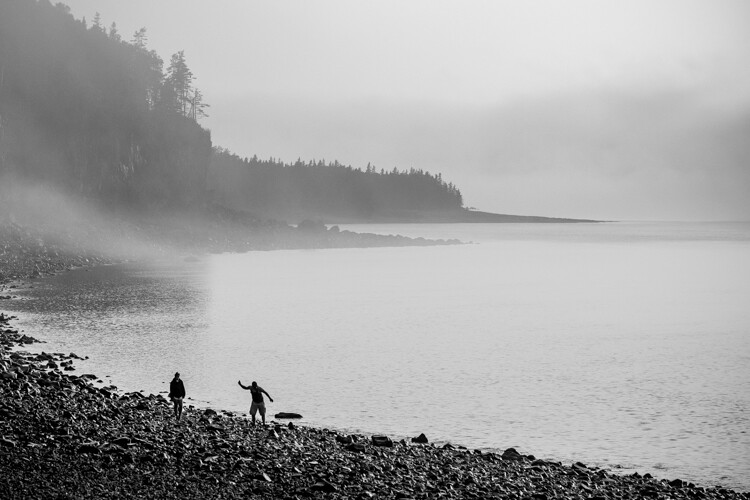
Skipping stones at Hall's Harbour - How to Photograph Your Family Vacation

I had many beautiful (and not so beautiful) photos of Hall’s Harbour. I wasn’t satisfied with any of them and I wasn’t sure why. One evening I saw this couple come walking along and start skipping stones. That was it! That was the essence of this place; peace, solitude, skipping stones. This is a far more personal photograph to me.

Lighthouse at Summerside PEI - How to Photograph Your Family Vacation

In Summerside, Prince Edward Island, the vastness of the ocean overwhelmed me. That was the essence of the place to me. No matter where you go on PEI, you are surrounded by the ocean. I composed this photo to portray that vastness. A tiny lone lighthouse in the distance.

When you’re among the massive rock formations in Utah, you feel very small and vulnerable.

Black and white photo of Niagara Falls - How to Photograph Your Family Vacation

Niagara Falls is one of the most nostalgic places on earth for me. It’s where I first came to love photography as a child. The viewfinder is an icon for travelers, and Niagara Falls is one of the most recognizable sights in the world. The slight misfocus, the grain, the black and white, all work toward capturing the essence of Niagara Falls for me; memories.

This is Monument Valley during the beautiful evening light.

Visit locations at different times of the day, think creatively rather than making your family stand beside things, and consider the essence of the place you’re in.

3. Moments

You’ll be busy photographing the obvious landscapes and big moments of your trip. But you will experience many little unexpected moments in those places. Photograph these odd moments too. You’ll find them to be very meaningful moments and love talking about them when you look back at your photos over the years.

Kids riding an escalator - How to Photograph Your Family Vacation

My kids loved their first trip to Niagara Falls and I loved sharing that place with them. It was also their first time using an escalator (a moving set of stairs). They rode it over and over. I love this low angle perspective and how the main lines converge in the center of the photo.

A toddler making a mess of sunscreen. How to Photograph Your Family Vacation

My two-year-old daughter was being so quiet in the backseat. But you know when a toddler is being quiet they might be up to no good! She had discovered the tube of sunscreen and applied it liberally! Needless to say, she did not get a sunburn that day. If this had happened earlier in the trip I would have freaked out. But by this point, I had learned to relax no matter what happened.

4. Food

Often you will experience new foods on your journey. Whether you like the food or not, photograph some of it. Viewing the photos of food will instantly trigger memories of the meals you shared.

A lobster on a plate. How to Photograph Your Family Vacation

We tried lobster for the first time! The sun was shining directly on it, giving such deep color to the photo.

An empty plate of fish and chips.

Fish and chips is a must on the East Coast. The dinner was so good I forgot to take a picture until it was too late!

5. Hotels, campsites

Hotels and campsites are a blast for kids to explore! Make sure to capture some photos during downtime at the places you sleep.

A boy jumping across motel beds. How to Photograph Your Family Vacation

After a 10 hour day on the road, my son discovered just how fun beds in a hotel room can be. He was just barely able to leap the chasm between the two beds. He may forget the boring scenery, but he’ll love this memory.

A little girl with her face pressed up to the window screen. How to Photograph Your Family Vacation

Bathed and changed into fresh jammies, my daughter sits at the window with her nose pressed against the screen.

Kids playing with their parents shoes. How to Photograph Your Family Vacation

Kids being crazy with our shoes while we pack for the next part of our journey.

At this point, if you’ve packed light (including your photo inspiration list) and taken note of some creative ideas, you’ll be set to take some great photos along the way.

But one thing threatens to ruin your photos and your trip – emotions.

#3 – Managing Personalities and Emotions

“Tears and sweat often bring out the best in us.” – Mister Rogers

Every family is different, but most families deal with a certain amount of drama on their trips. Learning how to deal with drama and negative emotions is critical for having a better time with your family and taking better photos.

Consider the fact that you won’t be in the mood to take photos if you are grumpy and your family won’t want to be in photos or do anything fun if they are grumpy. My family learned this lesson the hard way.

Little girl happy in the car. How to Photograph Your Family Vacation

Everything started out fine on our trip to the East Coast. Filled with the anticipation of the journey, we had books and snacks and things to do in the car.

Crying girl in car. How to Photograph Your Family Vacation

But my goal of a family adventure and a beautiful photography project is quickly met with a reality check. Our kids are 2 and 4 years old and we’re crammed into a little car – more often than not, it feels like a disaster.

Two toddlers sleeping in the car. How to Photograph Your Family Vacation

My wife and I thought that we could easily relive the adventurous trips we took before we had kids. But the reality was now very different. We had to plan for shorter days of driving, more motel stops, earlier bedtimes and lots of relaxed downtime.

A little girl with sand in her eyes. How to Photograph Your Family Vacation

But no matter what we tried, the first half of our trip was just a disaster. Not even a relaxed day at the beach was any fun. The ocean winds blasted us with sand. We couldn’t enjoy ourselves for a moment. Even I couldn’t keep pretending to have fun. At one point our little girl ran into mama’s arms with eyes full of sand from the relentless ocean winds.

A mom and boy playing in the mud. How to Photograph Your Family Vacation

The ocean tide was always leaving behind a shoreline of muck. Normally kids love mucking about in the mud. But not on our miserable road trip. You know you’re in trouble when nothing makes your kids happy anymore. By this point in the trip, I was sure I’d have nothing but tear-filled photos for my project.

A sleeping girl. How to Photograph Your Family Vacation

A week into the trip we were at our wit’s end. Finally, one Sunday, we collapsed in anger and exhaustion and slept the day away. We woke up to the realization that this trip was a disastrous idea. At this point, I didn’t even care if I got photos or not. I just wanted my family to survive without hating each other.

A family at a harbor. How to Photograph Your Family Vacation

Something happened when we let go of chasing new locations and perfect photos. We admitted defeat and just stayed in one place for a while. We actually fell in love with a nearby harbor tucked away from other tourists. Halls Harbor was our refuge from the crowds – and ourselves.

Slide at the playground. How to Photograph Your Family Vacation

For the first time, I finally understood what it was really going to take to make our first family vacation a good one. We put the tourist life on hold and did the things that our kids really wanted to do – go to playgrounds and throw rocks in the water!

A boy playing in dirt. How to Photograph Your Family Vacation

Frankly, when we gave up, that’s when everything changed. We even met up with friends who had also journeyed out east. We could talk and unload our weakness as parents, confess the disaster we had made of this trip, and hear words of encouragement from our friends.

Family vacations are rarely the times of rest and relaxation that we hope them to be. Between kids fighting in the backseat and parents getting more stressed every day – sometimes I wonder why we ever go on trips!

But we can turn these challenges into a chance to grow as people. I learned a lot about our kids and myself on our first family road trip together. There were sweaty, tear-filled moments but we learned to embrace them and grow as a family.

Editing Life

Long after your trip has ended, you can relive the moments – and the lessons learned along the way.

Don’t forget about your photos. Print them, hang them, let them bring you joy until your next family adventure.

I sat at the kitchen table late one night reliving our trip through all the photos I had taken. The tears in the car. The tears on the beach. The tears in the mud. I thought about how naive we had been about traveling with toddlers. How we tried everything and failed. But also how the trip had been redeemed.

A photobook and a camera - How to Photograph Your Family Vacation

Just a couple weeks after that I was unwrapping a brand new photo book I made of our trip – my first finished photography project.

The post How to Photograph Your Family Vacation appeared first on Digital Photography School.


Digital Photography School

 
Comments Off on How to Photograph Your Family Vacation

Posted in Photography


MIOPS Capture360 is a modular, pocket-sized motion control box

14 Jun

Meet the newest member of the MIOPS family, the Capture360. Deemed the ‘most versatile motion box ever created’ by its creators, the Capture360 is a pocket-sized motion device currently being funded on Kickstarter that works with any camera or smartphone.

What sets Capture360 apart from the rest of MIOPS’ lineup is that it can be be as simple or robust as your filming needs demand.

Out of the box, a single Capture360 only captures one range of motion—panning. But, when paired with MIOPS’ optional L-bracket, that single unit can also be used for tilting. Combine two units and you get a rig that can both pan and tilt, all without the need for wires—the Capture360 devices will automatically determine which one is for panning and which one is for tilting.

MIOPS is also offering a Capsule Slider accessory that will let you add yet another range of motion to your shots.

Like MIOPS’ other systems, the speed and direction of the motion is controlled using MIOPS smartphone app for iOS and Android. The app, which connects via Bluetooth, is used to program the motion path of the device.

In addition to manual configuration, the app can also work to keep track of a subject with both object tracking and face tracking. The app is also capable of controlling the camera settings to account for bulb ramping, interval ramping, long exposures, and high dynamic range (HDR).

If you purchase an optional turntable accessory, you can also program the app to capture 360-degree product photos.

The Capsule360 features a built-in rechargeable battery that can work for eight hours straight of continuous use or up to one week long in time-lapse mode. There’s also an option to attach a USB battery pack to extend the battery life.

As with all of MIOP’s previous devices, the Capture360 is currently being crowdfunded on Kickstarter with an expected ship date of December 2018. As of publishing this article, it’s already surpassed its $ 75,000 goal with 28 days to go. A single standalone Capsule360 starts at $ 200 and depending on the accessories and add-ons you want, prices go up from there.

Articles: Digital Photography Review (dpreview.com)

 
Comments Off on MIOPS Capture360 is a modular, pocket-sized motion control box

Posted in Uncategorized


Nikon developing compact and lightweight 500mm F5.6 lens

14 Jun

Nikon has announced the development of the FX-format AF-S NIKKOR 500mm F5.6E PF ED VR lens. It uses the same type of phase fresnel element as the company’s AF-S 300mm F4E PF ED VR, which is 30% shorter and more than 50% lighter than its predecessor. By design, a Phase Fresnel element reduces chromatic aberration introduced by traditional refractive elements, while also reducing the overall length required to achieve high focal length magnification. This usually results in a decrease in total number of lens elements, as well as in overall size and weight.

Nikon hasn’t divulged any specifics, and more details, pricing and availability will be announced later this year.

Press Release

NIKON ANNOUNCES DEVELOPMENT OF AF-S NIKKOR 500mm f/5.6E PF ED VR, A PORTABLE SUPER-TELEPHOTO FX-FORMAT LENS

The AF-S NIKKOR 500mm f/5.6E PF ED VR Will Deliver Exceptional Agility and Optical Performance in an Incredibly Compact and Lightweight Package

MELVILLE, NY (JUNE 14, 2018 at 12:01 A.M. EDT) – Today, Nikon Inc. announces the development of the AF-S NIKKOR 500mm f/5.6E PF ED VR, an FX-format fixed focal length super-telephoto lens, which will offer a compelling combination of portability and performance.

The AF-S NIKKOR 500mm f/5.6E PF ED VR will be a high-performance super-telephoto lens that is significantly smaller and lighter than comparable predecessors due to the adoption of the same type of Phase Fresnel (PF) lens element found in the AF-S NIKKOR 300mm f/4E PF ED VR lens, introduced in January 2015. Despite its 500mm focal length, the lens is small and light enough to use hand-held in a wide variety of situations where a photographer must capture unpredictable and fast-moving subjects, including sporting events and wildlife photography.

Phase Fresnel Lens Elements

The Phase Fresnel (PF) lens element developed by Nikon effectively compensates for chromatic aberration utilizing the photo diffraction phenomenon*. Compared to many general camera lenses that employ an optical system using the photorefractive phenomenon, a remarkably compact and lightweight body can be attained with fewer lens elements.

Price and Availability

Information regarding the release of the AF-S NIKKOR 500mm f/5.6E PF ED VR lens, including final specifications and pricing, will be announced later this year. For more information on the latest Nikon products, please visit www.nikonusa.com.

*Diffraction phenomenon: Light has characteristics as a waveform. When a waveform faces an obstacle, it attempts to go around and behind it, and this characteristic is referred to as diffraction. Diffraction causes chromatic dispersion in the reverse order of refraction.

Articles: Digital Photography Review (dpreview.com)

 
Comments Off on Nikon developing compact and lightweight 500mm F5.6 lens

Posted in Uncategorized


Nikon D850 Review

14 Jun

  The long awaited Nikon D850 is here, so is it worth the price tag?  There are the features we have been expecting along with more than a few surprises. Let’s dive in and discuss the pros and cons of this 46- megapixel full frame shooting machine… The Nikon D850 replaces Nikon’s D810, but it does much more than that. Continue Reading

The post Nikon D850 Review appeared first on Photodoto.


Photodoto

 
Comments Off on Nikon D850 Review

Posted in Photography


Three Ways to Apply Tonal Effects in Photoshop

13 Jun

We are used to thinking about photography in terms of color or black and white, but before we arrived here, though, there were a series of processes that resulted in images being monochrome. In this tutorial, I’ll show you how to get those looks so you can think outside the box and achieve different tonal effects that will make your photos unique.

Intro Tonal Effects Photoshop Tutorial

Adding a tonal effect can give your photos from different collections a unified look. It can also help to set the atmosphere of a scene, or simply give a nostalgic and antique look. Before photography became as we know it to be today, there were many experiments and formulas chemists used that became popular throughout history.

Many of them had a particular color. The most popular are sepia and cyan and now it’s possible to achieve these and any other tonal effect with just a few clicks. I’ll show you three different ways to achieve it so you can choose which method suits you best.

#1 – SOLID COLORS

First of all, you need to work with a black and white image. There are many different ways to achieve this in Photoshop. The one I’m choosing is Menu > Image > Adjustments > Black and White because it gives you a lot of control.

Three Ways to Apply Tonal Effects in Photoshop

Once you have your starting image as black and white, you need to add a solid color adjustment layer. To do this go to the Layers palette and click the adjustment layers button on the bottom and choose the Solid Color option from there.

A pop-up window will open where you can choose the color you want for that layer. There’s no right or wrong here, it’s a matter of taste but for a sepia tone go somewhere in between the yellow and the red and when you’re happy just click OK.

Solid Color Tonal Effects Photoshop Tutorial

Now the color should have covered the entire image, which is normal as you added a solid color. But you still need to merge it with the image, so open the blending options menu from the top of the Layers palette and choose Soft Light.

Solid Color Soft Light Tonal Effects Photoshop Tutorial

You can also check out the other blending possibilities to see if there’s something that suits you better, but Soft Light usually works best for me. You can make a final adjustment on the layer opacity if you think it needs tweaking and that’s it!

Sepia Tonal Effects Photoshop Tutorial

#2 – ADJUSTMENT LAYERS

To achieve a cyan tone on your photo you need to start with a black and white image the same as the previous process, so I’ll use the opportunity to show you another way of converting your color photo into black and white.

Go to the Layers palette, add an adjustment layer. and from the drop-down menu choose Black and White. On the Properties window, you’ll have the same adjustments as the previous method as I used above.

The difference is that now you’ll have the black and white adjustment on a different layer so you can come back and tweak it or change the opacity at any time.

Adjustments Layer BlackandWhite Tonal Effects Photoshop Tutorial

Next add another adjustment layer, this time choosing Levels from the menu. In the Properties window, you can see a histogram of your image that shows you the blacks, whites, and mid-tones in your image and a corresponding slider to each of them for you to adjust.

Start moving the sliders to increase the contrast of your image as this will give a better result when you apply the cyan color to it.

Adjustments Layer Levels Histogram Tonal Effects Photoshop Tutorial

The final step you need to do is to add a third adjustment layer, this time using the Hue/Saturation option. On the Properties window move the Hue slider towards the blue end until you find a tone that you like, around the 215 is usually pretty good. If you feel the blue is too intense just decrease the saturation value a little until you are satisfied with the result.

Adjustments Layer Hue Saturation Tonal Effects Photoshop Tutorial

Now you have a snowy photo with a nice cold tone to boost the mood!

Cyan Tonal Effects Photoshop Tutorial

#3 – DUOTONE

If you are thinking that sepia or cyan are very nice effects but it would be even better if you apply both or even more, you don’t have to worry. Photoshop has thought about that too.

First, you have to open your black and white image (or convert your image to black and white as we did above). Then go to Menu > Image > Mode and choose the Duotone option. This is correct even if you want three or four tones, you will modify that later.

Duotone Tonal Effects Photoshop Tutorial

A pop-up window will open where you can choose the number of inks (tones) that you want in your image just by clicking on the drop-down menu. For this example, I’m choosing Tritone so three fields will be available to choose the inks.

Triotone Tonal Effects Photoshop Tutorial

You can set the color of each ink by clicking in the second square which will open a pop-up window with a color picker. So just click on the tone you like and hit OK. Then name it in the field to the right of the ink. Repeat this process for each ink color.

Duotone Color Picker Tonal Effects Photoshop Tutorial

Now the colors you selected are all covering the image in the same way. But you can modify that by choosing which ink will affect more which tones. For example, I choose the magenta for the darkest tones and the yellow for the lighter tones, but you can choose any tone and any adjustment you want.

Just click on the first square which will open the Curves window. By default, it will have a diagonal straight line that goes from 0 (black) to 255 (whites) you can experiment moving it all you like until you get the look of your image right.

Duotone Curves Tonal Effects Photoshop Tutorial

Because of all the possibilities, this is the hardest technique but also the more personalized one that will give you a very unique result. Try it out and let me know in the comments how it goes!

Duotone Tonal Effects Photoshop Tutorial jpg

Your turn

So there you have three methods for applying tonal effects using Photoshop. Do you use any of these for your images? Which method do you prefer? Do you have another technique you like? Please share your tonal effects images and ideas in the comment area below.

The post Three Ways to Apply Tonal Effects in Photoshop appeared first on Digital Photography School.


Digital Photography School

 
Comments Off on Three Ways to Apply Tonal Effects in Photoshop

Posted in Photography


6 Quick Tips for Doing Summer Photography

13 Jun

For many of us in the Northern Hemisphere, it is finally here – sunshine – the time of year most synonymous with new beginnings, transition and growth all thanks to the powerful rays of the sun. After months of dark dreary weather and perhaps a mood that matches staying indoors, we are finally ready to shed those winter blues and head outside with our gear. So in the spirit of getting you out of the house and into the outdoors, here are a few tips to help you do summer photography and revel in all its glory!

6 Quick Tips for Doing Summer Photography - purple flowers

#1 No more excuses period!

Shake off that hibernation mentality and get yourself out the door. Often times, some of the first signs of spring can be spotted right outside your front door so you maybe don’t need to go far. Or better yet, take a walk around your neighborhood and start noticing the transition as spring works its way into summer.

It is amazing how leaves, color, and budding florals can make an old place feel like new again.

white flowers - 6 Quick Tips for Doing Summer Photography

#2 Seasons and change can be a good thing

I know the whole time change thing that happens here in the US is debatable to many. But personally, I wait for spring forward. Yes, I lose an extra hour of sleep but it also means that the days start getting longer and that magical golden light at the end of the day is more within my reach.

With each and every day that passes, we are given more daylight, which provides greater opportunity to grab that camera and capture the golden hues. So head to a nearby park or even an open prairie and take in the whole scene. Use your wide angle lens to capture the big picture in your summer photography.

Karthika Gupta Photography - Memorable Jaunts DPS Article 6 ways to photograph spring-7
Karthika Gupta Photography - Memorable Jaunts DPS Article 6 ways to photograph spring-3


patio - 6 Quick Tips for Doing Summer Photography

#3 Embrace pattern play

As you’re taking in your surroundings, notice unique patterns and textures that are created by plants, water, and trees. Summer has this amazing ability to make everything colorful, so go ahead and use all that color to add a little punch to your photos.

Color, patterns, and textures add so much more interest in photos so use that to your advantage.

plants on shelves - 6 Quick Tips for Doing Summer Photography

flower in the garden - 6 Quick Tips for Doing Summer Photography

#4 The light and shadow dance

Mother nature really is a wonder. As winter changed into spring, the whole world seems to get lighter and transition into a new phase. You can almost sense that change in the air again.

The quality of light also changes and with that the play of light and shadows is quite spectacular.  Use this time as an opportunity to experiment with light and shadows and use these elements to create drama and interest using different subjects.

peony - 6 Quick Tips for Doing Summer Photography

#5 Capture those blooms

When the flowers and trees start blooming all around us it really feels like a breath of fresh air. Capture those blooms and see how vibrant they make everything else appear. Look for a neutral background like white siding or pastel walls to bring highlight to the florals.

Karthika Gupta Photography - Memorable Jaunts DPS Article-8

#6 Work around the weather

Rain showers and sunshine seem to go hand-in-hand with summer. I suggest you embrace all of Mother Nature’s tantrums and photograph around it. Use that rain cover to step out into the rain to photograph the scene. If you don’t have a rain cover for your gear, maybe stay indoors and photograph the outside from your window. Or even get in the car, go for a drive and photograph from the comfort of your car!

Notice how rain changes the light completely and embrace that softness for a very different look to a normally sunny scene.

I hope these tips help get you in the mood to pick up that camera more often and get back into the swing of photography if you have been suffering from the winter blues.

The post 6 Quick Tips for Doing Summer Photography appeared first on Digital Photography School.


Digital Photography School

 
Comments Off on 6 Quick Tips for Doing Summer Photography

Posted in Photography