RSS
 

Archive for May, 2018

4 Reasons Why Putting Your Camera Down Can Help You Take Better Photos

15 May

We’ve all been there; in a new country, a new city or just a new part of your local town. Camera in hand, you shoot and shoot and shoot as your memory card never seems to fill up. It’s thrilling and you don’t want to waste a moment because there is so much to capture. But what if putting your camera down, even just for 20 minutes, can help you take better photos?

I don’t mean leave it unattended. But I do mean put it away or leave it behind as you go for a walk in your new environment.
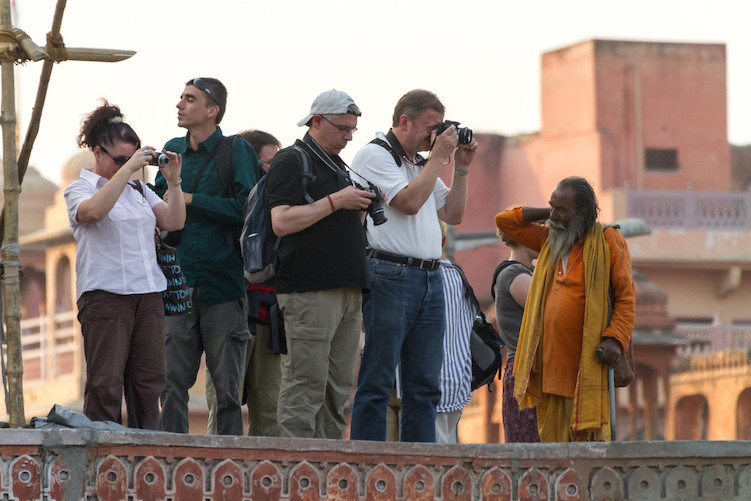
group of photographers shooting - What Happens When You Put Your Camera Down

I know some of you are getting the shakes at the mere thought of being without your camera in a new area, but indulge me for a moment. In this article, I will bring to light a few thoughts on why putting away your camera might actually help your photography.

1 – Greater Awareness

How can you truly capture the essence of a location without first experiencing it? There are always bright and colorful things to shoot. But if you go around grabbing each little scene like a bird grabbing nectar from a cherry blossom, you risk miss seeing the whole tree.

Jordan ruins at night in candlelight - 4 Reasons Why Putting Your Camera Down Can Help You Take Better Photos

I had time to visualize the shot above while watching an evening program at the Treasury in Petra, Jordan. While the program played, I was seated and limited in my movements, so I looked around at the space and tried to imagine photos from each location. At the end of the program, I was only allowed 10 minutes to get my shot (which took one minute to set up and 30 seconds to take), so my time spent gaining a greater awareness for my surroundings helped me greatly to take better photos in the time allotted.

Being aware of your surroundings is also important for safety. We all know the feeling of looking through our viewfinder, or camera screen, and losing all sense of what’s going on around us. It’s the feeling of “flow” when everything else melts away and there is just the joy of photography. That lack of awareness can work against you when in unfamiliar locations.

Beyond safety, having an awareness of your surroundings will also alert you if the clouds are about to cover the sun or if your scene is becoming more or less active. Watching others around you for clues on what to shoot is the next step.

2 – Observe Others

I love people watching in new environments. Even at home, if I go shopping with my wife I will typically end up on a bench just taking in the plethora of different shoppers passing by. Even we introverts can enjoy watching how people interact.

Look for clues about relationships and friendships while observing others. Do most people seem aloof or is there a lot of interaction? Watch how transactions are negotiated in markets. Is there a lot of haggling over price before money changes hands? These clues will help you anticipate when you can get those key shots when you return with your camera.

hat selling in Peru - take better photos

Because I took some time to people watch when the previous train came through town in the Urubamba Valley of Peru, I knew this colorful hat-seller would work the crowd when the next train arrived. So I waited and watched and was able to capture this image.

Is there a flow to the traffic of people around you? If so, look for a good location to set up and get some candid street photos. While crowds always draw attention, look for those standing back from the bustle if you want to capture a variety of everyday life.

Now is also a good time to realize who around you might not want their picture taken. Or who is charging photographers to pose for photos?

4 Reasons Why Putting Your Camera Down Can Help You Take Better Photos - officers in Jordan

In this shot of officers in Jordan, I hung around for a few moments with my camera down, said “Hi” and let the men get back to their conversations before taking the shot. I had noticed that they all looked intently at anyone new coming through the door and that wasn’t the shot I wanted. This more relaxed version was my goal.

3 – Observe Patterns

With patterns, I don’t mean just the cool shapes made by architecture or found in nature. I also mean the patterns humans create as they go about their day. Observing patterns will help you return with your camera (or simply get it out of your bag) and better anticipate the moment for shutter release and ultimately you will take better photos.

4 Reasons Why Putting Your Camera Down Can Help You Take Better Photos

For instance, watching a worker at the leather tannery in Fez, Morocco or a gentleman unloading chickens in Kathmandu, Nepal, with my camera down for a minute or two, helped me to visualize the action I wanted to capture and better time my shots.

4 – Interact Differently

Imagine someone came up to you on the street and instantly lifted a camera to snap a photo of your face. How would you feel?

Empathy for strangers and how they will react to my camera pointed in their direction is why I will typically recommend you ask permission first before taking a shot. Or better yet, with your camera down or put away, interact with your subject first. See what they are doing and ask questions if you can. Something about them made you want to take their photo, so take it one step further and interact before snapping away.

Peruvian kids - 4 Reasons Why Putting Your Camera Down Can Help You Take Better Photos

I played with these kids in Peru for a bit before having them ham it up for the lens. I don’t speak Quechuan and only poor Spanish, but I can recognize kids playing “shop” with weeds and flowers when I see it. I could tell who was in charge and I played along for a few minutes, trying in vain to get a good deal on my ugly weeds, before snapping this photo.

People will interact differently with you if you approach them first with your camera down or put away. Sometimes there is a fleeting moment that most feel needs to be caught candidly. But far more often a richer image can be created when you make human-to-human contact first. Rather than human-to-camera-to-human contact.

Conclusion

If you’ve never left your camera behind for even 10 minutes, I suggest giving it a try. It’s unnerving, I know! But it can lead to seeing your new environment in a way not possible with a camera constantly popping up to your eye.

Now you tell me; do you think you can take a walk and experience a new location without your camera? Do you think it might change the way you see the world before photographing it? Will it lead to helping you take better photos?

The post 4 Reasons Why Putting Your Camera Down Can Help You Take Better Photos appeared first on Digital Photography School.


Digital Photography School

 
Comments Off on 4 Reasons Why Putting Your Camera Down Can Help You Take Better Photos

Posted in Photography


Yongnuo unveils YN50mm F1.8 II: Version 2 of its ‘Nifty Fifty’ clone

15 May

$ (document).ready(function() { SampleGalleryV2({“containerId”:”embeddedSampleGallery_6039414031″,”galleryId”:”6039414031″,”isEmbeddedWidget”:true,”selectedImageIndex”:0,”isMobile”:false}) });

Hong Kong camera gear maker Yongnuo has released version II of its ‘nifty fifty’ Canon clone: the YN 50mm F1.8 II. The original YN 50mm F1.8 was one of the first lenses the budget brand ever released, undercutting Canon’s already ultra-affordable EF 50mm F1.8 II. Version II continues this trend, with a price tag of just $ 75, while the original will cost you just $ 51.

Optically, the lens seems to be unchanged—you still get 6 lens elements in 5 groups which produce a 46° angle of view, and a 7-blade aperture that runs from F1.8 to F22. The updated lens does drop the minimum focusing distance from 45cm to 35cm (to match Canon’s 50mm F1.8 STM), and adds support for USB-free firmware updates that are delivered directly through the camera.

Other notable improvements, according to Yongnuo, come in the form of improved “mechanical structure and coating technology,” which apparently translate into improved “focus accuracy, auto-focus speed and light transmittance.” You’re also getting a metal mount, and focus distance markings have been added to the lens build.

Here’s the full spec sheet, in case you’re curious:

The lens is already live on eBay, where it’s going for $ 75 (compared to Canon’s 50mm F1.8 STM, which will run you $ 125). Expect the Yongnuo lens to join the rest of the YN lineup on Amazon shortly.

To learn more about this lens, head over to the Yongnuo website.

Press Release

Small Lens with Super Bokeh Effect – YONGNUO YN50mm F1.8 II

Supports USB-free Firmware Upgrade

Firmware of the lens can be upgraded through camera instead of using USB port, which not only meets the requirements of firmware upgrade and appearance design, but also avoids the incompatibility problems caused by different computer operating systems.?Note: this function needs to be supported by camera?

F1.8 Bright Aperture

Maximum aperture F1.8,bokeh effect is easily achieved ,which brings you more fun during photographing.

New Mechanical Structure, New Coating Technology

YN50mm F1.8 II has all the product advantages of the last generation. By improving the mechanical structure and coating technology, its focus accuracy, auto-focus speed and light transmittance are increased. Furthermore, it can control backlight ghost and glare.

Durable Metal Mount

YN50mm F1.8 II adopts chrome-plated and high-accuracy metal mount. It’s wearable, corrosion-resistant, and highly consistent with the body of the camera.

0.35m Closest Focusing Distance

Compared with the first generation, the closet focusing distance of YN50mm F1.8 II is shortened to 0.35m.You can get closer to the object for photography and enlarge the object.

Focus Modes: Auto Focus (AF) and Manual Focus (MF)

YN50mm F1.8 II supports auto focus and manual focus. The focus mode can be selected according to practical requirement.

Focus Distance Indicator is convenient for you to estimate the distance and the depth of field.

YN50mm F1.8 II has 7pcs of aperture blades, which helps to take picture of circular defocused spots or helps to stop down and take picture of 14-star effect.

Articles: Digital Photography Review (dpreview.com)

 
Comments Off on Yongnuo unveils YN50mm F1.8 II: Version 2 of its ‘Nifty Fifty’ clone

Posted in Uncategorized


Nikon restructuring and strong D850 sales lead to 8x increase in annual profit

15 May

All of the camera manufacturers have been reporting their annual profits over the last month or two, and while we don’t typically cover individual company financial results, Nikon’s report stands out. That’s because, despite a modest 4% drop in revenue, the company reported a whopping 776% increase in overall profit year-over-year.

The report—which compares the fiscal year ending March 31st 2018 with the year ending March 31st 2017—shows that Nikon’s attempts to “improve profitability through restructuring” and the release of the ultra-popular Nikon D850 in July of 2017 have led to an impressive year. How impressive? Despite revenue dropping by approximately 3.2 billion yen (~$ 29 million USD), Nikon’s profits managed to jump by more than 34 billion yen (~$ 318 million USD). This translates into an 8x increase over last year’s results, which showed a profit of just 3.9 billion yen (~$ 35 million USD).

Of course, this reflects Nikon Corporation as a whole, but the news out of the Imaging division was also positive. While overall unit sales fell—due to the continued demise of the compact camera segment—strong demand for the D850 is said to have increased the sales of “high-class” cameras “significantly,” leading to a 76.2% year-on-year increase in operating profit. Restructuring helped here, too.

Here’s a relevant excerpt from the report:

As a result, revenue for the Imaging Products Business decreased by 5.8% year on year to 360,703 million yen. Operating profit, however, rose by 76.2% year on year to 30,222 million yen due to the efforts to improve profitability through the restructuring, such as the shift to a business strategy of selection and concentration and the discontinuation of operations of Nikon Imaging (China) Co., Ltd., a manufacturing consolidated subsidiary.

You can read the full report at this link, but the short version of the news seems positive, and may even push Nikon to continue focusing on the high-end market that responded so positively to the release of the D850. Does that mean a full-frame mirrorless is that much more likely? We can only speculate… and hope.

Articles: Digital Photography Review (dpreview.com)

 
Comments Off on Nikon restructuring and strong D850 sales lead to 8x increase in annual profit

Posted in Uncategorized


Fujifilm’s Instax Square SQ6 is a square-format analog instant camera

15 May

Fujifilm has announced the Instax Square SQ6, an analog instant film camera that resembles the old Instagram logo. The SQ6 takes Fujifilm’s Instax Square film which gives a 62 x 62mm (2.4 x 2.4″) images on 86 x 72mm film. It features a 66mm lens that gives a roughly 32mm equivalent field of view. The SQ6 joins the SQ10 Digital/Instax hybrid model to become the second camera to shoot using square-format film.

The SQ6 will be available from May 25th with a recommended price of $ 130/$ 160 CAD.

FUJIFILM ANNOUNCES THE NEW INSTAX SQUARE SQ6, THE FIRST SQUARE FORMAT ANALOG INSTAX CAMERA

Valhalla, N.Y., May 14, 2018FUJIFILM North America Corporation today announced the first SQUARE format analog INSTAX camera, in the FUJIFILM Instax instant camera line, the new INSTAX® SQUARE SQ6, a sleek and sophisticated square format instant film camera for instant square prints. The square format film provides a wider photo range with 1:1 aspect ratio. This allows for more room to set the scene, enabling capture of the subject, its background and extending the range of artistic expression.

“We are very excited to bring our first square format analog INSTAX camera to market,” says Manny Almeida, President, Imaging Division, FUJIFILM North America Corporation. “The SQ6 is an affordable and attractive option from the INSTAX line of instant cameras to capture real-life moments with a creative twist.”

To celebrate the release of the new INSTAX SQUARE SQ6, Fujifilm together with iHeart Radio, will hold an exclusive, private launch event, “A Night in NY,” on May 15th at West Edge in New York City. The event will feature experiential spaces to create custom, photo shareable content to immerse guests in curated experiences with INSTAX cameras, including the new SQ6. Hosted by Z100’s Danielle Monaro, “A Night in NY” will also feature an intimate performance by singer-songwriter MAX, #1 hit song “Lights Down Low.”

Along with the SQ6, instax SQUARE black instant film will also be released. With its new black frame, users can enjoy added creativity, perfect for a wide array of DIY projects.

Available in Three Beautiful Colors

The SQ6 is available in three stylish colors, Pearl White, Blush Gold and Graphite Gray.

Variety of Features for Enhanced Creativity

The new SQ6 is equipped with various features that allow users to be more creative. With auto exposure control, the high performance flash automatically calculates the surrounding brightness and adjusts shutter speed to capture both the subject and background with clarity, even when shooting in low light conditions, such as indoors or at a party. Three color filters that fit over the flash in orange, purple and green are included to add a pop of color to the images. Additionally, the camera can be set to a selfie mode which automatically adjusts focus and brightness. For added usability when taking selfies, a small mirror is located next to the lens to ensure accurate capture. Group photos are made easy with the built in timer and the added tripod socket located at the bottom of the camera.

Three Unique Modes to Capture Any Moment

To ensure capture of any moment, the SQ6 offers three unique modes. The double exposure mode is capable of superimposing two images onto a single film when the shutter button is pressed twice. The macro mode allows users to capture beautiful close-up images of subjects as close as 30cm and the landscape mode can be used to capture impressive scenic photos.

INSTAX SQUARE SQ6 Key Features:

  • Available in three colors, Pearl White, Blush Gold and Graphite Gray.
  • Compatible with FUJIFILM INSTAX SQUARE film (purchased separately).
  • Picture size – 62mm x 62mm/2.4in. x 2.4in.
  • Retractable lens, 2 components, 2 elements, f = 65.75 mm, 1:12.6.
  • Inverted Galilean finder, 0.4 x, with target spot.
  • Three motor driven focus modes: Macro Mode (0.3m – 0.5m/1ft. -1.6ft.), Normal Mode (0.5m – 2m/1.6ft. – 6.6ft.), Landscape Mode (2m/6.6ft. and beyond).
  • Programmed electronic shutter release, 1.6 sec – 1/400 sec.
  • Automatic, Interlocking range (ISO 800): LV 5 – LV 15.5, Exposure compensation: ± 2/3 EV.
  • Electronically controlled self-timer with approximately 10 second delay
  • LED display with Shooting mode (auto, selfie, macro, landscape, double exposure), brightness adjustment, flash suppressing and self-timer mode.
  • Two CR2/DL CR2 lithium batteries.
    • Capacity: Approximately 30 INSTAX SQUARE 10-pack film packs with new CR2/DL CR2 lithium batteries.
  • Tripod socket (tripod sold separately).

Availability and Pricing

The Instax SQUARE SQ6 will be available on May 25, 2018 in the U.S. and Canada for USD $ 129.95 and CAD $ 159.99.

Articles: Digital Photography Review (dpreview.com)

 
Comments Off on Fujifilm’s Instax Square SQ6 is a square-format analog instant camera

Posted in Uncategorized


Researchers use AI to brighten ultra-low light images without adding noise

15 May

Researchers with the University of Illinois Urbana–Champaign and Intel have developed a deep neural network that brightens ultra-low light images without adding noise and other artifacts. The network was trained using 5,094 raw short-exposure low-light and long-exposure image pairs—the end result is a system that automatically brightens images at a much higher quality than traditional processing options.

The deep learning system was detailed in a newly published study that points out the limitations of alternative “denoising, deblurring, and enhancement techniques” on what the team calls “extreme conditions,” such as low-light images that are too dark to discern without processing.

Using traditional methods to process these images often results in high levels of noise that isn’t present when using the machine learning technique:

The team used images captured with a Fujifilm X-T2 and Sony a7S II, and also demonstrated the system on photos taken with an iPhone X and Google Pixel 2 smartphone. High-resolution comparison images are available here, and a PDF of the full study can be found here.

This is the latest example of machine learning ‘AI’ being used to automatically enhance images—ideally speeding up post-processing tasks while reducing the user’s workload. Last year, for example, a system called Deep Image Prior was demonstrated using an image’s existing elements to intelligently repair damage, and Adobe and NVIDIA are both working on AI-powered Content Aware Fill.

Articles: Digital Photography Review (dpreview.com)

 
Comments Off on Researchers use AI to brighten ultra-low light images without adding noise

Posted in Uncategorized


Xiaomi establishing dedicated camera team

15 May

Many smartphones use camera hard and software components that are provided by third-party suppliers, but those components can only get you to a certain point. If manufacturers want to squeeze the maximum image quality out these third-party camera systems, an in-house camera team is indispensable.

It appears Chinese manufacturer Xiaomi has just come to this realization. A leaked internal email from CEO Lei Jun shares details about the creation of an in-house camera department.

With most important smartphone components, such as displays and chipsets being largely indistinguishable between devices, the camera remains the major differentiator in an ultra-competitive market. The new team at Xiaomi should be able to improve camera performance noticeably compared to existing devices.

This is good news, especially when considering the company’s latest dual-cam model Mi Mix 2S is already doing very well in the camera department, scoring 97 points overall and 101 for Photo performance at DxOMark.

Articles: Digital Photography Review (dpreview.com)

 
Comments Off on Xiaomi establishing dedicated camera team

Posted in Uncategorized


hähnel introduces Modus 600RT flash for Micro Four Thirds

15 May

Battery and accessory brand hähnel has extended its range of radio-triggered Modus 600RT flash units with a model for Micro Four Thirds cameras. The unit can be used directly in the hotshoe as a standalone flash, or will work within a group of flashes as a TTL commander or a slave using radio or optical communication.

The company already makes this model speedlight for Canon, Fujifilm, Nikon and Sony systems, and is adding Olympus and Panasonic cameras with this new model.

Although the Modus 600RT shares its basic design with the Godox TT685 flash, and much of its specification with the Godox V860II, hähnel claims its flash has significant advantages that account for the difference in price. A spokesperson told DPReview that the build quality of the 600RT is improved, and that hähnel is especially proud of its firmware updates and customer service—both before and after purchase.

The Modus flashes also feature Digital Channel Matching that locks the transmitter and receiver together once they are connected, to reduce the possibility of interference. Another major difference, according to hähnel, is the quality of the supplied lithium-ion block battery, which is injected with silicone to insulate the circuits and to provide improved shock absorption. The company says these hähnel Extreme li-ion batteries have a longer life and retain their charge for longer than competitors’ equivalents.

The Modus 600RT has a guide number of 60m/197ft at ISO 100, and can produce 600 full-power bursts per charge with only a 1.5-second delay for recycling.

With a transmitter and receiver built-in, the flashes work as both commanders and slaves in groups of other hähnel Captur-compatible guns as well as in combination with manufacturers’ original and third party units. A Viper TTL radio controller can be used from the hotshoe to control single guns or up to three groups of guns at a range of 100m/330ft, and can operate in full TTL, manual or strobotic modes with DCM. The zoom head offers coverage for 20-200mm lenses and high speed synch mode allows use with shutter speeds as short as 1/8000sec.

The hähnel Modus 600RT for micro four thirds is available now and will cost £270/$ 250/€250 including a Viper transmitter, hähnel Extreme li-ion battery and charger. For more information, read the full press release below or visit the hähnel website.

Press Release

{PressRelease}

hähnel announce launch of MODUS 600RT Speedlight for Micro Four Thirds

Following on from the very successful launch of the MODUS 600RT Speedlight for Canon, Nikon, Sony & Fuji, hähnel have now announced availability of the MODUS for Micro Four Thirds (Panasonic & Olympus).

The staggeringly powerful hähnel Extreme Li-Ion battery provides the power for the MODUS and beats the speed of AA-powered speedlight’s hands down. With a GN of 60, the MODUS will handle over 1000 shots at ½ power and over 600 shots at full power.

Rather than waiting the normal 4-6 seconds which normal Speedlight’s would require at full power, the MODUS 600RT has fast re-cycling in abundance at just 1.5 seconds. The built-in wireless receiver/transmitter offer TTL, manual and multi modes and high-speed sync supports up to 1/8000 of a sec.

The unique wireless connectivity really steps into its own when paired with the Viper TTL Wireless Flash Trigger. Use them together and control up to 3 separate groups of flash guns in either TTL, manual or Multi (Stroboscopic) mode. DCM channel matching and over 100m range makes the Viper TTL the perfect partner for this new speedlight.

With a long-standing reputation for high- quality accessories, it is no surprise that the MODUS has received ‘Best Value Accessory’, ‘Best Accessory’ and ‘Gear of the Year – Best Flashgun’ accolades from Digital Photographer, Digital Camera and N-Photo magazines since launched.

Stock available from Monday 28th May.

MODUS 600RT WIRELESS KIT FOR MICRO FOUR THIRDS RRP £269.99

{/Pressrelease}

Articles: Digital Photography Review (dpreview.com)

 
Comments Off on hähnel introduces Modus 600RT flash for Micro Four Thirds

Posted in Uncategorized


Sony 24-105mm F4 G OSS sample gallery

14 May

$ (document).ready(function() { SampleGalleryV2({“containerId”:”embeddedSampleGallery_0095576088″,”galleryId”:”0095576088″,”isEmbeddedWidget”:true,”selectedImageIndex”:0,”isMobile”:false}) });

Sony’s 24-105mm F4 G OSS has been in the company’s lineup since late 2017, and since then we’ve spent many-an-outing shooting with it for various camera reviews. While it may not look quite as exciting as the faster 24-70mm F2.8 G, there’s a lot to like about it – especially considering it’s one of the lightest full-frame 24-105mm F4 lenses on the market.

While we’ve featured photos from the lens in previous articles, we’ve never dedicated a full sample gallery to it – and we figured we’d change that.

See our Sony 24-105mm F4 G OSS
sample gallery

Articles: Digital Photography Review (dpreview.com)

 
Comments Off on Sony 24-105mm F4 G OSS sample gallery

Posted in Uncategorized


How to Use Spot Coloring in Your Photos

14 May

What is spot color in an image?

Some people refer to it as selective coloring. However, these two techniques are not the same thing.

Traditionally, selective coloring is something that is done in post-production. Photographers would highlight a certain area of the image, or a certain object, and leave it as the only thing that has colored in the frame.

They would turn the rest of the image into monochrome, or on occasion increasing the color saturation of that object while lowering it in the rest of the photograph. This is to call attention or focus to that particular part of the image.

Spot coloring in photography - dried roses against a white backdrop

Do you remember the days of black and white prom dresses with red corsages? Or, do you remember a black and white image of a model with red lips? Those are classic examples of selective coloring.

Difference between spot coloring versus selective

Spot coloring uses the available colors in a scene and then composes the image so that one color stands out from the rest of the frame. Spot coloring is a technique that is used in-camera (done by the photographer). It works by placing a color against other colors that allow it to stand out in the composition.

Selective coloring is a technique where one color is prominent in the final shot whereas all the other colors have either been changed to monochrome or had their color saturation levels lowered during post-production.

Spot coloring in photography - purple flower against green trees

The key with spot coloring in camera is to look for naturally occurring examples of color pops as opposed to making changes in post-production to highlight a particular color. This purple flower pops against the green of the leaves.

Before we move forward on this subject, I have to say that I am not downplaying or downgrading selective coloring versus the spot color technique. If there is one thing that this photography journey has taught me, it is that there is a market for every style of photography.

Each style of photography has its fans and its critics – that’s just the way the industry works. You just have to decide which camp you want to be in and run with that. I use spot coloring as I compose my shots in-camera. Unfortunately, rarely do I see a good use of selective coloring in post-production.

Spot coloring in photography - woman in red sari against yellow brick house porch - 2

My lovely client, in her red sari, stood out against this historic yellow brick building. This is a perfect example of spot color. By placing the bright red clothing against the reduced color tone and vibrancy of the building, the eye is directed right toward the subject.

I don’t know about you, but being in front of the computer for an extended period of time editing my images is not the most productive use of my time. If I can get the shot as close to how I envision it to be in-camera, then post-production is just about adding the finishing touches so it becomes relatively easy.

Here is a link to another recent dPS article about tips for quick editing. For me, spot coloring is a way to achieve an effect that fits my brand, my aesthetics, and my style of photography. Also, note that a spot color in your frame doesn’t have to be bright and vibrant. Sometimes, color contrast or a change in color hue is enough to move the eyes to the subject.

Advantages of Spot Coloring In-Camera

Spot coloring in photography - two hands holding gelato cones in pleasing colors in Rome

Colorful Italian gelato against the brick façade gives the right amount of soft color pop in this “subtle” use of spot color.

Spot coloring in-camera, if done correctly, can help you in the following ways:

#1 – It provides a clear definition of your subject.

By isolating your subject by way of color, you give a clear definition of the subject and help it stand out in an otherwise busy/crowded frame.

#2 – It helps you understand the relationship between colors.

Some colors work together, and others just don’t. Understanding the relationship between complementary colors and opposing colors can go a long way to creating images that are aesthetically pleasing and on point for your brand and your portfolio.

When practicing your spot color technique, keep a copy of the color wheel with you when you are creating images or studying the images of others to see how colors work together or against each other. You can print a color wheel off of the internet or find one in your local art supply store.

Ryb-colorwheel

By No machine-readable author provided. Bwilliam assumed (based on copyright claims). [GFDL, CC-BY-SA-3.0 or CC BY-SA 2.5 ], via Wikimedia Commons

#3 – Spot color makes images more impactful, images that have strong clear subjects.

These are more impactful when compared to images that are busy and cluttered and don’t give the viewer a sense of what is happening in the frame.

#4 – It slows you down to observe first and then click later.

When you observe a scene intentionally for the play of colors, patterns, and textures, you automatically slow down and learn to see first and then click the camera. Often, we are so focused on just clicking and getting something captured as opposed to photographing the right subject the right way.

If nothing else, this process will help you get away from the “spray and pray” mentality (photograph multiple frames at once and hope one of them works). Trying to use spot color can help you to slow down and analyze your scene. Ultimately, this will help you develop as a photographer instead of relying on the “spray and pray” technique.

Creative spot coloring can be done for any genre of photography: portraits, travel, and still life. Of course, some are easier than others, but this look is achievable in all these areas.

Spot Coloring in People Photography and Portraits

Spot coloring in photography - family portraits in red colored clothes against the snow

By choosing a pallet that complements the background, I was able to bring focus to my clients instead of having them blend into the frame. Here the red clothing worked really well against the white of the snow. This example is a bright, vibrant use of spot color. Note that they are not all wearing the same colors – but they do all have some common elements of the red which collectively looks well matched.

When you are photographing people (e.g. families and kids), a simple tool like a style guide can go a long way. I proactively send a style guide, or what-to-wear for your portrait tips list, to my clients where I suggest clothing options and colors – basically, pieces that I know will photograph well according to the season and location.

For example, if we will be shooting outside in a park or out in nature, I will suggest colors and outfits that will not compete with all the greenery. During the fall season when we have gorgeous colors in the trees, I will suggest colors that go well with the oranges, browns, and reds that Mother Nature shares with us. This way, when I am composing my shots and directing my clients, I will use poses that will ensure the photos are aesthetically pleasing and that do not have too many competing colors in the frame.

This is a “professional use” of spot color. I am going to coordinate the colors so that my client stands out from the background while looking pleasing at the same time.

Now, before you accuse me of manipulating the client experience, I have to point out that in all my eight years of being a family photographer, I have yet to come across a client who does not appreciate the what-to-wear tips that I send them when they book my photography services.

Most people are extremely uncomfortable being in front of the camera and get stressed out on what to wear and how to dress. Anything that can help alleviate that pain is going to be a welcome and much-appreciated thing. They have no idea that it’s actually a technical and aesthetic consideration on my part. It makes my job easier!

Spot Coloring in Travel Photography

Spot coloring in photography - roman vatican guard in costume standing guard

This colorful costume of the guards in the Vatican, Rome really stands out against the pastel colors of the building facade and the iron gate.

One of the key considerations to creating compelling travel images is to be aware of what is going on around you. Location is just as important as light. When you get to a scene, take a quick look around and do a quick mental assessment of everything that is happening around you. Colors, textures, light, and the subject all play a very important role in the final outcome of the image.

Think about how spot color could work for your shot. If you are in a location that has generally muted tones and colors, look for a subject that is a contrasting color to the rest of the scene. If framed correctly, that subject will carry the entire weight of the image, and the other colors will work in harmonizing the overall image around that subject.

On the other hand, if you were to choose a subject more or less similar in tones and colors to the background, the subject will likely blend in and the entire image may lack that oomph that you were hoping for. If you are in a busy, colorful location with lots of activity, try to isolate your subjects against a monotone background, thereby giving the subject a chance to stand out from the commotion.

Spot Coloring in Still Life Photography

Spot coloring in photography - still life flat lay with ruby red grape fruit and grapes

I love photographing food because that means I get to munch on it after as opposed to snacking on junk food! Plus, there is no better learning tool for the spot color technique!

This is one of the easiest genres of photography where you can practice spot color easily. Why? You have complete control over all of the color elements.

Remember when I said spot color is an exercise in understanding the color pallet? When you are planning your still life imagery, you can choose the colors (from opposite ends of the color wheel) to add that element of color pop to your images. You will also learn how effectively different colors work together to create a composition.

Spot color can be used with any genre of photography. However, the still life genre is a particularly useful learning experience because you have plenty of time and you control all of the colors that will be introduced into the picture!

Summing Up

I hope these examples help you to understand that just like many other techniques, spot coloring is a way to add creativity and fun to your images. Do you use spot color in your images? Share in the comments below.

The post How to Use Spot Coloring in Your Photos appeared first on Digital Photography School.


Digital Photography School

 
Comments Off on How to Use Spot Coloring in Your Photos

Posted in Photography


Optical Versus Electronic Viewfinders: Which is Best for You?

14 May

In this article, we’ll take a look at optical versus electronic viewfinders so you can get a better understanding of the differences and strengths and weaknesses of each.

Coke versus Pepsi, Star Wars versus Star Trek, football versus futbol. The world is full of great rivalries, and photography is no exception. Aside from simple brand loyalty and lens preference, there are dozens, perhaps hundreds, of other tools, features, and options that photographers to argue about. One of the most recent but most pronounced has to do with how you see the world in front of your lens.

Some cameras have optical viewfinders while others sport more technologically advanced versions called electronic viewfinders. Other cameras even have hybrid options that attempt to combine the best of both worlds. So which is better? Just like most rivalries, that question is impossible to answer, but it is worth exploring some of their individual strengths and weaknesses to help you know which one might be right for you.

Optical Versus Electronic Viewfinders - low angle sunset shot

Seeing the scene

A viewfinder is one of the most basic elements of any camera; it’s what you use to look at what you will be photographing. When you hold your camera up to your eye, whether you’re shooting DSLR or mirrorless, the tiny little hole you look through is what’s known as the viewfinder. This is what you use to compose your shots.

Some cameras forego the viewfinder altogether and just have a giant LCD screen on the back, which is how all mobile phones work. But it’s not uncommon for many cameras to include a viewfinder along with the rear screen.

It’s not just a holdover from days gone by, and even in today’s fast-paced tech-centric world, there is a myriad of reasons why many photographers prefer to compose their shots with the viewfinder instead of the rear LCD screen.

  • The scene appears much larger when held up to your eye which gives you a better sense of how your picture will look.
  • Holding your camera up to your face also has the rather practical benefit of making things more stabilized.
  • Viewfinders in DSLR (and more mirrorless) cameras often contain a row of numbers and indicators at the bottom showing you things like your aperture, shutter speed, metering mode, shots remaining, and more.
Optical Versus Electronic Viewfinders - inside the camera view

Optical viewfinders have a row of exposure and photo information at the bottom to help you as you shoot pictures.

Optical Viewfinders

Despite being decades-old technology, optical viewfinders still have many staunch supporters in photography today, with good reason. Their most important benefit, and the reason many photographers prefer them, is that they present an unfiltered and unaltered view of the scene in front of you as you are composing your shot.

Looking through an optical viewfinder, or OVF, is no different than looking through a window: nothing is changed in any way, shape, or form. This lets you see exactly what your shot will look like, and the view is not dependent on any type of fancy technology in order to function.

Optical viewfinders work even if your camera is turned off, in much the same way that looking through binoculars, a telescope, or even a paper towel roll does not require a battery. OVFs have no issue with accurate color rendition or screen refresh rates, and they work the same in bright light as they do in low light.

Optical Versus Electronic Viewfinders - crowd watching a speech outdoors

Most optical viewfinders also have indicators to show things like focus points and framing guides. When you half-press the shutter button to focus your camera, a small dot or square will show up in your camera’s OVF to let you know where the point of focus will be, and you can use a dial or knob on your camera to change this if you prefer.

Limitations of OVFs

However, not everything is sunshine and roses in the land of optical viewfinders. They do have some significant limitations that could be a factor depending on the type of photographs you take.

One of the most important is that you can’t see your image when you take a picture – a phenomenon known as viewfinder blackout. When you press the shutter button the mirror in a DSLR camera flips up and out of the way to let light pass through to the image sensor, which means the OVF goes completely dark.

dog with a frisbee - Optical Versus Electronic Viewfinders

This is not very noticeable when using fast shutter speeds but if you are shooting at about 1/30th of second or slower you will see a big blank box of nothing for a brief moment whenever you take a picture. In most situations, this blackout period is not going to make or break the photograph but it can cause issues if you are shooting fast-moving subjects. In those cases, the short amount of time that the OVF is blank is enough for the object you are photographing to move around quite a bit and it can take some practice to get used to this type of shooting.

Disadvantage

Another disadvantage of optical viewfinders is that they show you the world around you as it really is, not as it will appear in your digital photograph. The OVF sees what your eyes see, which is not necessarily the same as what your camera’s image sensor sees.

Unless you have a solid grasp on metering modes and how they affect your exposure, you might end up with pictures that are too bright or too dark, especially if there is a great deal of light and shadow in the scene itself. Looking through the OVF you might think your pictures are going to be just fine only to realize later that they are under or overexposed. Unless you shoot in RAW there might not be much you can do about it.

flowers with shallow DoF - Optical Versus Electronic Viewfinders

Electronic Viewfinders

A few years ago, this discussion about optical versus electronic viewfinders would have been more of an academic exercise without a whole lot of practical value because EVFs simply couldn’t compete with their analog counterparts in practical terms. Their list of downsides was as long as a 70-200mm lens, and aside from a few key benefits, there wasn’t much reason to use an EVF compared to an OVF.

However as time marches on and technology gets better and better, electronic viewfinders have now just about reached parity with optical viewfinders. They are not just a viable option, but in some cases are a superior one for some photographers.

Main difference

The most obvious difference with electronic viewfinders is that just like looking at the LCD screen on the back of your camera, you see a digital representation of the world in front of your camera instead of the actual world that your eye sees. An EVF is a tiny high-resolution screen that you hold less than an inch from your eye. Because it is entirely digital, it can show you a wealth of information and data that you simply can’t get with an optical viewfinder.

bike panning shot - Optical Versus Electronic Viewfinders

Benefits and bonuses of EVFs

While optical viewfinders have static overlays with framing guides and focus points splayed across your field of view, electronic viewfinders can show all kinds of information that is highly useful when taking photographs. You can see things like a live histogram and digital level along with the usual collection of exposure and metering information. But the ace up the sleeve of any OVF is its ability to show you exactly what your photograph will look like, not what the world in front of the lens looks like.

Electronic viewfinders will let you see instantly, in real-time, whether your shot is exposed correctly. This allows you to quickly made adjustments not based on a light meter (though you certainly can) but on the final image and how you want it to appear.

Things OVF can’t provide

If you’re shooting in a black and white mode, then that’s precisely what you will see as you look through the EVF to compose your image. You will also see the depth of field reflected exactly as the final image will appear, and you can watch it change in real-time as you adjust your focus point or aperture.

To put it simply, EVFs remove much of the guesswork inherent in OVFs. In many cases, this makes the act of taking pictures much easier, especially for new photographers.

pink flowers - Optical Versus Electronic Viewfinders

Getting the exposure right on this shot was easier thanks to the electronic viewfinder in my Fuji X100F.

Due to their electronic nature, EVFs gives you options that an OVF is simply incapable of doing. Many cameras with EVFs allow you to check focus by enlarging a portion of your image so it fills the screen, and you can often get visual aids like focus peaking in the EVF as well. You can use an EVF to go through menus, review pictures, and even record and review movie footage you have captured with your camera–all things that are impossible with an OVF.

Drawbacks of EVFs

There are, as you might expect, some important downsides to EVFs not the least of which is power consumption. Optical viewfinders work without any batteries at all, whereas electronic viewfinders require constant power to operate. It’s not uncommon for cameras that rely on electronic viewfinders to have much shorter battery lives than their optical counterparts, and many photographers who use these cameras are in the habit of carrying spare batteries for a day of shooting.

Electronic viewfinders also suffer from screen refresh rate issues, which means that they can be difficult to use in situations with a lot of fast-moving action. Some EVFs have a great deal of lag which means the image you see is just slightly behind what is actually happening. While they have certainly gotten much better in recent years, they are still not quite on par with optical viewfinders in this regard (in my opinion).

Finally, even though electronic viewfinders show you a good representation of what your final image will look like they don’t quite have the same color range and resolution as what you will see in your photographs. Even the best EVFs top out at 3 megapixels with most hovering around 1-2, which means you’re looking at a much lower-resolution version of what you will see in your pictures.

low camera angle of a long passage way - Optical Versus Electronic Viewfinders

So which is better?

Like many aspects of photography, this issue isn’t about whether an optical versus electronic viewfinder is better, but which one will suit you and your needs as a photographer. Some people prefer the analog precision of an optical viewfinder, while others like the high-tech features offered by electronic viewfinders. At the end of the day, what really matters is that you have the right tool for the job. So if you tend to prefer one of these over the other then, by all means, go ahead and use it.

I would like to add one caveat to all this, which is if you have not used an EVF in a few years you might want to give it a try. The shortcomings of EVFs are rapidly being addressed by many camera manufacturers today, and EVFs from days gone by have been eclipsed many times over by their modern counterparts. It might be worth your time to go to your local camera store and check out one of the newer models with a built-in EVF and see what you think, just so you can make an informed decision when choosing your next camera.

Optical Versus Electronic Viewfinders - pink flower

What about you? Do you prefer optical or electronic viewfinders? Leave your thoughts below. I’d love to hear from the dPS community about all of this, and I’m sure other readers would like having your thoughts as a way of learning more about this whole issue.

The post Optical Versus Electronic Viewfinders: Which is Best for You? appeared first on Digital Photography School.


Digital Photography School

 
Comments Off on Optical Versus Electronic Viewfinders: Which is Best for You?

Posted in Photography