RSS
 

Archive for April, 2018

Video: Remember that your gear is more advanced than Ansel Adams’

25 Apr

“Every famous photograph was made with a camera less advanced than the one you are using now.” This paraphrased quote is the inspiration behind The Art of Photography’s latest YouTube video titled “Your camera is better than Ansel’s.” In the ten-minute video, Ted Forbes breaks down his thoughts on the idea that, instead of taking an introspective approach to our photography work, we tend to blame the gear and use that as an excuse to our shortcomings as artists.

How often do you hear the phrase “I don’t have the right lens to get the shallow depth of field I want” or “I don’t have this camera body that shoots 15 frames per second.” These laments aren’t uncommon among photographers, but according to Forbes, they miss the point.

Sure, it’s fun to gawk over the latest and greatest gear, but it’s by no means necessary in order to create fantastic artwork—this morning’s Behind the Scenes article by Michael Benanav should more than prove that point. As Forbes elaborates throughout the video, gear is little more than a tool to create the artwork we’ve envisioned in our head—a means to an end.

Forbes summarizes this concept in the video’s description:

The truth is that important work… work that matters… doesn’t have anything to do with the technology we have access to. It has everything to do with what we have to say and communicate visually. Photography is an act of speaking.

It’d be an oversight to say there’s never a time when you need new gear. After all, it’s almost impossible to properly photograph a deer a few hundred yards away without a 400mm lens. But it’s something to think about when considering new equipment. Is that new camera actually necessary to produce the results you desire? Or is the gear you’re lusting over little more than a crutch that will help you avoid addressing your lack of a vision or direction?

Articles: Digital Photography Review (dpreview.com)

 
Comments Off on Video: Remember that your gear is more advanced than Ansel Adams’

Posted in Uncategorized


Monkey copyright lawsuit finally over, court rejects PETA’s claims

25 Apr
Photo: David Slater

PETA’s “monkey selfie” copyright lawsuit has finally, finally reached a satisfying ending. On Monday, a three-judge panel with the Ninth Circuit Court of Appeals ruled that only humans can pursue copyright infringement claims, upholding a lower court’s decision after a judge refused to let PETA settle its way out of this likely conclusion.

In its ruling, the court said:

Affirming the district court’s dismissal of claims brought by a monkey, the panel held that the animal had constitutional standing but lacked statutory standing to claim copyright infringement of photographs known as the “MonkeySelfies.” … The panel held that the monkey lacked statutory standing because the Copyright Act does not expressly authorize animals to file copyright infringement suits.

The ruling follows the Ninth Circuit’s decision earlier this month to reject PETA’s settlement dismissal request.

PETA had argued that the macaque named Naruto, not camera owner David Slater, owned the copyright because it took the image itself. Courts had expressed skepticism about PETA’s argument, also questioning whether the organization had a suitable relationship with the monkey to sue on its behalf.

In September 2017, PETA announced a settlement with Slater; it asked the Ninth Circuit Court to dismiss the case and vacate the lower court’s ruling. However, in a decision earlier this month, the Ninth Circuit indicated that it had rejected the request because it seemed to be PETA’s way to avoid establishing a precedent. The court had also stated:

As one of our colleagues once warned in a similar context, “courts must be particularly wary of abetting ‘strategic behavior’ on the part of institutional litigants whose continuing interest in the development in the law may transcend their immediate interest in the outcome of a particular case.”

The ruling doesn’t impact PETA’s settlement with Slater, which requires the photographer to donate 25% of future revenue from the image to charities that protect crested macaques in Indonesia.

Articles: Digital Photography Review (dpreview.com)

 
Comments Off on Monkey copyright lawsuit finally over, court rejects PETA’s claims

Posted in Uncategorized


Raya Pro Photoshop Plugin – How to Simplify and Speedup Your Workflow

24 Apr

For a long time, my solution for a faster workflow was to create my own Photoshop Actions. But in the last couple of years, I’ve implemented another third-party software into my workflow, the Raya Pro Photoshop plugin.

The challenge

Let’s face it, Photoshop can be an overwhelming and time-consuming photo editor. However, it’s also one that plays an important part in most photographer’s work. Either they use it for simple color corrections or more advanced techniques, most professional photographers put their images through Photoshop at some point.

I’ve been using Photoshop for the last 10-or-so years, so I would say that I’m pretty familiar with the software. My biggest challenge, or rather annoyment, since I started using Photoshop was the fact that several of the techniques I used took a lot of time to create. Even if I’m only talking about a few minutes, it accumulates when I use it several times in each picture, and I process several pictures a day.

Raya Pro Photoshop Plugin - How to Simplify and Speedup Your Workflow

I’ve used a Luminosity Mask to create local adjustments to the highlights in this image.

What is Raya Pro?

Spending time repeating the same techniques over and over again can be quite demotivating and even lead to you being sloppy in your post-processing. That’s why Raya Pro has become a part of my workflow. It’s a Photoshop Panel which allows you to make several advanced and professional-looking techniques with a simple click.

It’s a tool that’s useful for both experienced Photoshop users (to save time) and complete beginners (to learn to create professional effects).

Raya Pro consists of seven panels:

  • Raya Pro HUB
  • InstaMask
  • Precision Mask
  • Quick Blend
  • Colors
  • Dodge & Burn
  • Filters/Finish

Raya Pro Photoshop Plugin - How to Simplify and Speedup Your Workflow

Each panel contains several Actions which you easily can use to create professional-looking effects or techniques, such as Luminosity Masks, Dodging & Burning, the Orton Effect and Web Sharpening.

Most Important Features

I’m not going to lie and say that it doesn’t take some time to understand all seven panels. It’s quite a lot to get into but along with each panel, there’s a button that takes you to a series of video tutorials specifically for that panel. These tutorials are easy to follow and if you’ve already got some knowledge of Adobe software, it won’t take long for you to master the panels.

While it may seem a bit overwhelming, you’ll most likely not use all the Actions. In my experience, you’ll find a handful of Actions you use on a regular basis and mostly stick to using those. Let me make it a little easier for you and point out the ones I use in my workflow.

Exposure Blending & Luminosity Masks

One of the main features and uses of Raya Pro is to easily blend multiple images and create Luminosity Masks. (If you’re not familiar with Luminosity Masks I recommend reading this article by Raya Pro creator and dPS writer Jimmy McIntyre).

Raya Pro Photoshop Plugin - How to Simplify and Speedup Your Workflow

There are three ways to blend images with Raya Pro:

  1. With the QuickBlend Panel
  2. Using the Precision Mask Panel
  3. With the InstaMask Panel

The easiest option is to use the QuickBlend Panel. Here you can simply blend multiple exposures with one single click. However, being the easiest it’s also the most restricted so you might need to tweak it a little for optimal results. That being said, it does a good job most of the time.

The Precision Mask Panel is slightly more advanced and is divided into three sections: Exposure Blending, Color Zones and Fix Dark Blend. With this panel, you can create precise masks and further refine them by subtracting a specific color from your selection, for example.

InstaMask is the most advanced of the three but also the most flexible. Its main purpose is to create Luminosity Masks so if you want to do exposure blending you’ll need to create and apply the masks. This is my preferred panel as I’m able to further refine selections and apply either apply them to a mask or use them to create an adjustment layer.

Dodge & Burn

While creating a Dodge & Burn layer doesn’t take much time, it’s an effect that I often apply multiple times on an image; which is why I prefer having an Action (or Raya Pro) to create it quickly.

Raya Pro Photoshop Plugin - How to Simplify and Speedup Your Workflow

The Raya Pro Dodge & Burn panel.

Raya Pro has its own panel dedicated to Dodging & Burning where you’re able to create much more than only the traditional 50% Grey layer (though this is what I use the most). In this panel, you can create Dodge & Burn layers that specifically target only the highlights, shadows, or mid-tones. This is a great option to have when you’re working on local adjustments.

In addition to Dodge & Burn layers, you’re also able to create different styles of the Orton Effect; a glow effect that creates a dreamy atmosphere.

Correcting Color Cast

Raya Pro is also a great tool when it comes to working with colors. Whether you want to saturate, desaturate, convert to B&W or add warmth to the highlights, it’s all done with one simple click.

Correcting color cast is done with one simple click as well. In fact, you’ve got four options to use in case one doesn’t give you a good result: Correct 1, Correct 2, Correct 3 and Manual Correct. The three first make use of different techniques that automatically remove color cast. But should those not work, you can use the Manual Correct button for better results.

Filters & Finish

The last panel I use in my workflow is Filters & Finish. While I only use this panel for the Web Sharpening tool that doesn’t mean I don’t recommend playing around with the other effects as well.

Raya Pro Photoshop Plugin - How to Simplify and Speedup Your Workflow

You’re also able to add your own Actions if there’s a specific technique or effect you regularly create, that’s not already on the panel.

Final Words

Raya Pro has been a part of my workflow for the last couple years. While I still make the majority of the techniques, effects, or edits manually, I do use it at some point for most of my images.

It’s a plugin that is great for both complete beginners and advanced users as each panel is built differently. After some trial and error it’s pretty straightforward to use and, in my opinion, it’s never been easier to create professional looking techniques.

The post Raya Pro Photoshop Plugin – How to Simplify and Speedup Your Workflow appeared first on Digital Photography School.


Digital Photography School

 
Comments Off on Raya Pro Photoshop Plugin – How to Simplify and Speedup Your Workflow

Posted in Photography


Behind the scenes of Himalaya Bound: Images of nomads in north India

24 Apr
17-year-old Mariam leads her family’s caravan through the foothills of the Himalayas, while carrying her 2-year-old niece in the blue plaid shawl over her shoulders.

The forests and mountains of north India are home to a unique nomadic tribe whose world revolves around caring for the water buffaloes that they herd. During the fall and winter months, the Van Gujjars dwell in the lowland jungles of the Shivalik Hills, where thick foliage provides plenty of fodder for their animals at that time of year. But by mid-April, as temperatures there soar above 110 degrees, the leaves and grasses wither and die and creeks and streams run dry. With nothing left for their buffaloes to eat or drink, the Van Gujjars must move elsewhere.

Entire families, from infants to the elderly, trek with their herds up into the Himalayas, where melting snows reveal lush alpine meadows laced by gurgling streams, which provide abundant grass and water throughout the summer. When the cold sets in at the end of September, they head back down to the Shivaliks, where the jungle has sprung back to life following the monsoon rains. The tribe has followed this cycle of seasonal migration—up in summer, down in winter, perpetually living in the wilderness and shunning settled village life—for over 1,500 years.

My most recent book, Himalaya Bound: One Family’s Quest to Save Their Animals – And an Ancient Way of Life, which was published by Pegasus Books earlier this year, follows one extended Van Gujjar family on their spring migration into the mountains. In this article, I’ll delve into the story behind the images that are featured in the book’s photo insert, which is sandwiched between 230 pages of text.

Who Am I?

I’m a freelance photographer and writer for magazines and newspapers, including The New York Times. I’m also the author of three books.

I often find myself drawn to stories about nomadic communities around the world—for my first book, Men Of Salt: Crossing the Sahara on the Caravan of White Gold, I traveled 1,000 miles over age-old trade routes north of Timbuktu with one of the last working camel caravans on Earth. I’ve spent time with nomadic / transhumant people in Africa, the Middle East, a number of states in India, as well as Mongolia and the Southwestern U.S.

Before taking on the project that became Himalaya Bound, I had dreamed of migrating with a tribe—partly to document what is becoming an increasingly rare way of life, and partly because I imagined it would be an amazing thing to experience.

The Van Gujjars’ livelihoods are based almost entirely on the sale of buffalo milk

Planning

No, I did not fly over to India, wander into the jungle, and start randomly knocking on huts asking Van Gujjars if I could migrate with them. As the idea for this project began to crystallize in my mind, it seemed wise to investigate how realistic it was to pursue before channeling too much time, money, and energy in its direction.

My first step was emailing the director of the Society for the Preservation of Himalayan Indigenous Activities (SOPHIA)—a small non-profit organization based in Dehradun, India, that advocates for the tribe—asking if he thought it would be possible for me to travel with a nomadic family and document their migration from beginning to end. He replied that he would check in with a few Van Gujjars to see if they were open to the idea. As it turned out, they were; since they were being pressured by the government to abandon their way of life against their will, they thought it might be helpful if someone would share their story with the rest of the world. SOPHIA also connected me with a translator who was willing to join me for most of the journey.

Gear

My choice of camera gear was determined by three factors: weight, budget, and year. The year was 2009 and I had to watch what I spent. But my main consideration was the fact that I was embarking on an assignment during which I would be trekking for over a month, from the lowlands into the Himalayas, while hauling everything I needed on my back—including a sleeping bag, clothing appropriate for temperatures ranging from over 110 degrees to below freezing, a first aid kit, and more. Thus, my goal was to make the most out of as little camera gear as I could carry and still get satisfying images.

I ended up taking a Nikon D90 (remember the year) with a few Nikon lenses: an 18-70mm zoom, plus 50mm F1.4 and 35mm F1.8 primes. I kept my old Nikon D70 in the bottom of my bag as a backup in case the D90 failed (it never did), and I brought along a low-quality but very lightweight tripod. Knowing that I might spend days or weeks without an electrical outlet, I also carried a bunch of batteries.

The prime lenses proved to be crucial: many days, we hit the trail by 3am, aiming to arrive at our next camp as early in the morning as possible. This meant that my best shooting opportunities on the trail were often during the liminal hours in weak light around the break of dawn. With the caravan marching forward, I had to get shutter speeds fast enough to stop motion, and the only way to do that was with wide apertures—often shooting at F2. Carrying my fully loaded backpack, I would run ahead of the family, pause, turn, shoot, and repeat, as they quickly caught up to me.

Hamju carries his nephew, Karim
Goku carries her brother, Yasin, while following the Yamuna River into the Himalayas.

Getting the Images

The most important element in the series of images I returned with was the time I spent deep in the Van Gujjars’ world. I lived with them for forty-four days: walking with them, herding buffaloes with them, swimming in rivers with them, joking around with them, helping with daily chores, and sleeping under their tents. I formed real relationships with my companions, which I think accounts for how natural they appear and how clearly their personalities are communicated through the images.

I never set up shots or posed anyone—I either snapped away while they were doing whatever they happened to be doing or, for true portraits, they presented themselves however they liked.

The heads of four Van Gujjar families discuss their strategy for moving higher into the Himalayas, after the government has threatened to ban them from their ancestral alpine meadows, where they have gone each summer for generations, because those meadows are now within a national park. They scrambled to find a different place to spend the summer.
Jamila cooks lunch on the trail, with her 2-year-old son Yasin on her lap.
Mustooq and his little cousins, Bashi and Salma, asked for their picture to be taken.
Dhumman, the father of the family I traveled with, wanted a photo with his favorite buffalo.

Of course, the time I spent immersed with the tribe also allowed me to witness—and shoot—the scenarios that were essential to telling their story, as they happened.

One part of the Van Gujjars’ culture that I needed to capture was the deeply personal connection that they have with their water buffaloes. They think of their large horned animals as family members, and readily sacrifice their own comfort for their herds. If a buffalo falls ill, Van Gujjars become wracked with concern; if one dies, they mourn for it as though it were human. They never eat their buffaloes nor sell them for slaughter, using them only for the milk that they produce. (Though they are Muslim, Van Gujjars are also traditionally vegetarian, averse to the idea of killing animals.)

In order to get photos that convey this relationship in a way that was organic and authentic and not staged, I had to be there during those moments when that kind of closeness was demonstrated, and my companions had to be comfortable enough with me around so the fact that a foreigner with a camera was taking pictures didn’t alter the moment for them.

Goku pets one of her family’s buffaloes, at about 10,500’ above sea level.
Sharafat dries off after a swim in the Yamuna River, trusting a buffalo enough to use it as a lounge chair.
Karim gets his milk straight from the source.
Bashi watches the herd at a camp in the mountains.

In the course of documenting the migration, unexpected issues arose. While covering the human rights aspect of the story, I learned that the government was threatening to ban a number of Van Gujjar families—including the one that I was traveling with—from their ancestral alpine meadows, where they had spent summers for many generations. Those meadows had been absorbed into a national park, and park authorities didn’t want the nomads using them any longer. The Forest Department announced that any Van Gujjars who entered the park would be arrested and have their herds seized—while refusing to offer them any alternative pastures.

This left these families deeply shaken, facing dire circumstances, because they had no idea where they would take their buffaloes for the season. Hence, when the father of the family I was with joined about 80 of his fellow tribespeople at Forest Department headquarters in Dehradun (about two hours by bus from where we were camped) to plead with park officials to let them go to their traditional pastures, I went to take pictures.

Though I did nothing more than photograph what was a very peaceful scene, the park director had me arrested for being a “foreign political agitator,” and when I objected I was forced into a police car at gunpoint. Fortunately, no one thought to demand my memory cards, and the captain at the police station released me relatively quickly, realizing that the charge was absurd. What could have been a nightmare turned into a gift: by the time I rejoined the Van Gujjars that night, word about the incident had spread among the tribe, so even people I hadn’t yet met trusted me by my reputation, knowing that I had been pushed around by the same person who was pushing them around.

Weeks later, another episode posed a photographic dilemma for me. While camped at about 10,000 feet above sea level, a cataclysmic Himalayan storm struck, during which a tree washed over a cliff and landed on several young buffaloes, crushing one’s front left leg. A broken bone stuck out of the yearling’s flesh and the hoof below it flopped around like it was attached by a rubber band. It was bad, really bad, and because of how close they feel to their animals, everyone in the family was devastated—even the men were weeping.

Watching this unfold, part of me was aching to take pictures of this scene. But another part of me felt that in this moment of raw anguish, it could be the wrong thing to do: that the snapping of a shutter could create a self-consciousness that would inhibit my companions’ experience and their expressions of suffering and vulnerability.

Bashi comforts the yearling with the broken leg

I vividly remember a photograph that once appeared on the front page of a major American newspaper, probably twenty years ago or so: it was taken at a funeral, I believe in England, after some horrible tragedy. I don’t recall the specific circumstances—what stood out to me was that one of the graveside mourners depicted in the image was looking at the camera dead-on, and using her fully extended middle finger either to wipe a tear, or to convey a not-so-subtle message to the photographer. It was hard not to imagine it was the latter.

I think it matters how taking someone’s picture makes them feel, and I try to weigh how important it is to get any one image if the taking of that image might be hurtful or disrespectful in some way. There are an array of factors to consider in what can be a split-second decision, but I do think it’s worth questioning how many photos the world needs of grieving people in tears. Surely we need some, but how often do those photos serve a larger purpose—such as provoking outcry against genocide or bringing aid to famine victims or filling in a crucial piece of an important story—and how often might those images be, say, a photojournalistic cliché?

In the particular dilemma that I faced, I decided the world’s need for photos of this family in their moment of distress was outweighed by what I perceived to be the family’s need to freely express their feelings without a camera clicking around them. I felt as though shooting right then would have been greedy—as though I would have been willing to make people I cared about feel uncomfortable so I could return with a photo of their suffering. I kept my lens cap on until a semblance of composure returned, hoping that perhaps there is some kind of photographer’s karma, which would reward me with even better shooting opportunities for letting this one pass by.

I don’t claim any moral high ground for making that choice. It was simply the right choice for me, in that moment. I’ve talked to a number of photographers who adamantly disagree with my decision, and I understand and respect their opinions even if I don’t share them. Of course, since I’m a writer as well as a photographer, I knew that I could always write about the scene later, creating a deeply moving image with words, thus telling the story without disturbing the moment as it was happening. And a couple of days later, I felt like I did receive a bit of the photographic-karmic reward I’d hoped for.

The family decided to save the yearling, splinting its leg and carrying it up and over a 3000-foot-tall Himalayan pass to the meadow where they would spend the summer.
This was one of the most incredible things I’ve ever seen. And they did it not because the animal was worth much money, but because they love their buffaloes and would never leave one behind if there was any chance of saving it.

After the Migration

I’ve been back to visit the family I traveled with a few times over the years since the migration. Once, I was lucky enough to catch them on their way back down from the Himalayas, and was able to join them for a few days on the road.

Though I had given them many prints of the pictures I took, it wasn’t until 2016 that any Van Gujjars got a real taste of what I was doing with this story. That year, a set of my photos from the migration was exhibited in New Delhi at the Indira Gandhi National Centre for the Arts, and I gave a slide show at the opening. A few people from the tribe had been invited to attend, and though none of my companions were able to come, some of their cousins did.

The presentation was translated into Hindi as I gave it, and afterwards one of the Van Gujjars asked for the microphone and told the audience, “This is our life!” saying he was very happy that their story was being told. It was the most satisfying form of validation that my work on this project could have received.


Michael Benanav writes and shoots for The New York Times, Sierra, Geographical, The Christian Science Monitor Magazine, Lonely Planet, and other publications. His photographs have been used by international non-profit organizations and featured in National Geographic Books, on CBS’ 60 Minutes, at Lincoln Center in New York, and in exhibition at the Indira Gandhi National Center for the Arts in New Delhi.

To see more of his work, visit www.michaelbenanav.com. To see more about his new book, Himalaya Bound: One Family’s Quest to Save Their Animals – And an Ancient Way of Life, visit www.himalayabound.com.

Articles: Digital Photography Review (dpreview.com)

 
Comments Off on Behind the scenes of Himalaya Bound: Images of nomads in north India

Posted in Uncategorized


Demo: How to edit professional beauty images with GIMP on Linux

24 Apr

Though Photoshop remains the most recognizable image editing application out there, open-source alternative GIMP is still around, still free, and still receiving updates. In this video tutorial, photographer Shane Milton spends around 25 minutes demonstrating how to use the software to apply a pro-level beauty edit to an agency’s model image.

If you want to go fully open source for your photo editing, Milton is a great resource. His YouTube library offers numerous other videos on GIMP and free Lightroom alternative Darktable. In this particular video, Milton uses a Wacom Intuos Pro Small tablet with GIMP 2.9 running on Linux. He previously demonstrated optimizations that users could make to this version of GIMP, as well as setting up the Wacom tablet for use with Linux.

GIMP can be downloaded at this link for Windows, macOS, Linux, BSD, and Solaris.

Articles: Digital Photography Review (dpreview.com)

 
Comments Off on Demo: How to edit professional beauty images with GIMP on Linux

Posted in Uncategorized


Tips for Photographing Patterns in Nature

24 Apr

Photographing natural patterns is a fantastic project to work on as a outdoor photographer. The process of exploring patterns not only gives a wealth of photographic opportunities, but also provides a perfect opportunity to concentrate your mind on composition, shape, line and form aiding your development as an all-round photographer.

Reed patterns in nature

Gear

One of the best things about photographing patterns in nature is that it doesn’t require any specialist equipment to get started. Any camera from a smartphone to a top-of-the-line DSLR will give you options for capturing wonderful images of natural patterns.

Standard DLSR lenses such as an 18-55mm often have a decent close-up facility to help you fill the frame with larger patterns. While the macro feature on a compact camera can be a great benefit for those wanting to travel light in their photographic pursuits.

Macro lens and camera - patterns

To take things a step further, however, investing in a macro lens is a great way to explore some of the smaller and more obscure natural designs. That will allow you to focus in close on small bark, leaves, and shell designs to explore the natural work in miniature.

Often it’s recommended to pick up a macro lens with a focal length of 100mm or above in order to allow a greater working distance. That will help you to stay out of your lighting as well as give you room to compose. If you are on a tighter budget, shorter length options can still be a great alternative such as a 40mm or 60mm macro.

Alternatively, you can even look into purchasing extension tubes to reduce the close focusing distance of your current lenses. These are affordable ways to get into macro and close-up photography.

Feather patterns

Outside of macro, long lenses can also be put to great use to pick out patterns within a landscape. Working with a long telephoto such as a 70-200mm can help you pinpoint and explore repeating elements within a larger frame. This will help you to extract patterns and textures from wider landscapes, something that can be highly effective for making creative images.

Aside from the camera and lens, tripods are especially handy for slow shutter speed work as well as ensuring maximum sharpness when working with higher magnifications. Alternatively, working with flash can be liberating, allowing you to be more flexible in your approach and light subjects as you see fit for added impact and interest.

Subjects with patterns

Bark details - patterns in nature

When out in the field look for subjects that have repeating shapes or tones. Obvious choices are tree bark, leaves or rocks as they often contain repeating forms and shapes, as well as strong lines to aid composition. Extending from this, look at the wider field of view, repeating trees, sand, and reeds also make for great images.

When looking into your chosen subject, stare at it for a decent amount of time and don’t rush to bring your camera to your eye. What areas strike you as interesting, are there any lines you catch yourself following? These are all important characteristics that make a great pattern picture.

Picking your area of focus, working with standard composition rules can be highly effective. A line or break in the rule of thirds, or a repeating design with a contrast or stop point on one of the intersecting locations can make a simple and highly pleasing image.

Bird nest pattern - Tips for Photographing Patterns in Nature

One of the great things about photographing patterns is often the subjects don’t move hastily, so feel free to really spend some time fine-tuning your composition for utter perfection.

Within subjects, also look for other pictorial qualities that can manifest as patterns. Pay careful attention to the light and shadows. Often the contrast of harsh shadows can make less interesting subjects take on a whole new form, making unique patterns for intriguing images.

Reflections can also offer good opportunities for pattern shots. Ripples in the water reflecting light and color for some pleasing effects can make some stunning abstract compositions.

Rock details - Tips for Photographing Patterns in Nature

Technique

In terms of shooting technique, often you’ll want to maximize your depth of field to ensure the greatest level of detail within your images. This can be done in a number of ways depending on your subject.

Tree patterns - Tips for Photographing Patterns in Nature

Getting sharp images

The simplest method of gaining a large depth of field is to use a small aperture. Shooting above f/8 to ensure a large amount of your frame is kept in focus will help bring out the details of your chosen subjects. If you are working handheld, you might need to use flash or increase your ISO so as to not fall into slow shutter speeds that will see you encounter sharpness issues.

If you are working at an even closer scale, often stopping down won’t be enough to get the depth of field needed to showcase an entire pattern (especially with macro photography). So another method that can be deployed is focus stacking.

This is the process of shooting multiple images, each one in the sequence focused incrementally apart, then brought together in software to maximize the depth of field. This is a more advanced technique, that due to its precision requires a tripod to ensure critical sharpness. If the ultra-close perspective is something you find intriguing, focus stacking is certainly worth exploring.

Web Patterns - Tips for Photographing Patterns in Nature

Finally, sharpness isn’t always a necessity for photographing patterns in nature. Using slower shutter speeds offers fantastic ways to explore shapes and form, rendering obvious structures into abstraction for intriguing images.

One classic example is panning with trees to create a smooth line effect. Simply working with a slower shutter speed of a 1/2 a second and then by panning up and down the tree trunks you can render them into strong and simple abstract line compositions that can be fascinating.

Additionally, anything that moves in the wind can also be worked with slower shutter speeds. The effects of the elements have a marvelous impact for creating stunning patterns in nature pictures.

Tree lines - Tips for Photographing Patterns in Nature

Conclusion

Photographing natural patterns is great fun. Once you’ve started to train your brain to see the variety of striking repeating and abstract patterns in nature, they will soon become visible everywhere.

Exploring them can make the basis of a photographic project or a great way to create images when things just aren’t going to plan with your other subjects. It’s a great way to make the most of any day out with the camera and return home with some striking and interesting frames to boot.

The post Tips for Photographing Patterns in Nature appeared first on Digital Photography School.


Digital Photography School

 
Comments Off on Tips for Photographing Patterns in Nature

Posted in Photography


Artistic Versus Technical Photography Skills – What is Holding You Back?

24 Apr

Eiffel tower at dusk - How to overcome your technical or artistic shortcomings and improve your photography

In my work as a teacher – and as an artist – I have noticed something that might sound very obvious but is rarely talked about in our journey to become better photographers. That is, how we live our day-to-day lives will show us where we are going wrong in our photography. Figuring out your shortcomings is the only way to overcome them.

Let me explain.

“Creativity takes courage.” – Henri Matisse

How to overcome your technical or artistic shortcomings and improve your photography - night shot of Paris

Photography is an inner game. Everything about who we are is expressed in our photos. You can ask 100 photographers to photograph the same scene and they will all pick out different elements, they will all work on different parts of the scene and they will all end up with different images.

“There is only you and your camera. The limitations in your photography are in yourself, for what we see is what we are.” – Ernst Haas

What we respond to as a human being is filtered through our experiences and thoughts and for a huge part, through our personalities.

Paris monument - How to overcome your technical or artistic shortcomings and improve your photography

So if you are unhappy with the photos you are taking, as well as looking at all the usual suspects – technique, composition, etc. – I would take a close look at how you do things in your life and what that says about your personality.

Look at the strengths and weaknesses in yourself – you can then work to balance them and become the very best photographer you can be. Let’s take a look at a few (stereotypical) examples:

Person A – technically proficient, creativity lacking

This first stereotype is of someone whom I have met several times on my workshops. There are many of these people about. Let’s call them Person A.

night shot of a city - How to overcome your technical or artistic shortcomings and improve your photography

Person A lives very much in their left brain – the home of the analytical mind. Person A is great with detail-oriented, academic tasks.

I am going to bet that because Person A is so strong in this area of analysis, they have lived in that side of their brain for a long time, and become better and better at tasks associated with that. But they have neglected their right brain, their more creative side.

Your right brain is the home of creativity, of ideas, of inspiration even. At least that is what science is saying at this point…

Person A is often amazing with their camera – they either know or are working on knowing, a lot of camera techniques. Technically their photos are excellent, which sounds great, right?

night shot in Paris - How to overcome your technical or artistic shortcomings and improve your photography

But their photos are boring! Their photos lack feeling. They can see it themselves. They look at their photos and wonder why they lack that certain “Je ne sais quoi” – that certain something – that takes a photo from good to wow!

Their photos are decent, they work technically and/or compositionally. But they aren’t memorable, or particularly unique looking. People don’t look at them and feel something deep in their souls, they don’t feel stirred by them. Worst of all, they don’t remember them.

What’s the problem? And what is the solution? My number one diagnosis is that this person finds it very difficult to be present, to live in the present moment and to just “be”. They find it very hard to daydream, to drift, to explore and get lost. They have lost touch with their imagination.

Blue hour mosque Istanbul - How to overcome your technical or artistic shortcomings and improve your photography

Person A is drawn to interesting looking subjects but they don’t feel much when they are taking photos – so their images end up looking a bit cold or soulless.

Person B – highly creative, technically challenged

Now person B is very different. They are very good at inhabiting emotional states, they are drawn to mood, feeling, and atmosphere. Capturing subjects that move them and fill them with wonder and awe is their forte.

They have so much passion for photography, and constantly seek out locations and subjects that really excite them. The process of being creative is exciting, inspiring, and gives them so much joy.

Hagia Sofia Istanbul - How to overcome your technical or artistic shortcomings and improve your photography

The problem here, though, is when they look at their photos they are rarely, if ever, what they pictured in their head. They may see the feeling and atmosphere but in reality, if they are being honest, they don’t capture the feeling or mood of the subject in their images. The images don’t ooze with atmosphere in the way they want them to.

Person B is thinking – why aren’t my photos better!

Finding your solution

Now the creative solution for these two people would be completely different from each other – right? What person A has to do to create better photos is not what person B needs to do to create better photos.

night scene on the river - How to overcome your technical or artistic shortcomings and improve your photography

This is why you need to know what your strengths and weaknesses are so you can work to balance them out. Learning is not a one-size-fits-all journey.

I have students who pick up using Manual Mode in 2 weeks and some who take two years to master it. Others take two years to feel comfortable shooting strangers, whereas some are relaxed and confident after one afternoon’s instruction and shooting.

But it’s not how long it takes – it’s the fact that you are working on improving all aspects of your photography.

“It does not matter how slowly you go as long as you do not stop.” – Confucius

man in a workshop - How to overcome your technical or artistic shortcomings and improve your photography

In fact, it’s more impressive to me that someone continues and perseveres than just focuses on what is easy for them. That’s how you improve.

Now back to our example people. I wonder if you can imagine what solutions I’m about to suggest for each to help them develop their photography.

The solution for those lacking creativity (A)

If this sounds like you, what you are doing, for the most part, is focusing on the technical execution of the image, not the real feeling behind it. And if you can’t feel anything when looking at an image – then what’s the point? You might as well as just stare at cereal boxes.

night shot of city - How to overcome your technical or artistic shortcomings and improve your photographySo you need to work on inhabiting states of emotion, wonder, and awe whilst shooting. To notice atmosphere and to then translate that into your images.

The solution if you lack technical abilities (B)

For Person B: There is a definite lack of technical skills – and this translates as not being able to capture the vision in your head. You could see a life-changing sunset, but pointing your camera at it will not capture the real vision of what it looks and feels like to be there. You have not learned to translate emotion via the technical.

cat on a street scene - How to overcome your technical or artistic shortcomings and improve your photography

If this sounds like you, then you need to get a better understanding of your camera and the technical possibilities. An understanding of composition is also helpful. By learning and utilizing the potential of the camera you will be able to create the photos within that you so desire.

Can you see that I have taken two extremes and that in an ideal world they would both get a little of the other’s natural tendencies? By doing that we can then create balance. And nature thrives on balance and harmony. Not too much of this, not too much of that.

Salt is essential to bring out the flavor in cooking, but if you add too much it’s gross…you get what I’m saying.

Haman sign Turkey - How to overcome your technical or artistic shortcomings and improve your photography

These examples may seem extreme but I do teach many people who fall into either one of these camps.

So instead of just focusing on learning more, I encourage you to take a long, long look at what your personality is like – and work out where you need to focus.

The way that I have thought about it for myself is that I am very good at being in the moment. It’s a skill I’ve developed over 30 years of shooting. I also love the technical part of photography (never met a user manual I didn’t want to read).

So what’s the personality issue that affects my photography?

Blue mosque Instanbul - How to overcome your technical or artistic shortcomings and improve your photography

Well, I am so in the moment, so wrapped up in light and mood and atmosphere that the big challenge I’ve had in my career is to not get stuck into taking singular great images. One of this, one of that.

My weakness has been the inability to create and sustain a varied collection of photographs. It took me several years to realize that I was reacting to the world, rather than going out and seeking what I wanted.

I would just wander and drift, and see where my interest and attention led me. I had to work hard on becoming much more proactive – instead of I’ll wait for the shot, I had to become open to the idea of I’m going to find the shot.
sunset over a city scene - How to overcome your technical or artistic shortcomings and improve your photography

Now, keep in mind that I don’t always do that. Again the key here is finding a balance. Don’t throw the baby out with the bathwater; build on your areas of weakness, but still, celebrate your areas of strength.

I am now a much more proactive photographer – I don’t confine myself to singular, wicked shots. I build projects, and I sustain them over time, and I work hard to make incredible images that work together as part of a story.

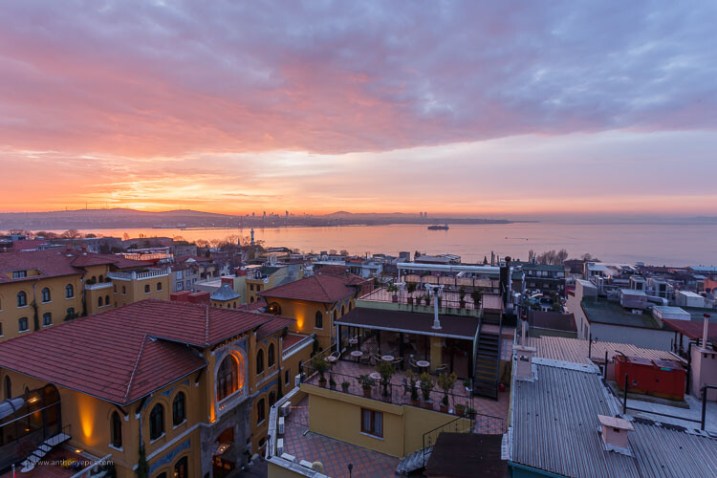
All the photos in this article are from a series of projects I’ve been working on for several years of cities at dawn. I love photographing the beauty of dawn light, the emptiness of the streets and the odd snippet of early morning life. The cities in these photos are Paris, London, and Istanbul.

tulips - How to overcome your technical or artistic shortcomings and improve your photography

Some tips to help you

How do we overcome our weaknesses?

To start – you need to know the strengths and weaknesses of your personality. If you don’t already know then ask your family or friends, I’m sure they would be more than happy to tell you!

You might think of concerns like:

Issue: You’re very shy and you find yourself holding back when you really want to grab a shot.

Solution: Do the thing that you fear! Perhaps it’s some street photography or portrait work to build your confidence with people. Or wandering off up that cool looking mountain.

flag in Turkey - How to overcome your technical or artistic shortcomings and improve your photography

If you don’t overcome your fears, you will always be holding yourself back from what you love to photograph. Great images rely on jumping into the process with your whole being, your whole heart.

Issue: You are better at talking about what you’re going to do than actually doing it. You alternate between perfectionism and procrastination.

Solution: Focus lots and lots of effort on getting started and work on producing a project. Don’t worry about it being perfect, or waiting for exactly the right time, because as someone with procrastinator to perfectionist tendencies, this could mean that the perfect time will never happen.

For this issue, start to work on producing something, anything, just so you can move through that block of never doing something. Then once you’ve got some work under your belt, you can then start working on making the photos or project you are involved in, better. Getting started and staying with something is the thing to focus on initially, though.

blue hour image - How to overcome your technical or artistic shortcomings and improve your photography

Once you know where your weaknesses lie, then you can start to look for ways to overcome those issues. There are always solutions. When you are not afraid to look at the weaknesses in your creativity and to work on them, then you create so much more freedom in your photography practice.

If you feel like you can go anywhere and do anything, then your photography will grow exponentially.

Do things differently

Shake things up a little. For example, if you’re a big planner in your “real life” – maybe you want to begin by not planning. Go out, drift around, get lost, and just explore. Move away from all the planning.

night street scene - How to overcome your technical or artistic shortcomings and improve your photography

Or if you are like me – doing more planning has been essential to being a better photographer. I am so used to exploring with my senses rather than doing lots of research. While that is great and has served me well, a little planning has made me much more effective on my shoots.

Develop an “open awareness”

We tend to live our lives going from one fixed activity to the next. Whether that is at work, driving home, shopping, cooking, emailing or sorting out the myriad of problems, issues, and conflicts that pop up every day.

We end up flitting from one thing to the next, mostly concentrating in a narrow focus on one thing at a time – which is obviously very helpful when we want to get things done.

If, though, you want to develop new ideas and get good insights about yourself or your photography, then having an open – rather than focused – awareness is key.

Open awareness is being aware of your thoughts, but not paying too much attention to them. Allow for some space to enter and open up to the world around you. So you are letting thoughts drift through but you are still noticing other things – the weather, the clouds, the birds – but not letting your attention focus on any one thing in particular.

This brings tremendous space to your mind, space you need for new ideas and insights. If you are always thinking, thinking, doing, doing; you won’t have space for inspired ideas or amazing insights.

London at sunset - How to overcome your technical or artistic shortcomings and improve your photography

When you develop open awareness you have the ability to see your thoughts, your ideas, but also allow space for other things. You start to observe the world around you, to pay attention to your thoughts and habits and tendencies without getting locked into them.

Believe that you can change and develop yourself

“We are what we believe we are.” – C. S. Lewis

I know so many people who are scared of their cameras. They are intimidated by learning the technical aspects of photography. They tell me it’s impossible to learn!

Yet I know that as humans it’s possible to learn anything if the desire is strong enough.

You don’t have to confine yourself with your photography just because you can’t do something. As Picasso said:

I am always doing that which I cannot do, in order that I may learn how to do it.” – Pablo Picasso

Science is also telling us now that what we previously thought about the brain – that it was a set, fixed entity that stops developing as we become adults – is in fact not the case.

We can develop our brains at any point by having new experiences and learning new things. We can cultivate new skills, we don’t have to stay in this fixed idea of what we are good at and what we aren’t good at.

“The meaning of life is to find your gift. The purpose of life is to give it away.” – Pablo Picasso

I cannot stress the importance of this idea enough. If you feel the urge to create in your life – with photography or any other medium – it’s a beautiful calling.

In my life, there is nothing more important than taking photographs. I know what it brings to my life, to ideas about photography and how I’m able to light little fires of inspiration in other people.

When you are being creative you are putting down your smartphone, the to-do lists, the emails and the shopping lists. Instead of looking inwards at your life – you are looking outwards at the world. You are committing yourself to the deeper, more interesting, more beautiful parts of life.

You are connecting to other people and to the world around you. Surely, paying more attention and creating connections to others is an incredibly important thing to promote in this day and age.

“Photography in our time leaves us with a grave responsibility. While we are playing in our studios with broken flower pots, oranges, nude studies and still lifes, one day we know that we will be brought to account: life is passing before our eyes without our ever having seen a thing.” – Brassai

Photography is such an exciting way to be creative, I hope I’ve given you some ideas on how to challenge yourself to keep improving and growing as a photographer.

We all have it in us to create memorable, unique, and interesting images. I’d love to know what you think of these ideas – please comment below.

The post Artistic Versus Technical Photography Skills – What is Holding You Back? appeared first on Digital Photography School.


Digital Photography School

 
Comments Off on Artistic Versus Technical Photography Skills – What is Holding You Back?

Posted in Photography


Meizu unveils the 15 Plus smartphone with stabilized tele-camera

24 Apr

Chinese smartphone manufacturer Meizu has launched a new high-end model, the Meizu 15 Plus. And based on specs alone, the 15 Plus could be well-worth a closer look for mobile photographers who are open to the idea of buying from a less established brand.

In the camera department, a 12MP 1/2.3″ main sensor is combined with a 20MP secondary camera that features a 2x zoom factor. On the main camera, light is captured through a F1.8 lens while the tele-lens has to make do with a slower F2.8 aperture. Both lenses are equipped with optical image stabilization, though.

As with most similar systems, the optical zoom is enhanced with computational methods and Meizu promises a 3x “lossless” zoom, and the cameras features multi-frame noise reduction and HDR as well. To view and edit those images, the phone is equipped with a 5.95-inch AMOLED screen with QHD resolution and a notch-less 16:9 aspect ratio.

In the processing department, the Meizu deploys the Exynos 8895 chipset from last year’s Samsung flagship models, and users can choose between 64 or 128GB storage—unfortunately, there is no expansion slot. All components are housed in a body made of a stainless steel aluminum composite material.

The Meizu 15 Plus costs CNY 3,000 (approximately US$ 475) for the 64GB version and CNY 3,300 (approximately US$ 525) for the 128GB model. This sounds like a very decent deal for a tele-camera equipped device with high-end specs, but unfortunately, no pricing information for outside China has been provided as of yet.

Articles: Digital Photography Review (dpreview.com)

 
Comments Off on Meizu unveils the 15 Plus smartphone with stabilized tele-camera

Posted in Uncategorized


NVIDIA’s content-aware fill uses deep learning to produce incredible results

24 Apr

Adobe Photoshop’s Content-Aware Fill is the current industry standard when it comes to removing unwanted artifacts and distracting objects, but that might not always be the case. Because while Adobe is currently working on an advanced deep learning-based “Deep Fill” feature, NVIDIA just demonstrated its own AI-powered spot healing tool, and the results are pretty incredible.

As you can see from the two-minute demonstration above, the prototype tool can handle both basic tasks, like removing a wire from a scene, as well as more complicated tasks, such as reconstructing books and shelves inside an intricate library scene.

The secret behind this tool is NVIDIA’s “state-of-the-art deep learning method” that the tool is built on. Not only does the tool use pixels from within the image to reconstruct an area—it actually analyzes the scene and figures out what it should look like when it’s finished. This helps to create a much more accurate and realistic result, even when the original image is an absolute disaster.

The best examples of this can be seen in a paper NVIDIA team members published titled ‘Image Inpainting for Irregular Holes Using Partial Convolutions.’ As seen in the comparison images below, NVIDIA’s tool blows Photoshop out of the water when reconstructing portraits where much or most of the face is removed.

From left to right: the corrupted image, Adobe’s Content-Aware results, NVIDIA’s results and the actual image.

In the discussion section (section 5.1) of the aforementioned paper, NVIDIA says its “model can robustly handle holes of any shape, size location, or distance from the image borders. Further, our performance does not deteriorate catastrophically as holes increase in size.”

NVIDIA does note, however, that “one limitation of our method is that it fails for some sparsely structured images such as the bars on the door,” as seen in the image comparison below.

From left to right: the corrupted image, NVIDIA’s results and the original image.

Current shortcomings aside, this particular tool—prototype or otherwise—appears to be leaps and bounds ahead of everyone else that’s currently on the market. Unsurprisingly, there’s no word on when, or if, we’ll ever see this hit the market, let alone in the consumer market, but we’ll keep our fingers and toes crossed.

Articles: Digital Photography Review (dpreview.com)

 
Comments Off on NVIDIA’s content-aware fill uses deep learning to produce incredible results

Posted in Uncategorized


This hacked Polaroid camera prints your photos onto thermal paper

24 Apr

If you enjoy DIY projects and don’t mind diving deep into programming, soldering, and otherwise hacking apart old cameras, this weekend project is right up your alley. Meet the thermal paper Polaroid.

Created by tinkerer Mitxela, this Frankenstein of a camera takes the shell of a Polaroid Sonar Autofocus 5000 and crams a webcam, thermal printer and Raspberry Pi Zero computer inside. The result is a digital instant camera that immediately prints your photographs onto thermal paper—the type of paper receipts are printed on.

The project isn’t for the faint of heart. It involves a good bit of cutting, soldering, wiring and programming, as meticulously detailed in Mitxela’s step-by-step guide on how he built the thing. The entire process was filled with a healthy bit of trial and error, but when all was said and done, it worked. And not barely worked… flawlessly worked, as though that’s how the Polaroid camera was designed to operate all along.

As explained in the above video, the camera uses a three-dollar webcam as the eye, catching the scene through the lens of the Polaroid. When the shutter of the Polaroid is pressed, a screenshot from the webcam is captured and processed by the Raspberry Pi Zero before being sent off to the thermal printer. As it prints, the paper is fed through the same area a normal Polaroid print would be expelled from.

The amount of work that went into the project is evident in how clean the camera looks even after all of the hacking, soldering and glueing. From the outside, the camera still looks almost identical to how it did when Mitxela started. Everything is packed inside the frame of the original Polaroid Sonar—it can even be booted up externally through the clever positioning of the serial port. which is hidden beneath where flash bars are placed when shooting with instant film.

To see the entire process and dozens of photos from throughout the building process, head on over to Mitxela’s site and check it out. And if you’re brave enough to take on this project yourself, be sure to share your results with us.

Articles: Digital Photography Review (dpreview.com)

 
Comments Off on This hacked Polaroid camera prints your photos onto thermal paper

Posted in Uncategorized